DB2 Server for VSE & VM SQL Reference (Version 7 Release 5) - page 8
EXPLAIN
Table 11. Columns in PLAN_TABLE (continued)
Column Name
Data Type
Description
PKGOWNER
CHAR(8) NOT
This identifies the owner of the package in which this SQL
NULL
statement originated. This field is blank for explicit EXPLAIN
processing invoked by the EXPLAIN statement.
PLANNO
SMALLINT
A number identifying the current step of the plan. PLANNO
NOT NULL
indicates the order in which the database managerdoes the actions
of the plan for processing the query block. The PLAN_TABLE row
with PLANNO 1 indicates the first action, PLANNO 2 indicates the
second action, and so on. For each query block, each row entered
as the result of an execution of EXPLAIN PLAN has a different
PLANNO value.
METHOD
SMALLINT
METHOD is the action done at this step; it is either 0, 1, 2 or 3.
NOT NULL
Method is 0 only for the first table accessed (which has PLANNO
1). Because this is the first table, there is not yet a composite. Also,
because there is no composite, SORTCOMP (described below) is
blank for this row.
Methods 1 and 2 correspond to plan steps that are joins, and
identify the method by which the join is performed. Method 1 is
the nested loop join. That is, for each row of the composite, the
database managerfinds and joins matching rows of the new table.
Method 2 is the merge scan join. In a merge scan join, the database
managerscans the composite and the new table in order according
to the join column. It then joins rows with matching join columns.
This resembles processes used in merging files, except that one row
in the composite may match many rows of the new table, and
many rows in the composite may match one row of the new table.
Method 3 indicates that the database managermust perform
additional sorts at the end of processing the query block. The
following sorts are possible:
ORDER BY
GROUP BY
SELECT DISTINCT
UNION.
When METHOD is 3, CREATOR is all blanks, TNAME is the
empty string, TABNO is zero, and SORTNEW is N.
CREATOR
CHAR(8) NOT
Creator of the new table accessed in this plan step.
NULL
TNAME
VARCHAR(18)
Name of the new table accessed in the plan step.
NOT NULL
TABNO
SMALLINT
Because a table may be joined to itself, there may be several
NOT NULL
references to the same table in a query block. TABNO distinguishes
the different references. TABNO, CREATOR, and TNAME
correspond to the columns with the same names in
REFERENCE_TABLE. When there is no new table then these
columns have the values specified when METHOD is 3 (see above).
276
SQL Reference

EXPLAIN
Table 11. Columns in PLAN_TABLE (continued)
Column Name
Data Type
Description
ACCESSTYPE
CHAR(2) NOT
Indicates how the database manager will access the data. These are
NULL
the character values that can appear in ACCESSTYPE:
I1
Accesses the new table by a fetch operation on a
fully-qualified unique index. This includes fetching the
first or last value of the index.
I
Accesses the new table using an index and specific key
values (identified in ACCESSCREATOR and
ACCESSNAME).
N
Accesses the new table using an index on the column in
an IN predicate with a list of literals.
W Accesses the new table using an index, but without
specific key values. This non-selective index scan locates
the rows in a table when it is more efficient to scan the
index than to scan all pages in the DBSPACE.
R
Accesses the new table by a scan of the DBSPACE in
which it resides.
L
Accesses the new table through the internal list. The
internal list is like a temporary table. It is created to
contain the result of a materialized view.
For any type of index access, ACCESSCREATOR and
ACCESSNAME identify the index. ACCESSTYPE is blank for the
top block of INSERT statements, as well as for UPDATE and
DELETE statements that use WHERE CURRENT OF CURSOR
clauses. ACCESSCREATOR is blanks and ACCESSNAME is the
null value in that case. (Access for INSERT’s is performed using
the first index created; UPDATE and DELETE statements using the
CURRENT OF CURSOR clause access using their cursors.)
MATCHCOLS
SMALLINT
For ACCESSTYPE ‘I1’, ‘I’, or ‘N’, the number of index keys that
NOT NULL
have key-matching predicates used in an index scan; otherwise, 0.
ACCESSCREATOR
CHAR(8) NOT
For ACCESSTYPE ‘I1’, ‘I’, ‘N’, or ‘W’, ACCESSCREATOR contains
NULL
the owner of the access path (index) that the database manageruses
to access the table. Otherwise, ACCESSCREATOR contains blanks.
ACCESSNAME
VARCHAR(18)
For ACCESSTYPE ‘I1’, ‘I’, ‘N’, or ‘W’, ACCESSNAME contains the
NOT NULL
name of the access path (index) that the database manageruses to
access the table. Otherwise, ACCESSNAME contains blanks.
INDEXONLY
CHAR(1) NOT
Indicates whether an index is sufficient to satisfy the request, and
NULL
to what degree.
Y
All predicates may be applied to the index pages and all
data may be retrieved from the index pages.
W All sargable predicates may be applied to the index pages,
but data pages must be accessed to retrieve data satisfying
the predicates or residual predicates.
N
Data pages must be accessed to resolve predicates and
retrieve data. Note that, in a few circumstances, some
predicate filtering may still be achieved using an index.
Chapter 6. Statements
277

EXPLAIN
Table 11. Columns in PLAN_TABLE (continued)
Column Name
Data Type
Description
SORTNEW
CHAR(1) NOT
To access a table in a particular order, the database manager may
NULL
sort some fields of some rows of the new table (for example, for
merge scan joins). These are the character values that can appear in
SORTNEW:
N
If the database manager does not sort the new table.
U
If the database manager does sort, and removes
duplicates.
Y
If the database manager sorts, and does not remove
duplicates.
SORTNEW is blank when no sort of the new table is possible, that
is, when METHOD is 3 and there is no new table.
SORTCOMP
CHAR(1) NOT
To access a composite in a particular order, the database manager
NULL
may sort some fields of some rows of the composite. These are the
character values that can appear in SORTCOMP:
N
If the database manager does not sort the composite.
U
If the database manager does sort, and removes
duplicates.
Y
If the database manager does sort, and does not remove
duplicates.
SORTCOMP is blank when no sort of the composite is possible;
that is, when METHOD is 0 and there is no composite yet.
SORTN_UNIQ
CHAR(1) NOT
Whether a sort is performed on the new table to remove duplicate
NULL
rows. Y = Yes; N = No.
SORTN_JOIN
CHAR(1) NOT
Whether a sort is performed on the new table if METHOD is 2. Y =
NULL
Yes; N = No.
SORTN_ORDERBY
CHAR(1) NOT
Whether an ORDER BY clause results in a sort on the new table. Y
NULL
= Yes; N = No.
SORTN_GROUPBY
CHAR(1) NOT
Whether a GROUP BY clause results in a sort on the new table. Y =
NULL
Yes; N = No.
SORTC_UNIQ
CHAR(1) NOT
Whether a sort is performed on the composite table to remove
NULL
duplicate rows. Y = Yes; N = No.
SORTC_JOIN
CHAR(1) NOT
Whether a sort is performed on the composite table if METHOD is
NULL
2. Y = Yes; N = No.
SORTC_ORDERBY
CHAR(1) NOT
Whether an ORDER BY clause results in a sort on the composite
NULL
table. Y = Yes; N = No.
SORTC_GROUPBY
CHAR(1) NOT
Whether a GROUP BY clause results in a sort on the composite
NULL
table. Y = Yes; N = No.
TIMESTAMP
TIMESTAMP
The time at which the EXPLAIN statement was processed.
NOT NULL
REMARKS
VARCHAR(254)
A field into which you can insert any character string of 254 or
NOT NULL
fewer characters.
Table 12. Columns in REFERENCE_TABLE
Column Name
Data Type
Description
QUERYNO
INTEGER
Query number. QUERYNO is intended for your use to distinguish among
queries. (See COST_TABLE for a description of QUERYNO.)
RINO
SMALLINT
RINO is intended to distinguish among queries and internally generated
NOT NULL
queries. (See COST_TABLE for a description of RINO.)
278
SQL Reference

EXPLAIN
Table 12. Columns in REFERENCE_TABLE (continued)
Column Name
Data Type
Description
QBLOCKNO
SMALLINT
Query block number, where 1 is the top level query block, that may have
NOT NULL
subqueries. Different query blocks receive different numbers.
PKGNAME
CHAR(8) NOT
This identifies the name of the package in which this SQL statement originated.
NULL
This field is blank for explicit EXPLAIN processing invoked by the EXPLAIN
statement.
PKGOWNER
CHAR(8) NOT
This identifies the owner of the package in which this SQL statement originated.
NULL
This field is blank for explicit EXPLAIN processing invoked by the EXPLAIN
statement.
REFTYPE
CHAR(6) NOT
An indication of the purpose of the current row in this table. Rows are inserted
NULL
for three reasons:
1. For each SQL statement, REFTYPE has a value indicating the type of
statement:
SELECT
A select statement
INSERT
An insert statement
UPDATE
An update statement
DELETE
A delete statement
SELUPD
A select statement with a ‘FOR UPDATE’ clause
DELCUR
A delete where current of cursor statement
UPDCUR
An update where current of cursor statement
2. For each table referenced, REFTYPE has the value ‘TABLE’.
3. For each column referenced, REFTYPE has the value ‘COLUMN’.
CREATOR
CHAR(8) NOT
Creator of a table referenced in the query block.
NULL
TNAME
VARCHAR(18)
Name of the table referenced in the query block.
NOT NULL
TABNO
SMALLINT
Because there may be several references to the same table in a query block
NOT NULL
(because a table may be joined to itself), TABNO differentiates among the
different references. TABNO may correspond to the order of tables in the FROM
clause of the query.
CNAME
VARCHAR(18)
Name of the column.
NOT NULL
COLNO
SMALLINT
Column number of a column in the table identified by CREATOR, TNAME, and
NOT NULL
TABNO. EXPLAIN REFERENCE causes at most one new row to be entered in
REFERENCE_TABLE for a particular column (COLNO) of a table (TABNO) in a
query block (QBLOCKNO).
Chapter 6. Statements
279

EXPLAIN
Table 12. Columns in REFERENCE_TABLE (continued)
Column Name
Data Type
Description
FILTER
FLOAT NOT
The filter factor associated with the query block’s most selective predicate on
NULL
this column.
The selectivity of a predicate is the fraction of the rows of the column’s table
that is estimated to satisfy the predicate. Not all columns referenced in a
statement have filter factors, however.
For each reference to a column, the EXPLAIN statement determines a filter
factor if the reference to the column meets these qualifications:
1. The column must be in a predicate that is connected by the AND logical
operator to the rest of the WHERE clause. If the predicate is not connected
by AND, it must have the only predicate in the WHERE clause.
2. The predicate in which the column appears must have the form “column op
expression.”
For each such column reference, the EXPLAIN statement determines a “filter
factor.” The smallest of these filter factors is returned in FILTER. This value is
between 0.0 and 1.0, and will be 1.0 if there are no predicates with filter factors
for the column. Filter factor may be used to estimate the cost of modifying rows
and indexes. Also, a small filter factor is one indicator that an index on the
column might be useful for processing the statement.
DBSSPRED
CHAR(1) NOT
Is there a sargable predicate (predicate applied at the first stage) associated with
NULL
this column?
Y
There is a sargable predicate associated with this column. However, this
sargable predicate may not necessarily be the most selective one.
N
There may be no sargable predicate associated with this column.
For each reference to a column, the EXPLAIN statement determines sargability if
the reference to the column meets these qualifications:
1. The column must be in a predicate that is connected by the AND logical
operator to the rest of the WHERE clause. If the predicate is not connected
by AND, it must have the only predicate in the WHERE clause.
2. The predicate in which the column appears must have the form “column op
expression.”
For each such column reference, the EXPLAIN statement determines the
sargability of the predicate associated with the column. If a sargable predicate
exists, the value is set to ’Y’; otherwise, it is set to ’N’.
JOINPRED
CHAR(1) NOT
Is there a sargable equi-join predicate (using equal value in tables to join)
NULL
associated with this column? Y = Yes; N = No.
If yes, then DBSSPRED must be Y as well.
ORDERCOL
SMALLINT
If this column is referenced in an ORDER BY clause, give its relative position in
NOT NULL
the ORDER BY clause and sort direction. If the column is not referenced in the
ORDER BY clause, ORDERCOL is zero. Sort direction is indicated by a positive
number for ascending order and a negative number for descending order.
GROUPCOL
SMALLINT
If this column is referenced in a GROUP BY clause, give its relative position in
NOT NULL
the GROUP BY clause. If the column is not referenced in the GROUP BY clause,
GROUPCOL is zero.
UPDATECOL
CHAR(1) NOT
If this column is in the SET clause of an UPDATE statement, indicate how it is
NULL
updated.
L
Updated by a literal.
X
Updated by a column or expression.
blank Column is not referenced in the SET clause
280
SQL Reference

EXPLAIN
Table 12. Columns in REFERENCE_TABLE (continued)
Column Name
Data Type
Description
TIMESTAMP
TIMESTAMP
The time at which the EXPLAIN statement was processed.
NOT NULL
Table 13. Columns in STRUCTURE_TABLE
Column Name
Data Type
Description
QUERYNO
INTEGER
Query number. QUERYNO is intended to
distinguish among queries. (See COST_TABLE for
a description of QUERYNO.)
RINO
SMALLINT NOT NULL
RINO is intended to distinguish among queries
and internally generated queries. (See
COST_TABLE for a description of RINO.)
QBLOCKNO
SMALLINT NOT NULL
Query block number, where 1 is the top level
query block that may have subqueries. Different
query blocks will receive different numbers.
PKGNAME
CHAR(8) NOT NULL
This identifies the name of the package in which
this SQL statement originated. This field is blank
for explicit EXPLAIN processing invoked by the
EXPLAIN statement.
PKGOWNER
CHAR(8) NOT NULL
This identifies the owner of the package in which
this SQL statement originated. This field is blank
for explicit EXPLAIN processing invoked by the
EXPLAIN statement.
ROWCOUNT
INTEGER NOT NULL
Estimated number of rows returned for the query
or subquery corresponding to this query block. For
queries, this is the estimated size of the response.
For update and delete statements, this is the
estimated number of affected rows. ROWCOUNT
can be used in estimating update costs. For insert
statements, the ROWCOUNT for the top level
query block (QBLOCKNO 1) is always 0, but the
ROWCOUNT’s for other query blocks, if any, are
normal estimates. ROWCOUNT is also 0 for
UPDATE and DELETE statements that use
WHERE CURRENT OF CURSOR clauses.
TIMES
FLOAT NOT NULL
Estimated number of times that “dependent”
query blocks of this block will be processed for
each execution of this query block. This field is no
longer in use, but is retained to provide for
compatibility with older versions of the SQL/DS
product.
PARENT
SMALLINT NOT NULL
The query block for which this block is performed.
This may be the query block in whose WHERE
clause the current query block appears. However,
some query blocks can be processed earlier, at the
opening of a “parent” query block, because there
are no correlations to intermediate query blocks
tables. In this case, PARENT identifies that
ancestor, rather than the parent given by the
statement’s structure.
Chapter 6. Statements
281

EXPLAIN
Table 13. Columns in STRUCTURE_TABLE (continued)
Column Name
Data Type
Description
ATOPEN
CHAR (1) NOT NULL
These are the characters that can appear in
ATOPEN:
Y
If the query is done once at each open
(new invocation) of the PARENT.
N
If the number of times that the current
query block is invoked (per invocation of
its parent) equals the TIMES field value of
the parent.
TIMESTAMP
TIMESTAMP NOT NULL
The time at which the EXPLAIN statement was
processed.
Examples
Place information about a SELECT statement that selects all the rows from the
EMP_ACT table into your tables named REFERENCES_TABLE and COST_TABLE.
Tag the entries that contain this information with the reference number 1500.
EXPLAIN REFERENCE, COST
SET QUERYNO = 1500
FOR SELECT * FROM EMP_ACT
282
SQL Reference

FETCH
FETCH
The FETCH statement positions a cursor on the next row of its result table and
assigns the values of that row to host variables, host structures, or both.
Invocation
This statement can only be embedded in an application program. It is an
executable statement that cannot be dynamically prepared.
Authorization
See “DECLARE CURSOR” on page 235 for an explanation of the authorization
required to use a cursor.
Syntax
►► FETCH cursor_name
INTO
host_variable_list
►◄
USING DESCRIPTOR descriptor_name
Description
cursor_name
Identifies the select cursor to be used in the fetch operation. The cursor_name
must identify a declared cursor as explained in “DECLARE CURSOR” on page
235. When the FETCH statement is processed, the cursor must be in the open
state.
If the cursor is currently positioned on or after the last row of the result table:
v SQLCODE is set to +100, and SQLSTATE is set to '02000'.
v The cursor is positioned after the last row.
v Host variables and host structure subfields are not assigned values.
If the cursor is currently positioned before a row, the cursor is positioned on
that row, and the values of that row are assigned to host variables and host
structure subfields as specified by INTO or USING.
If the cursor is currently positioned on a row other than the last row, after
execution of the FETCH statement the cursor is positioned on the next row.
Values of that row are assigned to host variables and host structure subfields
as specified by INTO or USING.
INTO
Introduces a list of host variables, host structures, or both.
host_variable_list
Identifies one or more host variables, host structures, or both, that must be
declared in the program in accordance with the rules for declaring host
variables and host structures.
The first value in the result row is assigned to the first host variable or host
structure subfield in the list, the second value to the second variable or
subfield, and so on.
USING DESCRIPTOR descriptor_name
Identifies an output SQLDA that must contain a valid description of zero or
more host variables.
Chapter 6. Statements
283

FETCH
Before the FETCH statement is processed, the user must set some fields in the
SQLDA as described in the “Description” section of “EXECUTE” on page 264
and Table 20 on page 360.
The data type of a variable must be compatible with its corresponding value. If the
value is numeric, the variable must have the capacity to represent the whole part
of the value. For a datetime value, the variable must be a character string variable
of a minimum length as defined in “String Representations of Datetime Values” on
page 49. If the value is null, an indicator variable must be specified.
Each value with a corresponding variable is assigned to the variable in accordance
with the assignment rules described in Chapter 3. If the number of variables is less
than the number of values in the row, the SQLWARN3 field of the SQLCA is set to
'W'. If an assignment error occurs, the value is not assigned to the variable, and no
more values are assigned to variables. Any values that have already been assigned
to variables remain assigned.
Error Conditions
See the DB2 Server for VSE & VM Application Programming manual for a description
of the possible errors when FETCH is processed.
Notes
Cursor Positioning
An open cursor has three possible positions:
v Before a row
v On a row
v After the last row.
If a cursor is on a row, that row is called the current row of the cursor. A cursor
referenced in an UPDATE or DELETE statement must be positioned on a row. A
cursor can only be on a row as a result of a FETCH statement.
It is possible for an error to occur that makes the state of the cursor unpredictable.
Examples
There are two tables, FORUM and ARCHIVE, each with the following columns:
Name:
FORUM
RECEIVED
SOURCE
TOPIC
ENTRY_TEXT
Type:
char(8)
timestamp
char(8)
char(64)
varchar(4000)
not null
not null
not null
not null
not null
Desc:
Forum name
Date and
Userid of
Topic within
The text
time entry
person
the forum
appended in
received
appending
this entry
entry
The FORUM table contains a number of named forums. Each forum contains one
or more topics and each topic contains one or more entries. When a topic is no
longer current its entries are either deleted or moved to the ARCHIVE table.
The following PL/I program performs maintenance on the forum table. A user can
invoke the program with one of three commands. Each command is accompanied
by a string of text that can be found within the TOPIC column of the entries for a
given topic (this need not be the entire TOPIC value). The three commands are:
284
SQL Reference
FETCH
v
1
(changes the contents of the TOPIC value for all that topic’s entries)
v
2
(moves all entries for that topic to the ARCHIVE table)
v
3
(deletes all entries for that topic without archiving them).
CLEANUP: PROC OPTIONS(MAIN);
DCL NOT_END BIT(1);
DCL ACTION
BINARY FIXED(15);
/* 1=chg-topic
2=archive
3=delete */
EXEC SQL BEGIN DECLARE SECTION;
DCL SRCH_FORUM CHAR(8);
DCL SRCH_TOPIC CHAR(66) VARYING;
DCL NEW_TOPIC
CHAR(64) VARYING;
DCL FORUM
CHAR(8);
DCL
1 ENTRY,
5 TSTMP
CHAR(26),
5 PERSON
CHAR(8),
5 TOPIC
CHAR(64) VARYING;
DCL TXT
CHAR(4000) VARYING;
EXEC SQL END DECLARE SECTION;
EXEC SQL INCLUDE SQLCA;
EXEC SQL WHENEVER NOT FOUND CONTINUE;
EXEC SQL WHENEVER SQLWARNING CONTINUE;
EXEC SQL WHENEVER SQLERROR GOTO ERRCHK;
EXEC SQL CONNECT TO TOROLAB3;
GET LIST (ACTION, SRCH_FORUM, SRCH_TOPIC, NEW_TOPIC);
SRCH_TOPIC = ’%’ || SRCH_TOPIC || ’%’;
EXEC SQL DECLARE CUR CURSOR FOR
SELECT * FROM FORUM
WHERE FORUM = :SRCH_FORUM AND TOPIC LIKE :SRCH_TOPIC
FOR UPDATE OF TOPIC;
EXEC SQL OPEN CUR;
EXEC SQL FETCH CUR INTO :FORUM, :ENTRY, :TXT;
IF SQLSTATE = ’02000’
THEN DO;
DISPLAY (’No notes found for requested forum and topic’);
GO TO FINISHED;
END;
NOT_END = ’1’B;
DO WHILE (NOT_END);
EXEC SQL FETCH CUR INTO :FORUM, :ENTRY, :TXT;
IF SQLSTATE = ’02000’ THEN
NOT_END = ’0’B;
ELSE DO;
SELECT;
WHEN (ACTION = 1)
/* change topic value */
EXEC SQL UPDATE FORUM
SET TOPIC = :NEW_TOPIC
WHERE CURRENT OF CUR;
WHEN (ACTION = 2)
/* archive entry to another table
*/
DO;
EXEC SQL INSERT INTO ARCHIVE
VALUES (:FORUM, :TSTMP, :PERSON, :TOPIC, :TXT);
EXEC SQL DELETE FROM FORUM WHERE CURRENT OF CUR;
END;
WHEN (ACTION = 3)
/* delete topic */
EXEC SQL DELETE FROM FORUM WHERE CURRENT OF CUR;
END; /* select */
END;
/* else do */
END;
/* do while */
FINISHED:
EXEC SQL CLOSE CUR;
EXEC SQL COMMIT WORK;
RETURN;
ERRCHK:
DISPLAY (’Unexpected Error -changes will be backed out’);
Chapter 6. Statements
285
FETCH
PUT SKIP LIST (SQLCA);
EXEC SQL WHENEVER SQLERROR CONTINUE;
/* continue if error on rollback */
EXEC SQL ROLLBACK WORK;
RETURN;
END;
/* CLEANUP */
286
SQL Reference
Extended FETCH
Extended FETCH
The Extended FETCH statement positions a cursor on the next row of its result
table and assigns the values of that row to host variables. The cursor must have
been opened using the Extended OPEN statement.
Invocation
This statement can only be embedded in an application program written in
Assembler or REXX.
Authorization
The authorization ID of the statement must have one of the following:
v ownership of the package
v DBA authority
v EXECUTE privilege on the package.
Syntax
►► FETCH cursor_variable USING DESCRIPTOR descriptor_name
►◄
Description
cursor_variable
Identifies the cursor that is to be used. The cursor must have been defined by a
preceding Extended DECLARE CURSOR statement in the same logical unit of
work.
USING DESCRIPTOR descriptor_name
Identifies an output SQLDA that must contain a valid description of host
variables.
Before the Extended FETCH statement is processed, the user must set some
fields in the SQLDA as described in the “Description” section of “EXECUTE”
on page 264 and Table 20 on page 360.
The indicated cursor must be declared and opened.
Notes
In most respects, the Extended FETCH statement is identical to the FETCH
statement (see “FETCH” on page 283). However, in the Extended FETCH
statement, the cursor_name is a host variable, thereby making it possible for a user
to provide the cursor name when the program is run and to FETCH in a logical
unit of work or program other than the one in which the statement was prepared.
Extended DECLARE CURSOR, OPEN, and FETCH must occur in the same logical
unit of work.
Examples
FETCH :CURSOR1 USING DESCRIPTOR MYSQLDA
Chapter 6. Statements
287

GRANT
GRANT (Package Privileges)
This form of the GRANT statement grants the privilege to process statements in a
package.
Invocation
This statement can be embedded in an application program or issued interactively.
It is an executable statement that can be dynamically prepared.
Authorization
To process this statement, the privileges held by the authorization ID of the
statement must include the EXECUTE privilege on the package and GRANT
authority on that privilege. Someone with DBA authority may grant the EXECUTE
privilege on a package owned by another user.
Syntax
,
(1)
▼
►►
GRANT EXECUTE ON
package_name
TO
authorization_name
►
PUBLIC
►
►◄
WITH GRANT OPTION
Notes:
1
RUN can be specified as a synonym for EXECUTE to support applications developed
for previous releases of SQL/DS.
Description
EXECUTE ON package_name
Identifies the package upon which the EXECUTE privilege is being granted.
The package_name must identify a package that exists at the application server.
TO
Specifies to whom the privileges are granted.
authorization_name,...
Lists one or more authorization IDs. You cannot use the ID of the GRANT
statement itself; you cannot grant privileges to yourself.
PUBLIC
Grants the EXECUTE privilege on the package to all users.
WITH GRANT OPTION
Allows the named authorization_names to grant the EXECUTE privilege on the
package to other users.
If WITH GRANT OPTION is omitted, the named authorization_names cannot
grant the EXECUTE privilege to others unless they have received that
authority from some other source.
288
SQL Reference
GRANT
The GRANT authority cannot be passed to PUBLIC. If you use PUBLIC and
WITH GRANT OPTION together, the statement is processed; but a warning is
given and the EXECUTE privilege is granted to PUBLIC without GRANT
authority.
Notes
Only the authorization ID that preprocesses a package (or an authorization ID with
DBA authority) can drop that package from the database. A 'drop' privilege cannot
be granted to another authorization ID.
Examples
Example 1
Grant the ability to process the TIMESHEET package (which is used by the
TIMESHEET program) to everyone.
GRANT EXECUTE ON TIMESHEET TO PUBLIC
Example 2
Grant the ability to process the TABB package (which is used by the TABB
program) to KING, BROWN, and BLACK. Allow them to grant this privilege to
others.
GRANT EXECUTE ON TABB
TO KING, BROWN, BLACK
WITH GRANT OPTION
Chapter 6. Statements
289

GRANT
GRANT (System Authorities)
This form of the GRANT statement changes passwords and authorities.
Invocation
This statement can be embedded in an application program or issued interactively.
It is an executable statement that can be dynamically prepared.
Authorization
DBA authority is needed to grant authorities and to change others’ passwords.
DBA authority is not needed for someone to change their own password if they
have been granted connect authority explicitly by a DBA. (A user able to access the
database only because connect authority has been granted to ALLUSERS cannot
use this command to change their own password.)
Syntax
►► GRANT
CONNECT
TO
AUTH
►◄
DBA
ID
RESOURCE
,
▼
CONNECT TO
authorization_name
(1)
ALLUSERS
SCHEDULE TO subsystemid IDENTIFIED
BY
password
AUTH:
,
▼
authorization_name
ID:
,
▼
IDENTIFIED BY
password
Notes:
1
ALLUSERS can only be specified once and is not applicable to a VSE application
server.
Description
CONNECT
Grants CONNECT authority to the specified authorization_names. A user can
use this parameter with the IDENTIFIED BY clause to change his or her own
password.
DBA
Grants DBA authority to the specified authorization_names. This also means that
the specified authorization_names will be automatically granted CONNECT and
RESOURCE authority. Someone with DBA authority
has all privileges on all
290
SQL Reference

GRANT
objects in the database, including the authority to drop any object. However, a
DBA may not grant any privileges on an object the DBA does not own unless
the owner has given the DBA that right. A DBA also cannot revoke any
privilege on an object unless the DBA granted that privilege in the first place.
For a complete description of DBA authority, see the DB2 Server for VSE & VM
Database Administration manual.
RESOURCE
Grants RESOURCE authority to the specified user(s). This also means that the
specified user(s) will be automatically granted CONNECT authority. Someone
with RESOURCE authority has the ability to create tables in public dbspaces.
TO
Introduces a list of one or more authorization_names
authorization_name
An authorization id.
ALLUSERS
Specifies that the CONNECT authority is granted implicitly to every
system-defined user. Granting CONNECT to ALLUSERS is a special case
that establishes implicit connect capability for all users in the system when
operating under the DB2 Server for VM environment.
VSE Users
ALLUSERS is not a valid option since implicit CONNECT authority
is not applicable to VSE application servers.
IDENTIFIED BY password...
Adds or changes the password for each authorization_name specified. If you
specify IDENTIFIED BY, you must include a password for every
authorization_name specified. The password specifies the new or changed
password for each of the specified authorization_names. Passwords are limited
to eight characters. The passwords and authorization_names must correspond as
shown in example 2 below. If the password is the same as the one that
currently exists for the authorization_name, or if no passwords are specified, the
change has no real effect.
SCHEDULE
Grants the authority to connect users without specifying a password. Used
with the VSE Guest Sharing facility. For more information, see the DB2 Server
for VM System Administration or the DB2 Server for VSE System Administration
manual.
TO subsystemid
The subsystem ID of the CICS subsystem running under the VSE guest.
IDENTIFIED BY password
The new or changed password by which the subsystem will identify itself.
Examples
Example 1
Grant DBA authority to THOMPSON and THORN.
GRANT DBA TO THOMPSON, THORN
Chapter 6. Statements
291
GRANT
Example 2
Grant CONNECT authority to BRIAN (with the password CONCON), ED (with
the password NDPNDP), and JOHN (with the password LIBLIB).
GRANT CONNECT TO BRIAN, ED, JOHN
IDENTIFIED BY CONCON, NDPNDP, LIBLIB
292
SQL Reference
GRANT
GRANT (Table Privileges)
This form of the GRANT statement grants privileges on table and views.
Invocation
This statement can be embedded in an application program or issued interactively.
It is an executable statement that can be dynamically prepared.
Authorization
The privileges held by the authorization ID of the statement must include the
privilege being granted and GRANT authority on that privilege. Someone with
DBA authority may grant table privileges on a table or view owned by another
user.
Syntax
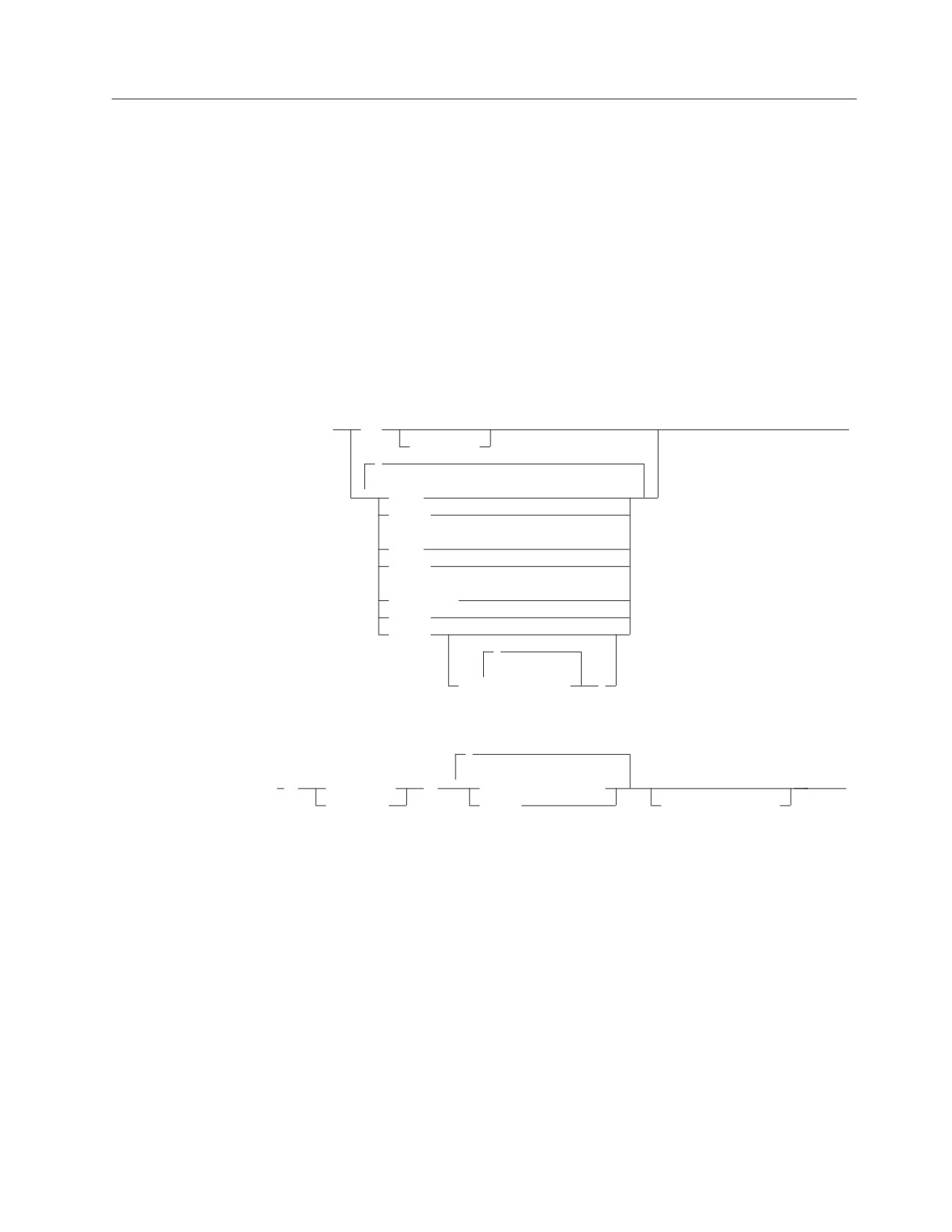
►► GRANT
ALL
►
PRIVILEGES
,
(1)
▼
ALTER
DELETE
(1)
INDEX
INSERT
(1)
REFERENCES
SELECT
UPDATE
,
▼
(
column_name
)
,
▼
►
ON
table_name
TO
authorization_name
►◄
view_name
PUBLIC
WITH GRANT OPTION
Notes:
1
The ALTER, INDEX and REFERENCES options do not apply to views.
Description
ALL or ALL PRIVILEGES
Grants table privileges on the table or view identified in the ON clause. The
privileges granted are those possessed by the authorization ID of the GRANT
statement. ALL PRIVILEGES is the default.
ALTER
Grants the privilege to use the ALTER TABLE statement. This privilege cannot
be granted on a view.
DELETE
Grants the privilege to use the DELETE statement.
Chapter 6. Statements
293
GRANT
INDEX
Grants the privilege to use the CREATE INDEX statement. This privilege
cannot be granted on a view.
INSERT
Grants the privilege to use the INSERT statement.
REFERENCES
Grants the privilege to create, drop, activate, or deactivate a referential
constraint in which the table is the parent table. This privilege does not apply
to views.
This privilege is required to reference the parent table when a referential
constraint is defined or added by the CREATE TABLE or ALTER TABLE
statement respectively.
This privilege is also required on the parent table when the user wants to use
the ALTER TABLE statement to drop, activate, or deactivate a foreign key on a
dependent table that references the parent table.
SELECT
Grants the privilege to use the SELECT statement or the CREATE VIEW
statement.
UPDATE
Allows the grantee(s) to update the table or view.
(column_name,...)
Restricts the update privilege to the columns listed. If a list of column
names is not specified or if UPDATE is granted using the specification of
ALL PRIVILEGES, the grantee(s) may update all updateable columns of
the table, even those created later by the ALTER TABLE statement.
ON table_name or view_name
Identifies the table or view upon which you are granting the privileges. The
table_name or view_name must identify a table or view that exists at the
application server.
TO
Indicates to whom the privileges are granted.
authorization_name,...
Lists one or more authorization IDs. The ID of the GRANT statement itself
cannot be used. (Privileges cannot be granted to oneself.)
PUBLIC
Grants the privileges to all users.
WITH GRANT OPTION
Allows the named authorization_names to grant the privileges to other
authorization_names. If you omit WITH GRANT OPTION, the named
authorization_names cannot grant the privileges to others unless they have that
authority from some other source.
You cannot pass the GRANT authority to PUBLIC. If you use PUBLIC and
WITH GRANT OPTION together, the statement is processed; but a warning is
given and the privileges are granted to PUBLIC without GRANT authority.
294
SQL Reference
GRANT
Examples
Example 1
Given that you have DBA authority, and that you have all grant authorities on the
table WESTERN_COURSES (owned by KATHLEEN), grant all privileges on the
table to PUBLIC.
GRANT ALL ON KATHLEEN.WESTERN_COURSES
TO PUBLIC
Example 2
Grant the appropriate privileges on your CALENDAR table so that ROANNA and
EMMA can read it and insert new entries into it, but do not allow them to change
or remove any entries. Do not allow ROANNA or EMMA to grant those privileges
to others.
GRANT SELECT, INSERT ON CALENDAR
TO ROANNA, EMMA
Example 3
Grant the UPDATE privilege on the RATING and CRITIQUE columns from the
public table TORONTO_RESTAURANT (owned by ONTARIO) to MARGARET
and COMPDEPT. Allow them to grant those privileges to others.
GRANT UPDATE (RATING, CRITIQUE) ON ONTARIO.TORONTO_RESTAURANT
TO MARGARET, COMPDEPT
WITH GRANT OPTION
Chapter 6. Statements
295

INCLUDE
INCLUDE
The INCLUDE statement inserts declarations, statements, or both, into a source
program.
Invocation
This statement can only be embedded in an application program. It is not an
executable statement. It is not supported in REXX.
Authorization
None required.
Syntax
►► INCLUDE
SQLCA
►◄
SQLDA
text_file_name
Description
SQLCA
Indicates the description of an SQL communication area (SQLCA) is to be
included. INCLUDE SQLCA must not be specified more than once in the same
program. INCLUDE SQLCA must not be specified if the program includes a
stand-alone SQLCODE (see “SQL Return Codes” on page 142). For a
description of the SQLCA, see “SQL Communication Area (SQLCA)” on page
353.
SQLDA
Indicates the description of an SQL descriptor area (SQLDA) is to be included.
SQLDA should not be specified in a COBOL, or Fortran program, as it will be
interpreted as a text_file_name. For a description of the SQLDA, see “SQL
Descriptor Area (SQLDA)” on page 359.
text_file_name
Identifies an external source file to be used as input when your program is
precompiled.
The statements contained in the external source specified by text_file_name may
be host language statements or SQL statements (except for another INCLUDE
statement). INCLUDE text_file_name statements may not be nested, but the
external source may contain INCLUDE SQLDA or INCLUDE SQLCA
statements. The INCLUDE text_file_name may appear in an SQL DECLARE
section or the entire SQL DECLARE section(s) may be placed within an
external source file.
Notes
The INCLUDE statement may be used to obtain secondary input from a CMS file
in VM or a source member in VSE. If a source program input to a preprocessor
uses the INCLUDE facility, any files to be used as secondary input must be
accessed by the user. The INCLUDE statement causes input to be read from the
specified file name until the end of the file, at which time the SYSIN input in VM
or the SYSIPT input in VSE resumes.
296
SQL Reference
INCLUDE
In VM
The file to be included must have one of the following file types:
Language
File Type
Assembler
ASMCOPY
C
CCOPY
COBOL
COBCOPY
Fortran
FORTCOPY
PL/I
PLICOPY
In VSE
The source member must be cataloged as one of the following source types:
Language
Source Type
Assembler
A
C
B
COBOL
C
Fortran
G
PL/I
P
For COBOL programs, INCLUDE SQLCA must not be specified in other than the
Working Storage Section.
See the DB2 Server for VSE & VM Application Programming manual for more
information on using external source files.
Examples
Include an SQL Communications Area into a PL/I program.
EXEC SQL INCLUDE SQLCA;
Chapter 6. Statements
297

INSERT
INSERT
The INSERT statement inserts rows into a table or view. Inserting a row into a
view also inserts the row into the table on which the view is based.
There are two forms of this statement:
v The INSERT using VALUES form inserts a single row into the table or view using
the values provided or referenced.
v The INSERT by subselect form inserts one or more rows into the table or view
using values from other tables or views.
Invocation
This statement can be embedded in an application program or issued interactively.
It is an executable statement that can be dynamically prepared.
Authorization
The privileges held by the authorization ID of the statement must include at least
one of the following:
v Ownership of the table
v The INSERT privilege for the table or view
v DBA authority.
The INSERT privilege on a view is only inherent in DBA authority. Ownership of a
view does not necessarily include the INSERT privilege on the view because the
privilege may not have been granted when the view was created, or it may have
been granted, but subsequently revoked.
If a subselect is specified, the privileges held by the authorization ID of the
statement must also include at least one of the following:
v Ownership of the tables or views identified in the subselect
v The SELECT privilege on every table or view identified in the subselect
v DBA authority.
Syntax
►►
INSERT INTO
table_name
►
view_name
,
▼
(
column_name
)
,
►
VALUES
(
▼
constant
)
►◄
host_variable_list
NULL
special_register
subselect
WITH
RR
CS
Description
INTO table_name
298
SQL Reference
INSERT
INTO view_name
Identifies the object of the insert operation. The name must identify a table or
view that exists at the application server, but it must not identify a catalog
table, a view of a catalog table, or a read-only view (see “Read-only views” on
page 233). However, someone with DBA authority may insert rows into a few
of the catalog tables. See “Updateable Columns” on page 371.
A value cannot be inserted into a view column that is derived from:
v A constant, expression, or scalar function
v The same base table column as some other column of the view.
If the object of the insert operation is a view with such columns, a list of
column names must be specified, and the list must not identify these columns.
(column_name,...)
Specifies the columns for which insert values are provided. Each name must be
an unqualified name that identifies a column of the table or view. The same
column must not be identified more than once. A view column that cannot
accept insert values must not be identified.
Omission of the column list is an implicit specification of a list in which every
column of the table or view is identified in left-to-right order. This list is
established when the statement is prepared and therefore does not include
columns that were added to a table after the statement was prepared.
SQL statements can be implicitly or explicitly rebound (prepared again). The
effect of a rebind on INSERT statements that do not include a column list is to
re-establish the list. Therefore, the number of columns into which data will be
inserted may change.
VALUES
Introduces one row of values to be inserted. The values of the row are the
values of the constants, host variables, host structure subfields, and keywords
specified in the clause.
Each host variable and host structure named must be described in the program
in accordance with the rules for declaring host variables and host structures.
The number of values in the VALUES clause must equal the number of names
in the column list. The first value is inserted in the first column in the list, the
second value in the second column, and so on.
For an explanation of constant and host-variable-list, see Chapter 3. For a
description of special-register, see “Special Registers” on page 62. NULL
specifies the null value. A constant or special register cannot be used to specify
the insert value for a long string column.
subselect
Inserts the rows of the result table of a subselect. There may be one, more than
one, or none. If there are none, SQLCODE is set to +100 and SQLSTATE is set
to '02000'.
(For an explanation of subselect, see Chapter 5, “Queries,” on page 121.)
The base object of the INSERT, and the base object of the subselect, or any
subquery of the subselect, must not be the same table.
The number of columns in the result table must equal the number of names in
the column list. The value of the first column of the result is inserted in the
first column in the list, the second value in the second column, and so on.
Chapter 6. Statements
299
INSERT
A non-null value cannot be inserted into a long string column using a
subselect.
WITH Specifies the isolation level at which the subselect is executed.
RR
Repeatable read
CS
Cursor stability
The default isolation level of the statement is the isolation level of the package.
INSERT Rules
Insert values must satisfy the following rules. If they do not, or if any other errors
occur during the execution of the INSERT statement, no rows are inserted.
v
Default values: The value inserted in any column that is not in the column list is
null. Columns that do not allow null values must be included in the column list.
Similarly, if you insert into a view, the null value is inserted into any column of
the base table that is not included in the view. Hence, all columns of the base
table that are not in the view must allow null values.
v
Assignment: Insert values are assigned to columns in accordance with the
assignment rules described in Chapter 3.
v
Validity: If the table named, or the base table of the view named, has one or
more unique indexes, each row inserted into the table must conform to the
constraints imposed by those indexes.
If you name a view whose definition includes WITH CHECK OPTION, each
row inserted into the view must conform to the definition of the view. If the
view you name is dependent on other views whose definitions include WITH
CHECK OPTION, the inserted rows must also conform to the definitions of
those views.
If you name a view whose definition does not include WITH CHECK OPTION,
rows can be inserted that do not conform to the definition of the view. Those
rows cannot appear in the view but are inserted into the base table of the view.
For an explanation of the rules governing these situations, see “CREATE VIEW”
on page 231.
v
Referential Integrity: For each constraint defined on the table, each non-null insert
value of each foreign key must be equal to a primary key value of the parent
table.
v
Length: If the insert value is a number, the column must be a numeric column
with the capacity to represent the integral part of the number. For INSERT using
VALUES, if the insert value is a string, the column must be a string column with
a length attribute at least as great as the length of the string. For INSERT by
subselect, the column may be a string column with a shorter length attribute, in
which case truncation will occur with no error. Note that character string values
may also be assigned to datetime columns as defined in “Datetime
Assignments” on page 57.
If you are inserting rows into a parent table that is part of a referential constraint,
the database manager implicitly checks that the primary key remains unique and
does not contain null values.
Notes
Rows are inserted in an order determined by the database manager; that is, no
facility is provided to specify the position in the table of a newly inserted row.
300
SQL Reference
INSERT
If an error occurs during the execution of an INSERT, you must inspect
SQLWARN6 to determine the extent of the error. The following are current settings
for SQLWARN6 when there is an error indication and the possible responses:
1. SQLWARN6 is set to 'S'. A severe error has occurred, leaving the system in an
unusable state.
v No further requests are possible. The application must end, or, in a DB2
Server for VSE & VM environment, may switch to another database.
2. SQLWARN6 is set to 'W'. An error occurred causing the LUW to be rolled back
automatically. The system is still in a usable state. The application can either:
v begin a new LUW and proceed or
v stop.
3. SQLWARN6 is blank. An error has occurred, but the LUW is still active. For
recoverable pools, any changes made by the request have been rolled back,
hence the failing request has not left any partial results in the database. For
information on nonrecoverable storage pools, see the DB2 Server for VM System
Administration or the DB2 Server for VSE System Administration manual. The
application can do one of the following:
v Continue forward processing of the LUW
v Commit the changes made before the failing request
v Roll back the LUW.
The order of rows being inserted is determined by the database manager; no
facility is provided to specify the position in the table of a newly inserted row. The
SQLERRD(3) portion of the SQLCA indicates the number of rows that were
inserted.
Unless appropriate locks already exist, one or more exclusive locks are acquired at
the execution of a successful INSERT statement. Until the locks are released, an
inserted row can only be accessed by the application process that performed the
insert. For further information about locking, see the description of the COMMIT,
ROLLBACK, LOCK TABLE, and LOCK DBSPACE statements.
|
Put blocking is available with the DRDA protocol if the application has been
|
preprocessed with the IBLOCK option. The database manager does not notify the
|
application program of an insert error until the INSERTs that fills a block is
|
processed. To determine when (or if) rows are actually inserted into the database,
|
your program should examine SQLERRD(3) in the SQLCA when doing INSERTs.
|
For example, assuming 10 data rows to be inserted fit into one block, and that the
|
data for the fourth insert is in error. The database manager tries to process the
|
block of ten inserts, but encounters the error in the fourth row. It stops processing
|
the block - that is, three rows are inserted successfully. SQLERRD(3) contains the
|
number of rows that were successfully inserted. In this case, it contains a value of
|
3. If all rows were inserted successfully, it would contain 10. The application
|
program can use SQLERRD(3) to determine where the error occurred.
Examples
Example 1
Insert a new department with the following specifications into the DEPARTMENT
table:
v Department number (DEPTNO) is ‘E31’
v Department name (DEPTNAME) is ‘ARCHITECTURE’
v Managed by (MGRNO) a person with number ‘00390’
v Reports to (ADMRDEPT) department ‘E01’.
Chapter 6. Statements
301
INSERT
INSERT INTO DEPARTMENT
VALUES (’E31’, ’ARCHITECTURE’, ’00390’, ’E01’)
Example 2
Insert a new department into the DEPARTMENT table as in example 1, but do not
assign a manager to the new department.
INSERT INTO DEPARTMENT (DEPTNO, DEPTNAME, ADMRDEPT)
VALUES (’E31’, ’ARCHITECTURE’, ’E01’)
Example 3
Create a temporary table MA_EMP_ACT with the same columns as the EMP_ACT
table. Load MA_EMP_ACT with the rows from the EMP_ACT table with a project
number (PROJNO) starting with the letters ‘MA’.
CREATE TABLE MA_EMP_ACT
(EMPNO
CHAR(6) NOT NULL,
PROJNO
CHAR(6) NOT NULL,
ACTNO
SMALLINT NOT NULL,
EMPTIME
DEC(5,2),
EMSTDATE
DATE,
EMENDATE
DATE )
INSERT INTO MA_EMP_ACT
SELECT * FROM EMP_ACT
WHERE SUBSTR(PROJNO, 1, 2) = ’MA’
Example 4
Use a PL/I program statement to add a skeleton project to the PROJECT table.
Obtain the project number (PROJNO), project name (PROJNAME), department
number (DEPTNO), and responsible employee (RESPEMP) from host variables and
a host structure. Use the current date as the project start date (PRSTDATE). Assign
a NULL value to the remaining columns in the table.
DCL 1 PROJECT,
5 PRJNO CHAR(5),
5 PRJNM CHAR(24) VARYING;
DCL 1 EMPLOYEE,
5 DPTNO CHAR(3),
5 REMP
CHAR(6),
5 LNAME
CHAR(25);
EXEC SQL INSERT INTO PROJECT
( PROJNO, PROJNAME, DEPTNO, RESPEMP, PRSTDATE)
VALUES (:PROJECT, :EMPLOYEE.DPTNO, :REMP, CURRENT DATE);
302
SQL Reference

LABEL ON
LABEL ON
The LABEL ON statement adds or replaces labels in the catalog descriptions of
tables, views, or columns.
Invocation
This statement can be embedded in an application program or issued interactively.
It is an executable statement that can be dynamically prepared.
Authorization
The privileges held by the authorization ID of the statement must include at least
one of the following:
v Ownership of the table or view
v DBA authority.
Syntax
►► LABEL ON
options_a
IS string_constant
►◄
table_name
(
options_b
)
view_name
options_a
TABLE
table_name
view_name
COLUMN
table_name.column_name
view_name.column_name
options_b
,
▼
column_name IS string_constant
Description
TABLE
Indicates that the label is for a table or a view.
table_name
view_name
Identifies a table or view to which the label applies. The name must
identify a table or view at the application server.
The label is placed into the TLABEL column of the SYSTEM.SYSCATALOG
catalog table for the row that describes the table or view.
COLUMN
Indicates that the label is for a column.
table_name.column_name
view_name.column_name
Identifies the column, qualified by the name of the table or view in which it
appears. The column_name must identify a column of the specified table or
view that exists at the application server.
Chapter 6. Statements
303
LABEL ON
The label is placed in the CLABEL column of the SYSTEM.SYSCOLUMNS
catalog table, for the row that describes the column.
Multiple Labels:
To define a label for more than one column within the same table or view
within the same statement, the table or view name is followed by a list of one
or more column_name and string-constant pairs in parentheses.
The column_name must identify a column of the specified table or view that
exists at the application server.
IS Introduces the label you want to provide.
string_constant
Can be any SQL character string constant of up to 30 characters. The
constant may contain mixed double-byte and single-byte characters.
Notes
Unlike synonyms, labels cannot be used as identifiers. Instead, they can be used in
displays created by applications that process SQL statements dynamically.
A DESCRIBE statement specified with USING BOTH or USING LABELS can be
used to return column labels in an SQLDA. The program can then move the label
from the SQLNAME field of the SQLDA into a work area. A column is considered
to have no label if either its LABEL column in SYSTEM.SYSCOLUMNS is NULL,
or if it has a zero length value. If there is no column label when the program
issues a DESCRIBE, the SQLNAME field of the SQLDA is set to length 0, and the
field is cleared to 30 blanks. For this reason, the program should move the label
into a work area using the length returned in SQLDA only after it makes sure that
the length is not zero.
Examples
Example 1
Insert a label for the EMP_ACT table into the catalog.
LABEL ON TABLE EMP_ACT
IS ’EMPLOYEE ACTIVITY BY PROJECT’
Example 2
Insert a label for the EMP_VIEW1 view into the catalog.
LABEL ON TABLE EMP_VIEW1
IS ’EMPLOYEE WITHOUT SALARY’
Example 3
Insert a label for the EDLEVEL column of the EMPLOYEE table into the catalog.
LABEL ON COLUMN EMPLOYEE.EDLEVEL
IS ’HIGHEST GRADE LEVEL’
Example 4
Insert a label for two different columns of the EMPLOYEE table into the catalog.
LABEL ON EMPLOYEE
(WORKDEPT IS ’DEPTNO IN EMPLOYEE’,
EDLEVEL IS ’HIGHEST GRADE LEVEL ’)
304
SQL Reference

LOCK DBSPACE
LOCK DBSPACE
The LOCK DBSPACE statement either prevents concurrent application processes
from changing a dbspace or prevents concurrent application processes from using
a dbspace.
Invocation
This statement can be embedded in an application program or issued interactively.
It is an executable statement that can be dynamically prepared.
Authorization
The privileges held by the authorization ID of the statement must include at least
one of the following:
v Ownership of the dbspace
v DBA authority.
Syntax
►► LOCK DBSPACE dbspace_name IN
SHARE
MODE
►◄
EXCLUSIVE
Description
dbspace_name
Identifies the dbspace to be locked. The dbspace must exist at the application
server. You cannot lock any dbspace containing the database manager's system
catalog.
The LOCK statement can be used to lock both private and public dbspaces. If
the dbspace_name is unqualified, the database manager will first look for a
private dbspace and, if that does not exist, it will look for a public dbspace
with the same dbspace name.
IN SHARE MODE
Prevents concurrent application processes from executing any but read-only
operations on the dbspace.
IN EXCLUSIVE MODE
Prevents concurrent application processes from executing any operations on
the dbspace. This option requires a Z lock on the dbspace.
Locking prevents concurrent operations. A lock is not necessarily acquired during
the execution of LOCK DBSPACE if a suitable lock already exists. The lock that
prevents the concurrent operations is held until the termination of the unit of
work.
Examples
Obtain a lock on the dbspace named DSP3. Allow others to read from the DSP3
while it is locked.
LOCK DBSPACE DSP3 IN SHARE MODE
Chapter 6. Statements
305

LOCK TABLE
LOCK TABLE
The LOCK TABLE statement either prevents concurrent application processes from
changing a table or prevents concurrent application processes from using a table.
Invocation
This statement can be embedded in an application program or issued interactively.
It is an executable statement that can be dynamically prepared.
Authorization
The privileges held by the authorization ID of the statement must include at least
one of the following:
v Ownership of the table
v The SELECT privilege for the table
v DBA authority.
Syntax
►► LOCK TABLE table_name IN
SHARE
MODE
►◄
EXCLUSIVE
Description
table_name
Identifies the table. The table_name must identify a base table that exists at the
application server. If you lock a table in a private dbspace the entire dbspace is
locked because locking is always performed at the dbspace level for private
dbspaces.
IN SHARE MODE
Prevents concurrent application processes from executing any but read-only
operations on the table.
IN EXCLUSIVE MODE
Prevents concurrent application processes from executing any operations on
the table. This option requires an IX lock on the dbspace and a Z lock on the
table.
Locking prevents concurrent operations. A lock is not necessarily acquired during
the execution of LOCK TABLE if a suitable lock already exists. The lock that
prevents the concurrent operations is held until the termination of the unit of
work.
The lock is acquired when the LOCK TABLE statement is processed.
Examples
Obtain a lock on the DEPARTMENT table. Do not allow others to either update or
read from DEPARTMENT while it is locked.
LOCK TABLE DEPARTMENT IN EXCLUSIVE MODE
306
SQL Reference

OPEN
OPEN
The OPEN statement opens a cursor.
Invocation
This statement can be embedded only in an application program. It is an
executable statement that cannot be dynamically prepared.
Authorization
See “DECLARE CURSOR” on page 235 for the authorization required to use a
cursor. The authorization for the OPEN statement is checked when the related
DECLARE CURSOR statement is prepared.
Syntax
►► OPEN cursor_name
►◄
USING
host_variable_list
USING DESCRIPTOR descriptor_name
Description
cursor_name
Identifies the cursor to be opened. The cursor_name must identify a declared
cursor as explained in the Notes for the DECLARE CURSOR statement. When
the OPEN statement is processed, the cursor must be in the closed state, and it
must have been successfully prepared or declared.
If using an insert-cursor and the program is blocking, this statement tells the
application server to prepare to block the rows to be inserted. If not blocking,
the application server prepares to insert a single row into the database. Rows
are not actually inserted into the database until one or more PUT statements
have been processed.
If opening a query-cursor, the result table of the cursor is derived by evaluating
that select-statement. The evaluation uses the current values of any special
registers specified in the select-statement and the current values of any host
variables or host structures specified in it or in the USING clause of the OPEN
statement. The rows of the result table may be derived during the execution of
the OPEN statement, and a temporary table created to hold them; or they may
be derived during the execution of subsequent FETCH statements. In either
case, the cursor is placed in the open state and positioned before the first row
of its result table. If the table is empty, the position of the cursor is effectively
“after the last row.”
USING
Introduces a list of host variables or host structures or both whose values are
substituted for the parameter markers (question marks) of a prepared
statement. (For an explanation of parameter markers, see “PREPARE” on page
313.) If the DECLARE CURSOR statement names a prepared statement that
includes parameter markers, you must use USING. If the prepared statement
does not include parameter markers, USING is ignored. USING must not be
used if the select-statement of the cursor is specified in the DECLARE
CURSOR statement.
A USING clause cannot appear in the OPEN statement for an insert-cursor.
Chapter 6. Statements
307
OPEN
host_variable_list
Identifies a list of host variables, host structures, or both, that must be
declared in the program in accordance with the rules for declaring host
variables and host structures.
The total number of host variables and host structure subfields must be the
same as the number of parameter markers in the prepared statement. The
nth variable or subfield corresponds to the nth parameter marker in the
prepared statement.
USING DESCRIPTOR descriptor_name
Identifies an input SQLDA that must contain a valid description of host
variables.
Before the OPEN statement is processed, the user must set some fields in the
SQLDA as described in the “Description” section of “EXECUTE” on page 264
and Table 20 on page 360.
If the select-statement of the cursor was prepared (rather than declared) and that
statement contains parameter markers, when that statement is evaluated each
parameter marker in the statement is effectively replaced by its corresponding host
variable. With the exception of the LIKE predicate, the replacement of a parameter
marker is an assignment operation in which the source is the value of the host
variable, and the target is a variable within the database manager. The attributes of
the target variable are determined as follows:
v
If the parameter marker was specified as the operand of a unary minus, the
target is double-precision floating-point.
v
If the parameter marker was specified as the operand of an arithmetic operator,
the data type, scale, and precision of the target are the same as the other
operand of that operator.
v
If the parameter marker was specified as a comparison operand, the attributes of
the target are the same as the other operand of the predicate. However, if the
data type of the other operand is DATE, TIME, or TIMESTAMP, the target is
effectively CHAR(254).
v
When the parameter marker is specified as a comparison operand in the
BETWEEN predicate,
- If there is an operand that is specified solely as a column name (or a column
function with the argument being a column with a field procedure defined on
it), then the attributes of the leftmost operand are used.
- Otherwise, the attributes of the leftmost operand that is not a parameter
marker are used.
v
When the parameter marker is specified as a comparison operand in the IN
predicate,
- The attributes of the leftmost operand that is not a parameter marker are
used.
If the parameter marker is the pattern in a LIKE predicate, then:
v
If the first operand in the predicate is a character string column, the target is
VARCHAR(n), where n is 10 more than the length attribute of the column with
this exception: if that length is greater than 246, then n is 256.
v
If the first operand in the predicate is a graphic string column, the target is
VARCHAR(n), where n is 5 more than the length attribute of the column with
this exception: if that length is greater than 123, then n is 128.
308
SQL Reference
OPEN
Let V denote a host variable that corresponds to parameter marker P. The value of
V is assigned to the target variable for P in accordance with the rules for assigning
a value to a column. Thus:
v V must be compatible with the target.
v If V is a string, its length must not be greater than the length attribute of the
target.
v If V is a number, the absolute value of its integer part must not be greater than
the maximum absolute value of the integer part of the target.
v If the attributes of V are not identical to the attributes of the target, the value is
converted to conform to the attributes of the target.
When the SELECT statement of the cursor is evaluated, the value used in place of
P is the value of the target variable for P. For example, if V is CHAR(6), and the
target is CHAR(8), the value used in place of P is the value of V padded with two
blanks.
The USING clause is intended for a prepared SELECT statement that contains
parameter markers. However, it can also be used when the SELECT statement of
the cursor is part of the DECLARE CURSOR statement. In this case the OPEN
statement is processed as if each host variable in the SELECT statement were a
parameter marker, except that the attributes of the target variables are the same as
the attributes of the host variables in the SELECT statement. The effect is to
override the values of the host variables in the SELECT statement of the cursor
with the values of the host variables specified in the USING clause.
Notes
Closed state of cursors
All cursors in a program are in the closed state when:
v The program is initiated
v A program initiates a new unit of work by executing a COMMIT or ROLLBACK
statement.
A cursor can also be in the closed state because:
v A CLOSE statement was processed
v An error was detected that made the position of the cursor unpredictable.
To retrieve rows from the active set of a query-cursor, a FETCH statement must be
processed while the cursor is open. To insert rows into the active set of an
insert-cursor, a PUT statement must be processed while the cursor is open. The only
way to change the state of a cursor from closed state to open is to process an
OPEN statement.
Effect of temporary tables: If the result table of a query cursor is not read-only,
its rows are derived during the execution of subsequent FETCH statements. The
same method may be used for a read-only result table. However, if a result table is
read-only, the database manager may choose to use the temporary table method
instead. With this method the entire result table is inserted into a temporary table
during the execution of the OPEN statement. When a temporary table is used, the
results of a program can differ in these two ways:
v An error can occur during OPEN that would otherwise not occur until some
later FETCH statement.
v An INSERT, UPDATE, and DELETE statement processed while the cursor is
open cannot affect the result table.
Chapter 6. Statements
309
OPEN
Conversely, if a temporary table is not used, INSERT, UPDATE, and DELETE
statements processed while the cursor is open can affect the result table if issued
from the same application process. The effect of such operations is not always
predictable. For example, if cursor C is positioned on a row of its result table
defined as SELECT * FROM T, and you insert a row into T, the effect of that insert
on the result table is not predictable because its rows are not ordered. A
subsequent FETCH C might or might not retrieve the new row of T.
Examples
Example 1
Write the embedded statements in a COBOL program that will:
1. Define a cursor C1 that is to be used to retrieve all rows from the
DEPARTMENT table for departments that are administered by (ADMRDEPT)
department ‘A00’
2. Place the cursor C1 before the first row to be fetched.
EXEC SQL DECLARE C1 CURSOR FOR
SELECT DEPTNO, DEPTNAME, MGRNO FROM DEPARTMENT
WHERE ADMRDEPT = ’A00’ END-EXEC.
EXEC SQL OPEN C1
END-EXEC.
Example 2
Code an OPEN statement to associate a cursor DYN_CURSOR with a dynamically
defined select-statement in a PL/I program. Assume each prepared
select-statement always has two parameter markers in its WHERE clause with the
first having a data type of integer and the second having a data type of
varchar(64). (The related host variable definitions, PREPARE statement and
DECLARE CURSOR statement are also shown in the example below.)
EXEC SQL BEGIN DECLARE SECTION;
DCL HV_INT
BINARY
FIXED(31);
DCL HV_VCHAR64
CHAR(64)
VARYING;
DCL STMT1_STR
CHAR(200) VARYING;
EXEC SQL END DECLARE SECTION;
EXEC SQL PREPARE STMT1_NAME FROM :STMT1_STR;
EXEC SQL DECLARE DYN_CURSOR CURSOR FOR STMT1_NAME;
EXEC SQL OPEN DYN_CURSOR USING :HV_INT, :HV_VCHAR64;
Example 3
Code an OPEN statement as in example 2, but in this case the number and data
types of the parameter markers in the WHERE clause are not known.
EXEC SQL BEGIN DECLARE SECTION;
DCL STMT1_STR CHAR(200) VARYING;
EXEC SQL END DECLARE SECTION;
EXEC SQL INCLUDE SQLDA;
EXEC SQL PREPARE STMT1_NAME FROM :STMT1_STR;
EXEC SQL DECLARE DYN_CURSOR CURSOR FOR STMT1_NAME;
EXEC SQL OPEN DYN_CURSOR USING DESCRIPTOR :SQLDA;
Example 4
This example shows the SQL statements used with a cursor CURSOR3 in a PL/I
program. In this program, CURSOR3 inserts a row into the MA_ACT view (and
therefore into the EMP_ACT table, which is the base table for the view) based on
310
SQL Reference
OPEN
the values in the host variables EMNUM (char(6)), PJNUM (char(6)), ACNUM
(smallint), EMTIM (dec(5,2)), STDAT (date), and EMDAT (date).
EXEC SQL DECLARE CURSOR3 CURSOR FOR
INSERT INTO MA_ACT
VALUES (:EMNUM, :PJNUM, :ACNUM, :EMTIM, :STDAT, :EMDAT);
EXEC SQL OPEN CURSOR3;
EXEC SQL PUT CURSOR3;
EXEC SQL CLOSE CURSOR3;
Chapter 6. Statements
311
Extended OPEN
Extended OPEN
The Extended OPEN statement opens a cursor declared using an Extended
DECLARE CURSOR statement for a previously prepared statement. The open
cursor retrieves the results of a query, or inserts values into the database.
Invocation
This statement can only be embedded in an application program written in
Assembler or REXX.
Authorization
The authorization ID of the statement must have one of the following:
v ownership of the package
v DBA authority
v EXECUTE privilege on the package.
Syntax
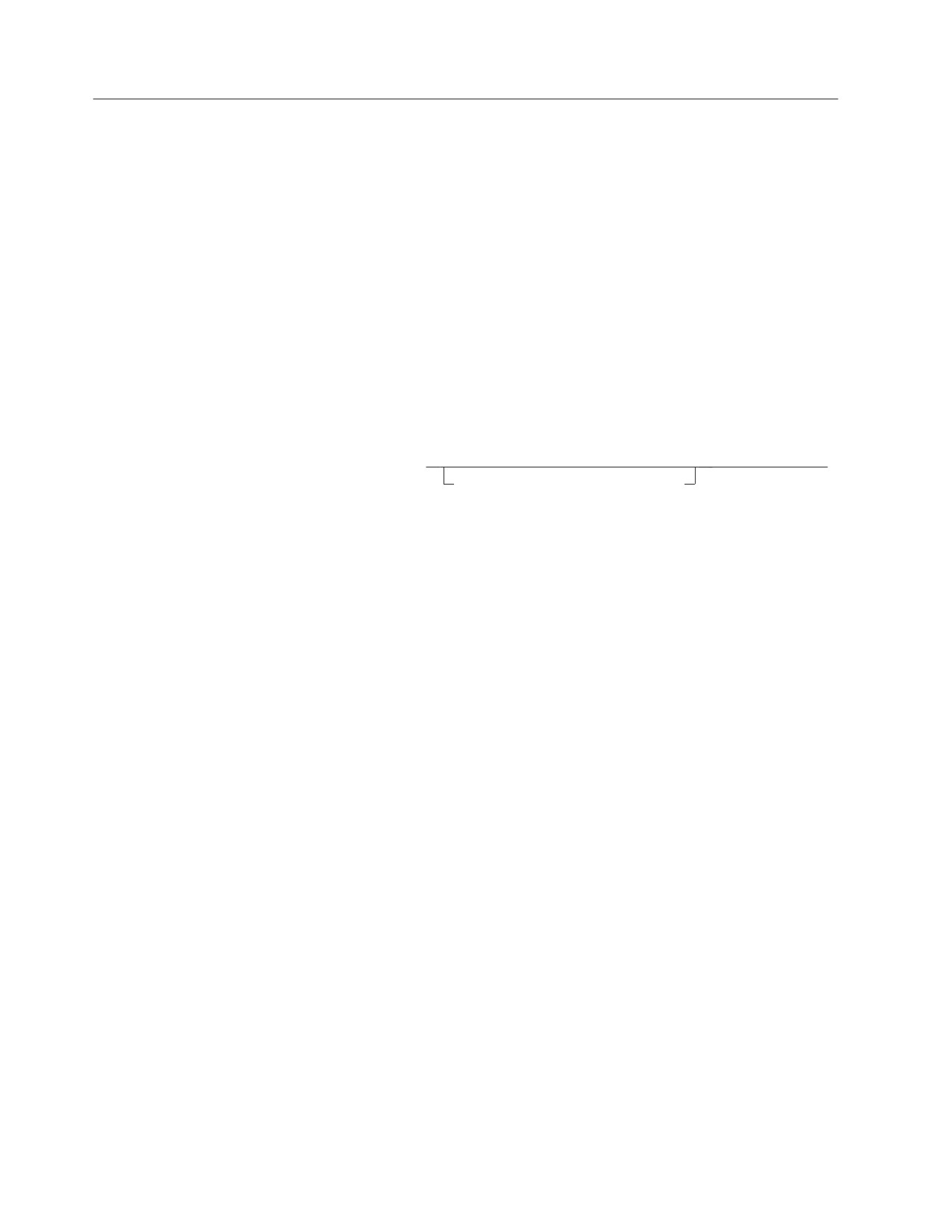
►► OPEN cursor_variable
►◄
USING DESCRIPTOR descriptor_name
Description
cursor_variable
Identifies the cursor that is to be opened. The cursor must have been defined
by a preceding Extended DECLARE CURSOR statement in the same logical
unit of work.
USING DESCRIPTOR descriptor_name
Identifies an input SQLDA structure that provides information concerning
input variables that were specified as parameter markers (?) when the
statement was prepared.
Before the Extended OPEN statement is processed, the user must set the fields
in the SQLDA described in the “Description” section of “EXECUTE” on page
264 and Table 20 on page 360.
When the cursor is to be used for inserting data into a table, the USING
DESCRIPTOR clause should not be included because the clause must be in the
PUT statement.
Notes
In most respects, the Extended OPEN statement is similar to the OPEN statement
(see “OPEN” on page 307). However, in the Extended OPEN statement, the
cursor_name is a host variable, thereby making it possible for a user to provide the
cursor name when the program is run and to open the cursor in a logical unit of
work or program other than the one in which the statement was prepared.
Extended DECLARE CURSOR and Extended OPEN must occur in the same logical
unit of work.
Examples
OPEN :CURSOR1 USING DESCRIPTOR MYSQLDA
312
SQL Reference

PREPARE
PREPARE
The PREPARE statement is used by application programs to dynamically prepare
an SQL statement for execution. The PREPARE statement creates an executable
SQL statement, called a prepared statement, from a character string form of the
statement, called a statement string. The prepared statement is a named object that
can be referred to only within the logical unit of work in which it is created.
Invocation
This statement can only be embedded in an application program. It is an
executable statement that cannot be dynamically prepared.
Authorization
The authorization rules are those defined for the SQL statement specified by the
PREPARE statement. For example, see Chapter 5, “Queries,” on page 121 for the
authorization rules that apply when a select-statement is prepared. The
authorization ID is the run-time authorization ID.
Syntax
►► PREPARE statement_name FROM
string_constant
►◄
host_variable
Description
statement_name
Provides a name for the prepared statement. No two prepared statements in a
single source program may use the same statement name. In REXX, the
statement_name must not be the same as the cursor_name declared in the
program.
FROM
Introduces the statement string. The statement string is the value of the
specified string_constant or the identified host_variable.
string_constant
String constants are supported in all languages except Assembler and C.
You should avoid using either delimited identifiers or DBCS strings in
statements specified in string constants because results are unpredictable.
When the string_constant form of the PREPARE statement is used in
Fortran programs:
v If the statement_name is referenced in a DECLARE CURSOR statement,
the PREPARE statement must come first.
v Any unqualified objects are qualified with the authorization ID of the
person preparing the program.
host_variable
Identifies a host variable that is described in the program in accordance
with the rules for declaring character string variables. An indicator variable
must not be specified.
In Assembler, C, COBOL, and REXX, the host variable must be a
varying-length string variable. In C, it cannot be a NUL-terminated string.
In Fortran, the host variable must be a fixed-length string variable. In PL/I,
Chapter 6. Statements
313
PREPARE
the host variable can either be a fixed-length or varying-length string
variable. The host variable must have a maximum length of 8192.
In a PL/I Version 2 program, a prepared statement containing DBCS
characters must be coded as a mixed string using the new PL/I Mixed
format.
For example:
DYNSTR = ’SELECT COL1 FROM TABLE WHERE COL2 = G’<
>’M;
EXEC SQL PREPARE STMT1 FROM :DYNSTR;
Rules for statement strings
The string_constant or host_variable must contain one of the following SQL
statements:
ACQUIRE DBSPACE
GRANT Package Privileges
ALLOCATE CURSOR
GRANT System Authorities
ALTER DBSPACE
GRANT Table Privileges
ALTER TABLE
INSERT
ASSOCIATE LOCATORS
LABEL ON
COMMENT ON
LOCK DBSPACE
CREATE INDEX
LOCK TABLE
CREATE SYNONYM
REVOKE Package Privileges
CREATE TABLE
REVOKE System Authorities
CREATE VIEW
REVOKE Table Privileges
DELETE
select-statement
DROP
UPDATE
EXPLAIN
UPDATE STATISTICS
Furthermore, the statement string must not:
v Begin with EXEC SQL and end with a statement terminator
v Include references to host variables
v Include comments.
Parameter markers: Although a statement string cannot include references to host
variables, it may include parameter markers; those can be replaced by the values of
host variables when the prepared statement is processed. A parameter marker is a
question mark (?) that is used where a host variable could be used if the statement
string were a static SQL statement. For an explanation of how parameter markers
are replaced by values, see “OPEN” on page 307 and “EXECUTE” on page 264.
Rules for parameter markers:
v Parameter markers must not be used:
- In a select list (SELECT ? is incorrect)
- As an operand of the concatenation operator
- As both operands of a single arithmetic or comparison operator (WHERE ? =
? is incorrect)
- As an operand in a datetime arithmetic expression
v At least one of the operands of the BETWEEN or IN predicates must not be a
parameter marker.
v An argument of a scalar function cannot be specified solely as a parameter
marker. For example, VALUE(COL1, COL2, ?) is not valid.
v If a scalar function is used in other than a SELECT list, and it has an argument
that can be specified as an arithmetic expression, a parameter marker can be
included in that expression, provided that it is the operand of an arithmetic
operator and that the other operand is a number.
314
SQL Reference
PREPARE
Notes
When a PREPARE statement is processed, the statement string is parsed and
checked for errors. If the statement string is incorrect, a prepared statement is not
created and the error condition that prevents its creation is reported in the SQLCA.
Prepared statements can be referred to in the following kinds of statements, with
the following restrictions shown:
In ...
The prepared statement ...
DESCRIBE
has no restrictions
DECLARE CURSOR
must be a select-statement or an insert-statement
EXECUTE
must not be a select-statement
A prepared statement can be processed many times. Indeed, if a prepared
statement is not processed more than once and does not contain parameter
markers, it is more efficient to use the EXECUTE IMMEDIATE statement rather
than the PREPARE and EXECUTE statements.
All prepared statements created in a logical unit of work are destroyed when the
logical unit of work is terminated.
Examples
Example 1
Prepare and process a non-select-statement in a COBOL program. Assume the
statement is contained in a host variable HOLDER and that the program will place
a statement string into the host variable based on some instructions from the user.
The statement to be prepared does not have any parameter markers.
EXEC SQL PREPARE STMT_NAME FROM :HOLDER END-EXEC.
EXEC SQL EXECUTE STMT_NAME END-EXEC.
Example 2
Prepare and process a non-select-statement as in example 1, except code it for a
PL/I program. Also assume the statement to be prepared can contain any number
of parameter markers.
EXEC SQL PREPARE STMT_NAME FROM :HOLDER;
EXEC SQL EXECUTE STMT_NAME USING DESCRIPTOR :INSERT_DA;
Assume that the following statement is to be prepared:
INSERT INTO DEPARTMENT VALUES(?, ?, ?, ?)
To insert department number G01 named COMPLAINTS, which has no manager
and reports to department A00, the structure INSERT_DA should have the
following values before running the EXECUTE statement.
Chapter 6. Statements
315
PREPARE
SQLDAID
SQLDABC
188
SQLN
4
SQLD
4
SQLTYPE
452
SQLLEN
3
SQLDATA
GO1
SQLIND
0
SQLNAME
SQLTYPE
448
SQLLEN
29
SQLDATA
SQLIND
COMPLAINTS
SQLNAME
0
SQLTYPE
SQLLEN
453
SQLDATA
6
SQLIND
SQLNAME
-1
SQLTYPE
SQLLEN
452
SQLDATA
3
SQLIND
A00
SQLNAME
0
316
SQL Reference