DB2 Server for VSE & VM SQL Reference (Version 7 Release 5) - page 9
Extended PREPARE
Extended PREPARE
The Basic Extended PREPARE and Single Row Extended PREPARE forms of the
Extended PREPARE statement permit a statement to be prepared and stored in a
package for later execution.
The Empty Extended PREPARE form of the Extended PREPARE statement
provides support for dynamic SQL statements in non-modifiable packages. It is
used in conjunction with the Temporary Extended PREPARE form of the Extended
PREPARE statement.
The Temporary Extended PREPARE form of the Extended PREPARE statement
provides support for dynamic SQL statements in non-modifiable packages.
The package you are preparing into must have been created with the CREATE
PACKAGE statement.
Invocation
This statement can only be embedded in an application program written in
Assembler or REXX.
Authorization
The authorization ID of the first three forms of the Extended PREPARE statement
must have at least one of the following:
v ownership of the package
v DBA authority.
The authorization ID of the Temporary Extended PREPARE form must have at
least one of the following:
v ownership of the package
v DBA authority
v EXECUTE privilege on the package.
Chapter 6. Statements
317
Extended PREPARE
Syntax
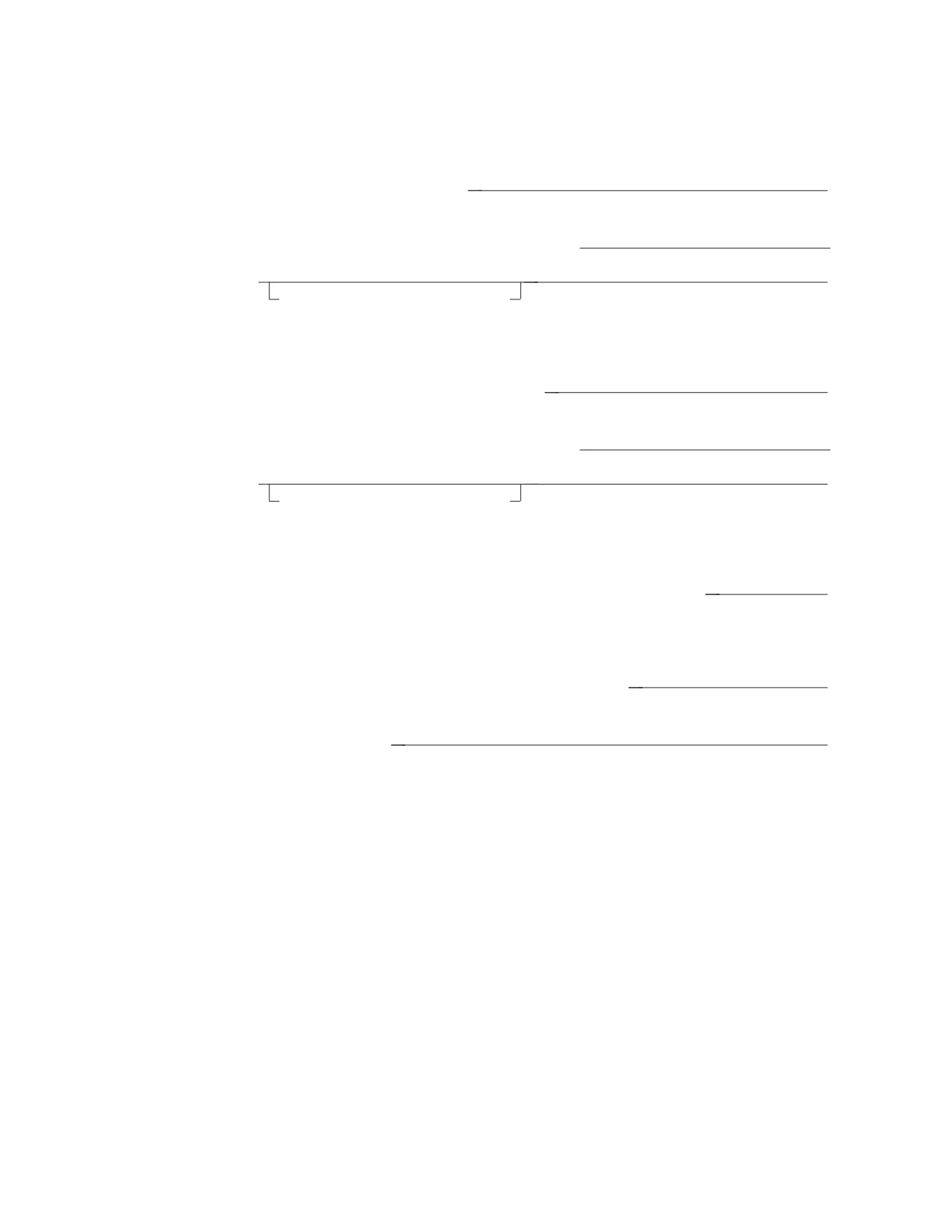
Basic Extended PREPARE
►► PREPARE FROM host_variable
►◄
►► SETTING section_variable IN package_spec
►
►
►◄
USING DESCRIPTOR descriptor_name
Single Row Extended PREPARE
►► PREPARE SINGLE ROW FROM host_variable
►◄
►► SETTING section_variable IN package_spec
►
►
►◄
USING DESCRIPTOR descriptor_name
Empty Extended PREPARE
►► PREPARE FROM NULL SETTING section_variable IN package_spec
►◄
Temporary Extended PREPARE
►► PREPARE FROM host_variable FOR section_variable
►◄
►► IN package_spec
►◄
Description
host_variable
Specifies the statement that is to be prepared. Host_variable is a varying-length
string host variable of maximum length 8192. It does not have an associated
indicator variable.
SETTING section_variable
In the Basic Extended PREPARE statement, the section_variable is set by the
database manager to an identifier for the statement that is prepared. It is used
in subsequent Extended DESCRIBE, DROP STATEMENT, Extended EXECUTE,
and Extended DECLARE CURSOR statements to specify the corresponding
prepared statement.
In the Single Row Extended PREPARE statement, the section_variable is set by
the database manager to an identifier for the statement that is prepared. It is
used in subsequent Extended DESCRIBE, DROP STATEMENT, and Extended
EXECUTE (with the OUTPUT Descriptor clause) statements to specify the
corresponding prepared statement.
318
SQL Reference
Extended PREPARE
In the Empty Extended PREPARE statement, the section_variable is set by the
database manager to an identifier for the indefinite section that is created. It is
used in subsequent Temporary Extended PREPARE, Extended DESCRIBE,
Extended EXECUTE, DROP STATEMENT and Extended DECLARE CURSOR
statements to specify the corresponding section.
FOR section_variable
Identifies a statement defined by an Empty Extended PREPARE statement.
This should be set to the value returned by the database manager as a result of
the Empty Extended PREPARE statement.
IN package_spec
Identifies the package in which the prepared statement is to be stored. If the
qualified package_spec does not refer to an existing package, an error will result.
USING DESCRIPTOR descriptor_name
Identifies an input SQLDA structure that provides information concerning
input variables that were specified as parameter markers (?) when the
statement was prepared. Extended PREPARE only utilizes the following fields
in an SQLDA: SQLD, SQLTYPE, SQLLEN, and, optionally, SQLNAME (for
CCSID override).
USING DESCRIPTOR may be specified for Temporary Extended PREPARE without
an error indication, but it is ignored.
Normally if a prepared statement contains parameter markers (?), an SQLDA
would be provided at run time by the Extended EXECUTE or Extended OPEN
statement that references that prepared statement. However, an SQLDA can be
used to improve run-time performance and reduce conversions in those cases
where data types and lengths are known at statement preparation time for the
parameter markers in the prepared SQL statement. Another reason for
providing an SQLDA at statement preparation time is to override the
restrictions on the use of parameter markers as outlined under “Rules for
parameter markers” under the PREPARE statement. Also, if an SQLDA is not
provided at statement preparation time, it is assumed that none of the
variables used within predicates are nullable; therefore, an error results if a
negative indicator value is provided at execution time.
An input SQLDA may also be specified on a subsequent Extended EXECUTE
or Extended OPEN; in such cases, if the information does not match that of the
PREPARE SQLDA, errors may result.
The fields described in the SQLDA should match the parameter markers (?) in
the statement being prepared. If there are fewer fields specified in the SQLDA,
an error will result. If there are more fields specified in the SQLDA, they will
be ignored.
Before the Extended PREPARE statement is processed, the user must set the
fields in the SQLDA described in the “Description” section of “EXECUTE” on
page 264 and Table 20 on page 360.
The Basic Extended PREPARE form of the Extended PREPARE statement adds an
SQL statement to an existing package. If the package is new, the Extended
PREPARE statement must be preceded by a CREATE PACKAGE statement.
Existing packages, created using the MODIFY option of CREATE PACKAGE, can
be extended using this format of the PREPARE statement.
The USING DESCRIPTOR clause must be used when preparing a statement that
contains parameter markers, if using the DRDA protocol.
Chapter 6. Statements
319
Extended PREPARE
The Single Row Extended PREPARE form of the Extended PREPARE statement
indicates that the select-statement contained in the host_variable is a single row
Select. Select-statements prepared using ″PREPARE SINGLE ROW″ must be
processed using the Extended EXECUTE with OUTPUT DESCRIPTOR command.
The Single Row Extended PREPARE form of the Extended PREPARE statement is
not supported with the DRDA protocol.
The Empty Extended PREPARE form of the Extended PREPARE statement allows
for the creation of an indefinite section in a program. The section is subsequently
used when a statement is dynamically prepared using a Temporary Extended
PREPARE statement.
This format of the Extended PREPARE must follow the CREATE
PACKAGE...USING NOMODIFY... format of the CREATE PACKAGE statement
and must exist in the same logical unit of work as the CREATE PACKAGE
statement.
If the above restriction is violated, execution of the statement will be unsuccessful.
The Temporary Extended PREPARE form of the Extended PREPARE statement
prepares the statement contained in the created indefinite section. This section
must have been created by an Empty Extended PREPARE statement. The section
number for this section is contained in the section_variable.
This format of the Extended PREPARE may not be processed in a logical unit of
work in which update to the package is already in progress. If the above restriction
is violated, execution of the statement will be unsuccessful.
See “Rules for statement strings”, “Parameter Markers”, and “Rules for parameter
markers” on page 314 for a list of the SQL statements which may be contained in
the host_variable and the rules for using parameter markers in the host_variable.
Notes
The various formats to the Extended PREPARE statement permit statements to be
created for different programs in different logical units of work.
Because a DBA can add a statement to a package on behalf of the owner (creator)
of the module, where the owner is not authorized for the added function, the DBA
should grant the proper authorization to the owner.
Examples
Example of Basic Extended PREPARE
PREPARE FROM :XSTRING SETTING :STMID
IN :USERID.:PACKNAME USING DESCRIPTOR MYSQLDA
Example of Single Row Extended PREPARE
PREPARE SINGLE ROW FROM :XSTRING SETTING :STMID
IN :USERID.:PACKNAME USING DESCRIPTOR MYSQLDA
Example of Empty Extended PREPARE
PREPARE FROM NULL SETTING :STMID
IN :USERID.:PACKNAME
Example of Temporary Extended PREPARE
320
SQL Reference
Extended PREPARE
PREPARE FROM :XSTRING FOR :STMID
IN :USERID.:PACKNAME
Chapter 6. Statements
321

PUT
PUT
The PUT statement inserts a row into a table. It is most often used when blocking
is in effect in order to create a block of rows to be inserted into a table at one time
and thus improve performance.
Invocation
This statement can only be embedded in an application program. It is an
executable statement that cannot be dynamically prepared.
Authorization
For an explanation of the authorization required to use a cursor, see “DECLARE
CURSOR” on page 235.
Syntax
►► PUT cursor_name
►◄
FROM
host_variable_list
USING DESCRIPTOR descriptor_name
Description
cursor_name
Is an ordinary identifier that identifies the insert cursor to be used in the PUT
operation. The cursor_name must identify a declared cursor as explained in
“DECLARE CURSOR” on page 235. When the PUT statement is processed, the
cursor must be in the open state.
FROM
This is only used in a PUT statement that is used in conjunction with a
dynamic INSERT statement, in which case either FROM or USING
DESCRIPTOR is required.
Introduces a list of host variables, host structure, or both, whose values are
substituted for the parameter markers (question marks) in the
dynamically-prepared INSERT statement. (For an explanation of parameter
markers, see “PREPARE” on page 313.)
host_variable_list
Identifies a list of host variables, host structures, or both, that must be
declared in the program in accordance with the rules for declaring host
variables and host structures.
The total number of host variables and host structure subfields must be the
same as the number of parameter markers in the prepared statement. The
nth variable or subfield corresponds to the nth parameter marker in the
prepared statement.
USING DESCRIPTOR descriptor_name
This is only used in a PUT statement that is used in conjunction with a
dynamic INSERT statement, in which case either FROM or USING
DESCRIPTOR is required.
Identifies an input SQLDA structure that provides information concerning
input variables that were specified as parameter markers (?) when the INSERT
statement was prepared.
322
SQL Reference
PUT
Before the PUT statement is processed, the user must set the fields in the
SQLDA described in the “Description” section of “EXECUTE” on page 264 and
Table 20 on page 360.
Notes
When blocking is used, every time a PUT statement is processed, a single row of
data is added to an insert-block. Rows are not inserted into the database until the
block is full, or, until a CLOSE statement is processed. The PUT statement can also
be processed when blocking is not in effect. In this case, one data row is inserted
directly into a table.
|
Insert blocking is available with the DRDA protocol if the application has been
|
preprocessed with the BLOCK option.
The database manager does not notify your program of an insert error until the
PUT that fills a block is processed. To determine when (or if) rows are actually
inserted into the database, your program should examine SQLERRD(3) in the
SQLCA when doing PUTs.
For example, suppose that 10 data rows to be inserted fit into one block, and that
the data for the fourth insert is in error. PUTs 1 through 9 have successful SQLCA
notifications, even though the insert for the fourth PUT has an error. On the tenth
PUT, the block is full. The database manager tries to process the block of ten
inserts, but encounters the error in the fourth row. It stops processing the block -
that is, three rows are inserted successfully. SQLERRD(3) contains the number of
rows that were successfully inserted. In this case, it contains a value of 3. If all
rows were inserted successfully, it would contain 10. You can use SQLERRD(3) to
determine where the error occurred.
Examples
Example 1
This example of statements from a PL/I program illustrates the use of a PUT
statement with a static INSERT statement. The host variables EMPNO, FIRSTNME,
MIDINIT, LASTNAME and EDLEVEL are compatible with the columns by the
same name in the EMPLOYEE table. In this program, cursor PUTCUR inserts
blocks of skeleton rows into the EMPLOYEE table.
EXEC SQL DECLARE PUTCUR CURSOR FOR
INSERT INTO EMPLOYEE
(EMPNO, FIRSTNME, MIDINIT, LASTNAME, EDLEVEL)
VALUES (:EMPNO, :FIRSTNME, :MIDINIT, :LASTNAME, :EDLEVEL);
EXEC SQL OPEN PUTCUR;
... /* code to start a loop */
... /* code to pick up values and assign them to host variables */
EXEC SQL PUT PUTCUR;
... /* code to end a loop */
EXEC SQL CLOSE PUTCUR;
Example 2: Similar to example 1, except that it uses a PUT statement with a
dynamic INSERT statement.
EXEC SQL PREPARE INSERT_STMT FROM
’INSERT INTO EMPLOYEE
(EMPNO, FIRSTNME, MIDINIT, LASTNAME, EDLEVEL)
VALUES (? ? ? ? ?)’;
EXEC SQL DECLARE PUTCUR CURSOR FORINSERT_STMT;
Chapter 6. Statements
323
PUT
EXEC SQL OPEN PUTCUR;
... /* code to start a loop */
... /* code to pick up values and assign them to host variables
*/
/* and to the three subfields FIRSTNME, MIDINIT, LASTNAME
*/
/* of host structure EMPNAME.
*/
EXEC SQL PUT PUTCUR FROM :EMPNO, :EMPNAME, :EDLEVEL;
... /* code to end a loop */
EXEC SQL CLOSE PUTCUR;
324
SQL Reference
Extended PUT
Extended PUT
The Extended PUT statement inserts a row into a table. It is most often used when
blocking is in effect in order to create a block of rows to be inserted into a table at
one time and thus improve performance. The cursor must have been opened with
an Extended OPEN.
Invocation
This statement can only be embedded in an application program written in
Assembler or REXX.
Authorization
The authorization ID of the statement must have one of the following:
v ownership of the package
v DBA authority
v EXECUTE privilege on the package.
Syntax
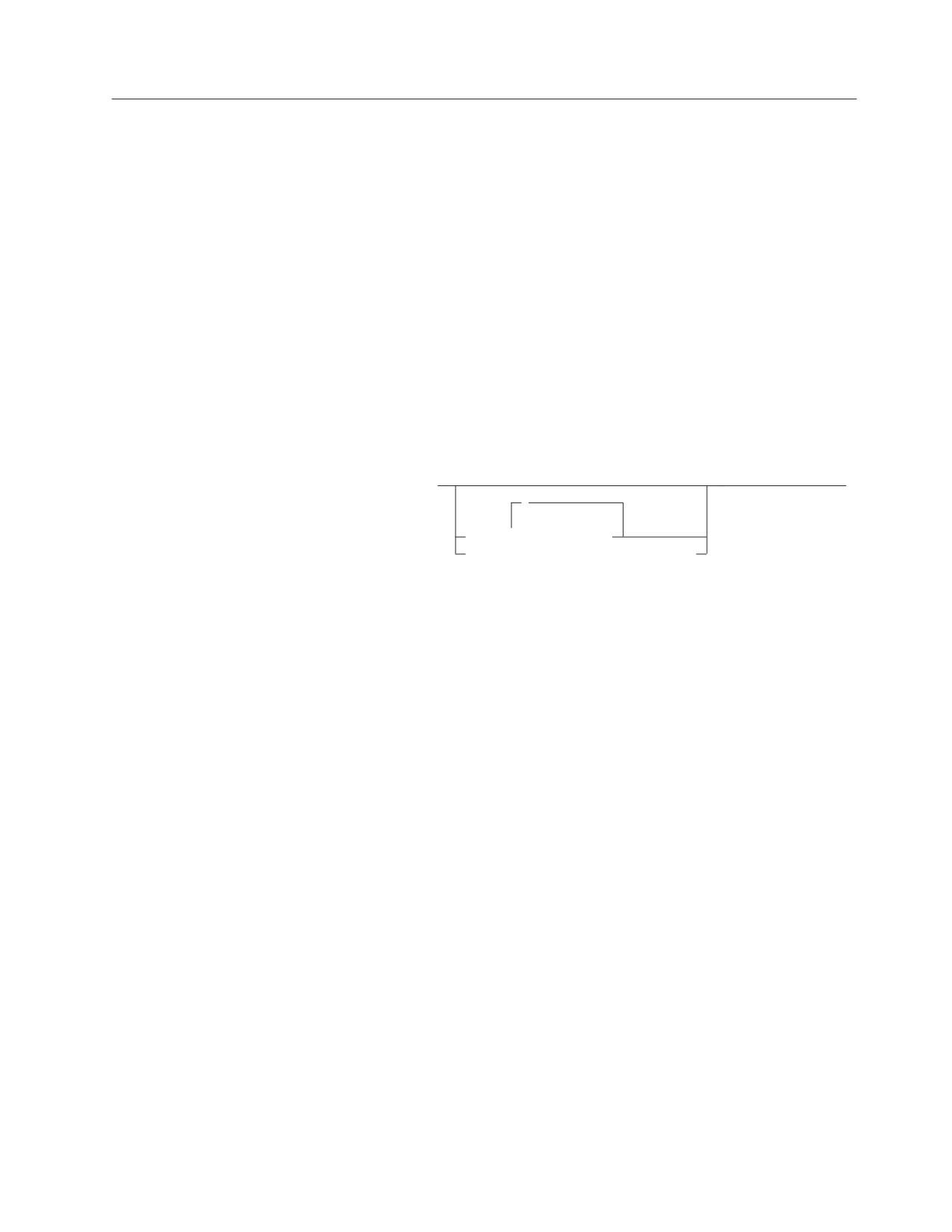
►► PUT cursor_variable
►◄
,
▼
FROM
host_variable
USING DESCRIPTOR descriptor_name
Description
cursor_variable
Identifies the insert cursor that is to be used. The cursor must have been
defined by a preceding Extended DECLARE CURSOR statement in the same
logical unit of work.
FROM host_variable,...
Identifies variables in the program that will be used to provide the values that
are to be inserted with the Extended PUT. The number of variables must be
the same as the number of parameter markers in the prepared statement. The
nth variable corresponds to the nth parameter marker in the prepared
statement.
USING DESCRIPTOR descriptor_name
Identifies an input SQLDA structure that provides information concerning
input variables that were specified as parameter markers (?) when the
statement was prepared.
Before the Extended PUT statement is processed, the user must set the fields in
the SQLDA described in the “Description” section of “EXECUTE” on page 264
and Table 20 on page 360.
The indicated cursor must be declared and opened.
Notes
In most respects, the Extended PUT statement is identical to the PUT statement
(see “PUT” on page 322); however, in the Extended PUT statement, the
cursor_variable is a host variable. This feature makes it possible for a user to
provide the cursor name when the program is run and to enter a PUT statement in
Chapter 6. Statements
325
Extended PUT
a logical unit of work or program other than the one in which the statement was
prepared. Extended DECLARE CURSOR, OPEN, and PUT must occur in the same
logical unit of work.
Examples
PUT :CURSOR1 FROM :X, :Y
PUT :CURSOR2 USING DESCRIPTOR SQLDA
326
SQL Reference

REVOKE
REVOKE (Package Privileges)
This form of the REVOKE statement revokes the privilege to process statements in
a package.
Invocation
This statement can be embedded in an application program or issued interactively.
It is an executable statement that can be dynamically prepared.
Authorization
This authorization ID must previously have granted the specified privileges to
every authorization_name (or PUBLIC) specified in the FROM clause.
Note that someone with DBA authority can indirectly revoke the EXECUTE
privilege on a package by obtaining the owner’s password from the
SYSTEM.SYSUSERAUTH catalog table and then connecting as the owner.
Syntax
,
(1)
▼
►►
REVOKE EXECUTE
ON package_name
FROM
authorization_name
►◄
(2)
PUBLIC
Notes:
1
RUN can be used as a synonym for EXECUTE and is provided for compatibility with
previous versions of SQL/DS.
2
PUBLIC is specified only once.
Description
EXECUTE ON package_name
Identifies the package from which the EXECUTE privilege is being removed.
The package_name must identify a package that exists at the application server.
FROM authorization_name,...
Identifies the user from whom the privilege is revoked. authorization_name,... is
a list of one or more authorization IDs. Do not use the same authorization_name
more than once.
You cannot use the authorization_name of the REVOKE statement itself. (You
cannot revoke privileges from yourself.)
PUBLIC
Revokes the privilege from PUBLIC.
Examples
All users currently have the right to process the TREMAR package. PAYROLL,
HANNA, and TREVOR have explicitly been granted this privilege. The other users
have it because a GRANT EXECUTE TO PUBLIC statement was previously
processed.
Remove the right to process the package from all users but PAYROLL.
REVOKE EXECUTE ON TREMAR FROM HANNA, PUBLIC, TREVOR
Chapter 6. Statements
327
REVOKE
REVOKE (System Authorities)
This form of the REVOKE statement allows a user having DBA authority to revoke
authorities from other users.
Invocation
This statement can be embedded in an application program or issued interactively.
It is an executable statement that can be dynamically prepared.
Authorization
The authorization ID of the statement must have DBA authority.
Syntax
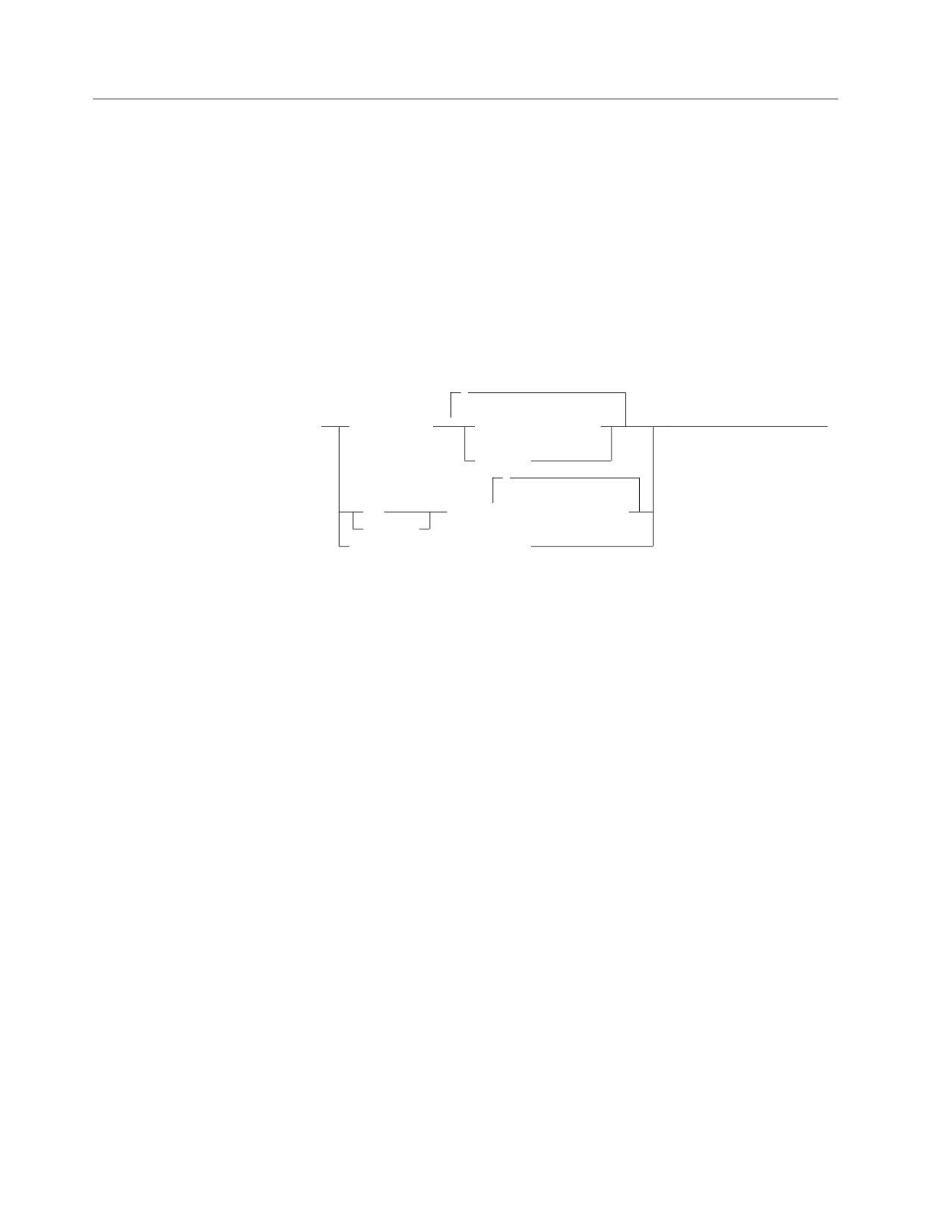
,
▼
►► REVOKE
CONNECT FROM
authorization_name
►◄
(1)
ALLUSERS
,
▼
DBA
FROM
authorization_name
RESOURCE
SCHEDULE FROM subsystemid
Notes:
1
ALLUSERS can only be specified once.
Description
CONNECT
Revokes CONNECT authority from the specified authorization_names. Revoking
CONNECT causes all authorities to be revoked with it and the
authorization_name to be deleted from the catalog SYSUSERAUTH.
Revoking CONNECT does not cause objects owned by that authorization_name
to be dropped. Neither does it cause table privileges for that authorization_name
to be revoked. A user with DBA authority can later drop the objects and
revoke the privileges.
DBA
Revokes DBA authority from the specified authorization_names. A user having
DBA authority cannot revoke any authority from himself or herself. Revoking
DBA authority automatically causes all authorities to be revoked except
CONNECT.
RESOURCE
Revokes RESOURCE authority from the specified authorization_names. No one
can revoke RESOURCE authority from a user that has DBA authority.
Revoking RESOURCE authority implies no other revocations.
FROM
Introduces a list of one or more authorization_names.
authorization_name
An authorization ID.
328
SQL Reference

REVOKE
ALLUSERS
Specifies that implicit CONNECT authority is to be revoked for all
system-defined users.
VSE Users
ALLUSERS is not a valid option because implicit CONNECT
authority is not applicable to VSE application servers.
SCHEDULE
Allows the DBA to revoke access by a CICS subsystem. Used with the VSE
Guest sharing facility of the DB2 Server for VM product. For more information
see the DB2 Server for VM System Administration or the DB2 Server for VSE
System Administration manual.
FROM subsystemid
Is the subsystem ID of the CICS subsystem running under the VSE guest.
Notes
If you enter REVOKE for an authority that the user does not have, the revocation
is ignored for that authority.
Examples
Example 1
Given that VEILLEUX, MARINA, and HEARST have DBA authority, enter the
statements necessary to revoke all authority from VEILLEUX. Leave MARINA with
only CONNECT authority and leave HEARST with both CONNECT and
RESOURCE authority.
REVOKE DBA FROM VEILLEUX, MARINA, HEARST
REVOKE CONNECT FROM VEILLEUX
GRANT RESOURCE TO HEARST
Example 2
All users have previously been granted implicit connect authority from their VM
user ID. PAYROLL, HANNA, and TREVOR have explicitly been granted this
authority. The other users have it because a GRANT CONNECT TO ALLUSERS
statement was previously processed.
Remove implicit connect authority from all users but PAYROLL.
REVOKE CONNECT FROM HANNA, TREVOR, ALLUSERS
VSE Users
Example 2 does not apply to VSE.
Chapter 6. Statements
329

REVOKE
REVOKE (Table Privileges)
This form of the REVOKE statement revokes privileges on the table or view.
Invocation
This statement can be embedded in an application program or issued interactively.
It is an executable statement that can be dynamically prepared.
Authorization
This authorization ID must previously have granted the specified privileges to
every authorization_name (or PUBLIC) specified in the FROM clause.
Note that someone with DBA authority can indirectly revoke privileges on a table
or view by obtaining the owner’s password from the SYSTEM.SYSUSERAUTH
catalog table and then connecting as the owner.
Syntax
PRIVILEGES
►► REVOKE
ALL
ON
table_name
►
,
view_name
(1)
▼
ALTER
DELETE
(1)
INDEX
INSERT
(1)
REFERENCES
SELECT
UPDATE
,
▼
►
FROM
authorization_name
►◄
(2)
PUBLIC
Notes:
1
The ALTER, INDEX, and REFERENCES options are not applicable to views.
2
PUBLIC may only be specified once per statement.
Description
ALL or ALL PRIVILEGES
Revokes table privileges on the table or view identified in the ON clause. The
privileges revoked are those possessed by the authorization ID of the REVOKE
statement. ALL PRIVILEGES is the default.
ALTER
Revokes the privilege to use the ALTER TABLE statement. This privilege does
not apply to views.
DELETE
Revokes the privilege to use the DELETE statement.
330
SQL Reference
REVOKE
INDEX
Revokes the privilege to use the CREATE INDEX statement. This privilege
does not apply to views.
INSERT
Revokes the privilege to use the INSERT statement.
REFERENCES
Revokes the privilege to either create referential constraints or to change
existing referential constraints. This privilege does not apply to views.
SELECT
Revokes the privilege to use the SELECT statement or the CREATE VIEW
statement.
UPDATE
Revokes the privilege to use the UPDATE statement. Note that a list of column
names can be used only with GRANT, not with REVOKE. You must therefore
revoke UPDATE on all columns.
ON table_name
ON view_name
Identifies the table or view from which the privileges are being revoked. The
table_name or view_name must identify a table or view that exists at the
application server.
FROM authorization_name,...
Identifies from whom the privileges are revoked. authorization_name,... is a list
of one or more authorization IDs.
You cannot use the authorization_name of the REVOKE statement itself. (You
cannot revoke privileges from yourself.)
PUBLIC
Revokes a grant of privileges to PUBLIC.
Dependent Privileges
When a privilege is revoked from a user, every privilege dependent on that
privilege is also revoked.
A privilege P2 possessed by user U2 is dependent on privilege P1 possessed by
user U1 if all of these are true:
v P1 and P2 are the same privilege.
v U1 granted the privilege to U2.
v No other user granted the same privilege to U2 before U1 granted it.
Also, table privilege P2 is dependent on table privilege P1 if P2 was derived from
P1 as a result of a CREATE VIEW statement.
Revoking a privilege that was used to create a package invalidates the package.
Multiple Grants: If you granted the same privilege to the same user more than
once, revoking that privilege from that user negates all those grants. It does not
negate any grant of that privilege made by others.
If a user has more than one source for a privilege, that privilege is not revoked
until it is revoked by all sources (see example 2 below).
Chapter 6. Statements
331
REVOKE
Notes
The only way to revoke the WITH GRANT OPTION is to revoke the privilege
itself and then to grant it again without the WITH GRANT OPTION.
Examples
Example 1
This example shows the effect of revoking a privilege that has a dependent
privilege. To illustrate this process, the diagram that follows shows a sequence of
GRANT and REVOKE statements.
┌────────────────────────┐
│ Database Administrator │
└────────┬───────┬───────┘
1GW
3R
ø
ø
┌─────────┐
│ PAULINE │
└────┬────┘
2G
ø
┌─────────┐
│ DAVE
│
└─────────┘
The statements illustrated in the above diagram are:
1GW) from DBA:
GRANT SELECT ON TBLA TO PAULINE WITH GRANT OPTION
2G) from PAULINE:
GRANT SELECT ON TBLA TO DAVE
3R) from DBA:
REVOKE SELECT ON TBLA FROM PAULINE
Following this sequence of statements neither PAULINE nor DAVE has the
SELECT privilege on TBLA. The explicit revoking of PAULINE’s privilege
implicitly revokes DAVE’s as well.
Example 2
This extends example 1 in order to show the effect of having received a privilege
from more than one source.
┌────────────────────────────────┐
│
Database Administrator
│
└─┬───────┬────────────────┬─────┘
1GW
7R
2GW
ø
ø
ø
┌────────────┐
┌────────────┐
│ PAULINE
│
│ SIMON
│
└──────────┬─┘
└─┬──────────┘
3GW
5GW
ø
ø
┌────────────┐
│
DAVE
│
└┬──────────┬┘
4G
6G
ø
ø
┌────────────┐
┌────────────┐
│
JAY
│
│ RICHARD
│
└────────────┘
└────────────┘
Following this sequence of statements from the users indicated:
332
SQL Reference
REVOKE
1GW) from DBA:
GRANT SELECT ON TBLA TO PAULINE WITH GRANT OPTION
2GW) from DBA:
GRANT SELECT ON TBLA TO SIMON WITH GRANT OPTION
3GW) from PAULINE
GRANT SELECT ON TBLA TO DAVE
WITH GRANT OPTION
4G) from DAVE:
GRANT SELECT ON TBLA TO JAY
5GW from SIMON:
GRANT SELECT ON TBLA TO DAVE
WITH GRANT OPTION
6G) from DAVE:
GRANT SELECT ON TBLA TO RICHARD
7R) from Admin:
REVOKE SELECT ON TBLA FROM PAULINE
PAULINE loses her SELECT privilege on TBLA, but DAVE retains his (having
obtained it from SIMON as well).
JAY loses his SELECT privilege because he obtained it from DAVE at a time when
DAVE had only obtained the SELECT WITH GRANT privilege from PAULINE.
RICHARD retains his SELECT privilege because he obtained it from DAVE at a
time when DAVE had obtained the SELECT WITH GRANT privilege from both
PAULINE and SIMON.
Example 3
This example shows how the revocation of a PUBLIC privilege varies depending
on whether: that privilege was granted specifically to that user or that privilege
was obtained using a GRANT TO PUBLIC.
┌────────────────────────────────┐
│
Database Administrator
│
└─┬────────────┬───────────────┬─┘
1GW
2GP
4RP
ø
│
│
┌─────────┐
│
│
│ MARY
│
│
│
└───────┬─┘
│
│
3G
├─────────┐
│
ø
ø
ø
ø
┌─────────┐
┌──────────────────────────┐
│ RICHARD │
│ LOUIS (and other public) │
└─────────┘
└──────────────────────────┘
Following this sequence of statements from the users indicated:
1GW) from DBA:
GRANT SELECT ON TBLA TO MARY WITH GRANT OPTION
2GP) from DBA:
GRANT SELECT ON TBLA TO PUBLIC
3G) from MARY:
GRANT SELECT ON TBLA TO RICHARD
4RP) from DBA:
REVOKE SELECT ON TBLA FROM PUBLIC
RICHARD retains the SELECT privilege on TBLA even though he was originally
granted it as a member of the public. LOUIS only had the SELECT privilege as a
member of the public, so loses that privilege.
Chapter 6. Statements
333

ROLLBACK
ROLLBACK
The ROLLBACK statement ends a logical unit of work and back out the database
changes that were made by that logical unit of work.
Invocation
This statement can be embedded in an application program or issued interactively.
It is an executable statement that cannot be dynamically prepared.
Authorization
None required.
Syntax
WORK
►►
ROLLBACK
►◄
RELEASE
Description
RELEASE
Re-establishes the default user ID and default database for a subsequent logical
unit of work. If this default user ID had been overridden with an explicit
CONNECT, in the terminating logical unit of work that explicitly established
user ID is replaced by the default user ID. By not specifying RELEASE, the
user ID and database at termination of the logical unit of work are retained for
a subsequent logical unit of work. For VSE interactive users connected to a
remote DRDA application server, when the next SQL statement is entered, you
are automatically connected with your CICS signon user ID to the same
application server.
ROLLBACK terminates the logical unit of work in which ROLLBACK is processed.
All changes made by the following statements during a logical unit of work, are
backed out:
ACQUIRE DBSPACE
ALTER DBSPACE
ALTER PROCEDURE
ALTER PSERVER
ALTER TABLE
COMMENT ON
CREATE INDEX
CREATE PROCEDURE
CREATE PSERVER
CREATE SYNONYM
CREATE TABLE
CREATE VIEW
DELETE
DROP
DROP PROCEDURE
DROP PSERVER
EXPLAIN
GRANT Package Privileges
GRANT System Authorities
334
SQL Reference
ROLLBACK
GRANT Table/View Privileges
INSERT
LABEL ON
PUT
REVOKE Package Privileges
REVOKE System Authorities
REVOKE Table/View Privileges
UPDATE
UPDATE STATISTICS
All locks acquired by the logical unit of work are released. All cursors that were
opened during the logical unit of work are closed. All statements that were
prepared during the logical unit of work are destroyed. Any cursors associated
with a prepared statement that is destroyed cannot be opened until the statement
is prepared again.
Notes
If a COMMIT or ROLLBACK does not immediately precede the termination of an
application process, the database manager attempts to commit the work (it may,
however, not always be successful). It is strongly recommended that each
application process explicitly ends its logical unit of work before terminating.
ROLLBACK should not be issued after a severe error has occurred (one which sets
the SQLWARN0 field in the SQLCA to 'S'). In this situation, the only statement that
can be issued is a CONNECT statement to another application server.
The logical unit of work must be completed by using the COMMIT or ROLLBACK
statements before the CONNECT statement can be used to switch to another user
ID or application server.
TCP/IP does not perform any security checking during a physical connect. The
Batch application requester will use the DRDA security handshaking flows during
the logical connect to perform user ID and password verification. The physical
TCP/IP connection will be deallocated and reallocated whenever the application
switches to a different user ID or server name (using the CONNECT statement),
and DRDA security handshaking flows will be used again during the logical
connect. Either of these switches will not require the application to issue a
COMMIT RELEASE or ROLLBACK RELEASE. The Batch Resource Adapter will
retain and use the current user ID, password, and server name (unless different
ones are specified with a new CONNECT statement) after the new TCP/IP
physical connection is established. If a COMMIT RELEASE or ROLLBACK
RELEASE was issued prior to a CONNECT statement, then all user ID, password
and server name information is lost and must be supplied with the next
CONNECT.
Examples
The PL/I program in “COMMIT” on page 182 illustrates how the ROLLBACK
statement is used.
Chapter 6. Statements
335

SELECT INTO
SELECT INTO
The SELECT INTO statement produces a result table consisting of at most one row,
and assigns the values in that row to host variables. If the table is empty, the
statement assigns +100 to SQLCODE and '02000' to SQLSTATE and does not assign
values to the host variables. If more than one row satisfies the search condition,
statement processing is terminated and an error occurs.
Invocation
This statement can only be embedded in an application program. It is an
executable statement that cannot be dynamically prepared.
In Fortran, REXX, and programs prepared using extended dynamic SQL, SELECT
INTO cannot be used with the DRDA protocol.
Authorization
The privileges held by the authorization ID of the statement must include at least
one of the following:
v DBA authority, or
v For each table or view identified in the SELECT INTO statement:
- The SELECT privilege on the table or view, or
- Ownership of the table or view.
Syntax
►► select_clause INTO host_variable_list from_clause
►
where_clause
►
►◄
with_clause
Description
The result table is derived by evaluating the from_clause, where_clause, and
select_clause, in this order.
See Chapter 5, “Queries,” on page 121 for a description of the select_clause,
from_clause, and where_clause.
INTO
Introduces a list of host variables, host structures, or both.
host_variable_list
Identifies a list of host variables, host structures, or both, that must be
declared in the program in accordance with the rules for declaring host
variables and host structures.
The first value in the result row is assigned to the first host_variable or host
structure subfield in the list, the second value to the second variable, and so
on. If the number of host variables and host structure subfields is less than the
number of select_list values, the value W is assigned to the SQLWARN3 field
of the SQLCA. (See “SQL Communication Area (SQLCA)” on page 353.) Note
that there is no warning if there are more variables than the number of
select_list values. For a datetime value, the variable must be a character string
variable of a minimum length as defined in Chapter 3.
336
SQL Reference
SELECT INTO
If the value is null, an indicator variable must be specified.
Each assignment to a variable is made according to the rules described in
Chapter 3.
►► WITH
RR
►◄
CS
UR
WITH
Specifies the isolation level at which the statement is executed.
RR
Repeatable read
CS
Cursor stability
UR
Uncommitted read
If an error occurs, no value is assigned to the host variable or to variables later in
the list, though any values that have already been assigned to variables remain
assigned.
If an error occurs because the result table has more than one row, values may or
may not be assigned to the host variables. If values are assigned to the host
variables, the row that is the source of the values is undefined and not predictable.
See the DB2 Server for VSE & VM Application Programming manual for a description
of the possible errors when SELECT INTO is processed.
Examples
Example 1
Using a COBOL program statement, put the maximum salary (SALARY) from the
EMPLOYEE table into the host variable MAX-SALARY (dec(9,2)).
EXEC SQL SELECT MAX(SALARY)
INTO :MAX-SALARY
FROM EMPLOYEE
END-EXEC.
Example 2
Using a PL/I program statement, select the row from the EMPLOYEE table with a
employee number (EMPNO) value the same as that stored in the host variable
HOST_EMP char(6)). Then put the first name (FIRSTNME) and last name
(LASTNAME) into the host structure HOST_NAME, and education level
(EDLEVEL) into the host variable HOST_EDUCATE (integer) from that row.
EXEC SQL SELECT FIRSTNME, LASTNAME, EDLEVEL
INTO :HOST_NAME, :HOST_EDUCATE
FROM EMPLOYEE
WHERE EMPNO = :HOST_EMP;
Chapter 6. Statements
337
UPDATE
UPDATE
The UPDATE statement updates the values of specified columns in rows of a table
or view. Updating a row of a view updates a row of its base table.
There are two forms of this statement:
v The Searched UPDATE form updates zero or more rows (optionally determined
by a search condition).
v The Positioned UPDATE form updates exactly one row (as determined by the
current position of a cursor).
Invocation
A Searched UPDATE statement can be embedded in an application program or
issued interactively. A Positioned UPDATE must be embedded in an application
program. Both Searched UPDATE and Positioned UPDATE are executable
statements that can be dynamically prepared.
A Positioned UPDATE in Fortran, and programs prepared using extended dynamic
SQL cannot be used with the DRDA protocol.
Authorization
The privileges held by the authorization ID of the statement must include at least
one of the following:
v Ownership of the table
v The UPDATE privilege for the table or columns in the table or view
v DBA authority.
The UPDATE privilege on a view is only inherent in DBA authority. Ownership of
a view does not necessarily include the UPDATE privilege on the view because the
privilege may not have been granted when the view was created, or it may have
been granted, but subsequently revoked.
If the search_condition includes a subquery, the privileges designated by the
authorization ID of the statement must also include at least one of the following:
v Ownership of the tables or views identified in the subquery
v The SELECT privilege on every table or view identified in the subquery
v DBA authority.
338
SQL Reference

UPDATE
Syntax
Searched UPDATE:
►► UPDATE
table_name
►
view_name
correlation_name
,
►
SET
▼
column_name
=
expression
►
NULL
WHERE search_condition
►
►◄
WITH
RR
CS
Positioned UPDATE:
,
▼
►► UPDATE
table_name
SET
column_name
=
expression
►
view_name
NULL
► WHERE CURRENT OF cursor_name
►◄
Description
table_name or view_name
Identifies the table or view to be updated. The name must identify a table or
view that exists at the application server, but must not identify a catalog table,
a view of a catalog table, or a read-only view. For an explanation of read-only
views, see “CREATE VIEW” on page 231.
Note: Someone with DBA authority may update rows from a few of the
catalog tables. See “Updateable Columns” on page 371.
correlation_name
Can be used within search_condition to designate the table or view. (For an
explanation of correlation_name, see “Correlation Names” on page 64.)
SET
Introduces a list of column names and values.
column_name
Identifies a column to be updated. The column_name must identify a
column of the specified table or view, but must not identify a view column
derived from a scalar function, constant, or expression. The column names
must not be qualified, and a column must not be specified more than once.
For a Positioned UPDATE, allowable column names can be further
restricted to those in a certain list. This list appears in the UPDATE clause
Chapter 6. Statements
339
UPDATE
of the select statement for the associated cursor. The column names need
not be in the select-list of the select statement for the associated cursor If
the select statement is dynamically prepared, the UPDATE clause must
always be present. Otherwise, the clause can be omitted under the
conditions described in “The NOFOR Option” on page 239.
A view column derived from the same column as another column of the
view can be updated, but both columns cannot be updated in the same
UPDATE statement.
expression or NULL
Indicates the new value of the column. The expression is any expression of
the type described in Chapter 3. It must not include a column function.
NULL specifies the null value.
A column_name in an expression must name a column of the named table
or view. For each row that is updated, the value of the column in the
expression is the value of the column in the row before the row is updated.
If the column_name on the left hand side of the SET identifies a long string
column, the only type of expression allowed is a host-variable.
WHERE
Specifies the rows to be updated. You can omit the clause, give a search
condition, or name a cursor. If the clause is omitted, all rows of the table or
view are updated.
search_condition
Is any search condition described in Chapter 3. Each column_name in the
search condition, other than in a subquery, must name a column of the
table or view. The search condition must not include a subquery where the
base object of both the UPDATE and the subquery is the same table.
The search_condition is applied to each row of the table or view and the
updated rows are those for which the result of the search_condition is true.
If the search condition contains a subquery, the subquery can be thought of
as being processed each time the search condition is applied to a row, and
the results used in applying the search condition. In actuality, the subquery
is processed for each row only if it contains a correlated reference to a
column of the table or view.
WITH
Specifies the isolation level used when locating the rows to be updated by
the statement.
RR
Repeatable read
CS
Cursor stability
The default isolation level of the statement is the isolation level of the
package. WITH can only be specified on a SEARCHED update; it is
incompatible with the WHERE CURRENT OF clause.
CURRENT OF cursor_name
Identifies the cursor to be used in the update operation. The cursor_name
must identify a declared cursor as explained in “DECLARE CURSOR” on
page 235. The cursor_name can be a delimited identifier. If cursor_name is a
reserved word, it must be a delimited identifier.
340
SQL Reference
UPDATE
The table or view specified must also be identified in the FROM clause of
the select-statement of the cursor, and the result table of the cursor must
not be read-only. (For an explanation of read-only result tables, see
“DECLARE CURSOR” on page 235.)
When the UPDATE statement is processed, the cursor must be positioned
on a row and that row is updated.
Update values must satisfy the following rules. If they do not, or if any other
errors occur during the execution of the UPDATE statement, no rows are updated.
v
Assignment:
Update values are assigned to columns under the assignment rules described in
Chapter 3.
v
Validity:
If the identified table, or the base table of the identified view, has one or more
unique indexes, each row updated in the table must conform to the constraints
imposed by those unique indexes.
In the case of a multiple-row update of a unique key, the uniqueness constraint
is effectively checked at the end of the operation.
If a view is used that is defined using the WITH CHECK OPTION, each
updated row must conform to the definition of the view. If a view is used that is
not defined using WITH CHECK OPTION, rows can be changed so that they no
longer conform to the definition of the view. Such rows are updated in the base
table of the view and no longer appear in the view.
If a view is used that is dependent on other views whose definitions include
WITH CHECK OPTION, the updated rows must also conform to the definition
of those views.
v
Referential Integrity:
The value of the primary key in a parent row must not be changed by a
Positioned UPDATE. A primary key value may be changed using a Searched
UPDATE if there are no rows that are dependent on the old key value and if the
new value of the primary key is unique. A non-null update value of a foreign
key must be equal to a value of the primary key of the parent table of the
relationship.
When an UPDATE statement completes execution, the value of SQLERRD(3) in the
SQLCA is the number of rows updated. (For a description of the SQLCA, see “SQL
Communication Area (SQLCA)” on page 353.)
Differences Between Searched Updates in Recoverable and
Non-Recoverable Storage Pools
Recoverable Storage Pool: Uniqueness is checked after all rows are updated.
Non-Recoverable Storage Pool: When multiple-row updates are performed
against a column that has a unique index, the database manager is sensitive to the
order (ascending or descending) of the data. Since the database manager
automatically creates a unique index on a primary key column, a Searched
UPDATE cannot be used to perform multiple-row updates against the primary key
column. This is to ensure that updates to the primary key are independent of the
order of the data. For the same reason, a Positioned UPDATE cannot be used to
update primary key columns.
Locking: Unless appropriate locks already exist, one or more exclusive locks are
acquired by the execution of a successful UPDATE statement. Until the locks are
Chapter 6. Statements
341
UPDATE
released, the updated row can only be accessed by the application process that
performed the update. For further information on locking, see the descriptions of
the COMMIT, ROLLBACK, LOCK TABLE, and LOCK DBSPACE statements.
Blocking: The blocking options, SBLocK or BLocK, in the SQLPREP command
and the CREATE PACKAGE statement improves performance as they insert and
retrieve rows in groups. However, if a program was preprocessed with the NOFOR
option, query cursors referenced in Positioned UPDATE statements are unavailable
for blocking. If a Positioned UPDATE is coded in a program and NOFOR is not in
effect, then a FOR UPDATE OF clause must be included in the select-statement.
See the DB2 Server for VSE & VM Application Programming manual for more
information on blocking when preprocessing and running a program.
Error Conditions: It is possible for an error to occur that makes the state of the
cursor unpredictable. If an error occurs during the execution of a Positioned
UPDATE that makes the position of a cursor unpredictable, the cursor is closed.
If an error occurs during the execution of a Searched UPDATE, you must inspect
SQLWARN6 to determine the extent of the error. The following are the current
settings of SQLWARN6 along with possible responses:
1. SQLWARN6 is set to 'S'. A severe error has occurred, leaving the system in an
unusable state.
v No further requests are possible. The application must end, or, in a DB2
Server for VSE & VM environment, may switch to another database.
2. SQLWARN6 is set to 'W'. An error occurred causing the LUW to be rolled back
automatically. The system is still in a usable state. The application can:
v begin a new LUW and proceed
v stop.
3. SQLWARN6 is blank. An error has occurred, but the LUW is still active. Any
changes made by the request have been rolled back, hence the failing request
has not left any partial results in the database. The application can:
v continue forward processing of the LUW
v commit the changes made before the failing request
v roll back the LUW.
Examples
Example 1
Change the job (JOB) of employee number (EMPNO) ‘000290’ in the EMPLOYEE
table to ‘LABORER’.
UPDATE EMPLOYEE
SET JOB = ’LABORER’
WHERE EMPNO = ’000290’
Example 2
Increase the project staffing (PRSTAFF) by 1.5 for all projects that department
(DEPTNO) ‘D21’ is responsible for in the PROJECT table.
UPDATE PROJECT
SET PRSTAFF = PRSTAFF + 1.5
WHERE DEPTNO = ’D21’
Example 3
All the employees except the manager of department (WORKDEPT) ‘E21’ have
been temporarily laid off. Indicate this by changing their job (JOB) to NULL and
their pay (SALARY, BONUS, COMM) values to zero in the EMPLOYEE table.
342
SQL Reference
UPDATE
UPDATE EMPLOYEE
SET JOB=NULL, SALARY=0, BONUS=0, COMM=0
WHERE DEPTNO = ’E21’
AND JOB <> ’MANAGER’
Example 4
In a PL/I program display the rows from the EMPLOYEE table and then, if
requested to do so, change the job (JOB) of certain employees to the new job keyed
in.
EXEC SQL DECLARE C1 CURSOR FOR
SELECT *
FROM EMPLOYEE
FOR UPDATE OF JOB;
EXEC SQL OPEN C1;
EXEC SQL FETCH C1 INTO ...
;
PUT ...
;
GET LIST (CHANGE, NEWJOB);
IF CHANGE = ’YES’ THEN
EXEC SQL UPDATE EMPLOYEE
SET JOB = :NEWJOB
WHERE CURRENT OF C1;
EXEC SQL CLOSE C1;
Chapter 6. Statements
343

UPDATE STATISTICS
UPDATE STATISTICS
The UPDATE STATISTICS statement causes internal statistics of tables and indexes
to be updated with current information.
Invocation
This statement can be embedded in an application program, or it can be issued
interactively.
Authorization
The privileges held by the authorization ID of the statement must include
CONNECT authority.
Syntax
►► UPDATE
STATISTICS FOR
TABLE table_name
►◄
ALL
DBSPACE dbspace_name
Description
Invoking UPDATE STATISTICS can improve performance on statements that access
data from tables. These statistics, contained in the catalog tables, include the table
size, various index characteristics, and other information.
ALL
Updates statistics for all columns. In the case of a column which is not a first
column of any index, the column statistics are an approximation. If ALL is not
specified, statistics are only updated for a column which is the first column of
any index.
FOR TABLE
Indicates the table for which you want the statistics updated. If the table name
is qualified, the qualifier is the owner of the table. Otherwise, the authorization
ID of the statement is the owner of the table.
table_name
Identifies the table whose statistics you want updated. The name must
identify a base table that exists at the application server.
FOR DBSPACE
Updates the statistics for all tables in the designated dbspace. If the dbspace
name is qualified, the qualifier is the owner of the dbspace. Otherwise, the
authorization ID of the statement is the owner of the dbspace.
dbspace_name
Identifies the dbspace containing the tables whose statistics you want
updated. The name must identify a dbspace that exists at the application
server.
Examples
This shows the statements that are embedded in a PL/I program in order to add
an index on project name (PROJNAME) to the PROJECT table and to update the
statistics on that table. This is so that programs using that table that are
subsequently reprepared can consider those statistics when determining an access
strategy.
344
SQL Reference
UPDATE STATISTICS
EXEC SQL CREATE INDEX PROJNAME
ON PROJECT(PROJNAME);
EXEC SQL UPDATE STATISTICS FOR TABLE PROJECT;
Chapter 6. Statements
345

WHENEVER
WHENEVER
The WHENEVER statement specifies the next host language statement to which
execution will be transferred when a specified exception condition occurs.
Invocation
This statement can only be embedded in an application program. It is not an
executable statement. It is not supported in REXX.
Authorization
None required.
Syntax
►► WHENEVER
SQLERROR
CONTINUE
►◄
SQLWARNING
(1)
STOP
GOTO
host_label
GO TO
:
NOT FOUND
CONTINUE
GOTO
host_label
GO TO
:
Notes:
1
STOP is not valid for C, and Fortran.
Description
The SQLERROR, SQLWARNING or NOT FOUND, clause identifies the type of
exception condition.
SQLERROR
Identifies any condition that results in a negative value in SQLCODE.
SQLWARNING
Identifies any condition that results in a warning condition (SQLWARN0 is
'W'), or that results in a positive value other than +100 in SQLCODE.
NOT FOUND
Identifies any condition that results in an SQLCODE of +100 and an
SQLSTATE of '02000'.
The CONTINUE, GO TO, or STOP clause specifies the next statement to be
processed when the identified type of exception condition exists.
CONTINUE
Causes the next sequential instruction of the source program to be processed.
GOTO host_label
GO TO host_label
Causes control to pass to the statement identified by host_label. For host_label,
substitute a host identifier optionally preceded by a colon. The form of the host
identifier depends on the host language. In COBOL, for example, it can be a
section-name or an unqualified paragraph-name. In a Fortran program, it is an
unsigned integer variable not preceded by a colon.
346
SQL Reference
WHENEVER
STOP
Causes program termination. If a logical unit of work is in progress, it is rolled
back.
Notes
There are three types of WHENEVER statements:
WHENEVER SQLERROR
WHENEVER SQLWARNING
WHENEVER NOT FOUND
Every executable SQL statement in a program is within the scope of one implicit or
explicit WHENEVER statement of each type. The scope of a WHENEVER
statement is related to the listing sequence of the statements in the program, not
their execution sequence.
An SQL statement is within the scope of the last WHENEVER statement of each
type that is specified before that SQL statement in the source program. If a
WHENEVER statement of some type is not specified before an SQL statement, that
SQL statement is within the scope of an implicit WHENEVER statement of that
type in which CONTINUE is specified.
Examples
Write the statements that need to be embedded in a COBOL program in order to:
1. Go to the label HANDLER for any statement that produces an error
2. Continue processing for any statement that produces a warning
3. Go to the label ENDDATA for any statement that does not return data when
expected to do so.
EXEC SQL WHENEVER SQLERROR GOTO HANDLER END-EXEC.
EXEC SQL WHENEVER NOT FOUND GOTO ENDDATA END-EXEC.
Chapter 6. Statements
347
WHENEVER
348
SQL Reference
Appendix A. SQL Limits
The tables that follow describe certain limits imposed by this product.
Table 14. Identifier Length Limits
Identifier Limits
DB2 Server for VSE & VM
Longest authorization name
8
Longest constraint name
18
Longest correlation name
18
Longest cursor name
18
Longest host identifier
256a
Longest long identifier
18
Longest short identifier
8
Longest server name
18
Longest statement name
18
Longest unqualified column name
18
Longest unqualified package name
8
Longest unqualified table/view/index name
18
Table 15. Numeric Limits
Numeric Limits
DB2 Server for VSE & VM
Smallest INTEGER value
-2147483648
Largest INTEGER value
+2147483647
Smallest SMALLINT value
-32768
Largest SMALLINT value
+32767
Largest decimal precision
31
Smallest FLOAT value
-7.2x1075
Largest FLOAT value
+7.2x1075
Smallest positive FLOAT value
+5.4x10-79
Largest negative FLOAT value
-5.4x10-79
Smallest REAL value
-7.2x1075
Largest REAL value
+7.2x1075
Smallest Positive REAL value
+5.4x10-79
Largest Negative REAL value
-5.4x10-79
Table 16. String Limits
String Limits
DB2 Server for VSE & VM
Maximum byte count of CHAR
254
Maximum byte count of VARCHAR
32767
Maximum character count of GRAPHIC
127
Maximum character count of VARGRAPHIC
16383
349
SQL Limits
Table 16. String Limits (continued)
String Limits
DB2 Server for VSE & VM
Maximum byte count of character constant
254
Longest concatenated character string
254
Longest concatenated graphic string
127
b
Maximum character count of a graphic constant
127
Table 17. Datetime Limits
Datetime Limitsc
DB2 Server for VSE & VM
Smallest DATE value
0001-01-01
Largest DATE value
9999-12-31
Smallest TIME value
00:00:00
Largest TIME value
24:00:00
Smallest TIMESTAMP value
0001-01-01-00.00.00.000000
Largest TIMESTAMP value
9999-12-31-24.00.00.000000
Table 18. Database Manager Limits
Database Manager Limits
DB2 Server for VSE & VM
Most columns in a table
255
Most columns in a view
140d
Maximum byte count of a row including all overhead
4080e
Maximum byte count of a tablef
32 x 109
Maximum byte count of an indexf
32 x 109
Most rows in a table
2 x 10⁹
Longest index key
255
Most columns in an index key
16
Most indexes on a table
255
Most tables referenced in an SQL statement or a viewg
15
Most host variable declarations in a preprocessed
storage
program
Most host variables in an SQL statement
256
Longest host variable used for insert or update
32767
Longest SQL statement
8192
Most elements in a select list
255
Most predicates in a WHERE or HAVING clause
200
Most JOIN columns
40
Maximum number of columns in a GROUP BY clause
16
Maximum total length of columns in a GROUP BY clause
255
Maximum number of columns in an ORDER BY clause
16
Maximum total length of columns in an ORDER BY
255
clause
Maximum size of an SQLDA
22524
Maximum number of prepared statements
512h
350
SQL Reference

SQL Limits
Table 18. Database Manager Limits (continued)
Database Manager Limits
DB2 Server for VSE & VM
Most declared cursors in a program
512h
Maximum number of cursors opened at one time
storage
Most tables in a relational database
storage
Most CCSID overrides in an INSERT or SELECT
80
statementi
Notes
a
Individual host language compilers may further restrict this. The database
manager, and not the Fortran compiler, places a limit of 18 on host
identifiers in Fortran programs.
b
May be further restricted by preprocessors and utilities.
c
Shown in ISO format.
d
e
The row length of a formatted data row is 4080 bytes including overhead
items such as the data value of the row, null byte, and the varchar length
field. These items and others affecting the length of a row in a table are
discussed in DB2 Server for VSE & VM Database Administration.
f
The numbers shown are architectural limits. The practical limits may be
less.
g
In a complex select-statement, the number of tables that can be joined may
be significantly less.
h
In C, COBOL and PL/I the sum of the number of declared cursors and the
number of prepared statements that are not referenced by a cursor must
not be greater than 512. In REXX, the sum of the number of declared
cursors and the number of prepared statements that are not referenced by
a cursor must not be greater than 40.
i
Though a table may be created with more than 80 different combinations
of CCSID and datatype, insert-statement and select-statement impose a
limitation of 80 CCSID overrides. For overrides above 80, use a second
insert-statement or select-statement.
Appendix A. SQL Limits
351
SQL Limits
352
SQL Reference

Appendix B. SQLCA and SQLDA
SQL Communication Area (SQLCA)
An SQLCA is a structure or a collection of variables that is updated at the end of
the execution of every SQL statement. A program that contains executable SQL
statements must provide either an SQLCA structure or a standalone SQLCODE
field.
In all host languages except REXX, the SQL INCLUDE statement can be used to
provide the declaration of the SQLCA. A similar set of variables is used for this
purpose in REXX (see the DB2 REXX SQL for VM/ESA Installation and Reference
manual for details).
In COBOL and Assembler
The name of the storage area must be SQLCA.
In PL/I and C
The name of the structure must be SQLCA. Every executable SQL statement must
be within the scope of its declaration.
In Fortran
The name of the COMMON area for the INTEGER and SMALLINT variables of
the SQLCA must be SQLCA1; the name of the COMMON area for the
CHARACTER and VARCHAR variables must be SQLCA2.
Description of Fields
Table
19. Fields of SQLCA
Assembler,
COBOL, or PL/I
Name1
C Name 1
Fortran Name1
Data Type
Usage
SQLCAID
sqlcaid
Not used
CHAR(8)
An 'eye catcher' for storage dumps,
containing 'SQLCA'.
SQLCABC
sqlcabc
Not used
INTEGER
Contains the maximum length of the
SQLCA: 136.
SQLCODE
sqlcode
SQLCOD
INTEGER
Contains an SQL return code.2
Code
Means
0
Successful
execution,
although
SQLWARN
indicators (see
below) might have
been set.
positive
Successful
execution, but with
a warning
message.
negative
Error condition.
353

SQLCA
Table 19. Fields of SQLCA (continued)
Assembler,
COBOL, or PL/I
1
1
Name1
C Name
Fortran Name
Data Type
Usage
SQLERRML3
sqlerrml3
SQLTXL
SMALLINT
Length indicator for SQLERRMC, in
the range 0 through 70. 0 means that
the value of SQLERRMC is not
pertinent.
SQLERRMC3
sqlerrmc3
SQLTXT
VARCHAR (70)
Contains one or more tokens,
separated by X'FF', that are
substituted for variables in the
descriptions of error and warning
conditions.2
In some cases the last token appears
as “FOnn”. This token specifies the
format number of the SQLCODE
message text. “FO” represents the
word “format”; “nn” identifies the
version of the message that applies
in this particular case.
After a CONNECT statement is
issued, the authorization-ID and
server-name are returned.
SQLERRP
sqlerrp
SQLERP
CHAR(8)
For DRDA, after a CONNECT
statement is issued, SQLERRP
begins with a three-letter identifier
indicating the product (DSN for DB2
for MVS, SQL for DB2 for OS/2 and
DB2 for AIX, QSQ for OS/400, and
ARI for DB2 Server for VSE & VM).
For non-DRDA, SQLERRP begins
with the three letter identifier ARI.
If the SQLCODE field indicates an
error or warning condition, this field
will contain the name of the module
that returned the error.
SQLERRD(1)
sqlerrd[0]
SQLERR(1)
INTEGER
Contains the Relational Data System
(RDS) error code.
SQLERRD(2)
sqlerrd[1]
SQLERR(2)
INTEGER
Contains the Database Storage
System (DBSS) return code.
SQLERRD(3)
sqlerrd[2]
SQLERR(3)
INTEGER
Contains the number of rows
affected after INSERT, UPDATE, and
DELETE. With blocking, the
SQLERRD(3) associated with the
final row in the block contains the
number of rows in the block.
354
SQL Reference

SQLCA
Table 19. Fields of SQLCA (continued)
Assembler,
COBOL, or PL/I
1
1
Name1
C Name
Fortran Name
Data Type
Usage
SQLERRD(4)
sqlerrd[3]
SQLERR(4)
INTEGER
When preprocessing a SELECT,
INSERT by subselect, searched
UPDATE, or searched DELETE
statement, this field contains
timerons, a short floating point value
that indicates a rough relative
estimate of resources required; it
does not reflect an estimate of the
time required. When preparing a
dynamically defined SQL statement,
use this value as an indicator of the
relative cost of the prepared SQL
statement. For a particular
statement, this number can vary
with changes to the statistics in the
catalog. It is also subject to change
between releases of DB2 Server for
VSE & VM.
For other conditions, the content of
this field is not predictable.
SQLERRD(5)
sqlerrd[4]
SQLERR(5)
INTEGER
Following the execution of a
successful DELETE statement, this
field will contain the number of
dependent rows affected. This
includes the rows that were set to
null as a result of the SET NULL
rule, and the rows that were deleted
as a result of the CASCADE rule. If
the object table is not part of a
referential structure, this field is set
to zero.
If processing of a datetime local exit
fails, this field will contain the
datetime local exit function number.
This is a fullword number
describing the function to be
performed. Datetime local exits are
discussed in the DB2 Server for VM
System Administration or the DB2
Server for VSE System Administration.
SQLERRD(6)
sqlerrd[5]
SQLERR(6)
INTEGER
Reserved for future use.
SQLWARN
sqlwarn
SQLWRN (0:10)
ARRAY
A set of indicators each containing
either a blank or a setting as
indicated below.
SQLWARN0
sqlwarn0
SQLWRN(0)
CHAR(1)
Blank if all other indicators are
blank. Contains 'W' if at least one
other indicator contains 'V', 'W', or
'Z'. Contains 'S' if SQLWARN6 is set
to 'S', which overrides any 'W'.
Appendix B. SQLCA and SQLDA
355

SQLCA
Table 19. Fields of SQLCA (continued)
Assembler,
COBOL, or PL/I
1
1
Name1
C Name
Fortran Name
Data Type
Usage
SQLWARN1
sqlwarn1
SQLWRN(1)
CHAR(1)
Contains 'W' if the value of a string
column was truncated when
assigned to a host variable. Contains
'Z' if, on truncation of mixed
character data, the data does not
follow the proper rules regarding
mixed data. If both types of
truncation occur, 'Z' overrides 'W'.
SQLWARN2
sqlwarn2
SQLWRN(2)
CHAR(1)
Contains 'W' if null values were
eliminated from the argument of a
function.
SQLWARN3
sqlwarn3
SQLWRN(3)
CHAR(1)
Contains 'W' if the number of
columns in a select list is greater
than the number of host variables
supplied for the INTO clause of a
SELECT or FETCH statement.
SQLWARN4
sqlwarn4
SQLWRN(4)
CHAR(1)
Contains 'W' if a prepared UPDATE
or DELETE statement does not
include a WHERE clause.
SQLWARN5
sqlwarn5
SQLWRN(5)
CHAR(1)
Contains 'W' if the SQL statement
would cause a performance
degradation.
SQLWARN6
sqlwarn6
SQLWRN(6)
CHAR(1)
Contains 'W' if the database
manager was forced to end a logical
unit of work. Contains 'S' when the
database manager issues a severe
SQLCODE; that is, one which
predicates that the database
manager is in an unusable state.
SQLWARN7
sqlwarn7
SQLWRN(7)
CHAR(1)
Contains 'W' if an adjustment was
made to a date or timestamp value
for the last day of the month.
Contains 'Z' if the conversion of an
operand with a decimal data type
caused the loss of any non-zero
digits in the fractional part of the
number.
SQLWARN8
sqlwarn8
SQLWRN(8)
CHAR(1)
Contains 'W' if a statement has been
disqualified for blocking. Contains
'Z' if a character that could not be
converted was replaced with a
substitute character.
SQLWARN9
sqlwarn9
SQLWRN(9)
CHAR(1)
Contains 'W' if blocking was
canceled for a cursor because of
insufficient storage in the user’s
virtual machine.
356
SQL Reference

SQLCA
Table 19. Fields of SQLCA (continued)
Assembler,
COBOL, or PL/I
Name1
C Name 1
Fortran Name1
Data Type
Usage
SQLWARNA
sqlwarna
SQLWRN(A)
CHAR(1)
Contains 'W' if blocking was
canceled because a blocking factor
of at least 2 rows could not be
maintained. Contains 'V' if there was
a conversion error when converting
the value of one of the fields in the
SQLCA at the application requester.
SQLSTATE
sqlstate
SQLSTT
CHAR(5)
Contains a return code for the
outcome of the most recent
execution of an SQL statement4. This
return code conforms to the SQL92
standard.
1: The field names are those present in an SQLCA obtained from using an INCLUDE statement.
2:
For the specific meanings of DB2 Server for VSE & VM return codes and of variables in error messages, see the
DB2 Server for VM Messages and Codes or the DB2 Server for VSE Messages and Codes manual for your database
manager.
3:
In COBOL and C, SQLERRM includes SQLERRML and SQLERRMC. In PL/I, the varying-length string
SQLERRM is equivalent to SQLERRML prefix to SQLERRMC. In Assembler, the storage area SQLERRM is
equivalent to SQLERRML and SQLERRMC.
4:
For a description of SQLSTATE values, see the DB2 Server for VM Messages and Codes or DB2 Server for VSE
Messages and Codes manual.
INCLUDE SQLCA Declarations
The description of the SQLCA that is given by INCLUDE SQLCA is shown for each of
the host languages.
Assembler
SQLCA
DS
0F
SQLCAID
DS
CL8
SQLCABC
DS
F
SQLCODE
DS
F
SQLERRM
DS
H,CL70
SQLERRP
DS
CL8
SQLERRD
DS
6F
SQLWARN
DS
0C
SQLWARN0 DS
C
SQLWARN1 DS
C
SQLWARN2 DS
C
SQLWARN3 DS
C
SQLWARN4 DS
C
SQLWARN5 DS
C
SQLWARN6 DS
C
SQLWARN7 DS
C
SQLWARN8 DS
C
SQLWARN9 DS
C
SQLWARNA DS
C
SQLSTATE DS
CL5
C
#ifndef SQLCODE
struct sqlca
{
Appendix B. SQLCA and SQLDA
357