DB2 Server for VSE & VM SQL Reference (Version 7 Release 5) - page 6
CONNECT (for VSE)
If a CONNECT TO server_name is processed first, the server name is placed in the
CURRENT SERVER register. Also, the SQLERRMC field in the SQLCA is set with
eight blanks and the server_name separated by X'FF'. However, a CONNECT
authorization_name IDENTIFIED BY password must be processed to complete the
connection and establish the user identification before any other SQL statements
are processed.
If the TO clause is not specified, the application is connected to the default
application server. The server_name must be one that exists in the DBNAME
directory. If it is a remote server, it must be identitified as using TCP/IP
communication. Otherwise, an SQL error will be returned to the batch application.
TCP/IP does not perform any security checking during a physical connect. The
Batch application requester will use the DRDA security handshaking flows during
the logical connect to perform user ID and password verification. The physical
TCP/IP connection will be deallocated and reallocated whenever the application
switches to a different user ID or server name (using the CONNECT statement),
and DRDA security handshaking flows will be used again during the logical
connect. Either of these switches will not require the application to issue a
COMMIT RELEASE or ROLLBACK RELEASE. The Batch Resource Adapter will
retain and use the current user ID, password, and server name (unless different
ones are specified with a new CONNECT statement) after the new TCP/IP
physical connection is established. If a COMMIT RELEASE or ROLLBACK
RELEASE was issued prior to a CONNECT statement, then all user ID, password
and server name information is lost and must be supplied with the next
CONNECT.
If a Logical Unit of Work is ended by a COMMIT, and a CONNECT TO server_name is
the next SQL statement processed, a new connection is made to the application
server specified, with the user ID and password being the same as in the previous
connection.
If a Logical Unit of Work is ended with a COMMIT RELEASE, the next SQL statement
must be either:
v CONNECT userid IDENTIFIED BY pw or
v CONNECT userid IDENTIFIED BY pw TO server_name
to re-establish the proper user ID.
Summary of Variations of the CONNECT Statement
The various clauses may be specified in the following combinations:
1. CONNECT
This returns information about the currently connected authorization ID and
application server.
2. CONNECT authorization_name IDENTIFIED BY password
This switches to a new authorization ID on the currently established
application server.
3. CONNECT TO server_name
This switches the currently established authorization ID to a new application
server.
4. CONNECT authorization_name IDENTIFIED BY password TO server_name
This switches to both a new authorization ID and application server.
194
SQL Reference
CONNECT (for VSE)
Connection States
An application process is in one of three states at any time:
v Connectable and connected
v Unconnectable and connected
v Connectable and unconnected.
The connectable and connected state: An application process is connected to an
application server and CONNECT statements can be processed. The process enters
this state when it completes a rollback or successful commit from the
unconnectable and connected state, or a CONNECT statement is successfully
processed from the connectable and unconnected state.
The unconnectable and connected state: An application process is connected to
an application server, but a CONNECT statement cannot be successfully processed
to change application servers or to change authorization IDs. The process enters
this state from the connectable and connected state when it processes any SQL
statement other than CONNECT, COMMIT or ROLLBACK.
The connectable and unconnected state: An application process is not connected
to an application server. The only SQL statement that can be processed is
CONNECT. The process is initially in this state or enters this state when an SQL
statement is unsuccessful because of a failure that causes a rollback operation at
the application server and the loss of the connection. The process can also enter
this state if it successfully completes a commit or rollback with the release option
from the unconnectable and connected state or it processes a CONNECT statement
unsuccessfully.
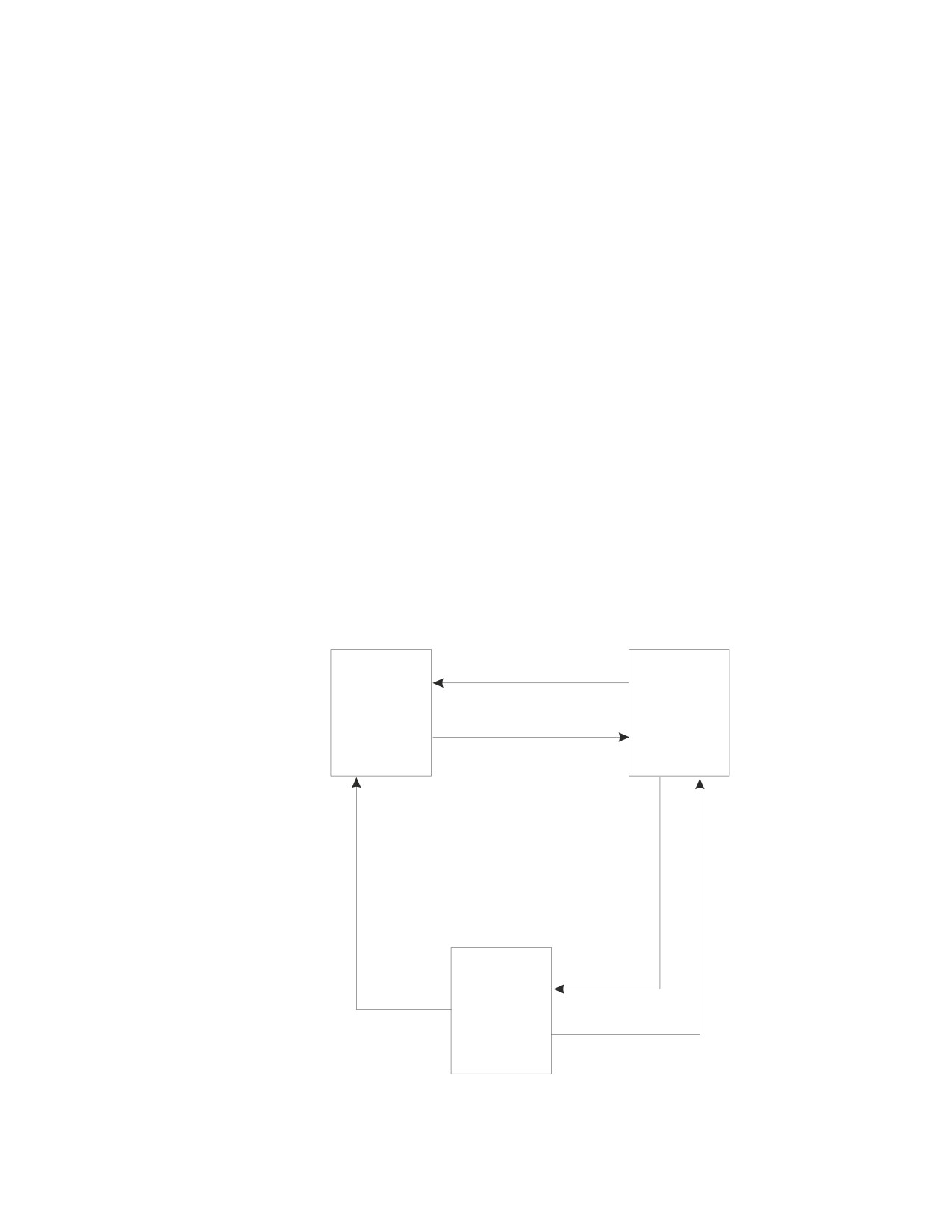
The following diagram shows the state transitions:
CONNECT withsystemfailure
Connectable
Connectable
and
and
Successful CONNECT
Unconnected
Connected
ROLLBACKor
SQLother than
CONNECT,COMMIT,
successful
COMMITwith
or ROLLBACK
Systemfailure
RELEASE
withrollback
anddeallocate
Unconnectable
and
Connected
ROLLBACKor
successful COMMIT
Figure 8. VSE Connection State Transitions
Chapter 6. Statements
195
CONNECT (for VSE)
Additional Rules
It is not an error to process consecutive CONNECT statements because CONNECT
itself does not remove the application process from the connectable state. It is an
error to process any SQL statement other than CONNECT, COMMIT, or
ROLLBACK, and then process CONNECT with any options. To avoid the error,
process a commit or rollback operation before processing the CONNECT.
Notes
If a program is connectable and connected, a CONNECT TO server_name results in the
old connection being disconnected before the new connection is attempted. If the
new connection fails, the program’s state is connectable and unconnected.
A CONNECT to the same application server without changing the authorization
ID is treated as a no-operation; the connection is not disconnected and
reconnected.
Examples
Example 1
In a PL/I program, connect to the application server TOROLAB3.
EXEC SQL CONNECT TO TOROLAB3;
Example 2
In a PL/I program, switch to a different application server called TOROLAB4.
Assume your user ID on TOROLAB4 is different than the one you are currently
using.
EXEC SQL BEGIN DECLARE SECTION;
DCL USERID
CHAR(8);
DCL PASWRD
CHAR(8);
EXEC SQL END DECLARE SECTION;
EXEC SQL CONNECT :USERID IDENTIFIED BY :PASWRD
TO TOROLAB4;
Example 3
In a PL/I program, connect to an application server whose name is stored in the
host variable APP_SERVER (varchar(18)).
EXEC SQL CONNECT TO :APP_SERVER;
Resolving Remote Server Name to Target Database
CICS Applications: If the CICS/VSE transaction issues an SQL CONNECT
statement with the ″TO server name″ clause, the server name is established
explicitly for the transaction and the Online Resource Adapter uses the DBNAME
Directory to resolve the server name to the target database.
If the CICS/VSE transaction did not issue an SQL CONNECT statement with
the“TO server name” clause, the Online Resource Adapter attempts to connect to
the default application server, as defined in the DBNAME Directory.
If the target database is a Remote server and the communications protocol to be
used is SNA, the application requester issues a GDS ALLOCATE command to
acquire a session for the remote system where the server runs. The SYSID used in
this ALLOCATE command is the SYSID value from the DBNAME Directory entry
(and the SYSID must match a CEDA DEF CONNECTION definition). Then the
196
SQL Reference
CONNECT (for VSE)
application requester issues a GDS CONNECT PROCESS command to initiate an
APPC basic conversation with the Remote server. The PROCNAME used by this
CONNECT PROCESS command is the REMTPN value from the DBNAME
Directory entry.
If the target database is a Remote server and the communications protocol to be
used is TCP/IP, the application requester issues a CONNECT to the TCP/IP
listener port number that is specified by the TCPPORT value from the DBNAME
Directory entry. The target database is identified by the IPADDR or TCPHOST
values from the DBNAME Directory entry.
If the target database is a Local or Host VM (guest sharing) server, normal
communications occurs using XPCC.
The default application server is determined when the CIRB transaction is invoked
and can be changed subsequently by a CIRC transaction. For more information on
establishing a default application server, see DB2 Server for VSE & VM Database
Administration.
Batch Applications: Batch applications access the Remote server in the same way
as CICS Transactions, but SNA communications protocol is not supported, only
TCP/IP. In addition, the Batch application must issue an SQL CONNECT
statement as the first SQL statement because an implicit connect is not allowed for
Batch applications.
Communications Protocols for Remote Server Access: The communications
method used to access a Remote server by CICS applications is specified by the
Communications Protocol setting in the SQLGLOB file, which can be either SNA or
TCP/IP. The remote server to be accessed must be connected by the desired
protocol. The default protocol in the SQLGLOB Default User entry is SNA, but this
can be changed. The protocol option can be specified for each user ID in the
SQLGLOB file. For more information about the SQLGLOB file, see DB2 Server for
VSE & VM Database Administration.
The communications method used to access a remote server by Batch applications
can only be TCP/IP; SNA is not supported for Batch applications.
If a server is identified in the DBNAME Directory as a Remote server, it must
contain information that identifies which communications protocols can be used to
access the Remote server. Either SNA or TCP/IP information (or both) can be
specified in the DBNAME Directory. For more information about the DBNAME
Directory, see DB2 Server for VSE & VM Database Administration.
Chapter 6. Statements
197

CREATE INDEX
CREATE INDEX
The CREATE INDEX statement creates an index on a table.
Invocation
This statement can be embedded in an application program or issued interactively.
It is an executable statement that can be dynamically prepared.
Authorization
The privileges held by the authorization ID of the statement must include at least
one of the following:
v Ownership of the table
v The INDEX privilege for the table
v DBA authority.
If the index name includes a qualifier that is not the same as the authorization ID
of the statement, the privileges held by the authorization ID of the statement must
include DBA authority.
Syntax
►► CREATE
INDEX index_name
►◄
UNIQUE
,
ASC
▼
►► ON table_name
(
column_name
)
►◄
DESC
PCTFREE = 10
►►
►◄
PCTFREE = integer
Description
UNIQUE
Prevents the table from containing two or more rows with the same value of
the index key. The constraint is enforced when rows of the table are updated
or new rows are inserted.
The constraint is also checked during the execution of the CREATE INDEX
statement. If the table already contains rows with duplicate key values, the
index is not created.
When UNIQUE is used, null values are treated as any other values. For
example, if the key is a single column that can contain null values, that column
can contain no more than one null value. Unique indexes will not allow values
which differ only by the number of trailing blanks.
INDEX index_name
Provides a name for the index. The name, including the implicit or explicit
qualifier, must not identify an index that already exists at the application
server.
198
SQL Reference
CREATE INDEX
If the index name is qualified, the qualifier is the owner of the index.
Otherwise, the authorization ID of the statement is the owner of the index. The
owner has the privilege of dropping the index.
ON table_name
Identifies the table on which you want the index to be created. The table_name
must be the name of a base table (not a view) that exists at the application
server. The indicated table may be empty.
(column_name,...)
Identifies a column that is to be part of the index key.
Each column_name must be an unqualified name that identifies a column of the
table. Up to 16 unique columns may be specified. Indexes cannot be created for
views or for columns containing long strings.
ASC
Puts the index entries in ascending order by the column. This is the
default.
DESC
Puts the index entries in descending order by the column.
PCTFREE
Controls the amount of free space reserved in an index for later insertions and
updates. PCTFREE defines the percentage (integer) of the total space of the
index that is to be reserved for this purpose. PCTFREE may range from 0 to
99, but for practical purposes should not exceed 50. Increasing PCTFREE
causes the index to take more space in the database, but reduces the time
required to insert or update rows in the indexed table. If you do not include a
PCTFREE clause on the CREATE INDEX statement, the database manager sets
PCTFREE to 10.
Notes
If the named table already contains data, CREATE INDEX creates the index entries
for it. If the table does not yet contain data, CREATE INDEX creates a description
of the index; the index entries are created when data is inserted into the table.
The sum of the length attributes of the indexed columns, plus approximately 25%
of the length attributes of any indexed columns of varying-length character type,
must not exceed 255 bytes. If you are creating the index after data has been loaded
into the table, a sort is invoked during the preprocessing of the CREATE INDEX
command. If duplicate keys are allowed in the index, then the sort will require 4
bytes to be added to the encoded key. These four bytes are part of the 255 total
bytes.
At preprocessing time, the database manager optimizer chooses which index, if
any, is to be used in processing a given query or data manipulation statement. The
index provides a fast means to access the table directly by the indexed columns.
However, there is a slight increase in the time required to update the indexed
columns because the database manager must also update the index. It is good
practice to create indexes before preprocessing programs that might take advantage
of them. When you create a new index, existing packages are not marked incorrect
because they can still use their original access path. However, an existing program
may run more efficiently by taking advantage of the new index. If this is the case,
you should preprocess the program again. A new package is then created for the
program, possibly using the new index.
Chapter 6. Statements
199
CREATE INDEX
An index is maintained by the database manager until it is explicitly dropped
using a DROP INDEX statement, or until its table or dbspace is dropped.
Recovery of a CREATE INDEX statement could result in the index being marked
as invalid. The database manager will end if an attempt is made to mark an index
as not valid if the system limit of not valid indexes has been reached. The database
manager will not allow a CREATE INDEX statement to proceed if the number of
currently not valid indexes plus the number of potentially not valid indexes
(currently executing CREATE INDEX statements plus DBSU REORGANIZE INDEX
commands) has reached the limit.
If doing many updates to an indexed column or inserting many rows into an
indexed table (as the Database Services utility does), it is often best to drop the
index before doing the updates and then re-create it after the updates are complete.
Because the index is not being updated while the table is being updated, this can
be a significant performance improvement.
For information on how to calculate the length of an encoded key refer to the DB2
Server for VSE & VM Database Administration manual.
Examples
Example 1
Create an index named UNIQUE_NAM on the PROJECT table. The purpose of the
index is to ensure that there are not two entries in the table with the same value
for project name (PROJNAME). The index entries are to be in ascending order.
CREATE UNIQUE INDEX UNIQUE_NAM
ON PROJECT(PROJNAME)
See example 4 in ALTER TABLE for an alternate method of ensuring unique
project names.
Example 2: Create an index named JOB_BY_DEPT on the EMPLOYEE table.
Arrange the index entries in ascending order by job title (JOB) within each
department (WORKDEPT). Leave 33 percent of the space in the index free for later
insertions.
CREATE INDEX JOB_BY_DEPT
ON EMPLOYEE (WORKDEPT, JOB)
PCTFREE = 33
200
SQL Reference

CREATE PACKAGE
CREATE PACKAGE
The CREATE PACKAGE statement creates a package.
Invocation
This statement can only be embedded in an application program written in
Assembler or REXX.
Authorization
None required. However, a DBA authority is required to create a package that is to
be owned by someone else.
Syntax
(1)
►►
CREATE PACKAGE
package_spec
►◄
(2)
▼
USING OPTIONs
option
host_variable
Notes:
1
PROGRAM is equivalent to PACKAGE, and is provided for compatibility with some
older versions of the SQL/DS product.
2
An option may be specified only once.
Description
package_spec
Provides a name for the package.
If the package_spec is identical to the name of an existing package and the
REPLACE option is specified, the existing package is implicitly dropped and
replaced with a new package.
USING OPTIONs option
USING OPTIONs host_variable
The options are as follows:
CCSIDSbcs (integer)
This option specifies the default CCSID to be used if a character column of
subtype SBCS is defined by a CREATE or ALTER TABLE statement in this
package without an explicit CCSID being specified for the column. If this
option is not specified, the target application server will use its system
default.
This option can only be used when connected to a DB2 Server for VM or
DB2 Server for VSE application server.
CCSIDMixed (integer)
This option specifies the default CCSID to be used if a character column of
subtype mixed is defined by a CREATE or ALTER TABLE statement in this
package without an explicit CCSID being specified for the column. If this
option is not specified, the target application server will use its system
default.
Chapter 6. Statements
201
CREATE PACKAGE
This option can only be used when connected to a DB2 Server for VM or
DB2 Server for VSE application server.
CCSIDGraphic (integer)
This option specifies the default CCSID to be used if a graphic column is
defined by a CREATE or ALTER TABLE statement in this package without
an explicit CCSID being specified for the column. If this option is not
specified, the target application server will use its system default.
This option can only be used when connected to a DB2 Server for VM or
DB2 Server for VSE application server.
CHARSUB Sbcs
CHARSUB Mixed
CHARSUB Bit
This option specifies the default character subtype to be used if a character
column is defined by a CREATE or ALTER TABLE statement in this
package without an explicit subtype or CCSID being specified. If this
option is not specified, the target application server will use its system
default.
This option can only be used when connected to a DB2 Server for VM or
DB2 Server for VSE application server.
DATE ISO
DATE USA
DATE EUR
DATE JIS
DATE LOCAL
This option specifies which output date format will be used by the SQL
statements. If the DATE option is not specified, the format specified at
installation time is used. If LOCAL is implicitly or explicitly specified, a
DATE installation exit must be installed.
If using DRDA protocol, ISO is the default format.
The DATE LOCAL option is not supported for non-modifiable packages
created by using extended dynamic statements with DRDA protocol. If
specified, an error will occur indicating an incorrect parameter.
EXPLAIN NO
EXPLAIN YES
This option, if set to YES, specifies whether explanatory information for all
explainable SQL statements in a package should be produced. NO is the
default.
ISOLation RR
ISOLation CS
ISOLation USER
ISOLation RS
ISOLation UR
This option specifies the isolation level for the package. The DB2 Server for
VSE & VM database manager supports RR, CS, UR, and USER. For a
description of isolation levels, see “Isolation Level” on page 20. For
information on USER, see the section on preprocessing and running a
program in the DB2 Server for VSE & VM Application Programming manual.
RR is the default.
202
SQL Reference
CREATE PACKAGE
In a VM environment, RS is not directly supported by the application
server. In a VSE environment, RS is not supported at all. In both VM and
VSE, isolation level RS is upgraded to level RR. (See the IBM SQL Reference
manual for details on RS.)
The ISOLATION USER option is not supported for non-modifiable
packages created by using extended dynamic statements with DRDA
protocol. If specified, USER will be overridden with CS.
KEEP
REVOKE
This option applies if the package has previously been created and the
owner of the package has granted the EXECUTE privilege on the resulting
package to other users.
KEEP causes these grants of the EXECUTE privilege to remain in effect
when the new package is created. KEEP is the default.
If the REVOKE option is specified, or if the owner of the package is not
entitled to grant all privileges embodied in the program, the preprocessor
revokes all existing grants of the EXECUTE privilege.
LABEL (label_text)
This option specifies a label for the package. Label_text can be, at most, 30
characters in length. If specified, label_text is stored in column PLABEL in
the SYSTEM.SYSACCESS catalog table; the default is 30 spaces.
NOBLocK
BLocK
SBLocK
This option specifies if rows should be inserted and retrieved in groups.
If the BLocK option is specified, all eligible query cursors return results in
groups of rows. All eligible insert cursors process inserts in groups of rows.
|
If NOBLocK is specified, rows are not grouped.
|
SBLocK is primarily for use with application servers that support the FOR
|
FETCH ONLY clause on the DECLARE CURSOR statement. When SBLock
|
is specified, all eligible cursors return results in group of rows. This is the
|
default.
NOCHECK
CHECK
ERROR
This option specifies what action to take when an SQL statement is
prepared into the package and checked for validity. For all options, if a
statement fails its validity check, an appropriate SQLCODE and SQLSTATE
is returned in the SQLCA.
v If NOCHECK is specified and any SQL statement fails its validity check,
the package will not be created. This is the default.
v If CHECK is specified, the package is not created, even if all SQL
statements pass their validity check.
v If ERROR is specified, the package is created even if any SQL statement
fails its validity check. The subsequent execution of a not valid statement
results in a -525 SQLCODE, SQLSTATE 51015. Note that for a modifiable
package, ERROR and EXIST may not be specified together.
NODESCRIBE
Chapter 6. Statements
203
CREATE PACKAGE
DESCRIBE
This option allows the use of the Extended DESCRIBE for statements
added to the created package.
If DESCRIBE is specified, Extended DESCRIBE statements can be
processed.
If NODESCRIBE is specified, these Extended DESCRIBE statements cannot
be processed. This is the default. NODESCRIBE is not supported with
DRDA protocol and will be changed to DESCRIBE.
NOEXIST
EXIST
This option specifies the action to be taken when objects referenced in a
program are checked for existence and their access authorizations are
checked.
If NOEXIST is specified, a warning is returned to the program if object and
authorization existence is not found. This will not affect the creation of the
package (for instance, if NOCHECK is in effect and everything else is
valid, then the package will be created). NOEXIST is the default.
If EXIST is specified, an error is returned to the program if an object does
not exist or if the authorization ID of an Extended PREPARE statement
does not have the appropriate privileges on an object. In such a case, the
package is not created, even if ERROR is specified. For modifiable
packages, ERROR and EXIST may not be specified together.
NOMODIFY
MODIFY
This option specifies whether the created package can be modified after it
is stored through a COMMIT. Sections are added to the package by using
the Extended PREPARE and deleted by using the DROP STATEMENT
function.
Sections in packages created with the MODIFY option can also be
processed or dropped before committing the logical unit of work in which
they were prepared.
The MODIFY option should not be used if the entire package will be
replaced using the REPLACE option. Once a package has been created
with the MODIFY option specified, it can be changed but not replaced by
subsequent CREATE PACKAGE statements. To replace a package created
with the MODIFY option, it is necessary to enter a DROP PACKAGE
statement and then enter a CREATE PACKAGE.
NOMODIFY is supported with DRDA protocol; however, there are some
restrictions (see Appendix G, “DRDA Considerations,” on page 425).
MODIFY is not supported with DRDA protocol and will be changed to
NOMODIFY. NOMODIFY is the default.
OWner (authorization_name)
This option specifies the owner of the package being created. If this option
is not specified, the binder’s authorization ID at the application server is
used.
For DB2 Server for VSE & VM application servers, the authorization_name
must be the same as the binder’s authorization ID at the application server.
QUALifier (collection_id)
This option specifies the default collection_id to be used within the package
204
SQL Reference
CREATE PACKAGE
to resolve unqualified object names. If this option is not specified, the
binder’s authorization ID at the application server is used.
For DB2 Server for VSE & VM application servers, the collection-id must be
the same as the binder’s authorization ID at the application server.
RELease COMMIT
RELease DEALLOCATE
This option specifies when the application server should release the
package execution resources and any associated locks.
If COMMIT is specified, the resources are released when a logical unit of
work (LUW) is committed or rolled back. This is the default.
If DEALLOCATE is specified, the resources are released when the
application process terminates.
For DB2 Server for VSE & VM application servers, the only acceptable
option is RELEASE(COMMIT).
REPLACE
NEW
This option specifies whether the package being created is new or whether
it will replace an existing package that has the same name. REPLACE is
the default.
If NEW is specified, an error results if a package already exists with the
same name.
If REPLACE is specified and no previous package exists with the same
name, no error or warning is given. If NEW is specified along with KEEP
or REVOKE, an error results.
Chapter 6. Statements
205
CREATE PACKAGE
TIME ISO
TIME USA
TIME EUR
TIME JIS
TIME LOCAL
This option specifies which output time format will be used by the SQL
statements. If the TIME option is not specified, the format specified at
installation time is used. If LOCAL is implicitly or explicitly specified, a
TIME installation exit must be installed.
If using DRDA protocol, ISO is the default format.
The TIME LOCAL option is not supported for non-modifiable packages
created by using extended dynamic statements with DRDA protocol. If
specified, an error will occur indicating an incorrect parameter.
host_variable
Contains a list of options, delimited by a comma or blank. This host variable
must be declared as VARCHAR and has a maximum length of 8192.
Notes
The package is stored in the database when a COMMIT is issued.
When the logical unit of work, in which the CREATE PACKAGE statement is
entered, is committed (using COMMIT), a new package is created. ROLLBACK
prevents the storage of the new package. A package created with the MODIFY
option can be committed even if it contains no statements. Only one package may
be created or modified within a logical unit of work.
Before SQL/DS Version 3 Release 1, the values for the ISOLATION, DATE, and
TIME bind options were derived from the corresponding options with which the
application was preprocessed. With SQL/DS Version 3 Release 1, these options
became pure bind options, meaning that their values are to be based only on their
specification in the CREATE PACKAGE statement. This change will only take
effect after the application issuing the CREATE PACKAGE statement has been
repreprocessed, reassembled, and relinked.
Note: For DB2 Server for VSE, if a combination of the NOBIND, BIND, or the
PACKAGE, NOPACKAGE or the CHECK, NOCHECK and ERROR was
specified, the preprocessor will generate an error message. For example, if
PACKAGE, NOPACKAGE, NOBIND, BIND were all specified, the
preprocessor will display the following error messages:
ARI0583E - Keywords PACKAGE and NOPACKAGE were both found.
- Specify only one.
ARI0583E - Keywords NOBIND and BIND were both found.
- Specify only one.
ARI0586I - Preprocessing ended with 2 errors and
- 0 warnings.
For DB2 Server for VSE, if NOBIND, NOCHECK and NOPACKAGE are all
specified, no action would be taken for this preprocessing. This is
considered an error and the following error messages will be displayed:
ARI5411E - Keywords NOBIND, NOCHECK and NOPACKAGE are
- specified. No preprocess will be done for this
- operation.
ARI0586I - Preprocessing ended with 1 errors and
- 0 warnings.
206
SQL Reference
CREATE PACKAGE
The restriction for non-modifiable packages created by using extended dynamic
statements with DRDA protocol are as follows:
v Only one CREATE PACKAGE statement is permitted in a logical unit of work.
v After a CREATE PACKAGE with the NOMODIFY option has been issued, only
Extended PREPARE SQL statements can follow in the same logical unit of work.
The following statements are the only ones valid in a package created using
CREATE PACKAGE:
- Extended DECLARE CURSOR
- Extended DROP STATEMENT
- Extended OPEN, FETCH, PUT, and CLOSE
- Extended EXECUTE
- Extended DESCRIBE
v After the unit of work containing the CREATE PACKAGE has completed, an
Extended PREPARE or DROP STATEMENT cannot be used to change the
package that was created with the CREATE PACKAGE statement.
Examples
CREATE PACKAGE JERRY.MUSICIANS USING OPTIONS DESCRIBE NEW BLOCK
Chapter 6. Statements
207

CREATE PROCEDURE
CREATE PROCEDURE
The CREATE PROCEDURE statement inserts the definition of a stored procedure
and the parameters it requires into SYSTEM.SYSROUTINES and
SYSTEM.SYSPARMS, and into the cache.
Invocation
This statement can be issued from an application program or interactively. It is an
executable statement that can be dynamically prepared. The PSERVER GROUP in
which the procedure will run must exist (there must be at least one PSERVER
defined in that group), before the procedure can be defined.
Authorization
The issuer of the CREATE PROCEDURE must have DBA authority.
Syntax
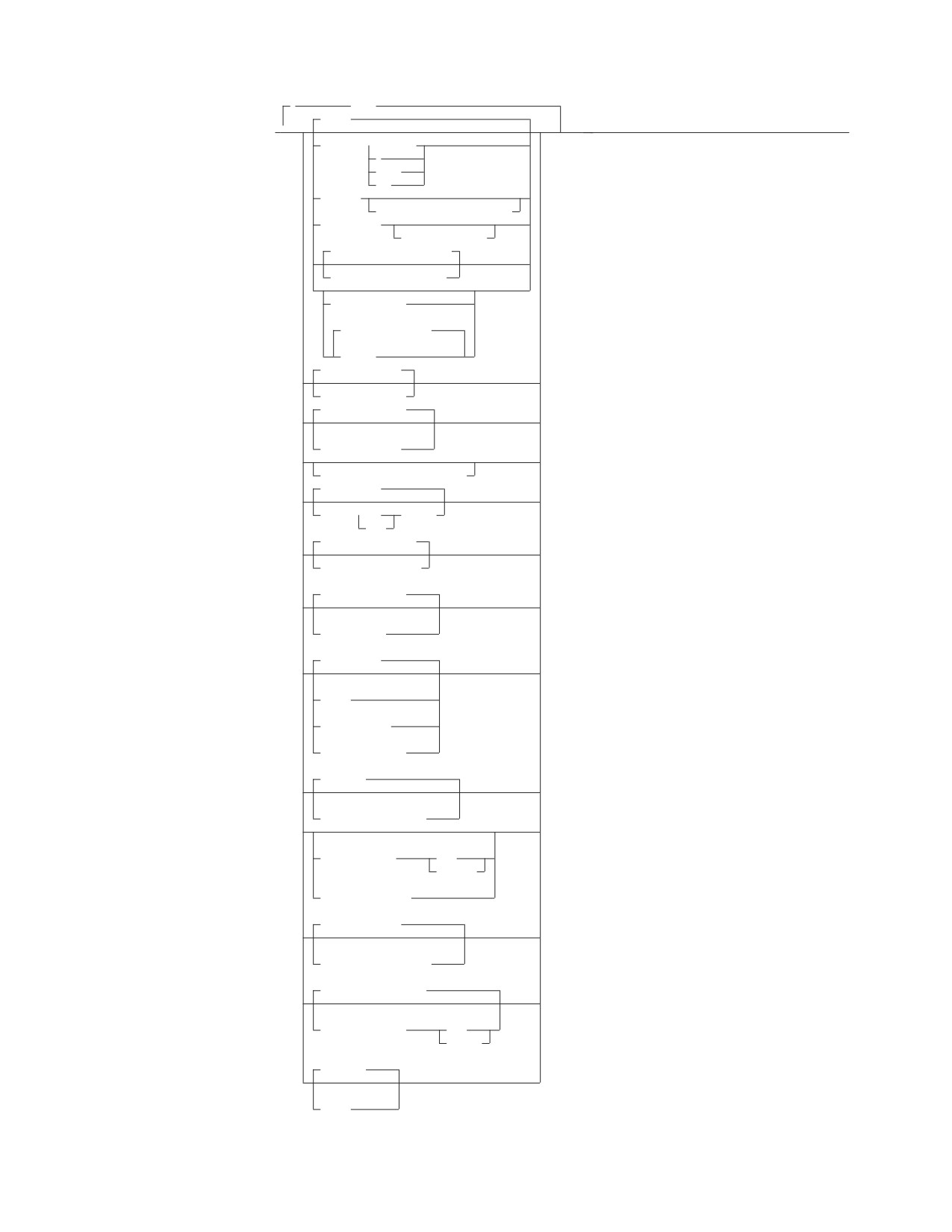
►► CREATE PROCEDURE procedure-name
(
)
►
AUTHID authid
parameters
208
SQL Reference
CREATE PROCEDURE
,
(1)
FENCED
(8)
▼
►
►◄
LANGUAGE ASSEMBLE
C
COBOL
PLI
EXTERNAL
NAME external-program-name
SERVER GROUP
server-group-name
DEFAULT SERVER GROUP YES
DEFAULT SERVER GROUP NO
PARAMETER STYLE
(3)
GENERAL WITH NULLS
(2)
GENERAL
STAY RESIDENT NO
STAY RESIDENT YES
PROGRAM TYPE MAIN
(4)
PROGRAM TYPE SUB
RUN OPTIONS run-time-options
RESULT SET 0
RESULT SET
integer
SETS
COMMIT ON RETURN NO
COMMIT ON RETURN YES
(5)
NOT DETERMINISTIC
(6)
DETERMINISTIC
(7)
CONTAINS SQL
(7)
NO SQL
(7)
READS SQL DATA
(7)
MODIFIES SQL DATA
(7)
NO COLLID
(7)
COLLID collection-id
(7)
WLM ENVIRONMENT
name
(name,*)
(7)
NO WLM ENVIRONMENT
(7)
ASUTIME NO LIMIT
(7)
ASUTIME LIMIT integer
(7)
EXTERNAL SECURITY DB2
(7)
EXTERNAL SECURITY
USER
DEFINER
(7)
NO DBINFO
(7)
DBINFO
Chapter 6. Statements
209
CREATE PROCEDURE
Notes:
1
This parameter is included for compatibility with the DB2 family. If specified,
it is ignored.
2
As an alternative to GENERAL, SIMPLE CALL may be used. This is for
compatibility within the DB2 family.
3
As an alternative to GENERAL WITH NULLS, SIMPLE CALL WITH NULLS
may be used. This is for compatibility within the DB2 family.
4
Currently, DB2 Server for VSE & VM supports stored procedures written as
main programs only.
5
VARIANT may be specified as an alternative to NOT DETERMINISTIC. This
is for compatibility within the DB2 family.
6
NOT VARIANT may be specified as an alternative to DETERMINISTIC. This
is for compatibility within the DB2 family.
7
This parameter is included for compatibility with the DB2 family. If specified,
it is ignored.
8
One or more clauses may be specified, however each clause may be specified
at most once.
Description
Only the parameters that are meaningful to DB2 Server for VSE & VM are
described.
procedure-name
Names the stored procedure. For DB2 Server for VSE & VM, the name must be
an ordinary identifier of 18 characters or less. The name must not identify a
stored procedure that already exists on the server. In addition, the name cannot
be ’AUTHID’ or ’ACTION’.
authid
The authorization ID for the stored procedure. authid must be an ordinary
identifier of 8 characters or less. If specified, then the stored procedure being
defined will be accessible only by authid. Note that authid cannot be ’AUTHID’
or ’ACTION’.
LANGUAGE
Specifies the programming language used to create the stored procedure. All
stored procedure programs must be designed to run in the IBM Language
Environment.
ASSEMBLE
Specifies that the stored procedure is written in Assembler.
C
Specifies that the stored procedure is written in C.
COBOL
Specifies that the stored procedure is written in COBOL.
PLI
Specifies that the stored procedure is written in PLI.
Note that the LANGUAGE clause must be specified on the CREATE
PROCEDURE statement.
EXTERNAL NAME external-program-name
Identifies the load module or phase associated with the stored procedure. The
load module or phase does not need to exist when the CREATE PROCEDURE
210
SQL Reference
CREATE PROCEDURE
statement is issued. However, when a CALL for the stored procedure is issued,
the load module must exist and be accessible to the stored procedure server.
If external-program-name is not specified, the name of the load module or phase
is assumed to be the same as the name of the stored procedure. In this case,
the name of the stored procedure must be 8 characters or less. Note that the
EXTERNAL clause must be specified on the CREATE PROCEDURE statement.
SERVER GROUP server-group-name
Identifies the name of the group of servers to be used to run this stored
procedure. Server-group-name must be an ordinary identifier of 18 characters
or less, and must be defined in SYSTEM.SYSPSERVERS.
If SERVER GROUP is specified without server-group-name, the stored procedure
must be able to run in the default server group. At least one server must exist
in the specified group. Note that the SERVER GROUP clause must be specified
on the CREATE PROCEDURE statement.
DEFAULT SERVER GROUP
Specifies whether the stored procedure can run in the default server group.
YES The stored procedure can run in the default server group. This is the
default.
NO The stored procedure cannot run in the default server group. If NO is
specified, a server-group-name must be provided on the SERVER
GROUP clause.
PARAMETER STYLE
Identifies the linkage convention used to pass parameters to the stored
procedure. All of the linkage conventions provide arguments to the stored
procedure containing the parameters specified on the SQL CALL statement. See
the DB2 Server for VSE & VM Database Administration manual for more
information. The following parameter styles options are valid for DB2 Server
for VSE & VM:
GENERAL
If the GENERAL linkage convention is used:
v the SQL CALL statement must provide a parameter for each
parameter expected by the stored procedure
v input parameters cannot be null
v nulls can be passed for output parameters only
v the stored procedure cannot return nulls for output parameters
Note that DB2 Server for VSE & VM does not support the parameter
style DB2SQL.
GENERAL WITH NULLS
If the GENERAL WITH NULLS linkage convention is used:
v the SQL CALL statement must provide a parameter for each
parameter expected by the stored procedure. When the database
manager invokes the stored procedure, it sends it the parameters
specified on the SQL CALL statement, as well as an array of
indicator variables (with one indicator variable for each parameter).
The stored procedure must contain a declaration for this array.
v input parameters can be null. This is achieved through the use of
indicator variables, or by specifying the keyword null.
v the stored procedure can return nulls for output parameters, by
using indicator variables.
Chapter 6. Statements
211
CREATE PROCEDURE
STAY RESIDENT
Specifies whether the stored procedure load module or phase remains loaded
in memory after the stored procedure ends. Possible values are:
NO The load module or phase is deleted from memory after the stored
procedure ends. This is the default.
YES The load module or phase remains loaded in memory after the stored
procedure ends.
PROGRAM TYPE
Specifies whether the stored procedure runs as a MAIN routine or as a SUB
routine. Currently, DB2 Server for VSE & VM supports stored procedures
written as MAIN routines only.
RUN OPTIONS
Specifies the Language Environment run-time options to be passed to the
stored procedure. The options must be specified as a character string up to 254
bytes and must be enclosed in single quotation marks. If this option is not
specified, or an empty string is passed, then DB2 Server for VSE & VM passes
no run-time options to the Language Environment, and Language Environment
uses its installation defaults. Note that DB2 Server for VSE & VM does not do
any checking of the options provided. For a complete description of Language
Environment run-time options, see Language Environment for MVS & VM
Programming Reference.
RESULT SETS or RESULT SET
Specifies the maximum number of query result sets that can be returned by
this stored procedure. The default is RESULT SETS 0, indicating that there are
no result sets. The largest value that can be specified is 32767.
COMMIT ON RETURN
Indicates whether the transaction should be committed immediately upon
return from the stored procedure.
NO The database manager should not issue COMMIT when the stored
procedure returns. This is the default.
YES The database manager should issue COMMIT when the stored
procedure returns when the following statements are true:
v The SQLCODE returned by the CALL statement is not negative
v The stored procedure is not in a must abort state
The COMMIT operation includes the work performed by the calling
application as well as the stored procedure. Any cursors that are open
when the COMMIT occurs will be closed during COMMIT processing.
212
SQL Reference
CREATE PROCEDURE
Parameters
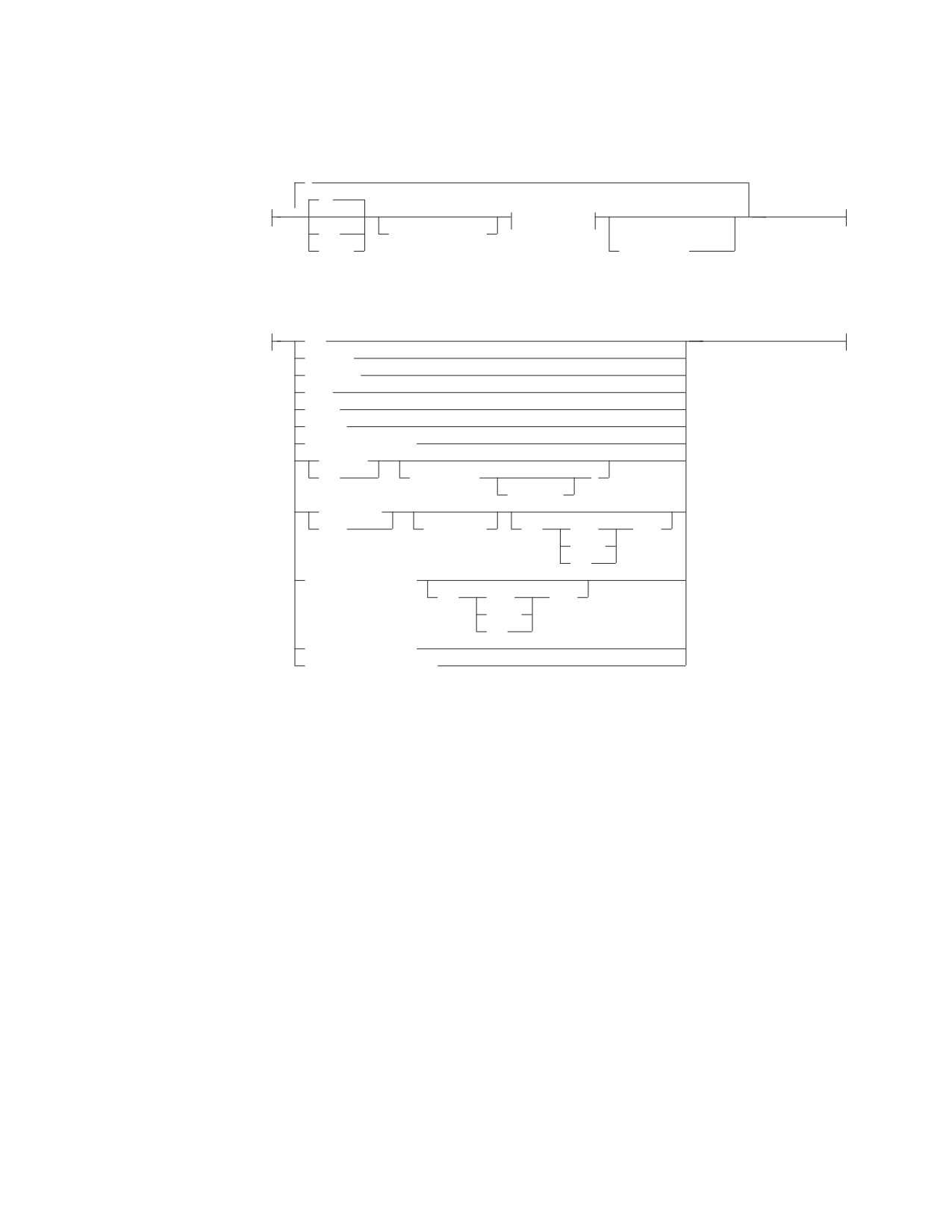
parameters:
,
IN
▼
data-type
OUT
parameter-name
(1)
INOUT
AS LOCATOR
data-type:
INT
INTEGER
SMALLINT
REAL
FLOAT
DOUBLE
DOUBLE PRECISION
DECIMAL
DEC
( integer
)
,integer
CHARACTER
CHAR
(integer)
FOR
SBCS
DATA
MIXED
BIT
VARCHAR(integer)
FOR
SBCS
DATA
MIXED
BIT
GRAPHIC(integer)
VARGRAPHIC(integer)
Notes:
1
This parameter is included for compatibility with the DB2
family. If specified, it is
ignored.
The fields of the parameters syntax diagram are:
IN
The parameter is an input-only parameter to the stored procedure.
OUT The parameter is an output-only parameter to the stored procedure.
INOUT
The parameter is both an input and output parameter to the stored
procedure.
parameter-name
a one- to eight-character ordinary identifier defining the name of the
parameter for use in messages. If you do not specify a name, the
position of the parameter in the parameter list is used in the DB2
Server for VSE & VM messages.
INTEGER or INT
Large integer parameter
SMALLINT
Small integer parameter
REAL Single precision floating point
Chapter 6. Statements
213
CREATE PROCEDURE
FLOAT, DOUBLE, or DOUBLE PRECISION
Double precision floating point
DECIMAL or DEC
Decimal parameter. The (integer,integer) optional arguments are the
precision and scale respectively. The precision is the total number of
digits from 1 to 31. The scale is the number of digits to the right of the
decimal point, from 0 to the precision.
CHARACTER or CHAR
Fixed length character string parameter. The (integer) optional
argument specifies the length of the string, from 1 to 254. If you do not
specify (integer), the length is set to 1.
VARCHAR
Varying length character string parameter. The maximum length is
specified by the argument (integer) and varies from 1 to 32767. If the
length is greater than 254 then it is a long string column.
GRAPHIC
Fixed-length graphic string parameter. The (integer) optional argument
specifies the length of the string, from 1 to 127. If you do not specify
the (integer) argument, the length is set to 1.
VARGRAPHIC
Varying-length graphic character string parameter. The maximum
length is specified by the argument (integer) and varies from 1 to 16383
characters.
FOR subtype DATA
Specifies a subtype for a character string parameter. The subtype can
be one of the following:
SBCS Specifies that the parameter is a single-byte character string.
MIXED
Specifies that the parameter holds mixed single-byte and
double-byte data. This option is valid only when the DBCS
value is set to YES.
BIT Specifies that the parameter holds bit data. Character
conversion does not occur for data that is defined FOR BIT
DATA
As an example, in the following parameters string:
PARM1 CHAR(10) IN, PARM2 INTEGER INOUT, PARM3 INT OUT
PARM1, PARM2, and PARM3 are identifiers for error messages. You can
specify any name you want. The stored procedure associated with the
PARMLIST string would expect three parameters:
v An input character parameter of length 10
v An integer parameter for both input and output
v An integer parameter for output only
Notes
1.
If a parameter represents a DB2 Server for VSE & VM DATE, TIME, or
TIMESTAMP value, it must be defined as CHARACTER or VARCHAR in the
PARMLIST.
214
SQL Reference
CREATE PROCEDURE
2. Refer to the appendices of the DB2 Server for VSE & VM Application
Programming manual for the programming language declarations that
correspond to the datatypes in the PARMLIST.
Examples
Example 1
CREATE PROCEDURE MYPROC (IN INT, IN PARM2 CHAR(10), OUT CHAR(20))
EXTERNAL NAME MYMOD,
LANGUAGE COBOL,
PARAMETER STYLE GENERAL
CREATE PROCEDURE MYPROC2 (IN INT, IN CHAR(10), OUT CHAR(20))
EXTERNAL NAME MYMOD2,
LANGUAGE COBOL,
PARAMETER STYLE GENERAL WITH NULLS,
RUN OPTIONS ’HEAP(,,ANY),BELOW(4K,,),ALL31(ON),STACK,(,,ANY,)’
Chapter 6. Statements
215
CREATE PSERVER
CREATE PSERVER
The CREATE PSERVER statement inserts the definition of a stored procedure
server into SYSTEM.SYSPSERVERS and puts the new definition into the cache.
Invocation
This statement can be issued from an application program or interactively. It is an
executable statement that can be dynamically prepared.
Authorization
The issuer of the CREATE PSERVER statement must have DBA authority.
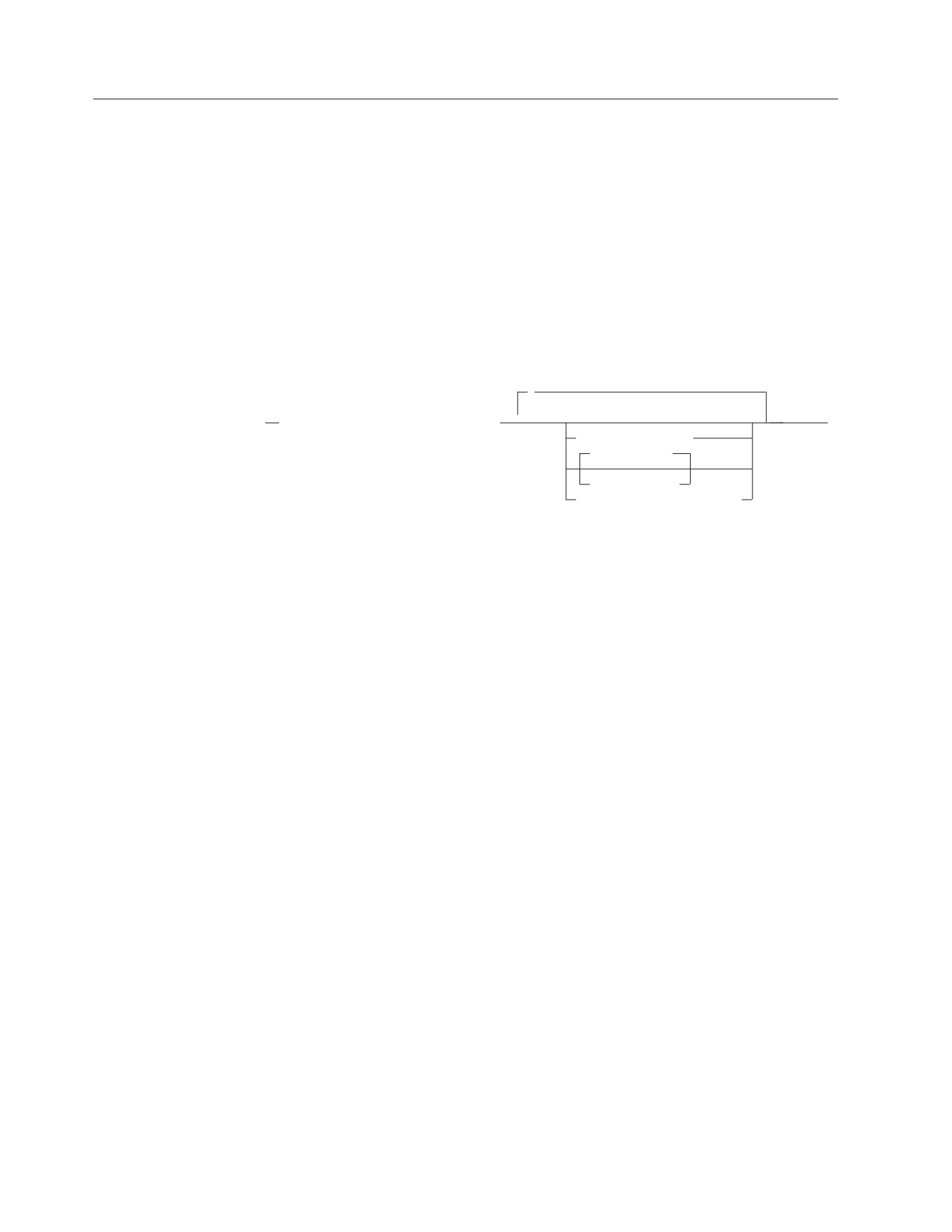
Syntax
,
(1)
►►
CREATE PSERVER procedure-server
▼
►◄
GROUP group-name
AUTOSTART NO
AUTOSTART YES
DESCRIPTION description
Notes:
1
One or more clauses may be specified, however each clause may be specified at most
once.
Description
procedure-server
The name of the stored procedure server. The name must be an ordinary
identifier of 8 characters or less. The name must not identify a stored
procedure server that already exists on the server. In addition, the name cannot
be one of the following:
GROUP
IMPLICIT
NOIMPLICIT
NORMAL
QUICK
GROUP
The name of the group that this stored procedure server is in. Using stored
procedure groups gives the database administrator more flexibility in defining
the system. The use of stored procedure groups is optional; if the GROUP
clause is not specified, the stored procedure server becomes part of the default
group. If the GROUP clause is specified, the group-name must be an ordinary
identifier of 1 to 18 characters.
AUTOSTART
Determines whether the database manager will issue a START PSERVER
command for this stored procedure server when the database is started.
NO The stored procedure server will not be started when the database is
initialized. This is the default.
YES The stored procedure server will be started when the database is
initialized.
216
SQL Reference
CREATE PSERVER
DESCRIPTION
This field provides the database administrator with a place to provide
information about this stored procedure server, such as virtual storage
requirements, other servers in the group, and so on. Description can be up to
254 characters and must be enclosed in single quotation marks. The default is
NULL.
Examples
Example 1
CREATE PSERVER SRV1 GROUP GRP1, AUTOSTART YES
CREATE PSERVER SRV2 GROUP GRP2, AUTOSTART YES
Chapter 6. Statements
217

CREATE SYNONYM
CREATE SYNONYM
The CREATE SYNONYM statement defines an alternative name for a table or
view. This lets you refer to a table or view owned by another user without having
to enter the qualified name. You may also define a synonym for a table or view
that you own.
Invocation
This statement can be embedded in an application program or issued interactively.
It is an executable statement that can be dynamically prepared.
Authorization
None required.
Syntax
►► CREATE SYNONYM synonym FOR
qualified_table_name
►◄
qualified_view_name
Description
synonym
Provides an alternative name to use when referring to the table or view. The
synonym must be an SQL identifier that is not identical to one of your
synonyms or the unqualified name of a table or view that you own.
FOR
Identifies the qualified name of the table or view for which the synonym is to
be created. The qualifier is required, even when you are creating a synonym
for one of your own tables or views. You can create a synonym for a table or
view that does not as yet exist in the system catalog.
The synonym is defined only for your authorization ID, that is, the
authorization ID of the statement. If many users want to have the same
synonym, each user must enter a CREATE SYNONYM statement.
qualified_table_name
qualified_view_name
Identifies the object to which the synonym will apply. The name consists of
two parts and denotes a table or view already described or which will be
described in the catalog.
Notes
A synonym cannot be used with the table or view it represents in the same
statement.
Examples
Define an alternative name, PARTS, for TRUDEAU.INVENTORY.
CREATE SYNONYM PARTS
FOR TRUDEAU.INVENTORY
218
SQL Reference
CREATE TABLE
CREATE TABLE
The CREATE TABLE statement defines a table. You provide the name of the table
and the names and attributes of its columns. Moreover, you may specify the
dbspace where the table is to be created.
Invocation
This statement can be embedded in an application program or issued interactively.
It is an executable statement that can be dynamically prepared.
Authorization
The privileges held by the authorization ID of the statement must include at least
one of the following:
v DBA authority
v RESOURCE authority
v A private dbspace that was acquired for you.
If the table name is qualified by an identifier other than your authorization ID, you
must have DBA authority.
See the description of the IN clause for further information on authorization.
Chapter 6. Statements
219
CREATE TABLE
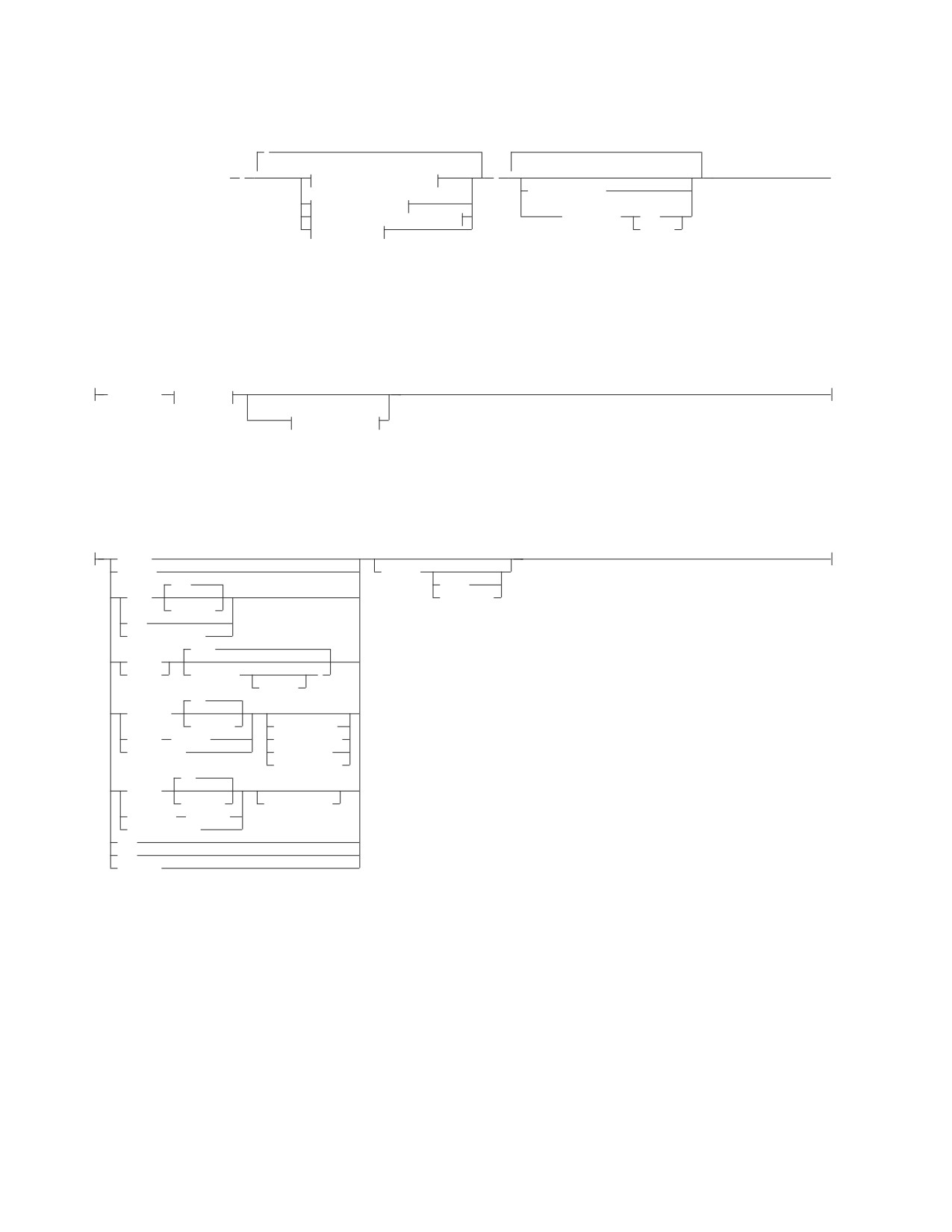
Syntax
,
(1)
►► CREATE TABLE table_name
(
▼
column_definition_block
)
▼
►◄
(1)
IN dbspace_name
primary_key_block
(2)
referential_constraint_block
DATA CAPTURE
NONE
unique_block
CHANGES
Notes:
1
There can be up to 255 columns in a table.
2
The same clause must not be specified more than once.
column_definition_block:
column_name
data_type
(1)
fieldproc_block
Notes:
1
These clauses may be specified in any order.
data_type:
INTeger
SMALLINT
NOT NULL
(53)
UNIQUE
FLOAT
PRIMARY KEY
(integer)
REAL
DOUBLE PRECISION
(5,0)
DECimal
NUMERIC
( integer
)
,integer
(1)
CHARacter
(integer)
FOR SBCS DATA
VARCHAR
(integer
FOR MIXED DATA
LONG VARCHAR
FOR BIT DATA
CCSID integer
(1)
GRAPHIC
(integer)
CCSID integer
VARGRAPHIC
(integer)
LONG VARGRAPHIC
DATE
TIME
TIMESTAMP
220
SQL Reference
CREATE TABLE
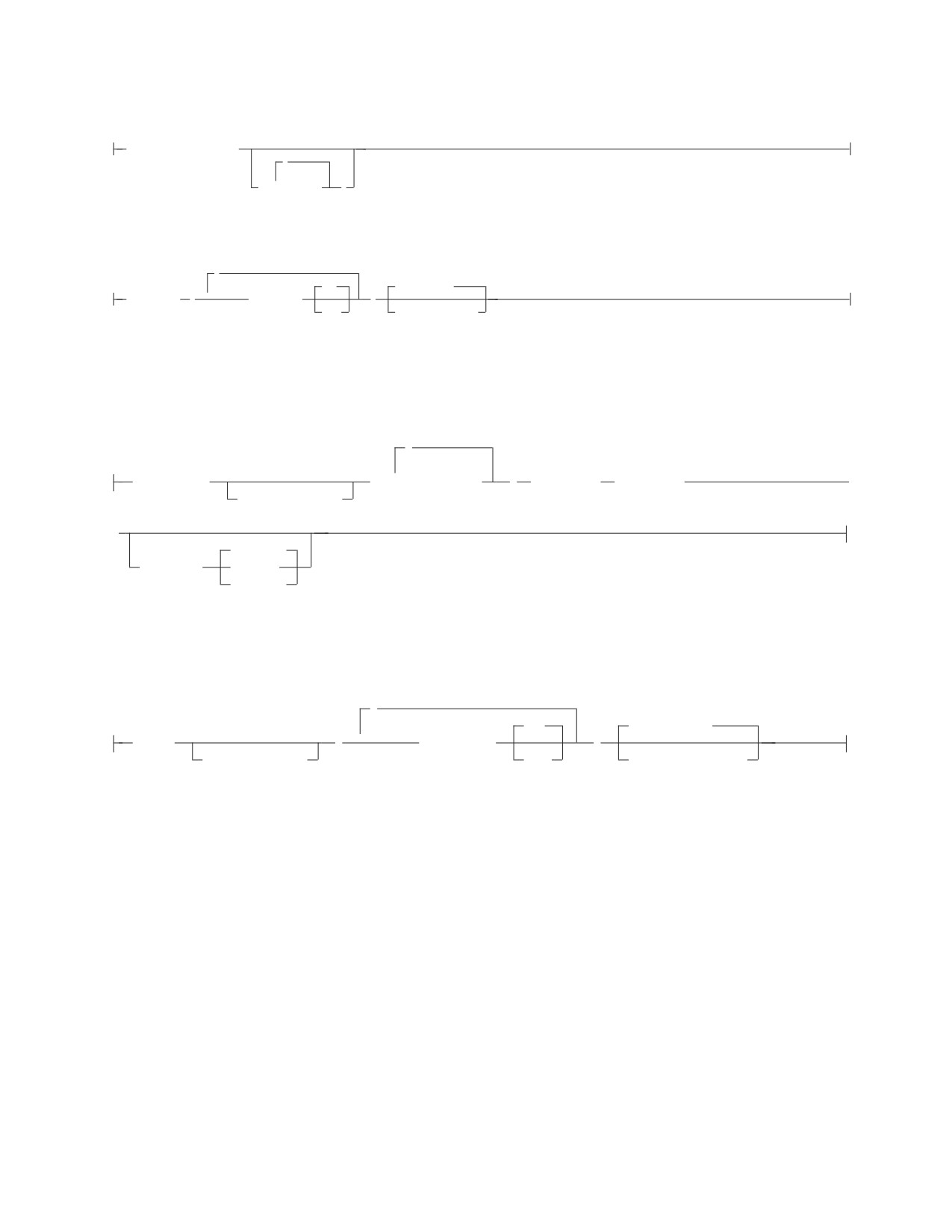
fieldproc_block:
FIELDPROC program_name
,
(
▼
constant
)
primary-key-block:
,
(1)
ASC
PCTFREE = 10
PRIMARY KEY
(
▼
column_name
)
DESC
PCTFREE = integer
Notes:
1
A PRIMARY KEY can have up to 16
columns.
referential-constraint-block:
,
▼
FOREIGN KEY
(
column_name
)
REFERENCES
table_name
►
constraint_name
►
RESTRICT
ON DELETE
CASCADE
SET NULL
unique-block:
,
(1)
ASC
PCTFREE = 10
UNIQUE
(
▼
column_name
)
constraint_name
DESC
PCTFREE = integer
Notes:
1
There can be up to 16 columns on a unique constraint.
Description
table_name
Provides a name for the table. The name, including the implicit or explicit
qualifier, must not identify a table, view, or synonym that already exists at the
application server.
If the table name is qualified, the qualifier is the owner of the table. Otherwise,
the authorization ID of the statement is the owner of the table. The owner has
all privileges on the table. The privileges can be granted by the owner and
cannot be revoked from the owner.
If user SCOTT preprocesses a program that creates a table named SUMMARY,
and user JONES runs the program, the owner of the SUMMARY table is
Chapter 6. Statements
221
CREATE TABLE
SCOTT. Note that JONES must be a DBA to run the program. Any program
preprocessed by SCOTT can refer to the SUMMARY table simply by the name
SUMMARY. When another authorization ID preprocesses a program that refers
to the SUMMARY table, the program must use SCOTT as a prefix to the
table_name, SCOTT.SUMMARY.
(column_name,...)
Names a column of the table. Do not qualify column_name and do not use the
same name for more than one column of the table.
data_type
Specifies one of the types in the following list.
INTeger
For a large integer. The value may range from -2147483648 to 2147483647.
SMALLINT
For a small integer. The value may range from -32 768 to 32 767.
FLOAT(integer)
FLOAT
For a floating-point number. If the integer is between 1 and 21 inclusive,
the format is that of single precision floating-point. If the integer is
between 22 and 53 inclusive, the format is that of double precision
floating-point. If the integer is omitted from the specification, double
precision floating-point is assumed.
In place of FLOAT(integer) you may specify either:
REAL
For single precision floating-point
DOUBLE PRECISION
For double precision floating-point
DECIMAL(precision-integer,scale-integer)
For a packed decimal number. The first integer is the precision of the
number; that is, the total number of digits; it can range from 1 to 31. The
second integer is the scale of the number; that is, the number of digits to
the right of the decimal point; the scale of the number can range from 0 to
the precision of the number.
DECIMAL(p) can be used for DECIMAL(p,0), and DECIMAL can be used
for DECIMAL(5,0).
NUMERIC
NUMERIC is a synonym for DECIMAL.
CHARacter(integer)
CHARacter
For a fixed-length character string of length integer, which can range from 1
to 254 bytes. If the length specification is omitted, a length of 1 character is
assumed.
VARCHAR(integer)
For a varying-length character string of maximum length integer, which can
range from 1 to 32 767 bytes. An integer greater than 254 defines a long
string column.
LONG VARCHAR
For a varying-length character string with a maximum length of 32 767
bytes.
A LONG VARCHAR column is always a long string column (even if its
actual length is 254 or less).
222
SQL Reference
CREATE TABLE
GRAPHIC(integer)
For a fixed-length graphic string of length integer, which can range from 1
to 127 double-byte characters. If the length specification is omitted, a
length of 1 character is assumed.
VARGRAPHIC(integer)
For a varying-length graphic string of maximum length integer, which must
range from 1 to 16 383 double-byte characters. An integer greater than 127
double-byte characters defines a long string column.
LONG VARGRAPHIC
For a varying-length string of double-byte characters, of maximum length
16 383 bytes. A LONG VARGRAPHIC column is always a long string
column (even if its actual length is 127 double-byte characters or less).
DATE
For a date.
TIME
For a time.
TIMESTAMP
For a timestamp.
column clauses (can be specified in any order)
NOT NULL
Prevents the column from containing null values.
NOT NULL PRIMARY KEY
Establishes a primary key column. (See “PRIMARY KEY” in the
primary-key-block section for a definition of a primary key.)
NOT NULL UNIQUE
Establishes a unique index on the column. (See “UNIQUE” in the
“unique-block” section for a definition of a unique index.)
FOR SBCS DATA
Indicates the column will contain single-byte characters.
FOR MIXED DATA
Indicates the column might contain values that have a mixture of
single-byte or double-byte characters.
FOR BIT DATA
Indicates that the values of a character column are not associated with a
coded character set and therefore are never converted. For example, the bit
pattern of the data should not be modified when moving table data
between ASCII and EBCDIC environments. The database manager sets the
SUBTYPE column in the SYSCOLUMNS catalog table to 'B' when this
option is specified.
CCSID integer
Uniquely identifies an encoding scheme and one or more pairs of character
sets and code pages, for either character or graphic data.
Depending on the specification of subtypes and CCSIDs, the database
manager assigns different values:
v If either SBCS or mixed data is specified, then the database default
CCSID for the subtype is assigned.
v If a CCSID is specified, then the subtype that matches the CCSID is
assigned.
Chapter 6. Statements
223
CREATE TABLE
v If neither SBCS nor mixed data is specified and a CCSID is also not
specified, then first the default subtype is assigned; then the database
default CCSID for that subtype is assigned.
v If graphic data is specified without a CCSID, then the database default
CCSID for graphic data is assigned.
The choice of CCSID, including allowing it to default, may significantly
affect performance. For performance implications related to CCSID, consult
the DB2 Server for VSE & VM Performance Tuning Handbook manual.
fieldproc-block
FIELDPROC program_name
Names a field procedure for the column. Use a field procedure only
with a short string column. The column has no field procedure if you
omit FIELDPROC.
constant
Is a parameter of the field procedure. A parameter list is optional. The
number of parameters and the data type of each are determined by the
field procedure. The maximum length of the parameter list is 254
bytes, including commas, but excluding insignificant blanks and the
delimiting parentheses after blank compression occurs.
primary-key-block
PRIMARY KEY
Is a set of column values in the table that enforces a unique constraint.
Only one primary key is allowed in a parent table. Primary key values
must be unique and must be defined as NOT NULL.
Defining a primary key on a table sets up the table to be referenced by
another table’s foreign key to establish a referential constraint.
column_name
Identifies the column or columns that comprise the primary key. Each
column_name must be an unqualified name that identifies a column of
the table, and that column must be defined as NOT NULL. No column
in a primary key can contain a long string. The same column cannot be
specified more than once.
ASC
Creates the primary key such that the values from this column are
arranged in ascending order. This is the default.
DESC
Creates the primary key such that the values from this column are
arranged in descending order.
PCTFREE
Is the percentage of space in each index page reserved for later
insertions and updates of the primary key. The integer can range from
0 to 99, but for practical purposes should not exceed 50. Increasing
PCTFREE causes the index to take up more space, but reduces the time
required to insert or update primary key rows of the indexed table.
referential-constraint-block
FOREIGN KEY
Defines a foreign key which consists of one or more columns in a
dependent table that together must take on a value that exists in the
224
SQL Reference
CREATE TABLE
primary key of the related parent table. The columns in the dependent
table may contain nulls. If any of the columns contain a null value, the
foreign key is considered null.
constraint_name
Provides a name for the referential constraint. You cannot use a
constraint_name more than once in the same table. Although the
database manager generates a constraint_name if you do not specify
one, you should specify your own constraint_name to make it easier for
you to drop, activate, and deactivate the foreign key.
column_name
Identifies the column or columns that comprise the foreign key. Each
column_name must be an unqualified name that identifies a column of
the table. The data type and length of foreign key columns must match
the data type and length of the primary key columns. Only the null
attribute of a foreign key column may be different. The same column
cannot be specified more than once.
REFERENCES table_name
Specifies the name of the parent table involved in the referential
constraint. The table_name cannot identify the table that is being
created. The identified table must already exist and cannot be the
system catalog table.
ON DELETE
Defines the delete rule to be followed when a row is deleted from the
parent table in a relationship.
RESTRICT
Prevents deletion of a parent row until all the dependent rows
have been deleted. RESTRICT is the default value.
CASCADE
Causes all dependent rows to be deleted also.
SET NULL
Sets to null all columns of the foreign keys in each dependent row
that can contain nulls. At least one column of the foreign key in
the dependent table must be able to contain nulls.
The following restriction for ON DELETE is checked when a table is
created.
v If a table has more than one referential constraint referencing the
same parent, all the delete rules on those constraints must be the
same and must not be SET NULL.
v If a table is delete-connected to the same parent through multiple
paths, all of the delete rules on a path, except for the last one, must
be CASCADE. The last constraint on all paths must be the same, and
must not be SET NULL.
unique-block
UNIQUE
Adds a unique index for the column or columns specified. If there are
duplicates in the values of the columns, then a unique constraint is not
added.
constraint_name
Provides a name for the unique constraint. You cannot use the same
Chapter 6. Statements
225
CREATE TABLE
constraint_name more than once in the same table. Although the
database manager generates a constraint_name if you do not specify
one, you should specify your own constraint_name to make it easier
for you to drop, activate, and deactivate the unique constraint.
column_name
Identifies the column or columns that comprise the unique key. Each
column_name must be an unqualified name that identifies a column of
the table, and that column must be defined as NOT NULL. No column
in a unique constraint can be nullable. You cannot specify the same
column more than once. These columns should not be the same as that
of a primary key in the same table.
ASC
Creates the unique key such that the values from this column are
arranged in ascending order. This is the default.
DESC
Creates the unique key such that the values from this column are
arranged in descending order.
PCTFREE
Is the percentage of space in each index page reserved for later
insertions and updates of unique keys. The integer may range from 0
to 99, but for practical purposes should not exceed 50. Increasing
PCTFREE causes the index to take up more space, but reduces the time
required to insert or update unique keys.
IN dbspace_name
The name of the dbspace into which the table is to be placed. The dbspace
must exist at the application server. The default qualifier portion of
dbspace_name is the authorization ID of the statement. If dbspace_name is
omitted, the table will be created in one of the owner’s private dbspaces (if
the owner does not have any private dbspace, an error condition will
result).
A newly created table is placed in one of the existing dbspaces of the
database according to the following rules:
1. Specifying a dbspace_name in the CREATE TABLE statement puts the
table into the named dbspace. The owner of the dbspace must be either
the user who preprocessed the current program, or PUBLIC. If you
have DBA authority, you can create a table in a private dbspace of any
user by qualifying the dbspace_name with its owner’s user ID, as
follows:
CREATE TABLE ... IN SCOTT.DSP3
2. Not specifying a dbspace_name in the CREATE TABLE statement puts
the table into any private dbspace owned by the authorization ID who
preprocessed the program. Consider the following case:
a. The person who preprocessed the program has DBA authority.
b. No dbspace is specified.
c. The table name is qualified with an authorization_name.
The database manager places the table into any private dbspace owned
by the specified authorization ID. If there is no such dbspace, an error
condition results.
3. If the dbspace_name is not qualified, the database manager will not place
the table into a nonrecoverable dbspace by default. Specify the
dbspace_name to create a table in a nonrecoverable dbspace.
226
SQL Reference

CREATE TABLE
4. If both the table_name and the dbspace_name are qualified, but are not
qualified with the same authorization_name, and the authorization ID
who preprocessed the program has DBA authority, the database
manager uses both qualifiers. That is, if JIM has DBA authority, he may
create table KELLI.SUPPLIERS in JOE.SPACE1.
Table 9 summarizes where a table is placed depending on what is
specified. X represents the user ID of the person who preprocessed the
program. X is denoted as optional below because if no user ID is
specified, the creator always defaults to the user ID of the person who
preprocessed the program (X). Y represents some other user ID.
Table 9. Default table placement when user X preprocesses the program.
DBA Authority
DBSPACE
Database
Needed?
Table Creator
Table Name
Owner
DBSPACE Name
Manager Action
No
X
A
User X creates
X.A in a private
dbspace owned
by X.
Yes
Y
A
User X creates
Y.A in any private
dbspace owned
by Y.
No
X
A
X
B
User X creates
X.A in X.B1
Yes
A
Y
B
User X creates
X.A in Y.B
Yes
Y
A
B
User X creates
Y.A in Y.B1
Yes
Y
A
Z
B
User X creates
Y.A in Z.B
1
If there is no PRIVATE DBSPACE B, but there is PUBLIC DBSPACE B, the PUBLIC DBSPACE will be used.
Concatenate the desired authorization_names to both the table_name and
the dbspace_name to avoid confusion. This concatenation always
identifies both the owner of the table and where the table will be
placed.
DATA CAPTURE
Specifies if log records for this table should contain the full before image
(DATA CAPTURE CHANGES) or the partial before image (DATA
CAPTURE NONE) for UPDATE operations. If this option is not specified,
it defaults to DATA CAPTURE NONE. If DataPropagator Capture is being
used to capture changes to this table, DATA CAPTURE CHANGES must
be specified. If DataPropagator Capture is not being used to capture
updates to this table, DATA CAPTURE NONE should be specified to
reduce the amount of data logged for updates to this table.
NONE
Include the partial before image in the log records for UPDATE operations.
If DataPropagator Capture is not being used to capture updates to this
table, DATA CAPTURE NONE should be specified to reduce the amount
of data logged for updates to this table.
CHANGES
Include the full before image in the log records for UPDATE operations. If
Chapter 6. Statements
227
CREATE TABLE
DataPropagator Capture is being used to capture changes to this table,
DATA CAPTURE CHANGES must be specified.
Notes
Once a table has been created, the data types of its columns may not be changed,
and columns may not be deleted from a table. However, new columns may be
added to the table (with the ALTER TABLE statement).
Byte counts
The sum of the byte counts of the columns must not be greater than 4077. The list
that follows gives the byte counts of columns by data type for columns that do not
allow null values. For a column that allows null values the byte count is one more
than shown in the list.
Data Type
Byte Count
INTEGER
4
SMALLINT
2
FLOAT( n)
If n is from 1 to 21, the byte count is 4. If n is from
22 to 53, the byte count is 8.
DECIMAL( p, s)
(p/2 + 1), rounded down to an integer.
CHAR( n)
n
VARCHAR( n)
n+2, or 6 if n>254
LONG VARCHAR
6
DATE
4
TIME
3
TIMESTAMP
10
GRAPHIC( n)
2n
VARGRAPHIC( n)
2n+2, or 6 if n>127
LONG VARGRAPHIC
6
Dbspace use for long string columns: Actual data for a long string column is
stored in its own internal table in the dbspace. Thus, each table that contains long
string columns uses one of the available 255 tables in the dbspace.
Tables as part of a referential structure: Tables that are part of a referential
structure must be defined in DBSPACEs that are in the same type of storage pool.
That is, both parent and dependent tables in the same referential structure must be
in DBSPACEs that are in either a recoverable storage pool or a nonrecoverable
storage pool. If the tables are not in the same type of storage pool, any attempt to
define or change a referential constraint will produce an error.
Examples
Example 1
Given that you have DBA authority, create a table named ‘ROSSITER.INVENTORY’
with the following columns:
part number
integer between 1 and 9,999, must be present
description
character of length 1 to 24
quantity on hand
integer between 0 and 100,000
228
SQL Reference
CREATE TABLE
CREATE TABLE ROSSITER.INVENTORY
(PARTNO
SMALLINT
NOT NULL,
DESCRIPTION
VARCHAR(24),
QONHAND
INT)
Example 2
Given that you have DBA authority, create the SITE1_SUPPLIERS table in the
PUBLIC dbspace SPACE3 with the following columns and make KRISTEL the
owner of the table:
supplier number
integer between 1 and 99, must be present
name
character of length 15
address
character of length 1 to 35
CREATE TABLE KRISTEL.SITE1_SUPPLIERS
(SUPPNO
SMALLINT
NOT NULL,
NAME
CHAR(15),
ADDRESS
VARCHAR(15) )
IN "PUBLIC".SPACE3
Example 3
Create the EQUIPMENT table in one of your private dbspaces with the following
columns:
equipment number
integer between 0100000 and 8999999
equipment description
varying length string of up to 50 characters
location
varying length string of up to 50 characters
equipment owner
the number of the department that owns this
equipment, null if not owned by any department
Ensure there is a unique entry in the table for each piece of equipment and order
the entries in ascending order by equipment number (EQUIP_NO).
Also define a referential constraint with the table so that the equipment owner
(EQUIP_OWNER) must be a department (DEPTNO) that is present in the
DEPARTMENT table. If a department is removed from the DEPARTMENT table,
the equipment owner values for all equipment owned by that department should
become unassigned (that is, set to null). Give the constraint a name of
DEPT_EQUIP.
CREATE TABLE EQUIPMENT
(EQUIP_NO INT
NOT NULL,
EQUIP_DESC
VARCHAR(50),
LOCATION
VARCHAR(50),
EQUIP_OWNER
CHAR(3),
PRIMARY KEY(EQUIP_NO),
FOREIGN KEY DEPT_EQUIP (EQUIP_OWNER)
REFERENCES DEPARTMENT
ON DELETE SET NULL )
Example 4
On a DB2 Server for VM or DB2 Server for VSE application server with mixed data
supported and with a default character subtype (that is, CHARSUB) of mixed,
create a table named ‘MAPS’ in one of your private dbspaces. This table is
designed to be maintained from a DB2 for OS/2 application requester. The table is
to have the following columns (all values must be present):
Column
Description
Data Stored
MAP_NUMBER
map number
7 SBCS characters (to be
converted to EBCDIC)
LAST_UPD
last update
date
Chapter 6. Statements
229
CREATE TABLE
Column
Description
Data Stored
DESC
description
up to 40 ASCII mixed (to be
converted to EBCDIC)
MAP
the map
up to 4000 bytes (not to be
converted to EBCDIC)
CREATE TABLE MAPS
(MAP_NUMBER CHAR(7) FOR SBCS DATA NOT NULL,
LAST_UPD
DATE NOT NULL,
DESC
VARCHAR(40) NOT NULL,
MAP
VARCHAR(4000) FOR BIT DATA NOT NULL)
Example 5
Similar to example 4, except that the default character subtype in the system is
SBCS.
CREATE TABLE MAPS
(MAP_NUMBER CHAR(7) NOT NULL,
LAST_UPD
DATE
NOT NULL,
DESC
VARCHAR(40) FOR MIXED DATA NOT NULL,
MAP
VARCHAR(4000)
FOR BIT DATA NOT NULL)
Example 6
Similar to example 5, except that not only is the default character subtype SBCS
but the default CCSIDs for both SBCS and mixed are not those required in the
table (the table requires an SBCS CCSID of 290 and a mixed CCSID of 5026).
CREATE TABLE MAPS
(MAP_NUMBER
CHAR(7) CCSID 290
NOT NULL,
LAST_UPD
DATE NOT NULL,
DESC
VARCHAR(40) CCSID 5026
NOT NULL,
MAP
VARCHAR(4000)
FOR BIT DATA NOT NULL)
Example 7
Create a table and include the partial before image on UPDATE log records
because DataPropagator Capture is not capturing updates for this table:
CREATE TABLE SALARY1
OR
CREATE TABLE SALARY1
DATA CAPTURE NONE
Example 8
Create a table and include the full before image on UPDATE log records because
DataPropagator Capture requires this information for update log records:
CREATE TABLE SALARY2
DATA CAPTURE CHANGES
230
SQL Reference

CREATE VIEW
CREATE VIEW
The CREATE VIEW statement creates a view on one or more tables or views.
Invocation
This statement can be embedded in an application program or issued interactively.
It is an executable statement that can be dynamically prepared.
Authorization
The privileges held by the authorization ID of the statement must include at least
one of the following:
v DBA authority, or
v For each table or view identified in the subselect:
- The SELECT privilege on the view, or
- Ownership of the table or view.
If the specified view name includes a qualifier that is not the same as the
authorization ID of the statement, the privileges held by the authorization ID of
the statement must include DBA authority. If the view name is qualified by an
identifier that is not your authorization ID, you must have DBA authority.
Syntax
►► CREATE VIEW view_name
►
,
▼
(
column_name
)
► AS subselect
►◄
WITH CHECK OPTION
Description
view_name
Provides a name for the view. The name, including the implicit or explicit
qualifier, must not identify a table, view, or synonym that already exists at the
application server.
The implicit or explicit qualifier of the view_name is the owner of the view.
The owner always acquires the SELECT privilege on the view, and the
authority to drop the view. The SELECT may be granted to others only if the
owner has the authority to grant the SELECT privilege on every table or view
identified in the first FROM clause of the subselect.
If the owner has the INSERT, UPDATE, or DELETE privileges on the table or
view identified in the first FROM clause of subselect, then the owner also
acquires these privileges on the view being created. Only the owner of the
table or view identified in the first FROM clause of the subselect can grant the
privilege.
(column_name,...)
Names the columns in the view. If you specify a list of column names, it must
consist of as many names as there are columns in the result table of the
subselect. Each column_name must be unique and unqualified. If you do not
specify a list of column names, the columns of the view inherit the names of
the columns of the result table of the subselect.
Chapter 6. Statements
231
CREATE VIEW
You must specify a list of column names if the result table of the subselect has
duplicate column names or an unnamed column (a column derived from a
constant, function, or expression).
AS subselect
Defines the view. At any time, the view consists of the rows that would result
if the subselect were processed. Note that the subselect is not processed when
the view is created, which means that semantic errors (for example, specifying
"WHERE COL = '10'" when COL is a decimal column) are not detected until
the view is used. To determine whether a statement contains semantic errors,
you can enter a 'SELECT *' against the view after creating it.
subselect must not reference host variables. For an explanation of subselect, see
Chapter 5, “Queries,” on page 121.
WITH CHECK OPTION
Specifies the constraint that every row of the view must conform to the search
condition of the view. The constraint is enforced by the database manager
whenever rows of the view are inserted or updated. If the search condition is
not true for any inserted or updated row, an error is returned, and no rows are
inserted or updated.
The search condition of a view is the search condition specified in the first
WHERE clause of the subselect used to define the view.
WITH CHECK OPTION must not be specified if the view is read-only or if its
search condition includes a subquery. WITH CHECK OPTION is ignored if the
view is updateable but does not have a search condition. If WITH CHECK
OPTION is specified for an updateable view that does not allow inserts, the
constraint only applies to updates.
If WITH CHECK OPTION is omitted, the search condition of the view is not
used in the checking of any insert or update operations. The view can then be
used to insert a row that does not conform to the search condition of the view
and to update a row so that it no longer conforms to the search condition of
the view. A row that does not conform to the search condition of a view cannot
be retrieved using that view. It is also possible for this situation to exist when
WITH CHECK OPTION is specified; this can happen when the view is directly
or indirectly dependent on a view that was defined without the constraint.
The WITH CHECK OPTION constraint on view V is inherited by any
updateable view that is directly or indirectly dependent on V. Thus, if an
updateable view is defined on V, the constraint on V also applies to that view,
regardless of whether WITH CHECK OPTION is specified in the definition of
that view.
Consider the following updateable views:
v V1 defined on T0
v V2 defined on V1 WITH CHECK OPTION
v V3 defined on V2
v V4 defined on V3 WITH CHECK OPTION
v V5 defined on V4
When a row of V5 or V4 is inserted or updated, it is checked against the
conjunction of the search conditions of V4 and V2. When a row of V3 or V2 is
inserted or updated, it is checked against the search condition of V2. When a
row of V1 is inserted or updated, it is not checked against any search
condition.
232
SQL Reference
CREATE VIEW
FOR UPDATE OF, ORDER BY, and UNION cannot be used in the definition of a
view.
Notes
Read-only views
A view is read-only if its definition involves any of the following:
v The first FROM clause identifies more than one table or view
v The first FROM clause identifies a read-only view
v The first SELECT clause specifies the keyword DISTINCT
v The outer subselect contains a GROUP BY clause
v The outer subselect contains a HAVING clause
v The first SELECT clause contains a column function
v It contains a subquery such that the base object of the outer subselect, and of the
subquery, is the same table
v The first FROM clause identifies a catalog table with no updatable columns.
A read-only view cannot be the object of an INSERT, UPDATE, or DELETE
statement. Note that the fact that a table contains expressions does not make it a
read only view. As long as the expressions reference a single base table, such a view
can be used to delete rows from the base table or to update columns that are
defined without expressions. Rows can also be inserted into such views if the
columns defined as expressions are nullable.
If you use a 'SELECT *' clause in the view definition and then you add a column
to an underlying table (with the ALTER TABLE statement), the new column will
not appear in the view.
There is no specific number for the limit on the number of columns in a view,
because it depends on many factors which affect this limit. A view of up to 140
columns should work in most situations.
Examples
Example 1
Create a view named MA_PROJ upon the PROJECT table that contains only those
rows with a project number (PROJNO) starting with the letters ‘MA’.
CREATE VIEW MA_PROJ
AS SELECT * FROM PROJECT
WHERE SUBSTR(PROJNO, 1, 2) = ’MA’
Example 2
Create a view as in example 1, but select only the columns for project number
(PROJNO), project name (PROJNAME) and employee in charge of the project
(RESPEMP).
CREATE VIEW MA_PROJ
AS SELECT PROJNO, PROJNAME, RESPEMP
FROM PROJECT
WHERE PROJNO LIKE ’MA____’
Example 3
Create a view as in example 2, but, in the view, call the column for the employee
in charge of the project IN_CHARGE.
Chapter 6. Statements
233
CREATE VIEW
CREATE VIEW MA_PROJ
(PROJNO, PROJNAME, IN_CHARGE)
AS SELECT PROJNO, PROJNAME, RESPEMP FROM PROJECT
WHERE SUBSTR(PROJNO, 1, 2) = ’MA’
Note: Even though you are changing only one of the column names, the names of
all three columns in the view must be listed in the parentheses that follow
MA_PROJ.
Example 4
Create a view named PRJ_LEADER that contains the first four columns (PROJNO,
PROJNAME, DEPTNO, RESPEMP) from the PROJECT table together with the last
name (LASTNAME) of the person who is responsible for the project (RESPEMP).
Obtain the name from the EMPLOYEE table by matching EMPNO in EMPLOYEE
to RESEMP in PROJECT.
CREATE VIEW PRJ_LEADER
AS SELECT PROJNO, PROJNAME, DEPTNO, RESPEMP, LASTNAME
FROM PROJECT, EMPLOYEE
WHERE RESPEMP = EMPNO
Example 5
Create a view as in example 4, but in addition to the columns PROJNO,
PROJNAME, DEPTNO, RESEMP and LASTNAME, show the total pay (SALARY +
BONUS +COMM) of the employee who is responsible. Also select only those
projects with mean staffing (PRSTAFF) greater than one.
CREATE VIEW PRJ_LEADER (PROJNO, PROJNAME, DEPTNO, RESPEMP, LASTNAME, TOTAL_PAY )
AS SELECT PROJNO, PROJNAME, DEPTNO, RESPEMP, LASTNAME, SALARY+BONUS+COMM
FROM PROJECT, EMPLOYEE
WHERE RESPEMP = EMPNO AND PRSTAFF > 1
Example 6
This example shows something that can happen when a view defined WITH
CHECK OPTION depends on a view defined without this option. In this case, a
view named VV depends on a view named WW, and WW depends on the
EMPLOYEE sample table. The view definitions are as follows:
CREATE VIEW WW
AS SELECT * FROM EMPLOYEE
WHERE SALARY < 35000.00
CREATE VIEW VV
AS SELECT * FROM WW
WHERE SALARY > 30000.00
WITH CHECK OPTION
Assume both views have a single owner, who uses VV in the following UPDATE
statement:
UPDATE VV SET SALARY = SALARY + 5000.00
The update applies to every row in which SALARY is greater than 30000 but less
than 35000. After the update, all rows that were visible to WW have salaries
greater than 35000. Such salaries conform to the search condition of VV but not to
that of WW. Even so, because WW is not defined WITH CHECK OPTION, all
these rows are updated. As a result, any row in EMPLOYEE that was visible to VV
is now invisible to WW and is therefore also invisible to VV.
234
SQL Reference