DB2 Server for VSE & VM SQL Reference (Version 7 Release 5) - page 5
ALTER PROCEDURE
specified, the SERVER GROUP clause must have been provided on the
CREATE PROCEDURE statement, or it must be provided on the
ALTER PROCEDURE statement.
PARAMETER STYLE
Identifies the linkage convention used to pass parameters to the stored
procedure. All of the linkage conventions provide arguments to the stored
procedure containing the parameters specified on the SQL CALL statement. See
the DB2 Server for VSE & VM Database Administration manual for more
information. The following parameter styles options are valid for DB2 Server
for VSE & VM:
GENERAL
If the GENERAL linkage convention is used:
v the SQL CALL statement must provide a parameter for each
parameter expected by the stored procedure
v input parameters cannot be null
v nulls can be passed for output parameters only
v the stored procedure cannot return nulls for output parameters
GENERAL WITH NULLS
If the GENERAL WITH NULLS linkage convention is used:
v the SQL CALL statement must provide a parameter for each
parameter expected by the stored procedure. When the database
manager invokes the stored procedure, it sends it the parameters
specified on the SQL CALL statement, as well as an array of
indicator variables (with one indicator variable for each parameter).
The stored procedure must contain a declaration for this array.
v input parameters can be null. This is achieved through the use of
indicator variables, or by specifying the keyword null.
v the stored procedure can return nulls for output parameters, by
using indicator variables.
STAY RESIDENT
Specifies whether the stored procedure load module or phase remains loaded
in memory after the stored procedure ends. Possible values are:
NO The load module or phase is deleted from memory after the stored
procedure ends.
YES The load module or phase remains loaded in memory after the stored
procedure ends.
PROGRAM TYPE
Specifies whether the stored procedure runs as a MAIN routine or as a SUB
routine. Currently, DB2 Server for VSE & VM supports only stored procedures
written as MAIN routines. If PROGRAM TYPE SUB is specified, DB2 Server
for VSE & VM will override it with PROGRAM TYPE MAIN.
RUN OPTIONS
Specifies the Language Environment run-time options to be passed to the
stored procedure. The options must be specified as a character string up to 254
bytes enclosed in single quotation marks. If this option is not specified, or an
empty string is passed, then DB2 Server for VSE & VM passes no run-time
options to the Language Environment, and Language Environment uses its
installation defaults. Note that DB2 Server for VSE & VM does not do any
Chapter 6. Statements
153
ALTER PROCEDURE
checking of the options provided. For a complete description of Language
Environment run-time options, see Language Environment for MVS & VM
Programming Reference.
RESULT SETS or RESULT SET
Specifies the maximum number of query result sets that can be returned by
this stored procedure. The largest value that can be specified is 32767.
COMMIT ON RETURN
Indicates whether the unit of work should be committed immediately upon
return from the stored procedure.
NO The database manager should not issue COMMIT when the stored
procedure returns.
YES The database manager should issue COMMIT when the stored
procedure returns when the following statements are true:
v The SQLCODE returned by the CALL statement is not negative
v The stored procedure is not in a must abort state
The COMMIT operation includes the work performed by the calling
application as well as the stored procedure. Any cursors that are open
when the COMMIT occurs will be closed during COMMIT processing.
Examples
Example 1
ALTER PROCEDURE MYPROC STAY RESIDENT NO
154
SQL Reference

ALTER PSERVER
ALTER PSERVER
The ALTER PSERVER statement alters the definition of an existing stored
procedure server.
The STOP PSERVER command must be issued with the NOIMPLICIT option
before the ALTER PSERVER statement will be accepted.
Invocation
This statement can be issued from an application program or interactively. It is an
executable statement that can be dynamically prepared.
Authorization
The issuer of the ALTER PSERVER statement must have DBA authority.
Syntax
,
(1)
▼
►► ALTER PSERVER
procedure-server
GROUP
►◄
group-name
AUTOSTART NO
AUTOSTART YES
DESCRIPTION description
Notes:
1
One or more clauses may be specified, however each clause may be specified at most
once.
Description
procedure-server
The name of the stored procedure server. This must be an ordinary identifier of
8 characters or less.
GROUP
The name of the group that this stored procedure server will be in after the
ALTER PSERVER statement has been executed. If a group name is specified, it
must be an ordinary identifier of 1 to 18 characters. If the GROUP clause is
specified without group-name, the stored procedure server will be put in the
default group.
group-name
The name of the stored procedure group. It cannot be any of the following:
GROUP
IMPLICIT
NOIMPLICIT
NORMAL
QUICK
AUTOSTART
Determines whether the database manager will issue a START PSERVER
command for this stored procedure server when the database is started.
NO START PSERVER will not be issued when the database is started.
YES START PSERVER will be issued when the database is started.
Chapter 6. Statements
155
ALTER PSERVER
DESCRIPTION
This field provides the database administrator with a place to provide
information about this stored procedure server, such as virtual storage
requirements, other servers in the group, and so on. Description can be up to
254 characters and must be enclosed in single quotation marks.
Examples
Example 1
ALTER PSERVER SRV1 GROUP GRP2, AUTOSTART NO
156
SQL Reference
ALTER TABLE
ALTER TABLE
The ALTER TABLE statement adds a single column to an existing table, and adds,
drops, activates, or deactivates primary and foreign keys.
Invocation
This statement can be embedded in an application program or issued interactively.
It is an executable statement that can be dynamically prepared.
Authorization
The privileges held by the authorization ID of the statement must include at least
one of the following:
v Ownership of the table
v The ALTER privilege for the table
v DBA authority.
To create, drop, activate, or deactivate a foreign key, the authorization ID of the
statement must also hold at least one of the following on the parent table:
v Ownership of the table
v The REFERENCES privilege for the table
v Administrative authority.
To drop, activate, or deactivate a primary key, the authorization ID of the
statement must also hold at least one of the following on each table that has a
foreign key referencing the primary key that is being dropped.
v Ownership of the table
v The ALTER privilege for the table
v DBA authority.
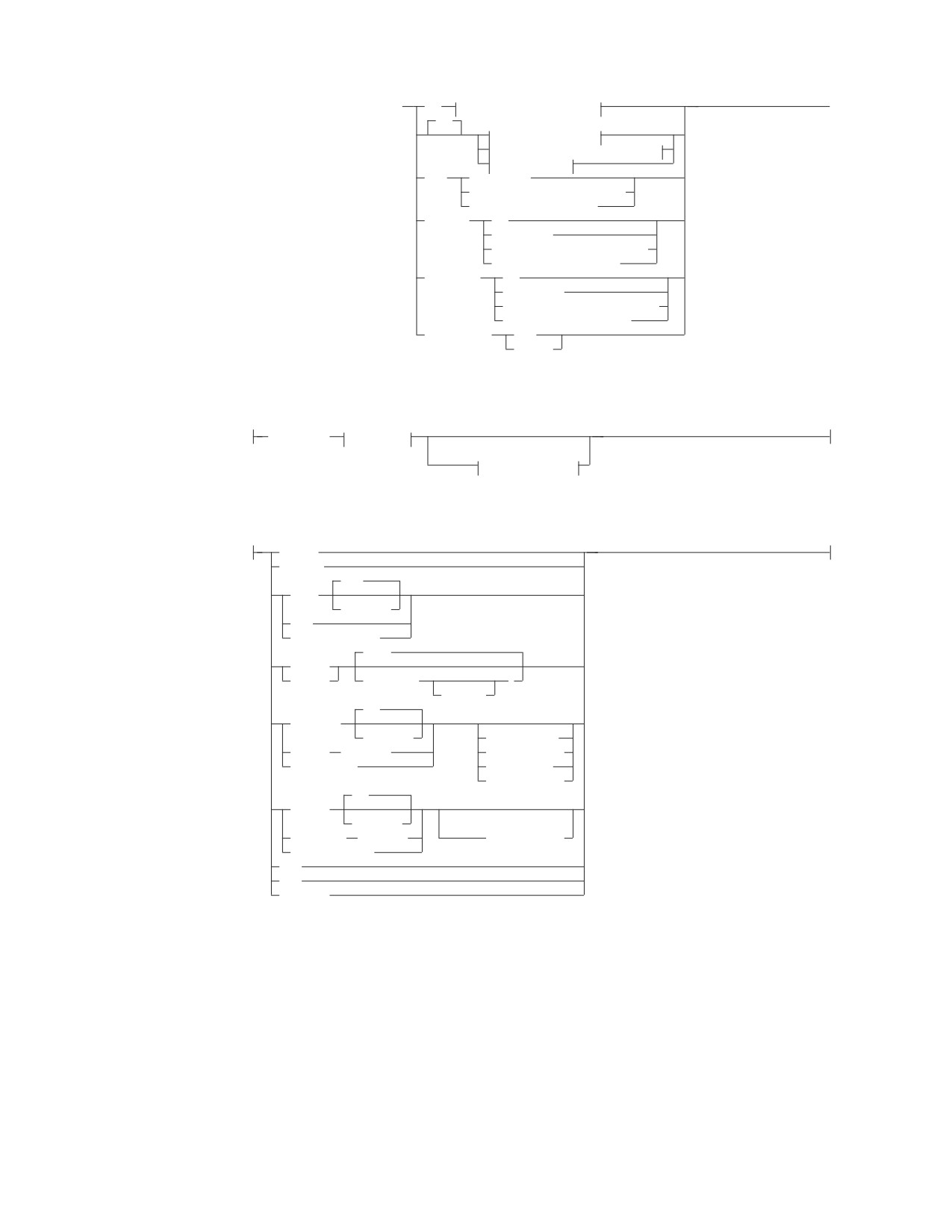
Syntax
Chapter 6. Statements
157
ALTER TABLE
►► ALTER TABLE table_name
ADD
column-definition-block
►◄
ADD
primary-key-block
referential-constraint-block
unique-block
DROP
PRIMARY KEY
FOREIGN KEY constraint_name
UNIQUE constraint_name
ACTIVATE
ALL
PRIMARY KEY
FOREIGN KEY constraint_name
UNIQUE constraint_name
DEACTIVATE
ALL
PRIMARY KEY
FOREIGN KEY constraint_name
UNIQUE constraint_name
DATA CAPTURE
NONE
CHANGES
column-definition-block:
column_name
data-type
(1)
fieldproc-block
data-type:
INTeger
SMALLINT
(53)
FLOAT
(integer)
REAL
DOUBLE PRECISION
(5,0)
DECimal
NUMERIC
( integer
)
,integer
(1)
(1)
CHARacter
(integer)
FOR SBCS DATA
VARCHAR
(integer)
FOR MIXED DATA
LONG VARCHAR
FOR BIT DATA
CCSID integer
(1)
GRAPHIC
(integer)
(1)
VARGRAPHIC
(integer)
CCSID integer
LONG VARGRAPHIC
DATE
TIME
TIMESTAMP
Notes:
1
These clauses may be specified in any order.
158
SQL Reference

ALTER TABLE
fieldproc-block:
FIELDPROC program_name
,
(
▼
constant
)
primary-key-block:
,
(1)
ASC
PCTFREE = 10
▼
PRIMARY KEY
(
column_name
)
DESC
PCTFREE = integer
Notes:
1
There can be up to 16 columns in a primary key.
referential-constraint-block:
,
FOREIGN KEY
(
▼
column_name
) REFERENCES table_name
►
constraint_name
►
RESTRICT
ON DELETE
CASCADE
SET NULL
unique-block:
,
(1)
ASC
PCTFREE = 10
UNIQUE
(
▼
column_name
)
constraint_name
DESC
PCTFREE = integer
Notes:
1
There can be up to 16 columns on a unique constraint.
Description
table_name
Identifies the table to be changed. It must be a table that exists at the
application server and must not be a view or a catalog table. If the table_name
is qualified, the qualifier is the owner of the table. Otherwise, the authorization
ID of the statement is the owner of the table.
ADD
Adds a column to the table. All column values are NULL and the column is
the last table column on the rightmost side. That is, if initially there are n
columns, the added column is column n+1. The value of n cannot be greater
than 254.
Chapter 6. Statements
159
ALTER TABLE
Adding the new column must not make the total byte count of all columns
exceed the maximum record size of approximately 4072 bytes. For more
information, see “Notes” on page 228.
column_definition_block
column_name
Names the column to be added to the table. The name cannot already be
used by an existing column of the table.
data_type
Is one of the data types in the descriptions listed under “CREATE TABLE”
on page 219.
fieldproc_block
FIELDPROC program_name
Names a field procedure for the column. A field procedure may be
used only with a short string column. If FIELDPROC is omitted, the
column has no field procedure.
constant
Is a parameter passed to the field procedure when the ALTER TABLE
statement invokes it. A parameter list is optional. The number of
parameters and the data type of each are determined by the field
procedure. The maximum length of the parameter list is 254 bytes,
including commas, but excluding insignificant blanks and excluding
the delimiting parentheses after blank compression takes place.
primary_key_block
PRIMARY KEY
Is a set of column values in the table that enforces a unique constraint.
Only one primary key is allowed in a parent table. Primary key values
must be unique and must be defined as NOT NULL.
Defining a primary key on a table sets up the table to be referenced by
another table’s foreign key to establish a referential constraint.
column_name
Identifies the column or columns that comprise the primary keys. Each
column_name must be an unqualified name that identifies a column of the
table. No column in a primary key can contain a long string. The same
column cannot be specified more than once.
ASC
Creates the primary key such that the values from this column are
arranged in ascending order. This is the default.
DESC
Creates the primary key such that the values from this column are
arranged in descending order.
PCTFREE
Is the percentage of space in each index page reserved for later insertions
and updates of primary keys. The integer may range from 0 to 99, but for
practical purposes should not exceed 50. Increasing PCTFREE causes the
index to take up more space, but reduces the time required to insert or
update primary key rows of the indexed table.
160
SQL Reference
ALTER TABLE
referential_constraint_block
FOREIGN KEY
Defines a foreign key composed of the identified columns. Consists of one
or more columns in this dependent table that together must take on a
value that exists in the primary key of the referenced parent table. The
columns in the dependent table may contain nulls. If any of the columns
contain a null value, the foreign key is considered null.
constraint_name
Provides a name for the referential constraint. A constraint_name cannot be
used more than once in the same table. Although the database manager
generates a constraint_name if one is not specified, a constraint_name
should be explicitly chosen to make it easier for a user to drop, activate,
and deactivate the foreign key.
column_name
Identifies the column or columns that comprise the foreign key. Each
column_name must be an unqualified name that identifies a column of the
table. The data type and length of foreign key columns must match the
data type and length of the primary key columns. Only the null attribute
of a foreign key column may be different. The same column cannot be
specified more than once.
REFERENCES table_name
Specifies the name of the parent table involved in the referential constraint.
The table_name cannot identify the table that is being altered.
ON DELETE
Defines the delete rule to be followed when a row is deleted from the
parent table in a relationship.
RESTRICT
Prevents deletion of a parent row until all the dependent rows have
been deleted. This is the default.
CASCADE
Causes all dependent rows to be deleted also.
SET NULL
Sets to null all columns of the foreign key values in each dependent
row that can contain nulls. At least one column of the foreign key in
the dependent table must be able to contain nulls.
The following restrictions for ON DELETE are checked when a table is
altered.
v If a table has more than one referential constraint referencing the same
parent, all the delete rules on those constraints must be the same and
must not be SET NULL.
v If a table is delete-connected to the same parent through multiple paths,
all of the delete rules on the paths, except for the last one, must be
CASCADE. The last delete rule on all paths must be the same and must
not be SET NULL.
v A referential cycle involving two or more tables must not cause a table
to be delete-connected to itself.
For additional information and examples of application restrictions see
“Definition Restrictions” on page 16.
Chapter 6. Statements
161
ALTER TABLE
unique_block
UNIQUE
Adds a unique index automatically for the column or columns
specified. If there are duplicates in the values of the columns, then a
unique constraint is not added.
constraint_name
Provides a name for the unique constraint. A constraint_name cannot be
used more than once in the same table. Although the database
manager generates a constraint_name if one is not specified, a
constraint_name should be explicitly chosen to make it easier for a user
to drop, activate, and deactivate the unique constraint.
column_name
Identifies the column or columns that comprise the unique key. Each
column_name must be an unqualified name that identifies a column of
the table. No column in a unique constraint can be nullable. No
column in a unique constraint can contain a long string. The same
column cannot be specified more than once. These columns should not
be the same as that of a primary key in the same table.
ASC
Creates the unique key such that the values from this column are
arranged in ascending order. This is the default.
DESC
Creates the unique key such that the values from this column are
arranged in descending order.
PCTFREE
Is the percentage of space in each index page reserved for later
insertions and updates of unique keys. The integer may range from 0
to 99, but for practical purposes should not exceed 50. Increasing
PCTFREE causes the index to take up more space, but reduces the time
required to insert or update unique keys.
DROP PRIMARY KEY
Drops the definition of the primary key, thereby removing all referential
constraints in which the table is a parent. Dropping a primary key causes
the foreign keys that reference the parent table to be dropped.
DROP FOREIGN KEY constraint_name
Drops the definition of the foreign key, thereby removing the named
referential constraint.
DROP UNIQUE constraint_name
Drops the unique index associated with the constraint and the information
in the system catalog tables.
ACTIVATE ALL
Causes all the referential constraints defined for a primary key to be
enforced automatically. ACTIVATE ALL is equivalent to activating the
primary key, then activating all the explicitly inactive foreign keys and
unique constraints.
ACTIVATE PRIMARY KEY
Causes the primary key to be enforced automatically. If the primary key is
already active, this clause drops and re-creates the primary key index. If
the primary key is inactive, then the primary key index is re-created first.
If any dependent foreign keys are deactivated implicitly when the primary
162
SQL Reference
ALTER TABLE
key is made inactive, those foreign keys are verified against the primary
key. If the primary key index is created successfully and the dependent
foreign key values are found in the primary key of the object table, then
the primary key and the dependent foreign keys are activated. None of the
keys are activated if an error occurs.
ACTIVATE FOREIGN KEY constraint_name
Causes the referential constraint defined by the named foreign key to be
enforced automatically. If the primary key of the parent table referenced by
this foreign key is inactive, the foreign key is not activated. If the
associated primary key is active, the foreign key values are verified against
the values in the primary key. If all values are found in the parent primary
key, the dependent foreign key is activated.
ACTIVATE UNIQUE constraint_name
Activates a unique key on an existing table.
DEACTIVATE ALL
Suspends the restrictions imposed by the referential constraints and makes
the parent and dependent tables involved in a referential constraint
unavailable to users other than the DBA and the owner of the table. All
primary and foreign keys become inactive. DEACTIVATE ALL is
equivalent to deactivating the primary key, all active foreign keys in the
table, and all unique constraints.
DEACTIVATE PRIMARY KEY
Suspends the restrictions imposed by the referential constraints and makes
the parent and dependent tables involved in a referential constraint
unavailable to users other than the DBA and the owner of the table.
Deactivating a primary key drops the primary key index from the object
table and implicitly deactivates all active dependent foreign keys.
DEACTIVATE FOREIGN KEY constraint_name
Suspends the restrictions imposed by the referential constraints and makes
the parent and dependent tables involved in a referential constraint
unavailable to users other than the DBA and the owner of the table.
DEACTIVATE UNIQUE constraint_name
Deactivates a unique key on an existing table.
DATA CAPTURE
Specifies if log records for this table should contain the full before image
(DATA CAPTURE CHANGES) or the partial before image (DATA CAPTURE
NONE) for UPDATE operations. If this option is not specified, it defaults to
DATA CAPTURE NONE. If DataPropagator Capture is being used to capture
changes to this table, DATA CAPTURE CHANGES must be specified. If
DataPropagator Capture is not being used to capture updates to this table,
DATA CAPTURE NONE should be specified to reduce the amount of data
logged for updates to this table.
NONE
Include the partial before image in log records for UPDATE operations. If
DataPropagator Capture is not being used to capture updates to this table,
DATA CAPTURE NONE should be specified to reduce the amount of data
logged for updates to this table.
CHANGES
Include the full before image in log records for UPDATE operations. If
DataPropagator Capture is being used to capture changes to this table,
DATA CAPTURE CHANGES must be specified.
Chapter 6. Statements
163
ALTER TABLE
Notes
It is not possible to:
v Use NOT NULL. All values in a new column are NULL when created.
v See an added column in any existing view of the table.
v Change the name of a column unless the table is dropped and recreated with the
new column name.
v Add a PRIMARY KEY, FOREIGN KEY, or UNIQUE constraint on any catalog
table.
It is not a good practice to:
v Duplicate a referential constraint in the same table (that is, to have two foreign
keys with the same column list referencing the same table).
v Duplicate a unique constraint in the same table (that is, to have two unique
constraints with the same column list in the same table).
v Have a unique constraint with the same columns as the primary key of the same
table.
In these cases, a warning is issued but the duplicate specification is accepted.
Adding, dropping, activating, or deactivating keys invalidates the packages that
access tables affected by these changes in the keys. When an SQL statement
attempts to invoke an incorrect package, the database manager tries to dynamically
rebind the package.
The characteristics of a primary key or foreign key cannot be directly altered. All
specifications of the key must first be dropped and then respecified.
Examples
Example 1
Add a new column named RATING, which is one character long, to the
DEPARTMENT table.
ALTER TABLE DEPARTMENT
ADD RATING CHAR
Example 2
Add a new column named SITE_NOTES to the PROJECT table. Create
SITE_NOTES as a varying-length column with a maximum length of 1000
characters. The values of the column do not have an associated character set and
therefore should not be translated.
ALTER TABLE PROJECT
ADD SITE_NOTES VARCHAR(1000) FOR BIT DATA
Example 3
Assume a new table EQUIPMENT has been created with the following columns:
Column Name
Data Type
EQUIP_NO
INT
EQUIP_DESC
VARCHAR(50)
LOCATION
VARCHAR(50)
EQUIP_OWNER
CHAR(3)
Add a referential constraint to the EQUIPMENT table so that the owner
(EQUIP_OWNER) must be a department number (DEPTNO) that is present in the
DEPARTMENT table. If a department is removed from the DEPARTMENT table,
164
SQL Reference
ALTER TABLE
the owner (EQUIP_OWNER) values for all equipment owned by that department
should become unassigned (or set to null). Give the constraint the name
DEPT_EQUIP.
ALTER TABLE EQUIPMENT
ADD FOREIGN KEY DEPT_EQUIP (EQUIP_OWNER)
REFERENCES DEPARTMENT
ON DELETE SET NULL
Example 4
Add a constraint to the PROJECT table to ensure that there are not two entries in
the table with the same value for project name (PROJNAME).
ALTER TABLE PROJECT
ADD UNIQUE (PROJNAME)
See example 1 in “CREATE INDEX” on page 198 for an alternate method of
ensuring unique project names.
Example 5
Alter a table to create log records with the partial before image for UPDATE
operations where DataPropagator Capture is not capturing updates for the table:
ALTER TABLE SALARY1
DATA CAPTURE NONE
Example 6
Alter a table to create log records with the full before image for UPDATE
operations because DataPropagator Capture requires this information for update
log records:
ALTER TABLE SALARY2
DATA CAPTURE CHANGES
Chapter 6. Statements
165

ASSOCIATE LOCATORS
ASSOCIATE LOCATORS
The ASSOCIATE LOCATORS statement obtains the RESULT SET LOCATOR value
for each result set data type returned by a stored procedure.
Invocation
This statement can be embedded in an application program. It is an executable
statement that can be dynamically prepared. It cannot by issued interactively.
Authorization
None required.
Syntax
►► ASSOCIATE
LOCATOR
►
RESULT SET
(1)
LOCATORS
,
▼
►
(
rs-locator-variable
) WITH PROCEDURE
host-variable
►◄
procedure-name
Notes:
1
RESULT SET LOCATOR variables are only supported in client applications written in
Assembler, C, COBOL, and PL/I.
Description
rs-locator-variable
Identifies a result set locator variable that has been declared according to the
rules for declaring result set locator variables. One result set locator variable is
required for each result set that is returned by a stored procedure. If a stored
procedure returns fewer result sets than the number of result set locator
variables specified, then the extra variables are assigned a value of zero.
WITH PROCEDURE host-variable or procedure-name
Identifies the stored procedure that returns result set locators. The procedure
name may be specified either directly or within a host variable.
If a host-variable is specified, it must be a character-string variable and it must
not include an indicator variable. Note that the value is not converted to
uppercase.
If procedure-name is specified, it must be an ordinary identifier, which implies
that it cannot contain blanks or special characters, and the value is converted
to uppercase. Therefore, if it is necessary to use a lowercase name that contains
blanks or special characters, then the name must be specified in a
host-variable. The procedure name must be left-justified. The form in which a
procedure name exists varies according to the server where the procedure is
stored.
DB2 Server for VSE & VM:
The name of the procedure to execute. The name can be up to 18
166
SQL Reference
ASSOCIATE LOCATORS
characters long and must match a value in the NAME column of the
SYSTEM.SYSROUTINES catalog table.
DB2
Common Server/DB2 Universal Database (except OS/390 and OS/400):
procedure-name
The name (with no extension) of the procedure to execute. This
is used both as the name of the stored procedure library and
the function name within that library.
procedure-library!function-name
The exclamation point character acts as a delimiter between the
library name and the function name of the stored procedure.
absolute-path!function-name
The absolute-path specifies the complete path to the stored
procedure library.
In all of these cases the total length of the procedure name including
its implicit or explicit full path must not be longer than 254 bytes.
DB2
Universal Database Server for OS/390:
An implicit or explicit three-part name. The parts are as follows:
high order
The location name of the server where the procedure is stored.
middle
SYSPROC
low order
Some value in the PROCEDURE column of the
SYSIBM.SYSPROCEDURES catalog table.
DB2
Universal Database Server for OS/400:
The external program name is assumed to be the same as the
procedure name.
For portability, the procedure name should be specified as a single token no
larger than eight bytes.
The ASSOCIATE LOCATORS statement can only be executed against a stored
procedure that has already been invoked by the program using the SQL CALL
statement.
Notes
1.
More than one locator can be assigned to a result set. The same ASSOCIATE
LOCATORS statement can be issued more than once with different result set
locator variables.
2.
If the number of result set locator variables listed in the ASSOCIATE
LOCATORS statement is less than the number of result sets returned by the
stored procedure, all variables in the statement are assigned a value, and a
warning is issued.
If the number of result set locator variables listed in the ASSOCIATE
LOCATORS statement is more than the number of locators returned by the
stored procedure, then the extra variables are assigned a value of zero.
3.
The ASSOCIATE LOCATORS statement assigns result set locator values to
result set locator variables from the SQLVAR sections of the SQLDA. The first
SQLDATA field is assigned to the first locator variable, the second SQLDATA
field to the second locator variable, and so on.
Chapter 6. Statements
167
ASSOCIATE LOCATORS
4. For the ASSOCIATE LOCATORS statement to be successful, the application
must be connected to the site at which the stored procedure was executed.
Examples
The statements in the following examples are assumed to be in PL/I programs.
Example 1
Use :loc1 and :loc2 to obtain the result set locator values for the two result sets
returned by stored procedure P1:
EXEC SQL ASSOCIATE RESULT SET LOCATORS (:loc1, :loc2)
WITH PROCEDURE P1;
Example 2
Use :loc1 and :loc2 to obtain the result set locator values for the two result sets
returned by the stored procedure named by host variable :hv1:
EXEC SQL ASSOCIATE LOCATORS (:loc1, :loc2)
WITH PROCEDURE :hv1;
168
SQL Reference
BEGIN DECLARE SECTION
BEGIN DECLARE SECTION
The BEGIN DECLARE SECTION statement marks the beginning of an SQL declare
section where host variables must be defined.
Invocation
This statement can only be embedded in an application program. It is not an
executable statement. It is not supported in REXX.
Authorization
None required.
Syntax
►► BEGIN DECLARE SECTION
►◄
Description
The BEGIN DECLARE SECTION statement can be coded in the application
program wherever variable declarations can appear in accordance with the rules of
the host language. An SQL declare section ends with an END DECLARE SECTION
statement, described on page “END DECLARE SECTION” on page 263.
The BEGIN DECLARE SECTION and the END DECLARE SECTION statements
must be paired and may not be nested.
SQL statements (other than the 'INCLUDE text-file-name' form of the INCLUDE
statement) cannot be specified within an SQL declare section.
In programs other than REXX, all variables referenced in SQL statements must be
declared in one or more SQL declare sections. With the exception of Assembler, the
SQL declare section must appear before the first reference to the variable. In REXX,
host variables are declared without the use of these statements; meaning they are
implicitly declared.
Variables declared outside an SQL declare section must not have the same name as
variables declared within an SQL declare section.
Examples
Example 1
In an Assembler program, define the host variables HVSMINT (smallint),
HVVCHR24 (varchar(24)), and HVDEC72 (dec(7,2)).
EXEC SQL BEGIN DECLARE SECTION
HVSMINT DS
H
HVVCHR24 DS
H,CL24
HVDEC72
DS
PL4’12345.67’
EXEC SQL END DECLARE SECTION
Example 2
In a C program, define the host variables hv_smint (smallint), hv_vchar24
(varchar(24)), hv_double (float), and host structure name_structure (char(9),char(9)).
EXEC SQL BEGIN DECLARE SECTION;
static short
hv_smint;
static struct hv_char {
Chapter 6. Statements
169
BEGIN DECLARE SECTION
short hv_vchar24_len;
char hv_vchar24_value[24];
}
hv_vchar24;
static double
hv_double;
static struct name_struct {
char lname[9];
char fname[9];
}
name_structure;
EXEC SQL END DECLARE SECTION;
Example 3
In a COBOL program, define the host variables HV-SMINT (smallint),
HV-VCHAR24 (varchar(24)), HV-DEC72 (dec(7,2)), and host structure
NAME-STRUCTURE (char(9),char(9)).
WORKING-STORAGE SECTION.
EXEC SQL BEGIN DECLARE SECTION END-EXEC.
01
HV-SMINT
PIC S9(4)
COMP-4.
01
HV-VCHAR24.
49 HV-VCHAR24-LENGTH PIC S9(4)
COMP-4.
49 HV-VCHAR24-VALUE PIC X(24).
01
HV-DEC72
PIC S9(5)V9(2) COMP-3.
01
NAME-STRUCTURE.
05 FNAME
PIC X(9).
05 LNAME
PIC X(9).
EXEC SQL END DECLARE SECTION END-EXEC.
Example 4
In a Fortran program, define the host variables HVSMINT (smallint), HVCHAR24
(char(24)), and HVDOUBLE (float).
EXEC SQL BEGIN DECLARE SECTION
INTEGER*2
HVSMINT
CHARACTER*24
HVCHAR24
REAL*8
HVDOUBLE
EXEC SQL END DECLARE SECTION
Note: Because varying-length character strings are not supported in Fortran, a
character host variable large enough to use the largest expected value must be
used.
Example 5
In a PL/I program, define the host variables HV_SMINT (smallint), HV_VCHAR24
(varchar(24)), HV_DEC72 (dec(7,2)), and host structure NAME_STRUCTURE
(char(9),char(9)).
EXEC SQL BEGIN DECLARE SECTION;
DCL HV_SMINT
BINARY
FIXED(15);
DCL HV_VCHAR24
CHAR(24)
VARYING;
DCL HV_DEC72
FIXED
DECIMAL(7,2);
DCL
01 NAME_STRUCTURE,
05 FNAME
CHAR(9),
05 LNAME
CHAR(9);
EXEC SQL END DECLARE SECTION;
170
SQL Reference

CALL
CALL
The CALL statement invokes a stored procedure. The database manager uses the
cached information from SYSTEM.SYSROUTINES, SYSTEM.SYSPARMS, and
SYSTEM.SYSPSERVERS to process the statement.
Invocation
This statement must be embedded in an application program. It is an executable
statement that cannot be dynamically prepared. However, a host variable can be
specified for the procedure-name, enabling the procedure name to be resolved at
run time.
Authorization
The privileges required to execute the CALL statement are determined by the
application server and must be held by the owner of the package containing the
CALL statement. If the server is DB2 Server for VSE & VM, that authorization ID
must have at least one of the following for each of the packages associated with
the stored procedure:
v Run privilege on the package
v Ownership of the package
v DBA authority
Syntax
►► CALL
procedure-name
►◄
host-variable
(
)
,
▼
host-variable
constant
NULL
USING DESCRIPTOR descriptor-name
Description
procedure-name or host variable
Identifies the procedure to call. The procedure name may be specified either
directly or within a host variable.
If procedure-name is specified it must be an ordinary identifier, which implies
that it cannot contain blanks or special characters, and that the value is
converted to upper case. If it is necessary to use lower case names, blanks, or
special characters, the name must be specified in a host-variable.
If a host-variable is specified, it must be a character-string variable and it must
not include an indicator variable. Note that the value is not converted to upper
case. Procedure-name must be left-justified.
The procedure name can take one of several forms. The forms supported vary
according to the server at which the procedure is stored.
v DB2 Server for VSE & VM:
The name of the procedure to execute. The name can be up to 18 characters
long, and must match a value in the NAME column of the
SYSTEM.SYSROUTINES catalog table.
Chapter 6. Statements
171
CALL
v
DB2 common server / DB2 Universal Database (except OS/390 and
OS/400):
procedure-name
The name (with no extension) of the procedure to execute. This is
used both as the name of the stored procedure library and the
function name within that library.
procedure-library!function-name
The exclamation character (!) acts as a delimiter between the library
name and the function name of the stored procedure.
absolute-path!function-name
The absolute-path specifies the complete path to the stored
procedure library.
In all these cases, the total length of the procedure name including its
implicit or explicit full path must not be longer than 254 bytes.
v
DB2 Universal Database Server for OS/390:
An implicit or explicit three part name. The parts are as follows:
high order
The location name of the server where the procedure is stored.
middle
SYSPROC
low order
Some value in the PROCEDURE column of the
SYSIBM.SYSPROCEDURES catalog table.
v
DB2 Universal Database Server for OS/400:
The external program name is assumed to be the same as the
procedure-name
For portability, procedure-name should be specified as a single token no larger
than 8 bytes. Note that when the SQL CALL statement is preprocessed, the
database manager does not check whether the procedure is defined, or
whether the caller is authorized to invoke it. This checking is done at run time
only.
Parameters (host variable, constant, or NULL)
Identifies a list of values to be passed as parameters to the procedure.
Each specification of a host-variable, constant, or NULL is a parameter of the
CALL. If USING DESCRIPTOR is specified, each host variable described by the
identified SQLDA is a parameter of the CALL. The nth parameter of the CALL
corresponds to the nth parameter of the stored procedure. When the CALL
statement is executed, the number of parameters of the CALL must be the
same as the number of parameters expected by the stored procedure, and each
pair of corresponding parameters must be consistent as explained below.
Each parameter of the stored procedure is defined at the server. In addition to
attributes such as data type and length, the description of each parameter
indicates how it is used by the stored procedure:
v IN means the parameter is used only as an input value
v OUT means the parameter is used only as an output value
v INOUT means the parameter is used as both an input and an output value
DB2 Server for VSE & VM gets the parameter descriptions from the cached
information from the new catalog table SYSTEM.SYSPARMS.
172
SQL Reference
CALL
Other servers might acquire parameter descriptions from other sources such as
the SQL DECLARE PROCEDURE statement.
When the CALL statement is executed, the value of each parameter of the
CALL defined as IN or INOUT is assigned to the corresponding parameter of
the stored procedure in accordance with the DB2 Server for VSE & VM rules
for assigning values to host variables. Control is then passed to the stored
procedure in accordance with the calling conventions of the host language.
When execution of the stored procedure is complete, the value of each
parameter defined as OUT or INOUT is assigned to the corresponding
parameter of the CALL in accordance with the DB2 Server for VSE & VM rules
for assigning values to host variables.
Note: DB2 Server for VSE & VM does not support the use of structures or
arrays for stored procedure parameters.
host-variable
The parameter of the CALL is the identified host variable. Host-variable must
identify a host variable (not a structure) described in the program according to
the rules for declaring host variables and the data type of the variable must be
compatible with the data type of the corresponding parameter of the stored
procedure. If an indicator variable is specified, its value must not be negative
unless
v the parameter style for the stored procedure (as defined in
SYSTEM.SYSROUTINES) is GENERAL WITH NULLS
v the parameter style for the stored procedure (as defined in
SYSTEM.SYSROUTINES) is GENERAL and the corresponding parameter of
the stored procedure is defined as OUT.
constant
The parameter of the CALL is the specified value. The data type of the
constant must be compatible with the datatype of the corresponding parameter
of the stored procedure and that parameter must be defined as IN.
NULL
The parameter of the CALL is the null value. The corresponding parameter of
the stored procedure must be defined as IN and the description of the stored
procedure must allow for null parameters.
USING DESCRIPTOR descriptor-name
Identifies an SQLDA that must contain a valid description of host variables
(unless the stored procedure has no parameters in which case the SQLDA is
not used). In C, the descriptor-name can be a pointer to an SQLDA.
Before the CALL statement is processed, the user must set the following fields
in the SQLDA:
v SQLN to indicate the number of SQLVAR occurrences provided in the
SQLDA (this number must not be less than SQLD)
v SQLDABC to indicate the number of bytes of storage allocated for the
SQLDA (this number must be not less than SQLN*44+16)
v SQLD to indicate the number of variables used in the SQLDA when
processing the statement (this number must be the same as the number of
parameters defined for the stored procedure).
v SQLVAR occurrences to indicate the attributes of the variables
Chapter 6. Statements
173
CALL
Notes
1. The capability of calling stored procedures is provided to improve the
performance of distributed operations, but the capability is not limited to
distributed operations. Thus, the application server can be the local DB2 Server
for VSE & VM.
2. The values of all parameters are passed from the application requester to the
application server. To improve the performance of this operation, host variables
that correspond to OUT parameters and have lengths of more than a few bytes
should be set to null before the CALL statement is issued.
3. If accounting is active, the activity done and resources used by the database
manager on behalf of the stored procedure will be included in the accounting
records of the userid that issued the SQL CALL.
Examples
Example 1
A package for a PL/I application exists on DB_A. A package for the stored
procedure REPORT1 exists on DB_B. The SYSTEM.SYSROUTINES table on DB_B
describes the procedure REPORT1 which allows nulls and has two parameters. The
first parameter is defined as IN and the second as OUT. Here are some of the
statements in the PL/I application that runs at DB_A:
EXEC SQL CONNECT TO DB_B;
VAR1
= 920176;
IVAR2 = -1;
EXEC SQL
CALL REPORT1(:VAR1, :VAR2 INDICATOR :IVAR2);
174
SQL Reference
CLOSE
CLOSE
The CLOSE statement closes a cursor. In doing so, it stops the usage of the group
of rows pointed to by the named cursor. Closing the cursor permits the database
manager to release the resources associated with maintaining an open cursor.
Invocation
This statement can only be embedded in an application program. It is an
executable statement that cannot be dynamically prepared.
Authorization
None required. See “DECLARE CURSOR” on page 235 for the authorization
required to use a cursor.
Syntax
►► CLOSE cursor_name
►◄
Description
cursor_name
Is an ordinary identifier that identifies the cursor to be closed. The cursor_name
must identify a cursor defined in a DECLARE statement of your program.
When the CLOSE statement is processed, the cursor must be in the open state.
When the CLOSE statement is processed, the indicated cursor leaves the open
state, and its active set becomes undefined. No FETCH or PUT statement can be
processed on the cursor, and no DELETE or UPDATE statement can refer to its
current position, until the cursor is reopened by an OPEN statement.
Notes
Explicitly closing cursors as soon as possible can improve performance.
When a CLOSE statement is processed in a program that is blocking PUTS, the
remaining rows in an incomplete block are inserted. SQLERRD(3) contains the
number of rows that were successfully inserted.
Note that both the COMMIT and ROLLBACK statements automatically close all
cursors (except when blocking an insert cursor - a COMMIT or ROLLBACK
statement issued when there is an OPEN with a blocked insert cursor results in an
error). CLOSE, however, does not cause a commit or rollback operation; these
operations must be coded separately.
Examples
In a COBOL program, use the cursor C1 to fetch the values from the first four
columns of the EMP_ACT table a row at a time and put them in the following host
variables:
v EMP (char(6))
v PRJ (char(6))
v ACT (smallint)
v TIM (dec(5,2)).
Finally, close the cursor.
Chapter 6. Statements
175
CLOSE
EXEC SQL BEGIN DECLARE SECTION END-EXEC.
77 EMP
PIC X(6).
77 PRJ
PIC X(6).
77 ACT
PIC S9(4) COMP-4.
77 TIM
PIC S9(3)V9(2) COMP-3.
EXEC SQL END DECLARE SECTION END-EXEC.
EXEC SQL DECLARE C1 CURSOR FOR
SELECT EMPNO, PROJNO, ACTNO, EMPTIME
FROM EMP_ACT
END-EXEC.
EXEC SQL OPEN C1
END-EXEC.
EXEC SQL FETCH C1 INTO :EMP, :PRJ, :ACT, :TIM END-EXEC.
IF SQLSTATE = ’02000’
PERFORM DATA-NOT-FOUND
ELSE
PERFORM GET-REST-OF-ACTIVITY UNTIL SQLSTATE IS NOT EQUAL TO ’00000’.
EXEC SQL CLOSE C1
END-EXEC.
GET-REST-OF-ACTIVITY.
EXEC SQL FETCH C1 INTO :EMP, :PRJ, :ACT, :TIM END-EXEC.
176
SQL Reference
Extended CLOSE
Extended CLOSE
The Extended CLOSE statement “closes” the cursor_name which was opened by an
Extended OPEN statement.
Invocation
This statement can only be embedded in an application program written in
Assembler or REXX.
Authorization
The authorization ID of the statement must have one of the following:
v ownership of the package
v DBA authority
v EXECUTE privilege on the package.
Syntax
►► CLOSE cursor_variable
►◄
Description
cursor_variable
Identifies the cursor that is to be closed. The cursor must have been defined by
a preceding Extended DECLARE CURSOR statement in the same logical unit
of work.
When the cursor is closed, its active set becomes undefined. No FETCH or PUT
statement can be processed on the cursor, and no DELETE or UPDATE statement
can refer to its current position, until the cursor is reopened by an Extended OPEN
statement.
Notes
CLOSE permits the database manager to release the resources associated with
maintaining an open cursor.
In most respects, the Extended CLOSE statement is identical to the CLOSE
statement (“CLOSE” on page 175). However, in the Extended CLOSE statement,
the cursor_variable is a host variable, thereby making it possible for a user to
provide the cursor_variable when the program is run and to CLOSE the cursor in a
logical unit of work or program other than the one in which the statement was
prepared.
Examples
CLOSE :CURSOR1
Chapter 6. Statements
177

COMMENT ON
COMMENT ON
The COMMENT ON statement adds or replaces comments (also called remarks) in
the catalog descriptions of tables, views, or columns.
Invocation
This statement can be embedded in an application program or issued interactively.
It is an executable statement that can be dynamically prepared.
Authorization
The privileges held by the authorization ID of the statement must include one of
the following:
v Ownership of the table or view
v DBA authority.
Syntax
►► COMMENT ON
options_a
IS str_constant
►◄
table_name
(
options_b
)
view_name
options_a
TABLE
table_name
view_name
COLUMN
table_name.column_name
view_name.column_name
options_b
,
▼
column_name IS str_constant
Description
TABLE
Indicates that the comment applies to a table or view.
table_name or view_name
Identifies a table or view to which the comment applies. The name must
identify a table or view that exists at the application server.
The comment is placed in the REMARKS column of the
SYSTEM.SYSCATALOG catalog table for the row that describes the table or
view.
COLUMN
Indicates that the comment applies to a column.
table_name.column_name or view_name.column_name
Identifies the column, qualified by the name of the table or view in which
it appears. The column_name must identify a column of the specified table
or view that exists at the application server.
178
SQL Reference
COMMENT ON
The comment is placed into the REMARKS column of the
SYSTEM.SYSCOLUMNS catalog table, for the row that describes the
column.
Multiple comments
To comment on more than one column in the same table or view within the
same statement, follow the table or view name with a list of one or more
column names and string constant pairs in parentheses. The column_name must
identify a column of the specified table or view that exists at the application
server.
IS Introduces the comment that you want to make.
string_constant
Can be any SQL character string constant of up to 254 characters. The
constant may contain mixed double-byte and single-byte characters.
Examples
Example 1
Insert a comment for the EMPLOYEE table into the catalog.
COMMENT ON TABLE EMPLOYEE
IS ’Reflects first quarter 1981 reorganization’
Example 2
Insert a comment for the EMP_VIEW1 view into the catalog.
COMMENT ON TABLE EMP_VIEW1
IS ’View of the EMPLOYEE table without salary information’
Example 3
Insert a comment for the EDLEVEL column of the EMPLOYEE table into the
catalog.
COMMENT ON COLUMN EMPLOYEE.EDLEVEL
IS ’highest grade level passed in school’
Example 4
Insert two comments into the catalog for two different columns of the EMPLOYEE
table.
COMMENT ON EMPLOYEE
(WORKDEPT IS ’see DEPARTMENT table for names’,
EDLEVEL IS ’highest grade level passed in school ’)
Chapter 6. Statements
179

COMMENT ON PROCEDURE
COMMENT ON PROCEDURE
The COMMENT ON PROCEDURE statement adds or replaces comments to the
REMARKS column of the SYSTEM.SYSROUTINES catalog table for the row that
describes the stored procedure identified.
Invocation
This statement can be embedded in an application program or issued interactively.
It is an executable statement that can be dynamically prepared.
Authorization
The issuer must have DBA authority.
Syntax
►► COMMENT ON PROCEDURE procedure_name
►
AUTHID authid
► IS string_constant
►◄
Description
PROCEDURE
Indicates that the comment applies to a stored procedure.
procedure_name
Identifies a stored procedure that has been defined (meaning, a CREATE
PROCEDURE has been processed successfully for it).
AUTHID
Indicates that authid is specified.
authid
Identifies the authorization ID for the stored procedure. If specified, the
comment will only be added or updated for the version of procedure_name
that is accessible only by authid.
IS Introduces the comment that you want to make.
string_constant
Can be any SQL character string constant of up to 254 characters. The
constant may contain mixed double-byte and single-byte characters. The
comment is placed into the REMARKS column of the
SYSTEM.SYSROUTINES catalog table, for the row that describes the stored
procedure.
Examples
Example 1
Insert a comment for the STORPRC1 stored procedure into the catalog.
COMMENT ON PROCEDURE STORPRC1
IS ’Calculates project cost for the current month in person-hours’
Example 2
Insert a comment for the STORPRC2 stored procedure with AUTHID USER1 into
the catalog.
180
SQL Reference
COMMENT ON PROCEDURE
COMMENT ON PROCEDURE STORPRC2 USERID USER1
IS ’Calculates average turn-around time for service calls for the current week’
Chapter 6. Statements
181

COMMIT
COMMIT
The COMMIT statement terminates the current logical unit of work and commits
the application server changes that were made by that logical unit of work.
Invocation
This statement can be embedded in an application program or issued interactively.
It is an executable statement that cannot be dynamically prepared.
Authorization
None required.
Syntax
WORK
►►
COMMIT
►◄
RELEASE
Description
RELEASE
Specifies that when the COMMIT process is complete, your connection to the
application server is severed.
For VM users, when the next SQL statement is entered, you are automatically
connected with your logon user ID to the default application server. This
eliminates the need to enter a CONNECT statement to return to the system
default user ID after being connected to an application server as another user
ID.
For VSE interactive users, when the next SQL statement is entered, you are
automatically connected to the CICS default user ID on the same application
server. For VSE interactive users connected to a remote DRDA application
server, when the next SQL statement is entered, you are automatically
connected with your CICS signon user ID to the same application server.
For VSE batch applications, an explicit CONNECT with a user ID and
password is necessary after a COMMIT RELEASE to establish an SQL user ID.
In any case, if you are connected to an application server with a user ID other
than the default user ID and you enter a COMMIT without specifying
RELEASE, you will remain connected to the application server under that user
ID.
The COMMIT statement terminates the logical unit of work in which it is
processed and initiates a new logical unit of work. All changes that were made by
any of the following statements during the logical unit of work are committed:
ACQUIRE DBSPACE
GRANT Package Privileges
ALTER DBSPACE
GRANT System Authorities
ALTER PROCEDURE
Alter a Stored Procedure
ALTER PSERVER
Alter a Stored Procedure Server
ALTER TABLE
GRANT Table Privileges
COMMENT ON
INSERT
CREATE INDEX
LABEL ON
CREATE PACKAGE
Extended PREPARE
CREATE PROCEDURE
Define a Stored Procedure
182
SQL Reference
COMMIT
CREATE PSERVER
Define a Stored Procedure Server
CREATE SYNONYM
PUT
CREATE TABLE
Extended PUT
CREATE VIEW
REVOKE Package Privileges
DELETE
REVOKE System Authorities
DROP
REVOKE Table Privileges
DROP PROCEDURE
Remove a Stored Procedure
DROP PSERVER
Remove a Stored Procedure Server
DROP STATEMENT
UPDATE
EXPLAIN
UPDATE STATISTICS
All locks acquired by the logical unit of work are released. All cursors that were
opened during the logical unit of work are closed. All statements that were
prepared during the logical unit of work using the non-extended form of the
PREPARE statement are destroyed. Any cursors associated with a prepared
statement that is destroyed cannot be opened until the statement is prepared again.
Notes
If a COMMIT or ROLLBACK does not immediately precede the termination of an
application process, the database manager attempts to commit the work. If there
are errors during the commit process, it may not be successful. It is strongly
recommended that each application process explicitly ends its logical unit of work before
terminating.
The logical unit of work must be completed by using the COMMIT or ROLLBACK
statements before the CONNECT statement can be used to switch to another user
ID or application server.
TCP/IP does not perform any security checking during a physical connect. The
Batch application requester will use the DRDA security handshaking flows during
the logical connect to perform user ID and password verification. The physical
TCP/IP connection will be deallocated and reallocated whenever the application
switches to a different user ID or server name (using the CONNECT statement),
and DRDA security handshaking flows will be used again during the logical
connect. Either of these switches will not require the application to issue a
COMMIT RELEASE or ROLLBACK RELEASE. The Batch Resource Adapter will
retain and use the current user ID, password, and server name (unless different
ones are specified with a new CONNECT statement) after the new TCP/IP
physical connection is established. If a COMMIT RELEASE or ROLLBACK
RELEASE was issued prior to a CONNECT statement, then all user ID, password
and server name information is lost and must be supplied with the next
CONNECT.
Examples
In a PL/I program, transfer a certain amount of commission (COMM) from one
employee (EMPNO) to another in the EMPLOYEE table. Subtract the amount from
one row and add it to the other. Use the COMMIT statement to ensure that no
permanent changes are made to the database until both operations are completed
successfully.
XFRCOMM: PROC OPTIONS(MAIN);
EXEC SQL BEGIN DECLARE SECTION;
DCL AMOUNT
FIXED DECIMAL(5,2);
DCL FROM_EMPNO
CHAR(6);
DCL TO_EMPNO
CHAR(6);
EXEC SQL END DECLARE SECTION;
EXEC SQL INCLUDE SQLCA;
Chapter 6. Statements
183
COMMIT
EXEC SQL WHENEVER SQLERROR GOTO SQLERR;
EXEC SQL CONNECT TO TOROLAB3;
GET LIST (AMOUNT, FROM_EMPNO, TO_EMPNO);
EXEC SQL UPDATE EMPLOYEE
SET COMM = COMM - :AMOUNT
WHERE EMPNO = :FROM_EMPNO;
EXEC SQL UPDATE EMPLOYEE
SET COMM = COMM + :AMOUNT
WHERE EMPNO = :TO_EMPNO;
EXEC SQL COMMIT WORK;
RETURN;
SQLERR:
DISPLAY (’Unexpected Error -changes will be backed out’);
PUT SKIP LIST (SQLCA);
EXEC SQL WHENEVER SQLERROR CONTINUE;
/* continue if error on rollback */
EXEC SQL ROLLBACK WORK;
RETURN;
END;
/* XFRCOMM */
184
SQL Reference

CONNECT (for VM)
CONNECT (for VM)
Overall Notes
The CONNECT statement connects an application process or a user, or both, to an
application server.
Invocation
This statement can only be embedded within an application program. It is an
executable statement that cannot be dynamically prepared. It should be noted,
however, that interactive SQL facilities, such as ISQL, provide an interface that
gives the appearance of interactive execution.
Authorization
The privileges held by the authorization ID of the statement or, when specified, the
authorization_name in the statement must include authorization to connect to the
identified application server. If an authorization_name is specified in the statement,
the appropriate password must also be specified.
Syntax
►► CONNECT
►
authorization_name
IDENTIFIED BY
password
host_variable
host_variable
►
►◄
TO server_name
host_variable
Description
An application process can only be connected to one application server at a time.
This is called the current server. A default application server is established when
the application requester is initialized. When an application process is started, it is
implicitly connected to the default application server. The application process can
explicitly connect to a different application server by issuing a CONNECT
statement with the TO clause. There is no default connection for CONNECT with
no options. A connection lasts until one of the following occurs:
v COMMIT RELEASE or ROLLBACK RELEASE is processed
v CONNECT ... TO ... successfully switches databases
v the application terminates
v a severe error causes the connection to be severed.
authorization_name/host_variable
Is the user ID trying to CONNECT to the application server. If used within an
interactive facility, it must be a valid ordinary identifier with a maximum
length of 8. If it is used in an application program, it must be a valid host
variable, specified without an indicator variable, declared as a fixed-length
8-character string, and initialized before the statement is processed. (For
programs written in C the host variable must be declared as a NUL-terminated
string with a length of 9.) The value can be less than 8 characters; unused
character positions in the host variable must be padded with blanks to the
right.
Chapter 6. Statements
185
CONNECT (for VM)
IDENTIFIED BY password/host_variable
Is the password of the authorization_name. If used within an interactive facility,
it must be a valid ordinary identifier with a maximum length of 8. If it is used
in an application program, it must be a valid host variable, specified without
an indicator variable, declared as a fixed-length 8-character string, and
initialized before the statement is processed. (For programs written in C, the
host variable must be declared as a NUL-terminated string with a length of 9.)
The value can be less than 8 characters; unused character positions in the host
variable must be padded with blanks to the right.
TO server_name/host_variable
Identifies the application server by the specified server_name or by a
host_variable which contains the server_name. The server_name must be a valid
ordinary identifier. Unlike authorization_name and password, if it is used in an
application, it may be specified either directly or within a host variable.
If a host_variable is specified, it must be a character string variable with a
length attribute that is not greater than 18, and an indicator variable may not
be specified. (For programs written in C, if the host variable is declared as a
NUL-terminated string, it must have a length attribute that is between 2 and
19.) The server_name that is contained within the host_variable must be
left-justified and must not be delimited by quotation marks; if a fixed-length, it
must be padded on the right with blanks if its length is less than that of the
host variable.
The default is the currently active application server. If no application server is
currently active, the default is the application server established by SQLINIT.
(See the DB2 Server for VSE & VM Database Administration for information on
SQLINIT.)
When the CONNECT statement is processed, the server_name must identify an
application server described in the local directory (see the DB2 Server for VM
System Administration manual) and the application process must be in the
connectable state. (See “Notes” on page 187 for information about connection
states.)
If the CONNECT statement is successful:
v The application process is disconnected from its previous application server, if
any, and connected to the identified application server
v The name of the application server is placed in the CURRENT SERVER special
register
v When using the DRDA protocol, information about the application server is
placed in the SQLERRP field of the SQLCA. If the application server is an IBM
product, the information has the form pppvvrrm, where:
- ppp identifies the product as follows:
DSN for DB2 for OS/390
ARI for DB2 Server for VSE & VM
QSQ for DB2 for OS/400
SQL for DB2 for OS/2 and DB2 for AIX.
- vv is a two-digit version identifier such as '02'
- rr is a two-digit release identifier such as '03'
- m is a one-digit modification level such as '0'.
For example, if the application server is Version 7 Release 5 of the DB2 Server
for VSE & VM, the value of SQLERRP is 'ARI06010'.
When using the SQLDS protocol, SQLERRP is set to 'ARI
'.
186
SQL Reference
CONNECT (for VM)
For more information on the DRDA protocol and the SQLDS protocol, see
“Distributed Relational Database” on page 23.
v The authorization ID and the server_name of the connection are placed in the
SQLERRMC field of the SQLCA. The authorization ID precedes the server_name
and these are separated by X'FF'.
If the CONNECT statement is unsuccessful because the application process is not
in the connectable state or the server_name is not listed in the local directory, the
connection state of the application process is unchanged. If the CONNECT
statement is unsuccessful for any other reason, the application process remains in
the connectable state.
CONNECT with No Operand
This form of the CONNECT statement returns information about the current
authorization ID and application server. The information is returned in the
SQLERRP and SQLERRMC fields of the SQLCA as described above. This form of
CONNECT:
v Does not require the application process to be in the connectable state.
v If already connected, does not change the connection state. If unconnected,
causes a connection to the default application server.
Notes
It is a good practice for the first SQL statement processed by an application process
to be the CONNECT statement.
Summary of Variations of the CONNECT Statement
The various clauses may be specified in the following combinations:
1. CONNECT
This returns information about the currently connected authorization ID and
application server.
2. CONNECT authorization_name IDENTIFIED BY password
This switches to a new authorization ID on the currently established
application server.
3. CONNECT TO server_name
This switches the currently established authorization ID to a new application
server.
4. CONNECT authorization_name IDENTIFIED BY password TO server_name
This switches to both a new authorization ID and application server.
Only variations 1 and 2 are available in single user mode.
Table 8. CONNECT Variations Supported by Communication Protocols
Single User
Multiple User
Variation
SQLDS Protocol
DRDA Protocol
Mode
Mode
Variation 1
Yes
Yes
Yes
Yes
Variation 2
Yes
Yes
Yes
Yes
Variation 3
Yes
Yes
No
Yes
Variation 4
Yes
Yes
No
Yes
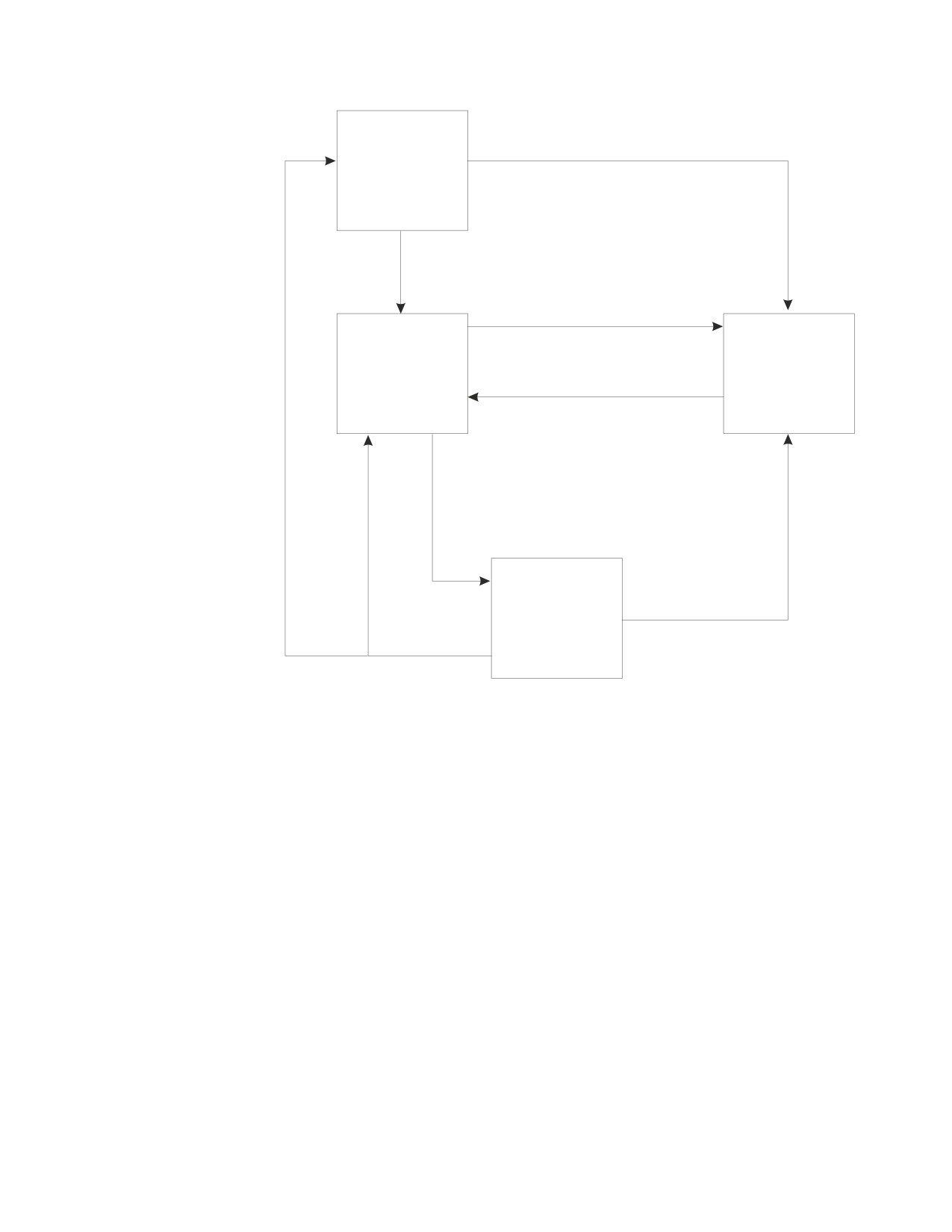
Connection States: An application process is in one of four states at any time:
v Connectable and connected
Chapter 6. Statements
187
CONNECT (for VM)
v Unconnectable and connected
v Connectable and unconnected
v Implicitly connectable.
An application process is initially in the implicitly connectable state.
The connectable and connected state: An application process is connected to an
application server and CONNECT statements can be processed. The process enters
this state when it completes a rollback or successful commit from the
unconnectable and connected state, or a CONNECT statement is successfully
processed from the connectable and unconnected state.
The unconnectable and connected state: An application process is connected to an
application server, but a CONNECT statement cannot be successfully processed to
change application servers or to change authorization IDs. The process enters this
state from the connectable and connected state when it processes any SQL
statement other than CONNECT, COMMIT or ROLLBACK.
The connectable and unconnected state: An application process is not connected to an
application server. The only SQL statement that can be processed is CONNECT.
The process enters this state when an SQL statement is unsuccessful because of a
failure that causes a rollback operation at the application server and the loss of the
connection. The process can also enter this state if it processes a CONNECT
statement unsuccessfully.
The implicitly connectable state: An application process is not connected to an
application server and CONNECT statements can be processed. The process enters
this state when it completes a rollback or successful commit with the release option
from the unconnectable and connected state.
The following diagram shows the state transitions:
188
SQL Reference
CONNECT (for VM)
Failure of implicit connect
Implicitly
Connectable
Begin process (first SQL statement)
CONNECT with system failure
Connectable
Connectable
and
and
Successful CONNECT
Connected
Unconnected
SQL other than CONNECT,
COMMIT, or ROLLBACK
System failure
with rollback
Unconnectable
and deallocate
and
Connected
with
ROLLBACK or
RELEASE successful COMMIT
Figure 7. VM Connection State Transitions
Additional Rules: It is not an error to process consecutive CONNECT statements
because CONNECT itself does not remove the application process from the
connectable state. It is an error to process any SQL statement other than
CONNECT, COMMIT, or ROLLBACK, and then process CONNECT with any
options. To avoid the error, process a commit or rollback operation before
processing the CONNECT.
A CONNECT to the current application server is treated like any other CONNECT.
Such a CONNECT can cause the redundant deallocation and allocation of a
conversation.
Notes
A VM user ID may be transformed when using DRDA protocol. See the DB2 Server
for VM System Administration manual for more information on the CMS
communications directory which may cause this transformation.
The old connection will not be disconnected until the new connection is made
successfully. Two connections are therefore held
for a short interval. If there are
Chapter 6. Statements
189
CONNECT (for VM)
many applications running concurrently that switch application servers, this may
cause a wait for sessions. If experiencing delays, use COMMIT RELEASE which
will disconnect explicitly.
Examples
Example 1
In a PL/I program, connect to the application server TOROLAB3.
EXEC SQL CONNECT TO TOROLAB3;
Example 2
In a PL/I program, switch to a different application server called TOROLAB4.
Assume your user ID on TOROLAB4 is different than the one you are currently
using.
EXEC SQL BEGIN DECLARE SECTION;
DCL USERID
CHAR(8);
DCL PASWRD
CHAR(8);
EXEC SQL END DECLARE SECTION;
EXEC SQL CONNECT :USERID IDENTIFIED BY :PASWRD
TO TOROLAB4;
Example 3
In a PL/I program, connect to an application server whose name is stored in the
host variable APP_SERVER (varchar(18)). Following a successful connection, copy
the 3 character product identifier of the application server to the host variable
PRODUCT (char(3)).
EXEC SQL CONNECT TO :APP_SERVER;
IF SQLSTATE = ’00000’ THEN
PRODUCT = SUBSTR(SQLERRP,1,3);
190
SQL Reference

CONNECT (for VSE)
CONNECT (for VSE)
Overall Notes
The CONNECT statement connects an application process or a user, or both, to an
application server.
Invocation
This statement can only be embedded within an application program. It is an
executable statement that cannot be dynamically prepared. It should be noted,
however, that interactive SQL facilities, such as ISQL, provide an interface that
gives the appearance of interactive execution.
Authorization
The privileges held by the authorization ID of the statement or, when specified, the
authorization_name in the statement must include authorization to connect to the
identified application server. If an authorization_name is specified in the statement,
the appropriate password must also be specified.
Syntax
►► CONNECT
►
(1)
(1)
authorization_name
IDENTIFIED BY
password
host_variable
host_variable
►
►◄
TO server_name
host_variable
Notes:
1
An implicit connect is not allowed by a Batch application requester. Therefore, the
user ID and password must be supplied on the CONNECT statement used for Batch
application requester processing.
Description
An application process can only be connected to one application server at a time.
This is called the current server. A default application server is established when
the application requester is initialized. When an application process is started and
a CONNECT statement is issued, the application is connected to the default
application server. The application process can explicitly connect to a different
application server by issuing a CONNECT statement with the TO clause. There is
no default connection for CONNECT with no options. A connection lasts until one
of the following occurs:
v COMMIT RELEASE or ROLLBACK RELEASE is processed
v CONNECT ... TO ... successfully switches databases
v the application terminates
v a severe error causes the connection to be severed.
authorization_name/host_variable
Is the user ID trying to CONNECT to the application server. If used within an
interactive facility, it must be a valid ordinary identifier with a maximum
length of 8. If it is used in an application program, it must be a valid host
Chapter 6. Statements
191
CONNECT (for VSE)
variable, specified without an indicator variable, declared as a fixed-length
8-character string, and initialized before the statement is processed. (For
programs written in C the host variable must be declared as a NUL-terminated
string with a length of 9.) The value can be less than 8 characters; unused
character positions in the host variable must be padded with blanks to the
right.
IDENTIFIED BY password/host_variable
Is the password of the authorization_name. If used within an interactive facility,
it must be a valid ordinary identifier with a maximum length of 8. If it is used
in an application program, it must be a valid host variable, specified without
an indicator variable, declared as a fixed-length 8-character string, and
initialized before the statement is processed. (For programs written in C, the
host variable must be declared as a NUL-terminated string with a length of 9.)
The value can be less than 8 characters; unused character positions in the host
variable must be padded with blanks to the right.
Note: An implicit connect is not allowed by a Batch application requester.
Therefore, the user ID and password must be supplied on the
CONNECT statement used for Batch application requester processing.
TO server_name/host_variable
Identifies the application server by the specified server_name or by a
host_variable which contains the server_name. The server_name must be a valid
ordinary identifier. This option may be used only in an application and, unlike
authorization_name and password, it may be specified either directly or within
a host variable.
If a host_variable is specified, it must be a character string variable with a
length attribute that is not greater than 18, and an indicator variable may not
be specified. (For programs written in C, if the host variable is declared as a
NUL-terminated string, it must have a length attribute that is between 2 and
19.) The server_name that is contained within the host_variable must be
left-justified and must not be delimited by quotation marks; if a fixed-length, it
must be padded on the right with blanks if its length is less than that of the
host variable.
The default is the application server as defined in the DBNAME directory. If a
batch application attempts the connect, then the server_name must be one that
exists in the DBNAME directory. If it is a remote server, it must be identified
as using TCP/IP communication. Otherwise, an SQL error will be returned to
the batch application. (See the DB2 Server for VSE System Administration manual
for information on the DBNAME directory.)
When the CONNECT statement is processed, the server_name must identify an
application server described in the DBNAME directory (see the DB2 Server for VSE
System Administration manual) and the application process must be in the
connectable state. (See “Notes” on page 193 for information about connection
states.)
If the CONNECT statement is successful:
v The application process is disconnected from its previous application server, if
any, and connected to the identified application server
v The name of the application server is placed in the CURRENT SERVER special
register.
192
SQL Reference
CONNECT (for VSE)
If you are connected using SQLDS protocol, the SQLERRP field in the SQLCA is
set to 'ARI
'. If you are connected using DRDA protocol, the format of
SQLERRP will be pppvvrrm, where:
- ppp identifies the product as follows:
DSN for DB2 for OS/390
ARI for DB2 Server for VSE & VM
QSQ for DB2 for OS/400
SQL for DB2 for OS/2 and DB2 for AIX.
- vv is a two-digit version identifier such as '02'
- rr is a two-digit release identifier such as '03'
- m is a one-digit modification level such as '0'.
v The authorization ID and the server_name of the connection are placed in the
SQLERRMC field of the SQLCA. The authorization ID precedes the server_name
and these are separated by X'FF'.
If the CONNECT statement is unsuccessful because the application process is not
in the connectable state or the server_name is not listed in the DBNAME directory,
the connection state of the application process is unchanged. If the CONNECT
statement is unsuccessful for any other reason, the application process remains in
the connectable state.
CONNECT with No Operand
This form of the CONNECT statement returns information about the current
authorization ID and application server. The information is returned in the
SQLERRP and SQLERRMC fields of the SQLCA as described above. This form of
CONNECT:
v Does not require the application process to be in the connectable state.
v Does not change the connection state.
Notes
In a batch program, either
v CONNECT
v CONNECT userid IDENTIFIED BY pw
v CONNECT userid IDENTIFIED BY pw TO server_name
v CONNECT TO server_name
must be the first SQL statement processed by the program. If a CONNECT TO
server_name statement is processed first, it must be followed by one of the other
three CONNECT statements above.
If a CONNECT with no options is processed first, the SQLERRMT fields will be set
to a blank user ID and blank server name. In this case, there is no default
application server. If the new target server is remote, then a new DRDA connection
to that remote server will be allocated and DRDA security handshaking will be
performed. If the new target server is local, DRDA flows are not possible and an
XPCC connection will be used. A CONNECT statement with no parameters
specified returns current connection information in the SQLERRP field of SQLCA.
If a DRDA connection exists when a CONNECT with no options is specified, the
current connection information is returned in the SQLERRP field of the SQLCA.
One of the remaining forms from the list above is required to establish the proper
identification of the user on the application server.
Chapter 6. Statements
193