ISO 32000-1 Document management — Portable document format — Part 1: PDF 1.7 - page 18
Annex E
(normative)
PDF Name Registry
E.1
General
This annex discusses a registry for developers, controlled by ISO and currently provided by Adobe on behalf of
ISO. The registry contains private names and formats that may be used by conforming writers. Developer
prefixes shall be used to identify extensions to PDF that use First Class names (see below) and that are
intended for public use. (See 7.12.2, “Developer Extensions Dictionary.) “Developers” means any entity
including individuals, companies, non-profits, standards bodies, open source groups, etc., who are developing
standards or software to use and extend ISO 32000-1.
Private data may be added to PDF documents that enable conforming reader’s to change behavior based on
this data. At the same time, users have certain expectations when opening a PDF document, no matter which
conforming reader is being used. PDF enforces certain restrictions on private data in order to meet these
expectations.
A conforming writer or conforming reader may define new types of actions, destinations, annotations, security,
and file system handlers. If a user opens a PDF document using a conforming reader for which the new type of
object is not supported, the conforming reader shall behave as described in Annex I.
A conforming writer may also add keys to any PDF object that is implemented as a dictionary, except the file
trailer dictionary (see 7.5.5, "File Trailer"). In addition, a conforming writer may create tags that indicate the role
of marked-content operators (PDF 1.2), as described in 14.6, "Marked Content".
E.2
Name Registry
To avoid conflicts with third-party names and with future versions of PDF, ISO maintains a registry for certain
private names and formats. Developers shall only add private data that conforms to the registry rules. The
registry includes three classes:
•
First class. Names and data formats that are of value to a wide range of developers. All names defined in
this ISO 32000 specification are first-class names. Conforming readers that are publicly available shall use
first-class names for their private data. First-class names and data formats shall be registered with ISO and
shall be made available for all developers to use. To submit a private name and format for consideration as
first-class, see the link on registering a private PDF extension, at the following Web page:
Data format descriptions shall follow the style of ISO 32000-1 and give a complete specification of the
intended function of the extended information.
•
Second class. Names that are applicable to a specific developer. ISO does not register second-class data
formats.) ISO distributes second-class names by registering developer-specific 4-byte prefixes. Those
bytes followed by a LOW LINE (5Fh) shall be used as the first characters in the names of all private data
added by the developer. ISO shall not register the same prefix to two different developers, thereby
ensuring that different developers’ second-class names shall not conflict. It is the responsibility of the
developer not to use the same name in conflicting ways. To register a developer-specific prefix, use the
following Web page:
673
•
Third class. Names that may be used only in PDF files that other third parties will never see because they
can conflict with third-class names defined by others. Third-class names shall all begin with a specific
prefix reserved for private extensions. This prefix, which is XX, shall be used as the first characters in the
names of all private data added by the developer. It is not necessary to contact ISO to register third-class
names.
New keys for the document information dictionary (see 14.3.3, "Document Information Dictionary") or a thread
information dictionary
(in the I entry of a thread dictionary; see Section
12.4.3,
“Articles”) shall not be
registered.
More information about developer prefixes, handlers and extensions to ISO 32000-1 can be obtained at http://
674
Annex F
(normative)
Linearized PDF
F.1
General
Linearization of PDF is an optional feature available beginning in PDF 1.2 that enables efficient incremental
access of the file in a network environment. A conforming reader that does not support this optional feature can
still successfully process linearized files although not as efficiently. Enhanced conforming readers can
recognize that a PDF file has been linearized and may take advantage of that organization (as well as added
hint information) to enhance viewing performance.
The primary goal for a linearized PDF file is to achieve the following behaviour for documents of arbitrary size
and so that the total number of pages in the document should have little or no effect on the user-perceived
performance of viewing any particular page:
•
When a document is opened, display the first page as quickly as possible. The first page to be viewed may
be an arbitrary page of the document, not necessarily page 0 (though opening at page 0 is most common).
•
When the user requests another page of an open document (for example, by going to the next page or by
following a link to an arbitrary page), display that page as quickly as possible.
•
When data for a page is delivered over a slow channel, display the page incrementally as it arrives. To the
extent possible, display the most useful data first.
•
Permit user interaction, such as following a link, to be performed even before the entire page has been
received and displayed.
NOTE
A linearized PDF is optimized for viewing of read-only PDF documents. A linearized PDF should be generated
once and read many times.
Incremental update shall still be permitted, but the resulting PDF is no longer linearized and subsequently shall
be treated as ordinary PDF. Linearizing it again may require reprocessing the entire file; see G.7, "Accessing an
Updated File" for details.
Linearized PDF requires two additions to the PDF specification:
•
Rules for the ordering of objects in the PDF file
•
Additional optional data structures, called hint tables, that enable efficient navigation within the document
Both of these additions are relatively simple to describe; however, using them effectively requires a deeper
understanding of their purpose. Consequently, this annex goes considerably beyond a simple specification of
these PDF extensions to include background, motivation, and strategies.
•
F.2, "Background and Assumptions," provides background information about the properties of the Web that
are relevant to the design of Linearized PDF.
•
F.3, "Linearized PDF Document Structure," specifies the file format and object-ordering requirements of
Linearized PDF.
•
F.4, "Hint Tables," specifies the detailed representation of the hint tables.
675
•
Annex G, outlines strategies for accessing Linearized PDF over a network, which in turn determine the
optimal way to organize the PDF file.
The reader is assumed to be familiar with the basic architecture of the Web, including terms such as URL,
HTTP, and MIME.
F.2
Background and Assumptions
NOTE 1
The principal problem addressed by the Linearized PDF design is the access of PDF documents through the
Web. This environment has the following important properties:
•
The access protocol (HTTP) is a transaction consisting of a request and a response. The conforming
reader presents a request in the form of a URL, and the server sends a response consisting of one or
more MIME-tagged data blocks.
•
After a transaction has completed, obtaining more data requires a new request-response transaction. The
connection between conforming reader and server does not ordinarily persist beyond the end of a
transaction, although some implementations may attempt to cache the open connection to expedite
subsequent transactions with the same server.
•
Round-trip delay can be significant. A request-response transaction can take up to several seconds,
independent of the amount of data requested.
•
The data rate may be limited. A typical bottleneck is a slow link between the conforming reader and the
Internet service provider.
These properties are generally shared by other wide-area network architectures besides the Web.
Also, CD-ROMs share some of these properties, since they have relatively slow seek times and lim-
ited data rates compared to magnetic media. The remainder of this annex focuses on the Web.
Some additional properties of the HTTP protocol are relevant to the problem of accessing PDF files
efficiently. These properties may not all be shared by other protocols or network environments.
•
When a PDF file is initially accessed (such as by following a URL hyperlink from some other document),
the file type is not known to the conforming reader. Therefore, the conforming reader initiates a transaction
to retrieve the entire document and then inspects the MIME tag of the response as it arrives. Only at that
point is the document known to be PDF. Additionally, with a properly configured server environment, the
length of the document becomes known at that time.
•
The conforming reader may abort a response while the transaction is still in progress if it decides that the
remainder of the data is not of immediate interest. In HTTP, aborting the transaction requires closing the
connection, which interferes with the strategy of caching the open connection between transactions.
•
The conforming reader may request retrieval of portions of a document by specifying one or more byte
ranges (by offset and count) in the HTTP request headers. Each range can be relative to either the
beginning or the end of the file. The conforming reader may specify as many ranges as it wants in the
request, and the response consists of multiple blocks, each properly tagged.
•
The conforming reader may initiate multiple concurrent transactions in an attempt to obtain multiple
responses in parallel. This is commonly done, for instance, to retrieve inline images referenced from an
HTML document. This strategy is not always reliable and may backfire if the transactions interfere with
each other by competing for scarce resources in the server or the communication channel.
NOTE 2
Extensive experimentation has determined that having multiple concurrent transactions does not work very
well for PDF in some important environments. Therefore, Linearized PDF is designed to enable good
performance to be achieved using only one transaction at a time. In particular, this means that the conforming
reader needs to have sufficient information to determine the byte ranges for all the objects required to display
a given page of the PDF file so that it can specify all those byte ranges in a single request.
NOTE 3
The following additional assumptions are made about the conforming reader and its local environment:
•
The conforming reader has plenty of local temporary storage available. It should rarely need to retrieve a
given portion of a PDF document more than once from the server.
676
•
The conforming reader is able to display PDF data quickly once it has been received. The performance
bottleneck is assumed to be in the transport system (throughput or round-trip delay), not in the processing
of data after it arrives.
The consequence of these assumptions is that it may be advantageous for the conforming reader to
do considerable extra work to minimize delays due to communications.
Such work includes maintaining local caches and reordering actions according to when the needed data
becomes available.
F.3
Linearized PDF Document Structure
F.3.1
General
Except as noted below, all elements of a Linearized PDF file shall be as specified in 7.5, "File Structure", and all
indirect objects in the file shall be shall be divided into two groups.
•
The first group shall consist of the document catalogue, other document-level objects, and all objects
belonging to the first page of the document. These objects shall be numbered sequentially, starting at the
first object number after the last number of the second group. (The stream containing the hint tables, called
a hint stream, may be numbered out of sequence; see F.3.6, "Hint Streams (Parts 5 and 10)".
•
The second group shall consist of all remaining objects in the document, including all pages after the first,
all shared objects (objects referenced from more than one page, not counting objects referenced from the
first page), and so forth. These objects shall be numbered sequentially starting at 1.
These groups of objects shall be indexed by exactly two cross-reference table sections. For pedagogical
reasons the linearized PDF is considered to be composed from 11 parts, in order, and the composition of these
groups is discussed in more detail in the sections that follow. All objects shall have a generation number of 0.
Beginning with PDF 1.5, PDF files may contain object streams (see 7.5.7, "Object Streams"). In linearized files
containing object streams, the following conditions shall apply:
•
These additional objects may not be contained in an object stream: the linearization dictionary, the
document catalogue, and page objects.
•
Objects stored within object streams shall be given the highest range of object numbers within the main
and first-page cross-reference sections.
•
For files containing object streams, hint data may specify the location and size of the object streams only
(or uncompressed objects), not the individual compressed objects. Similarly, shared object references
shall be made to the object stream containing a compressed object, not to the compressed object itself.
•
Cross-reference streams (7.5.8, "Cross-Reference Streams") may be used in place of traditional cross-
reference tables. The logic described in this sub-clause shall still apply, with the appropriate syntactic
changes.
EXAMPLE 1
Part 1: Header
% PDF-1 . 1
% … Binary characters…
EXAMPLE 2
Part 2: Linearization parameter dictionary
43 0 obj
<< /Linearized 1.0
% Version
/L
54567
% File length
/H [ 475 598 ]
% Primary hint stream offset and length (part 5)
/O 45
% Object number of first page’s page object (part 6)
/E 5437
% Offset of end of first page
/N 11
% Number of pages in document
677
/T 52786
% Offset of first entry in main cross-reference table (part 11)
>>
endobj
EXAMPLE 3
Part 3: First-page cross-reference table and trailer
xref
43 14
0000000052 00000 n
0000000392 00000 n
0000001073 00000 n
… Cross-reference entries for remaining objects in the first page…
0000000475 00000 n
trailer
<< /Size 57
% Total number of cross-reference table entries in document
/Prev 52776
% Offset of main cross-reference table (part 11)
/Root 44 0 R
% Indirect reference to catalogue (part 4)
… Any other entries, such as Info and Encrypt…
% (part 9)
>>
% Dummy cross-reference table offset
startxref
0
%% EOF
EXAMPLE 4
Part 4: Document catalogue and other required document-level objects
44 0 obj
<< /Type /Catalog
/Pages 42 0 R
>>
endobj
… Other objects…
EXAMPLE 5
Part 5: Primary hint stream (may precede or follow part 6)
56 0 obj
<< /Length 457
… Possibly other stream attributes, such as Filter…
/S 221
% Position of shared object hint table
… Possibly entries for other hint tables…
>>
stream
… Page offset hint table…
… Shared object hint table…
… Possibly other hint tables…
endstream
endobj
EXAMPLE 6
Part 6: First-page section (may precede or follow part 5)
45 0 obj
<< /Type /Page
…
>>
endobj
… Outline hierarchy (if the PageMode value in the document catalog is UseOutlines)…
… Objects for first page, including both shared and nonshared objects…
EXAMPLE 7
Part 7: Remaining pages
1 0 obj
<< /Type /Page
678
… Other page attributes, such as MediaBox, Parent, and Contents…
>>
endobj
… Nonshared objects for this page…
… Each successive page followed by its nonshared objects…
… Last page followed by its nonshared objects…
EXAMPLE 8
Part 8: Shared objects for all pages except the first
… Shared objects…
EXAMPLE 9
Part 9: Objects not associated with pages, if any
… Other objects…
EXAMPLE 10
Part 10: Overflow hint stream (optional)
… Overflow hint stream…
EXAMPLE 11
Part 11: Main cross-reference table and trailer
xref
0 43
0000000000 65535 f
… Cross-reference entries for all except first page’s objects…
trailer
<< /Size 43
>>
% Trailer need not contain other entries; in particular,
% it should not have a Prev entry
% Offset of first-page cross-reference table (part 3)
startxref
257
%% EOF
F.3.2
Header (Part 1)
The Linearized PDF file shall begin with the standard header line (see 7.5.2, "File Header"). Linearization is
independent of PDF version number and may be applied to any PDF file of version 1.1 or greater.
The binary characters following the PERCENT SIGN (25h) on the second line are characters with codes 128 or
greater, as recommended in 7.5.2, "File Header".
F.3.3
Linearization Parameter Dictionary (Part 2)
Following the header, the first object in the body of the file (part 2) shall be an indirect dictionary object, the
linearization parameter dictionary, which shall contain the parameters listed in Table F.1. All values in this
dictionary shall be direct objects. There shall be no references to this dictionary anywhere in the document;
however, the first-page cross-reference table (part 3) shall contain a normal entry for it.
The linearization parameter dictionary shall be entirely contained within the first 1024 bytes of the PDF file. This
limits the amount of data a conforming reader must read before deciding whether the file is linearized.
679

Table F.1 - Entries in the linearization parameter dictionary
Parameter
Type
Value
Linearized
number
(Required) A version identification for the linearized format.
L
integer
(Required) The length of the entire file in bytes. It shall be exactly
equal to the actual length of the PDF file. A mismatch indicates that
the file is not linearized and shall be treated as ordinary PDF, ignoring
linearization information. (If the mismatch resulted from appending an
update, the linearization information may still be correct but requires
validation; see G.7, "Accessing an Updated File" for details.)
H
array
(Required) An array of two or four integers,
[offset1 length1 ] or
[offset1 length1 offset2 length2 ]. offset1 shall be the offset of the
primary hint stream from the beginning of the file.
(This is the
beginning of the stream object, not the beginning of the stream data.)
length1 shall be the length of this stream, including stream object
overhead.
If the value of the primary hint stream dictionary’s Length entry is an
indirect reference, the object it refers to shall immediately follow the
stream object, and length1 also shall include the length of the indirect
length object, including object overhead.
If there is an overflow hint stream, offset2 and length2 shall specify its
offset and length.
O
integer
(Required) The object number of the first page’s page object.
E
integer
(Required) The offset of the end of the first page (the end of EXAMPLE
6 in F.3.1, "General"), relative to the beginning of the file.
N
integer
(Required) The number of pages in the document.
T
integer
(Required) In documents that use standard main cross-reference
tables (including hybrid-reference files; see 7.5.8.4, "Compatibility with
Applications That Do Not Support Compressed Reference Streams"),
this entry shall represent the offset of the white-space character
preceding the first entry of the main cross-reference table (the entry for
object number 0), relative to the beginning of the file. Note that this
differs from the Prev entry in the first-page trailer, which gives the
location of the xref line that precedes the table.
(PDF 1.5) Documents that use cross-reference streams exclusively
(see 7.5.8, "Cross-Reference Streams"), this entry shall represent the
offset of the main cross-reference stream object.
P
integer
(Optional) The page number of the first page; see F.3.4, "First-Page
Cross-Reference Table and Trailer (Part 3)". Default value: 0.
F.3.4
First-Page Cross-Reference Table and Trailer (Part 3)
Part 3 shall contain the cross-reference table for objects belonging to the first page (discussed in F.3.4, "First-
Page Cross-Reference Table and Trailer (Part 3)") as well as for the document catalogue and document-level
objects appearing before the first page (discussed in F.3.5, "Document Catalogue and Document-Level Objects
(Part 4)"). Additionally, this cross-reference table shall contain entries for the linearization parameter dictionary
(at the beginning) and the primary hint stream (at the end). This table shall be a valid cross-reference table as
defined in 7.5.4, "Cross-Reference Table", although its position in the file shall not be at the end of the file. It
shall consist of a single cross-reference subsection that has no free entries.
In PDF 1.5 and later, cross-reference streams (see 7.5.8, "Cross-Reference Streams") may be used in
linearized files in place of traditional cross-reference tables. The logic described in this section, along with the
appropriate syntactic changes for cross-reference streams shall still apply.
680
Below the table shall be the first-page trailer. The trailer’s Prev entry shall give the offset of the main cross-
reference table near the end of the file. A conforming reader that does not support the linearized feature shall
process this correctly even though the trailers are linked in an unusual order. It interprets the first-page cross-
reference table as an update to an original document that is indexed by the main cross-reference table.
The first-page trailer shall contain valid Size and Root entries, as well as any other entries needed to display
the document. The Size value shall be the combined number of entries in both the first-page cross-reference
table and the main cross-reference table.
The first-page trailer may optionally end with startxref, an integer, and %%EOF, just as in an ordinary trailer.
This information shall be ignored.
F.3.5
Document Catalogue and Document-Level Objects (Part 4)
Following the first-page cross-reference table and trailer are the catalogue dictionary and other objects that are
required present when the document is opened. These additional objects (constituting part 4) shall include the
values of the following entries if they are present and are indirect objects:
•
The conforming reader Preferences entry in the catalogue.
•
The PageMode entry in the catalogue. Note that if the value of PageMode is UseOutlines, the outline
hierarchy shall be located in part 6; otherwise, the outline hierarchy, if any, shall be located in part 9. See
F.3.10, "Other Objects (Part 9)" for details.
•
The Threads entry in the catalogue, along with all thread dictionaries it refers to. This does not include the
threads’ information dictionaries or the individual bead dictionaries belonging to the threads.
•
The OpenAction entry in the catalogue.
•
The AcroForm entry in the catalogue. Only the top-level interactive form dictionary shall be present, not
the objects that it refers to.
•
The Encrypt entry in the first-page trailer dictionary. All values in the encryption dictionary shall also be
located here.
All other objects shall not be located here but instead shall be at the end of the file; see F.3.10, "Other Objects
(Part 9)". This includes objects such as page tree nodes, the document information dictionary, and the
definitions for named destinations.
NOTE
The objects located here are indexed by the first-page cross-reference table, even though they are not logically
part of the first page.
F.3.6
Hint Streams (Parts 5 and 10)
The core of the linearization information shall be stored in data structures known as hint tables, whose format is
described in F.4, "Hint Tables." They shall provide indexing information that enables the conforming reader to
construct a single request for all the objects that are needed to display any page of the document or to retrieve
other information efficiently. The hint tables may contain additional information to optimize access by
conforming writer extensions to application-specific data.
The hint tables shall not be logically part of the information content of the document; they shall be derived from
the document. Any action that changes the document—for instance, appending an incremental
update—invalidates the hint tables. The document remains a valid PDF file but is no longer linearized; see G.7,
"Accessing an Updated File" for details.
The hint tables are binary data structures that shall be enclosed in a stream object. Syntactically, this stream
shall be a PDF indirect object. However, there shall be no references to the stream anywhere in the document.
681

Therefore, it is not logically part of the document, and an operation that regenerates the document may remove
the stream.
Usually, all the hint tables shall be contained in a single stream, known as the primary hint stream. Optionally,
there may be an additional stream containing more hints, known as the overflow hint stream. The contents of
the two hint streams shall be concatenated and treated as if they were a single unbroken stream.
The primary hint stream, which shall be required, is shown as part 5 in Example 5. The order of this part and
the first-page section, shown as part 6, may be reversed; see Annex G for considerations on the choice of
placement. The overflow hint stream, part 10, is optional.
The location and length of the primary hint stream, and of the overflow hint stream if present, shall be given in
the linearization parameter dictionary at the beginning of the file.
The hint streams shall be assigned the last object numbers in the file—that is, after the object number for the
last object in the first page. Their cross-reference table entries shall be at the end of the first-page cross-
reference table. This object number assignment shall be independent of the physical locations of the hint
streams in the file.
NOTE
This convention keeps their object numbers from conflicting with the numbering of the linearized objects.
With one exception, the values of all entries in the hint streams’ dictionaries shall be direct objects and may
contain no indirect object references. The exception is the stream dictionary’s Length entry (see the discussion
of the H entry in Table F.1).
In addition to the standard stream attributes, the dictionary of the primary hint stream shall contain entries
giving the position of the beginning of each hint table in the stream. These positions shall be counted in bytes
relative to the beginning of the stream data (after decoding filters, if any, are applied) and with the overflow hint
stream concatenated if present. The dictionary of the overflow hint stream shall not contain these entries. The
keys designating the standard hint tables in the primary hint stream’s dictionary are listed in Table F.2; F.4, "Hint
Tables," documents the format of these hint tables. Additionally, there is a required page offset hint table, which
shall be the first table in the stream and shall start at offset 0.
Table F.2 - Standard hint tables
Key
Hint table
S
(Required) Shared object hint table (see F.4.2, “Shared Object Hint
Table”)
T
(Present only if thumbnail images exist) Thumbnail hint table (see F.4.3,
"Thumbnail Hint Table")
O
(Present only if a document outline exists) Outline hint table (see F.4.4,
“Generic Hint Tables”)
A
(Present only if article threads exist) Thread information hint table (see
F.4.4, “Generic Hint Tables”)
E
(Present only if named destinations exist) Named destination hint table
(see F.4.4, “Generic Hint Tables”)
V
(Present only if an interactive form dictionary exists) Interactive form hint
table (see F.4.5, “Extended Generic Hint Tables”)
I
(Present only if a document information dictionary exists) Information
dictionary hint table (see F.4.4, “Generic Hint Tables”)
C
(Present only if a logical structure hierarchy exists; PDF 1.3) Logical
structure hint table (see F.4.5, “Extended Generic Hint Tables”)
L
(PDF 1.3) Page label hint table (see F.4.4, “Generic Hint Tables”)
682

Table F.2 - Standard hint tables (continued)
Key
Hint table
R
(Present only if a renditions name tree exists; PDF 1.5) Renditions
name tree hint table (see F.4.5, “Extended Generic Hint Tables”)
B
(Present only if embedded file streams exist; PDF 1.5) Embedded file
stream hint table (see F.4.6, “Embedded File Stream Hint Tables”)
New keys may be registered for additional hint tables required application-specific data accessed by
conforming writer extensions. See Annex E for further information.
F.3.7
First-Page Section (Part 6)
This part of the file contains all the objects needed to display the first page of the document. Ordinarily, the first
page is page 0—that is, the leftmost leaf page node in the page tree. However, if the document catalogue
contains an OpenAction entry that specifies opening at some page other than page 0, that page shall be
considered the first page and shall be located here. The page number of the first page is given in the P entry of
the linearization parameter dictionary.
NOTE
As mentioned earlier, the section containing objects belonging to the first page of the document may either
precede or follow the primary hint stream. The starting file offset and length of this section can be determined
from the hint tables. In addition, the E entry in the linearization parameter dictionary specifies the end of the
first page (as an offset relative to the beginning of the file), and the O entry gives the object number of the first
page’s page object.
The following objects shall be contained in the first-page section:
•
The page object for the first page. This object shall be the first one in this part of the file. Its object number
is given in the linearization parameter dictionary. This page object shall explicitly specify all required
attributes, such as Resources and MediaBox; the attributes may not be inherited from ancestor page tree
nodes.
•
The entire outline hierarchy, if the value of the PageMode entry in the catalogue is UseOutlines. If the
PageMode entry is omitted or has some other value and the document has an outline hierarchy, the
outline hierarchy shall appear in part 9; see F.3.10, "Other Objects (Part 9)" for details.
•
All objects that the page object refers to, to an arbitrary depth, except page tree nodes or other page
objects. This shall include objects referred to by its Contents, Resources, Annots, and B entries, but not
the Thumb entry.
The order of objects referenced from the page object should facilitate early user interaction and incremental
display of the page data as it arrives. The following order should be used:
a) The Annots array and all annotation dictionaries, to a depth sufficient for those annotations to be
activated. Information required to draw the annotation may be deferred until later since annotations are
always drawn on top of (hence after) the contents.
b) The B (beads) array and all bead dictionaries, if any, for this page. If any beads exist for this page, the B
array shall be present in the page dictionary. Additionally, each bead in the thread (not just the first bead)
shall contain a T entry referring to the associated thread dictionary.
c) The resource dictionary, but not the resource objects contained in the dictionary.
d) Resource objects, other than the types listed below, in the order that they are first referenced (directly or
indirectly) from the content stream. If the contents are represented as an array of streams, each resource
object shall precede the stream in which it is first referenced. Note that Font, FontDescriptor, and
Encoding resources shall be included here, but not substitutable font files referenced from font descriptors
(see item (g) below).
683
e) The page contents (Contents). If large, this should be represented as an array of indirect references to
content streams, which in turn shall be interleaved with the resources they require. If small, the entire
contents should be a single content stream preceding the resources.
f)
Image XObjects, in the order that they are first referenced. Images can be assumed to be large and slow to
transfer; therefore, the conforming reader should defer rendering images until all the other contents have
been displayed.
g) FontFile streams, which contain the actual definitions of embedded fonts. These can be assumed to be
large and slow to transfer; therefore, the conforming reader should use substitute fonts until the real ones
have arrived. Only those fonts for which substitution is possible may be deferred in this way. (Currently, this
includes any Type 1 or TrueType font that has a font descriptor with the Nonsymbolic flag set, indicating
the Adobe standard Latin character set).
See Annex G for additional discussion about object order and incremental drawing strategies.
F.3.8
Remaining Pages (Part 7)
Part 7 of the Linearized PDF file shall contain the page objects and nonshared objects for all remaining pages
of the file, with the objects for each page grouped together. The pages shall be contiguous and shall be ordered
by page number. If the first page of the file is not page 0, this section shall start with page 0 and shall skip over
the first page when its position in the sequence is reached.
For each page, the objects required to display that page shall be grouped together, except for resources and
other objects that are shared with other pages. Shared objects shall be located in the shared objects section
(part 8). The starting file offset and length of any page can be determined from the hint tables.
The recommended order of objects within a page is essentially the same as in the first page. In particular, the
page object shall be the first object in each section.
In most cases, unlike for the first page, little benefit is gained from interleaving contents with resources because
most resources other than images—fonts in particular—are shared among multiple pages and therefore reside
in the shared objects section. Image XObjects usually are not shared, but they should appear at the end of the
page’s section of the file, since rendering of images is deferred.
F.3.9
Shared Objects (Part 8)
Part 8 of the file contains objects, primarily named resources, that are referenced from more than one page but
that are not referenced (directly or indirectly) from the first page. The hint tables contain an index of these
objects. For more information on named resources, see 7.8.3, "Resource Dictionaries".
The order of these objects shall be arbitrary. However, wherever a resource consists of a multiple-level
structure, all components of the structure shall be grouped together. If only the top-level object is referenced
from outside the group, the entire group may be described by a single entry in the shared object hint table. This
helps to minimize the size of the shared object hint table and the number of individual references from entries in
the page offset hint table.
F.3.10
Other Objects (Part 9)
Following the shared objects are any other objects that are part of the document but are not required for
displaying pages. These objects shall be divided into functional categories. Objects within each of these
categories should be grouped together; the relative order of the categories is unimportant.
•
The page tree. This object can be located in this section because the conforming reader never needs to
consult it. Note that all Resources attributes and other inheritable attributes of the page objects shall be
pushed down and replicated in each of the leaf page objects (but they may contain indirect references to
shared objects).
684
•
Thumbnail images. These objects shall simply be ordered by page number. (The thumbnail image for page
0 shall be first, even if the first page of the document is some page other than 0.) Each thumbnail image
consists of one or more objects, which may refer to objects in the thumbnail shared objects section (see
the next item).
•
Thumbnail shared objects. These are objects that shall be shared among some or all thumbnail images
and shall not be referenced from any other objects.
•
The outline hierarchy, if not located in part 6. The order of objects shall be the same as the order in which
they shall be displayed by the conforming reader. This is a preorder traversal of the outline tree, skipping
over any subtree that is closed (that is, whose parent’s Count value is negative). Following that shall be
the subtrees that were skipped over, in the order in which they would have appeared if they were all open.
•
Thread information dictionaries, referenced from the I entries of thread dictionaries. Note that the thread
dictionaries themselves shall be located with the document catalogue and the bead dictionaries with the
individual pages.
•
Named destinations. These objects include the value of the Dests or Names entry in the document
catalogue and all the destination objects that it refers to; see G.3, "Opening at an Arbitrary Page".
•
The document information dictionary and the objects contained within it.
•
The interactive form field hierarchy. This group of objects shall not include the top-level interactive form
dictionary, which is located with the document catalogue.
•
Other entries in the document catalogue that are not referenced from any page.
•
(PDF 1.3) The logical structure hierarchy.
•
(PDF 1.5) The renditions name tree hierarchy.
•
(PDF 1.5) Embedded file streams.
F.3.11
Main Cross-Reference and Trailer (Part 11)
Part 11 is the cross-reference table for all objects in the PDF file except those listed in the first-page cross-
reference table (part 3). As indicated earlier, this cross-reference table shall play the role of the original cross-
reference table for the file (before any updates are appended) and shall conform to the following rules:
•
It consists of a single cross-reference subsection, beginning at object number 0.
•
The first entry (for object number 0) shall be a free entry.
•
The remaining entries are for in-use objects, which shall be numbered consecutively, starting at 1.
The startxref line shall give the offset of the first-page cross-reference table. The Prev entry of the first-page
trailer shall give the offset of the main cross-reference table. The main trailer has no Prev entry and shall not
contain any entries other than Size.
In PDF 1.5 and later, cross-reference streams (see 7.5.8, "Cross-Reference Streams") may be used in
linearized files in place of traditional cross-reference tables. The logic described in this sub-clause, along with
the appropriate syntactic changes for cross-reference streams, still applies.
685
F.4
Hint Tables
The core of the linearization information shall be stored in two or more hint tables, as indicated by the attributes
of the primary hint stream; see F.3.6, "Hint Streams (Parts 5 and 10)". The format of the standard hint tables is
described in this section.
A conforming writer may add additional hint tables for conforming reader-specific data. A generic format for
such hint tables is defined; see F.4.4, "Generic Hint Tables." Alternatively, the format of a hint table can be
private to the conforming reader; see Annex E for further information.
Each hint table shall consist of a portion of the stream, beginning at the position in the stream indicated by the
corresponding stream attribute. Additionally, a conforming writer shall include a page offset hint table, which
shall be the first table in the stream and shall start at offset 0. If there is an overflow hint stream, its contents
shall be appended seamlessly to the primary hint stream.
NOTE 1
Hint table positions are relative to the beginning of this combined stream.
In general, this byte stream shall be treated as a bit stream, high-order bit first, which shall then subdivided into
fields of arbitrary width without regard to byte boundaries. However, each hint table shall begin at a byte
boundary.
NOTE 2
The hint tables are designed to encode the required information as compactly as possible. Interpreting the hint
tables requires reading them sequentially; they are not designed for random access.
The conforming reader shall be expected to read and decode the tables once and retain the information for as
long as the document remains open.
NOTE 3
A hint table encodes the positions of various objects in the file. The representation is either explicit (an offset
from the beginning of the file) or implicit (accumulated lengths of preceding objects).
Regardless of the representation, the resulting positions shall be interpreted as if the primary hint stream itself
were not present. That is, a position greater than the hint stream offset shall have the hint stream length added
to it to determine the actual offset relative to the beginning of the file.
NOTE 4
The hint stream offset and hint stream length are the values offset1 and length1 in the H array in the
linearization parameter dictionary at the beginning of the file.
The reason for this rule is that the length of the primary hint stream depends on the information contained
within the hint tables, which is not known until after they have been generated. Any information contained in
the hint tables shall not depend on knowing the primary hint stream’s length in advance.
Note that this rule applies only to offsets given in the hint tables and not to offsets given in the cross-reference
tables or linearization parameter dictionary. Also, the offset and length of the overflow hint stream, if present,
does not be taken into account, since this object follows all other objects in the file.
In linearized files that use object streams (7.5.7, "Object Streams"), the position specified in a hint table for a
compressed object is to be interpreted as a byte range in which the object can be found, not as a precise
offset. conforming readers should locate the object via a cross-reference stream, as it would if the hint table
were not present.
F.4.1
Page Offset Hint Table
The page offset hint table provides information required for locating each page. Additionally, for each page
except the first, it also enumerates all shared objects that the page references, directly or indirectly.
This table shall begin with a header section, described in Table F.3, followed by one or more per-page entries,
described in Table F.4.
NOTE
The items making up each per-page entry are not contiguous; they are broken up with items from entries for
other pages.
686

The order of items making up the per-page entries shall be as follows:
a) Item 1 for all pages, in page order starting with the first page
b) Item 2 for all pages, in page order starting with the first page
c) Item 3 for all pages, in page order starting with the first page
d) Item 4 for all shared objects in the second page, followed by item 4 for all shared objects in the third page,
and so on
e) Item 5 for all shared objects in the second page, followed by item 5 for all shared objects in the third page,
and so on
f)
Item 6 for all pages, in page order starting with the first page
g) Item 7 for all pages, in page order starting with the first page
All the items in Table F.3 that specify a number of bits needed, such as item 3, have values in the range 0
through 32. Although that range requires only 6 bits, 16-bit numbers shall be used.
Table F.3 - Page offset hint table, header section
Item
Size (bits)
Description
1
32
The least number of objects in a page (including the page object itself).
2
32
The location of the first page’s page object.
3
16
The number of bits needed to represent the difference between the
greatest and least number of objects in a page.
4
32
The least length of a page in bytes. This shall be the least length from
the beginning of a page object to the last byte of the last object used
by that page.
5
16
The number of bits needed to represent the difference between the
greatest and least length of a page, in bytes.
6
32
The least offset of the start of any content stream, relative to the
beginning of its page.
7
16
The number of bits needed to represent the difference between the
greatest and least offset to the start of the content stream.
8
32
The least content stream length.
9
16
The number of bits needed to represent the difference between the
greatest and least content stream length.
10
16
The number of bits needed to represent the greatest number of shared
object references.
11
16
The number of bits needed to represent the numerically greatest
shared object identifier used by the pages
(discussed further in
Table F.4, item 4).
687

Table F.3 - Page offset hint table, header section (continued)
Item
Size (bits)
Description
12
16
The number of bits needed to represent the numerator of the fractional
position for each shared object reference. For each shared object
referenced from a page, there shall be an indication of where in the
page’s content stream the object is first referenced. That position shall
be given as the numerator of a fraction, whose denominator is
specified once for the entire document (in the next item in this table).
The fraction is explained in more detail in Table F.4, item 5.
13
16
The denominator of the fractional position for each shared object
reference.
Table F.4 - Page offset hint table, per-page entry
Item
Size (bits)
Description
1
See Table F.3, item 3
A number that, when added to the least number of objects in a page
(Table F.3, item 1), shall give the number of objects in the page. The
first object of the first page shall have an object number that is the
value of the O entry in the linearization parameter dictionary at the
beginning of the file. The first object of the second page shall have an
object number of 1. Object numbers for subsequent pages shall be
determined by accumulating the number of objects in all previous
pages.
2
See Table F.3, item 5
A number that, when added to the least page length (Table F.3, item
4), shall give the length of the page in bytes. The location of the first
object of the first page may be determined from its object number (the
O entry in the linearization parameter dictionary) and the cross-
reference table entry for that object; see F.3.4, "First-Page Cross-
Reference Table and Trailer (Part 3)". The locations of subsequent
pages shall be determined by accumulating the lengths of all previous
pages. A conforming product shall skip over the primary hint stream,
wherever it is located.
3
See Table F.3, item 10
The number of shared objects referenced from the page. For the first
page, this number shall be 0; the next two items start with the second
page.
4
See Table F.3, item 11
(One item for each shared object referenced from the page) A shared
object identifier—that is, an index into the shared object hint table
(described in F.4.2, “Shared Object Hint Table”). A single entry in the
shared object hint table may designate a group of shared objects, but
only one of which shall be referenced from outside the group. That is,
shared object identifiers shall not be directly related to object numbers.
This identifier combines with the numerators provided in item 5 to form
a shared object reference.
688

Table F.4 - Page offset hint table, per-page entry (continued)
Item
Size (bits)
Description
5
See Table F.3, item 12
(One item for each shared object referenced from the page) The
numerator of the fractional position for each shared object reference,
which shall be in the same order as the preceding item. The fraction
shall indicate where in the page’s content stream the shared object is
first referenced. This item shall be interpreted as the numerator of a
fraction whose denominator is specified once for the entire document
(Table F.3, item 13).
EXAMPLE
If the denominator is d, a numerator ranging from 0
to d - 1 indicates the corresponding portion of the
page’s content stream. For example, if the
denominator is
4, a numerator of
0,
1,
2, or
3
indicates that the first reference lies in the first,
second, third, or fourth quarter of the content
stream, respectively.
There are two (or more) other possible values for the numerator, which
shall indicate that the shared object is not referenced from the content
stream but instead is needed by annotations or other objects that are
drawn after the contents. The value d shall indicate that the shared
object is needed before image XObjects and other nonshared objects
that are at the end of the page. A value of d + 1 or greater shall
indicate that the shared object is needed after those objects.
NOTE
This method of dividing the page into fractions is only
approximate. Determining the first reference to a shared
object entails inspecting the unencoded content stream.
The relationship between positions in the unencoded and
encoded streams is not necessarily linear.
6
See Table F.3, item 7
A number that, when added to the least offset to the start of the
content stream (Table F.3, item 6), shall give the offset in bytes of the
start of the page’s content stream (the stream object, not the stream
data), relative to the beginning of the page.
7
See Table F.3, item 9
A number that, when added to the least content stream length
(Table F.3, item 8), shall give the length of the page’s content stream in
bytes. This length shall include object overhead preceding and
following the stream data.
F.4.2
Shared Object Hint Table
The shared object hint table gives information required to locate shared objects; see F.3.9, "Shared Objects
(Part 8)". Shared objects may be physically located in either of two places: objects that are referenced from the
first page shall be located with the first-page objects (part 6); all other shared objects shall be located in the
shared objects section (part 8).
A single entry in the shared object hint table may describe a group of adjacent objects under the following
condition: Only the first object in the group is referenced from outside the group; the remaining objects in the
group are referenced only from other objects in the same group. The objects in a group shall have adjacent
object numbers.
The page offset hint table, interactive form hint table, and logical structure hint table shall refer to an entry in the
shared object hint table by a simple index that is its sequential position in the table, counting from 0.
The shared object hint table shall consist of a header section (Table F.5) followed by one or more shared object
group entries (Table F.6). There shall be two sequences of shared object group entries: the ones for objects
located in the first page, followed by the ones for objects located in the shared objects section. The entries shall
have the same format in both cases. Note that the items making up each shared object group entry need not be
689

contiguous; they may be broken up with items from entries for other shared object groups. The order of items in
each sequence shall be as follows:
a) Item 1 for the first group, item 1 for the second group, and so on
b) Item 2 for the first group, item 2 for the second group, and so on
c) Item 3 for the first group, item 3 for the second group, and so on
d) Item 4 for the first group, item 4 for the second group, and so on
All objects associated with the first page (part 6) shall have entries in the shared object hint table, regardless of
whether they are actually shared. The first entry shall refer to the beginning of the first page and shall be have
an object count and length that shall span all the initial nonshared objects. The next entry shall refer to a group
of shared objects. Subsequent entries shall span additional groups of either shared or nonshared objects
consecutively until all shared objects in the first page have been enumerated. (There shall not be any entries
that refer to nonshared objects.)
Table F.5 - Shared object hint table, header section
item
Size (bits)
Description
1
32
The object number of the first object in the shared objects section (part
8).
2
32
The location of the first object in the shared objects section.
3
32
The number of shared object entries for the first page (including
nonshared objects, as noted above).
4
32
The number of shared object entries for the shared objects section,
including the number of shared object entries for the first page (that is,
the value of item 3).
5
16
The number of bits needed to represent the greatest number of objects
in a shared object group.
6
32
The least length of a shared object group in bytes.
7
16
The number of bits needed to represent the difference between the
greatest and least length of a shared object group, in bytes.
Table F.6 - Shared object hint table, shared object group entry
Item
Size (bits)
Description
1
See Table F.5, item 7
A number that, when added to the least shared object group length
(Table F.5, item 6), gives the length of the object group in bytes. The
location of the first object of the first page shall be given in the page
offset hint table, header section (Table F.3, item 4). The locations of
subsequent object groups can be determined by accumulating the
lengths of all previous object groups until all shared objects in the first
page have been enumerated. Following that, the location of the first
object in the shared objects section can be obtained from the header
section of the shared object hint table (Table F.5, item 2).
2
1
A flag indicating whether the shared object signature
(item
3) is
present; its value shall be 1 if the signature is present and 0 if it is
absent.
690
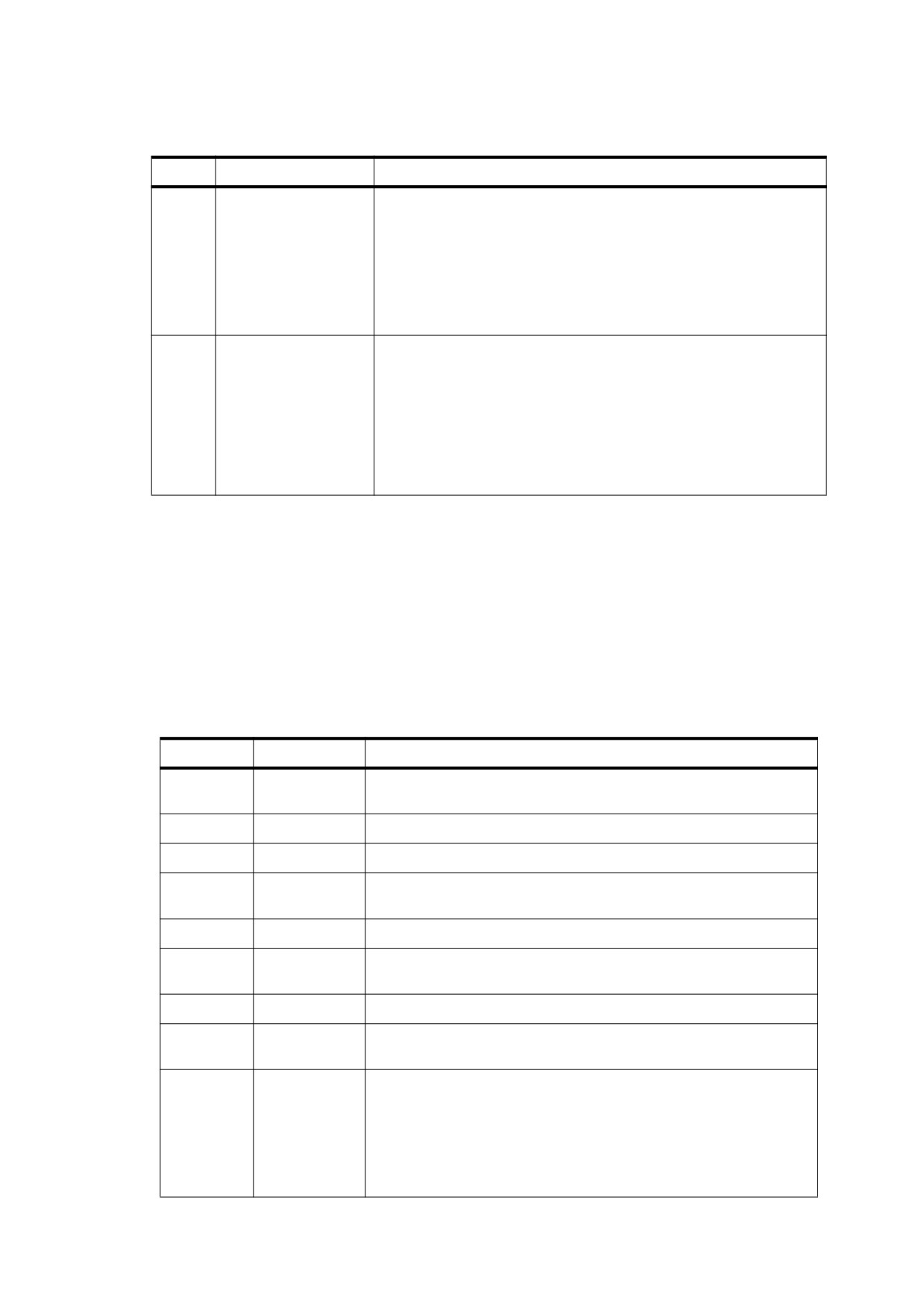
Table F.6 - Shared object hint table, shared object group entry (continued)
Item
Size (bits)
Description
3
128
(Only if item 2 is 1) The shared object signature, a 16-byte MD5 hash
that uniquely identifies the resource that the group of objects
represents.
NOTE
It enables the conforming reader to substitute a locally
cached copy of the resource instead of reading it from the
PDF file. Note that this signature is unrelated to signature
fields in interactive forms, as defined in
12.7.4.5,
"Signature Fields".
4
See Table F.5, item 5
A number equal to 1 less than the number of objects in the group. The
first object of the first page shall be the one whose object number is
given by the O entry in the linearization parameter dictionary at the
beginning of the file. Object numbers for subsequent entries can be
determined by accumulating the number of objects in all previous
entries until all shared objects in the first page have been enumerated.
Following that, the first object in the shared objects section has a
number that can be obtained from the header section of the shared
object hint table (Table F.5, item 1).
NOTE
In a document consisting of only one page, all of that page’s objects shall be treated as if they were shared; the
shared object hint table reflects this.
F.4.3
Thumbnail Hint Table
The thumbnail hint table shall consist of a header section (Table F.7) followed by the thumbnails section, which
shall include one or more per-page entries (Table F.8), each of which describes the thumbnail image for a
single page. The entries shall be in page number order starting with page 0, even if the document catalogue
contains an OpenAction entry that specifies opening at some page other than page 0. Thumbnail images may
exist for some pages and not for others.
Table F.7 - Thumbnail hint table, header section
Item
Size (bits)
Description
1
32
The object number of the first thumbnail image (that is, the thumbnail
image that is described by the first entry in the thumbnails section).
2
32
The location of the first thumbnail image.
3
32
The number of pages that have thumbnail images.
4
16
The number of bits needed to represent the greatest number of
consecutive pages that do not have a thumbnail image.
5
32
The least length of a thumbnail image in bytes.
6
16
The number of bits needed to represent the difference between the
greatest and least length of a thumbnail image.
7
32
The least number of objects in a thumbnail image.
8
16
The number of bits needed to represent the difference between the
greatest and least number of objects in a thumbnail image.
9
32
The object number of the first object in the thumbnail shared objects
section (a subsection of part 9). This section includes objects (colour
spaces, for example) that shall be referenced from some or all
thumbnail objects and are not referenced from any other objects. The
thumbnail shared objects shall be undifferentiated; there is no
indication of which shared objects shall be referenced from any given
page’s thumbnail image.
691

Table F.7 - Thumbnail hint table, header section (continued)
Item
Size (bits)
Description
10
32
The location of the first object in the thumbnail shared objects section.
11
32
The number of thumbnail shared objects.
12
32
The length of the thumbnail shared objects section in bytes.
Table F.8 - Thumbnail hint table, per-page entry
Item
Size (bits)
Description
1
See Table F.7, item 4
(Optional) The number of preceding pages lacking a thumbnail image.
This number indicates how many pages without a thumbnail image lie
between the previous entry’s page and this page.
2
See Table F.7, item 8
A number that, when added to the least number of objects in a
thumbnail image (Table F.7, item 7), gives the number of objects in this
page’s thumbnail image.
3
See Table F.7, item 6
A number that, when added to the least length of a thumbnail image
(Table F.7, item 5), gives the length of this page’s thumbnail image in
bytes.
The order of items in Table F.8 is as follows:
a) Item 1 for all pages, in page order starting with the first page
b) Item 2 for all pages, in page order starting with the first page
c) Item 3 for all pages, in page order starting with the first page
F.4.4
Generic Hint Tables
Categories of objects are associated with the document as a whole rather than with individual pages (see
F.3.10, "Other Objects (Part 9)"), and hints should be provided for accessing those objects efficiently. For each
category of hints, there shall be a separate entry in the primary hint stream giving the starting position of the
table within the stream; see F.3.6, "Hint Streams (Parts 5 and 10)".
Such hints shall be represented by a generic hint table, which describes a single group of objects that are
located together in the PDF file. The entries in this table are listed in Table F.9. This representation shall be
used for the following hint tables, if needed:
•
Outline hint table
•
Thread information hint table
•
Named destination hint table
•
Information dictionary hint table
•
Page label hint table
Generic hint tables may be used for product-specific objects accessed by conforming readers.
NOTE
It is considerably more convenient for a conforming reader to use the generic hint representation than to
specify custom hints.
692

Table F.9 - Generic hint table
item
Size (bits)
Description
1
32
The object number of the first object in the group.
2
32
The location of the first object in the group.
3
32
The number of objects in the group.
4
32
The length of the object group in bytes.
F.4.5
Extended Generic Hint Tables
An extended generic hint table shall begin with the same entries as in a generic hint table, and shall be followed
by three additional entries, as shown in Table F.10. This table provides hints for accessing objects that
reference shared objects. As of PDF 1.5, the following hint tables, if needed, shall use the extended generic
format:
•
Interactive form hint table
•
Logical structure hint table
•
Renditions name tree hint table
Embedded file streams shall not be referred to by this hint table, even if they are reachable from nodes in the
renditions name tree; instead they shall use the hint table described in F.4.6, "Embedded File Stream Hint
Tables."
Table F.10 - Extended generic hint table
Item
Size (bits)
Description
1
32
The object number of the first object in the group.
2
32
The location of the first object in the group.
3
32
The number of objects in the group.
4
32
The length of the object group in bytes.
5
32
The number of shared object references.
6
16
The number of bits needed to represent the numerically greatest
shared object identifier used by the objects in the group.
7…
See Table F.3, item 11
Starting with item 7, each of the remaining items in this table shall be a
shared object identifier—that is, an index into the shared object hint
table (described in F.4.2, “Shared Object Hint Table”).
F.4.6
Embedded File Stream Hint Tables
The embedded file streams hint table allows a conforming reader to locate all byte ranges of a PDF file needed
to access its embedded file streams. An embedded file stream may be grouped with other objects that it
references; all objects in such a group shall have adjacent object numbers. (A group shall contain no objects at
all if it contains shared object references.)
This hint table shall have a header section (see Table F.11), which shall have general information about the
embedded file stream groups. The header section shall be followed by the entries in Table F.12. Each of the
items in Table F.12 shall be repeated for each embedded file stream group (the number of groups being
represented by item 3 in Table F.11). That is, the order of items in Table F.12 shall be item 1 for the first group,
item 1 for the second group, and so on; item 2 for the first group, item 2 for the second group, and so on;
repeated for the 5 items.
693
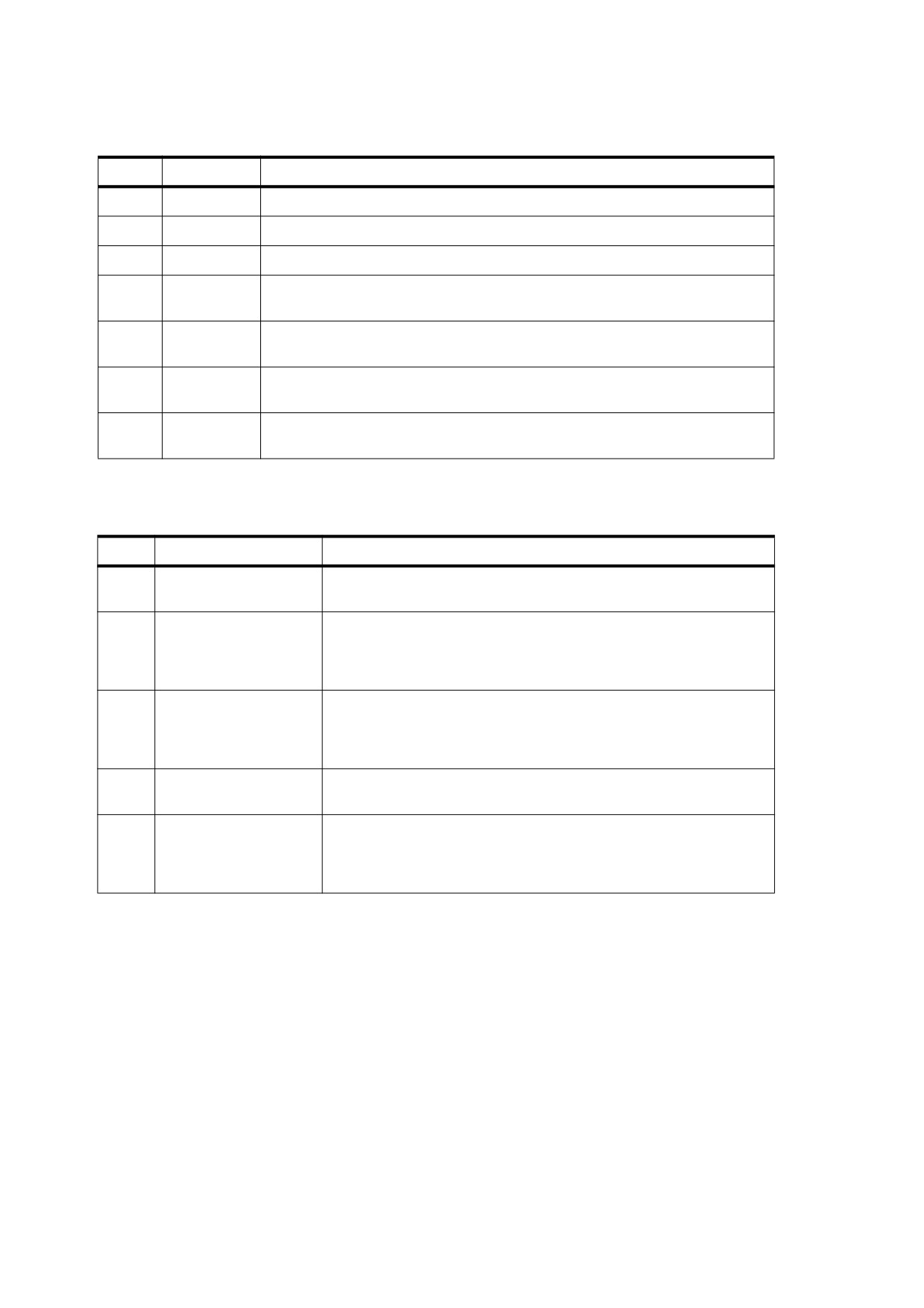
Table F.11 - Embedded file stream hint table, header section
Item
Size (bits)
Description
1
32
The object number of the first object in the first embedded file stream group.
2
32
The location of the first object in the first embedded file stream group.
3
32
The number of embedded file stream groups referenced by this hint table.
4
16
The number of bits needed to represent the highest object number
corresponding to an embedded file stream object.
5
16
The number of bits needed to represent the greatest number of objects in an
embedded file stream group.
6
16
The number of bits needed to represent the greatest length of an embedded file
stream group, in bytes.
7
16
The number of bits needed to represent the greatest number of shared object
references in any embedded file stream group.
Table F.12 - Embedded file stream hint table, per-embedded file stream group entries
Item
Size (bits)
Description
1
See Table F.11, item 4
The object number of the embedded file stream that this entry is
associated with.
2
See Table F.11, item 5
The number of objects in this embedded file streams group. This item
may be 0, meaning that there are only shared object references. In this
case, item 4 for this group shall be greater than zero and item 3 shall
be zero.
3
See Table F.11, item 6
The length of this embedded file stream group, in bytes. This item may
be 0, which shall mean that there are only shared object references. In
this case, item 4 for this group shall be greater than zero and item 2
shall be zero.
4
See Table F.11, item 7
The number of shared objects referenced by this embedded file
stream group.
5
See Table F.3, item 11
A bit-packed list of shared object identifiers; that is, indices into the
shared object hint table (see F.4.2, “Shared Object Hint Table”). Item 4
for this group shall specify how many shared object identifiers shall be
associated with the group.
694
Annex G
(informative)
Linearized PDF Access Strategies
G.1
General
This section outlines how the conforming reader can take advantage of the structure of a Linearized PDF file to
retrieve and display it efficiently. This material may help explain the rationale for the organization.
G.2
Opening at the First Page
As described earlier, when a document is initially accessed, a request is issued to retrieve the entire file,
starting at the beginning. Consequently, Linearized PDF is organized so that all the data required to display the
first page is at the beginning of the file. This includes all resources that are referenced from the first page,
regardless of whether they are also referenced from other pages.
The first page is usually but not necessarily page 0. If the document catalogue contains an OpenAction entry
that specifies opening at some page other than page 0, that page is the one physically located at the beginning
of the document. Thus, opening a document at the default place (rather than a specific destination) requires
simply waiting for the first-page data to arrive; no additional transactions are required.
In an ordinary conforming reader, opening a document requires first positioning to the end to obtain the
startxref line. Since a Linearized PDF file has the first page’s cross-reference table at the beginning, reading
the startxref line is not necessary. All that is required is to verify that the file length given in the linearization
parameter dictionary at the beginning of the file matches the actual length of the file, indicating that no updates
have been appended to the PDF file.
The primary hint stream is located either before or after the first-page section, which means that it is also
retrieved as part of the initial sequential read of the file. The conforming reader is expected to interpret and
retain all the information in the hint tables. The tables are reasonably compact and are not designed to be
obtained from the file in random pieces.
The conforming reader must now decide whether to continue reading the remainder of the document
sequentially or to abort the initial transaction and access subsequent pages by using separate transactions
requesting byte ranges. This decision is a function of the size of the file, the data rate of the channel, and the
overhead cost of a transaction.
G.3
Opening at an Arbitrary Page
The conforming reader may be requested to open a PDF file at an arbitrary page. The page can be specified in
one of three ways:
•
By page number (remote go-to action, integer page specifier)
•
By named destination (remote go-to action, name or string page specifier)
•
By article thread (thread action)
Additionally, an indexed search results in opening a document by page number. Handling this case efficiently is
especially important.
695
As indicated above, when the document is initially opened, it is retrieved sequentially starting at the beginning.
As soon as the hint tables have been received, the conforming reader has sufficient information to request
retrieval of any page of the document given its page number. Therefore, the conforming reader can abort the
initial transaction and issue a new transaction for the target page, as described in G.4, "Going to Another Page
of an Open Document".
The position of the primary hint stream (part 5 in F.3.1, "General") with respect to the first-page section (part 6
in F.3.1, "General") determines how quickly this can be done. If the primary hint stream precedes the first-page
section, the initial transaction can be aborted very quickly; however, this is at the cost of increased delay when
opening the document at the first page. On the other hand, if the primary hint stream follows the first-page
section, displaying the first page is quicker (since the hint tables are not needed for that), but opening at an
arbitrary page is delayed by the time required to receive the first page. The decision whether to favour opening
at the first page or opening at an arbitrary page must be made at the time a PDF file is linearized.
If an overflow hint stream exists, obtaining it requires issuing an additional transaction. For this reason,
inclusion of an overflow hint stream in Linearized PDF, although permitted, is not recommended. The feature
exists to allow the linearizer to write the PDF file with space reserved for a primary hint stream of an estimated
size and then go back and fill in the hint tables. If the estimate is too small, the linearizer can append an
overflow stream containing the remaining hint table data. Thus, the PDF file can be written in one pass, which
may be an advantage if the performance of writing PDF is considered important.
Opening at a named destination requires the conforming reader first to read the entire Dests or Names
dictionary, for which a hint is present. Using this information, it is possible to determine the page containing the
specific destination identified by the name.
Opening to an article requires the conforming reader first to read the entire Threads array, which is located with
the document catalogue at the beginning of the document. Using this information, it is possible to determine the
page containing the first bead of any thread. Opening at other than the first bead of a thread requires chaining
through all the beads until the desired one is reached; there are no hints to accelerate this.
G.4
Going to Another Page of an Open Document
Given a page number and the information in the hint tables, it is now straightforward for the conforming reader
to construct a single request to retrieve any arbitrary page of the document. The request should include the
following items:
•
The objects of the page itself, whose byte range can be determined from the entry in the page offset hint
table.
•
The portion of the main cross-reference table referring to those objects. This can be computed from main
cross-reference table location (the T entry in the linearization parameter dictionary) and the cumulative
object number in the page offset hint table.
•
The shared objects referenced from the page, whose byte ranges can be determined from information in
the shared object hint table.
•
The portion or portions of the main cross-reference table referring to those objects, as described above.
The purpose of the fractions in the page offset hint table is to enable the conforming reader to schedule
retrieval of the page in a way that allows incremental display of the data as it arrives. It accomplishes this by
constructing a request that interleaves pieces of the page contents with the shared resources that the contents
refer to. This serves much the same purpose as the physical interleaving that is done for the first page.
696
G.5
Drawing a Page Incrementally
The ordering of objects in pages and the organization of the hint tables are intended to allow progressive
update of the display and early opportunities for user interaction when the data is arriving slowly. The
conforming reader must recognize instances in which the targets of indirect object references have not yet
arrived and, where possible, rearrange the order in which it acts on the objects in the page.
The following sequence of actions is recommended:
a) Activate the annotations, but do not draw them yet. Also activate the cursor feedback for any article
threads in the page.
b) Begin drawing the contents. Whenever there is a reference to an image XObject that has not yet arrived,
skip over it. Whenever there is a reference to a font whose definition is an embedded font file that has not
yet arrived, draw the text using a substitute font (if that is possible).
c) Draw the annotations.
d) Draw the images as they arrive, together with anything that overlaps them.
e) Once the embedded font definitions have arrived, redraw the text using the correct fonts, together with
anything that overlaps the text.
The last two steps should be done using an off-screen buffer, if possible, to avoid objectionable flashing during
the redraw process.
On encountering a reference XObject (see 8.10.4, "Reference XObjects"), the conforming reader may choose
to initially display the object as a proxy and defer the retrieval and rendering of the imported content. Note that,
since all XObjects in a Linearized PDF file follow the content stream of the page on which they appear, their
retrieval is already deferred; the use of a reference XObject results in an additional level of deferral.
G.6
Following an Article Thread
As indicated earlier, the bead dictionaries for any article thread that visits a given page are located with that
page. This enables the bead rectangles to be activated and proper cursor feedback to be shown.
If the user follows a thread, the conforming reader can obtain the object number from the N or P entry of the
bead dictionary. This identifies a target bead, which is located with the page to which it belongs. Given this
object number, the conforming reader can go to that page, as discussed in G.4, "Going to Another Page of an
Open Document."
G.7
Accessing an Updated File
As stated earlier, if a Linearized PDF file subsequently has an incremental update appended to it, the
linearization and hints are no longer valid. Actually, this is not necessarily true, but the conforming reader must
do some additional work to validate the information.
When the conforming reader sees that the file is longer than the length given in the linearization parameter
dictionary, it must issue an additional transaction to read everything that was appended. It must then analyse
the objects in that update to see whether any of them modify objects that are in the first page or that are the
targets of hints. If so, it must augment its internal data structures as necessary to take the updates into account.
For a PDF file that has received only a small update, this approach may be worthwhile. Accessing the file this
way is quicker than accessing it without hints or retrieving the entire file before displaying any of it.
697
THIS PAGE BLANK
698

Annex H
(informative)
Example PDF Files
H.1
General
This annex presents several examples showing the structure of actual PDF files:
•
A minimal file that can serve as a starting point for creating other PDF files (and that is the basis of later
examples)
•
A simple example that shows a text string—the classic “Hello World”—and a simple graphics example that
draws lines and shapes
•
A fragment of a PDF file that illustrates the structure of the page tree for a large document and, similarly,
two fragments that illustrate the structure of an outline hierarchy
•
An example showing the structure of a PDF file as it is updated several times, illustrating multiple body
sections, cross-reference sections, and trailers
NOTE
The Length values of stream objects in the examples and the byte addresses in cross-reference tables are not
necessarily accurate.
H.2
Minimal PDF File
The example in H.2, "Minimal PDF File" is a PDF file that does not draw anything; it is almost the minimum
acceptable PDF file. It is not strictly the minimum acceptable because it contains an outline dictionary
(Outlines in the document catalog) with a zero count (in which case this object would normally be omitted); a
page content stream (Contents in the page object); and a resource dictionary (Resources in the page object)
containing a ProcSet array. These objects were included to make this file useful as a starting point for creating
other, more realistic PDF files.
Table H.1 lists the objects in this example.
Table H.1 - Objects in minimal example
Object number
Object type
1
Catalog (document catalog)
2
Outlines (outline dictionary)
3
Pages (page tree node)
4
Page (page object)
5
Content stream
6
Procedure set array
NOTE
When using the example in H.2, "Minimal PDF File" as a starting point for creating other files, remember to
update the ProcSet array as needed (see 14.2, "Procedure Sets"). Also, remember that the cross-reference
table entries may need to have a trailing SPACE (see 7.5.4, "Cross-Reference Table").
699
EXAMPLE
%PDF-1. 4
1 0 obj
<<
/Type /Catalog
/Outlines
2 0 R
/Pages 3 0 R
>>
endobj
2 0 obj
<<
/Type Outlines
/Count 0
>>
endobj
3 0 obj
<<
/Type /Pages
/Kids
[4 0 R ]
/Count 1
>>
endobj
4 0 obj
<<
/Type /Page
/Parent 3 0 R
/MediaBox [ 0 0 612 792 ]
/Contents 5 0 R
/Resources << /ProcSet 6 0 R >>
>>
endobj
5 0 obj
<< /Length 35 >>
stream
… Page-marking operators…
endstream
endobj
6 0 obj
[ /PDF ]
endobj
xref
0 7
0000000000 65535 f
0000000009 00000 n
0000000074 00000 n
0000000120 00000 n
0000000179 00000 n
0000000300 00000 n
0000000384 00000 n
trailer
<<
/Size
7
/Root 1 0 R
>>
startxref
408
%%EOF
H.3
Simple Text String Example
The example in H.3, "Simple Text String Example" is the classic “Hello World” example built from the preceding
example. It shows a single line of text consisting of the string Hello World, illustrating the use of fonts and
700

several text-related PDF operators. The string is displayed in 24-point Helvetica. Because Helvetica is one of
the standard 14 fonts, no font descriptor is needed.
Table H.2 lists the objects in this example.
Table H.2 - Objects in simple text string example
Object number
Object type
1
Catalog (document catalog)
2
Outlines (outline dictionary)
3
Pages (page tree node)
4
Page (page object)
5
Content stream
6
Procedure set array
7
Font (Type 1 font)
EXAMPLE
%PDF-1. 4
1 0 obj
<<
/Type /Catalog
/Outlines
2 0 R
/Pages 3 0 R
>>
endobj
2 0 obj
<<
/Type /Outlines
/Count 0
>>
endobj
3 0 obj
<<
/Type /Pages
/Kids
[4 0 R ]
/Count 1
>>
endobj
4 0 obj
<<
/Type /Page
/Parent 3 0 R
/MediaBox [ 0 0 612 792 ]
/Contents 5 0 R
/Resources <<
/ProcSet 6 0 R
/Font << /F1 7 0 R >>
>>
>>
endobj
5 0 obj
<< /Length 73 >>
stream
BT
/F1 24 Tf
100 100 Td
( Hello World ) Tj
ET
endstream
endobj
701

6 0 obj
[ /PDF /Text ]
endobj
7 0 obj
<<
/Type /Font
/Subtype /Type1
/Name /F1
/BaseFont /Helvetica
/Encoding /MacRomanEncoding
>>
endobj
xref
0 8
0000000000 65535 f
0000000009 00000 n
0000000074 00000 n
0000000120 00000 n
0000000179 00000 n
0000000364 00000 n
0000000466 00000 n
0000000496 00000 n
trailer
<< /Size 8
/Root 1 0 R
>>
startxref
625
%%EOF
H.4
Simple Graphics Example
The example in H.4, "Simple Graphics Example" draws a thin black line segment, a thick black dashed line
segment, a filled and stroked rectangle, and a filled and stroked cubic Bézier curve. Table H.3 lists the objects
in this example, and Figure H.1 shows the resulting output. (Each shape has a red border, and the rectangle is
filled with light blue.)
Table H.3 - Objects in simple graphics example
Object number
Object type
1
Catalog (document catalog)
2
Outlines (outline dictionary)
3
Pages (page tree node)
4
Page (page object)
5
Content stream
6
Procedure set array
702
Figure H.1 - Output of the following example
EXAMPLE
%PDF-1. 4
1 0 obj
<<
/Type /Catalog
/Outlines
2 0 R
/Pages 3 0 R
>>
endobj
2 0 obj
<<
/Type /Outlines
/Count 0
>>
endobj
3 0 obj
<<
/Type /Pages
/Kids
[4 0 R ]
/Count 1
>>
endobj
4 0 obj
<<
/Type /Page
/Parent 3 0 R
/MediaBox [ 0 0 612 792 ]
/Contents 5 0 R
/Resources << /ProcSet 6 0 R >>
>>
endobj
5 0 obj
<< /Length 883 >>
stream
% Draw a black line segment, using the default line width .
150 250 m
150 350 l
S
% Draw a thicker, dashed line segment .
4 w
% Set line width to 4 points
[4
6 ] 0 d
% Set dash pattern to 4 units on, 6 units off
150 250 m
400 250 l
S
[ ]
0 d
% Reset dash pattern to a solid line
1 w
% Reset line width to 1 unit
703
% Draw a rectangle with a 1-unit red border, filled with light blue .
1.0 0.0 0.0 RG
% Red for stroke color
0.5 0.75 1.0 rg
% Light blue for fill color
200 300 50 75 re
B
% Draw a curve filled with gray and with a colored border.
0.5 0.1 0.2 RG
0.7 g
300 300 m
300 400 400 400 400 300 c
b
endstream
endobj
6 0 obj
[ /PDF ]
endobj
xref
0 7
0000000000 65535 f
0000000009 00000 n
0000000074 00000 n
0000000120 00000 n
0000000179 00000 n
0000000300 00000 n
0000001532 00000 n
trailer
<<
/Size
7
/Root 1 0 R
>>
startxref
1556
%%EOF
H.5
Page Tree Example
The example in H.5, "Page Tree Example" is a fragment of a PDF file illustrating the structure of the page tree
for a large document. It contains the page tree nodes for a 62-page document. Figure H.2 shows the structure
of this page tree. Numbers in the figure are object numbers corresponding to the objects in the example.
704

337
335
336
4
43
77
108
139
170
201
232
263
294
325
3
42
76
107
138
169
200
231
262
293
324
16
48
82
113
144
175
206
237
268
299
330
21
53
87
118
149
180
211
242
273
304
26
58
92
123
154
185
216
247
278
309
31
63
97
128
159
190
221
252
283
314
37
70
102
133
164
195
226
257
288
319
Figure H.2 - Page tree for the following example
EXAMPLE
337 0 obj
<<
/Type /Pages
/Kids
[
335 0 R
336 0 R
]
/Count 62
>>
endobj
335 0 obj
<<
/Type /Pages
/Parent 337 0 R
/Kids
[
4 0 R
43 0 R
77 0 R
108 0 R
139 0 R
170 0 R
]
/Count 36
>>
endobj
336 0 obj
<<
/Type /Pages
/Parent 337 0 R
/Kids
[
201 0 R
232 0 R
263 0 R
294 0 R
325 0 R
]
/Count 26
>>
endobj
4 0 obj
<<
/Type /Pages
/Parent 335 0 R
/Kids
[
3 0 R
16 0 R
21 0 R
26 0 R
705
31 0 R
37 0 R
]
/Count 6
>>
endobj
43 0 obj
<<
/Type /Pages
/Parent 335 0 R
/Kids
[
42 0 R
48 0 R
53 0 R
58 0 R
63 0 R
70 0 R
]
/Count 6
>>
endobj
77 0 obj
<<
/Type /Pages
/Parent 335 0 R
/Kids
[
76 0 R
82 0 R
87 0 R
92 0 R
97 0 R
102 0 R
]
/Count 6
>>
endobj
108 0 obj
<<
/Type /Pages
/Parent 335 0 R
/Kids
[
107 0 R
113 0 R
118 0 R
123 0 R
128 0 R
133 0 R
]
/Count 6
>>
endobj
139 0 obj
<<
/Type /Pages
/Parent 335 0 R
/Kids
[
138 0 R
144 0 R
149 0 R
154 0 R
159 0 R
164 0 R
]
/Count 6
>>
endobj
170 0 obj
<<
/Type /Pages
706
/Parent 335 0 R
/Kids
[
169 0 R
175 0 R
180 0 R
185 0 R
190 0 R
195 0 R
]
/Count 6
>>
endobj
201 0 obj
<<
/Type /Pages
/Parent 336 0 R
/Kids
[
200 0 R
206 0 R
211 0 R
216 0 R
221 0 R
226 0 R
]
/Count 6
>>
endobj
232 0 obj
<<
/Type /Pages
/Parent 336 0 R
/Kids
[
231 0 R
237 0 R
242 0 R
247 0 R
252 0 R
257 0 R
]
/Count 6
>>
endobj
263 0 obj
<<
/Type /Pages
/Parent 336 0 R
/Kids
[
262 0 R
268 0 R
273 0 R
278 0 R
283 0 R
288 0 R
]
/Count 6
>>
endobj
294 0 obj
<<
/Type /Pages
/Parent 336 0 R
/Kids
[
293 0 R
299 0 R
304 0 R
309 0 R
314 0 R
319 0 R
]
/Count 6
707
>>
endobj
325 0 obj
<<
/Type /Pages
/Parent 336 0 R
/Kids
[
324 0 R
330 0 R
]
/Count 2
>>
endobj
H.6
Outline Hierarchy Example
This section from a PDF file illustrates the structure of an outline hierarchy with six items. Example 1 in H.6,
"Outline Hierarchy Example" shows the outline with all items open, as illustrated in Figure H.3.
Object
On-screen appearance
Count
number
21
6
Document
22
4
Section 1
25
0
Section 2
26
1
Subsection 1
27
0
Section 3
28
0
Summary
29
0
Figure H.3 - Document outline as displayed in Example 1
EXAMPLE 1
21 0 obj
<<
/Type /Outlines
/First
22 0 R
/Last
29 0 R
/Count 6
>>
endobj
22 0 obj
<<
/Title
( Document )
/Parent 21 0 R
/Next 29 0 R
/First
25 0 R
/Last
28 0 R
/Count 4
/Dest [ 3 0 R /XYZ 0 792 0 ]
>>
endobj
25 0 obj
<<
/Title
( Section 1 )
/Parent 22 0 R
/Next 26 0 R
/Dest [ 3 0 R /XYZ null 701 null ]
>>
endobj
26 0 obj
708

<<
/Title
( Section 2 )
/Parent 22 0 R
/Prev 25 0 R
/Next 28 0 R
/First
27 0 R
/Last
27 0 R
/Count 1
/Dest [ 3 0 R /XYZ null 680 null ]
>>
endobj
27 0 obj
<<
/Title
( Subsection 1 )
/Parent 26 0 R
/Dest [ 3 0 R /XYZ null 670 null ]
>>
endobj
28 0 obj
<<
/Title
( Section 3 )
/Parent 22 0 R
/Prev 26 0 R
/Dest [ 7 0 R /XYZ null 500 null ]
>>
endobj
29 0 obj
<<
/Title
( Summary )
/Parent 21 0 R
/Prev 22 0 R
/Dest [ 8 0 R /XYZ null 199 null ]
>>
endobj
Example 2 in H.6, "Outline Hierarchy Example" is the same as Example 1, except that one of the outline items
has been closed in the display. The outline appears as shown in Figure H.4.
Object
On-screen appearance
Count
number
21
5
Document
22
3
Section 1
25
0
Section 2
26
-1
Section 3
28
0
Summary
29
0
Figure H.4 - Document outline as displayed in Example 2
EXAMPLE 2
21 0 obj
<<
/Type /Outlines
/First
22 0 R
/Last
29 0 R
/Count 5
>>
endobj
22 0 obj
<<
/Title
( Document )
/Parent 21 0 R
709
/Next 29 0 R
/First
25 0 R
/Last
28 0 R
/Count 3
/Dest [ 3 0 R /XYZ 0 792 0 ]
>>
endobj
25 0 obj
<<
/Title
( Section 1 )
/Parent 22 0 R
/Next 26 0 R
/Dest [ 3 0 R /XYZ null 701 null ]
>>
endobj
26 0 obj
<<
/Title
( Section 2 )
/Parent 22 0 R
/Prev 25 0 R
/Next 28 0 R
/First
27 0 R
/Last
27 0 R
/Count −1
/Dest [ 3 0 R /XYZ null 680 null ]
>>
endobj
27 0 obj
<<
/Title
( Subsection 1 )
/Parent 26 0 R
/Dest [ 3 0 R /XYZ null 670 null ]
>>
endobj
28 0 obj
<<
/Title
( Section 3 )
/Parent 22 0 R
/Prev 26 0 R
/Dest [ 7 0 R /XYZ null 500 null ]
>>
endobj
29 0 obj
<<
/Title
( Summary )
/Parent 21 0 R
/Prev 22 0 R
/Dest [ 8 0 R /XYZ null 199 null ]
>>
endobj
H.7
Updating Example
This example shows the structure of a PDF file as it is updated several times; it illustrates multiple body
sections, cross-reference sections, and trailers. In addition, it shows that once an object has been assigned an
object identifier, it keeps that identifier until the object is deleted, even if the object is altered. Finally, the
example illustrates the reuse of cross-reference entries for objects that have been deleted, along with the
incrementing of the generation number after an object has been deleted.
The original file is the example in H.2, "Minimal PDF File". The updates are divided into four stages, with the file
saved after each stage:
710

a) Four text annotations are added.
b) The text of one of the annotations is altered.
c) Two of the text annotations are deleted.
d) Three text annotations are added.
The following sections show the segments added to the file at each stage. Throughout this example, objects
are referred to by their object identifiers, which are made up of the object number and the generation number,
rather than simply by their object numbers as in earlier examples. This is necessary because the example
reuses object numbers; therefore, the objects they denote are not unique.
NOTE
The tables in these sections show only those objects that are modified during the updating process. Objects
from H.2, "Minimal PDF File" that are not altered during the update are not shown.
H.7.1
Stage 1: Add Four Text Annotations
Four text annotations are added to the initial file and the file is saved. Table H.4 lists the objects involved in this
update.
Table H.4 - Object usage after adding four text annotations
Object identifier
Object type
4 0
Page (page object)
7 0
Annotation array
8 0
Annot (annotation dictionary)
9 0
Annot (annotation dictionary)
10 0
Annot (annotation dictionary)
11 0
Annot (annotation dictionary)
The example in H.7.1, "Stage 1: Add Four Text Annotations" shows the lines added to the file by this update.
The page object is updated because an Annots entry has been added to it. Note that the file’s trailer now
contains a Prev entry, which points to the original cross-reference section in the file, while the startxref value at
the end of the trailer points to the cross-reference section added by the update.
EXAMPLE
4 0 obj
<<
/Type /Page
/Parent 3 0 R
/MediaBox [ 0 0 612 792 ]
/Contents 5 0 R
/Resources << /ProcSet 6 0 R >>
/Annots 7 0 R
>>
endobj
7 0 obj
[
8 0 R
9 0 R
10 0 R
11 0 R
]
endobj
8 0 obj
<<
/Type /Annot
/Subtype /Text
711
/Rect [ 44 616 162 735 ]
/Contents ( Text #1 )
/Open true
>>
endobj
9 0 obj
<<
/Type /Annot
/Subtype /Text
/Rect [ 224 668 457 735 ]
/Contents ( Text #2 )
/Open false
>>
endobj
10 0 obj
<<
/Type /Annot
/Subtype /Text
/Rect [ 239 393 328 622 ]
/Contents ( Text #3 )
/Open true
>>
endobj
11 0 obj
<<
/Type /Annot
/Subtype /Text
/Rect [ 34 398 225 575 ]
/Contents ( Text #4 )
/Open false
>>
endobj
xref
0 1
0000000000 65535 f
4 1
0000000632 00000 n
7 5
0000000810 00000 n
0000000883 00000 n
0000001024 00000 n
0000001167 00000 n
0000001309 00000 n
trailer
<<
/Size
12
/Root 1 0 R
/Prev 408
>>
startxref
1452
%%EOF
H.7.2
Stage 2: Modify Text of One Annotation
One text annotation is modified and the file is saved. The example in H.7.2, "Stage 2: Modify Text of One
Annotation" shows the lines added to the file by this update. Note that the file now contains two copies of the
object with identifier 10 0 (the text annotation that was modified) and that the added cross-reference section
points to the more recent version of the object. This added cross-reference section contains one subsection,
which contains only an entry for the object that was modified. In addition, the Prev entry in the file’s trailer has
been updated to point to the cross-reference section added in the previous stage, while the startxref value at
the end of the trailer points to the newly added cross-reference section.
712