ISO 32000-1 Document management — Portable document format — Part 1: PDF 1.7 - page 16

Often an illustration is logically part of, or at least attached to, a paragraph or other element of a document. Any
such containment or attachment shall be represented through the use of the Figure structure type. The Figure
element indicates the point of attachment, and its Placement attribute describes the nature of the attachment.
An illustration element without a Placement attribute shall be treated as an ILSE and laid out inline.
For accessibility to users with disabilities and other text extraction purposes, an illustration element should
have an Alt entry or an ActualText entry (or both) in its structure element dictionary (see 14.9.3, “Alternate
Descriptions,” and 14.9.4, “Replacement Text”). Alt is a description of the illustration, whereas ActualText
gives the exact text equivalent of a graphical illustration that has the appearance of text.
14.8.5
Standard Structure Attributes
14.8.5.1
General
In addition to the standard structure types, Tagged PDF defines standard layout and styling attributes for
structure elements of those types. These attributes enable predictable formatting to be applied during
operations such as reflow and export of PDF content to other document formats.
As discussed in 14.7.5, “Structure Attributes,” attributes shall be defined in attribute objects, which are
dictionaries or streams attached to a structure element in either of two ways:
•
The A entry in the structure element dictionary identifies an attribute object or an array of such objects.
•
The C entry in the structure element dictionary gives the name of an attribute class or an array of such
names. The class name is in turn looked up in the class map, a dictionary identified by the ClassMap entry
in the structure tree root, yielding an attribute object or array of objects corresponding to the class.
In addition to the standard structure attributes described in 14.8.5.2, “Standard Attribute Owners,” there are
several other optional entries—Lang, Alt, ActualText, and E—that are described in 14.9, “Accessibility
Support,” but are useful to other PDF consumers as well. They appear in the following places in a PDF file
(rather than in attribute dictionaries):
•
As entries in the structure element dictionary (see Table 323)
•
As entries in property lists attached to marked-content sequences with a Span tag (see 14.6, “Marked
Content”)
The Example in 14.7.6, “Example of Logical Structure,” illustrates the use of standard structure attributes.
14.8.5.2
Standard Attribute Owners
Each attribute object has an owner, specified by the object’s O entry, which determines the interpretation of the
attributes defined in the object’s dictionary. Multiple owners may define like-named attributes with different
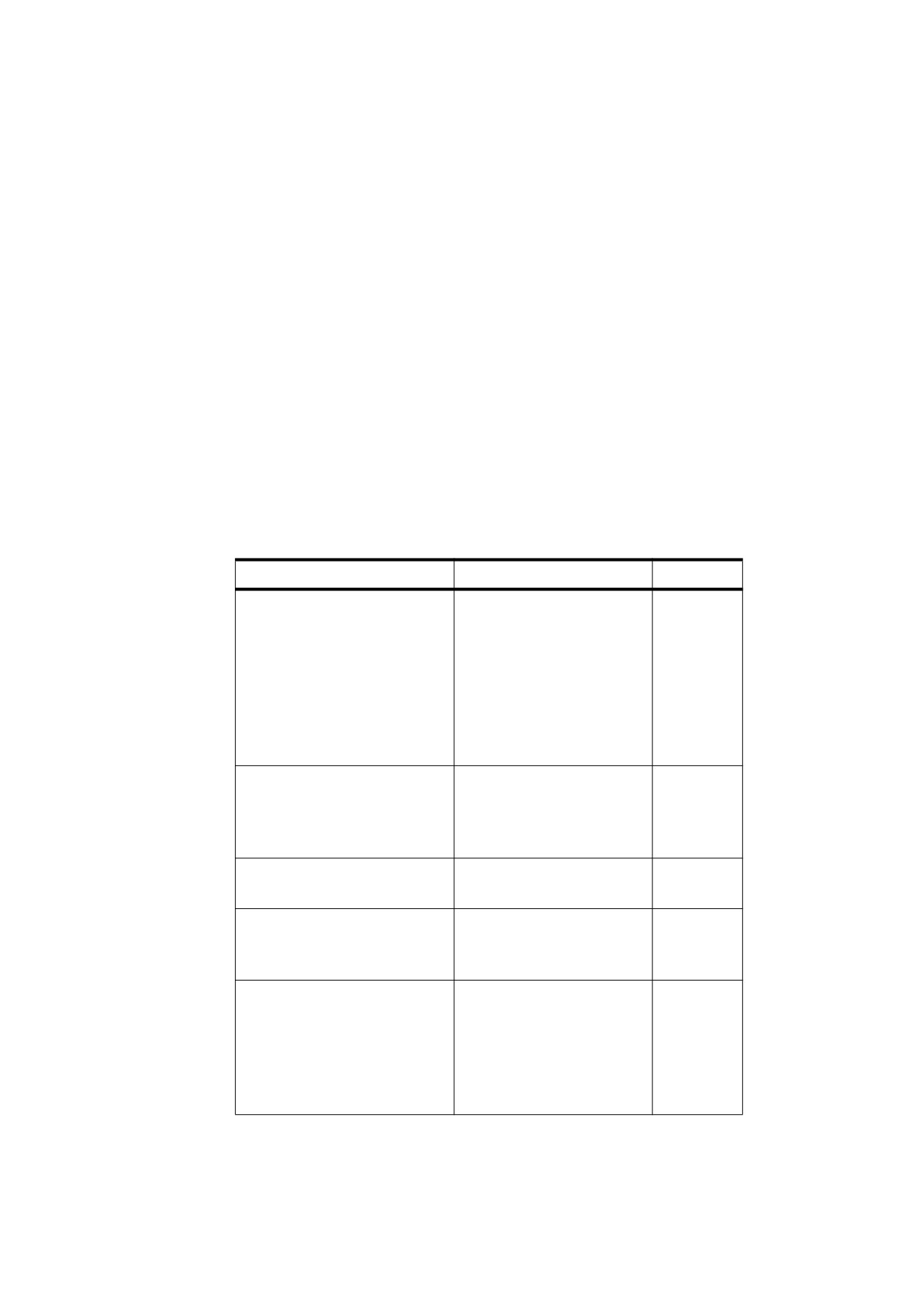
value types or interpretations. Tagged PDF defines a set of standard attribute owners, shown in Table 341.
Table 341 - Standard attribute owners
Owner
Description
Layout
Attributes governing the layout of content
List
Attributes governing the numbering of lists
PrintField
(PDF 1.7) Attributes governing Form structure elements for
non-interactive form fields
Table
Attributes governing the organization of cells in tables
593

Table 341 - Standard attribute owners (continued)
Owner
Description
XML-1.00
Additional attributes governing translation to XML, version
1.00
HTML-3.20
Additional attributes governing translation to HTML, version
3.20
HTML-4.01
Additional attributes governing translation to HTML, version
4.01
OEB-1.00
Additional attributes governing translation to OEB, version
1.0
RTF-1.05
Additional attributes governing translation to Microsoft Rich
Text Format, version 1.05
CSS-1.00
Additional attributes governing translation to a format using
CSS, version 1.00
CSS-2.00
Additional attributes governing translation to a format using
CSS, version 2.00
An attribute object owned by a specific export format, such as XML-1.00, shall be applied only when exporting
PDF content to that format. Such format-specific attributes shall override any corresponding attributes owned
by Layout, List, PrintField, or Table. There may also be additional format-specific attributes; the set of
possible attributes is open-ended and is not explicitly specified or limited by Tagged PDF.
14.8.5.3
Attribute Values and Inheritance
Some attributes are defined as inheritable. Inheritable attributes propagate down the structure tree; that is, an
attribute that is specified for an element shall apply to all the descendants of the element in the structure tree
unless a descendent element specifies an explicit value for the attribute.
NOTE 1
The description of each of the standard attributes in this sub-clause specifies whether their values are
inheritable.
An inheritable attribute may be specified for an element for the purpose of propagating its value to child
elements, even if the attribute is not meaningful for the parent element. Non-inheritable attributes may be
specified only for elements on which they would be meaningful.
The following list shows the priority for determining attribute values. A conforming reader determines an
attribute’s value to be the first item in the following list that applies:
a) The value of the attribute specified in the element’s A entry, owned by one of the export formats (such as
XML, HTML-3.20, HTML-4.01, OEB-1.0, CSS-1.00, CSS-2.0, and RTF), if present, and if outputting to that
format
b) The value of the attribute specified in the element’s A entry, owned by Layout, PrintField, Table or List, if
present
c) The value of the attribute specified in a class map associated with the element’s C entry, if there is one
d) The resolved value of the parent structure element, if the attribute is inheritable
e) The default value for the attribute, if there is one
NOTE 2
The attributes Lang, Alt, ActualText, and E do not appear in attribute dictionaries. The rules governing their
application are discussed in 14.9, “Accessibility Support.”
594
There is no semantic distinction between attributes that are specified explicitly and ones that are inherited.
Logically, the structure tree has attributes fully bound to each element, even though some may be inherited
from an ancestor element. This is consistent with the behaviour of properties (such as font characteristics) that
are not specified by structure attributes but shall be derived from the content.
14.8.5.4
Layout Attributes
14.8.5.4.1
General
Layout attributes specify parameters of the layout process used to produce the appearance described by a
document’s PDF content. Attributes in this category shall be defined in attribute objects whose O (owner) entry
has the value Layout (or is one of the format-specific owner names listed in Table 341).
NOTE
The intent is that these parameters can be used to reflow the content or export it to some other document
format with at least basic styling preserved.
Table 342 summarizes the standard layout attributes and the structure elements to which they apply. The
following sub-clauses describe the meaning and usage of these attributes.
As described in 14.8.5.3, “Attribute Values and Inheritance,” an inheritable attribute may be specified for any
element to propagate it to descendants, regardless of whether it is meaningful for that element.
Table 342 - Standard layout attributes
Structure Elements
Attributes
Inheritable
Any structure element
Placement
No
WritingMode
Yes
No
BackgroundColor
Yes
BorderColor
No
BorderStyle
Yes
BorderThickness
Yes
No
Color
Padding
Any BLSE
SpaceBefore
No
ILSEs with Placement other
SpaceAfter
No
than Inline
StartIndent
Yes
EndIndent
Yes
BLSEs containing text
TextIndent
Yes
TextAlign
Yes
Illustration elements
(Figure,
BBox
No
Formula, Form)
Width
No
Table
Height
No
TH (Table header)
Width
No
TD (Table data)
Height
No
BlockAlign
Yes
InlineAlign
Yes
TBorderStyle
Yes
TPadding
Yes
595
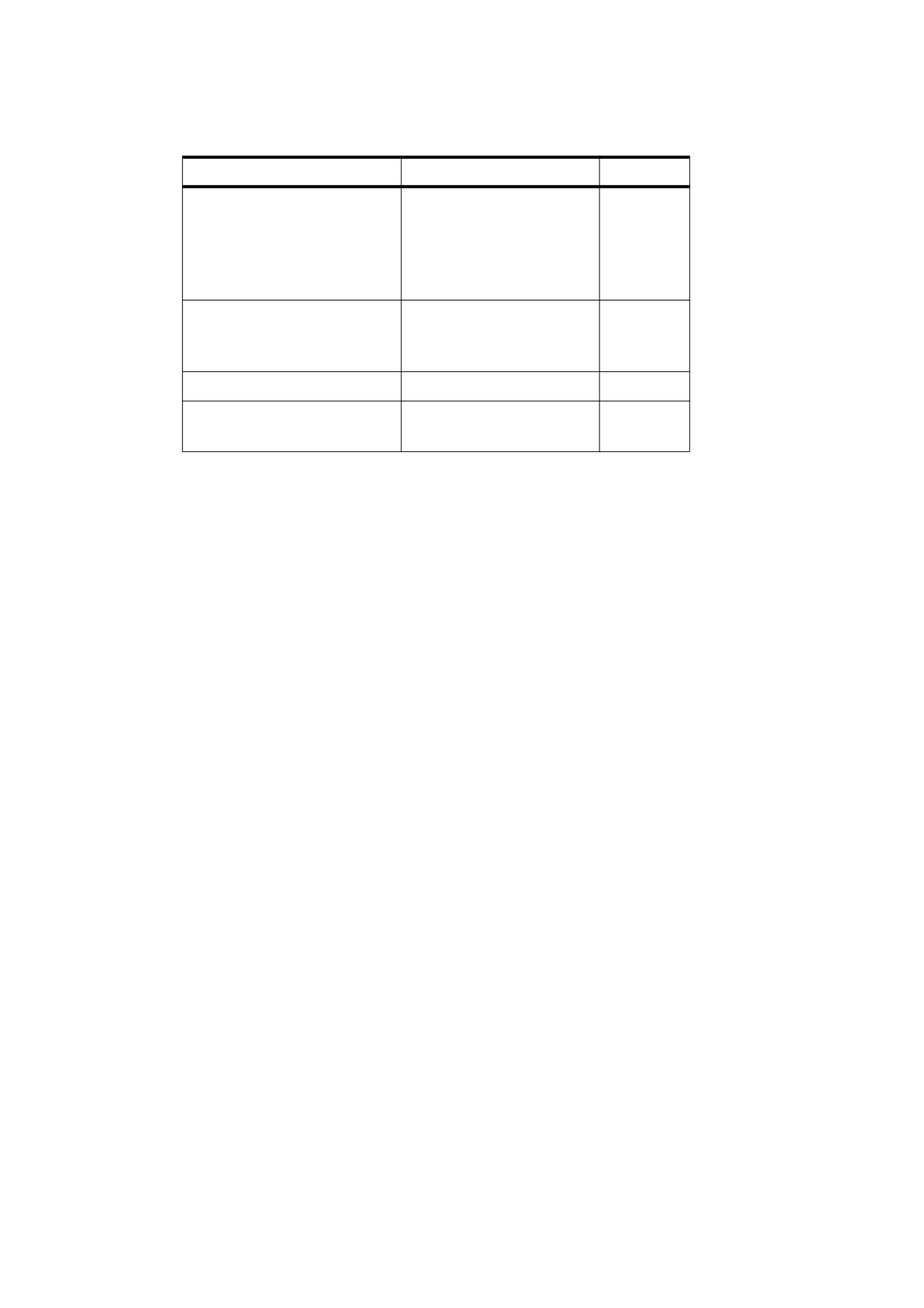
Table 342 - Standard layout attributes (continued)
Structure Elements
Attributes
Inheritable
Any ILSE
LineHeight
Yes
BLSEs containing ILSEs or
BaselineShift
No
containing direct or nested
TextDecorationType
No
content items
TextDecorationColor
Yes
TextDecorationThickness
Yes
Grouping elements Art, Sect,
ColumnCount
No
and Div
ColumnWidths
No
ColumnGap
No
Vertical text
GlyphOrientationVertical
Yes
Ruby text
RubyAlign
Yes
RubyPosition
Yes
14.8.5.4.2
General Layout Attributes
The layout attributes described in Table 343 may apply to structure elements of any of the standard types at the
block level (BLSEs) or the inline level (ILSEs).
596
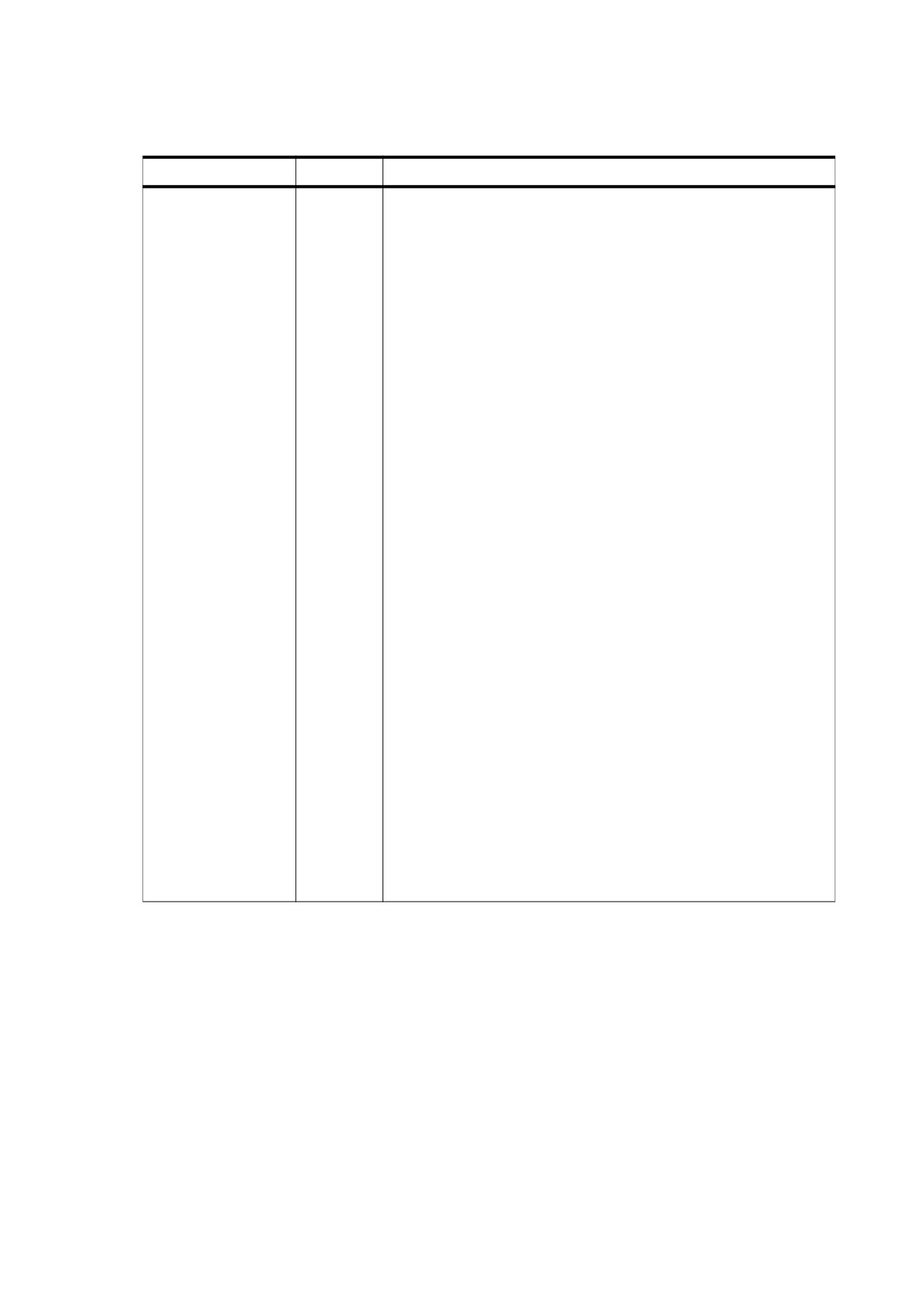
Table 343 - Standard layout attributes common to all standard structure types
Key
Type
Value
Placement
name
(Optional; not inheritable) The positioning of the element with respect
to the enclosing reference area and other content:
Block Stacked in the block-progression direction within an
enclosing reference area or parent BLSE.
Inline
Packed in the inline-progression direction within an enclosing
BLSE.
Before Placed so that the before edge of the element’s allocation
rectangle
(see
“Content and Allocation Rectangles” in
14.8.5.4,
“Layout Attributes”) coincides with that of the
nearest enclosing reference area. The element may float, if
necessary, to achieve the specified placement. The element
shall be treated as a block occupying the full extent of the
enclosing reference area in the inline direction. Other content
shall be stacked so as to begin at the after edge of the
element’s allocation rectangle.
Start
Placed so that the start edge of the element’s allocation
rectangle
(see
“Content and Allocation Rectangles” in
14.8.5.4,
“Layout Attributes”) coincides with that of the
nearest enclosing reference area. The element may float, if
necessary, to achieve the specified placement. Other content
that would intrude into the element’s allocation rectangle shall
be laid out as a runaround.
End
Placed so that the end edge of the element’s allocation
rectangle
(see
“Content and Allocation Rectangles” in
14.8.5.4,
“Layout Attributes”) coincides with that of the
nearest enclosing reference area. The element may float, if
necessary, to achieve the specified placement. Other content
that would intrude into the element’s allocation rectangle shall
be laid out as a runaround.
When applied to an ILSE, any value except Inline shall cause the
element to be treated as a BLSE instead. Default value: Inline.
Elements with Placement values of Before, Start, or End shall be
removed from the normal stacking or packing process and allowed to
float to the specified edge of the enclosing reference area or parent
BLSE. Multiple such floating elements may be positioned adjacent to
one another against the specified edge of the reference area or placed
serially against the edge, in the order encountered. Complex cases
such as floating elements that interfere with each other or do not fit on
the same page may be handled differently by different conforming
readers. Tagged PDF merely identifies the elements as floating and
indicates their desired placement.
597
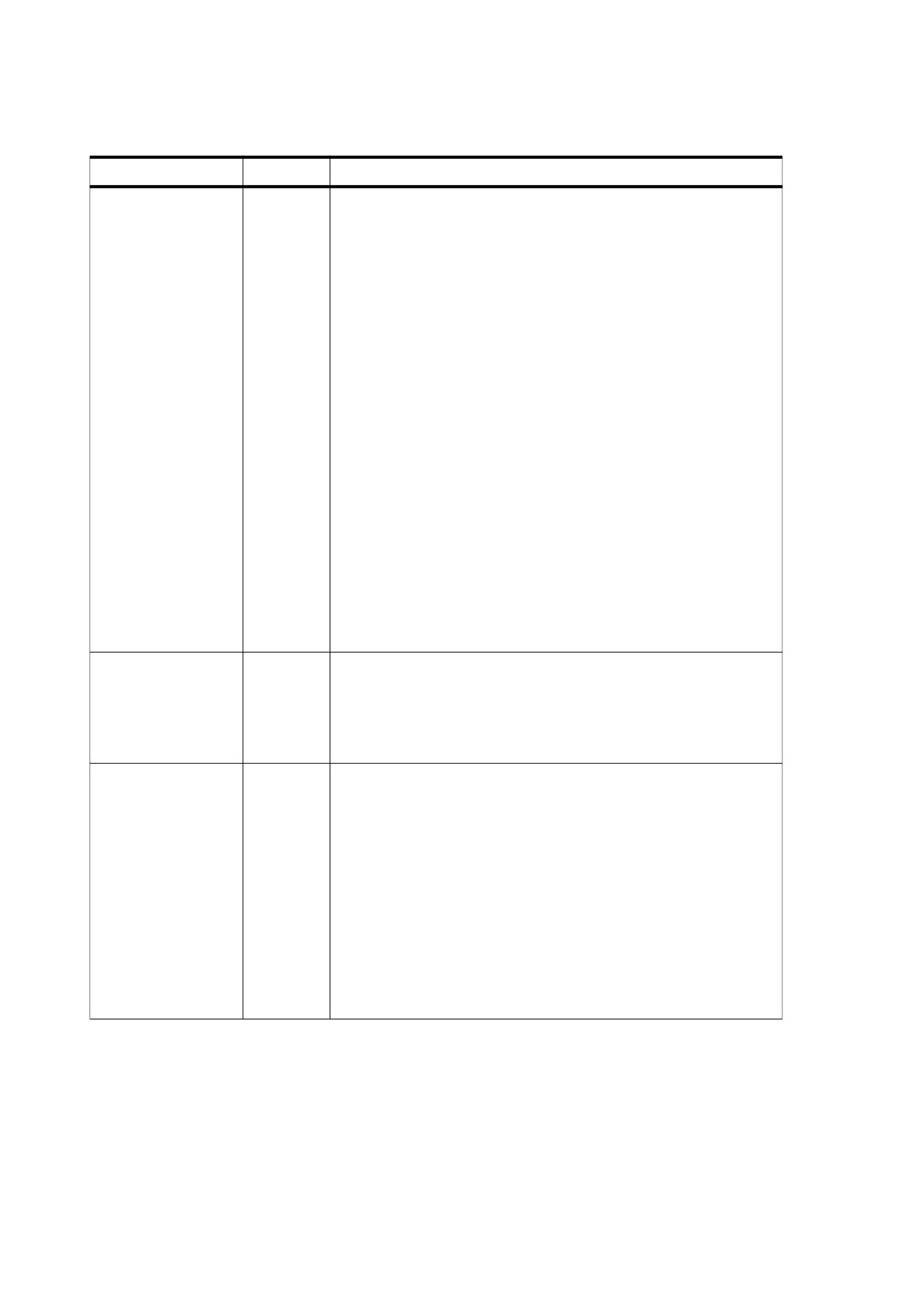
Table 343 - Standard layout attributes common to all standard structure types (continued)
Key
Type
Value
WritingMode
name
(Optional; inheritable) The directions of layout progression for packing
of ILSEs
(inline progression) and stacking of BLSEs
(block
progression):
LrTb Inline progression from left to right; block progression from top
to bottom. This is the typical writing mode for Western writing
systems.
RlTb Inline progression from right to left; block progression from top
to bottom. This is the typical writing mode for Arabic and
Hebrew writing systems.
TbRl Inline progression from top to bottom; block progression from
right to left. This is the typical writing mode for Chinese and
Japanese writing systems.
The specified layout directions shall apply to the given structure
element and all of its descendants to any level of nesting. Default
value: LrTb.
For elements that produce multiple columns, the writing mode defines
the direction of column progression within the reference area: the
inline direction determines the stacking direction for columns and the
default flow order of text from column to column. For tables, the writing
mode controls the layout of rows and columns: table rows (structure
type TR) shall be stacked in the block direction, cells within a row
(structure type TD) in the inline direction.
The inline-progression direction specified by the writing mode is
subject to local override within the text being laid out, as described in
Unicode Standard Annex #9, The Bidirectional Algorithm, available
from the Unicode Consortium (see the Bibliography).
BackgroundColor
array
(Optional; not inheritable; PDF 1.5) The colour to be used to fill the
background of a table cell or any element’s content rectangle (possibly
adjusted by the Padding attribute). The value shall be an array of
three numbers in the range 0.0 to 1.0, representing the red, green, and
blue values, respectively, of an RGB colour space. If this attribute is
not specified, the element shall be treated as if it were transparent.
BorderColor
array
(Optional; inheritable; PDF 1.5) The colour of the border drawn on the
edges of a table cell or any element’s content rectangle (possibly
adjusted by the Padding attribute). The value of each edge shall be an
array of three numbers in the range 0.0 to 1.0, representing the red,
green, and blue values, respectively, of an RGB colour space. There
are two forms:
A single array of three numbers representing the RGB values to apply
to all four edges.
An array of four arrays, each specifying the RGB values for one edge
of the border, in the order of the before, after, start, and end edges. A
value of null for any of the edges means that it shall not be drawn.
If this attribute is not specified, the border colour for this element shall
be the current text fill colour in effect at the start of its associated
content.
598
Table 343 - Standard layout attributes common to all standard structure types (continued)
Key
Type
Value
BorderStyle
array
or
(Optional; not inheritable; PDF 1.5) The style of an element’s border.
name
Specifies the stroke pattern of each edge of a table cell or any
element’s content rectangle
(possibly adjusted by the Padding
attribute). There are two forms:
•
A name from the list below representing the border style to apply
to all four edges.
•
An array of four entries, each entry specifying the style for one
edge of the border in the order of the before, after, start, and end
edges. A value of null for any of the edges means that it shall not
be drawn.
None No border. Forces the computed value of BorderThickness
to be 0.
Hidden Same as None, except in terms of border conflict resolution
for table elements.
Dotted The border is a series of dots.
Dashed The border is a series of short line segments.
Solid
The border is a single line segment.
Double The border is two solid lines. The sum of the two lines and
the space between them equals the value of
BorderThickness.
Groove The border looks as though it were carved into the canvas.
Ridge The border looks as though it were coming out of the canvas
(the opposite of Groove).
Inset
The border makes the entire box look as though it were
embedded in the canvas.
Outset The border makes the entire box look as though it were
coming out of the canvas (the opposite of Inset).
Default value: None
All borders shall be drawn on top of the box’s background. The colour
of borders drawn for values of Groove, Ridge, Inset, and Outset shall
depend on the structure element’s BorderColor attribute and the
colour of the background over which the border is being drawn.
NOTE
Conforming HTML applications may interpret Dotted,
Dashed, Double, Groove, Ridge, Inset, and Outset to be
Solid.
BorderThickness
number
or
(Optional; inheritable; PDF 1.5) The thickness of the border drawn on
array
the edges of a table cell or any element’s content rectangle (possibly
adjusted by the Padding attribute). The value of each edge shall be a
positive number in default user space units representing the border’s
thickness (a value of 0 indicates that the border shall not be drawn).
There are two forms:
A number representing the border thickness for all four edges.
An array of four entries, each entry specifying the thickness for one
edge of the border, in the order of the before, after, start, and end
edges. A value of null for any of the edges means that it shall not be
drawn.
599
Table 343 - Standard layout attributes common to all standard structure types (continued)
Key
Type
Value
Padding
number or
(Optional; not inheritable; PDF 1.5) Specifies an offset to account for
array
the separation between the element’s content rectangle and the
surrounding border
(see
“Content and Allocation Rectangles” in
14.8.5.4,
“Layout Attributes”). A positive value enlarges the
background area; a negative value trims it, possibly allowing the
border to overlap the element’s text or graphic.
The value shall be either a single number representing the width of the
padding, in default user space units, that applies to all four sides or a
4-element array of numbers representing the padding width for the
before, after, start, and end edge, respectively, of the content
rectangle. Default value: 0.
Color
array
(Optional; inheritable; PDF 1.5) The colour to be used for drawing text
and the default value for the colour of table borders and text
decorations. The value shall be an array of three numbers in the range
0.0 to 1.0, representing the red, green, and blue values, respectively,
of an RGB colour space. If this attribute is not specified, the border
colour for this element shall be the current text fill colour in effect at the
start of its associated content.
14.8.5.4.3
Layout Attributes for BLSEs
Table 344 describes layout attributes that shall apply only to block-level structure elements (BLSEs).
Inline-level structure elements (ILSEs) with a Placement attribute other than the default value of Inline shall be
treated as BLSEs and shall also be subject to the attributes described here.
Table 344 - Additional standard layout attributes specific to
block-level structure elements
Key
Type
Value
SpaceBefore
number
(Optional; not inheritable) The amount of extra space preceding the
before edge of the BLSE, measured in default user space units in the
block-progression direction. This value shall be added to any
adjustments induced by the LineHeight attributes of ILSEs within the
first line of the BLSE (see “Layout Attributes for ILSEs” in 14.8.5.4,
“Layout Attributes”). If the preceding BLSE has a SpaceAfter attribute,
the greater of the two attribute values shall be used. Default value: 0.
This attribute shall be disregarded for the first BLSE placed in a given
reference area.
SpaceAfter
number
(Optional; not inheritable) The amount of extra space following the
after edge of the BLSE, measured in default user space units in the
block-progression direction. This value shall be added to any
adjustments induced by the LineHeight attributes of ILSEs within the
last line of the BLSE (see 14.8.5.4, “Layout Attributes”). If the following
BLSE has a SpaceBefore attribute, the greater of the two attribute
values shall be used. Default value: 0.
This attribute shall be disregarded for the last BLSE placed in a given
reference area.
600
Table 344 - Additional standard layout attributes specific to
block-level structure elements (continued)
Key
Type
Value
StartIndent
number
(Optional; inheritable) The distance from the start edge of the
reference area to that of the BLSE, measured in default user space
units in the inline-progression direction. This attribute shall apply only
to structure elements with a Placement attribute of Block or Start (see
“General Layout Attributes” in
14.8.5.4,
“Layout Attributes”). The
attribute shall be disregarded for elements with other Placement
values. Default value: 0.
A negative value for this attribute places the start edge of the BLSE
outside that of the reference area. The results are implementation-
dependent and may not be supported by all conforming products that
process Tagged PDF or by particular export formats.
If a structure element with a StartIndent attribute is placed adjacent to
a floating element with a Placement attribute of Start, the actual value
used for the element’s starting indent shall be its own StartIndent
attribute or the inline extent of the adjacent floating element, whichever
is greater. This value may be further adjusted by the element’s
TextIndent attribute, if any.
EndIndent
number
(Optional; inheritable) The distance from the end edge of the BLSE to
that of the reference area, measured in default user space units in the
inline-progression direction. This attribute shall apply only to structure
elements with a Placement attribute of Block or End (see “General
Layout Attributes” in 14.8.5.4, “Layout Attributes”). The attribute shall
be disregarded for elements with other Placement values. Default
value: 0.
A negative value for this attribute places the end edge of the BLSE
outside that of the reference area. The results are implementation-
dependent and may not be supported by all conforming products that
process Tagged PDF or by particular export formats.
If a structure element with an EndIndent attribute is placed adjacent to
a floating element with a Placement attribute of End, the actual value
used for the element’s ending indent shall be its own EndIndent
attribute or the inline extent of the adjacent floating element, whichever
is greater.
TextIndent
number
(Optional; inheritable; applies only to some BLSEs) The additional
distance, measured in default user space units in the inline-
progression direction, from the start edge of the BLSE, as specified by
StartIndent, to that of the first line of text. A negative value shall
indicate a hanging indent. Default value: 0.
This attribute shall apply only to paragraphlike BLSEs and those of
structure types Lbl (Label), LBody (List body), TH (Table header), and
TD (Table data), provided that they contain content other than nested
BLSEs.
TextAlign
name
(Optional; inheritable; applies only to BLSEs containing text) The
alignment, in the inline-progression direction, of text and other content
within lines of the BLSE:
Start
Aligned with the start edge.
Center Centered between the start and end edges.
End
Aligned with the end edge.
Justify
Aligned with both the start and end edges, with internal
spacing within each line expanded, if necessary, to achieve
such alignment. The last (or only) line shall be aligned with
the start edge only.
Default value: Start.
601

Table 344 - Additional standard layout attributes specific to
block-level structure elements (continued)
Key
Type
Value
BBox
rectangle
(Optional for Annot; required for any figure or table appearing in its
entirety on a single page; not inheritable) An array of four numbers in
default user space units that shall give the coordinates of the left,
bottom, right, and top edges, respectively, of the element’s bounding
box (the rectangle that completely encloses its visible content). This
attribute shall apply to any element that lies on a single page and
occupies a single rectangle.
Width
number
(Optional; not inheritable; illustrations, tables, table headers, and table
or name
cells only; should be used for table cells) The width of the element’s
content rectangle
(see
“Content and Allocation Rectangles” in
14.8.5.4, “Layout Attributes”), measured in default user space units in
the inline-progression direction. This attribute shall apply only to
elements of structure type Figure, Formula, Form, Table, TH (Table
header), or TD (Table data).
The name Auto in place of a numeric value shall indicate that no
specific width constraint is to be imposed; the element’s width shall be
determined by the intrinsic width of its content. Default value: Auto.
Height
number
(Optional; not inheritable; illustrations, tables, table headers, and table
or name
cells only) The height of the element’s content rectangle (see “Content
and Allocation Rectangles” in 14.8.5.4, “Layout Attributes”), measured
in default user space units in the block-progression direction. This
attribute shall apply only to elements of structure type Figure, Formula,
Form, Table, TH (Table header), or TD (Table data).
The name Auto in place of a numeric value shall indicate that no
specific height constraint is to be imposed; the element’s height shall
be determined by the intrinsic height of its content. Default value: Auto.
BlockAlign
name
(Optional; inheritable; table cells only) The alignment, in the block-
progression direction, of content within the table cell:
Before
Before edge of the first child’s allocation rectangle aligned
with that of the table cell’s content rectangle.
Middle
Children centered within the table cell. The distance
between the before edge of the first child’s allocation
rectangle and that of the table cell’s content rectangle
shall be the same as the distance between the after edge
of the last child’s allocation rectangle and that of the table
cell’s content rectangle.
After
After edge of the last child’s allocation rectangle aligned
with that of the table cell’s content rectangle.
Justify
Children aligned with both the before and after edges of
the table cell’s content rectangle. The first child shall be
placed as described for Before and the last child as
described for After, with equal spacing between the
children. If there is only one child, it shall be aligned with
the before edge only, as for Before.
This attribute shall apply only to elements of structure type TH (Table
header) or TD (Table data) and shall control the placement of all
BLSEs that are children of the given element. The table cell’s content
rectangle
(see
“Content and Allocation Rectangles” in
14.8.5.4,
“Layout Attributes”) shall become the reference area for all of its
descendants. Default value: Before.
602
Table 344 - Additional standard layout attributes specific to
block-level structure elements (continued)
Key
Type
Value
InlineAlign
name
(Optional; inheritable; table cells only) The alignment, in the inline-
progression direction, of content within the table cell:
Start
Start edge of each child’s allocation rectangle aligned with
that of the table cell’s content rectangle.
Center
Each child centered within the table cell. The distance
between the start edges of the child’s allocation rectangle
and the table cell’s content rectangle shall be the same as
the distance between their end edges.
End
End edge of each child’s allocation rectangle aligned with
that of the table cell’s content rectangle.
This attribute shall apply only to elements of structure type TH (Table
header) or TD (Table data) and controls the placement of all BLSEs
that are children of the given element. The table cell’s content
rectangle
(see
“Content and Allocation Rectangles” in
14.8.5.4,
“Layout Attributes”) shall become the reference area for all of its
descendants. Default value: Start.
TBorderStyle
name
or
(Optional; inheritable; PDF 1.5) The style of the border drawn on each
array
edge of a table cell. Allowed values shall be the same as those
specified for BorderStyle (see Table 343). If both TBorderStyle and
BorderStyle apply to a given table cell, BorderStyle shall supersede
TBorderStyle. Default value: None.
TPadding
integer
or
(Optional; inheritable; PDF 1.5) Specifies an offset to account for the
array
separation between the table cell’s content rectangle and the
surrounding border
(see
“Content and Allocation Rectangles” in
14.8.5.4, “Layout Attributes”). If both TPadding and Padding apply to
a given table cell, Padding shall supersede TPadding. A positive
value shall enlarge the background area; a negative value shall trim it,
and the border may overlap the element’s text or graphic. The value
shall be either a single number representing the width of the padding,
in default user space units, that applies to all four edges of the table
cell or a 4-entry array representing the padding width for the before
edge, after edge, start edge, and end edge, respectively, of the content
rectangle. Default value: 0.
14.8.5.4.4
Layout Attributes for ILSEs
The attributes described in Table 345 apply to inline-level structure elements (ILSEs). They may also be
specified for a block-level element (BLSE) and may apply to any content items that are its immediate children.
603
Table 345 - Standard layout attributes specific to inline-level structure elements
Key
Type
Value
BaselineShift
number
(Optional; not inheritable) The distance, in default user space units,
by which the element’s baseline shall be shifted relative to that of its
parent element. The shift direction shall be the opposite of the
block-progression direction specified by the prevailing
WritingMode attribute (see “General Layout Attributes” in 14.8.5.4,
“Layout Attributes”). Thus, positive values shall shift the baseline
toward the before edge and negative values toward the after edge
of the reference area
(upward and downward, respectively, in
Western writing systems). Default value: 0.
The shifted element may be a superscript, a subscript, or an inline
graphic. The shift shall apply to the element, its content, and all of
its descendants. Any further baseline shift applied to a child of this
element shall be measured relative to the shifted baseline of this
(parent) element.
LineHeight
number
(Optional; inheritable) The element’s preferred height, measured in
or name
default user space units in the block-progression direction. The
height of a line shall be determined by the largest LineHeight value
for any complete or partial ILSE that it contains.
The name Normal or Auto in place of a numeric value shall indicate
that no specific height constraint is to be imposed. The element’s
height shall be set to a reasonable value based on the content’s font
size:
Normal Adjust the line height to include any nonzero value
specified for BaselineShift.
Auto
Adjustment for the value of BaselineShift shall not be
made.
Default value: Normal.
This attribute applies to all ILSEs (including implicit ones) that are
children of this element or of its nested ILSEs, if any. It shall not
apply to nested BLSEs.
When translating to a specific export format, the values Normal and
Auto, if specified, shall be used directly if they are available in the
target format. The meaning of the term “reasonable value” is left to
the conforming reader to determine. It should be approximately 1.2
times the font size, but this value can vary depending on the export
format.
NOTE 1
In the absence of a numeric value for LineHeight or
an explicit value for the font size, a reasonable method
of calculating the line height from the information in a
Tagged PDF file is to find the difference between the
associated font’s Ascent and Descent values (see
9.8, “Font Descriptors”), map it from glyph space to
default user space (see 9.4.4, “Text Space Details”),
and use the maximum resulting value for any character
in the line.
TextDecorationColor
array
(Optional; inheritable; PDF 1.5) The colour to be used for drawing
text decorations. The value shall be an array of three numbers in
the range 0.0 to 1.0, representing the red, green, and blue values,
respectively, of an RGB colour space. If this attribute is not
specified, the border colour for this element shall be the current fill
colour in effect at the start of its associated content.
604

Table 345 - Standard layout attributes specific to inline-level structure elements (continued)
Key
Type
Value
TextDecorationThickness
number
(Optional; inheritable; PDF 1.5) The thickness of each line drawn as
part of the text decoration. The value shall be a non-negative
number in default user space units representing the thickness (0 is
interpreted as the thinnest possible line). If this attribute is not
specified, it shall be derived from the current stroke thickness in
effect at the start of the element’s associated content, transformed
into default user space units.
TextDecorationType
name
(Optional; not inheritable) The text decoration, if any, to be applied
to the element’s text.
None
No text decoration
Underline
A line below the text
Overline
A line above the text
LineThrough A line through the middle of the text
Default value: None.
This attribute shall apply to all text content items that are children of
this element or of its nested ILSEs, if any. The attribute shall not
apply to nested BLSEs or to content items other than text.
The colour, position, and thickness of the decoration shall be
uniform across all children, regardless of changes in colour, font
size, or other variations in the content’s text characteristics.
RubyAlign
name
(Optional; inheritable; PDF 1.5) The justification of the lines within a
ruby assembly:
Start
The content shall be aligned on the start edge in the
inline-progression direction.
Center
The content shall be centered in the inline-progression
direction.
End
The content shall be aligned on the end edge in the
inline-progression direction.
Justify
The content shall be expanded to fill the available width
in the inline-progression direction.
Distribute The content shall be expanded to fill the available width
in the inline-progression direction. However, space shall
also be inserted at the start edge and end edge of the
text. The spacing shall be distributed using a
1:2:1
(start:infix:end) ratio. It shall be changed to a 0:1:1 ratio
if the ruby appears at the start of a text line or to a 1:1:0
ratio if the ruby appears at the end of the text line.
Default value: Distribute.
This attribute may be specified on the RB and RT elements. When a
ruby is formatted, the attribute shall be applied to the shorter line of
these two elements. (If the RT element has a shorter width than the
RB element, the RT element shall be aligned as specified in its
RubyAlign attribute.)
605
Table 345 - Standard layout attributes specific to inline-level structure elements (continued)
Key
Type
Value
RubyPosition
name
(Optional; inheritable; PDF 1.5) The placement of the RT structure
element relative to the RB element in a ruby assembly:
Before The RT content shall be aligned along the before edge of
the element.
After
The RT content shall be aligned along the after edge of
the element.
Warichu The RT and associated RP elements shall be formatted
as a warichu, following the RB element.
Inline
The RT and associated RP elements shall be formatted
as a parenthesis comment, following the RB element.
Default value: Before.
GlyphOrientationVertical
name
(Optional; inheritable; PDF 1.5) Specifies the orientation of glyphs
when the inline-progression direction is top to bottom or bottom to
top.
This attribute may take one of the following values:
angle A number representing the clockwise rotation in degrees of
the top of the glyphs relative to the top of the reference area. Shall
be a multiple of 90 degrees between -180 and +360.
AutoSpecifies a default orientation for text, depending on whether it
is fullwidth
(as wide as it is high). Fullwidth Latin and fullwidth
ideographic text (excluding ideographic punctuation) shall be set
with an angle of 0. Ideographic punctuation and other ideographic
characters having alternate horizontal and vertical forms shall use
the vertical form of the glyph. Non-fullwidth text shall be set with an
angle of 90.
Default value: Auto.
NOTE 2
This attribute is used most commonly to differentiate
between the preferred orientation of alphabetic (non-
ideographic) text in vertically written Japanese
documents (Auto or 90) and the orientation of the
ideographic characters and/or alphabetic
(non-
ideographic) text in western signage and advertising
(90).
This attribute shall affect both the alignment and width of the glyphs.
If a glyph is perpendicular to the vertical baseline, its horizontal
alignment point shall be aligned with the alignment baseline for the
script to which the glyph belongs. The width of the glyph area shall
be determined from the horizontal width font characteristic for the
glyph.
14.8.5.4.5
Content and Allocation Rectangles
As defined in 14.8.3, “Basic Layout Model,” an element’s content rectangle is an enclosing rectangle derived
from the shape of the element’s content, which shall define the bounds used for the layout of any included child
elements. The allocation rectangle includes any additional borders or spacing surrounding the element,
affecting how it shall be positioned with respect to adjacent elements and the enclosing content rectangle or
reference area.
The exact definition of the content rectangle shall depend on the element’s structure type:
•
For a table cell (structure type TH or TD), the content rectangle shall be determined from the bounding box
of all graphics objects in the cell’s content, taking into account any explicit bounding boxes (such as the
BBox entry in a form XObject). This implied size may be explicitly overridden by the cell’s Width and
Height attributes. The cell’s height shall be adjusted to equal the maximum height of any cell in its row; its
width shall be adjusted to the maximum width of any cell in its column.
606
•
For any other BLSE, the height of the content rectangle shall be the sum of the heights of all BLSEs it
contains, plus any additional spacing adjustments between these elements.
•
For an ILSE that contains text, the height of the content rectangle shall be set by the LineHeight attribute.
The width shall be determined by summing the widths of the contained characters, adjusted for any
indents, letter spacing, word spacing, or line-end conditions.
•
For an ILSE that contains an illustration or table, the content rectangle shall be determined from the
bounding box of all graphics objects in the content, and shall take into account any explicit bounding boxes
(such as the BBox entry in a form XObject). This implied size may be explicitly overridden by the element’s
Width and Height attributes.
•
For an ILSE that contains a mixture of elements, the height of the content rectangle shall be determined by
aligning the child objects relative to one another based on their text baseline (for text ILSEs) or end edge
(for non-text ILSEs), along with any applicable BaselineShift attribute (for all ILSEs), and finding the
extreme top and bottom for all elements.
NOTE
Some conforming readers may apply this process to all elements within the block; others may apply it on a
line-by-line basis.
The allocation rectangle shall be derived from the content rectangle in a way that also depends on the structure
type:
•
For a BLSE, the allocation rectangle shall be equal to the content rectangle with its before and after edges
adjusted by the element’s SpaceBefore and SpaceAfter attributes, if any, but with no changes to the start
and end edges.
•
For an ILSE, the allocation rectangle is the same as the content rectangle.
14.8.5.4.6
Illustration Attributes
Particular uses of illustration elements
(structure types Figure, Formula, or Form) shall have additional
restrictions:
•
When an illustration element has a Placement attribute of Block, it shall have a Height attribute with an
explicitly specified numerical value (not Auto). This value shall be the sole source of information about the
illustration’s extent in the block-progression direction.
•
When an illustration element has a Placement attribute of Inline, it shall have a Width attribute with an
explicitly specified numerical value (not Auto). This value shall be the sole source of information about the
illustration’s extent in the inline-progression direction.
•
When an illustration element has a Placement attribute of Inline, Start, or End, the value of its
BaselineShift attribute shall be used to determine the position of its after edge relative to the text baseline;
BaselineShift shall be ignored for all other values of Placement.
(An illustration element with a
Placement value of Start may be used to create a dropped capital; one with a Placement value of Inline
may be used to create a raised capital.)
14.8.5.4.7
Column Attributes
The attributes described in Table 346 shall be present for the grouping elements Art, Sect, and Div (see
14.8.4.2, “Grouping Elements”). They shall be used when the content in the grouping element is divided into
columns.
607
Table 346 - Standard column attributes
Key
Type
Value
ColumnCount
integer
(Optional; not inheritable; PDF 1.6) The number of columns in the content
of the grouping element. Default value: 1.
ColumnGap
number
(Optional; not inheritable; PDF 1.6) The desired space between adjacent
or array
columns, measured in default user space units in the inline-progression
direction. If the value is a number, it specifies the space between all
columns. If the value is an array, it should contain numbers, the first
element specifying the space between the first and second columns, the
second specifying the space between the second and third columns, and
so on. If there are fewer than ColumnCount - 1 numbers, the last
element shall specify all remaining spaces; if there are more than
ColumnCount - 1 numbers, the excess array elements shall be ignored.
ColumnWidths
number
(Optional; not inheritable; PDF 1.6) The desired width of the columns,
or array
measured in default user space units in the inline-progression direction. If
the value is a number, it specifies the width of all columns. If the value is
an array, it shall contain numbers, representing the width of each column,
in order. If there are fewer than ColumnCount numbers, the last element
shall specify all remaining widths; if there are more than ColumnCount
numbers, the excess array elements shall be ignored.
14.8.5.5
List Attribute
If present, the ListNumbering attribute, described in Table 347, shall appear in an L (List) element. It controls
the interpretation of the Lbl (Label) elements within the list’s LI (List item) elements (see “List Elements” in
14.8.4.3, “Block-Level Structure Elements”). This attribute may only be defined in attribute objects whose O
(owner) entry has the value List or is one of the format-specific owner names listed in Table 341.
Table 347 - Standard list attribute
Key
Type
Value
ListNumbering
name
(Optional; inheritable) The numbering system used to generate the
content of the Lbl (Label) elements in an autonumbered list, or the symbol
used to identify each item in an unnumbered list. The value of the
ListNumbering shall be one of the following, and shall be applied as
described here.
None
No autonumbering; Lbl elements
(if present) contain
arbitrary text not subject to any numbering scheme
Disc
Solid circular bullet
Circle
Open circular bullet
Square
Solid square bullet
Decimal
Decimal arabic numerals (1-9, 10-99, … )
UpperRoman Uppercase roman numerals (I, II, III, IV, … )
LowerRoman Lowercase roman numerals (i, ii, iii, iv, … )
UpperAlpha Uppercase letters (A, B, C, … )
LowerAlpha Lowercase letters (a, b, c, … )
Default value: None.
The alphabet used for UpperAlpha and LowerAlpha shall be determined
by the prevailing Lang entry
(see
14.9.2,
“Natural Language
Specification”).
The set of possible values may be expanded as Unicode identifies
additional numbering systems. A conforming reader shall ignore any value
not listed in this table; it shall behave as though the value were None.
608
NOTE
This attribute is used to allow a content extraction tool to autonumber a list. However, the Lbl elements within
the table should nevertheless contain the resulting numbers explicitly, so that the document can be reflowed or
printed without the need for autonumbering.
14.8.5.6
PrintField Attributes
(PDF 1.7) The attributes described in Table 348 identify the role of fields in non-interactive PDF forms. Such
forms may have originally contained interactive fields such as text fields and radio buttons but were then
converted into non-interactive PDF files, or they may have been designed to be printed out and filled in
manually. Since the roles of the fields cannot be determined from interactive elements, the roles are defined
using PrintField attributes.
NOTE
PrintField attributes enable screen readers to identify page content that represents form fields (radio buttons,
check boxes, push buttons, and text fields). These attributes enable the controls in print form fields to be
represented in the logical structure tree and to be presented to assistive technology as if they were read-only
interactive fields.
Table 348 - PrintField attributes
Key
Type
Value
Role
name
(Optional; not inheritable) The type of form field represented by this
graphic. The value of Role shall be one of the following, and a conforming
reader shall interpret its meaning as defined herein.
rb
Radio button
cb
Check box
pb Push button
tv
Text-value field
The tv role shall be used for interactive fields whose values have been
converted to text in the non-interactive document. The text that is the
value of the field shall be the content of the Form element (see Table 340).
NOTE 1
Examples include text edit fields, numeric fields, password
fields, digital signatures, and combo boxes.
Default value: None specified.
checked
name
(Optional; not inheritable) The state of a radio button or check box field.
The value shall be one of: on, off (default), or neutral.
NOTE 2
The case (capitalization) used for this key does not conform
to the same conventions used elsewhere in this standard.
Desc
text string
(Optional; not inheritable) The alternate name of the field.
NOTE 3
Similar to the value supplied in the TU entry of the field
dictionary for interactive fields (see Table 220).
14.8.5.7
Table Attributes
The value of the O (owner) entry of a Table attributes element shall be Table or one of the format-specific
owner names listed in Table 341.
609
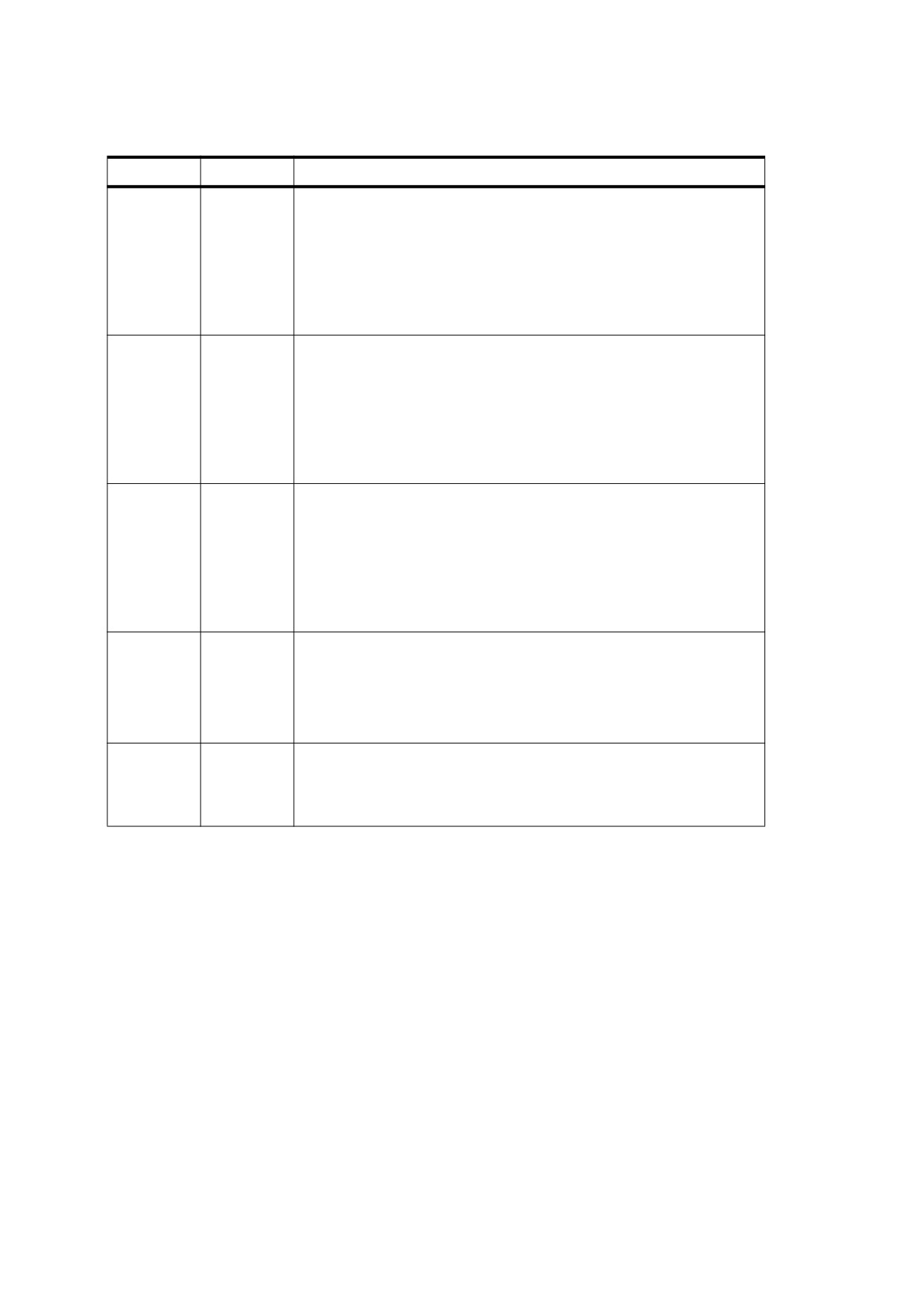
Table 349 - Standard table attributes
Key
Type
Value
RowSpan
integer
(Optional; not inheritable) The number of rows in the enclosing table that
shall be spanned by the cell. The cell shall expand by adding rows in the
block-progression direction specified by the table’s WritingMode
attribute. If this entry is absent, a conforming reader shall assume a value
of 1.
This entry shall only be used when the table cell has a structure type of
TH or TD or one that is role mapped to structure type TH or TD (see
Table 337).
ColSpan
integer
(Optional; not inheritable) The number of columns in the enclosing table
that shall be spanned by the cell. The cell shall expand by adding
columns in the inline-progression direction specified by the table’s
WritingMode attribute. If this entry is absent, a conforming reader shall
assume a value of 1
This entry shall only be used when the table cell has a structure type of
TH or TD or one that is role mapped to structure types TH or TD (see
Table 337).
Headers
array
(Optional; not inheritable; PDF 1.5) An array of byte strings, where each
string shall be the element identifier (see the ID entry in Table 323) for a
TH structure element that shall be used as a header associated with this
cell.
This attribute may apply to header cells (TH) as well as data cells (TD)
(see Table 337). Therefore, the headers associated with any cell shall be
those in its Headers array plus those in the Headers array of any TH
cells in that array, and so on recursively.
Scope
name
(Optional; not inheritable; PDF 1.5) A name whose value shall be one of
the following: Row, Column, or Both. This attribute shall only be used
when the structure type of the element is TH. (see Table 337). It shall
reflect whether the header cell applies to the rest of the cells in the row
that contains it, the column that contains it, or both the row and the
column that contain it.
Summary
text string
(Optional; not inheritable; PDF 1.7) A summary of the table’s purpose and
structure. This entry shall only be used within Table structure elements
(see Table 337).
NOTE
For use in non-visual rendering such as speech or braille
14.9
Accessibility Support
14.9.1
General
PDF includes several facilities in support of accessibility of documents to users with disabilities. In particular,
many visually computer users with visual impairments use screen readers to read documents aloud. To enable
proper vocalization, either through a screen reader or by some more direct invocation of a text-to-speech
engine, PDF supports the following features:
•
Specifying the natural language used for text in a PDF document—for example, as English or Spanish, or
used to hide or reveal optional content (see 14.9.2, “Natural Language Specification”)
•
Providing textual descriptions for images or other items that do not translate naturally into text (14.9.3,
“Alternate Descriptions”), or replacement text for content that does translate into text but is represented in
a nonstandard way (such as with a ligature or illuminated character; see 14.9.4, “Replacement Text”)
•
Specifying the expansion of abbreviations or acronyms (Section 14.9.5, “Expansion of Abbreviations and
Acronyms”)
610
The core of this support lies in the ability to determine the logical order of content in a PDF document,
independently of the content’s appearance or layout, through logical structure and Tagged PDF, as described
under 14.8.2.3, “Page Content Order.” An accessibility application can extract the content of a document for
presentation to users with disabilities by traversing the structure hierarchy and presenting the contents of each
node. For this reason, conforming writers ensure that all information in a document is reachable by means of
the structure hierarchy, and they should use the facilities described in this sub-clause.
NOTE 1
Text can be extracted from Tagged PDF documents and examined or reused for purposes other than
accessibility; see 14.8, “Tagged PDF.”
NOTE 2
Additional guidelines for accessibility support of content published on the Web can be found in the W3C
document Web Content Accessibility Guidelines and the documents it points to (see the Bibliography).
14.9.2
Natural Language Specification
14.9.2.1
General
Natural language may be specified for text in a document or for optional content.
The natural language used for text in a document shall be determined in a hierarchical fashion, based on
whether an optional Lang entry (PDF 1.4) is present in any of several possible locations. At the highest level,
the document’s default language (which applies to both text strings and text within content streams) may be
specified by a Lang entry in the document catalogue (see 7.7.2, “Document Catalog”). Below this, the
language may be specified for the following items:
•
Structure elements of any type (see 14.7.2, “Structure Hierarchy”), through a Lang entry in the structure
element dictionary.
•
Marked-content sequences that are not in the structure hierarchy (see 14.6, “Marked Content”), through a
Lang entry in a property list attached to the marked-content sequence with a Span tag.
NOTE 1
Although Span is also a standard structure type, as described under
14.8.4.4,
“Inline-Level Structure
Elements,” its use here is entirely independent of logical structure.
NOTE 2
The natural language used for optional content allows content to be hidden or revealed, based on the Lang
entry (PDF 1.5) in the Language dictionary of an optional content usage dictionary.
NOTE 3
The following sub-clauses provide details on the value of the Lang entry and the hierarchical manner in which
the language for text in a document is determined.
Text strings encoded in Unicode may include an escape sequence or language tag indicating the language of
the text and overriding the prevailing Lang entry (see 7.9.2.2, “Text String Type”).
14.9.2.2
Language Identifiers
Certain language-related dictionary entries are text strings that specify language identifiers. Such text strings
may appear as Lang entries in the following structures or dictionaries:
•
Document catalogue, structure element dictionary, or property list
•
Optional content usage dictionary’s Language dictionary, the hierarchical issues described in 14.9.2.3,
“Language Specification Hierarchy,” shall not apply to this entry
A language identifier shall either be the empty text string, to indicate that the language is unknown, or a
Language-Tag as defined in RFC 3066, Tags for the Identification of Languages.
Although language codes are commonly represented using lowercase letters and country codes are commonly
represented using uppercase letters, all tags shall be treated as case insensitive.
611
14.9.2.3
Language Specification Hierarchy
The Lang entry in the document catalogue shall specify the default natural language for all text in the
document. Language specifications may appear within structure elements, and they may appear within
marked-content sequences that are not in the structure hierarchy. If present, such language specifications
override the default.
Language specifications within the structure hierarchy apply in this order:
•
A structure element’s language specification. If a structure element does not have a Lang entry, the
element shall inherit its language from any parent element that has one.
•
Within a structure element, a language specification for a nested structure element or marked-content
sequence
If only part of the page content is contained in the structure hierarchy, and the structured content is nested
within nonstructured content for which a different language specification applies, the structure element’s
language specification shall take precedence.
A language identifier attached to a marked-content sequence with the Span tag specifies the language for all
text in the sequence except for nested marked content that is contained in the structure hierarchy (in which
case the structure element’s language applies) and except where overridden by language specifications for
other nested marked content.
NOTE
Examples in this sub-clause illustrate the hierarchical manner in which the language for text in a document is
determined.
EXAMPLE 1
This example shows how a language specified for the document as a whole could be overridden by one
specified for a marked-content sequence within a page’s content stream, independent of any logical
structure. In this case, the Lang entry in the document catalogue (not shown) has the value en-US,
meaning U.S. English, and it is overridden by the Lang property attached (with the Span tag) to the
marked-content sequence Hasta la vista. The Lang property identifies the language for this marked
content sequence with the value es-MX, meaning Mexican Spanish.
2 0 obj
% Page object
<< /Type /Page
/Contents 3 0 R
% Content stream
…
>>
endobj
3 0 obj
% Page's content stream
<< /Length … >>
stream
BT
( See you later, or as Arnold would say, ) Tj
/Span << /Lang ( es-MX ) >>
% Start of marked-content sequence
BDC
( Hasta la vista . ) Tj
EMC
% End of marked-content sequence
ET
endstream
endobj
EXAMPLE 2
In the following example, the Lang entry in the structure element dictionary (specifying English) applies to
the marked-content sequence having an MCID (marked-content identifier) value of 0 within the indicated
page’s content stream. However, nested within that marked-content sequence is another one in which the
Lang property attached with the Span tag (specifying Spanish) overrides the structure element’s
language specification.
This example omits required StructParents entries in the objects used as content items (see 14.7.4.4,
“Finding Structure Elements from Content Items”).
612
1 0 obj
% Structure element
<< /Type /StructElem
/S /P
% Structure type
/P …
% Parent in structure hierarchy
/K
<< /Type /MCR
/Pg 2 0 R
% Page containing marked-content sequence
/MCID 0
% Marked-content identifier
>>
/Lang ( en-US )
% Language specification for this element
>>
endobj
2 0 obj
% Page object
<< /Type /Page
/Contents 3 0 R
% Content stream
…
>>
endobj
3 0 obj
% Page's content stream
<< /Length … >>
stream
BT
/P << /MCID 0 >>
% Start of marked-content sequence
BDC
( See you later, or in Spanish you would say, ) Tj
/Span << /Lang ( es-MX ) >>
% Start of nested marked-content sequence
BDC
( Hasta la vista . ) Tj
EMC
% End of nested marked-content sequence
EMC
% End of marked-content sequence
ET
endstream
endobj
EXAMPLE 3
The page’s content stream consists of a marked-content sequence that specifies Spanish as its language
by means of the Span tag with a Lang property. Nested within it is content that is part of a structure
element (indicated by the MCID entry in that property list), and the language specification that applies to
the latter content is that of the structure element, English.
This example omits required StructParents entries in the objects used as content items (see 14.7.4.4,
“Finding Structure Elements from Content Items”).
1 0 obj
% Structure element
<< /Type /StructElem
/S /P
% Structure type
/P …
% Parent in structure hierarchy
/K
<< /Type /MCR
/Pg 2 0 R
% Page containing marked-content sequence
/MCID 0
% Marked-content identifier
>>
/Lang ( en-US )
% Language specification for this element
>>
endobj
2 0 obj
% Page object
<< /Type /Page
/Contents 3 0 R
% Content stream
…
>>
endobj
3 0 obj
% Page's content stream
<< /Length … >>
stream
613
/Span << /Lang ( es-MX ) >>
% Start of marked-content sequence
BDC
( Hasta la vista, ) Tj
/P << /MCID 0 >>
% Start of structured marked-content sequence,
BDC
% to which structure element's language applies
( as Arnold would say. ) Tj
EMC
% End of structured marked-content sequence
EMC
% End of marked-content sequence
endstream
endobj
14.9.2.4
Multi-language Text Arrays
A multi-language text array (PDF 1.5) allows multiple text strings to be specified, each in association with a
language identifier. (See the Alt entry in Tables 274 and 277 for examples of its use.)
A multi-language text array shall contain pairs of strings. The first string in each pair shall be a language
identifier (14.9.2.2, “Language Identifiers”). A language identifier shall not appear more than once in the array;
any unrecognized language identifier shall be ignored. An empty string specifies default text that may be used
when no suitable language identifier is found in the array. The second string is text associated with the
language.
EXAMPLE
[ (en-US) (My vacation) (fr) (mes vacances) ( ) (default text) ]
When a conforming reader searches a multi-language text array to find text for a given language, it shall look
for an exact (though case-insensitive) match between the given language’s identifier and the language
identifiers in the array. If no exact match is found, prefix matching shall be attempted in increasing array order:
a match shall be declared if the given identifier is a leading, case-insensitive, substring of an identifier in the
array, and the first post-substring character in the array identifier is a hyphen. For example, given identifier en
matches array identifier en-US, but given identifier en-US matches neither en nor en-GB. If no exact or prefix
match can be found, the default text (if any) should be used.
14.9.3
Alternate Descriptions
PDF documents may be enhanced by providing alternate descriptions for images, formulas, or other items that
do not translate naturally into text.
NOTE 1
Alternate descriptions are human-readable text that could, for example, be vocalized by a text-to-speech
engine for the benefit of users with visual impairments.
An alternate description may be specified for the following items:
•
A structure element (see 14.7.2, “Structure Hierarchy”), through an Alt entry in the structure element
dictionary
•
(PDF 1.5) A marked-content sequence (see 14.6, “Marked Content”), through an Alt entry in a property list
attached to the marked-content sequence with a Span tag.
•
Any type of annotation (see 12.5, “Annotations”) that does not already have a text representation, through
a Contents entry in the annotation dictionary
For annotation types that normally display text, the Contents entry of the annotation dictionary shall be used as
the source for an alternate description. For annotation types that do not display text, a Contents entry (PDF
1.4) may be included to specify an alternate description. Sound annotations, which need no alternate
description for the purpose of vocalization, may include a Contents entry specifying a description that may be
displayed for the benefit of users with hearing impairments.
614
An alternate name may be specified for an interactive form field (see 12.7, “Interactive Forms”) which, if
present, shall be used in place of the actual field name when a conforming reader identifies the field in a user-
interface. This alternate name, if provided, shall be specified using the TU entry of the field dictionary.
NOTE 2
The TU entry is useful for vocalization purposes.
Alternate descriptions are text strings, which shall be encoded in either PDFDocEncoding or Unicode
character encoding.
NOTE 3
As described in 7.9.2.2, “Text String Type,” Unicode defines an escape sequence for indicating the language of
the text. This mechanism enables the alternate description to change from the language specified by the
prevailing Lang entry (as described in the preceding sub-clause). Within alternate descriptions, Unicode
escape sequences specifying language shall override the prevailing Lang entry.
When applied to structure elements, the alternate description text shall be considered to be a complete (or
whole) word or phrase substitution for the current element. If each of two (or more) elements in a sequence
have an Alt entry in their dictionaries, they shall be treated as if a word break is present between them. The
same applies to consecutive marked-content sequences.
The Alt entry in property lists may be combined with other entries.
EXAMPLE
This example shows the Alt entry combined with a Lang entry.
/Span << /Lang (en-us) /Alt (six-point star) >> BDC (A) Tj EMC
14.9.4
Replacement Text
NOTE 1
Just as alternate descriptions can be provided for images and other items that do not translate naturally into
text (as described in the preceding sub-clause), replacement text can be specified for content that does
translate into text but that is represented in a nonstandard way. These nonstandard representations might
include, for example, glyphs for ligatures or custom characters, or inline graphics corresponding to letters in an
illuminated manuscript or to dropped capitals.
Replacement text may be specified for the following items:
•
A structure element (see 14.7.2, “Structure Hierarchy”), by means of the optional ActualText entry (PDF
1.4) of the structure element dictionary.
•
(PDF 1.5) A marked-content sequence (see 14.6, “Marked Content”), through an ActualText entry in a
property list attached to the marked-content sequence with a Span tag.
The ActualText value shall be used as a replacement, not a description, for the content, providing text that is
equivalent to what a person would see when viewing the content. The value of ActualText shall be considered
to be a character substitution for the structure element or marked-content sequence. If each of two (or more)
consecutive structure or marked-content sequences has an ActualText entry, they shall be treated as if no
word break is present between them.
NOTE 2
The treatment of ActualText as a character replacement is different from the treatment of Alt, which is treated
as a whole word or phrase substitution.
EXAMPLE
This example shows the use of replacement text to indicate the correct character content in a case where
hyphenation changes the spelling of a word (in German, up until recent spelling reforms, the word
“Drucker” when hyphenated was rendered as “Druk-” and “ker”).
(Dru) Tj
/Span
<</Actual Text (c) >>
BDC
(k-) Tj
EMC
(ker) '
615
Like alternate descriptions (and other text strings), replacement text, if encoded in Unicode, may include an
escape sequence for indicating the language of the text. Such a sequence shall override the prevailing Lang
entry (see 7.9.2.2, “Text String Type”).
14.9.5
Expansion of Abbreviations and Acronyms
The expansion of an abbreviation or acronym may be specified for the following items:
•
Marked-content sequences, through an E property (PDF 1.4) in a property list attached to the sequence
with a Span tag.
•
Structure elements, through an E entry (PDF 1.5) in the structure element dictionary.
NOTE 1
Abbreviations and acronyms can pose a problem for text-to-speech engines. Sometimes the full pronunciation
for an abbreviation can be divined without aid. For example, a dictionary search will probably reveal that “Blvd.”
is pronounced “boulevard” and that “Ave.” is pronounced “avenue.” However, some abbreviations are difficult
to resolve, as in the sentence “Dr. Healwell works at 123 Industrial Dr.”.
EXAMPLE
BT
/Span << /E ( Doctor ) >>
BDC
( Dr. ) Tj
EMC
( Healwell works at 123 Industrial ) Tj
/Span << /E ( Drive ) >>
BDC
( Dr. ) Tj
EMC
ET
The E value (a text string) shall be considered to be a word or phrase substitution for the tagged text and
therefore shall be treated as if a word break separates it from any surrounding text.The expansion text, if
encoded in Unicode, may include an escape sequence for indicating the language of the text (see 7.9.2.2, “Text
String Type”). Such a sequence shall override the prevailing Lang entry.
NOTE 2
Some abbreviations or acronyms are conventionally not expanded into words. For the text “XYZ,” for example,
either no expansion should be supplied (leaving its pronunciation up to the text-to-speech engine) or, to be
safe, the expansion “X Y Z” should be specified.
14.10 Web Capture
14.10.1
General
The information in the Web Capture data structures enables conforming products to perform the following
operations:
•
Save locally and preserve the visual appearance of material from the Web
•
Retrieve additional material from the Web and add it to an existing PDF file
•
Update or modify existing material previously captured from the Web
•
Find source information for material captured from the Web, such as the URL (if any) from which it was
captured
•
Find all material in a PDF file that was generated from a given URL
•
Find all material in a PDF file that matches a given digital identifier (MD5 hash)
616
The information needed to perform these operations shall be recorded in two data structures in the PDF file:
•
The Web Capture information dictionary, which shall hold document-level information related to Web
Capture.
•
The Web Capture content database, which shall hold a complete registry of the source content resources
retrieved by Web Capture and where it came from.
NOTE 3
The Web Capture content database enables the capturing process to avoid downloading material that is
already present in the file.
14.10.2
Web Capture Information Dictionary
The optional SpiderInfo entry in the document catalogue (see 7.7.2, “Document Catalog”), if present, shall hold
Web Capture information dictionary.
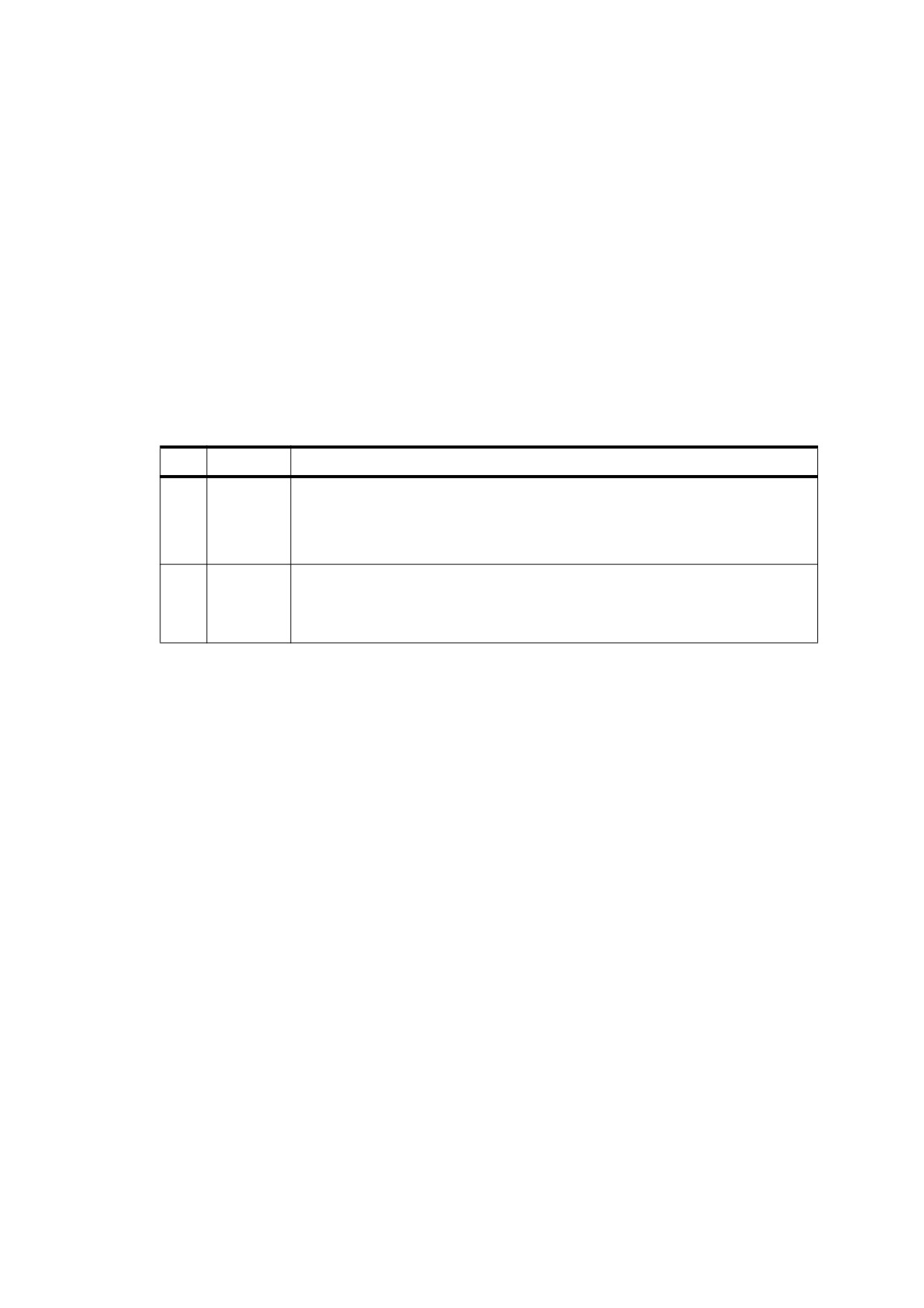
Table 350 - Entries in the Web Capture information dictionary
Key
Type
Value
V
number
(Required) The Web Capture version number. The version number shall be 1.0 in a
conforming file.
This value shall be a single real number, not a major and minor version number.
EXAMPLE
A version number of 1.2 would be considered greater than 1.15.
C
array
(Optional) An array of indirect references to Web Capture command dictionaries
(see 14.10.5.3, “Command Dictionaries”) describing commands that were used in
building the PDF file. The commands shall appear in the array in the order in which
they were executed in building the file.
14.10.3
Content Database
14.10.3.1
General
When a PDF file, or part of a PDF file, is built from a content resource stored in another format, such as an
HTML page, the resulting PDF file (or portion thereof) may contain content from more than the single content
resources. Conversely, since many content formats do not have static pagination, a single content resource
may give rise to multiple PDF pages.
To keep track of the correspondence between PDF content and the resources from which the content was
derived, a PDF file may contain a content database that maps URLs and digital identifiers to PDF objects such
as pages and XObjects.
NOTE 4
By looking up digital identifiers in the database, Web Capture can determine whether newly downloaded
content is identical to content already retrieved from a different URL. Thus, it can perform optimizations such
as storing only one copy of an image that is referenced by multiple HTML pages.
Web Capture’s content database shall be organized into content sets. Each content set shall be a dictionary
holding information about a group of related PDF objects generated from the same source data. A content set
shall have for the value of its S (subtype) entry either the value SPS, for a page set, or SIS, for an image set.
The mapping from a source content resource to a content set in a PDF document may be saved in the PDF file.
The mapping may be an association from the resource's URL to the content set, stored in the PDF document's
URLS name tree. The mapping may also be an association from a digital identifier (14.10.3.3, “Digital
Identifiers”) generated from resource's data to the content set, stored in the PDF document's IDS name tree.
Both associations may be present in the PDF file.
617
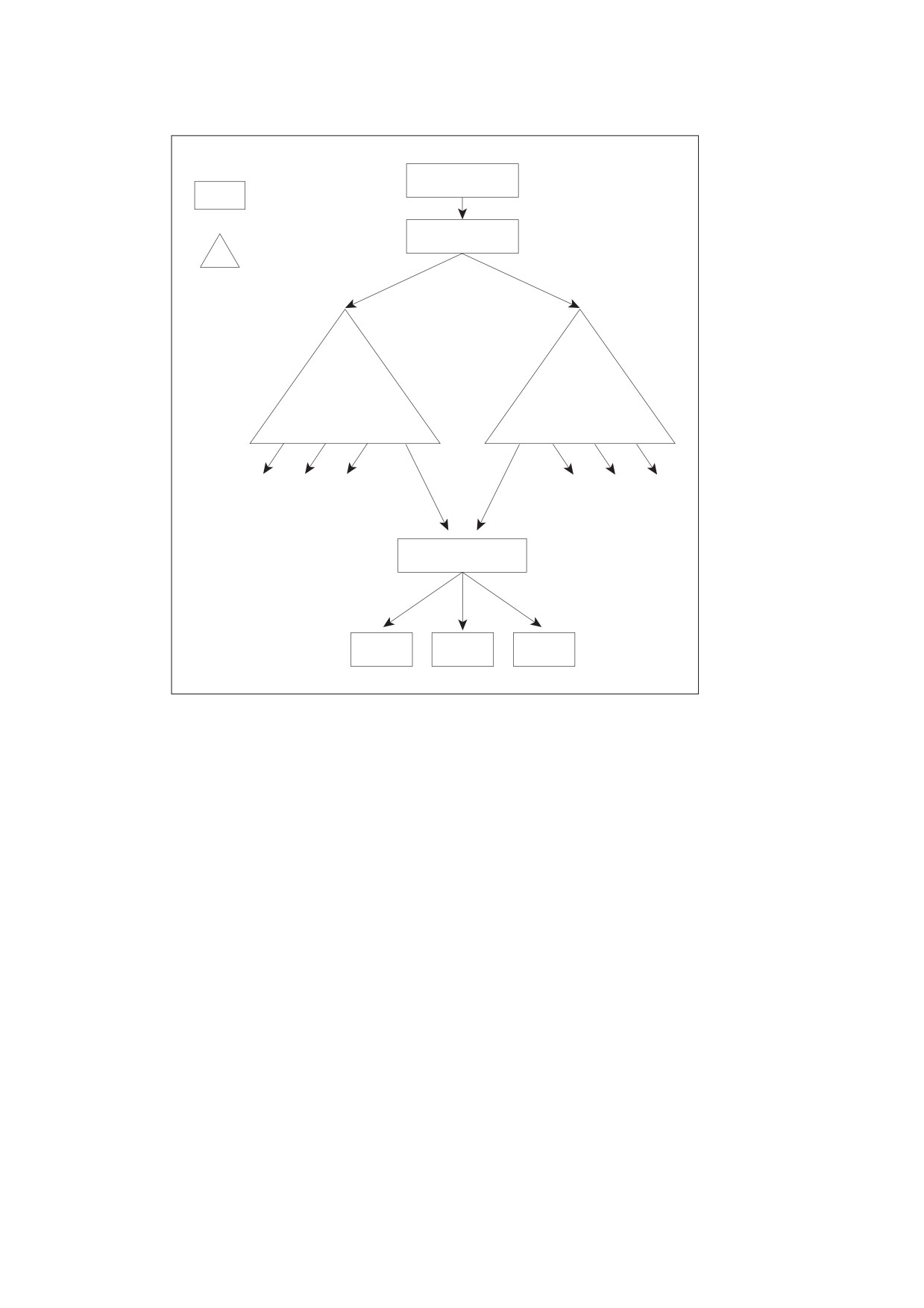
Document catalog
Dictionary
Name dictionary
Name tree
URLS
IDS
904B…1EA2
Page set
Page
Page
Page
Figure 84 - Simple Web Capture file structure
Entries in the URLS and IDS name trees may refer to an array of content sets or a single content set. If the
entry is an array, the content sets need not have the same subtype; the array may include both page sets and
image sets.
618
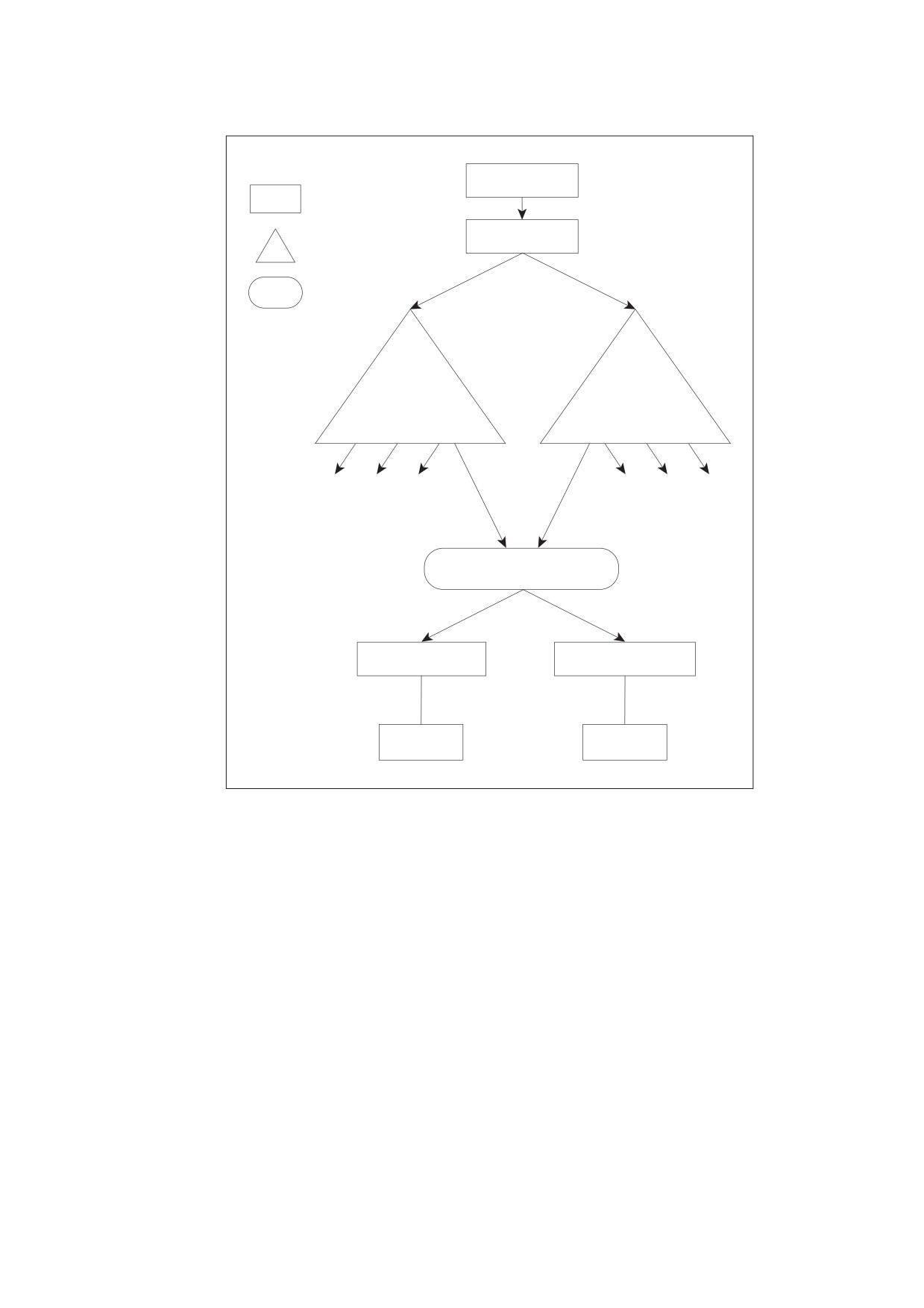
Document catalog
Dictionary
Names dictionary
Name tree
Array
URLS
IDS
BF70…14D8
Content set array
Page set
Image set
Page
Image XObject
Figure 85 - Complex Web Capture file structure
14.10.3.2
URL Strings
URLs associated with Web Capture content sets shall be reduced to a predictable, canonical form before being
used as keys in the URLS name tree. The following steps describe how to perform this reduction, using
terminology from Internet RFCs 1738, Uniform Resource Locators, and 1808, Relative Uniform Resource
Locators (see the Bibliography). This algorithm shall be applied for HTTP, FTP, and file URLs:
Algorithm: URL strings
a) If the URL is relative, it shall be converted into an absolute URL.
b) If the URL contains one or more NUMBER SIGN (02h3) characters, it shall be truncated before the first
NUMBER SIGN.
c) Any uppercase ASCII characters within the scheme section of the URL shall be replaced with the
corresponding lowercase ASCII characters.
d) If there is a host section, any uppercase ASCII characters therein shall be converted to lowercase ASCII.
619
e) If the scheme is file and the host is localhost, the host section shall be removed.
f)
If there is a port section and the port is the default port for the given protocol (80 for HTTP or 21 for FTP),
the port section shall be removed.
g) If the path section contains PERIOD (2Eh) ( . ) or DOUBLE PERIOD ( . . ) subsequences, transform the path
as described in section 4 of RFC 1808.
NOTE
Because the PERCENT SIGN (25h) is unsafe according to RFC 1738 and is also the escape character for
encoded characters, it is not possible in general to distinguish a URL with unencoded characters from one with
encoded characters. For example, it is impossible to decide whether the sequence %00 represents a single
encoded null character or a sequence of three unencoded characters. Hence, no number of encoding or
decoding passes on a URL can ever cause it to reach a stable state. Empirically, URLs embedded in HTML
files have unsafe characters encoded with one encoding pass, and Web servers perform one decoding pass
on received paths (though CGI scripts can make their own decisions).
Canonical URLs are thus assumed to have undergone one and only one encoding pass. A URL whose initial
encoding state is known can be safely transformed into a URL that has undergone only one encoding pass.
14.10.3.3
Digital Identifiers
Digital identifiers, used to associate source content resources with content sets by the IDS name tree, shall be
generated using the MD5 message-digest algorithm (Internet RFC 1321).
NOTE 1
The exact data passed to the algorithm depends on the type of content set and the nature of the identifier
being calculated.
For a page set, the source data shall be passed to the MD5 algorithm first, followed by strings representing the
digital identifiers of any auxiliary data files (such as images) referenced in the source data, in the order in which
they are first referenced. If an auxiliary file is referenced more than once, its identifier shall be passed only the
first time. The resulting string shall be used as the digital identifier for the source content resource.
NOTE 2
This sequence produces a composite identifier representing the visual appearance of the pages in the page
set.
NOTE 3
Two HTML source files that are identical, but for which the referenced images contain different data—for
example, if they have been generated by a script or are pointed to by relative URLs—do not produce the same
identifier.
When the source data is a PDF file, the identifier shall be generated solely from the contents of that file; there
shall be no auxiliary data.
A page set may also have a text identifier, calculated by applying the MD5 algorithm to just the text present in
the source data.
EXAMPLE 1
For an HTML file the text identifier is based solely on the text between markup tags; no images are used
in the calculation.
For an image set, the digital identifier shall be calculated by passing the source data for the original image to
the MD5 algorithm.
EXAMPLE 2
The identifier for an image set created from a GIF image is calculated from the contents of the GIF.
14.10.3.4
Unique Name Generation
In generating PDF pages from a data source, items such as hypertext links and HTML form fields are converted
into corresponding named destinations and interactive form fields. These items shall be given names that do
not conflict with those of other such items in the file.
NOTE
As used here, the term name refers to a string, not a name object.
620
Furthermore, when updating an existing file, a conforming processor shall ensure that each destination or field
is given a unique name that shall be derived from its original name but constructed so that it avoids conflicts
with similarly named items elsewhere.
The unique name shall be formed by appending an encoded form of the page set’s digital identifier string to the
original name of the destination or field. The identifier string shall be encoded to remove characters that have
special meaning in destinations and fields. The characters listed in the first column of Table 351 have special
meaning and shall be encoded using the corresponding byte values from second column of Table 351.
Table 351 - Characters with special meaning in destinations and fields and their byte values
Character
Byte value
Escape sequence
(nul)
0x00
\0 (0x5c 0x30)
(PERIOD)
0x2e
\p (0x5c 0x70)
\
(backslash)
0x5c
\\ (0x5c 0x5c)
EXAMPLE
Since the PERIOD character (2Eh) is used as the field separator in interactive form field names, it does
not appear in the identifier portion of the unique name.
If the name is used for an interactive form field, there is an additional encoding to ensure uniqueness and
compatibility with interactive forms. Each byte in the source string, encoded as described previously, shall be
replaced by two bytes in the destination string. The first byte in each pair is 65 (corresponding to the ASCII
character A) plus the high-order 4 bits of the source byte; the second byte is 65 plus the low-order 4 bits of the
source byte.
14.10.4
Content Sets
14.10.4.1
General
A Web Capture content set is a dictionary describing a set of PDF objects generated from the same source
data. It may include information common to all the objects in the set as well as about the set itself. Table 352
defines the contents of this type of dictionary.
14.10.4.2
Page Sets
A page set is a content set containing a group of PDF page objects generated from a common source, such as
an HTML file. The pages shall be listed in the O array of the page set dictionary (see Table 352) in the same
order in which they were initially added to the file. A single page object shall not belong to more than one page
set. Table 353 defines the content set dictionary entries specific to Page Sets.
The TID (text identifier) entry may be used to store an identifier generated from the text of the pages belonging
to the page set (see 14.10.3.3, “Digital Identifiers”). A text identifier may not be appropriate for some page sets
(such as those with no text) and may be omitted in these cases.
EXAMPLE
This identifier may be used to determine whether the text of a document has changed.
Table 352 - Entries common to all Web Capture content sets
Key
Type
Value
Type
name
(Optional) The type of PDF object that this dictionary describes; if present, shall
be SpiderContentSet for a Web Capture content set.
S
name
(Required) The subtype of content set that this dictionary describes. The value
shall be one of:
SPS
(“Spider page set”) A page set
SIS
(“Spider image set”) An image set
621
Table 352 - Entries common to all Web Capture content sets (continued)
Key
Type
Value
ID
byte string
(Required) The digital identifier of the content set
(see 14.10.3.3,
“Digital
Identifiers”).
O
array
(Required) An array of indirect references to the objects belonging to the
content set. The order of objects in the array is restricted when the content set
subtype (S entry) is SPS (see 14.10.4.2, “Page Sets”).
SI
dictionary
(Required) A source information dictionary (see 14.10.5, “Source Information”)
or array
or an array of such dictionaries, describing the sources from which the objects
belonging to the content set were created.
CT
ASCII string
(Optional) The content type, an ASCII string characterizing the source from
which the objects belonging to the content set were created. The string shall
conform to the content type specification described in Internet RFC 2045,
Multipurpose Internet Mail Extensions (MIME) Part One: Format of Internet
Message Bodies (see the Bibliography).
EXAMPLE
for a page set consisting of a group of PDF pages created
from an HTML file, the content type would be text / html.
TS
date
(Optional) A time stamp giving the date and time at which the content set was
created.
Table 353 - Additional entries specific to a Web Capture page set
Key
Type
Value
S
name
(Required) The subtype of content set that this dictionary describes; shall be
SPS.
T
text string
(Optional) The title of the page set, a human-readable text string.
TID
byte string
(Optional) A text identifier generated from the text of the page set, as described
in 14.10.3.3, “Digital Identifiers.”
14.10.4.3
Image Sets
An image set is a content set containing a group of image XObjects generated from a common source, such as
multiple frames of an animated GIF image. A single XObject shall not belong to more than one image set.
Table 354 shows the content set dictionary entries specific to Image Sets.
Table 354 - Additional entries specific to a Web Capture image set
Key
Type
Value
S
name
(Required) The subtype of content set that this dictionary describes; shall be SIS.
R
integer
(Required) The reference counts for the image XObjects belonging to the image
or array
set. For an image set containing a single XObject, the value shall be the integer
reference count for that XObject. For an image set containing multiple XObjects,
the value shall be an array of reference counts parallel to the O array (see
Table 352); that is, each element in the R array shall hold the reference count for
the image XObject at the corresponding position in the O array.
Each image XObject in an image set has a reference count indicating the number of PDF pages referring to
that XObject. The reference count shall be incremented whenever Web Capture creates a new page referring
to the XObject (including copies of already existing pages) and decremented whenever such a page is
destroyed. The reference count shall be incremented or decremented only once per page, regardless of the
number of times the XObject may be referenced by that page. If the reference count reaches 0, it shall be
622
assumed that there are no remaining pages referring to the XObject and that the XObject can be removed from
the image set’s O array. When removing an XObject from the O array of an image set, the corresponding entry
in the R array shall be removed also.
14.10.5
Source Information
14.10.5.1
General
The SI entry in a content set dictionary (see Table 352) shall contain one or more source information
dictionaries, each containing information about the locations from which the source data for the content set was
retrieved.
Table 355 - Entries in a source information dictionary
Key
Type
Value
AU
ASCII string
(Required) An ASCII string or URL alias dictionary (see 14.10.5.2, “URL Alias
or
Dictionaries”) which shall identify the URLs from which the source data was
dictionary
retrieved.
TS
date
(Optional) A time stamp which, if present, shall contain the most recent date
and time at which the content set’s contents were known to be up to date with
the source data.
E
date
(Optional) An expiration stamp which, if present, shall contain the date and time
at which the content set’s contents shall be considered out of date with the
source data.
S
integer
(Optional) A code which, if present, shall indicate the type of form submission, if
any, by which the source data was accessed (see 12.7.5.2, “Submit-Form
Action”). If present, the value of the S entry shall be 0, 1, or 2, in accordance
with the following meanings:
0
Not accessed by means of a form submission
1
Accessed by means of an HTTP GET request
2
Accessed by means of an HTTP POST request
This entry may be present only in source information dictionaries associated
with page sets. Default value: 0.
C
dictionary
(Optional; if present, shall be an indirect reference) A command dictionary (see
14.10.5.3, “Command Dictionaries”) describing the command that caused the
source data to be retrieved. This entry may be present only in source
information dictionaries associated with page sets.
A content set's SI entry may contain a single source information dictionary. However, a PDF processor may
attempt to detect situations in which the same source data has been located via two or more distinct URLs. If a
processor detects such a situation, it may generate a single content set from the source data, containing a
single copy of the relevant PDF pages or image XObjects. In this case, the SI entry shall be an array containing
one source information dictionary for each distinct URL from which the original source content was found.
The determination that distinct URLs produce the same source data shall be made by comparing digital
identifiers for the source data.
A source information dictionary’s AU (aliased URLs) entry shall identify the URLs from which the source data
was retrieved. If there is only one such URL, the v value of this entry may be a string. If multiple URLs map to
the same location through redirection, the AU value shall be a URL alias dictionary (see 14.10.5.2, “URL Alias
Dictionaries”).
NOTE 1
For file size efficiency, the entire URL alias dictionary (excluding the URL strings) should be represented as a
direct object because its internal structure should never be shared or externally referenced.
623
The TS (time stamp) entry allows each source location associated with a content set to have its own time
stamp.
NOTE 2
This is necessary because the time stamp in the content set dictionary (see Table 352) merely refers to the
creation date of the content set. A hypothetical “Update Content Set” command might reset the time stamp in
the source information dictionary to the current time if it found that the source data had not changed since the
time stamp was last set.
The E (expiration) entry specifies an expiration date for each source location associated with a content set. If
the current date and time are later than those specified, the contents of the content set shall be considered out
of date with respect to the original source.
14.10.5.2
URL Alias Dictionaries
When a URL is accessed via HTTP, a response header may be returned indicating that the requested data is at
a different URL. This redirection process may be repeated in turn at the new URL and can potentially continue
indefinitely. It is not uncommon to find multiple URLs that all lead eventually to the same destination through
one or more redirections. A URL alias dictionary represents such a set of URL chains leading to a common
destination. Table 356 shows the contents of this type of dictionary.
Table 356 - Entries in a URL alias dictionary
Key
Type
Value
U
ASCII
(Required) The destination URL to which all of the chains specified by the C entry
string
lead.
C
array
(Optional) An array of one or more arrays of strings, each representing a chain of
URLs leading to the common destination specified by U.
The C (chains) entry may be omitted if the URL alias dictionary contains only one URL. If C is present, its value
shall be an array of arrays, each representing a chain of URLs leading to the common destination. Within each
chain, the URLs shall be stored as ASCII strings in the order in which they occur in the redirection sequence.
The common destination (the last URL in a chain) may be omitted, since it is already identified by the U entry.
14.10.5.3
Command Dictionaries
A Web Capture command dictionary represents a command executed by Web Capture to retrieve one or more
pieces of source data that were used to create new pages or modify existing pages. The entries in this
dictionary represent parameters that were originally specified interactively by the user who requested that the
Web content be captured. This information is recorded so that the command can subsequently be repeated to
update the captured content. Table 357 shows the contents of this type of dictionary.
Table 357 - Entries in a Web Capture command dictionary
Key
Type
Value
URL
ASCII string
(Required) The initial URL from which source data was requested.
L
integer
(Optional) The number of levels of pages retrieved from the initial URL.
Default value: 1.
F
integer
(Optional) A set of flags specifying various characteristics of the
command (see Table 357). Defaut value: 0.
P
string or stream
(Optional) Data that was posted to the URL.
CT
ASCII string
(Optional) A content type describing the data posted to the URL. Default
value: application / x-www-form-urlencoded.
H
string
(Optional) Additional HTTP request headers sent to the URL.
624
Table 357 - Entries in a Web Capture command dictionary (continued)
Key
Type
Value
S
dictionary
(Optional) A command settings dictionary containing settings used in the
conversion process (see 14.10.5.4, “Command Settings”).
The URL entry shall contain the initial URL for the retrieval command. The L (levels) entry shall contain the
number of levels of the hyperlinked URL hierarchy to follow from this URL, creating PDF pages from the
retrieved material. If the L entry is omitted, its value shall be assumed to be 1, denoting retrieval of the initial
URL only.
The value of the command dictionary’s F entry shall be an integer that shall be interpreted as an array of flags
specifying various characteristics of the command. The flags shall be interpreted as defined in Table 358. Only
those flags defined in Table 358 may be set to 1; all other flags shall be 0. Flags not defined in Table 358 are
reserved for future use, and shall not be used by a conforming reader.
NOTE 3
The low-order bit of the flags value is referred to as being at bit-position 1.
Table 358 - Web Capture command flags
Bit position
Name
Meaning
1
SameSite
If set, pages were retrieved only from the host specified in the initial
URL.
2
SamePath
If set, pages were retrieved only from the path specified in the initial
URL.
3
Submit
If set, the command represents a form submission.
The SamePath flag shall be set if the retrieval of source content was restricted to source content in the same
path as specified in the initial URL. Source content shall be considered to be in the same path if its scheme and
network location components (as defined in Internet RFC 1808, Relative Uniform Resource Locators) match
those of the initial URL and its path component matches up to and including the last forward slash ( / ) character
in the initial URL.
EXAMPLE 1
the URL
http : / / www. adobe . com / fiddle / faddle / foo . html
is considered to be in the same path as the initial URL
http : / / www. adobe . com / fiddle /initial . html
The comparison shall be case-insensitive for the scheme and network location components and case-sensitive
for the path component.
The Submit flag shall be set when the command represents a form submission. If no P (posted data) entry is
present, the submitted data shall be encoded in the URL (an HTTP GET request). If P is present, the command
shall be an HTTP POST request. In this case, the value of the Submit flag shall be ignored.
NOTE 4
If the posted data is small enough, it may be represented by a string. For large amounts of data, a stream
should be used because it can be compressed.
The CT (content type) entry shall only be present for POST requests. It shall describe the content type of the
posted data, as described in Internet RFC 2045, Multipurpose Internet Mail Extensions (MIME), Part One:
Format of Internet Message Bodies (see the Bibliography).
625
The H (headers) entry, if present, shall specify additional HTTP request headers that were sent in the request
for the URL. Each header line in the string shall be terminated with a CARRIAGE RETURN and a LINE FEED,
as in this example:
EXAMPLE 2
( Referer : http : / / frumble . com \ 015 \ 012From : veeble@ frotz . com \ 015 \ 012 )
The HTTP request header format is specified in Internet RFC 2616, Hypertext Transfer Protocol—HTTP/1.1
(see the Bibliography).
The S (settings) entry specifies a command settings dictionary (see 14.10.5.4, “Command Settings”). Holding
settings specific to the conversion engines.
14.10.5.4
Command Settings
The S (settings) entry in a command dictionary, if present, shall contain a command settings dictionary, which
holds settings for conversion engines that shall be used in converting the results of the command to PDF.
Table 359 shows the contents of this type of dictionary. If this entry is omitted, default values are assumed.
Command settings dictionaries may be shared by any command dictionaries that use the same settings.
Table 359 - Entries in a Web Capture command settings dictionary
Key
Type
Value
G
dictionary
(Optional) A dictionary containing global conversion engine settings relevant to
all conversion engines. If this entry is absent, default settings shall be used.
C
dictionary
(Optional) Settings for specific conversion engines. Each key in this dictionary is
the internal name of a conversion engine. The associated value is a dictionary
containing the settings associated with that conversion engine. If the settings for
a particular conversion engine are not found in the dictionary, default settings
shall be used.
Each key in the C dictionary represents the internal name of a conversion engine, which shall be a name object
of the following form:
/company : product : version : contentType
where
company denotes the name (or abbreviation) of the company that created the conversion engine.
product denotes the name of the conversion engine. This field may be left blank, but the trailing COLON
character (3Ah) is still required.
version denotes the version of the conversion engine.
contentType denotes an identifier for the content type the associated settings. shall be used because some
converters may handle multiple content types.
EXAMPLE
/ADBE : H2PDF : 1 . 0 : HTML
All fields in the internal name are case-sensitive. The company field shall conform to the naming guidelines
described in Annex E. The values of the other fields shall be unrestricted, except that they shall not contain a
COLON.
The directed graph of PDF objects rooted by the command settings dictionary shall be entirely self-contained;
that is, it shall not contain any object referred to from elsewhere in the PDF file.
NOTE
This facilitates the operation of making a deep copy of a command settings dictionary without explicit
knowledge of the settings it may contain.
626
14.10.6
Object Attributes Related to Web Capture
A given page object or image XObject may belong to at most one Web Capture content set, called its parent
content set. However, the object shall not have direct pointer to its parent content set. Such a pointer may
present problems for an application that traces all pointers from an object to determine what resources the
object depends on. Instead, the object’s ID entry (see Table 30 and Table 89) contains the digital identifier of
the parent content set, which shall be used to locate the parent content set via the IDS name tree in the
document’s name dictionary. (If the IDS entry for the identifier contains an array of content sets, the parent may
be found by searching the array for the content set whose O entry includes the child object.)
In the course of creating PDF pages from HTML files, Web Capture frequently scales the contents down to fit
on fixed-sized pages. The PZ (preferred zoom) entry in a page object (see 7.7.3.3, “Page Objects”) specifies a
magnification factor by which the page may be scaled to undo the downscaling and view the page at its original
size. That is, when the page is viewed at the preferred magnification factor, one unit in default user space
corresponds to one original source pixel.
14.11Prepress Support
14.11.1
General
This sub-clause describes features of PDF that support prepress production workflows:
•
The specification of page boundaries governing various aspects of the prepress process, such as
cropping, bleed, and trimming (14.11.2, “Page Boundaries”)
•
Facilities for including printer’s marks, such as registration targets, gray ramps, colour bars, and cut marks
to assist in the production process (14.11.3, “Printer’s Marks”)
•
Information for generating colour separations for pages in a document (14.11.4, “Separation Dictionaries”)
•
Output intents for matching the colour characteristics of a document with those of a target output device or
production environment in which it will be printed (14.11.5, “Output Intents”)
•
Support for the generation of traps to minimize the visual effects of misregistration between multiple
colorants (14.11.6, “Trapping Support”)
•
The Open Prepress Interface (OPI) for creating low-resolution proxies for high-resolution images (14.11.7,
“Open Prepress Interface (OPI)”)
14.11.2
Page Boundaries
14.11.2.1
General
A PDF page may be prepared either for a finished medium, such as a sheet of paper, or as part of a prepress
process in which the content of the page is placed on an intermediate medium, such as film or an imposed
reproduction plate. In the latter case, it is important to distinguish between the intermediate page and the
finished page. The intermediate page may often include additional production-related content, such as bleeds
or printer marks, that falls outside the boundaries of the finished page. To handle such cases, a PDF page may
define as many as five separate boundaries to control various aspects of the imaging process:
•
The media box defines the boundaries of the physical medium on which the page is to be printed. It may
include any extended area surrounding the finished page for bleed, printing marks, or other such purposes.
It may also include areas close to the edges of the medium that cannot be marked because of physical
limitations of the output device. Content falling outside this boundary may safely be discarded without
affecting the meaning of the PDF file.
627
•
The crop box defines the region to which the contents of the page shall be clipped (cropped) when
displayed or printed. Unlike the other boxes, the crop box has no defined meaning in terms of physical
page geometry or intended use; it merely imposes clipping on the page contents. However, in the absence
of additional information (such as imposition instructions specified in a JDF or PJTF job ticket), the crop
box determines how the page’s contents shall be positioned on the output medium. The default value is the
page’s media box.
•
The bleed box (PDF 1.3) defines the region to which the contents of the page shall be clipped when output
in a production environment. This may include any extra bleed area needed to accommodate the physical
limitations of cutting, folding, and trimming equipment. The actual printed page may include printing marks
that fall outside the bleed box. The default value is the page’s crop box.
•
The trim box (PDF 1.3) defines the intended dimensions of the finished page after trimming. It may be
smaller than the media box to allow for production-related content, such as printing instructions, cut marks,
or colour bars. The default value is the page’s crop box.
•
The art box (PDF 1.3) defines the extent of the page’s meaningful content (including potential white space)
as intended by the page’s creator. The default value is the page’s crop box.
The page object dictionary specifies these boundaries in the MediaBox, CropBox, BleedBox, TrimBox, and
ArtBox entries, respectively (see Table 30). All of them are rectangles expressed in default user space units.
The crop, bleed, trim, and art boxes shall not ordinarily extend beyond the boundaries of the media box. If they
do, they are effectively reduced to their intersection with the media box. Figure 86 illustrates the relationships
among these boundaries. (The crop box is not shown in the figure because it has no defined relationship with
any of the other boundaries.)
628
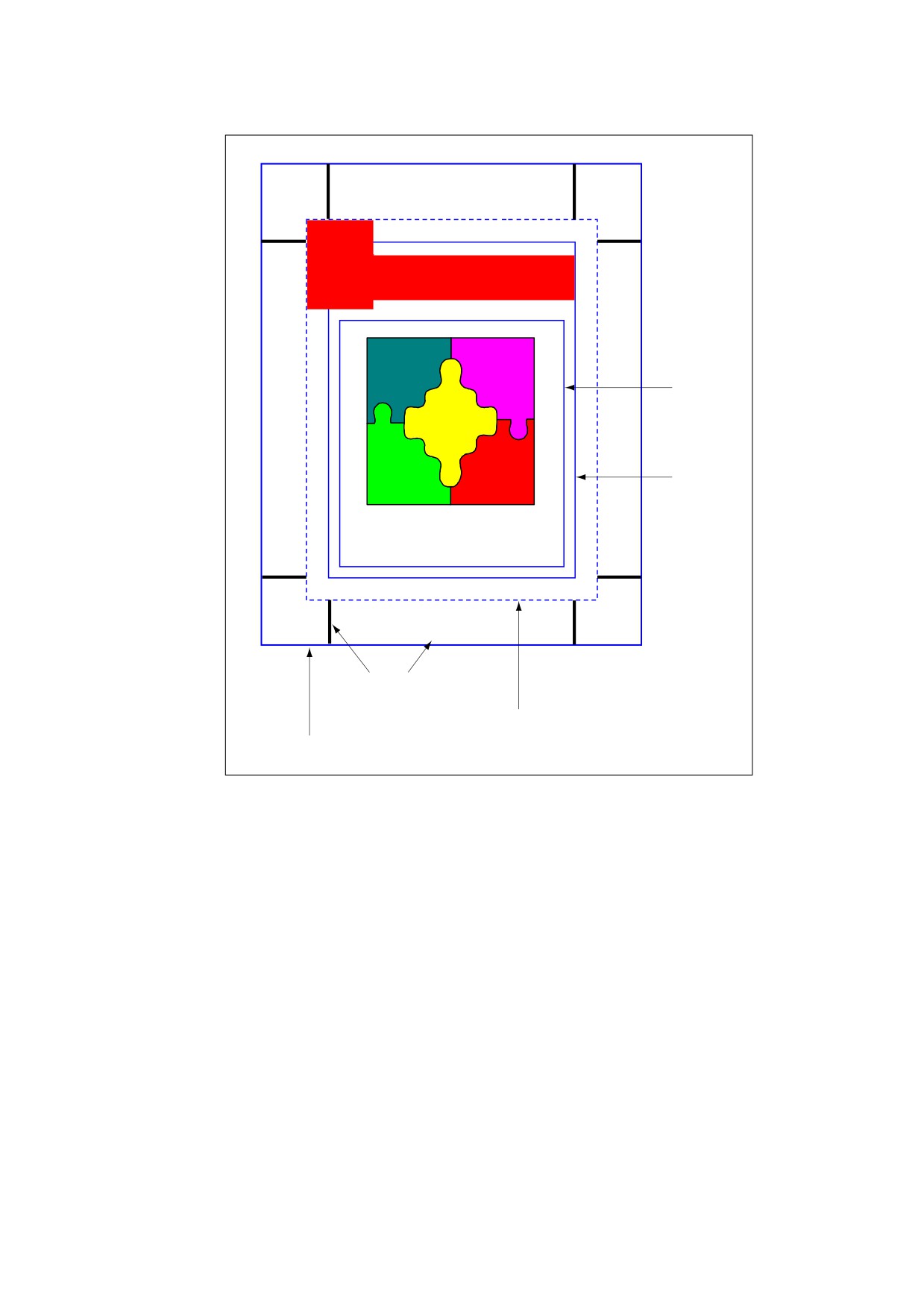
Headline
Art box
Trim box
Tis might be a caption
Bleed: 10.75x8.25
Trim: 10.5x8
Printer’s marks
Bleed box
Media box
Figure 86 - Page boundaries
NOTE 1
How the various boundaries are used depends on the purpose to which the page is being put. The following
are typical purposes:
Placing the content of a page in another application. The art box determines the boundary of the content that is
to be placed in the application. Depending on the applicable usage conventions, the placed content may be
clipped to either the art box or the bleed box. For example, a quarter-page advertisement to be placed on a
magazine page might be clipped to the art box on the two sides of the ad that face into the middle of the page
and to the bleed box on the two sides that bleed over the edge of the page. The media box and trim box are
ignored.
Printing a finished page. This case is typical of desktop or shared page printers, in which the page content is
positioned directly on the final output medium. The art box and bleed box are ignored. The media box may be
used as advice for selecting media of the appropriate size. The crop box and trim box, if present, should be the
same as the media box.
Printing an intermediate page for use in a prepress process. The art box is ignored. The bleed box defines the
boundary of the content to be imaged. The trim box specifies the positioning of the content on the medium; it
may also be used to generate cut or fold marks outside the bleed box. Content falling within the media box but
outside the bleed box may or may not be imaged, depending on the specific production process being used.
629

Building an imposition of multiple pages on a press sheet. The art box is ignored. The bleed box defines the
clipping boundary of the content to be imaged; content outside the bleed box is ignored. The trim box specifies
the positioning of the page’s content within the imposition. Cut and fold marks are typically generated for the
imposition as a whole.
NOTE 2
In the preceding scenarios, an application that interprets the bleed, trim, and art boxes for some purpose
typically alters the crop box so as to impose the clipping that those boxes prescribe.
14.11.2.2
Display of Page Boundaries
Conforming readers may offer the ability to display guidelines on the screen for the various page boundaries.
The optional BoxColorInfo entry in a page object (see 7.7.3.3, “Page Objects”) holds a box colour information
dictionary (PDF 1.4) specifying the colours and other visual characteristics to be used for such display.
Conforming readers typically provide a user interface to allow the user to set these characteristics interactively.
NOTE
This information is page-specific and may vary from one page to another.
As shown in Table 360, the box colour information dictionary contains an optional entry for each of the possible
page boundaries other than the media box. The value of each entry is a box style dictionary, whose contents
are shown in Table 361. If a given entry is absent, the conforming reader shall use its own current default
settings instead.
14.11.3
Printer’s Marks
Printer’s marks are graphic symbols or text added to a page to assist production personnel in identifying
components of a multiple-plate job and maintaining consistent output during production. Examples commonly
used in the printing industry include:
•
Registration targets for aligning plates
•
Gray ramps and colour bars for measuring colours and ink densities
•
Cut marks showing where the output medium is to be trimmed
Although conforming writers traditionally include such marks in the content stream of a document, they are
logically separate from the content of the page itself and typically appear outside the boundaries (the crop box,
trim box, and art box) defining the extent of that content (see 14.11.2, “Page Boundaries”).
Printer’s mark annotations (PDF 1.4) provide a mechanism for incorporating printer’s marks into the PDF
representation of a page, while keeping them separate from the actual page content. Each page in a PDF
document may contain any number of such annotations, each of which represents a single printer’s mark.
NOTE 1
Because printer’s marks typically fall outside the page’s content boundaries, each mark is represented as a
separate annotation. Otherwise—if, for example, the cut marks at the four corners of the page were defined in
a single annotation—the annotation rectangle would encompass the entire contents of the page and could
interfere with the user’s ability to select content or interact with other annotations on the page. Defining
printer’s marks in separate annotations also facilitates the implementation of a drag-and-drop user interface for
specifying them.
Table 360 - Entries in a box colour information dictionary
Key
Type
Value
CropBox
dictionary
(Optional) A box style dictionary
(see Table 361) specifying the visual
characteristics for displaying guidelines for the page’s crop box. This entry
shall be ignored if no crop box is defined in the page object.
BleedBox
dictionary
(Optional) A box style dictionary
(see Table 361) specifying the visual
characteristics for displaying guidelines for the page’s bleed box. This entry
shall be ignored if no bleed box is defined in the page object.
630
Table 360 - Entries in a box colour information dictionary (continued)
Key
Type
Value
TrimBox
dictionary
(Optional) A box style dictionary
(see Table 361) specifying the visual
characteristics for displaying guidelines for the page’s trim box. This entry
shall be ignored if no trim box is defined in the page object.
ArtBox
dictionary
(Optional) A box style dictionary
(see Table 361) specifying the visual
characteristics for displaying guidelines for the page’s art box. This entry
shall be ignored if no art box is defined in the page object.
Table 361 - Entries in a box style dictionary
Key
Type
Value
C
array
(Optional) An array of three numbers in the range 0.0 to 1.0, representing the
components in the DeviceRGB colour space of the colour to be used for
displaying the guidelines. Default value: [ 0.0
0.0 0.0 ].
W
number
(Optional) The guideline width in default user space units. Default value: 1.
S
name
(Optional) The guideline style:
S
(Solid) A solid rectangle.
D
(Dashed) A dashed rectangle. The dash pattern shall be specified by the
D entry.
Other guideline styles may be defined in the future. Default value: S.
D
array
(Optional) A dash array defining a pattern of dashes and gaps to be used in
drawing dashed guidelines (guideline style D). The dash array shall be
specified in default user space units, in the same format as in the line dash
pattern parameter of the graphics state (see 8.4.3.6, “Line Dash Pattern”).
The dash phase shall not be specified and shall be assumed to be 0.
EXAMPLE
A D entry of [ 3 2 ] specifies guidelines drawn with 3-point
dashes alternating with 2-point gaps.
Default value: [ 3 ].
The visual presentation of a printer’s mark shall be defined by a form XObject specified as an appearance
stream in the N
(normal) entry of the printer’s mark annotation’s appearance dictionary
(see
12.5.5,
“Appearance Streams”). More than one appearance may be defined for the same printer’s mark to meet the
requirements of different regions or production facilities. In this case, the appearance dictionary’s N entry holds
a subdictionary containing the alternate appearances, each identified by an arbitrary key. The AS (appearance
state) entry in the annotation dictionary designates one of them to be displayed or printed.
NOTE 2
The printer’s mark annotation’s appearance dictionary may include R (rollover) or D (down) entries, but
appearances defined in either of these entries are never displayed or printed.
Like all annotations, a printer’s mark annotation shall be defined by an annotation dictionary (see 12.5.2,
“Annotation Dictionaries”); its annotation type is PrinterMark. The AP (appearances) and F (flags) entries
(which ordinarily are optional) shall be present, as shall the AS (appearance state) entry if the appearance
dictionary AP contains more than one appearance stream. The Print and ReadOnly flags in the F entry shall be
set and all others clear (see 12.5.3, “Annotation Flags”). Table 362 shows an additional annotation dictionary
entry specific to this type of annotation.
631
Table 362 - Additional entries specific to a printer’s mark annotation
Key
Type
Value
Subtype
name
(Required) The type of annotation that this dictionary describes; shall be
PrinterMark for a printer’s mark annotation.
MN
name
(Optional) An arbitrary name identifying the type of printer’s mark, such as
ColorBar or RegistrationTarget.
The form dictionary defining a printer’s mark may contain the optional entries shown in Table 363 in addition to
the standard ones common to all form dictionaries (see 8.10.2, “Form Dictionaries”).
Table 363 - Additional entries specific to a printer’s mark form dictionary
Key
Type
Value
MarkStyle
text string
(Optional; PDF 1.4) A text string representing the printer’s mark in
human-readable form and suitable for presentation to the user.
Colorants
dictionary
(Optional; PDF 1.4) A dictionary identifying the individual colorants
associated with a printer’s mark, such as a colour bar. For each
entry in this dictionary, the key is a colorant name and the value is an
array defining a Separation colour space for that colorant (see
8.6.6.4,
“Separation Colour Spaces”). The key shall match the
colorant name given in that colour space.
14.11.4
Separation Dictionaries
In high-end printing workflows, pages are ultimately produced as sets of separations, one per colorant (see
8.6.6.4, “Separation Colour Spaces”). Ordinarily, each page in a PDF file shall be treated as a composite page
that paints graphics objects using all the process colorants and perhaps some spot colorants as well. In other
words, all separations for a page shall be generated from a single PDF description of that page.
In some workflows, however, pages are preseparated before generating the PDF file. In a preseparated PDF
file, the separations for a page shall be described as separate page objects, each painting only a single
colorant (usually specified in the DeviceGray colour space). In this case, additional information is needed to
identify the actual colorant associated with each separation and to group together the page objects
representing all the separations for a given page. This information shall be contained in a separation dictionary
(PDF 1.3) in the SeparationInfo entry of each page object (see 7.7.3.3, “Page Objects”). Table 364 shows the
contents of this type of dictionary.
Table 364 - Entries in a separation dictionary
Key
Type
Value
Pages
array
(Required) An array of indirect references to page objects representing
separations of the same document page. One of the page objects in the
array shall be the one with which this separation dictionary is associated,
and all of them shall have separation dictionaries
(SeparationInfo
entries) containing Pages arrays identical to this one.
DeviceColorant
name or
(Required) The name of the device colorant to be used in rendering this
string
separation, such as Cyan or PANTONE 35 CV.
632