Volkswagen ID.4 (2023 year). Manual in english - page 7

Dimensions of the ball mount holder
The drop heights fig. 124
from the upper edge of the ball mount to the upper edge of the neck may be no more than 63.5 mm (2
1
/2 inches) in the “DROP
position and not more than 47.625 mm (17/8 inches) in the “RISE” position.
The distance between the socket pin and the ball mount fig. 124
must not exceed 177.8 mm (7 inches) from the middle of the ball mount to the middle of
the eye of the pin.
The diameter of the ball mount may be either 47.625 mm (1
7
/8 inches) or 50.8 mm (2 inches).
Ball mounts and holders which do not meet these specifications could damage your car or could fail completely
⇒
Securing cables
In some countries, unbraked and braked trailers must be secured by means of securing or breakaway cables.
Follow the country-specific regulations for using a securing cable.
1. Secure the securing or breakaway cable to the provided ball mount eyelet.
2. Guide the cable through the eyelet and hook it in the karabiner
⇒
WARNING
Incorrect mounting or the use of an unsuitable trailer hitch can lead to the trailer becoming detached from the towing vehicle during the journey, potentially
causing serious accidents and serious or fatal injuries.
Only have work on your trailer hitch or the retrofitting of a trailer hitch carried out by an authorized Volkswagen dealer or authorized Volkswagen service
facility. Volkswagen recommends contacting an authorized Volkswagen dealer or authorized Volkswagen Service Facility.
WARNING
An improperly secured trailer can cause accidents and serious or fatal injuries.
Never drape the securing or breakaway cable of the trailer loosely over the ball mount.
CAUTION
A fitted but unused ball mount holder can increase the risk of injuries in the event of a rear-end collision.
Always remove the ball mount holder when it is not being used.
NOTICE
Fitting an unsuitable ball mount can cause vehicle damage and invalidation of the operating license.
Use the ball mount supplied by the factory or a ball mount approved for your vehicle model and its model year. Volkswagen recommends the use of
Volkswagen original parts or Volkswagen original accessories, which you can acquire from an authorized Volkswagen dealer or authorized Volkswagen
Service Facility.
NOTICE
The vehicle was not designed to tow trailers requiring larger ball mounts than those specified. The use of an unsuitable trailer hitch can cause vehicle damage.
Never use ball mounts with a diameter that exceeds 50.8 mm (2 inches).
Never use an adapter in order to use a larger ball mount.
If necessary, you may use an adapter to enable you to mount a bicycle carrier or similar. Always observe the weight specifications when doing so.
Make sure that the taillights are not obscured by the use of a bicycle rack or similar equipment.
2) This data was not available at the time of printing.
Retrofitting a trailer hitch
Volkswagen recommends having a trailer hitch retrofitted by an authorized Volkswagen dealer or authorized Volkswagen Service Facility. For example,
modifications to the cooling system or the installation of heat shields may be necessary. Volkswagen recommends contacting an authorized Volkswagen dealer or
authorized Volkswagen Service Facility.
Mount the trailer hitch in accordance with the instructions supplied.
A retrofitted, non-removable trailer hitch must not cover the label or the lighting system on the rear of the vehicle. Note the country-specific regulations for using a b
mount ⇒
243

WARNING
Improperly or incorrectly connected electrical wires can lead to malfunctions in the entire vehicle electronics system as well as accidents and serious or fatal
injuries.
Never connect the electrical system on a trailer directly to the electrical connectors for the taillights or other unsuitable power sources.
Only use suitable connectors to connect the trailer.
If retrofitting the vehicle with a trailer hitch, have the work performed by an authorized Volkswagen dealer or authorized Volkswagen Service Facility.
Volkswagen recommends contacting an authorized Volkswagen dealer or authorized Volkswagen Service Facility.
WARNING
Incorrect mounting or the use of an unsuitable trailer hitch can lead to the trailer becoming detached from the towing vehicle during the journey, potentially
causing serious accidents and serious or fatal injuries.
Only have work on your trailer hitch or the retrofitting of a trailer hitch carried out by an authorized Volkswagen dealer or authorized Volkswagen service
facility. Volkswagen recommends contacting an authorized Volkswagen dealer or authorized Volkswagen Service Facility.
Only use trailer hitches that are provided for the vehicle model, model year and vehicle equipment by the corresponding manufacturer. Volkswagen
recommends the use of Volkswagen original parts or Volkswagen original accessories, which you can acquire from an authorized Volkswagen dealer or
authorized Volkswagen Service Facility.
Roof rack
Introduction
Depending on the model, the vehicle may be designed to have a roof rack installed.
Bulky objects can be transported on the vehicle roof using the roof rack.
If you are not sure if your vehicle is designed to have a roof rack installed, check with an authorized Volkswagen dealer or authorized Volkswagen Service Facility.
Volkswagen recommends contacting an authorized Volkswagen dealer or authorized Volkswagen Service Facility.
Only use roof racks that are approved by Volkswagen for use with your vehicle.
Do not use or retrofit a roof rack if this is not approved for your vehicle.
WARNING
When transporting large, heavy, long, or flat loads on the roof rack, the vehicle's driving characteristics and aerodynamics change because of the different center
of gravity and increased wind resistance. This may cause accidents and serious or fatal injuries.
Always secure cargo correctly with suitable and undamaged cords, fixation belts or tensioning straps.
Avoid abrupt and sudden driving and braking maneuvers.
Always adapt your speed and driving style to the visibility, weather, road and traffic conditions.
WARNING
If the use of a roof rack is not approved for your vehicle or a roof rack that is incompatible with the vehicle is fitted, it may detach and fall from the roof of the
vehicle while you are driving. This may cause accidents and serious or fatal injuries.
Only use roof racks that are approved by Volkswagen for the vehicle.
Do not fit roof racks if they are not approved for your vehicle.
NOTICE
Installing any type of roof rack onto a vehicle that is not approved for use of a roof rack can cause serious damage.
Do not fit roof racks if they are not approved for your vehicle.
Driving with a roof rack fitted increases the air resistance of the vehicle and thus also the energy consumption of the electric drivetrain. This reduces the
potential vehicle range significantly. This applies to all roof racks and any objects transported on them, such as bicycles and skis.
Mounting a roof rack
Please read the introductory information and heed the Warnings and Notice ⇒
and Introduction.
For safety reasons, special roof racks are needed to transport luggage, bicycles, surfboards, skis and boats safely.
244
Only use roof racks that are provided for the vehicle model, model year and vehicle equipment by the corresponding manufacturer.
Volkswagen recommends the use of Volkswagen original parts or Volkswagen original accessories, which you can acquire from an authorized Volkswagen dealer
or authorized Volkswagen Service Facility.
Mounting a roof rack on the roof rail
Mount the roof rack in accordance with the instructions supplied.
After the roof rack has been mounted, the rack base can now be secured to it
⇒
Remove the roof rack in the following scenarios
If the roof rack is no longer needed.
Before driving through an automatic car wash
If the height of the vehicle exceeds the maximum height limit, for example in a garage
NOTICE
The height of the vehicle changes when a roof rack is installed and when there is cargo secured on it. The vehicle may be badly damaged if you drive into
entrances with low heights, e.g. underpasses and garages.
Compare the height of the vehicle with the clearance height.
NOTICE
If parts on the roof of your particular vehicle (depending on the vehicle equipment), e.g. the roof antenna, and the trunk lid's range of movement are impaired by
the roof rack and the luggage, the vehicle may be damaged.
Ensure that the roof rack is positioned correctly on the roof and that it will not affect any components of the vehicle.
WARNING
Securing the roof rack and base incorrectly or using them incorrectly may cause the luggage or the entire assembly to come loose from the vehicle roof. This can
result in accidents and serious injury or death.
Always mount the roof rack and base correctly in accordance with the manufacturer's instructions.
Secure the roof rack only at the locations intended for this.
Always mount special rack assemblies for bicycles, skis, surfboards, etc. correctly and in accordance with the manufacturer's installation instructions.
Only use the roof rack and base if they are undamaged and secured correctly.
Check the roof rack mounts before starting a journey and, if necessary, retighten them after a short distance.
On long trips, check the threaded connections and fasteners each time you take a break.
Do not make any modifications or repairs to the roof rack or base.
A fitted roof rack increases air resistance and therefore may reduce the vehicle's range.
Loading the roof rack
Please read the introductory information and heed the Warnings and Notice ⇒
and Introduction.
Maximum permissible roof weight
The maximum permissible roof load is 75 kg (165 lbs).
The roof load consists of the weight of the roof rack and the items carried on the roof rack
⇒
Always check the weight of the roof rack and the items that will be transported on it. Weigh the items if necessary.
When using a roof rack with a low load limit, do not load the rack with the maximum permissible roof load. In this case, only load the roof rack to the weight limit list
in the installation guide.
Distributing the load
Distribute the load evenly and secure it correctly
⇒
Checking that everything is secure
Once you have fitted the roof rack, drive a short distance and then check all the fasteners. Keep checking them regularly
⇒
245

WARNING
Accidents, vehicle damage and serious or fatal injuries can result if the maximum permissible roof load is exceeded.
Never exceed the specified roof load, the Gross Axle Weight Rating, and the Gross Vehicle Weight Rating of the vehicle.
Do not exceed the load limit of the roof rack, even if the roof load is below the limit.
WARNING
If loose and incorrectly secured luggage falls off the roof rack, accidents and serious or fatal injuries may occur.
Use only suitable and undamaged tie-downs, fixing and tensioning straps.
NOTICE
If the trunk lid hits the roof load, the vehicle may be damaged.
Make sure the trunk lid does not run into the roof load when opening the lid.
246
High-voltage battery
Safety instructions
Introduction
DANGER
The components of the high-voltage system are under high electrical voltage. Contact with live components of the high-voltage system causes burns, serious
injuries or fatal electric shock.
Always assume that the high-voltage battery is fully charged and that all the high-voltage components are live. This may be the case even if the ignition is
switched off.
Never touch high-voltage components or orange high-voltage cables. Damage to high-voltage components is not always obvious.
Never remove the orange high-voltage cables and never damage or modify them.
Never disconnect the high-voltage cable from the high-voltage system.
Never open or modify the cover of the high-voltage battery and never remove it.
Never perform repair and maintenance procedures on orange high-voltage cables or high-voltage components. Always have work on the high-voltage
system performed by a suitably qualified authorized Volkswagen dealer or authorized Volkswagen Service Facility approved for this work. Volkswagen
recommends contacting an authorized Volkswagen dealer or authorized Volkswagen Service Facility.
Never perform any work in the vicinity of high-voltage components or high-voltage cables using cutting, shaping, or sharp-edged tools or heat sources.
DANGER
Any damage to the vehicle or high-voltage battery may result in the immediate or delayed escape of poisonous gases or liquids. The escaping gases may cause
a fire. There is a risk of serious or fatal injuries.
Do not breathe in gases leaking out of the high-voltage battery.
Never touch liquids leaking from the high-voltage battery.
If a fire breaks out, leave the danger zone with all vehicle occupants and contact the fire department.
Always let the fire service and emergency responders know that your vehicle is equipped with a high-voltage battery.
NOTICE
The high-voltage battery can be damaged by an accident or if the vehicle runs into an obstacle.
Have your high-voltage battery checked by fully qualified professionals after an accident or if the vehicle runs into an obstacle. Volkswagen recommends
contacting an authorized Volkswagen dealer or authorized Volkswagen Service Facility.
If the high-voltage system has been switched off, secure the vehicle and obtain professional assistance. The vehicle is no longer ready to drive.
Warning signs for the high-voltage system
Please read the introductory information and heed the Warnings and Notice ⇒
and Introduction.
Where can warning signs be attached?
Covers and caps behind which there are high-voltage components.
All high-voltage components, including the high-voltage battery.
Under the hood.
Warning signs
The following illustrations may differ slightly from the warning signs on the vehicle.
247
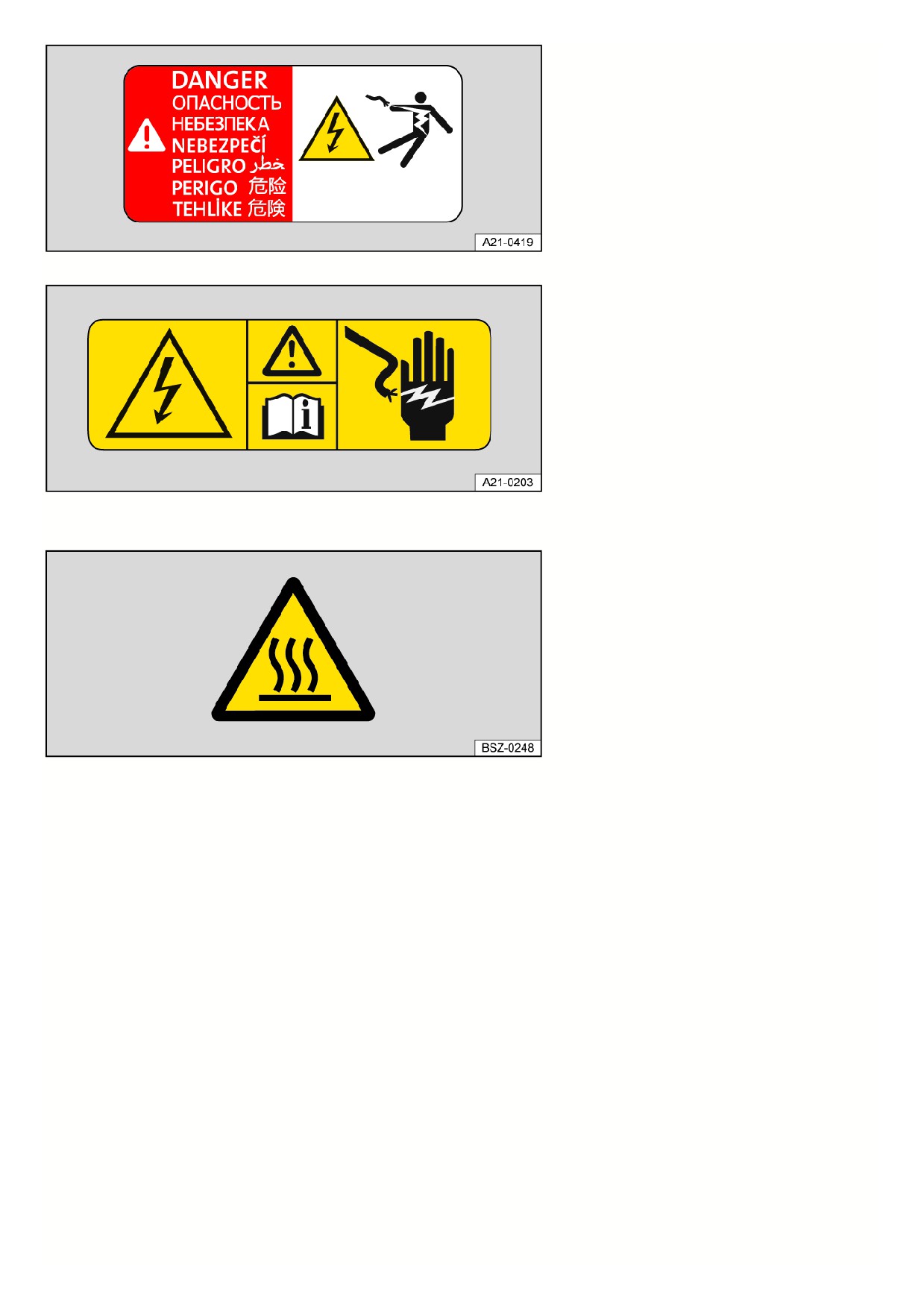
Fig. 125 Warning sign on the battery charger and other high-voltage components.
Fig. 126 Warning sign in the hood space.
These warning signs indicate a high electrical voltage fig. 125, fig. 126.
Fig. 127 Warning sign on the battery charger.
This warning sign fig. 127 indicates that parts of the high-voltage system can become very hot and must not be touched.
248
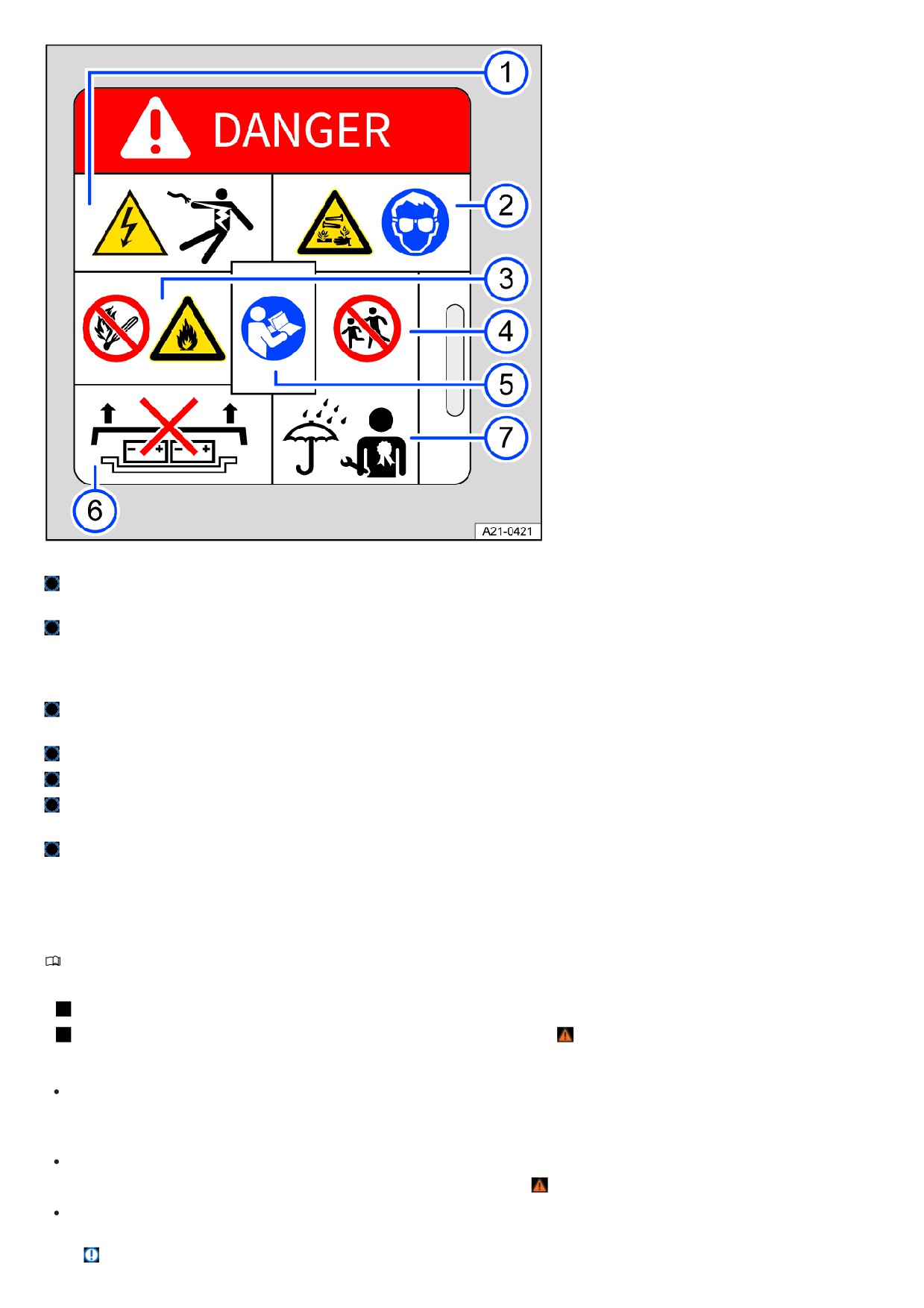
Fig. 128 Warning sign on the high-voltage battery.
Exposure to high voltages can result in serious injury or even death. Never touch the battery terminals with your fingers or with tools, or allow jewelry or other
metal items in contact with your body to touch the battery terminals.
The high-voltage battery contains hazardous liquids and solids. Escaping gas can cause serious chemical burns and could blind you. When working on the
high-voltage battery, always wear suitable protective eyewear and protective clothing to prevent battery fluid from coming into contact with your skin and eyes.
If battery fluid does come into contact with your skin or eyes, run clean water over the affected areas for at least 15 minutes and seek medical attention
immediately.
Under certain circumstances, the high-voltage battery can catch fire. Never expose the high-voltage battery to fire, sparks or naked flames. To prevent damage
and fluid leakage, always handle the high-voltage battery with care.
Keep children away from the high-voltage battery at all times.
Further information and warnings can be found in the Owner's Manual and in the workshop information.
Improper handling of the high-voltage battery can result in serious injury or even death. Never remove the cover from the high-voltage battery and never
disassemble the high-voltage battery.
Improper handling of the high-voltage battery can result in serious injury or even death. Have all maintenance procedures on the high-voltage battery
performed by fully qualified professionals. Never modify the high-voltage battery. When the high-voltage battery is open, do not allow it to come into contact
with water or other liquids. Liquids can cause short-circuiting, electric shock and burns.
Charging the high-voltage battery
Introduction
Requirements
Vehicle's drive system is deactivated.
Charging cable and charging infrastructure are working correctly and have been checked ⇒
Types of charging
AC (alternating current) charging at a charging station or wall box ⇒ Charging.
It is charged with a high charging power. The maximum achievable charging power results from the charging station used, the charging cable used and the
equipment of the battery charger.
AC (alternating current) charging at a mains socket ⇒ Charging.
The household's electrical installation must be checked and must be working correctly ⇒ . Plenty of charging time should be scheduled in, e.g. overnight.
DC (Direct Current) Charging at the Charging Station or Wall Box ⇒ Charging:
It is charged with a very high charging power. This significantly reduces the charging time. Please read the notes on frequent charging with direct current (DC)
⇒
249
NOTICE
A very high charging power is used for fast-charging with direct current (DC). Frequent fast-charging can permanently reduce the battery capacity of the high-
voltage battery.
The high-voltage battery should be mainly charged with alternating current (AC ) at a charging station or wall box.
When charging with alternating current (AC), it is recommended to charge with maximum charging power at a charging station or wall box. This achieves a
higher efficiency compared to charging with a mains socket.
Please note the technical information about your vehicle's charging power. For more information contact an authorized Volkswagen dealer or authorized
Volkswagen Service Facility.
WARNING
Failure to comply with the operating and safety instructions or improper use of the high-voltage battery and charging cable could result in a short circuit, electric
shock, explosions and fire. There is a risk of damage and serious or fatal injuries.
Always end the charging process before removing the mains plug to avoid coming into contact with residual power in the charger.
Pay attention to the safety and operating information for the supplied charging cable.
In the household, only use a connection that is suitable for electric vehicles and has been installed and tested by qualified professionals.
Never charge in areas where there is a risk of explosion. Charging cable components can trigger sparks and can ignite flammable or explosive vapors.
Always protect electrical connections from direct contact with water, damp, and other fluids.
Do not carry out any other work on or around the vehicle during charging for safety reasons.
WARNING
Driving with a low high-voltage battery charge level can cause the vehicle to become stranded in traffic. Accidents and serious injuries could result.
Always charge the high-voltage battery before starting a journey.
The high-voltage battery can only be charged at charging stations which meet the requirements of the country and abide by at least the following norms:
IEC 61851 and IEC 62196 (Europe).
GB/T 18487 and GB/T 20234 (China) in the 2015 version.
SAE J1772 (Japan).
SAE J1772 (USA and Canada).
Handling the high-voltage battery
Please read the introductory information and heed the Warnings and Notice ⇒
and Introduction.
Reliability and battery capacity of a high-voltage battery
A lithium-ion battery is generally subject to a physical and chemical aging and wearing process over its service life. Correct handling of the high-voltage battery can
significantly contribute to a reliable battery state and a high usable battery capacity and range in the long-term. This makes it all the more important to comply with
the following care instructions for the high-voltage battery. If you follow these care instructions, the vehicle can maintain its value for a long time.
Also observe the applicable Volkswagen guarantee and warranty conditions for the high-voltage battery. For more information, contact your authorized Volkswagen
dealer or authorized Volkswagen Service Facility.
Charging recommendations
Volkswagen recommends observing the following charging recommendations:
For everyday use, set the maximum battery charge level to 80% in the Infotainment system
⇒ Battery charge limits .
Charge the high-voltage battery once the battery charge level is below 20%. Ideally avoid the high-voltage battery being fully discharged
⇒
Charge the high-voltage battery to 100% before long journeys. Set a departure time in the Infotainment system
⇒ Departure Times (time-delayed charging) a
drive off as immediately after charging as possible.
Avoid regular rapid charging with direct current (DC).
NOTICE
The high-voltage battery must not be manipulated for use as a stationary power source. This may lead to irreversible damage to the high-voltage battery.
25
Never make technical modifications to or tamper with the high-voltage battery and high-voltage components.
Battery Care Mode
The maximum battery charge level is automatically limited to 80 % for the next charging process.
1. Tap HOME in the Infotainment system.
2. Tap
Charging.
3. Tap
Setup.
4. Activate the function.
Volkswagen recommends using the Battery Care Mode function for everyday use to protect the high-voltage battery.
If charging at a certain departure time is activated, the function cannot be used.
Periods when the vehicle is unused
If you intend to leave the vehicle parked for longer periods, park it with a battery charge level between 40% and 70%.
Ideally avoid high outside temperatures, especially in direct sunlight, when the vehicle is parked for longer periods.
To improve convenience and performance, use stationary air conditioning when required (depending on the vehicle equipment), especially at temperatures
below approx. -15 °C (approx. +5 °F) ⇒ Operating the stationary air conditioning.
NOTICE
If the vehicle is parked for an extended period with a discharged high-voltage battery, the high-voltage battery may not be able to charge or the vehicle might not
start. In the long-term, this can lead to irreversible damage to the high-voltage battery.
Charge the high-voltage battery at regular intervals.
The high-voltage battery has less power available in very low temperatures. If the battery charge level is also low, the driving power may also be limited for a
short time after pulling away.
Charging
Please read the introductory information and heed the Warnings and Notice ⇒
and Introduction.
The high-voltage battery can be
charged with alternating current at the
charging station or GFI outlet (AC
charging) or with direct current at the
rapid charging station (DC charging).
Connecting the charging cable
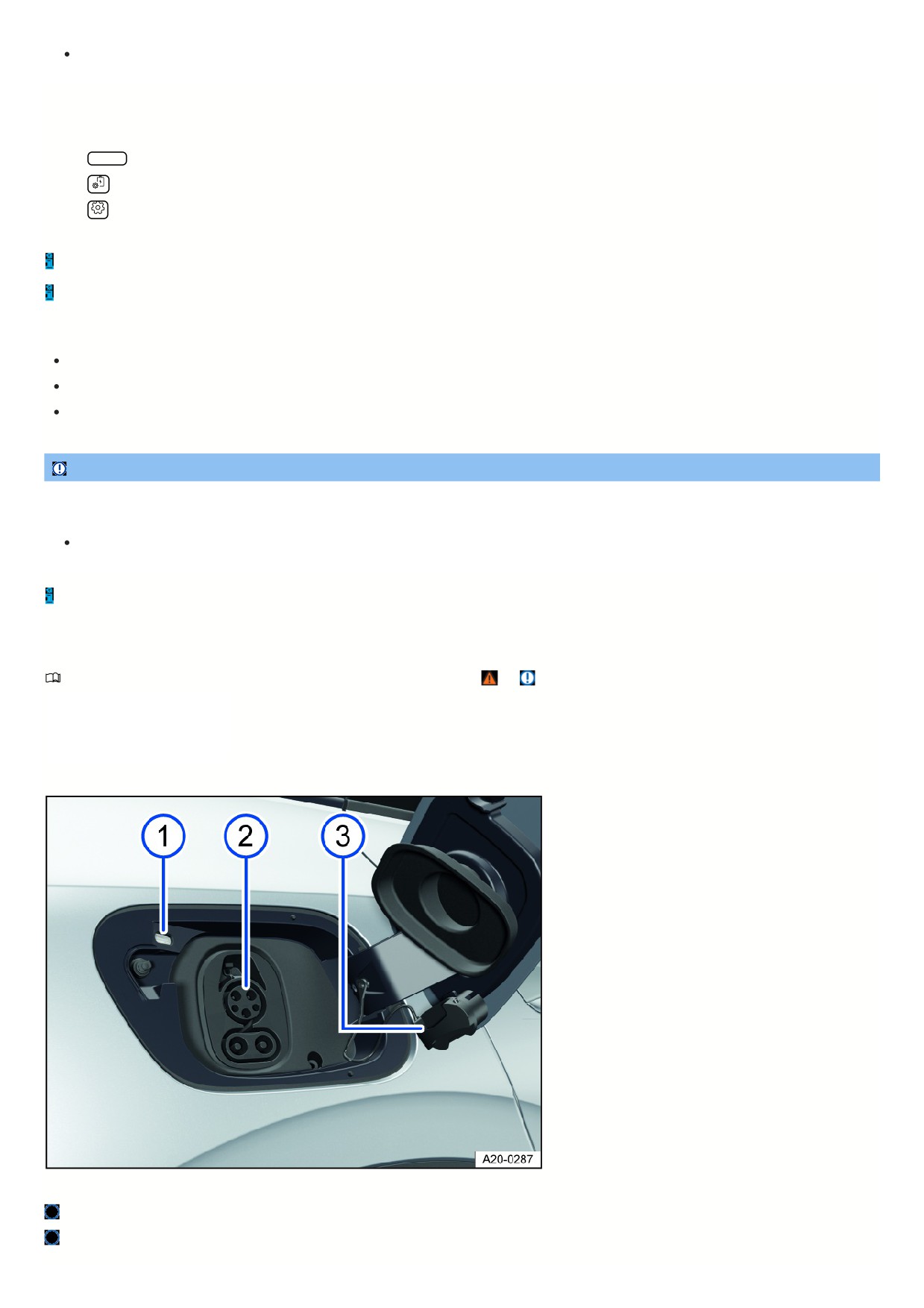
Fig. 129 Behind the rear-right charging socket flap: Charging socket.
Charging process display.
Charging socket with AC connection (top) and DC connection (bottom).
251
Protective cap on the support.
1. Unlock the vehicle.
2. Press gently on the charging socket flap to open it.
3. Remove the charging cable from the charging station or connect to the power supply and fully unwind.
Charging cable for mains sockets: The protective device of the charging cable will carry out a self-test
⇒ Charging cable for mains sockets .
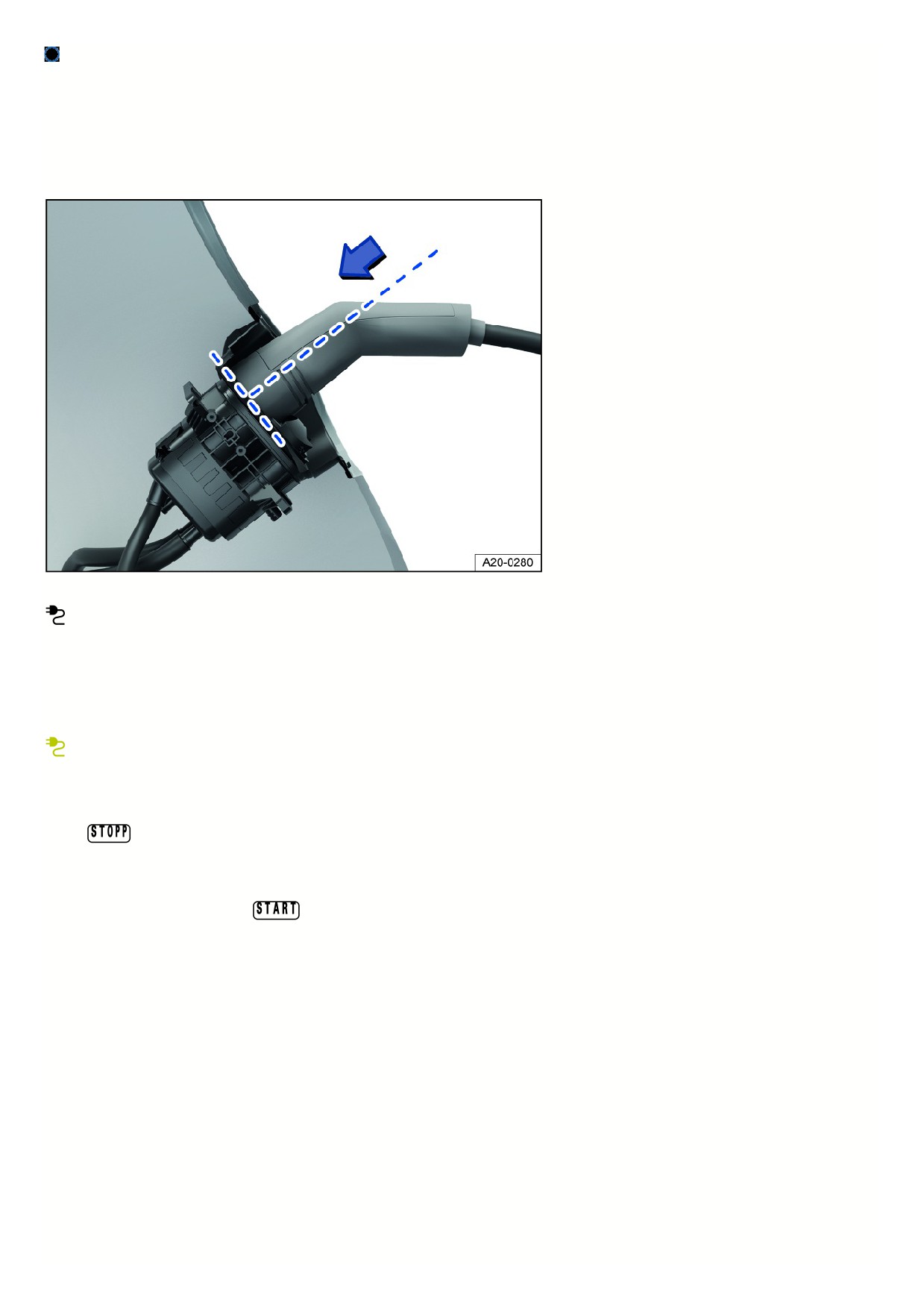
4. Insert the charging connector straight into the charging socket and check whether it is fully inserted fig. 130.
Fig. 130 Fully inserted charging connector (general example).
When the charging connector is plugged in, the white indicator light in the instrument cluster comes on.
Starting the charging process
1. To achieve the desired range with immediate charging, set the maximum battery charge level on the charging information screen.
2. If necessary, activate the charging station.
The charging process starts immediately or after a delay, depending on the settings for the stored charging location.
When the high-voltage battery is being charged, the green indicator light in the instrument cluster blinks.
Interrupting the charging process
The charging process can be interrupted at any time.
1. Tap
in the Infotainment system.
Or: Press the central locking button when AC charging at the charging station or GFI outlet.
When Automatically release the AC charging cable is selected in the Infotainment system, the charging connector is automatically released.
2. To restart the charging process, tap
3. Renewed activation may be required at the charging station.
After charging
Once the high-voltage battery has been charged, the charging process indicator on the charging socket turns green.
Charging station or GFI outlet (AC charging):
1. Unlock the vehicle.
2. Press the release button on the charging connector and remove the charging connector.
Or: if Automatically releasing the AC charging cable is selected in the Infotainment system, the charging connector can be unplugged immediately.
3. Disconnect the charging cable from the power supply and replace the protective cap.
4. Close the charging socket flap until it audibly engages.
Rapid charging station (DC charging): The charging connector is automatically unlocked from the charging station after charging and can be disconnected.
Charging for the first time and charging after the vehicle is parked for a long time
If the high-voltage battery is new or has not been charged for a long time, it may not achieve its maximum charge level until several charging processes have been
completed. This is a normal feature and is not a vehicle malfunction.
252
If the vehicle is not used for a long period, the high-voltage battery must be charged within a period of no more than four months → page , Handling the high-volta
battery.
The charging cable for the charging station must not exceed approx. 30 m (approx. 98 ft) in length.
In extremely low or extremely high temperatures the high-voltage battery charging process may be limited.
Charging process indicator
Please read the introductory information and heed the Warnings and Notice ⇒
and Introduction.
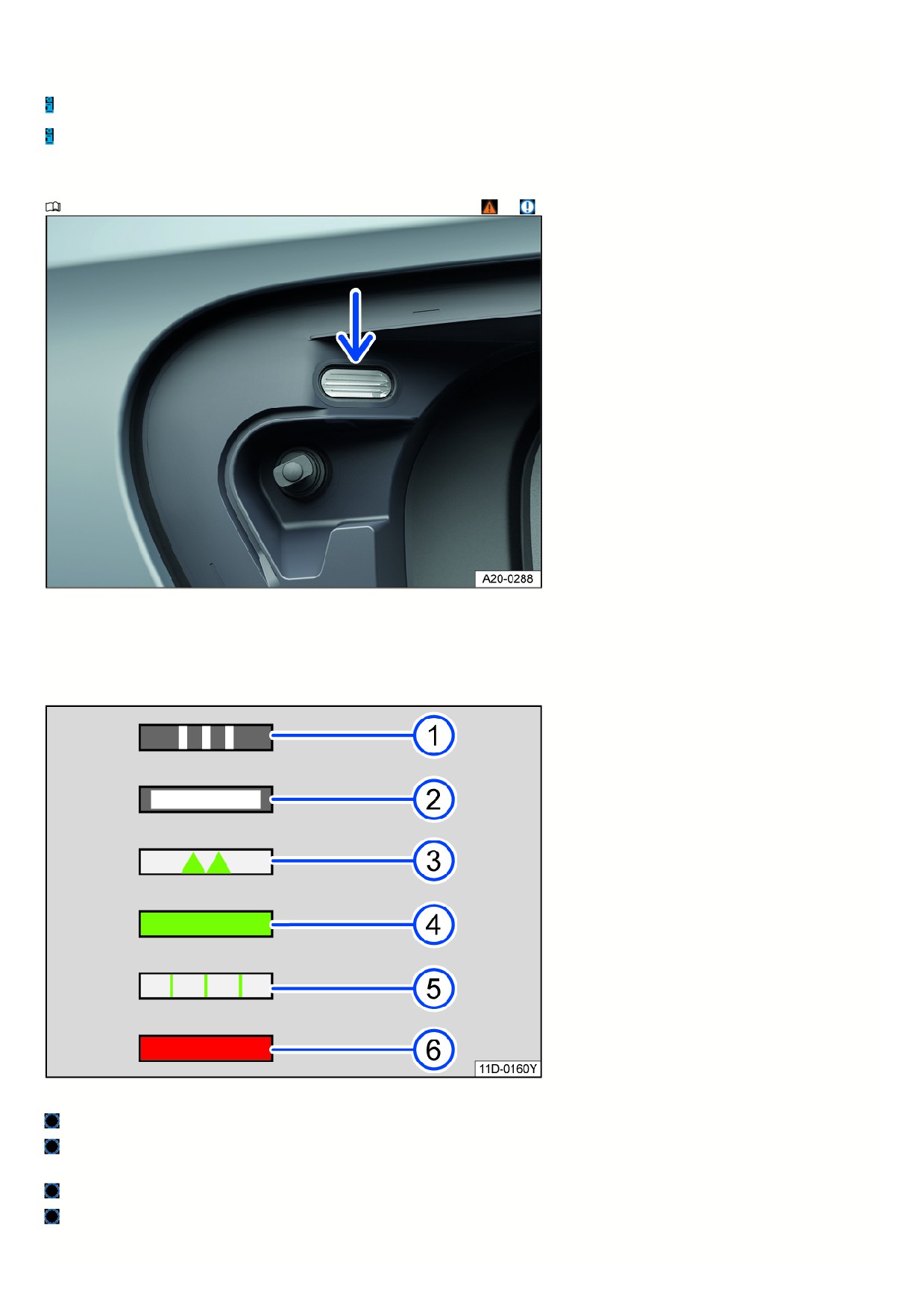
Fig. 131 Behind the charging socket flap: charging process indicator.
An LED on the charging socket shows the charging process status fig. 131 (arrow).
LED displays
A label on the charging socket describes the LED displays fig. 132.
Fig. 132 LED light displays (general example).
Flashing: Charging connector has been detected.
Blinking white: Vehicle is being connected to the charging infrastructure. Preparing for charging.
Light comes on: No active charging function.
Pulsing green: The high-voltage battery is being charged.
Green light comes on: Charging process successfully concluded.
Green light comes on alternately with red indicator: Charging with reduced current to prevent becoming stranded in traffic. There is a malfunction, e.g. the
charging connector is not fully inserted.
253

Flashing green: A time-delayed charging process has been activated and has not yet begun.
Red light comes on: Charging system malfunction.
If the charging process indicator continuously displays a malfunction related to the vehicle power supply or charging system, contact an authorized
Volkswagen dealer or authorized Volkswagen Service Facility. Volkswagen recommends contacting an authorized Volkswagen dealer or authorized Volkswagen
Service Facility.
Charging socket light
If one of the following conditions applies, the side lighting of the charging socket switches on in darkness:
The vehicle was unlocked.
The charging connector was removed from the charging socket.
After locking or unlocking the vehicle, the light turns off automatically after a certain time.
Troubleshooting
Please read the introductory information and heed the Warnings and Notice ⇒
and Introduction.
and
Risk of fire
The red central warning light
comes on and is shown in the Volkswagen Digital Cockpit display together with a message. A warning tone sounds continuously.
The temperature of the high-voltage battery is too high ⇒
1.
Do not continue driving! Exit the vehicle and inform the fire department immediately.
If the message disappears, the warning light
is displayed.
DANGER
If there is a risk of fire in high-voltage battery cells, toxic gases may escape or high-voltage components may be live. There is a risk of serious injuries, burns or
fatal electric shock.
Stop the vehicle in a where it is safe to do so as soon as possible.
Exit the vehicle and stay at a sufficient distance.
Inform the fire department immediately.
Observe the checklist of what to do in the event of a fire → page , What to do in the event of an accident or fire.
The continuous warning tone can only be turned off by suitably qualified professionals. Volkswagen recommends contacting an authorized Volkswagen dealer or
authorized Volkswagen Service Facility.
Fault in high-voltage system
The red warning light turns on. A message will appear in the instrument cluster display.
There is a malfunction in the high-voltage system. High-voltage components may be damaged ⇒
Charging the high-voltage battery is not possible.
DANGER
In the event of a high-voltage system malfunction, high-voltage components including the high-voltage battery and high-voltage cables may have been
damaged and still be live. There is a risk of serious injuries, burns or fatal electric shock.
Do not touch the high-voltage components or high-voltage cables.
1.
Do not continue driving! Park your vehicle outside as soon as it is possible and safe to do so.
2. End drive-ready mode.
3. Contact an authorized Volkswagen dealer or authorized Volkswagen Service Facility immediately for assistance.
High-voltage battery discharged and deep discharge possible
The red warning light turns on. A message will appear in the instrument cluster display.
During a lengthy stationary period, the high-voltage battery can be damaged by deep discharge.
1. Charge the high-voltage battery immediately.
High-voltage battery has been discharged
The yellow indicator light turns on. A message will appear in the instrument cluster display.
254

1. Charge the high-voltage battery immediately.
High-voltage battery charge level low
The yellow indicator light turns on. A message indicating the remaining range will appear in the instrument cluster display.
The reserve charge level of the high-voltage battery has been reached.
1. Charge the high-voltage battery.
High-voltage system malfunction
The yellow indicator light turns on. A message will appear in the instrument cluster display.
High-voltage components may be malfunctioning.
It is possible to continue driving.
1. Have the high-voltage system checked by suitably qualified professionals. Volkswagen recommends contacting an authorized Volkswagen dealer or authorized
Volkswagen Service Facility.
Error when calculating the range
The yellow indicator light turns on. A message will appear in the instrument cluster display.
There is a malfunction in the range calculation.
1. Contact a suitably qualified professional. Volkswagen recommends contacting an authorized Volkswagen dealer or authorized Volkswagen Service Facility.
Emergency charging of the high-voltage battery
The white indicator light comes on. A message will appear in the instrument cluster display. The charging process indicator on the charging socket comes on,
alternating between green and red.
A reduced charging current is used for charging and there is a malfunction, e.g. charging connector not correctly plugged in or malfunctioning connection to the
charging station.
1. Reconnect the charging cable.
2. If the malfunction persists, contact a suitably qualified professional. Volkswagen recommends contacting an authorized Volkswagen dealer or authorized
Volkswagen Service Facility.
Charging Process Not Possible or Canceled
The red charging process indicator on the charging socket comes on.
1. Reconnect the charging cable.
Or: check whether the charging connector is plugged in correctly.
Or: check if there is a malfunction on the charging station.
2. If you cannot resolve the malfunction, contact a suitably qualified professional. Volkswagen recommends contacting an authorized Volkswagen dealer or
authorized Volkswagen Service Facility.
The charging connector cannot be removed
1. During AC charging with alternating current, unlock the vehicle via the central locking system. Immediately unplug the charging connector.
Or: to unlock the charging connector prematurely during DC charging, tap
on the Infotainment system screen.
2. To prevent the vehicle from being stranded, if necessary, manually unlock the charging connector
⇒ Emergency release for the charging connector .
Afterwards, contact a suitably qualified professional. Volkswagen recommends contacting an authorized Volkswagen dealer or authorized Volkswagen Service
Facility.
The charging cable protective circuit for the GFI outlet switches off
An error may be recorded by the protective circuit during a self-test if external electrical devices, such as a refrigerator, are used simultaneously in the vehicle.
1. Follow the order specified. Connect the charging cable to the external power supply first and then connect it to the charging socket.
The charging time changes during DC charging
To protect the high-voltage battery from overheating, the charging current is automatically reduced after several DC charge cycles in succession, e.g. during
continuous use of the vehicle.
Emergency release for the charging connector
Please read the introductory information and heed the Warnings and Notice ⇒
and Introduction.
When can the charging connector be released?
The charging connector has been plugged in correctly and is not tilted.
255
Vehicle is unlocked.
Charging processes has been stopped or interrupted.
If charging with alternating current (AC), select the Automatically releasing the AC charging cable setting.
If the prerequisites are fulled and the charging connector still cannot be unplugged, the charging connector can be emergency released
⇒
DANGER
If the charging connector unexpectedly remains locked, it could be that the vehicle or charging station has a malfunction. Live contacts can be made accessible
by manual emergency unlocking. Touching the contact in the charging socket may, in this case, lead to burns, other injuries, or a fatal electric shock.
Never touch the contacts in the charging socket or the charging connector.
Only perform the emergency release on the charging connector if there is a vehicle malfunction.
Electrical emergency release of the charging connector
To avoid manual emergency release in the luggage compartment, try to release the charging connector electrically via the vehicle's central locking.
1. End the charging process via the function key
in the Infotainment system or at the charging station.
2. Press the
button on the remote control vehicle key three times in succession.
The turn signal must blink three times.
3. Unplug the charging connector.
Manual emergency release of the charging connector
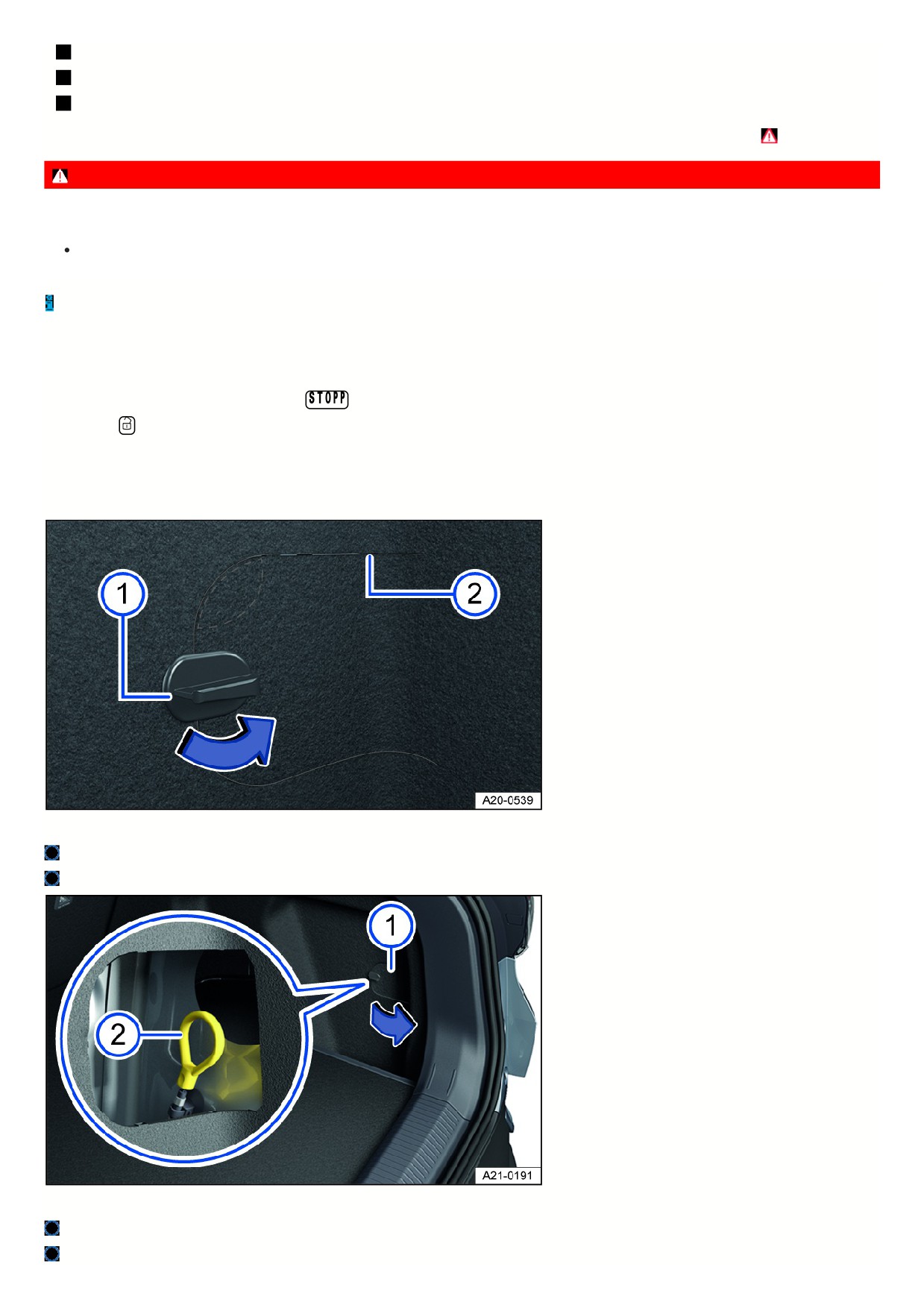
Fig. 133 In the bottom right luggage compartment trim: Flap for emergency release.
Fastener.
Separation points.
Fig. 134 In the bottom right luggage compartment trim: Emergency release of the charging connector.
Flap with fastener.
Emergency release loop.
256
On the bottom right-hand side of the luggage compartment, there is a flap with a lock fig. 134.
1. Open the luggage compartment.
2. Turn the flap lock by 90° fig. 133 (blue arrow).
3. Press in the area above the fastener fig. 133 (area marked).
4. Reach into the opening and pull the flap to release it. If necessary, use a suitable aid at the separation points fig. 133.
5. Open the flap.
6. Pull the manual emergency release loop fig. 134.
The charging connector can be removed ⇒
7. Close the flap in the luggage compartment trim again with the lock.
8. Have the charging socket checked by suitably qualified professionals. Volkswagen recommends contacting an authorized Volkswagen dealer or authorized
Volkswagen Service Facility.
Charging settings
Introduction
In the Infotainment system, it is possible
to configure settings for the charging
process. Advanced charging settings for
AC charging are available in the menu
for the saved charging location.
Opening the charging settings
1. Switch the Infotainment system on.
2.
Tap Charging in the main menu.
Or: When the charging connector is inserted into the unlocked vehicle, a screen with charging information is displayed automatically.
3. Open the
Charging menu.
Or: Open the
Charging locations menu and create a charging location.
1. If there is to be time-delayed charging, activate a departure time
⇒ Departure Times (time-delayed charging) .
Immediate charging: Without an activated departure time, the high-voltage battery is immediately charged to the maximum battery charge level
⇒ Battery
charge limits.
Changing the charging procedure
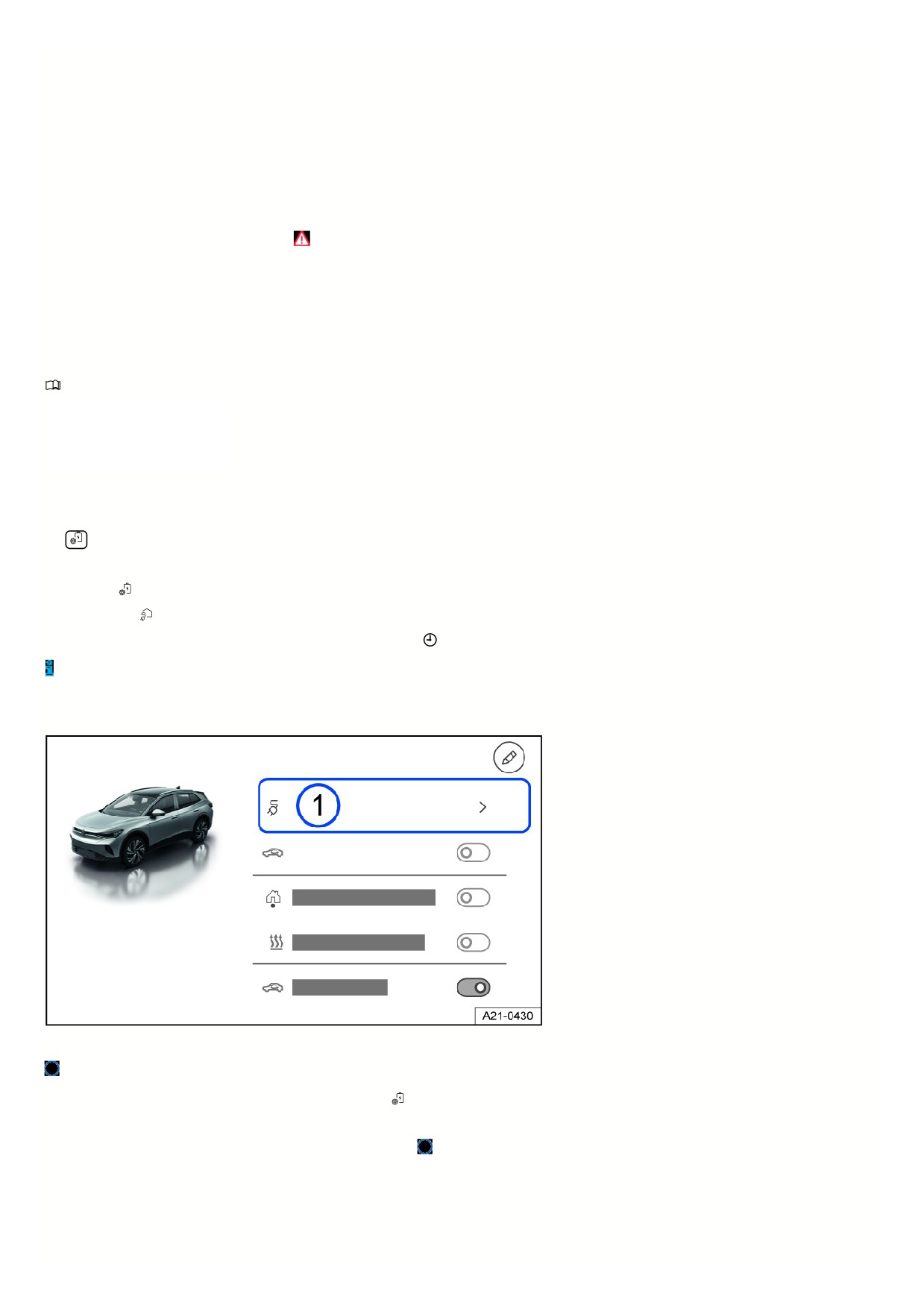
Fig. 135 Infotainment system: exit menu with function key for charging (general example).
Function key for displaying and changing the charging procedure.
You can change the charging procedure in the exit menu or in the
Charging menu. The selection depends on the settings in the created charging location profi
and the technical requirements at the location.
1. Tap the function key with the displayed charging procedure fig. 135
A list view will open.
2. Select a charging procedure, e.g. immediate charging, charging before a departure time, charging and air conditioning.
Overview of the charging settings
Settings in the Charging menu
257
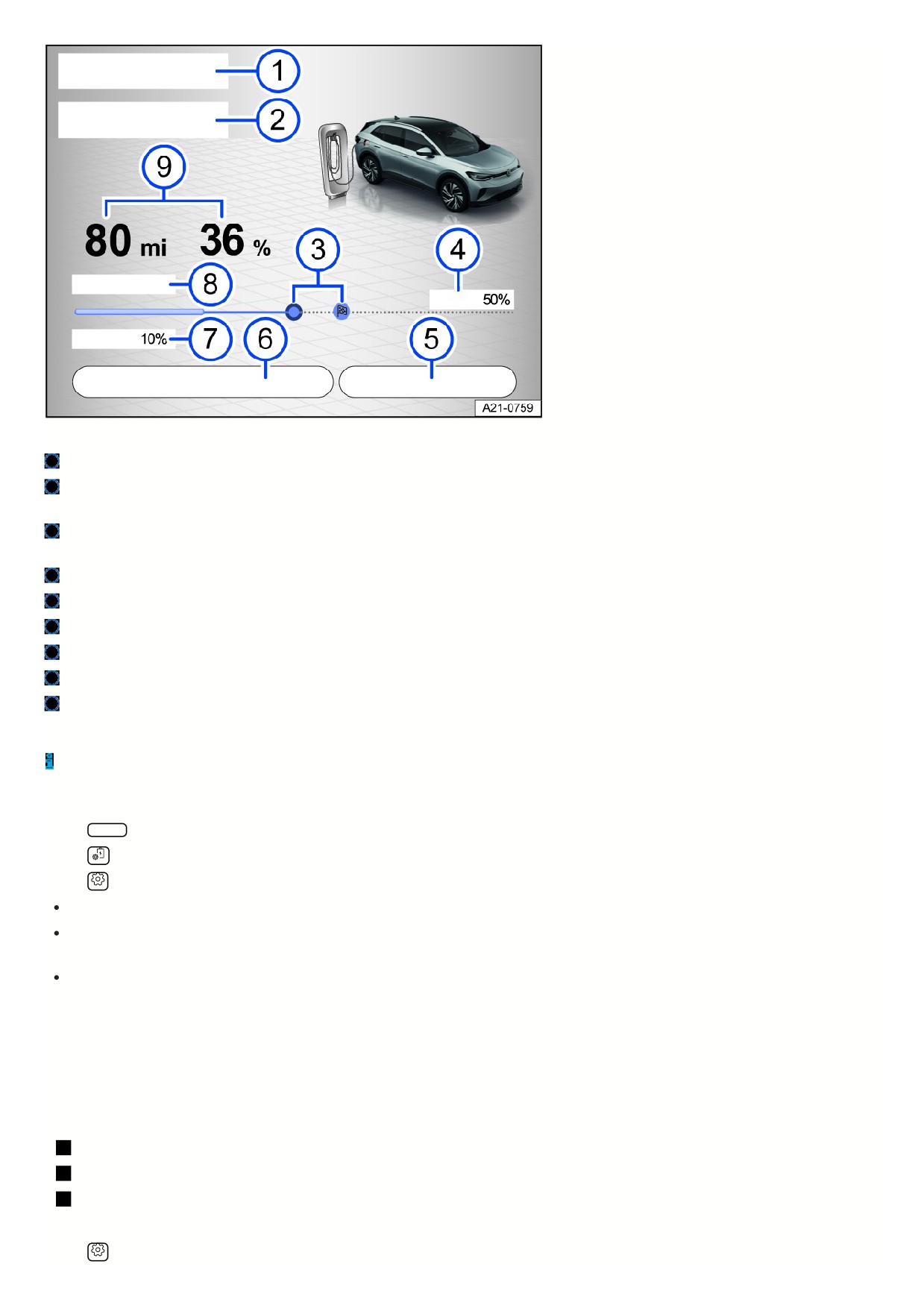
Fig. 136 Infotainment system: function keys and displays for charging (general example).
Current settings or detected charging location.
End of the charging process or scheduled departure time.
Or: stationary air conditioning for departure time (depending on the vehicle equipment).
Touch control for the maximum battery charge level.
E-route planning navigation symbol: Automatically calculated touch control position.
Display of the maximum battery charge level.
Stop or restart charging.
Change the charging procedure.
Minimum battery charge level.
Range regained during charging in km/h or km/min and charging power in kW.
Range and battery charge level.
Some of the described displays and settings are also available on the screen with charging information when the charging connector is plugged in.
The displays for the charging power and the duration of the charging process may vary between different charging processes. They depend on the charging
infrastructure and the temperature of the high-voltage battery. The charging power can also vary during the charging process.
Settings in the Setup menu
1. Tap HOME in the Infotainment system.
2. Tap
Charging.
3. Tap
Setup.
Battery Care Mode ⇒ Handling the high-voltage battery.
Automatically releasing the AC charging cable: after the AC charging process has finished, the charging connector is automatically released and can be
unplugged immediately. The function depends on the country.
Reducing the AC charging current: a lower charging current of 6 A or 8 A is used for charging (depending on the country). This setting is recommended when
several large items of electrical equipment are being operated via the same circuit.
Plug W Charge function
The high-voltage battery is charged at a suitable wall box or public charging station as soon as the charging connector is plugged in. Manual activation for cost
accounting is not required.
The function depends on the vehicle equipment and the country.
Requirements
The charging station supports the Plug & Charge charging function according to ISO 15118.
An electricity contract was stored in the vehicle.
Plug & Charge was switched on in the Infotainment system.
Switching on and off
1. Tap
Settings in the Charging main menu of the Infotainment system.
258

2. Activate Plug & Charge.
The function can be used by the primary user and a guest user. The primary user can switch the function on and off in the vehicle. A guest user can only switch off
the function.
Battery charge limits
The battery charge level, and
consequently the vehicle range, can be
adapted to everyday demands using
the battery charge limits in the
Infotainment system.
Upper battery charge limit
The maximum battery charge level limits the maximum charge level of the high-voltage battery to between 50 and 100%.
It is not necessary to fully charge the high-voltage battery for standard daily use.
1. Move touch controls in the Infotainment system's charging settings to the preferred value.
The maximum battery charge level can also be adjusted during charging.
Lower battery charge limit
A battery charge level for the high-voltage battery between 0 and 50% can be set.
The vehicle charges immediately once it has been connected to the power and reaches a minimum vehicle range.
Only then are preferred charging times, low tariffs or a departure time for time-delayed charging considered. The function is possible at a saved charging location.
1. Tap HOME in the Infotainment system.
2. Tap
Charging.
3. Open the
Charging locations menu.
4. Move the touch control in the charging location's profile to the preferred value.
Volkswagen recommends observing the information on battery care in order to set the battery charge levels correctly
⇒ Handling the high-voltage battery.
Charging locations
Charging locations can be set up in the
Infotainment system. The vehicle
automatically recognizes a saved
charging location and uses the
available settings when charging.
Location data
The Infotainment system uses the vehicle's current location data (geocoordinates) when a charging location is created or used.
Creating a charging location
1. Tap HOME in the Infotainment system.
2. Tap
Charging.
3. Open the
Charging locations menu.
4. Add and name the charging location (five maximum).
Removing a charging location
1. Open the
Charging locations menu.
2. Tap
3. Tap the
to remove the saved charging location.
Setup
All of the charging settings that have been saved always apply to the currently recognized charging location. If a Departure Time is activated for the charging
location, you can switch to immediate charging in the exit menu of the Infotainment system ⇒ Exit menu .
Reduce the charging current.
Automatically releasing the AC charging cable. The function depends on the country.
Departure time (three maximum) ⇒ Departure Times (time-delayed charging).
Lower battery charge limit ⇒ Battery charge limits.
Upper battery charge limit ⇒ Battery charge limits.
Preferred charging times: individually tailoring charging times can be helpful if there is other electrical equipment in the household or when using off-peak
electricity.
259

Displays address or geocoordinates.
Different charging settings can be saved for one charging location.
Departure Times (time-delayed charging)
If you have saved a charging location,
the high-voltage battery can be
charged at a time of your choice.
Setting a departure time
1. Tap HOME in the Infotainment system.
2. Tap
Charging.
3. Open the
Charging locations menu.
4. Open the profile of a charging location.
5. Set a departure time (three maximum).
Day of the week.
Time at which the high-voltage battery should be charged.
To be used weekly or as a one-off.
If time-delayed charging has not been activated in the Infotainment system, the high-voltage battery is charged up to the maximum battery charge level
immediately.
Air Conditioning
The vehicle interior is cooled or heated at the departure time by the stationary air conditioning. The function depends on the vehicle equipment.
1. Set the desired temperature in the Stationary air conditioning menu
⇒ Operating the stationary air conditioning.
2. Select the function for the charging procedure in the drop-down list.
Activating a departure time
1. Open the profile of a charging location.
2. Activate the departure time by placing a “check mark”
in the checkbox.
Displays in the Infotainment system
Charging at a certain departure time activated.
Air conditioning at a certain departure time activated.
Departure time is used regularly.
Charging cable
Introduction
Instructions for the charging cable
The charging cable delivered with the vehicle depends on the scope of supply and the country-specific technical specifications, for example charging plug
connectors for mains sockets.
Volkswagen recommends only using the charging cable supplied and observing the following information ⇒
, ⇒
Handle with care.
Roll out or roll in completely.
Do not fold or bend over sharp edges.
Do not allow to become trapped or run over.
Only pull on the charging connectors.
Children must not use the charging cable.
Keep animals away.
Stow away safely and without kinks after use.
DANGER
Using a charging cable that is damaged or has been tampered with can cause an electric shock, resulting in serious injury or death.
Check the charging connectors and the charging cable for damage, e.g. cracks, before every use.
Never open the charging cable and its components.
26
Never use a charging cable that has been damaged or tampered with.
In the event of a malfunction, have the charging cable checked by suitably qualified professionals. Volkswagen recommends contacting an authorized
Volkswagen dealer or authorized Volkswagen Service Facility.
WARNING
Charging a high-voltage battery with an unsuitable charging cable can cause short circuits and electric shocks. This could result in damage to the charging
cable and serious or fatal injuries.
Always take note of the information on the charging cable.
Before traveling abroad, find out about the electrical installations available locally.
Before traveling abroad, make sure you know which is the correct, country-specific charging cable and what the maximum permitted charging current is.
Stowing the charging cable away
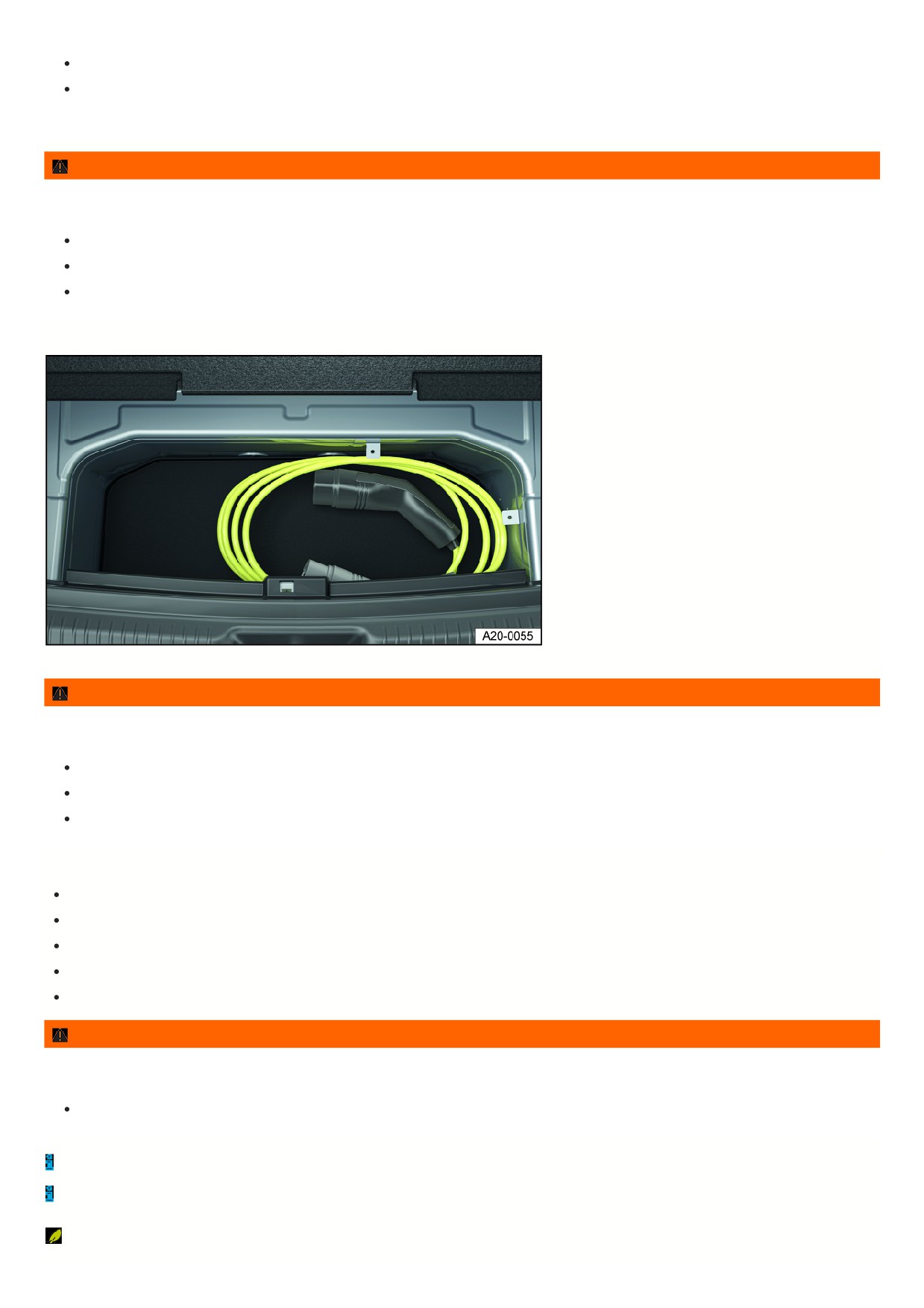
Fig. 137 Under the luggage compartment floor: Storage compartment for the charging cable (general example).
WARNING
An unsecured or incorrectly secured charging cable can be thrown around the inside of the vehicle during sudden driving and braking maneuvers. This can
cause accidents and serious injuries.
Stow the charging cable in the storage compartment under the luggage compartment floor fig. 137.
Or: Stow the charging cable in the charging cable bag provided and hook the charging cable bag to a front tie-down in the luggage compartment.
If the rear seat backrest has been folded over, stow the charging cable bag in the footwell in front of it.
Instructions for the charging connectors and the protective device of the charging cable
Do not reach into the contacts of the charging connector.
Keep away from intense sunlight. The outside temperature must be no higher than 50 °C (122 °F).
Do not drop.
Protect against immersion in liquids, e.g. rainwater.
Replace the protective cap after use.
WARNING
Incorrectly using or connecting the charging cable for mains sockets can cause a severe malfunction. This could result in damage to the electrical system and
the charging cable, as well as fire and serious injury.
Never connect the charging cable to an extension cable, a cable reel, a socket strip or an adapter, such as a travel adapter or timer.
As a portable piece of operating equipment, the charging cable may be subject to regular testing obligations. A test adapter is required for this.
Note the maximum load for the fuse circuit in use. If the charging cable is connected to a mains socket on the same electrical circuit as other consumers, the
circuit fuse may be tripped.
Charging cables must be disposed of in an environmentally friendly manner and may not be included with household waste.
261

Cleaning the charging cable
1. Wipe the surface of the charging cable with a dry or only slightly damp cloth
⇒
, ⇒
DANGER
Cleaning a connected charging cable creates a danger of coming into contact with live voltage from the high-voltage system. This can cause an electric shock,
resulting in burns and serious injuries or death.
Only clean the charging cable when it is unplugged.
NOTICE
Improperly cleaning the charging cable could result in damage.
Only use water and no additional cleaning agents when cleaning the surface.
Ensure that no water enters the contacts of the charging cable.
Charging cable for mains sockets
Please read the introductory information and heed the Warnings and Notice ⇒
and Introduction.
A suitable charging cable for mains sockets can be obtained from your authorized Volkswagen dealer or authorized Volkswagen Service Facility.
262
Do it yourself
Vehicle tool kit
Introduction
When securing the vehicle in the event of a vehicle breakdown, follow the legal regulations applicable in the respective country.
WARNING
A loose tire mobility set, spare wheel, compact spare wheel or vehicle tool kit can be thrown around the vehicle interior during sudden driving or braking
maneuvers or in a collision. This could result in serious or fatal injuries.
Always make sure the vehicle tool kit, tire mobility set, and spare wheel or compact spare wheel are secured in the luggage compartment.
WARNING
Working with an unsuitable or damaged vehicle tool kit may result in accidents. This could result in serious or fatal injuries.
Never work with an unsuitable or damaged vehicle tool kit.
Seek assistance from an authorized Volkswagen dealer or authorized Volkswagen Service Facility if there is no suitable vehicle tool kit available.
Placement
Please read the introductory information and heed the Warnings and Notice ⇒
Introduction.
There are a number of different storage locations for the tool box in the vehicle, such as under the luggage compartment floor or in a side storage compartment of
the luggage compartment.
Depending on the equipment variant, the vehicle may contain a loose box with the vehicle tool kit in the luggage compartment. This supplemental vehicle tool kit is
designed for a possible winter tire change and does not need to be carried in the vehicle at all times → page , Stowing luggage and cargo .
If used, crank the vehicle jack back down so that it can be securely stowed in the vehicle.
Vehicle tool kit components
Please read the introductory information and heed the Warnings and Notice ⇒
Introduction.
The scope of the tool box depends on the country and equipment. The following information describes the full scope of items that may be included.
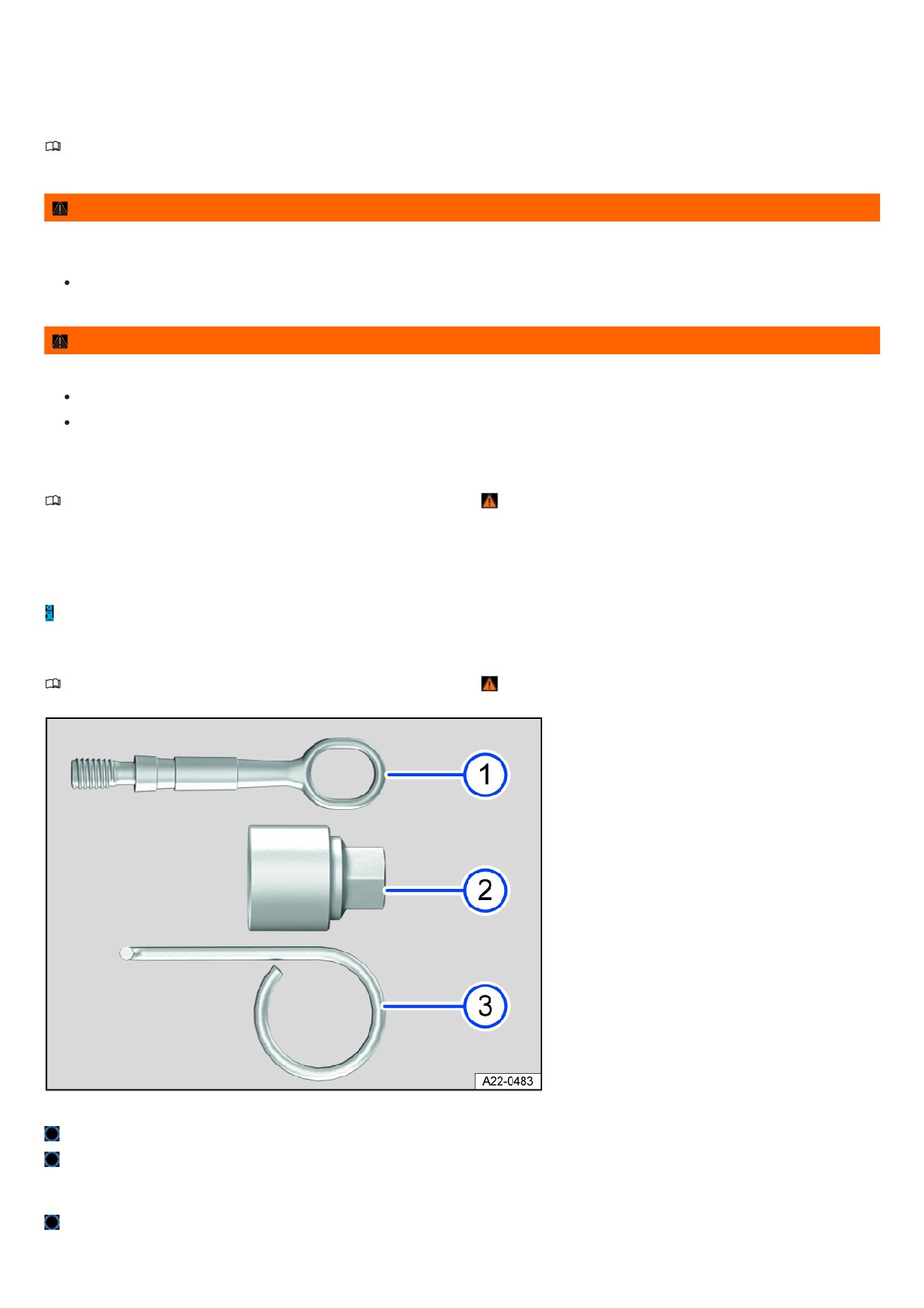
Fig. 138 Vehicle tool kit components (general example).
Towing eye that can be screwed in.
Adapter for the anti-theft wheel bolt. Volkswagen recommends always keeping the adapter for the wheel bolts in the vehicle with the vehicle tool kit. The code
number for the wheel bolt lock is stamped on the front of the adapter. A replacement adapter can be ordered based on this number if the adapter is lost. Note
the wheel bolt lock code number and keep it separate from the vehicle.
Extraction hook for removing the center wheel covers, wheel hub covers, or wheel bolt covers.
Additional vehicle tool kit
263
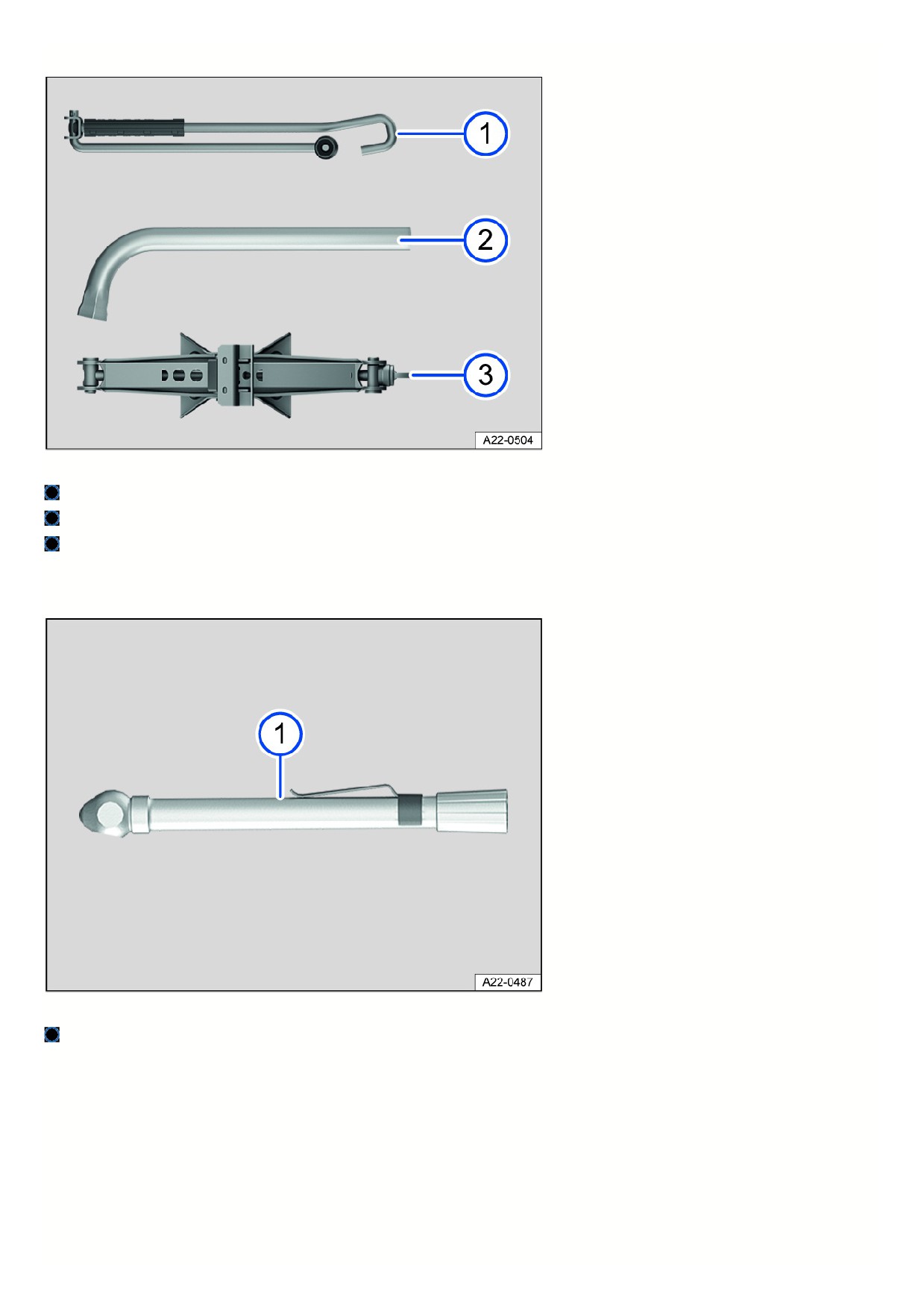
Vehicles that come equipped with winter wheels have an additional tool kit inside. The additional tool kit does not always have to be carried in the vehicle.
Fig. 139 Additional vehicle tool kit components (general example).
Crank.
Lug wrench.
Vehicle jack. Before putting the vehicle jack away, crank the vehicle jack claw all the way down.
Tire Pressure Gage
In some countries, there may also be a tire pressure gauge in the vehicle.
Fig. 140 Additional vehicle tool kit component (general example).
Tire pressure gage (depending on the country).
Jack maintenance
If there is a jack included in the vehicle tool kit, the jack generally does not require maintenance.
1. If necessary, apply universal lubricant to the jack.
Windshield wipers
Putting the windshield wipers in the service position
In the service position, the wiper arms can be lifted off of the windshield.
264
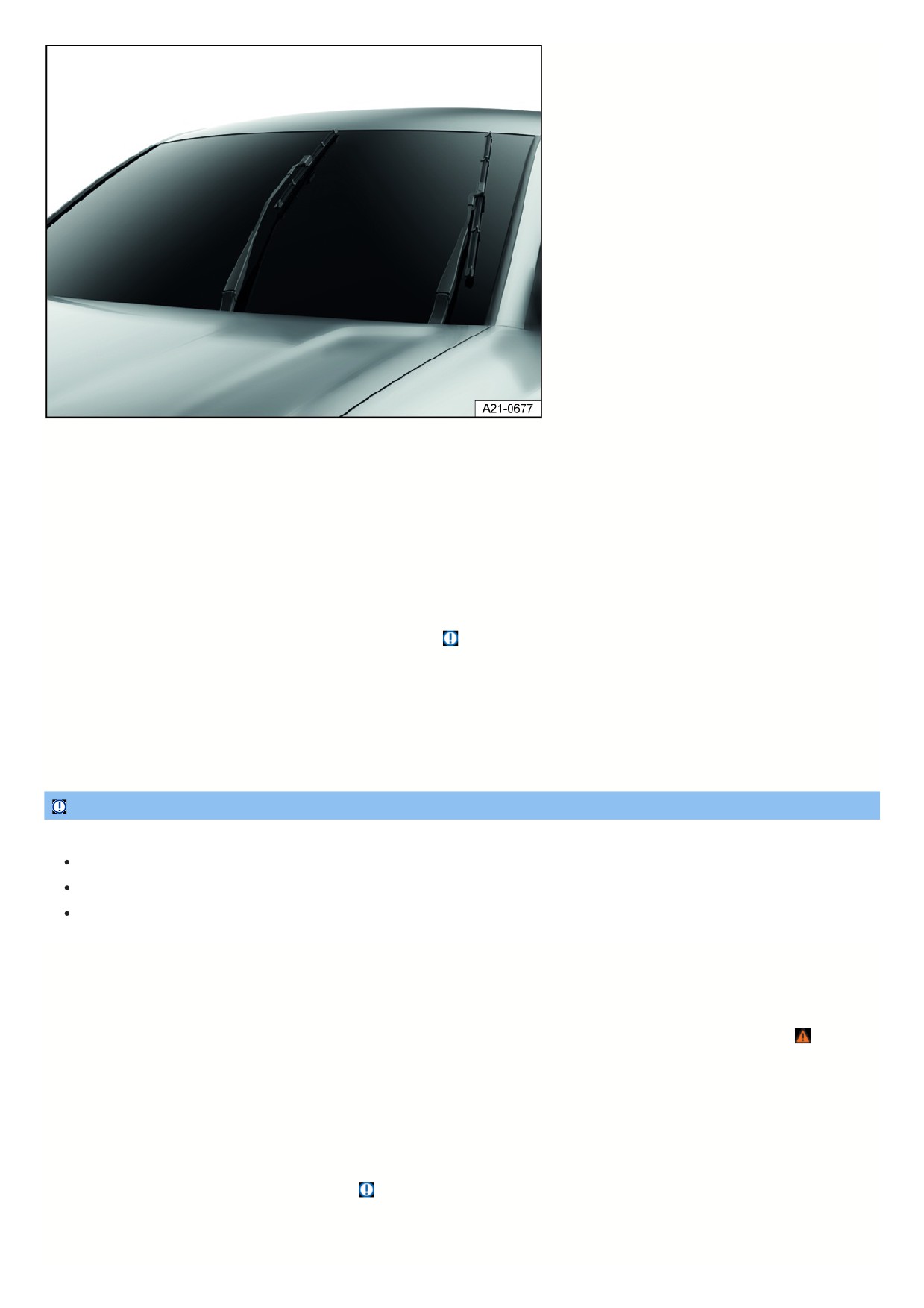
Fig. 141 Windshield wipers in service position (general example).
Activate the service position using the windshield wiper lever
1. Close the hood, driver and front passenger door.
2. Switch the ignition off and on again.
3. Briefly press the windshield wiper lever towards “one-tap wiping”
⇒ Operating the windshield wiper lever .
Activate the service position using the exit menu
The service position of the wiper blades can also be activated in the exit menu for a limited period of time. To do this, the ignition must be switched off.
Lifting the windshield wiper arms
1. Move the windshield wiper arms into the service position before lifting ⇒
2. Only hold and lift wiper arms in the area where they attach to the wiper blade.
Placing the windshield wiper arms back
1. Before driving, carefully place the wiper arms back against the windshield, holding them only in the area where they attach to the wiper blade.
2. When the ignition is switched on, press the windshield wiper lever briefly towards “one-tap wiping”.
The wiper arms move back to the original position.
NOTICE
Failing to take care when working on the wiper arms can damage the hood, windshield, or wiper arms.
Lift the wiper arms with care, and only in the service position.
Never open the hood when the wiper arms are raised up.
Always place the wiper arms carefully against the windshield before driving.
Cleaning and changing wiper blades
Wiper blades with a graphite coating are installed at the factory. The graphite coating allows the wiper blade to glide easily over the window. A damaged graphite
coating creates an increased noise level when wiping the window.
Check the condition of the wiper blades regularly. If wiper blades are rubbing, replace them if they are damaged or clean them if they are dirty
⇒
Damaged wiper blades should be replaced immediately. Wiper blades can be obtained from suitably qualified professionals. Volkswagen recommends contacting
an authorized Volkswagen dealer or authorized Volkswagen Service Facility.
Cleaning the wiper blades
Windshield wiper: Move the windshield wiper arms into the service position before lifting.
1. Lift the wiper arms, making sure to only hold the wiper arms in the area where they attach to the wiper blade.
2. Clean the wiper blades carefully with a damp sponge ⇒
3. Place the wiper arms carefully on the windshield.
Changing the windshield wiper blades
265
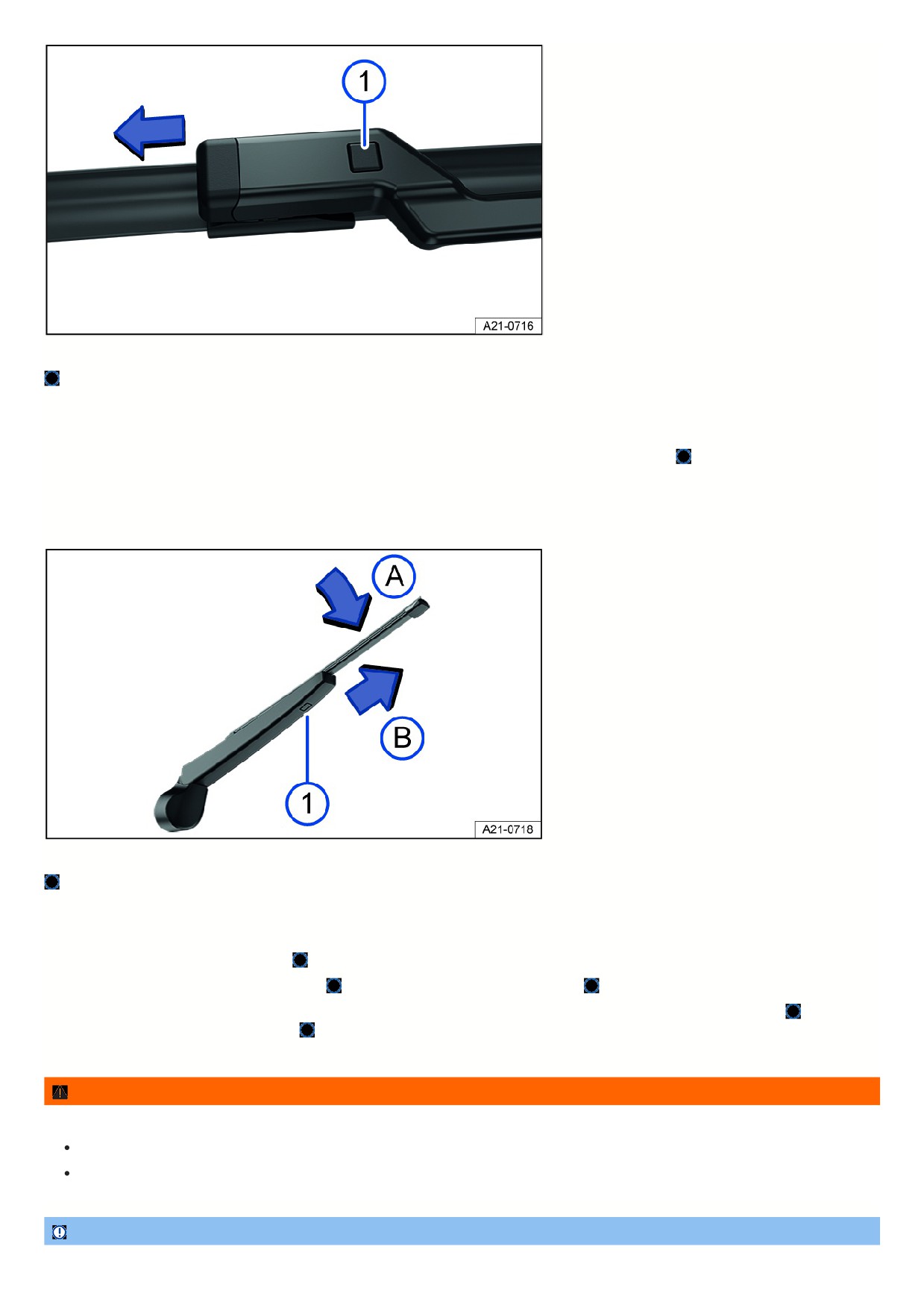
Fig. 142 Changing the windshield wiper blades.
Wiper blade release button.
1. Move the windshield wiper arms into the service position before lifting.
2. Lift the wiper arms, making sure to only hold the wiper arms in the area where they attach to the wiper blade.
3. Press and hold the release button and remove the wiper blade at the same time in the direction of the arrow fig. 142
4. Insert a new wiper blade of the same length and type on the respective wiper arm until it engages.
5. Place the wiper arms carefully on the windshield.
Changing the rear window wiper blade
Fig. 143 Changing the rear window wiper blade.
Wiper blade release button.
1. To lift a windshield wiper arm, hold it only in the area where it attaches to the wiper blade.
2. Lift the wiper arm and fold it out.
3. Press and hold the release button fig. 143
4. Tilt the wiper blade toward the wiper arm fig. 143
while removing it in the direction of the arrow
. You may need to use more force to do this.
5. Slide a new wiper blade with the same length and design onto the wiper arm in the opposite direction to the arrow until it engages fig. 143 . For this to wor
the wiper blade has to be folded out fig. 143
6. Place the wiper arm carefully on the rear window.
WARNING
Worn or dirty wiper blades reduce visibility and increase the risk of accidents and serious injuries.
Always clean dirty wiper blades.
Always replace wiper blades if they are damaged or worn and are no longer cleaning the window glass sufficiently.
NOTICE
266

Cleaning wiper blades or door windows with unsuitable cleaning agents may cause damage.
Do not clean the wiper blades and windshield and windows with fuel, nail polish remover, paint thinner, or other similar fluids.
Do not clean the wiper blades with rough sponges or other sharp objects.
If there is wax residue on the windshield and rear window from car wash systems and other products, this can cause the windshield wipers to rub. Remove any
wax residue with a special cleaner or cleaning towels.
Exterior lighting
Introduction
Before performing bulb replacement, check if it is an incandescent bulb or an LED light. Generally, light bulbs can be replaced by yourself. If the exterior lighting on
your vehicle is equipped with LED technology, it is not possible to change LED lights or individual LEDs by yourself. The malfunction of individual LEDs may be an
indication that more LEDs will malfunction. If this is the case, have the LEDs checked and/or replaced if necessary by suitably qualified professionals. Volkswagen
recommends contacting an authorized Volkswagen dealer or authorized Volkswagen Service Facility.
Driving with exterior lighting that is inoperative may be against the law.
Additional bulb specifications
Some bulbs may have certain manufacturer specifications that differ from conventional light bulbs. The respective name will be on the bulb socket or glass bulb.
WARNING
If the vehicle lighting is not used appropriately for the weather conditions, the road will not be illuminated sufficiently. The vehicle will not be visible to other road
users or will be difficult to see. This can cause accidents and serious or fatal injuries.
Regularly check the vehicle's lighting system and turn signals.
Repair the lighting system and turn signals when necessary.
WARNING
Work in the hood space can result in accidents and serious injuries if bulb replacements are carried out incorrectly.
Always follow the tasks described and observe the general safety precautions.
Never perform a bulb replacement if you are not familiar with the required activities.
If you are not sure how to carry out a bulb replacement, have the work required carried out by suitably qualified professionals. Volkswagen recommends
contacting an authorized Volkswagen dealer or authorized Volkswagen Service Facility.
WARNING
During the bulb replacement, the sharp-edged parts of bulb housings and hot or exploding bulbs can cause serious injuries.
Only change bulbs when they have cooled down completely.
Always protect your hands during bulb replacement.
NOTICE
Water entering the headlight housing can damage the electrical system.
After a bulb replacement, always fit the covers on the headlight housing.
After installation, always check that the covers have been secured correctly.
Information on bulb replacement
Please read the introductory information and heed the Warnings and Notice ⇒
and Introduction.
Always perform the following activities for bulb replacement in the specified sequence
⇒
:
1. Park the vehicle a safe distance away from moving traffic on level and solid ground as soon as possible.
2. Set the electronic parking brake.
3. Switch the lights off.
4. Turn off the turn signal if it is activated.
5. End drive-ready mode.
267
6. Allow the orientation lighting to turn off.
7. Allow the affected light bulbs to cool down.
8. Check if you can see that a fuse is burnt out
⇒ Introduction.
9. Change the affected light bulb according to the instructions ⇒
A light bulb may only be replaced with the same type of light bulb. The respective name will be on the bulb socket or glass bulb.
Never touch a glass light bulb with bare hands. The fingerprints left behind would vaporize from the heat when the bulb is switched on and condense on the
reflector, which would then reduce the headlight brightness.
10. Check the bulb function after a bulb is changed.
If the bulb does not function, the bulb may not have been inserted correctly, may have fallen out, or the connector may not have been plugged in correctly.
11. After every bulb replacement in the front of the vehicle, have the headlight adjustment checked by an authorized Volkswagen dealer or authorized Volkswagen
Service Facility. Volkswagen recommends contacting an authorized Volkswagen dealer or authorized Volkswagen Service Facility.
WARNING
If the steps described for the bulb replacement are ignored, accidents may occur. Serious injuries may result.
Always follow the tasks described and observe the general safety precautions.
NOTICE
Removing and inserting trim panels and headlights incorrectly can damage the vehicle paint and body.
Always be careful when removing and inserting the trim panels and headlights.
Replacing bulbs in LED headlights
Please read the introductory information and heed the Warnings and Notice ⇒
and Introduction.
Preparations
Only perform these activities in the specified order:
1. Refer to the information on bulb replacement and carry out the activities.
2. Open the hood.
The headlight does not need to be removed for bulb replacement.
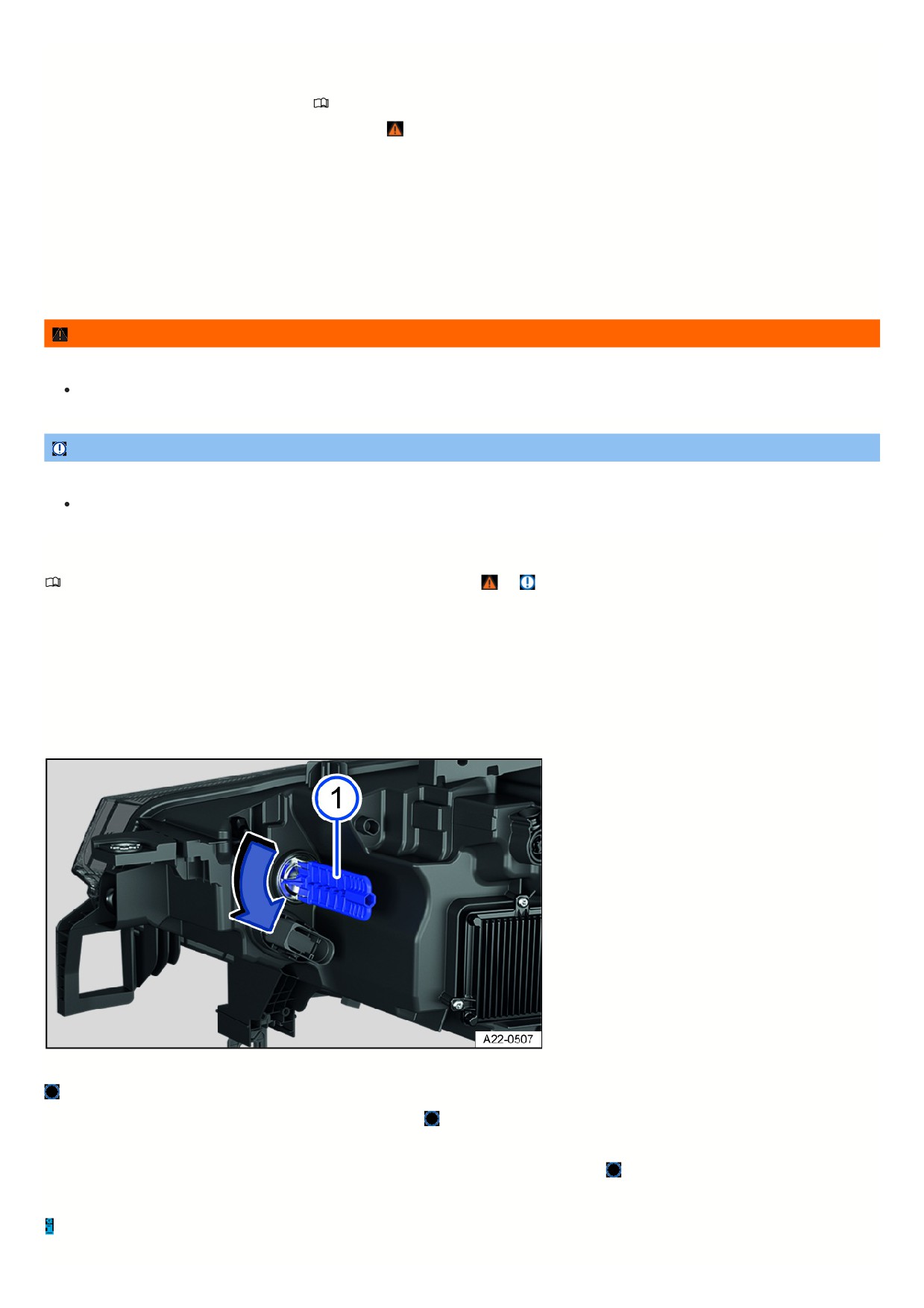
Replacing a bulb in a turn signal
Fig. 144 In the right-side of the hood space: rear side of the headlights.
Turn signal bulb holder.
1. To remove, turn the bulb holder in the direction of the arrow fig. 144
2. Replace the burned out bulb with a new bulb that is identical to the one being replaced.
3. Carefully insert the bulb holder into the headlight and turn in the opposite direction to the arrow fig. 144
4. Close the hood.
The illustration shows the right headlight from behind. The left headlight is structured as its mirror image.
268

Replacing fuses
Introduction
Due to the constant development of the vehicle, equipment-dependent fuse allocations, and the combined protection of multiple electrical equipment items using
one fuse, a complete overview of the fuse layout is not available at the time of print. Detailed information about fuse allocations can be obtained from suitably
qualified professionals. Volkswagen recommends contacting an authorized Volkswagen dealer or authorized Volkswagen Service Facility.
Generally, multiple electrical equipment items can be protected together through by fuse. On the other hand, some equipment items may use multiple fuses.
Only replace fuses if the cause for the malfunction has been fixed. If a new fuse blows again after a short time, the electrical system must be checked by suitably
qualified professionals. Volkswagen recommends contacting an authorized Volkswagen dealer or authorized Volkswagen Service Facility.
Fuses for emergency responders
One of the high-voltage system fuses in the fuse box in the instrument panel
⇒ Fuses in the instrument panel is marked with a special flag to allow emergency
responders to switch off the vehicle power as quickly as possible. Never replace this fuse yourself or swap it with a fuse from a different fuse location ⇒ . If this
fuse is malfunctioning, always have it replaced by suitably qualified professionals. Volkswagen recommends contacting an authorized Volkswagen dealer or
authorized Volkswagen Service Facility.
WARNING
Voltage in the high-voltage system can cause electric shocks, serious burns and death!
Never touch the electrical wires in the hood space
Never replace or repair fuses of the high-voltage system yourself.
Always have the work performed by an authorized Volkswagen dealer or authorized Volkswagen Service Facility qualified in this respect. Volkswagen
recommends contacting an authorized Volkswagen dealer or authorized Volkswagen Service Facility.
WARNING
Using unsuitable fuses, repairing fuses, and bridging a power circuit without fuses can cause severe damage or fires within the vehicle. This could result in
serious or fatal injuries.
Replace fuses only with fuses of same rating and size. Make sure that the color and label are identical to the faulty fuse.
Never repair fuses.
Never use metal strips, paper clips or similar objects as substitutes for fuses.
NOTICE
The high-voltage fuses marked with a special flag in the fuse box in the instrument panel are for use by emergency responders only in order to switch off the
vehicle power in an emergency. If these high-voltage fuses are removed incorrectly, the vehicle could be damaged.
Never remove the fuses marked with a special flag in the instrument panel.
If the high-voltage system has switched off, seek assistance from an authorized Volkswagen dealer or authorized Volkswagen Service Facility. The
vehicle is no longer ready to drive.
NOTICE
Changing a fuse when the ignition is switched on, the vehicle is drive-ready, the light is switched on, or other electrical equipment is switched on could cause
damage to the electrical system.
Always deactivate the vehicle's drive system and switch off the light and other electrical equipment.
Make sure that the drive-ready mode cannot be established while a fuse is being replaced.
NOTICE
If a fuse is replaced by another fuse with a higher amp rating, this could also damage the vehicle's electrical system in another location.
Never replace a fuse with a fuse that has a higher current rating.
NOTICE
Dirt and moisture in the fuse boxes can damage the electrical system.
Protect open fuse boxes from dirt and moisture.
269
Avoid short circuits in the electrical system.
Check that the fuse box covers are tightly sealed again and are not damaged.
There are more fuses in the vehicle than are specified in this chapter. These should only be replaced by an authorized Volkswagen dealer or authorized
Volkswagen Service Facility qualified in this respect. Volkswagen recommends contacting an authorized Volkswagen dealer or authorized Volkswagen Service
Facility.
Fuses in the hood space
Please read the introductory information and heed the Warnings and Notice ⇒
and Introduction.
Opening the fuse box in the hood space
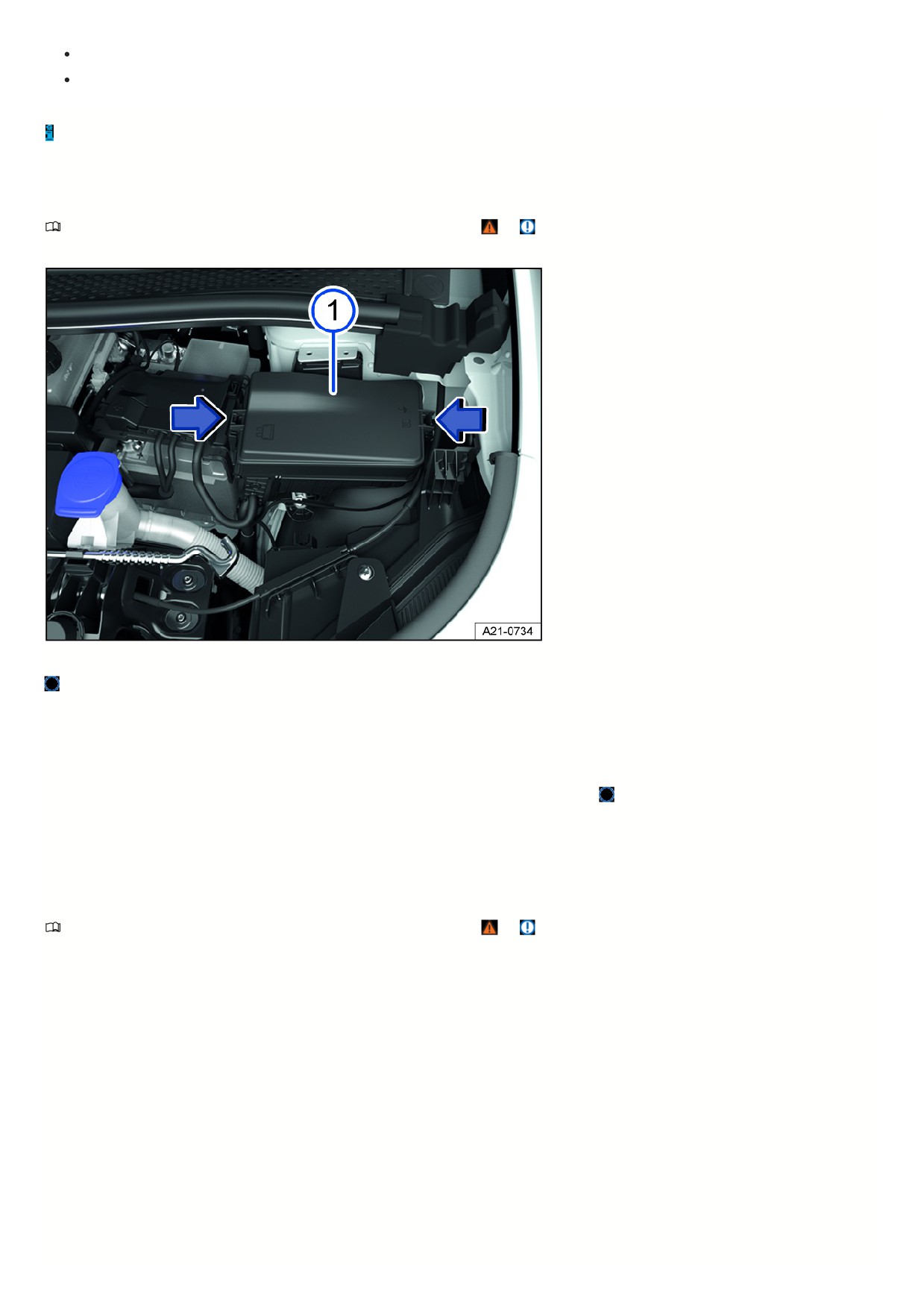
Fig. 145 In the hood space: fuse box.
Fuse box cover.
The fuse box cover may contain plastic pliers for pulling out the fuses.
Removing the cover
1. Open the hood.
2. Press the catches in the direction of the arrow fig. 145 (arrows), to release the fuse box cover fig. 145
3. Remove the cover upward.
Fitting the cover
1. Place the cover on the fuse box and press it down until the cover audibly clicks into place on both sides.
Fuse table for fuses in the hood space
Please read the introductory information and heed the Warnings and Notice ⇒
and Introduction.
The list shows the fuse locations for the equipment relevant to the driver. The first column of the table contains the fuse location; the other columns include the rated
current, fuse version and the protected equipment.
Depending on the country and the vehicle equipment, there may be differences from the fuse numbers and fuse locations listed in the table. If necessary, ask for th
exact fuse assignment from suitably qualified professionals. Volkswagen recommends contacting an authorized Volkswagen dealer or authorized Volkswagen
Service Facility.
Fuse assignment
27
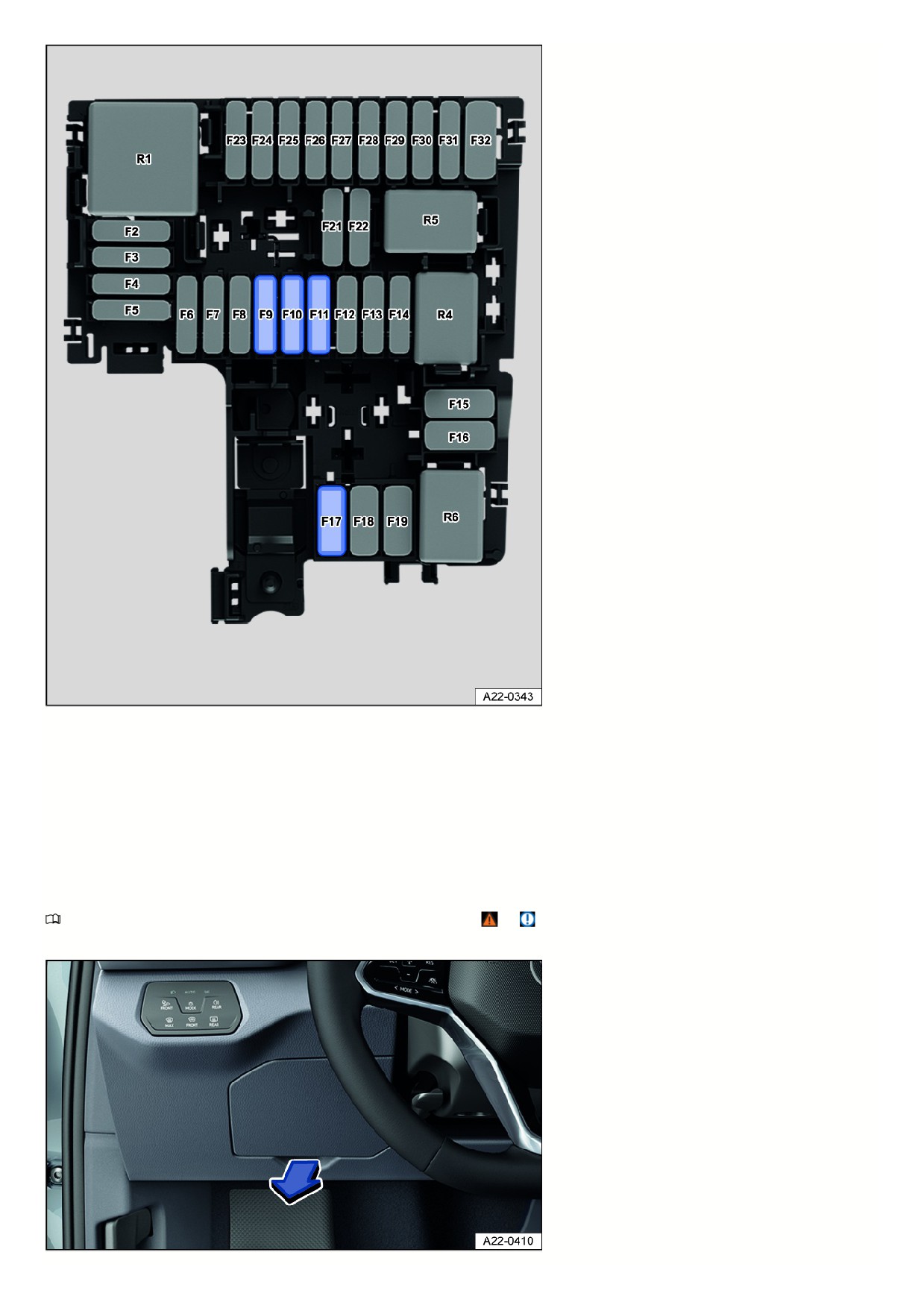
Fig. 146 In the hood space: Fuse locations.
Fuse location fig. 146:
F9
15 A, ATO®, horn.
F10
30 A, ATO®, front left windshield wiper.
F11
7.5 A, ATO®, air conditioner.
F17
40 A, MAXI+®, windshield defroster.
Fuses in the instrument panel
Please read the introductory information and heed the Warnings and Notice ⇒
and Introduction.
Left-hand drive vehicles: Opening the fuse box in the instrument panel
271
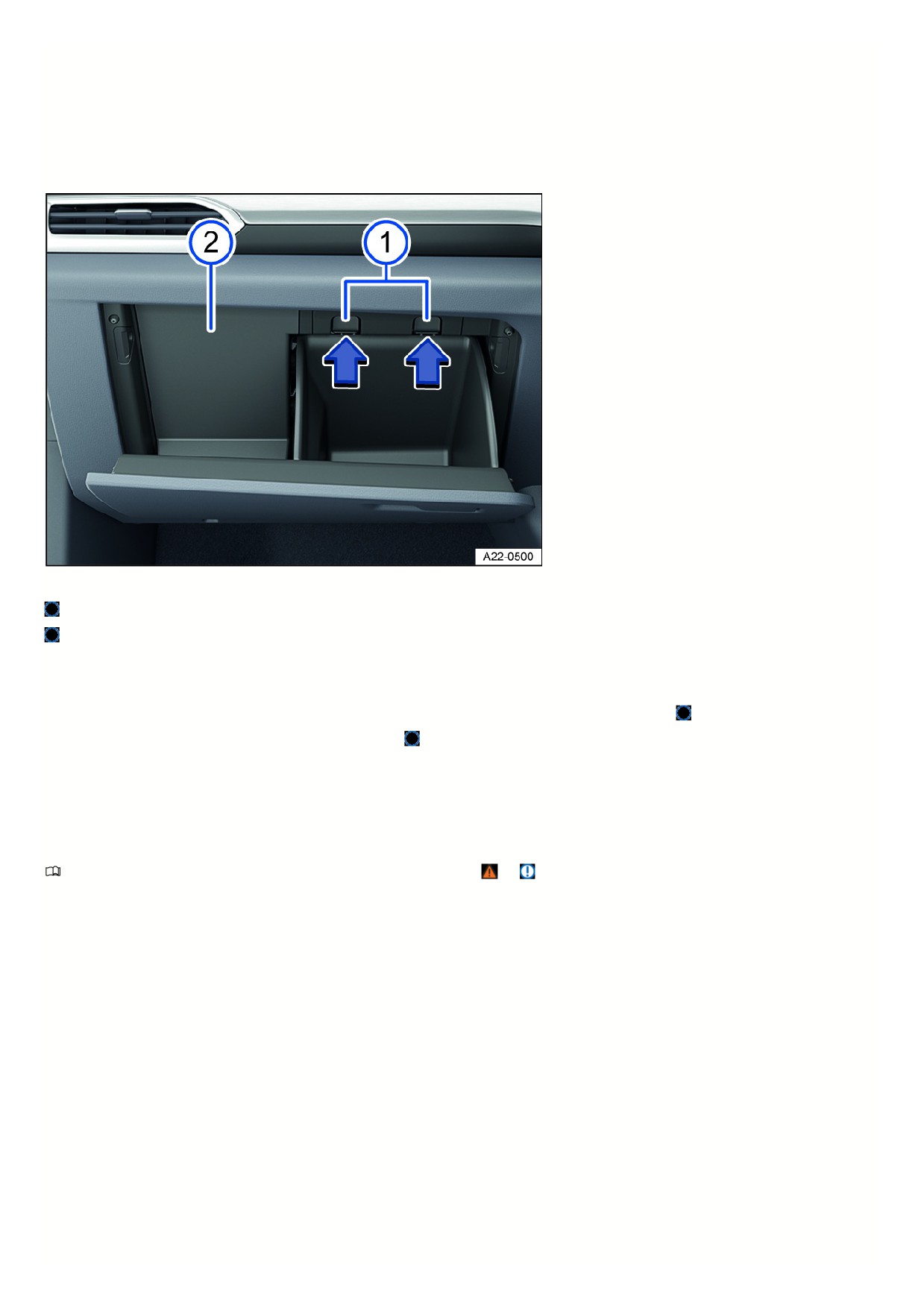
Fig. 147 Fuse box cover on the instrument panel on the driver's side (left-hand drive vehicles).
Removing the cover
1. Reach behind the cover and pull it off in the direction of the arrow fig. 147.
Fitting the cover
1. Position the cover starting with the opposite side and push it closed in the opposite direction to the arrow until you hear it click into place.
Right-hand drive vehicles: opening the fuse box in the instrument panel
Fig. 148 On the passenger's side: Fuse box in the instrument panel (right-hand drive vehicles).
Stop pin.
Cover
Removing the cover
1. Open the glove compartment and empty it if necessary.
2. Push the catches in the direction of the arrow while at the same time opening the glove compartment further fig. 148
3. Reach to the side behind the cover and pull it backward fig. 148
Fitting the cover
1. Reinsert the cover and press it forward until the cover is reengaged.
2. Close the glove box.
Fuse table for fuses in the instrument panel
Please read the introductory information and heed the Warnings and Notice ⇒
and Introduction.
The list shows the fuse locations for the equipment relevant to the driver. The first column of the table contains the fuse location; the other columns include the rated
current, fuse version and the protected equipment.
Depending on the country and the vehicle equipment, there may be differences from the fuse numbers and fuse locations listed in the table. If necessary, ask for th
exact fuse assignment from suitably qualified professionals. Volkswagen recommends contacting an authorized Volkswagen dealer or authorized Volkswagen
Service Facility.
Fuse assignment
272
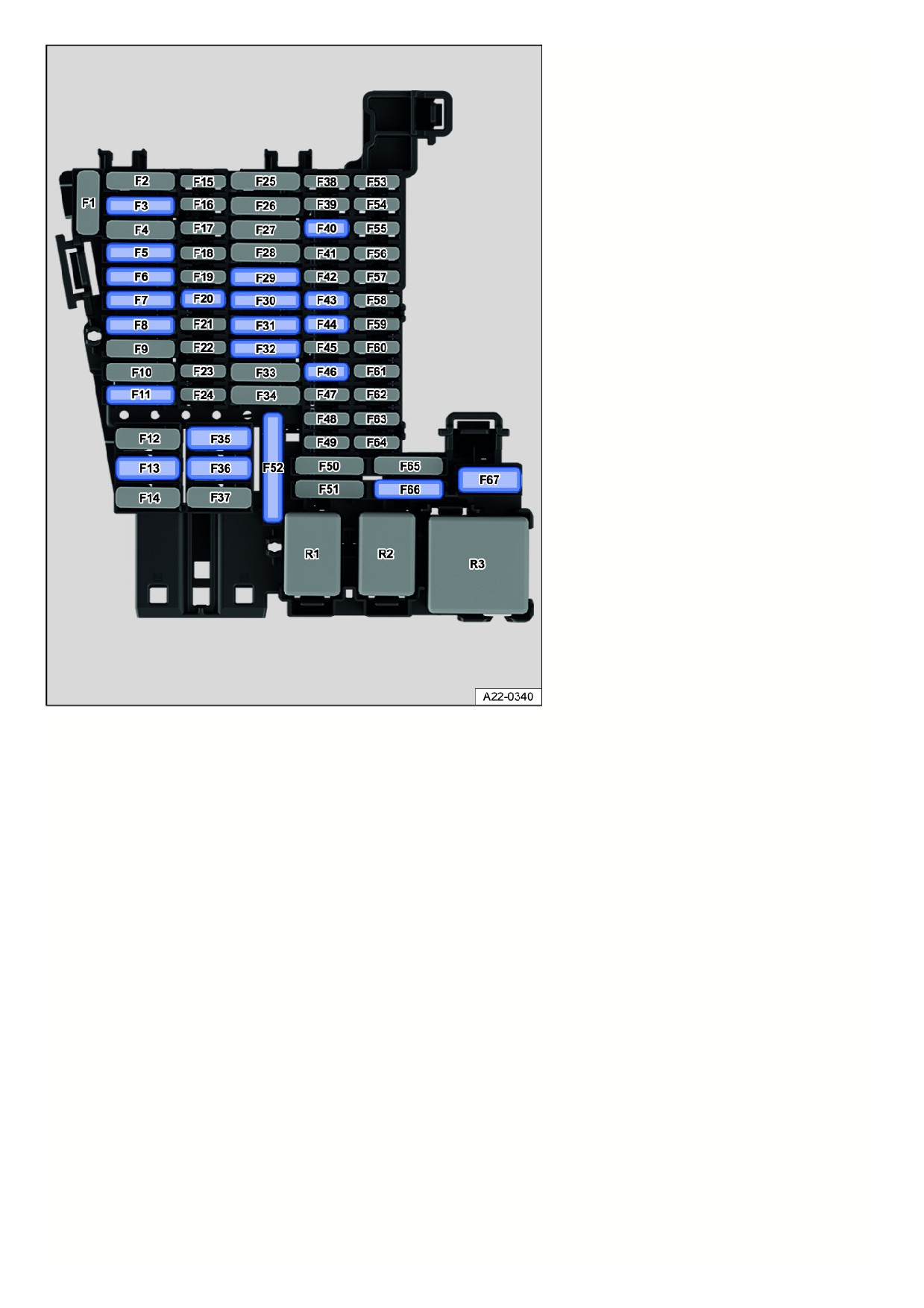
Fig. 149 Fuse assignment in the instrument panel.
Fuse location fig. 149:
F5
25 Amp, ATO®, exterior lighting on the left side.
F6
30 Amp, ATO®, interior lighting.
F7
30 Amp, ATO®, seat heating.
F13
40 A, MAXI+®, central locking.
F20
10 Amp, MINI®, telephone.
F30
20 A, ATO®, Infotainment system scope.
F32
25 Amp, ATO®, exterior lighting on the right side.
F35
40 A, MAXI+®, rear seat heating.
F36
40 A, MAXI+®, blower regulator.
F40
10 Amp, MINI®, anti-theft alarm system.
F43
7,5 amp, MINI®, climate control bar, rear window defroster relay.
F44
7.5 A, MINI®, light switch (dipped beam), rain/light sensor, ambient lighting, ID. Light.
F46
10 Amp, MINI®, Display, Infotainment system control panel.
F52
20 Amp, ATO®, cigarette lighter, sockets.
F66
15 Amp, ATO®, rear window wiper.
F67
30 A, MAXI+®, rear window heating.
Fuse locations in vehicles with a factory-installed trailer hitch:
273
F3
25 A, ATO®, control module for left trailer detection.
F11
15 A, ATO®, control module for trailer detection.
F29
15 A, ATO®, control module for trailer detection.
F31
25 A, ATO®, control module for right trailer detection.
Power windows and seats can be protected by circuit breakers or control modules, which switch back on automatically several seconds after correcting the
overload, for example when door windows are frozen shut.
3) Note the installation position. Factory-standard fuse location as shown in the illustration.
Replacing blown fuses
Please read the introductory information and heed the Warnings and Notice ⇒
and Introduction.
Preparations
1. Deactivate drive-ready mode and switch off the lights and all other electrical equipment.
Detecting blown fuses
Fig. 150 Blown fuse (general example).
1. Shine a flashlight on the fuses.
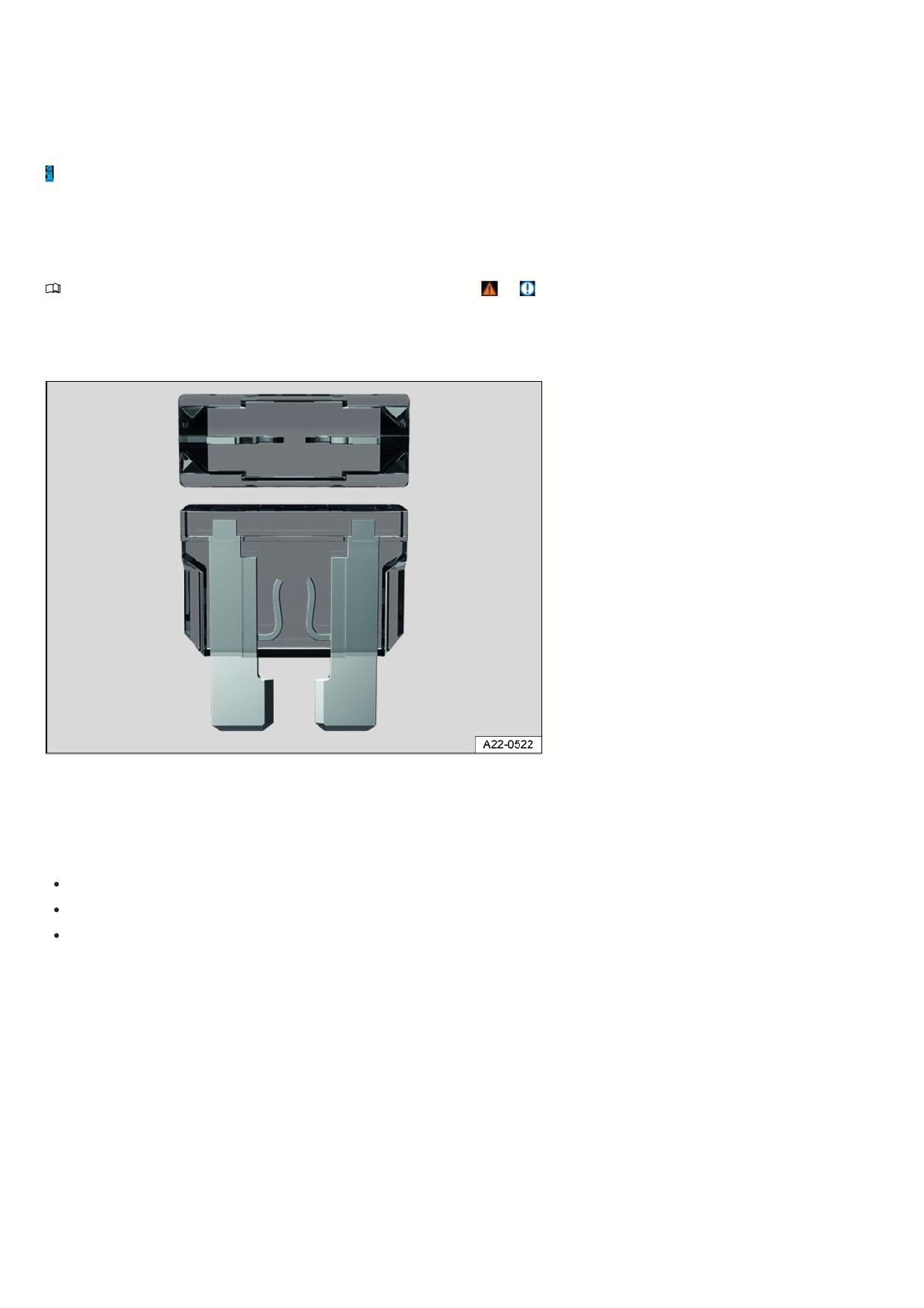
A blown fuse can be recognized from above and from the side through the transparent casing, as its metal strip will be burnt through fig. 150.
Fuse versions
Standard flat connector fuse (ATO®).
Small flat connector fuse (MINI®).
Large flat blade fuse (MAXI® or MAXI+®).
Fuse color codes
Fuses (ATO® - MINI® - MAXI® or MAXI+®).
Colo
Current rating
Black
1 A
Purple
3 A
Orange
5 A
Brown
7.5 A
Red
10 A
Blue
15 A
Yellow
20 A
White or clear 25 A
274
30 A
Green
Light green 40 A
Replacing fuses
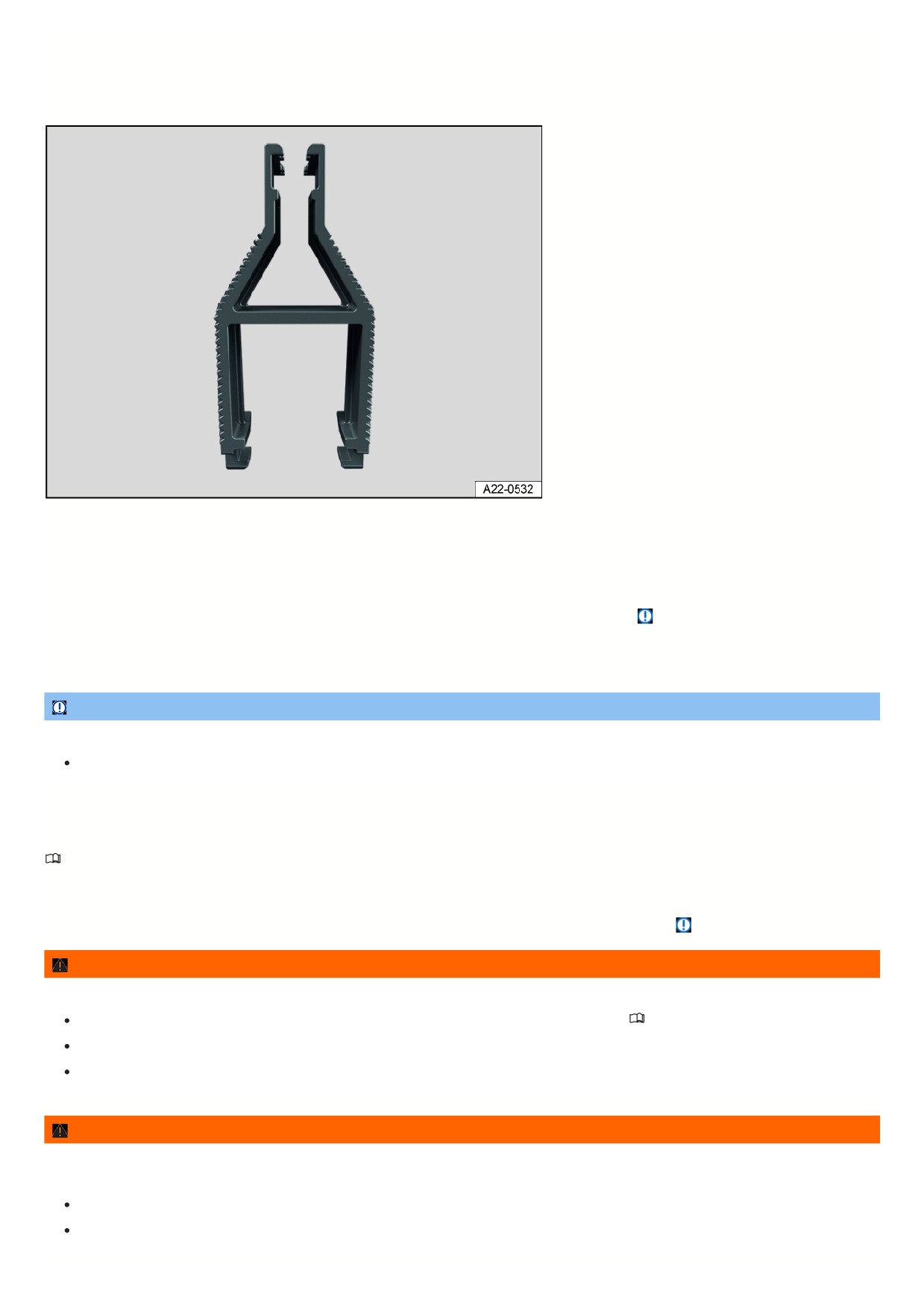
Fig. 151 Plastic pliers for removing or installing a fuse (general example).
1. If necessary, remove the plastic tongs from either the fuse box or the cover of the fuse box fig. 151.
2. Depending on the design of the fuse, slide the appropriately sized clamp on the plastic pliers onto the fuse from above or from the side.
3. Remove the fuse.
4. If a fuse is blown, replace with a fuse with the same rating (same color and same label) and the same size
⇒
5. After inserting the new fuse, place the plastic pliers back in the cover, if necessary.
6. Reinstall the cover or close the fuse box cover.
NOTICE
If a fuse is replaced by a fuse with a higher current rating, this could damage the electrical system in another location.
Never replace a fuse with a fuse that has a higher current rating.
Jump-starting
Introduction
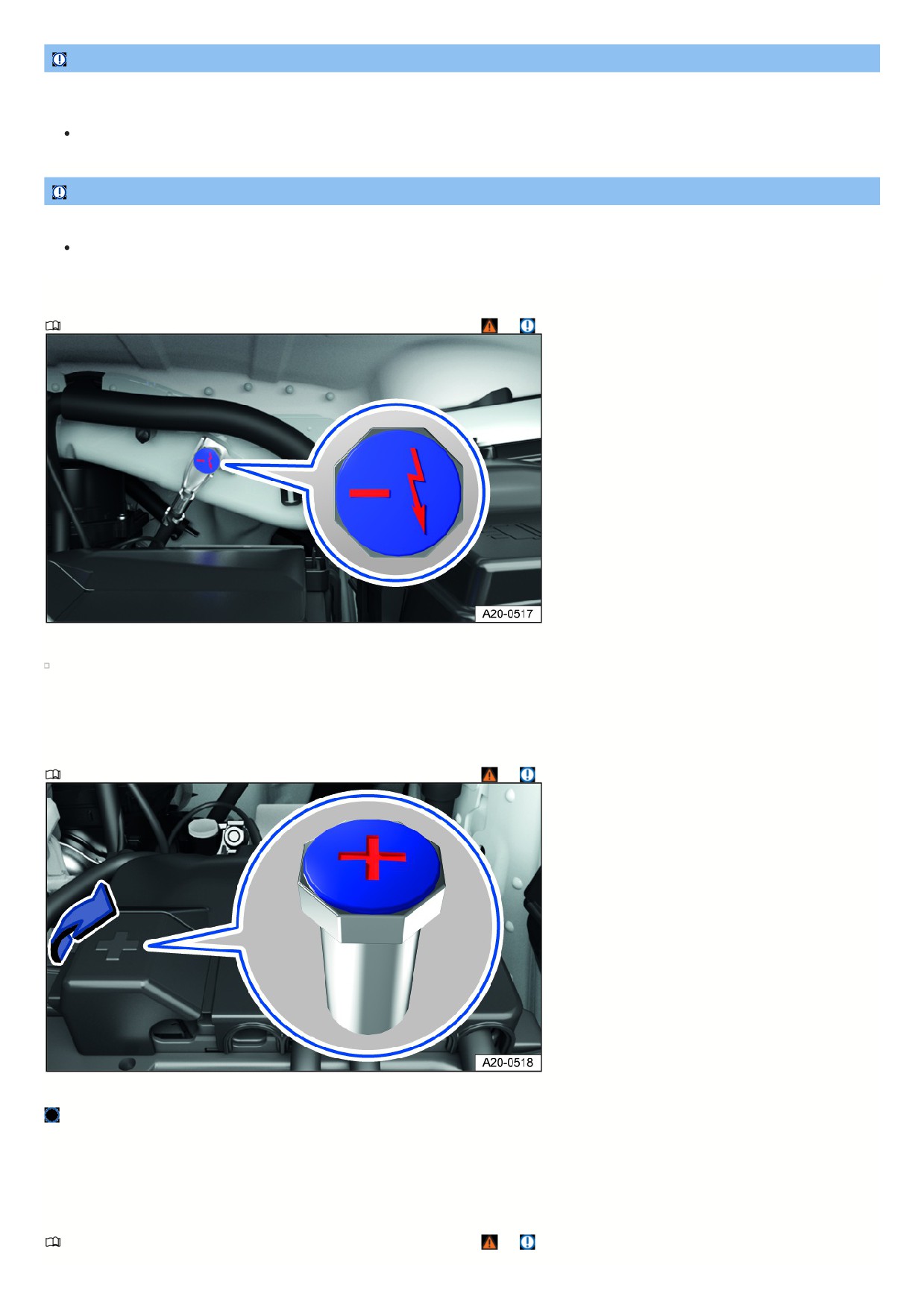
The vehicle must not be tow started for technical reasons. If the vehicle's drive system cannot be engaged because the 12 V vehicle battery is dead, the 12 V
vehicle battery on another vehicle can be used to engage your vehicle's drive system.
For technical reasons, the jump-start points in electric vehicles are not designed for use in jump-starting other vehicles
⇒
WARNING
Using jumper cables incorrectly and performing a jump-start incorrectly could cause the 12 V vehicle battery to explode. Serious injuries may result.
Always read and heed the warnings and safety precautions before working on the 12 V vehicle battery
⇒ Introduction.
Never confuse the positive battery terminal with the negative battery terminal.
Never jump-start a vehicle with a frozen or thawed 12 V vehicle battery.
WARNING
During a jump-start, a highly explosive gas mixture builds up at the 12 V vehicle battery. Sparks produced during a jump-start could ignite the flammable gas.
Serious injuries may result.
Always keep fires, sparks, open flames, and lit cigarettes far away from the 12 V vehicle battery.
Avoid discharging static electricity near the 12 V vehicle battery.
275
NOTICE
The electrical system of an electric vehicle is not designed to give jump-starts to other vehicles. This can cause significant damage to the electrical system of an
electric vehicle.
Never use an electric vehicle to jump-start another vehicle.
NOTICE
A drained 12 V vehicle battery can freeze, be damaged and fail at temperatures around approx. 0 °C (approx. +32 °F).
Always replace a frozen or thawed 12 V vehicle battery.
Ground jump-start point
Please read the introductory information and heed the Warnings and Notice ⇒
and Introduction.
Fig. 152 In the hood space: Negative terminal jump-start point.
The jump-start point (negative terminal) is for connecting the black jumper cable fig. 152.
To reduce the risk of considerable damage to the vehicle electrical system, it is not permitted to jump-start other vehicles with an electric vehicle.
The vehicle can receive a jump-start using this negative terminal jump-start point.
Positive jump-start point
Please read the introductory information and heed the Warnings and Notice ⇒
and Introduction.
Fig. 153 Under a cover in the hood space: Positive jump-start point.
The jump-start point (positive battery terminal) for connecting the red jumper cable is located under a cover in the hood space.
To reduce the risk of considerable damage to the vehicle electrical system, it is not permitted to jump-start other vehicles with an electric vehicle. The jump-start
point is not designed for jump-starting other vehicles.
The vehicle can receive a jump-start using this positive terminal jump-start point.
Preparing and Performing a Jump-start
Please read the introductory information and heed the Warnings and Notice ⇒
and Introduction.
276
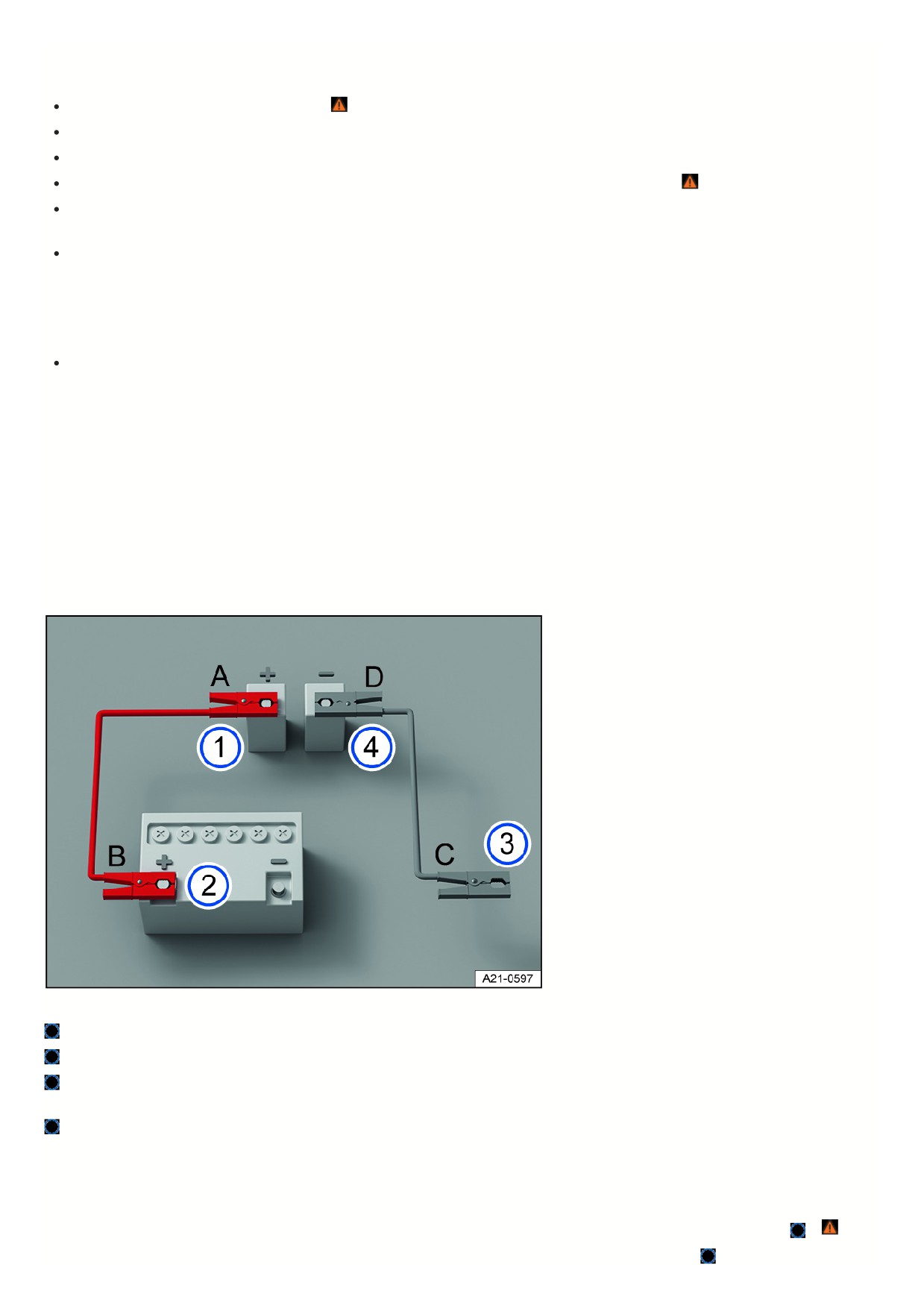
Preparations
Observe the following for jump-starting:
Wear suitable eye protection and safety gloves ⇒
Pay attention to the operating instructions provided by the manufacturer of the jump-start cables.
Open the hood.
Always use a jumper cable with fully insulated terminal clamps and without any insulation defects for jump-starting
⇒
Ensure that there is sufficient distance between the vehicle providing the jump-start and the vehicle receiving the jump-start, otherwise current could already
flow when connecting the positive battery terminals.
Make sure the terminal clamps have sufficient contact with metal.
Jumper cable
So that vehicles can be jump-started, an appropriate jumper cable is required.
The following jumper cable wire diameters must not be fallen short of by the vehicle providing the jump-start.
Vehicles with electric drivetrain: To jump-start the vehicle with a drained 12 V vehicle battery, the wire diameter of the jumper cable must be at least 25 mm
2
(0.038 in2).
Vehicle Receiving the Jump-start
1. Check that the discharged 12 V vehicle battery is properly connected to the 12 V vehicle electrical system.
2. If a 12 V vehicle battery with a viewing window has been installed, check the color of the viewing window. If the viewing window is light yellow or has no color,
do not perform a jump-start and contact an authorized Volkswagen dealer or authorized Volkswagen Service Facility.
Vehicle Providing the Jump-start
1. Pay attention to the operating instructions provided by the vehicle manufacturer.
2. Check that the battery providing the jump-start has the same voltage (12 V) and approximately the same battery capacity as the dead 12 V vehicle battery. Pay
attention to the information printed on the battery of the vehicle providing the jump-start.
Jump-starting
Fig. 154 Diagram for connecting the jumper cables.
Positive jump-start point of the electric drivetrain vehicle receiving the jump-start.
Positive battery terminal of the vehicle providing the jump-start.
Suitable negative terminal of the vehicle providing the jump-start. Preferably a jump-start point (negative), otherwise a large metal part that is bolted securely to
the engine block, or the engine block itself.
Jump-start point (negative) of the electric drivetrain vehicle receiving the jump-start.
Only connect the jumper cables in the sequence A - B - C - D fig. 154.
1. Switch the ignition off on both vehicles.
2. In the hood space, open the cover on the positive jump-start point (+), if fitted.
3. Connect one end of the red jumper cable to the positive jump-start point (+) of the vehicle with the discharged 12 V vehicle battery fig. 154
⇒
4. Connect the other end of the red jumper cable to the positive battery terminal (+) on the vehicle providing current fig. 154
277

5. Connect one end of the black jumper cable preferably to the negative terminal (-) jump-start point on the vehicle with the 12 V vehicle battery providing current
fig. 154
Or: If there is no negative terminal (-) jump-start point, connect the end of the black jumper cable to a large metal part that is bolted securely to the engine
block, or the engine block itself, on the vehicle with the 12 V vehicle battery providing current fig. 154
6. Connect the other end of the black jumper cable to the negative terminal (-) jump-start point on the vehicle with the discharged 12 V vehicle battery fig. 154
⇒
7. Route the jumper cables so that they cannot become caught in moving parts in the hood space.
Activating the vehicle's drive system
1. Start the engine in the vehicle that is providing current and allow it to idle.
2. Activate the vehicle's drive system in the vehicle with the discharged 12 V vehicle battery. If the vehicle's drive system cannot be activated, stop the starting
process after 10 seconds, and try again after approximately 1 minute.
If the vehicle’s drive system still cannot be activated, contact an authorized Volkswagen dealer or authorized Volkswagen Service Facility.
Removing the jumper cables
1. Before disconnecting the jumper cables, switch off the low beam headlight if necessary.
2. In the vehicle with the drained 12 V vehicle battery, switch on the blower for the air conditioner and the rear window defroster. This will reduce any voltage
surges that may occur when disconnected.
3. Once the vehicle has been jump-started, always disconnect the jumper cables in the order D - C - B - A fig. 154.
4. Close the cover of the positive battery terminal (+) jump-start point, if fitted.
After successful jump-starting, have the 12 V vehicle battery checked by an authorized Volkswagen dealer or authorized Volkswagen Service Facility. Volkswagen
recommends contacting an authorized Volkswagen dealer or authorized Volkswagen Service Facility.
WARNING
Performing a jump-start incorrectly can cause the 12 V vehicle battery to explode, which can cause serious injuries.
Always wear suitable eye protection and safety gloves.
Never bend over the 12 V vehicle battery.
Always connect the positive cable first and then the negative cable.
Never connect the negative cable to the brake lines.
Ensure that there is no contact between the non-insulated parts of the terminal clamps.
Make sure the cable insulation is free from any defects.
Make sure that the cable that is connected to the positive battery terminal on the 12 V vehicle battery does not come into contact with any vehicle
components that conduct electricity.
NOTICE
A drained 12 V vehicle battery can freeze, be damaged and fail at temperatures around approx. 0 °C (approx. +32°F).
Always replace a frozen or thawed 12 V vehicle battery.
Towing
Introduction
Towing requires practice, particularly if a towing cable is used. Both drivers should be familiar with the special considerations when towing. Inexperienced drivers
should not tow.
Follow all applicable laws when towing.
Always make sure the towing force does not exceed the permitted level and there are no shock loading conditions. There is always the risk of the coupling becomin
overloaded when driving off-road.
WARNING
The vehicle handling and braking efficiency will change considerably when it is towed. This may cause you to lose control of the vehicle and result in accidents
and serious or fatal injuries.
Bear in mind that more force is required for steering and braking during towing.
278
WARNING
If a vehicle that has no electrical power is towed, the electronic steering lock may suddenly engage. If this happens, you will not be able to move the steering
wheel. This can cause accidents and serious or fatal injuries.
Never turn off the ignition with the starter button while towing.
If the vehicle loses power while it is being towed, stop towing the vehicle immediately and see an authorized Volkswagen dealer or authorized
Volkswagen Service Facility for assistance.
NOTICE
When pushing the vehicle by hand, the taillights, side spoiler on the rear window and large sections of sheet metal could be damaged and the rear spoiler could
detach.
When pushing the vehicle by hand, do not press on the taillights, side spoiler on the rear window, large sections of sheet metal, or the rear spoiler.
Towing
Towing refers to using a vehicle to pull another vehicle that cannot be driven.
The vehicle can be towed using a tow bar or tow rope:
The maximum permissible speed is 50 km/h (30 mph).
The maximum permissible distance is 50 km/h (30 miles).
The easiest and safest way to tow is using a tow bar. You should use a towing cable only if a tow bar is not available. The towing cable should be elastic to protect
both vehicles. Use a cable made of synthetic rubber or a similar elastic material.
Towing with a tow truck
The vehicle must be towed with all four wheels on a tow truck.
WARNING
Vehicle components can be badly damaged by incorrectly attached tow ropes or tow bars. This increases the risk of accident and could result in serious or fatal
injuries.
Only ever secure the vehicle to be recovered and towed at the points designed for this purpose.
Never secure the tow rope or the tow bar to axle or suspension components.
Contact an authorized Volkswagen dealer or authorized Volkswagen Service Facility and have the vehicle taken away on a tow truck, if necessary.
Instructions for towing
Please read the introductory information and heed the Warnings and Notice ⇒
and Introduction.
A vehicle being towed can still signal a turn using the turn signals even if the emergency flashers are switched on. To do this when the ignition is switched on,
activate the turn signal for the desired direction. The emergency flashers will stop while the turn signal is active. The emergency flashers will automatically activate
again once the turn signal and high beam lever returns to the neutral position.
When may this vehicle not be towed?
The vehicle must not be towed in the following situations:
If the 12 V vehicle battery is drained.
A red warning light
and the Towing: Damaged e-system - see manual! message will appear the instrument cluster display.
The power supply to the 12-volt vehicle electrical system cannot be secured.
The indicator in the instrument cluster display does not function perfectly.
If the towing distance is greater than approx. 50 km (approx. 30 miles).
The driving mode selector cannot be moved to idle (position N).
The anti-roll function cannot be deactivated.
The electronic parking brake cannot be released.
The steering lock cannot be released.
If the wheel clearance or the steering function can no longer be secured after an accident.
If the vehicle cannot be towed on its own wheels due to one of the conditions listed, contact professional assistance and have the vehicle transported by a tow truck
if necessary. Inform the relevant people, particularly the organizing office and transportation, that an electric vehicle is involved.
279

Towing
Please read the introductory information and heed the Warnings and Notice ⇒
and Introduction.
If the towing conditions have not been met, the vehicle may be pushed or towed on its own four wheels only in emergency situations. The vehicle may be towed to
the tow truck only at walking pace and up to a maximum of 100 meters ⇒
WARNING
If you tow your vehicle in spite of the message Towing damages the electrical system. Owner's manual! appearing in the instrument cluster, vibrations could
occur in the drive system and the driven wheels could lock, particularly on ice or wet roads. Wheels that lock may cause you to lose control of the vehicle or lead
to accidents and serious or fatal injuries.
If the message Towing damages the electrical system. Owner's manual! appears in the instrument cluster, do not push or tow the vehicle unless it is an
emergency.
Secure the tow rope or tow bar only at the permitted points:
Towing lug.
Ball mount.
WARNING
Vehicle components can be badly damaged by incorrectly attached tow ropes or tow bars. This increases the risk of accident and could result in serious or fatal
injuries.
Only ever secure the vehicle to be recovered and towed at the points designed for this purpose.
Never secure the tow rope or the tow bar to axle or suspension components.
Contact an authorized Volkswagen dealer or authorized Volkswagen Service Facility and have the vehicle taken away on a tow truck, if necessary.
Preparations
Make sure the tow rope is not twisted. Otherwise it could disconnect from the towing eye while towing.
Switch the ignition and emergency flashers on in both vehicles. However, do not do this if it is prohibited by law.
Read and comply with the information and instructions for towing given in the Owner's Manual for the other vehicle.
Towing vehicle (front)
1. Only start to drive when the tow rope is taut.
2. Be especially careful when accelerating.
3. Avoid sudden braking and driving maneuvers.
4. Do not exceed the permitted towing weight of the vehicle.
Vehicle being towed (rear)
1. Make sure the ignition is always switched on so that the steering wheel is not locked and so that the turn signal and windshield wiper can be used if needed.
The brake booster and power steering only work when the ignition is switched on. Otherwise, the brake pedal needs to be pressed much harder and more force
is required to steer.
2. Make sure the vehicle key is always in the vehicle during the towing process.
3. Select gear
4. Deactivate the anti-roll function ⇒ Electronic parking brake.
Or: The driver remains seated in the driver seat throughout the towing process and always wears their safety belt, and the driver door is closed.
5. Ensure that the electronic parking brake is always switched off throughout the towing process
⇒
6. Make sure the tow rope is always taut.
NOTICE
If the electronic parking brake switches on during the towing process, wheels may lock. Serious damage to the vehicles may result.
End the towing process immediately.
Contact an authorized Volkswagen dealer or authorized Volkswagen Service Facility and have the vehicle taken away on a tow truck, if necessary.
NOTICE
If the battery charge level of the 12 V vehicle battery is insufficient, you will not be able to release the electronic parking brake and steering lock. The vehicle
may be damaged when towed.
28
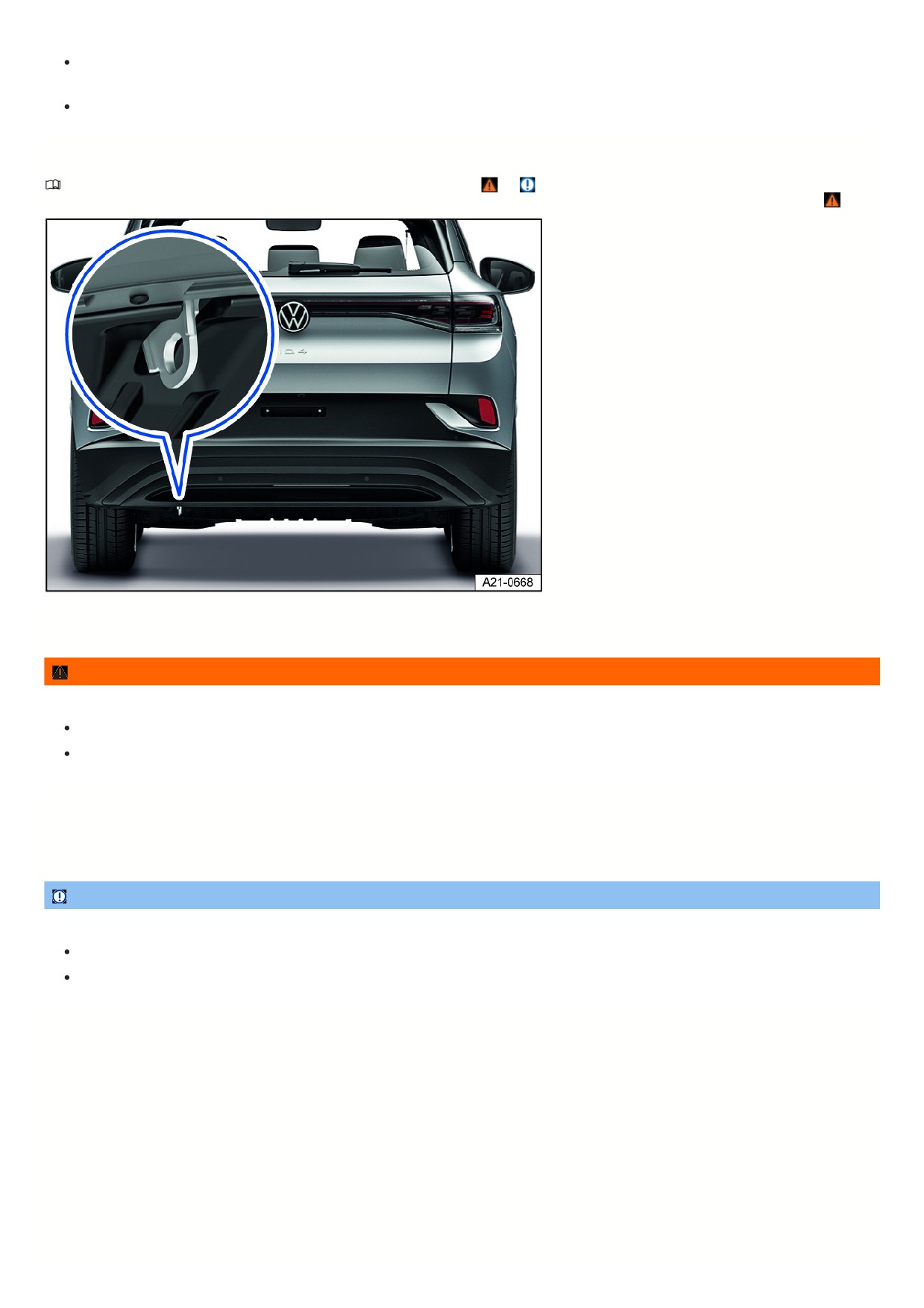
To release the electronic parking brake and steering lock, put the vehicle into drive-ready mode, if necessary by means of a jump-start if there is a loss of
power or malfunctions.
Contact an authorized Volkswagen dealer or authorized Volkswagen Service Facility and have the vehicle taken away on a tow truck, if necessary.
Rear towing eye
Please read the introductory information and heed the Warnings and Notice ⇒
and Introduction.
A pulling eye for tow truck is installed on the driver's side underneath the bumper cover so that the vehicle can be pulled onto a tow truck fig. 155, ⇒
Fig. 155 At the rear of the vehicle: pulling eye for tow truck installation location.
The pulling eye for tow truck is only intended for a tow rope or tow chain.
WARNING
Using the pulling eye for tow truck to tow other vehicles may damage the vehicle or cause accidents and serious or fatal injuries.
Only use the pulling eye for tow truck to have your own vehicle pulled onto a tow truck.
Never tow another vehicle with the pulling eye for tow truck.
Vehicles with a trailer hitch
Vehicles with a factory-installed trailer hitch do not have a pulling eye for tow truck at the rear of the vehicle.
1. Install the ball mount and use it for towing.
NOTICE
Using an unsuitable towing bar could damage the ball hitch and the vehicle.
Always use a tow bar specifically designed for mounting on a ball mount for towing.
If you do not have a suitable tow bar, use a tow rope for towing.
281

Checking and filling
In the hood space
Safety precautions for working in the hood space
The hood space of a vehicle is a dangerous area. Only perform work in the hood space if you are familiar with the necessary activities and the general safety
precautions, and if the correct operating equipment, fluids and suitable tools are available. Work performed incorrectly can result in serious injuries ⇒
. Have all
work performed by suitably qualified professionals if necessary. Volkswagen recommends contacting an authorized Volkswagen dealer or authorized Volkswagen
Service Facility.
WARNING
The hood space is a dangerous area. Any work in the hood space could lead to accidents and serious or fatal injuries.
Always work as cautiously and carefully as possible.
Do not perform work in the hood space unless you are familiar with the required activities.
If you are not sure how to do the work in the hood space, have the work required carried out by suitably qualified professionals. Volkswagen recommends
contacting an authorized Volkswagen dealer or authorized Volkswagen Service Facility.
Set the electronic parking brake before working in the hood space.
Switch off the ignition and store the vehicle key securely and far enough away from the vehicle to ensure that the vehicle's drive system cannot be
activated accidentally and the electrical system cannot be powered unintentionally.
Never touch hot components of the electric drivetrain.
Do not leave any items, such as cleaning cloths or tools, in the hood space.
Always keep children away from the hood space and never leave them unattended.
WARNING
The hood space contains moving components. When working in the hood space, particularly when starting the vehicle or if the vehicle is drive-ready, contact
with moving parts, e.g. fan blades in the radiator fan, may cause serious or fatal injuries.
Never reach into the radiator fan or into the area near the radiator fan even with the ignition or the vehicle's drive system switched off. The ventilator is
temperature-controlled and may switch on by itself.
To reduce the risk of anything becoming caught in electric drivetrain components, always remove any jewelry and/or ties, tie back long hair, and avoid
wearing loose-fitting clothing when performing work.
Always press the accelerator pedal extremely carefully and never press it without paying close attention. The vehicle could begin moving, even if the
electronic parking brake is set.
WARNING
Escaping hot steam or hot coolant and hot components may cause serious burns.
Never open or close the hood if steam or engine coolant is escaping.
Always wait until you can no longer see or hear steam or engine coolant escaping from the hood space.
WARNING
The motor cooling system is under pressure when the electric motor is hot. If the cover is opened carelessly, coolant may spray out and cause serious burns or
fatal injuries.
Never open the cap on the coolant expansion tank when the electric drivetrain is hot.
Always protect your face, hands and arms from hot coolant or steam with a large, thick cloth if you have to open the cover of the coolant tank.
Slowly and very carefully turn the cap on the coolant expansion tank counterclockwise while pressing down lightly on the cap.
WARNING
Additional insulating materials, such as covers in the hood space, or discarded items, such as cleaning cloths or tools, can cause malfunctions, damage to the
electric drivetrain or fires. This could result in serious or fatal injuries.
Never cover the electric drivetrain with blankets or other insulating materials.
Never leave items in the hood space.
282