Volkswagen Arteon (2023 year). Manual in english - page 4
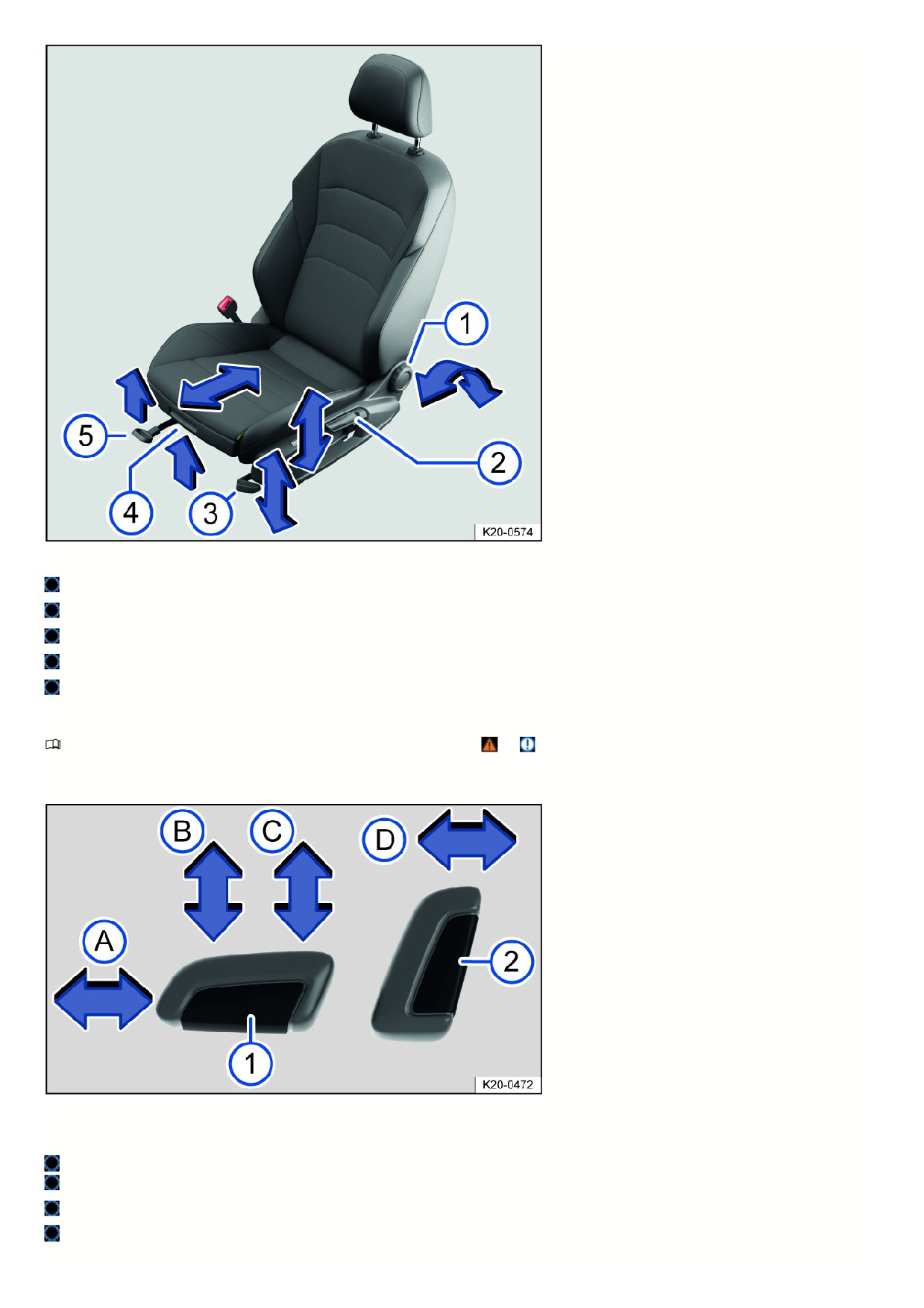
Fig. 68 On the driver seat: Controls (depending on the vehicle equipment).
To adjust the backrest, turn the handwheel with nothing resting on the backrest.
If necessary, move the lever upward or downward multiple times to adjust the height of the seat.
Pull or push the lever several times if necessary to adjust the seat cushion angle.
Lift the grip to move the seat cushion forward or backward.
Pull the lever to slide the front seat forward or backward. The front seat must lock into place after the lever is released.
Adjusting power front seats
Please read the introductory information and heed the Warnings and Notice ⇒
and Introduction.
The controls on the front passenger seat are a mirror image of those for the driver seat.
A seat may have both manual and power controls.
Fig. 69 Switch on the driver seat: Adjusting the front seat forward/back, the height and angle of the seat surface, and the front seat backrest.
Press the switch in the direction of the arrow:
Slide the seat forward or backward.
Adjust the angle of the seat surface.
Adjust the height of the seat.
Adjust the angle of the backrest.
93
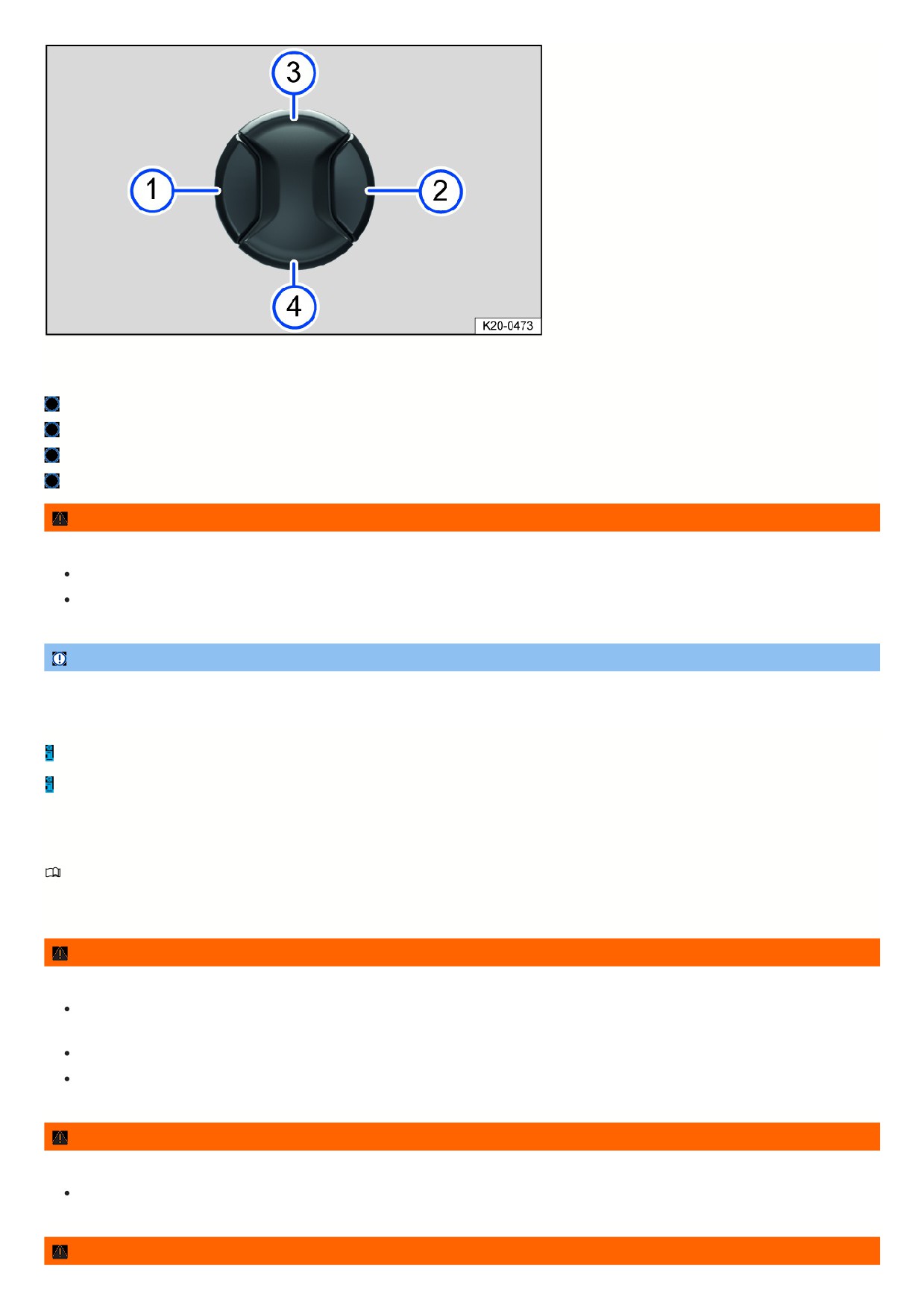
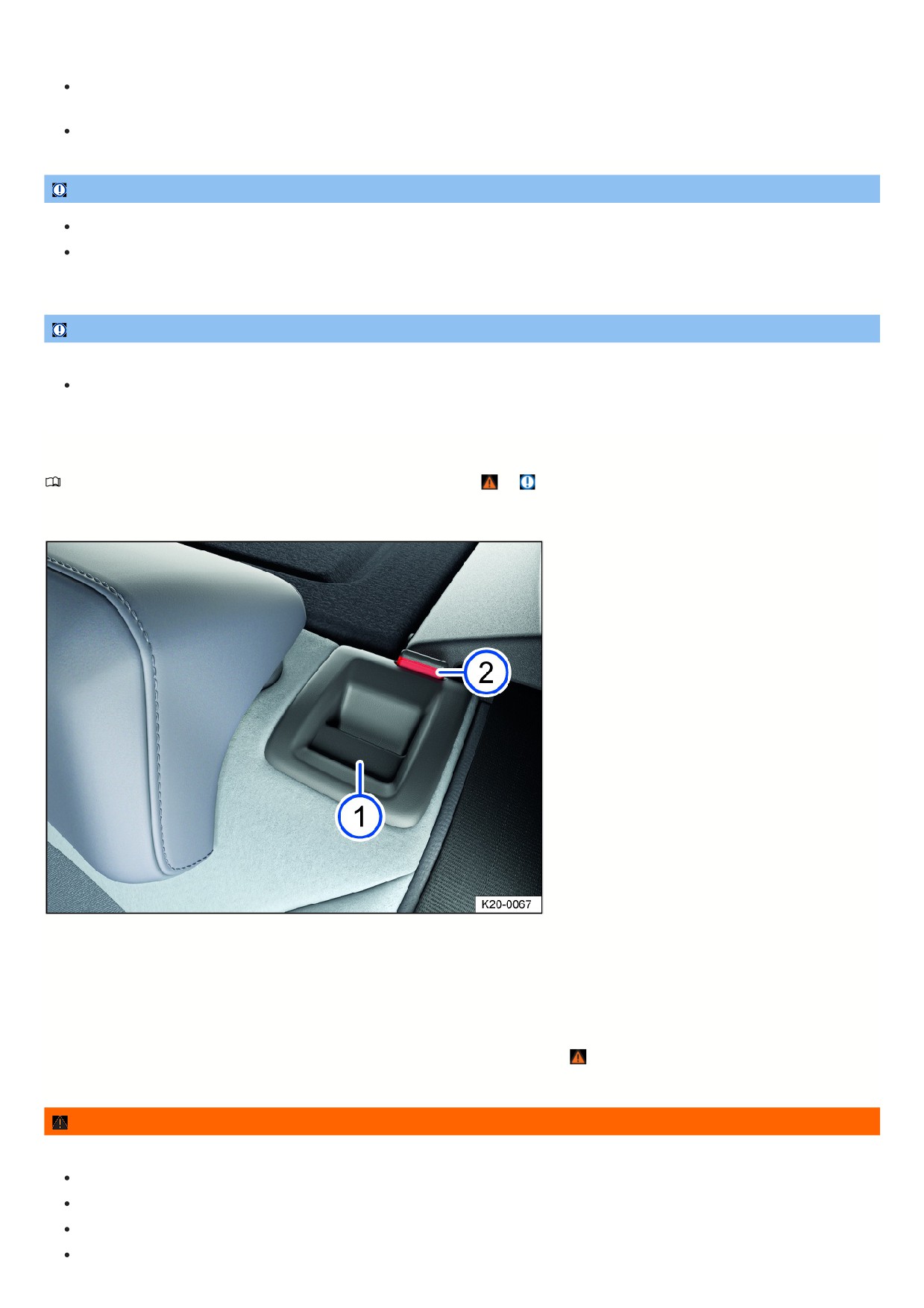
Fig. 70 Switch on the driver seat: Adjusting the lumbar support.
Press the switch in the direction you would like the lumbar support to move.
Move the curvature of the lumbar support forward.
Move the curvature of the lumbar support backward.
Raise the curvature of the lumbar support.
Move the curvature of the lumbar support down.
WARNING
Careless or unintended use of the power front seats can cause serious injuries.
The power front seats can also be adjusted when the ignition is switched off. Never leave children or people requiring assistance in the vehicle.
In case of an emergency, interrupt the power adjustment by pressing another switch.
NOTICE
To reduce the risk of damage to the electrical components in the front seats, never kneel on the front seats or seat cushions. Do not exert pressure on the
backrest with sharp or pointed objects.
If the 12 V vehicle battery charge level is too low, the seat may not be able to be adjusted with the power controls.
A seat adjustment may be canceled while the engine is starting.
Rear seats
Introduction
The following information describes the various options for adjusting the rear seats. Always make sure the seats are adjusted to the correct position
⇒ Correct
seating position.
WARNING
Adjust the rear seats correctly before each journey and make sure all passengers have their own safety belts fastened correctly.
Only adjust the rear seats when the vehicle is stationary. Otherwise, the rear seats could move unexpectedly while the vehicle is in motion. You could also
put yourself in an incorrect seating position.
For passengers in the rear seats, the risk of serious injuries increases if they do not sit upright, because the safety belts will not be positioned correctly.
Only adjust the rear seat when there is no one within the seat’s range of movement.
WARNING
Lighters in the vehicle can become damaged or ignite unintentionally. This can cause severe burns and vehicle damage.
Before adjusting any seat, always make sure that there are no cigarette lighters near the moving parts of the seat.
WARNING
94
To reduce the risk of injuries while driving, the rear center armrest must always be folded up.
If the center armrest is folded down, the center rear bench seat must never be used by either adults or children. Doing so would create an incorrect
seating position that could result in serious injuries.
Never allow an adult or child to ride on the center armrest.
NOTICE
Objects in the luggage compartment can cause damage when adjusting the rear seat forward or backward.
If the rear seat is positioned forward, objects can become caught between the seat and the luggage compartment floor. Remove any objects from this
area before sliding the rear seat back.
NOTICE
Objects with sharp edges can damage the seats.
Never touch the seats with sharp-edged objects. Sharp-edged objects, such as zippers, rivets on clothing, or belts, can cause surface damage. Open
hook and loop fasteners can also cause damage.
Folding the rear bench seat backrest forward or backward
Please read the introductory information and heed the Warnings and Notice ⇒
and Introduction.
The seat backrest is divided. Each part of the rear seat backrest can be folded forward individually to enlarge the luggage compartment.
Folding the rear seat backrest forward and down with the release button
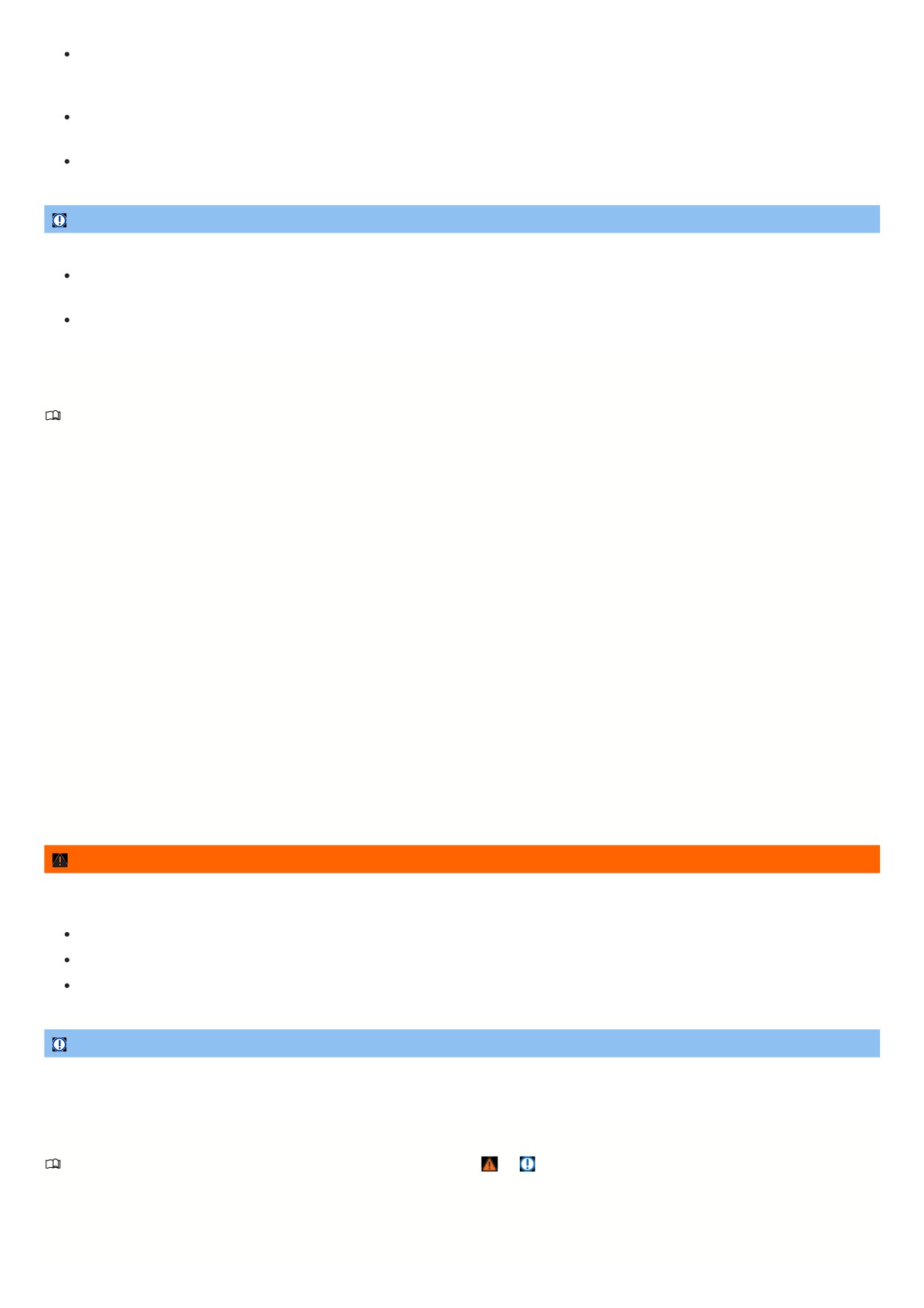
Fig. 71 In the rear seat backrest: release button.
1. Move the head restraints all the way down.
2. Pull the release button fig. 71 forward while folding the rear seat backrest forward and down.
The respective backrest part of the rear seat backrest is released when the red marking fig. 71 can be seen.
Folding the rear seat backrest up and back
1. Fold the rear seat backrest to the back and push firmly into the catch until it securely engages
⇒
The red marking fig. 71 must no longer be visible.
WARNING
Folding and unfolding the rear seat backrest in an uncontrolled or careless manner may cause severe injury.
Always take care that no people or animals are in the way of the rear seat backrest when folding it forward and down.
Never fold the rear seat backrest forward or back while driving.
Make sure the safety belt is not pinched or damaged when folding the rear seat backrest back.
Keep hands, fingers, feet and other body parts away from the rear seat backrest when folding forward or back.
95
Each rear seat backrest must always be securely engaged to ensure that the safety belts in the rear seats can provide the maximum protection. Take
extra care especially with the middle seat in the rear bench seat. If a seat on the rear bench is used without the rear seat backrest being engaged, the
vehicle occupant will move forward with the rear seat backrest in the event of sudden braking and driving maneuvers or a collision.
A red marking fig. 71 indicates that the rear seat backrest is not engaged. Always check that the red marker is not visible when the rear seat backrest is
in the upright position.
Never allow people to sit in a rear seat if that rear seat backrest is folded forward or is not engaged.
NOTICE
Folding and unfolding the rear seat backrest in an uncontrolled or careless manner may cause damage to the vehicle or other objects.
Before folding the rear seat backrest forward, always adjust the front seats so that the head restraint or padding on the rear seat backrest does not press
against the front seats.
Before folding the rear seat backrest forward, always take care that there are no objects in its path.
Head restraints
Introduction
The information that follows describes how the head restraints can be adjusted and removed. Always make sure the seats are adjusted to the correct position
⇒ Correct seating position.
All seats are equipped with head restraints. The head restraints are specially approved for the relevant seat and should not be installed in another seat in the
vehicle.
The center rear head restraint (depending on the vehicle equipment) is only intended for the center seat on the rear bench seat. Therefore do not install this head
restraint in any other position.
There are notches in the head restraint supports so that they can be locked in different positions. Only head restraints which are correctly mounted can lock into the
notches within the adjustable range. To prevent the head restraints from being removed unintentionally after mounting, there are stops at the top and bottom of the
adjustable range.
Correct head restraint adjustment
Adjust the head restraint so that the upper edge of the head restraint is in line with the upper portion of the head as much as possible, but not lower than eye level.
Position the back of the head as close as possible to the head restraint.
Head restraint adjustment for shorter persons
Slide the head restraint all the way down, even if the head is then below the upper edge of the head restraint. When the head restraint is in the lowest position, ther
may be a small gap between the head restraint and the backrest.
Head restraint adjustment for taller persons
Move the head restraint up all the way.
WARNING
Driving with head restraint that have been removed or adjusted incorrectly increases the risk of serious or fatal injuries in the event of an accident or sudden
driving and braking maneuvers.
If a person is sitting in a seat, always drive with the head restraint correctly installed and adjusted on that seat.
If a person is sitting in a seat, adjust the head restraint according to their height.
Never adjust the head restraint while driving.
NOTICE
When removing and installing the head restraint, make sure the head restraint does not hit the headliner, the front seat backrest, or other vehicle components.
Otherwise, damage could result.
Adjusting the head restraints
Please read the introductory information and heed the Warnings and Notice ⇒
and Introduction.
Adjusting the height of the head restraints
96
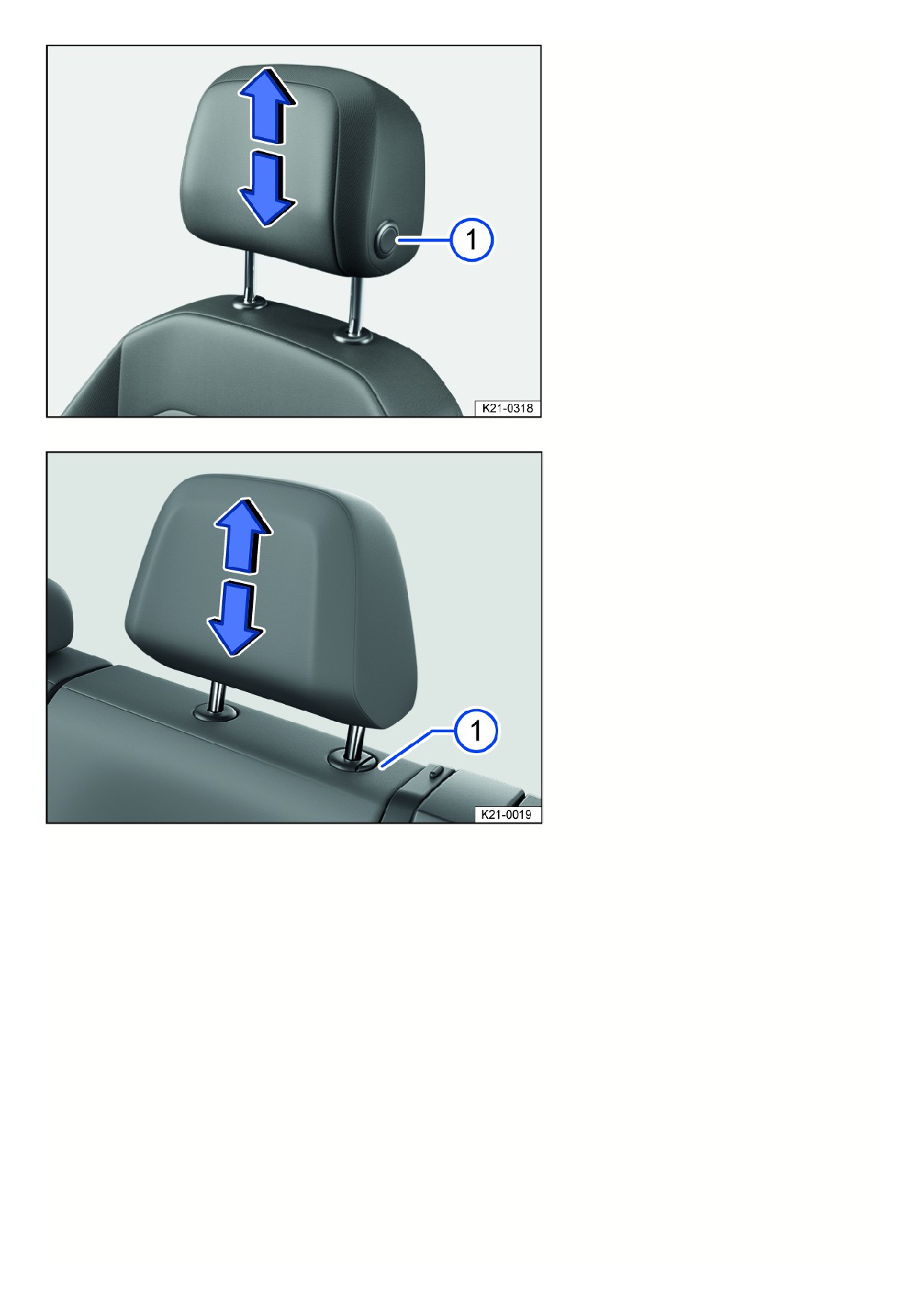
Fig. 72 General example: Adjusting the front head restraint forwards and backwards.
Fig. 73 General example: adjusting the rear head restraint.
1. Slide the head restraint up or down in the direction of the arrow; you may need to press the fig. 72 or fig. 73 button first to release the head restraint.
The head restraint must lock securely into place.
Adjusting the front head restraint forwards and backwards
97
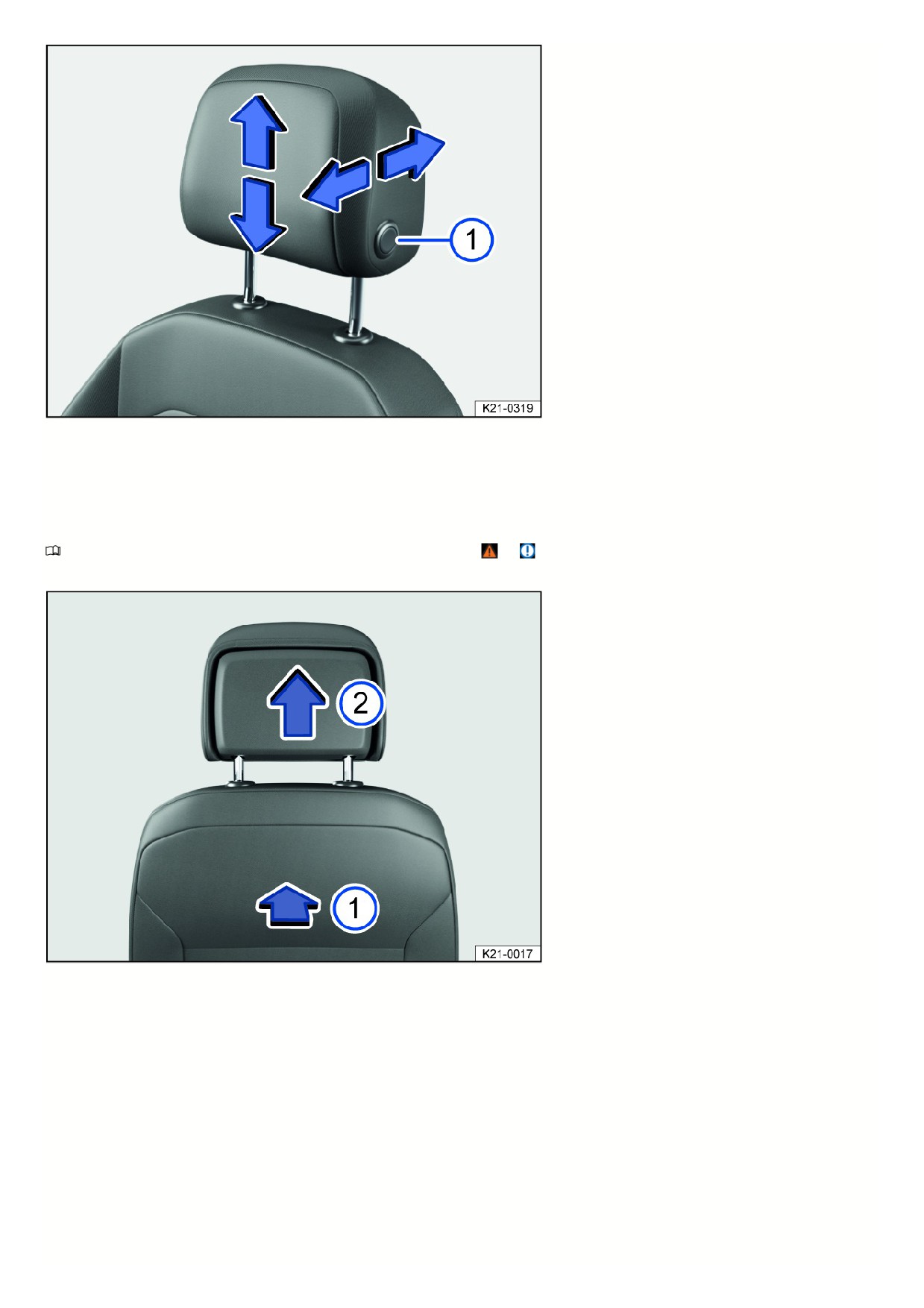
Fig. 74 General example: adjusting the front head restraint with forward/backward adjustment.
1. Push the head restraint forward in the direction of the arrow or, keeping the button fig. 74 pressed, push the head restraint backward.
The head restraint must lock securely into place.
Removing and installing the head restraints
Please read the introductory information and heed the Warnings and Notice ⇒
and Introduction.
Removing the front head restraints
Fig. 75 General example: removing the front head restraint.
1. Lower the head restraint if necessary.
2. To release, find the notch on the rear side in the marked area fig. 75, push inwards in the direction of the arrow and hold.
3. Pull out the head restraint in the direction of the arrow fig. 75.
Installing the front head restraints
1. Position the head restraint correctly above the head restraint guides and insert into the guides on the seat backrest.
2. Slide the head restraint downward until it engages into the guide rods.
3. Adjust the head restraint to the correct position.
Removing the rear head restraint
98
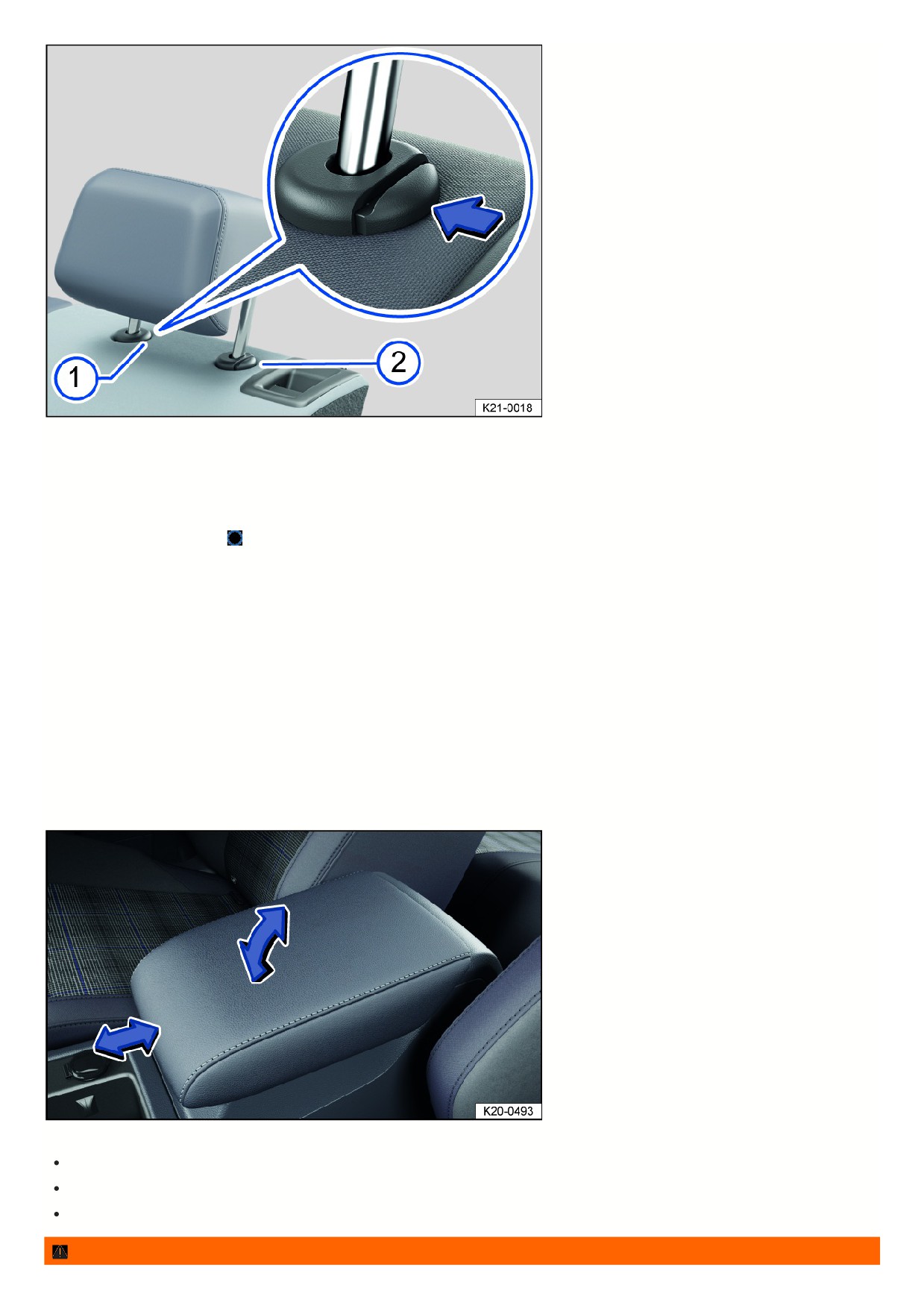
Fig. 76 General example: removing the rear head restraint.
1. Release the backrest of the rear bench seat and fold forwards.
2. Slide the head restraint all the way upward ⇒ Adjusting the head restraints.
3. Press the button fig. 76 on the head restraint guide.
4. At the same time, press button
while a second person pulls the head restraint all the way out.
5. Fold the rear bench seat backrest toward the rear and lock it securely into place.
Installing the rear head restraint
1. Release the backrest of the rear bench seat and fold forwards.
2. Position the head restraint correctly above the head restraint guides and insert into the guides on the seat backrest.
3. Push the head restraint downward while pressing the fig. 76 button.
4. Fold the rear bench seat backrest toward the rear and lock it securely into place.
5. Adjust the head restraint to the correct position.
Seat functions
Center armrest
Front center armrest
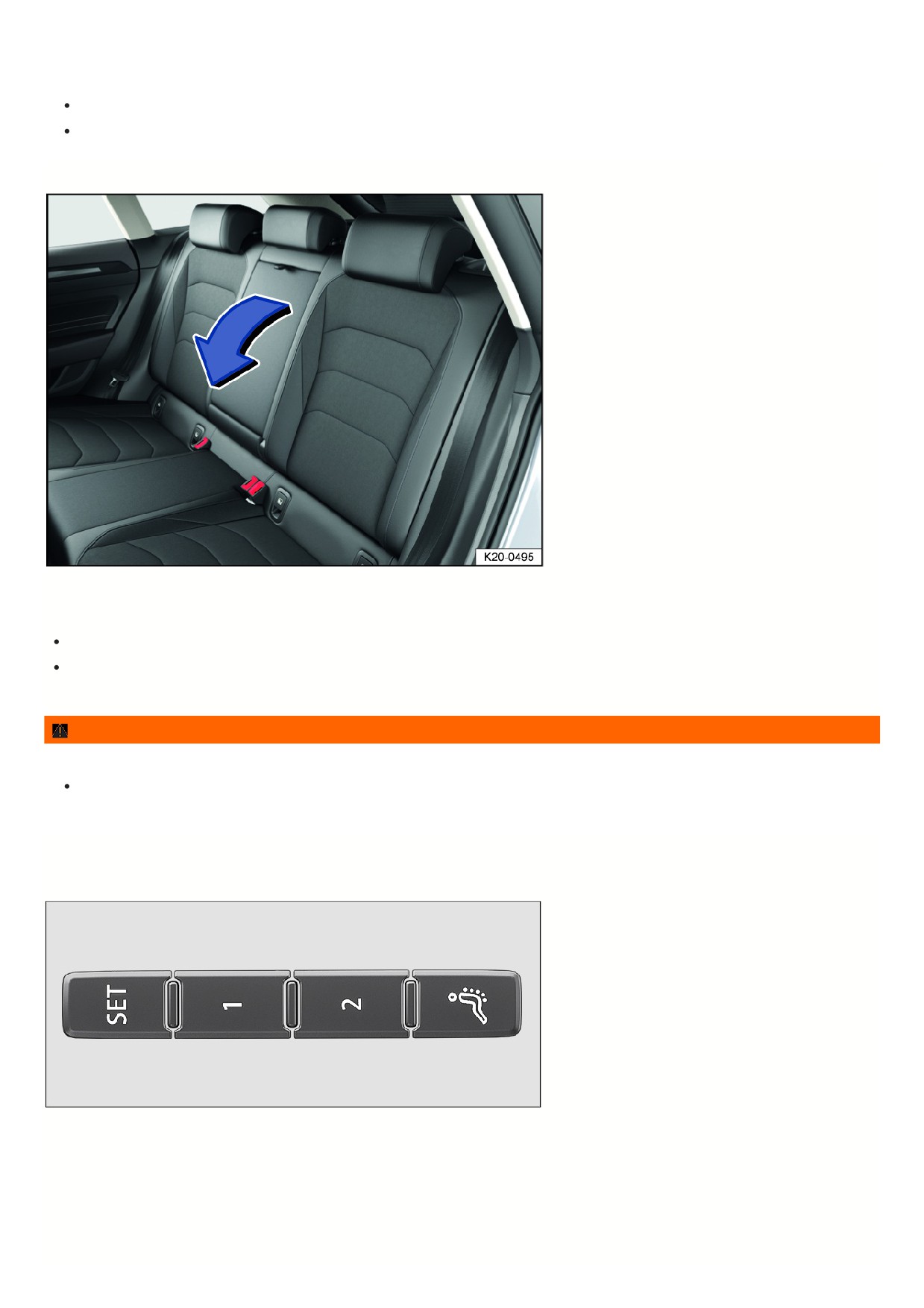
Fig. 77 Front center armrest (general example).
To lift: Pull the center armrest up to the detents in the direction of the arrow fig. 77.
To lower: Pull the center armrest up fully. Then press the center armrest down.
Forward and backward adjustment: Slide the center armrest in the direction of the arrow fig. 77 all the way forward or all the way backward.
WARNING
99
If the front center armrest is opened all the way or not completely closed, it can limit the driver’s ability to move his or her arms, which can cause accidents and
serious injuries.
Always keep the storage compartments closed while driving.
Never allow an adult or child to ride on the center armrest. This incorrect seating position can cause serious injuries.
Rear center armrest
Fig. 78 Folding center armrest in the rear.
There may be a folding armrest in the backrest of the rear center seat.
To fold forward: pull the center armrest in the direction of the arrow using the loop fig. 78.
To fold back: fold the center armrest upward in the opposite direction of the arrow fig. 78 and press it all the way toward the seat backrest.
Passengers must not sit in the center rear seat when the center armrest is folded down.
WARNING
To reduce the risk of injuries while driving, the rear center armrest must always be folded up.
If the center armrest is folded down, the center rear bench seat must never be used by either adults or children. Doing so would create an incorrect
seating position that could result in serious injuries.
Memory function
Memory buttons
Fig. 79 On the outer side of the driver’s seat: memory buttons.
Driver seat and outside mirror settings can be saved and called up using the memory buttons.
Storing the driver's seat and outside mirror settings for driving forward
1. Set the electronic parking brake.
2. Shift the transmission to neutral.
3. Switch the ignition on.
1
4. Adjust the driver's seat and outside mirror.
5. Press the
fig. 79 button for longer than ten seconds.
6. Press the desired memory button within approximately ten seconds.
A chime will confirm that the settings were saved.
Storing the front passenger's outside mirror settings for driving in reverse
1. Set the electronic parking brake.
2. Shift the transmission to neutral.
3. Switch the ignition on.
4. Press the desired memory button fig. 79.
5. Select the reverse gear.
6. Adjust the front passenger's outside mirror so that the edge of the curb can be seen clearly, for example.
The selected mirror position will be stored automatically and assigned to the vehicle key that was used to unlock the vehicle.
Recalling driver's seat and outside mirror settings
1. When the vehicle is stationary, the ignition is switched off, and a door is open, press the respective memory button briefly.
After approximately ten minutes, the stored positions can no longer be adjusted automatically. The adjustment process will be canceled if one of the memory
buttons is pressed again.
Or: When the ignition is switched on or the door is closed, press and hold the respective memory button until the saved positions are reached.
The front passenger's outside mirror automatically leaves the position stored for driving in reverse once you begin driving forward at speeds of at least approx.
15 km/h (approx. 10 mph) or when you turn the knob for the outside mirrors from the R position to another position.
If you open the driver door more than approximately ten minutes after the vehicle is unlocked, the driver seat and the outside mirrors will not be adjusted
automatically.
Front seat convenience entry function
When you open the driver door, the driver seat automatically moves to a position that enables you to enter and exit the vehicle with ease.
The driver seat automatically returns to its original position once you have closed the driver door and switched on the ignition.
The front seat convenience entry function can be enabled and disabled in the Infotainment system.
WARNING
Improper use of seat functions can cause injuries.
Before beginning a journey always adjust to the correct seat position and maintain this throughout the journey. This also applies to all passengers.
Set the memory function only with the vehicle stationary.
Always keep your hands, fingers, feet and other parts of your body clear of the area in which the seats operate and move during adjustment.
1) Only if personalization has been activated.
Massage feature
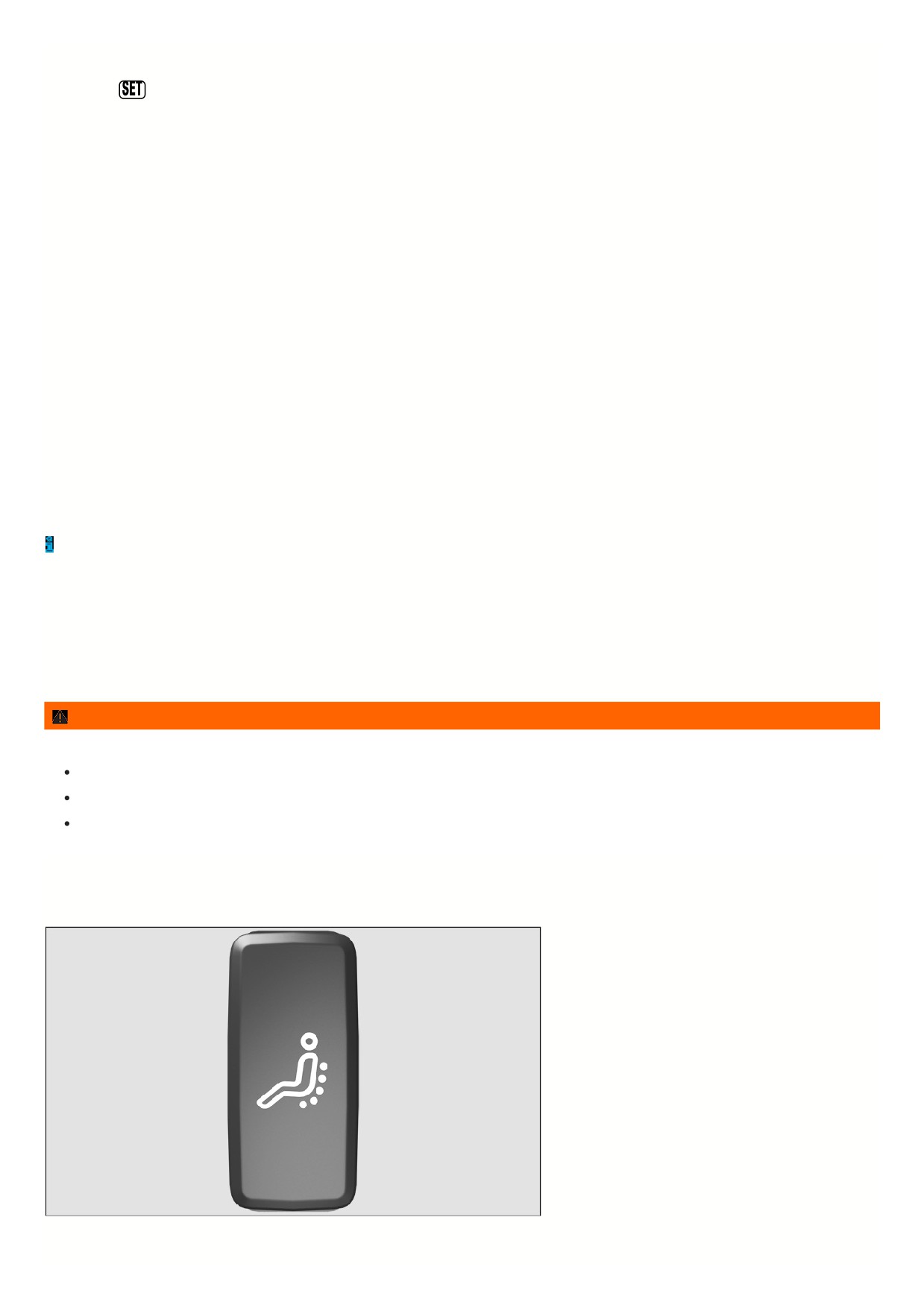
Fig. 80 In the lower part of the driver seat: Massage function button.
For the massage function, the lumbar support moves and massages the lumbar area of your back.
1 1
The lumbar support cushioning can be individually adjusted during operation by pressing repeatedly on the corresponding switch
⇒ Adjusting power front seats.
Switching the massage function on or off
1. To switch on, push the
button in the seat control panel. Press the
button again to switch off.
After around ten minutes, the massage function switches off automatically.
WARNING
Improper use of seat functions can cause injuries.
Before beginning a journey always adjust to the correct seat position and maintain this throughout the journey. This also applies to all passengers.
Only switch the massage function on and off when the vehicle is stationary.
Always keep your hands, fingers, feet and other parts of your body clear of the area in which the seats operate and move during adjustment.
1 2
Lights
Headlights
Switching the turn signals on and off
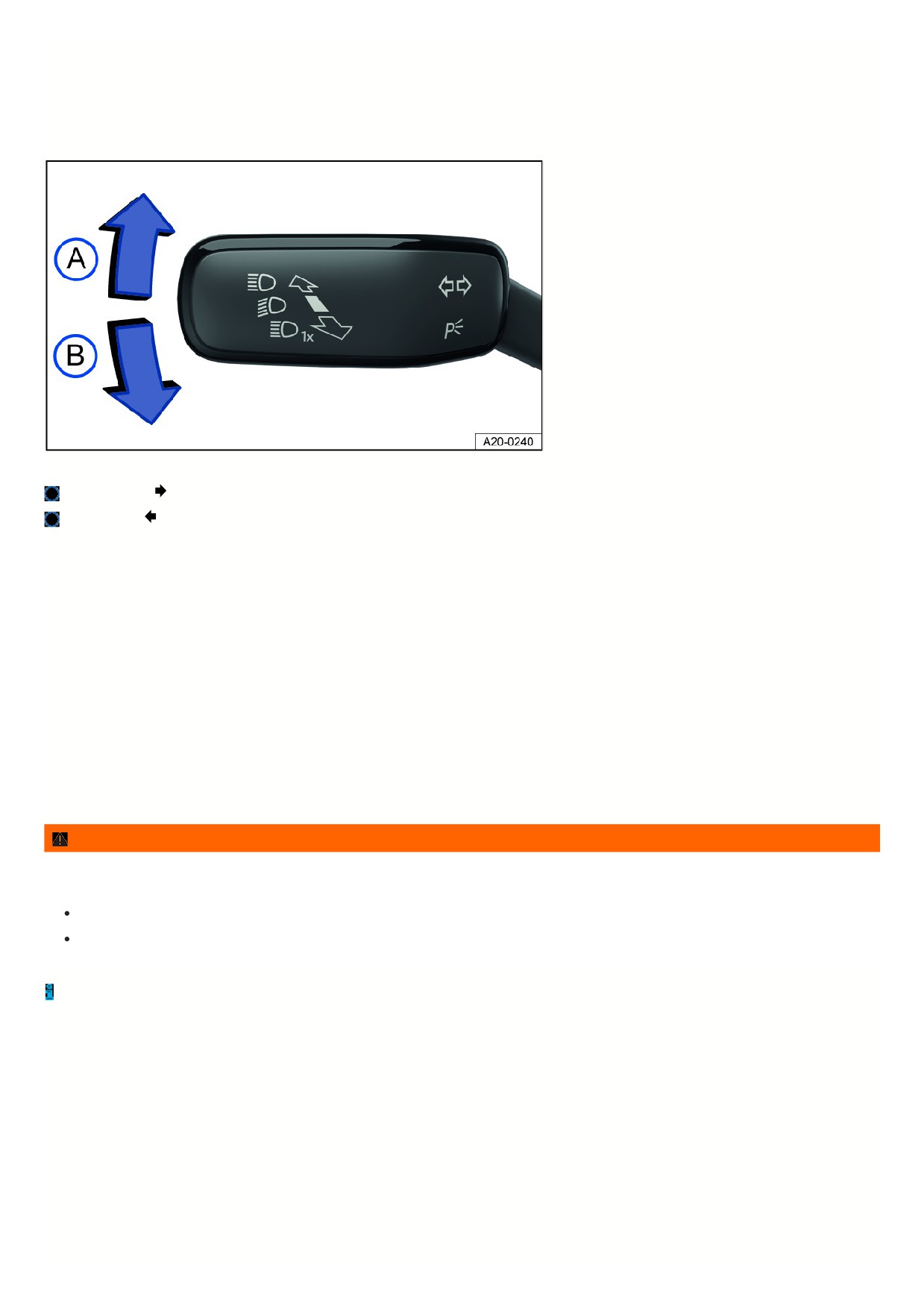
Fig. 81 On the left side of the steering column: turn signal and high beam lever.
Right turn signal
Left turn signal
Switching the turn signals on and off
1. Switch the ignition on.
2. Move the turn signal and high beam lever from the center position to the preferred position fig. 81.
3. To cancel the turn signal, move the turn signal and headlamp lever back to its basic position.
If no chime sounds when the turn signal is on, contact suitably qualified professionals and have the vehicle checked. Volkswagen recommends contacting an
authorized Volkswagen dealer or authorized Volkswagen Service Facility.
3-blink turn signal
To use the 3-blink turn signal, move the turn signal and high beam lever upward or downward to the pressure point and then release the lever. The turn signal will
blink three times.
To stop the 3-blink turn signal before it ends, move the turn signal and high beam lever immediately to the pressure point in the opposite direction and release.
The 3-blink turn signal can be activated and deactivated in the vehicle settings in the Infotainment system
⇒ Vehicle settings menu.
WARNING
Using the turn signals incorrectly, not using the turn signals, or forgetting to turn the turn signal off can mislead other road users. This can cause accidents and
serious injuries.
Always activate the turn signals correctly when changing lanes, passing, or turning.
Switch the turn signal off again every time you finish changing lanes, passing, or turning.
The emergency flashers also work when the ignition is switched off ⇒ In case of an emergency.
Switching the lights on and off
1 3
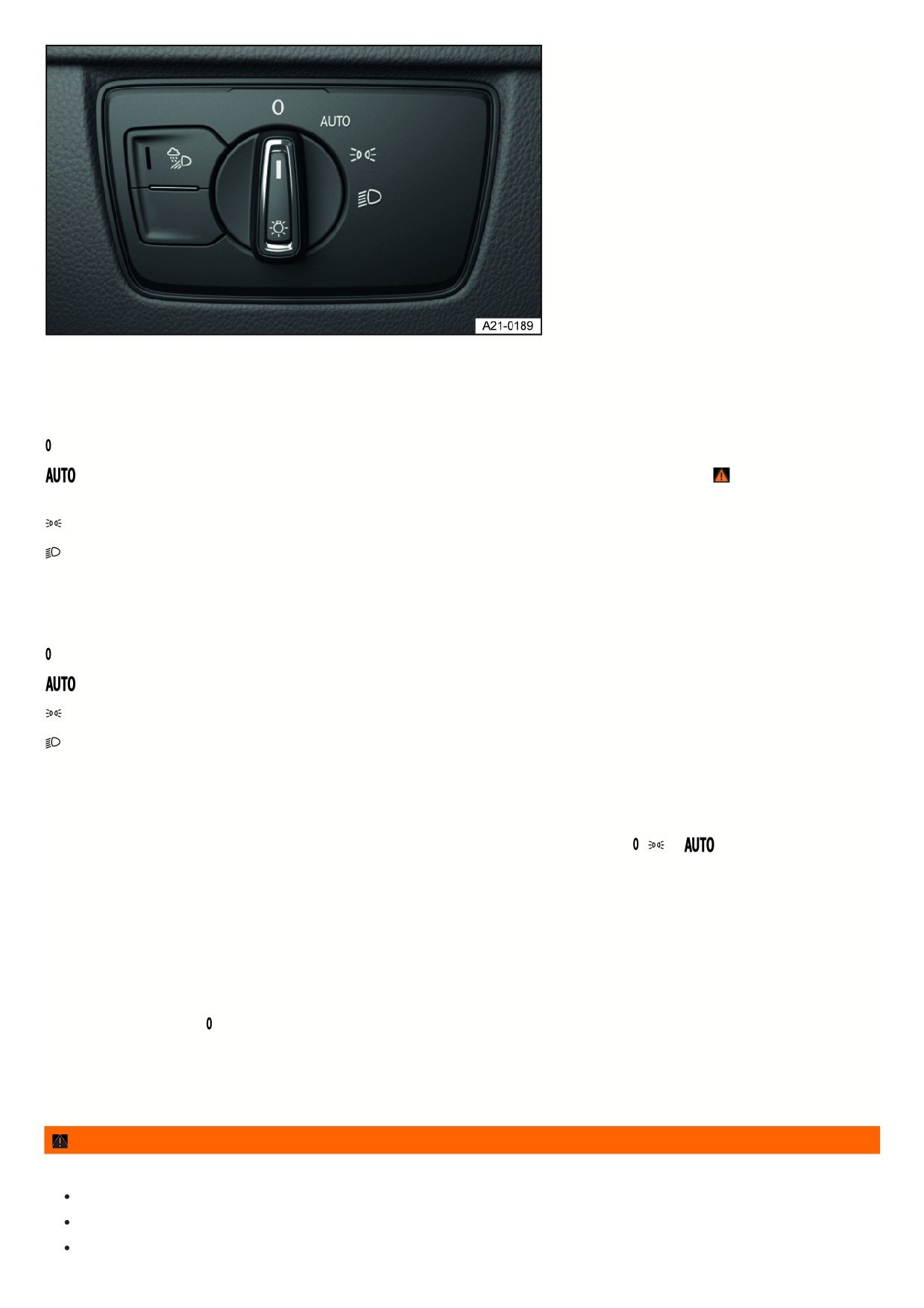
Fig. 82 Next to the steering wheel: light switch (one version).
Switching the lights on
1. Switch the ignition on.
2. Turn the light switch to the desired position fig. 82:
The side lights or parking lights and daytime running lights are switched on.
Automatic headlight control: the headlights will switch on or off depending on the brightness and weather conditions
⇒
, ⇒ Automatic headlight
control.
The side lights or parking lights and daytime running lights are switched on. The green symbol in the light switch turns on.
The low beam headlights are switched on.
Switching the lights off
1. Switch the ignition off.
2. Turn the light switch to the desired position:
The lights are switched off.
The orientation lighting can be switched on ⇒ “Exit lighting” and “Entry lighting” function (orientation lighting) .
The parking light is switched on ⇒ Parking lights. The green symbol in the light switch turns on.
The low beam headlights are switched off.
Vehicles with starter button: As long as the driver door is closed, the parking light continues to light up.
Daytime running lights
The optional daytime running lights can increase the visibility of your vehicle in traffic during the daytime.
The daytime running light comes on automatically every time the ignition is switched on if the light switch is in the
,
or
position (if brightness detected)
The daytime running lights cannot be switched on or off manually.
Daytime running lights parking function
Depending on the equipment, the vehicle may have a daytime running lights parking function to turn off the daytime running lights temporarily when the ignition is
switched on.
Switch off the daytime running lights:
1. Switch the ignition on.
2. Turn the light switch to the position.
3. Set the electronic parking brake.
Switch on the daytime running lights:
1. Switch off the electronic parking brake.
WARNING
Accidents and serious injuries may occur if the road is not well lit and the vehicle cannot be seen by others on the road, or is very difficult to see.
The light assistance systems are only aids. The driver is always responsible for turning on the correct vehicle lighting.
Always turn on the low beam headlight in the dark, when it is raining, and when visibility is poor.
Regularly check that the lighting system and turn signals are functioning correctly.
1 4
WARNING
The parking lights or daytime running lights are not bright enough to illuminate the road sufficiently and to be seen by other road users.
Always turn on the low beam headlight in the dark, when it is raining, and when visibility is poor.
The taillights do not switch on with the daytime running lights. A vehicle without its taillights turned on may not be seen by other road users in the dark, in
the fog, and when visibility is poor.
WARNING
Automatic headlight control
only turns the low beam headlights on and off when there are changes in brightness.
Turn on the low beam headlights manually in certain weather conditions, such as in fog.
When reverse gear is engaged, the cornering lights on both sides of the vehicle will turn on automatically to better illuminate the surroundings while
maneuvering.
Switching the high beam headlights on and off
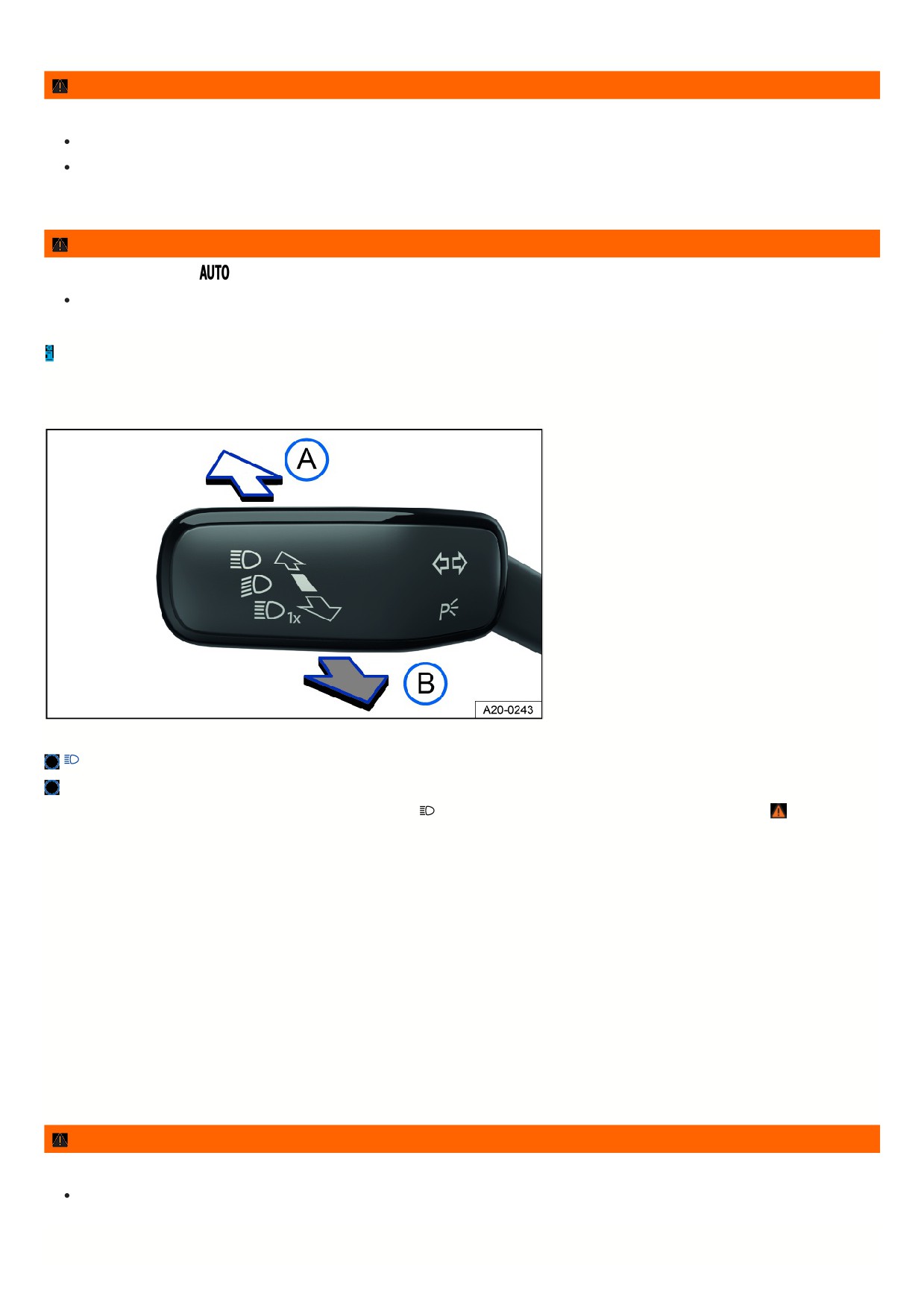
Fig. 83 On the left side of the steering column: turn signal and high beam lever.
Turn on the high beam headlight.
Activate the headlight flashers or turn off the high beam headlights.
If the high beam headlights or headlight flashers are turned on, the blue
indicator light will come on in the Volkswagen Digital Cockpit ⇒
Turning on the high beam headlight
1. Switch the ignition on.
2. Switch on the low beam headlight.
3. Press the turn signal and high beam lever forward out of the center position fig. 83.
Turning off the high beam headlight
1. Pull the turn signal and high beam lever backward out of the center position fig. 83.
Turning the headlight flasher on and off
1. Pull the turn signal and high beam lever backward out of the center position and hold it fig. 83.
Release the turn signal and high beam lever to turn the headlight flasher off.
Light Assist
Depending on the equipment, high beam control (Light Assist) may be available ⇒ Light Assist.
WARNING
Using the high beam headlights incorrectly can cause accidents and serious injuries, because the high beams can distract and create glare for other drivers.
Use the high beam headlights only if other road users cannot be distracted or blinded.
Light Assist
1
5

Light Assist switches off automatically if the system detects oncoming vehicles or vehicles driving ahead. Light Assist generally detects well-lit areas such as towns
and deactivates the high beam headlights when driving through these areas.
The high beam headlights switch on and off automatically within the limits of the system, depending on the environmental and traffic conditions and the vehicle
speed ⇒
Switching on Light Assist
1. Switch on the ignition and the automatic headlights
2. Tap the turn signal and high beam lever forward out of the basic position.
When Light Assist is switched on, the
indicator light in the instrument cluster display will turn on. When high beam control (Light Assist) is active, the blue
indicator light
for the high beam headlight in the instrument cluster lights up.
Setting the main-beam control sensitivity
Depending on the country, the main-beam control sensitivity can be set in two stages:
Increasing the sensitivity: press the turn signal and high beam lever forwards from its original position and hold it in this position for around 15 seconds.
The
indicator light on the instrument cluster will blink three times to confirm that this has been applied.
Setting the sensitivity back to its standard setting: press the turn signal and high beam lever forwards from its original position and hold it in this position for
around 15 seconds.
The
indicator light on the instrument cluster will blink three times in quick succession to confirm that this has been applied.
Or: Switch the ignition off and on.
Switching off Light Assist
1. Switch off
automatic headlights.
Or: If high beam control (Light Assist) is switched on and active, pull the turn signal and high beam lever backward.
Or: If high beam control (Light Assist) is switched on and not active, tip the turn signal and high beam lever forward.
The manual high beam headlights are now switched on. Pull the turn signal and high beam lever backwards to switch the high beam headlights off manually if
necessary.
Or: Switch off the ignition.
System limitations
The high beams must be switched off manually in the following situations, because Light Assist may not switch them off at the right time or at all:
In poorly lit towns which cannot be recognized as a town by the system.
On poorly lit roads with strongly reflective signs.
If there are others on the road who have inadequate lighting, such as pedestrians or cyclists.
On tight curves where the view of traffic is partially obstructed, on steep rises, or in dips.
When there are oncoming vehicles on roads with a center barrier and the drivers in the oncoming vehicle can clearly see above the barrier, for example truck
drivers.
In fog, snow, and heavy rain.
When there are dust and sand in the air.
If the windshield is damaged in the camera's field of vision.
If the camera visual field is fogged over, dirty, or covered by a sticker, snow, or ice.
If the camera switches off automatically due to a high ambient temperature or exposure to direct sunlight for a prolonged period. High beam control (Light
Assist) will be available once the camera is available again.
If the camera is faulty and the power supply is interrupted.
WARNING
The increased convenience thanks to high beam control (Light Assist) cannot replace the driver's attention. Switching on the high beam headlights incorrectly
can cause accidents and serious injuries, because the high beams can distract and blind other drivers.
Always control the headlights yourself and adapt them to the lighting, visual, and traffic conditions.
Light Assist may not detect all traffic situations correctly and the function may be restricted in certain situations.
If the camera lens is dirty, covered, or damaged, the Light Assist function may be limited. This is also the case if the vehicle lighting system is changed,
such as by adding auxiliary headlights.
NOTICE
1 6

To avoid impairing the function of the system, note the following points:
Regularly clean the camera view area and keep it free of snow and ice.
Do not cover the camera view area.
Regularly check the windshield for damage in the camera lens area.
Dynamic cornering light
The dynamic cornering lights provide optimum illumination of the roadway.
The dynamic cornering light only works when the automatic headlights
are switched on and at speeds of more than approximately 6 mph (approximately
10 km/h).
Switching the poor weather lights on and off
Poor weather lights help you to illuminate the carriageway more effectively when visibility is poor.
The poor weather light can be switched on when the ignition is switched on and the automatic headlights
or dipped beams
are switched on.
Switching on the Poor Weather Lights
1. Switch the ignition on.
2. Automatic headlights
or dipped beams
switched on.
3. Press the
button ⇒ Switching the lights on and off .
The green indicator light in the button turns on.
Switching off the Poor Weather Lights
1. Press the
button again.
If the poor weather light is switched on when the automatic headlights are switched on
, the dipped beams are also switched on, regardless of the
ambient light level.
Troubleshooting
Turn signal indicator light
The green indicator light blinks.
If a turn signal light on the vehicle is not working, the indicator light will blink twice as fast.
1. Check the lights and replace any bulbs as necessary
⇒ Exterior lighting using LED technology.
2. If the malfunction persists, contact a suitably qualified professional. Volkswagen recommends contacting an authorized Volkswagen dealer or authorized
Volkswagen Service Facility.
Trailer turn signal indicator light
The green indicator light blinks.
If a trailer turn signal or the entire trailer light system is out, the indicator light will turn off.
1. Check the lights and replace any bulbs as necessary
⇒ Exterior lighting using LED technology.
2. If the malfunction persists, contact a suitably qualified professional. Volkswagen recommends contacting an authorized Volkswagen dealer or authorized
Volkswagen Service Facility.
Exterior lighting malfunction
The yellow indicator light turns on.
The headlights have completely or partially failed.
1. Check the lights and replace any bulbs as necessary
⇒ Exterior lighting using LED technology.
2. If the malfunction persists, contact a suitably qualified professional. Volkswagen recommends contacting an authorized Volkswagen dealer or authorized
Volkswagen Service Facility.
Rain/light sensor malfunction
The yellow indicator light turns on.
In the
light switch position, the vehicle lighting will not turn on or off automatically.
1. Switch the ignition off and on.
2. If the malfunction persists, contact a suitably qualified professional. Volkswagen recommends contacting an authorized Volkswagen dealer or authorized
Volkswagen Service Facility.
1 7
Dynamic cornering light
When travel mode is activated, the dynamic cornering light does not work.
The swivel behavior of the bulbs can be influenced by the selected driving mode.
If the dynamic cornering light malfunctions, this is indicated on the instrument cluster display. Contact a suitably qualified professional. Volkswagen recommends
contacting an authorized Volkswagen dealer or authorized Volkswagen Service Facility.
Parking lights
Parking lights
Parking lights
If the
parking light function is switched on, both headlights will come on, along with the parking lights, sections of the taillights, the license plate light and variou
buttons in the vehicle interior.
Automatic parking light deactivation
The vehicle detects that the 12 V vehicle battery is low and switches off the parking light early enough to ensure that the engine can still be started, but not until at
least two hours have passed.
If the battery capacity is not sufficient for the parking light to run for two hours, the 12 V vehicle battery may drain to such an extent that the engine can no longer be
started.
WARNING
If the vehicle is stopped without enough lighting so that the vehicle cannot be seen or is difficult for others on the road to see, this can cause accidents and
serious injuries.
Always stop the vehicle safely and with enough lighting. Follow the country-specific legal regulations.
“Exit lighting” and “Entry lighting” function (orientation lighting)
When you are entering and exiting the vehicle in the dark, the “Exit lighting” and “Entry lighting” function illuminates the immediate area around the vehicle.
Depending on the equipment, the vehicle can have an automatic or manual “Coming home” function:
Automatic “Coming home” function: the “Coming home” and “Leaving home” function automatically control the rain/light sensor.
Manual “Coming home” function: the “Coming home” function is switched on manually.
The “Leaving home” function automatically controls the rain/light sensor.
The lighting time can be adjusted in the vehicle settings in the Infotainment system and the function can be activated or deactivated
⇒ Vehicle settings menu.
Switching on the automatic “Coming home” function
1. Switch the ignition off.
The “Coming home” lighting switches on automatically when the light switch is in the
position and the rain/light sensor detects darkness.
The lighting time begins when the last vehicle door or trunk lid is closed.
Switching on the manual “Coming home” function
1. Switch the ignition off.
2. Press the headlight flasher.
The “Coming home” lighting switches on automatically when the driver door opens. The switch-off delay begins when the last door or the trunk lid is closed.
Switching the “Exit lighting” function off
1. Turns off automatically after the set lighting time has elapsed.
Or: Automatically if a vehicle door or the trunk lid is still open approximately 30 seconds after switching on.
Or: Switch off the light.
Or: Switch on the ignition.
Switching the “Entry lighting” function on
1. Unlock the vehicle when the automatic headlight control
is switched on and the rain/light sensor detects darkness.
Switching the “Entry lighting” function off
1. Turns off automatically after the lighting time has elapsed.
Or: Lock the vehicle.
Or: Switch off the light.
1
8
Or: Switch on the ignition.
Light functions
Cornering lights
If the low beam headlights are switched on, a cornering light will also switch on during slow turns or in very tight corners.
When reverse gear is engaged, the cornering lights on both sides of the vehicle will turn on automatically to better illuminate the surroundings while
maneuvering.
Automatic headlight control
If automatic headlights
are switched on, the vehicle lighting switches on and off automatically along with the instrument illumination under the following
conditions:
The light sensor has detected darkness.
The windshield wipers are switched on for a long time.
When the lights are turned on, the yellow indicator light
turns on ⇒ Switching the lights on and off .
Automatic headlight control is merely an aid and cannot always accurately detect all driving situations.
If the vehicle is equipped accordingly, the activation time of the automatic headlights can be adjusted in the vehicle settings in the Infotainment system
⇒ Vehicle
settings menu.
Headlight range control
Headlight range control is used to adjust the beam of the dipped beam headlight to the load level of the vehicle. This provides the driver with the best possible
visibility and oncoming traffic is not dazzled.
Dynamic headlight range control
The headlight range automatically adjusts to the vehicle load when the headlights are switched on ⇒
WARNING
If the headlight range control fails or malfunctions, the headlights may blind and distract other road users. This can cause accidents and serious injuries.
Have the headlight range control inspected immediately by an authorized Volkswagen dealer or authorized Volkswagen Service Facility. Volkswagen
recommends contacting an authorized Volkswagen dealer or authorized Volkswagen Service Facility.
Adjusting headlights (travel mode)
When traveling in countries that drive on the opposite side of the road from your home country, the asymmetric low beam headlights can dazzle oncoming traffic.
Therefore, when driving in such countries, certain headlight variants must be adjusted, or certain areas of the headlight lens must be masked off. For further
information, contact an authorized Volkswagen dealer or authorized Volkswagen Service Facility. Volkswagen recommends contacting an authorized Volkswagen
dealer or authorized Volkswagen Service Facility.
Travel mode may be used only for a short period of time. Contact an authorized Volkswagen dealer or authorized Volkswagen Service Facility for permanent
conversion. Volkswagen recommends contacting an authorized Volkswagen dealer or authorized Volkswagen Service Facility.
Warning tones when lights are not turned off
If the ignition has been switched off and the driver door is opened, warning tones will sound under the following conditions:
With the side lights switched on
If the orientation lighting is switched on, the warning tone to indicate that the light is still turned on will not sound when leaving the vehicle
⇒ “Exit lighting” and “En
lighting” function (orientation lighting).
Interior lighting
Instrument and switch illumination
You can adjust the brightness of the instrument illumination in the vehicle settings in the Infotainment system
⇒ Vehicle settings menu.
The selected brightness will automatically adjust to the changing brightness in the vehicle.
If the automatic headlights
are switched on, a sensor switches the dipped beams and the instrument and switch lighting on and off automatically based on
outside brightness.
The instrument illumination for the needles and dials turns on when the ignition is on and the lights are off. The lighting for the gauges reduces automatically
and eventually turns off as brightness outside increases. This function should remind the driver to turn off low beam headlights at the right time, such as when
driving through tunnels.
1 9

Interior/reading lights, ambient lighting
Switching on or off interior and reading lights
The scope and the depiction of the controls in the headliner vary depending on the vehicle equipment.
Press the corresponding button:
Switch the front interior lights on or off.
Switch the rear interior lights on or off.
The interior lights will switch on automatically when unlocking or leaving
the vehicle.
Switch the reading lights on or off.
Switch the ambient surface lighting on or off. Depending on the vehicle equipment: Switch between the
highest brightness level and the set brightness level of ambient surface lighting in the roof console → page , Ambient lighting.
Glove compartment and luggage compartment lights
The relevant light turns on or off when opening and closing the glove compartment or trunk lid.
Ambient lighting
Depending on vehicle equipment, ambient lighting can provide indirect lighting in various areas of the vehicle interior.
The footwell can also be illuminated.
The brightness and, depending on the equipment, the color of the ambient lighting, can be adjusted in the vehicle settings in the Infotainment system
⇒ Vehicle
settings menu. If you select the setting Auto, the color of the ambient lighting changes depending on the driving mode setting.
Depending on the vehicle equipment: To increase or reduce the brightness of the ambient surface lighting in the roof console, briefly press the
button in the r
console. You can adjust the brightness of the ambient surface lighting in the vehicle settings in the Infotainment system ⇒ Vehicle settings menu.
After the ignition has been switched off, the lights will turn off when the vehicle is locked or automatically after a few minutes. This reduces the risk of the 12 V
vehicle battery being drained.
11
Visibility
Window wipers
Operating the windshield wiper lever
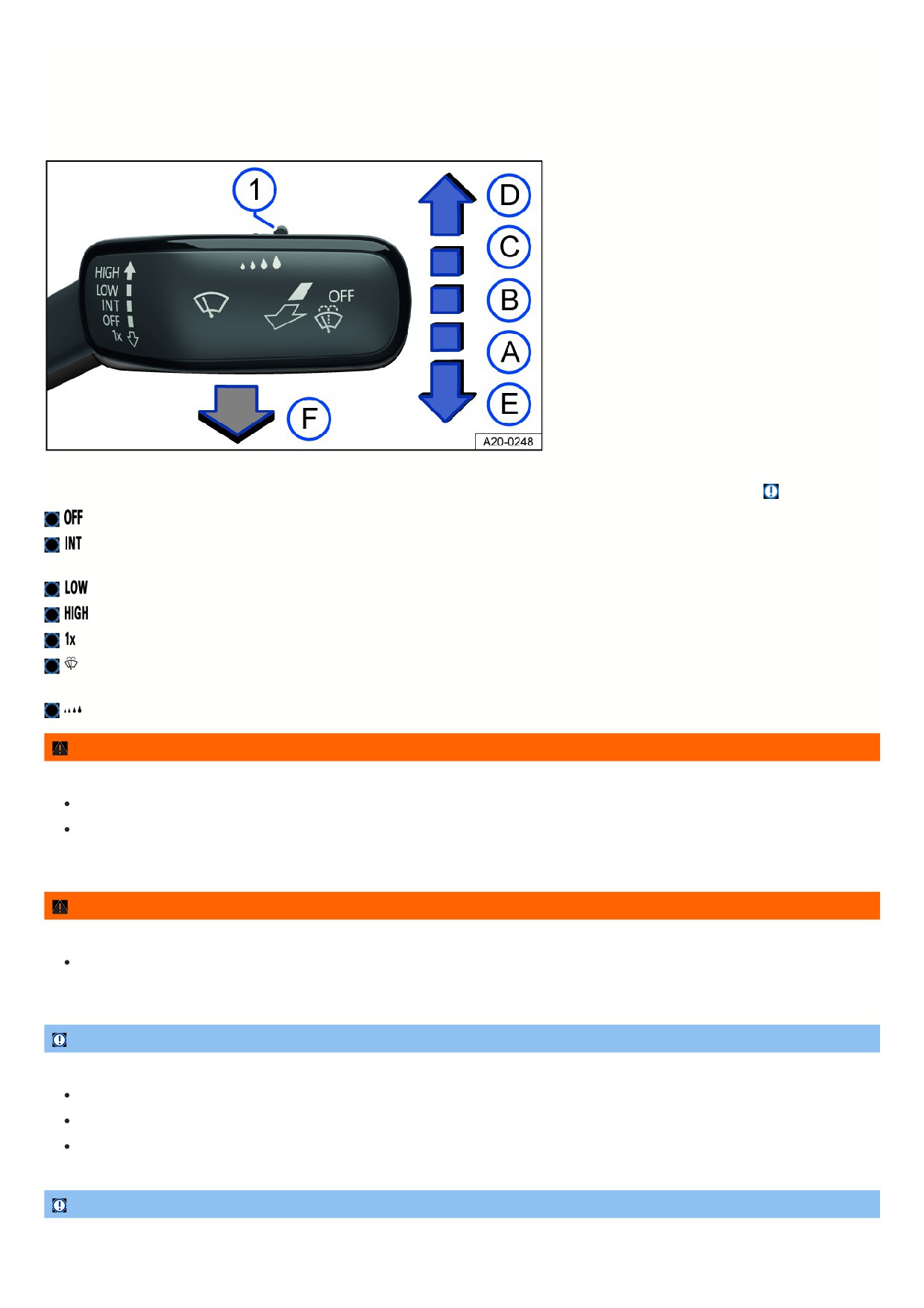
Fig. 84 On the right side of the steering column: operating the windshield wipers.
The windshield wipers only work when the ignition is switched on and the hood is closed. Move the wiper lever into the desired position
⇒
:
Wipers are switched off.
Interval wiping for the windshield or rain sensor mode. Interval wiping for the windshield depends on the driving speed. The higher the speed, the faster
the wipers will move.
Slow wiper speed.
Fast wiping.
One-tap wiping - brief wiping. Press and hold the lever down longer to wipe faster.
Pull the lever to activate the automatic wiper/washer system to clean the windshield. While the wiper/washer system is active, the Climatronic system
switches to recirculation mode for approximately 30 seconds to help prevent the washer fluid odor from entering the vehicle interior.
Switch for interval levels (vehicles without rain/light sensor) or to adjust the sensitivity of the rain/light sensor.
WARNING
Without the sufficient freeze protection, washer fluid can freeze on the window glass and reduce visibility.
Only use the washer system with sufficient freeze protection in winter temperatures.
Never use the windshield washer system in winter temperatures if the windshield has not been warmed up, e.g. with the air conditioning system.
Otherwise, the freeze protection mixture can freeze on the windshield and limit visibility.
WARNING
Worn or dirty wiper blades reduce visibility and increase the risk of accidents and serious injuries.
Always replace wiper blades if they are damaged or worn and are no longer cleaning the window glass sufficiently
⇒ Cleaning and changing wiper
blades.
NOTICE
Incorrect handling of the windshield wipers can cause damage to the windshield, the wiper blades and the wiper motor.
Before driving and before the ignition is switched on, check that the windshield wiper lever is in the basic position.
Remove any snow and ice from the windshield wipers and the windshield.
Always carefully loosen wiper blades that have frozen onto the windshield from the windshield.
NOTICE
Do not use the windshield wipers when the windshield is dry. The window glass can be damaged if wiper blades wipe a dry window.
111
Do not turn on the windshield wipers when the windshield is dry.
The activated wiper speed temporarily changes to the next lower speed when the vehicle is stationary.
When parking the vehicle in cold weather conditions, moving the windshield wipers to the service position may be helpful for loosening the wiper blades more
easily from the windshield ⇒ Putting the windshield wipers in the service position .
Wiper function
Heated washer nozzles
The heat thaws frozen washer fluid nozzles. The heat output is automatically regulated when the ignition is switched on and is dependent on the outside
temperature. Only the window washer nozzles are heated and not the washer fluid hoses.
Rain/light sensor
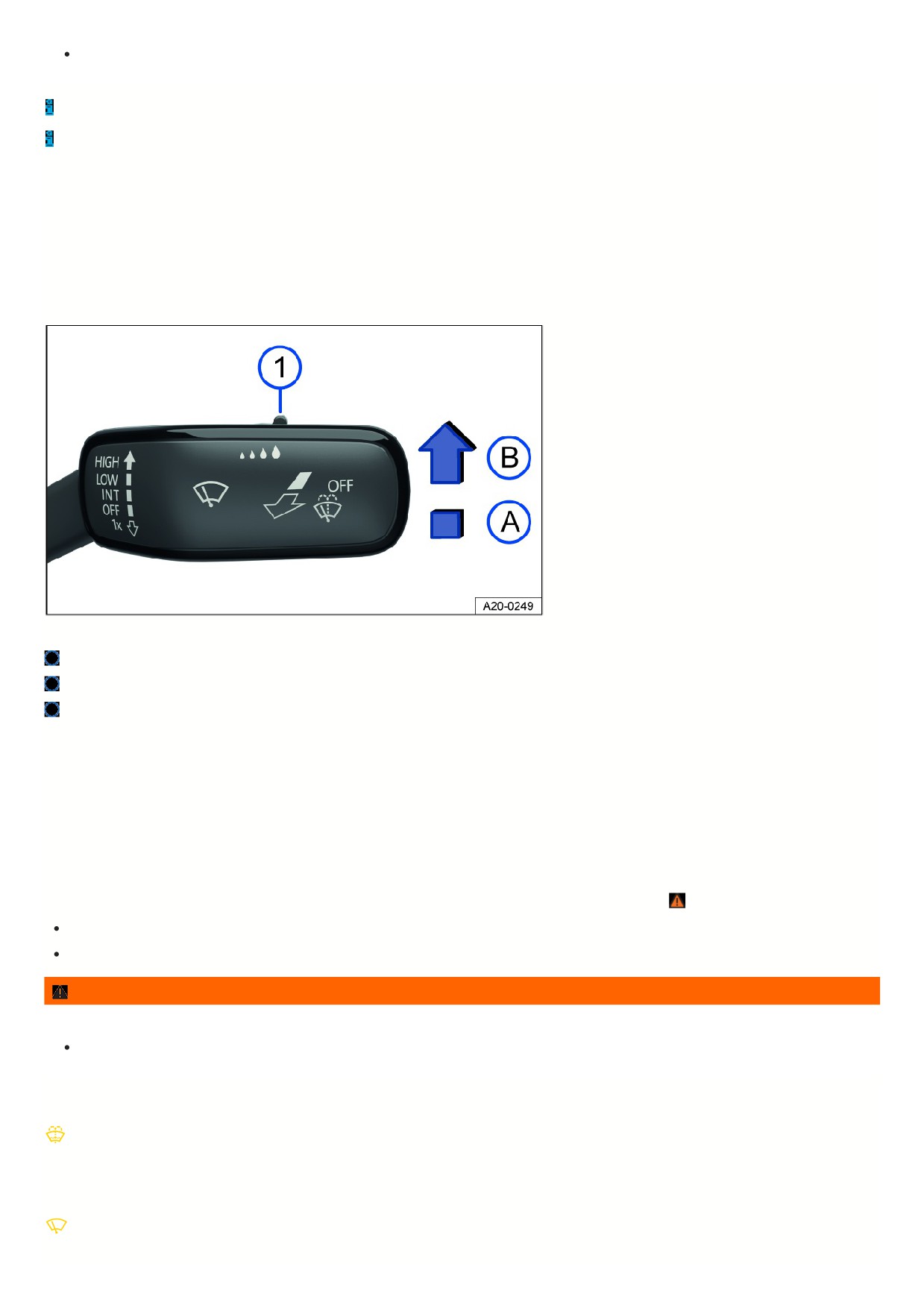
Fig. 85 On the right side of the steering column: windshield wiper lever.
Switch for adjusting the sensitivity of the rain/light sensor.
Rain/light sensor deactivated.
Rain/light sensor activated, automatic wiping as necessary.
When switched on, the rain/light sensor automatically shortens or lengthens the delay between wiping cycles depending on how hard it is raining.
Activating and deactivating the rain/light sensor
1. Press the lever into the desired position fig. 85.
Automatic wiping can be activated and deactivated in the vehicle settings in the Infotainment system
⇒ Vehicle settings menu.
If automatic wiping is deactivated in the Infotainment system, the interval time will be set in fixed stages.
Adjusting the sensitivity of the rain/light sensor
The sensitivity of the rain/light sensor can be manually adjusted with the switch in the windshield wiper lever fig. 85 , ⇒
Move the switch to the right - high sensitivity.
Move the switch to the left - low sensitivity.
WARNING
The rain/light sensor cannot detect all precipitation sufficiently and activate the windshield wipers accordingly.
If necessary, switch on the windshield wipers manually if water on the windshield is impairing visibility.
Troubleshooting
Washer fluid level too low
The yellow indicator light turns on.
1. Fill the washer fluid reservoir ⇒ Washer fluid.
Windshield wiper malfunction
The yellow indicator light turns on.
112

The windshield wipers are not working.
1. Switch the ignition off and on.
2. If the malfunction persists, contact a suitably qualified professional. Volkswagen recommends contacting an authorized Volkswagen dealer or authorized
Volkswagen Service Facility.
Rain/light sensor malfunction
The yellow indicator light turns on.
The windshield wipers will not be automatically activated in rain/light sensor mode when it is raining.
1. Switch the ignition off and on.
2. If the malfunction persists, contact a suitably qualified professional. Volkswagen recommends contacting an authorized Volkswagen dealer or authorized
Volkswagen Service Facility.
Changes to rain/light sensor reaction
Some possible reasons for malfunctions and misinterpretations in the sensor area of the rain/light sensor
⇒ View from the front could be:
Damaged wiper blades: damaged wiper blades can leave a film of water or streaks on the window, and this can extend the activation time, greatly shorten the
wiper intervals, or cause fast wiping time.
Insects: insects hitting the windshield may trigger the wipers.
Salt streaks: salt streaks on the windshield from driving in the winter can cause the wipers to wipe more frequently or continuously on a window that is almost
dry.
Dirt: dried dust, wax, any other build-up on the windshield (lotus effect), or washing product residue (car wash) can lower the sensitivity of the rain/light sensor
and cause it to react too slowly or not at all. Clean the sensor area for the rain/light sensor regularly and check the wiper blades for damage ⇒ Exterior care
and cleaning.
Crack in the windshield: if a stone strikes and chips the sensor area while the rain/light sensor is on, this will trigger a wiper cycle. After that, the rain/light
sensor will detect this irregularity on the sensor surface and react to it. Depending on the size of the chip, the reaction behavior of the rain/light sensor may or
may not change.
If there is an obstacle for the wipers on the window glass, the wipers will attempt to remove it. If it continues to block the wipers, the wipers will stop moving.
1. Remove the obstacle and switch the wipers on again.
Mirrors
General safety precautions
Using the outside mirrors and the interior rearview mirror, the driver can observe traffic and adjust their driving based on traffic.
For driving safety, it is important that the driver adjusts the outside mirrors and the interior rearview mirror correctly before starting to drive.
It is not possible to oversee the entire side and rear area of the vehicle by looking in the outside and interior rearview mirrors. These areas that are not visible are
called blind spots. Other road users and objects could be in the blind spot.
WARNING
Adjusting the outside mirrors and interior rearview mirror while driving can distract the driver. This can cause accidents and serious injuries.
Only adjust the outside mirror and interior rearview mirror when the vehicle is stationary.
When parking, changing lanes, passing, and turning, always pay attention to your surroundings, because other road users and objects could be within
the blind spot.
Always make sure that the mirrors are adjusted correctly and visibility to the rear is not limited by ice, snow, fog, or other objects.
WARNING
Inaccurate prediction of distance to vehicles behind you can cause accidents and serious injuries.
Curved mirror surfaces (convex or aspheric) enlarge the field of vision and allow objects in the mirror to appear smaller and farther away.
Using the curved mirrors to estimate the distance from vehicles behind you when changing lanes is imprecise and may cause accidents and serious
injuries.
Use the interior rearview mirror as much as possible to more accurately determine the distance to vehicles or other objects behind you.
Make sure there is sufficient visibility of the area behind the vehicle.
113
WARNING
An automatic dimming rearview mirror contains an electrolyte fluid that can leak out if the mirror glass breaks.
The leaking electrolyte fluid can irritate the skin, eyes, and respiratory organs, especially in individuals with asthma or similar illnesses. Immediately try to
exit the vehicle to get fresh air. If this is not possible, open all the windows and doors.
If the electrolyte fluid comes into contact with eyes or skin, wash the affected area immediately for at least 15 minutes with plenty of water and seek
medical assistance.
If the electrolyte fluid comes into contact with your shoes or clothing, wash it for at least 15 minutes with plenty of water. Clean the shoes and clothing
thoroughly before wearing them again.
If electrolyte fluid is swallowed, rinse out the mouth immediately for at least 15 minutes with plenty of water. Do not induce vomiting unless it ordered to
do so by a doctor. Call for medical assistance immediately.
NOTICE
If the glass on an automatic dimming mirror breaks, electrolyte fluid can leak out. This fluid damages plastic surfaces.
Remove any leaking fluid as soon as possible, for instance using a wet sponge.
Interior rearview mirror
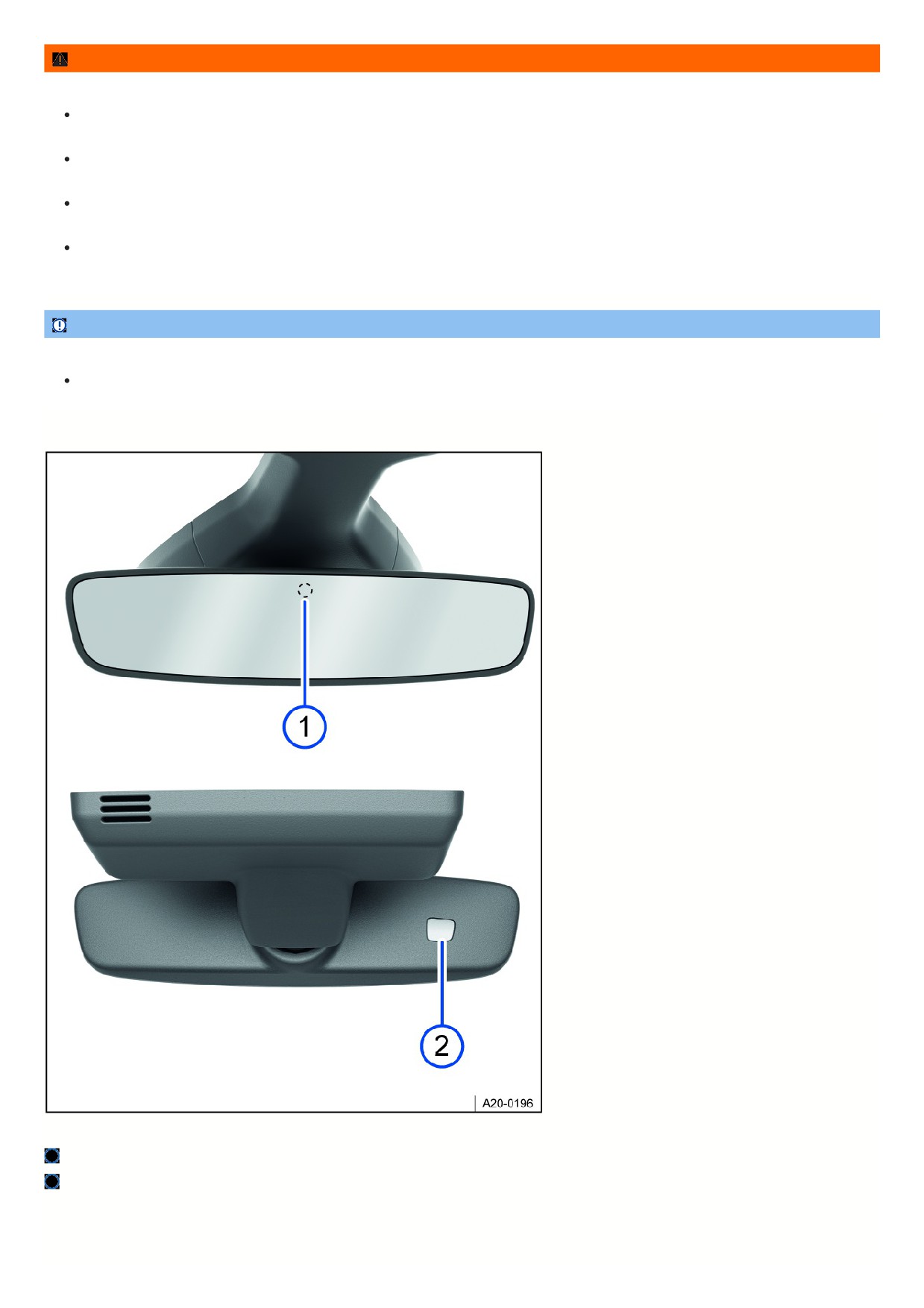
Fig. 86 On the windshield: automatic dimming interior rearview mirror.
Sensor for light entering from the rear.
Sensor for light entering from the front.
114
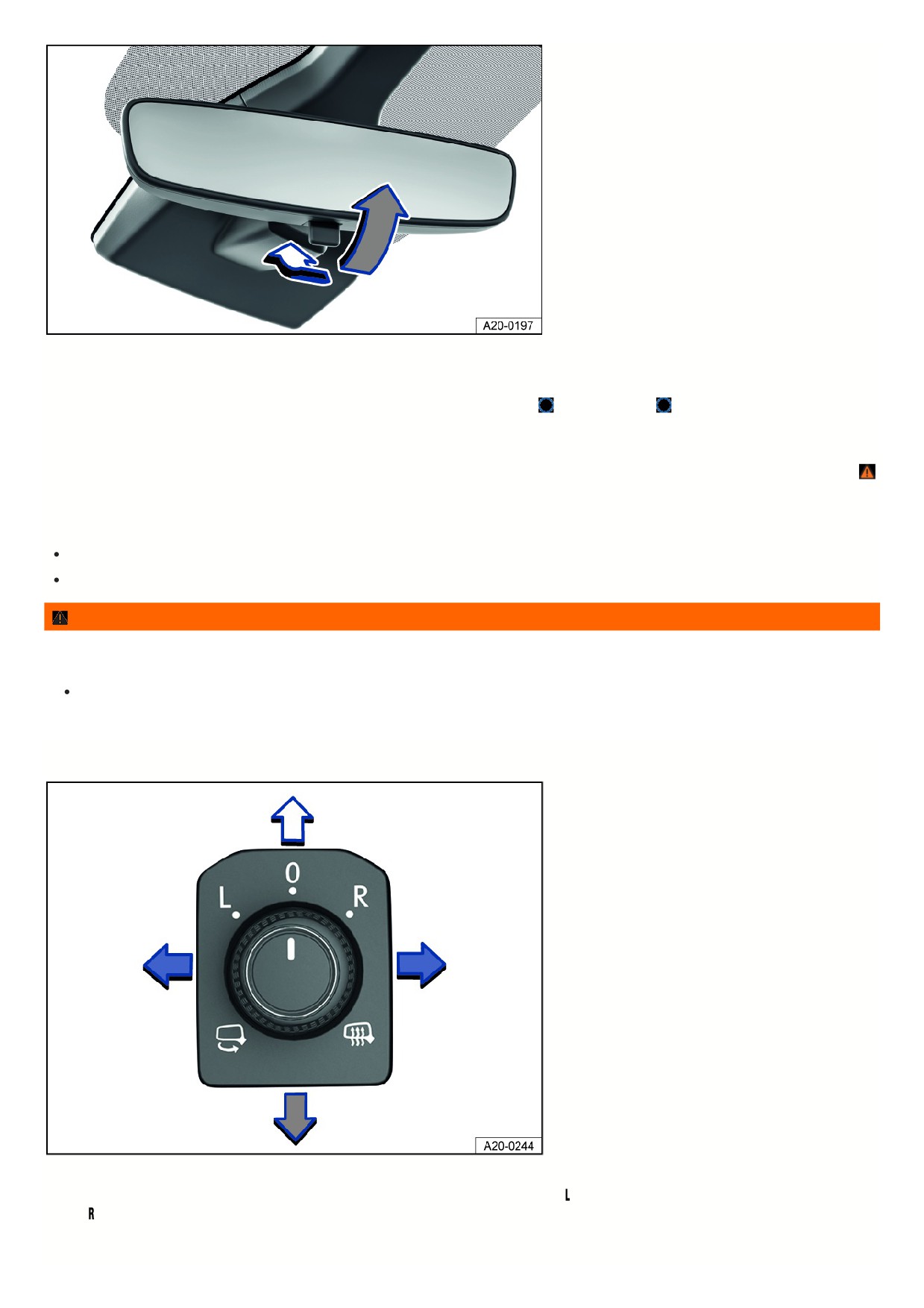
Fig. 87 On the windshield: manual dimming interior rearview mirror.
Automatic dimming interior rearview mirror
When the ignition is on, the sensors measure the amount of light entering from the rear fig. 86
and from the front
Depending on the measured values, the interior rearview mirror will dim automatically.
If the amount of light entering the sensors is limited or interrupted, for example by a sunshade or attachment, the automatic dimming interior rearview mirror may no
function or may malfunction. Mobile navigation devices on the windshield or near the automatic dimming interior rearview mirror can also affect the sensors ⇒
Automatic dimming will be deactivated in some situations, for example when reverse gear is engaged.
Manual dimming interior rearview mirror
Base position: lever on the lower edge of the mirror points forward toward the windshield.
To dim, pull the lever back fig. 87.
WARNING
The illuminated display on a mobile navigation device can cause the automatic dimming interior rearview mirror to malfunction, which can result in accidents
and serious injuries.
If the automatic dimming function malfunctions, it may not be possible to use the interior rearview mirror to evaluate the exact distance to vehicles or
other objects behind the vehicle.
Outside mirrors
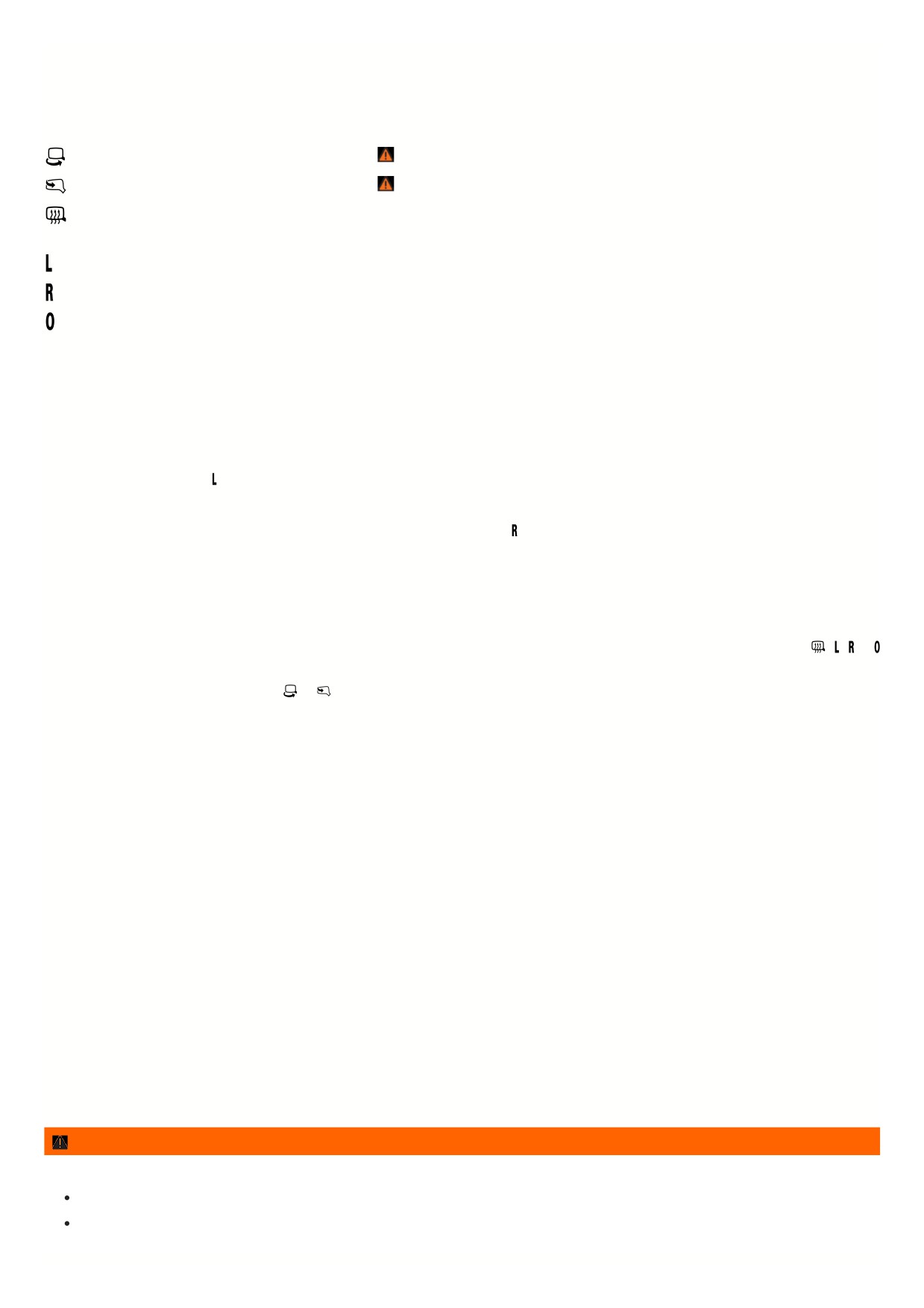
Fig. 88 In the driver door: knob for the outside mirrors.
The following information describes the outside mirror functions for left-hand drive vehicles. Position corresponds to the outside mirror on the driver's side, and
position corresponds to the outside mirror on the passenger's side. For right-hand drive vehicles, proceed in the reverse order.
Adjusting outside mirrors
115
1. Switch the ignition on.
2. Turn the knob in the driver door to the preferred symbol fig. 88.
3. To adjust the outside mirror, push the knob forward, back, right or left in the direction of the arrow.
The scope and the representation of the controls in the driver door vary depending on the vehicle equipment:
Fold the outside mirror in towards the vehicle body ⇒
Fold the outside mirror in towards the vehicle body ⇒
Switch on the outside mirror heating. The exterior mirror heating only works when the ambient temperature is below approx. 20 °C (around 68 °F) and
provides the most heat when it first turns on. After about two minutes, the mirrors will be heated depending on the ambient temperature.
Adjusts the left outside mirror.
Adjusts the right outside mirror.
Neutral position. The outside mirror cannot be adjusted and all functions are switched off.
Activating outside mirror functions
The following outside mirror functions must be activated in the vehicle settings in the Infotainment system before they are used for the first time
⇒ Vehicle settings
menu.
Synchronized mirror adjustment
The synchronized mirror adjustment feature simultaneously adjusts the right-side outside mirror to match adjustments to the left-side outside mirror.
1. Turn rotary knob to position
2. Adjusts the left outside mirror. The right outside mirror will be adjusted the same way (synchronized).
3. To correct the adjustment of the right outside mirror, if necessary, turn the knob to the
position and adjust the right outside mirror.
Automatic dimming exterior rearview mirror on the driver side
The automatic dimming exterior rearview mirror is controlled together with the automatic dimming interior rearview mirror
⇒ Interior rearview mirror.
Folding the outside mirrors in while parking
If the vehicle is locked or unlocked from the outside, the outside mirrors will automatically fold in or out. For this to happen, the knob must be in the
,
,
or
position.
If the knob for power exterior mirrors is in the
or
position, the outside mirrors will remain folded in.
Save the passenger-side outside mirror settings when reversing
1. Unlock the vehicle using the key, to which the setting is allocated.
2. Set the electronic parking brake.
3. Switch the ignition on.
4. Shift the transmission to neutral.
5. Select the reverse gear.
6. Adjust the front passenger outside mirror so that, for example, the edge of the curb can be seen clearly.
7. Shift the transmission to neutral.
8. Switch the ignition off.
The selected mirror position will be stored and assigned to the vehicle key.
Opening the front passenger outside mirror settings for driving in reverse
1. Turn rotary knob for the outside mirrors to the relevant position for adjusting the front passenger outside mirror.
2. With the ignition switched on, select reverse gear.
The front passenger outside mirror will adjust to the stored position.
The front passenger outside mirror will exit the position stored for driving in reverse when you begin driving forward faster than about 15 km/h (about 9 mph) or whe
the knob is turned to any other position.
WARNING
Inattentively folding the outside mirrors out and in can cause injuries.
Do not fold the outside mirrors out or in if there are any obstacles in the path.
Always make sure your fingers do not get pinched between the outside mirror and the mirror base when moving the mirror.
116
NOTICE
If outside mirrors are not folded in when driving through a car wash, they can get damaged.
Always fold in the outside mirrors.
Do not fold power outside mirrors in or out by hand because the mirror motor could be damaged.
Leave the outside mirror heating on only as long as it is needed. Otherwise fuel will be used unnecessarily.
If there is a malfunction in the power outside mirror, you can adjust the position of the mirror manually by hand by pushing on the edge of the mirror surface.
Sunshade
Sun visors
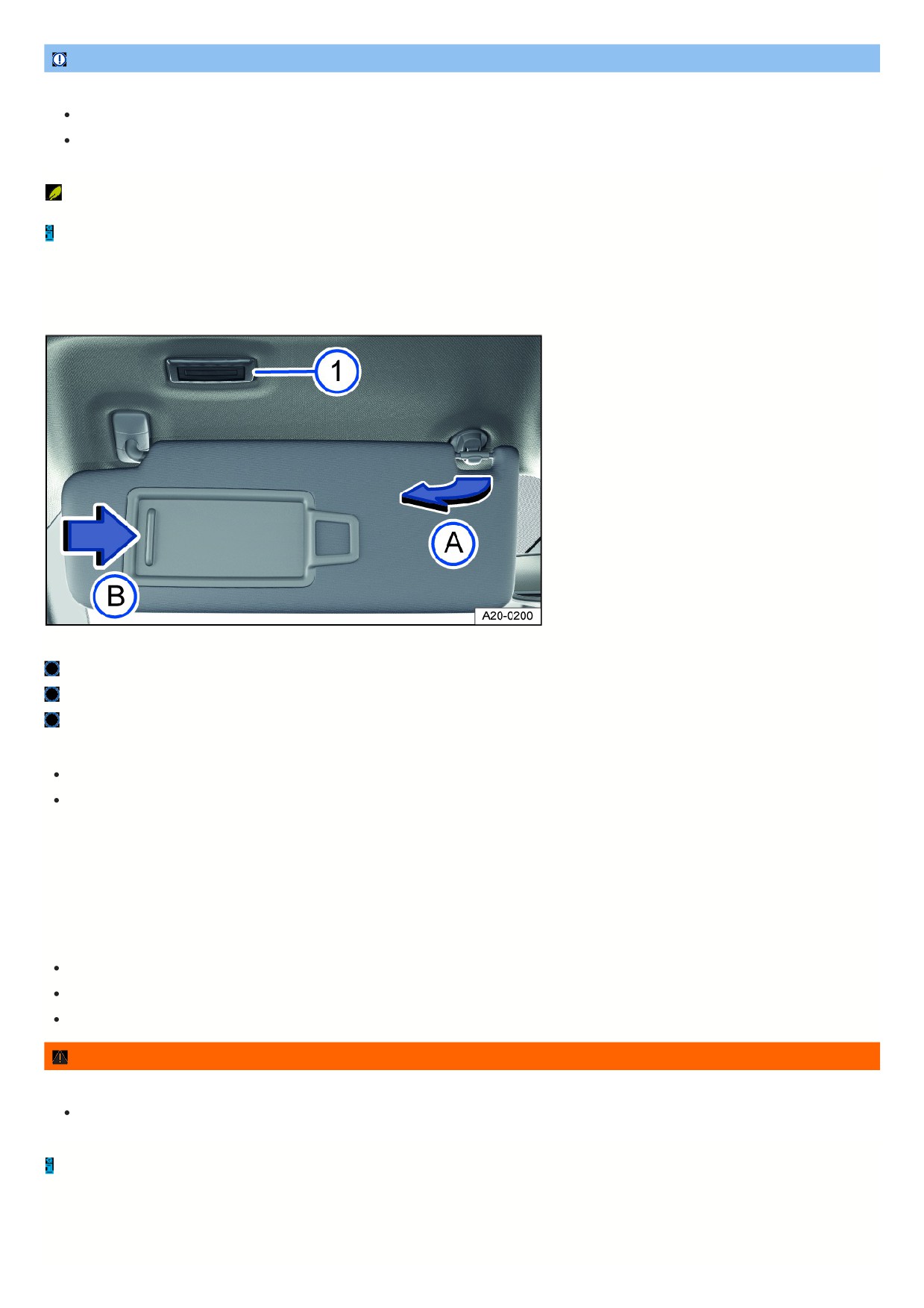
Fig. 89 In the front of the headliner: sun visor.
Light.
Remove from holder.
Slide cover open.
Adjustment options for the sun visors
Fold toward the windshield.
Remove from the holder and tilt toward the door fig. 89.
Adjustment options for the sun visor
In some vehicle models, the sun visor can be moved farther toward the rear when it is tilted toward the door.
Illuminated vanity mirror
When the sun visor is folded down, there is a vanity mirror located behind a cover. The lights fig. 89 turn on when the cover fig. 89 slides open.
The lighting for the vanity mirror switches off in the following situations:
The cover is closed.
The sun visor is swung upwards or fully forwards.
The sun visor is pushed in a longitudinal direction or not fully pushed in.
WARNING
Visibility may be reduced when sun visors are folded down and the sunshades are extended.
Always guide sun visors and sunshades back into their holders when they are no longer needed.
Under certain conditions, the light above the sun visor will turn off automatically after several minutes. This reduces the risk of the 12 V vehicle battery being
drained.
Windshield with communication window
117
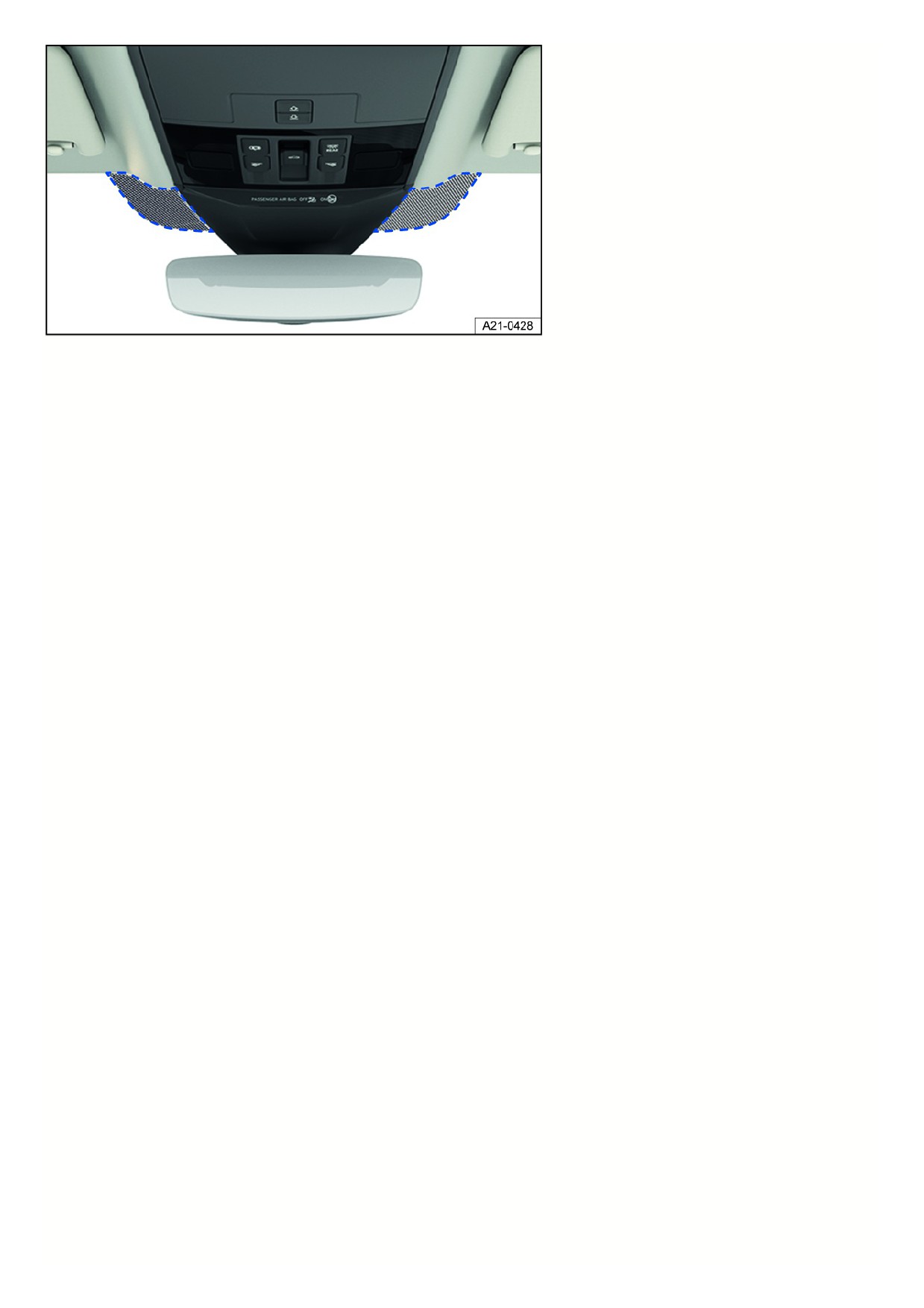
Fig. 90 Next to the mirror base: Communication window (general example).
Windshields made of heat protection glass may have an infrared-reflecting coating and may, depending on the vehicle equipment, be able to be wirelessly heated.
In order to ensure that wireless equipment from the accessories industry, e.g. toll systems, can function correctly, an uncoated area is present on either side of the
interior rearview mirror (communication window) fig. 90.
The uncoated areas must not be covered from the inside or outside, or have stickers on them, because this could cause malfunctions.
118
Heating and air conditioning system
Climatronic
Overview of the Climatronic
Automatic air conditioner
Climatronic is an automatic air conditioning system which warms, cools and dehumidifies the air. In automatic mode, Climatronic can automatically control the air
temperature, air distribution and the volume of air.
The air conditioner is most effective when the vehicle interior is kept closed. If there is a build-up of heat inside the vehicle, ventilation can help to speed up the
cooling process.
Some functions of the air conditioner, as well as a climate control bar for the rear seats, depend on the vehicle equipment.
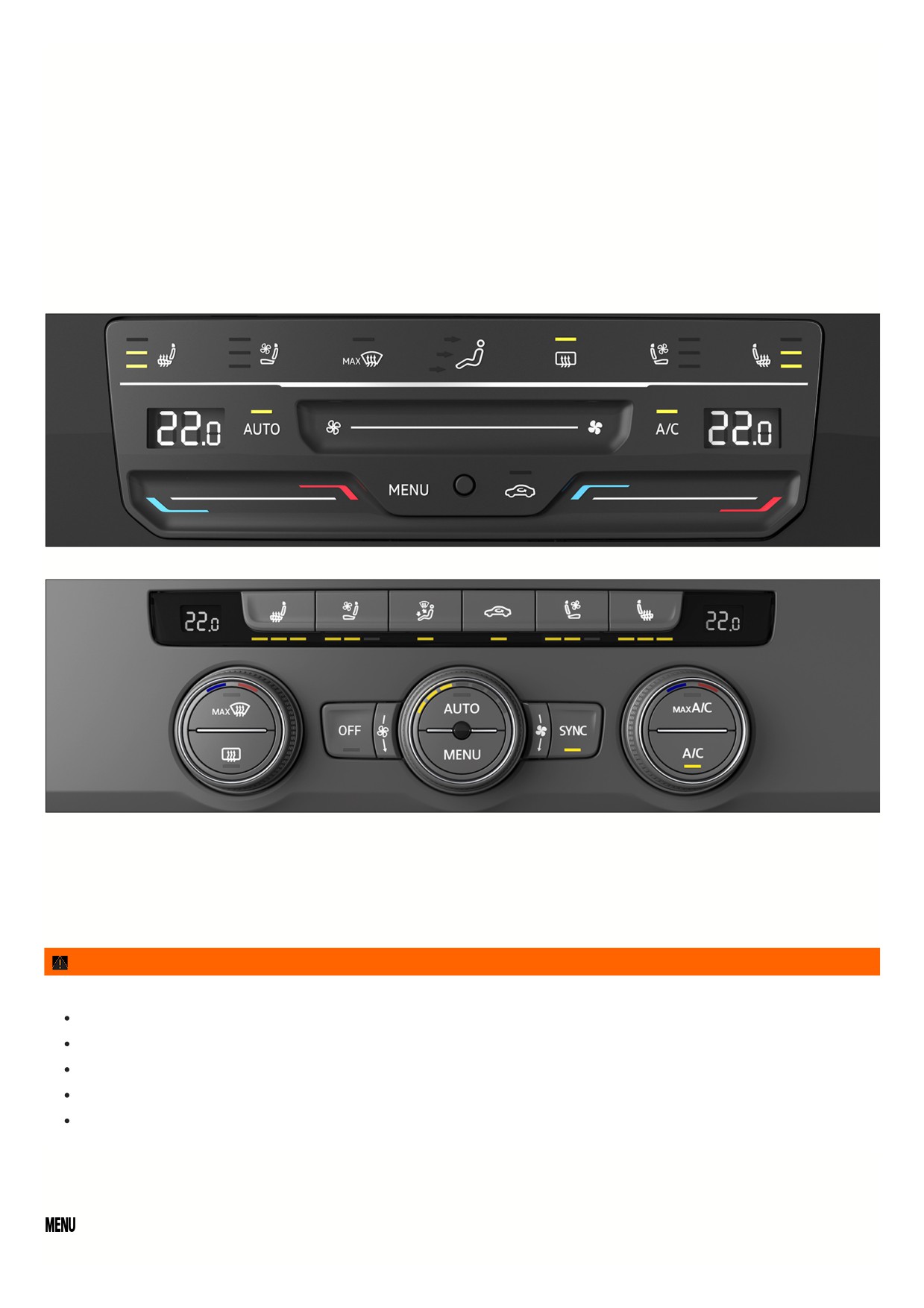
Fig. 91 In the upper section of the center console: air conditioning block for the Climatronic system (version 1).
Fig. 92 In the upper section of the center console: air conditioning block for the Climatronic system (version 2).
Display of activated functions
Illuminated LEDss on the climate control bar indicate that the function is activated.
In the Air conditioner menu in the Infotainment system, function keys highlighted in color indicate that a function is switched on
⇒ Air conditioner menu in the
Infotainment system.
WARNING
Poor visibility through the windows increases the risk of collisions and accidents that can cause serious or fatal injuries.
Keep all windows free of ice, snow and fog.
Adjust the heating, air conditioner, and rear window defroster to a setting where the windows do not fog up
⇒ Troubleshooting.
Only start driving when all windows are clear.
Only use recirculation mode for a short time. Otherwise, the windows could fog up very quickly and greatly reduce visibility.
Always switch off recirculation mode when it is not necessary.
Air conditioner menu in the Infotainment system
On the climate control bar
Open the Air conditioner menu in the Infotainment system.
The Air conditioner menu in the Infotainment system is only available via the Climatronic. Certain functions depend on the vehicle equipment.
119
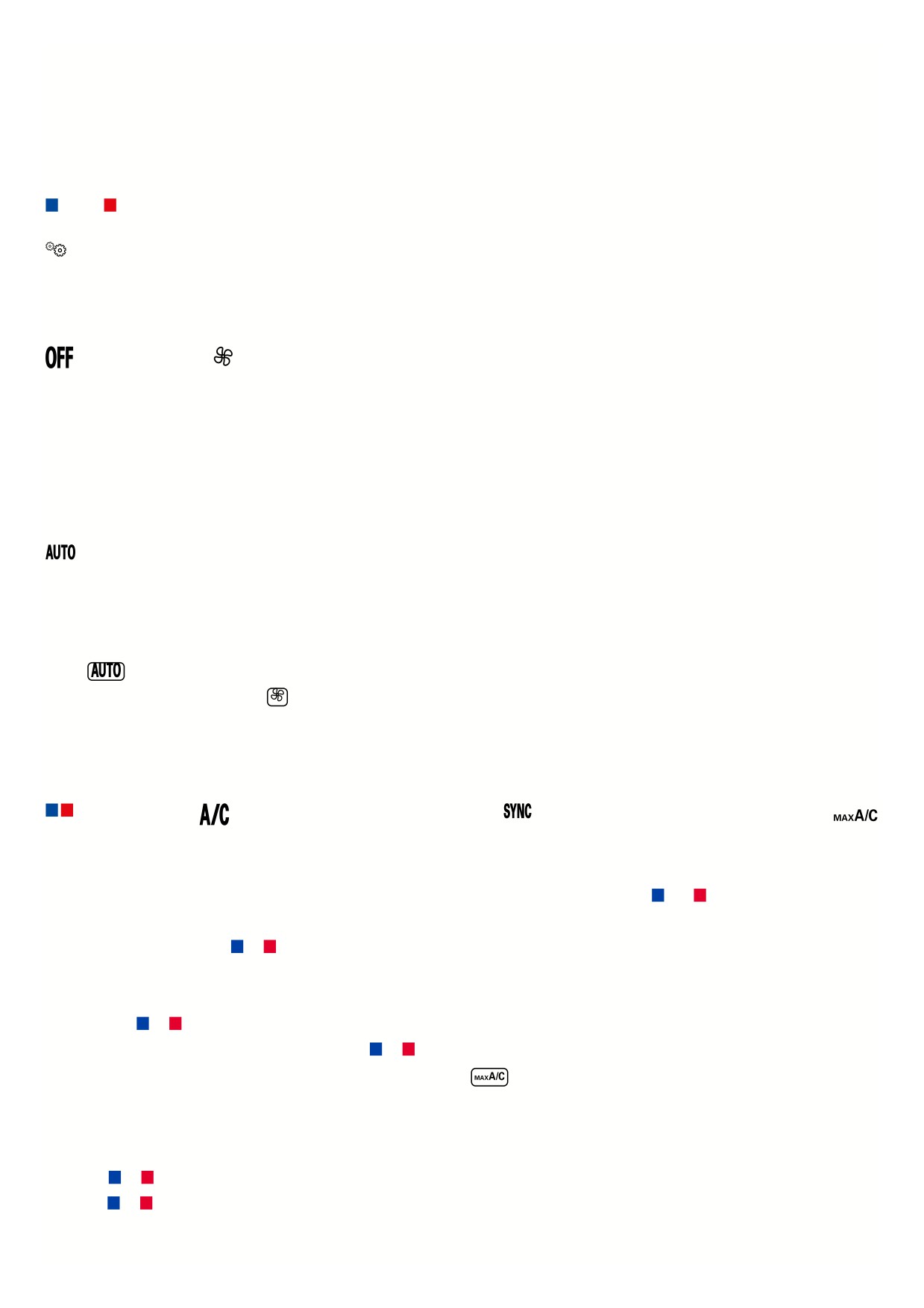
In the Air conditioner menu, you can find, for example, the functions for temperature regulation
⇒ Temperature regulation and air distribution ⇒ Air distribution and
blower speed.
The top of the screen shows the current climate control settings, such as the air conditioner profile for automatic mode.
The lower section of the screen shows function keys for frequently used air conditioning functions.
Operating status of the air conditioner
The operating status of the air conditioning system is represented by colors:
Cooling. Heating.
Climate control settings submenu
Open the Climate control settings submenu.
Depending on the vehicle equipment, you can find additional comfort functions in the Climate control settings submenu:
Switching the Climatronic on and off
In the air conditioner menu or on the climate control bar
Switch off the Climatronic.
Adjust the blower speed.
1. To switch on the Climatronic, swipe towards the right on the touch slider for the blower speed.
Or: Turn the center knob clockwise.
2. To switch off the Climatronic, swipe towards the left on the touch control for the blower speed.
Or: Turn the center knob counterclockwise as far as it will go.
Automatic mode of the Climatronic
In the air conditioner menu or on the climate control bar
The set air temperature is maintained constant. The air volume and air distribution are automatically controlled. Automatic mode switches off when the
blower speed is changed manually.
Selecting the air conditioner profile
The blower power in automatic mode can be controlled via the air conditioning profiles.
1. Open the air conditioner menu.
2. Tap
3. To select an air conditioner profile, tap
at the top of the screen.
4. Select your preferred air conditioner profile in the pop-up window.
Temperature regulation
In the air conditioner menu or on the climate control bar
Adjust the temperature.
The air is cooled and dehumidified in cooling mode.
Apply temperature settings for the driver side to all seats.
Switch the maximum cooling output on and off.
Air recirculation is switched on automatically and Climatronic automatically directs air to the upper body.
Setting the temperature on the Climatronic climate control bar
1. To set the temperature of the Climatronic to +72 °F (+22 °C), tap and hold the touch control in the center between
and
Or: to set a different temperature, swipe to the right or left on the touch control.
Or: turn the left or right knob to
or
The Climatronic displays the set temperatures.
Maximum cooling output and heating output
1. Tap and hold
or
on the Climatronic touch control.
Or: Turn the left or right knob of the Climatronic system to
or
as far as it will go.
Or: To switch on the maximum cooling output of the Climatronic system, press
on the climate control bar.
Adjusting the temperature for the rear seats
1. Open the Air conditioner menu in the Infotainment system.
2. Tap the function key for the rear seats.
3. Tap the
or
function key.
Or: tap
or
on the climate control bar for the rear seats.
The set temperatures for the rear seats are shown on the climate control bar displays for the rear seats.
12
If
is activated in the Infotainment system, the rear climate control bar cannot be used.
Air distribution and blower speed
Vents
Vents are located in the following places in the vehicle:
Driver’s side.
Passenger's side.
Front center console.
Rear center console.
NOTICE
Food, medication, and objects that are sensitive to heat or cold can become damaged or unusable from the air coming out of the vents.
Do not place any food, medication, or other objects that are sensitive to temperature in front of the vents.
Air distribution functions in the Air conditioner menu on the climate control bar
Adjust the blower speed.
Top arrow: Direct air onto the windshield.
Middle arrow: Direct air to the upper body.
Bottom arrow: Direct air into the footwell.
Direct air to the upper body.
Direct air into the footwell.
Direct air onto the windshield.
Defrost function
Switching defrost on and off
The Climatronic defrost function clears fog and ice from the windshield.
The air is dehumidified and the blower is set to a higher speed.
Air recirculation
Switching air recirculation on and off in the Air conditioner menu or climate control bar
No fresh air will enter the vehicle interior when recirculation mode is switched on.
1. Press
on the climate control bar.
When does recirculation mode switch off?
Recirculation mode will switch off in the following situations
⇒
:
If the defrost function is switched on.
If a sensor detects that the windows could fog up.
WARNING
Lack of air circulation can lead to sudden driver fatigue and lack of concentration, which can cause collisions, accidents, and serious injuries.
Never use recirculation mode for long periods of time, because this prevents fresh air from entering the passenger compartment.
Only use recirculation mode for a short time. Otherwise, the windows could fog up very quickly and greatly reduce visibility.
Always switch off recirculation mode when it is not necessary.
NOTICE
Do not smoke in the vehicle when recirculation mode is switched on. The smoke can settle on the refrigerant system evaporator and the active combination filter
and cause permanent odors.
Climatronic: When reverse gear is engaged or while the automatic wash and wipe system is on, recirculation mode switches on automatically so that no odors
will enter the vehicle interior.
Seat heating and seat ventilation
Switching the seat heating and seat ventilation on and off in the Air conditioner menu or in the climate control bar
121
The seat heating and seat ventilation function when the engine is running. The front seats and outer rear seats may be heated in three stages
⇒ . The front se
may also be ventilated from inside in three stages.
The seat ventilation function ventilates the seat using vehicle interior air. This removes moisture from the body. The seat itself is not cooled directly.
Switch seat heating on and off. Switch seat ventilation on and off.
If you switch off the ignition, the seat heating and seat ventilation are also switched off. If you switch on the ignition again within ten minutes, the last heating level o
ventilation level selected for the driver seat is also automatically activated.
Heating and ventilation levels
The seat heating and seat ventilation are represented by colors:
At the highest heating or ventilation level, all three LEDss light up.
Using the seat heating function
1. In order to switch on the seat heating at the highest heating level, press the
or
button in the climate control bar.
2. To set the heating level, press the
button or the
button repeatedly.
3. To turn off the seat heating, press the
or
button repeatedly until the LEDs turns off.
Using the seat ventilation function
1. In order to switch on the seat ventilation at the highest ventilation level, press the
or
button in the climate control bar.
2. To set the ventilation level, press the
or
button repeatedly.
3. To turn off the seat ventilation, press the
or
button repeatedly until the LEDs turns off.
When should the seat heating and seat ventilation not be switched on?
Do not switch on the seat heating and seat ventilation under any of the following conditions:
The seat is occupied by a person with a limited perception of pain or temperature
⇒
The seat is not occupied
The seat is covered with a seat cover
A child restraint is installed on the seat
The seat surface is damp or wet
Seat heating only: The interior or exterior temperature is higher than +77 °F (+25 °C).
WARNING
Magnetic fields are generated when the seat heating is operated. In individual cases, these magnetic fields can affect active medical implants (e.g.
pacemakers).
Wearers of an active medical implant should consult their doctor or the manufacturer of their implant before operating the seat heating.
If necessary, make your vehicle occupants aware of this as well.
WARNING
People who cannot perceive pain or temperature or who have a limited perception of these due to medication, paralysis, or chronic illnesses such as diabetes
could develop burns or undercooling on the back, buttocks, and legs when using seat heating or seat ventilation. Such injuries could take a very long time to heal
or may never heal completely. Contact a medical doctor for questions about personal health conditions.
People with a limited perception of pain and/or temperature must never use the seat heating and seat ventilation functions.
WARNING
If the seat cover is soaked through, this can cause the seat heating to malfunction and increase the risk of burns.
Make sure the seat surface is dry before using the seat heating function.
Never sit on the seat while wearing damp or wet clothing.
Do not place any damp or wet objects and clothing on the seat.
Do not pour any fluids on the seat.
NOTICE
To prevent damage to the seat heating elements, never kneel on the seats or exert pressure on the seating surface and backrest with sharp or pointed
122