Volkswagen New Beetle. Manual - part 28
 

  Index      Volkswagen     Volkswagen New Beetle 1998-2008 year - service repair manual


Search            


Content   ..  26  27  28  29   ..


Volkswagen New Beetle. Manual - part 28


DISABLING & ACTIVATING AIR BAG SYSTEM 

Disabling System 

1. Obtain radio security code from vehicle owner. Ensure radio is off before disconnecting battery. This will 

prevent damage to radio microprocessor.  

2. Before proceeding, see SERVICE PRECAUTIONS . Turn ignition switch to OFF position. Disconnect 

and shield negative battery cable. Locate and disconnect air bag module and seat belt tensioner 
connectors and passenger-side air bag module connector.  

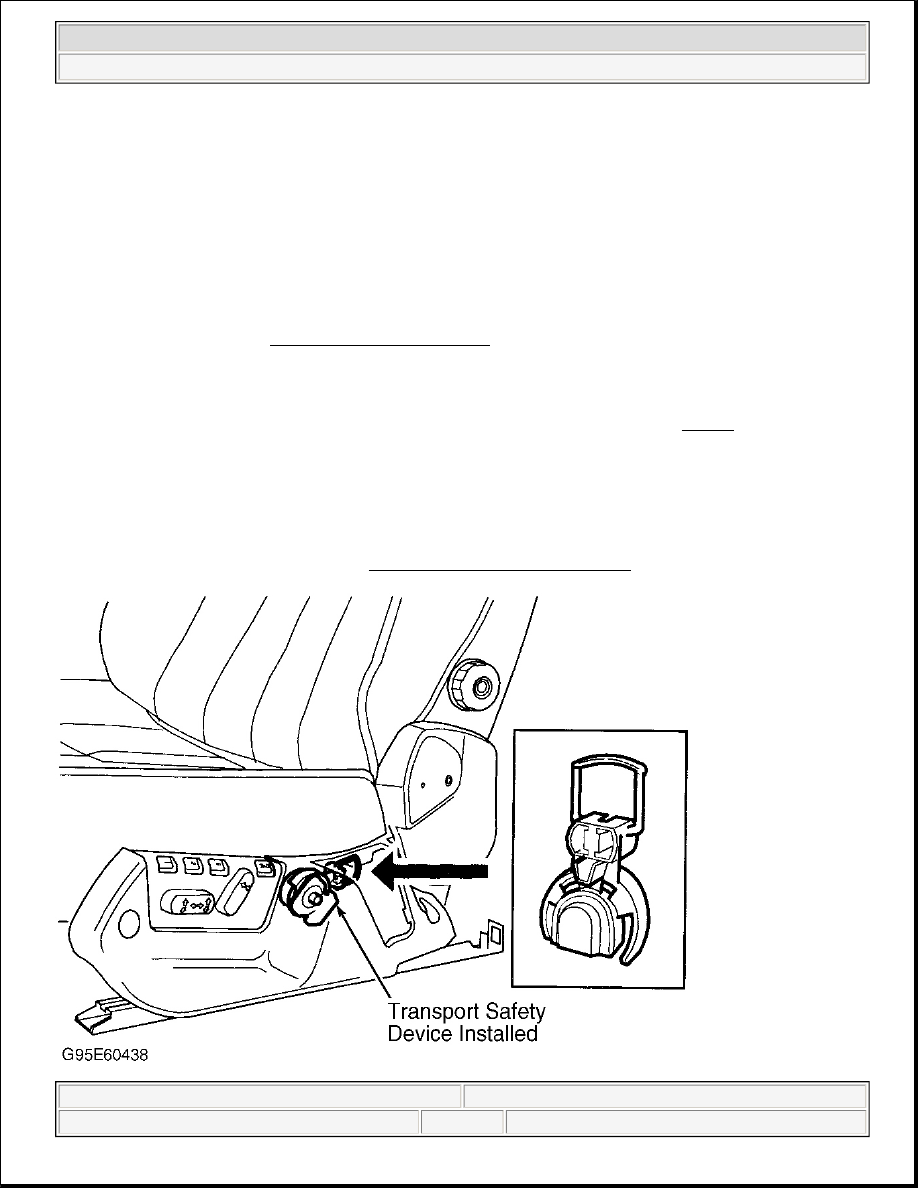
3. On models with side air bags, remove cover from side seat compartment. Remove transport safety device 

from inside of cover. Install transport safety device onto side impact sensor. See Fig. 34 . Repeat 
procedure for opposite front seat. SRS system is now disabled.  

Activating System 

After repairs are performed, ensure all wiring and component connectors are connected. Turn ignition switch to 
ON position. Connect negative battery cable. Ensure vehicle is not occupied when connecting battery cable. 
Ensure system is functioning properly. See SYSTEM OPERATION CHECK .  

WARNING:

DO NOT disconnect crash sensor connector or standby power unit to 
disable system. This action could cause air bag to deploy. 


1997 Lexus SC 300 

GENERAL INFORMATION Air Bag Deactivation Procedures


Helpmelearn Repair Manuals 


Wednesday, January 18, 2006 7:48:26 PM

Page 59 

© 2004 Mitchell Repair Information Company, LLC. 

Fig. 34: Disabling Side Air Bags (960, S90 & V90 Shown; 850, S70 & V70 Are Similar) 
Courtesy of VOLVO CARS OF NORTH AMERICA


1997 Lexus SC 300 

GENERAL INFORMATION Air Bag Deactivation Procedures


Helpmelearn Repair Manuals 


Wednesday, January 18, 2006 7:48:26 PM

Page 60 

© 2004 Mitchell Repair Information Company, LLC. 

GENERAL INFORMATION 

Trouble Shooting - Basic Procedures 

ACCESSORIES & ELECTRICAL 

CHARGING SYSTEM TROUBLE SHOOTING 

BASIC CHARGING SYSTEM TROUBLE SHOOTING CHART 

NOTE:

This is GENERAL information. This article is not intended to be specific to any 
unique situation or individual vehicle configuration. The purpose of this Trouble 
Shooting information is to provide a list of common causes to problem 
symptoms. For model-specific Trouble Shooting, refer to SUBJECT, 
DIAGNOSTIC, or TESTING articles available in the section(s) you are accessing. 

NOTE:

This is GENERAL information. This article is not intended to be specific to any 
unique situation or individual vehicle configuration. The purpose of this Trouble 
Shooting information is to provide a list of common causes to problem 
symptoms. For model-specific Trouble Shooting, refer to SUBJECT, 
DIAGNOSTIC, or TESTING articles available in the section(s) you are accessing. 

CONDITION & POSSIBLE 
CAUSE 

CORRECTION 

Vehicle Will Not Start 

Dead battery 

Check battery cells, alternator belt tension and alternator 

output 

Loose or corroded battery 
connections 

Check all charging system connections 

Ignition circuit or switch 
malfunction 

Check and replace as necessary 

Alternator Light Stays On With Engine Running 

Loose or worn alternator 
drive belt 

Check alternator drive tension and condition, See Belt 

Adjustment in TUNE-UP article in the TUNE-UP 

section 

Loose alternator wiring 
connections 

Check all charging system connections 

Short in alternator light 
wiring 

See Indicator Warning Lights in STANDARD 

INSTRUMENTS in the ACCESSORIES & 

EQUIPMENT section 

Defective alternator stator or 
diodes 

See Bench Tests in ALTERNATOR article 

Defective regulator 

See Regulator Check in ALTERNATOR article 

Alternator Light Stays Off With Ignition Switch ON 


1998 Chevrolet Pickup C1500 

GENERAL INFORMATION Trouble Shooting - Basic Procedures


1998 Chevrolet Pickup C1500 

GENERAL INFORMATION Trouble Shooting - Basic Procedures


Blown fuse 

See WIRING DIAGRAMS 

Defective alternator 

See Testing in ALTERNATOR article 

Defective indicator light 
bulb or socket 

See Indicator Warning Lights in STANDARD 

INSTRUMENTS in the ACCESSORIES & 

EQUIPMENT section 

Alternator Light Stays OFF With Ignition Switch ON 

Short in alternator wiring 

See On-Vehicle Tests in ALTERNATOR article 

Defective rectifier bridge 

See Bench Tests in ALTERNATOR article 

Lights or Fuses Burn Out Frequently 

Defective alternator wiring 

See On-Vehicle Tests in ALTERNATOR article 

Defective regulator 

See Regulator Check in ALTERNATOR article 

Defective battery 

Check and replace as necessary 

Ammeter Gauge Shows Discharge 

Loose or worn drive belt 

Check alternator drive belt tension and condition. See 

Belt Adjustment in TUNE-UP article in the TUNE-UP 

section 

Defective wiring 

Check all wires and wire connections 

Defective alternator or 
regulator 

See Bench Tests and On-Vehicle Tests in 

ALTERNATOR article 

Defective ammeter, or 
improper ammeter wiring 
connection 

See Testing in STANDARD INSTRUMENTS in the 

ACCESSORIES & EQUIPMENT section 

Noisy Alternator 

Loose drive pulley 

Tighten drive pulley attaching nut 

Loose mounting bolts 

Tighten all alternator mounting bolts 

Worn or dirty bearings 

See Bearing Replacement ALTERNATOR article 

Defective diodes or stator 

See Bench Test in ALTERNATOR article 

Battery Does Stay Charged 

Loose or worn drive belt 

Check alternator drive belt tension and condition. See 

Belt Adjustment in appropriate TUNE-UP article in the 

TUNE-UP section 

Loose or corroded battery 
connections 

Check all charging system connections 

Loose alternator connections 

Check all charging system connections 

Defective alternator or 
battery 

See On-Vehicle Tests and Bench Tests in 

ALTERNATOR article 

Add-on electrical 
accessories exceeding 
alternator capacity 

Install larger alternator 

Battery Overcharged-Uses Too Much Water 

Defective battery 

Check alternator output and repair as necessary 


1998 Chevrolet Pickup C1500 

GENERAL INFORMATION Trouble Shooting - Basic Procedures


Content   ..  26  27  28  29   ..