Volkswagen Golf Variant / Jetta. Manual - part 744
 

  Index      Volkswagen     Volkswagen Golf Variant (2007), Jetta (2005) - service repair manual


Search            


Content   ..  742  743  744  745   ..


Volkswagen Golf Variant / Jetta. Manual - part 744


Electronics boxes

4.1

Removing and installing electronics box

on left side of engine compartment

Caution

When battery -A- is disconnected and reconnected, the pro‐

cedure  described  in  the  workshop  manual  must  be  strictly

observed 

⇒ page 4

 .

Removing
– Disconnect battery -A- 

⇒ page 4

 .

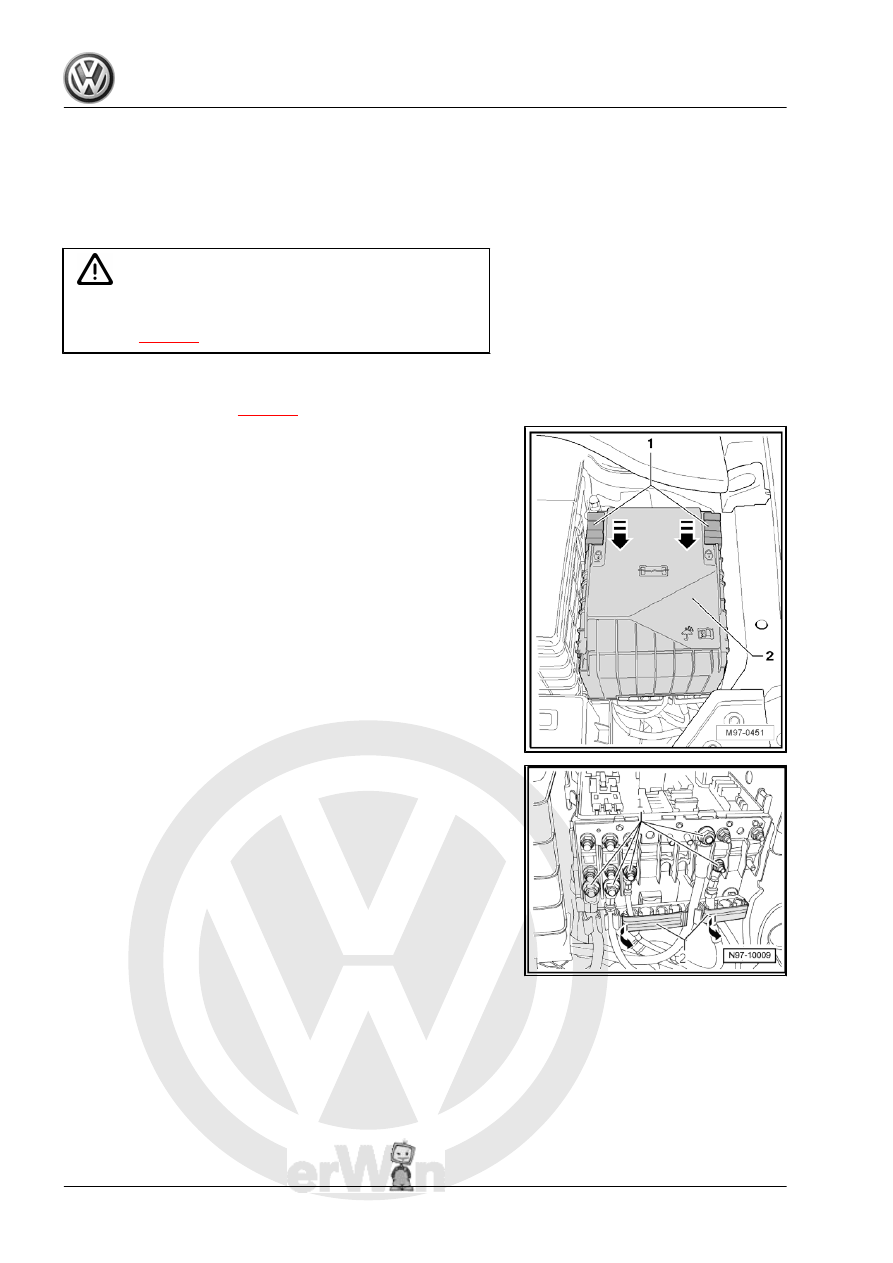
– Push safety clip -1- in direction of -arrow- and remove cover

from electronics box -2- upwards.

– Remove nuts -1-.
– Open -arrows- covers -2- of cable guides on electronics box.
– Remove wiring from stud connections.
– Unclip wiring from cable guides.

446

Note

Removing the central bolt -arrow- causes the E-box -1- to be

pushed upwards off the E-box mounting.

– Pull electronics box -1- upwards off bracket of electronics box.

Note

For removal of the flat contact housing -1-, the air filter housing

(on vehicles with diesel engine only), the battery -A- and the bat‐

tery tray must be removed.

– If necessary, remove air filter housing.
– Remove battery -A- 

⇒ page 4

 .

– Remove bolts -arrows- for battery tray -1-.
– Take battery tray -1- out of vehicle.

4. Electronics boxes    

447

slide flat contact housing -1- sideways -arrow A- out of bracket

of electronics box.

– Press tabs apart on bracket of electronics box -arrows C- and

slide flat contact housing -2- forwards -arrow D- out of bracket

of electronics box.

– Remove securing nuts -arrows- from bracket of E-box -1-.

Note

The installation of an additional relay carrier depends entirely on

the vehicle equipment.

– Pull bracket of electronics box -1- upwards off studs (be careful

not to stretch wiring of additional relay carrier).

– Unclip additional relay carrier -1- sideways out of bracket of

electronics box -2-.

– Take bracket of electronics box -2- out of vehicle.
Installing
Carry out installation in the reverse sequence, noting the follow‐

ing:
– Tighten threaded connections to specified torques

⇒ page 507

 .

448

of -arrow- until cover -2- engages.

Note

Then check whether the cover -2- of the electronics box is en‐

gaged correctly.

4. Electronics boxes    

449


Content   ..  742  743  744  745   ..