Volkswagen Golf Variant / Jetta. Manual - part 604
 

  Index      Volkswagen     Volkswagen Golf Variant (2007), Jetta (2005) - service repair manual


Search            


Content   ..  602  603  604  605   ..


Volkswagen Golf Variant / Jetta. Manual - part 604


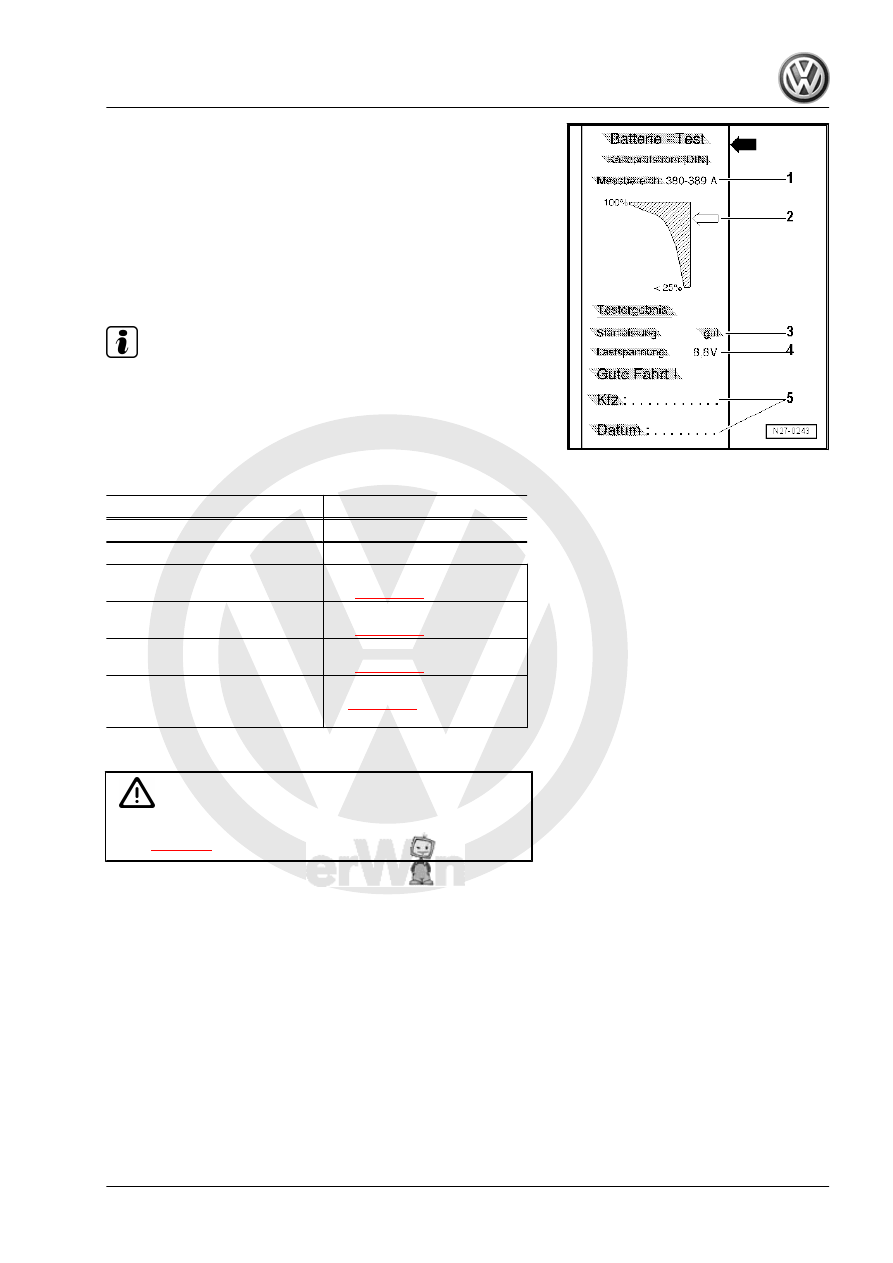
Explanations of test printout

1 - Measuring range set on battery tester with printer -VAS

5097 A- .

2 - Diagram, -arrow- indicates condition of battery -A- .
3 - Test result
4 - Voltage that was applied to battery -A- during load test.
5 - Vehicle data and date. Must be completed by test person‐

nel.

Note

The test printout is required for warranty claims.

Perform test once only. Repeating the test falsifies the results.

2.4.6

Evaluation of test result

Printout

Measures

Starting output very good

Battery -A- OK

Starting output good

Battery -A- OK

Starting output sufficient

Evaluation by current draw

test 

⇒ page 23

Starting output poor

Evaluation by current draw

test 

⇒ page 23

Starting output very poor

Evaluation by current draw

test 

⇒ page 23

Cannot be tested

– Charge battery -A-

⇒ page 26

 and test it

again.

2.5

Battery tester with printer -VAS 6161-

WARNING

Danger of injury! Observe warning notices and safety regula‐

tions 

⇒ page 2

 !

It is not necessary to remove or disconnect battery -A- when using

battery tester with printer -VAS 6161- .
The battery tester with printer -VAS 6161- does not load the bat‐

tery -A- any more. It works on the principle of dynamic conduc‐

tance acquisition.
All types of battery are stored in the battery tester with printer -

VAS 6161- .
Data can be stored on an SD card.
The battery tester with printer -VAS 6161- can be updated via an

interface or an SD card, so that battery data from VW are always

up to date.
Integrated infrared sensor (battery temperature measurement)

improves measurement quality.
A 2D scanner is available as an option to read data directly from

the bar code of the battery -A- .

2. Checking battery A     

13

Observe the ⇒  operating manual of the battery tester with printer

-VAS 6161- .

♦ Description of battery tester with printer -VAS 6161-

⇒ page 14

♦ Battery test 

⇒ page 14

 .

♦ Performing maintenance test 

⇒ page 16

 .

♦ Performing service test 

⇒ page 17

♦ Performing warranty test 

⇒ page 17

♦ Explanations of test printout 

⇒ page 18

♦ Evaluation of test result 

⇒ page 18

 .

2.5.1

Description of battery tester with printer

-VAS 6161-

Battery tester with printer -VAS 6161-
1 - Internal printer
2 - Operating lever for paper compartment
3 - Paper slot
4 - Display with main menu
5 - Control panel with 

ON/OFF

 button

6 - Connection for battery test cable
7 - Card slot for SD card
8 - Infrared sensor (temperature measurement)
9 - Data transmitter for PC

2.5.2

Battery test

WARNING

Danger of injury! Observe warning notices and safety regula‐

tions 

⇒ page 2

 !

Special tools and workshop equipment required
♦ Battery tester with printer -VAS 6161-

14

WARNING

Do not test or charge batteries -A- whose magic eye is “col‐

ourless/light yellow”. Do not slave/jump start the vehicle!
Danger  of  explosion  when  checking  and  charging  or  slave/

jump starting
These batteries -A- must be replaced.

Note

The temperature of the battery -A- must be at least 10 °C.

– Switch off ignition and all electrical consumers.
– Check magic eye on batteries -A- with magic eye 

⇒ page 5

 .

– Switch on battery tester with printer -VAS 6161- 

⇒ page 14

 .

– Connect red terminal clamp (+) to positive terminal of battery

-A- .

– Connect black terminal clamp (-) to negative terminal of bat‐

tery -A- .

Note

Ensure test clamps have a good contact!

– Select one of the following functions.
♦ Maintenance test (only in new cars before registration, in sta‐

tionary and stock maintenance programme) 

⇒ page 16

 .

♦ Service test 

⇒ page 17

 .

♦ Guarantee test 

⇒ page 17

 .

Note

The test is completed after about 10 seconds.

The result of the test is printed out by the printer.

The battery tester with printer -VAS 6161- requires no cooling

phase before it is ready for the next measurement.

– Switch off battery tester with printer -VAS 6161- 

⇒ page 14

 .

– Remove test terminals.

2. Checking battery A     

15

Performing maintenance test

WARNING

Do not test or charge batteries -A- whose magic eye is “col‐

ourless/light yellow”. Do not slave/jump start the vehicle!
Danger  of  explosion  when  checking  and  charging  or  slave/

jump starting
These batteries -A- must be replaced.

Special tools and workshop equipment required
♦ Battery tester with printer -VAS 6161-

Carry out following procedures:
– Select “Maintenance test” in menu.
– Connect scanner.

Note

If no scanner is available, write vehicle identification number on

test printout by hand.

– Scan vehicle identification number.
– Select “On battery terminal” or “On jump start point”.
– Select vehicle type.
– Scan the barcode or select “Type and Manufacturer” manually

from menu.

– Measure temperature above battery -A- . To do this, hold in‐

frared sensor about 5 cm above one battery terminal until

temperature stabilises.

– Start test.
– Print out test protocol.

16


Content   ..  602  603  604  605   ..