Volkswagen Golf Variant / Jetta. Manual - part 334
 

  Index      Volkswagen     Volkswagen Golf Variant (2007), Jetta (2005) - service repair manual


Search            


Content   ..  332  333  334  335   ..


Volkswagen Golf Variant / Jetta. Manual - part 334


gap is visible between the handle and the button. The button

locks when released.

– Secure the button in this position with a cable tie or wire to

prevent the button from being pressed in.

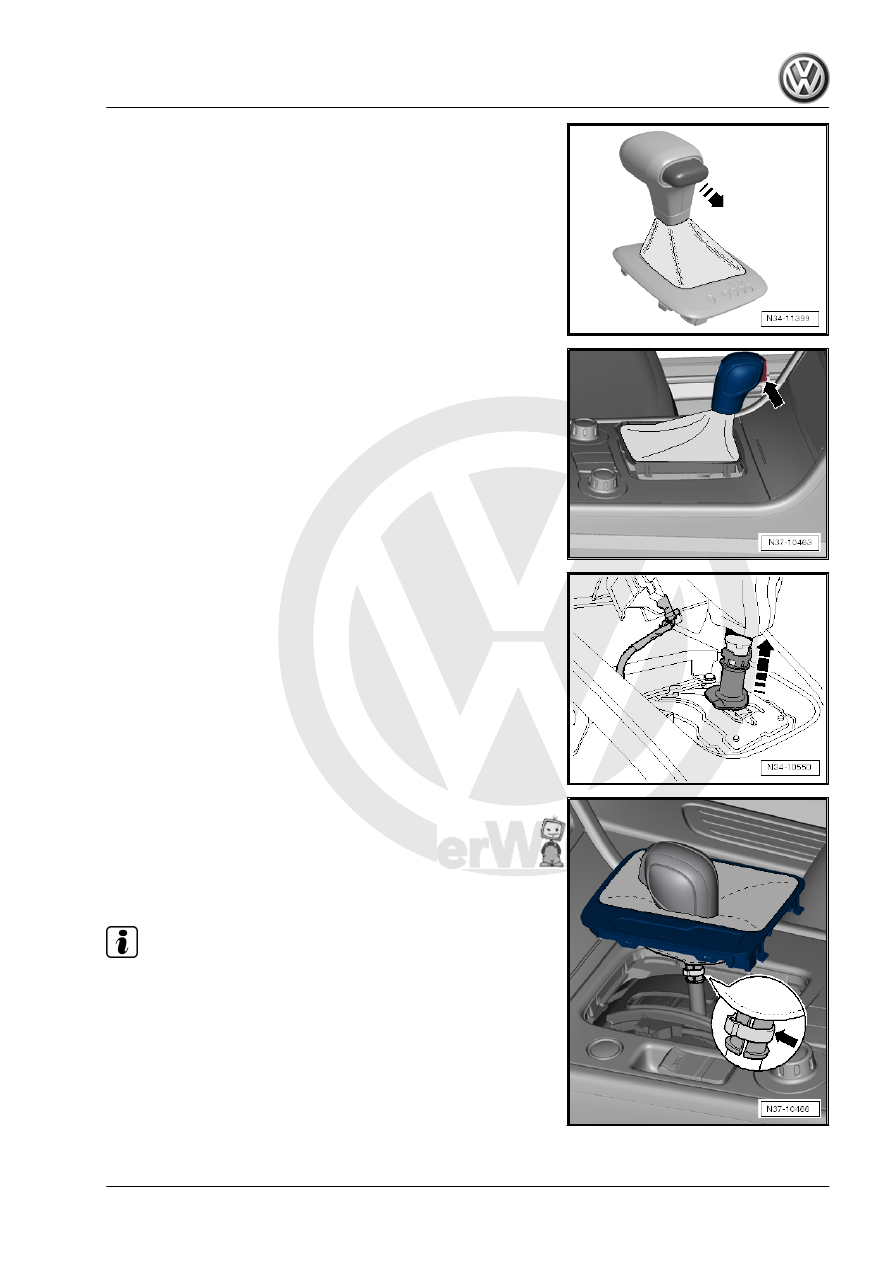
Handle with Front Button
– It is not necessary to pull out the button by hand. The button

locks in the installation position -arrow- when the handle is re‐

moved.

Vehicle with Sleeve
– Unclip the cover.
Disconnect the connector from the shift cover.
Push the sleeve upward in direction of -arrow- to unlock the han‐

dle.

Vehicle with Clamp
– Cut the clamp under the boot -arrow- with a side cutter.
All Handles
– Remove the handle from the selector lever without pushing the

button.

Note

Do not push the button once the handle has been removed oth‐

erwise it will not be possible to install the handle again.

Installing
– Install in reverse order of removal while noting the following:
• The selector lever is in the “D” position.

5. Selector Mechanism    

83

protected from getting pushed in again.

Handle with Front Button
• The button is in the installation position -arrow-.
If the button was pushed in by mistake, the installation position

can be set again.
– Move the button into the installation position. Refer to

⇒ “5.9 Button in Handle, Moving into Installation Position”,

page 85

 .

Note

A new handle is delivered with an assembly fastener. Remove

the retainer just before installing.

Vehicle with Sleeve
– Install the handle all the way onto the selector lever and lock

it.

– Push the sleeve downward to lock it.
Vehicle with Clamp
– Install the handle all the way with a new clamp.
– Clamp off the clamps using Hose Clamp Pliers - VAG1275- .
– Press the button after installation.

Note

If the button stays in the handle after being pressed, this means

it was installed incorrectly. If this happens, remove the handle

again and move the button in the installation position again. Refer

to

⇒ “5.9 Button in Handle, Moving into Installation Position”,

page 85

 . Then the handle can be installed again.

Further installation is performed in reverse order of the removal.

84

Button in Handle, Moving into Installa‐

tion Position

⇒ “5.9.1 Handle with Side Button”, page 85
⇒ “5.9.2 Handle with Front Button”, page 85

5.9.1

Handle with Side Button

– Pull the button out of the handle just far enough until there is

a small gap between the handle and the button. The button

locks when released.

– Secure the button in this position with a cable tie or wire to

prevent the button from being pressed in.

5.9.2

Handle with Front Button

The button cannot be pulled out on these handles.
There are two ways to move the button into the installation posi‐

tion, »with« or »without« the assembly fastener. Both possibilities

are described here.
Move the Handle »with« an Assembly Fastener into the Installa‐

tion Position:
When using an assembly fastener, make sure that it has an eye

-arrow- at the front. Other assembly fasteners are not suitable.

– With the button pressed and push the assembly fastener (with

the eye) -arrow- all the way in until it latches into the assembly

fastener. Then release the button. The button locks into the

installation position when the assembly fastener is pulled out.

Moving the Handle »without« an Assembly Fastener into the In‐

stallation Position:

5. Selector Mechanism    

85

– Push the small lever -1- for the pull rod into the groove -2- with

a screwdriver. This pushes the button -3- into the installation

position.

-I- the button is in the pressed position
-II- the button is in the installation position

Note

Push the lever into the groove and no farther.

Clip the handle trim back onto the selector mechanism only

after the handle is installed. This way it is possible to see if the

small lever engages into the pull rod when the button is push‐

ed.

5.10

Selector Mechanism, Checking

Do not operate the starter when the selector lever is in “R”, “D”

and “S”.
If the selector lever position “N” is selected at speeds greater than

km/h (3.1 mph), the shift lock solenoid must not engage and block

the selector lever. The selector lever can be shifted into another

gear.
When shifting into the selector lever position “N” at speeds below

km/h (3.1 mph) (almost stopped), the shift lock solenoid may en‐

gage only after approximately one second. The selector lever can

only be moved out of “N” when the brake pedal is pressed.
Selector Lever in “P” and the Ignition Turned On:

• If the brake pedal is not depressed:
The selector lever is locked and cannot be moved out of “P” when

the button is pressed. The shift lock solenoid blocks the selector

lever.
• If the brake pedal is depressed:
The shift lock solenoid releases the selector lever. It is possible

to select a gear. Move the selector lever slowly from “P” through

“S”; while doing this, check whether the selector lever position

86


Content   ..  332  333  334  335   ..