Volkswagen Golf Variant / Jetta. Manual - part 129
 

  Index      Volkswagen     Volkswagen Golf Variant (2007), Jetta (2005) - service repair manual


Search            


Content   ..  127  128  129  130   ..


Volkswagen Golf Variant / Jetta. Manual - part 129


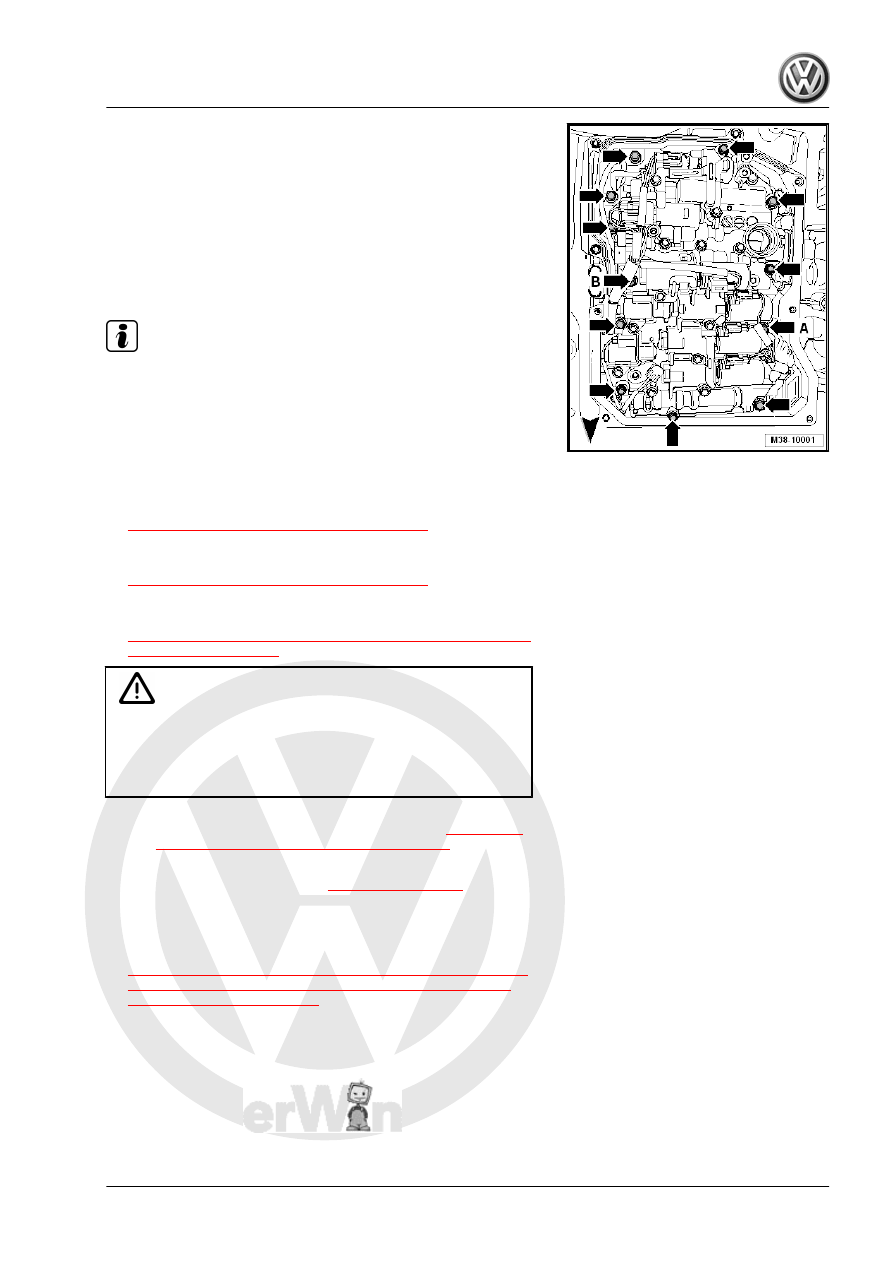
Bolts -arrows-

Quantity 10, M 6

× 21

Bolts -arrows A-

Quantity 1, M 6 x

16

Bolts -arrows B-

Quantity 1, M 6 ×

28

– Install the remaining new bolts and the bracket and tighten

hand-tight.

Note

If the wires are too short to be connected to the sensors or

attached to the designated location on the valve body, then

they were routed incorrectly or are pinched by the valve body.

The valve body must be removed again and wires must be

routed correctly.

Replace all the valve body bolts.

– Tighten the valve body starting from the inside and working

out diagonally to the tightening specification. Refer to

⇒ “4.1.1 Tightening Specifications”, page 132

 .

– Install the Transmission Fluid Temperature Sensor - G93- to

the tightening specification. Refer to

⇒ “4.1.1 Tightening Specifications”, page 132

 .

– Connect the connectors (quantity: 8) to the solenoid valves

according to the markings made earlier. Refer to

⇒ “4.1.2 Wire Routing, Connector, Connectors and Bracket on

Valve Body”, page 132

 .

Caution

In some circumstances, confusing the connectors could cause

damage to the transmission.
The wiring harness or the valve body with the solenoid valves

must be replaced if the one of the connectors gets damaged.

– Tighten the bracket for the connectors. Refer to 

⇒ page 133

and 

⇒ “4.1.1 Tightening Specifications”, page 132

 for the tight‐

ening specification.

– Push the connectors together 

⇒ Item B (page 135)

 .

– If equipped, connect the connectors vertically to Automatic

Transmission Hydraulic Pressure Sensor 1 - G193- and Au‐

tomatic Transmission Hydraulic Pressure Sensor 2 - G194-

-4-, if equipped. Refer to

⇒ Fig. ““ Automatic Transmission Hydraulic Pressure Sensor

1 -G193- and Automatic Transmission Hydraulic Pressure

Sensor 2 -G194- ”“ , page 18

 .

4. Valve Body    

147

-1- -arrow A-. Position the slider if necessary.
– Install the washer -5- and nut -4- on the selector shaft -6-.
The centering collar on the nut must face the washer and fit into

the washer when the nut is tightened.
The wiring harness must be routed underneath the selector shaft

lever.

– Tighten the nut on the selector lever -1- to the tightening spec‐

ification. Refer to

⇒ “4.1.1 Tightening Specifications”, page 132

 .

– While doing so, carefully hold the selector lever -1- firmly with

pliers -2- so that the torque is not transferred onto the Multi‐

function Transmission Range Switch - F125- .

– Make sure the slider -3- on the valve body in which the shift

lever engages is not damaged.

– Bend up the locking plate at the nuts -arrows-, if equipped.
– Install the transmission fluid screen. Refer to

⇒ “3 ATF Screen”, page 127

 .

– Install the transmission fluid pan. Refer to

⇒ “2 Transmission Fluid Pan”, page 125

 .

– Connect the battery ground cable. Refer to ⇒  Electrical Equip‐

ment; Rep. Gr.  27 ; Battery; Battery, Disconnecting and

Connecting .

– Fill the ATF and check the level. Refer to

⇒ “11 ATF Level, Checking and Filling”, page 112

 .

50 ; Noise Insulation; Overview - Noise Insulation .

– Connect the Vehicle Diagnostic Tester ⇒ Vehicle diagnostic

tester and select “function/component selection”.

– Then press “Powertrain (Repair Group 01; 10 to 26; 28 to 39)”.
– Then the “6-speed automatic transmission 09G”.
– Press “01 - OBD”.
– Press “Functions”.
– Press “basic setting”.

4.3

Solenoid Valve Wiring Harness (14-Pin

Connector), Removing and Installing

Removing
– Drain the ATF. Refer to

⇒ “11.3 ATF, Draining and Filling”, page 115

 .

– Remove the transmission fluid pan. Refer to

⇒ “2 Transmission Fluid Pan”, page 125

 .

148

⇒ “3 ATF Screen”, page 127

 .

– Remove the valve body. Refer to

⇒ “4.2 Valve Body, Removing and Installing”, page 135

 .

– Disconnect the connector -2- for the solenoid valves from the

transmission connector.

– Remove the 14-pin transmission connector bolt.
– Remove the transmission connector with the wiring harness

outward from the transmission housing.

Installing
Install in reverse order of removal while. Note the following:
– Replace the O-ring on the transmission connector.
– Coat the O-ring with ATF.
– Push the transmission connector all the way into the trans‐

mission.

– Tighten the bolt for the 14-pin transmission connector. Refer

to 

⇒ “4.1.1 Tightening Specifications”, page 132

 for the correct

tightening specification.

– Install the valve body. Refer to 

⇒ page 142

 .

– Install the ATF screen. Refer to

⇒ “3 ATF Screen”, page 127

 .

– Install the transmission fluid pan. Refer to

⇒ “2 Transmission Fluid Pan”, page 125

 .

– Fill with ATF and check the level. Refer to

⇒ “11 ATF Level, Checking and Filling”, page 112

 .

4.4

Sensor Wiring Harness (8-Pin Connec‐

tor), Removing and Installing

Removing
– Drain the ATF. Refer to

⇒ “11.3 ATF, Draining and Filling”, page 115

 .

– Remove the transmission fluid pan. Refer to

⇒ “2 Transmission Fluid Pan”, page 125

 .

– Remove the ATF screen. Refer to

⇒ “3 ATF Screen”, page 127

 .

– Remove the valve body. Refer to

⇒ “4.2 Valve Body, Removing and Installing”, page 135

 .

4. Valve Body    

149

connector.

– Remove the bolt from the 8-pin transmission connector.
– Remove the transmission connector with the wiring harness

outward from the transmission housing.

Installing
Install in reverse order of removal while. Note the following:
– Coat the O-ring with ATF.
– Push the transmission connector all the way into the trans‐

mission.

– Tighten the bolt for the 8-pin transmission connector to the

tightening specification. Refer to

⇒ “4.1.1 Tightening Specifications”, page 132

 .

– Install the valve body. Refer to 

⇒ page 142

 .

– Install the ATF screen. Refer to

⇒ “3 ATF Screen”, page 127

 .

– Install the transmission fluid pan. Refer to

⇒ “2 Transmission Fluid Pan”, page 125

 .

– Fill with ATF and check the level. Refer to

⇒ “11 ATF Level, Checking and Filling”, page 112

 .

4.5

Transmission Input Speed Sensor -

G182- , Removing and Installing

Removing
– Remove the valve body. Refer to

⇒ “4.2 Valve Body, Removing and Installing”, page 135

 .

– Remove the bolt -1- from the Transmission Input Speed Sen‐

sor - G182- .

– Remove the Transmission Input Speed Sensor - G182- from

the transmission housing.

150


Content   ..  127  128  129  130   ..