Volkswagen Golf / Golf Plus. Manual - part 216
 

  Index      Volkswagen     Volkswagen Golf (2004) / Golf Plus (2005) - service repair manual


Search            


Content   ..  214  215  216  217   ..


Volkswagen Golf / Golf Plus. Manual - part 216


s

p

e

c

t

 t

o


th

e

 c

o

rr

e

c

t

n

e

s

s


o

f

in

fo

r

m

a

tio

n

 in

 th

is

 d

o

c

um

en

t.

C

o

py

rig

ht b

y


V

olk

sw

a

ge

n


A

G.

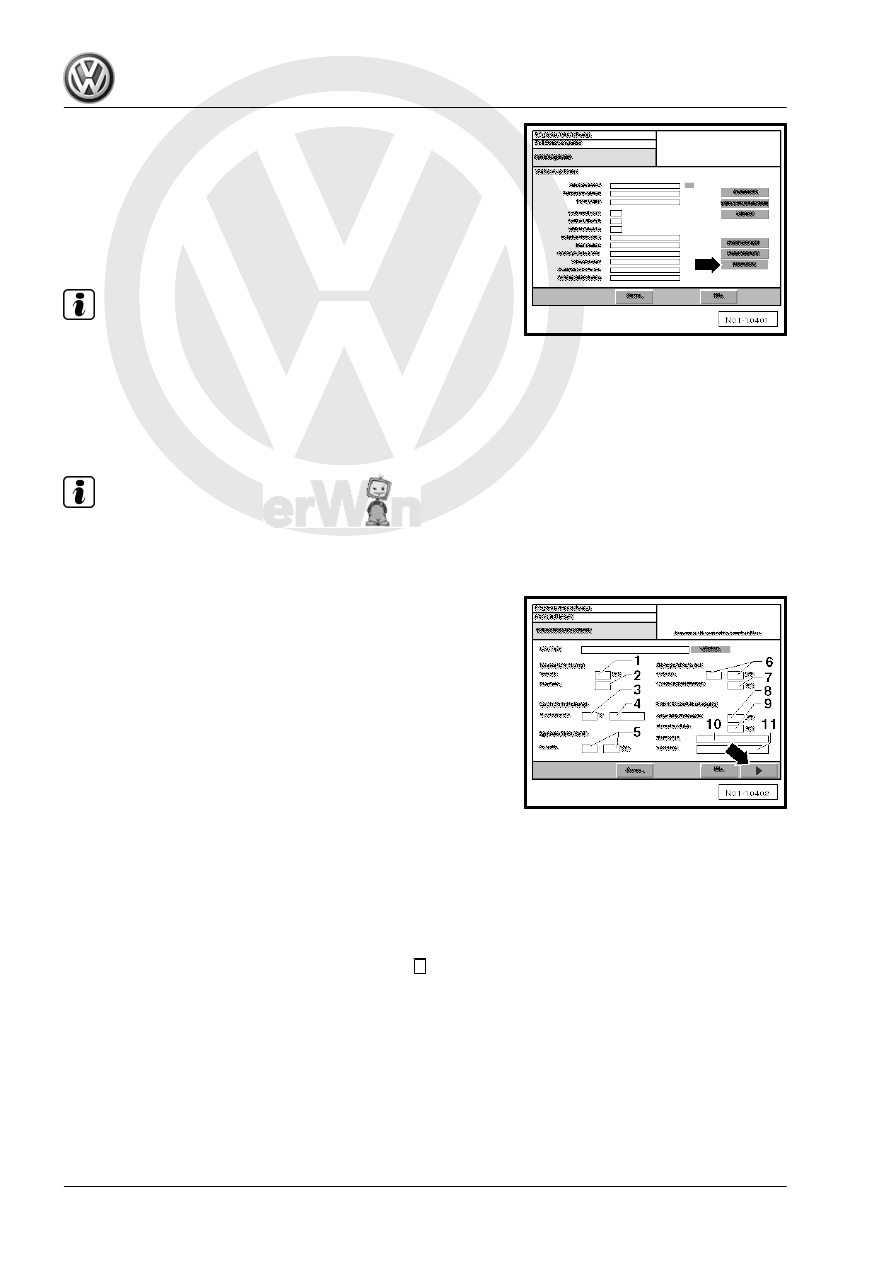
– Select “Diesel OBD” -arrow-.
Specified data input for EET:
There are different ways to enter the specified data:
♦ 1. Manual input
♦ 2. Bar code input of EET data sheet
♦ 3. ELSA web service

Note

To use the ELSA web service, the vehicle diagnostic tester ,

which is used for the exhaust emissions test, must be integra‐

ted in the workshop network.

For the ELSA web service the vehicle specified data are au‐

tomatically transmitted via the network to the respective mask.

Manual specified data input for EET:

Note

All test conditions and data required for exhaust emissions test,

see ⇒ Data sheets for exhaust emission test for respective en‐

gine.

– Perform manual data input according to instructions on dis‐

play.

– Enter displayed values on EET data sheet in column “Test

values for exhaust emissions test” on display as follows:

1 - Speed for conditioning
2 - Number of throttle bursts for conditioning
3 - Engine oil temperature (min. value)
4 - Select engine oil temperature measurement procedure
5 - Idling speed
6 - Rev limit
7 - Rev limit measuring period (1 second)
8 - Opacity figure (average)
9 - Select probe type (No. of probe)
10 - Select measuring mode
11 - Measured period portion
– When all data have been entered properly, press 

 button

-arrow-.

Specified data input for EET as bar code:
– If specified data for EET are available as bar code, read bar

code of EET data sheet with bar code reader.

Maintenance - Edition 11.2009

174

    5. Exhaust emissions test

s

p

e

c

t

 t

o


th

e

 c

o

rr

e

c

t

n

e

s

s


o

f

in

fo

r

m

a

tio

n

 in

 th

is

 d

o

c

um

en

t.

C

o

py

rig

ht b

y


V

olk

sw

a

ge

n


A

G.

All data required are shown on display -1-.
– Press 

 button -arrow- to continue procedure.

Visual check:
– Follow instructions on display.
– Perform visual check.
– If visual check is OK press “OK” button. -arrow-.

Note

When "not OK" button is pressed, a check will be carried out.

Connecting diagnostic connector:
• Ignition is switched off.

The visual check is displayed with the prompt to connect the di‐

agnostic connector -arrow A- and to check the “MI lamp”

-arrow B-.
– Follow instructions on display.

– Connect diagnostic cable connector to EOBD connection.
Visual check of MI lamp with ignition switched off:
– Switch on ignition.
– Perform visual check of “MI lamp”.

Maintenance - Edition 11.2009

5. Exhaust emissions test    

175

s

p

e

c

t

 t

o


th

e

 c

o

rr

e

c

t

n

e

s

s


o

f

in

fo

r

m

a

tio

n

 in

 th

is

 d

o

c

um

en

t.

C

o

py

rig

ht b

y


V

olk

sw

a

ge

n


A

G.

– If lamp lights up, press button “Lamp On” -arrow C-.

Note

If the MI lamp does not light up during visual check, the result of

the exhaust emissions test is “Failed”.

Visual check of MI lamp with engine running:
– Start engine and confirm engine running on display with “Yes”.
– Perform visual check of “MI lamp”. The lamp must not light or

flash.

– Confirm condition of “MI lamp” -arrow-.
It is automatically switched to test for readiness of operation.
It is checked here if all tests for readiness of operation supported

by the control unit have been performed.
Conditioning:
In the conditioning phase the engine and, if necessary, the emis‐

sion control systems are brought to operating temperature by

throttle bursts and are prepared for the exhaust emissions test.

– Follow instructions on display.
– Maintain engine speed in required engine speed range.
If no conditioning is necessary, press 

 button -arrow- for the next

measurement.
Reading engine temperature:
The engine temperature is read via the diagnostic connector of

engine control unit.
When the required engine temperature is reached, it is automat‐

ically switched to display for measuring the idling speed.
Measuring idling speed:

– Follow instructions on display.
Measurement starts when the engine speed has reached the re‐

quired level.

Note

Do not insert emission probe into exhaust tail pipe.

Measurement can be skipped using 

 button, i.e. the exhaust

emissions test has failed.

Measured values are reset using 

 button and the test can be

repeated.

– Maintain engine speed in required engine speed range.
The remaining time to perform measurement is displayed

-arrow-.
Measuring rev limit:

Maintenance - Edition 11.2009

176

    5. Exhaust emissions test

s

p

e

c

t

 t

o


th

e

 c

o

rr

e

c

t

n

e

s

s


o

f

in

fo

r

m

a

tio

n

 in

 th

is

 d

o

c

um

en

t.

C

o

py

rig

ht b

y


V

olk

sw

a

ge

n


A

G.

It is automatically switched to display for measuring rev limit.
Measurement starts when the engine speed has reached the re‐

quired level.
– Operate throttle until the measurement is carried out. To do

this, immediately depress accelerator pedal.

The remaining time to perform measurement is displayed

-arrow-.

Note

Do not insert emission probe into exhaust tail pipe.

Measurement can be skipped using 

 button, i.e. the exhaust

emissions test has failed.

Air quality check:

An air quality check is carried out before starting the free accel‐

eration. When doing this, no emission probe must be in the

exhaust tail pipe. Otherwise measuring errors or faulty signals

could occur during further measurements.
– When the air quality check is carried out, insert emission probe

into exhaust tail pipe

Free acceleration:
It is automatically switched to display for “Free acceleration”.
During “Free acceleration” the engine is revved up to rev limit

without load as quickly as possible.
The “Free acceleration” test consists of at least four throttle

bursts.
Free acceleration - phase 1:

– Follow instructions on display -arrow A- and -arrow C-.
– Maintain idling speed in engine speed range indicated

-arrow D-.

The remaining time to perform measurement is displayed

-arrow B-.

Note

The emissions probe must be in the exhaust tail pipe.

If the speed deviates from engine speed range indicated, the

measurement starts again.

Measurement can be skipped using 

 button, i.e. the exhaust

emissions test has failed.

Free acceleration - phase 2:

Maintenance - Edition 11.2009

5. Exhaust emissions test    

177


Content   ..  214  215  216  217   ..