Volkswagen Golf / Golf Plus. Manual - part 213
 

  Index      Volkswagen     Volkswagen Golf (2004) / Golf Plus (2005) - service repair manual


Search            


Content   ..  211  212  213  214   ..


Volkswagen Golf / Golf Plus. Manual - part 213


s

p

e

c

t

 t

o


th

e

 c

o

rr

e

c

t

n

e

s

s


o

f

in

fo

r

m

a

tio

n

 in

 th

is

 d

o

c

um

en

t.

C

o

py

rig

ht b

y


V

olk

sw

a

ge

n


A

G.

– Continue exhaust emissions test according to instructions on

display.

– If the EET specification selection is displayed, select respec‐

tive “EET specification selection” -arrow-.

♦ If exhaust emissions test is performed initially, either select

“Standard values”,

♦ Or “Last vehicle” when an exhaust emissions test is to be per‐

formed again.

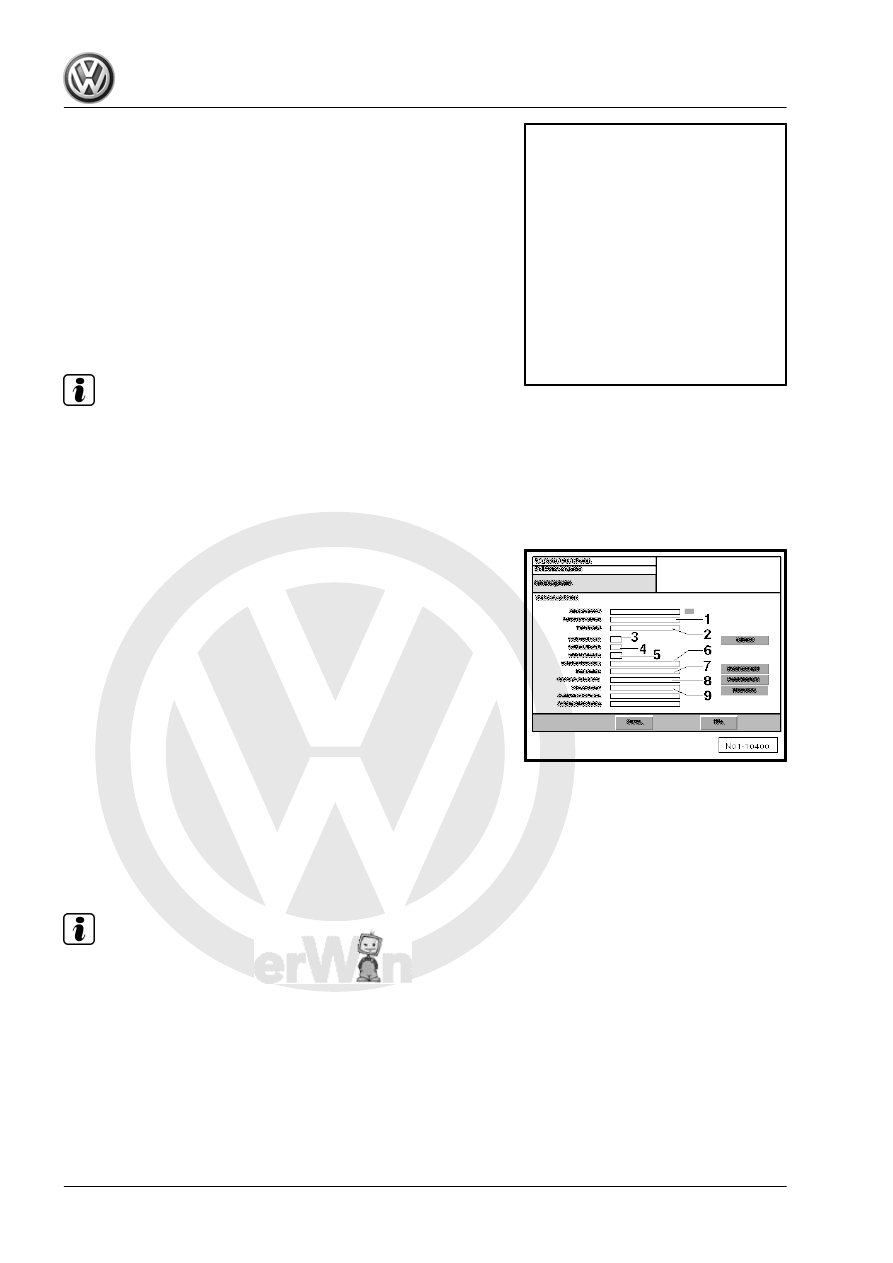
– Select “Continue” on display see -item 1-.
Vehicle data input:
The vehicle data input menu is displayed.

Note

For new models the document previously known as the vehicle

registration document is now called the vehicle registration

certificate part 1.

For new models the document previously known as the vehicle

log book is now called the vehicle registration certificate part

2.

♦ -1- Vehicle manufacturer: “e.g. VOLKSWAGEN - VW”
♦ -2- Vehicle type: “e.g. Golf”
♦ -3- Key number to 1: “e.g. 11”
♦ -4- Key number to 2: “e.g. 0603” (vehicle registration docu‐

ment)

♦ -4- Key number to 2.1 (code to 2): “e.g. 0603” (vehicle regis‐

tration certificate part 1)

♦ -5- Key number to 3: “e.g. 358” (vehicle registration document)
♦ -5- Key number to 2.2 (code to D2): “e.g. 358” (vehicle regis‐

tration certificate part 1)

♦ -6- Engine code “e.g. AQY”
♦ -7- Registration number: “e.g. WOB-HH 1234”
♦ -8- Vehicle identification number: “e.g.

WVWZZZ1JZYW123456”

– Enter odometer reading at -item 8- “e.g. 32000”.

Note

Further functions can be called up using "GoTo" button.

The test can be interrupted using "GoTo" button.

Maintenance - Edition 11.2009

162

    5. Exhaust emissions test

s

p

e

c

t

 t

o


th

e

 c

o

rr

e

c

t

n

e

s

s


o

f

in

fo

r

m

a

tio

n

 in

 th

is

 d

o

c

um

en

t.

C

o

py

rig

ht b

y


V

olk

sw

a

ge

n


A

G.

– Select “with OBD”, -arrow-.
Specified data input for EET:

Note

If specifications are not available as bar code, they are to be

entered manually.

All test conditions and data required for exhaust emissions

test, see ⇒ Data sheets for exhaust emission test for respec‐

tive engine.

Manual specified data input for EET:
– Perform manual data input according to instructions on dis‐

play.

– Enter displayed values on EET data sheet in column “Test

values for exhaust emissions test” on display as follows:

1 - Test speed (idling speed)
2 - Warm-up phase for catalytic converter
3 - Engine temperature
4 - Increased idling speed
5 - CO content at increased idling speed
6 - Lambda at increased idling speed
7 - Idling speed
8 - Select regulating probe type, either “Step-type probe” or

“Broad-band probe” -item 1-.

9 - Lambda probe value
– When all data have been entered properly, press 

Continue

button -arrow-.

Specified data input for EET as bar code:
– If specified data for EET are available as bar code, read bar

code of EET data sheet with bar code reader.

All data required are shown on display.
– Press 

 button -arrow- to continue procedure.

Maintenance - Edition 11.2009

5. Exhaust emissions test    

163

s

p

e

c

t

 t

o


th

e

 c

o

rr

e

c

t

n

e

s

s


o

f

in

fo

r

m

a

tio

n

 in

 th

is

 d

o

c

um

en

t.

C

o

py

rig

ht b

y


V

olk

sw

a

ge

n


A

G.

Visual check:
– Follow instructions on display.
– Perform visual check.
– If visual check is OK press “OK” button. -arrow-.

Note

When "not OK" button is pressed a check will be carried out

The visual check is displayed with the request to connect the di‐

agnostic connector -arrow A- and to check the MI lamp

-arrow B-.

– Follow instructions on display.
– Switch off ignition.
– Connect diagnostic cable connector to EOBD connection.

– Switch on ignition.
– Perform visual check of “MI lamp”.
– If lamp lights up, press button “Lamp On” -arrow C-.

Maintenance - Edition 11.2009

164

    5. Exhaust emissions test

s

p

e

c

t

 t

o


th

e

 c

o

rr

e

c

t

n

e

s

s


o

f

in

fo

r

m

a

tio

n

 in

 th

is

 d

o

c

um

en

t.

C

o

py

rig

ht b

y


V

olk

sw

a

ge

n


A

G.

– Follow instructions on display, see -arrow C- and -arrow A-.
♦ Start engine.
♦ Perform visual check of MI lamp.
– Insert emission probe in exhaust tail pipe.

Note

The exhaust emissions test is only continued when the test probe

is in the exhaust tail pipe.

It is automatically switched to test for readiness of operation.
It is checked here if all tests for readiness of operation supported

by the control unit have been performed.

Note

If all display values are set to zero, a regulating probe test is

not performed.

If not all display values are set to zero, a regulating probe test

will be performed later.

– Confirm condition of “MI lamp” - arrow B-.
Catalytic converter conditioning:
It is automatically switched to warm-up phase of catalytic con‐

verter.

– Follow instructions on display.
Measurement starts when the engine speed has reached the re‐

quired level.
– Maintain engine speed in required engine speed range.
The remaining time to perform the warm-up phase is displayed

- arrow A -.

Warm-up phase:
It is automatically switched to display for measuring engine tem‐

perature.
– Follow instructions on display.

Note

This is only indicated on display if engine temperature has not

reached 80 °C.

– Bring engine to required temperature.

Maintenance - Edition 11.2009

5. Exhaust emissions test    

165


Content   ..  211  212  213  214   ..