Mercedes-Benz ML320. Service manual - part 301
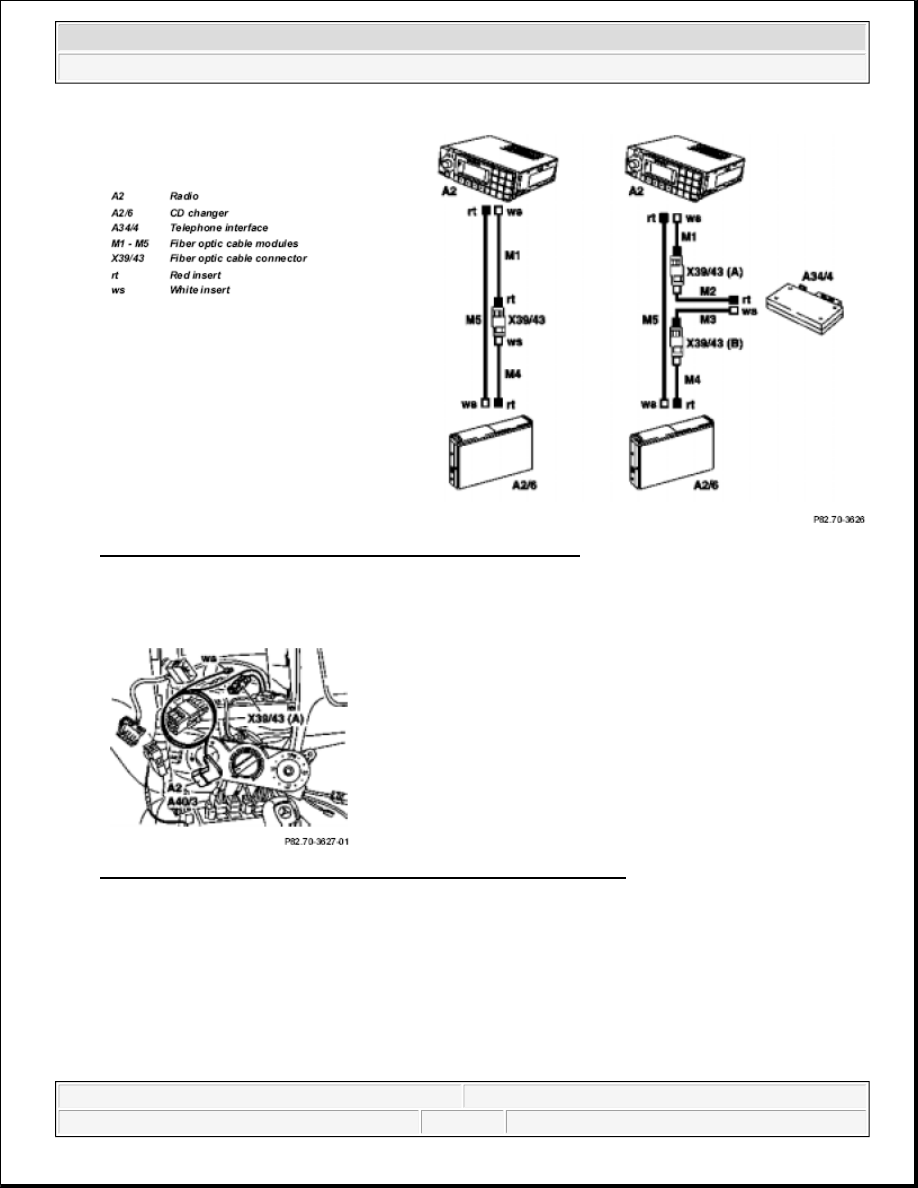
Fig. 243: Identifying Radio, CD Changer And CTEL Interface
3. After installing the interface in the radio slot, expose fiber optic cable connector (X39/43) (A), offnen and
take out the white insert (ws).
Fig. 244: Identifying White Insert And Fiber Optic Cable Connector
4. Place the white insert (ws) of the fiber optic cable wiring harness (31) into the fiber optic cable connector
(X39/43) (A) and close again.
5. Open the fiber optic cable connector (X39/43) (B) of the fiber optic cable wiring harness (31), place in the
white insert (ws) of the standard wiring harness and close again.
Shown on vehicle with radio A2 Radio
2001 Mercedes-Benz ML320
1998-2005 ACCESSORIES & BODY, CAB Electrical System - Body - 163 Chassis
me