Infiniti Q50 (2018 year). Instruction - part 16
 

  Index      Infiniti     Infiniti Q50 (2018 year) - instruction in english


Search            copyright infringement  


Content      ..     14      15      16      17     ..


Infiniti Q50 (2018 year). Instruction - part 16


5-66

Starting and driving

JVS0307X

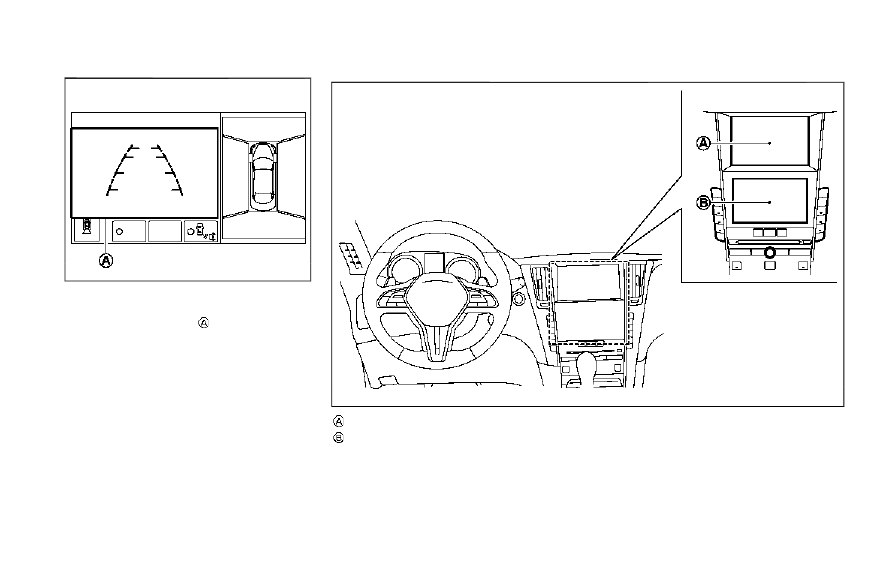
If an approaching vehicle or object behind
the vehicle is detected when your vehicle is
backing up, a red frame

will appear on the

upper display and the system will chime
three times. Then, the brakes will be applied
momentarily. After the automatic brake
application, the driver must depress the
brake pedal to maintain brake pressure.
If the driver’s foot is on the accelerator
pedal, the system moves the accelerator
pedal upward before the braking is applied.
However, if you continue to accelerate, the
system will not engage the brakes.
The BCI system does not operate if the
object is very close to the bumper.

JVS0833X

Upper display
Lower display

-------------------------------------------------------------------------------------------------------------------------------------------------------------

JVS0304X

Upper display

TURNING THE BCI SYSTEM ON/
OFF

The BCI system automatically turns on every
time the engine is started.
The BCI system can be turned off tempora-
rily by touching the BCI system key

on the

upper display. The indicator on the BCI ON
key turns off. When the shift lever is placed
in the R (Reverse) position again, the BCI
system is turned on.

JVS0246X

HOW TO ENABLE/DISABLE THE
BCI SYSTEM

The BCI system can be turned off perma-
nently using the lower display. Perform the
following steps to enable or disable the BCI
system.
1. Push the MENU button

and touch

[Settings] on the lower display.

2. Touch [Camera/Sonar].
3. Touch [Camera].
4. Touch [Back-up Collision Intervention]

to enable/disable the system.

When the BCI system is disabled by touching
[Back-up Collision Intervention], the BCI

system does not turn on automatically by
the following operations:
. When the shift lever is placed in the R

(Reverse) position

. When the engine is restarted

Starting and driving

5-67

-------------------------------------------------------------------------------------------------------------------------------------------------------------

5-68

Starting and driving

JVS0479X

BCI SYSTEM LIMITATIONS

WARNING

Listed below are the system limitations
for the BCI system. Failure to operate

the vehicle in accordance with these
system limitations could result in serious
injury or death.
Always check your surroundings and

turn to check what is behind you
before backing up.

The radar sensors detect approach-

ing (moving) vehicles. The radar sen-
sors cannot detect every object such
as:

— Pedestrians, bicycles, animals or

child operated toy vehicles

— A vehicle that is passing at speeds

greater than approximately 15
MPH (24 km/h)

The radar sensors may not detect

approaching vehicles in certain situa-
tions:

— Illustration a. When a vehicle

parked next to you obstructs the
beam of the radar sensor.

— Illustration b. When the vehicle is

parked in an angled parking space.

— Illustration c. When the vehicle is

parked on inclined ground.

— Illustration d. When an approach-

ing vehicle turns into your vehi-
cle’s parking lot aisle.

— Illustration e. When the angle

formed by your vehicle and ap-
proaching vehicle is small.

The following conditions may reduce

the ability of the radar sensors to
detect other vehicles:

-------------------------------------------------------------------------------------------------------------------------------------------------------------

— Severe weather

— Road spray

— Ice/frost/dirt build up on the

vehicle

Do not attach stickers (including

transparent material), install acces-
sories or apply additional paint near
the radar sensors. These conditions
may reduce the ability of the radar
sensors to detect other vehicles.

The sonar sensors detect stationary

objects behind the vehicle. The sonar
sensor may not detect:

— Small or moving objects

— Wedge-shaped objects

— Object close to the bumper (less

than approximately 1 ft (30 cm))

— Thin objects such as rope, wire

and chain, etc.

The brake engagement by the BCI

system is not as effective on a slope
as it is on flat ground. When on a
steep slope the system may not
function properly.

Do not use the BCI system under the

following conditions because the sys-
tem may not function properly.

— When driving with a tire that is

not within normal tire conditions
(for example, tire wear, low tire
pressure, installation of spare tire,
tire chains, non-standard wheels).

— When the vehicle is equipped with

non-original brake parts or sus-
pension parts.

Excessive noise (for example, audio

system volume, open vehicle window)
will interfere with the chime sound,
and it may not be heard.

JVS0824X

Vehicle information display

SYSTEM TEMPORARILY UNA-
VAILABLE

If the following message appears in the
vehicle information display

, a chime will

sound and the BCI system will be turned off
automatically.
. “Unavailable High Accelerator Temp.”:

If the vehicle is parked in direct sunlight
under high temperature conditions (over
approximately 104 °F (40 °C)) and then
started, the BCI system may be deacti-
vated automatically.
Action to take:
When the interior temperature is re-

Starting and driving

5-69

-------------------------------------------------------------------------------------------------------------------------------------------------------------

5-70

Starting and driving

duced, turn off the BCI system and turn
it on again.

. “Unavailable Side Radar Obstruction”:

When side radar blockage is detected.
Action to take:
When the blockage is removed, turn off
the BCI system and turn it on again.

SYSTEM MALFUNCTION

If the BCI system malfunctions, it will turn
off automatically, a chime will sound and BCI
system “malfunction” warning message will
appear in the vehicle information display

.

Action to take:
Stop the vehicle in a safe location and place
the shift lever in the P (Park) position. Turn
the engine off and restart the engine. If the
warning message continues to appear, have
the system checked. It is recommended you
visit an INFINITI retailer for this service.

JVS1122X

SYSTEM MAINTENANCE

The two radar sensors

for the BCI system

is located near the rear bumper. Always keep
the area near the radar sensors clean.
The radar sensors may be blocked by
temporary ambient conditions such as
splashing water, mist or fog.
The blocked condition may also be caused by
objects such as ice, frost or dirt obstructing
the radar sensors.
Check for and remove objects obstructing
the area around the radar sensors.
Do not attach stickers (including transparent
material), install accessories or apply addi-
tional paint near the radar sensors.

Do not strike or damage the area around the
radar sensors.
It is recommended you visit an INFINITI
retailer if the area around the radar sensors
is damaged due to a collision.

Radio frequency statement

For USA
This device complies with part 15 of the
FCC Rules.
Operation is subject to the following two
conditions: (1) This device may not cause
harmful interference, and (2) this device
must accept any interference received, in-
cluding interference that may cause unde-
sired operation.

NOTE:
The manufacturer is not responsible for any
radio or TV interference caused by un-
authorized modifications to this equipment.
Such modifications could void the user’s
authority to operate the equipment.
For Canada
This device complies with Industry Canada
Standard RSS-310.
Operation is subject to the following two
conditions: (1) This device may not cause
harmful interference, and (2) this device
must accept any interference received, in-
cluding interference that may cause unde-

-------------------------------------------------------------------------------------------------------------------------------------------------------------

sired operation.
Frequency of operation: 24.05GHz —
24.25GHz
Field Strength: Not greater than 2.5V/m
peak (0.25V/m average) at a distance of 3
m

PRECAUTIONS ON CRUISE
CONTROL

. If the cruise control system malfunctions,

it will cancel automatically. The cruise
indicator (green) in the vehicle informa-
tion display will then blink to warn the
driver.

. If the engine coolant temperature be-

comes excessively high, the cruise con-
t r o l

s y s t e m

w i l l

b e

c a n c e l e d

automatically.

. If the cruise indicator (green) blinks, turn

the cruise control MAIN switch off and
have the system checked. It is recom-
mended you visit an INFINITI retailer for
this service.

. The cruise indicator (green) may some-

times blink when the cruise control MAIN
switch is turned ON while pushing the
SET/COAST (-), RESUME/ACCELER-
ATE (+) or CANCEL switch. To properly
set the cruise control system, perform
the steps below in the order indicated.

WARNING

Do not use the cruise control when
driving under the following conditions:
when it is not possible to keep the

vehicle at a set speed

in heavy traffic or in traffic that

varies in speed

on winding or hilly roads
on slippery roads (rain, snow, ice,

etc.)

in very windy areas
Doing so could cause a loss of vehicle
control and result in an accident.

Starting and driving

5-71

CRUISE CONTROL (if so equipped)

-------------------------------------------------------------------------------------------------------------------------------------------------------------

5-72

Starting and driving

JVS0867X

CRUISE CONTROL OPERATIONS

1.

RESUME/ACCELERATE (+) switch

2.

SET/COAST (-) switch

3.

CANCEL switch

4.

MAIN (ON·OFF) switch

JVS0306X

Cruise indicator

The cruise indicator and the set vehicle
speed are displayed in the vehicle informa-
tion display. The cruise indicator indicates
the status of the cruise control system by the
color.
The cruise control allows driving at a speed
between 25 to 90 MPH (40 to 144 km/h)
without keeping your foot on the accelerator
pedal.
To turn on the cruise control, push the
MAIN switch on. The cruise indicator (white)
will come on.
To set cruising speed, accelerate your
vehicle to the desired speed, push the SET/
COAST (-) switch and release it. (The cruise
indicator (green) will illuminate.) Take your

foot off the accelerator pedal. Your vehicle
will maintain the set speed.
To pass another vehicle, depress the

accelerator pedal. When you release the
pedal, the vehicle will return to the
previously set speed.

. The vehicle may not maintain the set

speed on winding or hilly roads. If this
happens, drive without the cruise con-
trol.

To cancel the preset speed, follow any of
these methods:
1. Push the CANCEL switch.
2. Tap the brake pedal.
3. Turn the MAIN switch off.
After any of the above operations is per-
formed, the color of the cruise indicator will
change from green to white.
. If you depress the brake pedal while

pushing the RESUME/ACCELERATE
(+) or SET/COAST (-) switch and reset
at the cruising speed, the cruise control
will disengage. Turn the MAIN switch off
once and then turn it on again.

. The cruise control will automatically

cancel if the vehicle slows more than 8
MPH (13 km/h) below the set speed.

. If you move the shift lever to N (Neutral)

position, the cruise control will be can-
celed.

-------------------------------------------------------------------------------------------------------------------------------------------------------------

To reset at a faster cruising speed, use one
of the following methods:
. Depress the accelerator pedal. When the

vehicle attains the desired speed, push
and release the SET/COAST (-) switch.

. Push and hold the RESUME/ACCELER-

ATE (+) switch. When the vehicle attains
the speed you desire, release the switch.

. Push, then quickly release the RESUME/

ACCELERATE (+) switch. Each time you
do this, the set speed will increase by
about 1 MPH (1.6 km/h).

To reset at a slower cruising speed, use one
of the following methods:
. Lightly tap the brake pedal. When the

vehicle attains the desired speed, push
the SET/COAST (-) switch and release it.

. Push and hold the SET/COAST (-)

switch. Release the switch when the
vehicle slows down to the desired speed.

. Push, then quickly release the SET/

COAST (-) switch. Each time you do this,
the set speed will decrease by about 1
MPH (1.6 km/h).

To resume the preset speed, push and
release the RESUME/ACCELERATE (+)
switch. The vehicle will resume the last set
cruising speed when the vehicle speed is over
25 MPH (40 km/h).

WARNING

Failure to follow the warnings and
instructions for proper use of the ICC
system could result in serious injury or
death.
ICC is not a collision avoidance or

warning device. For highway use only
and it is not intended for congested
areas or city driving. Failure to apply
the brakes could result in an accident.

Always observe posted speed limits

and do not set the speed over them.

Always drive carefully and atten-

tively when using either cruise con-
trol mode. Read and understand the
Owner’s Instruction thoroughly before
using the cruise control. To avoid
serious injury or death, do not rely
on the system to prevent accidents or
to control the vehicle’s speed in
emergency situations. Do not use
cruise control except in appropriate
road and traffic conditions.

In the conventional (fixed speed)

cruise control mode, a warning chime
will not sound to warn you if you are
too close to the vehicle ahead. Pay
special attention to the distance
between your vehicle and the vehicle

ahead of you or a collision could
occur.

The ICC system maintains a selected dis-
tance from the vehicle in front of you within
the speed range of 0 to 90 MPH (0 to 144
km/h) up to the set speed. The set speed can
be selected by the driver between 20 to 90
MPH (32 to 144 km/h).
The vehicle travels at a set speed when the
road ahead is clear.
The ICC system can be set to one of two
cruise control modes.
. Vehicle-to-vehicle distance control

mode:
For maintaining a selected distance
between your vehicle and the vehicle in
front of you up to the preset speed.

. Conventional (fixed speed) cruise control

mode:
For cruising at a preset speed.

Starting and driving

5-73

INTELLIGENT CRUISE CONTROL
(ICC) (if so equipped)

-------------------------------------------------------------------------------------------------------------------------------------------------------------

5-74

Starting and driving

JVS0834X

Displays and indicators
ICC switches
MAIN (ON·OFF) switch

Push the MAIN switch

to choose the

cruise control mode between the vehicle-to-
vehicle distance control mode and the con-
ventional (fixed speed) cruise control mode.

Once a control mode is activated, it cannot
be changed to the other cruise control mode.
To change the mode, push the MAIN switch

once to turn the system off. Then push the

MAIN switch

again to turn the system

back on and select the desired cruise control
mode.

Always confirm the setting in the ICC system
display.
For the vehicle-to-vehicle distance control
mode, see “Vehicle-to-vehicle distance con-
trol mode” (P.5-75).
For the conventional (fixed speed) cruise
control mode, see “Conventional (fixed
speed) cruise control mode” (P.5-90).

-------------------------------------------------------------------------------------------------------------------------------------------------------------

JVS0835X

HOW TO SELECT THE CRUISE
CONTROL MODE

Selecting the vehicle-to-vehicle
distance control mode

To choose the vehicle-to-vehicle distance
control mode

, quickly push and release the

MAIN switch

.

Selecting the conventional (fixed
speed) cruise control mode

To choose the conventional (fixed speed)
cruise control mode

, push and hold the

MAIN switch

for longer than approxi-

mately 1.5 seconds. See “Conventional (fixed

speed) cruise control mode” (P.5-90).

VEHICLE-TO-VEHICLE DIS-
TANCE CONTROL MODE

In the vehicle-to-vehicle distance control
mode, the ICC system automatically main-
tains a selected distance from the vehicle
traveling in front of you according to that
vehicle’s speed (up to the set speed), or at
the set speed when the road ahead is clear.

Starting and driving

5-75

-------------------------------------------------------------------------------------------------------------------------------------------------------------

5-76

Starting and driving

JVS1123X

The system is intended to enhance the
operation of the vehicle when following a
vehicle traveling in the same lane and
direction.
If the radar sensor

detects a slower

moving vehicle ahead, the system will reduce
the vehicle speed so that your vehicle
follows the vehicle in front at the selected
distance.
The system automatically controls the throt-
tle and applies the brakes (up to approxi-
mately 40% of vehicle braking power) if
necessary.
The detection range of the sensor is approxi-
mately 650 ft (200 m) ahead.

Vehicle-to-vehicle distance control
mode operation

The vehicle-to-vehicle distance control
mode is designed to maintain a selected
distance and reduce the speed to match the
slower vehicle ahead; the system will de-
celerate the vehicle as necessary and if the
vehicle ahead comes to a stop, the vehicle
decelerates to a standstill. However, the ICC
system can only apply up to approximately
40% of the vehicle’s total braking power.
This system should only be used when traffic
conditions allow vehicle speeds to remain
fairly constant or when vehicle speeds
change gradually. If a vehicle moves into
the traveling lane ahead or if a vehicle
traveling ahead rapidly decelerates, the
distance between vehicles may become
closer because the ICC system cannot
decelerate the vehicle quickly enough. If this
occurs, the ICC system will sound a warning
chime and blink the system display to notify
the driver to take necessary action.
The system will cancel and a warning chime
will sound if the speed is below approxi-
mately 15 MPH (24 km/h) and a vehicle is
not detected ahead. The system will also
disengage when the vehicle goes above the
maximum set speed.
See “Approach warning” (P.5-83).

The following items are controlled in the
vehicle-to-vehicle distance control mode:
. When there are no vehicles traveling

ahead, the vehicle-to-vehicle distance
control mode maintains the speed set
by the driver. The set speed range is
between approximately 20 and 90 MPH
(32 and 144 km/h).

. When there is a vehicle traveling ahead,

the vehicle-to-vehicle distance control
mode adjusts the speed to maintain the
distance, selected by driver, from the
vehicle ahead. The adjusting speed range
is up to the set speed. If the vehicle
ahead comes to a stop, the vehicle
decelerates to a standstill within the
limitations of the system. The system
will cancel once it judges a standstill with
a warning chime.

. When the vehicle traveling ahead has

moved out from its lane of travel, the
vehicle-to-vehicle distance control mode
accelerates and maintains vehicle speed
up to the set speed.

The ICC system does not control vehicle
speed or warn you when you approach
stationary and slow moving vehicles. You
must pay attention to vehicle operation to
maintain proper distance from vehicles
ahead when approaching toll gates or traffic
congestion.

-------------------------------------------------------------------------------------------------------------------------------------------------------------

SSD0254

When driving on the freeway at a set speed
and approaching a slower traveling vehicle
ahead, the ICC system will adjust the speed
to maintain the distance, selected by the
driver, from the vehicle ahead. If the vehicle
ahead changes lanes or exits the freeway,
the ICC system will accelerate and maintain
the speed up to the set speed. Pay attention
to the driving operation to maintain control
of the vehicle as it accelerates to the set
speed.
The vehicle may not maintain the set speed
on winding or hilly roads. If this occurs, you
will have to instructionly control the vehicle
speed.
Normally when controlling the distance to a

vehicle ahead, this system automatically
accelerates or decelerates your vehicle ac-
cording to the speed of the vehicle ahead.
Depress the accelerator to properly accel-
erate your vehicle when acceleration is
required for a lane change. Depress the
brake pedal when deceleration is required
to maintain a safe distance to the vehicle
ahead due to its sudden braking or if a
vehicle cuts in. Always stay alert when using
the ICC system.

JVS0836X

Vehicle-to-vehicle distance control
mode switches

The system is operated by a MAIN switch
and four control switches, all mounted on
the steering wheel.
1. RESUME/ACCELERATE (+) switch:

Resumes set speed or increases speed
incrementally.

2. SET/COAST (-) switch:

Sets desired cruise speed, reduces speed
incrementally.

3. CANCEL switch:

Deactivates the system without erasing
the set speed.

Starting and driving

5-77

-------------------------------------------------------------------------------------------------------------------------------------------------------------

5-78

Starting and driving

4. MAIN switch:

Master switch to activate the system

5. DISTANCE switch:

Changes the vehicle’s following distance:

.

Long

.

Middle

.

Short

JVS0220X

Vehicle-to-vehicle distance control
mode display and indicators

The display is located between the speed-
ometer and tachometer.
1. This indicator indicates the ICC system

status depending on a color.

.

Intelligent Cruise Control system ON

indicator (white):
Indicates that the MAIN switch is ON.

.

Intelligent Cruise Control system set

indicator (green):
Indicates that cruising speed is set

.

Intelligent Cruise Control system

warning (orange):

Indicates that there is a malfunction in
the ICC system.

2. Vehicle ahead detection indicator:

Indicates whether it detects a vehicle in
front of you.

3. Set vehicle speed indicator:

Indicates the set vehicle speed.
For Canadian models, the speed is dis-
played in km/h.

4. Set distance indicator:

Displays the selected distance between
vehicles set with the DISTANCE switch.

-------------------------------------------------------------------------------------------------------------------------------------------------------------

JVS0837X

Operating vehicle-to-vehicle dis-
tance control mode

To turn on the cruise control, quickly push
and release the MAIN switch

on. The

Intelligent Cruise Control (ICC) system ON
indicator (white), set distance indicator and
set vehicle speed indicator come on and in a
standby state for setting.

JVS0838X

To set cruising speed, accelerate your
vehicle to the desired speed, push the SET/
COAST (-) switch and release it. (The ICC
system set indicator (green), vehicle ahead
detection indicator, set distance indicator
and set vehicle speed indicator come on.)
Take your foot off the accelerator pedal.
Your vehicle will maintain the set speed.

JVS0214X

When the SET/COAST (-) switch is pushed
under the following conditions, the system
cannot be set and the ICC indicators will
blink for approximately 2 seconds:
. When traveling below 20 MPH (32

km/h) and the vehicle ahead is not
detected

. When the shift lever is not in the D (Drive)

or instruction shift mode

. When the parking brake is applied

. When the brakes are operated by the

driver

When the SET/COAST (-) switch is pushed
under the following conditions, the system
cannot be set.

Starting and driving

5-79

-------------------------------------------------------------------------------------------------------------------------------------------------------------

5-80

Starting and driving

A warning chime will sound and the “cur-
rently unavailable” warning message ap-
pears in the vehicle information display.
. When the INFINITI Drive Mode Selector

is turned to the SNOW mode (To use the
ICC system, turn the INFINITI Drive
Mode Selector to a mode other than
the SNOW mode, push the MAIN switch
to turn off the ICC and reset the ICC
switch by pressing the MAIN switch
again.)
For details about the INFINITI Drive
Mode Selector, see “INFINITI Drive
Mode Selector” (P.5-22).

. When the VDC system is off (To use the

ICC system, turn on the VDC system.
Push the MAIN switch to turn off the
ICC system and reset the ICC switch by
pushing the MAIN switch again.)
For details about the VDC system, see
“Vehicle Dynamic Control (VDC) system”
(P.5-132).

. When ABS or VDC (including the traction

control system) is operating

. When a wheel is slipping (To use the ICC

system, make sure the wheels are no
longer slipping.)

JVS0210X

System set display with vehicle ahead
System set display without vehicle
ahead

The driver sets the desired vehicle speed
based on the road conditions. The ICC
system maintains the set vehicle speed,
similar to standard cruise control, as long
as no vehicle is detected in the lane ahead.
The ICC system displays the set speed.

Vehicle detected ahead:
When a vehicle is detected in the lane ahead,
the ICC system decelerates the vehicle by
controlling the throttle and applying the
brakes to match the speed of a slower
vehicle ahead. The system then controls the

vehicle speed based on the speed of the
vehicle ahead to maintain the driver selected
distance.

NOTE:

The stoplights of the vehicle come on

when braking is performed by the ICC
system.

When the brake operates, a noise may be

heard. This is not a malfunction.

When a vehicle ahead is detected, the
vehicle ahead detection indicator comes on.
The ICC system will also display the set
speed and selected distance.

-------------------------------------------------------------------------------------------------------------------------------------------------------------

Vehicle ahead not detected:
When a vehicle is no longer detected ahead,
the ICC system gradually accelerates your
vehicle to resume the previously set vehicle
speed. The ICC system then maintains the
set speed.
When a vehicle is no longer detected the
vehicle ahead detection indicator turns off.
If a vehicle ahead appears during accelera-
tion to the set vehicle speed or any time the
ICC system is in operation, the system
controls the distance to that vehicle.
When a vehicle is no longer detected under
approximately 15 MPH (24 km/h), the
system will be canceled.

JVS0211X

When passing another vehicle, the set speed
indicator will flash when the vehicle speed
exceeds the set speed. The vehicle detect
indicator will turn off when the area ahead
of the vehicle is open. When the pedal is
released, the vehicle will return to the
previously set speed.
Even though your vehicle speed is set in the
ICC system, you can depress the accelerator
pedal when it is necessary to accelerate your
vehicle rapidly.

How to change the set vehicle
speed

To cancel the preset speed, use any of these
methods:
. Push the CANCEL switch. The set vehicle

speed indicator will go out.

. Tap the brake pedal. The set vehicle

speed indicator will go out.

. Turn the MAIN switch off. Both the

Intelligent Cruise Control system set
indicator (green) and set vehicle speed
indicator will go out.

To reset at a faster cruising speed, use one
of the following methods:
. Depress the accelerator pedal. When the

vehicle attains the desired speed, push
and release the SET/COAST (-) switch.

. Push and hold the RESUME/ACCELER-

ATE (+) switch. The set vehicle speed will
increase by approximately 5 MPH (5
km/h for Canada).

. Push, then quickly release the RESUME/

ACCELERATE (+) switch. Each time you
do this, the set speed will increase by
approximately 1 MPH (1 km/h for Ca-
nada).

To reset at a slower cruising speed, use one
of the following methods:
. Lightly tap the brake pedal. When the

vehicle attains the desired speed, push

Starting and driving

5-81

-------------------------------------------------------------------------------------------------------------------------------------------------------------


Content      ..     14      15      16      17     ..