Fiat 124 Spider Abarth (2017 year). Instruction - part 11
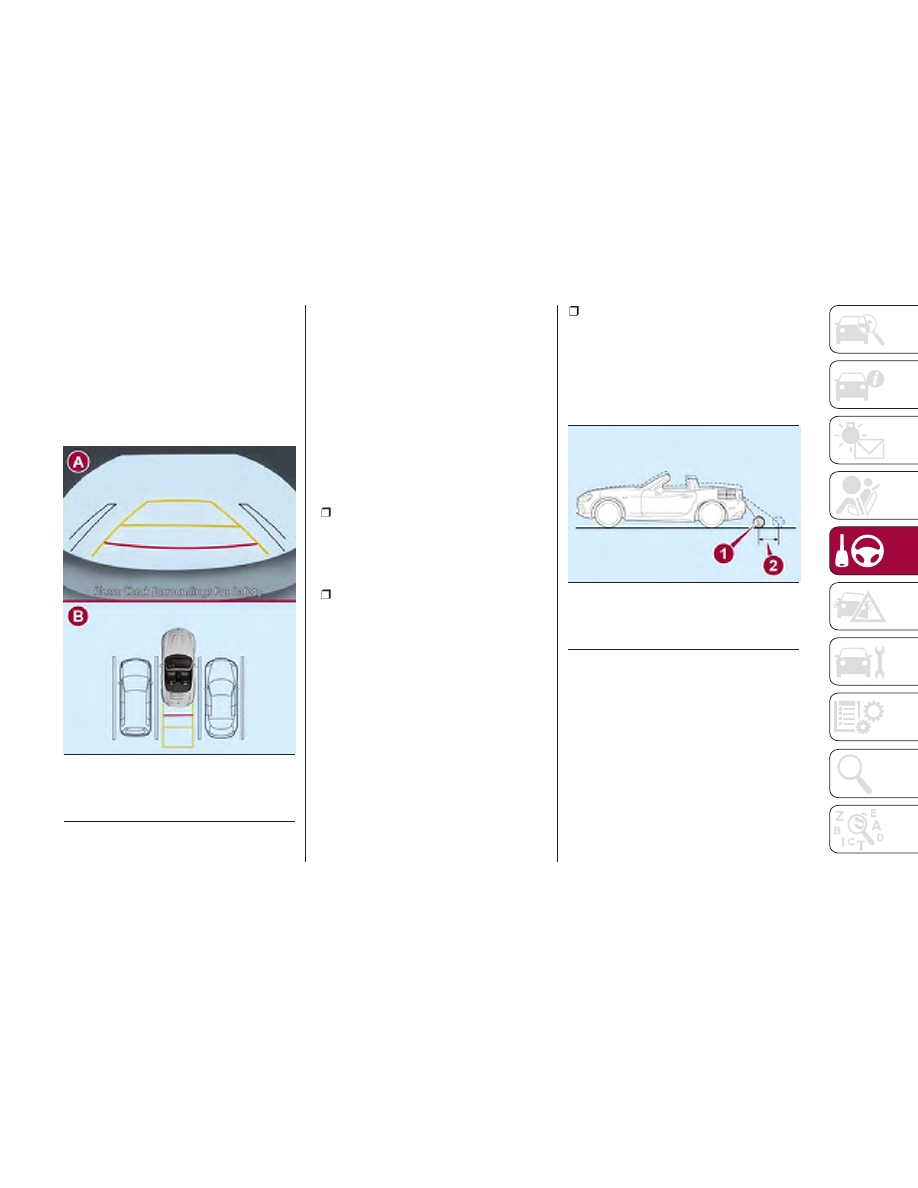
5. Once they are parallel, straighten the
steering wheel and reverse slowly into
the parking space. Continue to check
the vehicle’s surroundings and stop in
the best position possible (if the parking
space has dividing lines, check that the
vehicle width guide lines are parallel
with them).
6. When the gear selector is moved
from the REVERSE (R) position and put
in any other position, the screen returns
to the previous display mode.
Note:
Since there may be some differences
between the displayed image, as
indicated below, and the real
conditions, always check with your own
eyes that the area behind the vehicle
and the surrounding area are
completely safe:
In the image of the parking space
(or garage) shown above, the rear of
the vehicle and the distance guide lines
may seem parallel on the monitor, on
the ground they may not be.
When you enter a parking space
with a dividing line only on one side,
the dividing line and the vehicle width
guide line may appear parallel on the
monitor but they may not be so on the
ground.
Road Conditions And
Displayed Image
There are some differences between
the road and what is actually shown on
the display.
The different perceptions of distance
could lead to an accident. The
conditions that can lead to the different
perceptions of distance, listed below,
must be taken into consideration:
When The Vehicle Slopes Due To
The Weight Of Passengers And
Load:
When the vehicle is rear-heavy, the
object on the screen seems to be
further than it really is.
GUID-07080913990990
Entering Parking Spot
A — Rear Camera View
B — Check Surrounding Area
GUID-07080913991991
Loaded Vehicle Camera Angle
1 — Object
2— Variance
169