FM 3-05.211 Special Forces Military Free-Fall Operations (APRIL 2005) - page 1
*FM 3-05.211 (FM 31-19)
MCWP 3-15.6
NAVSEA SS400-AG-MMO-010
AFMAN 11-411(I)
Field Manual
Headquarters
No. 3-05.211
Department of the Army
Washington, DC, 6 April 2005
Special Forces
Military Free-Fall Operations
Contents
Page
PREFACE
v
Chapter 1
MILITARY FREE-FALL PARACHUTE OPERATIONS
1-1
Characteristics
1-1
Planning Considerations
1-2
Phases of Military Free-Fall Operations
1-5
Chapter 2
MC-4 RAM-AIR PARACHUTE SYSTEM
2-1
MC-4 Ram-Air Parachute System Components
2-1
Donning and Recovering the MC-4 Ram-Air Parachute System
2-15
Chapter 3
AUTOMATIC RIPCORD RELEASE
3-1
Automatic Ripcord Release Activation Setting and Operation
3-1
FF-2 Automatic Ripcord Release
3-1
DISTRIBUTION RESTRICTION: Distribution authorized to U.S. Government agencies and their contractors only
to protect technical or operational information from automatic dissemination under the International Exchange
Program or by other means. This determination was made on 15 December 2004. Other requests for this
document must be referred to Commander, United States Army John F. Kennedy Special Warfare Center and
School, ATTN: AOJK-DT-SFA, Fort Bragg, NC 28310-5000.
DESTRUCTION NOTICE: Destroy by any method that will prevent disclosure of contents or reconstruction of the
document.
Marine Corps distribution: PCN 14300004300
*This publication supersedes FM 31-19, 1 October 1999.
i
FM 3-05.211
Page
AR2 Automatic Ripcord Release, M451
3-6
AR2 Barometric Calculator, Model 466-001
3-9
Sentinel MK 2100
3-20
Military CYPRES
3-22
Chapter 4
USE OF OXYGEN IN SUPPORT OF MILITARY FREE-FALL OPERATIONS
4-1
Physiological Effects of High-Altitude Military Free-Fall Operations
4-1
Oxygen Forms
4-4
Oxygen Requirements
4-5
Oxygen Life-Support Equipment
4-7
The “PRICE” Check
4-19
Oxygen Safety Personnel and Preflight Checks
4-19
Oxygen Handling and Safety
4-24
Chapter 5
EQUIPMENT AND WEAPON RIGGING PROCEDURES
5-1
Equipment and Weapon Packing Considerations
5-1
Parachutist and Parachute Load Limitations
5-1
Hook-Pile Tape (Velcro) Lowering Line Assembly
5-3
Combat Packs and Other Equipment Containers
5-5
Parachutist Drop Bag
5-31
Weapon-Rigging Procedures
5-36
Life Preservers
5-50
Chapter 6
AIRCRAFT PROCEDURE SIGNALS AND JUMP COMMANDS
6-1
Aircraft Procedure Signals
6-1
Jump Commands
6-7
Chapter 7
BODY STABILIZATION
7-1
Tabletop Body Stabilization Training
7-1
Recovery From Instability
7-3
Chapter 8
RAM-AIR PARACHUTE FLIGHT CHARACTERISTICS
AND CANOPY CONTROL
8-1
Ram-Air Parachute Characteristics
8-1
Ram-Air Parachute Deployment Sequence
8-3
Ram-Air Parachute Theory of Flight
8-7
Ram-Air Parachute Flight Characteristics
8-8
Canopy Control
8-9
Turbulence
8-19
ii
FM 3-05.211/MCWP 3-15.6/NAVSEA SS400-AG-MMO-010/AFMAN 11-411(I)
6 April 2005
FM 3-05.211
Page
Land and Sea Breezes
8-20
Valley and Mountain Breezes
8-21
Chapter 9
EMERGENCY PROCEDURES FOR MILITARY FREE-FALL OPERATIONS
9-1
Refresher Training
9-1
Emergency Measures
9-1
Chapter 10
HIGH-ALTITUDE HIGH-OPENING AND LIMITED-VISIBILITY
OPERATIONS
10-1
Techniques and Requirements
10-1
Special Equipment
10-2
Free-Fall Delays
10-3
Parachute Jump Phases
10-3
Limited-Visibility Operations
10-4
Chapter 11
MILITARY FREE-FALL DROP ZONE OPERATIONS
11-1
Responsibilities
11-1
Drop Zone Selection Criteria
11-1
Drop Zone Surveys
11-2
Drop Zone Personnel Qualifications and Responsibilities
11-3
Military Free-Fall Drop Zone Markings
11-6
High-Altitude Release Point and Military Free-Fall Drop Zone Detection
11-6
Aircraft or High-Altitude High-Opening Team Identification
11-7
Authentication System
11-7
Chapter 12
DELIBERATE WATER MILITARY FREE-FALL OPERATIONS
12-1
Additional Support Requirements
12-1
Parachutist Requirements
12-2
Equipment Requirements
12-2
Drop Zone Requirements and Markings
12-4
Parachutist Procedures for Water Jumps
12-4
Drop Zone Procedures for Pickup of Parachutists and Equipment
12-5
Night Water Parachute Operations
12-6
Water Jumps With Combat Equipment
12-6
Chapter 13
JUMPMASTER RESPONSIBILITIES AND CURRENCY QUALIFICATIONS
13-1
Responsibilities
13-1
Qualifications
13-2
Cardinal Rules
13-2
Currency and Requalification Requirements
13-3
6 April 2005 FM 3-05.211/MCWP 3-15.6/NAVSEA SS400-AG-MMO-010/AFMAN 11-411(I)
iii
FM 3-05.211
Page
Appendix A MILITARY FREE-FALL CRITICAL TASK LISTS
A-1
Appendix B MILITARY FREE-FALL PARACHUTIST QUALIFICATION
AND REFRESHER TRAINING REQUIREMENTS
B-1
Appendix C RECOMMENDED MILITARY FREE-FALL TRAINING PROGRAMS
C-1
Appendix D SUGGESTED MILITARY FREE-FALL SUSTAINED AIRBORNE TRAINING
D-1
Appendix E SAMPLE ACCIDENT REPORT
E-1
Appendix F HIGH-ALTITUDE RELEASE POINT CALCULATION
F-1
Appendix G JUMPMASTER PERSONNEL INSPECTION
G-1
Appendix H SAMPLE AIRCRAFT INSPECTION CHECKLIST
H-1
Appendix I
JUMPMASTER AIRCREW BRIEFING CHECKLIST
I-1
GLOSSARY
Glossary-1
BIBLIOGRAPHY
Bibliography-1
INDEX
Index-1
iv
FM 3-05.211/MCWP 3-15.6/NAVSEA SS400-AG-MMO-010/AFMAN 11-411(I)
6 April 2005
FM 3-05.211
Preface
Department of Defense (DOD) Directive 5100.1, Functions of the Department of
Defense and Its Major Components, page
17, paragraph
6.6.1.2.3.2, has
designated the United States Army as the proponent for military parachute
operations.
Department of the Army memorandum, Subject: Army Military Free-Fall
Proponency, dated 23 September 1998, establishes USASOC as the proponent for
military free-fall (MFF) training, operations, equipment, and doctrine.
United States Special Operations Command
(USSOCOM) Directive
10-1,
Organization and Functions, Terms of Reference for Component Commanders,
Appendix A, page A-5, paragraph R, establishes Commander, USASOC, as the
proponent for MFF training, doctrine, safety, equipment, and interoperability for
USSOCOM Active and Reserve forces.
The Commander, United States Army John F. Kennedy Special Warfare Center
and School (USAJFKSWCS), Fort Bragg, North Carolina, is USASOC’s executive
agent for MFF training and doctrine.
This field manual (FM) presents a series of concise, proven techniques and
guidelines that are essential to safe, successful MFF operations. The techniques
and guidelines prescribed herein are generic in nature and represent the safest
and most effective methodologies available for executing MFF operations.
This FM applies to Army and USSOCOM MFF-capable units. USSOCOM
components are authorized to produce publications to supplement this manual to
clarify and amplify the procedures of this manual and Service publications.
Commanders can request waivers from their Service or component commanders
to meet specific operational requirements when methodologies contained in this
manual impede mission accomplishment.
When Service publications and USSOCOM publications conflict, USSOCOM
publications will take precedence during operations in which USSOCOM units
are the supported unit. When conducting Service-pure MFF operations, Services
will use their applicable regulations and standing operating procedures (SOPs).
The proponent and preparing agency of this publication is USAJFKSWCS.
Reviewers and users of this publication should submit comments and
recommended changes on Department of the Army Form 2028 to Commander,
USAJFKSWCS, ATTN: AOJK-DT-SFA, Fort Bragg, NC 28310-5000.
This FM implements Standardization Agreement (STANAG) 3570, Drop Zones
and Extraction Zones—Criteria and Markings, 26 March 1986.
Unless this publication states otherwise, masculine nouns and pronouns do not
refer exclusively to men.
6 April 2005 FM 3-05.211/MCWP 3-15.6/NAVSEA SS400-AG-MMO-010/AFMAN 11-411(I)
v
FM 3-05.211
Chapter 1
Military Free-Fall Parachute Operations
Special operations forces (SOF) must conduct a detailed mission analysis
to determine an appropriate method of infiltration. MFF operations are
one of the many options available to a commander to infiltrate personnel
into a designated area of operations (AO). MFF operations are ideally
suited for, but not limited to, the infiltration of operational elements, pilot
teams, pathfinder elements, special tactics team
(STT) assets, and
personnel replacements conducting various missions across the
operational continuum. A thorough understanding of all the factors
impacting MFF operations is essential due to the inherently high levels of
risk associated with MFF operations. The objective of this chapter is to
familiarize the reader with MFF operations and to outline the planning
considerations needed to successfully execute MFF operations.
CHARACTERISTICS
1-1. MFF parachute operations are used when enemy air defense systems,
terrain restrictions, or politically sensitive environments prevent low altitude
penetration or when mission needs require a clandestine insertion. MFF
parachute infiltrations are conducted using the Ram-Air Parachute System
(RAPS), which is a high-performance gliding system. The RAPS is a highly
maneuverable parachute that has forward air speeds of 20 to 30 miles per
hour (mph). The glide capability of the RAPS provides commanders the
means to conduct standoff infiltrations of designated areas without having to
physically fly over the target area. This process allows commanders to keep
high-value air assets outside the detection and threat ranges of enemy air
defense systems or politically sensitive areas.
1-2. MFF parachuting allows SOF personnel to deploy their parachutes at a
predetermined altitude, assemble in the air, navigate under canopy, and land
safely together as a tactical unit ready to execute their mission. Although
free-fall parachuting can produce highly accurate landings, it is primarily a
means of entering a designated impact area within the objective area. The
following are two basic types of MFF operations:
• High-altitude low-opening (HALO) operations are jumps made with an
exit altitude of up to 35,000 feet mean sea level (MSL) and a parachute
deployment altitude at or below 6,000 feet above ground level (AGL).
HALO infiltrations are the preferred MFF method of infiltration when
the enemy air defense posture is not a viable threat to the infiltration
platform. HALO infiltrations require the infiltration platform to fly
within several kilometers of the drop zone (DZ).
• High-altitude high-opening (HAHO) operations are standoff infiltration
jumps made with an exit altitude of up to 35,000 feet MSL and a
6 April 2005 FM 3-05.211/MCWP 3-15.6/NAVSEA SS400-AG-MMO-010/AFMAN 11-411(I)
1-1
FM 3-05.211
parachute deployment altitude at or above 6,000 feet AGL. HAHO
infiltrations are the preferred method of infiltration when the enemy
air defense threat is viable or when a low-signature infiltration is
required. Standoff HAHO infiltrations provide commanders a means to
drop MFF parachutists outside the air defense umbrella, where they
can navigate undetected under canopy to the DZ or objective area.
1-3. Personnel involved in MFF operations require extensive knowledge of
meteorology and navigation. They must be able to conduct realistic
premission training, gather information, plan, rehearse, and use the
appropriate MFF infiltration technique to accomplish their assigned mission.
(Appendix A includes the critical task lists for the MFF basic, advanced, and
jumpmaster courses.) Tandem operations, however, must be conducted in
accordance with (IAW) current doctrine and approved tactics, techniques, and
procedures (TTP).
1-4. When used correctly, MFF infiltrations give commanders another
means to move SOF and influence the battlefield. The skills and techniques
used in MFF operations are equally applicable to all SF core tasks, especially
direct action
(DA), special reconnaissance
(SR), unconventional warfare
(UW), and foreign internal defense (FID).
PLANNING CONSIDERATIONS
1-5. Successful MFF operations depend on thorough mission planning,
preparation, coordination, and rehearsals. MFF operations are almost always
joint operations that require coordination with an aircrew. Premission
planning must include joint briefings and rehearsals between the infiltrating
element and the supporting aircrew. Both elements must have a thorough
understanding of primary, alternate, and emergency plans. When planning
MFF operations, mission planners must consider—
• Mission, enemy, terrain and weather, troops and support available,
time available, civil considerations (METT-TC).
• Ingress and egress routes.
• Suppression of enemy air defenses (SEAD) support.
• Availability of deception air operations in support of actual infiltration.
• Use of commercial airline routes if clandestine infiltration is required
in politically sensitive areas.
• In-flight abort criteria.
• En route evasion plan of action (EPA) for the infiltrating element and
the aircrew.
• Availability of aircrews working under arduous conditions in
depressurized aircraft at high altitudes.
• Specialized training of personnel and special equipment requirements.
• Currency and proficiency level of the parachutist.
• Drop altitudes requiring the use of oxygen and special environmental
protective clothing.
1-2
FM 3-05.211/MCWP 3-15.6/NAVSEA SS400-AG-MMO-010/AFMAN 11-411(I)
6 April 2005
FM 3-05.211
• Limitations on jumping with extremely bulky or heavy equipment. The
total combined weight of the parachutist, parachute, and equipment
cannot exceed the maximum suspended weight of the canopy.
• Accurate weather data. This information is essential. The lack of
accurate meteorological data, such as winds aloft, jet stream direction
and velocity, seasonal variances, or topographical effects on turbulence,
can severely affect the infiltration’s success or the mission’s combat
effectiveness.
• HAHO standoff operations. Wind, cold, and high-altitude openings
increase the probability of physiological stress and injury, parachute
damage, and opening shock injuries.
• Minimum and maximum exit and opening altitudes for training
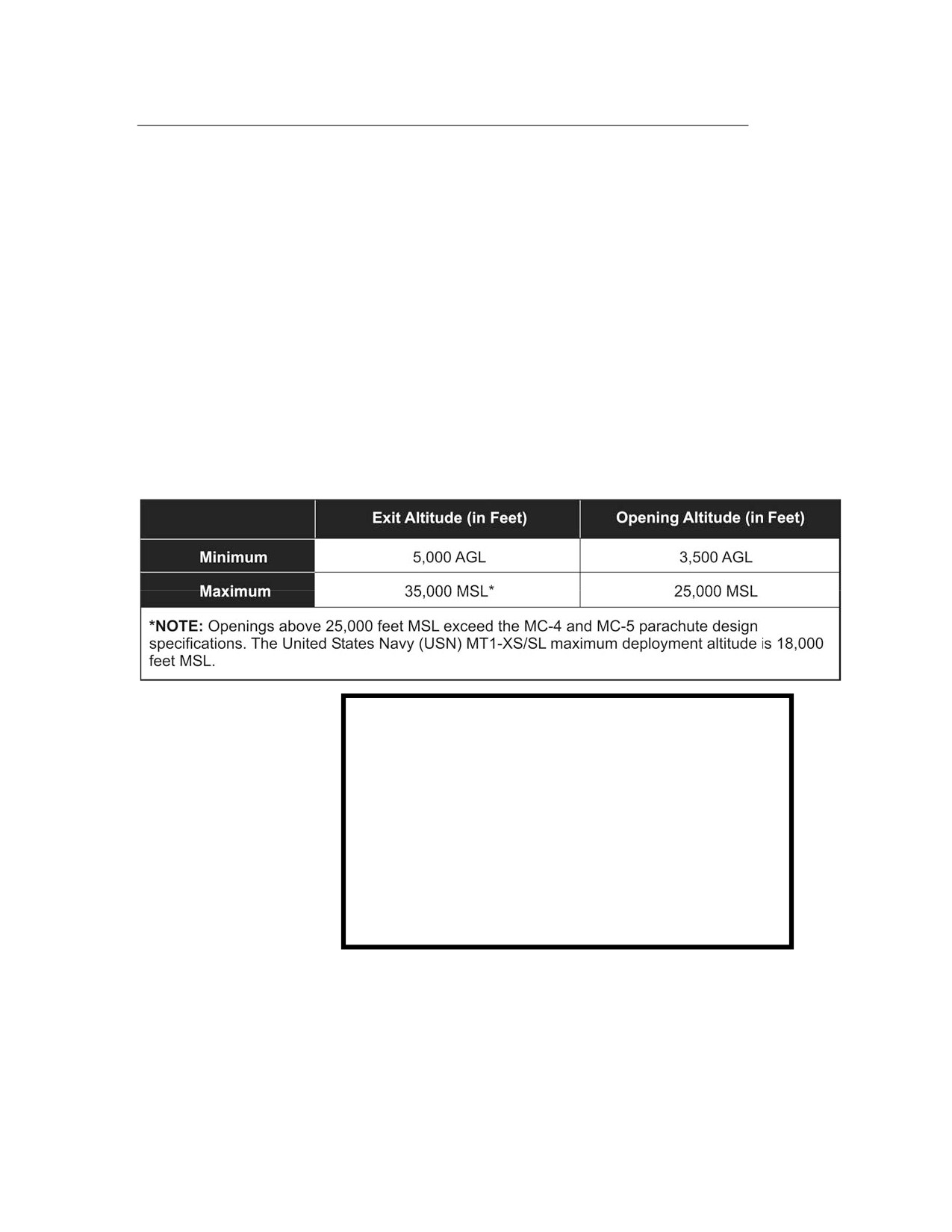
(Table 1-1).
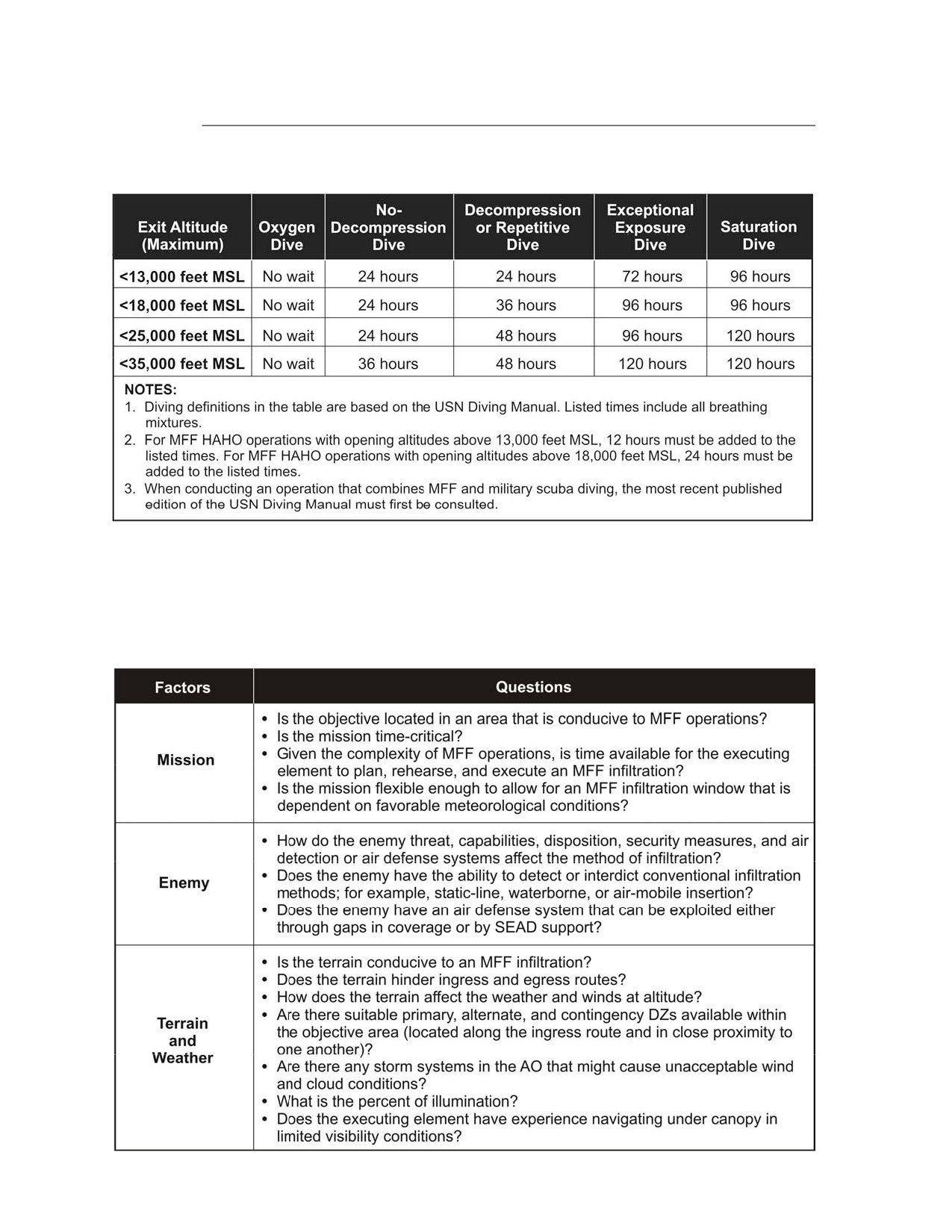
• Surface interval after diving operations (Table 1-2, page 1-4).
Table 1-1. Minimum and Maximum Exit and Opening Altitudes
WARNING
Personnel will not fly as passengers for 2 hours after
a no-decompression dive, 12 hours after a decom-
pression or repetitive dive, or
72 hours after an
exceptional exposure or saturation dive. Flying after
these times is limited to
8,000 feet MSL cabin
pressure, which is the maximum recommended for
commercial passenger aircraft. If aircraft cabin
pressure is below 2,300 feet MSL, then flying may be
done immediately after an air dive. There is no
waiting period for flying after an oxygen dive.
6 April 2005 FM 3-05.211/MCWP 3-15.6/NAVSEA SS400-AG-MMO-010/AFMAN 11-411(I)
1-3
FM 3-05.211
Table 1-2. Surface Interval Chart for Conducting Military Free-Fall Operations After Diving
1-6. The successful execution of any operation is directly related to thorough
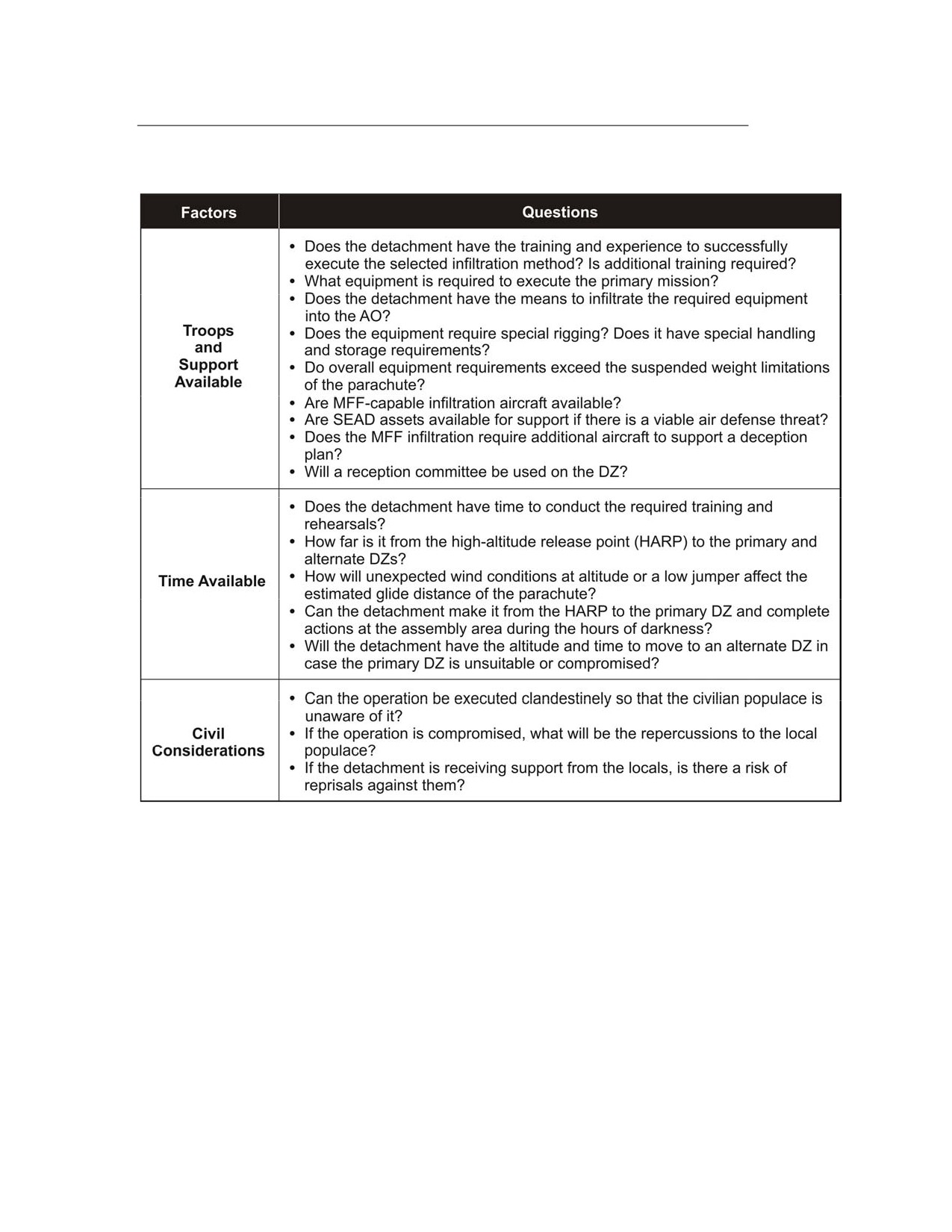
and detailed planning. Mission planning begins with a detailed analysis of
METT-TC questions (Table 1-3, pages 1-4 and 1-5), with qualifiers pertaining
to MFF operations that the executing element must consider when selecting
a method on infiltration.
Table 1-3. METT-TC Analysis
1-4
FM 3-05.211/MCWP 3-15.6/NAVSEA SS400-AG-MMO-010/AFMAN 11-411(I)
6 April 2005
FM 3-05.211
Table 1-3. METT-TC Analysis (Continued)
1-7. A thorough METT-TC analysis concentrating on those questions
pertaining to MFF operations will determine if MFF infiltration is
appropriate. The detachment must then complete the remainder of the
mission planning process.
PHASES OF MILITARY FREE-FALL OPERATIONS
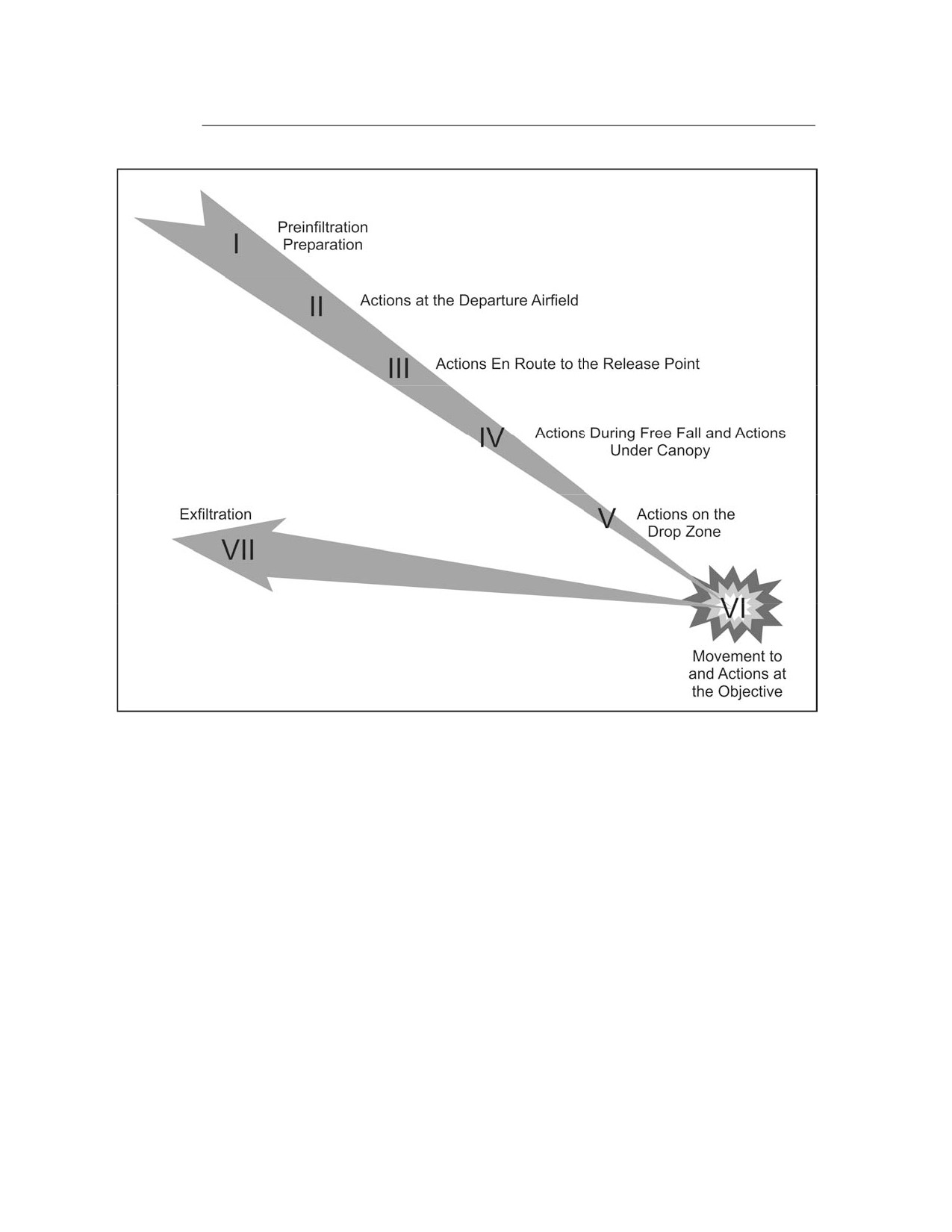
1-8. To aid the Special Forces operational detachment (SFOD) in planning
and executing, MFF operations are divided into seven phases. Figure 1-1,
page 1-6, shows each phase, and the following paragraphs provide the details
for each.
6 April 2005 FM 3-05.211/MCWP 3-15.6/NAVSEA SS400-AG-MMO-010/AFMAN 11-411(I)
1-5
FM 3-05.211
Figure 1-1. Military Free-Fall Operations Planning Phases
PHASE I: PREINFILTRATION PREPARATION
1-9. Preinfiltration preparation starts with preparing an estimate of the
situation. The detachment uses the military decision-making process
(MDMP) to identify critical nodes in the mission and develop courses of action
(COAs) to address them. During this phase, the detachment will plan the
mission, prepare plans and orders, conduct briefbacks, conduct training,
prepare equipment, and conduct inspections and rehearsals.
1-10. The air mission brief is one of the key briefings conducted during
premission planning. The air mission brief takes place during isolation,
before the briefback. The ground commander, primary jumpmaster, and
aircrew conduct face-to-face coordination to discuss the following items:
• Flight routes and in-flight checkpoints, to include the point of no
return.
• En route mission-abort criteria.
• En route EPA procedures.
• Emergency landing procedures.
1-6
FM 3-05.211/MCWP 3-15.6/NAVSEA SS400-AG-MMO-010/AFMAN 11-411(I)
6 April 2005
FM 3-05.211
• Actions in the aircraft.
• Call signs and frequencies or visual recognition signals, if used.
1-11. Aircrew attendance at the briefing is mandatory and should include at
a minimum the aircraft commander, navigator, and the primary loadmaster.
PHASE II: ACTIONS AT THE DEPARTURE AIRFIELD
1-12. In Phase II of infiltration, the detachment moves from the isolation
facility to the departure airfield. A pilot-jumpmaster briefing normally takes
place planeside before loading the aircraft; any changes or updates to the
plan are made at this time. If the prebreathing is required, it is started.
PHASE III: ACTIONS EN ROUTE TO THE RELEASE POINT
1-13. Under tactical conditions, the operational element completely rigs
itself, and the jumpmasters make jumpmaster personnel inspections (JMPIs)
before the point of no return. This procedure ensures the personnel will exit
the aircraft with all their equipment in case of a bailout over enemy territory.
All detachment members calibrate their altimeters so that the instruments
read distance above the ground at the DZ.
1-14. During flight to the HARP, the aircraft commander keeps the
jumpmaster informed of the aircraft’s position. In turn, the jumpmaster
keeps the parachutist informed. This information is essential. The
parachutist must know his relative position along the route so that he can
apply the required actions in case of an abort or enemy action. While in
flight, the aircraft commander keeps the MFF jumpmaster informed of
changes to the altimeter reading should it be necessary to abort and make an
emergency exit. All actions and time warnings issued will be IAW premission
briefings and this manual. The pilot will signal the jumpmaster upon
arriving at the HARP. The parachutists exit the aircraft on the jumpmaster’s
command.
PHASE IV: ACTIONS DURING FREE FALL AND ACTIONS UNDER CANOPY
1-15. MFF parachute jumps consist of four phases. They are—
• Exit, delay, and deployment.
• Assembly under canopy.
• Flight in formation.
• Final approach and landing.
PHASE V: ACTIONS ON THE DROP ZONE
1-16. At the DZ, the commander immediately accounts for his personnel and
equipment. Infiltrating detachments are especially vulnerable to enemy
action during this phase. To minimize the chances of detection, the
detachment must clear the DZ as rapidly as possible and move to the
preselected assembly area. This area must provide cover and concealment
and facilitate subsequent movement to the objective area. Parachutes and air
items should be buried or cached. If a reception committee is present, its
leader coordinates personnel movement and provides current intelligence on
6 April 2005 FM 3-05.211/MCWP 3-15.6/NAVSEA SS400-AG-MMO-010/AFMAN 11-411(I)
1-7
FM 3-05.211
the enemy situation. Finally, the detachment sterilizes the assembly area
and begins moving to the objective area.
PHASE VI: MOVEMENT TO AND ACTIONS AT THE OBJECTIVE
1-17. Movement from the DZ to the objective area may require guides. If a
reception committee is present, it provides guides to the area or mission
support sites where additional equipment brought ashore may be cached. If
guides are not available, the detachment follows the preselected route based
on detailed intelligence and the patrolling plan developed during isolation.
The route must take maximum advantage of cover and concealment and
avoid enemy outposts, patrols, and installations. The detachment carries only
mission-essential equipment and supplies (individual equipment, weapons,
communications, and ammunition).
PHASE VII: EXFILTRATION
1-18. Exfiltration planning considerations require the same planning,
preparations, tactics, and techniques as infiltrations do. However, in
exfiltration the planners are primarily concerned with recovery methods.
Distances involved in exfiltration usually require additional means of
transport. Fixed- or rotary-wing aircraft, vehicles, surface craft, submarines,
or various combinations of these methods can be used to recover operational
elements.
1-8
FM 3-05.211/MCWP 3-15.6/NAVSEA SS400-AG-MMO-010/AFMAN 11-411(I)
6 April 2005
FM 3-05.211
Chapter 2
MC-4 Ram-Air Parachute System
The evolution of the parachute used in MFF operations has been
considerable over the years. This chapter identifies the MC-4 RAPS
components and donning and recovery procedures. There are several
RAPSs used in DOD that have similar employment and flight
characteristics to the MC-4—the USN MT1-XS/SL and MT2-XX/SL, and
the United States Marine Corps (USMC) MC-5. All three RAPSs have a
static-line capability, though the MT1-XS/SL has a smaller reserve
canopy.
NOTE: Questions regarding employment of the RAPS in the static-line
configuration should be addressed to the Airborne School, Fort Benning, Georgia.
Technical manual (TM) 10-1670-287-23&P, Unit and Direct Support Maintenance
Manual for MC-4 Ram-Air Free-Fall Personnel Parachute System, contains
information on repairing and maintaining the MC-4; USMC TM
09770A-12&P/1A, Operational Instructions and Organizational Maintenance
With Illustrated Parts Breakdown for the Ram-Air Parachute Assembly, MC-5,
contains information for the MC-5; and Naval Air Systems Command (NAVAIR)
13-1-21, Organizational Maintenance With Illustrated Parts Breakdown for the
Ram-Air Parachute Assembly
(MT1-XS/SL), contains information for the
MT1-XS/SL.
MC-4 RAM-AIR PARACHUTE SYSTEM COMPONENTS
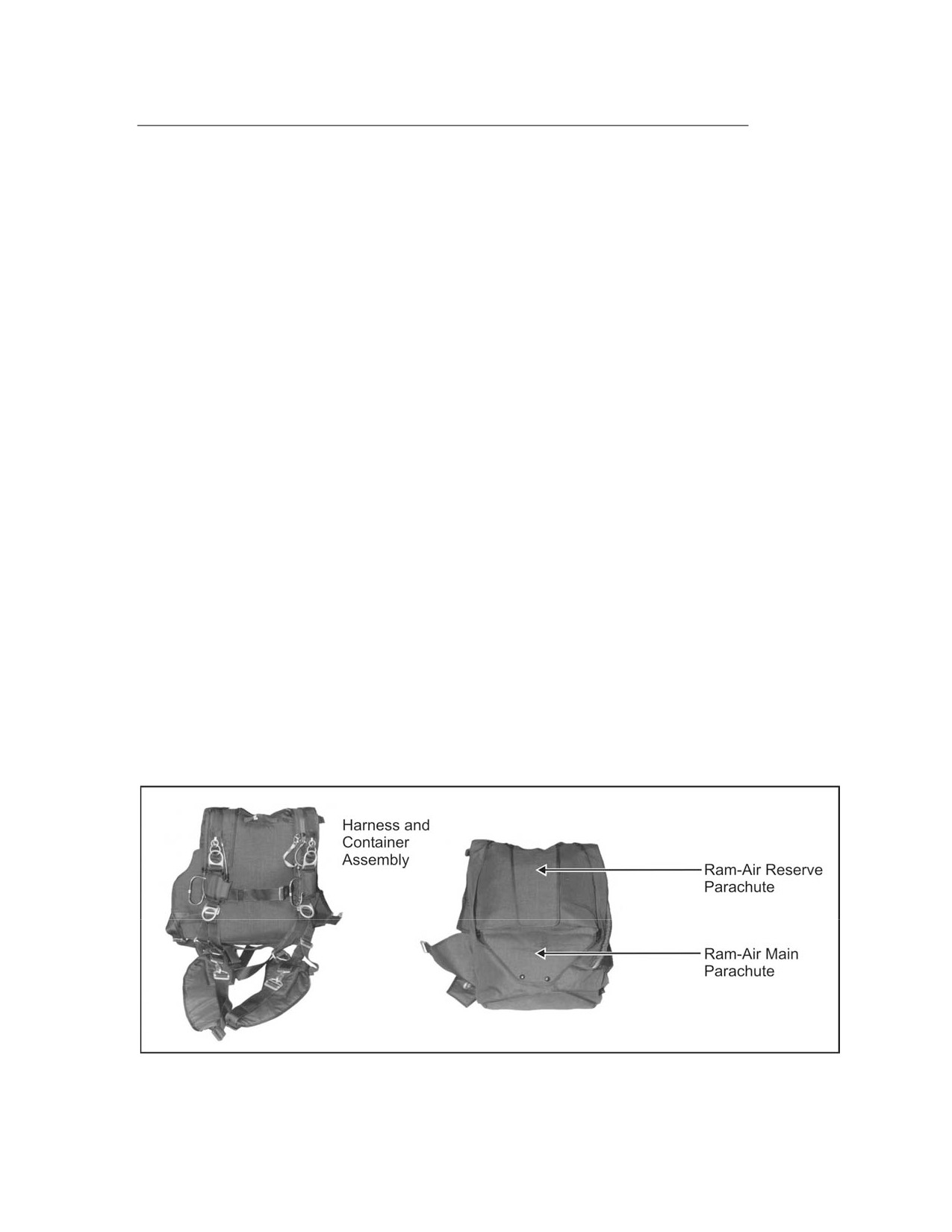
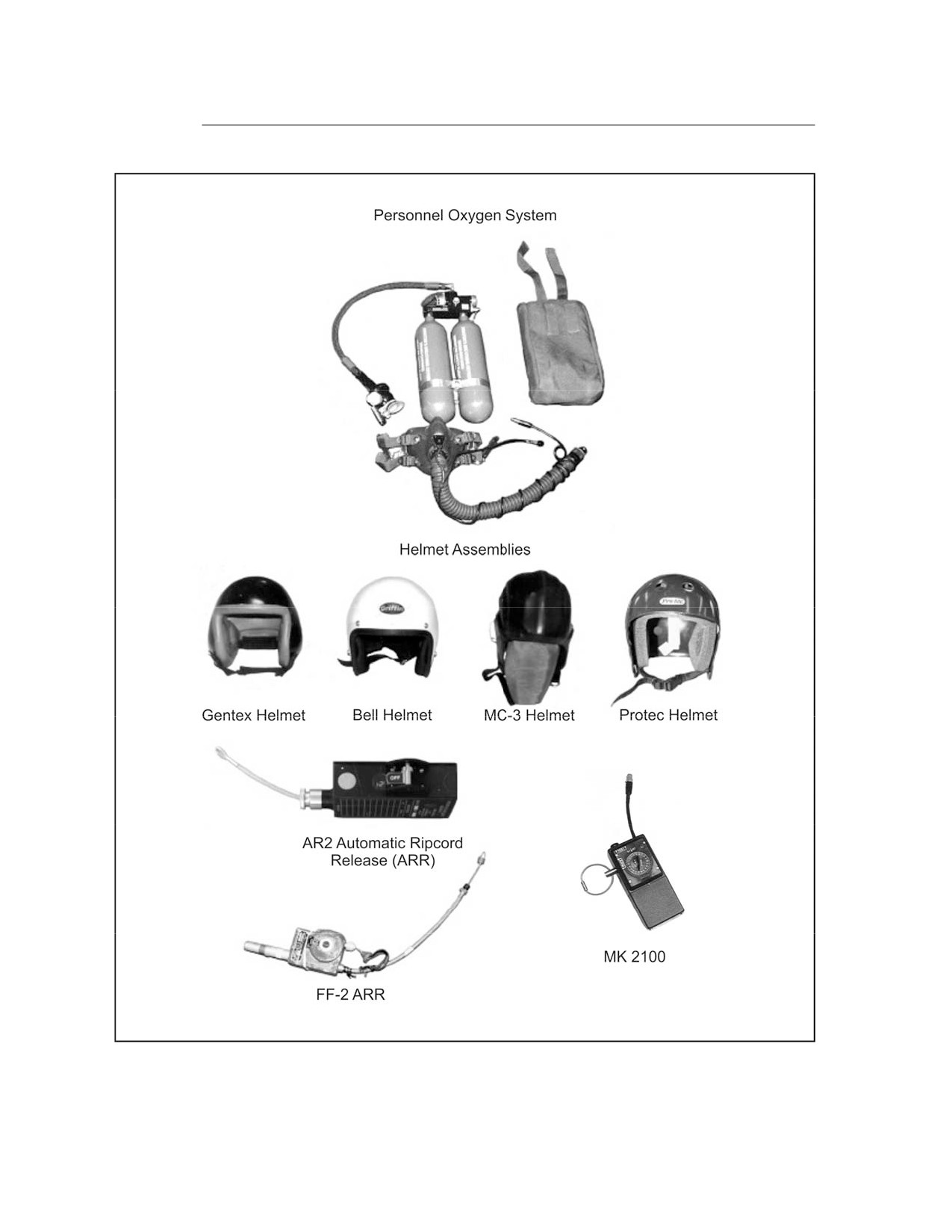
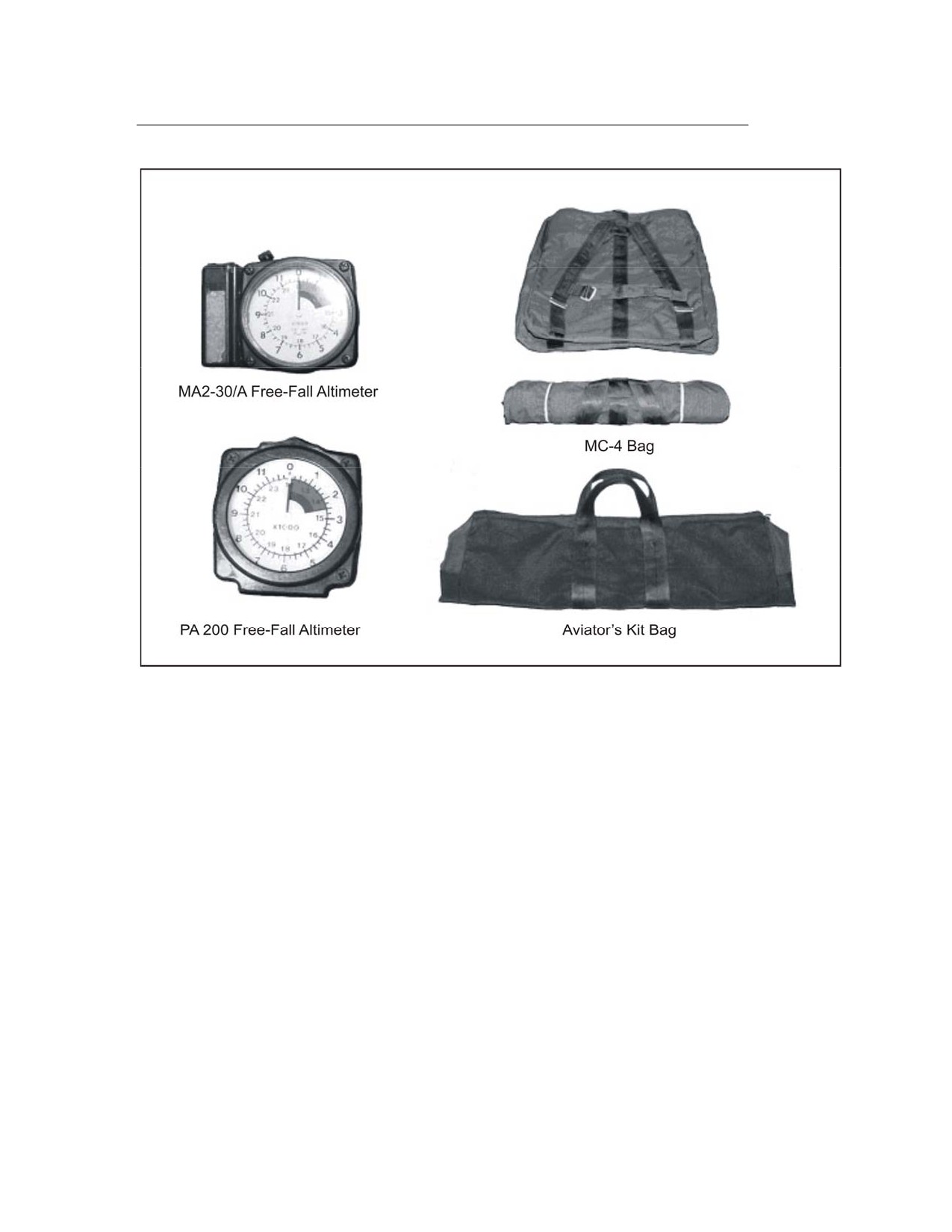
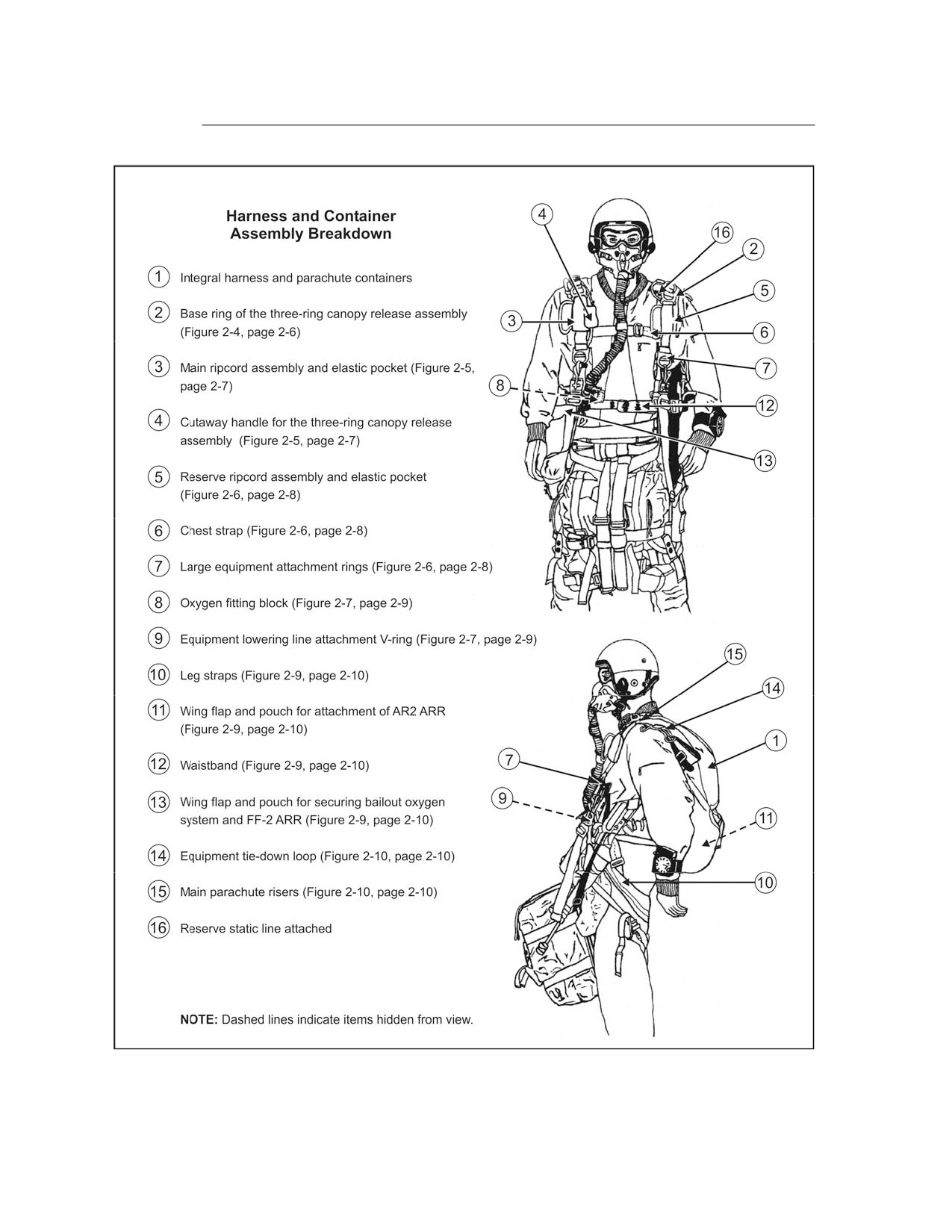
2-1. Figures 2-1 through 2-13, pages 2-1 through 2-13, depict the various
components associated with the MC-4 RAPS.
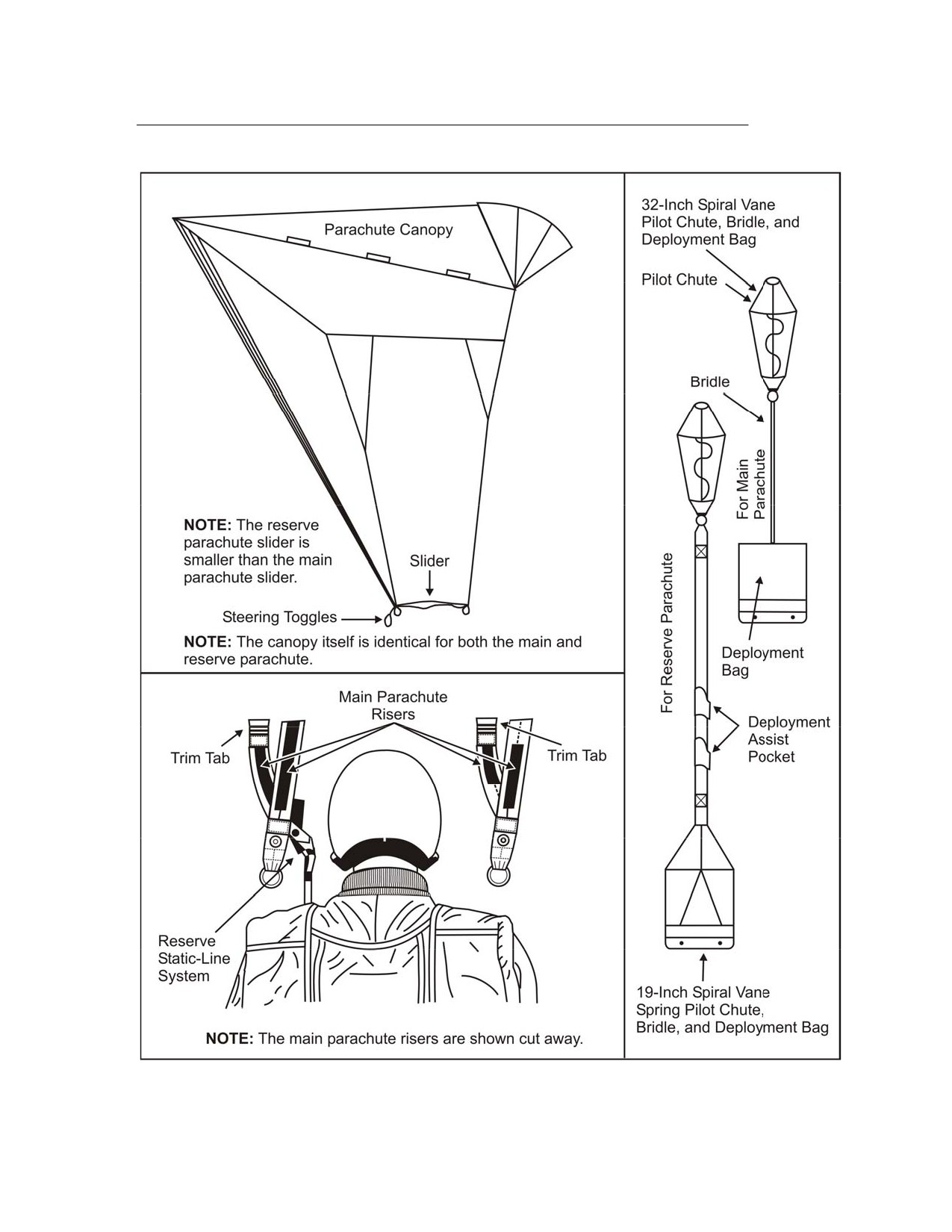
Figure 2-1. MC-4 RAPS Components
6 April 2005 FM 3-05.211/MCWP 3-15.6/NAVSEA SS400-AG-MMO-010/AFMAN 11-411(I)
2-1
FM 3-05.211
Figure 2-1. MC-4 RAPS Components (Continued)
2-2
FM 3-05.211/MCWP 3-15.6/NAVSEA SS400-AG-MMO-010/AFMAN 11-411(I)
6 April 2005
FM 3-05.211
Figure 2-1. MC-4 RAPS Components (Continued)
6 April 2005 FM 3-05.211/MCWP 3-15.6/NAVSEA SS400-AG-MMO-010/AFMAN 11-411(I)
2-3
FM 3-05.211
Figure 2-2. MC-4 RAPS Harness and Container Assembly Components
2-4
FM 3-05.211/MCWP 3-15.6/NAVSEA SS400-AG-MMO-010/AFMAN 11-411(I)
6 April 2005
FM 3-05.211
Figure 2-3. MC-4 RAPS Assembly Components
6 April 2005 FM 3-05.211/MCWP 3-15.6/NAVSEA SS400-AG-MMO-010/AFMAN 11-411(I)
2-5
FM 3-05.211
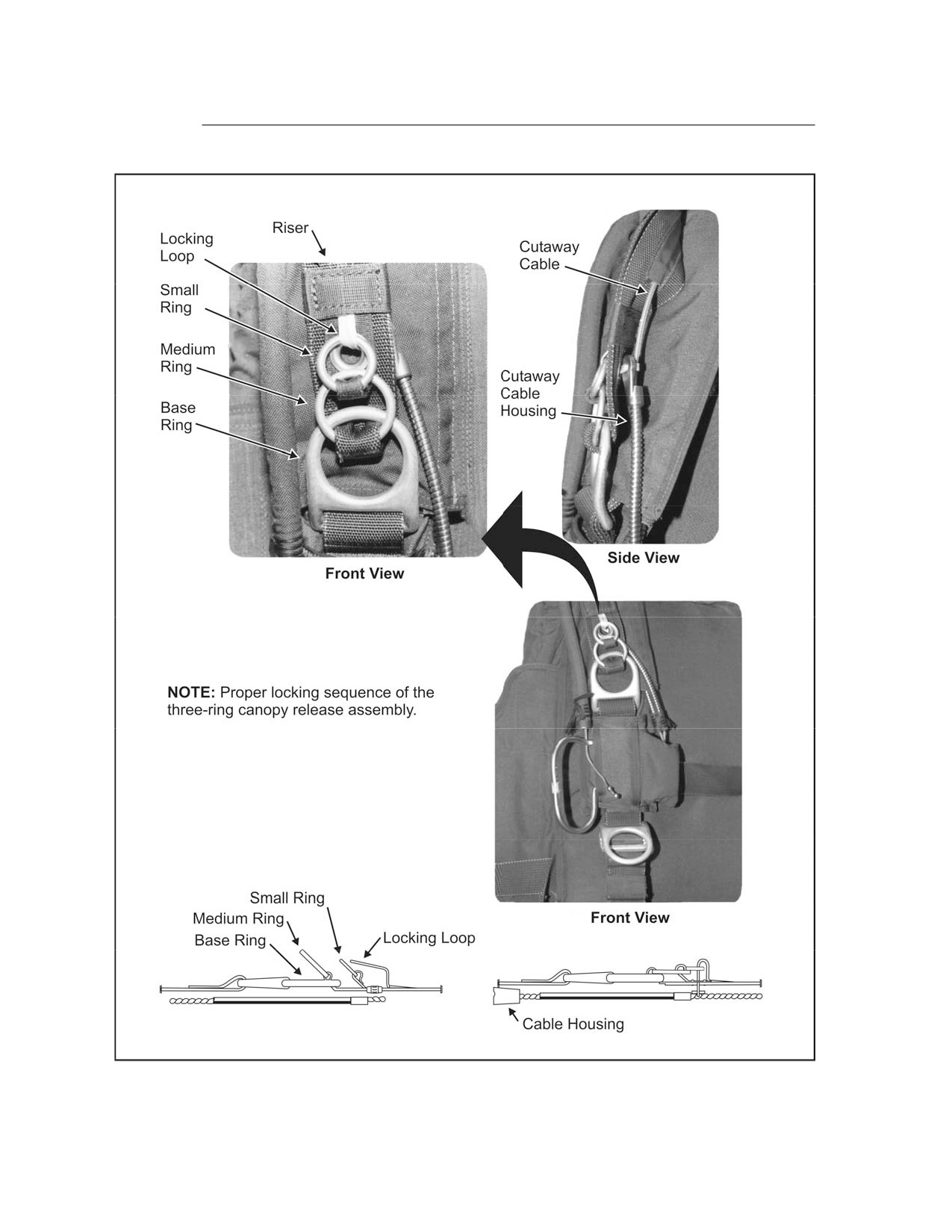
Figure 2-4. Location of the Three-Ring Canopy Release Assembly
2-6
FM 3-05.211/MCWP 3-15.6/NAVSEA SS400-AG-MMO-010/AFMAN 11-411(I)
6 April 2005
FM 3-05.211
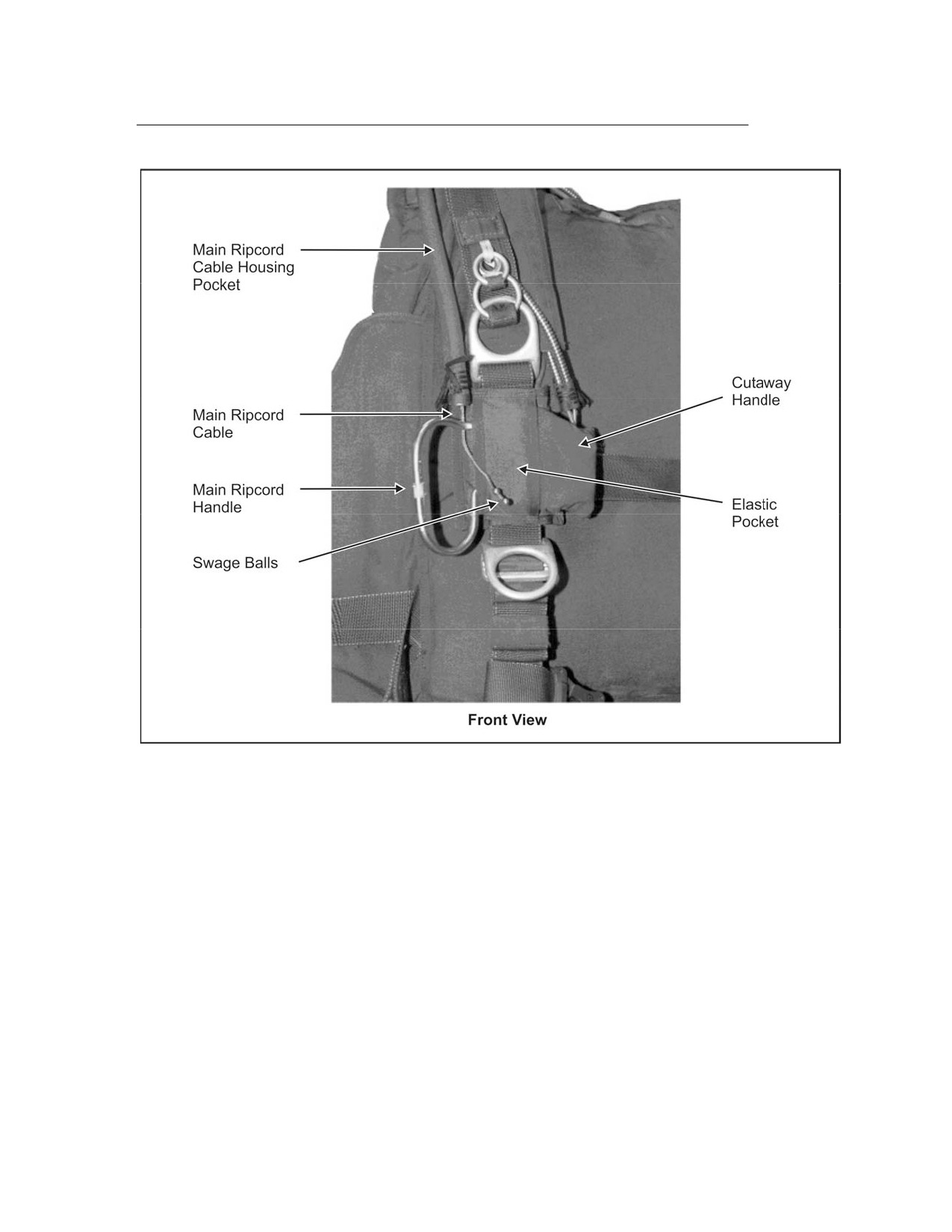
Figure 2-5. Location of the Main Ripcord Handle and Cutaway Handle
6 April 2005 FM 3-05.211/MCWP 3-15.6/NAVSEA SS400-AG-MMO-010/AFMAN 11-411(I)
2-7
FM 3-05.211
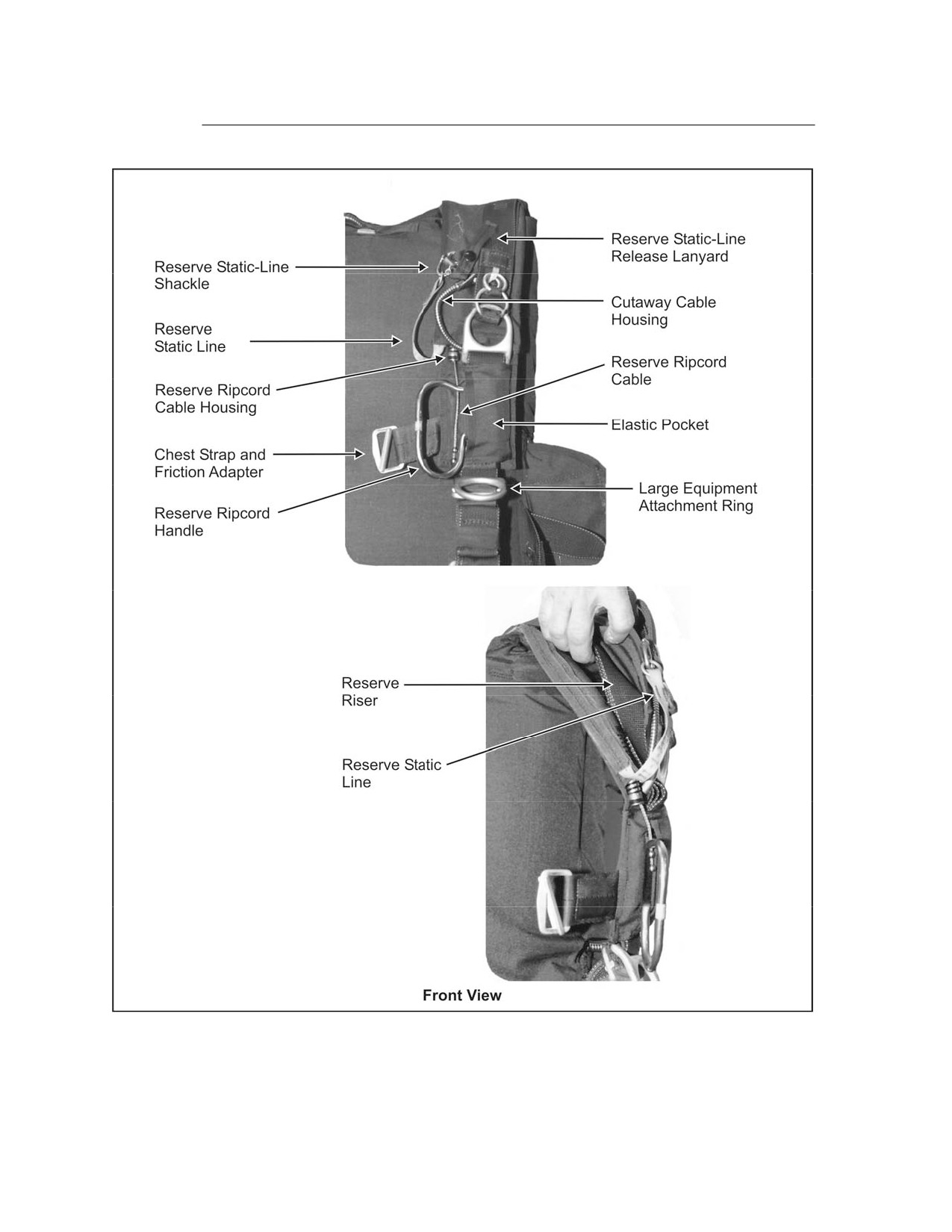
Figure 2-6. Location of the Chest Strap, Reserve Ripcord Handle, Large Equipment
Attachment Ring, and Reserve Ripcord Cable Housing
2-8
FM 3-05.211/MCWP 3-15.6/NAVSEA SS400-AG-MMO-010/AFMAN 11-411(I)
6 April 2005
FM 3-05.211
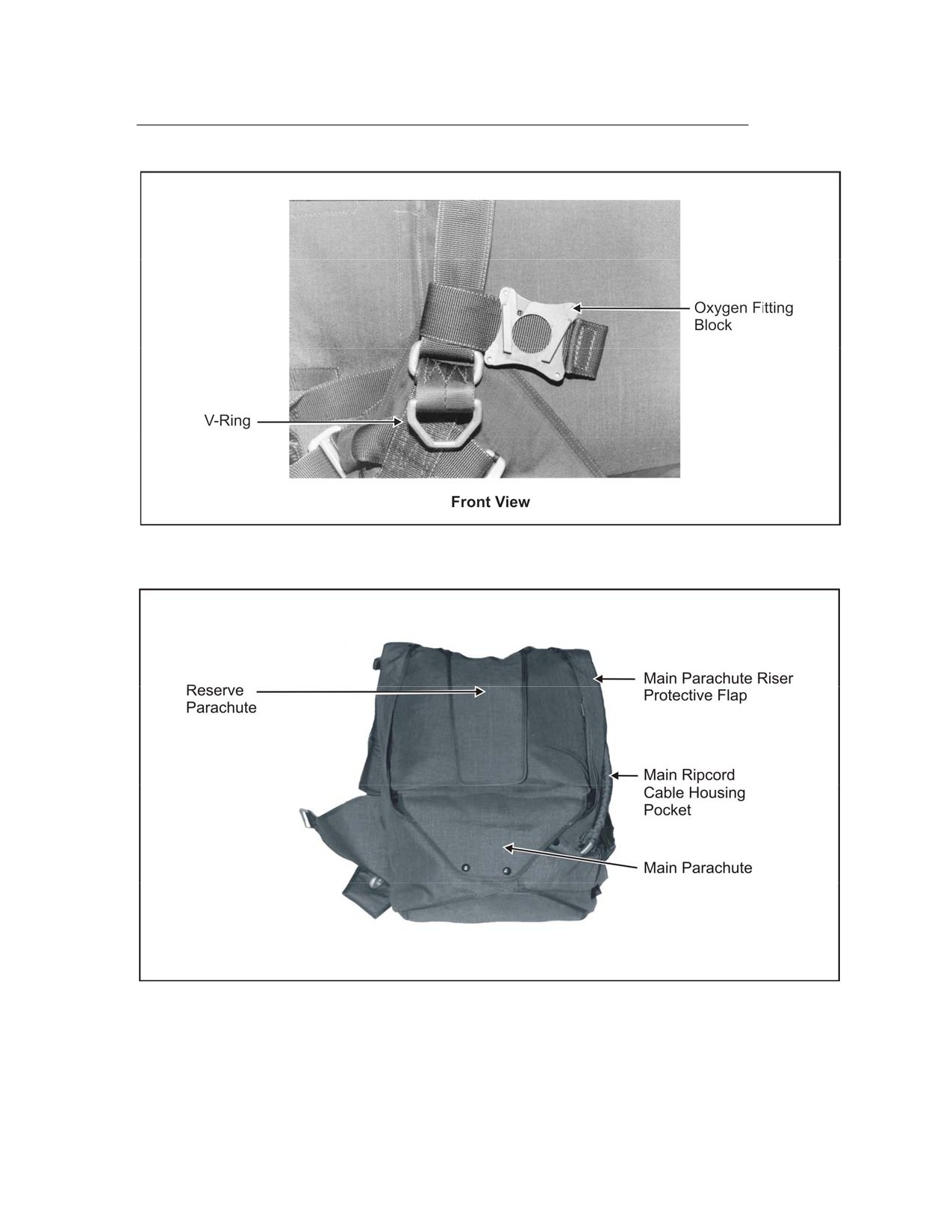
Figure 2-7. Location of the Oxygen Fitting Block and Equipment
Lowering Line Attachment V-Ring
Figure 2-8. Location of the Main and Reserve Parachutes in the Container
6 April 2005 FM 3-05.211/MCWP 3-15.6/NAVSEA SS400-AG-MMO-010/AFMAN 11-411(I)
2-9
FM 3-05.211
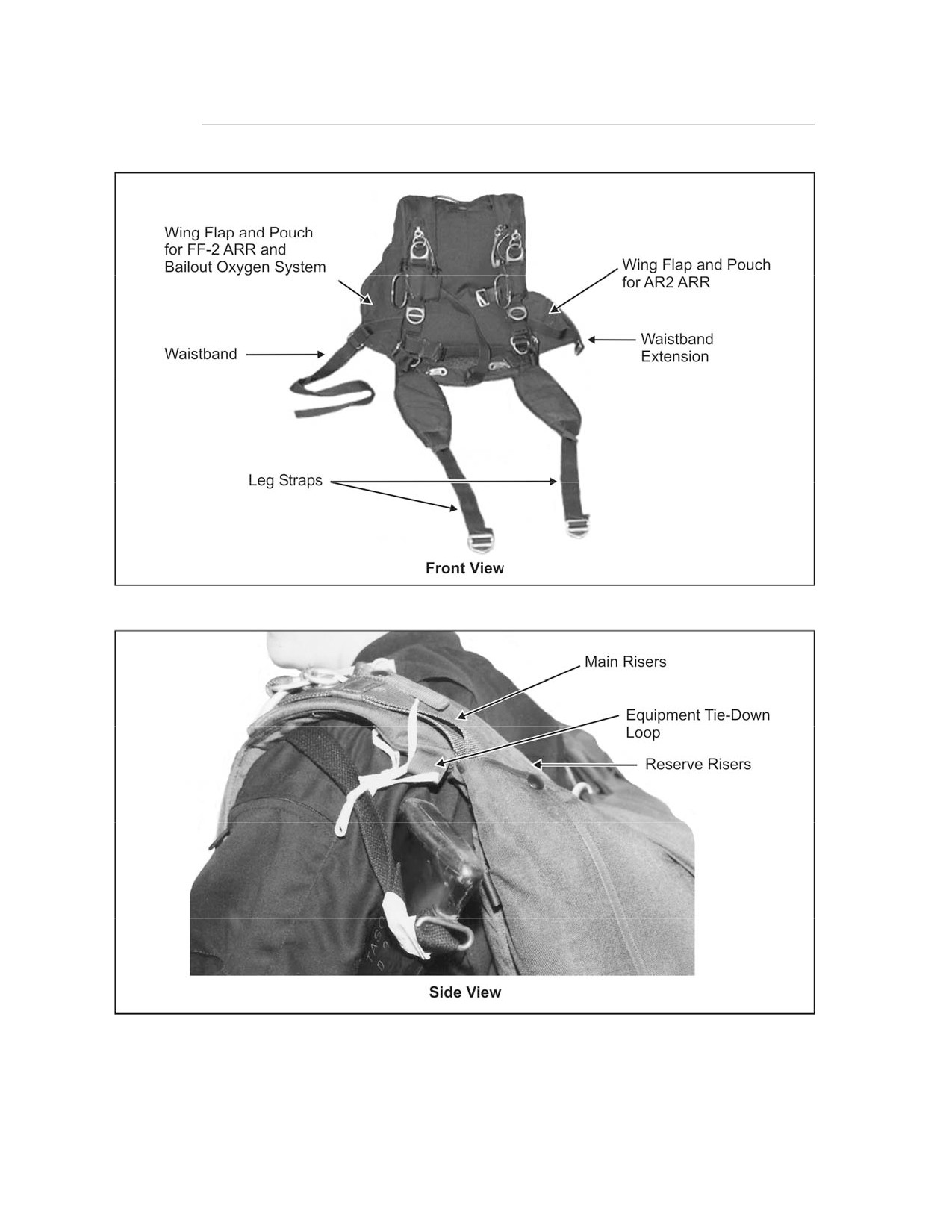
Figure 2-9. Location of Straps
Figure 2-10. Location of the Equipment Tie-Down Loop and Main Risers
2-10
FM 3-05.211/MCWP 3-15.6/NAVSEA SS400-AG-MMO-010/AFMAN 11-411(I)
6 April 2005
FM 3-05.211
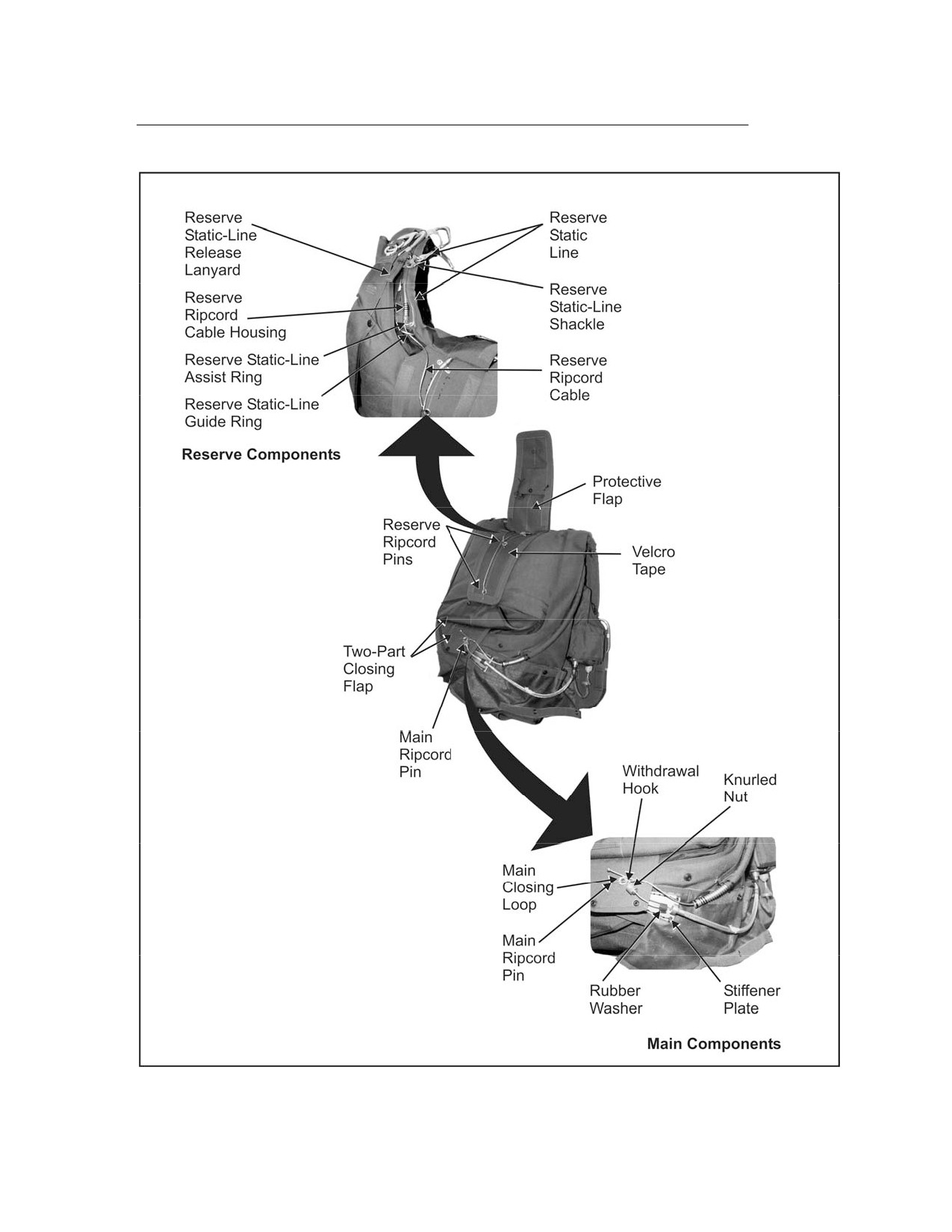
Figure 2-11. Location of Main and Reserve Components
6 April 2005 FM 3-05.211/MCWP 3-15.6/NAVSEA SS400-AG-MMO-010/AFMAN 11-411(I)
2-11
FM 3-05.211
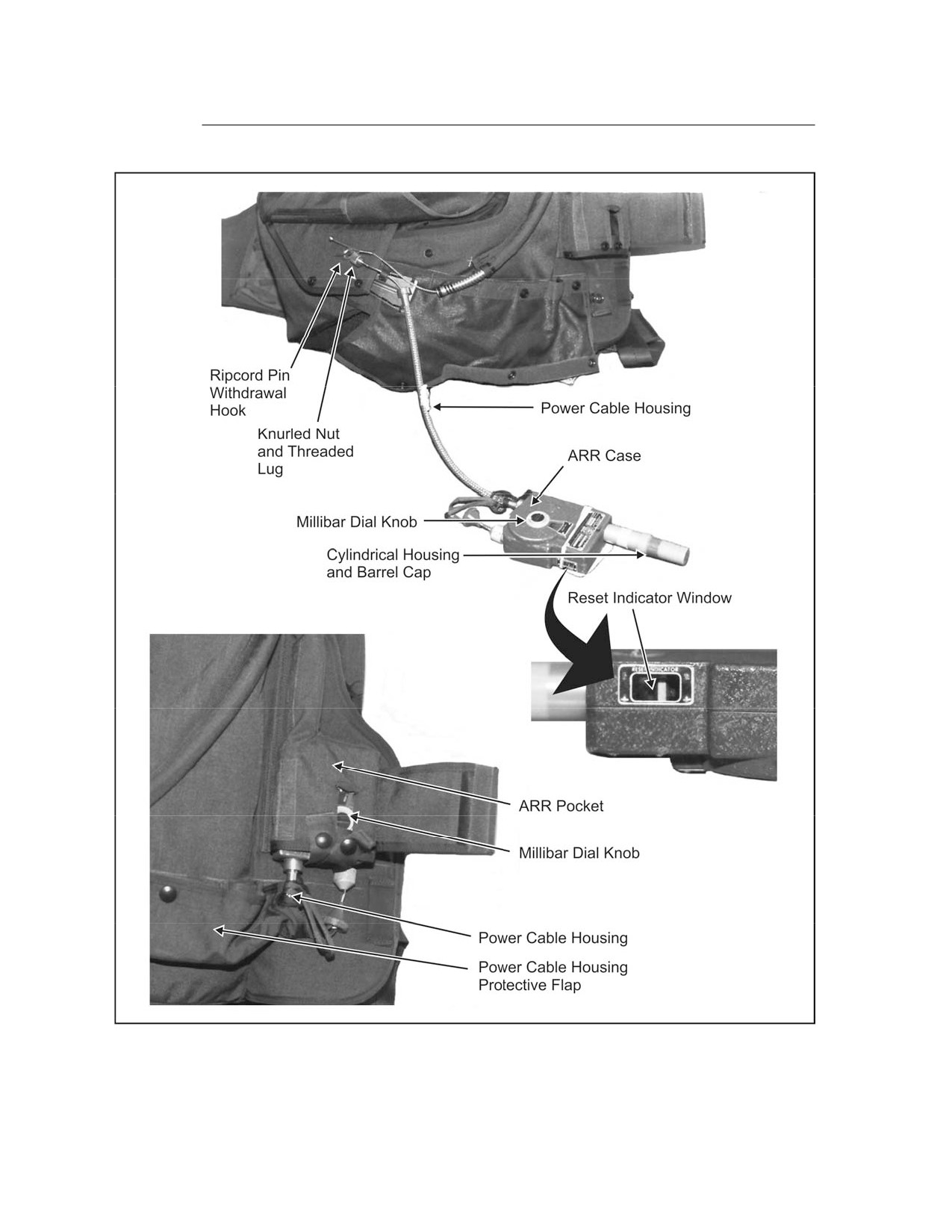
Figure 2-12. FF-2 Assembly Components
2-12
FM 3-05.211/MCWP 3-15.6/NAVSEA SS400-AG-MMO-010/AFMAN 11-411(I)
6 April 2005
FM 3-05.211
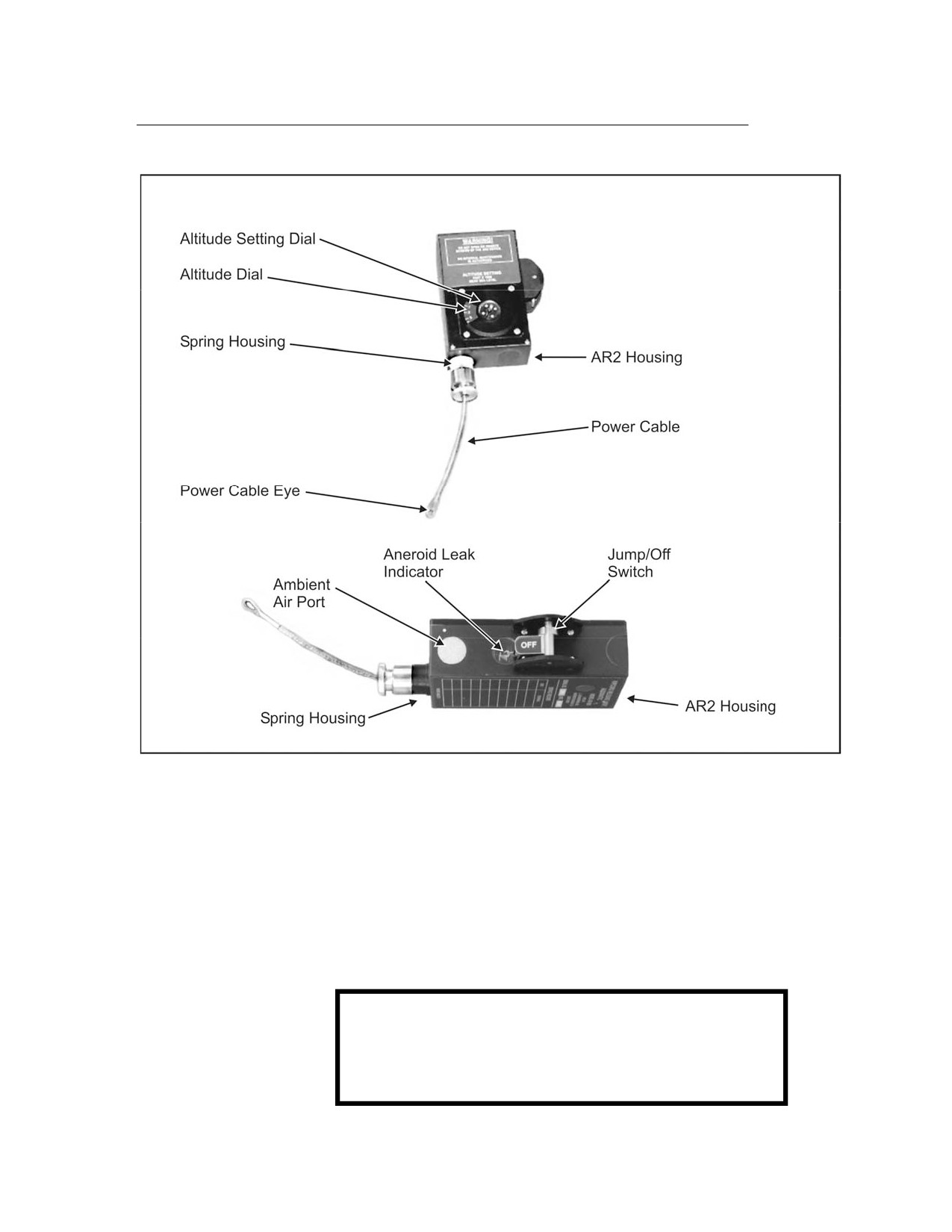
Figure 2-13. AR2 Assembly Components
MILITARY FREE-FALL PARACHUTIST HELMET ASSEMBLY
2-2. MFF parachutists use the following helmets: the Gentex HGU-55/P
helmet, the Gentex Lightweight Parachutist helmet, the MC-3 helmet (a
semirigid, padded leather helmet), the Protec helmet with free-fall liner, and
the Bell motorcyclist helmet (full-face helmet not authorized for MFF). To
conduct MFF with oxygen, personnel must wear helmets with bayonet
receptacles attached. The jumpmaster should have internal earphones and a
microphone for communication.
WARNING
The parachutist makes sure that bayonet receivers
on his helmet are compatible with the oxygen mask
and that the mask fits properly.
6 April 2005 FM 3-05.211/MCWP 3-15.6/NAVSEA SS400-AG-MMO-010/AFMAN 11-411(I)
2-13
FM 3-05.211
WARNING
The clear full-face shield (issued with the Gentex
helmet and jumped with the oxygen mask) may
become dislodged in free fall if not properly fitted
and tightened.
2-3. MFF parachutists must use eye protection. Commercial (Kroop) goggles
provide a wide field of vision and come in two sizes: regular and a larger box
design that fits over standard military eyeglasses. Military-issue sun, wind,
and dust goggles are authorized but not recommended because they restrict
the parachutist’s field of vision. Both of these goggles are authorized for
parachuting with or without an oxygen mask. The clear full-face shield issued
with the Gentex helmet is authorized for use only with an oxygen mask. All
lenses used should be clear and relatively free of scratches that might
obstruct vision.
MA2-30/A AND THE PA-200 FREE-FALL ALTIMETERS
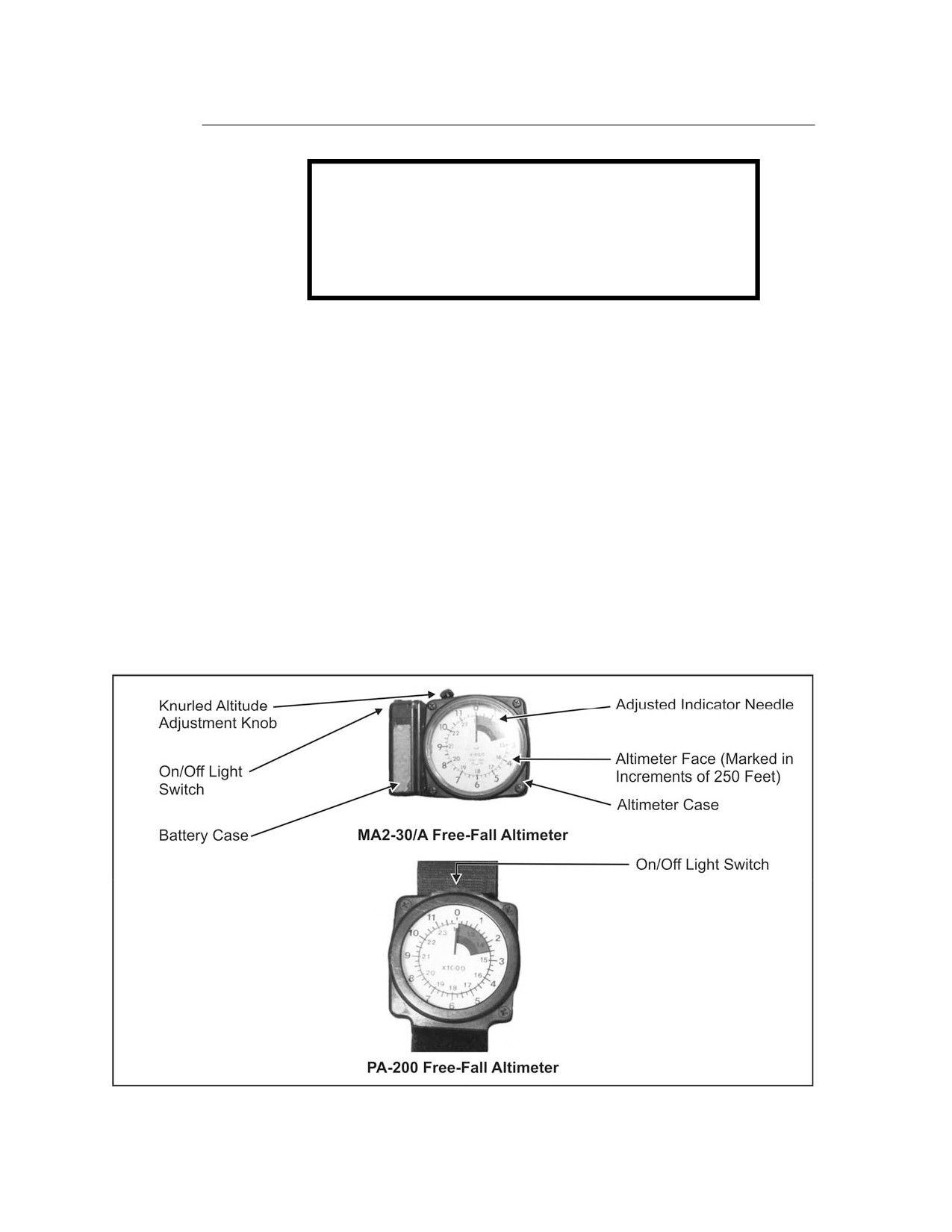
2-4. The parachutist wears the MA2-30/A or the PA-200 altimeter on his left
wrist (Figure 2-14). The altimeter shows his altitude above the ground during
free fall. The altimeter permits him to determine when he has reached the
proper altitude for deploying the main parachute. The altimeter must be
transported and stored with care. It must be chamber-tested for accuracy. The
altimeter must be rechecked after an unusually hard landing and after
accidentally dropping it. An altimeter that was submerged in water must be
replaced.
Figure 2-14. MA2-30/A and PA-200 Free-Fall Altimeters
2-14
FM 3-05.211/MCWP 3-15.6/NAVSEA SS400-AG-MMO-010/AFMAN 11-411(I)
6 April 2005
FM 3-05.211
2-5. The computation for the altimeter setting follows. The parachutist—
• Finds the difference in elevation between the departure airfield (DAF)
and the DZ.
• If the DAF is lower than the DZ, sets the altimeter back (-), or to the
left.
• If the DAF is higher than the DZ, sets the altimeter forward (+), or to
the right.
• If the DAF and DZ elevation are the same, makes no adjustment to the
altimeter except to place the altitude indicator arrow on zero.
CAUTION
Special consideration will be given to any obstacles (for
example, ridgelines, mountains, towers, and other such
items and their elevations) that may be located within 3
nautical miles or
5.5 kilometers of the parachutist’s
release point (RP) or desired impact point (DIP). These
obstacles may force the parachutist to consider
alternatives to HALO.
OTHER RECOMMENDED ITEMS
2-6. Boots (without speed lacing hooks) are not RAPS components; however,
they are considered mandatory safety equipment. Different types of gloves,
boots, and jumpsuits may be necessary depending upon the degree of
environmental protection required.
DONNING AND RECOVERING THE MC-4 RAM-AIR
PARACHUTE SYSTEM
2-7. The buddy system, or the pairing of parachutists, within each
operational element provides the most efficient and accurate way for
parachutists to don, adjust, and check each other’s parachutes. Using the
buddy system to properly don and adjust the MC-4 RAPS provides an
additional safety check and prevents unnecessary delays during the JMPI.
PREPARING THE KIT BAGS
2-8. The parachutist determines how he will wear the kit bags. He prepares
them as follows:
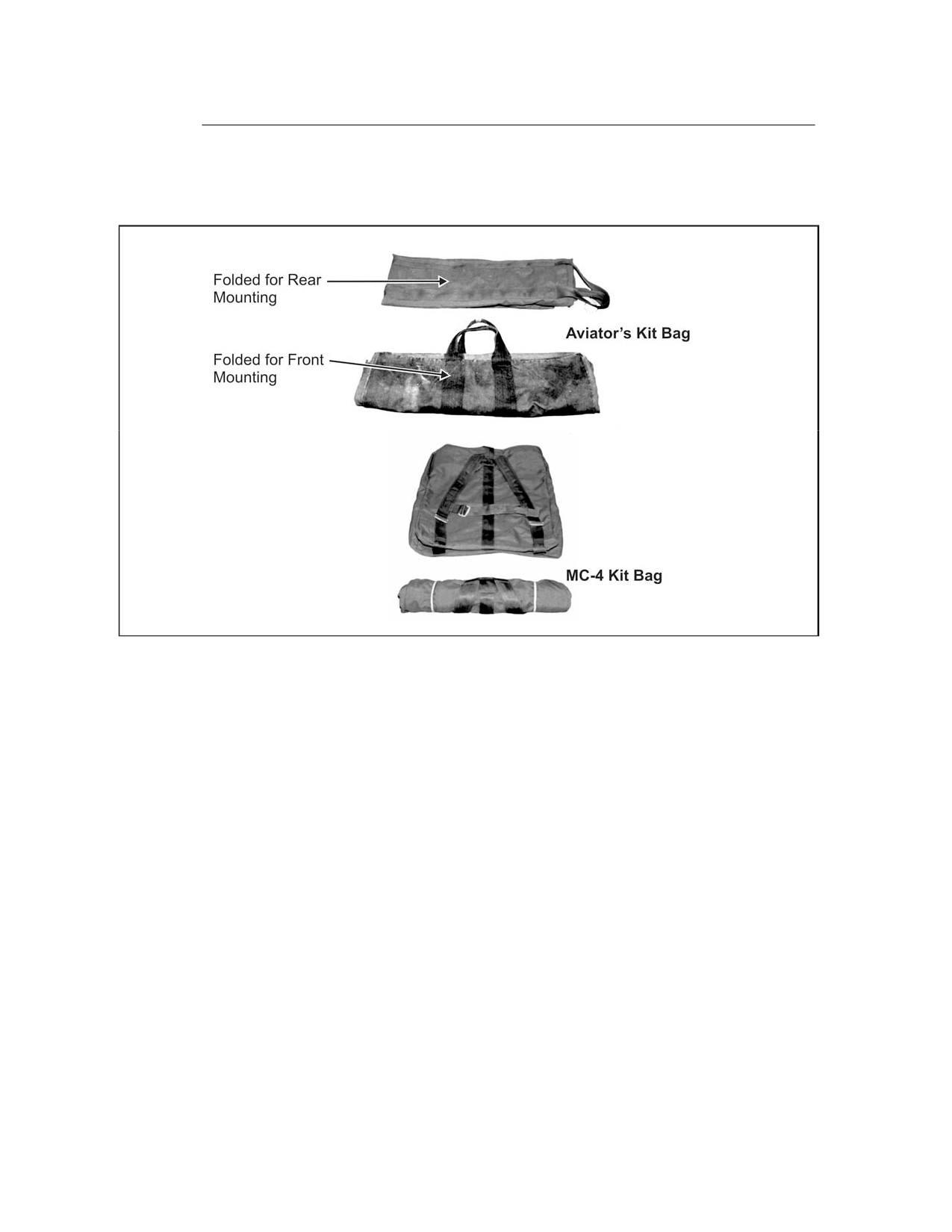
• Aviator’s kit bag. The parachutist closes the slide fastener and secures
all snap fasteners. If the kit bag is worn front-mounted, he folds it in
two folds from the bottom leaving the handles centered (Figure 2-15,
page 2-16). If the kit bag is worn rear-mounted, he folds each end of it
with one fold toward the center leaving the handles exposed at one end
(Figure 2-15).
• MC-4 kit bag. The parachutist closes the slide fastener. The kit bag can
be worn like a rucksack under the MC-4 RAPS. If it is front-mounted,
6 April 2005 FM 3-05.211/MCWP 3-15.6/NAVSEA SS400-AG-MMO-010/AFMAN 11-411(I)
2-15
FM 3-05.211
the parachutist rolls it from bottom to top with shoulder straps exposed
and places retainer bands on each end (Figure 2-15).
Figure 2-15. Aviator’s and MC-4 Kit Bags
DONNING THE MC-4 RAM-AIR PARACHUTE SYSTEM
2-9. The following outlines procedures for donning the MC-4 RAPS
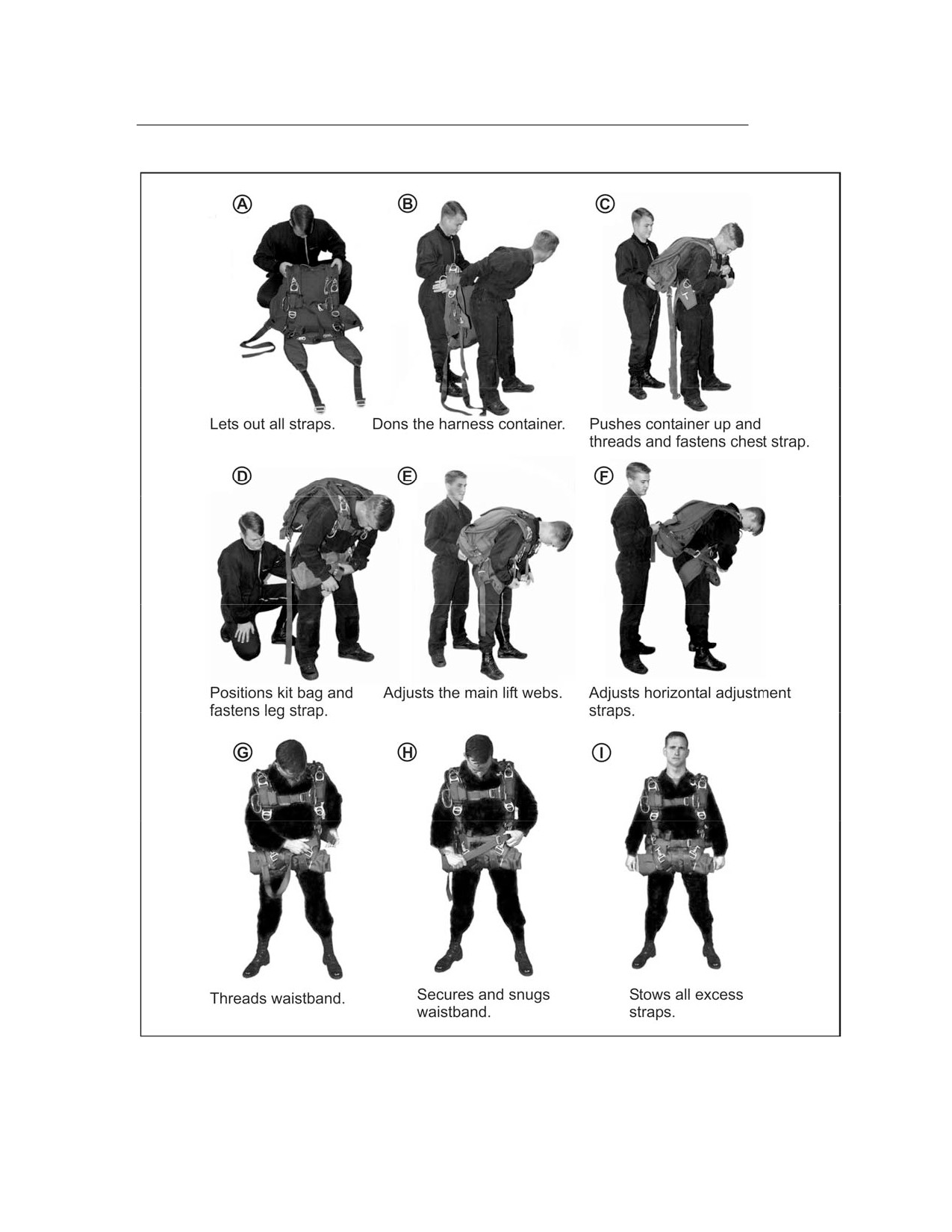
(Figure 2-16, page 2-17):
• The parachutist checks the parachute assembly for visible defects, lets
out all harness adjustments for ease of donning (Figure 2-16A), and
lays the assembly out with the pack tray face down.
• To don the parachute, the parachutist (No. 1) assumes a modified high
jumper position. The second parachutist (No. 2) holds the harness
container by the main lift webs at the canopy release assemblies and
places it on No. 1’s back (Figure 2-16B).
• No.
1 remains bent forward at the waist and No.
2 pushes the
container high on No. 1’s back as No. 1 threads and fastens the chest
strap (Figure 2-16C).
• No. 2 prepares the leg straps. No. 2 calls out, LEFT LEG STRAP, and passes
it to No. 1. No. 1 repeats, LEFT LEG STRAP, and grasps the left leg strap
with one hand. With his other hand, he starts from the saddle and feels
the length of the leg strap, removing any twists and turns. He inserts the
leg strap through one aviator’s kit bag handle
(if the kit bag is
front-mounted) and fastens the leg strap (Figure 2-16D). He repeats the
procedure for the remaining leg strap. He performs the same steps for
the MC-4 kit bag by inserting the leg straps through the shoulder straps.
2-16
FM 3-05.211/MCWP 3-15.6/NAVSEA SS400-AG-MMO-010/AFMAN 11-411(I)
6 April 2005
FM 3-05.211
Figure 2-16. Donning the MC-4 RAPS
6 April 2005 FM 3-05.211/MCWP 3-15.6/NAVSEA SS400-AG-MMO-010/AFMAN 11-411(I)
2-17
FM 3-05.211
• No.
1 stands erect and checks to make sure the canopy release
assemblies are in the hollows of his shoulders by adjusting the main
lift webs (Figure 2-16E, page 2-17).
• No. 1 locates the free-running ends of the horizontal adjustment straps
and tightens the harness so it fits snugly and comfortably (Figure
2-16F).
• No. 2 then threads the long-running end of the waistband through both
kit bag handles (if the kit bag is rear-mounted), and No. 1 fastens the
waistband to the waistband extension (Figures 2-16G and H).
• After final adjustment, No. 1 folds all excess straps inward, except for
the main lift webs that are folded outward, and secures them using the
elastic keepers (Figure 2-16I). No. 1 should be able to stand erect
without straining.
• When properly donned, the system should feel snug but not so tight as
to restrict movement. The jumper should be able to properly arch, look,
reach, and pull the ripcord on the ground before the actual jump.
• No. 1 and No. 2 then change positions and repeat the procedure.
• When both parachutists have donned their parachute assemblies and
adjusted their harnesses, they face each other, make a visual
inspection of each other, and correct any deficiencies before the JMPI.
RECOVERING THE RAM-AIR PARACHUTE SYSTEM
2-10. The parachutist uses the following procedures to recover a RAPS:
• If jumping oxygen, locks the ON/OFF switch in the OFF position and
removes the bailout bottles and pouch from the waistband.
NOTE: Parachutists do not place the oxygen mask on the ground
unprotected during parachute recovery. Moisture from breathing and
condensation due to temperature changes will cause dirt and debris to
adhere to the mask, interfering with sealing and increasing risk of injury.
• Removes the harness and container and daisy-chains the suspension lines.
• Removes and opens the aviator’s kit bag.
• Replaces the arming pin in the FF-2 or moves the JUMP/OFF switch to
OFF on the AR2.
• Replaces the ripcord in the ripcord cable housing and the ripcord
handle in the stow pocket.
• Places the pilot chute next to the kit bag.
• Places the canopy, deployment bag, suspension lines, and risers in the
kit bag.
• Removes the quick-release snap hooks and lowering line quick-ejector
snap from the equipment rings on the parachute harness.
• Places the harness and container in the kit bag with the back pad
facing up to protect the AR2.
• Finally, places the pilot chute in the kit bag and snaps or zips the
fasteners.
2-18
FM 3-05.211/MCWP 3-15.6/NAVSEA SS400-AG-MMO-010/AFMAN 11-411(I)
6 April 2005
FM 3-05.211
Chapter 3
Automatic Ripcord Release
The ARR is a safety device designed to activate the main or reserve
parachute of the RAPS should the parachutist fail to do so. The ARR
functions at a predetermined altitude AGL by sensing changes in
barometric pressure. The jumpmaster calculates the proper millibar
setting and inspects the ARR for the proper setting. The current ARRs
include the FF-2 Hite Finder, the AR2, the Sentinel MK 2100, and the
Military
Cybernetic Parachute Release System
(CYPRES).
TM 10-1670-305-23&P, Unit and Direct Support Maintenance Manual for
Automatic Ripcord Release, AR2, and TM 10-1670-300-20&P, Unit and
Direct Support Maintenance Manual for Ancillary Equipment for Military
Free-Fall System, provide further information.
AUTOMATIC RIPCORD RELEASE ACTIVATION
SETTING AND OPERATION
3-1. The ARRs are set to activate at 500 feet or more below the briefed main
parachute manual activation altitude; however, they are not under any
circumstances set to activate below the ARR’s prescribed activation altitude.
The activation altitudes are 2,500 feet AGL for the FF-2, 1,500 feet AGL for
the AR2, and 1,500 feet AGL for the MK 2100. The ARRs sense the altitude
1,000 feet above the MSL activation altitude. The ARR fires after the timer’s
activation, withdrawing the ripcord pin from the main or the reserve
parachute-closing loop, depending on the ARR model. The process cannot be
stopped once the timer is activated.
NOTE: The ARR is a mechanical safety device. It is a secondary means to
activate the main or reserve parachute. Its use is mandatory for all MFF
operations.
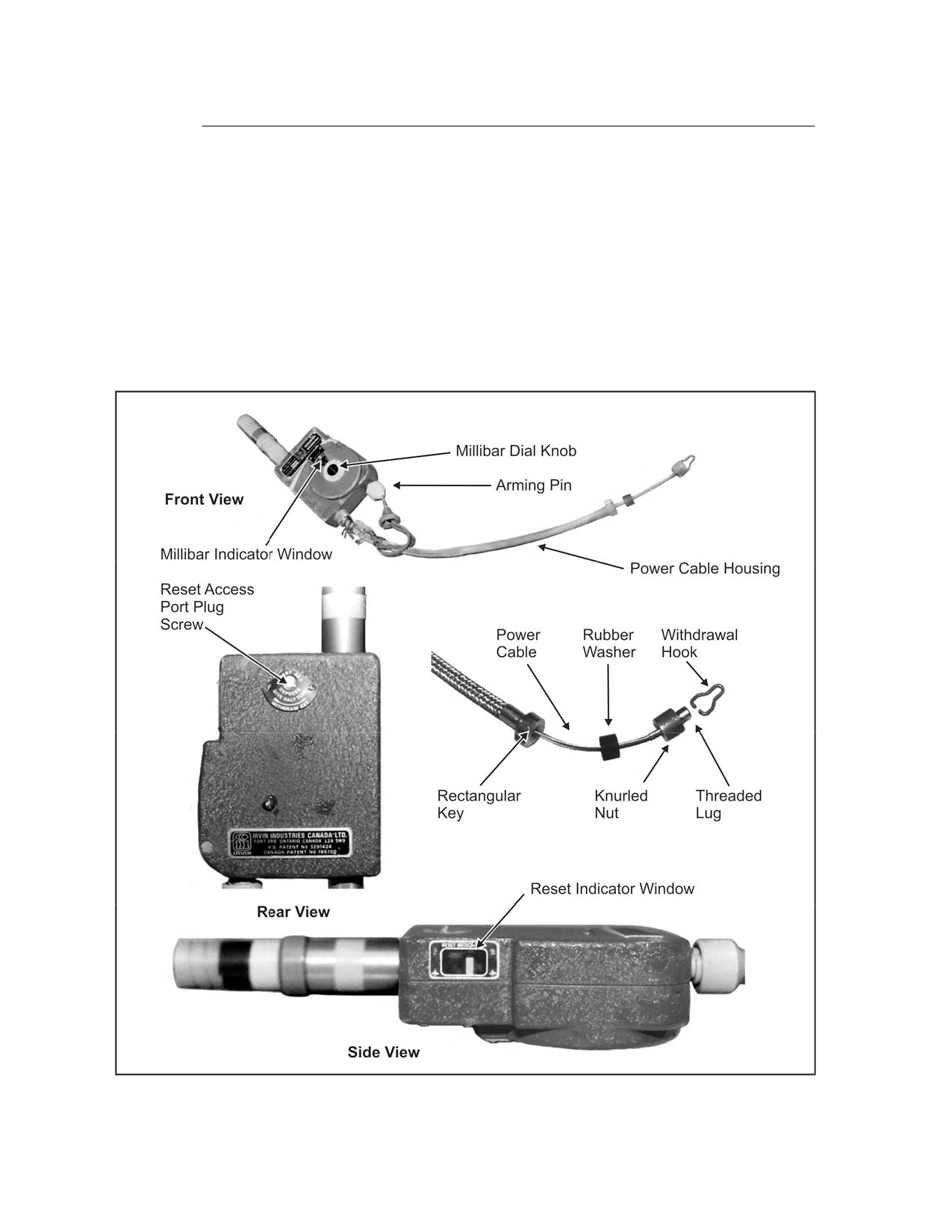
FF-2 AUTOMATIC RIPCORD RELEASE
3-2. The FF-2 ARR (Figure 3-1, page 3-2) is a main parachute-mounted
ARR. The FF-2 automatically opens an MFF parachutist’s parachute at the
preset altitude when the parachutist fails to pull the manual ripcord at the
prescribed pull altitude. The FF-2’s mechanical response depends on
presetting the instrument for the barometric pressure at the desired
activation altitude, computed in millibars, above the intended DZ.
6 April 2005 FM 3-05.211/MCWP 3-15.6/NAVSEA SS400-AG-MMO-010/AFMAN 11-411(I)
3-1
FM 3-05.211
MAJOR COMPONENTS
3-3. The FF-2 ARR is housed in an alloy case, at the bottom of which is a
cylindrical housing that contains the main spring, a plunger, and a barrel
cap. On one side of the FF-2’s case is a millibar dial knob used to set the
activation altitude. On the opposite side is an access hole, covered by a
threaded plug, used to reset the time-delay mechanism. The arming pin
assembly used to manually activate the FF-2’s time-delay mechanism is
located on the top. Also located and fitted on top of the release case is the
power cable and housing assembly that pulls the parachute ripcord pins in
the instrument’s operational sequence.
Figure 3-1. FF-2 ARR Assembly
3-2
FM 3-05.211/MCWP 3-15.6/NAVSEA SS400-AG-MMO-010/AFMAN 11-411(I)
6 April 2005
FM 3-05.211
PRINCIPLE OF OPERATION
3-4. The FF-2 senses the barometric pressure in inches of mercury (Hg) and
is set to activate a minimum of 500 feet below the manual pull altitude of the
parachute. The FF-2 minimum activation setting is 2,500 feet AGL.
CHECKING THE RESET INDICATOR
3-5. The parachutist can check the reset operation using the
“RESET
INDICATOR” window (Figure 3-1, page 3-2), located immediately below the
FF-2 case’s rounded face, by visually checking the window and observing the
location of the two white marks. If the FF-2’s time-delay mechanism has been
reset, the two marks will be aligned. If the lower, movable mark is offset
more than one half the width of the indicator, the time-delay mechanism may
not have been reset properly. The parachutist should replace an FF-2 that
has not been reset with another FF-2 that has been reset, or have the support
rigger reset the time-delay mechanism.
INSTALLATION AND REMOVAL
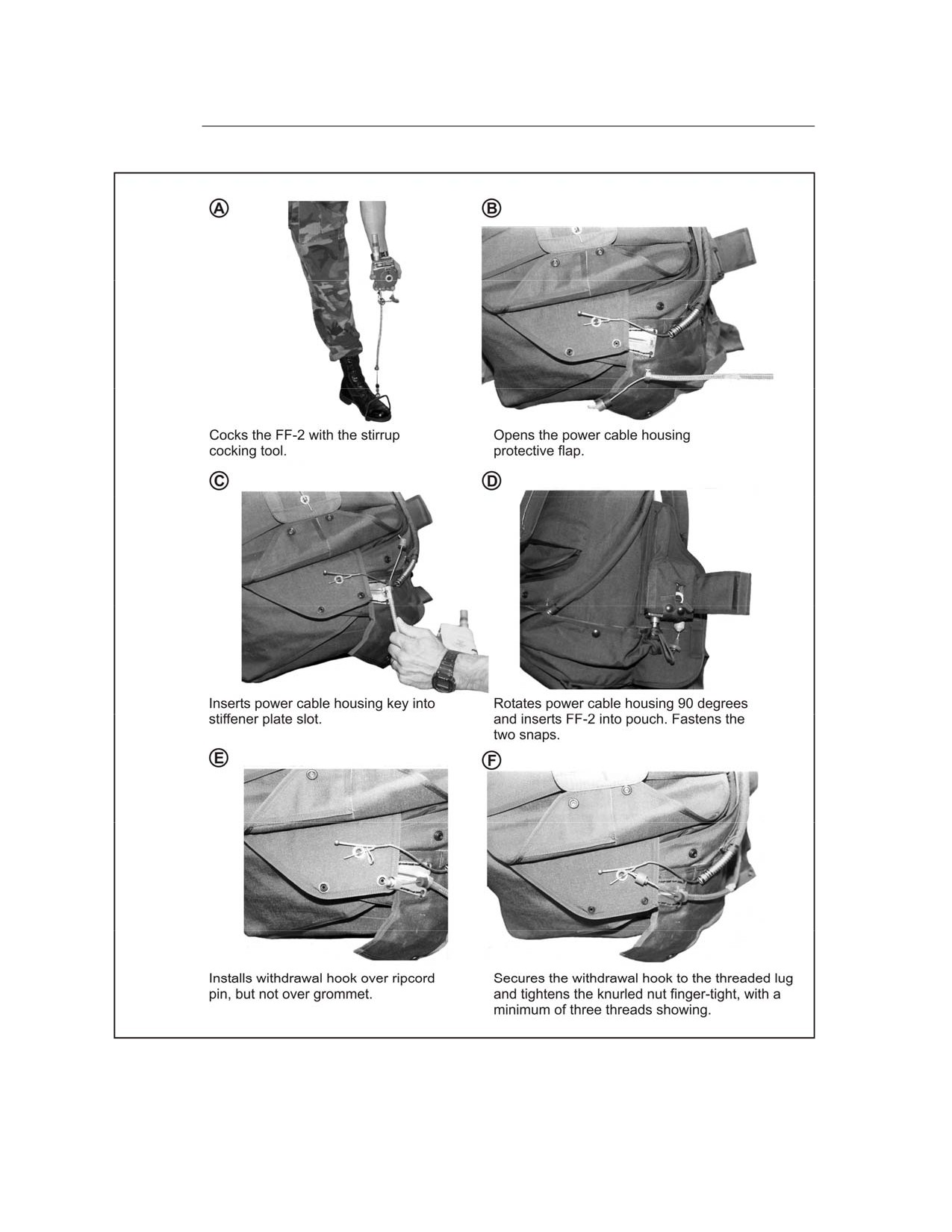
3-6. In most cases, the FF-2 ARR has been installed when the parachute is
issued. The FF-2 ARR fits into a stowage pocket specifically designed to
contain it. Should the parachutist have to install the release, he follows the
procedures in Figure 3-2, page 3-4.
WARNING
Due to the exposed mounting location of the FF-2
ARR, personnel must take extreme care when
handling, storing, and transporting an MC-4
steerable parachute.
3-7. Personnel should follow the steps outlined below to remove the FF-2
ARR from the parachute:
• Remove the withdrawal hook by unscrewing the knurled locking nut
and removing it from the retainer slot.
• Rotate the withdrawal hook off the locking pin.
• Reinstall the open end of the withdrawal hook in the hook retainer slot
and secure it to the retainer by screwing the knurled locking nut back
across the retainer.
• Remove the FF-2 from the parachute’s ARR pocket.
FF-2 MILLIBAR SETTING CALCULATION
3-8. The jumpmaster obtains the forecasted aircraft “altimeter setting” for
the DZ. The altimeter (pressure) setting will be given in inches of mercury.
The jumpmaster obtains the setting to the nearest one-hundredth of an inch.
If flying a mission with limited weather information, the aircrew can provide
the altimeter setting en route to the drop area.
6 April 2005 FM 3-05.211/MCWP 3-15.6/NAVSEA SS400-AG-MMO-010/AFMAN 11-411(I)
3-3
FM 3-05.211
Figure 3-2. Installing the FF-2 ARR
3-4
FM 3-05.211/MCWP 3-15.6/NAVSEA SS400-AG-MMO-010/AFMAN 11-411(I)
6 April 2005
FM 3-05.211
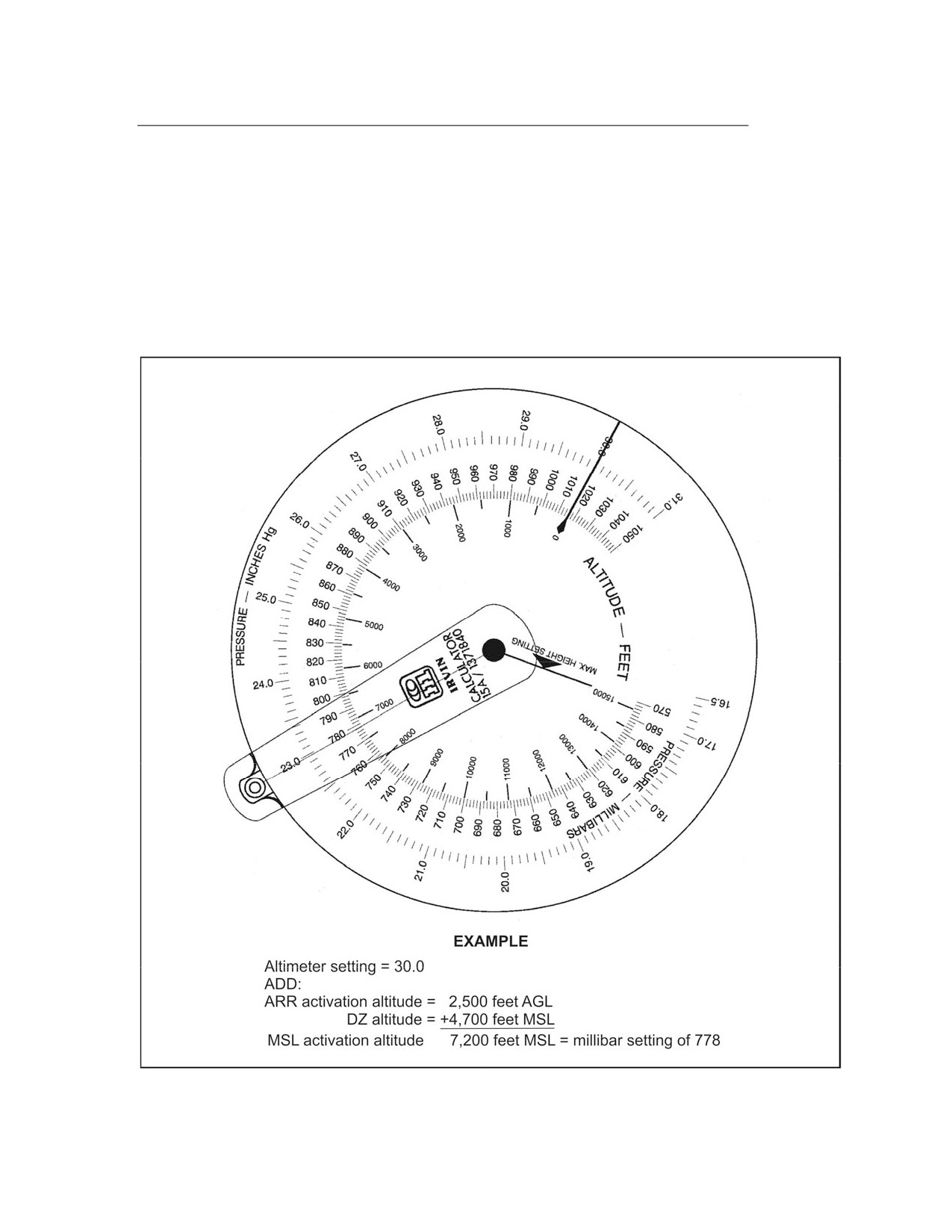
3-9. Using the Irvin FF-2 calculator
(Figure
3-3), the jumpmaster
determines the ARR millibar setting by first placing the black line over the
altimeter setting on the outer scale
(for example,
30.00). Next, the
jumpmaster adds the given ARR activation altitude (for example, 2,500 feet
AGL) to the given DZ elevation expressed in feet (for example, 4,700 feet) to
determine the MSL activation altitude (for example, 7,200 feet). He then
places the red line over the MSL activation altitude (for example, 7,200 feet)
on the inner scale of the calculator and reads the millibar under the red line
on the center scale (for example, 778 millibars).
Figure 3-3. Calculating the ARR Millibar Setting Using the Irvin FF-2 Calculator
6 April 2005 FM 3-05.211/MCWP 3-15.6/NAVSEA SS400-AG-MMO-010/AFMAN 11-411(I)
3-5
FM 3-05.211
FF-2 ARMING AND DISARMING
3-10. On the jumpmaster’s command, the parachutist removes the arming
pin to arm the FF-2. The safe arming altitude for the FF-2 is 2,500 feet above
the MSL activation altitude. If the aircraft must descend below the safe
arming altitude, the parachutist reinserts the arming pin to disarm the FF-2.
He must disarm the FF-2 not lower than 2,500 feet above the MSL activation
altitude to prevent an inadvertent firing. The minimum exit altitude when
using the FF-2 is 5,000 feet AGL (2,500-foot minimum activation setting plus
2,500-foot arming requirement).
AR2 AUTOMATIC RIPCORD RELEASE, M451
3-11. The AR2 is an all-mechanical automatic opening device (AOD) that
contains a pressure-sensing aneroid capsule. The AR2 is designed to release
its spring-powered actuation mechanism and deploy a parachute when the
surrounding atmospheric pressure has compressed the aneroid capsule to a
length corresponding to a specific preset altitude, provided that the descent
velocity at that point exceeds a required minimum limit. The relationship
between external pressure and actuation altitude of the AR2 is established
during manufacture by means of a uniform calibration procedure. This
procedure ensures that all AR2s respond alike, within a prescribed tolerance,
to a given external pressure.
3-12. The AR2 automatically deploys a parachute at a predetermined
altitude. The AR2 is designed to open the reserve parachute but can be used
with the main parachute. It may also be used with cargo parachutes. The
AR2 senses rate of fall and altitude above MSL (not AGL). The AR2 actuates
when it falls through a preselected altitude at a fall rate of 80 feet per second
(ft/sec) or greater. Altitude settings are in 250-foot increments.
MAJOR COMPONENTS
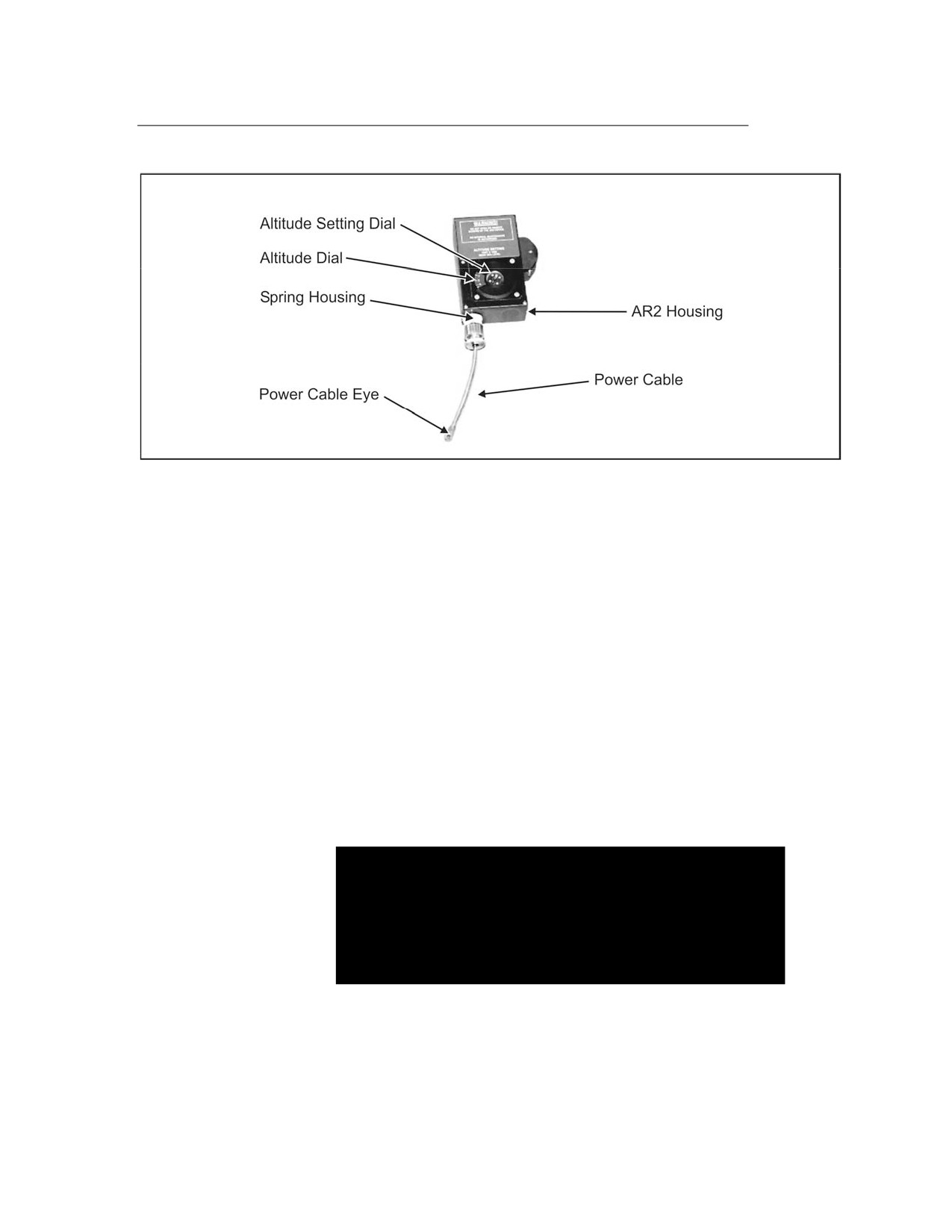
3-13. The AR2 basically consists of an aneroid with associated mechanism,
rate-of-fall sensing chamber, and a spring-loaded power cable. All
components, except the power cable and its flexible housing, are contained in
a housing. The housing provides all required chambers, passages, and
mounting pads for each component. An altitude setting dial and JUMP/OFF
switch are mounted on the housing. The power cable supplied for use with
the reserve parachute has a fixed eye that connects to the reserve parachute
ripcord pin. Figure 3-4, page 3-7, shows the AR2 components.
PRINCIPLES OF OPERATION
3-14. The AR2 senses the rate of fall and altitude above MSL (not AGL).
When the AR2 falls through the altitude set on the altitude dial at a rate of fall
of over 0.0368 pounds per square inch/second (psi/sec) (which equates to 80
ft/sec at an altitude above MSL of 5,500 feet), the power cable will retract 2
inches (minimum) and at an initial force of 70 pounds. If the rate of fall is at a
slower speed, such as 70 ft/sec measured at 5,500 feet, the AR2 will not
actuate.
3-6
FM 3-05.211/MCWP 3-15.6/NAVSEA SS400-AG-MMO-010/AFMAN 11-411(I)
6 April 2005
FM 3-05.211
Figure 3-4. AR2 Components
3-15. When the AR2 is used on the reserve parachute, the main parachute
must fully open 1,500 feet above the setting on the altitude dial. If the main
parachute opens a few hundred feet above the setting on the altitude dial
while in free fall, the rate mechanism may not have enough time to equalize
the pressure and to deactivate.
NOTE: The jumpmaster must brief jumpers on the importance of pulling at
the correct altitude.
3-16. During free fall when both fall rate and altitude MSL on the setting
dial are met (+ or - 300 according to factory), the AR2 will fire. This distance
of free fall before actuation will depend on the rate of fall and altitude. High
altitude and slow rate of fall will tend to delay actuation of the AR2.
OPERATION UNDER USUAL CONDITIONS
3-17. Step 1. The parachutist verifies that the JUMP/OFF switch is in the
OFF position and that the AR2 has been cocked at installation. This
verification procedure is ultimately the responsibility of the jumpmaster.
DANGER
If there is any indication of a leak in the aneroid, the
AR2 must be removed from service. A leaking
aneroid may cause a malfunction resulting in DEATH
of the parachutist.
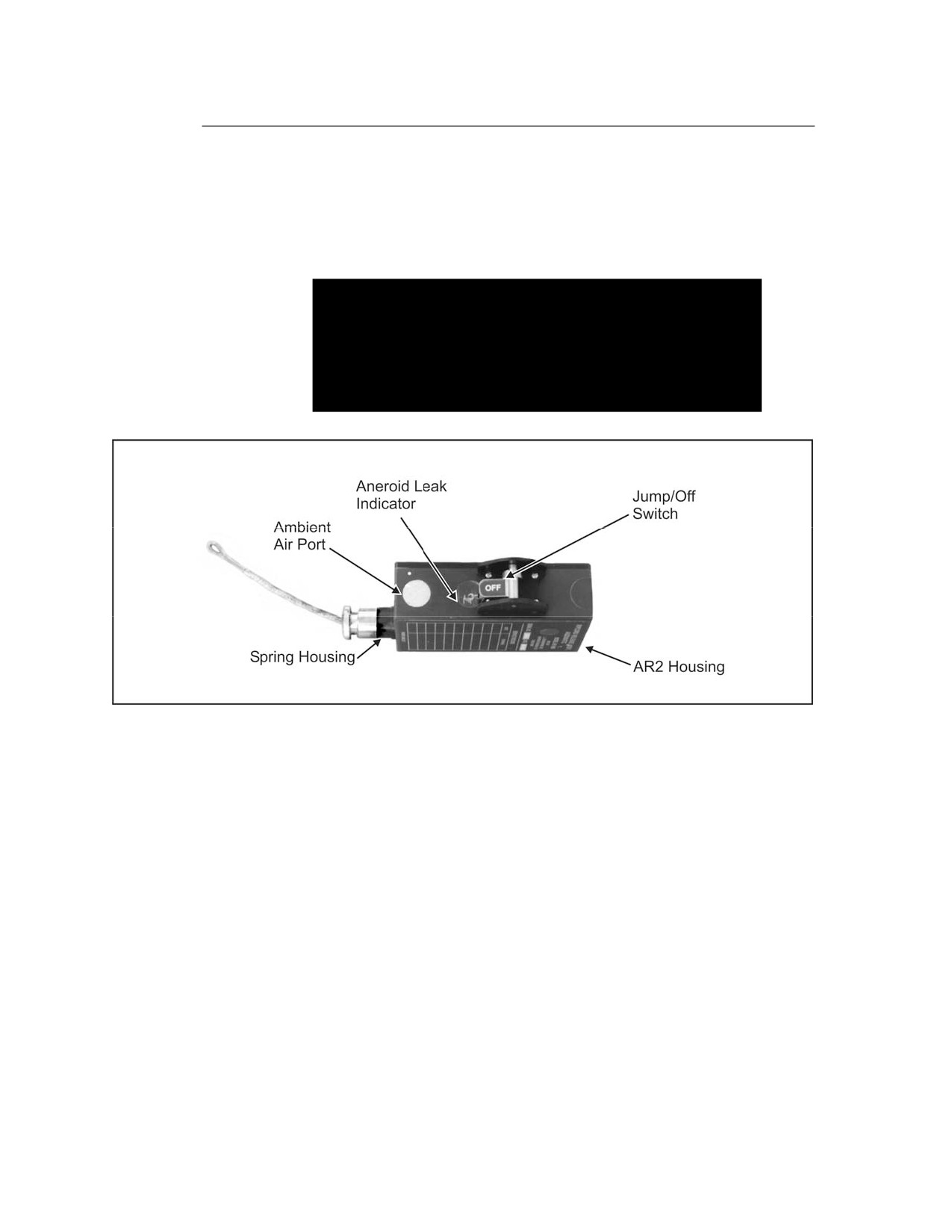
3-18. Step 2. The parachutist checks the AR2 for aneroid leakage at ground
level before every jump. To conduct the aneroid leakage test, the altitude dial
is set to an altitude at least 3,000 feet AGL. The yellow indicator should
indicate the local ground altitude. Example: If local ground elevation is 500
feet above MSL, and the altitude dial is set at 3,500 feet or above, the yellow
indicator should be approximately halfway between the MSL mark and the
6 April 2005 FM 3-05.211/MCWP 3-15.6/NAVSEA SS400-AG-MMO-010/AFMAN 11-411(I)
3-7
FM 3-05.211
1,000-foot mark. If there is a leak in the aneroid, the yellow indicator will
show some altitude above 500 feet, such as 2,000 or 3,000 feet or higher.
After conducting the aneroid leakage test, the parachutist resets the altitude
dial to the correct activation altitude for the intended DZ. Figure 3-5 shows
the location of the aneroid leak indicator on the AR2.
DANGER
The altitude dial indicates thousands of feet MSL
(not AGL). If the altitude dial is incorrectly set, two
parachutes may deploy and become entangled,
resulting in DEATH of the parachutist.
Figure 3-5. AR2 Aneroid Leak Indicator
3-19. Step 3. The jumpmaster computes the AR2 settings for reserve
mounting. He—
• Determines the desired activation altitude AGL (minimum 1,500 feet
AGL).
• Determines the elevation of the intended DZ above MSL.
• Adds the desired activation altitude AGL to the DZ elevation MSL to
obtain his setting for the AR2 in MSL.
• Notifies the jumper of setting and then confirms the setting.
NOTE: The manual activation altitude of the main parachute must be at
least
2,000 feet above the AR2 activation altitude. The lowest setting
currently authorized for the AR2 is 1,500 feet AGL.
3-20. Step 4. Before jumping, the jumpmaster verifies that altitude dial is
set at desired setting.
3-8
FM 3-05.211/MCWP 3-15.6/NAVSEA SS400-AG-MMO-010/AFMAN 11-411(I)
6 April 2005
FM 3-05.211
DANGER
Parachutist must not move JUMP/OFF switch to the
JUMP position unless the aircraft is at least 1,500
feet above the altitude set on the dial. The AR2 must
remain well above the altitude set on the dial at all
times after the JUMP/OFF switch has been moved to
JUMP. If the altitude dial is incorrectly set, two
parachutes may deploy and become entangled,
resulting in DEATH of the parachutist.
3-21. Step
5. The parachutist moves JUMP/OFF switch to JUMP and
verifies that the switch is all the way over to the detent position.
3-22. Step
6. After completing the jump, the parachutist moves the
JUMP/OFF switch to OFF.
3-23. Step 7. With the JUMP/OFF switch in OFF position, the parachutist
prepares the AR2 for the next jump by repeating steps 1 through 5.
DANGER
Moving the JUMP/OFF switch to OFF repositions the
mechanism for the next jump. If the switch is left in
the JUMP position, the next jump will cause the AR2
to activate prematurely, causing deployment of two
parachutes that may become entangled, resulting in
DEATH of the parachutist.
AR2 BAROMETRIC CALCULATOR, MODEL 466-001
3-24. The AR2 barometric calculator was designed to compensate for altitude
offsets caused by atmospheric pressure variations and thus provide more
accurate AR2 dial settings. The calculator also makes it possible to accurately
set both AR2s and wrist altimeters at locations remote from the DZ.
3-25. The barometric calculator has three selectable operational modes.
These modes are explained below:
• Mode 1: Operator located at DZ. This is the simplest mode of operation
and is the one in effect when the calculator is turned on. Only one input,
the AR2 actuation altitude, is required for operation in this mode.
• Mode 2: Remote operation with DZ equivalent altitude available. This
mode permits calculation of AR2 dial settings when the operator is at a
location other than the DZ. In addition to knowing the AR2 actuation
altitude, the equivalent altitude of the DZ must be obtained from
someone at that location. Equivalent altitude may be determined from
either another barometric calculator or from an aviation altimeter
located on the ground at the DZ.
• Mode 3: Remote operation with DZ altimeter setting and elevation
available. This mode is an alternate to Mode 2 when no calculator or
6 April 2005 FM 3-05.211/MCWP 3-15.6/NAVSEA SS400-AG-MMO-010/AFMAN 11-411(I)
3-9
FM 3-05.211
altimeter is available on the ground at the DZ. The local altimeter
setting and MSL elevation of the DZ are necessary for operation in this
mode.
3-26. Remote setting of wrist altimeters may be accomplished in either
Mode 2 or Mode 3 using the same input information as that required for the
AR2 dial setting. Employing the calculator to determine both settings assures
that no altitude offset exists between the two devices. Barometric pressure
changes that occur at the DZ between the time the AR2s and wrist altimeters
are set and the time the jump is carried out will affect both settings by the
same amount in the same direction. For this reason, remote settings should
be made as close to the time of the jump as is practicable.
DESCRIPTION
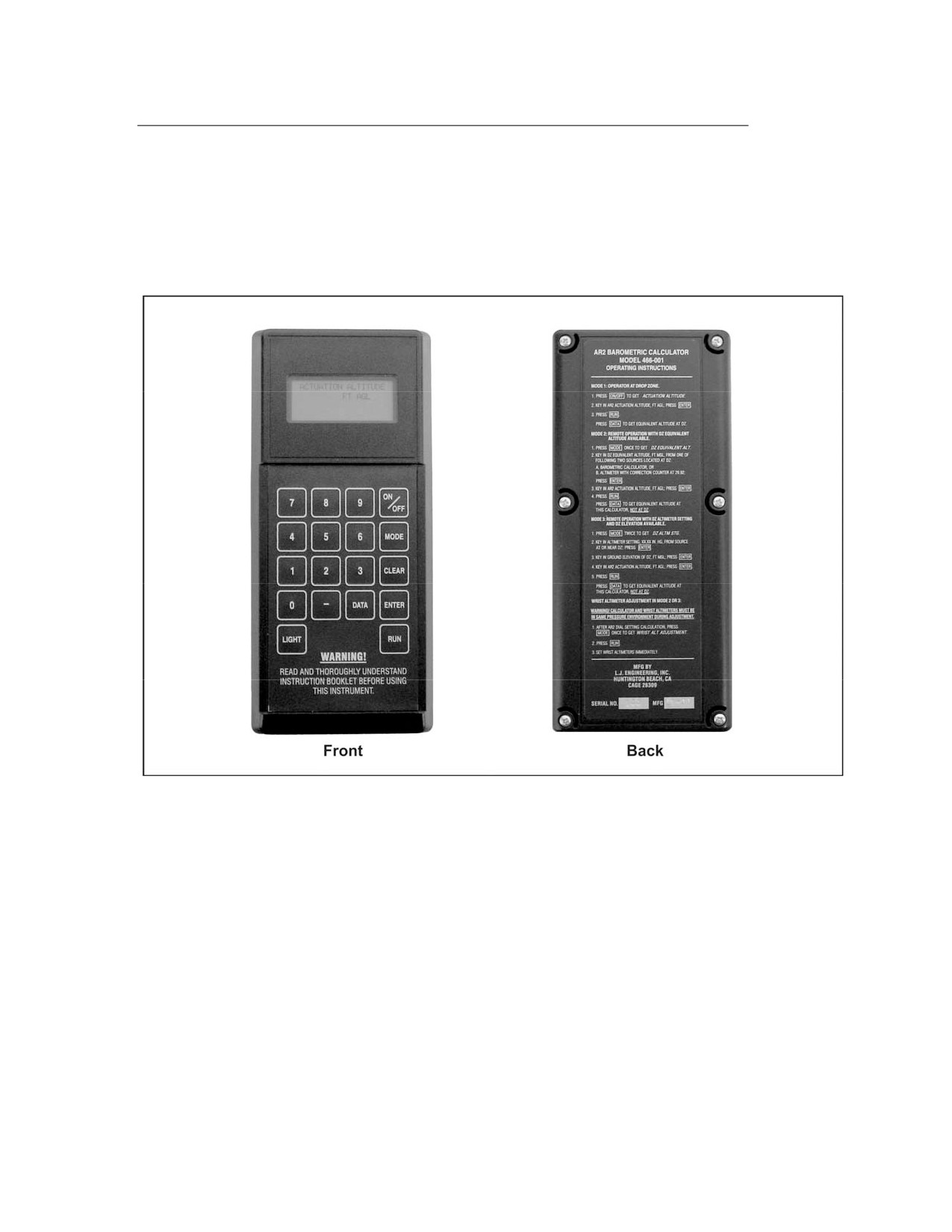
3-27. The AR2 barometric calculator, Figure 3-6, page 3-11, is a hand-held,
self-contained, battery-powered device that automatically measures the
surrounding barometric pressure, calculates the necessary altitude offset,
and provides an accurate revised setting for the AR2 altitude dial, rounded to
the nearest 250-foot dial graduation. The calculator possesses the following
characteristics and features:
•
A rugged, compact, streamlined enclosure.
•
Redundant sensors with temperature compensation to measure the
surrounding atmospheric pressure.
•
An electronic microprocessor incorporating mathematical formulas to
convert the measured pressure to an equivalent altitude on the
standard atmospheric pressure curve.
•
Simple operation with input prompts and error messages.
•
A single required input value, the AR2 actuation altitude in feet AGL,
for operation at the DZ.
•
Automatic computation and display of the corrected altitude setting,
rounded to the nearest 250-foot graduation to facilitate setting the AR2
dial.
•
Two alternate modes of operation when remote from the DZ, with
capability for remote wrist altimeter setting.
•
Display of the local equivalent MSL altitude.
•
Standard battery power with lighted display, automatic shutoff, and
low-battery indicator.
3-28.
The nonnumeric keys on the keypad function as follows:
•
ON/OFF—Turns the calculator on or off.
•
MODE—Allows selection of remote operation modes and wrist
altimeter adjustment.
•
CLEAR—Allows changes or corrections to input values and resets the
calculator.
•
ENTER—Puts a newly keyed-in number into the calculator program
for computation and fixes it in the display.
3-10
FM 3-05.211/MCWP 3-15.6/NAVSEA SS400-AG-MMO-010/AFMAN 11-411(I)
6 April 2005
FM 3-05.211
• RUN—Causes the calculator to compute a setting for the AR2 dial or
wrist altimeter, depending on the mode of operation.
• DATA—After dial-setting calculation, causes the display to show the
present equivalent altitude of the calculator.
• LIGHT—Illuminates the display.
Figure 3-6. AR2 Barometric Calculator
DEFINITIONS
3-29. The following definitions will be helpful for correctly interpreting and
implementing the operating instructions, which begin on page 3-13:
• Above ground level (AGL). Height above a surface referenced as zero,
regardless of that surface’s actual MSL elevation.
• Actuation altitude (ACT ALT). The altitude above the DZ, in feet AGL,
at which the AR2 functions to deploy the reserve parachute. This
altitude should be at least 1,500 feet below the altitude at which the
main parachute is fully deployed. The main parachute pull altitude
must allow for this amount of separation.
• Altimeter setting
(ALTM STG). The setting applied to an aircraft
altimeter’s barometric correction counter that results in an altimeter
reading equal to the MSL ground elevation of an airport, or other
location, when the aircraft is sitting on the ground at that location.
6 April 2005 FM 3-05.211/MCWP 3-15.6/NAVSEA SS400-AG-MMO-010/AFMAN 11-411(I)
3-11
FM 3-05.211
•
AR2 dial setting. The number of feet MSL to which the AR2 dial should
be set to obtain the correct actuation altitude after DZ elevation and all
barometric adjustments have been taken into account.
•
Aviation (master) altimeter. An altimeter of the type installed in all
aircraft. This instrument has an adjustment mechanism to provide
offset corrections (altimeter settings) for local deviations from standard
barometric pressure conditions.
•
Barometric correction counter. The adjustment mechanism that allows
an altimeter to be corrected for local deviations from standard
pressure.
•
DZ elevation (DZ ELEV). The actual physical (ground) altitude of the
DZ, in feet MSL, obtained from topographic maps or a global
positioning system (GPS).
•
Equivalent altitude
(EQUIVALENT ALT). The MSL altitude for a
location, derived from the standard atmosphere pressure-altitude
curve, which corresponds to the prevailing ambient pressure at that
location. This parameter is computed by the barometric calculator and
is used to bring locations with different atmospheric pressure
variations to the same reference point. Depending on the prevailing
pressure, equivalent altitude may be higher or lower than the actual
ground elevation. Equivalent altitudes may be negative for locations at
or near sea level. The equivalent altitude of any location may also be
determined using an aviation altimeter by adjusting its barometric
correction counter to the standard setting of 29.92 (no correction) and
reading the altitude directly.
•
Local barometric reference data. Information describing the
atmospheric conditions presently surrounding the barometric
calculator. When this data is accessed, the equivalent altitude of the
calculator is displayed. The equivalent altitude of a calculator located
at the DZ is used during Mode 2 operation to compute remote AR2 dial
and wrist altimeter settings.
•
Mean sea level (MSL). The average height of the sea for all tidal
conditions; the zero altitude reference point used in determining
ground elevations.
•
Remote operation. Operation of the barometric calculator and resultant
setting of AR2s and wrist altimeters at a location other than the DZ.
•
Standard atmosphere. An idealized description of the average
properties of the earth’s atmosphere, including the relationship
between atmospheric pressure and altitude, based on a pressure of
29.92 inches of mercury (in Hg), or 1013 millibars (mb), at MSL. All
aviation altimeters are calibrated to the standard atmosphere
pressure-altitude curve to permit uniform adjustment under variable
atmospheric and geographic conditions. The AR2 is also calibrated to
the standard atmosphere.
•
Wrist altimeter adjustment
(WRIST ALTM ADJUSTMENT). In
general, the practice of setting a wrist altimeter to zero on the ground
at the DZ to permit determination of a jumper’s height AGL. The
barometric calculator provides the capability for adjusting wrist
3-12
FM 3-05.211/MCWP 3-15.6/NAVSEA SS400-AG-MMO-010/AFMAN 11-411(I)
6 April 2005
FM 3-05.211
altimeters at a remote location to obtain a zero reading on the ground
at the DZ.
• Wrist altimeter setting. The number of feet, AGL, to which a wrist
altimeter at a remote location should be set to obtain a zero reading on
the ground at the DZ.
OPERATION
3-30. The following paragraphs outline the steps taken in operating the
calculator at various modes.
Mode 1: Operator Located at Drop Zone
3-31.
The parachutist should perform the following steps:
•
Step 1. Press ON/OFF to turn on the calculator. The calculator will
perform self-tests when it is first turned on. If the temperature or
altitude environment is outside the operating range of the calculator,
or if the measurements from the two pressure sensors do not agree, the
calculator will not function. The appropriate error message will appear
in the display. Paragraph 3-37 outlines a listing and definition of all
possible error messages.
•
Step 2. (The words ACTUATION ALTITUDE will appear, blinking, in
the first display line, and FT AGL will be displayed in the second line.)
Key the desired actuation altitude for the AR2, in feet AGL, into the
second display line and press ENTER. Both display lines will become
steadily illuminated. The acceptable actuation altitude input range is
1,000 to 24,999 feet AGL. INPUT OUT OF RANGE will appear if the
input value is not within these limits.
•
Step 3. Press RUN. SET AR2 DIAL will appear in the third display
line, and XXXXX FT MSL, the calculated dial setting rounded to the
nearest 250 feet, will be displayed in the bottom line. The acceptable
AR2 dial setting range is 500 to 25,000 feet MSL. SETTING OUT OF
RANGE will appear if the calculated setting is not within these limits.
•
Step 4. After the calculation is made, press DATA to obtain the local
equivalent altitude. The message LOCAL BAROMETRIC
REFERENCE DATA will appear in the first two lines of the display.
EQUIVALENT ALTITUDE and XXXXX FT MSL will be displayed in
the third and fourth lines, respectively. In Mode 1, this value is used to
calculate the AR2 dial setting and is available only after RUN has been
pressed and the calculation has been made.
•
Step 5. Press DATA again to toggle back to the previous display
readings.
•
Step 6. Press CLEAR to correct input errors at any time or to reset the
calculator.
•
Step 7. Press ON/OFF to turn off the calculator.
6 April 2005 FM 3-05.211/MCWP 3-15.6/NAVSEA SS400-AG-MMO-010/AFMAN 11-411(I)
3-13
FM 3-05.211
Mode 2: Remote Operation With Drop Zone Equivalent
Altitude Available
3-32. The parachutist should perform the following steps:
• Step 1. Press ON/OFF to turn on the calculator.
• Step
2. Press MODE once; DZ EQUIVALENT ALT will appear,
blinking, in the first display line and FT MSL will be displayed in the
second line.
• Step 3. Obtain the present equivalent altitude at the DZ, in feet MSL,
(not DZ ground elevation) from one of the two following sources:
A barometric calculator located on the ground at the DZ (refer to
Mode 1 operation).
An aviation altimeter located on the ground at the DZ with its
barometric correction counter set to 29.92 (1013 if calibrated in
millibars).
Key this value into the second line and press ENTER. The acceptable
DZ equivalent altitude input range is -2,000 to 16,000 feet MSL.
• Step 4. (The first two lines will become steadily illuminated and ACT
ALT will blink in the third line.) Key the desired actuation altitude for
the AR2, in feet AGL, into the third line and press ENTER. The
acceptable actuation altitude input range is 1,000 to 24,999 feet AGL.
• Step 5. (The third line will become steadily illuminated.) Press RUN.
SET AR2 XXXXX FT MSL will be displayed in the bottom line. The
acceptable AR2 dial setting range is 500 to 25,000 feet MSL.
NOTE: Information on remote wrist altimeter adjustment is discussed in
paragraph 3-34.
• Step 6. After the calculation is made, press DATA to obtain the local
equivalent altitude. DATA works exactly the same as in Mode 1.
However, the equivalent altitude displayed while in Mode 2 reflects the
present location of the calculator and is not the information used to
calculate the AR2 dial setting for the remote DZ.
• Step 7. Press CLEAR to correct input errors or reset the calculator.
• Step 8. Press ON/OFF to turn off the calculator.
Mode 3: Remote Operation With Drop Zone Altimeter Setting
and Elevation Available
3-33. The parachutist should perform the following steps:
• Step 1. Press ON/OFF to turn on the calculator.
• Step 2. Press MODE twice; DZ ALTM STG will appear, blinking, in the
first display line.
3-14
FM 3-05.211/MCWP 3-15.6/NAVSEA SS400-AG-MMO-010/AFMAN 11-411(I)
6 April 2005
FM 3-05.211
DANGER
Moving the JUMP/OFF switch to OFF repositions the
mechanism for the next jump. lf the switch is left in
the JUMP position, the next jump will cause the AR2
to activate prematurely, causing deployment of two
parachutes that may become entangled, resulting in
DEATH of the parachutist.
•
Step 3. Obtain the altimeter setting, in inches of mercury, at or close to
the DZ from someone at that location. The parachutist keys this setting
into the first line of the display using the format XX.XX IN and presses
ENTER. (If the altimeter setting is given in millibars, he divides by
33.86 to get inches of mercury.) The acceptable altimeter setting input
range is 28.10 to 31.00 inches of mercury.
•
Step 4. (The first line of the display will become steadily illuminated
and DZ ELEV will blink in the second line.) Key the actual ground
elevation for the DZ, in feet MSL (not equivalent altitude as in Mode
2), into the second display line and press ENTER. The acceptable DZ
elevation input range is 1,000 to 15,000 feet MSL.
•
Step 5. (The second line of the display will become steadily illuminated
and ACT ALT will blink in the third line.) Key the desired actuation
altitude for the AR2, in feet AGL, into the third line and press ENTER.
The acceptable actuation altitude input range is 1,000 to 24,999 feet
AGL.
•
Step 6. (The third line will become steadily illuminated.) Press RUN.
SET AR2 XXXXX FT MSL will be displayed in the bottom line. The
acceptable AR2 dial setting range is 500 to 25,000 feet MSL.
NOTE: Information on remote wrist altimeter adjustment is discussed in
paragraph 3-34.
• Step 7. After the calculation is made, press DATA to obtain the local
equivalent altitude. DATA works exactly the same as in Mode 1.
However, the equivalent altitude displayed while in Mode 3 reflects the
present location of the calculator and is not the information used to
calculate the AR2 dial setting for the remote DZ.
• Step 8. Press CLEAR to correct input errors or reset the calculator.
• Step 9. Press ON/OFF to turn off the calculator.
Remote Wrist Altimeter Adjustment in Mode 2 or Mode 3
3-34. This information can be accessed only after the AR2 dial setting
calculation in Mode 2 or Mode 3 above has been made. The parachutist must
not turn the calculator off before selecting the wrist altimeter adjustment
mode.
6 April 2005 FM 3-05.211/MCWP 3-15.6/NAVSEA SS400-AG-MMO-010/AFMAN 11-411(I)
3-15
FM 3-05.211
WARNING
To obtain an accurate adjustment, the calculator
and wrist altimeters must be located in the same
pressure environment during the calculation and
adjustment procedure. The parachutist should set
the wrist altimeters immediately. Local barometric
pressure changes that occur between the time the
calculation is made and the wrist altimeters are set
may affect the accuracy of the setting. Remote
calculations and settings should be made as close
to the time of the jump as is practicable.
3-35. The parachutist should perform the following steps when setting the
remote wrist altimeter adjustment in Mode 2 or Mode 3:
• Step 1. Press MODE once; WRIST ALTM ADJUSTMENT will appear
in the first display line. The parachutist should note the following:
If the calculator is in Mode 2, DZ EQUIVALENT ALT and its
previously input value will be displayed in the second and third
lines, respectively.
If the calculator is in Mode 3, DZ ALTM STG and DZ ELEV, and
their previously input values, will be displayed in the second and
third lines, respectively.
• Step
2. Press RUN. SET WRIST ALTM XXXXX, the required
adjustment in feet, will be displayed in the bottom line. NOTE: This
number may be negative if the remote wrist altimeters are located at or
below the MSL altitude of the DZ.
• Step 3. Press DATA, which displays the same information as in Mode 2
or Mode 3, respectively.
• Step 4. Press CLEAR to correct input errors or reset the calculator.
• Step 5. Press ON/OFF to turn off the calculator.
LIGHTED DISPLAY
3-36. At any time while the barometric calculator is turned on, pressing
LIGHT will illuminate its display. The display will remain lit until the
calculator is turned off or automatically shuts itself off to conserve battery
power.
AUTOMATIC SHUTOFF
3-37. If no key is pressed for approximately 5 minutes, the calculator will
automatically shut itself off to conserve battery power. The parachutist
presses ON/OFF to return the calculator to service.
3-16
FM 3-05.211/MCWP 3-15.6/NAVSEA SS400-AG-MMO-010/AFMAN 11-411(I)
6 April 2005
FM 3-05.211
ERROR MESSAGES
3-38. The following error messages may appear during operation of the
barometric calculator:
•
LOW BATTERY. Appears if the battery voltage is insufficient to
operate the unit. If this message appears, the parachutist should
replace the battery before attempting to use the calculator.
•
UNIT INOPERABLE. Appears if the two pressure sensors do not agree
or if there is a malfunction of other electrical components inside the
unit. If this message persists after several on/off cycles, the unit is
defective and must be repaired. Only the manufacturer can repair the
calculator.
•
ALT OUT OF LIMITS. Appears if the ambient pressure measured by
the sensors corresponds to an altitude greater than approximately
20,000 feet. The calculator will function normally when transported to
a lower altitude.
•
TEMP OUT OF LIMITS. Appears if the temperature inside the
calculator housing is less than 10 degrees Fahrenheit (F) or greater
than 130 degrees F. The calculator will function normally when its
temperature is brought back within this range.
•
INPUT OUT OF RANGE. Appears in the appropriate line of the
display if a number outside the acceptable input range is keyed in and
ENTER is pressed.
•
SETTING OUT OF RANGE. Appears in the bottom line of the display
when RUN is pressed if the setting calculated by the program is
outside the range of the AR2 dial.
MAINTENANCE
3-39.
Maintenance for the barometric calculator consists of periodically
verifying the accuracy of its sensors, changing the battery when necessary,
and keeping the unit free from dirt and other contaminants. Parachutists
must not drop the calculator or subject it to rough handling. The calculator
should be kept in its protective case when not in use.
3-40. If the calculator will be out of service for 180 days or more, the battery
should be removed.
ACCURACY VERIFICATION
3-41. The altitude accuracy of the calculator should be verified every 120
days. Verification is most easily accomplished by using the Model 467 Wrist
Altimeter Test Chamber
(WATC) in conjunction with the Model
453
Electronic Test Chamber (ETC) and following the procedure described below.
The parachutist—
• Connects the Model 467 WATC to the Model 453 ETC using the hose
assembly supplied with the WATC, and then closes the lids of both
chambers.
• Plugs the power cord of the ETC into the correct power outlet and
switches it on. Allows the ETC to warm up for at least 30 minutes.
6 April 2005 FM 3-05.211/MCWP 3-15.6/NAVSEA SS400-AG-MMO-010/AFMAN 11-411(I)
3-17
FM 3-05.211
Verifies that the two units together will hold a set altitude; for
example, 2,000 feet above the local ground elevation.
•
Prepares the calculator so that it displays the real-time local
equivalent altitude. To display this altitude, the parachutist—
Runs a hypothetical test case in Mode 1 and obtains any valid AR2
dial setting.
Presses and holds the - key, and then presses and holds DATA.
Releases - first, then releases DATA. The local equivalent altitude
will be displayed, and its value will change as the altitude of the
calculator changes.
•
Returns the altitude to ground level, opens the lid of the WATC, and
places the calculator inside one of the compartments; closes the lid.
•
Sets the ETC’s altimeter to zero (0) feet, + 10 feet. NOTE: If this
altitude is lower than the local ambient altitude, it may be necessary to
clamp or weight the lids of both chambers so that they can contain the
required pressure. The parachutist uses care to avoid damaging the
chambers.
•
Allows the altitude to stabilize and notes the equivalent altitude
displayed on the calculator—it should be within 100 feet of the ETC
altimeter reading.
•
Repeats the above two steps at 2,000, 4,000, 8,000, 12,000, and 16,000
feet. Each calculator reading should be within
100 feet of the
corresponding ETC altimeter reading. If the calculator shuts off during
this process, the parachutist removes it from the WATC, obtains the
local equivalent altitude as before, and continues the test. If any of the
corresponding readings differ from each other by more than 100 feet,
the calculator is defective and must be repaired.
BATTERY REPLACEMENT
3-42. Parachutists must replace the battery immediately whenever LOW
BATTERY appears in the display. To replace the battery, the parachutist—
• Turns off the calculator.
CAUTION
Parachutists must not attempt to open the calculator
unless it is in a flat position with the top half uppermost.
• Turns the calculator over to access six disassembly screws. The
parachutist uses finger pressure to hold the two halves of the case
together while removing the screws, then turns the case back over to
place the top half uppermost.
3-18
FM 3-05.211/MCWP 3-15.6/NAVSEA SS400-AG-MMO-010/AFMAN 11-411(I)
6 April 2005
///////////////////////////////////////