Snowmobile Arctic Cat 2-Stroke (2007 year). Instruction - part 77
 

  Index      Snowmobiles / ATV     Snowmobile Arctic Cat 2-Stroke - instruction 2007 year


Search            copyright infringement  


Content   ..  75  76  77  78   ..


Snowmobile Arctic Cat 2-Stroke (2007 year). Instruction - part 77


6-2

Brakelight Switch

(Bearcat 570/Z 570)

TESTING/REMOVING

1. Disconnect the wiring harness from the brake con-

trol.

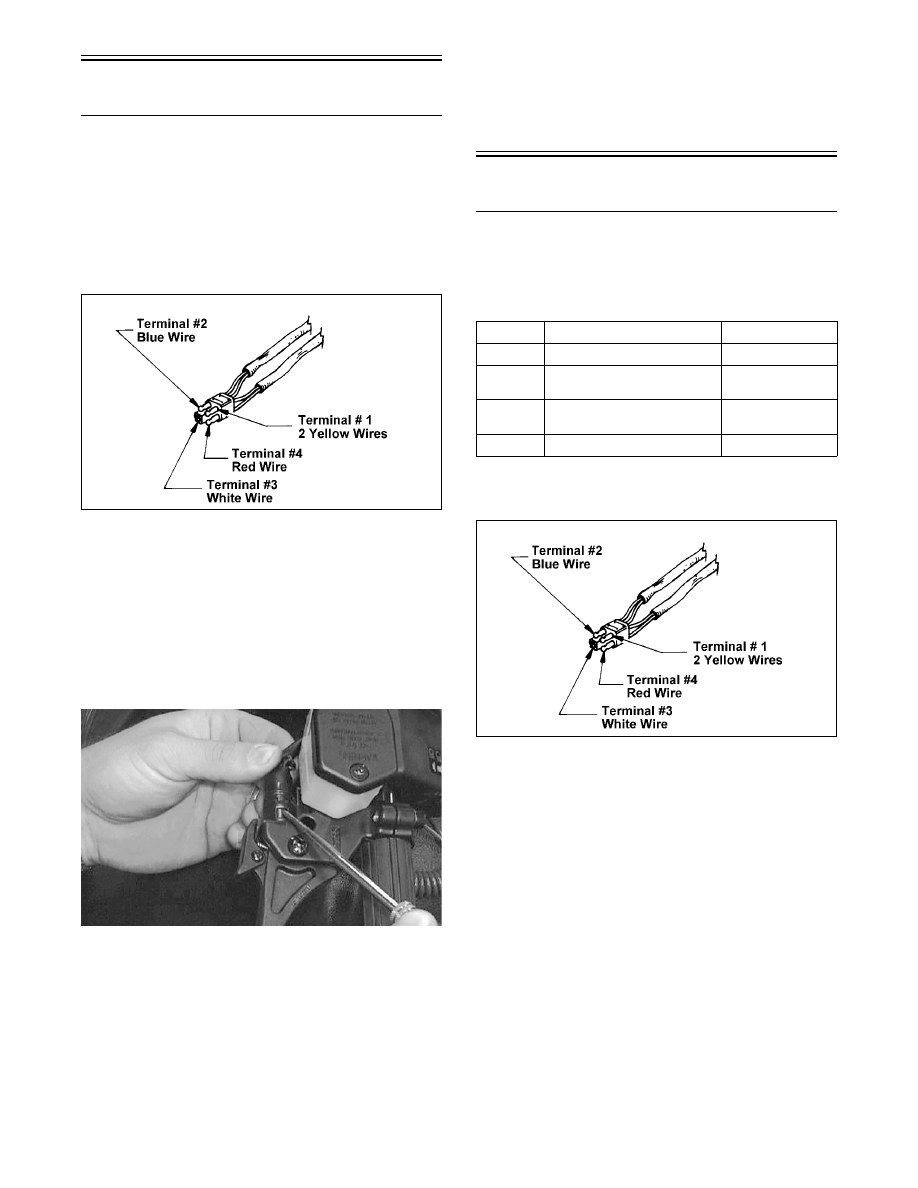
2. To test the brakelight switch, connect one tester

lead to the #1 (yellow) terminal; then connect the

other lead to the #4 (red) terminal.

727-650A

3. With the brake lever compressed, the meter must

read resistance. With the brake lever released, the

meter must read no resistance. If the meter does

not read as specified, the brakelight switch is

defective and must be replaced.

4. To remove the switch, use a small screwdriver to

compress the plastic locking tabs by pushing in on

the tabs; then slide the switch free of the brake

control.

AF201D

INSTALLING

1 On push-activated style, slide the brakelight

switch into the brake control assembly until the

self-locking tabs snap into position. Give the

switch body a light pull to make sure the switch is

properly secured.

2. Connect the switch harness to the main wiring har-

ness. Position the wires so they will not be either

pinched or come in contact with any moving com-

ponents. Start the engine and check the switch for

proper operation.

Brakelight Switch

(Panther 370/Z 370)

TESTING/REMOVING

1. Disconnect the wiring harness from the brake con-

trol.

2. Connect one tester lead to the #1 terminal; then

connect the other lead to the #4 terminal.

727-650A

3. With the brake lever compressed, the meter must

read less than 1 ohm of resistance. With the brake

lever released, the meter must read no resistance.

If the meter does not read as specified, the brake-

light switch is defective and must be replaced.

4. Use a small screwdriver to compress the plastic

locking tabs by pushing in on the tabs; then slide

the switch free of the brake control.

Terminal Corresponding Wire Color

Wire Usage

1

Yellow

Power Supply

2

Blue

Headlight - 

High Beam

3

White

Headlight - 

Low Beam

4

Red

Brakelight

6-3

6

AF907D

INSTALLING

1. Slide the brakelight switch into the brake control

assembly until the self-locking tabs snap into posi-

tion. Give the switch body a light pull to make

sure the switch is properly secured.

2. Connect the switch harness to the main wiring har-

ness. Position the wires so they will not be either

pinched or come in contact with any moving com-

ponents. Start the engine and check the switch for

proper operation.

Brakelight Switch

(EFI Models/Panther 570)

TESTING/REMOVING

„NOTE: On the F-Series to access the brakelight
switch connector, the two rear console torx-head
screws must be removed and the console must be
lifted upward and forward.

1. Disconnect the brakelight switch black and brown

two-wire connector (located below the steering

support). 

„NOTE: On the Panther 570, disconnect the two-
wire connector located under the console.

2. To test the brakelight switch, connect one tester

lead to the brown terminal; then connect the other

lead to the black terminal.

3. With the brake lever compressed, the meter must

read 1 ohm or less resistance. With the brake lever

released, the meter must read OL (open). If the

meter does not read as specified, the brakelight

switch is defective and must be replaced.

4. To remove the switch, remove the snap ring; then

remove the pin securing the brake lever to the con-

trol assembly.

5. Using a small flat-blade screwdriver, compress the

tabs of the switch; then push the switch toward the

end of the handlebar and out of the control assem-

bly.

CM108A

INSTALLING

1. Slide the brakelight switch into the brake control

assembly until the self-locking tabs snap into posi-

tion. Give the switch body a light pull to make

sure the switch is properly secured.

2. Install the brake lever and secure with the pin and

snap ring.

3. Connect the switch harness to the main wiring har-

ness. Position the wires so they will not be either

pinched or come in contact with any moving com-

ponents. Start the engine and check the switch for

proper operation.

„NOTE: On the F-Series, return the console to
position and secure with the two rear torx-head
screws.

Headlight

Dimmer Switch

(Bearcat 570/Panther 370/

Z 370/Z 570)

TESTING

1. Disconnect the headlight dimmer switch plug

(located next to the air-intake silencer).

2. Use the tester connections indicated in the follow-

ing chart. If the meter does not read as specified,

the headlight dimmer switch is defective and must

be replaced.

Position

Lead to 

Terminal 

(Wire Color)

Lead to 

Terminal 

(Wire Color)

Meter Reading

High Beam

1 (Yellow)

2 (Blue)

Less than 1 ohm

High Beam

1 (Yellow)

3 (White)

OL

Low Beam

1 (Yellow)

2 (Blue)

OL

Low Beam

1 (Yellow)

3 (White)

Less than 1 ohm

6

6-4

REMOVING

1. Remove the handlebar pad.

2. Remove the screws from the cover plate securing

the dimmer switch.

AF908D

3. Remove the plate and lift the switch free of the

control.

AF909D

INSTALLING

1. Place the dimmer switch into the control and

secure with the cover plate and screws.

2. Connect the four-prong plug; then install and

secure the handlebar pad.

Headlight Dimmer 

Switch

(EFI Models/Panther 570)

REMOVING/TESTING

1. Remove the handlebar pad (if applicable).

2. Remove the four screws securing the left-side

handlebar control assembly; then remove the

control assembly from the handlebar.

3. Disconnect the HI/LO beam harness from the

switch.

4. With the switch in the LO beam position, con-

nect one ohmmeter lead to pin (A) and the other

ohmmeter lead to pin (C). The meter must read

1 ohm or less resistance.

CM109A

5. With the switch in the HI beam position, con-

nect one ohmmeter lead to pin (B) and the other

ohmmeter lead to pin (C). The meter must read

1 ohm or less resistance.

„ NOTE: If either test does not read within specifi-
cation, replace the complete control assembly.

INSTALLING

1. Connect the HI/LO beam harness to the switch;

then place the control assembly on the handle-

bar.

2. Secure with the four screws.

3. Install the handlebar pad (if applicable).

Testing Handlebar 

Warmer Elements 

(Panther 370/Z 370/Z 570)

„NOTE: During this test, resistance will vary due
to temperature; therefore, this test should be made
at room temperature of 20° C (68° F).

1. Remove the handlebar pad; then disconnect the

handlebar warmer two-wire connector.

2. In the element connector, connect the ohmmeter

between the two lead wires.

3. The meter must read between 7.2 and 8.8 ohms.

4. Replace any element measuring less than or more

than the specified amount.

„NOTE: Repeat test for the other element.

5. Connect the leads; then install and secure the han-

dlebar pad.

6-5

6

Testing Handlebar 

Warmer Elements 

(EFI Models/Panther 570)

„ NOTE: To access the element connectors, the
handlebar control assembly for the side being
tested must be removed.

„ NOTE: During this test, resistance will vary due
to temperature; therefore, this test should be made
at room temperature of 20° C (68° F).

1. Remove the handlebar pad (if applicable); then

disconnect the handlebar warmer three-wire

connector.

2. In the element connector, connect one ohmmeter

lead to the green/white lead; then connect the other

ohmmeter lead to the green lead.

3. The meter must read between 6.3-7.7 ohms.

4. In the element connector, connect the ohmmeter

between the green/blue and green lead wires.

5. The meter must read between 12.6 and 15.4 ohms.

6. Replace any element measuring less than or more

than the specified amount.

„NOTE: Repeat test for the other element.

7. Connect the leads; then install the handlebar con-

trol assembly and secure the handlebar pad (if

applicable).

Testing Thumb 

Warmer Element 

(Bearcat 570/Panther 370/

Z 370/Z 570)

„NOTE: During this test, resistance will vary due
to temperature; therefore, this test should be made
at room temperature of 20° C (68° F).

1. Remove the handlebar pad; then disconnect the

thumb warmer two-wire connector.

2. In the element connector, connect one ohmmeter

lead to the green/white lead; then connect the other

ohmmeter lead to the yellow lead.

3. The meter must read between 2.7 and 3.3 ohms.

„NOTE: If the test is not within specification,
replace the thumb warmer element.

4. Connect the leads; then install and secure the han-

dlebar pad.

Testing Thumb 

Warmer Element 

(EFI Models/Panther 570)

„NOTE: During this test, resistance will vary due
to temperature; therefore this test should be made
at room temperature of 20° C (68° F).

1. Remove the handlebar pad (if applicable); then

disconnect the thumb warmer three-wire connec-

tor.

2. In the element connector, connect one ohmmeter

lead to the green/white lead; then connect the other

ohmmeter lead to the green lead.

3. The meter must read between 1.5 and 6.9 ohms.

4. In the element connector, connect one ohmmeter

lead to the green/blue lead; then connect the other

ohmmeter lead to the green lead.

5. The meter must read between 5.5 and 23.0 ohms.

„NOTE: If either test is not within specification,
replace the thumb warmer element.

6. Connect the leads; then install and secure the han-

dlebar pad (if applicable).

Testing Handlebar

Warmer Switch

(Bearcat 570/Panther 370/

Z 370/Z 570)

1. Remove the handlebar pad.

2. Disconnect the handlebar warmer two-wire con-

nector.

3. In the switch connector, connect the ohmmeter

leads to each terminal.

4. With the switch in the OFF position, the meter

must read an open circuit. With the switch in the

ON position, the meter must read 1 ohm or less

resistance.

5. Connect the leads; then install and secure the han-

dlebar pad.


Content   ..  75  76  77  78   ..