Snowmobile Polaris 600 RUSH (2010 year). Instruction - part 77
 

  Index      Snowmobiles / ATV     Snowmobile Polaris 600 RUSH - instruction 2010 year


Search            


Content   ..  75  76  77  78   ..


Snowmobile Polaris 600 RUSH (2010 year). Instruction - part 77


10.4

Battery and Electrical Systems

9923311 - 2010-2012 PRO-RIDE RUSH/Switchback/RMK Service Manual

© 2011 Polaris Sales Inc.

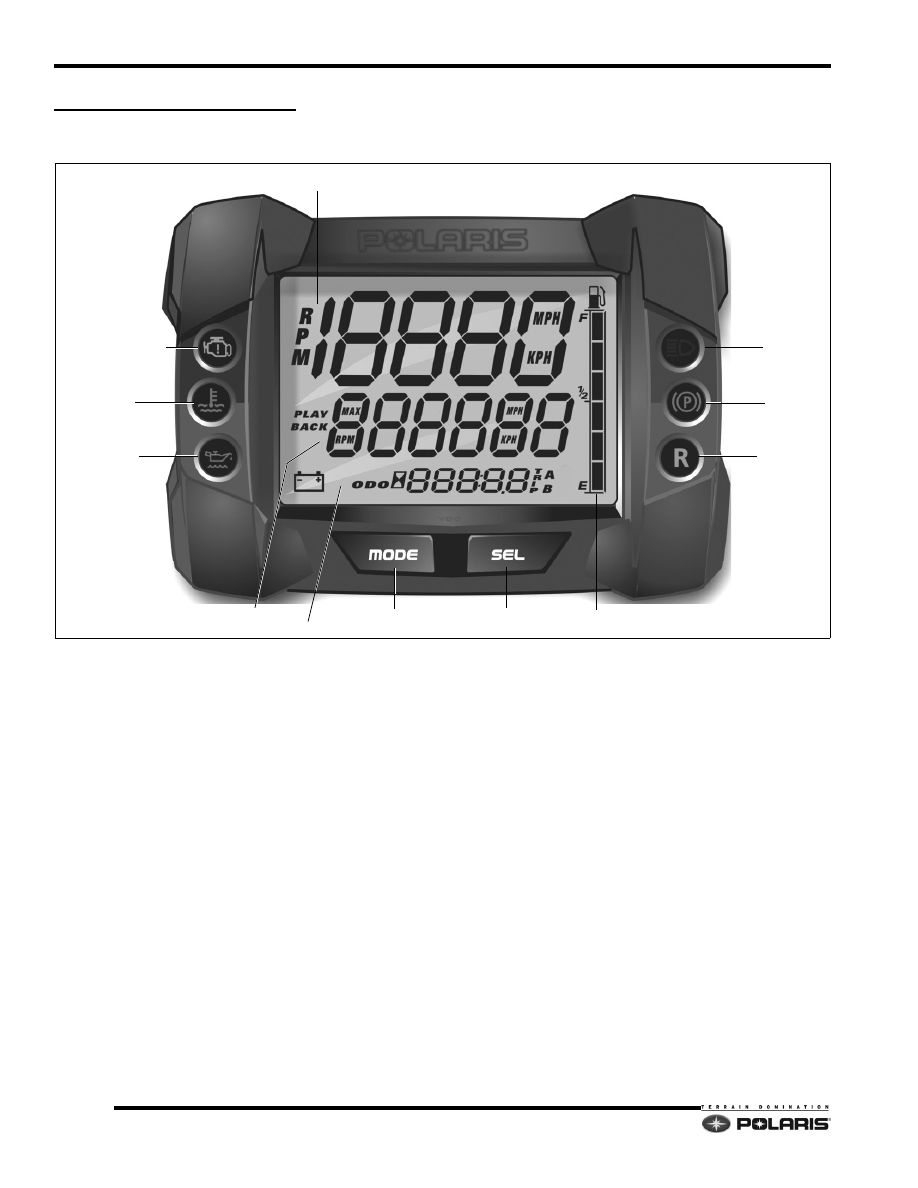
INSTRUMENT CLUSTER

Overview

Information regarding vehicle speed, engine RPM, 
engine overheat, PERC, oil level, brake, engine 
temperature (2011-current models) and check engine 
MIL (diagnostic trouble codes) is transmitted to the gauge 
from the ECU using CAN BUS communication 
technology.

Current fuel level is received from the fuel level sender 
located on the fuel pump. When the high beam headlights 
are illuminated, the gauge receives a signal from the YEL/
RED high beam circuit.

The MODE and SEL buttons perform the same functions 
as the LH control MODE/SET toggle button.

In addition to standard engine and vehicle information, 
the instrument cluster can playback up to three minutes 
of historical engine performance, and vehicle speed 
information and display diagnostic trouble codes when 
the check engine MIL is illuminated.

The instrument cluster is powered by the RED/WHT 
chassis power 12 VDC circuit.

ENGINE RPM/VEHICLE SPEED

FUEL LEVEL

BRAKE

PERC RVS

OIL LEVEL LOW

CK. ENGINE MIL

ENGINE TEMP.

PERFORMANCE DISPLAY

VEHICLE INFO. DISPLAY

MODE

SELECT

HIGH BEAM

10.5

Battery and Electrical Systems

10

9923311 - 2010-2012 PRO-RIDE RUSH/Switchback/RMK Service Manual

© 2011 Polaris Sales Inc.

Rider Information Display

The rider information display is located in the instrument 
cluster. All segments will illuminate for approximately one 
second at start-up.

NOTE:  If the instrument cluster fails to illuminate, an 
over-voltage condition may have occurred forcing the 
instrument cluster to power down.

1. RPM / Vehicle Speed Display - LCD display of either 

engine RPM or vehicle speed in MPH or km/h.

2. MPH / km/h Display - MPH is displayed when the 

instrument cluster is in the “Standard” mode. Km/h is 
displayed when the instrument cluster is in the “Metric” 
mode.

3. Performance Information Area - Engine RPM or 

Vehicle Speed (whichever is not displayed in top 
section of display) / MAX RPM / MAX Ground Speed 
and engine temperature (2011 models) are shown in 
the middle of the screen. The performance information 
area also displays “Play Back” when the play back 
function is enabled.

4. Vehicle Information Area - Trip meters A and B / 

Odometer / Service Interval Hours / Throttle Opening 
(TCS). TCS is only available during playback mode.

5. Fuel Level Indicator - Six segment LCD bar graph 

indicating current fuel level. All segments will flash 
when the last segment is cleared indicating a low fuel 
warning.

6. Check Engine MIL - Illuminated when the ECU has 

detected a Diagnostic Trouble Code (DTC) within the 
engine management system. Icon will flash when DTC 
display mode is active.

7. Engine Temperature Indicator - LED icon will 

illuminate when the ECU determines the engine is 
overheating. The icon will flash to indicate the engine 
is overheating. The icon will stay lit and not flash if a 
severe overheating condition exists.

8. Low Oil Level Indicator - Icon will illuminate when the 

oil level in the oil tank becomes too low. Add oil at the 
next fuel stop.

9. High Beam Indicator - LED will illuminate when the 

high beam headlamps are active.

10. Parking Brake Indicator - Icon will illuminate 

whenever the brake lever is pulled or when the parking 
brake is engaged.

11. Reverse Indicator - Icon will illuminate and flash 

whenever PERC reverse mode button is pushed on 
the LH control.

Instrument Cluster Pinouts

NOTE: CAN wires are twisted together and must 
remain twisted to prevent interference.

Engine RPM/Vehicle Speed Display

The top section of the display will show either engine 
RPM or vehicle speed. If engine RPM is displayed at the 
top, then vehicle speed will be displayed in the 
performance information area and vice-versa. To change 
the top section display, follow these steps:

1. The engine RPM or vehicle speed must be displayed 

in the performance information area. If neither are 
displayed, press and release the MODE button on the 
gauge or LH control until engine RPM or vehicle speed 
is displayed.

2. Press and hold the MODE button on the instrument 

cluster or LH control for 3 seconds to switch between 
the two displays.

Connector Pinouts

F

UNCTION

P

IN

DC Gauge Voltage (VDC) - RED/WHT

1

Ground - BRN/WHT

2

DC Gauge Voltage (VDC) - RED/WHT

3

CAN 1 High - YELLOW

4

CAN 1 Low - DK GREEN

5

LH Mode Switch - WHT/RED

10

LH Set Switch - WHT/BLK

11

High Beam Signal - YEL/RED

20

Fuel Level Sensor Signal - VIOLET/WHT

23

System Ground - BRN/WHT

24

10.6

Battery and Electrical Systems

9923311 - 2010-2012 PRO-RIDE RUSH/Switchback/RMK Service Manual

© 2011 Polaris Sales Inc.

Performance Information Area

The performance information area (middle) of the display 
screen is dedicated to displaying:

• Engine RPM or vehicle speed (whichever is not 

displayed at the top of the screen)

• Maximum ground speed

• Maximum engine RPM

• Engine temperature (2011-current models only)

Press and release the MODE button on the instrument 
cluster or LH control to toggle between the different 
displays.

Vehicle Information Area

The bottom of the instrument cluster screen is dedicated 
to displaying the following information:

• Odometer

• Trip  A

• Trip  B

• Engine hours

Press and release the SEL button on the instrument 
cluster or SET button on the LH control to toggle between 
the different displays.

To reset the Trip A and Trip B displays, press and hold the 
SEL button on the instrument cluster or SET button on the 
LH control for 3 seconds when the desired trip meter is 
displayed on the screen. The counter will reset to 0.

NOTE:  Engine hours and odometer cannot be reset.

Changing Units

The instrument cluster will display either standard or 
metric units. Change between the two by following these 
steps:

1. Press and release the SEL button on the instrument 

cluster or the SET button on the LH control until the 
ODOMETER is displayed on the screen.

2. Once the ODOMETER is displayed, press and hold 

either the SEL button or SET button for 3 seconds until 
the units change.

Diagnostic Display

The instrument cluster can display diagnostic trouble 
codes (DTCs) when, and only when, the check engine 
MIL is illuminated.

To display DTCs, follow these steps:

1. When an active DTC is realized, the check engine MIL 

will illuminate.

NOTE: The instrument cluster will display historic 
DTCs, but only during the same power cycle. All 
codes stored in the instrument cluster are lost when 
the instrument cluster is powered down.

2. Keep the engine running. Press and release the SEL 

button on the instrument cluster or the SET switch on 
the LH control until the diagnostics mode is activated. 
Once activated, the check engine MIL will begin 
flashing and “Err” will be displayed on the screen.

3. The diagnostics mode will display the SPN and FMI 

codes. A list of codes can be found in chapter four.

4. To check for multiple codes, press and hold the SEL 

button on the instrument cluster for 2 seconds until a 
new code is displayed. Repeat until no new codes are 
displayed.

5. To exit the diagnostics mode, either turn off the 

engine, or press and release the SEL button on the 
instrument cluster.

Playback Mode

The instrument cluster can be used as an engine RPM, 
vehicle speed, and TPS data recorder. Once enabled, the 
gauge can record up to three minutes of information.

To initiate RECORD:

1. Press and hold the MODE and SEL buttons on the 

instrument cluster for 3 seconds.

2. The PLAY BACK icon will begin flashing when record 

is activated.

To PLAY BACK:

1. Once the snowmobile has stopped and the engine 

RPM drops below clutch engagement speed, press 
and hold the MODE and SEL buttons on the 
instrument cluster to enter the play back mode.

2. To exit the play back mode, slightly tap the throttle 

lever.

10.7

Battery and Electrical Systems

10

9923311 - 2010-2012 PRO-RIDE RUSH/Switchback/RMK Service Manual

© 2011 Polaris Sales Inc.

SECURITY SYSTEM

Security System: Overview

An optional security feature is available on all 2012 Pro-
Ride snowmobiles which is enabled by an authorized 
Polaris dealer using Digital Wrench™. The security 
feature allows the operator to lock the ECU to prevent 
unauthorized use. When security is locked the ECU will 
prevent clutch engagement by limiting engine speed to 
3500 RPM. 

NOTE:  If the engine is running and security is locked, 
the ECU will shut the engine off when the engine 
temperature is above 120°F (49°C) for 60 seconds.

Security System: Digital Wrench™ Enable

Use Digital Wrench™ to enable the security function in 
the ECU. The following list of tools are required to enable 
the security function:

• PC/Laptop equipped with Digital Wrench™ and 

associated snowmobile SmartLink communication 
cables

• Fully Charged 12 VDC Battery

• Chassis Power-Up Harness: PS-47296-A

• Dual Power-Up Adapter: PS-50805

• Internet connection to Polaris reflash authorization 

site

Chassis Power-Up Harness and Dual PWR/Fuel Pump 
Prime Adapter

Digital Wrench SmartLink Module/Communication 
Cables

The security enable process has to be performed when:

• User wants security function turned on

• ECU has been reflashed with new reflash fileset

• Installing a new ECU

To enable the security function:

1. Open the left side engine compartment door and 

locate the Digital Wrench™ diagnostic plug, ECU 
power plug, and DC power plug.

2. Connect the dual power-up adapter to the chassis 

power-up harness. Attach one of the dual power-up 
connectors to the ECM PWR plug, and the other to the 
DC PWR plug. Connect the alligator clamps to a fully 
charged 12 VDC battery.

CHASSIS POWER-UP HARNESS

PS-47296-A

DUAL PWR/FUEL PUMP PRIME

PS-50805


Content   ..  75  76  77  78   ..