Snowmobile Polaris 600 RUSH (2010 year). Instruction - part 34
 

  Index      Snowmobiles / ATV     Snowmobile Polaris 600 RUSH - instruction 2010 year


Search            


Content   ..  32  33  34  35   ..


Snowmobile Polaris 600 RUSH (2010 year). Instruction - part 34


4.32

Cleanfire Fuel Injection

9923311 - 2010-2012 PRO-RIDE RUSH/Switchback/RMK Service Manual

© 2011 Polaris Sales Inc.

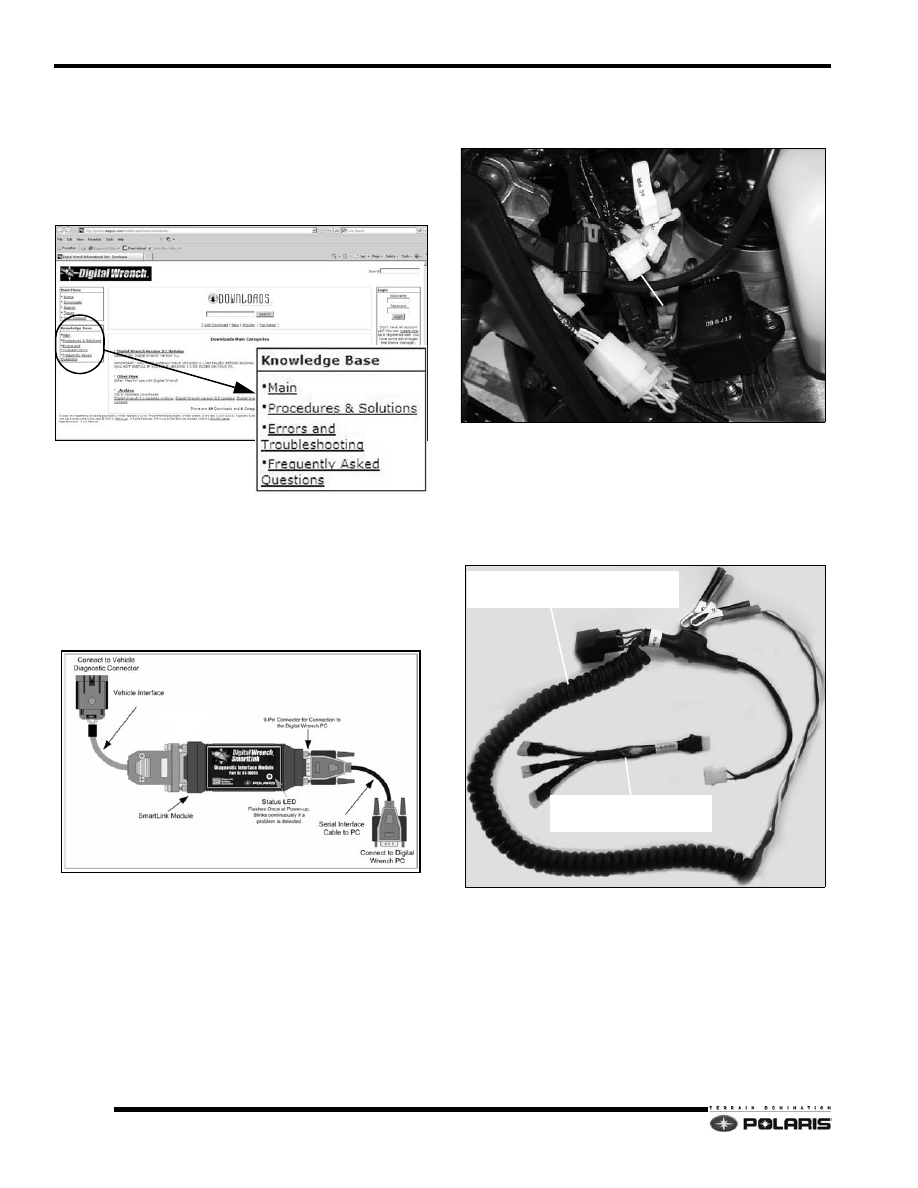
Digital Wrench™ Communication Errors

If you experience problems connecting to a vehicle or any 
Digital Wrench™ related problem, visit the Digital 
Wrench™ Knowledge Base for the most current 
troubleshooting information, FAQs, downloads and 
software updates at:        http://polaris.diagsys.com/.

Digital Wrench™ - Diagnostic / Power 
Connectors

The diagnostic/power connectors are located behind the 
left engine compartment door. 

1.

Assemble the SmartLink Module and attach the PC 
Interface Cable to your PC/laptop. 

2.

Remove the protective cap from the Digital Wrench™ 
connector (A) and then connect the Vehicle Interface 
Cable to the diagnostic connector.

3.

Connect the chassis power-up harness to a fully 
charged 12VDC battery. Connect the chassis power-
up harness to the ECU POWER connector.

NOTE:  An internal relay within the harness prevents 
reverse polarity damage in the event the alligator 
clamps are connected to the battery incorrectly.

4.

When battery power is connected successfully, the 
SmartLink status LED will blink on once.

A

ECU POWER

CHASSIS POWER-UP HARNESS

PS-47296-A

DUAL PWR/FUEL PUMP PRIME

PS-50805

4.33

Cleanfire Fuel Injection

4

9923311 - 2010-2012 PRO-RIDE RUSH/Switchback/RMK Service Manual

© 2011 Polaris Sales Inc.

NOTE:  Connecting the chassis power-up harness to 
the DC POWER TEST plug will power the DC chassis 
circuit.

Digital Wrench™ Serial Number Location

Open the configuration screen by clicking on the wrench 
icon. The serial number is located on the right side of the 
screen.

Digital Wrench™ Version and Update ID

Knowing what Digital Wrench™ version and update is 
installed will help determine which updates are required.

NOTE:  Versions and updates are subject to change.

1.

Open the Digital Wrench™ software. Locate the 
version ID shown on the lower right side of the Digital 
Wrench™ start-up screen.

2.

Proceed to http://polaris.diagsys.com to see if a 
newer update is available.

3.

If a newer update is available, it should be 
downloaded before using Digital Wrench™ (see 
“Digital Wrench™ Updates”).

Digital Wrench™ Updates

Updates are released for Digital Wrench™ via the Internet 
at:  http://polaris.diagsys.com. The Digital Wrench™ 
web site can also be accessed through the dealer web site 
at: www.polarisdealers.com.

NOTE: 

Only authorized Polaris dealers and 

distributors can access the dealer web site.

1.

Log on to www.polarisdealers.com.

2.

Locate the “Service and Warranty” drop-down 
menu.

3.

Click on “Digital Wrench Updates”.

4.

The Digital Wrench™ portal web site should appear 
in a new web browser.

CAUTION

Do not connect DC power to the AC power test plug. This 
plug is for testing the AC power circuit with a digital volt/
ohm meter. Severe electrical system damage will occur.

Version

Digital Wrench Update

4.34

Cleanfire Fuel Injection

9923311 - 2010-2012 PRO-RIDE RUSH/Switchback/RMK Service Manual

© 2011 Polaris Sales Inc.

5.

Click on “Digital Wrench Version Updates”. 

IMPORTANT: You must already have the current 
version installed before adding an update. Updates 
will not install if you are using an older version loaded 
on your PC.

6.

If the update file date listed is newer than your current 
version and update (see “Digital Wrench™ Version 
and Update ID”), download the file.

7.

Click on the link shown above, save the file to your 
hard disk and then double-click the icon to start the 
update process.

NOTE: Do not RUN or OPEN the file the web site. 
Select SAVE and download to your PC before 
running the install.

8.

When the update is complete, the version shown on 
the right side of the Digital Wrench™ start-up screen 

should match the update you just downloaded.

NOTE:  Versions and updates are subject to change.

Digital Wrench Update

Version

4.35

Cleanfire Fuel Injection

4

9923311 - 2010-2012 PRO-RIDE RUSH/Switchback/RMK Service Manual

© 2011 Polaris Sales Inc.

Digital Wrench™ Feature Map


Content   ..  32  33  34  35   ..