Snowmobile Polaris 600 RUSH (2010 year). Instruction - part 33
 

  Index      Snowmobiles / ATV     Snowmobile Polaris 600 RUSH - instruction 2010 year


Search            


Content   ..  31  32  33  34   ..


Snowmobile Polaris 600 RUSH (2010 year). Instruction - part 33


4.28

Cleanfire Fuel Injection

9923311 - 2010-2012 PRO-RIDE RUSH/Switchback/RMK Service Manual

© 2011 Polaris Sales Inc.

Fuel Tank Service

1.

Remove the tank cap and siphon the fuel in the tank 
into a suitable container.

2.

Remove the seat assembly

3.

Remove the door panels and hood.

4.

Remove the console.

5.

On RUSH models, remove the two screws attaching 
the fuel tank bracket to the steering post assembly.

6.

Disconnect the fuel supply and return hoses from the 
fuel pump. Disconnect the fuel pump power/level 
sender wire harness connector.

7.

Remove the fuel tank assembly from the snowmobile.

8.

Inspect the tank for signs of damage/excessive wear. 
Inspect the foam pads that the tank rests on. Replace 
pads if torn, missing, or damaged.

9.

Installation is the reverse of removal.

Fuel Pump Service

1.

Siphon the fuel out of the fuel tank into a suitable 
container.

2.

Remove the door panels, hood, and console.

3.

Disconnect the positive (+) battery cable from the 
battery if applicable.

4.

Bleed the pressure from the fuel rail. See “Fuel Rail 
Bleeding / Pressure Testing” on page 4.16.

5.

Disconnect the fuel supply and return hoses from the 
pump flange. See “Disconnect Fittings” on page 4.17.

6.

Disconnect the wiring harness.

7.

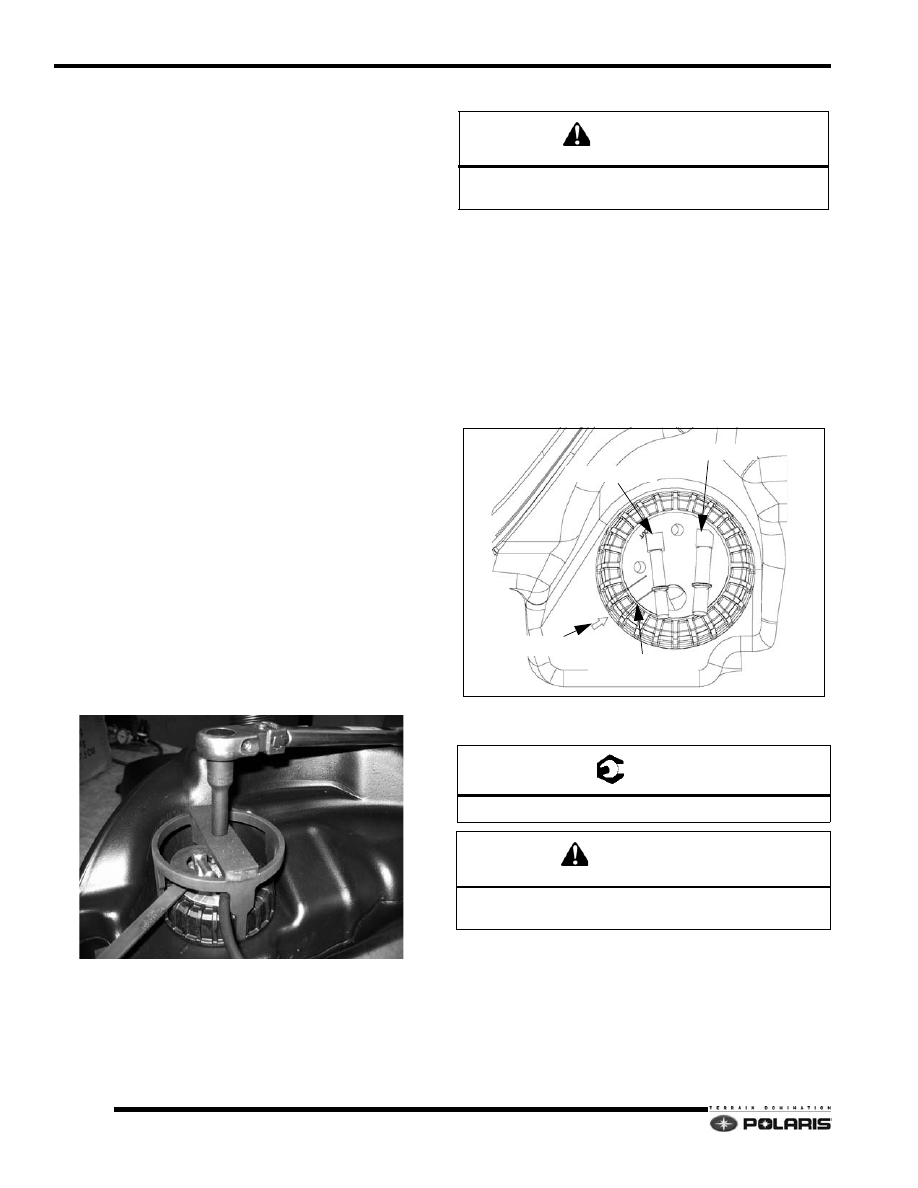
Using the PFA spanner wrench and nut socket (PS-
48459), carefully remove the PFA nut.

8.

Carefully extract the PFA out of the tank making sure 
the float and fuel hoses do not become kinked or bent.

9.

Remove the old gasket and discard.

10. Clean the tank’s gasket mating surface with isopropyl 

alcohol. Allow the surface to dry completely.

11. Install a new gasket ensuring the inside portion of the 

gasket hooks onto the bead on the inside diameter of 
the neck.

12. Remove any containments from the gasket with 

isopropyl alcohol.

13. Carefully place the PFA back into the tank. Push the 

float assembly against the hoses to fit it into the hole.

14. Hand tighten the PFA nut keeping the arrow between 

the PFA alignment marks.

15. Using the PFA spanner wrench and nut socket 

(PS48459), tighten the PFA to specification.

16. Fuel tank installation is the reverse of removal. Always 

test the PFA gasket seal before tank installation by 
performing a pressure check.

CAUTION

ALWAYS REPLACE PFA GASKET WITH NEW 

GASKET AFTER REMOVING FUEL PUMP.

T 

PFA Nut Torque: 28 ft-lb (38 Nm)

CAUTION

Verify the PFA nut does not make contact with the fuel 

tank after applying torque.

ARROW

ALIGNMENT LINES

SUPPLY FITTING

RETURN FITTING

4.29

Cleanfire Fuel Injection

4

9923311 - 2010-2012 PRO-RIDE RUSH/Switchback/RMK Service Manual

© 2011 Polaris Sales Inc.

Fuel Pump/Level Sender Test Specifications

The fuel level sender resistance can be checked using a 
multitester set to read resistance (OHMS).

Measure resistance at the fuel pump harness connector 
between pin 2 (WHITE/BLACK) and pin 4 (PINK/BLACK).

ARM UP/GAUGE READING FULL = <8



FLOAT HEIGHT FROM BOTTOM OF TANK = 345.3mm 
+/-16.4

ARM MIDDLE/GAUGE READING 1/2 = 40.7+/- 1.5



FLOAT HEIGHT FROM BOTTOM OF TANK = 213.2mm 
+/- 23.2

ARM DOWN/GAUGE READING EMPTY = 91.5 +/- 1.5



FLOAT HEIGHT FROM BOTTOM OF TANK =

89.6mm +/- 20.8

Fuel Tank Pressure Test

1.

Connect a Mity Vac hand pump to the fuel tank vent 
fitting.

2.

Connect a eight-inch piece of 5/16

 fuel hose and two 

gear clamps across the fuel supply and return fittings 
at the fuel pump flange.

3.

Pressurize the tank to 5 PSI (34 Kpa). 

NOTE: Fuel tank deformation will occur when the 
tank is pressurized.

NOTE: Using a hand pump to pressurize the fuel 
tank may take a very long time. The installation of an 
in-line Schrader Valve (PN: 2872602) and the use of a 
low pressure pump (bicycle tire pump) is 
recommended.

4.

Once the tank is pressurized, saturate the area 
around the PFA gasket with a mixture of water and 
mild detergent.

5.

If any bubbles form, re-check the PFA nut torque. If 
bubble formation continues, the PFA gasket will have 
to be replaced, or tank replacement is required.

NOTE:  There may be bubbles present from the initial 
application of leak detector. Blow on the bubbles to 
pop them. Watch for new bubble formation. New 
bubble formation may be very small so look closely. 
Apply additional water/detergent solution if required.

WARNING

Do not over-pressurize the fuel tank past 6 PSI

(41 Kpa).

4.30

Cleanfire Fuel Injection

9923311 - 2010-2012 PRO-RIDE RUSH/Switchback/RMK Service Manual

© 2011 Polaris Sales Inc.

Rush/Switchback Fuel Pump Pickup 
Orientation

When servicing the Rush fuel pump pickup assembly or 
troubleshooting an issue with a stuck low fuel gauge 
display on the MFD gauge, verify the pickup assembly is 
orientated as shown in the MY11 Pickup Assembly 
illustration below.

NOTE: Model year 2010 Rush fuel pump assembly 
service parts feature the rotated fuel pickup 
assembly.

MY10 Rush Pickup Assembly:

MY11 Rush Pickup Assembly:

PICKUP ASSEMBLY MAY INTERFERE
WITH FUEL SENDER FLOAT

PICKUP ASSEMBLY ROTATED
45 DEGREES

FUEL SENDER FLOAT CLEAR FROM
PICKUP ASSEMBLY

ROTATE BOTH HOSES BEFORE INSTALLING
CLAMPS

4.31

Cleanfire Fuel Injection

4

9923311 - 2010-2012 PRO-RIDE RUSH/Switchback/RMK Service Manual

© 2011 Polaris Sales Inc.

DIGITAL WRENCH DIAGNOSTIC 
SOFTWARE

Digital Wrench™ Diagnostic Software Overview

IMPORTANT: Refer to Section 2, 3 and 4 in the Instruction Manual provided in the Digital Wrench™ Diagnostic 
Kit to install the Polaris Digital Wrench™ diagnostic software on your computer.

The Digital Wrench™ diagnostic software allows the 
technician to perform the following tests and observations:

• View or clear trouble codes

• Analyze real-time engine data

• Reflash ECU calibration files

• Perform guided diagnostic procedures

• Create customer service account records

• Perform output state control tests

Special Tools

Diagnostic Software Version

Always use the most current version of the Digital 
Wrench™ software to ensure you have the latest updates 
or enhancements. New reprogramming files and guided 
diagnostic procedures are added to these updates as they 
become available. For information on how to determine if 
you have the latest update available, refer to “Digital 
Wrench™ Version and Update ID”.

ECU Replacement

Although the need for ECU replacement is unlikely, a 
specific replacement procedure is required to ensure that 
all essential data contained within the original ECU is 
transferred to the replacement ECU. 

Refer to procedure and carefully follow all instructions 
provided in Digital Wrench™.

Guided Diagnostics Available

Guided diagnostics are available within Digital Wrench™ 
for all supported Trouble Codes (that is, any fault that will 
turn on the ‘Check Engine’ indicator).

In addition, guided diagnostics are also available for many 
other electrical sub systems. 

Diagnostic procedures are added to subsequent versions 
of Digital Wrench™ as they become available. Check your 
release version often and upgrade when available to be 
sure you are using the most current software available.

DIGITAL WRENCH™ DIAGNOSTIC SOFTWARE

PART NUMBER

PC/Laptop with Microsoft Windows 98/XP-SP2/Vista/7

Commercially Available

Digital Wrench™ Diagnostic Kit

PU-47063-B

PU-47063-B (listed above) INCLUDES:

Digital Wrench™ Software: PU-48731

Standard Interface Cable: PU-47151

USB-Serial Adapter Cable: PU-50621

SmartLink Module/Cable Kit: PU-47471

PU-47471 INCLUDES:

SmartLink Module: PU-47468

SmartLink Serial Cable: PU-47470

SmartLink CAN Interface Cable: PU-47469

Chassis Power-Up Harness

PS-47296-A

Dual Power-Up Adapter/Fuel Pump Prime Harness

PS-50805

12 VDC Battery

Commercially Available

Reflash Enable Jumper

PS-50361


Content   ..  31  32  33  34   ..