Vauxhall Combo E (2023 year). Manual in english - page 8
 

  Index      Manuals     Vauxhall Combo E (2023 year). Manual in english


Search            copyright infringement  


Content      ..     6      7      8      9     ..


Vauxhall Combo E (2023 year). Manual in english - page 8


230

Driving and operating

4. Unscrew protective cap from the

filler neck.

5. Open AdBlue canister.
6. Mount one end of the hose on the

canister and screw the other end

on the filler neck.

7. Lift the canister until it is empty, or

until the flow from the canister has

stopped. This can take up to five

minutes.

8. Place the canister on the ground

to empty the hose, wait 15 s.

9. Unscrew the hose from the filler

neck.

10. Mount the protective cap and turn

clockwise until it engages.

Notice

Dispose of AdBlue canister

according to environmental

requirements. Hose can be reused

after flushing with clear water before

AdBlue dries out.

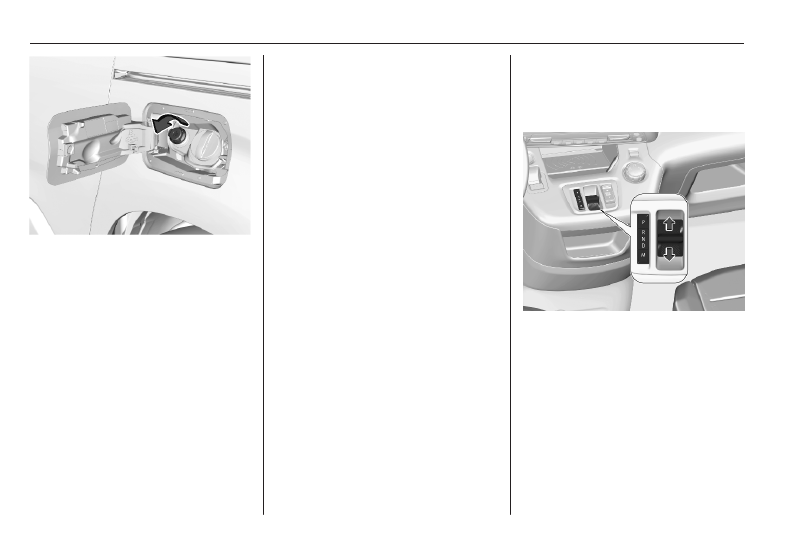
Electric drive unit

The vehicle uses an electric drive unit

with a 1-gear transmission.

P : park position

R : reverse mode

N : neutral mode

D : automatic mode

B : automatic mode with one-pedal

driving

After selecting a mode, the selector

will return to the centre position. The

selected mode is indicated in the

Driver Information Centre.

Driving and operating

231

Do not accelerate while selecting a

mode. Never depress the accelerator

pedal and brake pedal at the same

time. When a driving mode is

selected, the vehicle slowly begins to

creep when the brake is released.

Caution

If the vehicle seems to accelerate

slowly or not respond when you try

to go faster, do not continue your

journey. The electric drive unit

could be damaged. Consult a

workshop as soon as possible.

Caution

Spinning the tyres or holding the

vehicle in one place on a hill using

only the accelerator pedal may

damage the electric drive unit. If

you are stuck, do not spin the

tyres. When stopping on a hill, use

the brakes to hold the vehicle in

place.

Park position P

To shift into P, press button P when

vehicle is stationary. In P, the front

wheels of the vehicle are blocked.
To shift out of P, depress the brake

pedal and select the desired mode.
The vehicle automatically shifts into

P when

● the ignition is switched off
● the driver's door is opened while

the vehicle's speed is below

1 mph

Reverse mode R

To shift into and out of R, the vehicle

must be at standstill and the brake

pedal has to be depressed.

Caution

Shifting into R while the vehicle is

moving forward could damage the

automatic transmission. Only shift

into R after the vehicle has been

stopped.

Neutral mode N

In this mode, the propulsion system

does not transfer torque to the

wheels. To restart the propulsion

system when the vehicle is already

moving, use D only.
When N is selected, P is engaged

after a short time.
If the driver's door is opened while N

is selected, an audible signal is given

and P  is engaged. The audible signal

stops when the driver's door is closed.

Automatic mode D

Notice

In slippery conditions, operate the

vehicle in D for enhanced riding and

handling performance.

Automatic mode B with one-pedal

driving

In this mode, vehicle speed is

significantly reduced by releasing the

accelerator pedal without operating

the brake pedal.
Use B when driving down steep hills,

in deep snow, in mud or in stop-and-

go traffic.

232

Driving and operating

9

Warning

In the case of extreme

temperatures or if the high voltage

battery is almost fully charged, the

brake force of the regenerative

braking may be temporarily

reduced. If the braking force is not

sufficient, the driver has to be

prepared to use the brake pedal.

To activate B, shift into D and press

button B.
To deactivate B, press button B.
Regenerative braking 

3

 241

Free wheeling

In certain situations such as in an

automatic car wash etc., it is

necessary that the wheels can move

freely when the engine is switched off.
To enable free wheeling, the vehicle

has to be stationary, the engine has

to be running and the driver's door

has to be closed. Proceed as follows:

1. Depress the brake pedal and

select N.

2. Within five seconds depress and

hold the brake pedal.

3. Switch off the ignition and move

the selector forwards or

backwards.

4. Take your foot off the brake pedal

and switch on the ignition.

5. Depress and hold the brake pedal

and push the electric parking

brake to release it.

6. Take your foot off the brake pedal

and switch off the ignition.

A message is displayed in the Driver

Information Centre indicating that the

wheels are unblocked for the next 15

minutes.

To revert to normal operation,

depress the brake pedal and switch

on the engine.
Parking brake 

3

 238.

Driving and operating

233

Automatic transmission

P : park position

R : reverse mode

N : neutral mode

D : automatic mode

M : manual mode
Do not accelerate while selecting a

mode. Never depress the accelerator

pedal and brake pedal at the same

time. When a driving mode is

selected, the vehicle slowly begins to

creep when the brake is released.
The engine can only be started with

the gear selector in position P or N.

When position N is selected, press

the brake pedal or apply the parking

brake before starting.

Gear selector type A

Turn the selector.

Park position P

To shift into P, turn the selector to P

when vehicle is stationary. In P, the

front wheels of the vehicle are

blocked.
To shift out of P, depress the brake

pedal and select the desired mode.

Reverse mode R

To shift into and out of R, the vehicle

must be at standstill and the brake

pedal has to be depressed.

Caution

Shifting into R while the vehicle is

moving forward could damage the

automatic transmission. Only shift

into R after the vehicle has been

stopped.

Neutral mode N

In this mode, the propulsion system

does not transfer torque to the

wheels. To restart the propulsion

system when the vehicle is already

moving, use D only.

Automatic mode D

Notice

In slippery conditions, operate the

vehicle in D for enhanced riding and

handling performance.

Manual mode M

In this mode, gears can be selected

manually by using the steering wheel

paddles.
M can be activated from D in each

driving situation and speed.
When in D press button M.

234

Driving and operating

Gear selector type B

After selecting a mode, the selector

will return to the centre position.

Park position P

To shift into P, press button P when

vehicle is stationary. In P, the front

wheels of the vehicle are blocked.
To shift out of P, depress the brake

pedal and select the desired mode.
The vehicle shifts automatically into

P when

● the engine is switched off
● the driver's door is opened while

the vehicle's speed is below

1 mph

Reverse mode R

To shift into and out of R, the vehicle

must be at standstill and the brake

pedal has to be depressed.

Caution

Shifting into R while the vehicle is

moving forward could damage the

automatic transmission. Only shift

into R after the vehicle has been

stopped.

Neutral mode N

In this mode, the propulsion system

does not transfer torque to the

wheels. To restart the propulsion

system when the vehicle is already

moving, use D only.

Automatic mode D

Notice

In slippery conditions, operate the

vehicle in D for enhanced riding and

handling performance.

Manual mode M

In this mode, gears can be selected

manually by using the steering wheel

paddles.

M can be activated from D in each

driving situation and speed.
When in D press button M.

Engine braking

To utilise the engine braking effect,

select a lower gear when driving

downhill.

Rocking the vehicle

Rocking the vehicle is only

permissible if the vehicle is stuck in

sand, mud or snow. Move the gear

selector between D and R in a repeat

pattern. Do not race the engine and

avoid sudden acceleration.

Driving and operating

235

Steering wheel paddles

Pull steering wheel paddles to select

gears manually.
Pull right paddle + to shift to a higher

gear.
Pull left paddle - to shift to a lower

gear.
Multiple pulls allow gears to be

skipped.
If a higher gear is selected when

vehicle speed is too low, or a lower

gear when vehicle speed is too high,

the shift is not executed. This can

cause a message in the Driver

Information Centre.

In manual mode, no automatic

shifting to a higher gear takes place

at high engine revolutions.
Gear shifting indication 

3

 95.

Transmission display

The mode or selected gear is shown

in the Driver Information Centre.

Electronic driving programmes

● Following a cold start, the

operating temperature

programme increases engine

speed to quickly bring the

catalytic converter to the required

temperature.

● Special programmes

automatically adapt the shifting

points when driving up inclines or

down hills.

● In snowy or icy conditions or on

other slippery surfaces, the

electronic transmission control

enables the driver to select

manually first, second or third

gear for starting off.

Kickdown

Pressing down the accelerator pedal

beyond the kickdown detent will lead

to maximum acceleration

independent of selected driving

mode. The transmission shifts to a

lower gear depending on engine

speed.

Fault

In the event of a fault a message is

displayed in the Driver Information

Centre.
Vehicle messages 

3

 106.

Electronic transmission control

enables only third gear. The

transmission no longer shifts

automatically.

236

Driving and operating

Do not drive faster than 62 mph.
Have the cause of the fault remedied

by a workshop.

Eco mode

This mode adjusts the settings of the

systems for a more economic fuel

consumption, e.g. by optimising the

automatic transmission shift points

and adapting the sensitivity of the

accelerator pedal.

Manual transmission

To engage reverse on 5-speed

transmission, with the vehicle

stationary and engine at idle depress

the clutch pedal and move the

selector lever to the right and rear.

To engage reverse on 6-speed

transmission, with the vehicle

stationary and engine at idle depress

the clutch pedal, pull the ring under

the selector lever and move the

selector lever quite to the left and

front.
If the gear does not engage, set the

selector lever to neutral, release the

clutch pedal and depress again. Then

repeat gear selection.
Do not slip the clutch unnecessarily.
When operating, depress the clutch

pedal completely. Do not use the

pedal as a foot rest.

Driving and operating

237

When clutch slip is detected for a

specific time, the engine power will be

reduced. A warning is displayed in the

Driver Information Centre. Release

the clutch.

Caution

It is not advisable to drive with the

hand resting on the selector lever.

Gear shift indication 

3

 95.

Stop-start system 

3

 222.

Drive systems

Drive modes

Following drive modes are selectable:

● Normal mode
● Power mode
● Eco mode

Each drive mode corresponds to a

different vehicle setting.

To select the respective drive mode,

use the shown toggle switch.

Normal mode

Optimises range and dynamic

performance. This mode is

automatically selected everytime the

vehicle is started.

Power mode

Provides the same performance as

Normal mode, however, when the

vehicle is fully loaded.

Eco mode

Optimises energy consumption by

reducing the performance of heating

and air conditioning as well as

reducing the performance of the

electric engine.

238

Driving and operating

Brakes

The brake system comprises two

independent brake circuits.
If a brake circuit fails, the vehicle can

still be braked using the other brake

circuit. However, braking effect is

achieved only when the brake pedal

is depressed firmly. Considerably

more force is needed for this. The

braking distance is extended. Seek

the assistance of a workshop before

continuing the journey.
When the engine is not running, the

support of the brake servo unit

disappears once the brake pedal has

been depressed once or twice.

Braking effect is not reduced, but

braking requires significantly greater

force. It is especially important to bear

this in mind when being towed.
Control indicator 

m


3

 94.

Antilock brake system

Antilock brake system (ABS)

prevents the wheels from locking.

ABS starts to regulate brake pressure

as soon as a wheel shows a tendency

to lock. The vehicle remains

steerable, even during hard braking.
ABS control is made apparent

through a pulse in the brake pedal

and the noise of the regulation

process.
For optimum braking, keep the brake

pedal fully depressed throughout the

braking process, despite the fact that

the pedal is pulsating. Do not reduce

the pressure on the pedal.
When braking in an emergency, the

hazard warning flashers are switched

on automatically depending on the

force of deceleration. They are

switched off automatically the first

time you accelerate.
After starting off, the system performs

a self-test which may be audible.

Control indicator 

u


3

 95.

Fault

9

Warning

If there is a fault in the ABS, the

wheels may be liable to lock due

to braking that is heavier than

normal. The advantages of ABS

are no longer available. During

hard braking, the vehicle can no

longer be steered and may

swerve.

Have the cause of the fault remedied

by a workshop.

Parking brake

9

Warning

Before leaving the vehicle, check

parking brake status. Control

indicator 

j

 illuminate constantly

when electric parking brake is

applied.

Driving and operating

239

Manual parking brake

9

Warning

Always apply parking brake firmly

without operating the release

button, and apply as firmly as

possible on a downhill or uphill

slope.
To release the parking brake, pull

the lever up slightly, press the

release button and fully lower the

lever.
To reduce the operating forces of

the parking brake, depress the

foot brake at the same time.

Control indicator 

R


3

 94.

Electric parking brake

Applying when vehicle is stationary

9

Warning

Pull switch 

m

 for a minimum of

one second until control indicator

m

 illuminates constantly and

electric parking brake is applied

3

 94. The electric parking brake

operates automatically with

adequate force.

Before leaving the vehicle, check

the electric parking brake status.

Control indicator 

m


3

 94.

The electric parking brake can always

be activated, even if the ignition is off.
Do not operate electric parking brake

system too often without engine

running as this will discharge the

vehicle battery.

Releasing

Switch on ignition. Keep foot brake

pedal depressed and then push

switch 

j

.

Drive away function

Depressing the clutch pedal and then

slightly releasing the clutch pedal and

slightly depressing the accelerator

pedal releases the electric parking

brake automatically. This is only

possible if the automatic operation of

the electric parking brake is activated.

It is not possible when switch 

j

 is

pulled at the same time.

240

Driving and operating

Braking when vehicle is moving

When the vehicle is moving and the

switch 

j

 is kept pulled, the electric

parking brake system will decelerate

the vehicle. As soon as the switch

j

 is released, braking will be

stopped.
The antilock brake system and the

Electronic Stability Control stabilise

the vehicle while the switch 

j

 is kept

pulled. If an error of the electric

parking brake occurs, a warning

message is displayed in the driver

information centre. If the antilock

brake system and the Electronic

Stability Control fail, one or both

indicators 

i

 and 

J

 illuminate in the

instrument cluster. In this case,

stability can only be provided by

repeatedly pulling and pushing the

switch 

j

 until the vehicle is

immobilised.

Automatic operation

Automatic operation includes

automatic application and automatic

release of the electric parking brake.

The electric parking brake can also be

applied or released manually by using

the switch 

j

.

Automatic application:

● The electric parking brake is

automatically applied when the

vehicle is stationary and the

ignition is switched off.

j

 illuminates in the instrument

cluster and a display message

pops up to confirm the

application.

Automatic release:

● Parking brake releases

automatically after moving off.

j

 extinguishes in the

instrument cluster and a display

message pops up to confirm the

release.

If the vehicle is equipped with an

automatic transmission and the brake

is not released automatically, make

sure the front doors are correctly

closed.

Deactivation of automatic operation

In certain situations, e.g. in very cold

weather conditions, when being

towed etc., it may be necessary that

the automatic operation of the electric

parking brake is deactivated.

1. Start the engine.
2. If the parking brake is released,

apply the parking brake pulling the

switch 

j

.

3. Take your foot off the brake pedal.
4. Press the switch 

j

 for at least

ten seconds and maximum

15 seconds.

5. Release the switch 

j

.

6. Depress and hold the brake

pedal.

7. Pull the switch 

j

 for

two seconds.

The deactivation of the automatic

operation of the electric parking brake

is confirmed by 

o

 illuminating in the

instrument cluster 

3

 94. The electric

parking brake can only be applied and

released manually.

Driving and operating

241

To reactivate the automatic

operation, repeat the steps described

above.

Functionality check

When the vehicle is not moving, the

electric parking brake might be

applied automatically. This is done to

check the system.

Fault

Failure mode of electric parking brake

is indicated by a control indicator 

j

and by a vehicle message which is

displayed in the Driver Information

Centre.
Vehicle messages 

3

 106.

Control indicator 

j

 flashes: electric

parking brake is not fully applied or

released. When continuously

flashing, release electric parking

brake and retry applying.

Brake assist

If brake pedal is depressed quickly

and forcefully, maximum brake force

is automatically applied.

Operation of brake assist might

become apparent by a pulse in the

brake pedal and a greater resistance

when depressing the brake pedal.
Maintain steady pressure on the

brake pedal as long as full braking is

required. Maximum brake force is

automatically reduced when brake

pedal is released.

Hill start assist

The system helps prevent unintended

movement when driving away on

inclines.
When releasing the brake pedal after

stopping on an incline, brakes remain

on for further 2s. The brakes release

automatically as soon as the vehicle

begins to accelerate.

Regenerative braking

9

Warning

In the case of extreme

temperatures or if the high voltage

battery is almost fully charged, the

brake force of the engine braking

may be temporarily reduced. If the

braking force is not sufficient, the

driver has to be prepared to use

the brake pedal.

9

Warning

Depending on the engine braking

force the brake lights are

illuminated.

Regenerative braking generates

electrical energy resulting from

engine braking to charge the high

voltage battery.
Electric drive unit 

3

 230.

242

Driving and operating

Ride control systems

Electronic Stability Control

and Traction Control system

Electronic Stability Control (ESC)

improves driving stability when

necessary, regardless of the type of

road surface or tyre grip.
As soon as the vehicle starts to

swerve (understeer / oversteer),

engine output is reduced and the

wheels are braked individually.
ESC operates in combination with the

Traction Control system (TC). It

prevents the driven wheels from

spinning.
The TC is a component of the ESC.
Traction Control improves driving

stability when necessary, regardless

of the type of road surface or tyre grip,

by preventing the driven wheels from

spinning.
As soon as the driven wheels starts to

spin, engine output is reduced and

the wheel spinning the most is braked

individually. This considerably

improves the driving stability of the

vehicle on slippery road surfaces.

ESC and TC are operational after

each engine start as soon as the

control indicator 

b

 extinguishes.

When ESC and TC operate, 

b

flashes.

9

Warning

Do not let this special safety

feature tempt you into taking risks

when driving.
Adapt speed to the road

conditions.

Control indicator 

b


3

 95.

Deactivation

ESC and TC can be deactivated,

everytime it is required: press 

a

.

The LED in the button 

a

 illuminates.

A status message appears in the

Driver Information Centre when ESC

and TC are deactivated.
ESC and TC are reactivated by

pressing the 

a

 button again, by

applying the brake or in the case that

the vehicle is driven faster than

30 mph.
The LED in the button 

a

 extinguishes

when ESC and TC are reactivated.

Driving and operating

243

ESC and TC are also reactivated the

next time the ignition is switched on.

Fault

If there is a fault in the system, the

control indicator 

b

 illuminates

continuously and a message appears

in the Driver Information Centre. The

system is not operational.
Have the cause of the fault remedied

by a workshop.

Descent control system

The descent control system allows

the vehicle to travel at a low speed

without depressing the brake pedal.

The vehicle will automatically

decelerate to a low speed and remain

at that speed when the system is

activated. Some noise or vibration

from the brake system may be

apparent when the system is active.

Caution

Use only when descending steep

grades while driving off-road. Do

not use when driving on normal

road surfaces. Unnecessary

usage of the DCS function, such

as while driving on normal roads,

may damage the brake system

and the ESC function.

Activation

Notice

If hill descent control is active, active

emergency braking is automatically

deactivated.

The systems is only available for

slopes greater than 5%.

At speeds below approx. 30 mph,

press 

ò

. The system can also be

activated when the vehicle is

stationary with the engine running.

The control indicator 

ò

 in the

instrument cluster is illuminated in

green to show the system is

activated.
When the vehicles starts its descent,

the system controls the speed of the

vehicle; accelerator and brake pedals

can be released.

● If the gearbox is in first or second

gear, the speed decreases and

the control indicator in the

instrument cluster flashes

rapidly.

● If the gearbox is in neutral or the

clutch pedal is depressed, the

speed decreases and the control

indicator in the instrument cluster

flashes slowly.

If the system is operating, the brake

lights automatically come on.
If the speed exceeds 18 mph,

regulation is paused. The 

ò

indicator light in the instrument cluster

changes to grey. However, the LED

244

Driving and operating

of the 

ò

 button is still illuminated.

Regulation is automatically resumed

if the speed falls below 18 mph, the

slope is greater than 5% and the

pedal release conditions are met.

Deactivation

Press 

ò

 again until the LED in the

button extinguishes. The green

control indicator 

u

 in the instrument

cluster extinguishes, too.
If the speed exceeds 43 mph, the

system is automatically deactivated.

The LED in the button estinguishes.

Fault

If the green control indicator 

ò

 does

not illuminate or flash after pressing

the button, there is a fault in the

system.
Seek the assistance of a workshop.

Selective ride control

Caution

The vehicle is designed to drive

principally on-road, but it also

enables driving off-road

occasionally.
However, do not drive on terrain

where the vehicle could be

damaged due to obstacles, such

as stones among others and on

terrain with steep inclines and

poor grip.
Do not cross waters.

Caution

When driving off-road, sudden

motion and manoeuvres can

cause a collision or losing control.

Selective ride control is designed to

optimise traction in low-grip

conditions (snow, mud and sand).

It adapts to the terrain by acting on the

front wheels, in doing so this saves

the weight normally associated with a

more conventional four wheel drive

system.

Selective ride control allows to

choose between five driving modes

by turning the control:

● ESC off mode 

9

● standard mode 

2

● snow mode 

3

● mud mode 

4

● sand mode 

1

Driving and operating

245

An LED illuminates and a status

message appears in the Driver

Information Centre to confirm the

chosen mode.

ESC off mode 

9

The ESC and Traction Control are

deactivated in this mode.
ESC and Traction Control are

reactivated automatically from

30 mph or everytime the ignition is

switched on.

Standard mode 

2

This mode is calibrated for a low level

of wheel spin, based on the different

types of grip generally encountered in

normal day to day driving.
Everytime the ignition is switched off,

the system is automatically reset to

this mode.

Snow mode 

3

This mode adapts to the grip

conditions encountered by each

wheel when starting.

When advancing, the system

optimises wheel spin to guarantee the

best acceleration based on the

available traction. Recommended in

cases of deep snow and steep

inclines.
This mode is active up to a speed of

30 mph.

Mud mode 

4

This mode allows considerable wheel

spin at start-up for the wheel with the

least grip, this removes mud and re-

establishes traction.
Simultaneously, the wheel with the

most grip is provided with the most

torque possible.
This mode is active up to a speed of

50 mph.

Sand mode 

1

This mode allows a small amount of

simultaneous wheel spin on the two

drive wheels, enabling the vehicle to

advance and reduce the risk of

sinking.
This mode is active up to a speed of

75 mph.

Caution

Do not use the other modes on

sand as the vehicle may become

stuck.

246

Driving and operating

Driver assistance

systems

9

Warning

Driver assistance systems are

developed to support the driver

and not to replace the driver's

attention.
The driver accepts full

responsibility when driving the

vehicle.
When using driver assistance

systems, always take care

regarding the current traffic

situation.

Cruise control

The cruise control can store and

maintain speeds above 25 mph.

Additionally at least the third gear

must be engaged on manual

transmission, on automatic

transmission position D or the second

or a higher gear in position M must be

selected.

Deviations from the stored speeds

may occur when driving uphill or

downhill.
The system maintains the vehicle

speed at the preset speed by the

driver, without any action on the

accelerator pedal.
The preset speed can be exceeded

temporarily by pressing the

accelerator pedal firmly.
The status and preset speed is

displayed in the Driver Information

Centre.
Do not use the cruise control if it is not

advisable to maintain a constant

speed.
Control indicator 

m


3

 98.

Switching on the system

Press 

m

, symbol 

m

 and a message

are displayed in the Driver

Information Centre. The system is still

not active.

Driving and operating

247

Activation of the functionality

Setting speed by the driver

Accelerate to the desired speed and

press thumb wheel once briefly to

RES/+ or SET/-. The current speed is

stored and maintained. Accelerator

pedal can be released.
The preset speed can then be

changed by pressing thumb wheel to

RES/+ to increase or SET/- to

decrease the speed. Short press

changes speed in small steps, long

press in large steps.

Speed value is indicated in the Driver

Information Centre.

Adopting speed by the speed limit

recognition

The intelligent speed adaptation

informs the driver when a speed limit

is detected by the speed limit

recognition. The detected speed limit

can be used as new value for the

cruise control.
Using a camera at the top of the

windscreen, this system detects and

reads speed limit and end of speed

limit signs. The system also takes

account of information on speed limits

from the navigation map data.
The function can be deactivated or

activated in the personalisation menu

3

 107.

If the cruise control is active, the

recognised speed limit will be

displayed in the Driver Information

Centre and MEM illuminates.
The displayed information depends

on the Driver Information Centre

version.
In the Driver Information Centre,

speed limit sign is shown in the

display and MEM illuminates for a few

seconds.

248

Driving and operating

Press MEM on the steering wheel to

request saving of the suggested

speed.
Press MEM on the steering wheel

once more to confirm and save the

new speed setting.
This speed is the new value for the

cruise control.

Exceeding the set speed

Vehicle speed can be increased by

depressing the accelerator pedal.

When the accelerator pedal is

released, the previously stored speed

is resumed.

Deactivation of the functionality

Press 

Ñ

, cruise control is in pause

mode and a message is displayed.

The vehicle is driven without cruise

control.
Cruise control is deactivated, but not

switched off. Last stored speed

remains in memory for later speed

resume.

Cruise control is deactivated

automatically:

● The brake pedal is depressed.
● Vehicle speed is below 25 mph.
● The Traction Control system or

Electronic Stability Control is

operating.

● The selector lever is in N

(automatic transmission) / the

first or second gear (manual

transmission).

Resume stored speed

Press thumb wheel to RES/+ at a

speed above 25 mph. The stored

speed will be obtained.

Switching off the system

Press 

m

, the cruise control mode is

deselected and the cruise control

indication extinguishes in the Driver

Information Centre.
Pressing 

ß

 to activate the speed

limiter deactivates cruise control.
Switching off the ignition cancels any

programmed speed value.

Fault

In the event of a cruise control fault,

the speed is cleared resulting in

flashing of the dashes.
The cruise control may not operate

correctly if traffic signs do not comply

with the Vienna Convention on Road

Signs and Signals.

Speed limiter

The speed limiter prevents the

vehicle exceeding a preset maximum

speed.
The maximum speed can be set at

speeds above 18 mph.
The driver can accelerate the vehicle

up to the preset speed. Deviations

from the limited speed may occur

when driving downhill.
The preset speed can be exceeded

temporarily by pressing the

accelerator pedal firmly.
The status and preset speed limit are

displayed in the Driver Information

Centre.

Driving and operating

249

Switching on the system

Press 

ß

, symbol 

ß

 and a message

are displayed in the Driver

Information Centre. The system is still

not active.

Activation of the functionality

Setting speed by the driver

Press thumb wheel once briefly to

RES/+ or SET/-.
Following the preset speed can be set

by pressing thumb wheel to RES/+ to

increase or SET/- to decrease the

desired maximum speed. Short press

changes preset speed in small steps,

long press in large steps.
Speed value is indicated in the Driver

Information Centre.

Press 

Ñ

 to activate speed limiter.

250

Driving and operating

Adopting speed by the traffic sign

assistant

The intelligent speed adaptation

informs the driver when a speed limit

is detected by the traffic sign

assistant. The detected speed limit

can be used as new value for the

speed limiter.
Using a camera at the top of the

windscreen, this system detects and

reads speed limit and end of speed

limit signs. The system also takes

account of information on speed limits

from the navigation map data.
The function can be activated or

deactivated in the personalisation

menu 

3

 107.

If the speed limiter is active, the

recognised speed limit will be

displayed in the Driver Information

Centre and MEM illuminates.
The displayed information depends

on the Driver Information Centre

version.
In the Driver Information Centre,

speed limit sign is shown and MEM

illuminates for a few seconds.

Press MEM on the steering wheel to

request saving of the suggested

speed.
Press MEM on the steering wheel

once more to confirm and save the

new speed setting.
This speed is the new value for the

speed limiter.

Exceeding the speed limit

In the event of an emergency, it is

possible to exceed the speed limit by

depressing the accelerator pedal

firmly nearly to the final point.
Release the accelerator pedal and

the speed limiter function is

reactivated once a speed lower than

the limit speed is obtained.

Deactivation of the functionality

Press 

Ñ

, speed limiter is in pause

mode and a message is displayed.

The vehicle is driven without speed

limit.
Speed limiter is deactivated, but not

switched off. Last stored speed

remains in memory for later speed

resume.

Resume limit speed

Press 

Ñ

, the stored speed limit will be

obtained.

Switching off the system

Press 

ß

, the speed limiter mode is

deselected and the speed limit

indication extinguishes in the Driver

Information Centre.
Pressing 

m

 to activate cruise control

deactivates speed limiter.
The preset speed remains in the

memory when the ignition is switched

off.

Fault

In the event of a speed limiter fault,

the speed is cleared resulting in

flashing of the dashes.
The speed limiter may not operate

correctly if traffic signs do not comply

with the Vienna Convention on Road

Signs and Signals.

Driving and operating

251

Adaptive cruise control

The adaptive cruise control is an

enhancement to the conventional

cruise control with the additional

feature of maintaining a certain

following distance to the vehicle

ahead. It uses a camera at the top of

the windscreen and camera sensors

to detect the vehicles ahead. If no

vehicle is detected in the driving path,

the adaptive cruise control will

behave like a conventional cruise

control.
The adaptive cruise control

automatically decelerates the vehicle

when approaching a slower moving

vehicle. It then adjusts the vehicle

speed to follow the vehicle ahead at

the selected following distance. The

vehicle speed increases or decreases

to follow the vehicle ahead, but will

not exceed the set speed. It may

apply limited braking with activated

brake lights.
If the vehicle ahead accelerates or

changes lane, the adaptive cruise

control progressively accelerates the

vehicle to return to the stored set

speed. If the driver operates the turn

lights to overtake a slower vehicle, the

adaptive cruise control allows the

vehicle to temporarily approach the

vehicle ahead to help passing it.

However, the set speed will never be

exceeded.
The adaptive cruise control can store

set speeds for manual transmission.

If the vehicle ahead is moving too

slowly and the selected following

distance cannot be maintained

anymore, a warning chime is given

and a message is displayed in the

Driver Information Centre. The

message prompts the driver to take

back control of the vehicle. On

vehicles with automatic transmission,

the system can brake the vehicle until

a full stop.
The adaptive cruise control can store

set speeds over 19 mph for manual

transmission. If the vehicle ahead is

moving too slowly and the selected

following distance cannot be

maintained anymore, a warning

chime is given and a message is

displayed in the Driver Information

Centre. The message prompts the

driver to take back control of the

vehicle. On vehicles with automatic

transmission, the system can brake

the vehicle until a full stop.

9

Warning

The complete driver attention is

always required while driving with

adaptive cruise control. The driver

stays fully in control of the vehicle

because the brake pedal, the

accelerator pedal and the button

Ñ

 have priority over any adaptive

cruise control operation.

Switching on the system

252

Driving and operating

Press 

C

, the symbol

C

 is indicated in

the Driver Information Centre. The

system is still not active.

Activation of the functionality by

setting the speed

The adaptive cruise control has to be

switched on manually at a speed

between 19 mph and 112 mph.
For vehicles with automatic

transmission, the automatic selector

lever must be in position D or M.
Accelerate to the desired speed and

move the thumb wheel to SET/-. The

current speed is stored and

maintained.

The speed value is indicated in the

Driver Information Centre.
When the adaptive cruise control is

operating, the stop-start system is

automatically deactivated.

Adopting the speed limit from the

traffic sign assistant

The intelligent speed adaptation

informs the driver when a speed limit

is detected by the traffic sign

assistant. The detected speed limit

can be taken over as new set speed

for the adaptive cruise control.

Using the camera at the top of the

windscreen, this system detects and

reads speed limit and end of speed

limit signs. The system also takes into

account the information on speed

limits from the navigation map data.
If the adaptive cruise control is active,

the recognised speed limit will be

displayed in the Driver Information

Centre and MEM illuminates.
Press MEM on the steering wheel to

request saving of the suggested

speed.
Press MEM on the steering wheel

once more to confirm and save the

new speed setting.
This speed limit is now the new set

speed of the adaptive cruise control.
The function can be activated or

deactivated in the personalisation

menu 

3

 107.

Traffic sign assistant 

3

 278

Overriding set speed

It is always possible to drive faster

than the selected set speed by

depressing the accelerator pedal.

When the accelerator pedal is

Driving and operating

253

released, the vehicle returns to the

stored speed. If a slower moving

vehicle is ahead, the following

distance selected by the driver is

restored.
If the set speed is exceeded, the

indicated speed setting flashes in the

Driver Information Centre and a

warning message appears.

9

Warning

Accelerating by the driver

deactivates automatic braking by

the system. This is indicated as a

pop-up warning in the Driver

Information Centre.

Increasing speed

With the adaptive cruise control

active, hold the thumb wheel moved

to RES/+ or briefly move to RES/+

repeatedly: The speed increases

continuously or in small increments.

Reducing speed

With the adaptive cruise control

active, hold the thumb wheel moved

to SET/- or briefly move to SET/-

repeatedly: The speed decreases

continuously or in small increments.

Resuming stored speed

Move the thumb wheel to RES/+ at a

speed above 19 mph. The adaptive

cruise control is activated with the

stored set speed.

Adaptive cruise control on

vehicles with automatic

transmission

For vehicles with automatic

transmission, adaptive cruise control

allows to maintain the selected

distance behind a stopping vehicle

until a complete stop is reached.
If the system has stopped your

vehicle behind another vehicle, then

the set speed is replaced by a green

control indicator 

.

. This symbol

notifies, that the vehicle is hold

automatically in stop position.

If the stopped vehicle ahead was

stopped for a longer time and then

begins to move forward, the green

illuminated vehicle ahead control

indicator 

.

 will flash and a warning

chime will sound as a reminder to

check traffic before resuming.
When the vehicle ahead drives away,

press the accelerator pedal until

19 mph and then move the thumb

wheel to SET- or RES+ to resume

adaptive cruise control. If the vehicle

stays stopped for more than five

minutes or if the driver's door is

opened and the driver's seat belt is

unfastened, then the electric parking

brake is applied automatically to hold

the vehicle. Control indicator 

m

 will

illuminate. To release electric parking

brake, press the accelerator pedal.
Electric parking brake 

3

 238.

9

Warning

When the system is deactivated or

cancelled, the vehicle will no

longer be held at a stop and can

254

Driving and operating

start moving. Be always prepared

to manually apply the brake to hold

the vehicle stationary.
Do not leave the vehicle while it is

being held at a stop by adaptive

cruise control. Always move

selector lever to park position P

and switch off the ignition before

leaving the vehicle.

Setting the following distance

When adaptive cruise control detects

a slower moving vehicle in the driving

path, it will adjust the vehicle speed to

maintain the following distance

selected by the driver.
The following distance can be set to

close (1 bar), normal (2 bars) or far

(3 bars).
If the engine is running and the

adaptive cruise control is enabled

(grey), you can modify the following

distance setting:
Press 

Ö

, the current setting is shown

in the Driver Information Centre.

Press 

Ö

 again to change the following

distance: The new setting is

displayed in the Driver Information

Centre.
The selected following distance is

indicated by full bars in the adaptive

cruise control page.

9

Warning

The driver accepts full

responsibility for the appropriate

following distance based on traffic,

weather and visibility conditions.

Following distance must be

adjusted or the system switched

off when required by the prevailing

conditions.

Detecting the vehicle ahead

If the system detects a vehicle in the

driving path, the adaptive cruise

control symbol displayed in the Driver

Information Centre changes: 

-

 is

changed to 

w

.

Deactivation of the functionality

Press 

Ñ

, the adaptive cruise control

is in pause mode and a message is

displayed. The vehicle is driven

without adaptive cruise control.
The adaptive cruise control is

deactivated, but not disabled. The

last stored set speed remains in

memory for later usage.
The adaptive cruise control is

deactivated automatically when:

● The brake pedal is depressed.
● The vehicle accelerates above

112 mph or slows down below

19 mph.

Driving and operating

255

● The electric parking brake is

applied.

● The Traction Control system or

Electronic Stability Control is

deactivated or operating.

● The selector lever of automatic

transmissions is neither in D nor

in M.

● A fault is detected in the

Electronic Stability Control.

Switching off the system

Press 

C

, the adaptive cruise control

mode is disabled and the adaptive

cruise control indication extinguishes

in the Driver Information Centre.
Pressing 

ß

 to activate the speed

limiter deactivates adaptive cruise

control.
Switching off the ignition deletes the

stored set speed.

Driver's attention

● Use the adaptive cruise control

carefully on bends or mountain

roads, as it can lose the vehicle

ahead and needs time to detect it

again.

● Do not use the system on

slippery roads as it can create

rapid changes in tyre traction

(wheel spinning), so that you

could lose control of the vehicle.

● Do not use the system when the

spare wheel is in use.

System limits

9

Warning

The system's automatic brake

force does not permit hard braking

and the braking level may not be

sufficient to avoid a collision.

● After a sudden lane change, the

system needs a certain time to

detect the next preceding

vehicle. So if a new vehicle is

detected, the system may

accelerate instead of braking.

● The adaptive cruise control only

considers traffic driving in the

same direction.

● The adaptive cruise control does

not consider pedestrians and

animals for braking and driving

off.

● The adaptive cruise control

considers stopped vehicles only

at low speed.

● Do not use the adaptive cruise

control when towing a trailer.

● Do not use the adaptive cruise

control on roads with an incline of

more than 10%.

Bends

The adaptive cruise control calculates

a predicted path based on the

centrifugal force. This predicted path

considers the current bend

characteristic, but cannot consider a

future bend change. The system may

lose the current vehicle ahead or

256

Driving and operating

consider a vehicle which is not in the

actual lane. This can happen when

entering or exiting a bend or if the

bend gets stronger or weaker. If it no

longer detects any vehicle ahead,

then control indicator 

A

 will

extinguish.
If the centrifugal force is too high in a

bend, the system slows down the

vehicle slightly. This braking level is

not designed to avoid spinning-off the

bend. The driver is responsible for

reducing the selected speed before

entering a bend and in general to

adapt the speed to the road type and

to existing speed limits.

Motorways

On motorways, adapt the set speed

to the situation and the weather.

Always consider that adaptive cruise

control has a limited visibility range, a

limited braking level and a certain

reaction time to verify if a vehicle is on

the driving path or not. Adaptive

cruise control may not be able to

brake the vehicle in time to avoid a

collision with a much slower vehicle or

after a lane change. This is

particularly true while driving fast or if

the visibility is reduced due to weather

conditions.
While entering or exiting a motorway,

adaptive cruise control may lose the

vehicle ahead and accelerate up to

the set speed. For this reason,

decrease the set speed before the

exit or before the entry.

Vehicle path changes

If another vehicle enters your driving

path, adaptive cruise control will first

consider the vehicle when it is

completely in your path. Be ready to

take action and depress the brake

pedal, if you need to brake more

quickly.

Hill considerations

9

Warning

Do not use the adaptive cruise

control on steep hill roads.

System performance on hills depends

on vehicle speed, vehicle load, traffic

conditions and the road incline. It may

not detect a vehicle in your path while

driving on hills. On steep hills, you

may have to use the accelerator

pedal to maintain your vehicle speed.

When going downhill you may have to

brake to maintain or reduce your

speed.
Note that applying the brake

deactivates the system.

Driving and operating

257

Fault

In the event of a fault with the adaptive

cruise control, you are alerted by the

illumination of a warning light and the

display of a message in the

instrument panel, accompanied by an

audible signal.
The adaptive cruise control may not

operate correctly if traffic signs do not

comply with the Vienna Convention

on Road Signs and Signals.
Have the system checked by a dealer

or a qualified workshop.
As a safety measure, do not use the

system if the brake lights are faulty.

Forward collision alert

The forward collision alert may help to

avoid or reduce the harm caused by

front-end crashes.
The forward collision alert uses the

front camera in the windscreen to

detect a preceding vehicle directly

ahead, in your path.

If a vehicle directly ahead is

approached too quickly, a warning

chime sounds and a message ist

displayed in the Driver Information

Centre.

9

Warning

Forward collision alert is just a

warning system and does not

apply the brakes. When

approaching a vehicle ahead too

rapidly, it may not provide you

enough time to avoid a collision.
The driver accepts full

responsibility for the appropriate

following distance based on traffic,

weather and visibility conditions.
The complete attention of the

driver is always required while

driving. The driver must always be

ready to take action and apply the

brakes.

Activation

Forward collision alert detects

vehicles and operates automatically

at all speeds above 3 mph and

53 mph. The system detects

stationary vehicles if the speed does

not exceed 50 mph.

Alerting the driver

The driver is warned by following

alerts:

● Symbol 

,

 illuminates and a

warning message is displayed in

the Driver Information Centre

when the distance to the vehicle

ahead gets to small.

● Symbol 

,

 illuminates, a warning

message is displayed in the

Driver Information Centre and a

warning chime sounds, when a

collision is imminent and

immediate driver's action is

required.

258

Driving and operating

9

Warning

Forward collision alert is just a

warning system and does not

apply the brakes. When

approaching a vehicle ahead too

rapidly, there may not be enough

time to avoid a collision.
The driver accepts full

responsibility for the appropriate

following distance based on traffic,

weather and visibility conditions.
The complete attention of the

driver is always required while

driving. The driver must always be

ready to take action and apply the

brakes.

Caution

The colour lighting of this control

indicator does not correspond to

local traffic laws on following

distance. The driver bears full

responsibility for maintaining safe

following distance according to

applicable traffic rules, weather

and road conditions etc. at all

times.

Selecting the alert sensitivity

The alert sensitivity has to be set to

close, normal or distant in the vehicle

personalisation menu 

3

 107.

The chosen setting will remain until it

is changed. The alert timing will vary

based on vehicle speed. The faster

the vehicle speed, the farther away

the alert will occur. Consider traffic

and weather conditions when

selecting the alert timing.

Deactivation

The system can only be deactivated

by deactivating the active emergency

braking in the vehicle personalisation

3

 107.

System limitations

Forward collision alert is designed to

warn on vehicles, pedestrians and

cyclists, but may react also to other

objects.

In the following cases, forward

collision alert may not detect a vehicle

ahead or sensor performance is

limited:

● driving on winding or hilly roads
● driving during nighttime
● weather limits visibility, such as

fog, rain, or snow

● the sensor in the windscreen or

the radar unit behind the front

bumper are blocked by snow, ice,

slush, mud, dirt etc.

● the windscreen is damaged or

affected by foreign objects, e.g.

stickers

● the bumper is damaged or

affected by foreign objects, e.g.

license plate support

Active emergency braking

Active emergency braking can help to

reduce the damage and injury from

crashes with vehicles and

pedestrians directly ahead, when the

driver does not actively take action

either by manual braking or by

steering. For vehicles equipped with

Driving and operating

259

camera and radar, active emergency

braking also detects cyclists. Before

the active emergency braking

applies, the driver is warned by the

forward collision alert.
Forward collision alert 

3

 257

Front pedestrian protection 

3

 262

The feature uses various inputs (e.g.

camera sensor, brake pressure,

vehicle speed) to calculate the

probability of a frontal collision.

9

Warning

This system is not intended to

replace the driver's responsibility

for driving the vehicle and looking

ahead. It warns the driver if the

vehicle is at risk of a collision with

the preceding vehicle, a

pedestrian or a cyclist. Just before

the imminent collision, it reduces

the vehicle's speed to avoid a

collision or to limit its severity.

The system may not react to

animals. After a sudden lane

change, the system needs a

certain time to detect the next

preceding vehicle.
The driver must always be ready

to take action and apply the brakes

and steer to avoid collisions.

Functionality

Active emergency braking is

equipped with a front camera and

operates in forward gear in the range

between walking speed and 53 mph.

The system detects stationary

vehicles only if the speed does not

exceed 50 mph.
A precondition is that active

emergency braking is not deactivated

in the vehicle personalisation menu

3

 107.

If deactivated, 

m

 illuminates in the

instrument cluster and a warning

message is displayed in the Driver

Information Centre

If the system has been deactivated

manually, it is reactivated

automatically the next time the

ignition is switched on.
The system includes:

● emergency automatic braking
● forward collision alert
● front pedestrian protection

Emergency automatic braking

After activation of brake preparation

system and just before the imminent

collision, this function automatically

applies limited braking to reduce the

impact speed of the collision or

prohibit a crash.
If active emergency braking is

applied, 

m

 flashes in the instrument

cluster.
Depending on the situation, the

vehicle may automatically brake

moderately or hard.
Front automatic braking can only

occur if a vehicle or a pedestrian

ahead is detected.
Forward collision alert 

3

 257

Front pedestrian protection 

3

 262

260

Driving and operating

Below a speed of 19 mph, emergency

automatic braking may slow down the

vehicle to a complete stop. If the

speed exceeds 19 mph, emergency

automatic braking reduces the speed.

However, the driver must apply the

brake.
Emergency automatic braking may

slow the vehicle to a complete stop to

try to avoid a potential crash.

● Automatic transmission: If the

vehicle comes to a complete

stop, automatic braking is

maintained for up to two

seconds. Keep the brake pedal

depressed to prevent the vehicle

from starting off again.

● Manual transmission: If the

vehicle comes to a complete

stop, the engine may stall.

Operation of the function may be felt

by a slight vibration in the brake

pedal.

9

Warning

Emergency automatic braking is

an emergency crash preparation

feature and is not designed to

avoid crashes. Do not rely on the

system to brake the vehicle.

Emergency automatic braking will

not brake outside of its operating

speed range and only responds to

detected vehicles and

pedestrians.

Operation conditions

Active emergency braking only works

when

● the seat belts of the front seats

and depending on version of the

rear seats are fastened

● the brake system is operational
● Electronic Stability Control and

Traction Control system are

activated

Active emergency braking ist

automatically deactivated in the

following cases:

● A spare wheel with smaller

diameter is detected.

● A fault with the brake pedal

switch or with the left or right

brake light is detected.

● A fault in the active emergency

braking system, in the electronic

or in the brake system is

detected.

● A severe crash, e.g., with airbag

deployment was detected.

System limitations

The system performance may be

degraded or not available in the

following cases:

● sensor covered with snow, ice,

slush, mud or dirt

● windscreen damaged or

smeared, with blurred view or

covered with foreign items, e.g.

stickers,

● damaged or deformed front

bumper or front bumper covered

with foreign items, e.g. stickers

Driving and operating

261

● radar unit is out of its regular

position resulting from an impact

of the front bumper

● front camera out of its regular

position

● automatic braking not available,

e.g. brake discs cooling going on

● brake pedal continuously used

for a long time, e.g. on a long

downhill road

● winding or hilly roads
● during initialisation of the system,

e.g. after the vehicle battery has

been disconnected

● sun or lights shining into the front

camera lens

● adverse environmental

conditions, e.g. rain, fog, or snow

● vehicle ahead creating road

spray

After an impact or when damages are

visible have the vehicle checked by a

workshop.

The system performance may be

affected by:

● electronic stability control and

traction control system in

operation

● vehicle battery out of normal

operation voltage

● wet road reflecting lights
● close vehicles ahead
● tractors, muddy vehicles or

vehicles with a trailer

● banked roads
● poor lighting conditions
● sudden lighting changes
● vehicle modifications, e.g. tyres
● vehicle overloaded

If a sensor is covered, a message is

displayed indicating that the sensors

have to be cleaned.
If the system is temporarily affected

and no driver action is required, no

message is displayed.
Complete attention is always required

while driving, and be ready to take

action to avoid crashes.

We recommend to deactivate the

system in the vehicle personalisation

in the following cases:

● when towing a trailer or caravan
● when carrying long objects on

roof bars or a roof rack

● when the vehicle is being towed
● when performing any

maintenance with ignition on

● when the vehicle is fitted with

snow chains

● when a spare wheel is fitted that

is smaller than the other wheels

● before using an automatic car

wash

● before placing the vehicle on a

rolling road in a workshop

● if the windscreen has been

damaged close to the camera

● if the front bumper has been

damaged or deformed

● if the radar unit is out of its regular

position resulting from an impact

of the front bumper

● if the brake lights are not working


Content      ..     6      7      8      9     ..