DB2 Server for VSE. Operations Guide / Handbooks (2004-2007) - page 9
ARISTF1
Commands to the DBS Utility for Installing the French Help Text (Input to ARIS060D)
ARISTF3
Commands to the DBS Utility for Installing the French Help Text (Input to ARIS060D)
ARISTGF
Commands to the DBS Utility for Installing the German Help Text (Input to ARIS060D)
ARISTG1
Commands to the DBS Utility for Installing the German Help Text (Input to ARIS060D)
ARISTG3
Commands to the DBS Utility for Installing the German Help Text (Input to ARIS060D)
ARISTJF
Commands to the DBS Utility for Installing the Japanese Help Text (Input to ARIS060D)
ARISTJ1
Commands to the DBS Utility for Installing the Japanese Help Text (Input to ARIS060D)
ARISTJ3
Commands to the DBS Utility for Installing the Japanese Help Text (Input to ARIS060D)
ARISTUF
Commands to the DBS Utility for Installing the Uppercase English Help Text (Input to
ARIS060D)
ARISTU1
Commands to the DBS Utility for Installing the Uppercase English Help Text (Input to
ARIS060D)
ARISTU3
Commands to the DBS Utility for Installing the Uppercase English Help Text (Input to
ARIS060D)
ARISTXF
Commands to the DBS Utility for Installing the Mixed English Help Text (Input to ARIS060D)
ARISTX1
Commands to the DBS Utility for Installing the Mixed English Help Text (Input to ARIS060D)
ARISTX3
Commands to the DBS Utility for Installing the Mixed English Help Text (Input to ARIS060D)
ARIS6ASD
Sample Assembler Language Application Program to Manipulate the Sample Tables (see note
below)
ARIS6CBD
Sample COBOL Application Program to Manipulate the Sample Tables (see note below)
ARIS6CD
Sample C Application Program to Manipulate the Sample Tables (see note below)
ARIS6FTD
Sample FORTRAN Application Program to Manipulate the Sample Tables (see note below)
ARIS6PLD
Sample PL/I Application Program to Manipulate the Sample Tables (see note below)
ARIUXDT
User Date Conversion Routine
ARIUXIT
User Exit Router Routine
ARIUXTM
User Time Conversion Routine
FP102CY
Sample field procedure for cultural sorting for the Cyrillic code page (Regions: Russia, Bulgaria,
Serbia and Montenegro).
FP870L2
Sample field procedure for cultural sorting for the Latin 2 code page (Regions: Slovenia, Poland
and Romania).
ARIXU01B
Schema Stored Procedure bindfile for ARIXU01
ARIXU02B
Schema Stored Procedure bindfile for ARIXU02
ARIXU03B
Schema Stored Procedure bindfile for ARIXU03
ARIXU04B
Schema Stored Procedure bindfile for ARIXU04
ARIXU05B
Schema Stored Procedure bindfile for ARIXU05
ARIXU06B
Schema Stored Procedure bindfile for ARIXU06
96
DB2 for VSE Program Directory
ARIXU07B Schema Stored Procedure bindfile for ARIXU07
ARIXU08B Schema Stored Procedure bindfile for ARIXU08
ARIXU09B Schema Stored Procedure bindfile for ARIXU09
ARIXU10B Schema Stored Procedure bindfile for ARIXU10
ARIXU11B Schema Stored Procedure bindfile for ARIXU11
ARIXU12B Schema Stored Procedure bindfile for ARIXU12
ARIXUPTB Schema Stored Procedure bindfile for ARIXUPTB
ARISPDEF DBS Utility Commands to create tables and procedures for Schema Stored Procedures
Note:
Members ARIS6ASD, ARIS6CD, ARIS6CBD, ARIS6FTD, and ARIS6PLD are shown in the DB2
Server for VSE Application Programming. They serve as coding examples for application program-
mers.
You can punch the A-type members listed in this appendix by using the JCL statements shown in Figure 86.
Replace XXXXXXXX with the name of a member.
// JOB PUNCH
* * * * * * * * * * * * * * * * * * * * * * * * * * * * * * * * *
* PURPOSE: JOBSTREAM TO PUNCH OUT MEMBER XXXXXXXX.A
* * * * * * * * * * * * * * * * * * * * * * * * * * * * * * * * *
// EXEC LIBR,PARM='MSHP'
ACCESS SUBLIB=PRD2.DB2750
PUNCH XXXXXXXX.A
/*
/&
Figure 86. Example of JCL Required to Punch A-Type Members
Appendix D. A-Type Source Members
97
10.0
Appendix E. Z-Type Source Members
This appendix identifies the members that are distributed as DB2 Server for VSE Z-type source members. The
members contain sample JCL. Any members not documented in this manual are included in the DB2 Server for
VSE System Administration manual.
Member
Contents
ARIDSQLB
Job Control to load DBSU bindfile
ARISIMGJ
Job Control to Start Job Manager
ARISIVAR
Control Table with parameters
ARISITBP
Control Table with list of jobs for Preparation Step
ARISITBI
Control Table with list of jobs for Installation Step
ARISITBM
Control Table with list of jobs for Migration Step
ARISBDID
DBNAME Directory Generation Job Control
ARISCNVD
Job Control to Refresh CCSIDs-Related Phases
ARISGDEF
Job Control to set SQLGLOB file default value
ARISSTDL
Job Control to update labels for the new datasets
ARISIQBD
Job Control to load ISQL bindfile
ARIS6ASD
DB2 Server for VSE Sample Assembler Program Job Control
ARIS6CBD
DB2 Server for VSE Sample COBOL Program Job Control
ARIS6CD
DB2 Server for VSE Sample C Program Job Control
ARIS6C2D
DB2 Server for VSE Sample COBOL Program Job Control
ARIS6FTD
DB2 Server for VSE Sample FORTRAN Program Job Control
ARIS6PLD
DB2 Server for VSE Sample PL/I Program Job Control
ARIS75AD
Job Control to prepare for installation and restore the Distribution Library
ARIS75BD
Job Control to Do DB2 Server for VSE Link-Edits
ARIS75CD
Job Control to Define the VSAM Master Catalog and the VSAM Data Sets
ARIS75DD
Job Control to Generate and Install Starter Data Base
ARIS75ED
Job Control to Install Optional DB2 Server for VSE Components
ARIS75FD
Job Control to Optionally Grant SCHEDULE Authority to CICS
ARIS75GD
Job Control to Start DB2 Server for VSE in Multiple User Mode
ARIS75HD
Job Control to Add and Delete Dbextents
ARIS75HZ
Job Control to Enlarge HELPTEXT Dbspace
ARIS75ID
Job Control to Increase the Size of the Directory
ARIS75JD
Job Control to Define CICS Programs and Transactions
98
Copyright IBM Corp. 1981, 2007
ARIS75JZ
Job Control to Install National Language
ARIS75KD
Job Control to Define CICS DB2 for VSE DRDA Programs and Transactions for CICS
ARIS75ND
Job Control to Cold Log and Change the Password for User SQLDBA
ARIS75OD
Job Control to Format the DB2 Server for VSE Logs
ARIS75PD
Job Control to Create the Version 7 Release 5 System Catalog
ARIS75QD
Job control to Create the DBS Utility Package
ARIS75RD
Job Control to Update the DB2 Server for VSE System
ARIS75SD
Job Control to Migrate the Help Text Tables
ARIS75TD
Job Control to Reload the English Help Text
ARIS75UD
Job Control to Enable DRDA AR Support with LE/C TCP/IP interface
ARIS75VD
Job Control to Change the Password for User SQLDBA
ARIS75WD
Job Control to Reload the CCSID-Related Phases Package
ARIS75ZD
Job Control to Enable DRDA AR Support with EZASMI TCP/IP interface
ARIS751D
List Primary Keys to be Dropped and Recreated
ARIS752D
Enable DRDA Server Support with LE/C TCP/IP interface
ARIS752Z
Enable DRDA Server Support with EZASMI TCP/IP interface
ARIS753D
Remove DRDA Server Support
ARIS754D
Linkedit LE/VSE Abend Checking Support
ARIS755D
Job Control to Enable DRDA AR Support with Assembler TCP/IP interface
ARIS756D
Job Control to Remove DRDA AR Support
ARIS757D
Job Control to Define VSAM Preprocessor Bind File
ARIS758D
Job Control to define SQLGLOB VSAM file
ARIS759D
Job Control to define BINDWKF VSAM file
ARIS75GZ
Job Control to Start DB2 Server for VSE Migration in Multiple User Mode
ARIS75KZ
Load Fips Flagger
ARIS75LZ
Reload ISQL
ARIS75MZ
Revoke allusers connect
ARIS75NZ
Reset SQLDBA Password
ARISPGPH
Job Control to generate phases for Schema Stored Procedures
ARISPCTB
Job Control to create tables and procedures for Schema Stored Procedures
ARIXU01B
Job Control to load ARIXU01 bindfile
ARIXU02B
Job Control to load ARIXU02 bindfile
ARIXU03B
Job Control to load ARIXU03 bindfile
ARIXU04B
Job Control to load ARIXU04 bindfile
Appendix E. Z-Type Source Members
99
ARIXU05B Job Control to load ARIXU05 bindfile
ARIXU06B Job Control to load ARIXU06 bindfile
ARIXU07B Job Control to load ARIXU07 bindfile
ARIXU08B Job Control to load ARIXU08 bindfile
ARIXU09B Job Control to load ARIXU09 bindfile
ARIXU10B Job Control to load ARIXU10 bindfile
ARIXU11B Job Control to load ARIXU11 bindfile
ARIXU12B Job Control to load ARIXU12 bindfile
ARIXUPTB Job Control to load ARIXUPT bindfile
ARIS75LD
Enable DRDA AR Support for Batch with Assembler TCP/IP interface
ARIS75LF
Enable DRDA AR Support for Batch with EZASMI TCP/IP interface
ARIS75LB
Enable DRDA AR Support for Batch with LE/C TCP/IP interface
You may punch the Z-type source members presented in this appendix using the JCL in Figure
87.
Replace
XXXXXXXX with the name of a member.
// JOB PUNCH ZTYPE
* * * * * * * * * * * * * * * * * * * * * * * * * * * * * * * * *
* PURPOSE: JOBSTREAM TO PUNCH OUT MEMBER XXXXXXXX.Z
* * * * * * * * * * * * * * * * * * * * * * * * * * * * * * * * *
// EXEC LIBR,PARM='MSHP'
ACCESS SUBLIB=PRD2.DB2750
PUNCH XXXXXXXX.Z
/*
/&
Figure 87. Example of JCL Required to Punch Z-Type Members
100
DB2 for VSE Program Directory
11.0
Appendix F. Additional CICS and VSE Updates for the
DB2 Server System
Chapters 2 and 3 of this manual presented the basic CICS and VSE requirements for DB2 Server for VSE. This
appendix describes additional entries you may choose to make. Only the CICS and VSE entries related to DB2
Server for VSE are described here: for information about CICS entries to control access to ISQL, see the DB2
Server for VSE System Administration manual.
This appendix is not a tutorial on CICS or VSE installation and customization. For complete descriptions of product
usage, refer to the applicable CICS and VSE manuals.
11.1
Additional Updates Required for the CICS Monitoring Facility
If DB2 Server for VSE will be used in an online environment, and if your system will use the CICS Monitoring
Facility, update these CICS tables:
DFHJCT
Journal Control Table
DFHMCT Monitor Control Table
DFHFCT
File Control Table
DFHSIT
System Initialization Table.
DFHTCT
Terminal Control Table
These entries are described in the following sections.
11.1.1
DFHJCT Entries
Define a journal used for the CICS system log in the DFHJCT. Specify JFILEID=SYSTEM in a DFHJCT
TYPE=ENTRY macro.
Also, define a journal used to record the monitoring facility output data in a DFHJCT TYPE=ENTRY macro as a
user journal. Specify a JFILEID value between 02 and 99. Specify FORMAT=SMF for the user journal so that the
SMF block format is used instead of the CICS block format.
Figure 88 on page 102 shows an example of how to code your DFHJCT. Here, a CICS system log is allocated to a
3380 DASD device, and an DB2 Server user journal is assigned to a tape device.
Copyright IBM Corp. 1981, 2007
101
DFHJCT TYPE=INITIAL,SUFFIX=jj
(1)
DFHJCT TYPE=ENTRY,
X
JFILEID=SYSTEM,
X
BUFSIZE=1024,
X
BUFSUV=1024,
X
JOUROPT=(CRUCIAL,INPUT),
(2) X
JTYPE=DISK1,
X
OPEN=INITIAL,
X
DEVADDR=sysxxx,
(3) X
JDEVICE=3380
X
DFHJCT TYPE=ENTRY,
X
JFILEID=nn,
(4) X
BUFSIZE=4096
X
BUFSUV=4096,
X
FORMAT=SMF,
X
JTYPE=TAPE1,
X
OPEN=INITIAL,
X
DEVADDR=sysyyy,
(5)
JDEVICE=TAPE
DFHJCT TYPE=FINAL
END DFHJCTBA
Figure 88. DFHJCT Examples for CICS Monitoring Facility
Notes for Figure 88:
¹
CICS journal files must be formatted before use. See the CICS manuals for information on CICS journal files.
(1)
The SUFFIX value jj must be supplied in the DFHSIT JCT=jj parameter.
(2)
Use of the CRUCIAL parameter causes the CICS system to ABEND if the log is inaccessible.
This condition usually occurs because of a permanent I/O error which makes the log unreadable.
Consequently, it may not be possible to correctly recover all resources.
An alternative and preferable procedure is not to specify CRUCIAL, in which case the operator is
notified with a DFH4513 message, and the CICS system continues. The operator should then
perform a non-immediate shutdown of the CICS system, but before starting it again with a new
log, should backup recoverable resources so the backups are properly synchronized with the new
log.
(3)
sysxxx is the logical unit address for the CICS system log journal (JFILEID=SYSTEM) assigned
to a 3380 DASD file.
(4)
The JFILEID value nn must be between 02 and 99. This value must also be supplied as the
DFHMCT TYPE=RECORD entry DATASET parameter value.
(5)
sysyyy is the logical unit address for the DB2 Server user journal (JFILEID=nn) assigned to a tape
file.
11.1.2
DFHMCT Entries
Figure 89 on page 103 shows an example of how to code your DFHMCT to activate all the DB2 Server clocks and
counters. Refer to the DB2 Server for VSE & VM Performance Tuning Handbook for a description of these
clocks and counters.
102
DB2 for VSE Program Directory
DFHMCT TYPE=INITIAL,SUFFIX=mm
(1)
* CLOCK/COUNTER FOR TIME WAITING FOR A LINK
DFHMCT TYPE=EMP,ID=(PP,16),CLASS=PERFORM,PERFORM=SCLOCK(1)
(2)
DFHMCT
TYPE=EMP,ID=(PP,17),CLASS=PERFORM,PERFORM=PCLOCK(1)
* TIME USER HOLDS A LINK
DFHMCT TYPE=EMP,ID=(PP,18),CLASS=PERFORM,PERFORM=SCLOCK(2)
DFHMCT TYPE=EMP,ID=(PP,19),CLASS=PERFORM,PERFORM=PCLOCK(2)
* TIME IN DB2 Server for VSE PARTITION
DFHMCT TYPE=EMP,ID=(PP,20),CLASS=PERFORM,PERFORM=SCLOCK(3)
DFHMCT TYPE=EMP,ID=(PP,21),CLASS=PERFORM,PERFORM=PCLOCK(3)
* DB2 Server FUNCTION COUNTERS (4 COUNTERS) FOR LINK USAGE AND
ALLOCATION
DFHMCT
TYPE=EMP,ID=(PP,22),CLASS=PERFORM,PERFORM=(MLTCNT(1,4))
* CICS/VS USER JOURNAL
DFHMCT
TYPE=RECORD,CLASS=PERFORM,DATASET=nn,MAXBUF=2040,FREQ=100
(3)
DFHMCT TYPE=FINAL
END
Figure 89. DFHMCT Example for CICS Monitoring Facility
Notes for Figure 89:
(1)
The DFHMCT TYPE=INITIAL macro defines the SUFFIX value mm to be used for the DFHSIT
MCT parameter value.
(2)
The DFHMCT TYPE=EMP macros define clocks and counters to record the DB2 Server moni-
tored events.
(3)
The DFHMCT TYPE=RECORD macro identifies the CICS user journal to which the data is to be
sent for each class of data being collected (in this case, the performance class). The DATASET
value nn specified must correspond to the DFHJCT JFILEID value specified for the user journal.
To include support for the CICS Monitoring Facility, use the CICS RDO tool (CEDA):
CEDA ADD GROUP(DFHSTAND) LIST(VSELIST)
CEDA ADD GROUP(DFHJRNL) LIST(VSELIST)
Replace VSELIST with the value specified for GRPLIST in your DFHSIT or CICS startup JCL.
11.1.3
DFHSIT Entries
The DFHSIT macro must include:
¹
CMP=YES to identify the monitoring program.
¹
JCP=2$ to identify journal control programs without dynamic transaction backout.
¹
JCT=(jj<,...>) where jj is the SUFFIX parameter value specified in the DFHJCT macro.
Appendix F. Additional CICS and VSE Updates for the DB2 Server System
103
¹
MCT=mm where mm is the SUFFIX parameter value specified in the DFHMCT macro.
¹
MONITOR=PER to record performance class information. The operator can later use the CSTT transaction to
activate or deactivate any of the monitoring classes. For example:
CSTT MONITOR,ON=PER
11.2
Additional Updates for DB2 Server Accounting
If DB2 Server accounting is to be used, you must:
¹
Provide CICS Restart Resynchronization capability, as described under "CICS Restart Res ynchronization
Support".
¹
Include z/VSE job accounting. The parameter JA=YES must be specified on the IPL SYS command.
11.3
Additional Updates for CIRB Auto-Initiation
If CICS sequential device support is to be used to auto-initiate the CIRB transaction, update the CICS DFHTCT
table.
11.3.1
DFHTCT Entries Required for Card Reader Line Printer Support
When a CRLP (card reader, line printer) device is defined in the DFHTCT, the CIRB transaction can be automat-
ically executed by including the CIRB statement in the CICS startup job stream.
Figure 90 shows an example of how you might code your DFHTCT entry for CRLP support.
DFHTCT TYPE=SDSCI,
X
DEVADDR=SYSIPT,
X
DEVICE=2540,
X
DSCNAME=READER
DFHTCT TYPE=SDSCI,
X
DEVADDR=SYSLST,
X
DEVICE=1403,
X
DSCNAME=PRINTER
DFHTCT TYPE=LINE,
X
ACCMETH=BSAM,
X
TRMTYPE=CRLP,
X
ISADSCN=READER,
X
OSADSCN=PRINTER,
X
INAREAL=80
DFHTCT TYPE=TERMINAL,
X
TRMIDNT=SAMA,
X
TRMTYPE=CRLP,
X
TRMSTAT=TRANSCEIVE
Figure 90. DFHTCT Examples for CRLP Support
After the CRLP device has been defined in the DFHTCT, the CIRB statement can be included in the CICS startup
job stream. Code it just as you would if entering it from a terminal. Include '\' at the end of the statement to
indicate the end of data. Following is an example of auto-initiating CIRB using CRLP support.
104
DB2 for VSE Program Directory

// EXEC DFHSIP,SIZE=nnnnK
CIRB PASSWORD,3,PRODCICS,0\
/*
Figure 91. Auto-initiating CIRB using CRLP support
When the CICS system is initialized, the CIRB transaction is automatically invoked. Do not include a CSSF
GOODNIGHT statement following the CIRB statement. This allows the CIRB statement to be processed in all
CICS startup modes (COLD, AUTO, or EMER).
11.3.2
DFHTCT Entries Required for Sequential DASD Support
When a sequential DASD device is defined in the DFHTCT, the CIRB statement can be read from a sequential
DASD data set.
Figure 92 shows an example of how you might code your DFHTCT entry for sequential DASD support.
DFHTCT TYPE=SDSCI,
X
DEVADDR=SYS001,
X
DEVICE=2314,
X
DSCNAME=DISKIN1
DFHTCT TYPE=SDSCI,
X
DEVADDR=SYS006,
X
DEVICE=2314,
X
DSCNAME=DISKOT1
DFHTCT TYPE=LINE,
X
ACCMETH=SEQUENTIAL,
X
TRMTYPE=DASD,
X
ISADSCN=DISKIN1,
X
OSADSCN=DISKOT1,
X
INAREAL=80
DFHTCT TYPE=TERMINAL,
X
TRMIDNT=SAMB,
X
TRMSTAT=(TRANSCEIVE)
Figure 92. DFHTCT Examples for Sequential DASD Support
To use sequential DASD support, two sequential DASD data sets must be defined. These can be either Sequential
Access Method (SAM) data sets or SAM-managed VSAM data sets.
The input data set (DISKIN1 in Figure 90 on page 104) must contain the CIRB statement. Depending upon the
data set type, a utility such as DITTO or VSAM IDCAMS can be used to load the CIRB statement to the input data
set. Load the CIRB statement just as you would if entering it from a terminal. Include "\" at the end the statement
to indicate the end of data. The output data set (DISKOT1 in Figure 91 contains the messages from the CIRB
initialization process.
When DASD data sets are used to simulate a CICS terminal, provide DLBL, EXTENT, and ASSGN job control
statements (depending upon the access method). When the CICS system is initialized, the CIRB statement is auto-
matically invoked. Do not include a CSSF GOODNIGHT statement following the CIRB statement. This allows the
CIRB statement to be processed in all CICS startup modes (COLD, AUTO, or EMER).
Appendix F. Additional CICS and VSE Updates for the DB2 Server System
105
11.4
Additional Updates Required for the Online Resource Adapter
DRDA Router Tracing
DB2 Server for VSE uses VSAM files (or VSE/VSAM Space Management for the SAM feature) to store trace
records. CICS/VSE treats SAM files as Extrapartition Transient Data. Transient data queues are called destina-
tions. They must be predefined in a table known as the destination control table (DCT).
Data directed to of from an external destination is called extrapartition data and consists of sequential records that
are fixed-length or variable-length, blocked or unblocked. The record format for an extrapartition destination must
be defined in the DCT by the system programmer.
Note that Transient data queue definitions point to an associated data definition (DLBL/TLBL) statement in the
CICS start-up JCL.
If Online Resource Adapter DRDA Router Tracing will be used in an online environment (for example, the
SQLGLOB parameter TRACERA or TRACEDRRM or TRACECONV is ON), the following steps are required for
creating trace records:
1. Define the SAM file to CICS. This involves updating the DCT.
2. Add the appropriate TLBL, DLBL, EXTENT and ASSGN JCL statements to the CICS startup JCL to define
file ARITRAC.
Figure 93 on page 107 shows an example of how to code your DFHDCT to define the Resource Adapter trace file
to CICS.
106
DB2 for VSE Program Directory
* Use one of the following SDSCI entries - not BOTH
* This definition is used if tracing to TAPE
DFHDCT TYPE=SDSCI,
(1)
X
BLKSIZE=4096,
X
BUFNO=1,
X
DSCNAME=ARITRAC,
X
RECFORM=VARBLK,
X
DEVICE=TAPE,
X
DEVADDR=SYS018,
(2)
X
FILABL=STD,
X
ERROPT=IGNORE,
X
RECSIZE=4088,
X
REWIND=UNLOAD,
X
TYPEFLE=OUTPUT
* This definition is used if tracing to Disk
DFHDCT TYPE=SDSCI,
(1)
X
BLKSIZE=4096,
X
BUFNO=1,
X
DSCNAME=ARITRAC,
X
RECFORM=VARBLK,
X
DEVICE=DISK,
X
ERROPT=IGNORE,
X
RECSIZE=4088,
X
TYPEFLE=OUTPUT
DFHDCT TYPE=EXTRA,
X
DESTID=ARIT,
X
DSCNAME=ARITRAC,
X
OPEN=INITIAL,
(3)
X
RESIDNT=YES,
X
RSL=PUBLIC
(4)
Figure 93. DFHDCT Example
Notes:
(1)
The "TYPE=SDSCI" definitions do not include a MODNAME=name parameter. Because this
operand is omitted, a standard VSE name is generated for calling the logic module when the DCT
is link-edited.
(2)
Code DEVADDR with the symbolic unit address. This operand is not required for disk data sets
when the symbolic address is provided through the EXTENT system control statement.
(3)
OPEN=DEFERRED may be used. In this case, the command CEMT SET QUEUE (ARIT)
ENABLED OPEN must be used to open the file.
(4)
RSL=0 or RSL=number may also be used. In these cases, any transactions defined with
RSLC(YES) may not be able to access the ARITRAC file. See the CICS/VSE Resource Definition
(Macro) manual for more details.
The output of the Online Resource DRDA Router trace can be directed to either tape or disk.
To direct the output to tape, include a TLBL statement in your CICS startup job control for generating a trace. An
example of a TLBL statement for a trace output file is as follows:
// ASSGN SYS018,181
// TLBL ARITRAC,'DB2.ARITRAC'
Appendix F. Additional CICS and VSE Updates for the DB2 Server System
107
To direct the output to disk, include a DLBL, an EXTENT, and an ASSGN statement in the CICS startup job
control for generating a trace.
The following is an example of the job control required for a trace output DASD file.
// ASSGN SYS018,DISK,VOL=&vol,SHR
// DLBL ARITRAC,'DB2.ARITRAC',0,SD
// EXTENT SYS018,&vol,1,0,195,90
108
DB2 for VSE Program Directory
12.0
Bibliography
This bibliography lists publications that are referenced in this manual or that may be helpful.
Related Publications
¹
DB2 Server for VSE & VM Data Restore Guide,SC09-2991
¹
IBM SQL Reference, Version 2, Volume 1, SC26-8416
¹
IBM SQL Reference, SC26-8415
Other Distributed Data Publications
¹
DRDA: Every Manager's Guide, GC26-3195
¹
IBM Distributed Data Management (DDM) Architecture, Architecture Reference, Level 3, SC21-9526
¹
IBM Distributed Data Management (DDM) Architecture, Implementation Programmer's Guide, SC21-9529
¹
VM/Directory Maintenance Licensed Program Operation and User Guide Release 4, SC23-0437
¹
IBM Distributed Relational Database Architecture Reference, SC26-4651
¹
IBM Systems Network Architecture, Format and Protocol
¹
SNA LU 6.2 Reference: Peer Protocols
¹
Reference Manual: Architecture Logic for LU Type 6.2
¹
IBM Systems Network Architecture, Logical Unit 6.2 Reference: Peer Protocols
¹
Distributed Data Management (DDM) List of Terms
CCSID Publications
- Character Data Representation Architecture, Executive Overview, GC09-2207
- Character Data Representation Architecture Reference and Registry, SC09-2190
C/VSE Publications
- IBM C/VSE V1R1.0 Installation and Customization Guide, GC09-2422
- IBM C/VSE V1R1.0 User's Guide, SC09-2423
- IBM C/VSE V1R1.0 Language Reference, SC09-2425
Communication Server for OS/2 Publications
- Up and Running!, GC31-8189
- Network Administration and Subsystem Management Guide, SC31-8181
- Command Reference, SC31-8183
- Message Reference, SC31-8185
- Problem Determination Guide, SC31-8186
Distributed Database Connection Services (DDCS) Publications
- DDCS User's Guide for Common Servers, S20H-4793
Copyright IBM Corp. 1981, 2007
109
- DDCS for OS/2 Installation and Configuration Guide, S20H-4795
VTAM Publications
- VTAM Messages and Codes, SC31-6493
- VTAM Network Implementation Guide, SC31-6494
- VTAM Operation, SC31-6495
- VTAM Programming, SC31-6496
- VTAM Programming for LU 6.2, SC31-6497
- VTAM Resource Definition Reference, SC31-6498
- VTAM Resource Definition Samples, SC31-6499
DL/I DOS/VS Publications
- DL/I DOS/VS Application Programming, SH24-5009
COBOL Publications
-
COBOL/VSE V1R1.0 Migration Guide, GC26-8070
–
COBOL/VSE V1R1.0 General Information, GC26-8068
–
COBOL for VSE/ESA Language Reference V1.2, SC26-8073
–
COBOL for VSE/ESA Programming Guide, SC26-8072
Systems Network Architecture (SNA) Publications
- SNA Transaction Programmer's Reference Manual for LU Type 6.2, GC30-3084
- SNA Format and Protocol Reference: Architecture Logic for LU Type 6.2, SC30-3269
- SNA LU 6.2 Reference: Peer Protocols, SC31-6808
- SNA Synch Point Services Architecture Reference, SC31-8134
Miscellaneous Publications
- IBM 3990 Storage Control Planning, Installation, and Storage Administration Guide, GA32-0100
- Dictionary of Computing, ZC20-1699
- APL2 Programming: Using Structured Query Language, SH21-1056
- ESA/390 Principles of Operation, SA22-7201
Related Feature Publications
- DB2 Replication Guide and Reference, SC26-9920
- Control Center Operations Guide for VSE, GC09-2992
12.1
Contacting IBM
Before you contact DB2 customer support, check the product manuals for help with your specific technical problem.
For information or to order any of the DB2 Server for VSE & VM products, contact an IBM representative at a
local branch office or contact any authorized IBM software remarketer.
110
DB2 for VSE Program Directory
If you live in the U.S.A., then you can call one of the following numbers:
¹
1-800-237-5511 for customer support
¹
1-888-426-4343 to learn about available service options
12.1.1
Product information
DB2 Server for VSE & VM product information is available by telephone or by the World Wide Web at
This site contains the latest information on the technical library, product manuals, newsgroups, APARs, news, and
links to web resources.
If you live in the U.S.A., then you can call one of the following
¹
1-800-IBM-CALL (1-800-426-2255) to order products or to obtain general information.
¹
1-800-879-2755 to order publications.
For information on how to contact IBM outside of the United States, go to the IBM Worldwide page at
In some countries, IBM-authorized dealers should contact their dealer support structure for information.
Bibliography
111
DB2 Server for VSE & VM
IBM
Quick Reference
Version 7 Release 5
SC09-2988-01
Contents
About This Manual
vii
MONTH
20
Who Should Use This Manual
vii
SECOND
20
Related Publications
vii
STRIP
20
Syntax Notation Conventions
viii
SUBSTR
20
Contacting IBM
xi
TIME
21
Product information
xi
TIMESTAMP
21
Conventions for Representing Mixed Data Values .
. xi
TRANSLATE
21
Short Forms Used in Syntax Diagrams
xii
VALUE
21
VARGRAPHIC
22
YEAR
22
Chapter 1. DB2 Language Elements . .
1
Primitive Elements
1
Chapter 3. Queries
23
SQL Comments
1
Identifiers
1
subselect
23
Names and Other Metavariables
2
select-clause
23
Data Types
5
from-clause
23
String Representations of Dates and Times
9
where-clause
23
Date Strings
9
group-by-clause
24
Time Strings
9
having-clause
24
Constants
10
fullselect
24
Special Registers
11
select-statement
24
Expressions
11
order-by-clause
24
Date Arithmetic
12
update-clause
25
Time Arithmetic
13
with-clause
25
Timestamp Arithmetic
13
Predicate
13
Chapter 4. SQL Statements .
27
Basic Predicate
13
Invocation
27
BETWEEN Predicate
14
ACQUIRE DBSPACE (I,P)
27
EXISTS Predicate
14
ALLOCATE CURSOR (P)
27
IN Predicate
14
ALTER DBSPACE (I,P)
27
LIKE Predicate
14
ALTER PROCEDURE (I,P)
28
NULL Predicate
14
ALTER PSERVER (I,P)
30
Quantified Predicate
14
ALTER TABLE (I,P)
30
Search Conditions
15
ASSOCIATE LOCATORS (P)
31
BEGIN DECLARE SECTION (P) .
31
Chapter 2. Functions.
17
CALL (P)
32
Column Functions
17
CLOSE (P)
32
AVG
17
Extended CLOSE (P)
32
COUNT
17
COMMENT ON (I,P)
32
MAX
17
COMMENT ON PROCEDURE (I,P)
33
MIN
17
COMMIT (I,P)
33
SUM
18
CONNECT (I,P)
33
Scalar Functions
18
CREATE INDEX (I,P)
33
CHAR
18
CREATE PACKAGE (P)
33
DATE
18
Using Options
34
DAY
18
CREATE PROCEDURE (I,P)
34
DAYS
18
CREATE PSERVER (I,P)
37
DECIMAL
18
CREATE SYNONYM (I,P)
37
DIGITS
19
CREATE TABLE (I,P)
37
FLOAT
19
38
HEX
19
CREATE VIEW (I,P)
39
HOUR
19
DECLARE CURSOR (P)
40
INTEGER
19
Extended DECLARE CURSOR (P) .
40
LENGTH
19
DELETE (I,P)
40
MICROSECOND
19
DESCRIBE (P)
41
MINUTE
20
Extended DESCRIBE (P)
41
iii
DESCRIBE CURSOR (P)
41
FORWARD
62
DESCRIBE PROCEDURE (P) . .
41
HELP
62
DROP (I,P)
41
HOLD
62
DROP PROCEDURE (I,P)
42
IGNORE
62
DROP PSERVER (I,P)
42
INPUT
62
DROP STATEMENT (P)
42
Interactive Select
62
END DECLARE SECTION (P) . .
42
ISQLTRACE
64
EXECUTE (P)
42
LEFT
64
Extended EXECUTE (P)
42
LIST
64
EXECUTE IMMEDIATE (P)
43
PRINT - VM Users
65
EXPLAIN (I,P)
43
PRINT - VSE Users
65
FETCH (P)
43
RECALL
65
Extended FETCH (P)
43
RENAME
65
GRANT Package Privileges (I,P) .
44
RIGHT
66
GRANT System Authorities (I,P) .
44
RUN
66
GRANT Table Privileges (I,P) . .
44
SAVE
66
INCLUDE (P)
45
SET
66
INSERT (I,P)
45
START
68
LABEL ON (I,P)
46
STORE
69
LOCK DBSPACE (I,P)
46
TAB
69
LOCK TABLE (I,P)
46
ISQL Program Function Keys
69
OPEN (P)
47
CMS Subset VM Users
69
Extended OPEN CURSOR (P) . .
47
PREPARE (P)
47
Chapter 7. Operator Commands . .
71
Extended PREPARE (P)
47
COUNTER
71
Basic Extended PREPARE . .
47
SHOW
71
Single Row Extended PREPARE
47
Empty Extended PREPARE . .
48
Chapter 8. Database Services Utility
Temporary Extended PREPARE.
48
Commands
73
PUT (P)
48
Starting and Stopping the DBS Utility . .
73
Extended PUT (P)
48
Starting the DBS Utility - VM Users . .
73
REVOKE Package Privileges (I,P) .
48
Exiting from the DBS Utility - VM Users
74
REVOKE System Authorities (I,P) .
49
Starting the DBS Utility - VSE Users . .
74
REVOKE Table Privileges (I,P) . .
49
Exiting from the DBS Utility - VSE Users
74
ROLLBACK (I,P)
50
COMMENT
74
SELECT INTO (P)
50
CREATE SCHEMA
75
UPDATE (I,P)
50
DATALOAD
75
UPDATE STATISTICS (I,P)
51
Table-Column-ID-Subcommand (TCI). .
75
WHENEVER (P)
51
Infile-subcommand
76
DATAUNLOAD
77
Chapter 5. Preprocessing the Program
53
Data-Field-Identification Subcommand .
77
Program Preparation Command - VM Users . .
53
REBIND PACKAGE
79
Program Preparation Command - VSE Users . .
56
RELOAD DBSPACE
79
Multiple User Mode
56
VM Users
79
Single User Mode
56
VSE Users
79
Program BIND Command - VSE Users
57
RELOAD PACKAGE
79
VM Users
79
Chapter 6. Interactive SQL Commands
59
VSE Users
80
Starting and Stopping ISQL - VM Users
59
RELOAD TABLE
80
Starting and Stopping ISQL - VSE Users
59
VM Users
80
BACKOUT
59
VSE Users
80
BACKWARD
59
REORGANIZE INDEX
81
CANCEL
60
SCHEMA
81
CHANGE
60
VM Users
81
COLUMN
60
VSE Users
81
DISPLAY
60
SET AUTOCOMMIT
81
END
60
SET ERRORMODE
81
ERASE
60
SET FORMAT
82
EXIT
61
SET ISOLATION
82
FORMAT
61
SET LINECOUNT (LINEWIDTH)
82
iv
VM Users
83
Catalog Table Descriptions
90
VSE Users
83
SET UPDATE STATISTICS
83
Chapter 11. Application Server Support
UNLOAD DBSPACE
83
for VSE
95
VM Users
83
DBNAME Directory
95
VSE Users
83
UNLOAD PACKAGE
84
Chapter 12. SQL Reserved Words . . . 97
VM Users
84
VSE Users
84
UNLOAD TABLE
84
Chapter 13. DBS Utility Reserved
VM Users
84
Words
99
VSE Users
84
Chapter 14. Notes
101
Chapter 9. SQLCA and SQLDA
85
SQL Communication Area (SQLCA)
85
Notices
103
SQL Descriptor Area (SQLDA)
86
Programming Interface Information
105
Trademarks
105
Chapter 10. Catalog Tables
89
Roadmap
89
Contents v
About This Manual
This reference pictorially summarizes Structured Query Language statements used
by:
v DB2 Server for VM and DB2 Server for VSE
v Interactive SQL Facility (ISQL) commands
v Database Services Utility (DBS Utility) commands.
It also contains information about the following:
v SQL language elements
v Functions
v Queries
v Preprocessing application programs
v ISQL program function keys
v Operator commands
v Catalog tables
v Application server support for remote applications
v Multiple application server support for DB2 Server for VSE
v SQL communication area (SQLCA) and SQL descriptor area (SQLDA)
v SQL reserved words
v Database Services Utility reserved words.
Who Should Use This Manual
This manual is intended as a quick reference for application developers, system
programmers, and database administrators who write application programs using
SQL, or use ISQL, or the Database Services Utility in a DB2 Server for VM or DB2
Server for VSE environment. It contains syntax diagrams for SQL statements, ISQL
commands, operator commands, and DBS Utility commands.
It is assumed that the VM user has some knowledge of VM (CMS, CP), a
programming language, and structured query language (SQL). It is assumed that
the VSE user has some knowledge of a VSE system, a CICS/VSE® system or batch
as applicable, a programming language, and structured query language (SQL).
Both the VSE and VM user should be familiar with the information in the DB2
Server for VSE & VM Overivew. For further information on the required
environment, refer to either the DB2 Server for VM Program Directory or the DB2
Server for VSE Program Directory for your database manager.
Related Publications
For more information about the DB2 Server for VM and DB2 Server for VSE
database managers, ISQL, and the DBS Utility, refer to the following IBM
publications for DB2 Server for VM or DB2 Server for VSE as appropriate:
v DB2 Server for VSE & VM Overivew
v DB2 Server for VSE & VM SQL Reference
v DB2 Server for VSE & VM Interactive SQL Guide and Reference
v DB2 Server for VSE & VM Database Services Utility
v DB2 Server for VSE & VM Operation.
vii
Syntax Notation Conventions
Throughout this manual, syntax is described using the structure defined below.
v Read the syntax diagrams from left to right and from top to bottom, following
the path of the line.
Diagrams of syntactical units that are not complete statements start
v Some SQL statements, Interactive SQL (ISQL) commands, or database services
utility (DBS Utility) commands can stand alone. For example:
►► SAVE
►◄
Others must be followed by one or more keywords or variables. For example:
►► SET AUTOCOMMIT OFF
►◄
v Keywords may have parameters associated with them which represent
user-supplied names or values. These names or values can be specified as either
constants or as user-defined variables called host_variables (host_variables can only
be used in programs).
►► DROP SYNONYM synonym
►◄
v Keywords appear in either uppercase (for example, SAVE) or mixed case (for
example, CHARacter). All uppercase characters in keywords must be present;
you can omit those in lowercase.
v Parameters appear in lowercase and in italics (for example, synonym).
v If such symbols as punctuation marks, parentheses, or arithmetic operators are
shown, you must use them as indicated by the syntax diagram.
v All items (parameters and keywords) must be separated by one or more blanks.
v Required items appear on the same horizontal line (the main path). For example,
the parameter integer is a required item in the following command:
►► SHOW DBSPACE integer
►◄
This command might appear as:
SHOW DBSPACE 1
v Optional items appear below the main path. For example:
viii
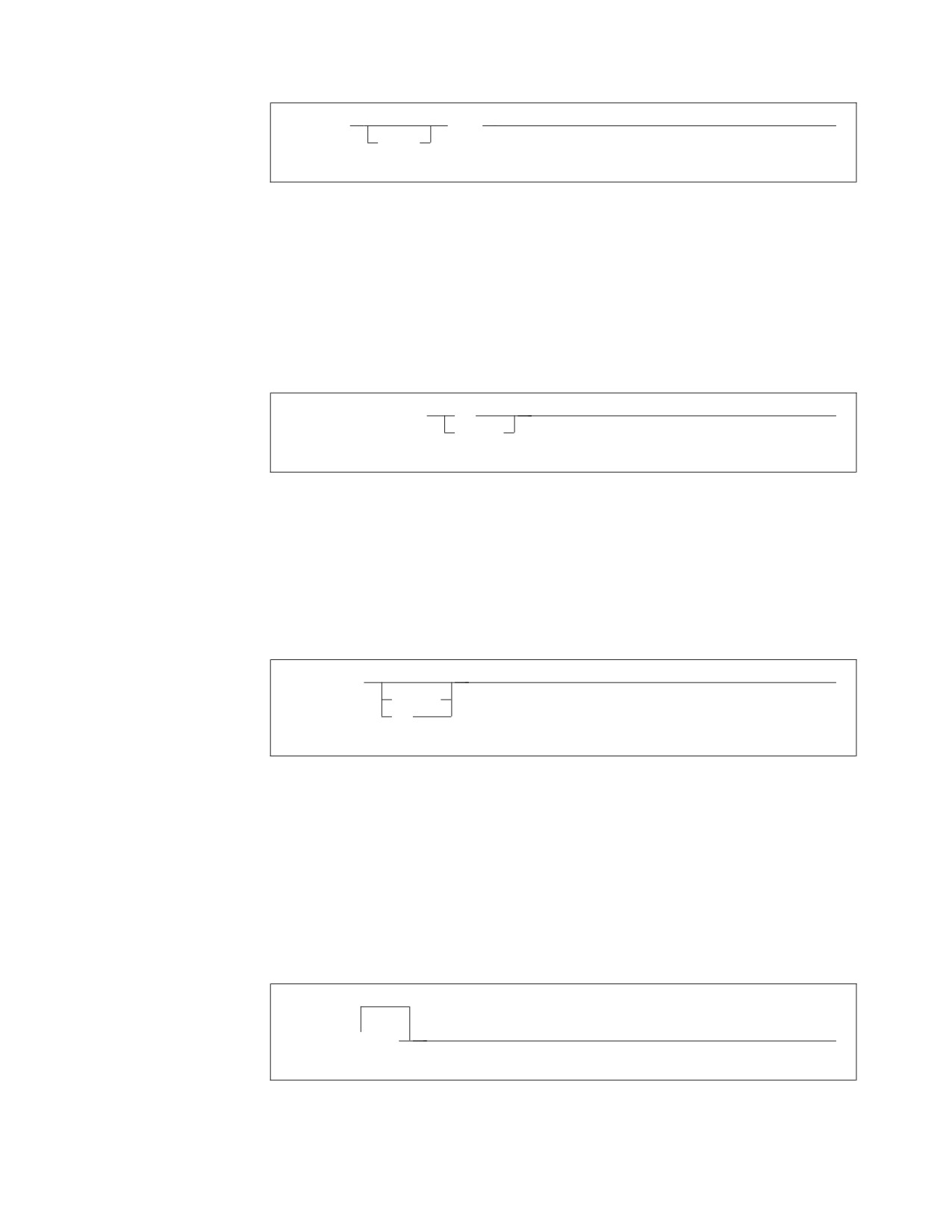
►► CREATE
INDEX
►◄
UNIQUE
This statement could appear as either:
CREATE INDEX
or
CREATE UNIQUE INDEX
v If you can choose from two or more items, they appear vertically in a stack.
If you must choose one of the items, one item appears on the main path. For
example:
►► SHOW LOCK DBSPACE
ALL
►◄
integer
Here, the command could be either:
SHOW LOCK DBSPACE ALL
or
SHOW LOCK DBSPACE 1
If choosing one of the items is optional, the entire stack appears below the main
path. For example:
►► BACKWARD
►◄
integer
MAX
Here, the command could be:
BACKWARD
or
BACKWARD 2
or
BACKWARD MAX
v The repeat symbol indicates that an item can be repeated. For example:
▼
►► ERASE
name
►◄
This statement could appear as:
ERASE NAME1
About This Manual ix
or
ERASE NAME1 NAME2
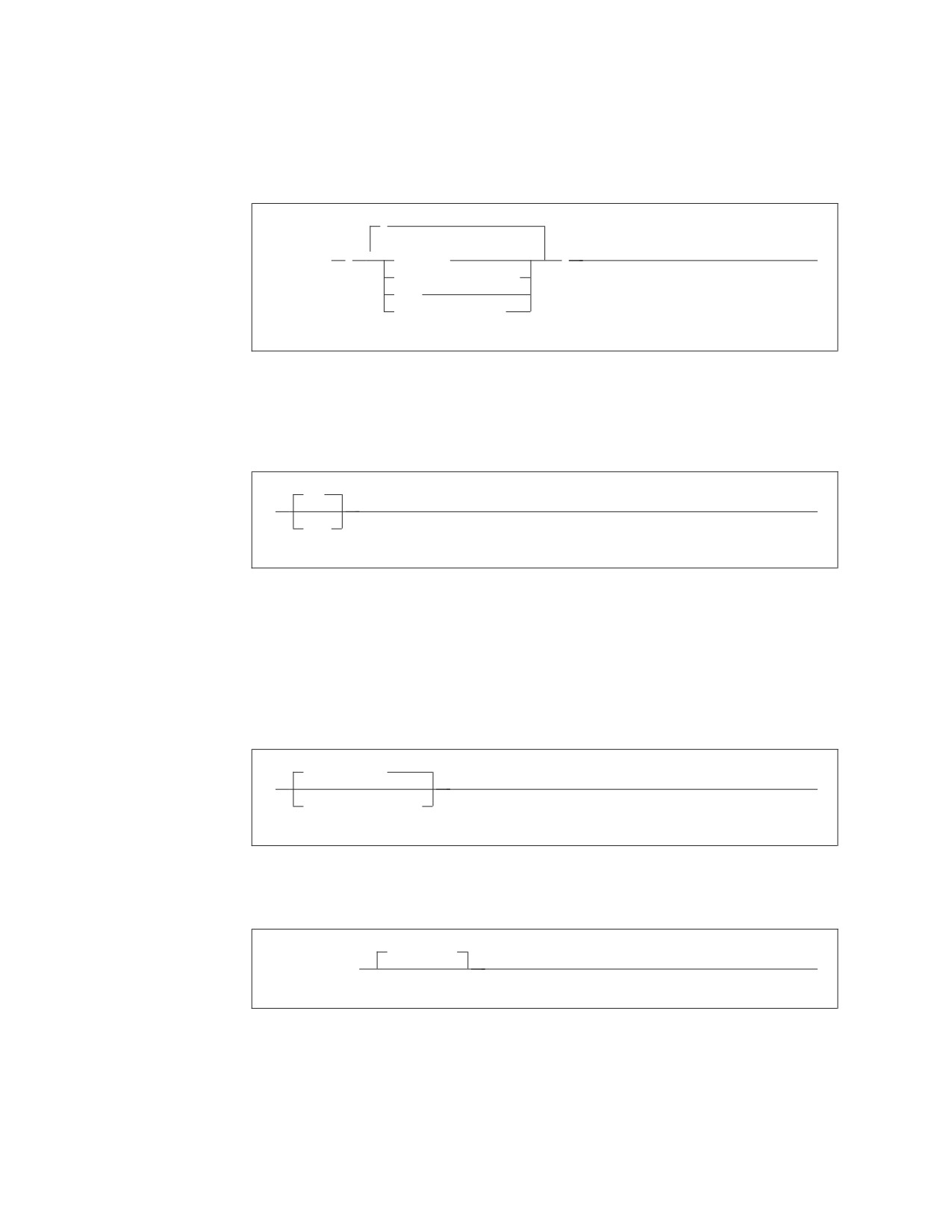
A repeat symbol above a stack indicates that you can make more than one
choice from the stacked items, or repeat a choice. For example:
,
►► VALUES
(
▼
constant
)
►◄
host_variable_list
NULL
special_register
v If an item is above the main line, it represents a default, which means that it will
be used if no other item is specified. In the following example, the ASC keyword
appears above the line in a stack with DESC. If neither of these values is
specified, the command would be processed with option ASC.
ASC
►►
►◄
DESC
v When an optional keyword is followed on the same path by an optional default
parameter, the default parameter is assumed if the keyword is not entered.
However, if this keyword is entered, one of its associated optional parameters
must also be specified.
In the following example, if you enter the optional keyword PCTFREE =, you
also have to specify one of its associated optional parameters. If you do not
enter PCTFREE =, the database manager will set it to the default value of 10.
PCTFREE = 10
►►
►◄
PCTFREE = integer
v Words that are only used for readability and have no effect on the execution of
the statement are shown as a single uppercase default. For example:
PRIVILEGES
►► REVOKE ALL
►◄
Here, specifying either REVOKE ALL or REVOKE ALL PRIVILEGES means the
same thing.
v Sometimes a single parameter represents a fragment of syntax that is expanded
below. In the following example, fieldproc_block is such a fragment and it is
expanded following the syntax diagram containing it.
x

►►
fieldproc_block
►◄
NOT NULL
UNIQUE
PRIMARY KEY
fieldproc_block:
FIELDPROC program_name
,
▼
(
constant
)
Contacting IBM
Before you contact DB2 customer support, check the product manuals for help
with your specific technical problem.
For information or to order any of the DB2 Server for VSE & VM products, contact
an IBM representative at a local branch office or contact any authorized IBM
software remarketer.
If you live in the U.S.A., then you can call one of the following numbers:
v
1-800-237-5511 for customer support
v
1-888-426-4343 to learn about available service options
Product information
DB2 Server for VSE & VM product information is available by telephone or by the
World Wide Web at http://www.ibm.com/software/data/db2/vse-vm
This site contains the latest information on the technical library, product manuals,
newsgroups, APARs, news, and links to web resources.
If you live in the U.S.A., then you can call one of the following numbers:
v
1-800-IBM-CALL (1-800-426-2255) to order products or to obtain general
information.
v
1-800-879-2755 to order publications.
For information on how to contact IBM outside of the United States, go to the IBM
Worldwide page at http://www.ibm.com/planetwide
In some countries, IBM-authorized dealers should contact their dealer support
structure for information.
Conventions for Representing Mixed Data Values
When mixed data values are shown in examples, the following conventions are
used:
About This Manual xi
Convention Meaning
<
Represents the mixed shift-out character (X'0E').
>
Represents the mixed shift-in character (X'0F').
x
Represents an SBCS character (x can be any lowercase letter).
Short Forms Used in Syntax Diagrams
Some words have been shortened in the syntax diagrams in this book. The words
are:
Full Word
Short Form
duration
dur
expressions
exp
string
str
xii
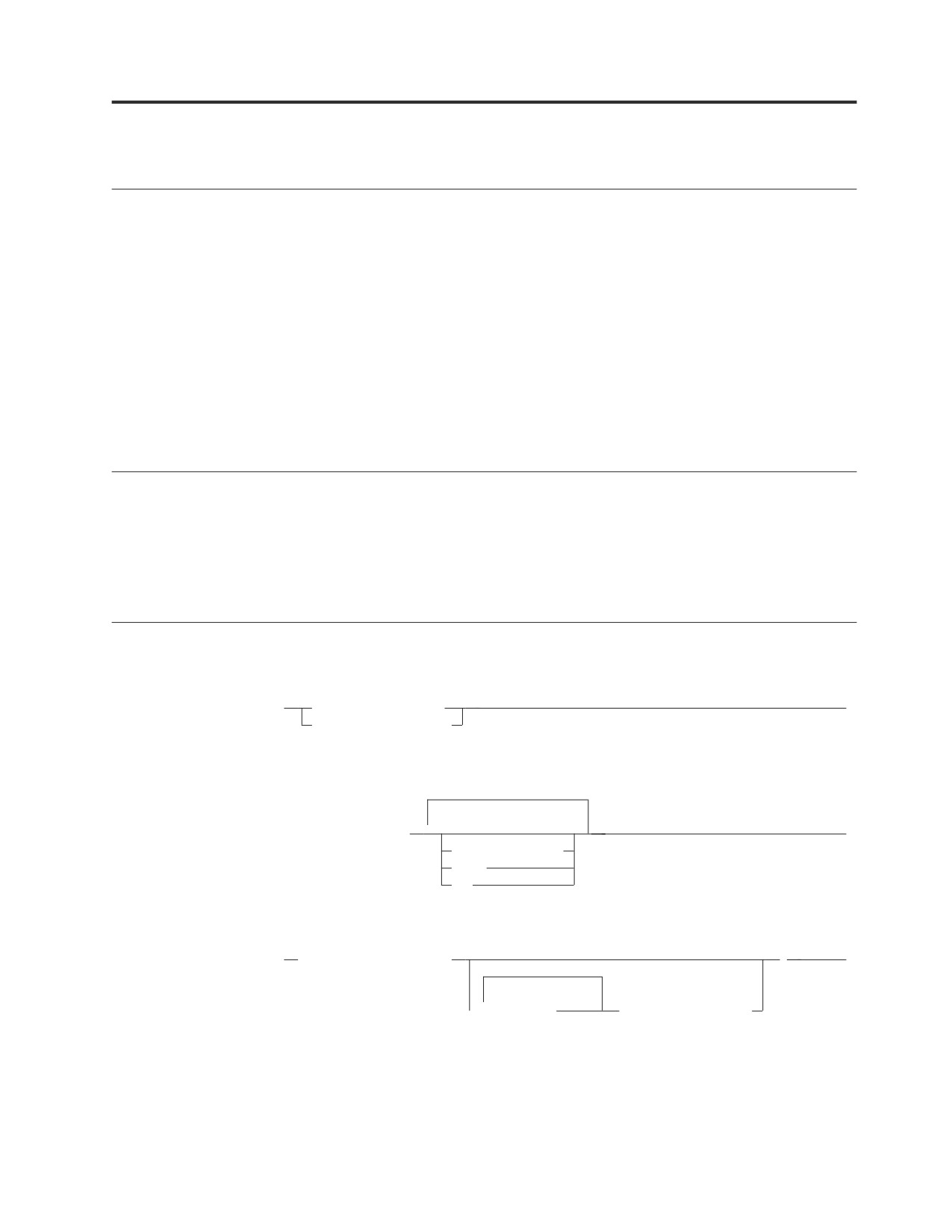
Chapter 1. DB2 Language Elements
Primitive Elements
character
A letter, digit, space, or special-character
letter
The letters a to z, A to Z, or national language
extender (# @ $), or as specified in SYSCHARSETS
digit
The digits 0 to 9
space
The space character
special-character
Any element in a character set other than a letter,
digit, or space
hexadecimal-character
A pair of characters in the range 00 to FF
double-byte-character
A character that occupies 2 bytes.
SQL Comments
An SQL comment is all text following two consecutive hyphens (--) on the same
line of a static SQL statement in an application program or the command portion
of a DBS Utility command.
Comments are allowed wherever a separator (space character) is valid.
Identifiers
identifier
►►
ordinary_identifier
►◄
delimited_identifier
ordinary_identifier
▼
►► uppercase_letter
►◄
uppercase_letter
digit
_
delimited_identifier
►►
″ non_space_character
″
►◄
(1)
▼
character
non_space_character
Notes:
1
With the exception of ″.
1
long_identifier
An identifier with a maximum length of 18 characters (not
including any quotation marks).
short_identifier
An identifier with a maximum length of 8 characters (not including
any quotation marks).
host_identifier
As defined by the host language, has a maximum length imposed
by the host language.
Names and Other Metavariables
A metavariable (or parameter) is a lowercase character or group of characters used
in syntax diagrams to represent a group of variables.
authorization_name
With a VSE system, authorization names and passwords are limited to 8 characters
and cannot have embedded blanks.
►► short_identifier
►◄
collection_id
►► short_identifier
►◄
2
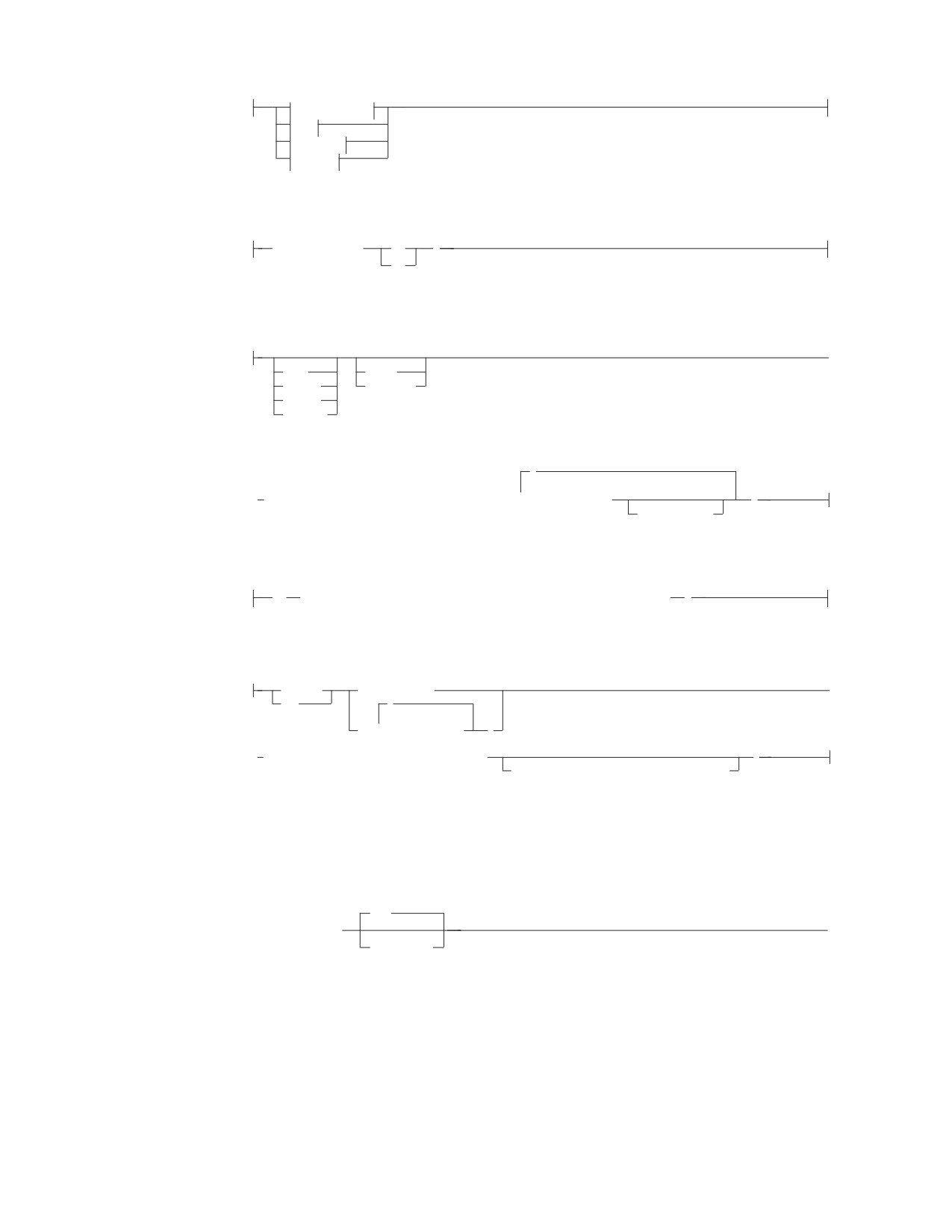
column_name
►►
long_identifier
►◄
table_name.
view_name.
synonym.
correlation_name.
constraint_name
►► long_identifier
►◄
correlation_name
►► long_identifier
►◄
cursor_name
►► long_ordinary_identifier
►◄
cursor_variable
►► long_ordinary_identifier
►◄
dbspace_name
►►
short_ordinary_identifier
►◄
owner.
descriptor_name
►►
:host_identifier
►◄
host_variable
►►
:host_identifier
►◄
INDICATOR
:host_identifier
host_variable_list
,
▼
►►
host_variable
►◄
index_id
►► short_ordinary_identifier
►◄
Chapter 1. DB2 Language Elements
3

index_name
►►
long_identifier
►◄
owner.
owner_name
►► short_ordinary_identifier
►◄
package_id
►► short_ordinary_identifier
►◄
package_name
►►
long_identifier
►◄
owner.
package_spec
►►
short_ordinary_identifier
►◄
short_ordinary_identifier.
(1)
host_identifier.
host_identifier
Notes:
1
Cannot be a qualified subfield name.
password
►► short_ordinary_identifier
►◄
program_name
►► short_ordinary_identifier
►◄
routine_name
►►
long_identifier
►◄
owner.
section_variable
►► host_identifier
►◄
server_name
►► long_ordinary_name
►◄
4

statement_name
►► long_ordinary_identifier
►◄
statement_variable
►► long_ordinary_identifier
►◄
subsystemid
►► short_ordinary_identifier
►◄
synonym
►►
long_identifier
►◄
owner.
table_id
►► short_ordinary_identifier
►◄
table_name
►►
long_identifier
►◄
owner.
view_id
►► short_ordinary_identifier
►◄
view_name
►►
long_identifier
►◄
owner.
Data Types
Result Set LOCATOR
For RESULT SET LOCATOR data. This data type is used to identify host variables
that are used by the DB2 Server for VSE & VM requester to uniquely indicate a
query result set returned by a stored procedure.
RESULT SET LOCATOR
►►
►◄
Chapter 1. DB2 Language Elements
5
Assembler
C
COBOL
PL/I
Assembler:
variable-name
DC
F
DS
C:
►
auto
const
extern
volatile
static
_Packed
,
▼
►
SQL TYPE IS RESULT_SET_LOCATOR VARYING
variable-name
;
= init-value
COBOL:
01
variable-name SQL TYPE IS RESULT-SET-LOCATOR
VARYING
PL/I:
DECLARE
variable-name
►
DCL
,
(
▼
variable-name
)
► SQL TYPE IS RESULT_SET_LOCATOR VARYING
;
Alignment and/or Scope and/or Storage
CHARacter
For character data that has a fixed number of characters (integers). The maximum
number of characters is 254.
(1)
►► CHARacter
►◄
(integer)
DATE
A three-part value that designates a point in time according to the Gregorian
calendar. Internally represented as 4-byte packed decimal. The three parts are the
year, month, and day. The date can be formatted in several ways. The range of
year is 0001 to 9999. The range of month is 1 to 12. The range of day is 1 to n
where n depends on the month.
6
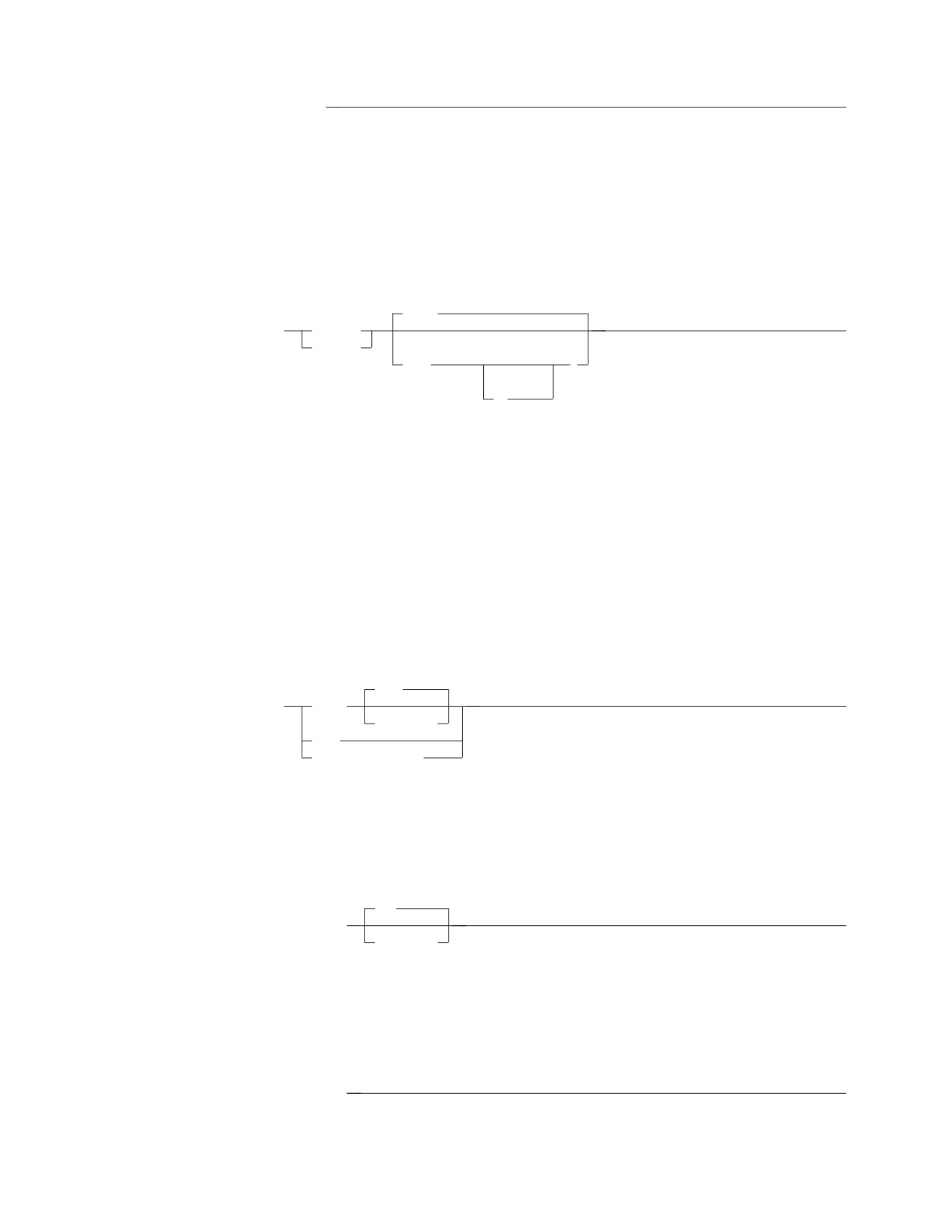
►► DATE
►◄
DECimal
For decimal data. The p identifies the total number of decimal digits a number can
have. The s identifies the number of digits to the right of the decimal point. For
example, DECIMAL(5,2) creates a decimal column consisting of five digits, two of
which are to the right of the decimal point. The NUMERIC parameter is a
synonym for DECIMAL.
(5,0)
►►
DECimal
►◄
NUMERIC
(1)
( p
)
(2)
,s
Notes:
1
The p is an integer value that defines the precision of the number.
2
Thes is an integer value that defines the scale of the number.
FLOAT
For floating-point numbers. Floating-point numbers range from 5.4E−79 to 7.2E+75.
When integer is between 1 and 21, it is a single-precision floating-point number;
REAL is a synonym for FLOAT in this situation. When integer is between 22 and
53, it is a double-precision floating-point number; DOUBLE PRECISION is a
synonym for FLOAT in this situation.
(53)
►►
FLOAT
►◄
(integer)
REAL
DOUBLE PRECISION
GRAPHIC
For double-byte character set (DBCS) data that has a fixed number of DBCS
characters (integer). The maximum number of DBCS characters is 127.
(1)
►► GRAPHIC
►◄
(integer)
INTeger
For large positive or negative whole numbers. The largest number that can be
accommodated is 2147483647; the smallest number is −2147483648.
►► INTeger
►◄
Chapter 1. DB2 Language Elements
7
LONG VARCHAR
For character data that varies in length up to 32,767 characters.
(1)
►► LONG VARCHAR
►◄
Notes:
1
ISQL does not support INSERT, UPDATE, or SELECT of tables or views with
LONG VARCHAR columns.
LONG VARGRAPHIC
For double-byte character set (DBCS) data that varies in length. A LONG
VARGRAPHIC can be up to a maximum of 16,383 DBCS characters.
(1)
►► LONG VARGRAPHIC
►◄
Notes:
1
ISQL does not support INSERT, UPDATE, or SELECT of tables or views with
LONG VARGRAPHIC columns.
SMALLINT
For small positive or negative whole numbers. The largest number that can be
accommodated is 32767; the smallest is −32768.
►► SMALLINT
►◄
TIME
A three-part value in a number of formats that designates a time of day according
to a 24-hour clock. Internally represented as 3-byte packed decimal. The three parts
are the hour, minute, and second. The range of hour is 0 to 24, and the range of
minute and second is 0 to 59.
►► TIME
►◄
TIMESTAMP
A seven-part value that designates a date and time, including a fractional part.
Internally represented as 10-byte packed decimal. The seven parts are year, month,
day, hour, minute, second, and microsecond.
►► TIMESTAMP
►◄
VARCHAR
8
For character data that varies in length. The integer refers to the maximum number
of characters for any entry and can be a value up to 32767. When the value is
greater than 254, the data type is considered a long string.
(1)
►► VARCHAR
(integer)
►◄
Notes:
1
ISQL does not support INSERT, UPDATE, or SELECT of tables or views with
VARCHAR>254.
VARGRAPHIC
For double-byte character set (DBCS) data that varies in length. The integer is the
number of DBCS characters for any entry; the maximum is 16383. When integer is
greater than 127, the data type is considered a long string.
(1)
►► VARGRAPHIC
(integer)
►◄
Notes:
1
ISQL does not support INSERT, UPDATE, or SELECT of tables or views with
VARGRAPHIC>127.
String Representations of Dates and Times
Date Strings
A string representation of a date is a character string that starts with a digit and
has a length of at least 8 characters.
Format Name
Abbrev.
Date Format
Example
International Standards
ISO
yyyy-mm-dd
1993-12-12
Organization
IBM USA standard
USA
mm/dd/yyyy
12/12/1993
IBM European standard
EUR
dd.mm.yyyy
12.12.1993
Japanese Industrial Standard
JIS
yyyy-mm-dd
1993-12-12
Christian Era
Site-defined
LOCAL
Any site-defined
—
form
Time Strings
A string representation of a time is a character string that starts with a digit and
has a length of at least 4 characters.
Format Name
Abbrev.
Time Format
Example
International Standards Organization
ISO
hh.mm.ss
13.30.05
IBM USA standard
USA
hh:mm AM or PM
1:30 PM
IBM European standard
EUR
hh.mm.ss
13.30.05
Japanese Industrial Standard Christian Era
JIS
hh:mm:ss
13:30:05
Site-defined
LOCAL
Any site-defined form
—
Chapter 1. DB2 Language Elements
9
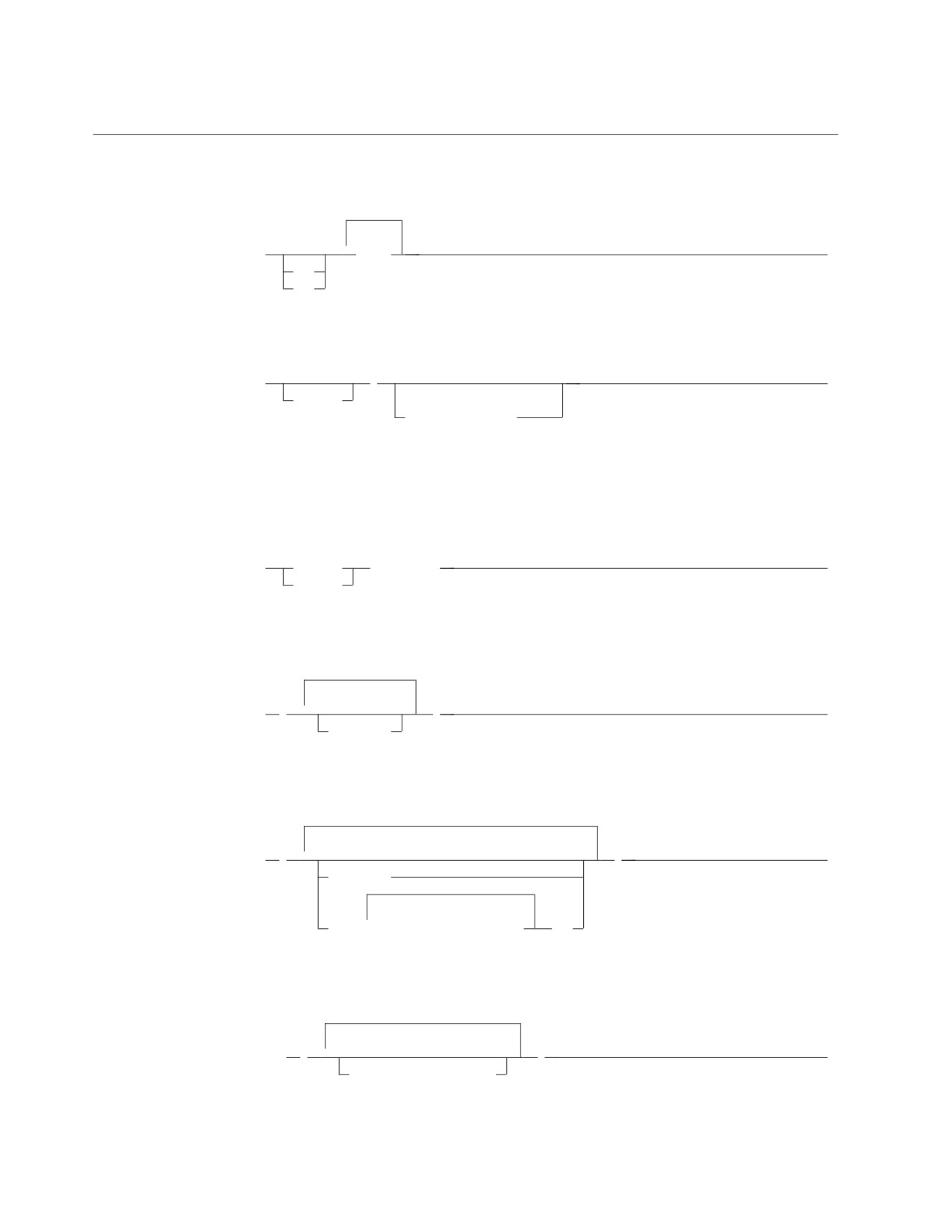
Constants
Integer Constant
▼
►►
digit
►◄
+
-
Decimal Constant
►►
►◄
integer
(1)
unsigned_integer
Notes:
1
At least one number is needed with the decimal point.
Floating-Point Constant
►►
decimal
E integer
►◄
integer
Character Constant - SBCS
▼
►►
’
’
►◄
character
Character Constant - MIXED
▼
►►
’
’
►◄
character
▼
<
double_byte_character
>
Character Constant - Hexadecimal
►► X
’
▼
’
►◄
hexadecimal_character
Graphic Constant - in PL/I Programs
10

(1)
►►
<’
’G>
►◄
▼
double_byte_character
Notes:
1
N is a synonym for G.
or
(1)
►►
’<
>’G
►◄
▼
double_byte_character
Notes:
1
N is a synonym for G.
Graphic Constant - In All Other Contexts
(1)
►► G’<
>’
►◄
▼
double_byte_character
Notes:
1
N is a synonym for G.
Special Registers
The following special registers are supported by the database manager.
Special Registers
Description
USER
The runtime authorization ID
CURRENT DATE
The current date in the local time zone
CURRENT SERVER
The current application server
CURRENT TIME
The current time in the local time zone
CURRENT TIMESTAMP
The current timestamp in the local time zone
CURRENT TIMEZONE
A signed time duration as a DECIMAL(6,0)
number containing the local time-zone value.
Expressions
An expression specifies a value. The form of an expression is as follows:
Chapter 1. DB2 Language Elements
11
| operator |
(1)
▼
►►
column_name
►◄
+
constant
−
(expression)
function
host_variable
labeled_duration
special_register
operator:
(2)
CONCAT
/
+
−
Notes:
1
Not all combinations of operands and operations are supported.
2
Either || or !! can be used as a synonym for CONCAT.
labeled_duration:
column_name
DAY
constant
DAYS
(expression)
HOUR
function
HOURS
host_variable
MICROSECOND
MICROSECONDS
MINUTE
MINUTES
MONTH
MONTHS
SECOND
SECONDS
YEAR
YEARS
Date Arithmetic
(1)
(1)
►► date
+
date_dur
= date
►◄
-
labeled_date_dur
Notes:
1
These operands can be specified in either order.
►►
date
-
date
= date_dur
►◄
(1)
(1)
date_str
date_str
12
Notes:
1
Only one of these two operands can be a string.
Time Arithmetic
(1)
(1)
►► time
+
time_dur
= time
►◄
-
labeled_time_dur
Notes:
1
These operands can be specified in either order.
►►
time
-
time
= time_dur
►◄
(1)
(1)
time_str
time_str
Notes:
1
Only one of these two operands can be a string.
Timestamp Arithmetic
(1)
(1)
►► timestamp
+
date_dur
=
timestamp
►◄
-
labeled_dur
time_dur
timestamp_dur
Notes:
1
These operands can be specified in either order.
►►
timestamp
-
timestamp
= timestamp_dur
►◄
(1)
(1)
timestamp_str
timestamp_str
Notes:
1
Only one of these two operands can be a string.
Predicate
Specifies a condition that is true, false, or unknown about a row or group.
Basic Predicate
►► exp
=
exp
►◄
(1)
(subselect)
<>
<
>
<=
>=
Chapter 1. DB2 Language Elements
13
Notes:
1
Either ^= or ^= can be used as an alternative to the <> operator.
BETWEEN Predicate
►► exp
BETWEEN exp AND exp
►◄
NOT
EXISTS Predicate
►►
EXISTS
(subselect)
►◄
NOT
IN Predicate
►► exp
IN
(subselect)
►◄
NOT
,
(
▼
constant
)
host_variable_list
special_register
LIKE Predicate
►► column_name
LIKE
USER
►
NOT
host_variable
str_constant
►
►◄
ESCAPE host_variable
character_constant
NULL Predicate
►► column_name IS
NULL
►◄
NOT
Quantified Predicate
►► exp
=
SOME
(subselect)
►◄
(1)
ANY
<>
ALL
<
>
<=
>=
Notes:
1
Either ^= or ^= can be used as an alternative to the <> operator.
14