DB2 Server for VSE & VM Application Programming (Version 7 Release 5) - page 7
Assigning Field Procedures to Columns
To assign a field procedure to a new column, include the FIELDPROC clause on
either the CREATE TABLE or ALTER TABLE statement. To assign field procedures
to columns in an existing table, you must unload the data, recreate the table to
include the field procedures, and they reload the data back into the table. If you
create a column without a field procedure, you cannot add one later.
Refer to the DB2 Server for VSE & VM SQL Reference manual for the syntax
diagrams for the CREATE and ALTER TABLE statements. The fieldproc-block for
these diagrams is shown below.
►► FIELDPROC program_name
►◄
,
▼
(
constant
)
Figure 63. fieldproc-block Syntax
For example:
ALTER TABLE SCOTT.SUPPLIERS ADD RATING CHAR(6) FIELDPROC MYFLDPRO (10,5)
The constants (10,5), that follow the program_name MYFLDPRO are optional
parameters, defined when the field procedure is written and passed to the field
procedure when it is invoked.
Understanding Field Procedure Rules
In most cases you will not have to worry about the rules that define when a field
procedure encodes or decodes a short string. However, if you understand when
the database manager calls field procedures, this can help you understand their
performance implications. The less you call field procedures to encode or decode
strings the better your application’s performance will be.
Understanding when field procedures are called can also help you to avoid some
pitfalls. For example, consider a table TABLE_A with a column COLUMN_A that
has fieldproc F1, and consider these two statements:
SELECT SUBSTR(MAX(COLUMN_A,1,5)) FROM TABLE_A
SELECT MAX(SUBSTR(COLUMN_A,1,5)) FROM TABLE_A
You might assume that the two statements should return essentially the same
result; however, different results can be returned depending on your coding. In the
first statement, the database manager does the following:
1. Finds the maximum encoded value in COLUMN_A
2. Decodes the result from MAX with field procedure F1
3. Applies the SUBSTR function to the decoded value of the result from MAX.
In the second statement, the database manager does the following:
1. Decodes the value in COLUMN_A with field procedure F1
2. Applies the SUBSTR function to the decoded value in COLUMN_A
3. Applies the MAX function to the result of the SUBSTR function.
That is, the first statement MAX is applied to encoded values, and the second is
applied to decoded values.
Chapter 11. Special Topics
283
The rest of this section covers the rules that define when a field procedure encodes
or decodes a short string.
Input from an Application Program
The field procedure is called to encode data when your application program inserts
or updates data. This includes the following statements:
v INSERT
v PUT
v UPDATE
Output to an Application Program
The field procedure is called to decode data when your application program
fetches or selects data. This includes the following statements:
v FETCH
v SELECT INTO
Comparison
If a column with a field procedure is compared to a constant, the constant is first
encoded by the field procedure. The comparison is then performed between the
encoded values in the column and the encoded value of the constant.
Host-variables, parameter markers, and the USER special register are treated the
same way.
For example, consider the following SQL statement where COLUMN_A has field
procedure F1:
SELECT * FROM MY_TABLE WHERE COLUMN_A > ’SMITH’
When processing the above statement, the database manager first encodes 'SMITH',
and then for each row in MY_TABLE, compares F1 to the encoded value in
COLUMN_A.
A field procedure can only encode short strings values. If the variable or constant
is of a data type other than CHAR, VARCHAR, GRAPHIC or VARGRAPHIC, a
negative SQLCODE is returned.
If a column with a field procedure is compared to another column, both columns
must have field procedures with the same program_name, comparable encoded data
type, and the same CCSID. If not, a negative SQLCODE is returned.
Referential Integrity
If a primary key column has a field procedure, then the foreign key column must
have the same field procedure, and the CCSIDs of both key columns must be the
same. Otherwise, a negative SQLCODE is returned. For two field procedures to be
the same, their program_names, encoded data type, encoded data length, and input
parameters must be identical.
For example, the following is correct:
CREATE TABLE PRIMARY
(COLUMN_A CHAR(10) FIELDPROC F1 NOT NULL,
COLUMN_B INTEGER)
PRIMARY KEY(COLUMN_A)
CREATE TABLE FOREIGN
(COLUMN_A CHAR(10) FIELDPROC F1 NOT NULL,
COLUMN_B CHAR(10))
284
Application Programming
ALTER TABLE FOREIGN
ADD FOREIGN KEY (COLUMN_A)
REFERENCES PRIMARY ON DELETE SET NULL
Scalar Functions
All scalar functions operate on decoded values. For example, if ’V’ is a string in a
column with a field procedure, HEX(’V’) returns the hexadecimal representation of
’V’. The result is not associated with the original column’s field procedure.
However, if the result of a scalar function is compared to a column that is
associated with a field procedure, this result is encoded by the comparison
column’s field procedure. The comparison is then made between the encoded
value of the column and the encoded result of the scalar function. This is
consistent with how columns with field procedures are compared to constants.
For example:
1.
Consider a table (MY_TABLE) with COLUMN_A that has field procedure F1
and COLUMN_B that has field procedure F2. Consider the following SQL
statement:
SELECT * FROM MY_TABLE WHERE COLUMN_A > SUBSTR(COLUMN_B,3,3)
For each row of MY_TABLE, the following occurs:
a. The encoded values of COLUMN_B are decoded by field procedure F2.
b. The substring operation is applied to the decoded value of COLUMN_B.
c. The result of the substring operation is encoded by field procedure F1.
d. Finally, the encoded value of COLUMN_A is compared to the encoded
result of the substring operation.
2.
Consider a table (MY_TABLE) with three columns, where COLUMN_A has
field procedure F1, COLUMN_B has field procedure F2, and COLUMN_C is
NOT NULL and has field procedure F3. Consider the following SQL statement:
SELECT * FROM MY_TABLE WHERE COLUMN_A > VALUE(COLUMN_B,COLUMN_C)
For each row of MY_TABLE, the following occurs:
a. If the value of COLUMN_B is not null, then COLUMN_B is decoded, using
F2. Call the result ’M’.
b. If the value of B is null, then C is decoded, using F3. Call the result ’M’.
c.
’M’ is then encoded using F1.
d. The encoded result of the VALUE function is then compared to the encoded
value of COLUMN_A.
Note: A field procedure is never called to encode or decode a NULL value. A
NULL value always maps to a NULL.
3.
If a column with a field procedure is the argument of the LENGTH function,
first it is decoded by the field procedure, and then the length of the result is
returned. Of course, if the column data type is a fixed length (for example,
CHAR(15)), there is no need to actually decode the column value. The length
returned by the function is simply the fixed length of the column (15 in this
example).
Column Functions
The column functions MAX and MIN operate on encoded values. The remaining
column functions operate on numeric data, and are not affected by field
procedures.
Concatenation
The concatenation operator is basically a scalar function, and follows the same
rules as a scalar function.
Chapter 11. Special Topics
285
For example, consider a table (MY_TABLE) with COLUMN_A that has field
procedure F1 and COLUMN_B that has field procedure F2. Now, consider the
following SQL statement:
SELECT * FROM MY_TABLE WHERE COLUMN_A > ’ADDITION’ CONCAT COLUMN_B
For each row in MY_TABLE, the following occurs:
1. The value of COLUMN_B is decoded by F2.
2.
’ADDITION’ is concatenated with the decoded value in COLUMN_B.
3. The result of the concatenation is encoded by field procedure F1.
4. The encoded result of the concatenation is compared to the encoded value of
COLUMN_A.
The IN and BETWEEN Predicates
These predicates operate the same as a comparison between a column with a field
procedure and a constant.
The LIKE Predicate
This predicate operates on decoded values.
Sorting
Indexes will be based on encoded values. The ORDER BY and GROUP BY clauses
will sort the data according to the encoded format. The database manager also
sorts values during a UNION operation.
Null Values
While a column with a field procedure may be defined to allow null values, the
field procedure is never called to process a null value. A decoded null value
always maps to an encoded null value, and an encoded null always maps to a
decoded null.
Unions and Joins
The rules for comparing two columns with field procedures apply to unions and
joins. The two columns must have the same field procedure.
Sub-SELECTS
All the rules described above apply to sub-SELECTs.
For example:
SELECT * FROM TABLE_1
WHERE COLUMN_A=(SELECT COLUMN_B FROM TABLE_2);
SELECT * FROM TABLE_1
WHERE COLUMN_A IN (SELECT COLUMN_B FROM TABLE_2);
If the columns COLUMN_A and COLUMN_B have different field procedures these
statements are invalid (field procedure comparison rules apply). For example:
INSERT INTO T1 (COLUMN_A) SELECT COLUMN_B FROM T2;
In this statement, the decoded data types for COLUMN_A and COLUMN_B must
be compatible. If so, the value in COLUMN_B will be decoded with F2. The
decoded value is then encoded by F1, and the resulting value is inserted into
COLUMN_A.
Using CMS Work Units (DB2 Server for VM)
Application programs can use the CMS work unit facility, which supports the
following DB2 Server for VM functions:
286
Application Programming
v One application can invoke another, independent of the processing of the
invoked application.
v An application can be invoked in the CMS SUBSET, independent of the program
from which the CMS SUBSET was invoked.
v Applications can issue concurrent server requests for DB2 Server for VM
resources.
v An application can establish more than one path into the same database.
v An application can copy data from one DB2 Server for VM database to another
without first having to write the data to a temporary file.
Note: You should not use the CMS SUBSET function if the WORKUNIT option in
SQLINIT/SQLGLOB is set to NO.
Using Work Units in Application Programs
Associated with each work unit is a unique work unit id assigned by CMS. When
you invoke your program, a default work unit id identifies the currently active
work unit for your program. To switch to a new work unit, you must explicitly
change the currently active work unit.
Use the CMS routines shown in Table 32 to manage work units:
Table 32. Routines to Manage Work Units
CSL Call
Function
Description
DMSGETWU
Get
Obtains and reserves a work unit id from CMS.
You must invoke this routine for each separate
work unit id
work unit you wish to manage.
DMSPUSWU
Push
Pushes the work unit id onto the work unit stack.
Makes the pushed work unit the currently active
work unit id
one.
DMSPOPWU
Pop
Pops the work unit id from the top of the stack.
The next work unit on the stack becomes the
work unit id
currently active one.
Processing the First SQL Statement in the Work Unit
Although a work unit may have been established and made the currently active
work unit, it is not known to the database manager until the first SQL statement in
the work unit is executed. When this SQL statement is processed, the work unit id
is obtained from CMS, a logical path (work unit) is established between the
application and the DB2 Server for VSE & VM resource, and the user is connected
to either the default application server or the explicitly connected application
server. (The default application server is the one established by the SQLINIT
EXEC.) The CONNECT statement can be used to connect to the desired application
server.
If the work unit id is already known, no change occurs in the database to which
the user is connected in that work unit, unless the user explicitly issues a
CONNECT to change the database.
Invoking Another Application Program
One DB2 Server for VSE & VM application can be invoked from another. By
starting a separate CMS work unit before invoking the second application, the
calling application will not be affected by any COMMIT or ROLLBACK statement
issued from the called application. When the called application pops its work unit
Chapter 11. Special Topics
287
id from the top of the stack, control is returned to the first application. The calling
application is in the same state as it was before it called the other application. The
calling application and the called application can access the same database or
different databases.
Figure 64 illustrates how the calling program can be isolated from the work
committed or rolled back by the called program.
Program 1
Program 2
WU1
WU2
Start
Establish WU2
COMMIT/ROLLBACK
Call Program 2
Re-establish WU1
End
Figure 64. Program Transitioning Using CMS Work Units
Invoking Applications in CMS SUBSET
A DB2 Server for VSE & VM application (for example ISQL) can interrupt
processing of its logical unit of work to go into CMS SUBSET and invoke another
DB2 Server for VSE & VM application. The processing done by the invoked
application does not affect the invoking program. When control is returned to the
invoking program, the LUW is in the same state as it was before going into CMS
SUBSET.
To prevent the application in the CMS SUBSET from affecting any work done by
the invoking application in normal CMS, the SQLRMEND EXEC cannot be used
with the COMMIT ALL or ROLLBACK ALL parameters while in CMS SUBSET
mode. (See the DB2 Server for VSE & VM Database Administration manual for more
information on the SQLRMEND EXEC.)
Processing Applications Concurrently
More than one DB2 Server for VSE & VM application can concurrently process
against the same DB2 Server for VSE & VM database or different DB2 Server for
VSE & VM databases. The application server ensures that processing done by one
application is independent of that done by another. In order to do this, the server
acquires and manages work units for each application.
Accessing the Database from Different Points in the Program
By acquiring two or more work units, an application can logically access the same
database from different points in the application. These work units (and their paths
into the database) cannot be processed concurrently.
Copying Data across Databases
Applications can copy data from one database to another by following these steps:
1. Establish a work unit #1.
2. CONNECT to database #1.
3. Establish a work unit #2.
4. CONNECT to database #2.
5. Make work unit #1 the current work unit.
6. Open a cursor and read into an array as many rows as feasible.
7. Make work unit #2 the current work unit.
288
Application Programming
8. Open an insert cursor and put all rows from an array into a table.
9. Repeat until all rows are read and put into a table.
How Locking Works with CMS Work Units
If an active work unit requests a SHARE lock on a DB2 Server for VSE & VM
resource, and a suspended work unit has an EXCLUSIVE lock on the same
resource, the active work unit has to wait until the EXCLUSIVE lock is released.
Since the suspended work unit cannot resume processing until the active work
unit is released or suspended, the user will be in an infinite wait state unless a
cancel is issued or the agent is forced off.
This same locking problem will occur if the suspended work unit has a SHARE
lock on the resource and the active work unit requests an EXCLUSIVE lock on the
same resource.
Environmental Considerations
To use CMS work units, your CMS virtual machine and the database virtual
machine must be running under the VM/ESA operating system, the application
server must be running in multiple user mode, and the Work Unit option in the
SQLINIT EXEC must be set to yes (the default) at initialization time. See the DB2
Server for VSE & VM Database Administration manual for more information on
SQLINIT EXEC.
The database manager does not reuse links for different work units. If you no
longer need a work unit, you should enter either COMMIT RELEASE or
ROLLBACK RELEASE, to free the (APPC/VM) path for reuse.
Performance Considerations
There is a degradation in performance when SQLINIT WORKUNIT (YES) is
specified either directly, or indirectly as the default. This applies even if the
application is not using multiple work units.
Ensuring Data Integrity
Data integrity refers to the accuracy and correctness of data in the database. When
related changes are made to a database, the database manager maintains integrity
of the data by ensuring that either all or none of the changes are made. This
protects other users and programs from using inconsistent or wrong data. This
type of integrity is called atomic integrity.
Data integrity is also maintained by ensuring the uniqueness of certain data in the
database. For example, the SUPPLIERS table must not have duplicate supplier
numbers (SUPPNO). Using this integrity rule, the database manager ensures that
duplicates do not exist. This type of integrity is called entity integrity.
For consistency and integrity, when one table references values in another table,
the referenced values must exist in both tables, or the reference is not valid. The
database manager automatically enforces rules that you define on the tables. These
rules are called referential constraints. Enforcement of referential constraints ensures
the referential integrity of the data referenced.
Chapter 11. Special Topics
289
Ensuring Entity Integrity
The rule that each row in the EMPLOYEE table must represent one and only one
employee is an example of entity integrity. By defining a primary key on the table,
you can ensure that duplicate rows do not occur, thereby enforcing entity integrity.
For example, in the following SQL statement, the column EMPNO is defined as a
primary key, so a unique index is automatically created on that column. This
enforces uniqueness of the data in that column.
CREATE TABLE EMPLOYEE
(EMPNO
CHAR(6)
NOT NULL,
FIRSTNME VARCHAR(12) NOT NULL,
LASTNAME VARCHAR(15) NOT NULL,
SALARY
DECIMAL(9,2)
,
PRIMARY KEY (EMPNO)
)
Using Unique Constraints
A unique constraint enables you to enforce data integrity without having to
enforce entity integrity. While a primary key can ensure that each row in the
EMPLOYEE table represents one and only one employee, a unique constraint can
ensure that each entry in another column is unique. For example, a company has
one telephone for every employee and wants to maintain a set of unique phone
numbers. Its database, however, already uses an employee number as a primary
key. A unique constraint can ensure that no phone numbers are repeated in the
table. Also, if the phone number consists of several columns (area code, 7-digit
number, extension), the unique constraint can include all those columns.
CREATE TABLE EMPLOYEE
(EMPNO
CHAR(6)
NOT NULL,
FIRSTNME VARCHAR(12) NOT NULL,
LASTNAME VARCHAR(15) NOT NULL,
AREACODE CHAR(3)
NOT NULL,
PHONENUM CHAR(7)
NOT NULL,
PHONEEXT CHAR(4)
NOT NULL,
PRIMARY KEY (EMPNO)
UNIQUE PHONE (AREACODE,PHONENUM,PHONEEXT)
)
The ALTER TABLE command can be used to add, activate, deactivate, or remove a
unique constraint. Another way to remove a unique constraint is either by
dropping the table or the dbspace. Although a unique index is created when the
unique constraint is created, the constraint cannot be dropped by dropping the
index.
When Creating a View
The WITH CHECK OPTION clause in the CREATE VIEW statement is an example
of data integrity in the maintenance of data defined by a view. See “Creating a
View” on page 62.
Ensuring Referential Integrity
Defining Terms
Referential integrity defines the condition on a set of tables in which the existence
of values in one table depends on the existence of the same values in another table.
By enforcing referential constraints (referential integrity rules) that are part of the
table definitions, the database manager ensures the referential integrity of the data
in the tables.
290
Application Programming
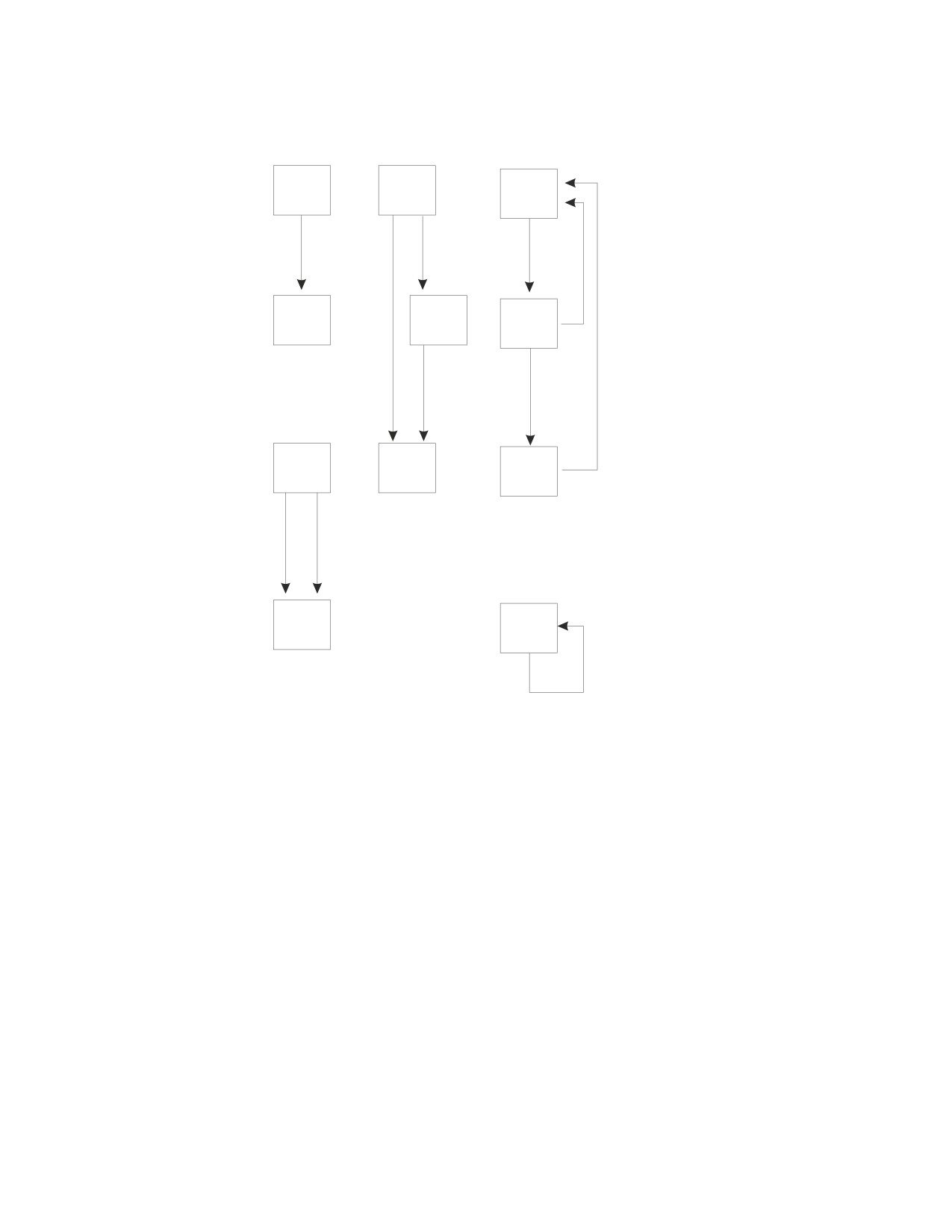
Figure 65 on page 291 shows examples of relationships supported by the database
manager.
T1
T5
T8
T2
T6
T9
T3
T7
T10
T4
T11
Figure 65. Table Relationships with Referential Integrity. T1, T2, ... are tables. Arrows point
from parent tables to dependent tables.
You should be familiar with the following terms:
Relationship
A relationship is formed by connecting two tables
directly. The tables are related through matching
column values in the tables. For example, in
Figure 65, tables T1 and T2 show a simple
relationship. T3 has two relationships with T4. T5
has two paths to T7 (one directly, the other through
T6), but only one relationship with T7. T5 also has a
relationship with T6. Tables are connected to each
other when relationships are formed.
Referential Constraint
A relationship between a primary key and a
foreign key, along with a set of rules that define
how the relationship is maintained. This
relationship is that every foreign key value must
match a primary key value or be null.
Referential Cycle
A set of referential constraints such that each table
in the set is a descendent of itself.
Referential Structure
A set of tables that are related to each other by
Chapter 11. Special Topics
291
referential constraints. For example, T5 is a parent
of both T6 and T7, which are its dependents. T7 is
also a dependent of T6.
Parent Table
A table whose primary key is referenced in a
referential constraint. For example, T1 is the parent
of T2.
Dependent Table
A table with a foreign key that is related to another
table (the parent) through a referential constraint.
For example, T4 is a dependent of T3.
Delete-Connected Table
A table that may be involved in a delete operation
on another table.
Descendent Table
A table is a descendent table if it is a dependent
table or a dependent of a descendent table. For
example, in Figure 65 on page 291, both T6 and T7
are descendent tables of T5.
Parent Row
A row in a parent table with a primary key value
that is referenced by the foreign key value in at
least one row in a dependent table.
Dependent Row
A row in a dependent table with a foreign key
value that matches a primary key value in the
parent table referenced in the referential constraint.
Self-Referencing Table
A self-referencing table is both the parent and the
dependent table in the same relationship. This
relationship is not supported by the DB2 Server for
VSE & VM product. For example, T11 is a
self-referencing table.
Primary Key
A set of non-null columns that together uniquely
identify every row in a table. The values in these
columns are known as primary key values.
Foreign Key
A set of columns whose values are called foreign
key values. A foreign key only exists as part of a
referential constraint.
Ensuring Referential Integrity in New Tables
To ensure referential integrity in new tables, you must specify a primary key, a
foreign key, and a delete rule that together define the relationship between the
parent table and the dependent table. Delete rules specify what will happen to the
dependent rows if the corresponding parent row is deleted. Insert and update rules
are automatically defined on tables when primary keys and foreign keys are
defined on those tables.
The relationship is defined when the new table is created using the CREATE
TABLE statement.
You should be aware of the referential constraints of the tables you manipulate, as
well as the rules for those tables. In this way you can avoid violating any
referential constraints, and take appropriate action should you inadvertently do so.
In the example below, the EMPLOYEE table is the parent of the DEPARTMENT
table. This relationship is established by specifying a primary key (EMPNO) on the
EMPLOYEE table and a foreign key (MGRNO) on the DEPARTMENT table. This
relationship specifies that every manager listed in the DEPARTMENT table is also
292
Application Programming
listed in the EMPLOYEE table. The REFERENCES privilege is required on the
parent table. The foreign key is nullable.
CREATE TABLE EMPLOYEE
(EMPNO
CHAR(6)
NOT NULL
primary key
FIRSTNME
VARCHAR(12)
NOT NULL
MIDINIT
CHAR(1)
NOT NULL
LASTNAME
VARCHAR(15)
NOT NULL
WORKDEPT
CHAR(3)
,
PHONENO
CHAR(4)
,
SALARY
DECIMAL(9,2)
,
PRIMARY KEY (EMPNO)
)
CREATE TABLE DEPARTMENT
primary key
(DEPTNO
CHAR(3)
NOT NULL
DEPTNAME
VARCHAR(36)
NOT NULL
MGRNO
CHAR(6)
,
foreign key
PRIMARY KEY (DEPTNO)
,
FOREIGN KEY MNUM (MGRNO)
REFERENCES EMPLOYEE ON DELETE SET NULL)
Adding Referential Integrity to Existing Tables
To add referential integrity to existing tables, you must add a primary key, a
foreign key, and a delete rule that together define the relationship between the
parent table and the dependent table. Delete rules specify what will happen to the
dependent rows if the corresponding parent row is deleted. Insert and update rules
are implicitly defined on tables when primary keys and foreign keys are defined
on those tables.
The relationship is defined using the ALTER TABLE statement.
When keys (primary or foreign) are added to an existing table, any packages that
depend on the table are invalidated. When the application programs are run again,
the packages will be dynamically repreprocessed. Refer to “Running the Program”
on page 144 (DB2 Server for VM) or “Running the Program” on page 182 (DB2
Server for VSE) for more information on dynamic repreprocessing.
As in the case of new tables, you should be aware of the referential constraints of
the tables you manipulate as well as the rules for those tables, in order to avoid
violating any referential constraints or to take appropriate action should you
inadvertently do so.
Consider the existing DEPARTMENT and PROJECT tables. The PROJECT table
was created by the following CREATE TABLE statement:
CREATE TABLE PROJECT
(PROJNO
CHAR(6)
NOT NULL
primary key
PROJNAME
VARCHAR(24)
NOT NULL
DEPTNO
CHAR(3)
NOT NULL
foreign key (To be added)
RESPEMP
CHAR(6)
NOT NULL
PRSTAFF
DECIMAL(5,2)
,
PRIMARY KEY (PROJNO)
)
The following ALTER TABLE statement adds a referential constraint to the
PROJECT table, thereby establishing a relationship between it and the existing
DEPARTMENT table:
Chapter 11. Special Topics
293

ALTER TABLE PROJECT
ADD FOREIGN KEY DNUM (DEPTNO)
REFERENCES DEPARTMENT ON DELETE CASCADE;
In this relationship, DEPARTMENT is the parent table and PROJECT is the
dependent table. This specifies that every department that is responsible for a
project is also in the DEPARTMENT table.
Note: The ALTER TABLE statement can also be used to defer the enforcement of
referential constraints or cause the removal of referential constraints. These
topics are discussed in the section “Enforcing Referential Integrity” on page
299.
Managing Table Relationships
The ALTER TABLE statement can be used to add, drop, activate, or deactivate
primary and foreign keys. Various clauses of the statement alter the keys that
establish relationships between tables. When the ALTER TABLE statement
establishes or changes relationships, specific privileges are required on parent
tables and dependent tables. Table 33 shows the privileges that are required.
Table 33. Privileges to Use the ALTER TABLE Statement
Privilege on
Privilege on
ALTER TABLE Clause
Parent Table
Dependent Table
Add Column
ALTER
Add Primary Key
ALTER
Add Foreign Key
REFERENCES
ALTER
Drop Primary Key
ALTER
ALTER
REFERENCES1
Drop Foreign Key
REFERENCES
ALTER
Deactivate Primary Key
ALTER
ALTER
REFERENCES1
Deactivate Foreign Key
REFERENCES
ALTER
Activate Primary Key
ALTER
ALTER
REFERENCES1
Activate Foreign Key
REFERENCES
ALTER
Note: The REFERENCES privilege is required only if the parent table has
dependents.
You can grant to or revoke from another user the privilege to add, drop, activate,
or deactivate a relationship between a parent table and its dependent. In order to
enter any of these statements, you must have the REFERENCES privilege on the
parent table whenever a referential constraint is to be:
v Created on a new table (CREATE TABLE)
v Added to an existing table (ALTER TABLE)
v Dropped, activated, or deactivated (ALTER TABLE).
294
Application Programming
By revoking the privileges previously granted on tables in a referential structure,
you can prevent the accidental removal of constraints that your applications may
depend on.
Modifying Applications to Ensure Integrity
Applications that currently enforce consistency and integrity of their data can be
modified to let the database manager do the checking. Using the referential
constraints and the integrity rules that apply to the tables containing the data, the
system checks that the rules are adhered to, and thereby enforces integrity of the
data. As this function can be performed by the database manager, some existing
code can be removed from the application.
Modifying Data in Tables Containing Referential Constraints
To maintain the consistency and integrity of the data, the database manager checks
that integrity rules for insert, update, and delete operations are followed.
Applying Insert Rules: The database manager checks the implicit insert rules when
a row is inserted into either the parent or a dependent table in a referential
structure. When a row is inserted into a parent table, the database manager checks
that the primary key remains unique and does not contain null values. When a
row is inserted into a dependent table, the database manager checks each foreign
key for the following:
v Each has a matching primary key in the parent table, or
v Each contains a null value in one or more of its columns.
Assuming for the moment that department D21 does not already exist in the
parent table (DEPARTMENT), the following INSERT statement adds a new row to
DEPARTMENT.
INSERT INTO DEPARTMENT (DEPTNO,DEPTNAME,MGRNO,ADMRDEPT)
VALUES (‘D21’,‘ADMINISTRATION SYSTEMS’,‘000070’,‘D01’)
Note: The primary key (the DEPTNO column) in the DEPARTMENT table remains
unique and does not contain null values.
Table 34. Part of Department Table
DEPTNO
DEPTNAME
MGRNO
A00
SPIFFY COMPUTER SERVICE DIV.
000010
B01
PLANNING
000020
C01
INFORMATION CENTER
000030
D01
DEVELOPMENT CENTER
?
D11
MANUFACTURING SYSTEMS
000060
E11
OPERATIONS
000090
D21
ADMINISTRATION SYSTEMS
000070
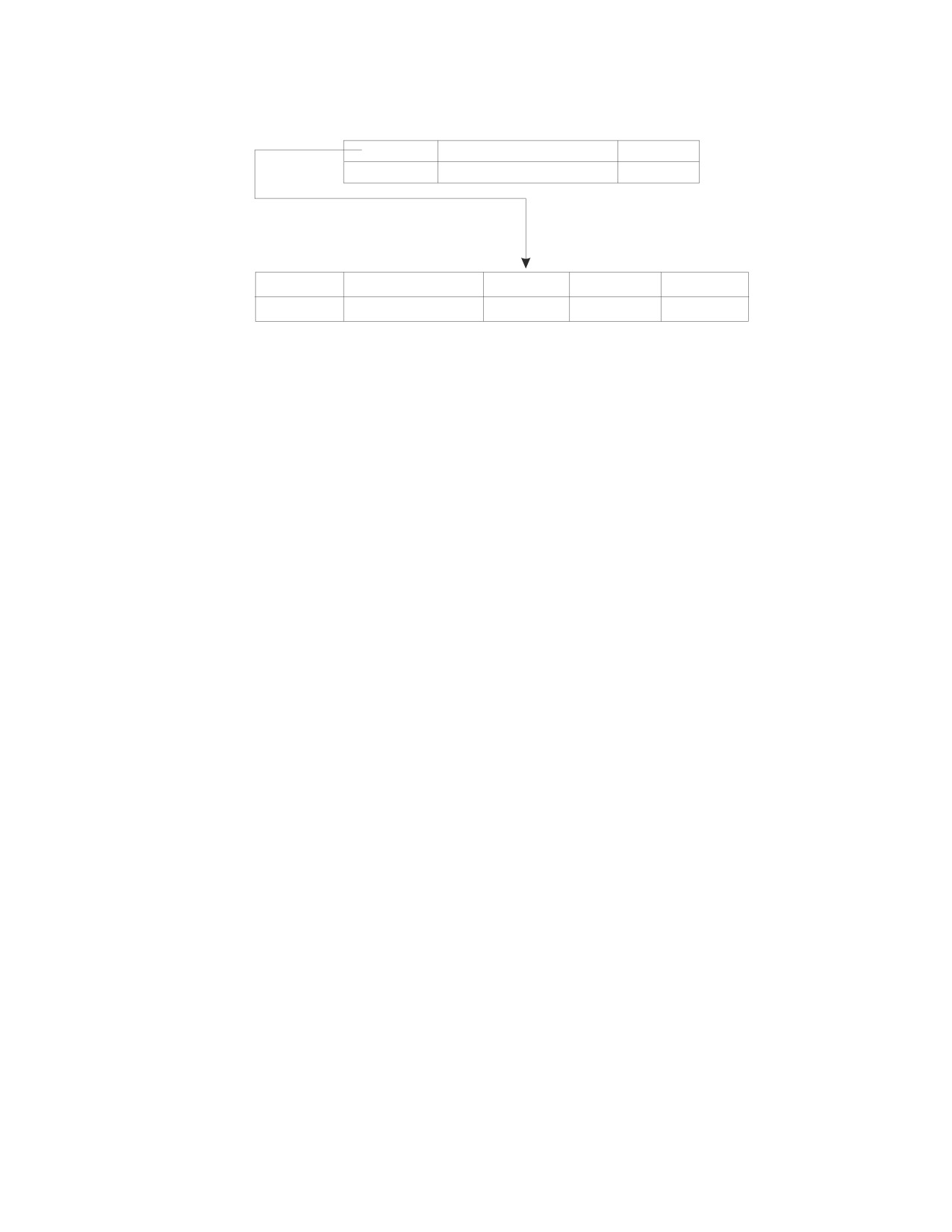
Assuming for the moment that project IF2000 does not already exist in the
dependent table (PROJECT), the following INSERT statement adds a new row with
DEPTNO = C01 to PROJECT. This value for DEPTNO must exist in the parent
(DEPARTMENT) table.
INSERT INTO PROJECT (PROJNO,PROJNAME,DEPTNO,RESPEMP,PRSTAFF)
VALUES (‘IF2000’,‘USER EDUCATION’,‘C01’,‘000030’,1.00)
Chapter 11. Special Topics
295
Primary
key
Part of parent table (DEPARTMENT)
column
DEPTNO
DEPTNAME
MGRNO
C01
INFORMATION CENTER
000030
Foreign
key column
Part of dependent table (PROJECT)
PROJNO
PROJNAME
DEPTNO
RESPEMP
PRSTAFF
IF2000
USER EDUCATION
C01
000030
1.00
Applying Update Rules: When a key value is updated, the database manager
checks the implicit update rules. A key value may be updated when a parent row
(primary key) or a dependent row (foreign key) is updated. If the primary key is
updated due to updates made to the parent table, the database manager checks
that the updated primary key is unique and is not null. All rows in the dependent
table that reference the primary key must first be deleted or updated, or an error
will occur. This ensures that the dependent table is not referencing an “old”
primary key.
If foreign keys are updated, the database manager checks that each updated
foreign key has either a matching primary key in the corresponding parent table,
or that the updated foreign key is a null key. A foreign key is null when one or
more of its column values are null.
Notes:
1. If a searched update contains a subquery, any table referenced in the subquery
must not be a dependent of the table in the UPDATE clause. (See the DB2
Server for VSE & VM SQL Reference manual for more information.) In the
example below, the NAME table must not be a descendent of the EMPLOYEE
table:
UPDATE EMPLOYEE
SET SALARY = 65000.00
WHERE LASTNAME = ’SMITH’ AND EXISTS
(SELECT * FROM NAME
WHERE LASTNAME = ’SMITH’)
2. In recoverable storage pools, when a searched update is performed against a
column or set of columns, defined in a unique index, primary key, or unique
constraint, uniqueness is checked after all rows have been updated. If
duplicates exist, then the statement is rolled back.
3. In nonrecoverable storage pools, searched updates are sensitive to the order
(ascending or descending) of the data. Since a unique index is automatically
created on a primary key column, you cannot use a searched update against a
primary key column. This ensures that updates to the primary key are
independent of the order of the data.
4. Positioned updates are sensitive to the order (ascending or descending) of the
data. Since a unique index is automatically created on a primary key column,
you cannot use a positioned update against a primary key column. This
ensures that updates to the primary key are independent of the order of the
data.
The following operations change the DEPTNO B01 to F01 in the DEPARTMENT
table. Since DEPTNO is a primary key in the parent table, the foreign key with
DEPTNO equal to B01 must also be changed in the dependent table (PROJECT).
296
Application Programming
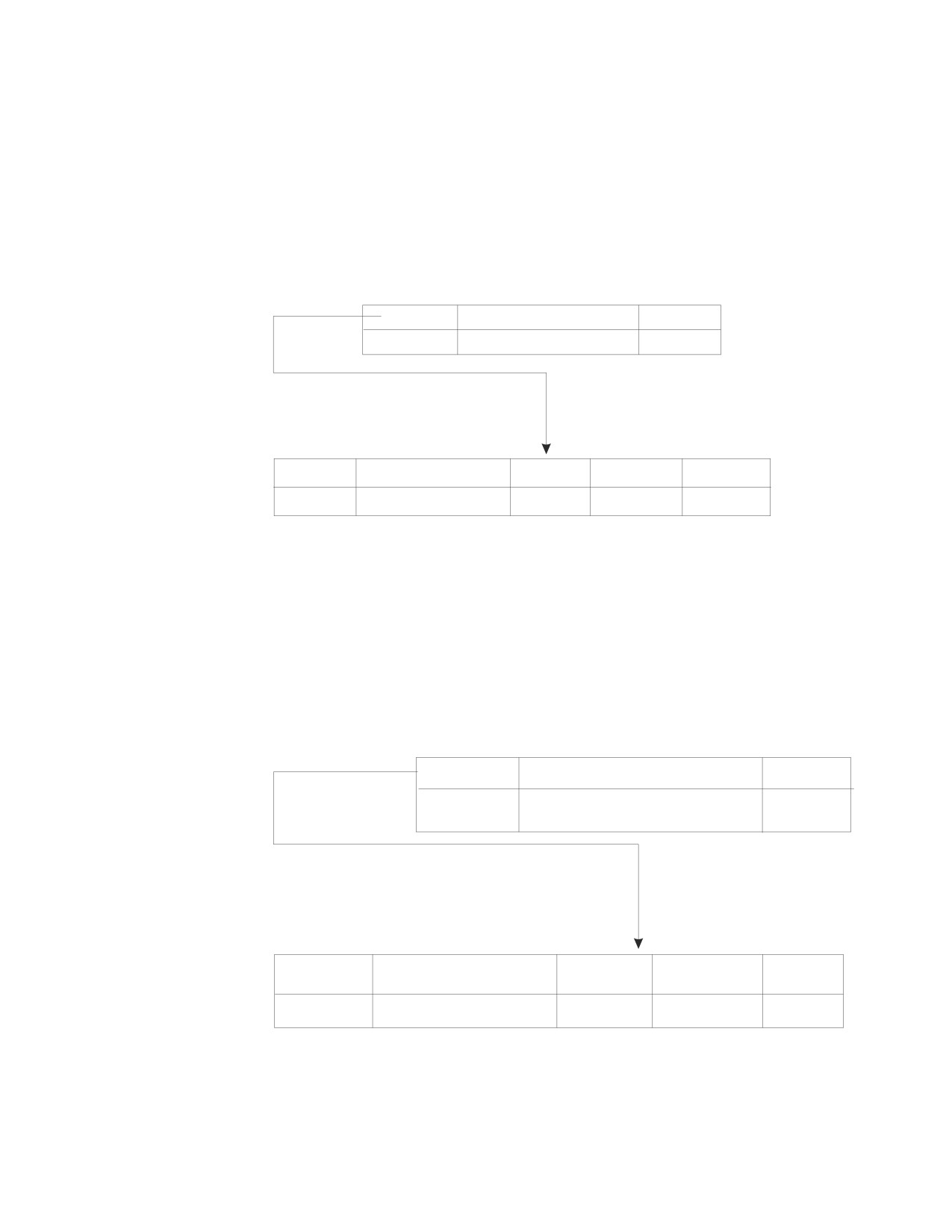
INSERT INTO DEPARTMENT (DEPTNO,DEPTNAME,MGRNO,ADMRDEPT)
VALUES (‘F01’,‘PLANNING’,‘000020’‘,A00’)
UPDATE PROJECT
SET DEPTNO = ’F01’
WHERE DEPTNO = ’B01’
DELETE FROM DEPARTMENT
WHERE DEPTNO = ’B01’
Primary
key
Part of parent table (DEPARTMENT)
column
DEPTNO
DEPTNAME
MGRNO
F01
PLANNING
000020
Foreign
key column
Part of dependent table (PROJECT)
PROJNO
PROJNAME
DEPTNO
RESPEMP
PRSTAFF
PL2100
WELD LINE PLANNING
F01
000020
1.00
The example below changes the DEPTNO A00 to D11 for the ADMIN SERVICES
project in the PROJECT table. Since DEPTNO is a primary key in the parent table,
the database manager ensures that DEPTNO D11 in the dependent table
(PROJECT) also exists in the parent table (DEPARTMENT).
UPDATE PROJECT
SET DEPTNO = ’D11’
WHERE PROJNAME = ’ADMIN SERVICES’
Primary
key
Part of parent table (DEPARTMENT)
column
DEPTNO
DEPTNAME
MGRNO
MANUFACTURING
D11
000060
SYSTEMS
Foreign
key column
Part of dependent table (PROJECT)
PROJNAME
DEPTNO
RESPEMP
PRSTAFF
PROJNO
AD3100
ADMIN SERVICES
D11
000010
6.50
Applying Delete Rules: The database manager does not do any checking when
data is deleted from dependent tables. The delete rule in a referential constraint
clause defines what action should be taken by the database manager when a
parent row is deleted. The delete rules are:
Chapter 11. Special Topics
297
v The RESTRICT rule prevents the deletion of a parent row unless all the
dependent rows have been deleted first. This is the default rule.
v The SET NULL rule sets all nullable columns of the foreign key to null before
deleting the parent row. At least one column of the foreign key must be nullable.
v The CASCADE rule deletes rows at each level containing dependent tables that
have the referential constraint CASCADE.
Restrictions on Using Delete Rules:
v If a table with a referential constraint of CASCADE has dependent tables that
have different delete rules, such as RESTRICT, a delete operation is successful
only if the object row is not found in the dependent table. If the object row is
found in the dependent table, the CASCADE delete operation is rolled back.
That is, the SET NULL and RESTRICT rules maintain their referential integrity
between parent and dependent tables.
v A table cannot be delete-connected to itself in a referential cycle involving two
or more tables.
v If a dependent table is delete-connected to the parent table through multiple
delete paths, each path must have the same delete rule and this rule cannot be
SET NULL.
v If a Searched DELETE contains a subquery, any table referenced in the subquery
and any table that has a referential constraint of CASCADE or SET NULL with
the table referenced in the subquery must not be a dependent of the table in the
FROM clause. (See the DB2 Server for VSE & VM SQL Reference manual for more
information.)
In the following example, the NAME table must not be a descendent of the
EMPLOYEE table:
DELETE FROM EMPLOYEE
WHERE LASTNAME = ’SMITH’ AND EXISTS
(SELECT * FROM NAME
WHERE LASTNAME = ’SMITH’)
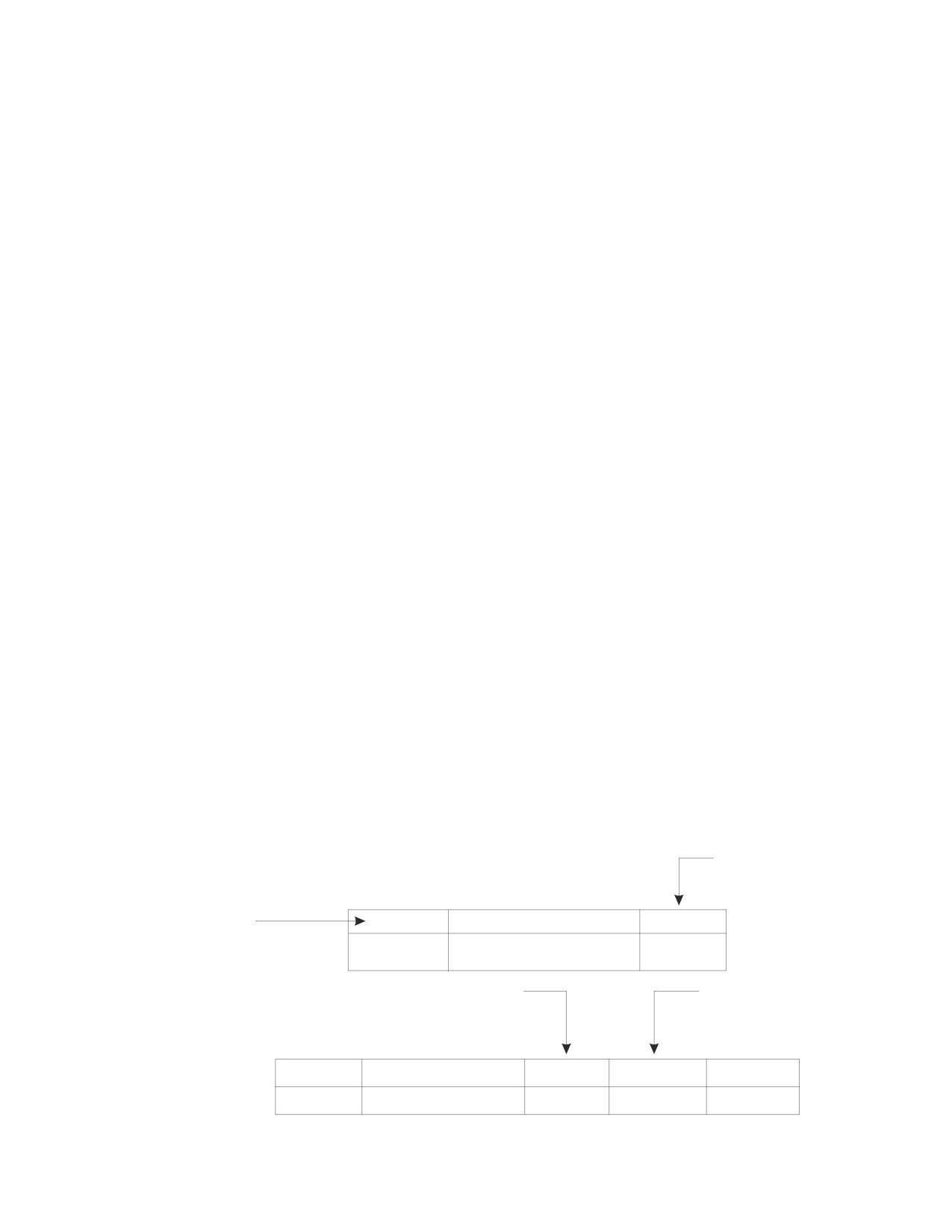
In the example below, the row with EMPNO equal to 000050 is deleted from the
EMPLOYEE table:
DELETE FROM EMPLOYEE
WHERE LASTNAME = ’GEYER’
Foreign
key
column
Primary
key
Part of parent table (DEPARTMENT)
column
DEPTNO
DEPTNAME
MGRNO
SUPPORT SERVICES
E01
?
Foreign
Foreign
key column
key column
Part of PROJECT table
PROJNO
PROJNAME
DEPTNO
RESPEMP
PRSTAFF
OP1000
OPERATION SUPPORT
E01
?
6.00
298
Application Programming
Because the EMPLOYEE table is a parent table and the delete rule is SET NULL in
the relationship that exists between the EMPLOYEE table and the DEPARTMENT
table, the database manager sets MGRNO equal 000050 to null in the
DEPARTMENT table. Also, because the EMPLOYEE table is a parent table and the
delete rule is SET NULL in the relationship that exists between the EMPLOYEE
table and the PROJECT table, the database manager sets RESEMP equal 000050 to
null in the PROJECT table. (Refer to Figure 66 on page 300 for more information.)
In the example below, the row with DEPTNO equal to D01 is deleted from the
DEPARTMENT table:
DELETE FROM DEPARTMENT
WHERE DEPTNAME = ’DEVELOPMENT CENTER’
Because the DEPARTMENT table is a parent table and the CASCADE rule was set
in the relationship that exists between the DEPARTMENT table and the PROJECT
table, the row with DEPTNO D01 is also deleted from the PROJECT table.
Generating SQL Statements in Response to Table Modifications
When INSERT, UPDATE, and DELETE statements are issued against tables in a
referential structure, the database manager generates internal SQL statements,
which it uses to ensure the consistency and integrity of the data in the tables. The
number of rows affected, the cost of processing the INSERT, UPDATE, DELETE,
and the internally generated statements are returned in the SQLERRD fields in the
SQLCA. The SQLERRD(3) gives the number of rows that were processed
successfully. Upon successful completion of the DELETE statement, SQLERRD(5)
contains the number of dependent rows that were successfully deleted or set to
null. For other data-manipulating language (DML) statements, SQLERRD(5) is set
to zero. The relative cost of processing all the statements is given in the
SQLERRD(4) field.
Additional information on internally generated statements can be found in tables
updated by the EXPLAIN statement. (This statement is discussed in the DB2 Server
for VSE & VM SQL Reference manual.) To determine this information, enter the
EXPLAIN statement for the INSERT, UPDATE, or DELETE statement.
Enforcing Referential Integrity
Referential constraints may be enforced as soon as they are defined, or their
enforcement may be deferred. If the constraints are enforced as soon as they are
defined, the insert, update, and delete integrity rules are enforced immediately
when the INSERT, UPDATE, and DELETE statements are issued.
To defer the enforcement of a constraint is to render the constraint inactive so that
it is not immediately enforced when the INSERT, UPDATE, and DELETE
statements are issued. This is done by deactivating either the primary key, the
dependent foreign key(s), or the foreign key(s). If any of these keys are
deactivated, both the parent and the dependent tables become inactive and
unavailable for data manipulation statements to general users (that is, other than
the DBA and the owner of the tables). However, these tables are available for data
definition statements.
When a primary key is deactivated, all active dependent foreign keys are implicitly
deactivated, and the primary key index is dropped from the parent table. Both
parent and dependent tables become inactive. A primary key cannot be implicitly
deactivated.
Chapter 11. Special Topics
299
With a table in an inactive state, only the owner of the table or a database
administrator (DBA) can enter data manipulating language (DML) statements
against it. No one can enter INSERT, UPDATE, and DELETE statements that cause
statements to be generated against an inactive table.
When keys (either primary or foreign) are activated, the constraints are
automatically verified. If they cannot be verified because of integrity problems, an
error message is returned, and the tables remain unavailable for data manipulation
statements entered by users other than the DBA or the owner.
When keys (either primary or foreign) are activated or deactivated, packages that
depend on the table are invalidated. When the program is run again, it is
dynamically repreprocessed.
In general, you would defer the enforcement of referential constraints between
tables when large amounts of data are to be loaded, or when data is to be loaded
in an order that violates the referential constraint at some point during the loading
operation. For further information, refer to the DB2 Server for VSE & VM Database
Administration manual.
The relationships among the EMPLOYEE, DEPARTMENT, and PROJECT tables are
shown in Figure 66.
DEPARTMENT
MGRNO
DEPTNO
(N)
(N)
(R)
PROJECT
EMPLOYEE
WORKDEPT
DEPTNO
(N)
EMPNO
RESEMP
Figure 66. Relationships among the TABLES. Arrows point from primary keys in parent tables
to foreign keys in dependent tables. Delete rules are labeled as (C) = CASCADE, (N) = SET
NULL, (R) = RESTRICT.
300
Application Programming
CREATE TABLE EMPLOYEE
(EMPNO
CHAR(6)
NOT NULL,
primary key
FIRSTNME
VARCHAR(12)
NOT NULL,
MIDINIT
CHAR(1)
NOT NULL,
LASTNAME
VARCHAR(15)
NOT NULL,
WORKDEPT
CHAR(3)
,
PHONENO
CHAR(4)
,
SALARY
DECIMAL(9,2)
,
PRIMARY KEY (EMPNO)
)
CREATE TABLE DEPARTMENT
(DEPTNO
CHAR(3)
NOT NULL,
primary key
DEPTNAME
VARCHAR(36)
NOT NULL,
MGRNO
CHAR(6)
,
foreign key
PRIMARY KEY (DEPTNO)
,
FOREIGN KEY MNUM (MGRNO)
REFERENCES EMPLOYEE ON DELETE SET NULL)
ALTER TABLE EMPLOYEE ADD FOREIGN KEY WORKNUM (WORKDEPT)
REFERENCES DEPARTMENT ON DELETE SET NULL
CREATE TABLE PROJECT
(PROJNO
CHAR(6)
NOT NULL,
primary key
PROJNAME
VARCHAR(24)
NOT NULL,
DEPTNO
CHAR(3)
NOT NULL,
foreign key
RESPEMP
CHAR(6)
NOT NULL,
PRSTAFF
DECIMAL(5,2)
,
PRIMARY KEY (PROJNO)
,
FOREIGN KEY DNUM (DEPTNO)
REFERENCES DEPARTMENT ON DELETE CASCADE)
Then,
ALTER TABLE DEPARTMENT DEACTIVATE PRIMARY KEY
explicitly deactivates the primary key in DEPARTMENT, and implicitly deactivates
the foreign keys DNUM in the PROJECT table and WORKNUM in the EMPLOYEE
table. The DEPARTMENT, EMPLOYEE, and PROJECT tables become inactive.
Therefore, only the owner of these tables or the DBA can enter data manipulation
statements against the tables.
However,
ALTER TABLE DEPARTMENT DEACTIVATE FOREIGN KEY MNUM
will not affect the primary key in the EMPLOYEE table. However, both the
EMPLOYEE table and the DEPARTMENT table become inactive since the foreign
key affects both tables. As mentioned earlier, when tables become inactive, only the
owner of the tables or the DBA can enter data manipulation statements against
them.
Removing Referential Constraints
To remove a referential constraint, you must drop the foreign key. When a table
that contains foreign keys is dropped, the referential constraints associated with
that table are removed. You can drop a table explicitly with the DROP TABLE
statement, or implicitly with the DROP DBSPACE statement. You can also drop the
foreign key with the ALTER TABLE statement, provided that you have the ALTER
privilege on the dependent table and the REFERENCES privilege on the parent
Chapter 11. Special Topics
301
table. For descriptions of the above three statements, see Chapter 9, “Maintaining
Objects Used by a Program,” on page 255.
When a table that contains a primary key is dropped, the database manager drops
the primary key and any foreign keys that reference the primary key and removes
the referential constraints associated with those foreign keys. The ALTER TABLE
statement can also be used to drop a primary key directly. To use the ALTER
TABLE statement for this purpose, you must have the ALTER and REFERENCES
privileges on the parent table as well as the ALTER privilege on all dependent
tables.
When keys are dropped, any packages that depend on the table are invalidated.
When the program is run again, it is dynamically repreprocessed. The new
package no longer contains internally generated statements to enforce referential
integrity.
Switching Application Servers
You can access multiple application servers from within an application program,
but only one application server can be accessed at a time. DB2 Server for VM
application servers can reside on the same processor as the user, or on another
processor (in the TSAF collection or the SNA network). VSE application servers
must reside on the same processor as the user, if DRDA protocol is not being used.
If the VSE application server does not reside on the same processor as the
CICS/VSE online user, the VSE application server must be accessed during the
DRDA protocol. This VSE server must be defined as a remote DRDA server to the
DB2 Server for VSE Online Resource Adapter. VM application servers, accessed
through VSE guest sharing or using the DRDA protocol, may reside on the same
processor as the user, or on another processor (in the TSAF collection or the SNA
network). If a program is written to access multiple application servers, its package
must exist on all of them.
This section discusses these authorities in more detail, and explains how to switch
application servers from your application program. For a detailed discussion on
establishing communication links between application requesters and application
servers, refer to the DB2 Server for VM System Administration or the DB2 Server for
VSE System Administration manual.
Identifying Switching Options
Use the CONNECT statement to switch among application servers if you want
application programs to connect to different application servers while running. For
more information on the CONNECT statement, see the DB2 Server for VSE & VM
SQL Reference manual.
Comparing Switching to Other Methods (DB2 Server for VM)
Figure 68 on page 303 and Figure 70 on page 306 show how an application
program, indicated by PGM, accesses three application servers with and without
switching application servers in the program. The application servers can reside on
the same processor as the program or on a different processor.
The application server specified by the SQLINIT EXEC is the default application
server. In Figure 70 on page 306 the default application server is DB01.
If you are not switching application servers in the program, to access another
application server you must terminate the program, reissue the SQLINIT EXEC,
302
Application Programming
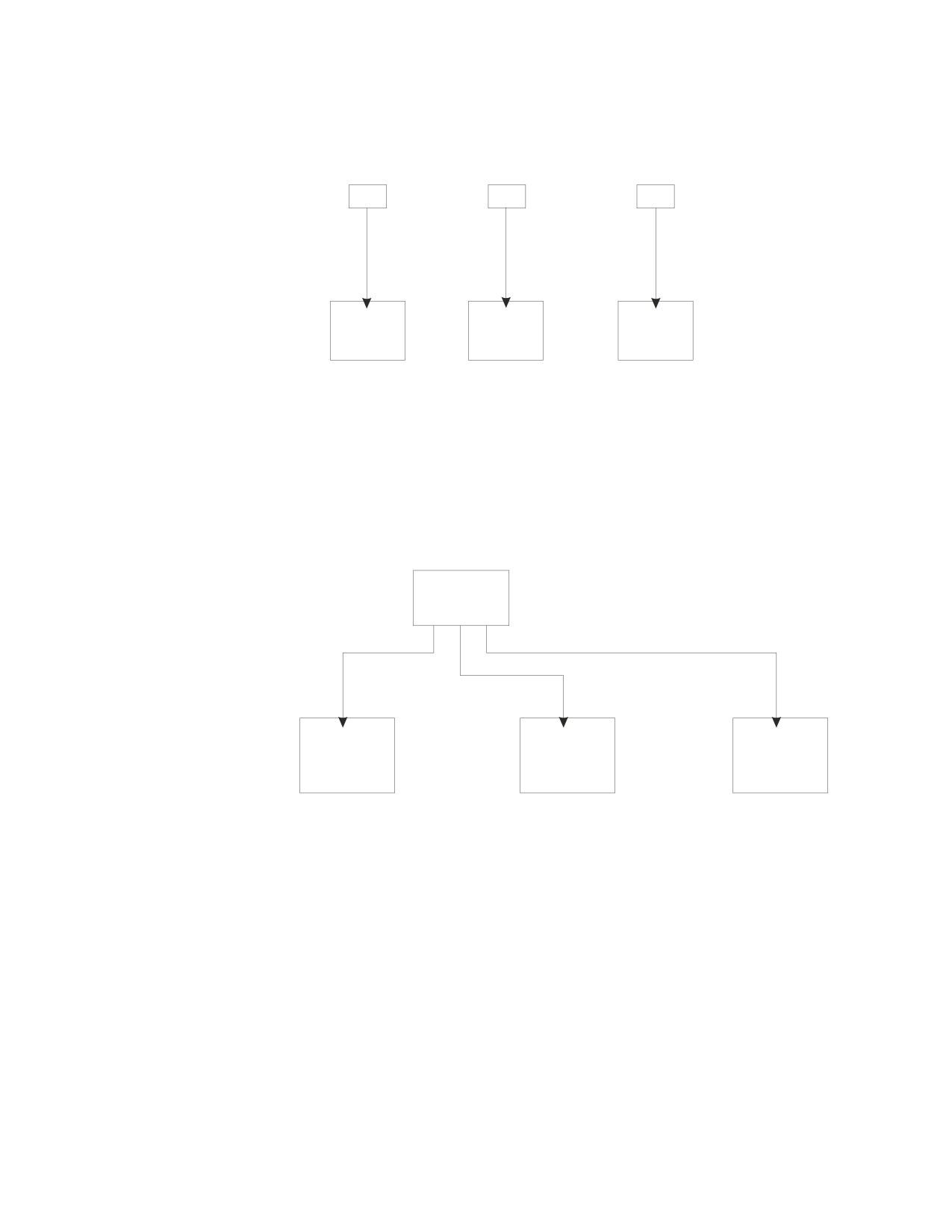
and run the program again. In Figure 68, for example, to switch from application
server DB01 to application server DB02, you must terminate the program PGM,
reissue SQLINIT, and run the program again.
SQLINIT
SQLINIT
SQLINIT
PGM
PGM
PGM
DB(DB02)
DB(DB03)
DB(DB01)
Application
Application
Application
Server
Server
Server
DB01
DB02
DB03
Figure 67. Switching Application Servers NOT Implemented within the Program
When you are switching application servers in the program, an application
program can switch to a new application server during execution with the
CONNECT statement. Like the SQLINIT method, a package for the program must
exist on all application servers it accesses, and each logical unit of work must end
before you switch to a different application server. See “Parameters for SQLPREP
EXEC for Single and Multiple User Modes” on page 118 for the options used to
preprocess the program on multiple application servers.
SQLINIT
PGM
DB(DB01)
Application
Application
Application
Server
Server
Server
DB01
DB02
DB03
Figure 68. Switching Application Servers Implemented
How to Switch Servers (DB2 Server for VSE)
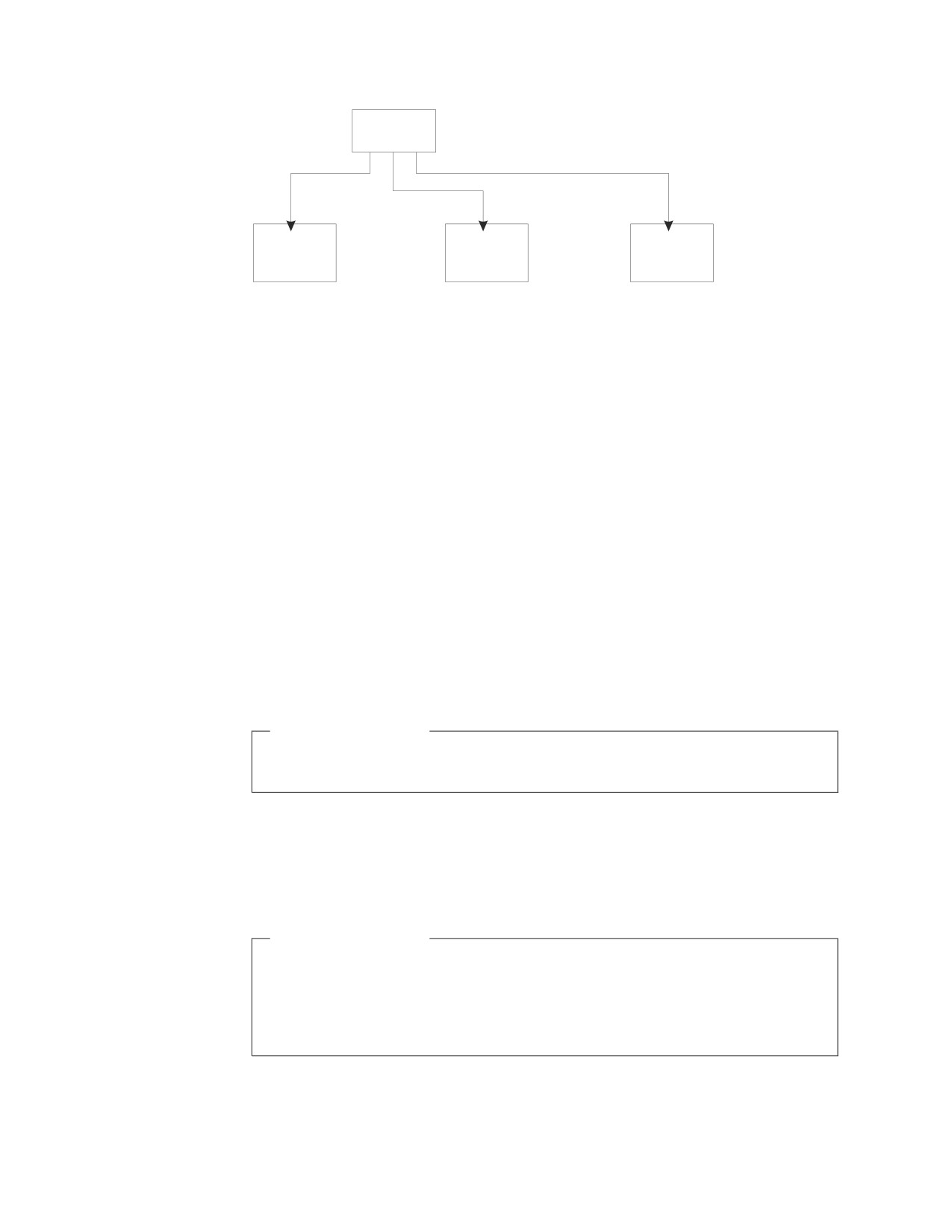
Figure 69 on page 304 shows how an application program, indicated by PGM,
accesses three application servers by switching application servers in the program.
The application servers can reside on the same processor as the program or on a
different processor. When you are switching application servers in the program, an
application program can switch to a new application server during execution with
the CONNECT statement. A package for the program must exist on all application
servers it accesses, and each logical unit of work must end before you switch to a
different application server. See “Preprocessing the Program on Multiple
Application Servers” on page 306 for more details.
Chapter 11. Special Topics
303
PGM
Application
Application
Application
Server
Server
Server
DB01
DB02
DB03
Figure 69. Switching Application Servers Implemented - DB2 Server for VSE
Accessing a New Application Server
An DB2 Server for VM application accesses the application server established by
the SQLINIT command when:
v The first CONNECT statement in an application does not contain the TO clause.
v Either a COMMIT RELEASE or ROLLBACK RELEASE statement is executed
and the next statement is not a CONNECT statement with the application server
name specified in the TO clause.
v No CONNECT statement is executed by an application. That is, an implicit
connect is performed.
An DB2 Server for VSE application accesses the default application server when:
v The first CONNECT statement in an application does not contain the TO clause.
v Either a COMMIT RELEASE or ROLLBACK RELEASE statement is executed by
a batch application and the subsequent CONNECT statement does not contain
the TO clause.
v No CONNECT statement is executed by a CICS/VSE application. That is, an
implicit connect is performed.
DB2 Server for VSE
For more information about the defaults that determine the application server
that is accessed, refer to the DB2 Server for VSE System Administration manual.
The application accesses a new application server after executing: An application
accesses a specific application server after executing:
v a CONNECT statement with the application server name specified in the TO
clause.
DB2 Server for VSE
You must enter a CONNECT statement from a batch application after a
COMMIT RELEASE statement or ROLLBACK RELEASE statement to
reestablish the user ID and target application server. Otherwise subsequent
SQL statements are not successful (SQLCODE -563). A null CONNECT
statement is not sufficient.
For DB2 Server for VM to query the user ID and the identity of the application
server to which you are currently connected, as well as the relational database
management system (RDBMS) running the application server, do one of the
304
Application Programming
following from within an application program. For DB2 Server for VSE to query
the user ID and the identity of the application server to which you are currently
connected, enter one of the following from within an application program.
v A null CONNECT statement, which returns the user ID and the identification of
the RDBMS (DB2 Server for VM) and the application server in the SQLCA. Refer
to the discussion of the CONNECT statement in the DB2 Server for VSE & VM
SQL Reference manual for a description of the format and location of the
information that is returned.
For DB2 Server for VSE if a null CONNECT is issued as the first SQL statement
in a batch application, blanks are returned in the SQLCA for the user ID and
application server name and the execution of subsequent SQL statements are not
successful (SQLCODE -563).
v A SELECT statement requesting the USER and CURRENT SERVER, which
returns the user ID and the identification of the application server in the host
variables associated with the USER and CURRENT SERVER special registers.
If you are using DB2 Server for VM, from your terminal, enter:
v An SQLQRY command, which displays the user ID and the identification of the
RDBMS and the application server on the terminal. Refer to the discussion of the
SQLQRY command in the DB2 Server for VSE & VM Database Administration
manual for a description of the format of the information that is returned and
the restrictions on the use of the SQLQRY command.
Illustrating Sample Code
Figure 70 on page 306 shows how an application can take advantage of switching
application servers.
Chapter 11. Special Topics
305

Program In User's Machine
Declarations, (and so forth)
DB_NAME = 'DB01'
EXEC SQL CONNECT TO :DB_NAME
EXEC SQL DECLARE CUR1 CURSOR FOR SELECT . . .
Application
EXEC SQL OPEN CUR1
Server
DO until all rows fetched:
DB01
EXEC SQL FETCH CUR1 INTO
(Use data)
END DO
EXEC SQL CLOSE CUR1
EXEC SQL COMMIT RELEASE
Application
DB_NAME = 'DB02'
Server
EXEC SQL CONNECT TO :DB_NAME
DB02
EXEC SQL DELETE FROM . . . WHERE . . .
EXEC SQL COMMIT RELEASE
DB_NAME = 'DB03"
Application
EXEC SQL CONNECT TO :DB_NAME
Server
EXEC SQL INSERT INTO . . . VALUES . . .
DB03
EXEC SQL COMMIT RELEASE
Figure 70. Pseudocode Illustrating How to Switch Application Servers
In the above example, the application connects to three application servers (DB01,
DB02, and DB03), and performs a series of operations when accessing each one.
When accessing DB01, the program retrieves information from the application
server (with the FETCH statement) and processes the information.
Next, it accesses DB02, and some rows are deleted from a table; then accesses
DB03, and rows are inserted into a table.
Preprocessing the Program on Multiple Application Servers
An application program that allows access to multiple application servers with the
CONNECT statement must exist on every application server that the program is to
access.
The DB2 Server for VSE preprocessors provide the DBNAME parameter to
preprocess a program on different application servers. In addition, the CBND
transaction provides the DBLIST parameter to create a package on different
application servers.
The DB2 Server for VM SQLPREP EXEC provides the option to preprocess a
program on multiple application servers with the DBFile or DBList parameter.
However, an application using either of these parameters is preprocessed on one
application server at a time. Each of the application servers provided in the DBFile
or DBList parameter preprocesses the program separately and consecutively, and
generates a source listing. These source listings are concatenated.
306
Application Programming
When an application that accesses different application servers is being
preprocessed, certain warnings may be issued by the preprocessor. For example, if
TABLE1 exists in DB01, but your application program is preprocessed against
DB02 or DB03, you will receive warning messages that the table does not exist in
those application servers. If your program does not access TABLE1 in DB02 or
DB03, these messages can be ignored; however, if TABLE1 will be accessed in
either DB02 or DB03, you must create TABLE1 in the accessed application server.
You should repreprocess the program on the application servers that you updated
before executing the program. If you are using the preprocessing option
CTOKEN=NO, you only need to preprocess the application program on one
application server. If you specify CTOKEN=YES, you must repreprocess on all
application servers that the program accesses to get the same timestamp.
During execution, the table being referenced in an SQL statement may reside in the
currently accessed application server or in another application server. In fact, a
table of the same name, but with different attributes, may be in the application
server. The database manager issues a warning message that there are
inconsistencies, but preprocessing will continue. The statement causing the
warning remains in the package, and will only cause an application failure if it is
referenced at run time. Conditions that will generate a warning and the
corresponding SQLCODE include:
v Column column was not found in table owner.table. (SQLCODE = +205 and
SQLSTATE='01533')
v Incompatible data types were found in an expression or compare operation.
(SQLCODE = +401 and SQLSTATE='01578')
v The string representation of a date/time value has invalid syntax. (SQLCODE =
+180 and SQLSTATE='01572')
For more information on preprocessing against unlike DB2 Server for VM
application servers, refer to “Preprocessing the Program” on page 114.
Condition Handling with LE/VSE (DB2 Server for VSE)
The DB2 Server for VSE environment is sensitive to errors or conditions. A failing
SQL transaction or application can potentially leave a DB2 Server for VSE database
in an inconsistent state. For this reason, it is essential that DB2 Server for VSE
knows about the failure of a transaction or application that has been updating a
database so that it can perform database rollback.
When a user runs an application with the TRAP(ON) run-time option of LE/VSE
and the DB2 Server for VSE application is running in Single User Mode, LE/VSE
and DB2 Server for VSE keep track of calls to and returns from the database. If a
program interrupt or abend occurs when the application is running, the LE/VSE
condition manager is informed whether the problem occurred in the application or
in the database manager. If the program interrupt or abend occurs in the database
manager, the LE/VSE condition handler passes the condition back to DB2 Server
for VSE.
If a program interrupt or abend occurs in the application outside the database
manager, the LE/VSE condition manager will perform its own condition handling
actions. If the condition manager gets control then the user must do one of the
following:
v Resolve the error completely so that the application can continue.
Chapter 11. Special Topics
307
v
Make sure that the application terminates abnormally by using the
ABTERMENC(ABEND) run-time option of LE/VSE to transform all abnormal
terminations into operating system abends in order to cause DB2 Server for VSE
to do the necessary recovery processing when the DB2 Server for VSE server is
warm started.
Note: The following methods are available for specifying any LE/VSE run-time
options, including ABTERMENC(ABEND):
1. As an installation wide default through the CEEDOPT assembler
language source file.
2. In the assembler user exit routine CEEBXITA.
3. As an application default through the CEEUOPT assembler language
source file. CEEUOPT is assembled into an object module which is
linked with the application program.
4. In JCL through the PARM parameter of the JCL EXEC statement.
5. In PL/I source code through the PLIXOPT string.
See the IBM Language Environment for VSE/ESA Programming Guide for more
details.
v
Provide a modified run-time assembler user exit (CEEBXITA) that transforms all
abnormal terminations into operating system abends. The assembler user exit
should check the return code and reason code or the CEEAUE_ABTERM bit,
and request an abend by setting the CEEAUE_ABND flag to ON, if appropriate.
Note: CEEBXITA assembler user exit is intended for use by the application
programmer. It is not intended for DB2 Server for VSE use. See the IBM
Language Environment for VSE/ESA Programming Guide for more details.
308
Application Programming
Appendix A. Using SQL in Assembler Language
Using ARIS6ASD, an Assembler Language Sample
Embedding SQL Statements
316
Program (DB2 Server for VSE Only)
310
Using the INCLUDE Statement
316
Using ARIS6ASC, an Assembler Language Sample
Using Host Variables in SQL Statements . . . 317
Program (DB2 Server for VM Only)
310
Using DBCS Characters in Assembler Language
317
Acquiring the SQLDSECT Area
310
Handling SQL Errors
317
Imposing Usage Restrictions on the SQLDSECT
Using Dynamic SQL Statements in Assembler
Area
312
Language
318
Rules for Using SQL Statements in Assembler
Defining DB2 Server for VSE & VM Data Types for
Language
314
Assembler Language
319
Identifying Rules for Case
314
Using Reentrant Assembler Language Programs
320
Declaring Host Variables
314
Using Stored Procedures
326
309
Using ARIS6ASD, an Assembler Language Sample Program (DB2
Server for VSE Only)
ARIS6ASD is an assembler language sample program for VSE systems that is
shipped with the DB2 Server for VSE product. It resides on the production disk for
the base product. You may find it useful to print this sample program before going
through this appendix as the hard copy will provide an illustration for many of the
topics discussed here.
Note, for example, how the program satisfies the requirements of the application
prolog and epilog. Near the beginning of the program, all the host variables are
declared, the SQLDSECT area is acquired (and set to zero), and error handling is
defined. Near the logical end of the program, the database changes are rolled back,
to assure that the database remains consistent for each use of the sample program.
(For your own applications, of course, you will enter a COMMIT statement.)
The DS and DC statements for the host variables were determined by referring to
Table 35 on page 319, which shows the assembler representation for each of the
DB2 Server for VSE data types supported by assembler programs. When you are
coding your own applications, you must obtain the data types of the columns that
your host variables interact with. This can be done by querying the catalog tables.
These tables are described in the DB2 Server for VSE & VM SQL Reference manual.
Using ARIS6ASC, an Assembler Language Sample Program (DB2
Server for VM Only)
ARIS6ASC is an assembler language sample program for VM systems that is
shipped with the DB2 Server for VM product. It resides on the production disk for
the base product. You may find it useful to print this sample program before going
through this appendix as the hard copy will provide an illustration for many of the
topics discussed here.
Note, for example, how the program satisfies the requirements of the application
prolog and epilog. Near the beginning of the program, all the host variables are
declared, the SQLDSECT area is acquired (and set to zero), and error handling is
defined. Near the logical end of the program, the database changes are rolled back,
to assure that the database remains consistent for each use of the sample program.
(For your own applications, of course, you will enter a COMMIT statement.)
The DS and DC statements for the host variables were determined by referring to
Table 35 on page 319, which shows the assembler representation for each of the
DB2 Server for VM data types supported by assembler programs. When you are
coding your own applications, you must obtain the data types of the columns that
your host variables interact with. This can be done by querying the catalog tables.
These tables are described in the DB2 Server for VSE & VM SQL Reference manual.
Acquiring the SQLDSECT Area
The assembler preprocessor puts all the variables and structures it generates within
a DSECT named SQLDSECT. The preprocessor also generates a fullword variable
called SQLDSIZ, which contains the length of the SQLDSECT DSECT in bytes.
Thus, for all assembler programs, you must provide an area of size SQLDSIZ, set
the area to zero, and provide addressability to the SQLDSECT DSECT.
310
Application Programming
Figure 71 shows DB2 Server for VSE sample code that does just that for VSE batch
and ICCF applications:
TESTNAME CSECT
STM
14,12,12(13)
BALR
regx,0
USING *,regx
L
0,SQLDSIZ
GETVIS ADDRESS=(1),LENGTH=(0)
LR
regy,1
USING SQLDSECT,regy
(add code to zero the area)
END
This area is needed only until the program is finished executing all SQL statements, at
which time the area should be freed (FREEVIS).
Figure 71. Acquiring the SQLDSECT Area for VSE Batch and ICCF Applications - (DB2
Server for VSE)
DB2 Server for VM
Use CMSSTOR OBTAIN macros to acquire storage. If you want to use CMS
OS or DOS simulation, you can use the following macros:
v GETMAIN for a CMS OS/VS program
v GETVIS for a CMS VSE program.
Note that SQLDSIZ is in bytes, and that you need the length in doublewords
for the CMSSTOR macro.
Figure 72 on page 312 shows sample DB2 Server for VM pseudocode that can be
used to acquire the SQLDSECT area.
Appendix A. Using SQL in Assembler Language
311
TESTNAME CSECT
STM
14,12,12(13)
BALR
regx,0
USING *,regx
LA
regy,7(0,0)
A
regy,SQLDSIZ
SRL
regy,3
(save computed doubleword length for CMSSTOR RELEASE)
LR
0,regy
CMSSTOR OBTAIN,DWORDS=(0)
LR
regz,1
USING SQLDSECT,regz
(add code to zero the area)
(add code to free storage by CMSSTOR RELEASE)
END
This area is needed only until the program is finished executing all SQL statements, at
which time the area should be freed (CMSSTOR RELEASE).
Figure 72. Acquiring a Dynamic SQLDSECT Area - DB2 Server for VM
If you know the approximate size of the SQLDSECT that will be generated in your
program, you can define an area (AREA DS CLxxxx) within your program and use
this as your SQLDSECT area. Your program will not be re-entrant if you use this
method.
The preprocessor generates the code to calculate SQLDSIZ directly in front of the
last statement in the source program. Make the last statement an END statement.
If the assembler preprocessor is run with the CHECK option, SQLDSECT and
SQLDSIZ are not generated. Errors occur if you attempt to assemble the output
generated by the preprocessor when the CHECK option is specified. See Chapter 4,
“Preprocessing and Running a DB2 Server for VM Program,” on page 111 or
Chapter 5, “Preprocessing and Running a DB2 Server for VSE Program,” on page
153 for more information about preprocessor parameters.
For DB2 Server for VSE CICS/VSE transactions, Figure 71 on page 311 does not
apply. Figure 73 is a CICS/VSE example.
label1
EQU regx
EXEC CICS GETMAIN SET(label1) LENGTH(SQLDSIZ+2) INITIMG(00)
USING SQLDSECT,regx
Figure 73. Acquiring the SQLDSECT Area for CICS/VSE Applications - DB2 Server for VSE
Note: You must provide a save area for all assembler programs.
Imposing Usage Restrictions on the SQLDSECT Area
There are two performance considerations about the SQLDSECT area that you
should be aware of:
v Acquire and clear the SQLDSECT area only once.
The DB2 Server for VSE examples shown in Figure 71 on page 311 and Figure 73
assume that the TESTNAME is entered once.
312
Application Programming
The DB2 Server for VM example shown in Figure 72 on page 312 assumes that
the TESTNAME is entered once. If TESTNAME is a subroutine of a mainline
module, and if TESTNAME is invoked many times, you should acquire the
SQLDSECT in the mainline module. The following is an example of how this
may be done:
1.
In TESTNAME add an entry card as follows:
ENTRY SQLDSIZ
This allows the field containing the size information for the SQLDSECT area
to be accessed externally.
2.
The mainline module can now access the size information using the
following sequence:
For DB2 Server for VM
L regy,=V(SQLDSIZ)
GET POINTER TO FIELD CONTAINING SIZE
LA 0,7(0,0)
ROUND UP FOR DOUBLEWORDS
A
0,0(,regy)
SET LENGTH + 7
SRL 0,3
CONVERT BYTES TO DOUBLEWORDS
CMSSTOR OBTAIN,DWORDS=(0)
GET STORAGE
LR regy,1
SAVE POINTER TO SQLDSECT
(Zero the SQLDSECT area.)
For DB2 Server for VSE
L regy,=V(SQLDSIZ) GET POINTER TO FIELD CONTAINING SIZE
L
0,0(,regy)
SET LENGTH
GETVIS ADDRESS=(1),LENGTH=(0)
LR regy,1
SAVE POINTER TO SQLDSECT
(Zero the SQLDSECT area.)
3.
When the mainline module calls TESTNAME, it should pass the pointer to
the SQLDSECT. Assuming that regy still contains the pointer, TESTNAME
simply issues the appropriate USING statement as follows:
TESTNAME CSECT
STM
14,12,12(13)
BALR
regx,0
USING SQLDSECT,regy
Depending on how many times TESTNAME is invoked, the above could be
an important performance consideration. Using the technique reduces the
path length because you only need to get, clear, and free storage once.
Further, the cleared SQLDSECT area serves as a “first pass” flag for the
batch/ICCF and CMS resource adapters. Thus, by letting the mainline
module initialize the SQLDSECT area only once, you further avoid
significant resource adapter “first pass” processing.
v
Provide only one SQLDSECT area.
If you structure an application so that the mainline module invokes several
modules that each contain SQL commands, you need to provide only one
SQLDSECT area. The area that you provide must be the largest SQLDSECT area.
For example, suppose the mainline module invokes MODA and MODB, each of
which contains SQL commands, but which have different SQLDSECT area
requirements. The mainline module must satisfy the larger of the two
requirements.
By inserting the following into MODA and MODB, you could allow the
mainline module to calculate the SQLDSECT area requirement:
INTO MODA:
INTO MODB:
MODADSIZ DC A(SQLDSIZ)
MODBDSIZ DC A(SQLDSIZ)
Appendix A. Using SQL in Assembler Language
313
ENTRY MODADSIZ
ENTRY MODBDSIZ
The mainline module could reference the above entries and provide for the
maximum SQLDSECT area. The following example shows how the mainline
module could determine the requirement of MODA:
L regy,=V(MODADSIZ) GET POINTER TO POINTER FIELD
L regy,0(,regy)
GET POINTER TO FIELD CONTAINING SIZE
L
0,0(,regy)
SET LENGTH.
The same technique could be used to access the SQLDSIZ of MODB. Given the
two SQLDSIZ values, the mainline module should provide for a SQLDSECT area
equal in size to the greater SQLDSIZ value.
By using only one SQLDSECT area for your application, you reduce the storage
requirement and minimize the first pass processing.
Rules for Using SQL Statements in Assembler Language
This section lists the rules for embedding SQL statements within an assembler
program.
Note: OPSYN and ICTL assembler statements may not be used.
Identifying Rules for Case
Uppercase must be used for all SQL statements, except for text within quotation
marks, which will be left in the original case.
Declaring Host Variables
The following example shows an SQL declare section for an assembler program:
Col. 1
Col.16
Col. 72
|
|
|
|
|
|
LABEL EXEC SQL BEGIN DECLARE SECTION
AA
DS
F
BB
DC
H’3’
comment
* comment card or
* comment section
CC
DC
CL80’xxxx
xxxx*
xxxx
xxxxx’
XYZ
DSECT
DD
DS
D
EE
DS
CL5
FF
DS
H,CL40
ORG
FF
GG
DS
H
HH
DS
CL40
comment
continued comment
II
DS
PL5
JJ
DC
PL5’123.45’
KK
DS
0H
LL
DS
CL12
XX
DS
CL10
*
continuation of comment
LABEL2
EXEC
SQL END DECLARE SECTION comment
The preceding example illustrates the following rules:
314
Application Programming
1.
All assembler variables that are to be used in SQL statements must be
declared, and their declarations must appear within one or more sections that
begin with:
EXEC SQL BEGIN DECLARE SECTION
and end with:
EXEC SQL END DECLARE SECTION
Each of these two statements must be totally contained on one line.
Note: There is no semicolon delimiter at the end of the SQL statements. There
may be a label on either of the statements, and host language
comments are allowed after the statements.
2.
Host language comments are allowed on any statement within the SQL
declare section, as are host language comment line images (* in column 1).
3.
The assembler preprocessor processes the statements in the declare section as
follows:
a.
If there is no label, the preprocessor ignores the statement and goes on to
the next.
b.
If there is a label, but the opcode is not DS or DC, the preprocessor ignores
the statement and goes on to the next.
c.
If there is a label and a DS or DC opcode, the operand is checked. The
operand must be an acceptable data type, as shown in Table 35 on page
319. Here are some examples:
F
F’5’
H
H’100’
CL255
CL5’ABCDE’
H,CL5
H’5’,CL5’ABCDE’
D
D’2.5E10’
PL2
PL5’123.45’
P’123’
P’123.45’
P’1234’
P’123.456’
H,CL32767
The first character of the operand may also be zero and used as follows:
0H
0F
0D
0C
In this case, the line is ignored and the next line is processed.
If there are no errors at this stage, the variable is validly defined as a host
variable. If there are errors, the line is flagged as an error, and the next line
is processed.
4.
The database manager allows host variable names, statement labels, and SQL
descriptor area names of up to 256 characters in length, subject to any
assembler language restrictions mentioned in this appendix.
5.
The opcode for a declare statement must be coded on the first line of the
statement. Because the line length is 71, this limits the length of host variable
names to 68 characters.
Appendix A. Using SQL in Assembler Language
315
6. Continuations are allowed by coding a non-blank character in column 72 of
the line to be continued, and coding the continuation anywhere from columns
16 to 71 inclusive on the next line, leaving 1-15 blank.
7. Continuation of tokens (the basic syntactical units of a language) is allowed
from one line to the next, by coding the first part of the token up to column
71 of the line to be continued, and coding the second part of the token from
column 16 on the continuation line. If either column 71 of the continued line
or column 16 of the continuation line is blank, the token will not be
continued. See the DB2 Server for VSE & VM SQL Reference manual for a
discussion on tokens.
8. The declare section can be anywhere that a normal DS or DC can be used.
Because the assembler preprocessor is a two-pass operation, the declare
section can come after the SQL statements that use the host variables.
9. There can be more than one SQL declare section in a program.
10. Host variable names cannot contain variable symbols (for example,
&ABCDEFG, &SYSNDX, &SYSPARM). These names must be resolved at
preprocessing time. Variable symbols will be resolved at assembly time.
Embedding SQL Statements
The following are the rules for embedding SQL statements within assembler
programs:
1. Each SQL statement must be preceded by EXEC SQL, which must be on the
same line. Only blanks can appear between the EXEC and SQL. There must not
be a semicolon (;) delimiter on the SQL statement.
2. The first line of an SQL statement can have a label beginning in column 1. If
there is no label, the statement must begin in column 2 or greater.
3. Rules for continuation of statements and tokens are the same as those described
for host variables.
4. No host language comments are allowed within an SQL statement. Any such
comments are considered part of the SQL statement.
5. If an entire statement must be contained on one line, there cannot be SQL
comments embedded in the statement. There are three such statements:
v BEGIN DECLARE SECTION
v END DECLARE SECTION
v INCLUDE.
6. Avoid using labels or variable names that begin with SQL, ARI, or RDI. Also
avoid names beginning with PID, PBC, PA, PB, PC, PD, PE, PL, or PN where
these letters are followed by numbers. These names may conflict with names
generated by the assembler preprocessor.
7. All SQL statements must be in one CSECT.
8. The EXEC SQL must be coded on the first line of the statement. Because the
line length is 71, this limits the length of a LABEL to 62 characters.
Using the INCLUDE Statement
To include external secondary input, specify the following at the point in the
source code where the secondary input is to be included:
EXEC SQL INCLUDE text_name
Text_name is the A-Type source member of a VSE library. Text_name is the file name
of a CMS file with an “ASMCOPY” file type, located on a CMS minidisk accessed
by the user.
316
Application Programming
The INCLUDE statement must be completely contained on one line. There may be
a label on the command, and host language comments are allowed after the
command.
Using Host Variables in SQL Statements
When you place host variables within an SQL statement, you must put a colon (:)
in front of every host variable, to distinguish them from the SQL identifiers (such
as a column name). When the same variable is used outside of an SQL statement,
do not use a colon.
A host variable can represent a data value, but not an SQL identifier. For example,
you cannot assign a character constant, such as “MUSICIANS”, to a host variable,
and then use that host variable in a CREATE TABLE statement to represent the
table name. The following pseudocode sequence is invalid:
IT = ' MUSICIANS '
Incorrect
CREATE TABLE :TT (NAME ...
Using DBCS Characters in Assembler Language
The rules for the format and use of DBCS characters in SQL statements are the
same for assembler language as for other host languages supported by the
database manager. For a discussion of these rules, see “Using a Double-Byte
Character Set (DBCS)” on page 51.
Assembler language does not provide a way to define graphic host variables. If
you want to add graphic data to or retrieve it from DB2 Server for VSE & VM
tables, you must execute the affected statements dynamically. By doing so, the data
areas that are referenced by each statement can be described in an SQLDA. In the
SQLDA, you must set the data type of the areas containing graphic data to one of
the graphic data types. For a discussion of the SQLDA, refer to the DB2 Server for
VSE & VM SQL Reference manual.
Handling SQL Errors
There are two ways to declare the SQL communication area (SQLCA):
v You can code the following statement in your source program:
EXEC SQL INCLUDE SQLCA
The preprocessor replaces this with a declaration of the SQLCA structure.
v You may declare the SQLCA directly, as shown in Figure 74 on page 318.
Appendix A. Using SQL in Assembler Language
317
SQLCA
DS
0F
SQLCAID
DS
CL8
SQLCABC
DS
F
SQLCODE
DS
F
SQLERRM
DS
H,CL70
SQLERRP
DS
CL8
SQLERRD
DS
6F
SQLWARN
DS
0C
SQLWARN0 DS
CL1
SQLWARN1 DS
CL1
SQLWARN2 DS
CL1
SQLWARN3 DS
CL1
SQLWARN4 DS
CL1
SQLWARN5 DS
CL1
SQLWARN6 DS
CL1
SQLWARN7 DS
CL1
SQLWARN8 DS
CL1
SQLWARN9 DS
CL1
SQLWARNA DS
CL1
SQLSTATE DS
CL5
Figure 74. SQLCA Structure (in Assembler)
You must not declare the SQLCA within the SQL declare section. The meaning
of the fields is explained in DB2 Server for VSE & VM SQL Reference manual.
You may find that the only variable in the SQLCA you really need is SQLCODE. If
this is the case, declare just the SQLCODE variable, and invoke NOSQLCA support
at preprocessor time.
Using Dynamic SQL Statements in Assembler Language
An SQLDA structure may be required for dynamically executed SQL statements.
There are two ways to declare the SQLDA structure:
v You can code the following statement in your source program:
EXEC SQL INCLUDE SQLDA
The preprocessor replaces this with a declaration of the SQLDA structure.
v You can declare the SQLDA directly, as shown in Figure 75 on page 318.
SQLDA
DSECT
SQLDAID
DS
CL8
SQLDABC
DS
F
SQLN
DS
H
SQLD
DS
H
SQLVAR
DS
0F
SQLVARN
DSECT
SQLTYPE
DS
H
SQLLEN
DS
0H
SQLPRSCN
DS
CL1
SQLSCALE
DS
CL1
SQLDATA
DS
A
SQLIND
DS
A
SQLNAME
DS
H,CL30
&SYSECT
CSECT
Figure 75. SQLDA Structure (in Assembler)
318
Application Programming

The SQLDA structure must not be declared within an SQL declare section. When
you specify INCLUDE SQLDA, the assembler preprocessor generates a CSECT
statement at the end of the SQLDA. This CSECT is generated with the name of the
CSECT currently active in your program.
You must not specify a constant string on a PREPARE or EXECUTE IMMEDIATE
statement. You can only specify a host variable defined as a variable-length
character string:
EXEC SQL PREPARE S1 FROM :STRING1
EXEC SQL EXECUTE IMMEDIATE :STRING1
EXEC SQL BEGIN DECLARE SECTION
STRING1
DS H,CLxxxxx
(xxxxx <= 8192)
EXEC SQL END DECLARE SECTION
The halfword of STRING1 must contain the length of the string, and the character
portion must contain the string itself when the PREPARE or EXECUTE
IMMEDIATE statement is executed.
See Appendix B of the DB2 Server for VSE & VM SQL Reference manual for more
information on the individual fields within SQLDA.
Defining DB2
Server for VSE & VM Data Types for Assembler
Language
Table 35. DB2 Server for VSE & VM Data Types for Assembler
DB2 Server for VSE &
Equivalent Assembler
Description
VM Keyword
Declaration
A binary integer of 31 bits, plus sign.
INTEGER or INT
F
A binary integer of 15 bits, plus sign.
SMALLINT
H
A packed decimal number, precision p, scale s
DECIMAL[(p[,s])] or
PLn[‘decimal constant’] or
(1≤p≤31 and 0≤s≤p). In storage the number occupies
DEC[(p[,s])]¹1
P‘decimal constant’
a m aximum of 16 bytes. Precision is the total
number of digits. Scale is the number of digits to
For declarations using PLn, the
the right of the decimal point.
precision is 2n-1 (n is the number
of bytes). For the declarations
using P, the length of the decimal
constant, excluding the decimal
point and sign, is the precision.
For the declarations using P or PL,
the scale is that of the decimal
constant. For the declarations
using P, the decimal constant must
be specified. For the declarations
using PLn, the decimal constant is
optional. If it is not specified, the
scale is 0.
A single precision (4-byte) floating-point number in
REAL or FLOAT(p), 1 ≤
E
short System/390 floating-point format.
p ≤ 21
A double precision (8-byte) floating-point number in
FLOAT or FLOAT(p), 22
D
long System/390 floating-point format.
≤ p ≤ 53
or DOUBLE
PRECISION
A fixed-length character string of length n where 0
CHARACTER[(n)] or
CLn
< n ≤ 254.
CHAR[(n)]
Appendix A. Using SQL in Assembler Language
319
Table 35. DB2 Server for VSE & VM Data Types for Assembler (continued)
DB2 Server for VSE &
Equivalent Assembler
Description
VM Keyword
Declaration
A varying-length character string of maximum
VARCHAR(n)
H,CLn
length n. If n > 254 or ≤ 32,767; this data type is
considered a long field. (See “Using Long Strings”
on page 45.) (Only the actual length is stored in the
database.)
A varying-length character string of maximum
LONG VARCHAR
H,CLn
length 32 767 bytes.
A fixed-length string of n DBCS characters, where 0
GRAPHIC[(n)]
Not supported.
< n ≤ 127.
A varying-length string of n DBCS characters. If n >
VARGRAPHIC(n)
Not supported.
127 or ≤ 16 383, this data type is considered a long
field. (See “Using Long Strings” on page 45.)
A varying-length string of DBCS characters of
LONG VARGRAPHIC
Not supported.
maximum length 16 383.
A fixed or varying-length character string
DATE
CLn or H,CLn
representing a date. The minimum and maximum
lengths vary with both the format used and
whether it is an input or output operation. See the
DB2 Server for VSE & VM SQL Reference manual for
more information.
A fixed or varying-length character string
TIME
CLn or H,CLn
representing a time. The minimum and maximum
lengths vary with both the format used and
whether it is an input or output operation. See the
DB2 Server for VSE & VM SQL Reference manual for
more information.
A fixed or varying-length character string
TIMESTAMP
CLn or H,CLn
representing a timestamp. The lengths can vary on
input and output. See the DB2 Server for VSE & VM
SQL Reference manual for more information.
Notes:
1. NUMERIC is a synonym for DECIMAL, and may be used when creating or
altering tables. In such cases, however, the CREATE or ALTER function will
establish the column (or columns) as DECIMAL.
Using Reentrant Assembler Language Programs
A reentrant program has the characteristic of dynamic allocation of space for data
and save areas. This reentrant characteristic can be used in assembler programs. In
this case, the data and save areas are allocated in a calling (driver) program and
passed to a called (reentrant) program as parameters. Storage for these areas need
not be allocated in the called program.
A convenient use for reentrancy is the use of an SQLDA structure declared as a
DSECT in the calling program. This, in combination with an INCLUDE SQLDA
statement in the called program, permits the passing back of values, extracted by a
SELECT/FETCH in the called program, in a clean and simple manner. A
DESCRIBE statement can be used by the called program to fill the SQLDA
320
Application Programming
structure, or it can be hand-filled in the driver program. Other SQL statements (for
example, INSERT, DELETE, UPDATE) utilize a single data location to communicate
just an SQLCODE.
If statement results other than the SQLCODE are desired, an SQLCA structure can
be allocated in the driver program. However, unlike the SQLDA structure
allocation by a DSECT, the fields of the SQLCA structure must be hard-coded into
the driver, because the driver will not be preprocessed. An INCLUDE SQLCA
statement, within a DSECT, is then required in the called program. SQLCA
communication between the two programs can be achieved by passing the address
of the first field of the SQLCA structure to the reentrant program.
The “Locda DSECT” structure is hard-coded in the Driver Program, instead of
being defined by an “EXEC SQL INCLUDE SQLDA”, so that there is no need to
preprocess the Driver Program. This example assumes there is only a single host
variable returned by the FETCH. For production application programming, it is
recommended that macros be created for defining the SQLCA and SQLDA
structures (with optional DSECT statement) when used in programs that will not
be preprocessed.
The following are skeleton programs illustrating the use of the SQLDA structure,
and a single data location for communicating SQLCODEs. The reentrant example
illustrates only a FETCH statement. If more than one “action” statement (INSERT,
DELETE, and so on) is used, then various flags are needed to direct access to the
individual operations. The required modifications to include an SQLCA structure
follow these skeletons.
Appendix A. Using SQL in Assembler Language
321
Driver CSECT ,
Driver Program
* Standard Linkage Conventions ...
STM R14,R12,12(R13)
Save callers registers
:
Qstring DC H’57’,CL57’SELECT DESCRIPTION FROM INVENTORY WHERE QONHA $
ND < 100’
SQL Statement to be executed
:
LA
R13,Save1
Subroutine Register Savearea Address
* Forward and backward chain saveareas together
:
LA
R4,1
’1’ indicates 1st call to subroutine
ST
R4,Loccode
SQLCODE returned from subroutine
(Also used as 1st call switch)
:
* Create SQLDA structure to pass to subroutine:
* (OR Subroutine could fill in by using DESCRIBE)
LA
R4,LSQLDA
Point R4 at SQLDA area
USING Locda,R4
reference SQLDA fields
:
LA
R7,Outarea+1
Address where DESCRIPTION stored
ST
R7,Locdata
LA
R7,Indaddr
Address where Indicator Value stored
ST
R7,Locind
* NOTE: Setting of other SQLDA fields is not shown, but may be required
:
* Loop to call reentrant subroutine (Loop needed for Cursor operation)
LOOP
EQU
* Blank Output area for next FETCH result:
:
LA
R1,Parmlist
Parms passed to subroutine through R1
L
R15,=V(Reentran)
Load Subroutine Entry Point address
BALR
R14,R15
Call Reentrant Subroutine
CLC
Loccode,F0
Any error from subroutine ?
BE
FetchOK
No, continue as normal
CLC
Loccode,F100
Cursor EOF occurred ???
BE
Final
Yes, all done.
B
Errchk
No, some kind of error, go handle.
FetchOK EQU
* Test indicator values for NULL, etc, and handle as appropriate:
:
* Output result from a Fetch:
(Data conversion may be necessary)
:
* Branch back to Loop for another Fetch
B
LOOP
:
Errchk EQU
* Handle errors returned by subroutine.
:
Final
EQU
* Program complete, restore registers and return to caller
:
BR
R14
Return to caller
:
Figure 76. Driver Program (Part 1 of 2)
322
Application Programming
* Declare Section
:
:
F0
DC
F’0’
’NO ERRORS’ retcode from subroutine
F100
DC
F’100’
’CURSOR EOF’ retcode from subroutine
:
SaveRA
DS
18F
register savearea for use by Resource
... Adapter when called by subroutine
Save1
DS
18F
subroutine register savearea
Loccode
DS
F
SQLCODE variable passed to subroutine
(return code from subroutine)
:
Parmlist
DS
0D
Subroutine Parameter List:
DC
A(Qstring)
SQL Statement to execute
DC
A(LSQLDA)
Local SQLDA area
DC
A(Loccode)
Return Code from subroutine
DC
A(Hostvar)
Host Variable Workarea
DC
A(SaveRA)
Resource Adapter register savearea
:
Indaddr
DS
F
Indicator area
Outarea
DS
CL80
Fetch value return area
:
LSQLDA
DS
CL500
Local SQLDA area
Hostvar
DS
CL500
Subroutine Host Variable workarea
:
Locda
DSECT ,
Describes SQLDA fields
Locdaid
DS
CL8
Locdabc
DS
F
Locn
DS
H
Locd
DS
H
Locvar
DS
0F
assumes one one Host Variable used
Loctype
DS
H
Loclen
DS
0H
Locprcsn
DS
X
Locscale
DS
X
Locdata
DS
A
Locind
DS
A
Locname
DS
H,CL30
...end of Local SQLDA area
:
:
END Driver
...end of Driver Program
Figure 76. Driver Program (Part
2
of 2)
Appendix A. Using SQL in Assembler Language
323
Reentran CSECT ,
Reentrant Subroutine
* Standard Linkage Conventions. Register Savearea address in R13.
STM R14,R12,12(R13)
Save callers registers
:
* Get Parameter addresses
L
R3,0(0,R1)
Point to Qstring
L
R4,4(0,R1)
Point to SQLDA area
USING SQLDA,R4
Reference SQLDA fields
L
R5,8(0,R1)
Point to Loccode (SQLCODE) return code
USING LSQLCODE,R5
Reference Passed SQLCODE variable
L
R6,12(0,R1)
Point to Hostvar workarea
USING Hostvar,R6
Reference Hostvar workarea
LR
R7,R13
R7 points to callers savearea
L
R13,16(0,R1)
Point R13 at "our" passed savearea ...
... for use by Resource Adapter calls
* Forward and backward chain saveareas together
ST
R13,8(0,R7)
Caller savearea points to "our" savearea
ST
R7,4(0,R13)
"our" savearea points to caller savearea
:
* Check if this is first call to subroutine:
CLC F0,0(R5)
If NOT zero, it is first call
BE
Next
Is zero - NOT first call
EXEC SQL CONNECT ...
:
LH
R1,0(R3)
Get length of Qstring
LA
R1,1(R1,0)
Length minus 1 for EXecute ...
... plus 2 for length Halfword ...
... equals length + 1.
EX
R1,MOVQSTR
move length & Qstring to Hostvar area
EXEC SQL PREPARE S1 FROM :QSTRING
CLC SQLCODE,F0
Any errors ?
BNE Exit
Yes, return it to caller
:
* Fill in passed SQLDA structure (possibly with DESCRIBE),
* if not done in Driver program.
:
EXEC SQL DECLARE C1 CURSOR FOR S1
:
EXEC SQL OPEN C1
:
Next
EQU
EXEC SQL FETCH C1 USING DESCRIPTOR SQLDA
CLC SQLCODE,F100
Cursor EOF reached ??
BNE Exit
No, return to caller (even if error)
:
* All Fetched, Close Cursor before returning
Done
EQU
EXEC SQL CLOSE C1
CLC SQLCODE,F0
Any error ?
BNE Exit
Yes, return error to caller
* Return ’CURSOR EOF’ return code to caller
MVC
0(4,R5),F100
R5 points to Loccode
:
Exit
EQU
*
Return to caller
:
Figure 77. Reentrant Program (Part 1 of 2)
324
Application Programming
* Restore registers and return to caller
* Our return code is in Loccode
L
R13,4(0,R13)
Load callers savearea address
LM
R14,R12,12(R13)
Restore callers registers
BR
R14
Return to caller
:
* Declare section
MOVQSTR MVC QSTRING(1),0(R3)
EXecuted during 1st call
F0
DC
F’0’
’NO ERRORS’ retcode from subroutine
F100
DC
F’100’
’CURSOR EOF’ retcode from subroutine
:
* Include the SQLDA DSECT
EXEC SQL INCLUDE SQLDA
:
Hostvar DSECT ,
Passed Host Variable Workarea
QSTRING DS CL500
:
LSQLCODE DSECT ,
Passed SQLCODE variable
SQLCODE DS F
:
END Reentran
...end of Reentrant Subroutine
Figure 77. Reentrant Program (Part 2 of 2)
To include full SQLCA communications between the Driver Program and the
Reentrant program, you must modify both programs.
Appendix A. Using SQL in Assembler Language
325
In the Driver program, replace the ″Loccode″ variable definition with an ″SQLCA″
structure definition and update the 3rd address constant in the ″Parmlist″, as follows:
:
Save1
DS
18F
subroutine register savearea
Locca
DS
0D
SQLCA structure passed to subroutine
Loccaid
DS
CL8
Loccabc
DS
F
Loccode
DS
F
SQLCODE
Locerrm
DS
H,CL70
Locerrp
DS
CL8
Locerrd
DS
6F
Locwarn
DS
0C
Locwarn0
DS
CL1
Locwarn1
DS
CL1
Locwarn2
DS
CL1
Locwarn3
DS
CL1
Locwarn4
DS
CL1
Locwarn5
DS
CL1
Locwarn6
DS
CL1
Locwarn7
DS
CL1
Locwarn8
DS
CL1
Locwarn9
DS
CL1
LocwarnA DS
CL1
Locstate DS
CL5
... end of local SQLCA structure
:
Parmlist DS
0D
Subroutine Parameter List:
DC
A(Qstring)
SQL Statement to execute
DC
A(LSQLDA)
Local SQLDA area
DC
A(Locca)
SQLCA returned from subroutine
<----
DC
A(Hostvar)
Host Variable Workarea
DC
A(SaveRA)
Resource Adapter register savearea
:
In the Reentrant program, change from just referencing the ″SQLCODE″ variable,
through the ″LSQLCODE DSECT″, to referencing the full ″SQLCA″ structure, through the
″PASSEDCA DSECT″, as follows:
:
L
R5,8(0,R1)
Point to Locca (SQLCA) return codes
USING PASSEDCA,R5
Reference Passed SQLCA structure
:
:
PASSEDCA DSECT ,
Passed SQLCA structure
EXEC SQL INCLUDE SQLCA
include SQLCA field definitions
:
Figure 78. SQLCA Changes for Driver/Reentrant Programs
Using Stored Procedures
The following example shows how to define the parameters in a stored procedure
that uses the GENERAL linkage convention. PLIST=OS must be specified.
326
Application Programming
*******************************************************************
* CODE FOR AN ASSEMBLER LANGUAGE STORED PROCEDURE THAT USES
* THE GENERAL LINKAGE CONVENTION.
*******************************************************************
A
CEEENTRY AUTO=PROGSIZE,MAIN=YES,PLIST=OS
USING PROGAREA,R13
*******************************************************************
* GET THE PASSED PARAMETER VALUES. THE GENERAL LINKAGE CONVENTION*
* FOLLOWS THE STANDARD ASSEMBLER LINKAGE CONVENTION:
* ON ENTRY, REGISTER 1 POINTS TO A LIST OF POINTERS TO THE
* PARAMETERS.
*******************************************************************
L
R7,0(R1)
GET POINTER TO V1
MVC
LOCV1(4),0(R7)
MOVE VALUE INTO LOCAL COPY OF V1
L
R7,4(R1)
GET POINTER TO V2
MVC
0(9,R7),LOCV2
MOVE A VALUE INTO OUTPUT VAR V2
CEETERM RC=0
*******************************************************************
* VARIABLE DECLARATIONS AND EQUATES
*******************************************************************
R1
EQU
1
REGISTER 1
R7
EQU
7
REGISTER 7
PPA
CEEPPA
,
CONSTANTS DESCRIBING CODE BLOCK
LTORG ,
PLACE LITERAL POOL HERE
PROGAREA DSECT
ORG
*+CEEDSASZ
LEAVE SPACE FOR DSA FIXED PART
LOCV1
DS
F
LOCAL COPY OF PARAMETER V1
LOCV2
DS
CL9
LOCAL COPY OF PARAMETER V2
PROGSIZE EQU
*-PROGAREA
CEEDSA
,
MAPPING OF THE DYNAMIC SAVE AREA
CEECAA
,
MAPPING OF THE COMMON ANCHOR AREA
END A
Figure 79. Stored Procedures - Using GENERAL Linkage Convention
The following example shows how to define the parameters in a stored procedure
that uses the GENERAL WITH NULLS linkage convention.
Appendix A. Using SQL in Assembler Language
327
*******************************************************************
* CODE FOR AN ASSEMBLER LANGUAGE STORED PROCEDURE THAT USES
* THE GENERAL WITH NULLS LINKAGE CONVENTION
*******************************************************************
B
CEEENTRY AUTO=PROGSIZE,MAIN=YES,PLIST=OS
USING PROGAREA,R13
*******************************************************************
*******************************************************************
* GET THE PASSED PARAMETER VALUES. THE GENERAL WITH NULLS LINKAGE*
* CONVENTION IS AS FOLLOWS:
* ON ENTRY, REGISTER 1 POINTS TO A LIST OF POINTERS. IF N
* PARAMETERS ARE PASSED, THERE ARE N+1 POINTERS. THE FIRST
* N POINTERS ARE THE ADDRESSES OF THE N PARAMETERS, JUST AS
* WITH THE GENERAL LINKAGE CONVENTION. THE N+1ST POINTER IS
* THE ADDRESS OF A LIST CONTAINING THE N INDICATOR VARIABLE
* VALUES.
*******************************************************************
L
R7,0(R1)
GET POINTER TO V1
MVC
LOCV1(4),0(R7)
MOVE VALUE INTO LOCAL COPY OF V1
L
R7,8(R1)
GET POINTER TO INDICATOR ARRAY
MVC
LOCIND(2*2),0(R7)
MOVE VALUES INTO LOCAL STORAGE
LH
R7,LOCIND
GET INDICATOR VARIABLE FOR V1
LTR
R7,R7
CHECK IF IT IS NEGATIVE
BM
NULLIN
IF SO, V1 IS NULL
L
R7,4(R1)
GET POINTER TO V2
MVC
0(9,R7),LOCV2
MOVE A VALUE INTO OUTPUT VAR V2
L
R7,8(R1)
GET POINTER TO INDICATOR ARRAY
MVC
2(2,R7),=H(0)
MOVE ZERO TO V2’S INDICATOR VAR
CEETERM RC=0
Figure 80. Stored Procedure - Using GENERAL WITH NULLS Linkage Convention (Part
1
of
2)
328
Application Programming
*******************************************************************
* VARIABLE DECLARATIONS AND EQUATES
*******************************************************************
R1
EQU
1
REGISTER 1
R7
EQU
7
REGISTER 7
PPA
CEEPPA
,
CONSTANTS DESCRIBING THE CODE BLOCK
LTORG ,
PLACE LITERAL POOL HERE
PROGAREA DSECT
ORG
*+CEEDSASZ
LEAVE SPACE FOR DSA FIXED PART
LOCV1
DS
F
LOCAL COPY OF PARAMETER V1
LOCV2
DS
CL9
LOCAL COPY OF PARAMETER V2
LOCIND
DS
2H
LOCAL COPY OF INDICATOR ARRAY
PROGSIZE EQU
*-PROGAREA
CEEDSA
,
MAPPING OF THE DYNAMIC SAVE AREA
CEECAA
,
MAPPING OF THE COMMON ANCHOR AREA
END B
Figure 80. Stored Procedure - Using GENERAL WITH NULLS Linkage Convention (Part 2 of 2)
Appendix A. Using SQL in Assembler Language
329
330
Application Programming
Appendix B. Using SQL in C
A C Sample Program
332
Using C Variables in SQL: Data Conversion
Rules for Using SQL in C
332
Considerations
342
Placing and Continuing SQL Statements . . . 332
Using C NUL-Terminated Strings and
Delimiting SQL Statements
333
Truncation
342
Identifying Rules for Case
333
Calculating Dates
342
Identifying Rules for Character Constants . . . 333
Using Trigraphs
343
Using the INCLUDE Statement
333
Using DBCS Characters in C
343
Using the CONNECT Statement (DB2 Server for
Considering Preprocessor-Generated Statements
343
VSE)
334
Handling SQL Errors
346
Using the C Compiler Preprocessor
334
Using Dynamic SQL Statements in C
347
Declaring Host Variables
334
Defining DB2 Server for VSE & VM Data Types for
Using Host Variables in SQL Statements . . . 339
C
348
Using the Pointer Type Attribute
339
Using Reentrant C Programs
350
Using Host Variables as Function Parameters
341
Using Stored Procedures
350
331
A C Sample Program
ARIS6CD is a C language sample program for VSE systems that is shipped with
the DB2 Server for VSE product. ARIS6CC is a C language sample program for
VM systems that is shipped with the DB2 Server for VSE product. It resides on the
production disk for the base product. You may find it useful to print this sample
program before going through this appendix as the hard copy will provide an
illustration for many of the topics discussed here.
The program satisfies the requirements of the application prolog and epilog. Near
the beginning of the program all the host variables are declared, and error
handling is defined. Near the logical end of the program, the database changes are
rolled back, to assure that the database remains consistent for each use of the
sample program. (For your own applications, of course, you will enter a COMMIT
statement.)
To determine the types of C host variables to declare, refer to Table 38 on page 348
which gives the C representation for each of the DB2 Server for VSE & VM data
types. Note the following:
v C expects a character array to end in a hex 00 null character when used to
contain a character string. This null character is referred to as NUL, and is coded
as ’\0’ in a C program. An SQL character string does not end in a NUL.
Therefore, SQL will try to add a NUL to a character string when storing it in a
character array host variable, and it will expect a NUL, which it will remove,
when setting an SQL column value from a C character host variable. To account
for the NUL, declare character array host variables to one character longer than
the length of the SQL character data they are to contain. For all the rules
concerning NULs, see “Using C NUL-Terminated Strings and Truncation” on
page 342.
There are two other types of nulls to be aware of. Quite separate from the NUL
character described above, C refers to a pointer value as NULL, in a similar way
to PL/I. A C NULL pointer has a value of 0, and C allows the word NULL in
pointer assignments and expressions. This use of NULL is distinct from the DB2
Server for VSE & VM NULL, which means an undefined column or expression
value. The word NULL can be used in a C program to mean either. You can
always determine which is meant by the context.
When you are coding your own applications, you will need to obtain the data
types of the columns that your host variables interact with. This can be done by
querying the catalog tables. (These tables are described in the DB2 Server for VSE &
VM SQL Reference manual.)
Rules for Using SQL in C
Placing and Continuing SQL Statements
All statements in your C program, including SQL statements, must be contained in
columns 1 through 72 of your source file. Columns 73 through 80 can also be used
if the NOSEQuence C preprocessor option is specified; if NOSEQuence is not
specified, or if SEQuence is specified, these columns will be ignored by the
preprocessor. If NOSEQuence is used, the NOSEQ and MARGINS(1,80) C compiler
options must be used to compile the application program.
332
Application Programming