DB2 Server for VSE & VM Application Programming (Version 7 Release 5) - page 6

FETCH USING DESCRIPTOR
SQLDA
Binary Halfword
SELECT
PARTNO
Main Variable:
500
FROM INVENTORY
WHERE DESCRIPTION = 'GEAR'
Figure 47. The FETCH Using Descriptor
In previous sections, the select_list item, the type code, and the data type of the
storage area allocated for holding query results are all equivalent. That is, in the
above example, PARTNO is a SMALLINT column (with no nulls permitted), 500 is
the type code meaning SMALLINT NOT NULL, and the area allocated is a binary
integer halfword. To force a data conversion, you must allocate a storage area
having a different data type and then change SQLTYPE in the SQLDA. Suppose
that you wanted to select the SMALLINT part numbers into an integer area. Here
is the sequence of instructions needed:
EXEC SQL PREPARE S1 FROM :STRING
EXEC SQL DESCRIBE S1 INTO SQLDA
Allocate a binary integer fullword of storage.
Set SQLDATA to point to it.
SQLTYPE = 496
When the FETCH is executed, SMALLINT is converted to INTEGER. Similarly, you
could have converted the retrieved PARTNO values to FLOAT merely by setting
SQLTYPE to 480 and by allocating a floating-point word of storage.
This conversion can be done when the SQLDA is used for input also. Consider the
normal case:
EXECUTE USING DESCRIPTOR
INSERT INTO INVENTORY (PARTNO)
SQLDA
Binary Halfword
Main Variable:
VALUES
(?)
500
Figure 48. The EXECUTE Using Descriptor
As before, PARTNO is SMALLINT. The main variable is also allocated as
SMALLINT (binary integer halfword), and the SQLTYPE that describes the main
variable represents a SMALLINT. To perform data conversion on input, you need
to change only the SQLTYPE and the type of storage allocated to hold the input
values. This is done exactly as in the previous example. To insert a floating-point
variable into the SMALLINT PARTNO column, for example, these steps are
needed:
Chapter 7. Using Dynamic Statements
233
EXEC SQL PREPARE S1 FROM :STRING
EXEC SQL PREPARE S2 FROM ’SELECT PARTNO FROM INVENTORY’
EXEC SQL DESCRIBE S2 INTO SQLDA
Allocate an 8-byte floating-point area.
Set SQLDATA to point to it.
Assign a floating-point number to the area.
SQLTYPE = 480
EXEC SQL EXECUTE S1 USING DESCRIPTOR SQLDA
All dynamic data conversion is done according to the rules summarized under
“Converting Data” on page 48.
If you change the SQLTYPE code and then allocate a storage area of an incorrect
type, the system treats the storage area as though it were of the type indicated by
SQLTYPE. For example, suppose SQLTYPE indicates that the storage area pointed
to by SQLDATA is an INTEGER, but that the actual area allocated is a binary
integer halfword (SMALLINT). The field is treated as though it is an INTEGER,
not a SMALLINT. This type of error may yield confusing results.
When a datetime data code is used in an SQLDA on a FETCH, the system assumes
that the variable declared to hold the result is fixed-length character.
Summarizing the Fields of the SQLDA
This section summarizes the SQLDA structure and related information.
As you have learned in the previous sections, the SQLDA can be used in any
number of ways. In general, the fields within the SQLDA must be initialized either
by using a DESCRIBE statement or by user code. Once they are initialized, the
SQLDA can be used for input (in EXECUTE, OPEN, and PUT) or for output (in
FETCH).
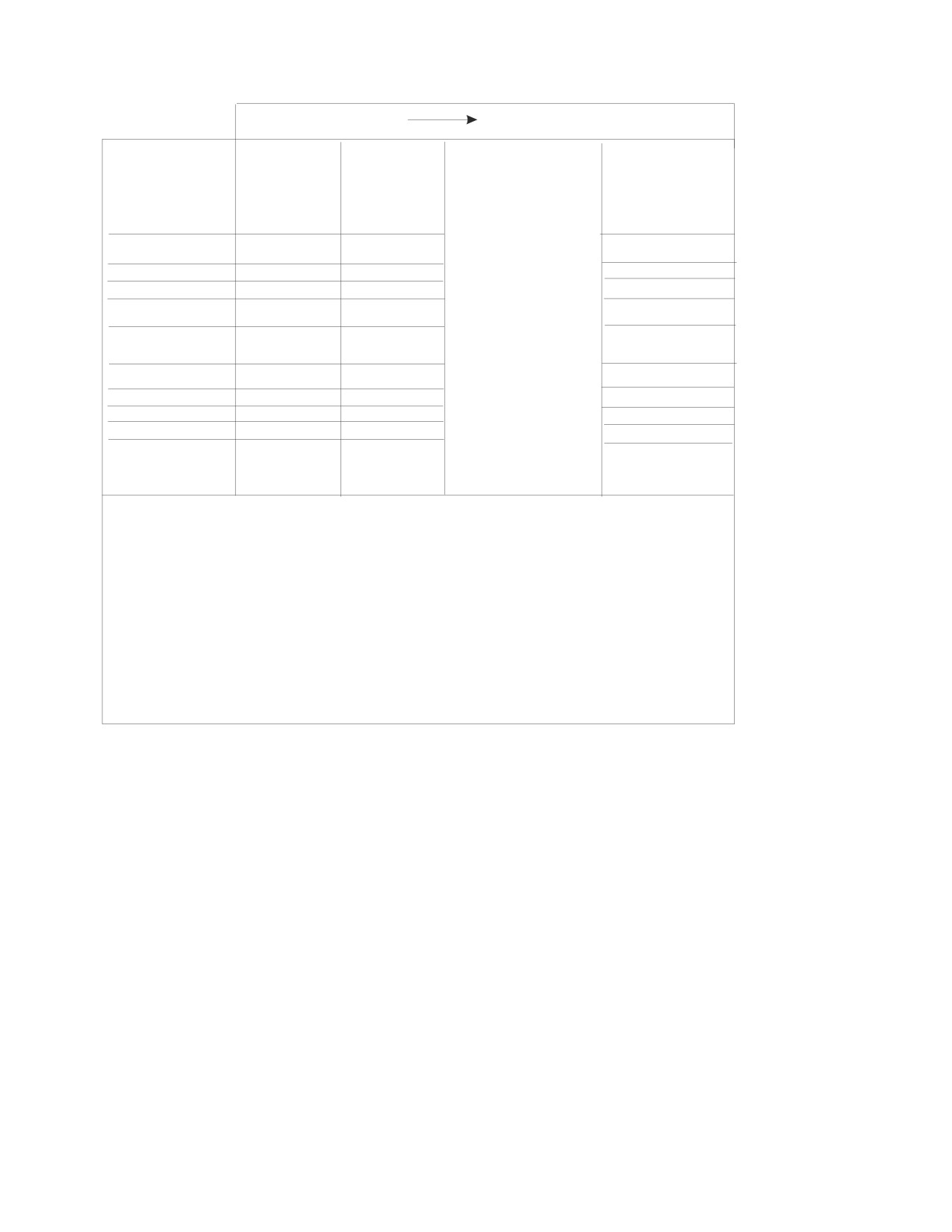
Figure 49 on page 235 summarizes the sequence of events needed to initialize the
SQLDA for use in processing dynamically defined statements in DB2 Server for
VM. In any case, you must always initialize SQLN before the DESCRIBE.
234
Application Programming

Sequence of Events
First,
Then
Next, if you intend
EXECUTE,
to use the
SQLDA
DESCRIBE
you must
OPEN, PUT
SQLDA for input
Fields:
initializes:
initialize:
and FETCH
(EXECUTE or
OPEN), you must
use:
place values in
SQLDAID(3)
X
the locations
SQLDABC
X
pointed to by
SQLN(1)
SQLDATA and
SQLD
X
X
SQLIND. When
the SQLDA is
SQLVAR
used for output
(FETCH), the
SQLTYPE
X
X
system places
SQLLEN
X
X
values in those
SQLDATA
X
X
X
areas.
SQLIND(2)
X
X
SQLNAME(3)
X
X
X
Notes:
1. You must set SQLN before the DESCRIBE.
2. Only provide indicator variables if they are allowed. In dynamic SQL, indicator variables
should be used for output. They can be used for input in an INSERT or UPDATE, but not
in predicates.
3. Only update the SQLDAID and SQLNAME fields if a CCSID override is required. The database
manager extracts the CCSID from the 3rd and 4th byte of the SQLNAME field only
when the following are true:
* The data type of the user data area is character or graphic
* If the SQLDS protocol is being used, the 6th byte of the SQLDAID field has been set to '+'.
For example, the SQLDAID field is 'SQLDA+ '.
* The length of the SQLNAME field is 8
* The first two bytes of data in the SQLNAME field are X ' 0000 '.
Figure 49. SQLDA Initialization - DB2 Server for VM
Chapter 7. Using Dynamic Statements
235
Sequence of Events
Next, if you intend
First,
Then
EXECUTE,
to use the
SQLDA
DESCRIBE
you must
OPEN, PUT
SQLDA for input
Fields:
initializes:
initialize:
and FETCH
(EXECUTE or
OPEN), you must
use:
place values in
SQLDAID(3)
X
the locations
SQLDABC
X
pointed to by
SQLN(1)
SQLDATA and
SQLD
X
X
SQLIND. When
the SQLDA is
SQLVAR
used for output
(FETCH), the
SQLTYPE
X
X
system places
SQLLEN
X
X
values in those
SQLDATA
X
X
X
areas.
SQLIND(2)
X
X
SQLNAME(3)
X
X
X
Notes:
1. You must set SQLN before the DESCRIBE.
2. Only provide indicator variables if they are allowed. In dynamic SQL, indicator variables
should be used for output. They can be used for input in an INSERT or UPDATE, but not
in predicates.
3. Only update the SQLDAID and SQLNAME fields if a CCSID override is required. The database
manager extracts the CCSID from the 3rd and 4th byte of the SQLNAME field only
when the following are true:
* The data type of the user data area is character or graphic
* The 6th byte of the SQLDAID field has been set to '+'.
For example, the SQLDAID field is 'SQLDA+ '.
* The length of the SQLNAME field is 8
* The first two bytes of data in the SQLNAME field are X ' 0000 '.
Figure 50. SQLDA Initialization DB2 Server for VSE
If you do not use a DESCRIBE to set up the SQLDA, you need only fill in those
fields that are actually used by the OPEN, FETCH, PUT, or EXECUTE statements.
For applications that override the defaults for subtypes and CCSIDs, the SQLDA
provides output information on subtypes and CCSIDs. The DB2 Server for VSE &
VM SQL Reference manual contains a description of the structure of the SQLDA,
and an explanation of each field within the SQLDA. The following are some
additional guidelines for using the SQLN and SQLD fields.
Using the SQLN Field
Always set this value when the structure is allocated. When the USING clause of
the DESCRIBE statement is set to NAMES, LABELS, or ANY, specify the maximum
number of expected select_list items. When you set the USING clause option to
BOTH, specify twice the number of expected select_list items.
Using the SQLD Field in the SQLDA
If the statement being described is not a select-statement, the database manager
returns a zero in SQLD. If the statement is a select-statement, SQLD is set to indicate
236
Application Programming
the number of SQLVAR elements. This number is either the number of select_list
elements (when the USING clause of the DESCRIBE statement is set to NAMES,
LABELS, or ANY), or twice the number of select_list elements (if the USING clause
is set to BOTH).
In the second case (USING clause set to BOTH), your program should reset SQLD
to half its value before issuing a subsequent FETCH or PUT. This is because only
the first N/2 elements contain information; the rest contains label information only.
If (after a DESCRIBE) SQLD is greater than SQLN, the SQLVAR array is not large
enough to contain descriptions for all the select_list items. In this case, you must
allocate a larger SQLDA based on the value of SQLD. The value in SQLN is not
changed.
If you set the value of SQLD yourself, and you set it to less than SQLN, the excess
elements of the SQLVAR array are ignored.
Using the PREPARE Statement
►► PREPARE statement_name FROM
string_constant
►◄
host_variable
Figure 51. Format of the PREPARE statement
Although a statement to be “prepared” cannot contain any host variables, it can
contain parameters to be filled in when the statement is executed. These
parameters are denoted by parameter markers (?). You can specify parameters only
in places where a data value could be used. (A parameter cannot represent the
name of a table or a column.) The pseudocode example below prepares an INSERT
statement that has three parameters:
QSTRING=’INSERT INTO DEPARTMENT(DEPTNO,DEPTNAME,ADMRDEPT) VALUES (?,?,?)’
PREPARE S1 FROM :QSTRING
Each time S1 is executed, values must be supplied for the three parameters that
were specified with question marks.
If your program constructs dynamic SQL statements by manipulating quoted
strings, remember that SQL uses two single quotation marks to represent a
quotation mark inside a quoted string. The following example illustrates this rule:
PREPARE S1 FROM ’INSERT INTO DEPARTMENT(DEPTNO,DEPTNAME,ADMRDEPT)
VALUES (’A00’,’SPIFFY COMPUTER SERVICE DIV.’,’A00’’)’
In this example, the text beginning with INSERT and ending with A00'') is a
constant string. Each pair of quotation marks is collapsed to a single quotation
mark.
In COBOL, a constant string-spec is treated as a COBOL character string and is
affected by the Quote/APOST option. This option determines the character string
delimiters. If you use the same character (" or ') in the constant string-spec as the
one established by Quote/APOST option for the outer string delimiters,
unexpected string termination can result.
Chapter 7. Using Dynamic Statements
237
It is best to avoid using a constant string-spec whenever it may contain quotation
marks. Instead, you should build the SQL statement as a host variable string-spec,
using the known host language rules for character strings. For SQL statements that
contain graphic constants, be aware that some DBCS characters may contain the
encodings for EBCDIC quote. This could cause unintentional termination of host
language strings that contain DBCS characters.
A parameter marker (?) can appear in an SQL statement to be “prepared” in any
place that a host variable may appear, with the following exceptions:
v
A parameter marker cannot be used in a select_list or a FROM-clause (but it may
be used in the WHERE clause of a SELECT statement).
The following examples are invalid:
SELECT ? FROM EMPLOYEE
SELECT EMPNO FROM ?
The following example is valid:
SELECT * FROM EMPLOYEE WHERE EMPNO = ?
v
At least one of the operands of the arithmetic and comparison operators, or of
the BETWEEN and IN predicates, must not be a parameter marker.
The following examples are invalid:
SELECT * FROM EMPLOYEE WHERE SALARY > ? + ?
SELECT * FROM EMPLOYEE WHERE ? = ?
SELECT * FROM EMPLOYEE WHERE ? IN (?,?)
The following examples are valid:
SELECT * FROM EMPLOYEE WHERE SALARY > 20000 + ?
SELECT * FROM EMPLOYEE WHERE SALARY = ?
SELECT * FROM EMPLOYEE WHERE ? IN (?,?,20000)
v
A parameter marker cannot be the sole argument of a scalar function. It,
however, can be used in an arithmetic expression as long as the other parameter
is a number.
The following example is invalid:
SELECT * FROM EMPLOYEE WHERE HIREDATE > DATE(?)
The following example is valid:
SELECT * FROM EMPLOYEE WHERE HIREDATE > DATE(14+?)
v
A parameter marker cannot be used as the sole operand in an arithmetic
expression that involves a datetime value.
The following examples are invalid:
SELECT * FROM EMPLOYEE WHERE HIREDATE = START_DATE + ?
SELECT * FROM EMPLOYEE WHERE HIREDATE = 10000000. + ?
The following example is valid:
SELECT * FROM EMPLOYEE WHERE HIREDATE = HIREDATE + (1000000.+?)
SQL Functions Not Supported in Dynamic Statements
The following SQL functions are not supported in dynamic SQL:
v Syntax and semantic flagging of the dynamically executed statement
v SQL comments
v Negative indicator variables in predicates
v Optional choice for the FOR UPDATE OF clause in cursor query statements
(NOFOR support).
v SQL CALL statement.
238
Application Programming
Chapter 8. Using Extended Dynamic Statements
Contents
Using Extended Dynamic Statements to
Using COMMIT WORK and ROLLBACK
Maintain Packages
240
WORK Statements (DB2 Server for VSE
Illustrating the Use of Extended Dynamic
Only)
252
Statements
244
Considering Virtual Storage in a Logical Unit
Developing a Query Application
244
of Work (DB2 Server for VSE Only)
252
Developing a Language Preprocessor . . . 246
Mapping Extended Dynamic Statements to
Grouping Extended Dynamic Statements in an
Static and Dynamic Statements
253
LUW
250
SQL Functions Not Supported in Extended
Considering Virtual Storage in an LUW (DB2
Dynamic Statements
254
Server for VM Only)
252
239
Using Extended Dynamic Statements to Maintain Packages
Extended dynamic statements support the direct creation and maintenance of
packages for DB2 Server for VSE & VM data. For DB2 Server for VSE, extended
dynamic statements can only be used with assembler language. For DB2 Server for
VM, extended dynamic statements can only be used with assembler language or in
the optional DB2 Server RXSQL feature (described in the DB2 REXX SQL for
VM/ESA Installation and Reference manual). Refer to the DB2 Server for VSE & VM
SQL Reference manual for a detailed discussion of the restrictions with DRDA
protocol.
Note: This topic is more advanced than previous sections and the techniques
discussed here are not relevant to all application programs.
Before reading this chapter, you should be familiar with how to use packages as
described in “Preprocessing the Program” on page 114 (DB2 Server for VM) or
“Preprocessing the Program” on page 156 (DB2 Server for VSE), and dynamically
defined statements, as described in Chapter 7, “Using Dynamic Statements,” on
page 215. Extended dynamic statements provide a function similar to that
provided by the DB2 Server for VSE & VM preprocessors, but may be particularly
useful where:
v The current preprocessors do not support the language of the application or
support program.
v SQL statements are conceived and built dynamically, but are executed
repetitively (in a different logical unit of work). In this case it is more efficient to
avoid having to repeat the preprocessing of statements each time they are
executed, as would be required for normal dynamic statements.
v You want to build and maintain an application package of SQL statements to be
shared by a group of users.
v The utilization of program storage is critical and there are a significant number
of predefined “transactions” involving DB2 Server for VSE & VM data.
Individual SQL statements can be added or deleted without affecting or repeating
the preprocessing of other SQL statements in the package.
The following extended dynamic statements are supported. (They are described in
detail in the DB2 Server for VSE & VM SQL Reference manual.)
v CREATE PACKAGE—build an empty package
v PREPARE—add a statement to a package
v DESCRIBE—obtain information about columns in the select_list of a prepared
select-statement
v EXECUTE—execute a statement in a package
v DECLARE CURSOR—in connection with OPEN, FETCH, PUT, and CLOSE,
execute a SELECT or an INSERT statement in a package
v OPEN (cursor)
v FETCH (cursor)
v PUT (cursor)
v CLOSE (cursor)
v DROP STATEMENT—delete a statement from a package.
Except for CREATE PACKAGE and DROP STATEMENT, the names of these
statements are the same as the corresponding “normal” dynamic statements
discussed in Chapter 7, “Using Dynamic Statements,” on page 215, but their format
240
Application Programming
and meaning are somewhat different. For example, the statement-id, package-id,
and cursor-name fields are all specified by host variables.
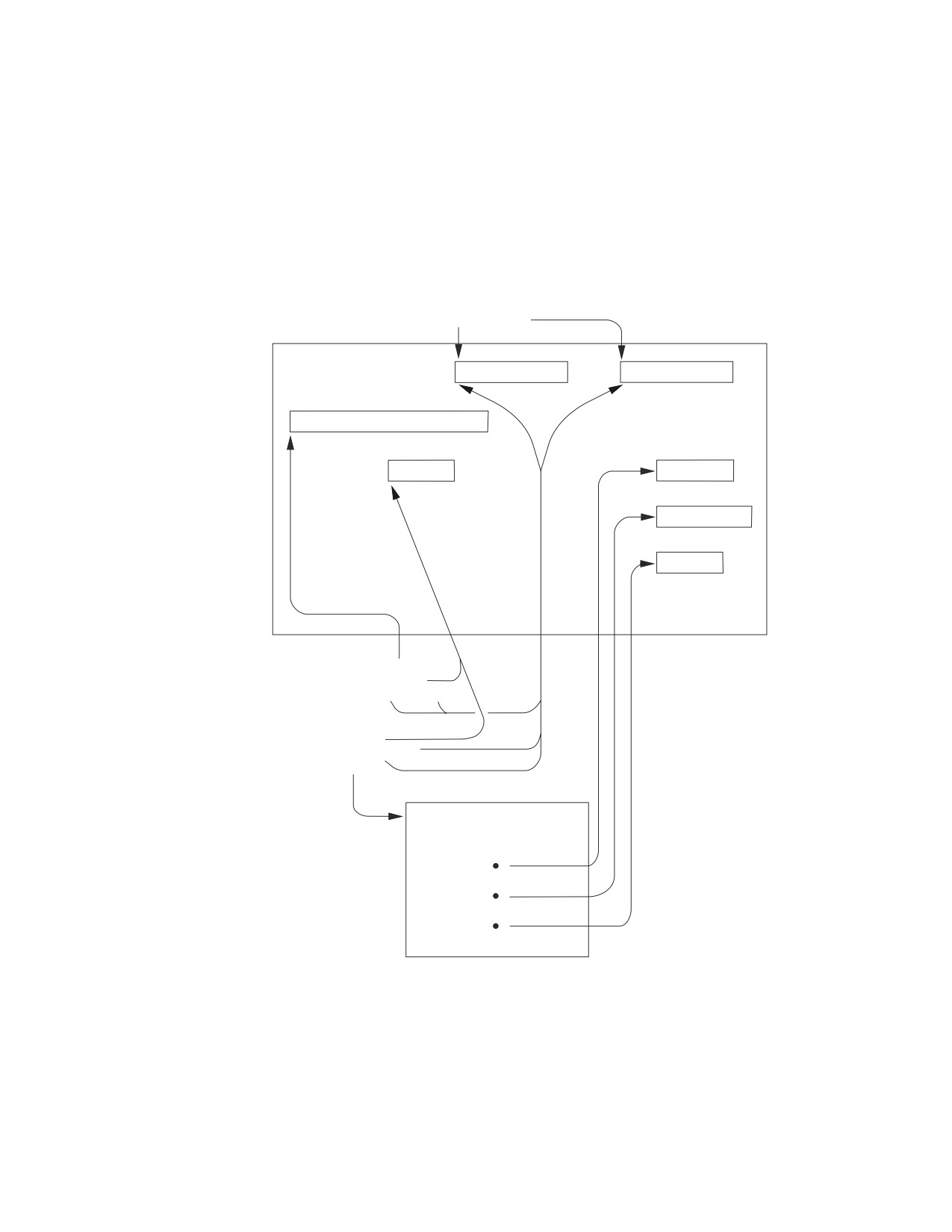
Unlike dynamic statements which are related through a specific statement name,
extended dynamic statements are related through the symbolic host variables used
for the statement-id and package-id. This relationship is shown in Figure 52.
Because the statement-id and package-id are host variables, actual values can be
substituted when the program is executed. STMTID is returned by an extended
PREPARE statement, and is used as input by the subsequent extended EXECUTE
(or DECLARE CURSOR) statement.
CREATE PROGRAM :USER.PROG
HOST PROGRAM VARIABLES
USERNAME
PROGRAMX
SELECT * FROM EMPLOYEE
PREPARE FROM :STRING
SETTING :STMTID
IN :USER.:PROG
EXECUTE :STMID
IN :USER.:PROG
USING :SQLDA
SQLDA
STRUCTURE
Figure 52. Relationship between Extended Dynamic Statements Expressed Using Host
Program Variables
The differences between dynamic and extended dynamic statements are illustrated
in Figure 53. As shown in this figure, the normal dynamic statements are intended
primarily for supporting an interactive environment. As such, the PREPARE and
EXECUTE commands must be used within the same logical unit of work. In
contrast, extended dynamic statements are generally used in a compile
environment where the EXECUTE (or DECLARE CURSOR) may be in a logical
Chapter 8. Using Extended Dynamic Statements
241
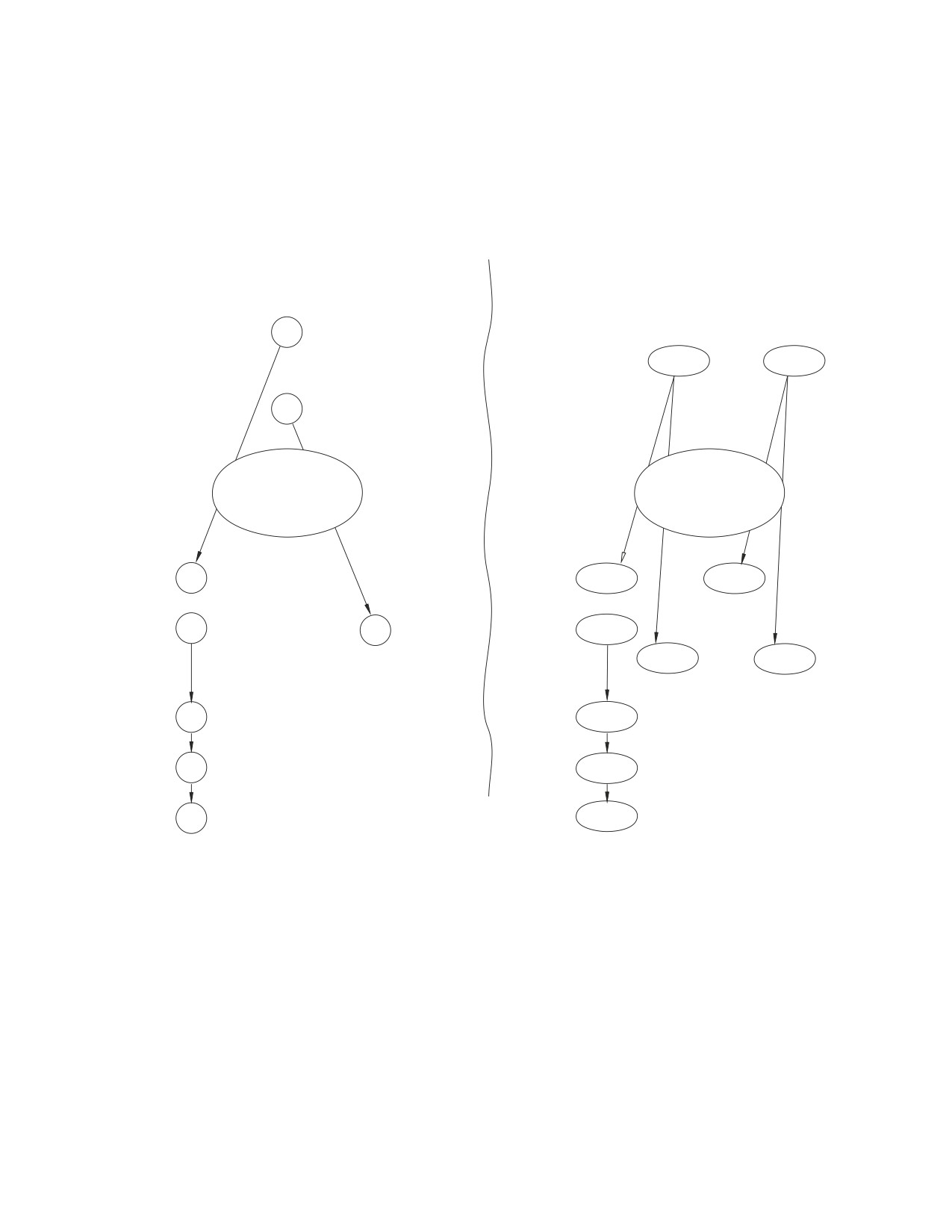
unit of work that is different from the one where the SQL statement was prepared.
This makes it possible to PREPARE statements at different times. In DB2 Server for
VSE & VM terms, they can be prepared in one logical unit of work (stored in a
package), and called out for execution from another logical unit of work (from the
same or a different program). This is made possible by passing the program and
statement identifiers between the preparation environment and the execution
environment.
DYNAMICALLY DEFINED
EXTENDED DYNAMIC
STATEMENTS
STATEMENTS
(INTERACTIVE)
(COMPILED)
PREPARE
S1
FROM :STRING
PREPARE FROM :STRING
SETTING
:STMTID
IN
:PROG
PREPARE
S2
FROM :STRING
Names must be resolved
Pass Values between
in the same logical unit
logical units of work
of work and program
or programs
EXECUTE
S1
USING...
:STMTID
IN
:PROG
DECLARE
C1
CURSOR FOR...
S2
:CURS
CURSOR
:STMTID
IN
:PROG
OPEN
C1
OPEN
:CURS
FETCH
C1
INTO...
FETCH
:CURS
INTO...
CLOSE
C1
CLOSE
:CURS
Figure 53. Comparing Dynamic to Extended Dynamic Statements
CREATE PACKAGE and DROP STATEMENT have no counterparts in the normal
dynamic statement set.
CREATE PACKAGE creates an empty package and is normally followed by
extended PREPARE statements to add statements to the package. If the CREATE
PACKAGE has a MODIFY option, the package may even be changed in another
logical unit of work. The change may take the form of additional extended
PREPAREs (adding statements to those already there), or DROP STATEMENTs
(deleting statements previously prepared). If a program is created with the
NOMODIFY option, it cannot be changed without completely replacing it. You do
this by using CREATE PACKAGE with the REPLACE option and specifying the
same package-id. When you use DB2 Server for VM DRDA protocol, there is no
support for the MODIFY option. The MODIFY option of the CREATE PACKAGE
statement defaults to NOMODIFY.
242
Application Programming
The DROP PACKAGE statement is not listed as an extended dynamic statement,
because it has general applicability for all packages, not just those that are built
with extended dynamic statements. (See the DB2 Server for VSE & VM SQL
Reference manual for more information on the DROP PACKAGE statement.) Like
the extended dynamic statements, DROP PACKAGE permits the package name to
be specified as a host program variable.
DB2 Server for VM
Like all SQL statements, extended dynamic statements require preprocessing,
but are only supported by the assembler preprocessor. Once they are
preprocessed (and the containing program is compiled), the program holding
them may itself be used to process SQL statements and create packages. That
is, it may prepare SQL statements for repetitive execution. A package created
in SQLDS protocol that uses extended dynamic statements is not supported
in DRDA protocol, nor is a package created in DRDA protocol that uses
extended dynamic statements supported in SQLDS protocol. The
nonmodifiable environment, when using extended dynamic statements, is
supported with the following restrictions:
v The Positioned UPDATE or Positioned DELETE statements are not
supported.
v If you use the basic format of the extended PREPARE statement to prepare
a statement that contains parameter markers, you must include the USING
DESCRIPTOR clause to identify an input SQLDA structure.
v The prepare single row format of the extended PREPARE statement is not
supported.
v The NODESCRIBE option of the CREATE PACKAGE statement is not
supported.
v Cursors are unsupported if they are declared with the “WITH HOLD”
clause.
Chapter 8. Using Extended Dynamic Statements
243
DB2 Server for VSE
Like all SQL statements, extended dynamic statements require preprocessing,
but are only supported by the assembler preprocessor. Once they are
preprocessed (and the containing program is compiled), the program holding
them may itself be used to process SQL statements and create packages. That
is, it may prepare SQL statements for repetitive execution. A package created
in SQLDS protocol that uses extended dynamic statements is not supported
in DRDA protocol, nor is a package created in DRDA protocol that uses
extended dynamic statements supported in SQLDS protocol. The
nonmodifiable environment, when using extended dynamic statements, is
supported with the following restrictions:
v The Positioned UPDATE or Positioned DELETE statements are not
supported.
v If you use the basic format of the extended PREPARE statement to prepare
a statement that contains parameter markers, you must include the USING
DESCRIPTOR clause to identify an input SQLDA structure.
v The prepare single row format of the extended PREPARE statement is not
supported.
v The NODESCRIBE option of the CREATE PACKAGE statement is not
supported.
v The temporary extended prepare format of the extended PREPARE
statement is not supported.
v The using output descriptor clause in the extended EXECUTE statement is
not supported.
v The USER parameter in the ISOLATION option of the CREATE PACKAGE
statement is not supported.
v The LOCAL parameter in the DATE or TIME option of the CREATE
PACKAGE statement is not supported.
v Cursors are unsupported if they are declared with the “WITH HOLD”
clause. However, VSE Online and Batch applications may use the “WITH
HOLD” clause against other DRDA servers if they support it, except when
extended dynamic statements are used.
Illustrating the Use of Extended Dynamic Statements
Developing a Query Application
Consider the following example. A support group needs to develop a program that
dynamically accepts SQL statements for execution and does not know what SQL
statements will be processed. This is a typical application for normal dynamic SQL
statements. But since there is also a requirement for repetitively executing the
preprocessed statements at a later time (stored SQL application) without having to
repeat the PREPARE, it is an application for extended dynamic statements.
A program that handles preparation of end user SQL statements can also execute
these statements. This is essentially a query language program (but it supports
more than just select-statements). The program may also support deleting
statements from and adding them to existing packages. (See the beginning of this
chapter for a list of extended dynamic statements for doing this, as well as
statements to control execution.)
244
Application Programming
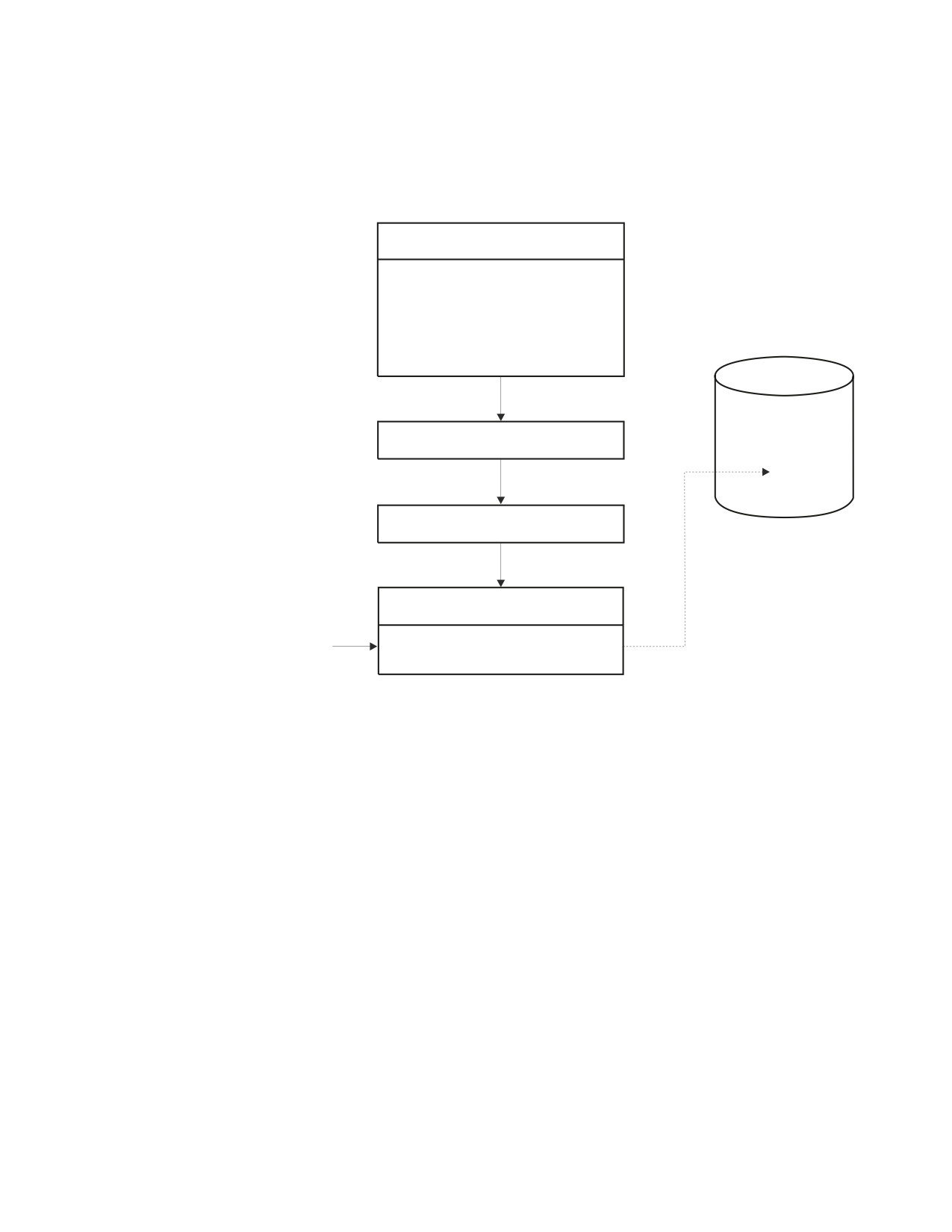
The program may use CREATE PACKAGE and extended PREPARE to build a
package and prepare the end-user SQL statements. However, you must first
preprocess the program itself, by running it through the assembler preprocessor
and the assembler. See Figure 54 (the application program is referred to as a
“Support Program”).
SUPPORT PROGRAM
Scan User Commands
CREATE PACKAGE
PREPARE
COMMIT WORK
DB2 for VSE & VM
Package
DB2 for VSE & VM
ASSEMBLER PREPROCESSOR
P
ASSEMBLER
SUPPORT PROGRAM
End User
Object
Commands
Figure 54. An Example of an Interpretive Support Program for Building and Executing SQL
Statements in a Package
The resulting support program can accept end-user SQL statements, and create
packages in the database to hold them. For example, there can be a separate
package to hold the SQL statements for each end-user. A more advanced support
program may even accept end-user commands that are at a higher level than that
supported by the system, and then translate them to SQL statements before
preparing them.
The package P is built by the support program (by CREATE PACKAGE) for the
particular SQL statements. If the support program allows both adding SQL
statements to and dropping them from P, then the support program must utilize
and be preprocessed with a DROP STATEMENT as well as the PREPARE. Of
course, there are a few other ordinary SQL statements that may be appropriate for
the support program: WHENEVER, COMMIT/ROLLBACK, and so on to make it
complete.
So far, this example has not addressed execution of the end-user SQL statements.
We have already listed the extended dynamic statements that support execution
(extended EXECUTE, DECLARE CURSOR, and so on). The support program
would ordinarily support end-user commands to retrieve data and update data
(using either direct SQL statements or higher level commands that require
conversion). This addition does not alter the concept shown in Figure 54, except to
add additional extended dynamic statements to the support program.
Chapter 8. Using Extended Dynamic Statements
245
The DESCRIBE statement can be used in the same way as shown under normal
dynamic statements.
Note that only one “copy” of each extended dynamic statement need be provided
in the support program, because each of these statements is parameterized with
host variables that can be dynamically changed for each use. For example, one
DECLARE CURSOR statement may service all cursor retrievals, even if they are
concurrently open, because each can be given a different cursor name by the host
variable value for the cursor name, and a different statement identifier by the host
variable value for the statement-id. This is important in cases where the use of
program storage is critical and there are a significant number of predefined
transactions.
Developing a Language Preprocessor
The previous example is structurally simple. It assumes that the support program
remains in control as an interpreter through preparation, maintenance, and
execution of the user’s SQL statements.
For a typical language preprocessor program such as those provided with the DB2
Server for VSE & VM product, however, this is not the case. If you write a support
program for a new language preprocessor, you would probably separate the two
parts, each with SQL statements:
1. One for preparation of end-user SQL statements and creation of a package.
2. Another for supporting the execution of the SQL statements that were prepared
by the first part.
The SQL facilities required are similar to the previous example, except that no
package maintenance functions are needed. The language preprocessor has the
following characteristics:
v
It is a batch program, rather than an interpreter.
v
Because it requires extended dynamic statements, it is written in assembler
language. (This was also true in the previous example.) Alternatively, at least
part of it must be written in assembler language (the part that contains the
extended dynamic statements) and the remaining part must be written in a
language that is capable of calling an assembler module.
v
Rather than accepting predefined commands from the end-user, the end-user’s
source language code is scanned for SQL statements, which must be identified
by some defined convention (for example, EXEC SQL) for proper recognition.
v
The support program must record information about host program variables in a
control structure that is added to the end-user’s source program and passed by a
generated call to the execution-time part of the support program. This control
structure builds SQLDA structures that are passed to or received from the
system (refer to the extended EXECUTE, OPEN and FETCH statements).
v
The execution part of the support program is link/loaded with the user’s
application program, where it is available to handle the execution-time
functions.
v
As each end-user SQL statement is prepared, the package-id and the
statement-id (returned by the system along with the package-id) must be saved
in a control structure (again generated into the end-user’s source program) for
use by the execution-time support program.
v
For each SQL statement in the end-user’s source program, a call must be
generated to the execution-time support program, passing the control structure,
containing the host variable, package-id, and statement-id information for the
current SQL statement.
246
Application Programming
v The execution-time support program must build the SQLDA structures required,
set values in host variables required by the execution-time extended dynamic
statements, and then execute these statements.
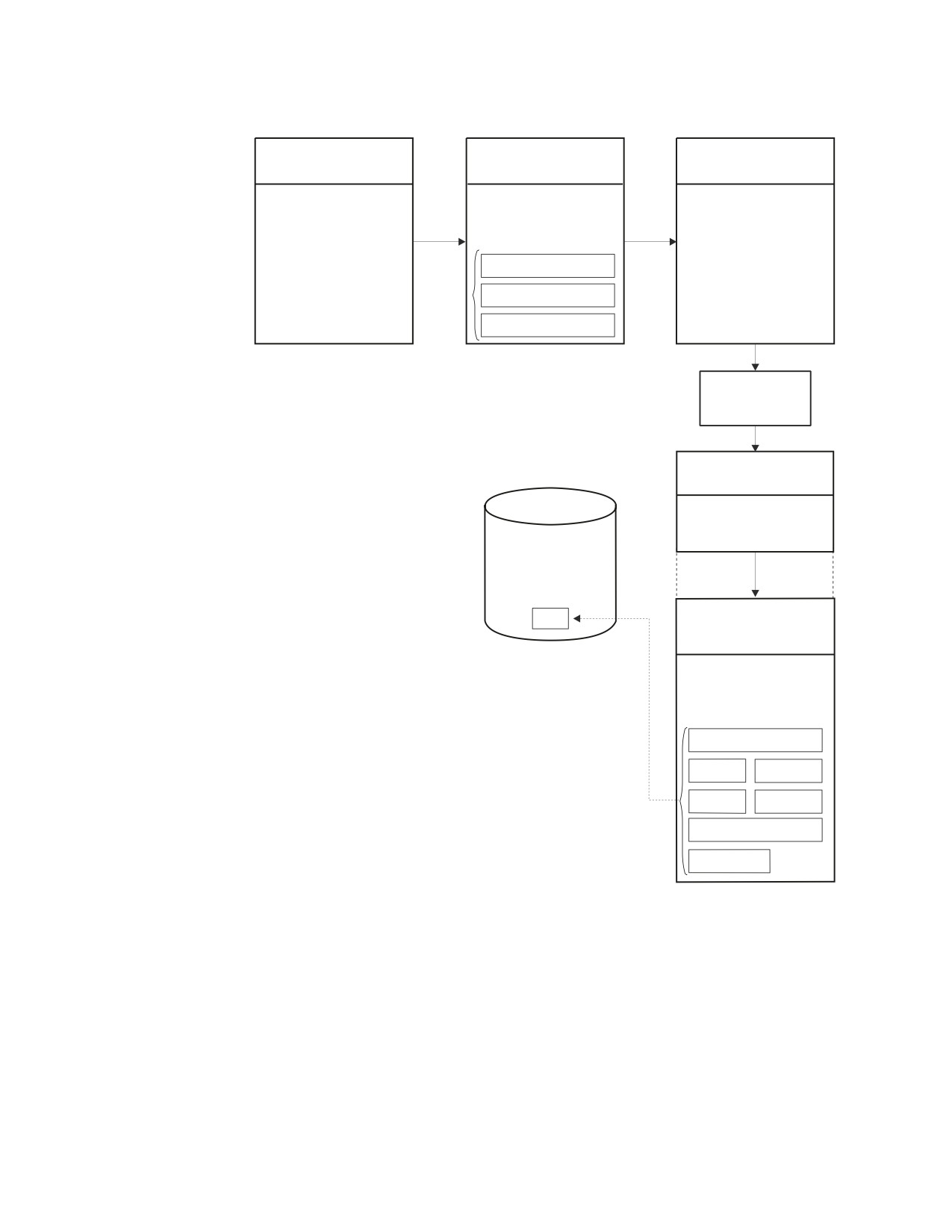
This process is illustrated in Figure 55, Figure 56, Figure 57, and Figure 58. The
support program is the preprocessor for language X. It preprocesses the end-user
program, modifying the source (adding control structures and generating calls to
pass to the support program Part 2 at execution-time). Once the modified end-user
source has been compiled by the language X compiler, it is combined in one load
module with the object code for the support program Part 2, which provides the
DB2 Server for VSE & VM support for execution-time functions (DECLARE
CURSOR, and so on).
Figure 55 shows the preprocessing and assembly steps for the two parts of the
support program. For DB2 Server for VM, no packages are created, because there
are no SQL statements in either part that need to be stored in a package.
Figure 56 on page 248 shows how the two resulting object modules of the support
program process end-user SQL statements.
SOURCE
OBJECT
SUPPORT PROGRAM
SUPPORT PROGRAM
PART I
PART I
DB2 for VSE & VM
Preparation Time
Assembler
Assembler
SQL Statement
Functions
Preprocessor
Expansions and
SQL Calls Added
SOURCE
OBJECT
SUPPORT PROGRAM
SUPPORT PROGRAM
PART II
PART II
DB2 for VSE & VM
Assembler
Assembler
SQL Statement
Execution Time
Preprocessor
Expansions and
Functions
SQL Calls Added
Figure 55. Preprocessing and Assembling of a Two-Part Support Program
Chapter 8. Using Extended Dynamic Statements
247
Preprocessing End-User
Program, P.
SOURCE
OBJECT
EXPANDED SOURCE
END-USER PROGRAM
SUPPORT PROGRAM
END-USER PROGRAM, P
P, LANGUAGE X.
PART I
Scan Routines
Build/Set up
SELECT Commented Out
Routines
SELECT
and replaced by Control
Structure and a Call to
CREATE PACKAGE
Support Program, Part II
PREPARE
COMMIT WORK
COMPILE
(LANGUAGE X)
Execution of End-User
Program, P.
OBJECT, END-USER
PROGRAM, P
DB2 for VSE & VM
Packages
Linked with
OBJECT
P
SUPPORT PROGRAM
PART II
Set up Extended Dynamic
Statements needed for
Execution Time and
Execute Them
DECLARE CURSOR
OPEN
FETCH
CLOSE
EXECUTE
COMMIT WORK
DESCRIBE
Figure 56. Preprocessing and Executing an End-User Program by a Two-Part Support
Program
Part 1 scans the end-user’s source for SQL statements, uses CREATE PACKAGE to
build an empty package, P, uses extended PREPARE statements to add SQL
statements to P, and uses a COMMIT statement to finalize P. It also adds calls and
control structures, required by Part 2 of the support program, to the user’s source
program and comments out the original SQL statement.
Part 2 of the support program works with the package, P, executing the SQL
statements scanned and prepared by Part 1, and using the control structures
passed in the calls generated by Part 1. Part 2 must be link/loaded with any
end-user module that is preprocessed by Part 1.
248
Application Programming
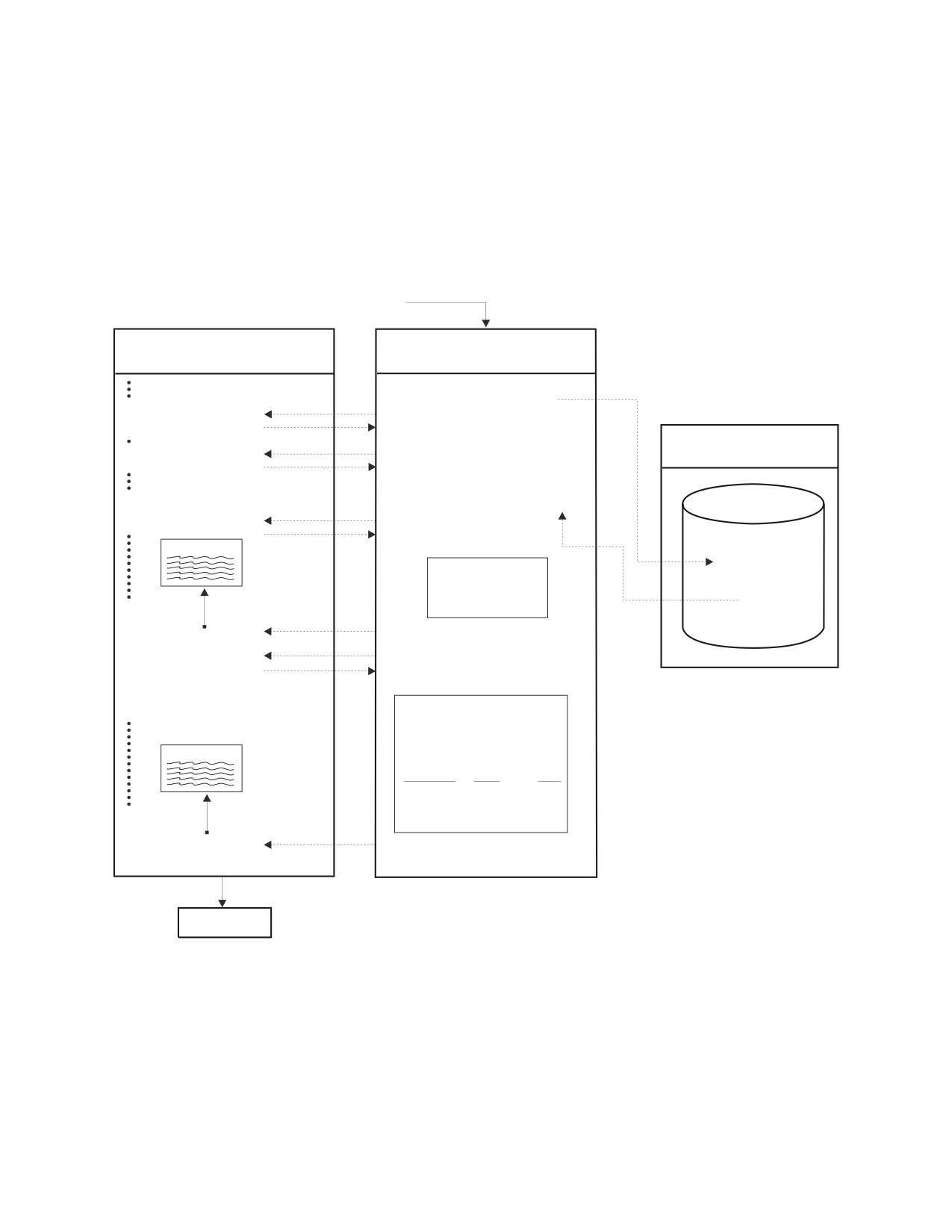
Figure 57 shows Part 1 of the support program in more detail, with pseudocode to
illustrate a simple user program that includes a DECLARE...CURSOR FOR
SELECT..., an OPEN of that cursor, and a FETCH for the same cursor. Control
structures are shown in more detail, and some particular values for parameters are
given. The value 26 returned from the PREPARE statement is only for purposes of
illustration, representing a unique identifier returned by the system to identify the
statement within the package P. A user ID may be necessary to identify the owner
of the package, but it is omitted here for simplicity. Other statements, such as
CLOSE (cursor) and COMMIT are not shown in order to simplify the illustration.
External Invocation Passing:
Program Name (P) and User's Source
END USER'S SOURCE PROGRAM
SUPPORT PROGRAM (OBJECT)
(P)
PART I
Put Program (P) into "PROG"
CREATE PACKAGE :PROG
Declare Variables
SCAN
A,B,C
Record Name, Type, Length of
Variables found
DECLARE C1 CURSOR
SCAN
FOR SELECT...
Move SQL Statement (SELECT...)
into variable "Q"
PREPARE FROM :Q SETTING :S
DB2forVSE&VM
IN PACKAGE :PROG
OPEN C1
SCAN
Build a control structure in
26
Ctl Structure
end-user's source:
Package
Call Type: OPEN
Cursor:
C1
26
Program:
P
P
Stmtid:
26
CALL SP2
(
)
Build a call to Support Program,
Part II
FETCH C1
SCAN
INTO :A, :B, :C
Build a Control Structure in
end-user's source:
Call Type:
Fetch
Cursor
C1
Program
P
Ctl Structure
Stmtid
26
Variables Type
Len
A
CHAR
10
B
DEC
6,2
C
INTEGER
4
CALL SP2
(
)
Build a call to Support Program,
Part II
COMPILE
Figure 57. Pseudocode Example of Preprocessing the End-User Program P
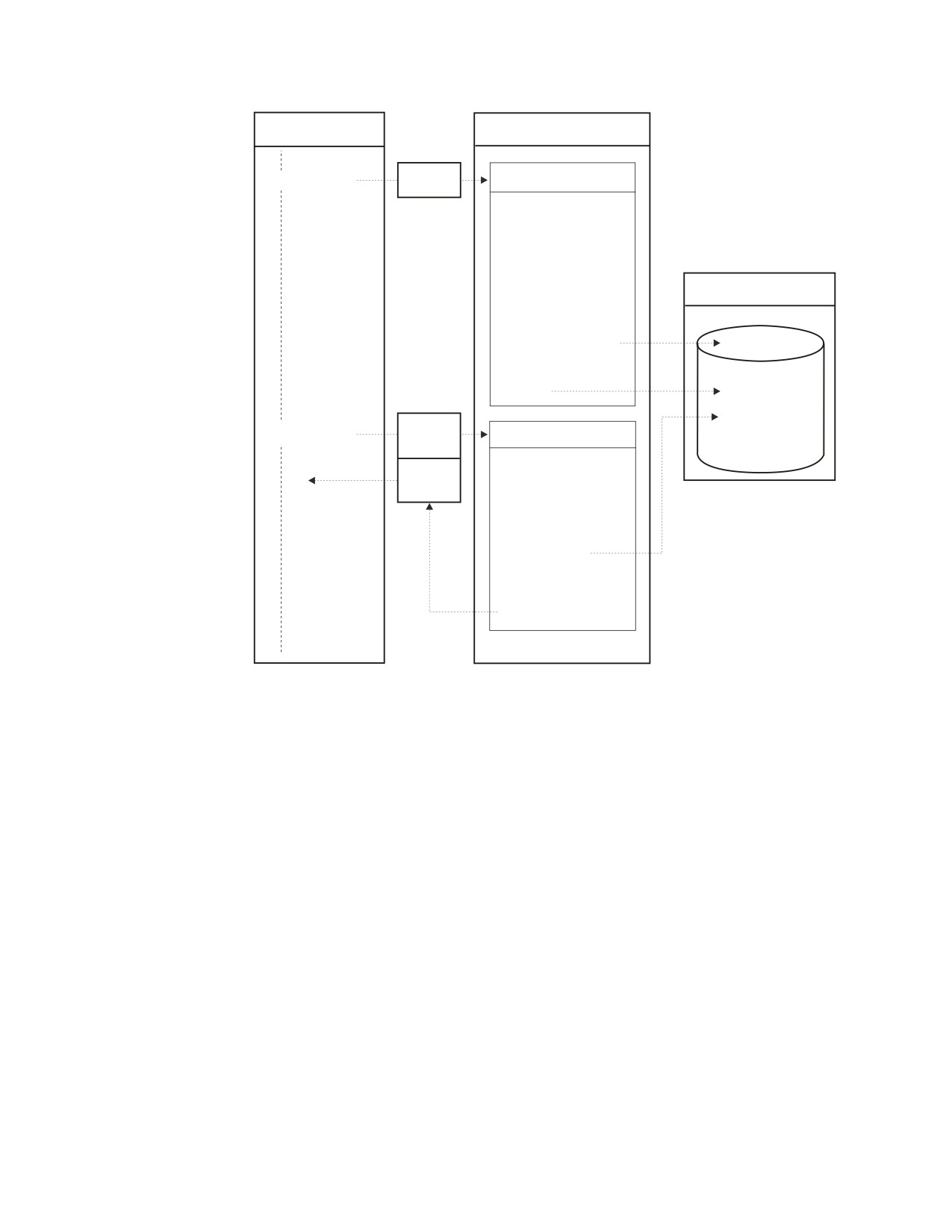
Figure 58 on page 250 shows the execution-time flow between the end-user’s object
program and the support program (Part 2) in more detail. The two calls shown
correspond to the two calls generated in Figure 57. This example does not go far
enough to illustrate that two calls of the same type (two opens, for example)
would share the same set of logic and the same extended dynamic statement
(OPEN) in the support program.
Chapter 8. Using Extended Dynamic Statements
249
END USER'S OBJECT
OBJECT SUPPORT PROGRAM
PROGRAM (P)
PART II
Control
CALL SP2 (OPEN)
CALL TYPE: OPEN
Structure
SET Cursor Name in
host variable, C
(Value 'C')
SET STMT-id in
host variable, SI
(Value 26)
SET Program in
host variable, PI
(Value 'P')
DECLARE :C CURSOR
DB2 for VSE & VM
FOR :SI
IN PROGRAM :PI
OPEN :C
Package
P
Control
CALL SP2 (FETCH)
CALL TYPE: FETCH
Structure
Set Cursor, STMT-id, and
Program, as above
Passback
Area
Build a SQLDA
Structure Using
variable information
for A, B, C,
FETCH :C USING
DESCRIPTOR SQLDA
MOVE A, B, C results
from SQLDA to
Passback Area
Figure 58. Pseudocode Example of Executing the End-User Program P
Grouping Extended Dynamic Statements in an LUW
There are primarily three cases to consider when determining the proper grouping
of extended dynamic statements in a logical unit of work:
1. An LUW contains a CREATE PACKAGE without the MODIFY option. This
would be the case for a language preprocessor application.
2. An LUW contains a CREATE PACKAGE with the MODIFY option. This would
be the case for an application that gets new SQL statements from its users, then
prepares and executes them immediately (but also has them available for later
execution, because they are stored in a package).
3. An LUW contains no CREATE PACKAGE (the referenced package has been
created with the MODIFY option in another LUW). This would be the case for
an application that prepares, executes, or changes statements in a package that
was created previously.
In the first case, the only other extended dynamic statement permitted is the
PREPARE statement, and it must reference only the program that is specified in
the CREATE PACKAGE statement. If the LUW is terminated by a COMMIT
statement, a DB2 Server for VSE & VM package is created. If no extended
PREPARE statements were executed, the package is empty and the COMMIT
statement returns an SQLCODE of -759 (SQLSTATE '42943'). If a ROLLBACK
250
Application Programming

statement terminates the LUW, no package is created. In Figure 59, Example 1 is a
valid illustration of this case.
DB2 Server for VM
If you are using DRDA protocol, MODIFY defaults to NOMODIFY when
specified on the CREATE PACKAGE statement. No error is returned if
MODIFY is specified. If a COMMIT statement is used for an empty package
(that is, the package contains no statements) created with the NOMODIFY
option, one of the following SQLCODEs is received:
v When using the SQLDS protocol, no package is created, and an SQLCODE
of -759 (SQLSTATE '42943') is issued.
v When using the DRDA protocol, a package containing an indefinite section
is created, and an SQLCODE of 0 (SQLSTATE '00000') is returned.
1
2
3
CREATE PACKAGE
X
CREATE PACKAGE
Y
CREATE PACKAGE
X4
USING OPTION
USING OPTIONS
USING OPTION MODIFY
NOMODIFY
MODIFY, DESCRIBE
PREPARE
IN X4
X5
CREATE PROGRAM
PREPARE
IN Y
INVALID
PREPARE
..................... IN X
DESCRIBE
IN Y
EXECUTE
IN Y
COMMIT WORK
DECLARE..CURSOR
IN Y
OPEN
FETCH
CLOSE
COMMIT WORK
4
5
6
EXECUTE
IN X2
DESCRIBE
IN X1
EXECUTE
IN Z
DROP STATEMENT
IN X1
EXECUTE
IN X2
PREPARE
IN Y
PREPARE
IN X1
EXECUTE
IN X3
DROP STATEMENT
IN Y
DECLARE..CURSOR
IN X1
PREPARE
IN X2
OPEN
DESCRIBE
IN X2
..................... IN Z
FETCH
EXECUTE
IN X2
PREPARE
CLOSE
DESCRIBE
IN X1
INVALID
EXECUTE
IN X1
COMMIT WORK
COMMIT WORK
7
8
DROP STATEMENT
IN X1
PREPARE
IN X1
EXECUTE
IN X2
DESCRIBE
IN X2
INVALID
INVALID
Figure 59. Placement of Extended Dynamic Statements in Logical Units of Work
In the second case, the rules discussed above for case 1 apply, but Extended
DESCRIBE, EXECUTE, DECLARE CURSOR, OPEN, FETCH, DROP STATEMENT,
and CLOSE statements may also be used in the same LUW, referencing the
Chapter 8. Using Extended Dynamic Statements
251
statements just added to or already contained in the current package. However,
you cannot reference a package other than the one created in the current LUW. In
Figure 59 on page 251, example 2 is a valid example of this case. Example 3
illustrates an invalid case 2 sequence. If the current LUW is committed before
extended PREPAREs are used to add statements to it (it is empty), it still may be
extended in a later LUW (since it is modifiable, it may make sense to leave it
empty initially).
In case 3, where the current LUW contains no CREATE PACKAGE, extended
dynamic statements may reference any package that has been created with a
CREATE PACKAGE statement. However, after an extended dynamic statement that
causes modification of the package is used (an extended PREPARE or DROP
STATEMENT), subsequent extended dynamic statements in the same LUW may
only refer to the modified package. Once the LUW is terminated, reference to any
package that has been created by a CREATE PACKAGE may be resumed. (Note
that this does not preclude additional restrictions: to modify a package, you must
have created it with the MODIFY option, and to DESCRIBE a statement in a
package, it must have been created with the DESCRIBE option.)
For example, if packages X1, X2, and X3 have been created with a CREATE
PACKAGE, where X1 and X2 have the MODIFY and DESCRIBE options. Examples
1, 2, 4, and 5 in Figure 59 on page 251 are valid, while Examples 3, 6, 7, and 8 are
invalid.
Considering Virtual Storage in an LUW (DB2 Server for VM Only)
If virtual storage consumption by the database manager is an important
consideration, you must be aware of the trade-off in using modifiable packages.
The amount of virtual storage required to represent statements prepared in the
current LUW may be significantly more than that required for previously prepared
statements. If you enter a COMMIT before executing the statement, the virtual
storage requirement for the package will be considerably less, but additional work
will be performed to store the updated package and to reload it for execution.
You should make this trade-off based on the nature of the preprocessing in your
application.
When declaring extended dynamic cursors, you must consider virtual storage
requirements. Cursor names are dynamically mapped to statement numbers when
DECLARE CURSOR statements are executed. A small amount of virtual storage is
required for each uniquely named cursor declared in an LUW. This storage is not
released until the end of the LUW. The amount of storage held, therefore, can
become quite large when many unique cursor names are declared.
Using COMMIT WORK and ROLLBACK WORK Statements (DB2
Server for VSE Only)
It is a good practice to always do a COMMIT WORK or ROLLBACK WORK in
your program that contains extended dynamic statements before you terminate the
program. If you use extended dynamic statements in a CICS/VSE transaction, it is
imperative that a COMMIT or ROLLBACK WORK be done before ending the
transaction. (A CICS abnormal termination may occur, especially if the logical unit
of work contains a CREATE PACKAGE statement.)
Considering Virtual Storage in a Logical Unit of Work (DB2
Server for VSE Only)
If virtual storage consumption by the database manager is an important
consideration, you should be aware of the trade-off in using modifiable packages.
252
Application Programming

The amount of virtual storage required to represent statements prepared in the
current LUW may be significantly more than that required for previously prepared
statements. If you enter a COMMIT WORK before executing the statement, the
virtual storage requirement for the package will be considerably less, but
additional work will be performed to store the updated package and to reload it
for execution.
You should make this trade-off based on the nature of the preprocessing in your
application.
When declaring extended dynamic cursors, you must consider virtual storage
requirements. Cursor names are dynamically mapped to statement numbers when
DECLARE CURSOR statements are executed. A small amount of virtual storage is
required for each uniquely named cursor declared in an LUW. This storage is not
released until the end of the LUW. The amount of storage held, therefore, can
become quite large when many unique cursor names are declared.
Mapping Extended Dynamic Statements to Static and Dynamic
Statements
Table 26 shows how static and dynamic SQL statements are mapped to the SQL
statements that preprocess and execute them.
Table 26. Mapping Extended Dynamic to Static and Dynamic Statements
SQL Statement
Static and Dynamic SQL
Executed at
SQL Statement Executed at
Statement
Preprocessing Time
Run Time
CLOSE
N/A
Extended CLOSE
COMMIT
N/A
COMMIT
CONNECT
N/A
CONNECT
DECLARE CURSOR FOR
Basic Extended
Extended DECLARE
statement
PREPARE of statement
CURSOR
DECLARE CURSOR FOR
See Table 27
Extended DECLARE
statement_name
CURSOR
DESCRIBE statement_name
N/A
Extended DESCRIBE
DROP PACKAGE
N/A
DROP PACKAGE
EXECUTE
N/A
Extended EXECUTE
EXECUTE IMMEDIATE
Basic Extended
Extended EXECUTE
string_constant
PREPARE of
string_constant
EXECUTE IMMEDIATE
Empty Extended
Temporary Extended
host_variable
PREPARE
PREPARE
Extended EXECUTE
FETCH
N/A
Extended FETCH
OPEN
N/A
Extended OPEN
PREPARE string_constant
Basic Extended
N/A
PREPARE of
string_constant1
PREPARE host_variable
Empty Extended
Temporary Extended
PREPARE1
PREPARE
PUT
N/A
Extended PUT
Chapter 8. Using Extended Dynamic Statements
253

Table 26. Mapping Extended Dynamic to Static and Dynamic Statements (continued)
SQL Statement
Static and Dynamic SQL
Executed at
SQL Statement Executed at
Statement
Preprocessing Time
Run Time
ROLLBACK
N/A
ROLLBACK
SELECT INTO
Single row Extended
Extended EXECUTE
PREPARE
Other executable statements
Basic Extended
Extended EXECUTE
PREPARE
Non-executable statements
N/A
N/A
Note:
1. See Table 27 if used in context of a cursor.
Table 27 shows the SQL statements that prepare statements executed with a cursor.
Table 27. Preprocessing Related PREPARE and DECLARE CURSOR Statements
Extended Dynamic SQL Statement
Example Statements
Executed at Preprocessing Time
PREPARE string_constant
Basic Extended PREPARE
DECLARE CURSOR statement_name
N/A
PREPARE host_variable
Empty Extended PREPARE
DECLARE CURSOR statement_name
N/A
DECLARE CURSOR statement_name
Empty Extended PREPARE
PREPARE string_constant
Temporary Extended PREPARE1
DECLARE CURSOR statement_name
Empty Extended PREPARE
PREPARE host_variable
N/A
Note:
1. This example is not supported in packages created with the NOMODIFY option
specified.
SQL Functions Not Supported in Extended Dynamic
Statements
The following SQL facilities are not supported for statements that are prepared
using extended dynamic SQL, unless the application program that performs the
extended PREPARE statement supplies the support:
v Checking of the statement for conformance to SQL-89 or SAA standards
v Use of SQL comments
v Optional choice for the FOR UPDATE OF clause in cursor query statements
v Use of negative indicator values in predicates, unless the statement is prepared
using the descriptor format of the extended PREPARE statement.
These restrictions do not apply to Fortran application programs, because the DB2
Server for VSE & VM preprocessors provide the necessary support.
Refer to the DB2 Server for VSE & VM SQL Reference manual for more information
on restrictions that apply to extended dynamic statements.
254
Application Programming
Chapter 9. Maintaining Objects Used by a Program
Managing Dbspaces
256
Dropping Tables
263
Defining Dbspaces
256
Using Indexes
263
Finding Available Space
257
Updating Catalog Tables for Table and Index
Specifying Properties of Dbspaces
258
Activity
264
Modifying the Size of Dbspaces
259
Using Synonyms
264
Automatically Locking Dbspaces
260
Using Comments
264
Overriding Automatic Locking
260
Using Labels
264
Deleting the Contents of Dbspaces
261
Using Stored Procedures and PSERVERS . . . 265
Other Data Definition Statements
262
Using Stored Procedures
265
Using Tables, Indexes, Statistics, Synonyms,
Example of a Stored Procedure Definition
265
Comments, and Labels
262
Using PSERVERs
266
Creating Tables
263
Example of a Stored Procedure Server
Modifying Tables
263
Definition
267
255
Managing Dbspaces
This section discusses the data definition statements for dbspaces and should be
read in conjunction with the DB2 Server for VSE & VM SQL Reference manual,
which contains the syntax, authorization rules, and usage rules of these statements.
Note: This section applies to DB2 Server for VSE & VM application servers only.
Defining Dbspaces
A dbspace is a portion of the database that can contain one or more tables and any
associated indexes. Each table that is stored is placed in a dbspace chosen by the
creator of the table.
Dbspaces are defined when the database is generated and may be added later by
the ADD DBSPACE process. Each dbspace remains unnamed and available until it
is acquired with an ACQUIRE DBSPACE statement, generally by the Database
Administrator (DBA). An acquired dbspace can be later returned to the list of
available dbspaces by the DROP DBSPACE statement.
The user who acquires a dbspace can either specify from which storage pool the
database manager is to acquire the dbspace, or can allow the system to choose the
storage pool by default. Storage pool are collections of DB2 Server for VSE data
sets or DB2 Server for VM minidisks called dbextents, and control the distribution
of the database across direct access storage devices (DASD).
Storage pools can be recoverable or nonrecoverable. Recoverable storage pools protect
their data using the automatic recovery for data updates. With nonrecoverable
storage pools, system overhead is reduced, but if there is a system failure, some
data may be lost, because the burden of recovery is placed on the user.
Nonrecoverable storage pools are particularly useful in cases where large amounts
of data are loaded from an external source, and that data is never modified
thereafter. See the DB2 Server for VM System Administration or the DB2 Server for
VSE System Administration manual for more information about storage pools.
The acquiring user also gives a name to the dbspace, and defines certain
characteristics for it. If it is to be private, the user who acquires it becomes its
owner; if it is of type public, its owner becomes public.
If you have DBA authority, you can acquire a dbspace for another user by
concatenating the userid to the dbspace-name:
ACQUIRE PRIVATE dbspace NAMED JONES.SPACE1
In the above statement, the owner of the dbspace is user JONES. User JONES can
refer to the dbspace as simply SPACE1.
A user holding RESOURCE authority can create new tables in any public dbspace,
or in any private dbspace owned by that user. Users who do not have RESOURCE
authority can also create tables in any private dbspace that was acquired for that
user by the DBA. Only users having DBA authority can create tables in a private
dbspace owned by another user.
The ability to access and update tables belonging to another user is controlled by
the system. Authorized users can access and update tables in any dbspace of any
type, by adding the owner-name as a prefix to the table name (for example,
SMITH.INVENTORY).
256
Application Programming

Note: Even users who are authorized to access data in someone else’s dbspace
may not be permitted to do so if the dbspace is in use.
An attempt to read data in a private dbspace results in a negative SQLCODE if any
data in the dbspace has been modified by a still-active logical unit of work. An
attempt to modify data in a private dbspace results in a negative SQLCODE if any
data in the dbspace has been read or modified by a still-active logical unit of work. If
the locked data you attempt to access is in a public dbspace, your program waits
and does not regain control until the lock is freed. If you attempt to update locked
data in a private dbspace, the system immediately returns control to your program,
with a negative SQLCODE.
The size of the space that is locked is the lock size. The lock size on a private
dbspace is always the entire dbspace, while the default lock size on a public
dbspace is somewhat smaller to allow for more concurrency. Thus, you should
place tables in public dbspaces if you expect that more than one user may need
concurrent access to them. On the other hand, because operations on private
dbspaces do not pay the overhead of acquiring individual locks within the
dbspace, a private dbspace is an efficient place to store tables for the exclusive use
by one user at a time. The cost of smaller locks is higher overhead. Table 28 and
Table 29 summarize the database manager locking mechanism.
Refer to the DB2 Server for VSE & VM Diagnosis Guide and Reference manual for
more information on locking.
Table 28. Locking Summary for Private Dbspaces
If you attempt to:
But another user has already:
read the data (acquired a share
modified the data (acquired
lock)
an exclusive lock)
Read data
You are allowed to read the data
You receive a negative
SQLCODE
Modify data
You receive a negative
You receive a negative
SQLCODE
SQLCODE
The lock size for a private dbspace is always the entire dbspace.
Table 29. Locking Summary for Public Dbspaces
If you attempt to:
But another user has already:
read the data (acquired a share
modified the data (acquired
lock)
an exclusive lock)
Read data
You are allowed to read the
Your program waits
data
Modify data
Your program waits
Your program waits
The lock size of a public dbspace defaults to a page (4096 bytes). The lock size can be
changed by the ACQUIRE DBSPACE or ALTER DBSPACE statements.
Finding Available Space
The ACQUIRE DBSPACE statement causes the system to find an available dbspace
of the requested type (public or private) and give it the dbspace-name you specify.
The dbspace-name must be an SQL identifier, as described in the DB2 Server for
VSE & VM SQL Reference manual; you can use it to refer to the DBSPACE in other
SQL statements, such as CREATE TABLE.
Chapter 9. Maintaining Objects Used by a Program
257
If the dbspace type is public, its owner becomes public; if the type is private, its
owner becomes the user who preprocessed the program in which the ACQUIRE
DBSPACE is embedded. Dbspace names must be unique within all the dbspaces
owned by the same user, but may duplicate the name of a dbspace owned by
another user.
Specifying Properties of Dbspaces
You can optionally specify one or more of the following properties of a dbspace, in
any order. Separate the parameters with commas.
NHEADER
Number of Header Pages. The number of 4096-byte logical pages
in the dbspace that are reserved for header pages. The system uses
header pages to record information about the contents of the
dbspace.
Notes:
1. NHEADER cannot be larger than eight pages.
2. If NHEADER is not specified, the default is eight pages.
3. You cannot change NHEADER after the dbspace has been
acquired. If you choose a small number for NHEADER, it may
limit the number of tables that can be created in the dbspace.
PAGES
Number of Pages. The minimum number of 4096-byte logical
pages that you require for this dbspace.
Notes:
1. The system may actually give you more pages than you request
because it acquires storage in units of 128 pages. However, of
the available dbspaces, the one chosen will be the smallest that
will satisfy the size specified for PAGES. The system determines
the number of pages that you receive by rounding the number
you specify to the next higher multiple of 128 pages. For
example, if you specify PAGES=53, the system acquires a block
of 128 pages. If you specify PAGES=130, the system acquires
256 pages.
2. If you do not specify PAGES, the system acquires the smallest
available dbspace by default.
PCTINDEX
Percentage of Index Pages. The percentage (0 to 99) of all pages in
the dbspace that are reserved for indexes.
Notes:
1. If you do not specify PCTINDEX, the default is 33 percent.
2. You cannot change PCTINDEX after the dbspace has been
acquired. If you choose a small number for PCTINDEX, it may
limit the number of indexes that can be created on tables in the
dbspace. (If you find that the PCTINDEX is too small, you can
acquire another dbspace and move the data there.)
PCTFREE
Percentage of Free Space. The percentage (0 to 99) of the space on
each page that the system is to keep empty when data is inserted
into the dbspace.
Notes:
1. If you do not specify PCTFREE, the default is 15 percent.
2. Typically a user might acquire a dbspace with PCTFREE set to
some value such as 25 percent. The dbspace is then loaded with
data by the Database Services Utility (described in the DB2
258
Application Programming
Server for VSE & VM Database Services Utility manual). The
system ensures that at least 25 percent of the space on each
page is left empty. After the initial loading of the dbspace, the
user can set PCTFREE to zero by means of the ALTER
DBSPACE statement (described later). Then, in subsequent
insertions, the system places new data in the space reserved
during initial loading. Using reserved free space in this way
results in a more favorable physical clustering of data on pages
when the data is loaded, and, therefore, improves access time.
The DB2 Server for VSE & VM Database Administration manual
discusses data clustering in more detail.
3. The value of PCTFREE is critical during mass insertion of data
into a dbspace (for example, a DBS Utility DATALOAD
command). Refer to the appendix on estimating the number of
data pages required in the DB2 Server for VSE & VM Database
Administration manual for more information on the dbspace
percent free specification.
LOCK
Lock Size. Applicable to public dbspaces only (private always locks
a dbspace). The valid specifications for size are DBSPACE, PAGE,
and ROW.
Notes:
1. The lock size determines the size of the locks that are acquired
when a user reads or updates data. If you specify ROW, the
system locks only an individual row in the table; PAGE or
DBSPACE cause the smallest lockable unit to be a page (4096
bytes) or a dbspace, respectively. Key-level locking is used for
indexes on tables in dbspaces for which row-level locking is
specified.
2. In general, using larger locking units causes less overhead to be
spent in acquiring locks, but also limits concurrency.
3. The default lock size for each public dbspace is PAGE.
STORPOOL
Storage Pool Number. Indicates from which storage pool a dbspace
is to be acquired.
Notes:
1. If a dbspace of the specified type and size is not available in
this storage pool, the ACQUIRE DBSPACE is unsuccessful, and
a negative SQLCODE is returned.
2. If you do not specify STORPOOL, the system acquires a
dbspace of the correct type and size from any recoverable storage
pool. To acquire a dbspace from a nonrecoverable storage pool,
you must specify the STORPOOL parameter.
Modifying the Size of Dbspaces
The ALTER DBSPACE statement enables you to alter the percentage of free space
that is reserved on each data page when records are inserted into a public or
private dbspace. It also enables you to alter the lock size of a public dbspace. (You
cannot alter the lock size of a private dbspace.)
When you acquire a dbspace, you should set the percentage (0 to 99) of free space
to some number greater than zero (the default is 15 percent). A typical use of
ALTER DBSPACE is to set the percentage of free space to zero (PCTFREE=0) after
initial loading of data into a dbspace; subsequent insertions can then take
Chapter 9. Maintaining Objects Used by a Program
259
advantage of the free space that is reserved during the loading process. It is also
possible to increase PCTFREE again for a later loading phase.
To alter the lock size of a public dbspace at any time, use the LOCK parameter.
(You can specify both the PCTFREE and LOCK parameters when altering a public
dbspace, in either order, separated with a comma. Each may be specified only
once.) The valid lock sizes are ROW, PAGE, and DBSPACE, as described under the
ACQUIRE DBSPACE statement. When an ALTER DBSPACE statement is executed
to alter the lock size of a dbspace, the system acquires an exclusive lock on the
entire dbspace and holds the lock until the end of the current logical unit of work.
The newly selected lock size then becomes effective for subsequent logical units of
work.
Automatically Locking Dbspaces
When you operate the database manager in single user mode, there is no
contention from other users when you attempt to access data; there may be
however in multiple user mode. To provide for concurrent access, the system
internally acquires locks on data accessed by a logical unit of work.
All LUWs automatically acquire exclusive locks on all data that they modify, and
share locks on data that they are reading. Exclusive locks prevent other users from
either reading or modifying the data; share locks permit other users to read, but
prevent them from modifying the data.
For UPDATE and DELETE processing, the system acquires update locks. If the user
wants to change the data, the update lock is changed to an exclusive lock; otherwise,
the update lock is changed to a share lock. An update lock is acquired for a Positioned
DELETE only if the cursor was declared with the FOR UPDATE clause. This type
of lock is also acquired on a parent table when changes are made to its dependent
tables. In general, locks are held to the end of the LUW in which they are acquired.
(See “Selecting the Isolation Level to Lock Data” on page 134 (DB2 Server for VM)
or “Selecting the Isolation Level to Lock Data” on page 172 (DB2 Server for VSE)
for more information.)
Potential deadlocks are automatically detected and corrected. A deadlock occurs
when two LUWs are each waiting to access data that the other has locked. The
system detects this situation and backs out the most recent LUW, meaning that all
changes made to the database during the LUW are restored, and then the locks
that were acquired for the LUW are released. The other application can then
proceed. If your LUW is backed out, a negative SQLCODE is returned and
SQLWARN6 is set to W.
Locking is automatic and requires no user intervention. However, certain
statements permit users to adjust or override the normal locking. You can adjust
the size of the lockable data units with the LOCK option of the ACQUIRE
DBSPACE and ALTER DBSPACE statements. You can also override automatic
locking and explicitly acquire certain kinds of locks with the LOCK statement as
discussed below.
Note: Only single user mode prevents locking.
Overriding Automatic Locking
The LOCK statement overrides the automatic locking mechanism and explicitly
acquires a lock on a table or dbspace, which is held the end of the current LUW.
260
Application Programming
The LOCK statement is useful only in multiple user mode. In single user mode,
there is no contention for resources, and, hence, no locking. When running in
single user mode, all LOCK statements are ignored.
An exclusive lock prevents other users from either reading or changing any data in
the locked table or dbspace. A share lock permits other users to read, but prevents
them from modifying, the data in the locked object.
The requested lock may be unavailable because other LUWs are reading or
modifying the indicated data. If this is the case, the LUW that requested the lock
waits until the other active LUWs have ended. The system then grants the lock,
and the requesting LUW proceeds normally.
The LOCK statement is entirely optional, as the system has fully automatic locking.
You may issue all SQL queries and updates independently of explicit LOCK
statements.
The LOCK statement is useful mainly for avoiding the overhead of acquiring many
small locks when scanning over a table. For example, suppose some dbspace has
been acquired with a lock size of ROW. If you know that you will be accessing all
the rows of a table within that dbspace, you may want to explicitly lock the entire
table to avoid the overhead of acquiring locks on each individual row.
In a private dbspace, a LOCK statement on a table is the same as one on the entire
dbspace, because locking is always done at the DBSPACE level for private
dbspaces.
Deleting the Contents of Dbspaces
The DROP DBSPACE statement deletes the entire contents of a dbspace. When the
logical unit of work is committed, the dbspace is available to be acquired. The
DROP DBSPACE statement is a much faster way to delete the contents of a
dbspace than by deleting the data one row at a time or dropping one table at a
time. (You can use DROP DBSPACE with both public and private dbspaces.)
For any table that is dropped implicitly by the DROP DBSPACE statement, all
referential constraints in which it is a dependent are dropped, and all referential
constraints in which it is a parent are also dropped. Furthermore, any unique
constraints defined in the table are dropped.
When a dbspace is dropped, packages for programs that operate on that dbspace
are marked invalid. In addition, if a parent table has been dropped, the packages
with tables dependent on that parent table are also marked invalid, because the
relationship between the parent table and its dependent tables was dropped.
If one of these programs is running, the system does not drop the dbspace until
the running program ends its current LUW. The invalid packages remain in the
database until they are explicitly dropped using the DROP PACKAGE statement
(discussed in the DB2 Server for VSE & VM SQL Reference manual).
When an invalid package is invoked, the system attempts to dynamically
re-preprocess it. If the package was not invalidated because the relationship
between a parent table and its dependent tables was dropped, and the program
contains any SQL statement that refers to a dbspace or table that has been
dropped, that SQL statement returns a negative SQLCODE at execution time.
Chapter 9. Maintaining Objects Used by a Program
261
Other Data Definition Statements
In addition to SQL data definition statements for dbspaces, there are those that
enable you to:
v Create and drop tables (CREATE TABLE and DROP TABLE)
v Create and drop indexes on tables (CREATE INDEX and DROP INDEX)
v Add new columns to existing tables; and add, drop, activate, or deactivate
primary keys, foreign keys, and unique constraints (ALTER TABLE)
v Create and drop synonyms for table names (CREATE SYNONYM and DROP
SYNONYM)
v Enter comments about tables into the DB2 Server for VSE & VM catalog tables
(COMMENT ON)
v Label tables and columns in dynamic SQL application programs (LABEL ON).
The following discussion is only an introduction to these statements. Refer to the
DB2 Server for VSE & VM SQL Reference manual for their syntax and detailed usage
rules.
Using Tables, Indexes, Statistics, Synonyms, Comments, and
Labels
One advantage of the database manager is that you can define new objects in the
database without stopping the system or invoking special utilities. This provides
great flexibility: for example, your application program can create a table for
storing and manipulating some temporary result, and drop the table when it is no
longer needed.
Data definition statements automatically update the catalog tables that describe the
database. (These catalog tables are explained in the DB2 Server for VSE & VM SQL
Reference manual.) If an error occurs while you are processing a data definition
statement, the system stops processing the statement, and reverses only the
changes resulting from the statement in error. Any work done before the execution
of the statement in the LUW will not be affected. If you want to, you can enter a
ROLLBACK statement to undo any other changes made in the LUW.
Also, if you plan to DROP and re-CREATE the object later in the program, make
sure that you start a new LUW after you drop the object. For example, if you write
a procedure that creates and drops a temporary table, make sure that your
program issues a COMMIT before the end of the procedure. (For more information
on the LUW refer to “Using Logical Units of Work” on page 18.)
Some data definition statements may invalidate the packages of one or more
programs previously preprocessed. For example, dropping the index used by a
program to access a table will invalidate the package of that program. Other
examples include adding keys (primary or foreign) to a table, or dropping,
activating, or deactivating keys on the table. When the program is used, a new
package is created based on the dependencies currently available. No changes need
be made to the program. The process of creating the new package called rebinding
is entirely transparent to programs, except for a slight delay in processing the first
SQL statement. (Rebinding is discussed in Chapter 4, “Preprocessing and Running
a DB2 Server for VM Program,” on page 111 (DB2 Server for VM) or Chapter 5,
“Preprocessing and Running a DB2 Server for VSE Program,” on page 153 (DB2
Server for VSE).)
262
Application Programming
Creating Tables
Use the CREATE TABLE statement to create a new table in the database and to
define the datatypes and subtypes of all the columns in the table. You can also use
it to define primary keys and foreign keys which may be used to ensure referential
integrity. This is done by specifying a primary key, a foreign key, and a delete or
update rule that defines the relationship. Only a primary key is required for entity
integrity.
If you specify the NOT NULL option for a column, the system does not permit
null values in that column. Any statement that attempts to place a null value in
such a column is rejected with an error code.
You can also associate a field procedure with a column. For more information on
field procedures see “Using Field Procedures” on page 281.
You can define a unique constraint when creating a table. This consists of one or
more columns where the combined value in these columns is unique. This enables
you to ensure data integrity for columns where a primary key would not be
practical.
Note: Instead of declaring a column to be of DECIMAL (or NUMERIC) data type
with a scale of 0, you should consider declaring it INTEGER or SMALLINT.
These data types use storage more effectively, and other processing will be
more efficient. If the precision is less than 5, use SMALLINT; if the precision
ranges from 5 to 7, use INTEGER.
Once a table has been created, you may not change the data types of its columns
or drop a column from the table. However, you may add new columns, a primary
key, foreign keys, and unique constraints by using the ALTER TABLE statement.
Modifying Tables
Use the ALTER TABLE statement to add a new column to an existing table, or to
add, drop, activate or deactivate primary keys, foreign keys, and unique
constraints.
Dropping Tables
Use the DROP TABLE statement to drop a table from the database. All indexes,
primary and foreign keys, unique constraints, views defined on the table, and all
privileges granted on the table, are also dropped. All contents of the table are lost.
However, users can have previously defined synonyms (by a CREATE SYNONYM
statement) for the name of the table that was dropped; these synonyms remain in
effect even though the table no longer exists.
Using Indexes
Use the CREATE INDEX statement to create an index on one or more columns of a
table, and to give a name to the new index. The indicated table must exist, but it
may be empty.
You can create an index on a column in either ascending (ASC) or descending
(DESC) order. Ascending order is the default. Performance may be improved for
queries that access the indexed column in the specified order.
An index is maintained until it is explicitly dropped with a DROP INDEX
statement, or until its table or dbspace is dropped.
Chapter 9. Maintaining Objects Used by a Program
263
Indexes are invisible to application programs in the sense that the system provides
no means for using an index directly. The database manager selects the index, if
any, that is to be used in processing a given query or data manipulation statement.
Updating Catalog Tables for Table and Index Activity
Use the UPDATE STATISTICS statement to bring up to date the internal statistics
recorded by the system for a table and its indexes. These statistics, which are
contained in the catalog tables, include the size of the table, various index
characteristics, and other information. The system uses these statistics when
choosing access paths for SQL statements. If the statistics are not kept up to date,
less efficient access paths may be chosen.
You should invoke the UPDATE STATISTICS statement for a table after a
significant number of changes have been made to its data since it updated; for
example, if a table has been changed by 20 percent or more.
Using Synonyms
Use the CREATE SYNONYM statement to define an alternative name for a table or
view. For example, the following statement defines the alternative name PEOPLE
to refer to the table named EMPLOYEE whose owner is SMITH:
CREATE SYNONYM PEOPLE FOR SMITH.EMPLOYEE
The right-hand side of the CREATE SYNONYM statement (SMITH.EMPLOYEE in
the above example) must be the name of a table or a view, not another synonym.
Synonyms are commonly used when a group of users all want to share a table.
Suppose one user, ADAMS, creates a table called DATA. All users sharing this
table can then enter the statement:
CREATE SYNONYM DATA FOR ADAMS.DATA
Each user can then refer to the shared table as DATA, without using the fully
qualified name ADAMS.DATA. (Remember that ADAMS must authorize the other
users to access his table.)
Once created, a synonym remains in effect until it is explicitly dropped by a DROP
SYNONYM statement.
Using Comments
Use the SQL COMMENT ON statement to associate remarks or comments with
your tables or views, or with columns in your tables or views. The comment you
specify is placed into one of the catalog tables.
Using Labels
Use the SQL LABEL ON statement to define a label for a table name or a column
name. Unlike synonyms, labels cannot be used as identifiers. Instead, they can be
used in displays created by applications that process SQL statements dynamically.
You can enter SQL statements using the actual table and column names (which are
easier to enter). The program can display the results using the labels (which are
easier to understand) instead of the table and column names.
Labels are ignored by DBS Utility and ISQL SELECT processing. Only column
names will identify SQL select-statement output displayed by DBS Utility or ISQL
processing.
264
Application Programming

Using Stored Procedures and PSERVERS
Using Stored Procedures
Before a stored procedure can run, you must define it to DB2. Use the SQL
statement CREATE PROCEDURE to define a stored procedure to DB2. To alter the
definition, use the ALTER PROCEDURE statement.
Table 30 lists the characteristics of a stored procedure and the CREATE
PROCEDURE and ALTER PROCEDURE parameters that correspond to those
characteristics.
Table 30. Characteristics of a Stored Procedure
Characteristic
CREATE/ALTER PROCEDURE Parameter
Stored procedure name
PROCEDURE
Parameter declarations
External name
EXTERNAL NAME
Language
LANGUAGE ASSEMBLE
LANGUAGE C
LANGUAGE COBOL
LANGUAGE PLI
Parameter style
PARAMETER STYLE GENERAL
PARAMETER STYLE GENERAL WITH NULLS
Name of group of servers
SERVER GROUP server-group-name
where stored procedure can
run
Whether or not a stored
DEFAULT SERVER GROUP YES
procedure can run in default
DEFAULT SERVER GROUP NO
server group
Load module stays in
STAY RESIDENT NO
memory after it executes
STAY RESIDENT YES
Run-time options
RUN OPTIONS options
Maximum number of result
RESULT SETS integer
sets returned
Commit work on return from
COMMIT ON RETURN YES
stored procedure
COMMIT ON RETURN NO
For information on the parameters for the CREATE PROCEDURE or ALTER
PROCEDURE statement, see the DB2 Server for VSE & VM SQL Reference manual.
Example of a Stored Procedure Definition
Suppose you have written and prepared a stored procedure that has these
characteristics:
v The name is B.
v It takes two parameters:
- An integer input parameter named V1
- A character output parameter of length 9 named V2
v It is written in the C language.
v The load module name is SUMMOD.
v The parameters can have null values.
v It should be deleted from memory when it completes.
Chapter 9. Maintaining Objects Used by a Program
265
v The Language Environment run-time options it needs are:
MSGFILE(OUTFILE),RPTSTG(ON),RPTOPTS(ON)
v It can be executed by any stored procedure server in the group named
PAYROLL.
v It can return at most 10 result sets.
v When control returns to the client program, DB2 should not commit updates
automatically
This CREATE PROCEDURE statement defines the stored procedure to DB2:
CREATE PROCEDURE B(V1 INTEGER IN, V2 CHAR(9) OUT)
LANGUAGE C
EXTERNAL NAME SUMMOD
PARAMETER STYLE GENERAL WITH NULLS
STAY RESIDENT NO
RUN OPTIONS ’MSGFILE(OUTFILE),RPTSTG(ON),RPTOPTS(ON)’
SERVER GROUP PAYROLL
DEFAULT SERVER GROUP NO
RESULT SETS 10
COMMIT ON RETURN NO;
Later, you need to make the following changes to the stored procedure definition:
v The stored procedure can also be run in the default server group in addition to
the group of stored procedure servers named PAYROLL.
Execute this ALTER PROCEDURE statement to make the changes:
ALTER PROCEDURE B
DEFAULT SERVER GROUP YES;
Using PSERVERs
Stored procedures are executed by stored procedure servers. These servers are
organized into named groups. Use the SQL statement CREATE PSERVER to add a
stored procedure server to a group. To alter the definition, use the ALTER
PSERVER statement.
Table 31 lists the characteristics of a stored procedure server and the CREATE
PSERVER and ALTER PSERVER parameters that correspond to those
characteristics.
Table 31. Characteristics of a Stored Procedure
Characteristic
CREATE/ALTER PSERVER Parameter
Stored Procedure server name
PSERVER procedure-server
Name of the group to which
GROUP group-name
the stored procedure server
belongs
Whether or not the database
AUTOSTART NO
manager should issue a
AUTOSTART YES
START PSERVER command
when the database initializes
A description of the stored
DESCRIPTION description
procedure server
For information on the parameters for the CREATE PROCEDURE or ALTER
PROCEDURE statement, see the DB2 Server for VSE & VM SQL Reference manual.
266
Application Programming
Example of a Stored Procedure Server Definition
Suppose you must set up a stored procedure server that has these characteristics:
v The name is SERVER1
v It is part of stored procedure group PAYROLL
v The database manager is not to issue a START PSERVER command when it
initializes
This CREATE PSERVER statement defines the stored procedure server to DB2:
CREATE PSERVER SERVER1
GROUP PAYROLL
AUTOSTART NO
Later, you need to make the following changes to the stored procedure server
definition:
v The database manager should issue a START PSERVER command when it
initializes
v The description of the stored procedure server is to be ″This is the first server
used by payroll procedures″
Execute this ALTER PROCEDURE statement to make the changes:
ALTER PSERVER SERVER1
AUTOSTART YES
DESCRIPTION ’This is the first server used by payroll procedures’
Chapter 9. Maintaining Objects Used by a Program
267
268
Application Programming
Chapter 10. Assigning Authority and Privileges
Defining User Access to the Database
270
Assigning User Privileges to the Owner . . 273
Defining Authority Types for the Database . . 270
Assigning Privileges to Others
274
Granting Authority to Users
270
Differences Between Static and Dynamic
Revoking Authority from Users
271
Statements
274
Defining Privileges
271
Revoking the Run Privilege
275
Defining Privileges on Tables and Views . . . 272
Recording Assigned Privileges in the Catalog
Revoking Privileges
272
Tables
275
Defining Privileges on Packages
273
269
Defining User Access to the Database
Defining Authority Types for the Database
When a database is initially generated, there is only one user defined for it. This
user, referred to as SQLDBA, has a special authority called “DBA” authority. Only
someone with DBA authority can grant authorities to other users.
The types of authorities are:
CONNECT Authorization to access the database
RESOURCE Authorization to acquire space in the database
SCHEDULE Authorization to issue a connect without a password (internal to
the on-line Resource Adapter)
DBA
Authorization to perform database administration functions.
Granting any one of these authorities to a user who does not already have the
CONNECT authority causes that user to be granted CONNECT authority. For
example, if resource authority is granted to a user who currently has no
authorities, the user will have both RESOURCE and CONNECT authority; if DBA
authority is granted, the user will have DBA, CONNECT, SCHEDULE, and
RESOURCE authorities.
Granting Authority to Users
The following information applies to the GRANT statement and to DB2 Server for
VSE & VM application servers only. For a discussion of authorities for another
application server, refer to that product’s library.
Note: In discussions about granting authorities and privileges in this chapter, the
“grantor” is defined as the user who preprocessed the program in which the
GRANT statement appears. However, for dynamically defined GRANT
statements, the grantor is determined at run time, based on the connected
authorization ID.
The System Authorities form of the GRANT statement allows a user having DBA
authority to grant authorities to other users. See the DB2 Server for VSE & VM SQL
Reference manual for the syntax.
The IDENTIFIED BY clause is optional when granting any of the authorities. If the
clause is included, a password is added or changed for each user specified. If the
password is the same as the one that currently exists for the user, the change has
no real effect. If no passwords are given, none is assigned and previously assigned
passwords are retained.
User IDs and passwords are limited to eight characters. They can be entered in
double quotation marks to bypass checking under the rules of SQL identifier
naming. Embedded blanks are not permitted, even in double quotation marks. If
you specify IDENTIFIED BY, you must include a password for every user ID
specified. The passwords and user IDs must correspond as indicated in the
statement format above.
You can change your password by issuing the following form of the CONNECT
statement which does not require special authority.
CONNECT ... IDENTIFIED BY ...
270
Application Programming
To do this, you need only have CONNECT authority, and may or may not have
already been assigned a password.
Granting CONNECT to ALLUSERS is a special case that establishes implicit
connect capability for all users in the system when operating under the CICS/VSE
system or VM. ALLUSERS may be specified only once for DB2 Server for VM. (See
“Using VM Implicit Connect” on page 113.)
(CICS/VSE connect considerations are discussed in Chapter 5, “Preprocessing and
Running a DB2 Server for VSE Program,” on page 153 for DB2 Server for VSE.)
Granting an authority that a user already possesses has no additional effect, except
for changing the password if it is specified.
You should not grant CONNECT authority to SYSTEM or PUBLIC. They are used
internally.
Revoking Authority from Users
Note: In discussions about revoking authorities and privileges in this chapter, the
“revoker” is defined as the user who preprocessed the program in which the
REVOKE statement appears. However, for dynamically defined REVOKE
statements, the revoker is determined at run time, based on the connected
authorization ID.
The System Authorities form of the REVOKE statement allows a user having DBA
authority to revoke an authority from any other users regardless of who originally
granted it. The only exceptions are:
v Anyone with DBA authority cannot revoke their authority
v No one can revoke RESOURCE authority from a user who has DBA authority.
See the DB2 Server for VSE & VM SQL Reference manual for the syntax of the
REVOKE statement.
If you enter REVOKE for an authority that a user does not have, the revocation is
ignored.
Revoking a user’s CONNECT authority causes any other authorities to be revoked
as well, and the user is deleted from the catalog table SYSUSERAUTH. Revoking
CONNECT authority does not cause objects owned by that user to be dropped; if
they should be dropped, this can be done by a user with DBA authority.
Revoking DBA authority automatically causes all other authorities except
CONNECT to be revoked. Revoking RESOURCE or SCHEDULE authority implies
no other revocations.
Defining Privileges
The system keeps track of the privileges that each authorization ID has, and makes
sure that each ID performs only authorized operations on the database.
Authorized users can create and drop tables or views, and compile and run
programs that operate on these tables or views. Anyone who creates a table or
view or compiles a program can selectively share the use of that table, view, or
program with other authorization IDs.
Chapter 10. Assigning Authority and Privileges
271
The privileges you need vary depending on what operations you want to perform.
There are two categories of privileges: privileges on tables and views, and
privileges on programs.
Defining Privileges on Tables and Views
You can have any or all of the following privileges on specific tables and views:
ALTER
Privilege to add new columns and keys to a table
(does not apply to views)
DELETE
Privilege to delete rows from tables and views
INDEX
Privilege to create new indexes on a table (does not
apply to views)
INSERT
Privilege to insert new rows into tables or views
REFERENCES
Privilege to add, drop, activate, or deactivate a
foreign key relationship (does not apply to views)
SELECT
Privilege to retrieve data from tables or views
UPDATE
Privilege to change column values in tables or
views.
When you create a new table or view, you are automatically given full privileges
on it. In most situations, you are also given the GRANT option on each privilege
which enables you to grant any or all of these individual privileges to other
authorization IDs. When you grant a privilege, you may include the GRANT
option so that the recipient will be able to grant the privilege to others in turn.
If you grant the privileges on an object to PUBLIC, all authorization IDs (including
those that do not yet exist) will have the same privileges that you have.
If you have DBA authority, you have the same privileges on an object and you can
grant those privileges (or drop the object) in the same way that the owner of the
object can.
Any privilege that you hold on a table or view may be exercised directly through
ISQL and the DBS utility as well as application programs.
Privileges on tables and views are listed in the database manager catalog tables.
SYSTABAUTH and SYSCOLAUTH. To check what privileges you hold or have
granted to other authorization IDs, make the suitable queries on these tables. See
the DB2 Server for VSE & VM SQL Reference manual for more information on the
catalog tables.
Revoking Privileges
Once you have granted a privilege, you can revoke it by issuing a REVOKE
statement. (You can never revoke a privilege from yourself.) If you revoke a
privilege from user LEENA, it is automatically revoked from all authorization IDs
to whom LEENA granted it, unless the other authorization IDs have another
independent source for the same privilege. The most common and most convenient
way to enter a REVOKE statement is through ISQL or the DBS utility. You can
code REVOKE statements within a program; however, because the user ID and
passwords in the REVOKE statements cannot be host variables, the statements
have limited use.
272
Application Programming
If you attempt to revoke a privilege that is currently in use by a running program,
the REVOKE statement is queued until the program ends its current logical unit of
work. For example, if you revoke the UPDATE privilege from user MARY, but
MARY’s program is running and is already making updates, your REVOKE
statement does not take effect until MARY’s updates are finished.
The database manager can also automatically revoke privileges on views, or drop
the view definition. Suppose BILL grants GENE the SELECT privilege with the
GRANT option on the EMPLOYEES table. GENE then defines a view called
SALARY on this table, and grants the SELECT privilege on that view to other
users. After some time, BILL decides to revoke the SELECT privilege on the
EMPLOYEES table from GENE. When BILL does so, the system also automatically
revokes the SELECT privilege from SALARY also, including all SELECT privileges
on SALARY that GENE passed on. If after this process GENE holds no privileges
on SALARY, the definition of SALARY is dropped.
Defining Privileges on Packages
Assigning User Privileges to the Owner
Application programs must be preprocessed before they are compiled or
assembled. Successfully preprocessing an application program results in the
creation or replacement of a package in the database. The contents of the package
are then used to satisfy database requests at run time.
When the package is created, the system determines the level of the RUN privilege
to be given to the owner (EXECUTE privilege can be used as a synonym for RUN
privilege). This depends on such factors as the preprocessed SQL statements, the
existence and ownership of the referenced objects (tables, indexes, dbspaces, and so
on), and the owner’s authorization level (DBA, RESOURCE, or CONNECT) for
DB2 Server for VM, and (DBA, RESOURCE, SCHEDULE, or CONNECT) for DB2
Server for VSE.
The owner of a package is assigned the RUN privilege based on the following
rules:
v If the owner does not have DBA authority, the RUN privilege is assigned when
the preprocessor successfully creates or replaces the package.
v If the owner has DBA authority, the RUN privilege is assigned when none of the
preprocessed SQL statements depends on the owner having DBA authority.
There is an exception to this rule: if an SQL statement selects information from a
table on which the owner does not have the explicit SELECT privilege, and the
owner has DBA authority, then the owner may still be assigned the RUN
privilege. This will depend on the result of preprocessing all the other SQL
statements in the program.
When a particular SQL statement references objects that do not exist or have
different attributes at preprocessing time, the system still creates a package for the
program and assigns RUN privilege to the owner. In this case, the required objects
must be correctly defined at run time, or execution of the program will fail.
In fact, the determination of whether an owner receives the RUN privilege is based
on the aggregate “score” of all preprocessed SQL statements in the program. Each
statement is individually assigned an authorization score; at the end of the
preprocessing phase, the system picks the lowest score, and assigns that to the
owner.
Chapter 10. Assigning Authority and Privileges
273
The scores, and the decision tables used to assign them, are discussed in
Appendix F, “Decision Tables to Grant Privileges on Packages,” on page 397.
Assigning Privileges to Others
The database manager provides a GRANT statement that allows the owner of a
package to grant the RUN privilege on the package to other users.
Determining When the Owner Can Grant the RUN Privilege: The owner of a
package is assigned the GRANT RUN privilege when all preprocessed SQL
statements in the program allow the owner to GRANT RUN. If the owner can
grant the RUN privilege on a package, a user with DBA authority has the same
ability.
Circumstances which enable an owner to gain the GRANT RUN privilege include:
v The owner has the necessary privileges (with the GRANT option) to access any
referenced objects.
v The package does not contain any statements that require DBA authority. The
following are examples of operations that require DBA authority:
- Acquiring a public dbspace
- Creating a table in another user’s dbspace or in a SYSTEM dbspace
- Acquiring a dbspace for another user
- Altering another user’s table when the owner doesn’t have explicit ALTER
authority on the table
- Locking another user’s dbspace
- Commenting on another user’s table
- Dropping another user’s object
- Locking another user’s table
- Altering another user’s dbspace
- Creating an index on another user’s table when the owner doesn’t have
explicit INDEX authority on that table
- Creating a table for another user
- Inserting, deleting, or updating another user’s table when the owner doesn’t
have the explicit authority to do so.
Note: The following statements also require DBA authority, but do not affect the
RUN privilege, because they are not checked until run time (when they may
be rejected).
v ALTER DBSPACE when the owner qualifier is not given
v LOCK DBSPACE when the owner qualifier is not given
v DROP DBSPACE when the owner qualifier is not given
v CREATE TABLE in someone else’s dbspace or in a SYSTEM dbspace
when the DBSPACE owner qualifier is not given.
Differences Between Static and Dynamic Statements
There is a difference between static, dynamic, and extended dynamic SQL
statements, when determining the privileges of the owner and other users of the
package being run.
Static
At preprocessing time the objects referenced in
static statements are checked for existence, for
usage consistent with the definitions in the
database, and to determine whether the package
owner has the required privileges. This process
allows the person who is preprocessing a package
to encapsulate a set of object privileges that he or
she possesses into that package and to
subsequently grant them to others.
274
Application Programming
Dynamic
All dynamic statements are checked at the time the
PREPARE or EXECUTE IMMEDIATE statement is
run and the privileges on the objects referenced in
the statement are checked against those of the
authorization ID of the runner of the package.
There is, therefore, no way to encapsulate object
privileges with dynamic statements.
Extended Dynamic
For modifiable packages, all statements are checked
against the privileges of the person who is
preparing or modifying the package, as per static
SQL. For nonmodifiable packages, statements
prepared with extended PREPARE Filling Empty
Section statement are checked as per dynamic SQL,
and statements prepared with the other forms of
extended PREPARE are checked as per static SQL.
Revoking the Run Privilege
The REVOKE statement may be used to revoke the RUN privilege on a package in
the same way it revokes privileges on tables and views.
In some situations, the system automatically revokes the RUN privilege from a
number of users. Suppose user GENE has preprocessed a program that makes use
of some privilege, such as SELECT. GENE receives the RUN privilege on the
package with the GRANT option, and grants this privilege to other users.
If the SELECT privilege is now revoked from GENE, the package associated with
the program is automatically marked invalid. When the program is run (by GENE
or any other user), the system attempts to regenerate a valid (fully authorized)
package. At the time of this regeneration process, the following outcomes are
possible:
1. GENE has all the privileges required by the program, and furthermore has the
GRANT option on all these privileges. In this case, the package is regenerated,
all existing grants of the RUN privilege on the program remain in effect, and
execution proceeds normally.
2. For some SQL statements in the program, GENE lacks the necessary privilege,
or has the privilege without the GRANT option. In this case, GENE retains the
RUN privilege on the program, but all existing grants of the RUN privilege are
revoked. When the program is run, those SQL statements for which GENE has
the necessary privilege execute successfully, and others return error codes.
Recording Assigned Privileges in the Catalog Tables
The database manager records the current RUN and GRANT RUN privileges held
by all authorization IDs in the SYSPROGAUTH catalog table. The entries in the
catalog identify:
v The grantor
v The grantee
v The package that is the subject of the RUN privilege
v A marker indicating that the grantee holds either RUN (‘Y’) or GRANT RUN
(‘G’) authority.
The entries are added to the catalog tables as an application is preprocessed. The
entries may depend, of course, on whether the package satisfies the various
Chapter 10. Assigning Authority and Privileges
275
conditions described in the preceding sections. The system also makes entries in
the SYSPROGAUTH catalog table when someone grants the RUN privilege to
another authorization ID.
The system also updates the SYSUSERAUTH, SYSCOLAUTH, and SYSTABAUTH
catalog tables. The package’s dependency on some authorization is recorded in
these catalog tables. For example, when a package requires RESOURCE authority
to execute successfully, an entry is made in SYSUSERAUTH to reflect that
dependency. The system uses the catalog table entries to keep track of valid and
invalid packages.
276
Application Programming
Chapter 11. Special Topics
Using Datetime Values with Durations
278
How Locking Works with CMS Work Units . .
289
Using Durations
278
Environmental Considerations
289
Resolving Peculiarities of Date Arithmetic . .
278
Performance Considerations
289
Summarizing Addition Operations
280
Ensuring Data Integrity
289
Summarizing Subtraction Operations . .
281
Ensuring Entity Integrity
290
Using Field Procedures
281
Using Unique Constraints
290
Assigning Field Procedures to Columns . .
283
When Creating a View
290
Understanding Field Procedure Rules
283
Ensuring Referential Integrity
290
Input from an Application Program
284
Defining Terms
290
Output to an Application Program
284
Ensuring Referential Integrity in New Tables
292
Comparison
284
Adding Referential Integrity to Existing
Referential Integrity
284
Tables
293
Scalar Functions
285
Managing Table Relationships
294
Column Functions
285
Modifying Applications to Ensure Integrity
295
Concatenation
285
Modifying Data in Tables Containing
The IN and BETWEEN Predicates
286
Referential Constraints
295
The LIKE Predicate
286
Generating SQL Statements in Response to
Sorting
286
Table Modifications
299
Null Values
286
Enforcing Referential Integrity
299
Unions and Joins
286
Removing Referential Constraints
301
Sub-SELECTS
286
Switching Application Servers
302
Using CMS Work Units (DB2 Server for VM) . .
286
Identifying Switching Options
302
Using Work Units in Application Programs .
287
Comparing Switching to Other Methods (DB2
Processing the First SQL Statement in the
Server for VM)
302
Work Unit
287
How to Switch Servers (DB2 Server for VSE)
303
Invoking Another Application Program. .
287
Accessing a New Application Server
304
Invoking Applications in CMS SUBSET. .
288
Illustrating Sample Code
305
Processing Applications Concurrently . .
288
Preprocessing the Program on Multiple
Accessing the Database from Different Points
Application Servers
306
in the Program
288
Condition Handling with LE/VSE (DB2 Server for
Copying Data across Databases
288
VSE)
307
277
Using Datetime Values with Durations
Using Durations
A duration is a value that represents an interval of time. The value may be a
constant, a column name, a host variable, a function, an expression, or an
expression followed by a duration attribute. Numbers are interpreted as durations
only in certain contexts as defined in the DB2 Server for VSE & VM SQL Reference
manual; the arithmetic of using date, time, and timestamp is discussed in detail.
Figure 61 on page 280 and Figure 62 on page 281 summarize this topic.
Resolving Peculiarities of Date Arithmetic
What does it mean to add a month to a given date? Presumably the result should
be the same day of the next month. That is, one month after January 1 is February
1, and one month after February 1 is March 1. But what is one month after January
31? This difficulty (which is the reason why certain contracts are always dated the
first of the month) is resolved by the further assumption that the result should be
the last day of February. Thus, adding a month to a given date gives the same day
of the next month except when the next month does not have such a day, in which case
the result is the last day of that month. But, one month from the last day of a
month is not necessarily the last day of the next month. One month from the last
day of February, for example, is not the last day of March. Thus (a date) + (a
simple duration of months) - (a simple-duration of months) is not necessarily equal
to the original date.
The definition of a month does not permit a consistent system of date arithmetic. If
this is a problem, it can be avoided by using days rather than months. For
example, to increment the date date3 by the difference between the dates date1 and
date2, the expression:
DATE ( DAYS(date1) - DAYS(date2) + DAYS(date3) )
will give an accurate result whereas date1 - date2 + date3 may not. Figure 60 on
page 279 shows how SQLWARN7 provides warnings during date arithmetic when
the resulting date has to be adjusted to derive a valid date.
278
Application Programming
Let D1 be the DATE 2000-02-29, a leap year:
SQLWARN7
D1 + 1 DAY
= 2000-03-01
’ ’
D1 + 2 MONTHS = 2000-04-29
’ ’
D1 + 1 YEAR
= 2001-02-28
’W’
D1 + 4 YEARS
= 2004-02-29
’ ’
Let N be DEC(8,0) and set to 00010203.
D1 + N
= 2000-02-29 + 1 YEAR + 2 MONTHS + 3 DAYS
= 2001-02-28 + 2 MONTHS + 3 DAYS
’W’
= 2001-04-28 + 3 DAYS
= 2001-05-01
Let D2 be the DATE 2001-03-31:
SQLWARN7
D2 + 1 MONTH
= 2001-04-30
’W’
D2 + 2 MONTHS = 2001-05-31
’ ’
Figure 60. Setting SQLWARN7 during Date Arithmetic. When incrementing or decrementing
dates, SQLWARN7 is set when the resulting date is an invalid date because of a leap year or
month difference, and a valid date is derived.
Chapter 11. Special Topics
279
Summarizing Addition Operations
DATETIME ADDITION = OPERAND + OPERAND
LEFT OR RIGHT OPERAND
DURATIONS
SIMPLE
D
T
T
S
D
T
T
Y
M
D
H
M
S
M
S
A
I
I
T
A
I
I
E
O
A
O
I
E
I
E
T
M
M
R
T
M
M
A
N
Y
U
N
C
C
C
E
E
E
I
E
E
E
R
T
R
U
O
R
O
S
N
S
H
T
N
O N
LEFT OR
RESULT
T
G
T
E
D
D
RIGHT
DATA
A
A
S
OPERAND
TYPE
M
M
P
P
DATE
X
X
X
X
DATE
TIME
X
X
X
X
TIME
TIME
TIME
STAMP
X
X
X
X
X
X
X
X
X
X
STAMP
Figure 61. Datetime Addition
v An X denotes valid datetime addition operation.
v STRING means a character string in a valid datetime format.
280
Application Programming
Summarizing Subtraction Operations
DATETIME SUBTRACTION = MINUEND - SUBTRAHEND
S U B T R A H E N D
DURATIONS
SIMPLE
D
T
T
S
D
T
T
Y
M
D
H
M
S
M
S
A
I
I
T
A
I
I
E
O
A
O
I
E
I
E
T
M
M
R
T
M
M
A
N
Y
U
N
C
C
C
E
E
E
I
E
E
E
R
T
R
U
O
R
O
S
N
S
H
T
N
O N
RESULT
T
G
T
E
D
D
DATA
A
A
S
TYPE
MINUEND
M
M
P
P
DATE
1
1
2
2
2
2
1=(8,0)
2=DATE
TIME
1
1
2
2
2
2
1=(6,0)
2=TIME
1=(20,6)
TIME
2=TIME
STAMP
1
1
2
2
2
2
2
2
2
2
2
2
STAMP
Figure 62. Datetime Subtraction
v
1 or 2
denotes a valid datetime subtraction operation.
v
1 means a result data type of DECIMAL(8,0), DECIMAL(6,0) or DECIMAL(20,6)
which is deemed as a date duration, time duration, or timestamp duration
respectively. 2 means a result data type of date, time, or timestamp.
v STRING means a character string in a valid datetime format.
Using Field Procedures
Field procedures enable you to alter the sorting sequence of values entered in a
single short string column (CHAR, VARCHAR, GRAPHIC, or VARGRAPHIC). For
some applications the standard EBCDIC sorting sequence is not appropriate. For
example, telephone directories sometimes require that names like “McCabe” and
“MacCabe” appear next to each other, and the standard sorting routine would
separate them. Another example is a national language character set that does not
use the Roman alphabet. For example, Kanji (Japanese) can only be sorted properly
using a field procedure.
Chapter 11. Special Topics
281
If you assign a field procedure to a column, it is called whenever values in that
column are changed or are inserted, and it transforms (encodes) the original value
into one value that sorts properly.
When you retrieve a row from the encoded column, the same field procedure
decodes it into the original form. You will never see the encoded string. From a
user’s point of view, all a field procedure does is change the sorting sequence for a
column.
For example, consider a table with a short string column that contains the four
divisions in a company: North, South, East, and West. Divisions are usually sorted
as follows:
East
North
South
West
You can, however, write a field procedure that encodes North as 1, South as 2, East
as 3 and West as 4. The divisions would then be sorted as follows:
North
South
East
West
Note: The encoded values do not have to be the same data type as the decoded
values. Refer to the DB2 Server for VSE & VM SQL Reference manual for a
description of the catalog table SYSCOLUMNS, which contains the
descriptions of decoded columns, and SYSFIELDS, which contains the
descriptions of the corresponding encoded columns.
While field procedures are used primarily to alter the standard EBCDIC sorting
sequence, they can also be used in any application program that requires short
strings to be stored differently from how they are inserted or retrieved.
For a sample field procedure and the rules for writing field procedures, refer to the
DB2 Server for VM System Administration or the DB2 Server for VSE System
Administration manual.
DB2 Server for VSE & VM provides two field procedures for performing cultural
sorts. They are:
FP870L2
Sample field procedure for cultural sorting for the Latin 2 code page
(Regions: Slovenia, Poland, and Romania).
FP102CY
Sample field procedure for cultural sorting for the Cyrillic code page
(Regions: Russia, Bulgaria, Serbia, and Montenegro).
If Data Propagator Capture for VSE or VM is being used on tables that have
columns with field procedures, “1-way” field procedures must be defined on the
Data Propagator Change Data (CD) tables to properly propagate this data. Refer to
the DB2 Server for VM System Administration or the DB2 Server for VSE System
Administration manual for more information.
282
Application Programming