TMS320C6000 Assembly Language Tools v 6.1. User's Guide - page 2
Source Statement Format
3.5.3
Unit Specifier Field
The unit specifier field is an optional field that follows the mnemonic field for machine-instruction
mnemonics. The unit specifier field begins with a period (.) followed by a functional unit specifier. In
general, one instruction can be assigned to each functional unit in a single instruction cycle. There are
eight functional units, two of each functional type:
.D1 and .D2
Data/addition/subtraction
.L1 and .L2
ALU/compares/long data arithmetic
.M1 and .M2
Multiply
.S1 and .S2
Shift/ALU/branch/bit field
ALU refers to an arithmetic logic unit.
There are several ways to use the unit specifier field:
• You can specify the particular functional unit (for example, .D1).
• You can specify only the functional type (for example, .M), and the assembler assigns the specific unit
(for example, .M2).
• If you do not specify the functional unit, the assembler assigns the functional unit based on the
mnemonic field and operand field.
For more information on functional units, including which assembly instructions require which functional
type, see the TMS320C6000 CPU and Instruction Set Reference Guide.
3.5.4
Operand Field
The operand field follows the mnemonic field and contains one or more operands. The operand field is not
required for all instructions or directives. An operand consists of the following items:
• Symbols (see Section 3.8)
• Constants (see Section 3.6)
• Expressions (combination of constants and symbols; see Section 3.9)
You must separate operands with commas.
3.5.5
Comment Field
A comment can begin in any column and extends to the end of the source line. A comment can contain
any ASCII character, including blanks. Comments are printed in the assembly source listing, but they do
not affect the assembly.
A source statement that contains only a comment is valid. If it begins in column 1, it can start with a
semicolon ( ; ) or an asterisk ( *). Comments that begin anywhere else on the line must begin with a
semicolon. The asterisk identifies a comment only if it appears in column 1.
Assembler Description
43
Constants
3.6
Constants
The assembler supports several types of constants:
• Binary integer
• Octal integer
• Decimal integer
• Hexadecimal integer
• Character
• Assembly time
The assembler maintains each constant internally as a 32-bit quantity. Constants are not sign extended.
For example, the constant 00FFh is equal to 00FF (base 16) or 255 (base 10); it does not equal -1.
However, when used with the .byte directive, -1 is equivalent to 00FFh.
3.6.1
Binary Integers
A binary integer constant is a string of up to 32 binary digits (0s and 1s) followed by the suffix B (or b). If
fewer than 32 digits are specified, the assembler right justifies the value and fills the unspecified bits with
zeros. These are examples of valid binary constants:
00000000B Constant equal to 010 or 016
0100000b
Constant equal to 3210 or 2016
01b
Constant equal to 110 or 116
11111000B Constant equal to 24810 or 0F816
3.6.2
Octal Integers
An octal integer constant is a string of up to 11 octal digits (0 through 7) followed by the suffix Q (or q).
These are examples of valid octal constants:
10Q
Constant equal to 810 or 816
010
Constant equal to 810 or 816 format)
100000Q
Constant equal to 32 76810 or 800016
226q
Constant equal to 15010 or 9616
3.6.3
Decimal Integers
A decimal integer constant is a string of decimal digits ranging from -2147 483 648 to 4 294 967 295.
These are examples of valid decimal constants:
1000
Constant equal to 100010 or 3E816
-32768
Constant equal to -32 76810 or 800016
25
Constant equal to 2510 or 1916
44
Assembler Description
Constants
3.6.4
Hexadecimal Integers
A hexadecimal integer constant is a string of up to eight hexadecimal digits followed by the suffix H (or h)
or preceded by 0x. Hexadecimal digits include the decimal values 0-9 and the letters A-F or a-f. A
hexadecimal constant must begin with a decimal value (0-9). If fewer than eight hexadecimal digits are
specified, the assembler right justifies the bits. These are examples of valid hexadecimal constants:
78h
Constant equal to 12010 or 007816
0x78
Constant equal to 12010 or 007816 format)
0Fh
Constant equal to 1510 or 000F16
37ACh
Constant equal to 14 25210 or 37AC16
3.6.5
Character Constants
A character constant is a single character enclosed in single quotes. The characters are represented
internally as 8-bit ASCII characters. Two consecutive single quotes are required to represent each single
quote that is part of a character constant. A character constant consisting only of two single quotes is valid
and is assigned the value 0. These are examples of valid character constants:
'a'
Defines the character constant a and is represented internally as 6116
'C'
Defines the character constant C and is represented internally as 4316
''''
Defines the character constant ' and is represented internally as 2716
''
Defines a null character and is represented internally as 0016
Notice the difference between character constants and character strings (Section 3.7 discusses
character strings). A character constant represents a single integer value; a string is a sequence of
characters.
3.6.6
Assembly-Time Constants
If you use the .set directive to assign a value to a symbol (see Define Assembly-Time Constant ), the
symbol becomes a constant. To use this constant in expressions, the value that is assigned to it must be
absolute. For example:
sym
.set 3
MVK sym,B1
You can also use the .set directive to assign symbolic constants for register names. In this case, the
symbol becomes a synonym for the register:
sym
.set B1
MVK
10,sym
Assembler Description
45
Character Strings
3.7
Character Strings
A character string is a string of characters enclosed in double quotes. Double quotes that are part of
character strings are represented by two consecutive double quotes. The maximum length of a string
varies and is defined for each directive that requires a character string. Characters are represented
internally as 8-bit ASCII characters.
These are examples of valid character strings:
"sample program" defines the 14-character string sample program.
"PLAN ""C"""
defines the 8-character string PLAN "C".
Character strings are used for the following:
• Filenames, as in .copy "filename"
• Section names, as in .sect "section name"
• Data initialization directives, as in .byte "charstring"
• Operands of .string directives
3.8
Symbols
Symbols are used as labels, constants, and substitution symbols. A symbol name is a string of up to 200
alphanumeric characters (A-Z, a-z, 0-9, $, and _). The first character in a symbol cannot be a number, and
symbols cannot contain embedded blanks. The symbols you define are case sensitive; for example, the
assembler recognizes ABC, Abc, and abc as three unique symbols. You can override case sensitivity with
the --syms_ignore_case assembler option (see Section 3.3). A symbol is valid only during the assembly in
which it is defined, unless you use the .global directive or the .def directive to declare it as an external
symbol (see Identify Global Symbols ).
3.8.1
Labels
Symbols used as labels become symbolic addresses that are associated with locations in the program.
Labels used locally within a file must be unique. Mnemonic opcodes and assembler directive names
without the . prefix are valid label names.
Labels can also be used as the operands of .global, .ref, .def, or .bss directives; for example:
.global label1
label2: MVKL
label2, B3
MVKH
label2, B3
B
label1
NOP
5
3.8.2
Local Labels
Local labels are special labels whose scope and effect are temporary. A local label can be defined in two
ways:
•
$n, where n is a decimal digit in the range 0-9. For example, $4 and $1 are valid local labels. See
Example 3-1.
• name?, where name is any legal symbol name as described above. The assembler replaces the
question mark with a period followed by a unique number. When the source code is expanded, you will
not see the unique number in the listing file. Your label appears with the question mark as it did in the
source definition. You cannot declare this label as global. See Example 3-2.
Normal labels must be unique (they can be declared only once), and they can be used as constants in the
operand field. Local labels, however, can be undefined and defined again. Local labels cannot be defined
by directives.
46
Assembler Description
Symbols
A local label can be undefined or reset in one of these ways:
• By using the .newblock directive
• By changing sections (using a .sect, .text, or .data directive)
• By entering an include file (specified by the .include or .copy directive)
• By leaving an include file (specified by the .include or .copy directive)
Example 3-1. Local Labels of the Form $n
This is an example of code that declares and uses a local label legally:
$1:
SUB
A1,1,A1
[A1] B
$1
SUBC A3,A0,A3
NOP
4
.newblock
; undefine $1 to use it again
$1
SUB
A2,1,A2
[A2] B
$1
MPY
A3,A3,A3
NOP
4
The following code uses a local label illegally:
$1:
SUB
A1,1,A1
[A1] B
$1
SUBC A3,A0,A3
NOP
4
$1
SUB
A2,1,A2
; WRONG - $1 is multiply defined
[A2] B
$1
MPY
A3,A3,A3
NOP
4
The $1 label is not undefined before being reused by the second branch instruction. Therefore, $1 is
redefined, which is illegal.
Local labels are especially useful in macros. If a macro contains a normal label and is called more than
once, the assembler issues a multiple-definition error. If you use a local label and .newblock within a
macro, however, the local label is used and reset each time the macro is expanded.
Up to ten local labels of the $n form can be in effect at one time. Local labels of the form name? are not
limited. After you undefine a local label, you can define it and use it again. Local labels do not appear in
the object code symbol table.
Because local labels are intended to be used only locally, branches to local labels are not expanded in
case the branch's offset is out of range.
Example 3-2. Local Labels of the Form name?
****************************************************************
** First definition of local label mylab
**
****************************************************************
nop
mylab? nop
B mylab?
nop 5
****************************************************************
** Include file has second definition of mylab
**
****************************************************************
.copy "a.inc"
****************************************************************
** Third definition of mylab, reset upon exit from .include
**
****************************************************************
Assembler Description
47
Symbols
Example 3-2. Local Labels of the Form name? (continued)
mylab? nop
B mylab?
nop 5
****************************************************************
** Fourth definition of mylab in macro, macros use different
**
** namespace to avoid conflicts
**
****************************************************************
mymac
.macro
mylab? nop
B mylab?
nop 5
.endm
****************************************************************
** Macro invocation
**
****************************************************************
mymac
****************************************************************
** Reference to third definition of mylab. Definition is not
**
** reset by macro invocation.
**
****************************************************************
B mylab?
nop 5
****************************************************************
** Changing section, allowing fifth definition of mylab
**
****************************************************************
.sect "Sect_One"
nop
mylab?
.word 0
nop
nop
B mylab?
nop 5
****************************************************************
** The .newblock directive allows sixth definition of mylab
**
****************************************************************
.newblock
mylab?
.word 0
nop
nop
B mylab?
nop 5
3.8.3
Symbolic Constants
Symbols can be set to constant values. By using constants, you can equate meaningful names with
constant values. The .set and .struct/.tag/.endstruct directives enable you to set constants to symbolic
names. Symbolic constants cannot be redefined. The following example shows how these directives can
be used:
K
.set
1024
; constant definitions
maxbuf .set
2*K
item
.struct
; item structure definition
value
.int
; value offset = 0
delta
.int
; delta offset = 4
i_len
.endstruct
; item size
= 8
array
.tag item
.bss array, i_len*K ; declare an array of K "items"
.text
LDW
*+B14(array.delta + 2*i_len),A1
; access array [2].delta
The assembler also has several predefined symbolic constants; these are discussed in Section 3.8.5.
48
Assembler Description
Symbols
3.8.4
Defining Symbolic Constants (--asm_define Option)
The --asm_define option equates a constant value or a string with a symbol. The symbol can then be used
in place of a value in assembly source. The format of the --asm_define option is as follows:
cl6x --asm_define= name[=value]
The name is the name of the symbol you want to define. The value is the constant or string value you
want to assign to the symbol. If the value is omitted, the symbol is set to 1. If you want to define a quoted
string and keep the quotation marks, do one of the following:
• For Windows, use --asm_define=name="\"value\"". For example, --asm_define=car="\"sedan\""
• For UNIX, use --asm_define=name='"value"'. For example, --asm_define=car='"sedan"'
• For Code Composer Studio, enter the definition in a file and include that file with the --cmd_file (or -@)
option.
Once you have defined the name with the --asm_define option, the symbol can be used in place of a
constant value, a well-defined expression, or an otherwise undefined symbol used with assembly
directives and instructions. For example, on the command line you enter:
cl6x --asm_define=SYM1=1 --asm_define=SYM2=2 --asm_define=SYM3=3 --asm_define=SYM4=4 value.asm
Since you have assigned values to SYM1, SYM2, SYM3, and SYM4, you can use them in source code.
Example 3-3 shows how the value.asm file uses these symbols without defining them explicitly.
Within assembler source, you can test the symbol defined with the --asm_define option with the following
directives:
Type of Test
Directive Usage
Existence
.if $isdefed(" name ")
Nonexistence
.if $isdefed(" name ") = 0
Equal to value
.if name = value
Not equal to value
.if name != value
The argument to the $isdefed built-in function must be enclosed in quotes. The quotes cause the
argument to be interpreted literally rather than as a substitution symbol.
Example 3-3. Using Symbolic Constants Defined on Command Line
If_4:
.if
SYM4 = SYM2 * SYM2
.byte
SYM4
; Equal values
.else
.byte
SYM2 * SYM2
; Unequal values
.endif
IF_5:
.if
SYM1 <= 10
.byte
10
; Less than / equal
.else
.byte
SYM1
; Greater than
.endif
IF_6:
.if
SYM3 * SYM2 != SYM4 + SYM2
.byte
SYM3 * SYM2
; Unequal value
.else
.byte
SYM4 + SYM4
; Equal values
.endif
IF_7:
.if
SYM1 = SYM2
.byte
SYM1
.elseif
SYM2 + SYM3 = 5
.byte
SYM2 + SYM3
.endif
Assembler Description
49
Symbols
3.8.5
Predefined Symbolic Constants
The assembler has several predefined symbols, including the following types:
•
$, the dollar-sign character, represents the current value of the section program counter (SPC). $ is a
relocatable symbol.
• Register symbols, including A0-A15 and B0-B15 for C6200 and C6700; and A16-31 and B16-31 for
C6400 and C6400+.
• CPU control registers, including those listed in Table 3-2. Control registers can be entered as all
upper-case or all lower-case characters; for example, CSR can also be entered as csr.
• Processor symbols, including those listed in Table 3-3.
• Assembler Version Symbols. See Table 3-4.
Table 3-2. CPU Control Registers
Register
Description
AMR
Addressing mode register
CSR
Control status register
DESR
(C6700+ only) dMAX event status register
DETR
(C6700+ only) dMAX event trigger register
DNUM
(C6400+ and C6740 only) DSP core number register
ECR
(C6400+ and C6740 only) Exception clear register
EFR
(C6400+ and C6740 only) Exception flag register
FADCR
(C6700 only) Floating-point adder configuration register
FAUCR
(C6700 only) Floating-point auxiliary configuration register
FMCR
(C6700 only) Floating-point multiplier configuration register
GFPGFR
(C6400 only) Galois field polynomial generator function register
GPLYA
(C6400+ and C6740 only) GMPY A-side polynomial register
GPLYB
(C6400+ and C6740 only) GMPY B-side polynomial register
ICR
Interrupt clear register
IER
Interrupt enable register
IERR
(C6400+ and C6740 only) Interrupt exception report register
IFR
Interrupt flag register
ILC
(C6400+ and C6740 only) Inner loop count register
NRP
Nonmaskable interrupt return pointer
IRP
Interrupt return pointer
ISR
Interrupt set register
ITSR
(C6400+ and C6740 only) Interrupt task state register
ISTP
Interrupt service table pointer
NTSR
(C6400+ and C6740 only) NMI/Exception task state register
PCE1
Program counter
REP
(C6400+ and C6740 only) Restricted entry point address register
RILC
(C6400+ and C6740 only) Reload inner loop count register
SSR
(C6400+ and C6740 only) Saturation status register
TSCH
(C6400+ and C6740 only) Time-stamp counter (high 32) register
TSCL
(C6400+ and C6740 only) Time-stamp counter (low 32) register
TSR
(C6400+ and C6740 only) Task status register
50
Assembler Description
Symbols
Table 3-3. Processor Symbols
Symbol name
Description
.TMS320C6000
Always set to 1
.TMS320C6200
Set to 1 for C6200, otherwise 0
.TMS320C6400
Set to 1 for C6400, C6400+, and C6740, otherwise 0
.TMS320C6400_PLUS
Set to 1 for C6400+ and C6740, otherwise 0
.TMS320C6700
Set to 1 for C6700, C6700+, and C6740, otherwise 0
.TMS320C6700_PLUS
Set to 1 for C6700+ and C6740, otherwise 0
.TMS320C6740
Set to 1 for C6740
.LITTLE_ENDIAN
Set to 1 if little-endian mode is selected (the --big_endian assembler option is not used); otherwise 0.
.BIG_ENDIAN
Set to 1 if big-endian mode is selected (the --big_endian assembler option is used); otherwise 0.
Table 3-4. Assembler Version Symbols
Symbol name
Description
__TI_ASSEMBLER_VERSION Defined to a 7-digit integer that takes the 3-digit release version number X.Y.Z and generates an
integer XXXYYYZZZ where each portion X, Y and Z is expanded to three digits and concatenated
together. The number does not contain a decimal. For example, version 3.2.1 is represented as
3002001. The leading zeros are dropped to prevent the number being interpreted as an octal.
3.8.6
Substitution Symbols
Symbols can be assigned a string value (variable). This enables you to alias character strings by equating
them to symbolic names. Symbols that represent character strings are called substitution symbols. When
the assembler encounters a substitution symbol, its string value is substituted for the symbol name. Unlike
symbolic constants, substitution symbols can be redefined.
A string can be assigned to a substitution symbol anywhere within a program; for example:
.global _table
.asg
"B14", PAGEPTR
.asg
"*+B15(4)", LOCAL1
.asg
"*+B15(8)", LOCAL2
LDW
*+PAGEPTR(_table),A0
NOP
4
STW
A0,LOCAL1
When you are using macros, substitution symbols are important because macro parameters are actually
substitution symbols that are assigned a macro argument. The following code shows how substitution
symbols are used in macros:
MAC .macro src1, src2, dst
; Multiply/Accumulate macro
MPY
src1, src2, src2
NOP
ADD
src2, dst, dst
.endm
* MAC macro invocation
MAC
A0,A1,A2
See Chapter 5 for more information about macros.
Assembler Description
51
Expressions
3.9
Expressions
An expression is a constant, a symbol, or a series of constants and symbols separated by arithmetic
operators. The 32-bit ranges of valid expression values are -2147 483 648 to 2147 483 647 for signed
values, and 0 to 4 294 967 295 for unsigned values. Three main factors influence the order of expression
evaluation:
Parentheses
Expressions enclosed in parentheses are always evaluated first.
8 / (4 / 2) = 4, but 8 / 4 / 2 = 1
You cannot substitute braces ( { } ) or brackets ( [ ] ) for parentheses.
Precedence groups
Operators, listed in Table 3-5, are divided into nine precedence groups.
When parentheses do not determine the order of expression evaluation,
the highest precedence operation is evaluated first.
8 + 4 / 2 = 10 (4 / 2 is evaluated first)
Left-to-right evaluation
When parentheses and precedence groups do not determine the order of
expression evaluation, the expressions are evaluated from left to right,
except for Group 1, which is evaluated from right to left.
8 / 4*2 = 4, but 8 / (4*2) = 1
3.9.1
Operators
Table
3-5 lists the operators that can be used in expressions, according to precedence group.
Table 3-5. Operators Used in Expressions (Precedence)
Group(1)
Operator
Description(2)
1
+
Unary plus
-
Unary minus
~
1s complement
!
Logical NOT
2
Multiplication
/
Division
%
Modulo
3
+
Addition
-
Subtraction
4
<<
Shift left
>>
Shift right
5
<
Less than
<=
Less than or equal to
>
Greater than
>=
Greater than or equal to
6
=[=]
Equal to
!=
Not equal to
7
&
Bitwise AND
8
^
Bitwise exclusive OR (XOR)
9
|
Bitwise OR
(1)
Group 1 operators are evaluated right to left. All other operators are evaluated left to right.
(2)
Unary + and - have higher precedence than the binary forms.
3.9.2
Expression Overflow and Underflow
The assembler checks for overflow and underflow conditions when arithmetic operations are performed at
assembly time. It issues a warning (the message Value Truncated) whenever an overflow or underflow
occurs. The assembler does not check for overflow or underflow in multiplication.
52
Assembler Description
Expressions
3.9.3
Well-Defined Expressions
Some assembler directives require well-defined expressions as operands. Well-defined expressions
contain only symbols or assembly-time constants that are defined before they are encountered in the
expression. The evaluation of a well-defined expression must be absolute.
This is an example of a well-defined expression:
1000h+X
where X was previously defined as an absolute symbol.
3.9.4
Conditional Expressions
The assembler supports relational operators that can be used in any expression; they are especially
useful for conditional assembly. Relational operators include the following:
=
Equal to
!=
Not equal to
<
Less than
<=
Less than or equal to
>
Greater than
>=
Greater than or equal to
Conditional expressions evaluate to 1 if true and 0 if false and can be used only on operands of
equivalent types; for example, absolute value compared to absolute value, but not absolute value
compared to relocatable value.
3.9.5
Legal Expressions
With the exception of the following expression contexts, there is no restriction on combinations of
operations, constants, internally defined symbols, and externally defined symbols.
When an expression contains more than one relocatable symbol or cannot be evaluated at assembly time,
the assembler encodes a relocation expression in the object file that is later evaluated by the linker. If the
final value of the expression is larger in bits than the space reserved for it, you receive an error message
from the linker. See Section 2.4 for more information on relocation expressions.
• When using the register relative addressing mode, the expression in brackets or parenthesis must be a
well-defined expression, as described in Section 3.9.3. For example:
*+A4[15]
• Expressions used to describe the offset in register relative addressing mode for the registers B14 and
B15, or expressions used as the operand to the branch instruction, are subject to the same limitations.
For these two cases, all legal expressions can be reduced to one of two forms:
relocatable symbol
± absolute symbol
B
(extern_1-10)
or
a well-defined expression
*+B14/B15[14]
Assembler Description
53
Expressions
3.9.6
Expression Examples
Following are examples of expressions that use relocatable and absolute symbols. These examples use
four symbols that are defined in the same section:
.global extern_1 ; Defined in an external module
intern_1: .word '"D'
; Relocatable, defined in
;
current module
intern_2
; Relocatable, defined in
;
current module
intern_3
; Relocatable, defined in
;
current module
•
Example 1
In these contexts, there are no limitations on how expressions can be formed.
.word
extern_1 * intern_2 - 13
; Legal
MVKL
(intern_1 - extern_1),A1
; Legal
•
Example 2
The first statement in the following example is valid; the statements that follow it are invalid.
B (extern_1 - 10)
; Legal
B (10-extern_1)
; Can't negate reloc. symbol
LDW *+B14 (-(intern_1)), A1
; Can't negate reloc. symbol
LDW *+B14 (extern_1/10), A1
; / not an additive operator
B (intern_1 + extern_1)
; Multiple relocatables
•
Example 3
The first statement below is legal; although intern_1 and intern_2 are relocatable, their difference is
absolute because they are in the same section. Subtracting one relocatable symbol from another
reduces the expression to relocatable symbol + absolute value. The second statement is illegal
because the sum of two relocatable symbols is not an absolute value.
B (intern_1 - intern_2 + extern_3)
; Legal
B (intern_1 + intern_2 + extern_3)
; Illegal
•
Example 4
A relocatable symbol's placement in the expression is important to expression evaluation. Although the
statement below is similar to the first statement in the previous example, it is illegal because of
left-to-right operator precedence; the assembler attempts to add intern_1 to extern_3.
B (intern_1 + extern_3 - intern_2)
; Illegal
54
Assembler Description
Source Listings
3.10
Source Listings
A source listing shows source statements and the object code they produce. To obtain a listing file, invoke
the assembler with the --asm_listing option (see Section 3.3).
Two banner lines, a blank line, and a title line are at the top of each source listing page. Any title supplied
by the .title directive is printed on the title line. A page number is printed to the right of the title. If you do
not use the .title directive, the name of the source file is printed. The assembler inserts a blank line below
the title line.
Each line in the source file produces at least one line in the listing file. This line shows a source statement
number, an SPC value, the object code assembled, and the source statement. Figure 3-2 shows these in
an actual listing file.
Field 1: Source Statement Number
Line number
The source statement number is a decimal number. The assembler numbers source lines as it
encounters them in the source file; some statements increment the line counter but are not listed. (For
example, .title statements and statements following a .nolist are not listed.) The difference between two
consecutive source line numbers indicates the number of intervening statements in the source file that
are not listed.
Include file letter
A letter preceding the line number indicates the line is assembled from the include file designated by
the letter.
Nesting level number
A number preceding the line number indicates the nesting level of macro expansions or loop blocks.
Field 2: Section Program Counter
This field contains the SPC value, which is hexadecimal. All sections (.text, .data, .bss, and named
sections) maintain separate SPCs. Some directives do not affect the SPC and leave this field blank.
Field 3: Object Code
This field contains the hexadecimal representation of the object code. All machine instructions and
directives use this field to list object code. This field also indicates the relocation type associated with
an operand for this line of source code. If more than one operand is relocatable, this column indicates
the relocation type for the first operand. The characters that can appear in this column and their
associated relocation types are listed below:
!
undefined external reference
'
.text relocatable
+
.sect relocatable
"
.data relocatable
-
.bss, .usect relocatable
% relocation expression
Field 4: Source Statement Field
This field contains the characters of the source statement as they were scanned by the assembler. The
assembler accepts a maximum line length of 200 characters. Spacing in this field is determined by the
spacing in the source statement.
Figure 3-2 shows an assembler listing with each of the four fields identified.
Assembler Description
55
Source Listings
Figure 3-2. Example Assembler Listing
Include file
letter
Nesting level
Line number
number
1
***********************************************
2
** Global variables
3
***********************************************
4
00000000
.bss
var1, 4
5
00000004
.bss
var2, 4
6
7
***********************************************
8
** Include multiply macro
9
***********************************************
10
.copy
mpy32.inc
A
1
mpy32
.macro
A,B
A
2
A
3
MPYLH.M1
A,B,A
; tmp1 = A.lo * B.hi
A
4
||
MPYHL.M2
A,B,B
; tmp2 = A.hi * B.lo
A
5
A
6
MPYU.M2
A,B,B
; tmp3 = A.lo * B.lo
A
7
A
8
ADD.L1
A,B,A
; A = tmp1 + tmp2
A
9
A
10
SHL.S1
A,16,A ; A <<= 16
A
11
A
12
ADD.L1
B,A,A
; A = A + tmp3
A
13
.endm
11
12
***********************************************
13
** _func multiplies 2 global ints
14
***********************************************
15
00000000
.text
16
00000000
_func
17
00000000
0200006C-
LDW
*+B14(var1),A4
18
00000004
0000016E-
LDW
*+B14(var2),B0
19
00000008
00006000
NOP
4
20
0000000c
mpy32
A4,B0
1
1
0000000c
02009881
MPYLH.M1
A4,B0,A4
; tmp1 = A.lo * B.hi
1
00000010
00101882
||
MPYHL.M2
A4,B0,B0
; tmp2 = A.hi * B.lo
1
1
00000014
00101F82
MPYU.M2
A4,B0,B0
; tmp3 = A.lo * B.lo
1
1
00000018
02009078
ADD.L1
A4,B0,A4
; A = tmp1 + tmp2
1
1
0000001c
02120CA0
SHL.S1
A4,16,A4 ; A <<= 16
1
1
00000020
02009078
ADD.L1
B0,A4,A4
; A = A + tmp3
21
00000024
000C6362
B
B3
22
00000028
00008000
NOP
5
23
* end _func
Field 1
Field 2
Field 3
Field 4
56
Assembler Description
Debugging Assembly Source
3.11
Debugging Assembly Source
When you invoke cl6x with --symdebug:dwarf (or -g) when compiling an assembly file, the assembler
provides symbolic debugging information that allows you to step through your assembly code in a
debugger rather than using the Disassembly window in Code Composer Studio. This enables you to view
source comments and other source-code annotations while debugging.
The .asmfunc and .endasmfunc (see Mark Function Boundaries ) directives enable you to use C
characteristics in assembly code that makes the process of debugging an assembly file more closely
resemble debugging a C/C++ source file.
The .asmfunc and .endasmfunc directives allow you to name certain areas of your code, and make these
areas appear in the debugger as C functions. Contiguous sections of assembly code that are not enclosed
by the .asmfunc and .endasmfunc directives are automatically placed in assembler-defined functions
named with this syntax:
$ filename : starting source line : ending source line $
If you want to view your variables as a user-defined type in C code, the types must be declared and the
variables must be defined in a C file. This C file can then be referenced in assembly code using the .ref
directive (see Identify Global Symbols ).
Example 3-4. Viewing Assembly Variables as C Types C Program
typedef struct
{
int m1;
int m2;
} X;
X svar = { 1, 2 };
Example 3-5. Assembly Program for Example 3-4
;------------------------------------------------------------------------------
; Tell the assembler we're referencing variable "_svar", which is defined in
; another file (cvars.c).
;------------------------------------------------------------------------------
.ref _svar
;------------------------------------------------------------------------------
; addfive() - Add five to the second data member of _svar
;------------------------------------------------------------------------------
.text
.global addfive
addfive:
.asmfunc
LDW
.D2T2
*+B14(_svar+4),B4 ; load svar.m2 into B4
RET
.S2
B3
; return from function
NOP
3
; delay slots 1-3
ADD
.D2
5,B4,B4
; add 5 to B4 (delay slot 4)
STW
.D2T2
B4,*+B14(_svar+4) ; store B4 back into svar.m2
; (delay slot 5)
.endasmfunc
Example 3-4 shows the cvar.c C program that defines a variable, svar, as the structure type X. The svar
variable is then referenced in the addfive.asm assembly program in Example 3-5 and 5 is added to svar's
second data member.
Compile both source files with the --symdebug:dwarf option (-g) and link them as follows:
cl6x -symdebug:dwarf cvars.c addfive.asm --run_linker --library=lnk.cmd --library=rts62.lib
--output_file=addfive.out
Assembler Description
57
Cross-Reference Listings
When you load this program into a symbolic debugger, addfive appears as a C function. You can monitor
the values in svar while stepping through main just as you would any regular C variable.
3.12
Cross-Reference Listings
A cross-reference listing shows symbols and their definitions. To obtain a cross-reference listing, invoke
the assembler with the --cross_reference option (see Section 3.3) or use the .option directive with the X
operand (see Select Listing Options ). The assembler appends the cross-reference to the end of the
source listing. Example 3-6 shows the four fields contained in the cross-reference listing.
Example 3-6. An Assembler Cross-Reference Listing
LABEL
VALUE
DEFN
REF
.BIG_ENDIAN
00000000
0
.LITTLE_ENDIAN
00000001
0
.TMS320C6200
00000001
0
.TMS320C6700
00000000
0
.TMS320C6X
00000001
0
_func
00000000'
18
var1
00000000-
4
17
var2
00000004-
5
18
Label
column contains each symbol that was defined or referenced during the assembly.
Value
column contains an 8-digit hexadecimal number (which is the value assigned to the
symbol) or a name that describes the symbol's attributes. A value may also be
preceded by a character that describes the symbol's attributes. Table 3-6 lists these
characters and names.
Definition
(DEFN) column contains the statement number that defines the symbol. This
column is blank for undefined symbols.
Reference
(REF) column lists the line numbers of statements that reference the symbol. A
blank in this column indicates that the symbol was never used.
Table 3-6. Symbol Attributes
Character or Name
Meaning
REF
External reference (global symbol)
UNDF
Undefined
'
Symbol defined in a .text section
"
Symbol defined in a .data section
+
Symbol defined in a .sect section
-
Symbol defined in a .bss or .usect section
Cross-Reference Listing Not Supported for C6400+ and C6740
Note: The cross-reference listing capability is not supported for C6400+ and C6740. You can use
the disassembler, the -m linker option or the object file display utility (ofd6x) to obtain similar
information.
58
Assembler Description
Chapter 4
Assembler Directives
Assembler directives supply data to the program and control the assembly process. Assembler directives
enable you to do the following:
• Assemble code and data into specified sections
• Reserve space in memory for uninitialized variables
• Control the appearance of listings
• Initialize memory
• Assemble conditional blocks
• Define global variables
• Specify libraries from which the assembler can obtain macros
• Examine symbolic debugging information
This chapter is divided into two parts: the first part (Section 4.1 through Section 4.10) describes the
directives according to function, and the second part (Section 4.11) is an alphabetical reference.
Topic
Page
4.1
Directives Summary
60
4.2
Directives That Define Sections
63
4.3
Directives That Initialize Constants
65
4.4
Directives That Perform Alignment and Reserve Space
66
4.5
Directives That Format the Output Listings
67
4.6
Directives That Reference Other Files
68
4.7
Directives That Enable Conditional Assembly
69
4.8
Directives That Define Unions or Structures
69
4.9
Directives That Define Symbols at Assembly Time
70
4.10
Miscellaneous Directives
71
4.11
Directives Reference
71
Assembler Directives
59
Directives Summary
4.1
Directives Summary
Table 4-1 through Table 4-9 summarize the assembler directives.
Besides the assembler directives documented here, the TMS320C6000™ software tools support the
following directives:
• The assembler uses several directives for macros. Macro directives are discussed in Chapter 5; they
are not discussed in this chapter.
• The assembly optimizer uses several directives that supply data and control the optimization process.
Assembly optimizer directives are discussed in the TMS320C6000 Optimizing Compiler User's Guide.
• The C compiler uses directives for symbolic debugging. Unlike other directives, symbolic debugging
directives are not used in most assembly language programs. Appendix A discusses these directives;
they are not discussed in this chapter.
Labels and Comments Are Not Shown in Syntaxes
Note: Any source statement that contains a directive can also contain a label and a comment.
Labels begin in the first column (only labels and comments can appear in the first column),
and comments must be preceded by a semicolon, or an asterisk if the comment is the only
element in the line. To improve readability, labels and comments are not shown as part of
the directive syntax.
Table 4-1. Directives That Define Sections
Mnemonic and Syntax
Description
See
.bss symbol, size in bytes[, alignment
Reserves size bytes in the .bss (uninitialized data) section
.bss topic
[, bankoffset] ]
.data
Assembles into the .data (initialized data) section
.data topic
.sect " section name"
Assembles into a named (initialized) section
.sect topic
.text
Assembles into the .text (executable code) section
.text topic
symbol .usect "section name", size in bytes
Reserves size bytes in a named (uninitialized) section
.usect topic
[, alignment[, bankoffset] ]
Table 4-2. Directives That Initialize Constants (Data and Memory)
Mnemonic and Syntax
Description
See
.byte value1[, ..., valuen]
Initializes one or more successive bytes in the current section
.byte topic
.char value1[, ..., valuen]
Initializes one or more successive bytes in the current section
.char topic
.double value1[, ..., valuen]
Initializes one or more 64-bit, IEEE double-precision,
.double topic
floating-point constants
.field value[, size]
Initializes a field of size bits (1-32) with value
.field topic
.float value1[, ..., valuen]
Initializes one or more 32-bit, IEEE single-precision,
.float topic
floating-point constants
.half value1[, ... , valuen]
Initializes one or more 16-bit integers (halfword)
.half topic
.int value1[, ... , valuen]
Initializes one or more 32-bit integers
.int topic
.long value1[, ... , valuen]
Initializes one or more 32-bit integers
.long topic
.short value1[, ... , valuen]
Initializes one or more 16-bit integers (halfword)
.short topic
.string {expr1|"string1"}[,... , {exprn|"stringn"}]
Initializes one or more text strings
.string topic
.word value1[, ... , valuen]
Initializes one or more 32-bit integers
.word topic
.uhalf value1[, ... , valuen]
Initializes one or more 16-bit integers (halfword)
.uhalf topic
.uint value1[, ... , valuen]
Initializes one or more 32-bit integers
.uint topic
.ushort value1[, ... , valuen]
Initializes one or more 16-bit integers (halfword)
.ushort topic
.uword value1[, ... , valuen]
Initializes one or more 32-bit integers
.uword topic
60
Assembler Directives
Directives Summary
Table
4-3. Directives That Perform Alignment and Reserve Space
Mnemonic and Syntax
Description
See
.align [size in bytes]
Aligns the SPC on a boundary specified by size in bytes, which
.align topic
must be a power of 2; defaults to byte boundary
.bes size
Reserves size bytes in the current section; a label points to the
.bes topic
end of the reserved space
.space size
Reserves size bytes in the current section; a label points to the
.space topic
beginning of the reserved space
Table
4-4. Directives That Format the Output Listing
Mnemonic and Syntax
Description
See
.drlist
Enables listing of all directive lines (default)
.drlist topic
.drnolist
Suppresses listing of certain directive lines
.drnolist topic
.fclist
Allows false conditional code block listing (default)
.fclist topic
.fcnolist
Suppresses false conditional code block listing
.fcnolist topic
.length [page length]
Sets the page length of the source listing
.length topic
.list
Restarts the source listing
.list topic
.mlist
Allows macro listings and loop blocks (default)
.mlist topic
.mnolist
Suppresses macro listings and loop blocks
.mnolist topic
.nolist
Stops the source listing
.nolist topic
.option option1[, option2, . . .]
Selects output listing options; available options are A, B, D, H,
.option topic
L, M, N, O, R, T, W, and X
.page
Ejects a page in the source listing
.page topic
.sslist
Allows expanded substitution symbol listing
.sslist topic
.ssnolist
Suppresses expanded substitution symbol listing (default)
.ssnolist topic
.tab size
Sets tab to size characters
.tab topic
.title " string "
Prints a title in the listing page heading
.title topic
.width [page width]
Sets the page width of the source listing
.width topic
Table
4-5. Directives That Reference Other Files
Mnemonic and Syntax
Description
See
.copy ["]filename["]
Includes source statements from another file
.copy topic
.def symbol1[, ... , symboln]
Identifies one or more symbols that are defined in the current
.def topic
module and that can be used in other modules
.global symbol1[, ... , symboln]
Identifies one or more global (external) symbols
.global topic
.include ["]filename["]
Includes source statements from another file
.include topic
.mlib ["]filename["]
Defines macro library
.mlib topic
.ref symbol1[, ... , symboln]
Identifies one or more symbols used in the current module that
.ref topic
are defined in another module
Assembler Directives
61
Directives Summary
Table 4-6. Directives That Enable Conditional Assembly
Mnemonic and Syntax
Description
See
.break [well-defined expression]
Ends .loop assembly if well-defined expression is true. When
.break topic
using the .loop construct, the .break construct is optional.
.else
Assembles code block if the .if well-defined expression is false.
.else topic
When using the .if construct, the .else construct is optional.
.elseif well-defined expression
Assembles code block if the .if well-defined expression is false
.elseif topic
and the .elseif condition is true. When using the .if construct,
the .elseif construct is optional.
.endif
Ends .if code block
.endif topic
.endloop
Ends .loop code block
.endloop topic
.if well-defined expression
Assembles code block if the well-defined expression is true
.if topic
.loop [well-defined expression]
Begins repeatable assembly of a code block; the loop count is
.loop topic
determined by the well-defined expression.
Table
4-7. Directives That Define Unions or Structures
Mnemonic and Syntax
Description
See
.cstruct
Acts like .struct, but adds padding and alignment like that
.cstruct topic
which is done to C structures
.cunion
Acts like .union, but adds padding and alignment like that
.cstruct/.cunion
which is done to C unions
.endstruct
Ends a structure definition
.cunion topic ,
.struct
.endunion
Ends a union definition
.cstruct/.cunion ,
.union
.struct
Begins structure definition
.struct topic
.tag
Assigns structure attributes to a label
.cstruct/.cunion ,
.struct , .union
.union
Begins a union definition
.union topic
Table 4-8. Directives That Define Symbols at Assembly Time
Mnemonic and Syntax
Description
See
.asg ["]character string["], substitution symbol
Assigns a character string to substitution symbol
.asg topic
symbol .equ value
Equates value with symbol
.equ topic
.eval well-defined expression,
Performs arithmetic on a numeric substitution symbol
.eval topic
substitution symbol
.label symbol
Defines a load-time relocatable label in a section
.label topic
symbol .set value
Equates value with symbol
.set topic
.var
Adds a local substitution symbol to a macro's parameter list
.var topic
62
Assembler Directives
Directives That Define Sections
Table 4-9. Directives That Perform Miscellaneous Functions
Mnemonic and Syntax
Description
See
.asmfunc
Identifies the beginning of a block of code that contains a
.asmfunc topic
function
.cdecls [options,] "filename"[, "filename2"[, ...]
Share C headers between C and assembly code
.cdecls topic
.clink ["section name"]
Enables conditional linking for the current or specified section
.clink topic
.emsg string
Sends user-defined error messages to the output device;
.emsg topic
produces no .obj file
.end
Ends program
.end topic
.endasmfunc
Identifies the end of a block of code that contains a function
.endasmfunc
topic
.mmsg string
Sends user-defined messages to the output device
.mmsg topic
.newblock
Undefines local labels
.newblock topic
.nocmp
Instructs tools to not utilize 16-bit instructions for section
.nocmp topic
.wmsg string
Sends user-defined warning messages to the output device
.wmsg topic
4.2
Directives That Define Sections
These directives associate portions of an assembly language program with the appropriate sections:
• The .bss directive reserves space in the .bss section for uninitialized variables.
• The .data directive identifies portions of code in the .data section. The .data section usually contains
initialized data.
• The .sect directive defines an initialized named section and associates subsequent code or data with
that section. A section defined with .sect can contain code or data.
• The .text directive identifies portions of code in the .text section. The .text section usually contains
executable code.
• The .usect directive reserves space in an uninitialized named section. The .usect directive is similar to
the .bss directive, but it allows you to reserve space separately from the .bss section.
Chapter 2 discusses these sections in detail.
Example 4-1 shows how you can use sections directives to associate code and data with the proper
sections. This is an output listing; column 1 shows line numbers, and column 2 shows the SPC values.
(Each section has its own program counter, or SPC.) When code is first placed in a section, its SPC
equals 0. When you resume assembling into a section after other code is assembled, the section's SPC
resumes counting as if there had been no intervening code.
The directives in Example 4-1 perform the following tasks:
.text
initializes words with the values 1, 2, 3, 4, 5, 6, 7, and 8.
.data
initializes words with the values 9, 10, 11, 12, 13, 14, 15, and 16.
var_defs
initializes words with the values 17 and 18.
.bss
reserves 19 bytes.
xy
reserves 20 bytes.
The .bss and .usect directives do not end the current section or begin new sections; they reserve the
specified amount of space, and then the assembler resumes assembling code or data into the current
section.
Assembler Directives
63
Directives That Define Sections
Example 4-1. Sections Directives
1
**************************************************
2
Start assembling into the .text section
3
**************************************************
4
00000000
.text
5
00000000
00000001
.word
1,2
00000004
00000002
6
00000008
00000003
.word
3,4
0000000c
00000004
7
8
**************************************************
9
Start assembling into the .data section
10
**************************************************
11
00000000
.data
12
00000000
00000009
.word
9, 10
00000004
0000000A
13
00000008
0000000B
.word
11, 12
0000000c
0000000C
14
15
**************************************************
16
Start assembling into a named,
17
initialized section, var_defs
18
**************************************************
19
00000000
.sect
"var_defs"
20
00000000
00000011
.word
17, 18
00000004
00000012
21
22
**************************************************
23
Resume assembling into the .data section
24
**************************************************
25
00000010
.data
26
00000010
0000000D
.word
13, 14
00000014
0000000E
27
00000000
.bss
sym, 19
; Reserve space in .bss
28
00000018
0000000F
.word
15, 16
; Still in .data
0000001c
00000010
29
30
**************************************************
31
Resume assembling into the .text section
32
**************************************************
33
00000010
.text
34
00000010
00000005
.word
5, 6
00000014
00000006
35
00000000
usym
.usect "xy", 20
; Reserve space in xy
36
00000018
00000007
.word
7, 8
; Still in .text
0000001c
00000008
64
Assembler Directives
Directives That Initialize Constants
4.3
Directives That Initialize Constants
Several directives assemble values for the current section:
•
The .byte and .char directives place one or more 8-bit values into consecutive bytes of the current
section. These directives are similar to .long and .word, except that the width of each value is restricted
to eight bits.
•
The .double directive calculates the double-precision (64-bit) IEEE floating-point representation of one
or more floating-point values and stores them in two consecutive words in the current section. The
.double directive automatically aligns to the double-word boundary.
•
The .field directive places a single value into a specified number of bits in the current word. With .field,
you can pack multiple fields into a single word; the assembler does not increment the SPC until a word
is filled.
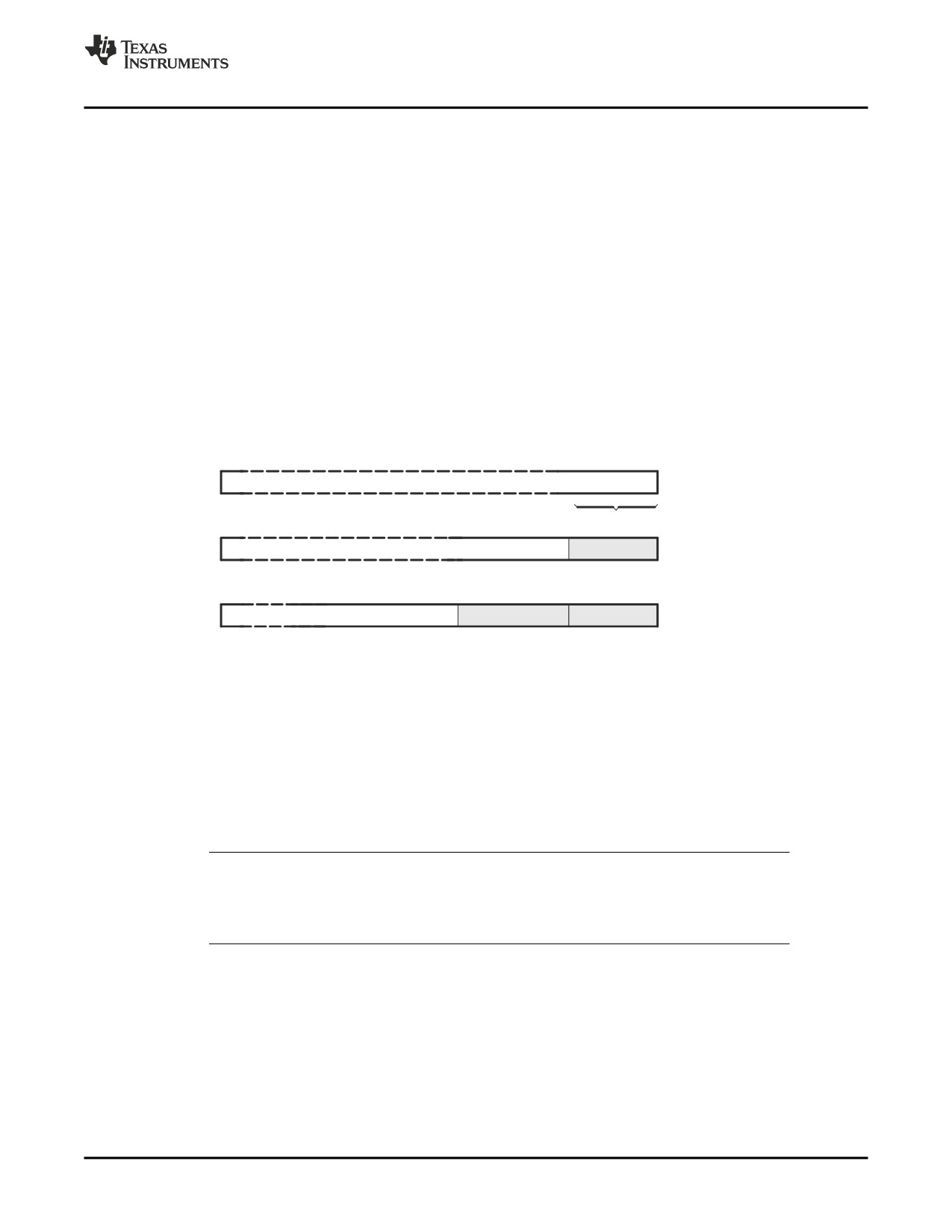
Figure 4-1 shows how fields are packed into a word. Using the following assembled code, notice that
the SPC does not change (the fields are packed into the same word):
1 00000000 00000003
.field
3,4
2 00000000 00000083
.field
8,5
3 00000000 00002083
.field
16,7
Figure 4-1. The .field Directive
31
3
2
1
0
0
0
1
1
.field 3, 4
4 bits
31
8
7
6
5
4
0
1
0
0
0
0
0
1
1
.field 8, 5
31
15 14 13 12
11
10
9
0
0
1
0
0
0
0
0
1
0
0
0
0
0
1
1
.field 16, 7
•
The .float directive calculates the single-precision (32-bit) IEEE floating-point representation of a single
floating-point value and stores it in a word in the current section that is aligned to a word boundary.
•
The .half, .uhalf, .short, and .ushort directives place one or more 16-bit values into consecutive 16-bit
fields (halfwords) in the current section. The .half and .short directives automatically align to a short
(2-byte) boundary.
•
The .int, .uint, .long, .word, .uword directives place one or more 32-bit values into consecutive 32-bit
fields (words) in the current section. The .int, .long, and .word directives automatically align to a word
boundary.
•
The .string directive places 8-bit characters from one or more character strings into the current
section. This directive is similar to .byte, placing an 8-bit character in each consecutive byte of the
current section.
Directives That Initialize Constants When Used in a .struct/.endstruct Sequence
Note: The .byte, .char, .int, .long, .word, .double, .half, .short, .string, .float, and .field directives do
not initialize memory when they are part of a .struct/ .endstruct sequence; rather, they define
a member’s size. For more information, see the .struct/.endstruct directives .
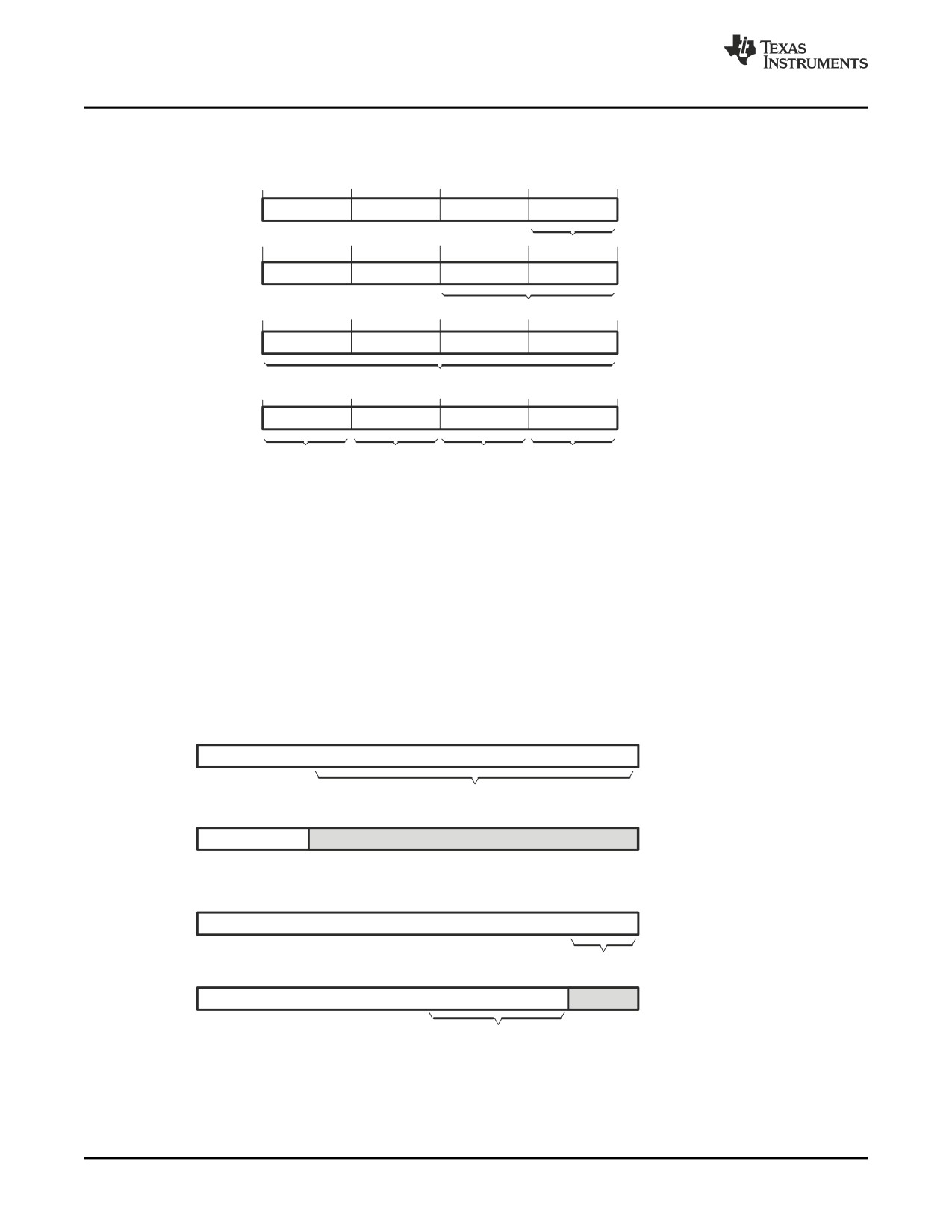
Figure 4-2 compares the .byte, .half, .word, and .string directives. Using the following assembled code:
1 00000000 000000AB
.byte
0ABh
2
.align 4
3 00000004 0000CDEF
.half
0CDEFh
4 00000008 89ABCDEF
.word
089ABCDEFh
5 0000000c 00000068
.string "help"
0000000d 00000065
0000000e 0000006C
0000000f 00000070
Assembler Directives
65
Directives That Perform Alignment and Reserve Space
Figure 4-2. Initialization Directives
Word
Contents
Code
31
0
1
0
0
0
0
0
0
A
B
.byte 0ABh
1 byte
2
0
0
0
0
C
D
E
F
.half 0CDEFh
2 bytes (half word)
.word 089ABCDEFh
3
8
9
A
B
C
D
E
F
whole word
4
70
6C
65
68
.string ”help”
p
l
e
h
4.4
Directives That Perform Alignment and Reserve Space
These directives align the section program counter (SPC) or reserve space in a section:
• The .align directive aligns the SPC at the next byte boundary. This directive is useful with the .field
directive when you do not want to pack two adjacent fields in the same byte.
Figure 4-3 demonstrates the .align directive. Using the following assembled code:
1
2 00000000 00AABBCC
.field
0AABBCCh,24
3
.align
2
4 00000000 0BAABBCC
.field
0Bh,5
5 00000004 000000DE
.field
0DEh,10
Figure 4-3. The .align Directive
Word
Code
31
23
0
0
.field 0AABBCCh, 24
1 0 1 0 1 0 1 01 0 1 1 1 0 1 1 1 1 0 0 1 1 0 0
24-bit field
31
23
0
.align 2
0
0 0 0 0 0 0 0 0
1 0 1 0 1 0 1 01 0 1 1 1 0 1 1 1 1 0 0 1 1 0 0
31
4
0
1
0 1 0 1 1
.field 0Bh, 5
5-bit field
31
15
4
0
1
.field 0DEh, 10
0 0 1 1 0 1 1 1 1 0
0 1 0 1 1
10-bit field
66
Assembler Directives
Directives That Format the Output Listings
• The .bes and .space directives reserve a specified number of bytes in the current section. The
assembler fills these reserved bytes with 0s.
- When you use a label with .space, it points to the first byte that contains reserved bits.
- When you use a label with .bes, it points to the last byte that contains reserved bits.
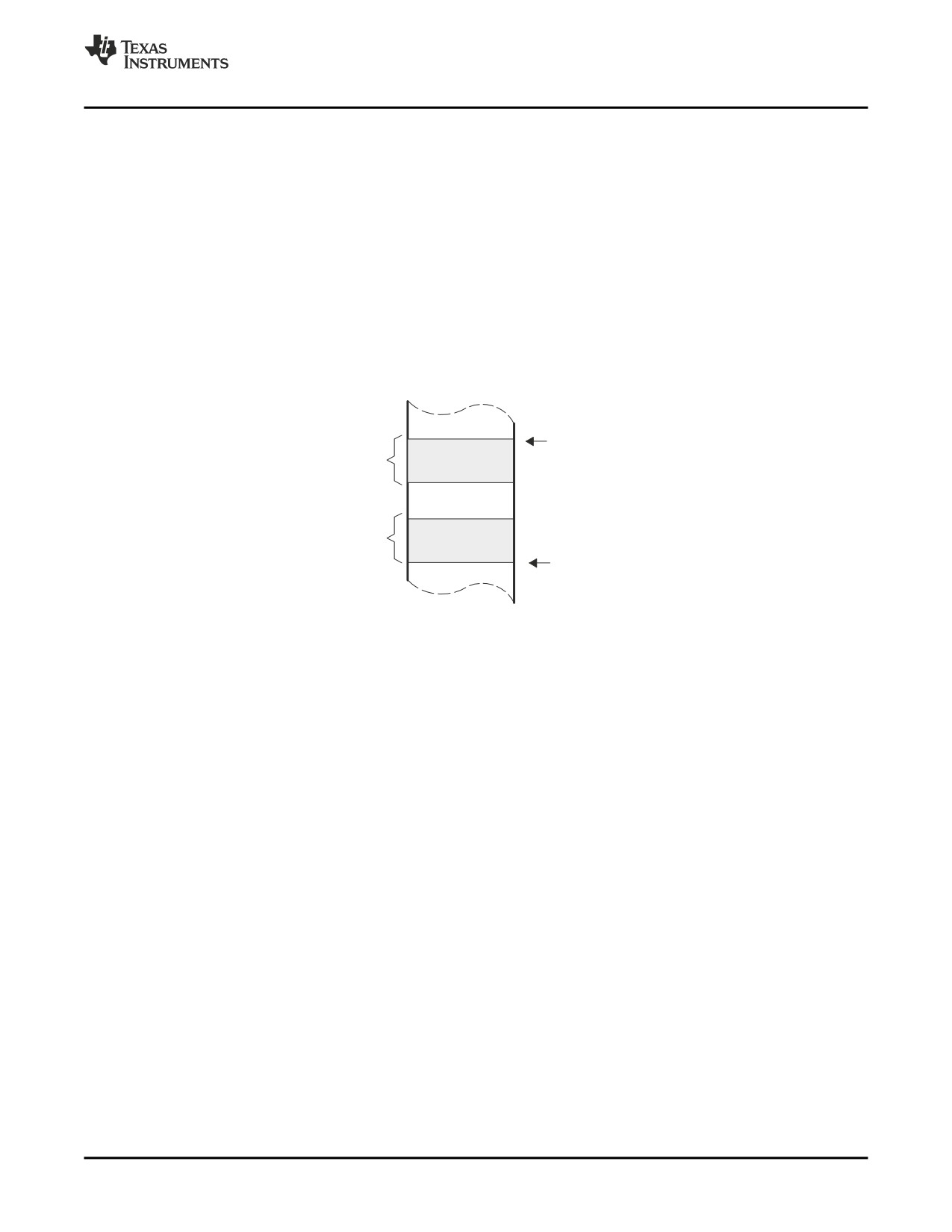
Figure 4-4 shows how the .space and .bes directives work for the following assembled code:
1
2 00000000 00000100
.word
100h, 200h
00000004 00000200
3 00000008
Res_1:
.space
17
4 0000001c 0000000F
.word
15
5 00000033
Res_2:
.bes
20
6 00000034 000000BA
.byte
0BAh
Res_1 points to the first byte in the space reserved by .space. Res_2 points to the last byte in the
space reserved by .bes.
Figure 4-4. The .space and .bes Directives
Res_1 = 08h
17 bytes
reserved
20 bytes
reserved
Res_2 = 33h
4.5
Directives That Format the Output Listings
These directives format the listing file:
• The .drlist directive causes printing of the directive lines to the listing; the .drnolist directive turns it off
for certain directives. You can use the .drnolist directive to suppress the printing of the following
directives. You can use the .drlist directive to turn the listing on again.
.asg
.eval
.length
.mnolist
.var
.break
.fclist
.mlist
.sslist
.width
.emsg
.fcnolist
.mmsg
.ssnolist
.wmsg
• The source code listing includes false conditional blocks that do not generate code. The .fclist and
.fcnolist directives turn this listing on and off. You can use the .fclist directive to list false conditional
blocks exactly as they appear in the source code. You can use the .fcnolist directive to list only the
conditional blocks that are actually assembled.
• The .length directive controls the page length of the listing file. You can use this directive to adjust
listings for various output devices.
• The .list and .nolist directives turn the output listing on and off. You can use the .nolist directive to
prevent the assembler from printing selected source statements in the listing file. Use the .list directive
to turn the listing on again.
• The source code listing includes macro expansions and loop blocks. The .mlist and .mnolist directives
turn this listing on and off. You can use the .mlist directive to print all macro expansions and loop
blocks to the listing, and the .mnolist directive to suppress this listing.
Assembler Directives
67
Directives That Reference Other Files
•
The .option directive controls certain features in the listing file. This directive has the following
operands:
A
turns on listing of all directives and data, and subsequent expansions, macros, and blocks.
B
limits the listing of .byte and .char directives to one line.
D
turns off the listing of certain directives (same effect as .drnolist).
H
limits the listing of .half and .short directives to one line.
L
limits the listing of .long directives to one line.
M
turns off macro expansions in the listing.
N
turns off listing (performs .nolist).
O
turns on listing (performs .list).
R
resets the B, H, L, M, T, and W directives (turns off the limits of B, H, L, M, T, and W).
T
limits the listing of .string directives to one line.
W
limits the listing of .word and .int directives to one line.
X
produces a cross-reference listing of symbols. You can also obtain a cross-reference listing
by invoking the assembler with the --cross_reference option (see Section 3.3).
•
The .page directive causes a page eject in the output listing.
•
The source code listing includes substitution symbol expansions. The .sslist and .ssnolist directives
turn this listing on and off. You can use the .sslist directive to print all substitution symbol expansions
to the listing, and the .ssnolist directive to suppress this listing. These directives are useful for
debugging the expansion of substitution symbols.
•
The .tab directive defines tab size.
•
The .title directive supplies a title that the assembler prints at the top of each page.
•
The .width directive controls the page width of the listing file. You can use this directive to adjust
listings for various output devices.
4.6
Directives That Reference Other Files
These directives supply information for or about other files that can be used in the assembly of the current
file:
• The .copy and .include directives tell the assembler to begin reading source statements from another
file. When the assembler finishes reading the source statements in the copy/include file, it resumes
reading source statements from the current file. The statements read from a copied file are printed in
the listing file; the statements read from an included file are not printed in the listing file.
• The .def directive identifies a symbol that is defined in the current module and that can be used in
another module. The assembler includes the symbol in the symbol table.
• The .global directive declares a symbol external so that it is available to other modules at link time.
(For more information about global symbols, see Section 2.7.1). The .global directive does double duty,
acting as a .def for defined symbols and as a .ref for undefined symbols. The linker resolves an
undefined global symbol reference only if the symbol is used in the program. The .global directive
declares a 16-bit symbol.
• The .mlib directive supplies the assembler with the name of an archive library that contains macro
definitions. When the assembler encounters a macro that is not defined in the current module, it
searches for it in the macro library specified with .mlib.
• The .ref directive identifies a symbol that is used in the current module but is defined in another
module. The assembler marks the symbol as an undefined external symbol and enters it in the object
symbol table so the linker can resolve its definition. The .ref directive forces the linker to resolve a
symbol reference.
68
Assembler Directives
Directives That Enable Conditional Assembly
4.7
Directives That Enable Conditional Assembly
Conditional assembly directives enable you to instruct the assembler to assemble certain sections of code
according to a true or false evaluation of an expression. Two sets of directives allow you to assemble
conditional blocks of code:
• The .if/.elseif/.else/.endif directives tell the assembler to conditionally assemble a block of code
according to the evaluation of an expression.
.if well-defined expression
marks the beginning of a conditional block and assembles code
if the .if well-defined expression is true.
[.elseif well-defined expression]
marks a block of code to be assembled if the .if well-defined
expression is false and the .elseif condition is true.
.else
marks a block of code to be assembled if the .if well-defined
expression is false and any .elseif conditions are false.
.endif
marks the end of a conditional block and terminates the block.
• The .loop/.break/.endloop directives tell the assembler to repeatedly assemble a block of code
according to the evaluation of an expression.
.loop [well-defined expression]
marks the beginning of a repeatable block of code. The optional
expression evaluates to the loop count.
.break [well-defined expression]
tells the assembler to assemble repeatedly when the .break
well-defined expression is false and to go to the code
immediately after .endloop when the expression is true or
omitted.
.endloop
marks the end of a repeatable block.
The assembler supports several relational operators that are useful for conditional expressions. For more
information about relational operators, see Section 3.9.4.
4.8
Directives That Define Unions or Structures
These directives set up C or C-like structures or unions in assembly code.
• The .cstruct/.endstruct directives set up C structure definitions. The .cunion/.endunion directives set
up C-like union definitions. The .tag directive assigns the C structure or union characteristics to a label.
The .cstruct/.endstruct directives allow you to organize your information into structures so that similar
elements can be grouped together. Similarly, the .cunion/.endunion directives allow you to organize
your information into unions. Element offset calculation is left up to the assembler. These directives do
not allocate memory. They simply create a symbolic template that can be used repeatedly. The .cstruct
and .cunion directives force the same alignment and padding as used by the C compiler when such
types are nested within compound data structures..
The .tag directive assigns a label to a structure. This simplifies the symbolic representation and also
provides the ability to define structures that contain other structures. The .tag directive does not
allocate memory, and the structure tag (stag) must be defined before it is used.
• The .struct/.endstruct directives set up C-like structure definitions. The .union/.endunion directives
set up C-like union definitions. The .tag directive assigns the C-like structure or union characteristics to
a label.
The .struct/.endstruct directives allow you to organize your information into structures so that similar
elements can be grouped together. Similarly, the .union/.endunion directives allow you to organize your
information into unions. Element offset calculation is left up to the assembler. These directives do not
allocate memory. They simply create a symbolic template that can be used repeatedly.
The .tag directive assigns a label to a structure or union. This simplifies the symbolic representation
and also provides the ability to define structures that contain other structures. The .tag directive does
not allocate memory, and the structure tag (stag) must be defined before it is used.
Assembler Directives
69
Directives That Define Symbols at Assembly Time
COORDT .struct
; structure tag definition
X
.byte
;
Y
.byte
T_LEN
.endstruct
COORD
.tag COORDT
; declare COORD (coordinate)
.bss COORD, T_LEN
; actual memory allocation
LDB
*+B14(COORD.Y), A2 ; move member Y of structure
; COORD into register A2
4.9
Directives That Define Symbols at Assembly Time
Assembly-time symbol directives equate meaningful symbol names to constant values or strings.
•
The .asg directive assigns a character string to a substitution symbol. The value is stored in the
substitution symbol table. When the assembler encounters a substitution symbol, it replaces the
symbol with its character string value. Substitution symbols can be redefined.
.asg "10, 20, 30, 40", coefficients
; Assign string to substitution symbol.
.byte coefficients
; Place the symbol values 10, 20, 30, and 40
; into consecutive bytes in current section.
•
The .eval directive evaluates a well-defined expression, translates the results into a character string,
and assigns the character string to a substitution symbol. This directive is most useful for manipulating
counters:
.asg
1 , x
; x = 1
.loop
; Begin conditional loop.
.byte
x*10h
; Store value into current section.
.break
x = 4
; Break loop if x = 4.
.eval
x+1, x
; Increment x by 1.
.endloop
; End conditional loop.
•
The .label directive defines a special symbol that refers to the load-time address within the current
section. This is useful when a section loads at one address but runs at a different address. For
example, you may want to load a block of performance-critical code into slower off-chip memory to
save space and move the code to high-speed on-chip memory to run. See the .label topic for an
example using a load-time address label.
•
The .set and .equ directives set a constant value to a symbol. The symbol is stored in the symbol table
and cannot be redefined; for example:
bval .set 0100h
; Set bval = 0100h
.long bval, bval*2, bval+12
; Store the values 0100h, 0200h, and 010Ch
; into consecutive words in current section.
The .set and .equ directives produce no object code. The two directives are identical and can be used
interchangeably.
•
The .var directive allows you to use substitution symbols as local variables within a macro.
70
Assembler Directives
Miscellaneous Directives
4.10
Miscellaneous Directives
These directives enable miscellaneous functions or features:
• The .asmfunc and .endasmfunc directives mark function boundaries. These directives are used with
the compiler --symdebug:dwarf (-g) option to generate debug information for assembly functions.
• The .cdecls directive enables programmers in mixed assembly and C/C++ environments to share C
headers containing declarations and prototypes between C and assembly code.
• The .clink directive enables conditional linking by telling the linker to leave the named section out of
the final object module output of the linker if there are no references found to any symbol in the
section. The .clink directive can be applied to initialized or uninitialized sections.
• The .end directive terminates assembly. If you use the .end directive, it should be the last source
statement of a program. This directive has the same effect as an end-of-file character.
• The .newblock directive resets local labels. Local labels are symbols of the form $n, where n is a
decimal digit, or of the form NAME?, where you specify NAME. They are defined when they appear in
the label field. Local labels are temporary labels that can be used as operands for jump instructions.
The .newblock directive limits the scope of local labels by resetting them after they are used. See
Section 3.8.2 for information on local labels.
• The .nocmp directive for C6400+ and C6740 instructs the tools to not utilize 16-bit instructions for the
section .nocmp appears in.
These three directives enable you to define your own error and warning messages:
• The .emsg directive sends error messages to the standard output device. The
.emsg directive
generates errors in the same manner as the assembler, incrementing the error count and preventing
the assembler from producing an object file.
• The .mmsg directive sends assembly-time messages to the standard output device. The .mmsg
directive functions in the same manner as the .emsg and .wmsg directives but does not set the error
count or the warning count. It does not affect the creation of the object file.
• The .wmsg directive sends warning messages to the standard output device. The .wmsg directive
functions in the same manner as the .emsg directive but increments the warning count rather than the
error count. It does not affect the creation of the object file.
For more information about using the error and warning directives in macros, see Section 5.7.
4.11
Directives Reference
The remainder of this chapter is a reference. Generally, the directives are organized alphabetically, one
directive per topic. Related directives (such as .if/.else/.endif), however, are presented together in one
topic.
Assembler Directives
71
.align — Align SPC on the Next Boundary
.align
Align SPC on the Next Boundary
Syntax
.align [size in bytes]
Description
The .align directive aligns the section program counter (SPC) on the next boundary,
depending on the size in bytes parameter. The size can be any power of 2, although
only certain values are useful for alignment. An operand of 1 aligns the SPC on the next
byte boundary, and this is the default if no size in bytes is given. The assembler
assembles words containing null values (0) up to the next size in bytes boundary:
1
aligns SPC to byte boundary
2
aligns SPC to halfword boundary
4
aligns SPC to word boundary
8
aligns SPC to doubleword boundary
128
aligns SPC to page boundary
Using the .align directive has two effects:
• The assembler aligns the SPC on an x-byte boundary within the current section.
• The assembler sets a flag that forces the linker to align the section so that individual
alignments remain intact when a section is loaded into memory.
Example
This example shows several types of alignment, including .align 2, .align 8, and a default
.align.
1 00000000 00000004
.byte
4
2
.align
2
3 00000002 00000045
.string
"Errorcnt"
00000003 00000072
00000004 00000072
00000005 0000006F
00000006 00000072
00000007 00000063
00000008 0000006E
00000009 00000074
4
.align
5 00000008 0003746E
.field
3,3
6 00000008 002B746E
.field
5,4
7
.align
2
8 0000000c 00000003
.field
3,3
9
.align
8
10 00000010 00000005
.field
5,4
11
.align
12 00000011 00000004
.byte
4
72
Assembler Directives
.asg/.eval — Assign a Substitution Symbol
.asg/.eval
Assign a Substitution Symbol
Syntax
.asg ["]character string["], substitution symbol
.eval well-defined expression, substitution symbol
Description
The .asg directive assigns character strings to substitution symbols. Substitution
symbols are stored in the substitution symbol table. The .asg directive can be used in
many of the same ways as the .set directive, but while .set assigns a constant value
(which cannot be redefined) to a symbol, .asg assigns a character string (which can be
redefined) to a substitution symbol.
• The assembler assigns the character string to the substitution symbol. The quotation
marks are optional. If there are no quotation marks, the assembler reads characters
up to the first comma and removes leading and trailing blanks. In either case, a
character string is read and assigned to the substitution symbol.
• The substitution symbol must be a valid symbol name. The substitution symbol is up
to 128 characters long and must begin with a letter. Remaining characters of the
symbol can be a combination of alphanumeric characters, the underscore (_), and
the dollar sign ($).
The .eval directive performs arithmetic on substitution symbols, which are stored in the
substitution symbol table. This directive evaluates the well-defined expression and
assigns the string value of the result to the substitution symbol. The .eval directive is
especially useful as a counter in .loop/.endloop blocks.
• The well-defined expression is an alphanumeric expression in which all symbols have
been previously defined in the current source module, so that the result is an
absolute.
• The substitution symbol must be a valid symbol name. The substitution symbol is up
to 128 characters long and must begin with a letter. Remaining characters of the
symbol can be a combination of alphanumeric characters, the underscore (_), and
the dollar sign ($).
Example
This example shows how .asg and .eval can be used.
1
.sslist ; show expanded substitution symbols
2
3
.asg
*+B14(100), GLOB100
4
.asg
*+B15(4),
ARG0
5
6
00000000
003B22E4
LDW
GLOB100,A0
#
LDW
*+B14(100),A0
7
00000004
00BC22E4
LDW
ARG0,A1
#
LDW
*+B15(4),A1
8
00000008
00006000
NOP
4
9
0000000c
010401E0
ADD
A0,A1,A2
10
11
.asg
0,x
12
.loop
5
13
.word
100*x
14
.eval
x+1,x
15
.endloop
1
00000010
00000000
.word
100*x
#
.word
100*0
1
.eval
x+1,x
#
.eval
0+1,x
1
00000014
00000064
.word
100*x
#
.word
100*1
1
.eval
x+1,x
#
.eval
1+1,x
1
00000018
000000C8
.word
100*x
#
.word
100*2
1
.eval
x+1,x
#
.eval
2+1,x
1
0000001c
0000012C
.word
100*x
#
.word
100*3
1
.eval
x+1,x
#
.eval
3+1,x
Assembler Directives
73
.asmfunc/.endasmfunc — Mark Function Boundaries
1
00000020 00000190
.word
100*x
#
.word
100*4
1
.eval
x+1,x
#
.eval
4+1,x
.asmfunc/.endasmfunc Mark Function Boundaries
Syntax
symbol .asmfunc
.endasmfunc
Description
The .asmfunc and .endasmfunc directives mark function boundaries. These directives
are used with the compiler -g option (--symdebug:dwarf) to allow assembly code
sections to be debugged in the same manner as C/C++ functions.
You should not use the same directives generated by the compiler (see Appendix A) to
accomplish assembly debugging; those directives should be used only by the compiler to
generate symbolic debugging information for C/C++ source files.
The .asmfunc and .endasmfunc directives cannot be used when invoking the compiler
with the backwards-compatibility --symdebug:coff option. This option instructs the
compiler to use the obsolete COFF symbolic debugging format, which does not support
these directives.
The symbol is a label that must appear in the label field.
Consecutive ranges of assembly code that are not enclosed within a pair of .asmfunc
and .endasmfunc directives are given a default name in the following format:
$ filename : beginning source line : ending source line $
Example
In this example the assembly source generates debug information for the user_func
section.
1
00000000
.sect
".text"
2
.global user_func
3
.global _printf
4
5
user_func: .asmfunc
6
00000000
00000010!
CALL
.S1
_printf
7
00000004
01BC94F6
STW
.D2T2
B3,*B15--(16)
8
00000008
01800E2A'
MVKL
.S2
RL0,B3
9
0000000c
01800028+
MVKL
.S1
SL1+0,A3
10
00000010
01800068+
MVKH
.S1
SL1+0,A3
11
12
00000014
01BC22F5
STW
.D2T1
A3,*+B15(4)
13
00000018
0180006A' ||
MVKH
.S2
RL0,B3
14
15
0000001c
01BC92E6
RL0:
LDW
.D2T2
*++B15(16),B3
16
00000020
020008C0
ZERO
.D1
A4
17
00000024
00004000
NOP
3
18
00000028
000C0362
RET
.S2
B3
19
0000002c
00008000
NOP
5
20
.endasmfunc
21
22
00000000
.sect
".const"
23
00000000
00000048
SL1:
.string "Hello World!",10,0
00000001
00000065
00000002
0000006C
00000003
0000006C
00000004
0000006F
00000005
00000020
00000006
00000057
00000007
0000006F
00000008
00000072
00000009
0000006C
0000000a
00000064
0000000b
00000021
0000000c
0000000A
0000000d
00000000
74
Assembler Directives
.bss — Reserve Space in the .bss Section
.bss
Reserve Space in the .bss Section
Syntax
.bss symbol, size in bytes[, alignment[, bank offset]]
Description
The .bss directive reserves space for variables in the .bss section. This directive is
usually used to allocate space in RAM.
• The symbol is a required parameter. It defines a label that points to the first location
reserved by the directive. The symbol name must correspond to the variable that you
are reserving space for.
• The size in bytes is a required parameter; it must be an absolute expression. The
assembler allocates size bytes in the .bss section. There is no default size.
• The alignment is an optional parameter that ensures that the space allocated to the
symbol occurs on the specified boundary. This boundary indicates the size of the slot
in bytes and must be set to a power of 2. If the SPC is aligned to the specified
boundary, it is not incremented.
• The bank offset is an optional parameter that ensures that the space allocated to the
symbol occurs on a specific memory bank boundary. The bank offset value measures
the number of bytes to offset from the alignment specified before assigning the
symbol to that location.
For more information about sections, see Chapter 2.
Example
In this example, the .bss directive is used to allocate space for a variable, array. The
symbol array points to 100 bytes of uninitialized space (at .bss SPC = 0). Symbols
declared with the .bss directive can be referenced in the same manner as other symbols
and can also be declared global.
1
*******************************************
2
** Start assembling into .text section. **
3
*******************************************
4 00000000
.text
5 00000000 008001A0
MV
A0,A1
6
7
*******************************************
8
** Allocate 100 bytes in .bss.
**
9
*******************************************
10 00000000
.bss
array,100
11
12
*******************************************
13
** Still in .text
**
14
*******************************************
15 00000004 010401A0
MV
A1,A2
16
17
*******************************************
18
** Declare external .bss symbol
**
19
*******************************************
20
.global array
Assembler Directives
75
.byte/.char —
Initialize Byte
.byte/.char
Initialize Byte
Syntax
.byte value1[, ... , valuen]
.char value1[, ... , valuen]
Description
The .byte and .char directives place one or more values into consecutive bytes of the
current section. A value can be one of the following:
• An expression that the assembler evaluates and treats as an 8-bit signed number
• A character string enclosed in double quotes. Each character in a string represents a
separate value, and values are stored in consecutive bytes. The entire string must be
enclosed in quotes.
The first byte occupies the eight least significant bits of a full 32-bit word. The second
byte occupies bits eight through 15 while the third byte occupies bits 16 through 23. The
assembler truncates values greater than eight bits. You can use up to 100 value
parameters, but the total line length cannot exceed 200 characters.
If you use a label, it points to the location of the first byte that is initialized.
When you use .byte or .char in a .struct/.endstruct sequence, .byte and .char define a
member's size; they do not initialize memory. For more information, see the
.struct/.endstruct/.tag topic .
Example
In this example, 8-bit values (10, -1, abc, and a) are placed into consecutive bytes in
memory with .byte. Also, 8-bit values (8, -3, def, and b) are placed into consecutive
bytes in memory with .char. The label STRX has the value 0h, which is the location of
the first initialized byte. The label STRY has the value 6h, which is the first byte
initialized by the .char directive.
1 00000000 0000000A strx
.byte
10,-1,"abc",'a'
00000001 000000FF
00000002 00000061
00000003 00000062
00000004 00000063
00000005 00000061
2 00000006 00000008
stry
.char
8,-3,"def",'b'
76
Assembler Directives
.cdecls — Share C Headers Between C and Assembly Code
.cdecls
Share C Headers Between C and Assembly Code
Syntax
Single Line:
.cdecls [options,] "filename"[, "filename2"[,...]]
Syntax
Multiple Lines:
.cdecls [options]
%{
/*---------------------------------------------------------------------------------*/
/* C/C++ code - Typically a list of #includes and a few defines */
/*---------------------------------------------------------------------------------*/
%}
Description
The .cdecls directive allows programmers in mixed assembly and C/C++ environments
to share C headers containing declarations and prototypes between the C and assembly
code. Any legal C/C++ can be used in a .cdecls block and the C/C++ declarations cause
suitable assembly to be generated automatically, allowing you to reference the C/C++
constructs in assembly code; such as calling functions, allocating space, and accessing
structure members; using the equivalent assembly mechanisms. While function and
variable definitions are ignored, most common C/C++ elements are converted to
assembly, for instance: enumerations, (non-function-like) macros, function and variable
prototypes, structures, and unions.
The .cdecls options control whether the code is treated as C or C++ code; and how the
.cdecls block and converted code are presented. Options must be separated by
commas; they can appear in any order:
C
Treat the code in the .cdecls block as C source code (default).
CPP
Treat the code in the .cdecls block as C++ source code. This is the
opposite of the C option.
NOLIST Do not include the converted assembly code in any listing file generated
for the containing assembly file (default).
LIST
Include the converted assembly code in any listing file generated for the
containing assembly file. This is the opposite of the NOLIST option.
NOWARN Do not emit warnings on STDERR about C/C++ constructs that cannot be
converted while parsing the .cdecls source block (default).
WARN Generate warnings on STDERR about C/C++ constructs that cannot be
converted while parsing the .cdecls source block. This is the opposite of
the NOWARN option.
In the single-line format, the options are followed by one or more filenames to include.
The filenames and options are separated by commas. Each file listed acts as if #include
"filename" was specified in the multiple-line format.
In the multiple-line format, the line following .cdecls must contain the opening .cdecls
block indicator %{. Everything after the %{, up to the closing block indicator %}, is
treated as C/C++ source and processed. Ordinary assembler processing then resumes
on the line following the closing %}.
The text within %{ and %} is passed to the C/C++ compiler to be converted into
assembly language. Much of C language syntax, including function and variable
definitions as well as function-like macros, is not supported and is ignored during the
conversion. However, all of what traditionally appears in C header files is supported,
including function and variable prototypes; structure and union declarations;
non-function-like macros; enumerations; and #define's.
Assembler Directives
77
.cdecls
—
Share
C
Headers Between C and Assembly Code
The resulting assembly language is included in the assembly file at the point of the
.cdecls directive. If the LIST option is used, the converted assembly statements are
printed in the listing file.
The assembly resulting from the .cdecls directive is treated similarly to a .include file.
Therefore the .cdecls directive can be nested within a file being copied or included. The
assembler limits nesting to ten levels; the host operating system may set additional
restrictions. The assembler precedes the line numbers of copied files with a letter code
to identify the level of copying. An A indicates the first copied file, B indicates a second
copied file, etc.
The .cdecls directive can appear anywhere in an assembly source file, and can occur
multiple times within a file. However, the C/C++ environment created by one .cdecls is
not inherited by a later .cdecls; the C/C++ environment starts new for each .cdecls.
See Chapter 12 for more information on setting up and using the .cdecls directive with C
header files.
Example
In this example, the .cdecls directive is used call the C header.h file.
C header file:
#define WANT_ID 10
#define NAME "John\n"
extern int a_variable;
extern float cvt_integer(int src);
struct myCstruct { int member_a; float member_b; };
enum status_enum { OK = 1, FAILED = 256, RUNNING =
0
};
Source file:
.cdecls C,LIST,"myheader.h"
size:
.int $sizeof(myCstruct)
aoffset: .int myCstruct.member_a
boffset: .int myCstruct.member_b
okvalue: .int status_enum.OK
failval: .int status_enum.FAILED
.if $$defined(WANT_ID)
id
.cstring NAME
.endif
Listing File:
1
.cdecls C,LIST,"myheader.h"
A
1
; ------------------------------------------
A
2
; Assembly Generated from C/C++ Source Code
A
3
; ------------------------------------------
A
4
A
5
; =========== MACRO DEFINITIONS ===========
A
6
.define "10",WANT_ID
A
7
.define """John\n""",NAME
A
8
A
9
; =========== TYPE DEFINITIONS ===========
A
10
status_enum
.enum
A
11
00000001 OK
.emember 1
A
12
00000100 FAILED
.emember 256
A
13
00000000 RUNNING
.emember 0
A
14
.endenum
A
15
A
16
myCstruct
.struct 0,4
; struct size=(8
bytes|64
bits),
alignment=4
A
17
00000000 member_a
.field 32
; int member_a - offset 0
bytes, size
(4 bytes|32
bits)
A
18
00000004 member_b
.field 32
; float member_b - offset
4 bytes, size
(4 bytes|32
bits)
78
Assembler Directives
.clink — Conditionally Leave Section Out of Object Module Output
A
19
00000008
.endstruct
; final size=(8 bytes|64 bits)
A
20
A
21
; =========== EXTERNAL FUNCTIONS ===========
A
22
.global _cvt_integer
A
23
A
24
; =========== EXTERNAL VARIABLES ===========
A
25
.global _a_variable
2 00000000
00000008 size:
.int $sizeof(myCstruct)
3 00000004
00000000 aoffset: .int myCstruct.member_a
4 00000008
00000004 boffset: .int myCstruct.member_b
5 0000000c
00000001 okvalue: .int status_enum.OK
6 00000010
00000100 failval: .int status_enum.FAILED
7
.if $defined(WANT_ID)
8 00000014
0000004A id
.cstring NAME
00000015
0000006F
00000016
00000068
00000017
0000006E
00000018
0000000A
00000019
00000000
9
.endif
.clink
Conditionally Leave Section Out of Object Module Output
Syntax
.clink ["section name"]
Description
The .clink directive enables conditional linking by telling the linker to leave a section out
of the final object module output of the linker if there are no references found to any
symbol in section name. The .clink directive can be applied to initialized or uninitialized
sections.
The section name identifies the section. If .clink is used without a section name, it
applies to the current initialized section. If .clink is applied to an uninitialized section, the
section name is required. The section name is significant to 200 characters and must be
enclosed in double quotes. A section name can contain a subsection name in the form
section name:subsection name.
The .clink directive tells the linker to leave the section out of the final object module
output of the linker if there are no references found in a linked section to any symbol
defined in the specified section. The --absolute_exe linker option produces the final
output in the form of an absolute, executable output module.
A section in which the entry point of a C program is defined cannot be marked as a
conditionally linked section.
Example
In this example, the Vars and Counts sections are set for conditional linking.
1 00000000
.sect "Vars"
2
.clink
3
; Vars section is conditionally linked
4
5 00000000 0000001A X:
.word 01Ah
6 00000004 0000001A Y:
.word 01Ah
7 00000008 0000001A Z:
.word 01Ah
8 00000000
.sect "Counts"
9
.clink
10
; Counts section is conditionally linked
11
12 00000000 0000001A XCount: .word 01Ah
13 00000004 0000001A YCount: .word 01Ah
14 00000008 0000001A ZCount: .word 01Ah
15 00000000
.text
16
; By default, .text is unconditionally linked
17
18 00000000 00B802C4
LDH
*B14,A1
19 00000004 00000028+
MVKL
X,A0
20 00000008 00000068+
MVKH
X,A0
21
; These references to symbol X cause the Vars
22
; section to be linked into the COFF output
23 0000000c 00040AF8
CMPLT A0,A1,A0
Assembler Directives
79
.copy/.include —
Copy Source File
.copy/.include
Copy Source File
Syntax
.copy ["]filename["]
.include ["]filename["]
Description
The .copy and .include directives tell the assembler to read source statements from a
different file. The statements that are assembled from a copy file are printed in the
assembly listing. The statements that are assembled from an included file are not printed
in the assembly listing, regardless of the number of .list/.nolist directives assembled.
When a .copy or .include directive is assembled, the assembler:
1. Stops assembling statements in the current source file
2. Assembles the statements in the copied/included file
3. Resumes assembling statements in the main source file, starting with the statement
that follows the .copy or .include directive
The filename is a required parameter that names a source file. It can be enclosed in
double quotes and must follow operating system conventions. If filename starts with a
number the double quotes are required.
You can specify a full pathname (for example, /320tools/file1.asm). If you do not specify
a full pathname, the assembler searches for the file in:
1. The directory that contains the current source file
2. Any directories named with the --include_path assembler option
3. Any directories specified by the C6X_A_DIR environment variable
4. Any directories specified by the C6X_C_DIR environment variable
For more information about the --include_path option and C6X_A_DIR, see Section 3.4.
For more information about C6X_C_DIR, see the TMS320C6000 Optimizing Compiler
User's Guide.
The .copy and .include directives can be nested within a file being copied or included.
The assembler limits nesting to 32 levels; the host operating system may set additional
restrictions. The assembler precedes the line numbers of copied files with a letter code
to identify the level of copying. A indicates the first copied file, B indicates a second
copied file, etc.
Example
1
In this example, the .copy directive is used to read and assemble source statements
from other files; then, the assembler resumes assembling into the current file.
The original file, copy.asm, contains a .copy statement copying the file byte.asm. When
copy.asm assembles, the assembler copies byte.asm into its place in the listing (note
listing below). The copy file byte.asm contains a .copy statement for a second file,
word.asm.
When it encounters the .copy statement for word.asm, the assembler switches to
word.asm to continue copying and assembling. Then the assembler returns to its place
in byte.asm to continue copying and assembling. After completing assembly of byte.asm,
the assembler returns to copy.asm to assemble its remaining statement.
copy.asm
byte.asm
word.asm
(source file)
(first copy file)
(second copy file)
.space
29
** In byte.asm
** In word.asm
.copy "byte.asm"
.byte
32,1+ 'A'
.word
0ABCDh,
56q
** Back in original file
.copy "word.asm"
.string "done"
** Back in byte.asm
.byte
67h
+
3q
80
Assembler Directives
.copy/.include — Copy Source File
Listing file:
1 00000000
.space 29
2
.copy "byte.asm"
A
1
** In byte.asm
A
2 0000001d 00000020
.byte 32,1+ 'A'
0000001e 00000042
A
3
.copy "word.asm"
B
1
** In word.asm
B
2 00000020 0000ABCD
.word 0ABCDh, 56q
00000024 0000002E
A
4
** Back in byte.asm
A
5 00000028 0000006A
.byte 67h + 3q
3
4
** Back in original file
5 00000029 00000064
.string "done"
0000002a 0000006F
0000002b 0000006E
0000002c 00000065
Example
2
In this example, the .include directive is used to read and assemble source statements
from other files; then, the assembler resumes assembling into the current file. The
mechanism is similar to the .copy directive, except that statements are not printed in the
listing file.
include.asm
byte2.asm
word2.asm
(source file)
(first copy file)
(second copy file)
.space
29
** In byte2.asm
** In word2.asm
.include "byte2.asm"
.byte
32,1+ 'A'
.word
0ABCDh,
56q
** Back in original file
.include "word2.asm"
.string "done"
** Back in byte2.asm
.byte
67h
+
3q
Listing file:
1 00000000
.space 29
2
.include "byte2.asm"
3
4
** Back in original file
5 00000029 00000064
.string "done"
0000002a 0000006F
0000002b 0000006E
0000002c 00000065
Assembler Directives
81
.cstruct/.cunion/.endstruct/.endunion/.tag
— Declare C Structure Type
.cstruct/.cunion/.endstruct/.endunion/.tag Declare C Structure Type
Syntax
[stag]
.cstruct|.cunion
[expr]
[mem0] element
[expr0]
[mem1] element
[expr1]
[memn]
.tag stag
[exprn]
[memN] element
[exprN]
[size]
.endstruct|.endunion
label
.tag
stag
Description
The .cstruct and .cunion directives have been added to support ease of sharing of
common data structures between assembly and C code. The .cstruct and .cunion
directives can be used exactly like the existing .struct and .union directives except that
they are guaranteed to perform data layout matching the layout used by the C compiler
for C struct and union data types.
In particular, the .cstruct and .cunion directives force the same alignment and padding as
used by the C compiler when such types are nested within compound data structures.
The .endstruct directive terminates the structure definition. The .endunion directive
terminates the union definition.
The .tag directive gives structure characteristics to a label, simplifying the symbolic
representation and providing the ability to define structures that contain other structures.
The .tag directive does not allocate memory. The structure tag (stag) of a .tag directive
must have been previously defined.
Following are descriptions of the parameters used with the .struct, .endstruct, and .tag
directives:
• The stag is the structure's tag. Its value is associated with the beginning of the
structure. If no stag is present, the assembler puts the structure members in the
global symbol table with the value of their absolute offset from the top of the
structure. A .stag is optional for .struct, but is required for .tag.
• The element is one of the following descriptors: .byte, .char, .int, .long, .word,
.double, .half, .short, .string, .float, and .field. All of these except .tag are typical
directives that initialize memory. Following a .struct directive, these directives
describe the structure element's size. They do not allocate memory. A .tag directive
is a special case because stag must be used (as in the definition of stag).
• The expr is an optional expression indicating the beginning offset of the structure.
The default starting point for a structure is 0.
• The exprn/N is an optional expression for the number of elements described. This
value defaults to 1. A .string element is considered to be one byte in size, and a .field
element is one bit.
• The memn/N is an optional label for a member of the structure. This label is absolute
and equates to the present offset from the beginning of the structure. A label for a
structure member cannot be declared global.
• The size is an optional label for the total size of the structure.
Example
This example illustrates a structure in C that will be accessed in assembly code.
; typedef struct STRUCT1
; {
int i0;
/* offset 0 */
;
short s0;
/* offset 4 */
; } struct1;
/* size 8, alignment 4 */
;
82
Assembler Directives
.cstruct/.cunion/.endstruct/.endunion/.tag — Declare C Structure Type
; typedef struct STRUCT2
; {
struct1 st1; /* offset 0 */
;
short s1;
/* offset 8 */
; } struct2;
/* size 12, alignment 4 */
;
; The structure will get the following offsets once
; the C compiler lays out the structure elements according
; to the C standard rules:
;
; offsetof(struct1, i0) = 0
; offsetof(struct1, s0) = 4
; sizeof(struct1)
= 8
;
; offsetof(struct2, s1) = 0
; offsetof(struct2, i1) = 8
; sizeof(struct2)
= 12
;
;
; Attempts to replicate this structure in assembly using the
; .struct/.union directive will not create the correct offsets
; because the assembler tries to use the most compact arrangement:
struct1
.struct
i0
.int
; bytes 0-3
s0
.short
; bytes 4-5
struct1len
.endstruct
; size 6, alignment 4
struct2
.struct
st1
.tag struct1
; bytes 0-5
s1
.short
; bytes 6-7
endstruct2
.endstruct
; size 8, alignment 4
.sect "data1"
.word struct1.i0
; 0
.word struct1.s0
; 4
.word struct1len
; 6
.sect "data2"
.word struct2.st1
; 0
.word struct2.s1
; 6
.word endstruct2
; 8
;
; The .cstruct/.cunion directives will calculate
; the offsets in the same manner as the C compiler. The
; resulting assembly structure can be used to access the
; elements of the C structure. Notice the different in
; the offsets from those structures defined via .struct
; above, and compare them to the offsets for the C code.
cstruct1
.cstruct
i0
.int
; bytes 0-3
s0
.short
; bytes 4-5
cstruct1len .endstruct
; size 8, alignment 4
cstruct2
.cstruct
st1
.tag cstruct1
; bytes 0-7
s1
.short
; bytes 8-9
cendstruct2 .endstruct
; size 12, alignment 4
.sect "data3"
.word cstruct1.i0, struct1.i0
; 0
.word cstruct1.s0, struct1.s0
; 4
.word cstruct1len, struct1len
; 8
.sect "data4"
.word cstruct2.st1, struct2.st1 ; 0
.word cstruct2.s1, struct2.s1
; 8
.word cendstruct2, endstruct2
; 12
Assembler Directives
83
.data — Assemble Into the .data Section
.data
Assemble Into the .data Section
Syntax
.data
Description
The .data directive tells the assembler to begin assembling source code into the .data
section; .data becomes the current section. The .data section is normally used to contain
tables of data or preinitialized variables.
For more information about sections, see Chapter 2.
Example
In this example, code is assembled into the .data and .text sections.
1
***********************************************
2
**
Reserve space in .data
**
3
***********************************************
4 00000000
.data
5 00000000
.space
0CCh
6
7
***********************************************
8
**
Assemble into .text
**
9
***********************************************
10 00000000
.text
11 00000000 00800358
ABS
A0,A1
12
13
***********************************************
14
**
Assemble into .data
**
15
***********************************************
16 000000cc
table:
.data
17 000000cc FFFFFFFF
.word
-1
18 000000d0 000000FF
.byte
0FFh
19
20
***********************************************
21
**
Assemble into .text
**
22
***********************************************
23 00000004
.text
24 00000004 008001A0
MV
A0,A1
25
26
***********************************************
27
** Resume assembling into the .data section **
28
***********************************************
29 000000d1
.data
30 000000d4 00000000
coeff
.word
00h,0ah,0bh
000000d8 0000000A
000000dc 0000000B
84
Assembler Directives