ISO 32000-1 Document management — Portable document format — Part 1: PDF 1.7 - page 7
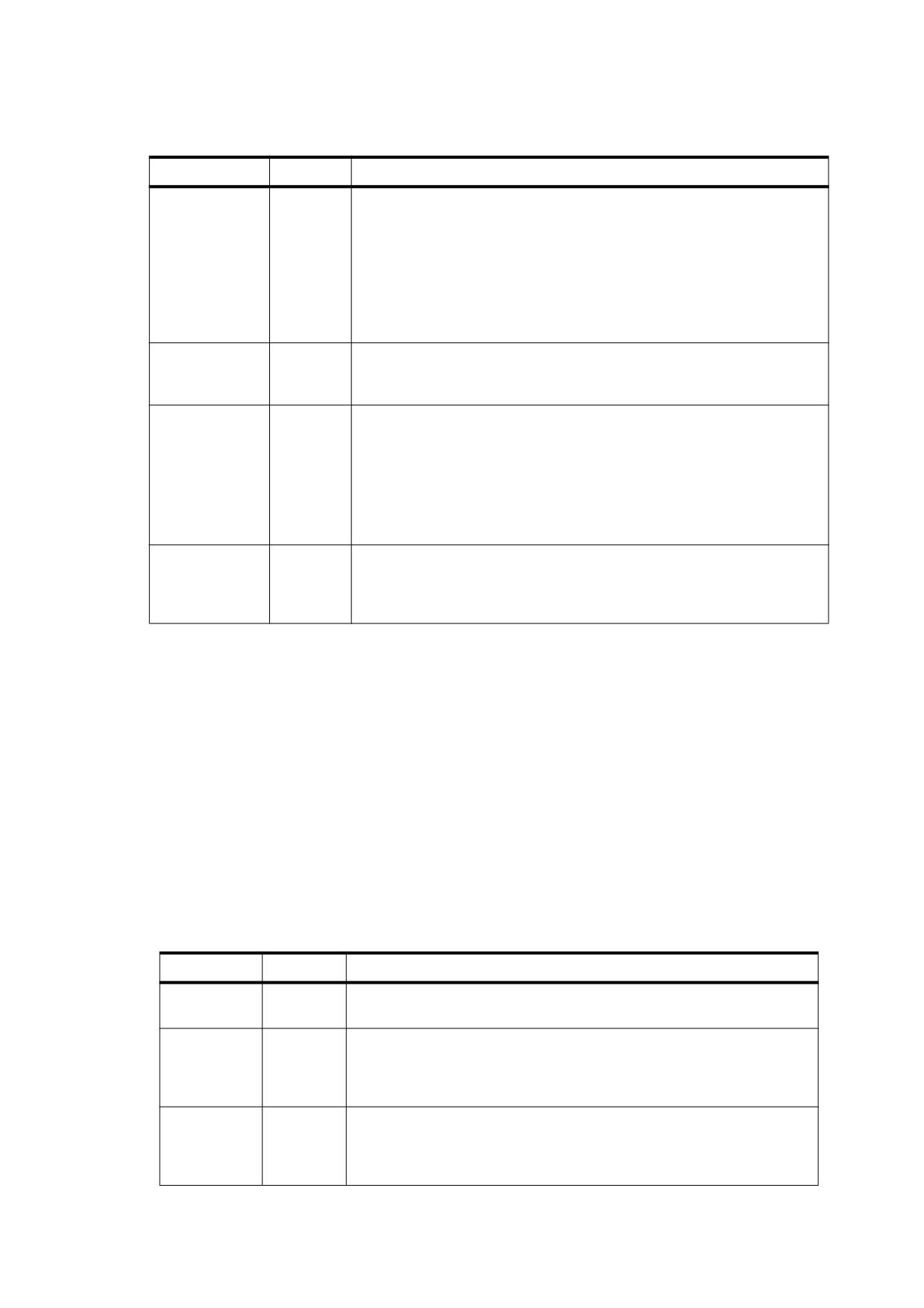
Table 102 - Entries in an Optional Content Usage Dictionary (continued)
Key
Type
Value
Print
dictionary
(Optional) A dictionary specifying that the content in this group is shall be
used when printing. It may contain the following optional entries:
Subtype A name object specifying the kind of content controlled by the
group; for example, Trapping, PrintersMarks and
Watermark.
PrintState A name that shall be either ON or OFF, indicating that the
group shall be set to that state when the document is printed
from a conforming reader.
View
dictionary
(Optional) A dictionary that shall have a single entry, ViewState, a name
that shall have a value of either ON or OFF, indicating that the group shall
be set to that state when the document is opened in a conforming reader.
User
dictionary
(Optional) A dictionary specifying one or more users for whom this optional
content group is primarily intended. Each dictionary shall have two
required entries:
Type
A name object that shall be either Ind (individual), Ttl (title),
or Org (organization).
Name
A text string or array of text strings representing the name(s)
of the individual, position or organization.
PageElement
dictionary
(Optional) A dictionary declaring that the group contains a pagination
artifact. It shall contain one entry, Subtype, whose value shall be a name
that is either HF (header/footer), FG (foreground image or graphic), BG
(background image or graphic), or L (logo).
While the data in the usage dictionary serves as information for a document user to examine, it may also be
used by conforming readers to automatically manipulate the state of optional content groups based on external
factors such as current system language settings or zoom level. Document authors may use usage application
dictionaries to specify which entries in the usage dictionary shall be consulted to automatically set the state of
optional content groups based on such factors. Usage application dictionaries shall be listed in the AS entry in
an optional content configuration dictionary (see Table 101). If no AS entry is present, states shall not be
automatically adjusted based on usage information.
A usage application dictionary specifies the rules for which usage entries shall be used by conforming readers
to automatically manipulate the state of optional content groups, which groups shall be affected, and under
which circumstances. Table 103 shows the entries in a usage application dictionary.
Usage application dictionaries shall only be used by interactive conforming readers, and shall not be used by
applications that use PDF as final form output (see 8.11.4.5, "Determining the State of Optional Content
Groups" for more information).
Table 103 - Entries in a Usage Application Dictionary
Key
Type
Value
Event
name
(Required) A name defining the situation in which this usage application
dictionary should be used. Shall be one of View, Print, or Export.
OCGs
array
(Optional) An array listing the optional content groups that shall have their
states automatically managed based on information in their usage
dictionary (see 8.11.4.4, "Usage and Usage Application Dictionaries").
Default value: an empty array, indicating that no groups shall be affected.
Category
array
(Required) An array of names, each of which corresponds to a usage
dictionary entry
(see Table 102). When managing the states of the
optional content groups in the OCGs array, each of the corresponding
categories in the group’s usage dictionary shall be considered.
233
The Event entry specifies whether the usage settings shall be applied during viewing, printing, or exporting the
document. The OCGs entry specifies the set of optional content groups to which usage settings shall be
applied. For each of the groups in OCGs, the entries in its usage dictionary (see Table 102) specified by
Category shall be examined to yield a recommended state for the group. If all the entries yield a recommended
state of ON, the group’s state shall be set to ON; otherwise, its state shall be set to OFF.
The entries in the usage dictionary shall be used as follows:
•
View: The state shall be the value of the ViewState entry. This entry allows a document to contain content
that is relevant only when the document is viewed interactively, such as instructions for how to interact with
the document.
•
Print: The state shall be the value of the PrintState entry. If PrintState is not present, the state of the
optional content group shall be left unchanged.
•
Export: The state shall be the value of the ExportState entry.
•
Zoom: If the current magnification level of the document is greater than or equal to min and less than max,
the ON state shall be used; otherwise, OFF shall be used.
•
User: The Name entry shall specify a name or names to match with the user’s identification. The Type
entry determines how the Name entry shall be interpreted (name, title, or organization). If there is an exact
match, the ON state shall be used; otherwise OFF shall be used.
•
Language: This category shall allow the selection of content based on the language and locale of the
application. If an exact match to the language and locale is found among the Lang entries of the optional
content groups in the usage application dictionary’s OCGs list, all groups that have exact matches shall
receive an ON recommendation. If no exact match is found, but a partial match is found (that is, the
language matches but not the locale), all partially matching groups that have Preferred entries with a value
of ON shall receive an ON recommendation. All other groups shall receive an OFF recommendation.
There shall be no restriction on multiple entries with the same value of Event, in order to allow documents with
incompatible usage application dictionaries to be combined into larger documents and have their behaviour
preserved. If a given optional content group appears in more than one OCGs array, its state shall be ON only if
all categories in all the usage application dictionaries it appears in shall have a state of ON.
EXAMPLE
This example shows the use of an auto state array with usage application dictionaries. The AS entry in
the default configuration dictionary is an array of three usage application dictionaries, one for each of the
Event values View, Print, and Export.
/OCProperties
% OCProperties dictionary in document catalog
<< /OCGs [1 0 R 2 0 R 3 0 R 4 0 R]
/D << /BaseState /OFF
% The default configuration
/ON [1 0 R]
/AS [
% Auto state array of usage application dictionaries
<< /Event /View /Category [/Zoom] /OCGs [1 0 R 2 0 R 3 0 R 4 0 R] >>
<< /Event /Print /Category [/Print] /OCGs [4 0 R] >>
<< /Event /Export /Category [/Export] /OCGs [3 0 R 4 0 R] >>
]
>>
>>
1 0 obj
<< /Type /OCG
/Name (20000 foot view)
/Usage << /Zoom << /max 1.0 >> >>
>>
endobj
2 0 obj
<< /Type /OCG
234
/Name (10000 foot view)
/Usage << /Zoom << /min 1.0 /max 2.0 >> >>
>>
endobj
3 0 obj
<< /Type /OCG
/Name (1000 foot view)
/Usage << /Zoom << /min 2.0 /max 20.0 >>
/Export << /ExportState /OFF >> >>
>>
endobj
4 0 obj
<< /Type /OCG
/Name (Copyright notice)
/Usage << /Print << /PrintState /ON >>
/Export << /ExportState /ON>> >>
>>
endobj
In the example, the usage application dictionary with event type View specifies that all optional content groups
shall have their states managed based on zoom level when viewing. Three groups (objects 1, 2, and 3) contain
Zoom usage information. Object 4 has none; therefore, it shall not be affected by zoom level changes. Object 3
shall receive an OFF recommendation when exporting. When printing or exporting, object 4 shall receive an
ON recommendation.
8.11.4.5
Determining the State of Optional Content Groups
This sub-clause summarizes the rules by which conforming readers make use of the configuration and usage
application dictionaries to set the state of optional content groups. For purposes of this discussion, it is useful to
distinguish the following types of conforming readers:
•
Viewer applications which allow users to interact with the document in various ways.
•
Design applications, which offer layering features for collecting groups of graphics together and selectively
hiding or viewing them.
NOTE 1
The following rules are not meant to apply to design applications; they may manage their states in an entirely
different manner if they choose.
•
Aggregating applications, which import PDF files as graphics.
•
Printing applications, which print PDF files.
When a document is first opened, its optional content groups shall be assigned a state based on the D (default)
configuration dictionary in the OCProperties dictionary:
a) The value of BaseState shall be applied to all the groups.
b) The groups listed in either the ON or OFF array (depending on which one is opposite to BaseState) shall
have their states adjusted.
This state shall be the state used by printing and aggregating application. Such applications shall not apply the
changes based on usage application dictionaries described below. However, for more advanced functionality,
they may provide user control for manipulating the individual states of optional content groups.
NOTE 2
Viewer applications may also provide users with an option to view documents in this state (that is, to disable
the automatic adjustments discussed below). This option permits an accurate preview of the content as it will
appear when placed into an aggregating application or sent to a stand-alone printing system.
The remaining discussion in this sub-clause applies only to viewer applications. Such applications shall
examine the AS array for usage application dictionaries that have an Event of type View. For each one found,
235
the groups listed in its OCGs array shall be adjusted as described in 8.11.4.4, "Usage and Usage Application
Dictionaries".
Subsequently, the document is ready for interactive viewing by a user. Whenever there is a change to a factor
that the usage application dictionaries with event type View depend on
(such as zoom level), the
corresponding dictionaries shall be reapplied.
The user may manipulate optional content group states manually or by triggering SetOCGState actions (see
12.6.4.12, "Set-OCG-State Actions") by, for example, clicking links or bookmarks. Manual changes shall
override the states that were set automatically. The states of these groups remain overridden and shall not be
readjusted based on usage application dictionaries with event type View as long as the document is open (or
until the user reverts the document to its original state).
When a document is printed by a viewer application, usage application dictionaries with an event type Print
shall be applied over the current states of optional content groups. These changes shall persist only for the
duration of the print operation; then all groups shall revert to their prior states.
Similarly, when a document is exported to a format that does not support optional content, usage application
dictionaries with an event type Export shall be applied over the current states of optional content groups.
Changes shall persist only for the duration of the export operation; then all groups shall revert to their prior
states.
NOTE 3
Although the event types Print and Export have identically named counterparts that are usage categories, the
corresponding usage application dictionaries are permitted to specify that other categories may be applied.
236
9
Text
9.1
General
This clause describes the special facilities in PDF for dealing with text—specifically, for representing characters
with glyphs from fonts. A glyph is a graphical shape and is subject to all graphical manipulations, such as
coordinate transformation. Because of the importance of text in most page descriptions, PDF provides higher-
level facilities to describe, select, and render glyphs conveniently and efficiently.
The first sub-clause is a general description of how glyphs from fonts are painted on the page. Subsequent
sub-clauses cover these topics in detail:
•
Text state. A subset of the graphics state parameters pertain to text, including parameters that select the
font, scale the glyphs to an appropriate size, and accomplish other graphical effects.
•
Text objects and operators. The text operators specify the glyphs to be painted, represented by string
objects whose values shall be interpreted as sequences of character codes. A text object encloses a
sequence of text operators and associated parameters.
•
Font data structures. Font dictionaries and associated data structures provide information that a
conforming reader needs to interpret the text and position the glyphs properly. The definitions of the glyphs
themselves shall be contained in font programs, which may be embedded in the PDF file, built into a
conforming reader, or obtained from an external font file.
9.2
Organization and Use of Fonts
9.2.1
General
A character is an abstract symbol, whereas a glyph is a specific graphical rendering of a character.
EXAMPLE 1
The glyphs A, A, and A are renderings of the abstract “A” character.
NOTE 1
Historically these two terms have often been used interchangeably in computer typography (as evidenced by
the names chosen for some PDF dictionary keys and PostScript operators), but advances in this area have
made the distinction more meaningful. Consequently, this standard distinguishes between characters and
glyphs, though with some residual names that are inconsistent.
Glyphs are organized into fonts. A font defines glyphs for a particular character set.
EXAMPLE 2
The Helvetica and Times fonts define glyphs for a set of standard Latin characters.
A font for use with a conforming reader is prepared in the form of a program. Such a font program shall be
written in a special-purpose language, such as the Type 1, TrueType, or OpenType font format, that is
understood by a specialized font interpreter.
In PDF, the term font refers to a font dictionary, a PDF object that identifies the font program and contains
additional information about it. There are several different font types, identified by the Subtype entry of the font
dictionary.
For most font types, the font program shall be defined in a separate font file, which may be either embedded in
a PDF stream object or obtained from an external source. The font program contains glyph descriptions that
generate glyphs.
A content stream paints glyphs on the page by specifying a font dictionary and a string object that shall be
interpreted as a sequence of one or more character codes identifying glyphs in the font. This operation is called
showing the text string; the text strings drawn in this way are called show strings. The glyph description
consists of a sequence of graphics operators that produce the specific shape for that character in this font. To
render a glyph, the conforming reader executes the glyph description.
237
NOTE 2
Programmers who have experience with scan conversion of general shapes may be concerned about the
amount of computation that this description seems to imply. However, this is only the abstract behaviour of
glyph descriptions and font programs, not how they are implemented. In fact, an efficient implementation can
be achieved through careful caching and reuse of previously rendered glyphs.
9.2.2
Basics of Showing Text
EXAMPLE 1
This example illustrates the most straightforward use of a font. The text ABC is placed 10 inches from the
bottom of the page and 4 inches from the left edge, using 12-point Helvetica.
BT
/F13 12 Tf
288 720 Td
( ABC ) Tj
ET
The five lines of this example perform these steps:
a) Begin a text object.
b) Set the font and font size to use, installing them as parameters in the text state. In this case, the font
resource identified by the name F13 specifies the font externally known as Helvetica.
c) Specify a starting position on the page, setting parameters in the text object.
d) Paint the glyphs for a string of characters at that position.
e) End the text object.
These paragraphs explain these operations in more detail.
To paint glyphs, a content stream shall first identify the font to be used. The Tf operator shall specify the name
of a font resource—that is, an entry in the Font subdictionary of the current resource dictionary. The value of
that entry shall be a font dictionary. The font dictionary shall identify the font’s externally known name, such as
Helvetica, and shall supply some additional information that the conforming reader needs to paint glyphs from
that font. The font dictionary may provide the definition of the font program itself.
NOTE 1
The font resource name presented to the Tf operator is arbitrary, as are the names for all kinds of resources. It
bears no relationship to an actual font name, such as Helvetica.
EXAMPLE 2
This Example illustrates an excerpt from the current page’s resource dictionary, which defines the font
dictionary that is referenced as F13 (see EXAMPLE 1 in this sub-clause).
/Resources
<< /Font << /F13 23 0 R >>
>>
23 0 obj
<<
/Type /Font
/Subtype /Type1
/BaseFont /Helvetica
>>
endobj
A font defines the glyphs at one standard size. This standard is arranged so that the nominal height of tightly
spaced lines of text is 1 unit. In the default user coordinate system, this means the standard glyph size is 1 unit
in user space, or 1 ⁄ 72 inch. Starting with PDF 1.6, the size of this unit may be specified as greater than 1 ⁄ 72
inch by means of the UserUnit entry of the page dictionary; see Table 30. The standard-size font shall then be
scaled to be usable. The scale factor is specified as the second operand of the Tf operator, thereby setting the
text font size parameter in the graphics state. EXAMPLE 1 in this sub-clause establishes the Helvetica font with
a 12-unit size in the graphics state.
238
Once the font has been selected and scaled, it may be used to paint glyphs. The Td operator shall adjust the
translation components of the text matrix, as described in 9.4.2, "Text-Positioning Operators". When executed
for the first time after BT, Td shall establish the text position in the current user coordinate system. This
determines the position on the page at which to begin painting glyphs.
The Tj operator shall take a string operand and shall paint the corresponding glyphs, using the current font and
other text-related parameters in the graphics state.
NOTE 2
The Tj operator treats each element of the string (an integer in the range 0 to 255) as a character code (see
EXAMPLE 1 in this sub-clause).
Each byte shall select a glyph description in the font, and the glyph description shall be executed to paint that
glyph on the page. This is the behaviour of Tj for simple fonts, such as ordinary Latin text fonts. Interpretation of
the string as a sequence of character codes is more complex for composite fonts, described in 9.7, "Composite
Fonts".
What these steps produce on the page is not a 12-point glyph, but rather a 12-unit glyph, where the unit size
shall be that of the text space at the time the glyphs are rendered on the page. The actual size of the glyph shall
be determined by the text matrix (Tm ) in the text object, several text state parameters, and the current
transformation matrix (CTM) in the graphics state; see 9.4.4, "Text Space Details".
EXAMPLE 3
If the text space is later scaled to make the unit size 1 centimeter, painting glyphs from the same 12-unit
font generates results that are 12 centimeters high.
9.2.3
Achieving Special Graphical Effects
Normal uses of Tj and other glyph-painting operators cause black-filled glyphs to be painted. Other effects may
be obtained by combining font operators with general graphics operators.
The colour used for painting glyphs shall be the current colour in the graphics state: either the nonstroking
colour or the stroking colour (or both), depending on the text rendering mode (see 9.3.6, "Text Rendering
Mode"). The default colour shall be black (in DeviceGray), but other colours may be obtained by executing an
appropriate colour-setting operator or operators (see 8.6.8, "Colour Operators") before painting the glyphs.
EXAMPLE 1
This example uses text rendering mode 0 and the g operator to fill glyphs in 50 percent gray, as shown in
Figure 36.
BT
/F13 48 Tf
20 40 Td
0 Tr
0.5 g
( ABC ) Tj
ET
ABC
Figure 36 - Glyphs painted in 50% gray
239
Other graphical effects may be achieved by treating the glyph outline as a path instead of filling it. The text
rendering mode parameter in the graphics state specifies whether glyph outlines shall be filled, stroked, used
as a clipping boundary, or some combination of these effects. Only a subset of the possible rendering modes
apply to Type 3 fonts.
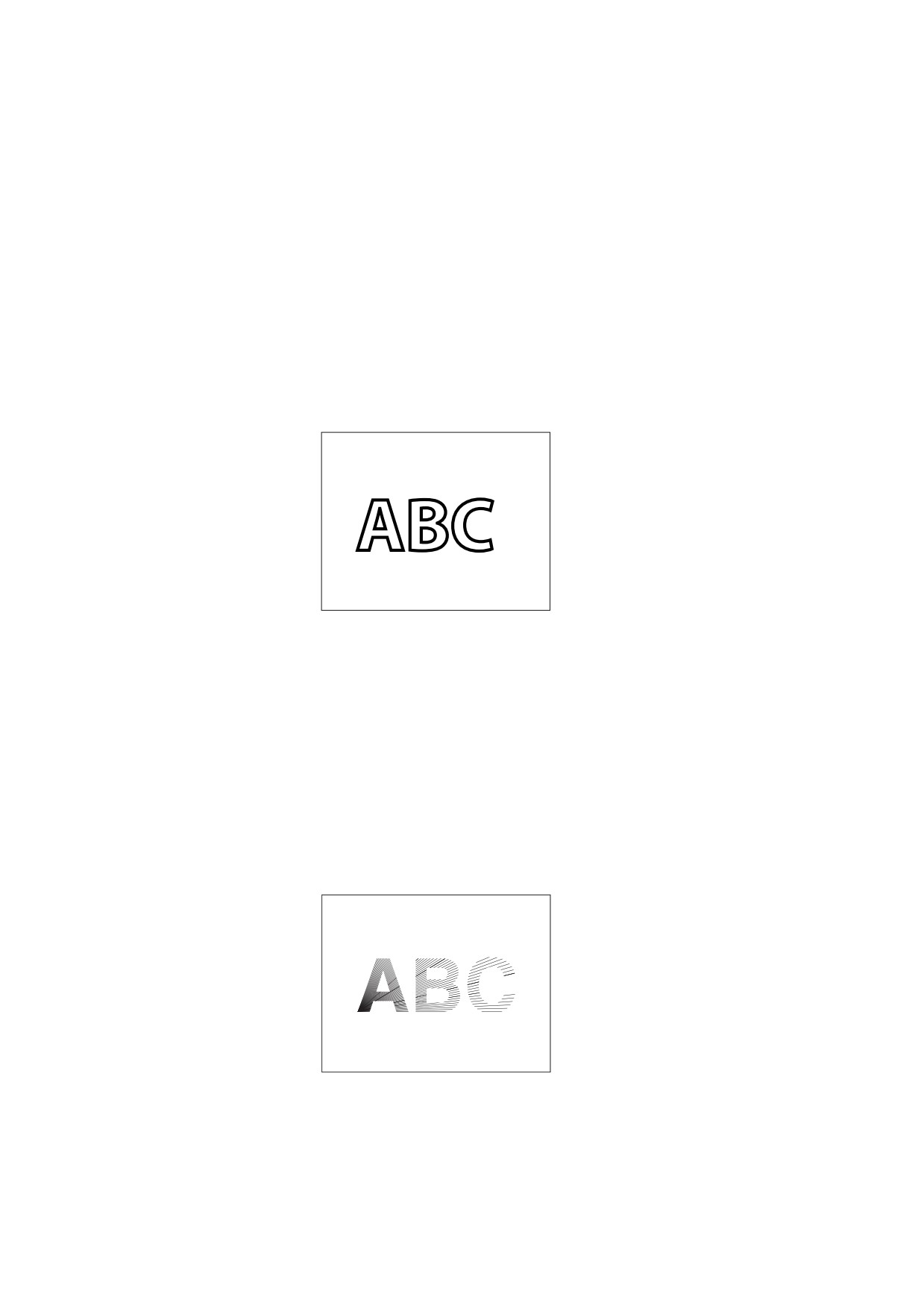
EXAMPLE 2
This example treats glyph outlines as a path to be stroked. The Tr operator sets the text rendering mode
to 1 (stroke). The w operator sets the line width to 2 units in user space. Given those graphics state
parameters, the Tj operator strokes the glyph outlines with a line 2 points thick (see Figure 37).
BT
/F13 48 Tf
20 38 Td
1 Tr
2 w
( ABC ) Tj
ET
ABC
Figure 37 - Glyph outlines treated as a stroked path
EXAMPLE 3
This example illustrates how the glyphs’ outlines may be used as a clipping boundary. The Tr operator
sets the text rendering mode to 7 (clip), causing the subsequent Tj operator to impose the glyph outlines
as the current clipping path. All subsequent painting operations mark the page only within this path, as
illustrated in Figure 38. This state persists until an earlier clipping path is reinstated by the Q operator.
BT
/F13 48 Tf
20 38 Td
7 Tr
( ABC ) Tj
ET
… Graphics operators to draw a starburst…
ABC
Figure 38 - Graphics clipped by a glyph path
240

9.2.4
Glyph Positioning and Metrics
A glyph’s width—formally, its horizontal displacement—is the amount of space it occupies along the baseline of
a line of text that is written horizontally. In other words, it is the distance the current text position shall move (by
translating text space) when the glyph is painted.
NOTE 1
The width is distinct from the dimensions of the glyph outline.
In some fonts, the width is constant; it does not vary from glyph to glyph. Such fonts are called fixed-pitch or
monospaced. They are used mainly for typewriter-style printing. However, most fonts used for high-quality
typography associate a different width with each glyph. Such fonts are called proportional or variable-pitch
fonts. In either case, the Tj operator shall position the consecutive glyphs of a string according to their widths.
The width information for each glyph shall be stored both in the font dictionary and in the font program itself.
The two sets of widths shall be identical.
NOTE 2
Storing this information in the font dictionary, although redundant, enables a conforming reader to determine
glyph positioning without having to look inside the font program.
NOTE 3
The operators for showing text are designed on the assumption that glyphs are ordinarily positioned according
to their standard widths. However, means are provided to vary the positioning in certain limited ways. For
example, the TJ operator enables the text position to be adjusted between any consecutive pair of glyphs
corresponding to characters in a text string. There are graphics state parameters to adjust character and word
spacing systematically.
In addition to width, a glyph has several other metrics that influence glyph positioning and painting. For most
font types, this information is largely internal to the font program and is not specified explicitly in the PDF font
dictionary. However, in a Type 3 font, all metrics are specified explicitly (see 9.6.5, "Type 3 Fonts").
The glyph coordinate system is the space in which an individual character’s glyph is defined. All path
coordinates and metrics shall be interpreted in glyph space. For all font types except Type 3, the units of glyph
space are one-thousandth of a unit of text space; for a Type 3 font, the transformation from glyph space to text
space shall be defined by a font matrix specified in an explicit FontMatrix entry in the font. Figure 39 shows a
typical glyph outline and its metrics.
Glyph
bounding
box
Next
Glyph
glyph
origin
origin
Glyph width
Figure 39 - Glyph metrics
The glyph origin is the point (0, 0) in the glyph coordinate system. Tj and other text-showing operators shall
position the origin of the first glyph to be painted at the origin of text space.
EXAMPLE 1
This code adjusts the origin of text space to (40, 50) in the user coordinate system and then places the
origin of the A glyph at that point:
BT
40 50 Td
( ABC ) Tj
ET
241
The glyph displacement is the distance from the glyph’s origin to the point at which the origin of the next glyph
should normally be placed when painting the consecutive glyphs of a line of text. This distance is a vector
(called the displacement vector) in the glyph coordinate system; it has horizontal and vertical components.
NOTE 4
Most Western writing systems, including those based on the Latin alphabet, have a positive horizontal
displacement and a zero vertical displacement. Some Asian writing systems have a nonzero vertical
displacement. In all cases, the text-showing operators transform the displacement vector into text space and
then translate text space by that amount.
The glyph bounding box shall be the smallest rectangle (oriented with the axes of the glyph coordinate system)
that just encloses the entire glyph shape. The bounding box shall be expressed in terms of its left, bottom, right,
and top coordinates relative to the glyph origin in the glyph coordinate system.
In some writing systems, text is frequently aligned in two different directions.
NOTE 5
It is common to write Japanese and Chinese glyphs either horizontally or vertically.
To handle this, a font may contain a second set of metrics for each glyph. Which set of metrics to use shall be
selected according to a writing mode, where 0 shall specify horizontal writing and 1 shall specify vertical writing.
This feature is available only for composite fonts, discussed in 9.7, "Composite Fonts".
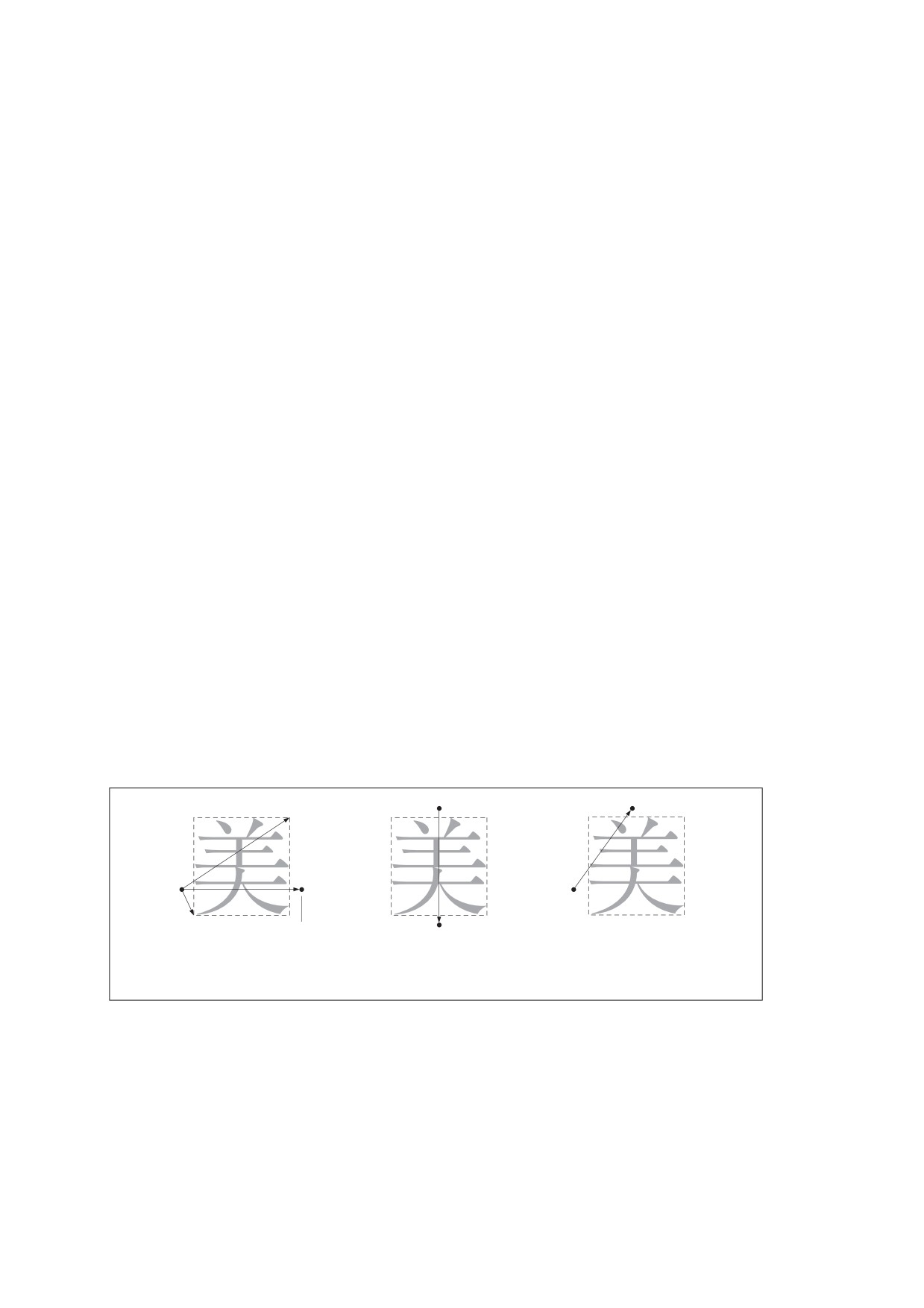
When a glyph has two sets of metrics, each set shall specify a glyph origin and a displacement vector for that
writing mode. In vertical writing, the glyph position shall be described by a position vector from the origin used
for horizontal writing (origin 0) to the origin used for vertical writing (origin 1). Figure 40 illustrates the metrics for
the two writing modes:
•
The left diagram illustrates the glyph metrics associated with writing mode 0, horizontal writing. The
coordinates ll and ur specify the bounding box of the glyph relative to origin 0. w0 is the displacement
vector that specifies how the text position shall be changed after the glyph is painted in writing mode 0; its
vertical component shall be 0.
•
The center diagram illustrates writing mode 1, vertical writing. w1 shall be the displacement vector for
writing mode 1; its horizontal component shall be 0.
•
In the right diagram, v is a position vector defining the position of origin 1 relative to origin 0.
ur
Origin 1
Origin 1
v
Origin
w0
0
Origin
0
ll
w1
New text
position
New text position
Writing mode 0
Writing mode 1
Mode 1 relative to mode 0
(horizontal)
(vertical)
Figure 40 - Metrics for horizontal and vertical writing modes
242
9.3
Text State Parameters and Operators
9.3.1
General
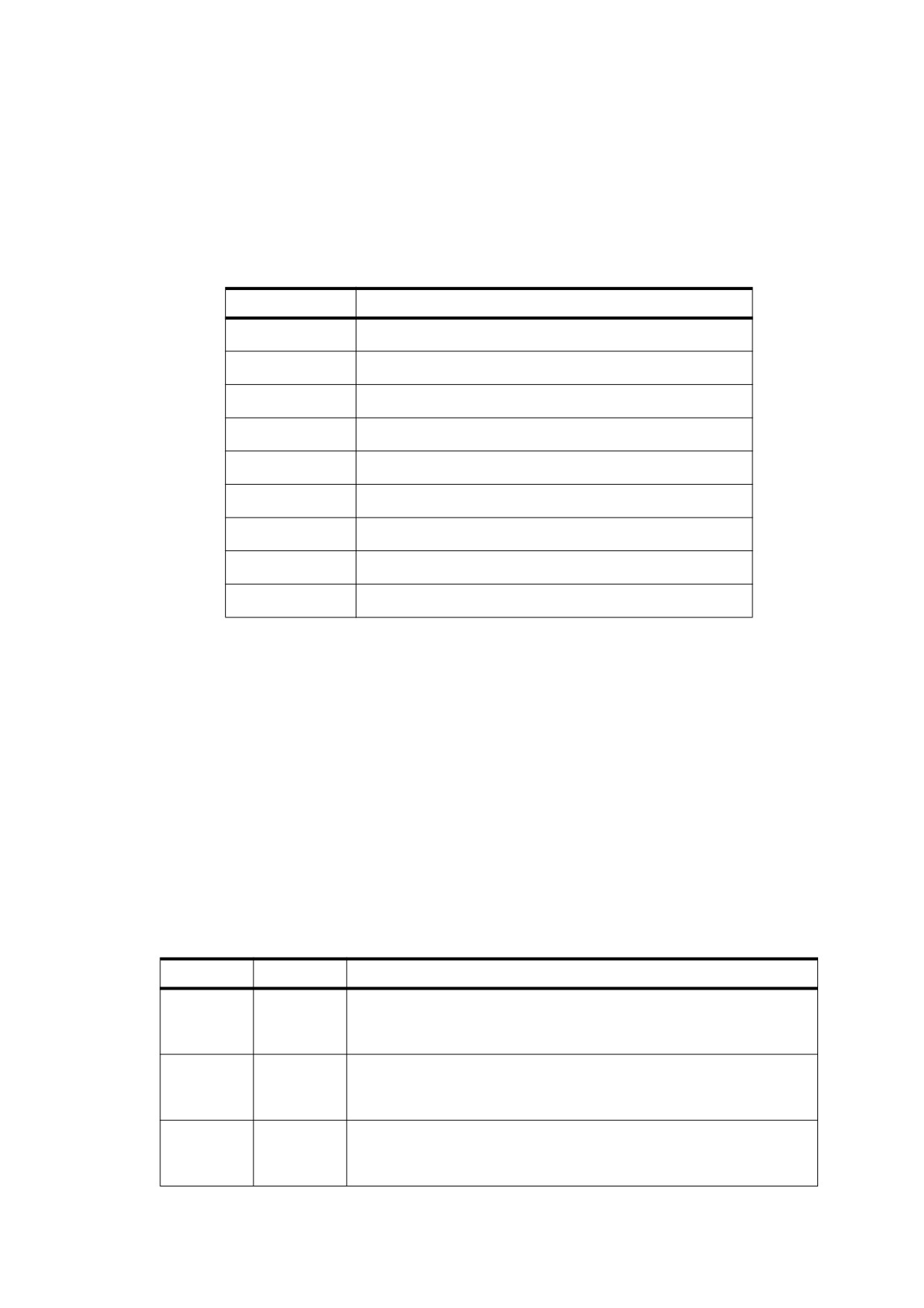
The text state comprises those graphics state parameters that only affect text. There are nine parameters in the
text state (see Table 104).
Table 104 - Text state parameters
Parameter
Description
Character spacing
Tc
Word spacing
Tw
Th
Horizontal scaling
Tl
Leading
Tf
Text font
Tfs
Text font size
Tmode
Text rendering mode
Text rise
Trise
Tk
Text knockout
Except for the previously described Tf and Tfs , these parameters are discussed further in subsequent sub-
clauses. (As described in 9.4, "Text Objects", three additional text-related parameters may occur only within a
text object: Tm , the text matrix; Tlm , the text line matrix; and Trm , the text rendering matrix.) The values of the
text state parameters shall be consulted when text is positioned and shown (using the operators described in
9.4.2, "Text-Positioning Operators" and 9.4.3, "Text-Showing Operators"). In particular, the spacing and scaling
parameters shall be used in a computation described in 9.4.4, "Text Space Details". The text state parameters
may be set using the operators listed in Table 105.
The text knockout parameter, Tk , shall be set through the TK entry in a graphics state parameter dictionary by
using the gs operator (see 8.4.5, "Graphics State Parameter Dictionaries"). There is no specific operator for
setting this parameter.
The text state operators may appear outside text objects, and the values they set are retained across text
objects in a single content stream. Like other graphics state parameters, these parameters shall be initialized to
their default values at the beginning of each page.
Table 105 - Text state operators
Operands
Operator
Description
charSpace
Tc
Set the character spacing, Tc , to charSpace, which shall be a number
expressed in unscaled text space units. Character spacing shall be used
by the Tj, TJ, and ' operators. Initial value: 0.
wordSpace
Tw
Set the word spacing, Tw, to wordSpace, which shall be a number
expressed in unscaled text space units. Word spacing shall be used by
the Tj, TJ, and ' operators. Initial value: 0.
scale
Tz
Set the horizontal scaling, Th , to (scale ÷ 100). scale shall be a number
specifying the percentage of the normal width. Initial value: 100 (normal
width).
243
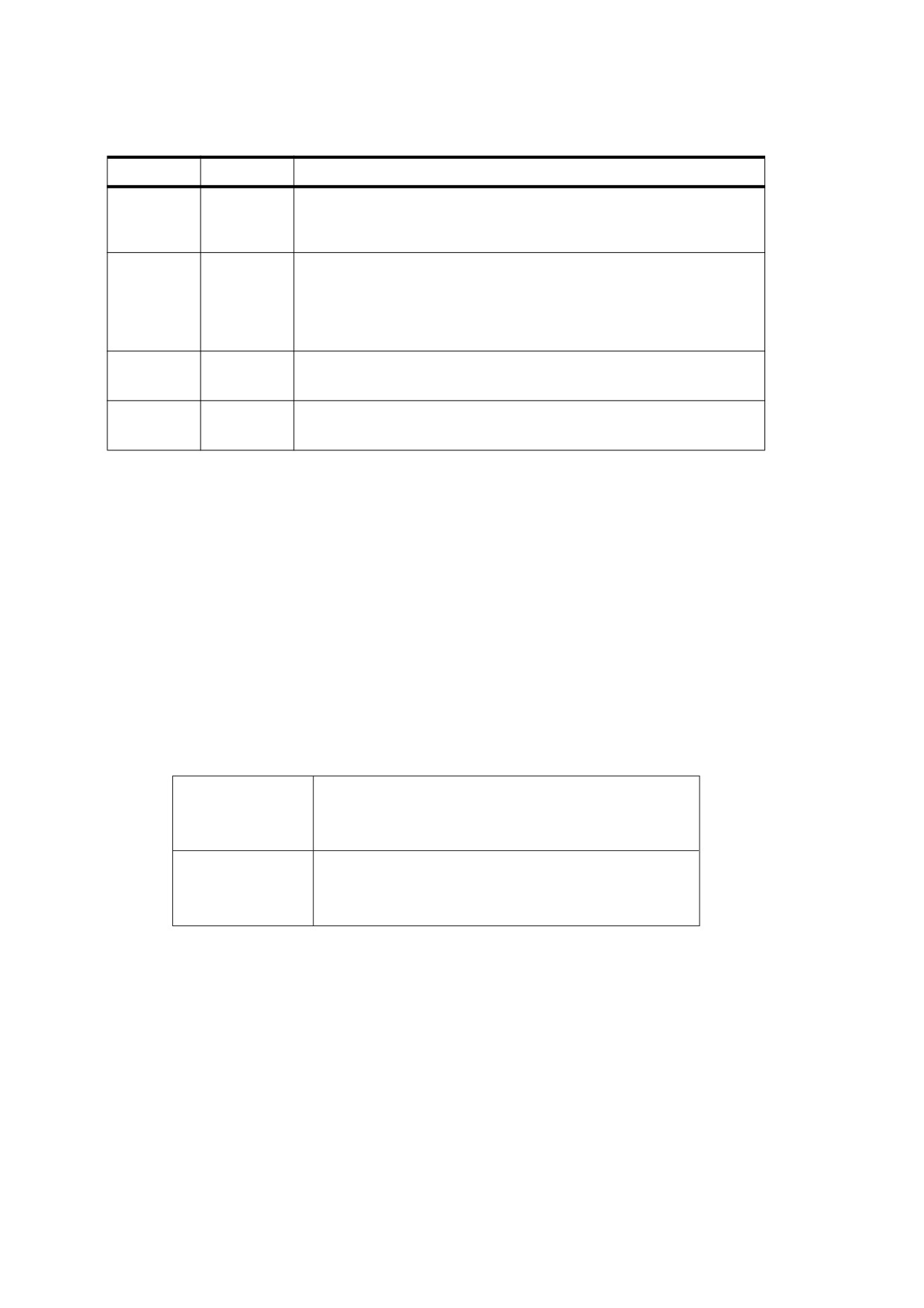
Table 105 - Text state operators (continued)
Operands
Operator
Description
leading
TL
Set the text leading, Tl , to leading, which shall be a number expressed in
unscaled text space units. Text leading shall be used only by the T*, ', and
" operators. Initial value: 0.
font size
Tf
Set the text font, Tf , to font and the text font size, Tfs , to size. font shall be
the name of a font resource in the Font subdictionary of the current
resource dictionary; size shall be a number representing a scale factor.
There is no initial value for either font or size; they shall be specified
explicitly by using Tf before any text is shown.
render
Tr
Set the text rendering mode, Tmode , to render, which shall be an integer.
Initial value: 0.
rise
Ts
Set the text rise, Trise , to rise, which shall be a number expressed in
unscaled text space units. Initial value: 0.
Some of these parameters are expressed in unscaled text space units. This means that they shall be specified
in a coordinate system that shall be defined by the text matrix, Tm but shall not be scaled by the font size
parameter, Tfs .
9.3.2
Character Spacing
The character-spacing parameter, Tc , shall be a number specified in unscaled text space units (although it shall
be subject to scaling by the Th parameter if the writing mode is horizontal). When the glyph for each character
in the string is rendered, Tc shall be added to the horizontal or vertical component of the glyph’s displacement,
depending on the writing mode. See 9.2.4, "Glyph Positioning and Metrics", for a discussion of glyph
displacements. In the default coordinate system, horizontal coordinates increase from left to right and vertical
coordinates from bottom to top. Therefore, for horizontal writing, a positive value of Tc has the effect of
expanding the distance between glyphs (see Figure 41), whereas for vertical writing, a negative value of Tc has
this effect.
Tc = 0 (default)
Character
Tc = 0.25
Character
Figure 41 - Character spacing in horizontal writing
9.3.3
Word Spacing
Word spacing works the same way as character spacing but shall apply only to the ASCII SPACE character
(20h). The word-spacing parameter, Tw, shall be added to the glyph’s horizontal or vertical displacement
(depending on the writing mode). For horizontal writing, a positive value for Tw has the effect of increasing the
spacing between words. For vertical writing, a positive value for Tw decreases the spacing between words (and
a negative value increases it), since vertical coordinates increase from bottom to top. Figure 42 illustrates the
effect of word spacing in horizontal writing.
244
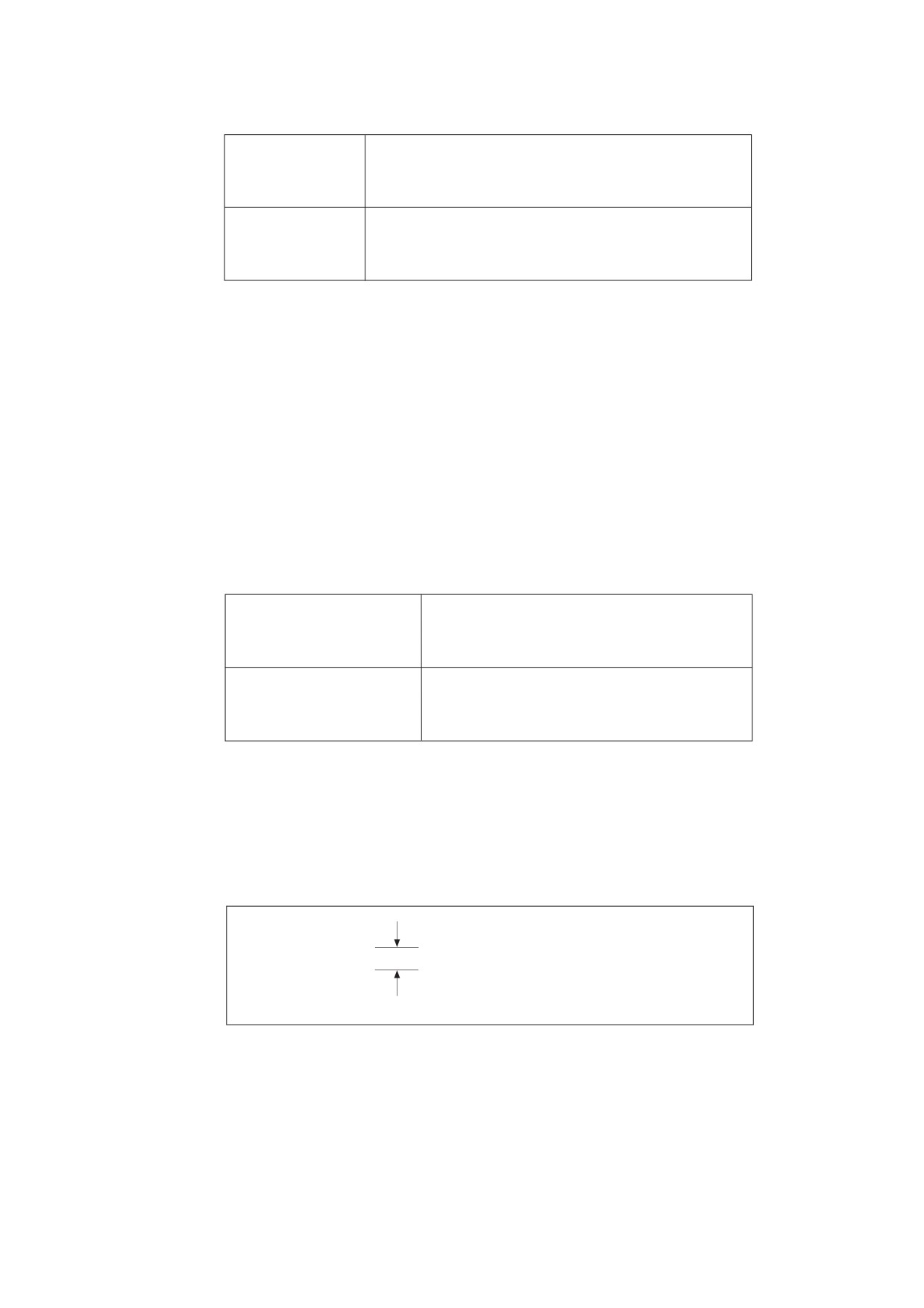
Tw = 0 (default)
Word Space
Tw = 2.5
Word Space
Figure 42 - Word spacing in horizontal writing
Word spacing shall be applied to every occurrence of the single-byte character code 32 in a string when using
a simple font or a composite font that defines code 32 as a single-byte code. It shall not apply to occurrences of
the byte value 32 in multiple-byte codes.
9.3.4
Horizontal Scaling
The horizontal scaling parameter, Th , adjusts the width of glyphs by stretching or compressing them in the
horizontal direction. Its value shall be specified as a percentage of the normal width of the glyphs, with 100
being the normal width. The scaling shall apply to the horizontal coordinate in text space, independently of the
writing mode. It shall affect both the glyph’s shape and its horizontal displacement (that is, its displacement
vector). If the writing mode is horizontal, it shall also effect the spacing parameters Tc and Tw, as well as any
positioning adjustments performed by the TJ operator. Figure 43 shows the effect of horizontal scaling.
Th = 100 (default)
Word
Th = 50
WordWord
Figure 43 - Horizontal scaling
9.3.5
Leading
The leading parameter, Tl , shall be specified in unscaled text space units . It specifies the vertical distance
between the baselines of adjacent lines of text, as shown in Figure 44.
This is 12-point text with
14.5-point leading
Leading
Figure 44 - Leading
The leading parameter shall be used by the TD, T*, ', and " operators; see Table 108 for a precise description
of its effects. This parameter shall apply to the vertical coordinate in text space, independently of the writing
mode.
245
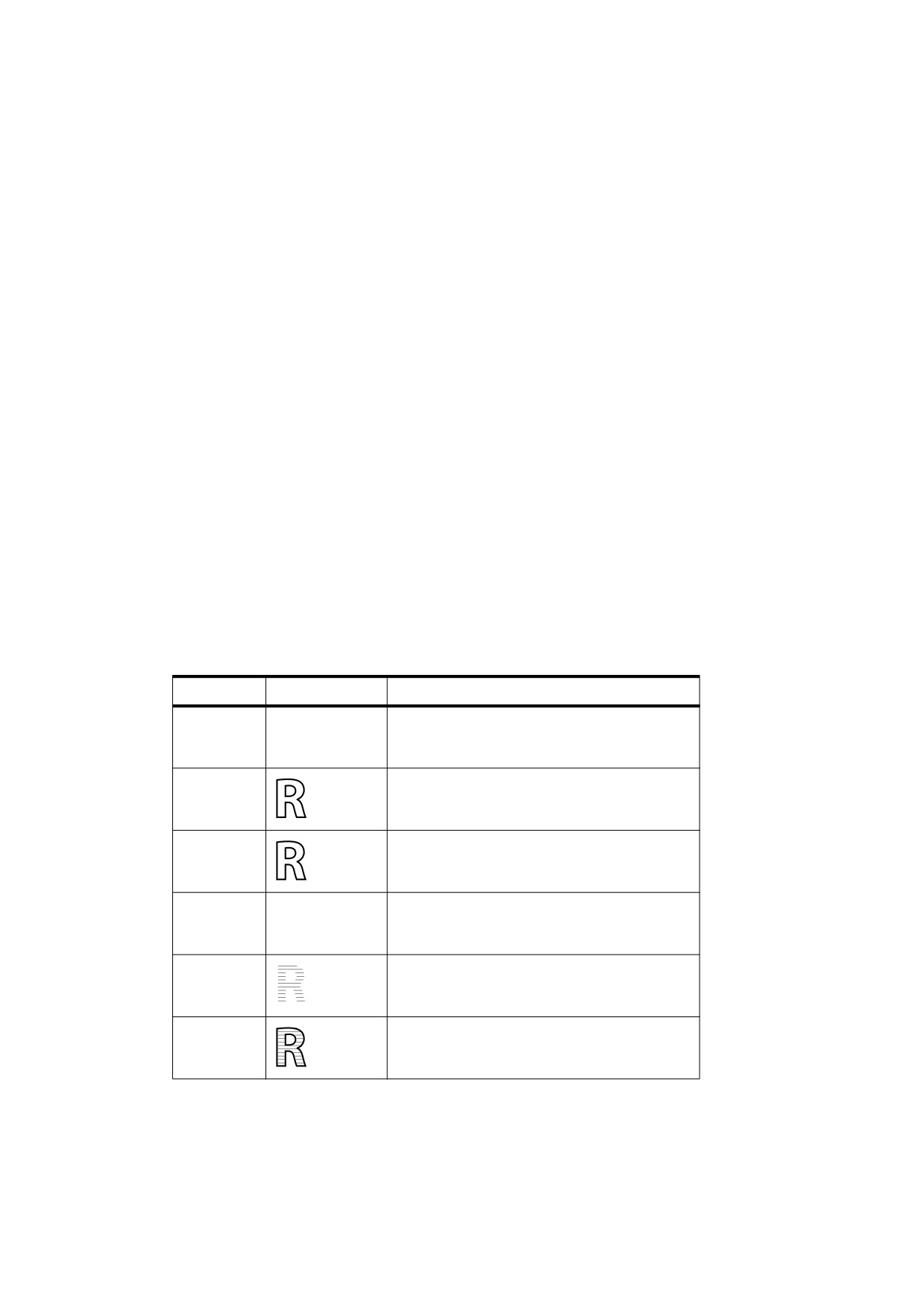
9.3.6
Text Rendering Mode
The text rendering mode, Tmode , determines whether showing text shall cause glyph outlines to be stroked,
filled, used as a clipping boundary, or some combination of the three. Stroking, filling, and clipping shall have
the same effects for a text object as they do for a path object (see 8.5.3, "Path-Painting Operators" and 8.5.4,
"Clipping Path Operators"), although they are specified in an entirely different way. The graphics state
parameters affecting those operations, such as line width, shall be interpreted in user space rather than in text
space.
NOTE
The text rendering modes are shown in Table 106. In the examples, a stroke colour of black and a fill colour of
light gray are used. For the clipping modes (4 to 7), a series of lines has been drawn through the glyphs to
show where the clipping occurs.
Only a value of 3 for text rendering mode shall have any effect on text displayed in a Type 3 font (see 9.6.5,
"Type 3 Fonts").
If the text rendering mode calls for filling, the current nonstroking colour in the graphics state shall be used; if it
calls for stroking, the current stroking colour shall be used. In modes that perform both filling and stroking, the
effect shall be as if each glyph outline were filled and then stroked in separate operations. If any of the glyphs
overlap, the result shall be equivalent to filling and stroking them one at a time, producing the appearance of
stacked opaque glyphs, rather than first filling and then stroking them all at once. In the transparent imaging
model, these combined filling and stroking modes shall be subject to further considerations; see 11.7.4.4,
"Special Path-Painting Considerations".
The behaviour of the clipping modes requires further explanation. Glyph outlines shall begin accumulating if a
BT operator is executed while the text rendering mode is set to a clipping mode or if it is set to a clipping mode
within a text object. Glyphs shall accumulate until the text object is ended by an ET operator; the text rendering
mode shall not be changed back to a nonclipping mode before that point.
Table 106 - Text rendering modes
Mode
Example
Description
0
Fill text.
R
1
Stroke text.
2
Fill, then stroke text.
R
3
Neither fill nor stroke text (invisible).
4
Fill text and add to path for clipping (see 9.3.6,
"Text Rendering Mode,").
R
5
Stroke text and add to path for clipping.
246
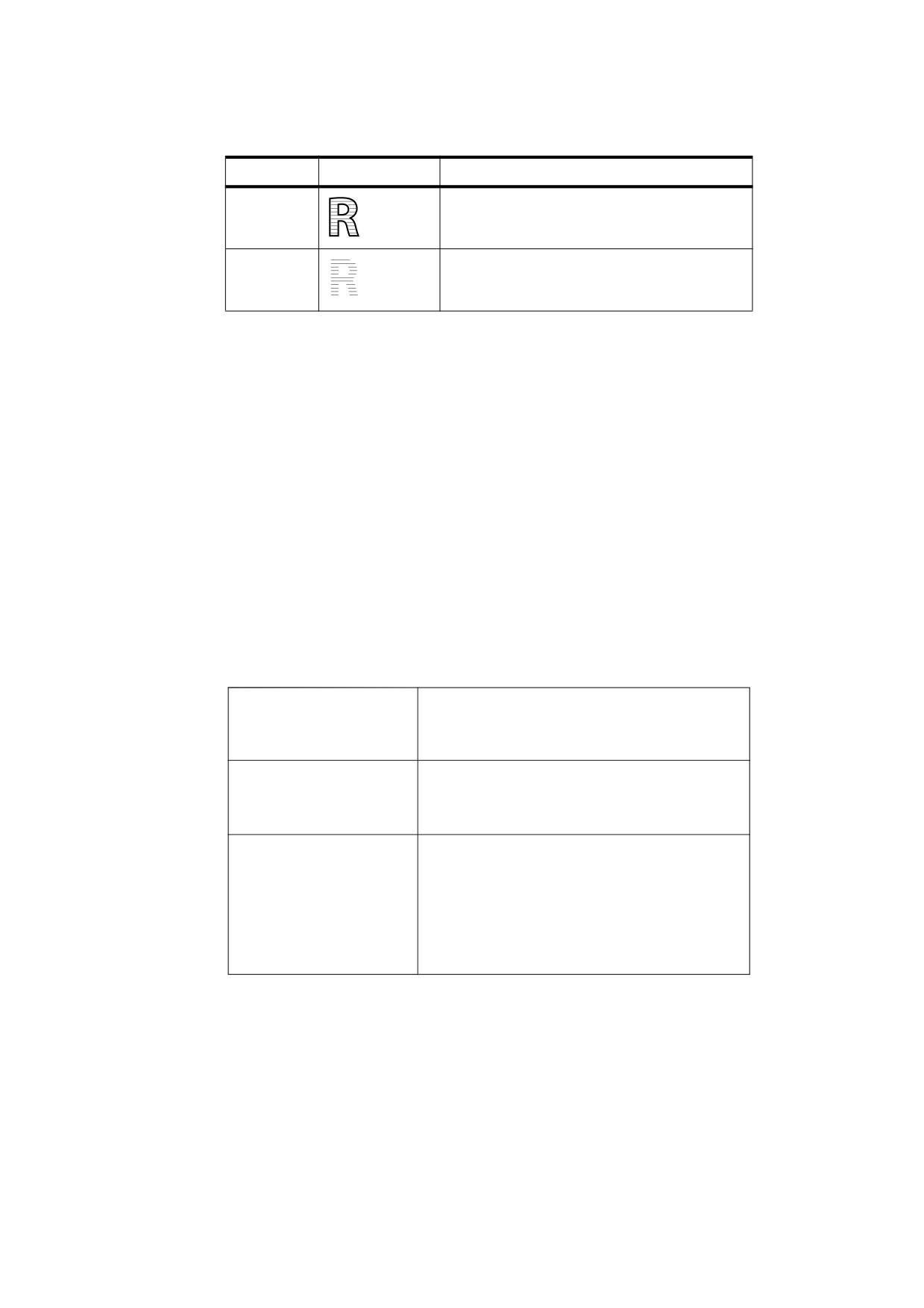
Table 106 - Text rendering modes (continued)
Mode
Example
Description
6
Fill, then stroke text and add to path for clipping.
R
7
Add text to path for clipping.
At the end of the text object, the accumulated glyph outlines, if any, shall be combined into a single path,
treating the individual outlines as subpaths of that path and applying the nonzero winding number rule (see
8.5.3.3.2, "Nonzero Winding Number Rule"). The current clipping path in the graphics state shall be set to the
intersection of this path with the previous clipping path. As is the case for path objects, this clipping shall occur
after all filling and stroking operations for the text object have occurred. It remains in effect until a previous
clipping path is restored by an invocation of the Q operator.
If no glyphs are shown or if the only glyphs shown have no outlines (for example, if they are ASCII SPACE
characters (20h)), no clipping shall occur.
9.3.7
Text Rise
Text rise, Trise , shall specify the distance, in unscaled text space units, to move the baseline up or down from its
default location. Positive values of text rise shall move the baseline up. Figure 45 illustrates the effect of the text
rise. Text rise shall apply to the vertical coordinate in text space, regardless of the writing mode.
NOTE
Adjustments to the baseline are useful for drawing superscripts or subscripts. The default location of the
baseline can be restored by setting the text rise to 0.
(This text is ) Tj
5 Ts
This text is superscripted
(superscripted) Tj
(This text is ) Tj
This text is
-5 Ts
subscripted
(subscripted) Tj
(This ) Tj
-5 Ts
(text ) Tj
5 Ts
This
text moves around
(moves ) Tj
0 Ts
(around) Tj
Figure 45 - Text rise
9.3.8
Text Knockout
The text knockout parameter, Tk (PDF 1.4), shall be a boolean value that determines what text elements shall
be considered elementary objects for purposes of colour compositing in the transparent imaging model. Unlike
other text state parameters, there is no specific operator for setting this parameter; it may be set only through
the TK entry in a graphics state parameter dictionary by using the gs operator (see 8.4.5, "Graphics State
Parameter Dictionaries"). The text knockout parameter shall apply only to entire text objects; it shall not be set
between the BT and ET operators delimiting a text object. Its initial value shall be true.
247
If the parameter is false, each glyph in a text object shall be treated as a separate elementary object; when
glyphs overlap, they shall composite with one another.
If the parameter is true, all glyphs in the text object shall be treated together as a single elementary object;
when glyphs overlap, later glyphs shall overwrite (“knock out”) earlier ones in the area of overlap. This
behaviour is equivalent to treating the entire text object as if it were a non-isolated knockout transparency
group; see 11.4.6, "Knockout Groups". Transparency parameters shall be applied to the glyphs individually
rather than to the implicit transparency group as a whole:
•
Graphics state parameters, including transparency parameters, shall be inherited from the context in which
the text object appears. They shall not be saved and restored. The transparency parameters shall not be
reset at the beginning of the transparency group (as they are when a transparency group XObject is
explicitly invoked). Changes made to graphics state parameters within the text object shall persist beyond
the end of the text object.
•
After the implicit transparency group for the text object has been completely evaluated, the group results
shall be composited with the backdrop, using the Normal blend mode and alpha and soft mask values of
1.0.
9.4
Text Objects
9.4.1
General
A PDF text object consists of operators that may show text strings, move the text position, and set text state
and certain other parameters. In addition, three parameters may be specified only within a text object and shall
not persist from one text object to the next:
•
Tm , the text matrix
•
Tlm , the text line matrix
•
, the text rendering matrix, which is actually just an intermediate result that combines the effects of text
Trm
state parameters, the text matrix (Tm ), and the current transformation matrix
A text object begins with the BT operator and ends with the ET operator, as shown in the Example, and
described in Table 107.
EXAMPLE
BT
… Zero or more text operators or other allowed operators…
ET
Table 107 - Text object operators
Operands
Operator
Description
—
BT
Begin a text object, initializing the text matrix, Tm , and the text line matrix,
Tlm , to the identity matrix. Text objects shall not be nested; a second BT shall
not appear before an ET.
—
ET
End a text object, discarding the text matrix.
These specific categories of text-related operators may appear in a text object:
•
Text state operators, described in 9.3, "Text State Parameters and Operators"
•
Text-positioning operators, described in 9.4.2, "Text-Positioning Operators"
•
Text-showing operators, described in 9.4.3, "Text-Showing Operators"
248
The latter two sub-clauses also provide further details about these text object parameters. The other operators
that may appear in a text object are those related to the general graphics state, colour, and marked content, as
shown in Figure 9.
If a content stream does not contain any text, the Text procedure set may be omitted (see 14.2, "Procedure
Sets"). In those circumstances, no text operators (including operators that merely set the text state) shall be
present in the content stream, since those operators are defined in the same procedure set.
NOTE
Although text objects cannot be statically nested, text might be shown using a Type 3 font whose glyph
descriptions include any graphics objects, including another text object. Likewise, the current colour might be a
tiling pattern whose pattern cell includes a text object.
9.4.2
Text-Positioning Operators
Text space is the coordinate system in which text is shown. It shall be defined by the text matrix, Tm , and the
text state parameters Tfs , Th , and Trise , which together shall determine the transformation from text space to
user space. Specifically, the origin of the first glyph shown by a text-showing operator shall be placed at the
origin of text space. If text space has been translated, scaled, or rotated, then the position, size, or orientation
of the glyph in user space shall be correspondingly altered.
The text-positioning operators shall only appear within text objects.
Table 108 - Text-positioning operators
Operands
Operator
Description
ty
Td
Move to the start of the next line, offset from the start of the current line by
tx
(tx , ty ). tx and ty shall denote numbers expressed in unscaled text space
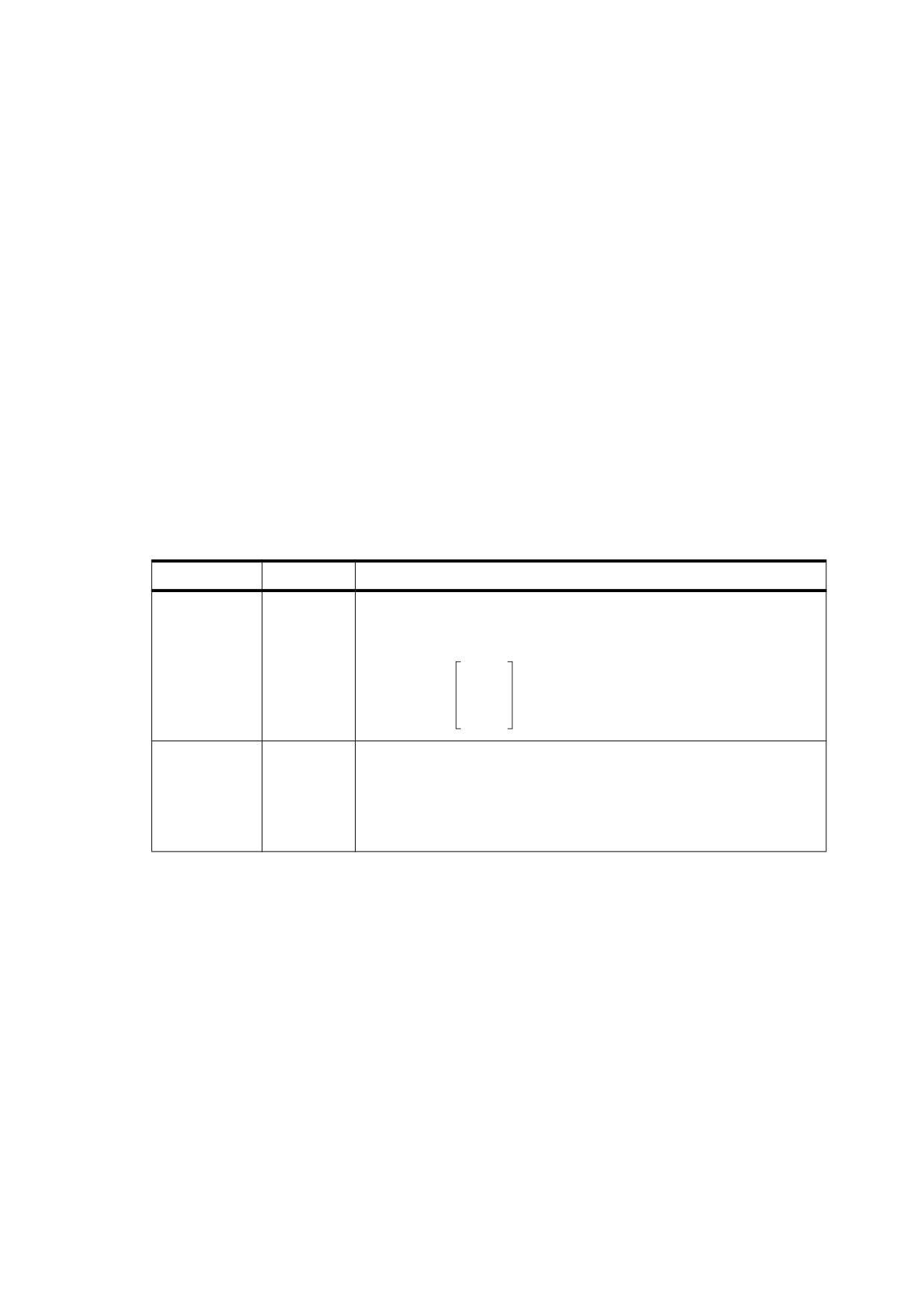
units. More precisely, this operator shall perform these assignments:
1
0 0
Tm = Tlm
=
0
1 0
×
Tlm
tx ty 1
tx ty
TD
Move to the start of the next line, offset from the start of the current line by
(tx , ty ). As a side effect, this operator shall set the leading parameter in
the text state. This operator shall have the same effect as this code:
−ty TL
tx ty Td
249
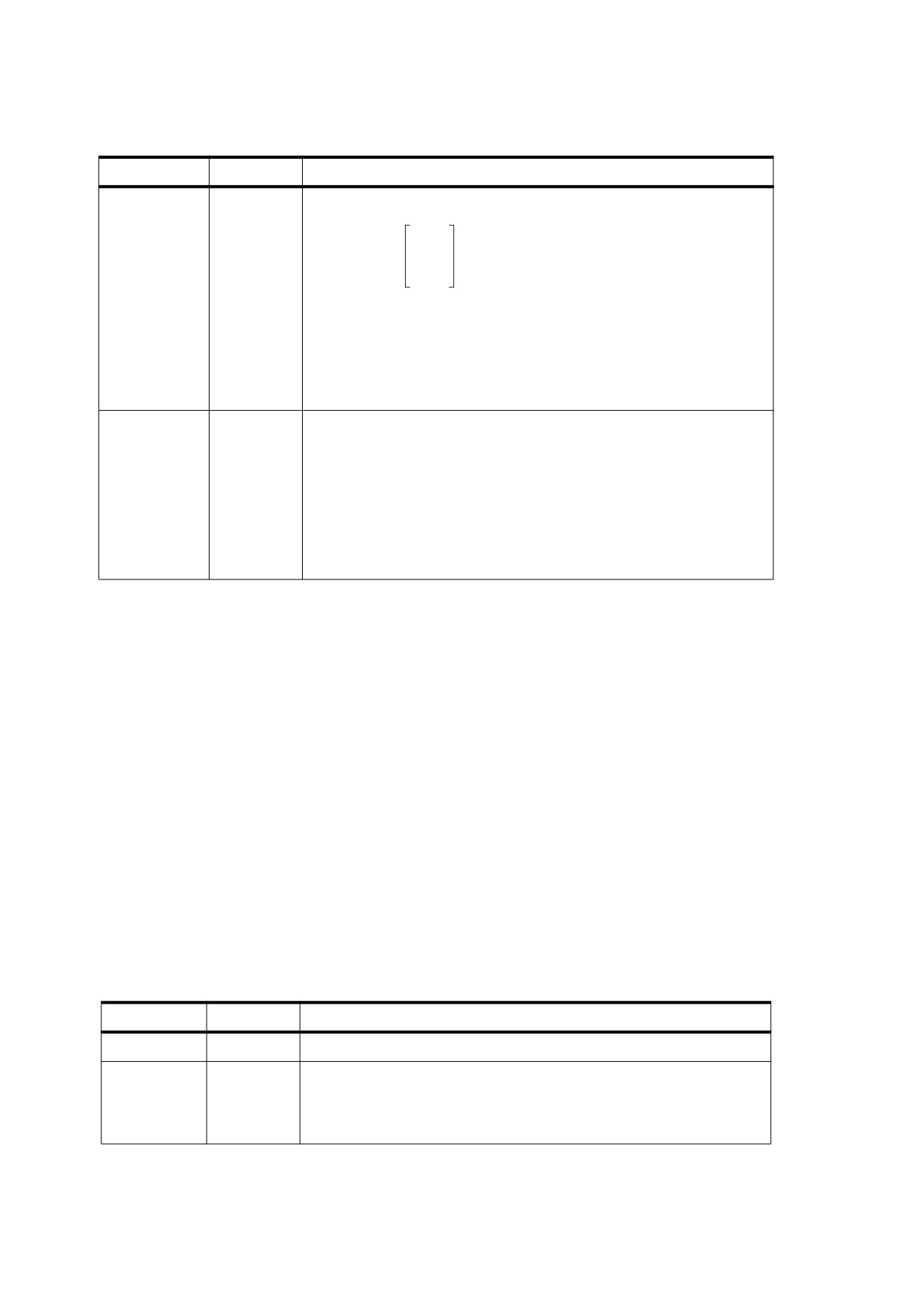
Table 108 - Text-positioning operators (continued)
Operands
Operator
Description
a b c d e f
Tm
Set the text matrix, Tm , and the text line matrix, Tlm :
a b 0
Tm = Tlm
=
c d 0
e f 1
The operands shall all be numbers, and the initial value for Tm and Tlm
shall be the identity matrix,
[1
0 0 1 0 0 ]. Although the operands
specify a matrix, they shall be passed to Tm as six separate numbers, not
as an array.
The matrix specified by the operands shall not be concatenated onto the
current text matrix, but shall replace it.
—
T*
Move to the start of the next line. This operator has the same effect as the
code
0 -Tl Td
where Tl denotes the current leading parameter in the text state. The
negative of Tl is used here because Tl is the text leading expressed as a
positive number. Going to the next line entails decreasing the
y coordinate.
At the beginning of a text object, Tm shall be the identity matrix; therefore, the origin of text space shall be
initially the same as that of user space. The text-positioning operators, described in Table 108, alter Tm and
thereby control the placement of glyphs that are subsequently painted. Also, the text-showing operators,
described in Table 109, update Tm (by altering its e and f translation components) to take into account the
horizontal or vertical displacement of each glyph painted as well as any character or word-spacing parameters
in the text state.
Additionally, within a text object, a conforming reader shall keep track of a text line matrix, Tlm , which captures
the value of Tm at the beginning of a line of text. The text-positioning and text-showing operators shall read and
set Tlm on specific occasions mentioned in Tables 108 and 109.
NOTE
This can be used to compactly represent evenly spaced lines of text.
9.4.3
Text-Showing Operators
The text-showing operators (Table 109) shall show text on the page, repositioning text space as they do so. All
of the operators shall interpret the text string and apply the text state parameters as described in Table 109.
The text-showing operators shall only appear within text objects.
Table 109 - Text-showing operators
Operands
Operator
Description
string
Tj
Show a text string.
string
'
Move to the next line and show a text string. This operator shall have the
same effect as the code
T*
string Tj
250
Table 109 - Text-showing operators (continued)
Operands
Operator
Description
aw ac string
"
Move to the next line and show a text string, using aw as the word spacing
and ac as the character spacing (setting the corresponding parameters in
the text state). aw and ac shall be numbers expressed in unscaled text
space units. This operator shall have the same effect as this code:
aw Tw
ac Tc
string '
array
TJ
Show one or more text strings, allowing individual glyph positioning. Each
element of array shall be either a string or a number. If the element is a
string, this operator shall show the string. If it is a number, the operator
shall adjust the text position by that amount; that is, it shall translate the
text matrix, Tm . The number shall be expressed in thousandths of a unit
of text space (see 9.4.4, "Text Space Details"). This amount shall be
subtracted from the current horizontal or vertical coordinate, depending
on the writing mode. In the default coordinate system, a positive
adjustment has the effect of moving the next glyph painted either to the
left or down by the given amount. Figure 46 shows an example of the
effect of passing offsets to TJ.
[ (AWAY again) ] TJ
AWAY again
[ (A) 120 (W) 120 (A) 95 (Y again) ] TJ
AWAY again
Figure 46 - Operation of the TJ operator in horizontal writing
A string operand of a text-showing operator shall be interpreted as a sequence of character codes identifying
the glyphs to be painted.
With a simple font, each byte of the string shall be treated as a separate character code. The character code
shall then be looked up in the font’s encoding to select the glyph, as described in 9.6.6, "Character Encoding".
With a composite font (PDF 1.2), multiple-byte codes may be used to select glyphs. In this instance, one or
more consecutive bytes of the string shall be treated as a single character code. The code lengths and the
mappings from codes to glyphs are defined in a data structure called a CMap, described in 9.7, "Composite
Fonts".
The strings shall conform to the syntax for string objects. When a string is written by enclosing the data in
parentheses, bytes whose values are equal to those of the ASCII characters LEFT PARENTHESIS (28h),
RIGHT PARENTHESIS (29h), and REVERSE SOLIDUS (5Ch) (backslash) shall be preceded by a REVERSE
SOLIDUS) character. All other byte values between 0 and 255 may be used in a string object. These rules
apply to each individual byte in a string object, whether the string is interpreted by the text-showing operators
as single-byte or multiple-byte character codes.
Strings presented to the text-showing operators may be of any length—even a single character code per
string—and may be placed on the page in any order. The grouping of glyphs into strings has no significance for
the display of text. Showing multiple glyphs with one invocation of a text-showing operator such as Tj shall
produce the same results as showing them with a separate invocation for each glyph.
251
NOTE 6
The performance of text searching (and other text extraction operations) is significantly better if the text strings
are as long as possible and are shown in natural reading order.
NOTE 7
In some cases, the text that is extracted can vary depending on the grouping of glyphs into strings. See, for
example, 14.8.2.3.3, "Reverse-Order Show Strings".
9.4.4
Text Space Details
As stated in 9.4.2, "Text-Positioning Operators", text shall be shown in text space, defined by the combination
of the text matrix, Tm , and the text state parameters Tfs , Th , and Trise . This determines how text coordinates
are transformed into user space. Both the glyph’s shape and its displacement (horizontal or vertical) shall be
interpreted in text space.
NOTE 1
Glyphs are actually defined in glyph space, whose definition varies according to the font type as discussed in
9.2.4, "Glyph Positioning and Metrics". Glyph coordinates are first transformed from glyph space to text space
before being subjected to the transformations described in Note 2.
NOTE 2
Conceptually, the entire transformation from text space to device space may be represented by a text
rendering matrix, Trm :
Tfs × Th
0
0
Trm
=
0
Tfs
0
×
Tm
× CTM
0
Trise
1
Trm is a temporary matrix; conceptually, it is recomputed before each glyph is painted during a text-showing
operation.
After the glyph is painted, the text matrix shall be updated according to the glyph displacement and any spacing
parameters that apply. First, a combined displacement shall be computed, denoted by tx in horizontal writing
mode or ty in vertical writing mode (the variable corresponding to the other writing mode shall be set to 0):
Tj
⎛
⎛
⎞
⎞
tx
=
w0
- -----------
×
Tfs
+
Tc +Tw
×
Th
⎝
⎝
⎠
⎠
1000
Tj
⎛
⎞
ty
=
w1
- -----------
×
Tfs
+
Tc +Tw
⎝
1000⎠
where
w0 and w1 denote the glyph’s horizontal and vertical displacements
Tj denotes a number in a TJ array, if any, which specifies a position adjustment
Tfs and Th denote the current text font size and horizontal scaling parameters in the graphics state
Tc and Tw denote the current character- and word-spacing parameters in the graphics state, if applicable
The text matrix shall then be then updated as follows:
1
0
0
Tm
=
0
1
0
×
Tm
tx ty 1
252
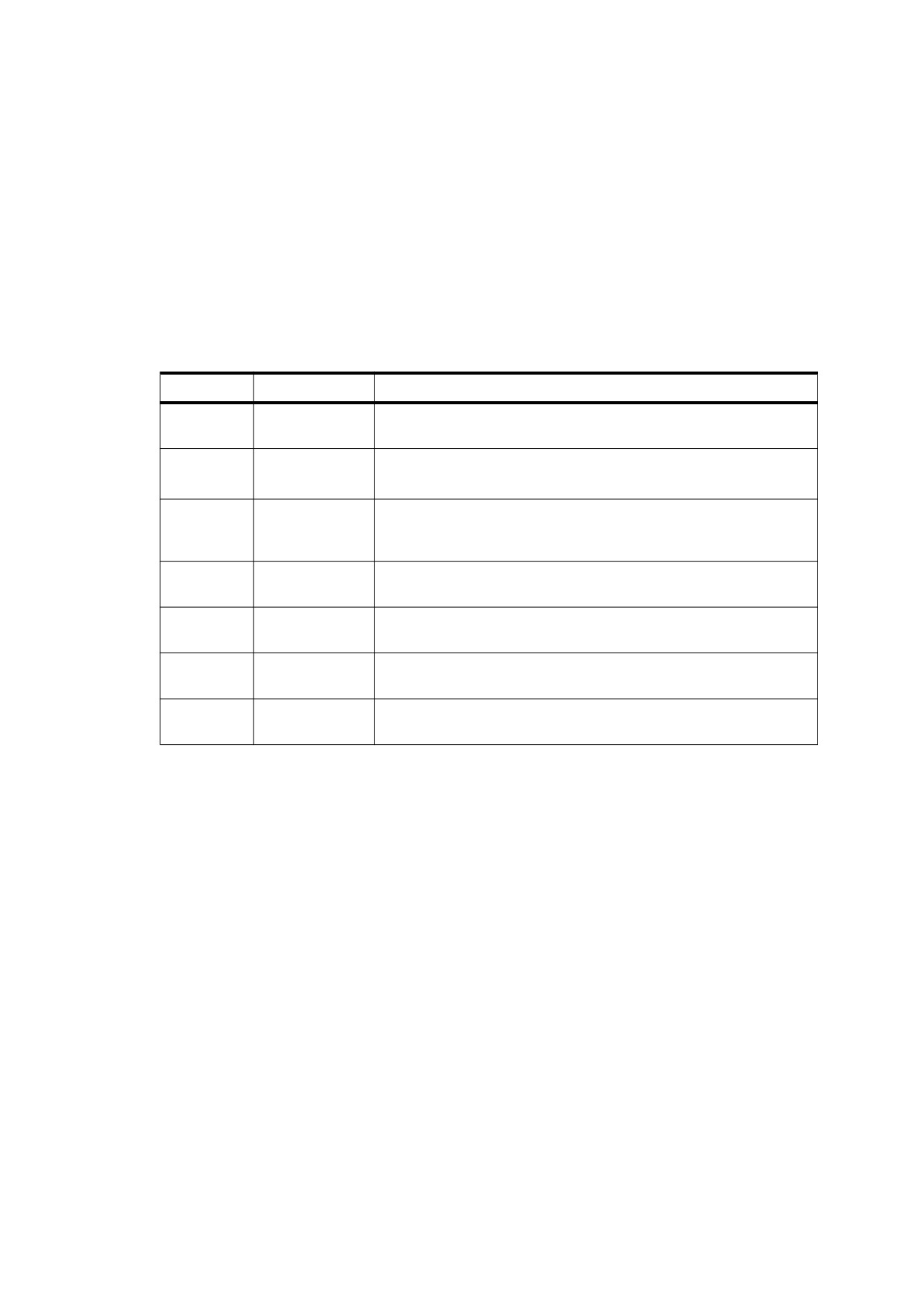
9.5
Introduction to Font Data Structures
A font shall be represented in PDF as a dictionary specifying the type of font, its PostScript name, its encoding,
and information that can be used to provide a substitute when the font program is not available. Optionally, the
font program may be embedded as a stream object in the PDF file.
The font types are distinguished by the Subtype entry in the font dictionary. Table 110 lists the font types
defined in PDF. Type 0 fonts are called composite fonts; other types of fonts are called simple fonts. In addition
to fonts, PDF supports two classes of font-related objects, called CIDFonts and CMaps, described in 9.7.2,
"CID-Keyed Fonts Overview". CIDFonts are listed in Table 110 because, like fonts, they are collections of
glyphs; however, a CIDFont shall not be used directly but only as a component of a Type 0 font.
Table 110 - Font types
Type
Subtype Value
Description
Type 0
Type0
(PDF 1.2) A composite font—a font composed of glyphs from a
descendant CIDFont (see 9.7, "Composite Fonts")
Type 1
Type1
A font that defines glyph shapes using Type 1 font technology (see
9.6.2, "Type 1 Fonts").
MMType1
A multiple master font—an extension of the Type 1 font that allows
the generation of a wide variety of typeface styles from a single font
(see 9.6.2.3, "Multiple Master Fonts")
Type 3
Type3
A font that defines glyphs with streams of PDF graphics operators
(see 9.6.5, "Type 3 Fonts")
TrueType
TrueType
A font based on the TrueType font format (see 9.6.3, "TrueType
Fonts")
CIDFont
CIDFontType0
(PDF 1.2) A CIDFont whose glyph descriptions are based on Type 1
font technology (see 9.7.4, "CIDFonts")
CIDFontType2
(PDF 1.2) A CIDFont whose glyph descriptions are based on
TrueType font technology (see 9.7.4, "CIDFonts")
For all font types, the term font dictionary refers to a PDF dictionary containing information about the font;
likewise, a CIDFont dictionary contains information about a CIDFont. Except for Type 3, this dictionary is
distinct from the font program that defines the font’s glyphs. That font program may be embedded in the PDF
file as a stream object or be obtained from some external source.
NOTE 1
This terminology differs from that used in the PostScript language. In PostScript, a font dictionary is a
PostScript data structure that is created as a direct result of interpreting a font program. In PDF, a font program
is always treated as if it were a separate file, even when its content is embedded in the PDF file. The font
program is interpreted by a specialized font interpreter when necessary; its contents never materialize as PDF
objects.
NOTE 2
Most font programs (and related programs, such as CIDFonts and CMaps) conform to external specifications,
such as the Adobe Type 1 Font Format. This standard does not include those specifications. See the
Bibliography for more information about the specifications mentioned in this clause.
NOTE 3
The most predictable and dependable results are produced when all font programs used to show text are
embedded in the PDF file. The following sub-clauses describe precisely how to do so. If a PDF file refers to
font programs that are not embedded, the results depend on the availability of fonts in the conforming reader’s
environment. The following sub-clauses specify some conventions for referring to external font programs.
However, some details of font naming, font substitution, and glyph selection are implementation-dependent
and may vary among different conforming readers, writers and operating system environments.
253
9.6
Simple Fonts
9.6.1
General
There are several types of simple fonts, all of which have these properties:
•
Glyphs in the font shall be selected by single-byte character codes obtained from a string that is shown by
the text-showing operators. Logically, these codes index into a table of 256 glyphs; the mapping from
codes to glyphs is called the font’s encoding. Under some circumstances, the encoding may be altered by
means described in 9.6.6, "Character Encoding".
•
Each glyph shall have a single set of metrics, including a horizontal displacement or width, as described in
9.2.4, "Glyph Positioning and Metrics"; that is, simple fonts support only horizontal writing mode.
•
Except for Type 0 fonts, Type 3 fonts in non-Tagged PDF documents, and certain standard Type 1 fonts,
every font dictionary shall contain a subsidiary dictionary, the font descriptor, containing font-wide metrics
and other attributes of the font; see 9.8, "Font Descriptors". Among those attributes is an optional font file
stream containing the font program.
9.6.2
Type 1 Fonts
9.6.2.1
General
A Type 1 font program is a stylized PostScript program that describes glyph shapes. It uses a compact
encoding for the glyph descriptions, and it includes hint information that enables high-quality rendering even at
small sizes and low resolutions.
NOTE 1
Details on this format are provided in a separate specification, Adobe Type 1 Font Format. An alternative, more
compact but functionally equivalent representation of a Type 1 font program is documented in Adobe Technical
Note #5176, The Compact Font Format Specification.
NOTE 2
Although a Type 1 font program uses PostScript language syntax, using it does not require a full PostScript
interpreter; a specialized Type 1 font interpreter suffices.
A Type 1 font dictionary may contain the entries listed in Table 111. Some entries are optional for the standard
14 fonts listed under 9.6.2.2, "Standard Type 1 Fonts (Standard 14 Fonts)", but are required otherwise.
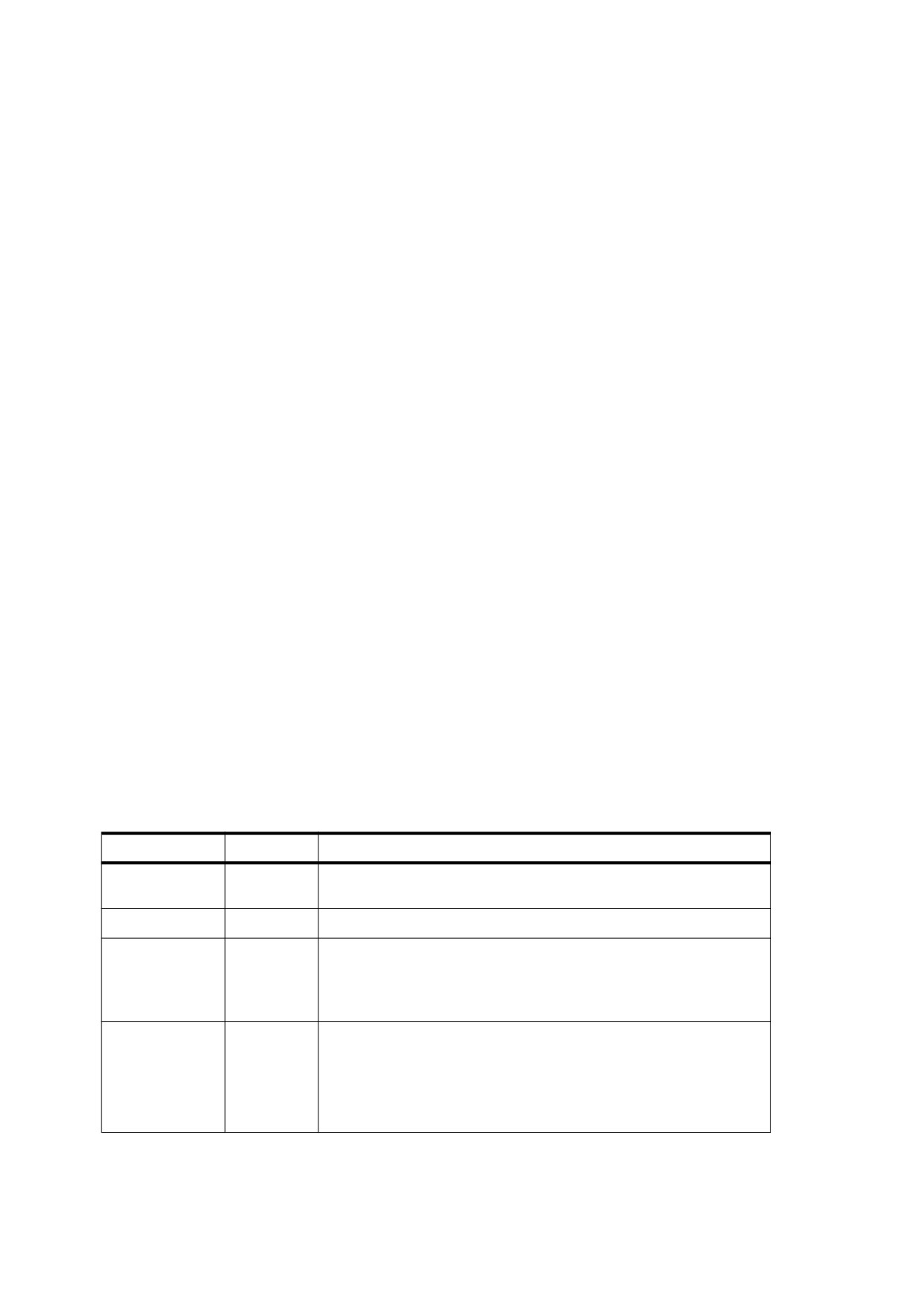
Table 111 - Entries in a Type 1 font dictionary
Key
Type
Value
Type
name
(Required) The type of PDF object that this dictionary describes; shall
be Font for a font dictionary.
Subtype
name
(Required) The type of font; shall be Type1 for a Type 1 font.
Name
name
(Required in PDF 1.0; optional otherwise) The name by which this font
is referenced in the Font subdictionary of the current resource
dictionary.
This entry is obsolete and should not be used.
BaseFont
name
(Required) The PostScript name of the font. For Type 1 fonts, this is
always the value of the FontName entry in the font program; for more
information, see Section 5.2 of the PostScript Language Reference,
Third Edition. The PostScript name of the font may be used to find the
font program in the conforming reader or its environment. It is also the
name that is used when printing to a PostScript output device.
254
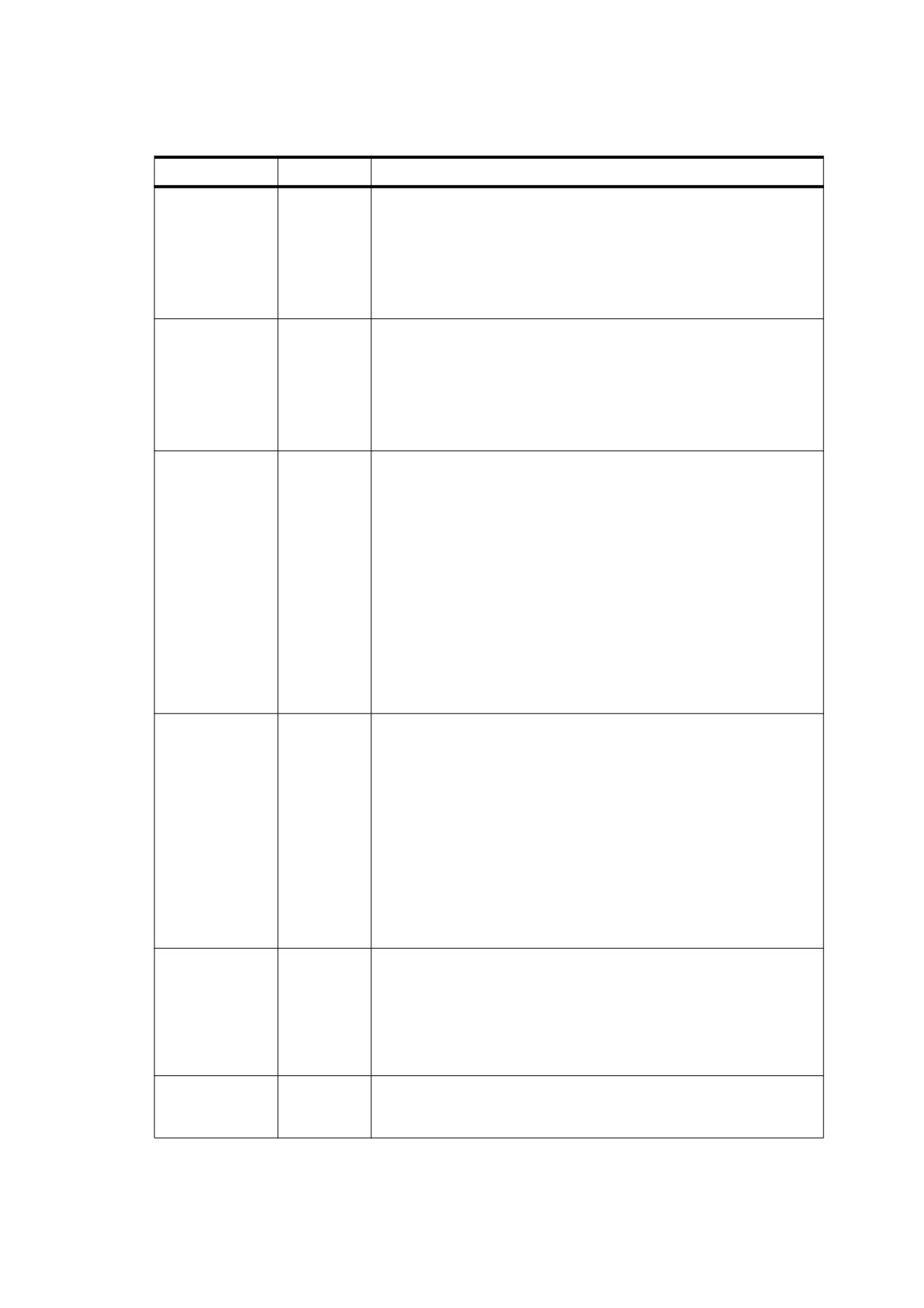
Table 111 - Entries in a Type 1 font dictionary (continued)
Key
Type
Value
FirstChar
integer
(Required except for the standard 14 fonts) The first character code
defined in the font’s Widths array.
Beginning with PDF 1.5, the special treatment given to the standard 14
fonts is deprecated. Conforming writers should represent all fonts
using a complete font descriptor. For backwards capability, conforming
readers shall still provide the special treatment identified for the
standard 14 fonts.
LastChar
integer
(Required except for the standard 14 fonts) The last character code
defined in the font’s Widths array.
Beginning with PDF 1.5, the special treatment given to the standard 14
fonts is deprecated. Conforming writers should represent all fonts
using a complete font descriptor. For backwards capability, conforming
readers shall still provide the special treatment identified for the
standard 14 fonts.
Widths
array
(Required except for the standard
14 fonts; indirect reference
preferred) An array of
(LastChar − FirstChar + 1) widths, each
element being the glyph width for the character code that equals
FirstChar plus the array index. For character codes outside the range
FirstChar to LastChar, the value of MissingWidth from the
FontDescriptor entry for this font shall be used. The glyph widths
shall be measured in units in which 1000 units correspond to 1 unit in
text space. These widths shall be consistent with the actual widths
given in the font program. For more information on glyph widths and
other glyph metrics, see 9.2.4, "Glyph Positioning and Metrics".
Beginning with PDF 1.5, the special treatment given to the standard 14
fonts is deprecated. Conforming writers should represent all fonts
using a complete font descriptor. For backwards capability, conforming
readers shall still provide the special treatment identified for the
standard 14 fonts.
FontDescriptor
dictionary
(Required except for the standard
14 fonts; shall be an indirect
reference) A font descriptor describing the font’s metrics other than its
glyph widths (see 9.8, "Font Descriptors"”\).
For the standard 14 fonts, the entries FirstChar, LastChar, Widths,
and FontDescriptor shall either all be present or all be absent.
Ordinarily, these dictionary keys may be absent; specifying them
enables a standard font to be overridden; see 9.6.2.2, "Standard Type
1 Fonts (Standard 14 Fonts)".
Beginning with PDF 1.5, the special treatment given to the standard 14
fonts is deprecated. Conforming writers should represent all fonts
using a complete font descriptor. For backwards capability, conforming
readers shall still provide the special treatment identified for the
standard 14 fonts.
Encoding
name or
(Optional) A specification of the font’s character encoding if different
dictionary
from its built-in encoding. The value of Encoding shall be either the
name of a predefined encoding
(MacRomanEncoding,
MacExpertEncoding, or WinAnsiEncoding, as described in Annex
D) or an encoding dictionary that shall specify differences from the
font’s built-in encoding or from a specified predefined encoding (see
9.6.6, "Character Encoding").
ToUnicode
stream
(Optional; PDF 1.2) A stream containing a CMap file that maps
character codes to Unicode values (see 9.10, "Extraction of Text
Content").
255
EXAMPLE
This example shows the font dictionary for the Adobe Garamond® Semibold font. The font has an
encoding dictionary (object 25), although neither the encoding dictionary nor the font descriptor (object 7)
is shown in the example.
14 0 obj
<<
/Type /Font
/Subtype /Type1
/BaseFont /AGaramond−Semibold
/FirstChar
0
/LastChar 255
/Widths 21 0 R
/FontDescriptor 7 0 R
/Encoding 25 0 R
>>
endobj
21 0 obj
[
255 255 255 255 255 255 255 255 255 255 255 255 255 255 255 255
255 255 255 255 255 255 255 255 255 255 255 255 255 255 255 255
255 280 438 510 510 868 834 248 320 320 420 510 255 320 255 347
510 510 510 510 510 510 510 510 510 510 255 255 510 510 510 330
781 627 627 694 784 580 533 743 812 354 354 684 560 921 780 792
588 792 656 504 682 744 650 968 648 590 638 320 329 320 510 500
380 420 510 400 513 409 301 464 522 268 259 484 258 798 533 492
516 503 349 346 321 520 434 684 439 448 390 320 255 320 510 255
627 627 694 580 780 792 744 420 420 420 420 420 420 402 409 409
409 409 268 268 268 268 533 492 492 492 492 492 520 520 520 520
486 400 510 510 506 398 520 555 800 800 1044 360 380 549 846 792
713 510 549 549 510 522 494 713 823 549 274 354 387 768 615 496
330 280 510 549 510 549 612 421 421 1000 255 627 627 792 1016 730
500 1000 438 438 248 248 510 494 448 590 100 510 256 256 539 539
486 255 248 438 1174 627 580 627 580 580 354 354 354 354 792 792
790 792 744 744 744 268 380 380 380 380 380 380 380 380 380 380
]
endobj
9.6.2.2
Standard Type 1 Fonts (Standard 14 Fonts)
The PostScript names of 14 Type 1 fonts, known as the standard 14 fonts, are as follows: Times-Roman,
Helvetica, Courier, Symbol, Times-Bold, Helvetica-Bold, Courier-Bold, ZapfDingbats, Times-Italic, Helvetica-
Oblique, Courier-Oblique, Times-BoldItalic, Helvetica-BoldOblique, Courier-BoldOblique
These fonts, or their font metrics and suitable substitution fonts, shall be available to the conforming reader.
NOTE
The character sets and encodings for these fonts are listed in Annex D. The font metrics files for the standard
14 fonts are available from the ASN Web site (see the Bibliography). For more information on font metrics, see
Adobe Technical Note #5004, Adobe Font Metrics File Format Specification.
9.6.2.3
Multiple Master Fonts
The multiple master font format is an extension of the Type 1 font format that allows the generation of a wide
variety of typeface styles from a single font program. This is accomplished through the presence of various
design dimensions in the font.
EXAMPLE 1
Examples of design dimensions are weight (light to extra-bold) and width (condensed to expanded).
Coordinates along these design dimensions (such as the degree of boldness) are specified by numbers. A
particular choice of numbers selects an instance of the multiple master font. PDFs can contain multiple master
instances.
NOTE
Adobe Technical Note #5015, Type 1 Font Format Supplement, describes multiple master fonts in detail.
256
The font dictionary for a multiple master font instance may contain the same entries as a Type 1 font dictionary
(see Table 111), with these differences:
•
The value of Subtype shall be MMType1.
•
If the PostScript name of the instance contains SPACEs (20h), the SPACEs shall be replaced by LOW
LINEs (underscores) (5Fh) in the value of BaseFont. For instance, as illustrated in this example, the name
“MinionMM 366 465 11 ” (which ends with a SPACE character) becomes /MinionMM_366_465_11_.
EXAMPLE 2
7 0 obj
<<
/Type /Font
/Subtype /MMType1
/BaseFont /MinionMM_366_465_11_
/FirstChar
32
/LastChar 255
/Widths 19 0 R
/FontDescriptor 6 0 R
/Encoding 5 0 R
>>
endobj
19 0 obj
[
187 235 317 430 427 717 607 168 326 326 421 619 219 317 219 282 427
… Omitted data…
569 0 569 607 607 607 239 400 400 400 400 253 400 400 400 400 400
]
endobj
This example illustrates a convention for including the numeric values of the design coordinates as part of
the instance’s BaseFont name. This convention is commonly used for accessing multiple master font
instances from an external source in the conforming reader’s environment; it is documented in Adobe
Technical Note #5088, Font Naming Issues. However, this convention is not prescribed as part of the PDF
specification.
If the font program for a multiple master font instance is embedded in the PDF file, it shall be an ordinary Type
1 font program, not a multiple master font program. This font program is called a snapshot of the multiple
master font instance that incorporates the chosen values of the design coordinates.
9.6.3
TrueType Fonts
A TrueType font dictionary may contain the same entries as a Type 1 font dictionary (see Table 111), with these
differences:
•
The value of Subtype shall be TrueType.
•
The value of Encoding is subject to limitations that are described in 9.6.6, "Character Encoding".
•
The value of BaseFont is derived differently.
The PostScript name for the value of BaseFont may be determined in one of two ways:
•
If the TrueType font program's “name” table contains a PostScript name, it shall be used.
•
In the absence of such an entry in the “name” table, a PostScript name shall be derived from the name by
which the font is known in the host operating system. On a Windows system, the name shall be based on
the lfFaceName field in a LOGFONT structure; in the Mac OS, it shall be based on the name of the FOND
resource. If the name contains any SPACEs, the SPACEs shall be removed.
257
NOTE 1
The TrueType font format was developed by Apple Computer, Inc., and has been adopted as a standard font
format for the Microsoft Windows operating system. Specifications for the TrueType font file format are
available in Apple’s TrueType Reference Manual and Microsoft’s TrueType
1.0 Font Files Technical
Specification (see Bibliography).
NOTE 2
A TrueType font program may be embedded directly in a PDF file as a stream object.
NOTE 3
The Type 42 font format that is defined for PostScript does not apply to PDF.
NOTE 4
For CJK (Chinese, Japanese, and Korean) fonts, the host font system’s font name is often encoded in the host
operating system’s script. For instance, a Japanese font may have a name that is written in Japanese using
some (unidentified) Japanese encoding. Thus, TrueType font names may contain multiple-byte character
codes, each of which requires multiple characters to represent in a PDF name object (using the # notation to
quote special characters as needed).
9.6.4
Font Subsets
PDF documents may include subsets of Type 1 and TrueType fonts. The font and font descriptor that describe
a font subset are slightly different from those of ordinary fonts. These differences allow a conforming reader to
recognize font subsets and to merge documents containing different subsets of the same font. (For more
information on font descriptors, see 9.8, "Font Descriptors".)
For a font subset, the PostScript name of the font—the value of the font’s BaseFont entry and the font
descriptor’s FontName entry— shall begin with a tag followed by a plus sign (+). The tag shall consist of
exactly six uppercase letters; the choice of letters is arbitrary, but different subsets in the same PDF file shall
have different tags.
EXAMPLE
EOODIA+Poetica is the name of a subset of Poetica®, a Type 1 font.
9.6.5
Type 3 Fonts
Type 3 fonts differ from the other fonts supported by PDF. A Type 3 font dictionary defines the font; font
dictionaries for other fonts simply contain information about the font and refer to a separate font program for the
actual glyph descriptions. In Type 3 fonts, glyphs shall be defined by streams of PDF graphics operators. These
streams shall be associated with glyph names. A separate encoding entry shall map character codes to the
appropriate glyph names for the glyphs.
NOTE 1
Type 3 fonts are more flexible than Type 1 fonts because the glyph descriptions may contain arbitrary PDF
graphics operators. However, Type 3 fonts have no hinting mechanism for improving output at small sizes or
low resolutions.
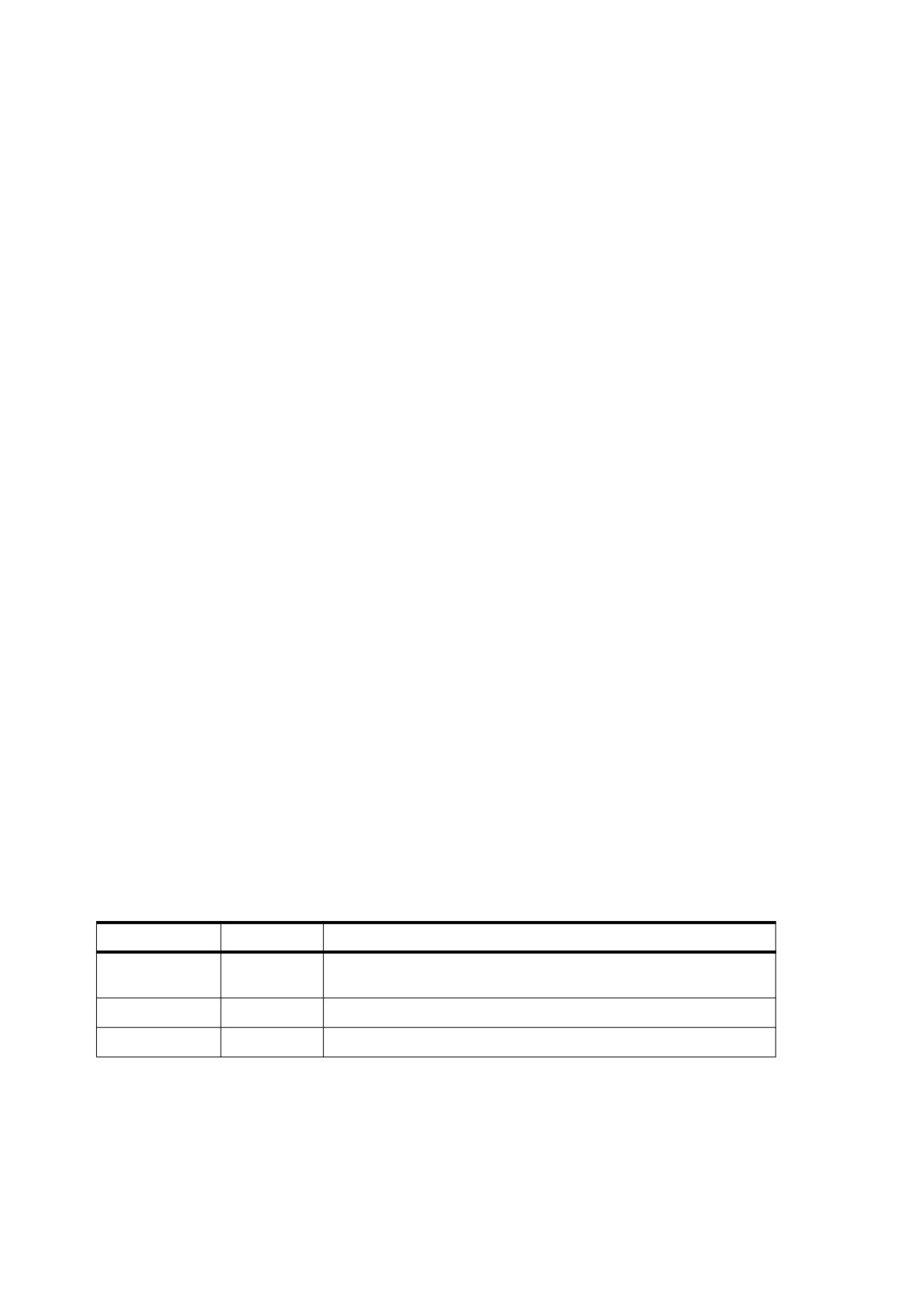
A Type 3 font dictionary may contain the entries listed in Table 112.
Table 112 - Entries in a Type 3 font dictionary
Key
Type
Value
Type
name
(Required) The type of PDF object that this dictionary describes; shall
be Font for a font dictionary.
Subtype
name
(Required) The type of font; shall be Type3 for a Type 3 font.
Name
name
(Required in PDF 1.0; optional otherwise) See Table 111.
258
Table 112 - Entries in a Type 3 font dictionary (continued)
Key
Type
Value
FontBBox
rectangle
(Required) A rectangle (see 7.9.5, "Rectangles") expressed in the
glyph coordinate system, specifying the font bounding box. This is the
smallest rectangle enclosing the shape that would result if all of the
glyphs of the font were placed with their origins coincident and then
filled.
If all four elements of the rectangle are zero, a conforming reader shall
make no assumptions about glyph sizes based on the font bounding
box. If any element is nonzero, the font bounding box shall be
accurate. If any glyph’s marks fall outside this bounding box, incorrect
behavior may result.
FontMatrix
array
(Required) An array of six numbers specifying the font matrix, mapping
glyph space to text space (see 9.2.4, "Glyph Positioning and Metrics").
NOTE
A common practice is to define glyphs in terms of a
1000-unit glyph coordinate system, in which case the font
matrix is [ 0.001 0 0 0.001 0 0 ].
CharProcs
dictionary
(Required) A dictionary in which each key shall be a glyph name and
the value associated with that key shall be a content stream that
constructs and paints the glyph for that character. The stream shall
include as its first operator either d0 or d1, followed by operators
describing one or more graphics objects, which may include path, text,
or image objects. See below for more details about Type 3 glyph
descriptions.
Encoding
name or
(Required) An encoding dictionary whose Differences array shall
dictionary
specify the complete character encoding for this font
(see 9.6.6,
"Character Encoding").
FirstChar
integer
(Required) The first character code defined in the font’s Widths array.
LastChar
integer
(Required) The last character code defined in the font’s Widths array.
Widths
array
(Required; should be an indirect reference) An array of (LastChar −
FirstChar + 1) widths, each element being the glyph width for the
character code that equals FirstChar plus the array index. For
character codes outside the range FirstChar to LastChar, the width
shall be
0. These widths shall be interpreted in glyph space as
specified by FontMatrix (unlike the widths of a Type 1 font, which are
in thousandths of a unit of text space).
If FontMatrix specifies a rotation, only the horizontal component of the
transformed width shall be used. That is, the resulting displacement
shall be horizontal in text space, as is the case for all simple fonts.
FontDescriptor
dictionary
(Required in Tagged PDF documents; shall be an indirect reference) A
font descriptor describing the font’s default metrics other than its glyph
widths (see 9.8, "Font Descriptors").
Resources
dictionary
(Optional but should be used; PDF 1.2) A list of the named resources,
such as fonts and images, required by the glyph descriptions in this
font (see 7.8.3, "Resource Dictionaries"). If any glyph descriptions
refer to named resources but this dictionary is absent, the names shall
be looked up in the resource dictionary of the page on which the font is
used.
ToUnicode
stream
(Optional; PDF 1.2) A stream containing a CMap file that maps
character codes to Unicode values (see 9.10, "Extraction of Text
Content").
For each character code shown by a text-showing operator that uses a Type 3 font, the conforming reader
shall:
259
a) Look up the character code in the font’s Encoding entry, as described in 9.6.6, "Character Encoding," to
obtain a glyph name.
b) Look up the glyph name in the font’s CharProcs dictionary to obtain a stream object containing a glyph
description. If the name is not present as a key in CharProcs, no glyph shall be painted.
c) Invoke the glyph description. The graphics state shall be saved before this invocation and shall be restored
afterward; therefore, any changes the glyph description makes to the graphics state do not persist after it
finishes.
When the glyph description begins execution, the current transformation matrix
(CTM) shall be the
concatenation of the font matrix (FontMatrix in the current font dictionary) and the text space that was in effect
at the time the text-showing operator was invoked (see 9.4.4, "Text Space Details"). This means that shapes
described in the glyph coordinate system are transformed into the user coordinate system and appear in the
appropriate size and orientation on the page. The glyph description shall describe the glyph in terms of
absolute coordinates in the glyph coordinate system, placing the glyph origin at (0, 0) in this space. It shall
make no assumptions about the initial text position.
Aside from the CTM, the graphics state shall be inherited from the environment of the text-showing operator
that caused the glyph description to be invoked. To ensure predictable results, the glyph description shall
initialize any graphics state parameters on which it depends. In particular, if it invokes the S (stroke) operator, it
shall explicitly set the line width, line join, line cap, and dash pattern to appropriate values.
NOTE 2
Normally, it is unnecessary and undesirable to initialize the current colour parameter because the text-showing
operators are designed to paint glyphs with the current colour.
The glyph description shall execute one of the operators described in Table 113 to pass width and bounding
box information to the font machinery. This shall precede the execution of any path construction or path-
painting operators describing the glyph.
NOTE 3
Type 3 fonts in PDF are very similar to those in PostScript. Some of the information provided in Type 3 font
dictionaries and glyph descriptions, while seemingly redundant or unnecessary, is nevertheless required for
correct results when a conforming reader prints to a PostScript output device. This applies particularly to the
operands of the d0 and d1 operators, are the equivalent of PostScript's setcharwidth and setcachedevice.
For further explanation, see Section 5.7 of the PostScript Language Reference, Third Edition.
Table 113 - Type 3 font operators
Operands
Operator
Description
wx wy
d0
Set width information for the glyph and declare that the glyph
description specifies both its shape and its colour.
NOTE
This operator name ends in the digit 0.
wx denotes the horizontal displacement in the glyph coordinate
system; it shall be consistent with the corresponding width in the
font’s Widths array. wy shall be 0 (see 9.2.4, "Glyph Positioning
and Metrics").
This operator shall only be permitted in a content stream
appearing in a Type 3 font’s CharProcs dictionary. It is typically
used only if the glyph description executes operators to set the
colour explicitly.
260
Table 113 - Type 3 font operators (continued)
Operands
Operator
Description
wx w
ll
lly urx ury
d1
Set width and bounding box information for the glyph and declare
y
x
that the glyph description specifies only shape, not colour.
NOTE
This operator name ends in the digit 1.
wx denotes the horizontal displacement in the glyph coordinate
system; it shall be consistent with the corresponding width in the
font’s Widths array. wy shall be 0 (see 9.2.4, "Glyph Positioning
and Metrics").
ll
x and lly denote the coordinates of the lower-left corner, and urx
and ury denote the upper-right corner, of the glyph bounding box.
The glyph bounding box is the smallest rectangle, oriented with
the axes of the glyph coordinate system, that completely encloses
all marks placed on the page as a result of executing the glyph’s
description. The declared bounding box shall be correct—in other
words, sufficiently large to enclose the entire glyph. If any marks
fall outside this bounding box, the result is unpredictable.
A glyph description that begins with the d1 operator should not
execute any operators that set the colour (or other colour-related
parameters) in the graphics state; any use of such operators shall
be ignored. The glyph description is executed solely to determine
the glyph’s shape. Its colour shall be determined by the graphics
state in effect each time this glyph is painted by a text-showing
operator. For the same reason, the glyph description shall not
include an image; however, an image mask is acceptable, since it
merely defines a region of the page to be painted with the current
colour.
This operator shall be used only in a content stream appearing in
a Type 3 font’s CharProcs dictionary.
EXAMPLE
This example shows the definition of a Type 3 font with only two glyphs—a filled square and a filled
triangle, selected by the character codes a and b. Figure 47 shows the result of showing the string
( ababab ) using this font.
Figure 47 - Output from the example in 9.6.5, "Type 3 Fonts"
261
4 0 obj
<<
/Type /Font
/Subtype /Type3
/FontBBox [ 0 0 750 750 ]
/FontMatrix [ 0.001 0 0 0.001 0 0 ]
/CharProcs 10 0 R
/Encoding 9 0 R
/FirstChar
97
/LastChar 98
/Widths [ 1000 1000 ]
>>
endobj
9 0 obj
<<
/Type /Encoding
/Differences
[97
/square /triangle ]
>>
endobj
10 0 obj
<<
/square 11 0 R
/triangle
12 0 R
>>
endobj
11 0 obj
<< /Length 39 >>
stream
1000 0 0 0 750 750 d1
0 0 750 750 re
f
endstream
endobj
12 0 obj
<< /Length 48 >>
stream
1000 0 0 0 750 750 d1
0 0 m
375 750 l
750 0 l
f
endstream
endobj
9.6.6
Character Encoding
9.6.6.1
General
A font’s encoding is the association between character codes (obtained from text strings that are shown) and
glyph descriptions. This sub-clause describes the character encoding scheme used with simple PDF fonts.
Composite fonts (Type 0) use a different character mapping algorithm, as discussed in 9.7, "Composite Fonts".
Except for Type 3 fonts, every font program shall have a built-in encoding. Under certain circumstances, a PDF
font dictionary may change the encoding used with the font program to match the requirements of the
conforming writer generating the text being shown.
262
NOTE
This flexibility in character encoding is valuable for two reasons:
It permits showing text that is encoded according to any of the various existing conventions. For example, the
Microsoft Windows and Apple Mac OS operating systems use different standard encodings for Latin text, and
many conforming writers use their own special-purpose encodings.
It permits conforming writers to specify how characters selected from a large character set are to be encoded.
Some character sets consist of more than 256 characters, including ligatures, accented characters, and other
symbols required for high-quality typography or non-Latin writing systems. Different encodings may select
different subsets of the same character set.
One commonly used font encoding for Latin-text font programs is often referred to as StandardEncoding or
sometimes as the Adobe standard encoding. The name StandardEncoding shall have no special meaning in
PDF, but this encoding does play a role as a default encoding (as shown in Table 114). The regular encodings
used for Latin-text fonts on Mac OS and Windows systems shall be named MacRomanEncoding and
WinAnsiEncoding, respectively. An encoding named MacExpertEncoding may be used with “expert” fonts
that contain additional characters useful for sophisticated typography. Complete details of these encodings and
of the characters present in typical fonts are provided in Annex D.
In PDF, a font is classified as either nonsymbolic or symbolic according to whether all of its characters are
members of the standard Latin character set; see D.2, “Latin Character Set and Encodings”. This shall be
indicated by flags in the font descriptor; see 9.8.2, "Font Descriptor Flags". Symbolic fonts contain other
character sets, to which the encodings mentioned previously ordinarily do not apply. Such font programs have
built-in encodings that are usually unique to each font. The standard 14 fonts include two symbolic fonts,
Symbol and ZapfDingbats, whose encodings and character sets are documented in Annex D.
A font program’s built-in encoding may be overridden by including an Encoding entry in the PDF font
dictionary. The possible encoding modifications depend on the font type. The value of the Encoding entry shall
be either a named encoding
(the name of one of the predefined encodings MacRomanEncoding,
MacExpertEncoding, or WinAnsiEncoding) or an encoding dictionary. An encoding dictionary contains the
entries listed in Table 114.
Table 114 - Entries in an encoding dictionary
Key
Type
Value
Type
name
(Optional) The type of PDF object that this dictionary describes; if
present, shall be Encoding for an encoding dictionary.
BaseEncoding
name
(Optional) The base encoding—that is, the encoding from which the
Differences entry (if present) describes differences— shall be the name
of one of the predefined encodings MacRomanEncoding,
MacExpertEncoding, or WinAnsiEncoding (see Annex D).
If this entry is absent, the Differences entry shall describe differences
from an implicit base encoding. For a font program that is embedded in
the PDF file, the implicit base encoding shall be the font program’s built-in
encoding, as described in
9.6.6, "Character Encoding" and further
elaborated in the sub-clauses on specific font types. Otherwise, for a
nonsymbolic font, it shall be StandardEncoding, and for a symbolic font,
it shall be the font’s built-in encoding.
Differences
array
(Optional; should not be used with TrueType fonts) An array describing
the differences from the encoding specified by BaseEncoding or, if
BaseEncoding is absent, from an implicit base encoding. The
Differences array is described in subsequent sub-clauses.
The value of the Differences entry shall be an array of character codes and character names organized as
follows:
code1 name1,1 name1,2 …
263
code2 name2,1 name2,2 …
…
coden namen,1 namen,2 …
Each code shall be the first index in a sequence of character codes to be changed. The first character name
after the code becomes the name corresponding to that code. Subsequent names replace consecutive code
indices until the next code appears in the array or the array ends. These sequences may be specified in any
order but shall not overlap.
EXAMPLE
In the encoding dictionary in this example, the name quotesingle (' ) is associated with character code 39,
Adieresis (Ä) with code 128, Aring (Å) with 129, and trademark (™) with 170.
25 0 obj
<<
/Type /Encoding
/Differences
[
39 /quotesingle
96 /grave
128 /Adieresis /Aring /Ccedilla /Eacute /Ntilde /Odieresis /Udieresis
/aacute /agrave /acircumflex /adieresis /atilde /aring /ccedilla
/eacute /egrave /ecircumflex /edieresis /iacute /igrave
/icircumflex
/idieresis
/ntilde
/oacute /ograve /ocircumflex /odieresis /otilde
/uacute /ugrave /ucircumflex /udieresis /dagger /degree /cent
/sterling
/section
/bullet
/paragraph /germandbls /registered
/copyright
/trademark /acute /dieresis
174 /AE /Oslash
177 /plusminus
180 /yen /mu
187 /ordfeminine /ordmasculine
190 /ae /oslash /questiondown /exclamdown /logicalnot
196 /florin
199 /guillemotleft
/guillemotright
/ellipsis
203 /Agrave /Atilde /Otilde /OE /oe /endash /emdash /quotedblleft
/quotedblright
/quoteleft
/quoteright
/divide
216 /ydieresis /Ydieresis /fraction
/currency /guilsinglleft
/guilsinglright
/fi
/fl
/daggerdbl
/periodcentered /quotesinglbase /quotedblbase
/perthousand /Acircumflex /Ecircumflex /Aacute /Edieresis /Egrave
/Iacute
/Icircumflex
/Idieresis
/Igrave
/Oacute /Ocircumflex
241 /Ograve /Uacute /Ucircumflex /Ugrave /dotlessi /circumflex /tilde
/macron /breve /dotaccent
/ring
/cedilla
/hungarumlaut /ogonek
/caron
]
>>
endobj
9.6.6.2
Encodings for Type 1 Fonts
A Type 1 font program’s glyph descriptions are keyed by glyph names, not by character codes. Glyph names
are ordinary PDF name objects. Descriptions of Latin alphabetic characters are normally associated with
names consisting of single letters, such as A or a. Other characters are associated with names composed of
words, such as three, ampersand, or parenleft. A Type 1 font’s built-in encoding shall be defined by an
Encoding array that is part of the font program, not to be confused with the Encoding entry in the PDF font
dictionary.
An Encoding entry may override a Type 1 font’s mapping from character codes to character names. The
Differences array may map a code to the name of any glyph description that exists in the font program,
regardless of whether that glyph is referenced by the font’s built-in encoding or by the encoding specified in the
BaseEncoding entry.
264
All Type 1 font programs shall contain an actual glyph named . notdef. The effect produced by showing the
.notdef glyph is at the discretion of the font designer. If an encoding maps to a character name that does not
exist in the Type 1 font program, the . notdef glyph shall be substituted.
9.6.6.3
Encodings for Type 3 Fonts
A Type 3 font, like a Type 1 font, contains glyph descriptions that are keyed by glyph names; in this case, they
appear as explicit keys in the font’s CharProcs dictionary. A Type 3 font’s mapping from character codes to
glyph names shall be entirely defined by its Encoding entry, which is required in this case.
9.6.6.4
Encodings for TrueType Fonts
A TrueType font program’s built-in encoding maps directly from character codes to glyph descriptions by means
of an internal data structure called a “cmap” (not to be confused with the CMap described in 9.7.5, "CMaps").
This sub-clause describes how the PDF font dictionary’s Encoding entry shall be used in conjunction with a
“cmap” to map from a character code in a string to a glyph description in a TrueType font program.
A “cmap” table may contain one or more subtables that represent multiple encodings intended for use on
different platforms (such as Mac OS and Windows). Each subtable shall be identified by the two numbers, such
as (3, 1), that represent a combination of a platform ID and a platform-specific encoding ID, respectively.
Glyph names are not required in TrueType fonts, although some font programs have an optional “post” table
listing glyph names for the glyphs. If the conforming reader needs to select glyph descriptions by name, it
translates from glyph names to codes in one of the encodings given in the font program’s “cmap” table. When
there is no character code in the “cmap” that corresponds to a glyph name, the “post” table shall be used to
select a glyph description directly from the glyph name.
Because some aspects of TrueType glyph selection are dependent on the conforming reader or the operating
system, PDF files that use TrueType fonts should follow certain guidelines to ensure predictable behaviour
across all conforming readers:
•
The font program should be embedded.
•
A nonsymbolic font should specify MacRomanEncoding or WinAnsiEncoding as the value of its
Encoding entry, with no Differences array.
•
A font that is used to display glyphs that do not use MacRomanEncoding or WinAnsiEncoding should
not specify an Encoding entry. The font descriptor’s Symbolic flag (see Table 123) should be set, and its
font program’s “cmap” table should contain a (1, 0) subtable. It may also contain a (3, 0) subtable; if
present, this subtable should map from character codes in the range 0xF000 to 0xF0FF by prepending the
single-byte codes in the (1, 0) subtable with 0xF0 and mapping to the corresponding glyph descriptions.
NOTE 1
Some popular TrueType font programs contain incorrect encoding information. Implementations of TrueType
font interpreters have evolved heuristics for dealing with such problems; those heuristics are not described
here. For maximum portability, only well-formed TrueType font programs should be used in PDF files.
Therefore, a TrueType font program in a PDF file may need to be modified to conform to these guidelines.
The following paragraphs describe the treatment of TrueType font encodings beginning with PDF 1.3.
If the font has a named Encoding entry of either MacRomanEncoding or WinAnsiEncoding, or if the font
descriptor’s Nonsymbolic flag (see Table 123) is set, the conforming reader shall create a table that maps from
character codes to glyph names:
•
If the Encoding entry is one of the names MacRomanEncoding or WinAnsiEncoding, the table shall be
initialized with the mappings described in Annex D.
265
•
If the Encoding entry is a dictionary, the table shall be initialized with the entries from the dictionary’s
BaseEncoding entry (see Table 114). Any entries in the Differences array shall be used to update the
table. Finally, any undefined entries in the table shall be filled using StandardEncoding.
If a (3, 1) “cmap” subtable (Microsoft Unicode) is present:
•
A character code shall be first mapped to a glyph name using the table described above.
•
The glyph name shall then be mapped to a Unicode value by consulting the Adobe Glyph List (see the
Bibliography).
•
Finally, the Unicode value shall be mapped to a glyph description according to the (3, 1) subtable.
If no (3, 1) subtable is present but a (1, 0) subtable (Macintosh Roman) is present:
•
A character code shall be first mapped to a glyph name using the table described above.
•
The glyph name shall then be mapped back to a character code according to the standard Roman
encoding used on Mac OS.
•
Finally, the code shall be mapped to a glyph description according to the (1, 0) subtable.
In any of these cases, if the glyph name cannot be mapped as specified, the glyph name shall be looked up in
the font program’s “post” table (if one is present) and the associated glyph description shall be used.
The standard Roman encoding that is used on Mac OS is the same as the MacRomanEncoding described in
Annex D, with the addition of 15 entries and the replacement of the currency glyph with the Euro glyph, as
shown in Table 115.
Table 115 - Differences between MacRomanEncoding and Mac OS Roman encoding
Name
Code (Octal)
Code (DEcimal)
notequal
255
173
infinity
260
176
lessequal
262
178
greaterequal
263
179
partialdiff
266
182
summation
267
183
product
270
184
pi
271
185
integral
272
186
Omega
275
189
radical
303
195
approxequal
305
197
Delta
306
198
lozenge
327
215
Euro
333
219
apple
360
240
266
When the font has no Encoding entry, or the font descriptor’s Symbolic flag is set (in which case the Encoding
entry is ignored), this shall occur:
•
If the font contains a (3, 0) subtable, the range of character codes shall be one of these: 0x0000 - 0x00FF,
0xF000 - 0xF0FF, 0xF100 - 0xF1FF, or 0xF200 - 0xF2FF. Depending on the range of codes, each byte
from the string shall be prepended with the high byte of the range, to form a two-byte character, which shall
be used to select the associated glyph description from the subtable.
•
Otherwise, if the font contains a (1, 0) subtable, single bytes from the string shall be used to look up the
associated glyph descriptions from the subtable.
If a character cannot be mapped in any of the ways described previously, a conforming reader may supply a
mapping of its choosing.
9.7
Composite Fonts
9.7.1
General
A composite font, also called a Type 0 font, is one whose glyphs are obtained from a fontlike object called a
CIDFont. A composite font shall be represented by a font dictionary whose Subtype value is Type0. The Type
0 font is known as the root font, and its associated CIDFont is called its descendant.
NOTE 1
Composite fonts in PDF are analogous to composite fonts in PostScript but with some limitations. In particular,
PDF requires that the character encoding be defined by a CMap, which is only one of several encoding
methods available in PostScript. Also, PostScript allows a Type 0 font to have multiple descendants, which
might also be Type 0 fonts. PDF supports only a single descendant, which shall be a CIDFont.
When the current font is composite, the text-showing operators shall behave differently than with simple fonts.
For simple fonts, each byte of a string to be shown selects one glyph, whereas for composite fonts, a sequence
of one or more bytes are decoded to select a glyph from the descendant CIDFont.
NOTE 2
This facility supports the use of very large character sets, such as those for the Chinese, Japanese, and
Korean languages. It also simplifies the organization of fonts that have complex encoding requirements.
This sub-clause first introduces the architecture of CID-keyed fonts, which are the only kind of composite font
supported in PDF. Then it describes the CIDFont and CMap dictionaries, which are the PDF objects that
represent the correspondingly named components of a CID-keyed font. Finally, it describes the Type 0 font
dictionary, which combines a CIDFont and a CMap to produce a font whose glyphs may be accessed by means
of variable-length character codes in a string to be shown.
9.7.2
CID-Keyed Fonts Overview
CID-keyed fonts provide a convenient and efficient method for defining multiple-byte character encodings and
fonts with a large number of glyphs. These capabilities provide great flexibility for representing text in writing
systems for languages with large character sets, such as Chinese, Japanese, and Korean (CJK).
The CID-keyed font architecture specifies the external representation of certain font programs, called CMap
and CIDFont files, along with some conventions for combining and using those files. As mentioned earlier, PDF
does not support the entire CID-keyed font architecture, which is independent of PDF; CID-keyed fonts may be
used in other environments.
NOTE
For complete documentation on the architecture and the file formats, see Adobe Technical Notes #5092, CID-
Keyed Font Technology Overview, and #5014, Adobe CMap and CIDFont Files Specification. This sub-clause
describes only the PDF objects that represent these font programs.
The term CID-keyed font reflects the fact that CID (character identifier) numbers are used to index and access
the glyph descriptions in the font. This method is more efficient for large fonts than the method of accessing by
character name, as is used for some simple fonts. CIDs range from 0 to a maximum value that may be subject
to an implementation limit (see Table C.1).
267
A character collection is an ordered set of glyphs. The order of the glyphs in the character collection shall
determine the CID number for each glyph. Each CID-keyed font shall explicitly reference the character
collection on which its CID numbers are based; see 9.7.3, "CIDSystemInfo Dictionaries".
A CMap (character map) file shall specify the correspondence between character codes and the CID numbers
used to identify glyphs. It is equivalent to the concept of an encoding in simple fonts. Whereas a simple font
allows a maximum of 256 glyphs to be encoded and accessible at one time, a CMap can describe a mapping
from multiple-byte codes to thousands of glyphs in a large CID-keyed font.
EXAMPLE
A CMap can describe Shift-JIS, one of several widely used encodings for Japanese.
A CMap file may reference an entire character collection or a subset of a character collection. The CMap file’s
mapping yields a font number (which in PDF shall be 0) and a character selector (which in PDF shall be a CID).
Furthermore, a CMap file may incorporate another CMap file by reference, without having to duplicate it. These
features enable character collections to be combined or supplemented and make all the constituent characters
accessible to text-showing operations through a single encoding.
A CIDFont contains the glyph descriptions for a character collection. The glyph descriptions themselves are
typically in a format similar to those used in simple fonts, such as Type 1. However, they are identified by CIDs
rather than by names, and they are organized differently.
In PDF, the data from a CMap file and CIDFont shall be represented by PDF objects as described in 9.7.4,
"CIDFonts" and 9.7.5, "CMaps". The CMap file and CIDFont programs themselves may be either referenced by
name or embedded as stream objects in the PDF file.
A CID-keyed font, then, shall be the combination of a CMap with a CIDFont containing glyph descriptions. It
shall be represented as a Type 0 font. It contains an Encoding entry whose value shall be a CMap dictionary,
and its DescendantFonts entry shall reference the CIDFont dictionary with which the CMap has been
combined.
9.7.3
CIDSystemInfo Dictionaries
CIDFont and CMap dictionaries shall contain a CIDSystemInfo entry specifying the character collection
assumed by the CIDFont associated with the CMap—that is, the interpretation of the CID numbers used by the
CIDFont. A character collection shall be uniquely identified by the Registry, Ordering, and Supplement
entries in the CIDSystemInfo dictionary, as described in Table 116. In order to be compatible, the Registry and
Ordering values must be the same.
The CIDSystemInfo entry in a CIDFont is a dictionary that shall specify the CIDFont’s character collection. The
CIDFont need not contain glyph descriptions for all the CIDs in a collection; it may contain a subset. The
CIDSystemInfo entry in a CMap file shall be either a single dictionary or an array of dictionaries, depending on
whether it associates codes with a single character collection or with multiple character collections; see 9.7.5,
"CMaps".
For proper behaviour, the CIDSystemInfo entry of a CMap shall be compatible with that of the CIDFont or
CIDFonts with which it is used.
Table 116 - Entries in a CIDSystemInfo dictionary
Key
Type
Value
Registry
ASCII
(Required) A string identifying the issuer of the character collection. For
string
information about assigning a registry identifier, contact the Adobe
Solutions Network or consult the ASN Web site (see the Bibliography).
268
Table 116 - Entries in a CIDSystemInfo dictionary (continued)
Key
Type
Value
Ordering
ASCII
(Required) A string that uniquely names the character collection within the
string
specified registry.
Supplement
integer
(Required) The supplement number of the character collection. An original
character collection has a supplement number of 0. Whenever additional
CIDs are assigned in a character collection, the supplement number shall
be increased. Supplements shall not alter the ordering of existing CIDs in
the character collection. This value shall not be used in determining
compatibility between character collections.
9.7.4
CIDFonts
9.7.4.1
General
A CIDFont program contains glyph descriptions that are accessed using a CID as the character selector. There
are two types of CIDFonts:
•
A Type 0 CIDFont contains glyph descriptions based on CFF
NOTE
The term “Type 0” when applied to a CIDFont has a different meaning than for a “Type 0 font”.
•
A Type 2 CIDFont contains glyph descriptions based on the TrueType font format
A CIDFont dictionary is a PDF object that contains information about a CIDFont program. Although its Type
value is Font, a CIDFont is not actually a font. It does not have an Encoding entry, it may not be listed in the
Font subdictionary of a resource dictionary, and it may not be used as the operand of the Tf operator. It shall be
used only as a descendant of a Type 0 font. The CMap in the Type 0 font shall be what defines the encoding
that maps character codes to CIDs in the CIDFont. Table 117 lists the entries in a CIDFont dictionary.
Table 117 - Entries in a CIDFont dictionary
Key
Type
Value
Type
name
(Required) The type of PDF object that this dictionary describes;
shall be Font for a CIDFont dictionary.
Subtype
name
(Required) The type of CIDFont shall be CIDFontType0 or
CIDFontType2.
BaseFont
name
(Required) The PostScript name of the CIDFont. For Type
0
CIDFonts, this shall be the value of the CIDFontName entry in the
CIDFont program. For Type 2 CIDFonts, it shall be derived the same
way as for a simple TrueType font; see 9.6.3, "TrueType Fonts". In
either case, the name may have a subset prefix if appropriate; see
9.6.4, "Font Subsets".
CIDSystemInfo
dictionary
(Required) A dictionary containing entries that define the character
collection of the CIDFont. See Table 116.
FontDescriptor
dictionary
(Required; shall be an indirect reference) A font descriptor describing
the CIDFont’s default metrics other than its glyph widths (see 9.8,
"Font Descriptors").
DW
integer
(Optional) The default width for glyphs in the CIDFont (see 9.7.4.3,
"Glyph Metrics in CIDFonts"). Default value: 1000 (defined in user
units).
269
Table 117 - Entries in a CIDFont dictionary (continued)
Key
Type
Value
W
array
(Optional) A description of the widths for the glyphs in the CIDFont.
NOTE
The array’s elements have a variable format that can
specify individual widths for consecutive CIDs or one
width for a range of CIDs (see 9.7.4.3, "Glyph Metrics in
CIDFonts").
Default value: none (the DW value shall be used for all glyphs).
DW2
array
(Optional; applies only to CIDFonts used for vertical writing) An array
of two numbers specifying the default metrics for vertical writing (see
9.7.4.3, "Glyph Metrics in CIDFonts"). Default value: [ 880 −1000 ].
W2
array
(Optional; applies only to CIDFonts used for vertical writing) A
description of the metrics for vertical writing for the glyphs in the
CIDFont (see 9.7.4.3, "Glyph Metrics in CIDFonts"). Default value:
none (the DW2 value shall be used for all glyphs).
CIDToGIDMap
stream
(Optional; Type 2 CIDFonts only) A specification of the mapping from
or name
CIDs to glyph indices. If the value is a stream, the bytes in the stream
shall contain the mapping from CIDs to glyph indices: the glyph index
for a particular CID value c shall be a 2-byte value stored in bytes
2 × c and 2 × c + 1, where the first byte shall be the high-order byte.
If the value of CIDToGIDMap is a name, it shall be Identity,
indicating that the mapping between CIDs and glyph indices is the
identity mapping. Default value: Identity.
This entry may appear only in a Type 2 CIDFont whose associated
TrueType font program is embedded in the PDF file.
9.7.4.2
Glyph Selection in CIDFonts
Type 0 and Type 2 CIDFonts handle the mapping from CIDs to glyph descriptions in somewhat different ways.
For Type 0, the CIDFont program contains glyph descriptions that are identified by CIDs. The CIDFont program
identifies the character collection by a CIDSystemInfo dictionary, which should be copied into the PDF
CIDFont dictionary. CIDs shall be interpreted uniformly in all CIDFont programs supporting a given character
collection, whether the program is embedded in the PDF file or obtained from an external source.
When the CIDFont contains an embedded font program that is represented in the Compact Font Format (CFF),
the FontFile3 entry in the font descriptor (see Table 126) may be CIDFontType0C or OpenType. There are
two cases, depending on the contents of the font program:
•
The “CFF” font program has a Top DICT that uses CIDFont operators: The CIDs shall be used to
determine the GID value for the glyph procedure using the charset table in the CFF program. The GID
value shall then be used to look up the glyph procedure using the CharStrings INDEX table.
NOTE
Although in many fonts the CID value and GID value are the same, the CID and GID values may differ.
•
The “CFF” font program has a Top DICT that does not use CIDFont operators: The CIDs shall be used
directly as GID values, and the glyph procedure shall be retrieved using the CharStrings INDEX.
For Type 2, the CIDFont program is actually a TrueType font program, which has no native notion of CIDs. In a
TrueType font program, glyph descriptions are identified by glyph index values. Glyph indices are internal to the
font and are not defined consistently from one font to another. Instead, a TrueType font program contains a
“cmap” table that provides mappings directly from character codes to glyph indices for one or more predefined
encodings.
270
TrueType font programs are integrated with the CID-keyed font architecture in one of two ways, depending on
whether the font program is embedded in the PDF file:
•
If the TrueType font program is embedded, the Type 2 CIDFont dictionary shall contain a CIDToGIDMap
entry that maps CIDs to the glyph indices for the appropriate glyph descriptions in that font program.
•
If the TrueType font program is not embedded but is referenced by name, the Type 2 CIDFont dictionary
shall not contain a CIDToGIDMap entry, since it is not meaningful to refer to glyph indices in an external
font program. In this case, CIDs shall not participate in glyph selection, and only predefined CMaps may be
used with this CIDFont (see 9.7.5, "CMaps"). The conforming reader shall select glyphs by translating
characters from the encoding specified by the predefined CMap to one of the encodings in the TrueType
font’s “cmap” table. The means by which this is accomplished are implementation-dependent.
Even though the CIDs are not used to select glyphs in a Type 2 CIDFont, they shall always be used to
determine the glyph metrics, as described in the next sub-clause.
Every CIDFont shall contain a glyph description for CID 0, which is analogous to the . notdef character name in
simple fonts (see 9.7.6.3, "Handling Undefined Characters").
9.7.4.3
Glyph Metrics in CIDFonts
As discussed in
9.2.4, "Glyph Positioning and Metrics", the width of a glyph refers to the horizontal
displacement between the origin of the glyph and the origin of the next glyph when writing in horizontal mode.
In this mode, the vertical displacement between origins shall be 0. Widths for a CIDFont are defined using the
DW and W entries in the CIDFont dictionary. These widths shall be consistent with the actual widths given in
the CIDFont program.
The W array allows the definition of widths for individual CIDs. The elements of the array shall be organized in
groups of two or three, where each group shall be in one of these two formats:
c [ w1 w2 … wn ]
cfirst clast w
In the first format, c shall be an integer specifying a starting CID value; it shall be followed by an array of n
numbers that shall specify the widths for n consecutive CIDs, starting with c. The second format shall define the
same width, w, for all CIDs in the range cfirst to clast .
EXAMPLE 1
In this example, the glyphs having CIDs 120, 121, and 122 are 400, 325, and 500 units wide, respectively.
CIDs in the range 7080 through 8032 all have a width of 1000 units.
W entry example:
/W [ 120 [ 400 325 500 ]
7080 8032 1000
]
Glyphs from a CIDFont may be shown in vertical writing mode. This is selected by the WMode entry in the
associated CMap dictionary; see 9.7.5, "CMaps". To be used in this way, the CIDFont shall define the vertical
displacement for each glyph and the position vector that relates the horizontal and vertical writing origins.
The default position vector and vertical displacement vector shall be specified by the DW2 entry in the CIDFont
dictionary. DW2 shall be an array of two values: the vertical component of the position vector v and the vertical
component of the displacement vector w1 (see Figure 40). The horizontal component of the position vector
shall be half the glyph width, and that of the displacement vector shall be 0.
EXAMPLE 2
If the DW2 entry is
/DW2 [ 880 −1000 ]
271
then a glyph’s position vector and vertical displacement vector are
v = (w0 ÷ 2,880)
w1 = (0, -1000)
where w0 is the width (horizontal displacement) for the same glyph.
NOTE
A negative value for the vertical component places the origin of the next glyph below the current glyph because
vertical coordinates in a standard coordinate system increase from bottom to top.
The W2 array shall define vertical metrics for individual CIDs. The elements of the array shall be organized in
groups of two or five, where each group shall be in one of these two formats:
c [ w11y v1x v1y w12y v2x v2y
… ]
cfirst clast w11y v1x v1y
In the first format, c is a starting CID and shall be followed by an array containing numbers interpreted in groups
of three. Each group shall consist of the vertical component of the vertical displacement vector w1 (whose
horizontal component shall be 0) followed by the horizontal and vertical components for the position vector v.
Successive groups shall define the vertical metrics for consecutive CIDs starting with c. The second format
defines a range of CIDs from cfirst to clast , that shall be followed by three numbers that define the vertical
metrics for all CIDs in this range.
EXAMPLE 3
This W2 entry defines the vertical displacement vector for the glyph with CID 120 as (0, −1000) and the
position vector as (250, 772). It also defines the displacement vector for CIDs in the range 7080 through
8032 as (0, −1000) and the position vector as (500, 900).
/W2 [ 120 [ −1000 250 772 ]
7080 8032 −1000 500 900
]
9.7.5
CMaps
9.7.5.1
General
A CMap shall specify the mapping from character codes to character selectors. In PDF, the character selectors
shall be CIDs in a CIDFont (as mentioned earlier, PostScript CMaps can use names or codes as well). A CMap
serves a function analogous to the Encoding dictionary for a simple font. The CMap shall not refer directly to a
specific CIDFont; instead, it shall be combined with it as part of a CID-keyed font, represented in PDF as a
Type 0 font dictionary (see 9.7.6, "Type 0 Font Dictionaries"). Within the CMap, the character mappings shall
refer to the associated CIDFont by font number, which in PDF shall be 0.
PDF also uses a special type of CMap to map character codes to Unicode values (see 9.10.3, "ToUnicode
CMaps").
A CMap shall specify the writing mode—horizontal or vertical—for any CIDFont with which the CMap is
combined. The writing mode determines which metrics shall be used when glyphs are painted from that font.
NOTE
Writing mode is specified as part of the CMap because, in some cases, different shapes are used when writing
horizontally and vertically. In such cases, the horizontal and vertical variants of a CMap specify different CIDs
for a given character code.
A CMap shall be specified in one of two ways:
•
As a name object identifying a predefined CMap, whose value shall be one of the predefined CMap names
defined in Table 118.
•
As a stream object whose contents shall be a CMap file.
272