Volkswagen Tiguan (2023 year). Manual in english - page 4
Lights
Headlights
Switching the turn signals on and off
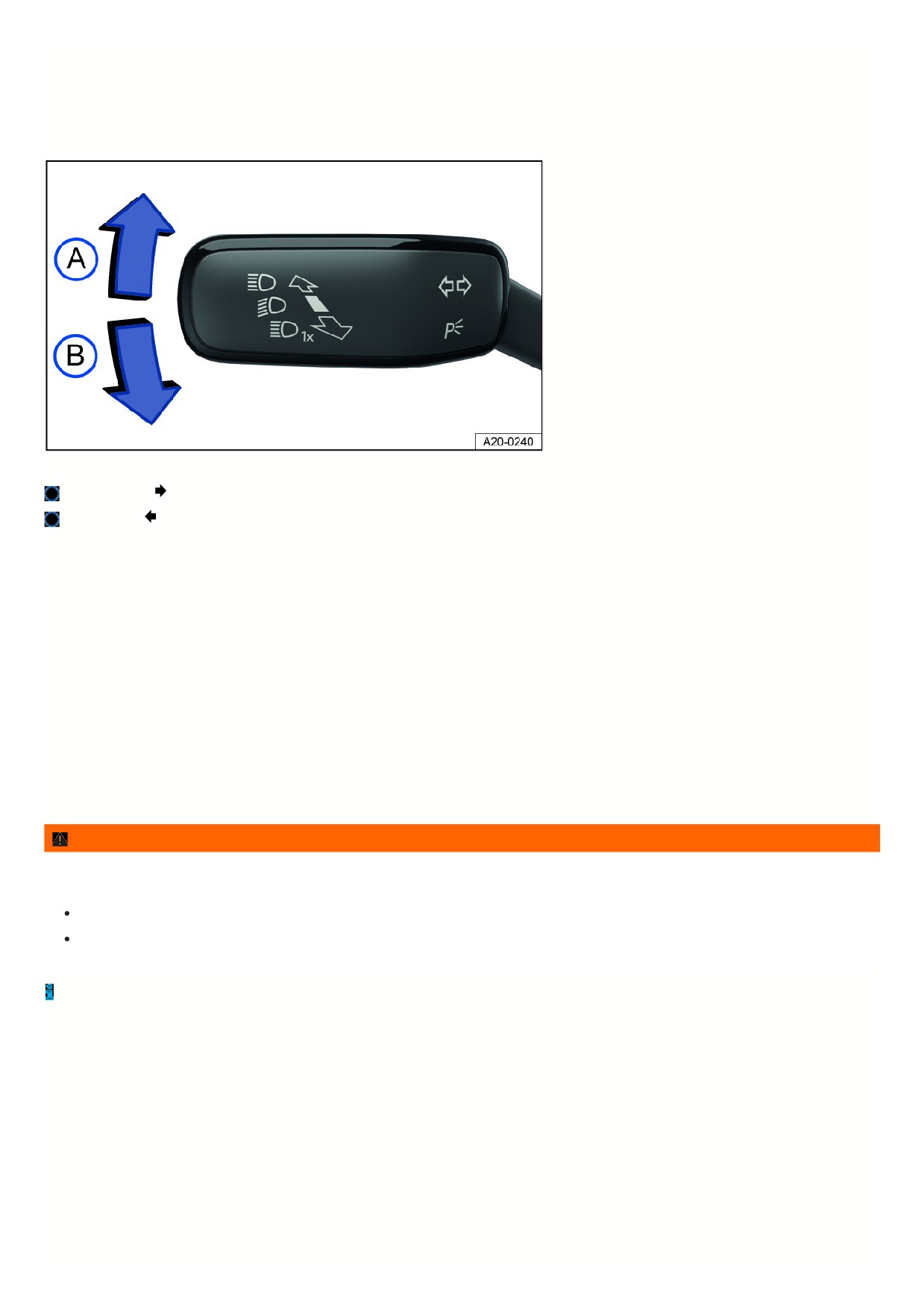
Fig. 100 On the left side of the steering column: turn signal and high beam lever.
Right turn signal
Left turn signal
Switching the turn signals on and off
1. Switch the ignition on.
2. Move the turn signal and high beam lever from the center position to the preferred position fig. 100.
3. To cancel the turn signal, move the turn signal and headlamp lever back to its basic position.
If no chime sounds when the turn signal is on, contact suitably qualified professionals and have the vehicle checked. Volkswagen recommends contacting an
authorized Volkswagen dealer or authorized Volkswagen Service Facility.
3-blink turn signal
To use the 3-blink turn signal, move the turn signal and high beam lever upward or downward to the pressure point and then release the lever. The turn signal will
blink three times.
To stop the 3-blink turn signal before it ends, move the turn signal and high beam lever immediately to the pressure point in the opposite direction and release.
The 3-blink turn signal can be activated and deactivated in the vehicle settings in the Infotainment system
⇒ Vehicle settings menu.
WARNING
Using the turn signals incorrectly, not using the turn signals, or forgetting to turn the turn signal off can mislead other road users. This can cause accidents and
serious or fatal injuries.
Always activate the turn signals correctly when changing lanes, passing, or turning.
Switch the turn signal off again every time you finish changing lanes, passing, or turning.
The emergency flashers also work when the ignition is switched off ⇒ In case of an emergency.
Switching the lights on and off
123
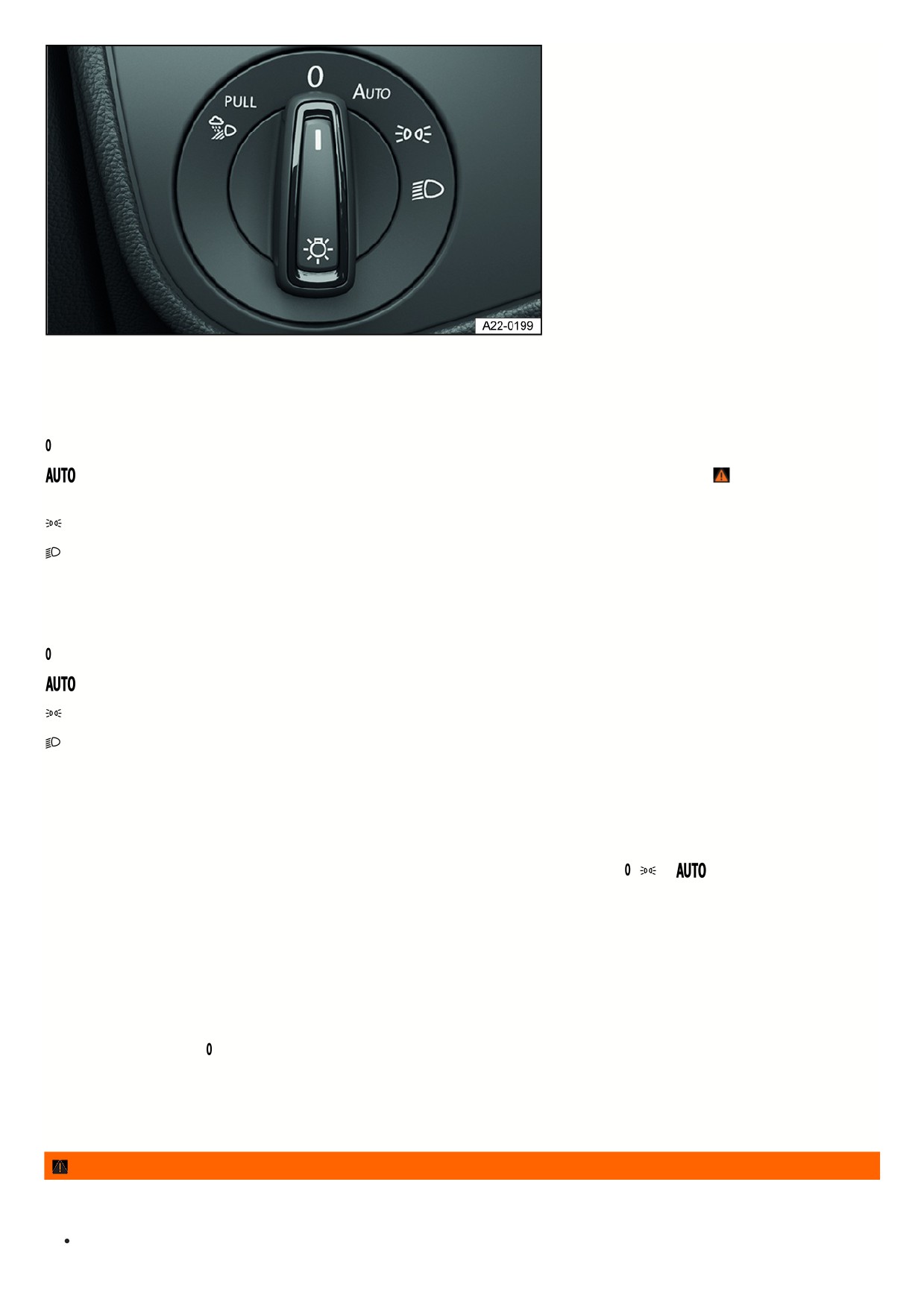
Fig. 101 Next to the steering wheel: light switch (one version).
Switching the lights on
1. Switch the ignition on.
2. Turn the light switch to the desired position fig. 101:
The side lights or parking lights and daytime running lights are switched on.
Automatic headlight control: the headlights will switch on or off depending on the brightness and weather conditions
⇒
, ⇒ Automatic headlight
control.
The side lights or parking lights and daytime running lights are switched on. The green symbol in the light switch turns on.
The low beam headlights are switched on.
Switching the lights off
1. Switch the ignition off.
2. Turn the light switch to the desired position:
The lights are switched off.
The orientation lighting can be switched on ⇒ “Exit lighting” and “Entry lighting” function (orientation lighting) .
The parking light is switched on ⇒ Parking lights. The green symbol in the light switch turns on.
The low beam headlights are switched off.
Vehicles with ignition switch: As long as the remote control vehicle key is in the ignition switch, the parking light continues to light up.
Vehicles with starter button: As long as the driver door is closed, the parking light continues to light up.
Daytime running lights
The optional daytime running lights can increase the visibility of your vehicle in traffic during the daytime.
The daytime running light turns on automatically every time the ignition is switched on if the light switch is in the
,
or
position (if brightness detected).
The daytime running lights cannot be switched on or off manually.
Daytime running lights parking function
Depending on the equipment, the vehicle may have a daytime running lights parking function to turn off the daytime running lights temporarily when the ignition is
switched on.
Switch off the daytime running lights:
1. Switch the ignition on.
2. Turn the light switch to the position.
3. Set the electronic parking brake.
Switch on the daytime running lights:
1. Switch off the electronic parking brake.
WARNING
If the vehicle lighting is not used appropriately for the weather conditions, the road will not be illuminated sufficiently. The vehicle will not be visible to other road
users or will be difficult to see. This can cause accidents and serious or fatal injuries.
Always turn on the low beam headlight in the dark, when it is raining, and when visibility is poor.
124
Regularly check that the lighting system and turn signals are functioning correctly.
WARNING
The parking lights or daytime running lights are not bright enough to illuminate the road sufficiently and to be seen by other road users. The taillights do not
switch on with the daytime running lights. Without its taillights turned on, the vehicle may not be seen by other road users in the dark, in the fog, and when
visibility is poor. This can cause accidents and serious or fatal injuries.
Always turn on the low beam headlight in the dark, when it is raining, and when visibility is poor.
WARNING
The automatic headlights
are for assistance only. The driver is always responsible for turning on the correct vehicle lighting. Automatic headlight control
only turns the low beam headlights on and off when there are changes in brightness. Insufficient lighting on the road may cause accidents and serious or
fatal injuries.
Turn on the low beam headlights manually in certain weather conditions, such as in fog.
When reverse gear is engaged, the cornering lights on both sides of the vehicle will turn on automatically to better illuminate the surroundings while
maneuvering.
Switching the high beam headlights on and off
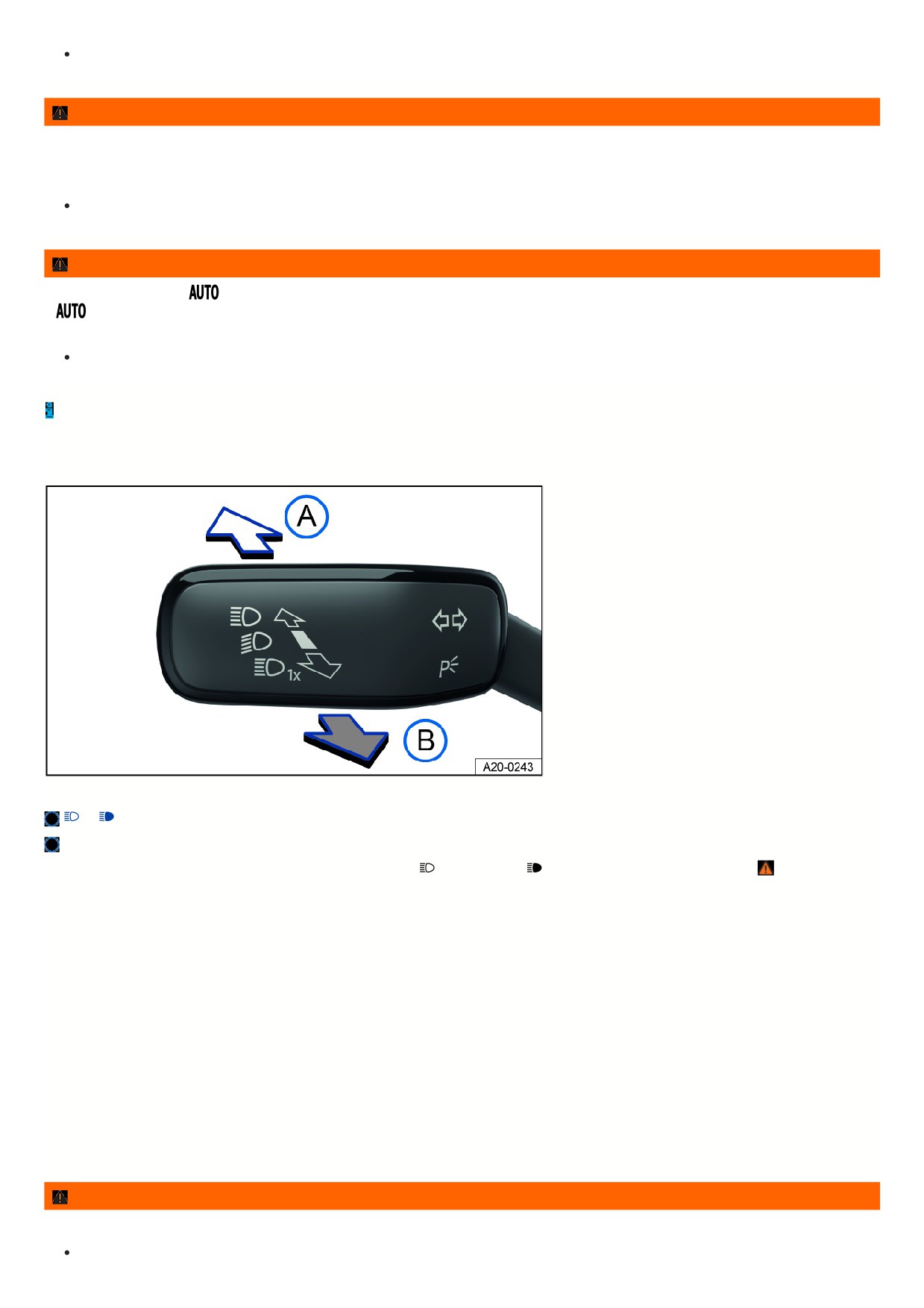
Fig. 102 On the left side of the steering column: turn signal and high beam lever.
or
turn on the high beam headlight.
Activate the headlight flashers or turn off the high beam headlights.
If the high beam headlights or headlight flashers are turned on, the blue
indicator light or
will come on in the instrument cluster ⇒
Turning on the high beam headlight
1. Switch the ignition on.
2. Switch on the low beam headlight.
3. Press the turn signal and high beam lever forward out of the center position fig. 102.
Turning off the high beam headlight
1. Pull the turn signal and high beam lever backward out of the center position fig. 102.
Turning the headlight flasher on and off
1. Pull the turn signal and high beam lever backward out of the center position and hold it fig. 102.
Release the turn signal and high beam lever to turn the headlight flasher off.
Light Assist
Depending on the equipment, high beam control (Light Assist) may be available → page , High Beam Control (Light Assist) .
WARNING
Incorrect use of the high beam headlight may distract and blind other road users. This can cause accidents and serious or fatal injuries.
Use the high beam headlights only if other road users cannot be distracted or blinded.
125

High Beam Control (Light Assist)
High beam control (Light Assist) switches off automatically if the system detects oncoming vehicles or vehicles driving ahead. In addition, Light Assist generally
detects well-lit areas such as towns and deactivates the high beam headlights when driving through these areas.
The high beam headlights switch on and off automatically within the limits of the system, depending on the environmental and traffic conditions and the vehicle
speed ⇒
Switching on high beam control (Light Assist)
1. Switch on the ignition and the automatic headlights
2. Tap the turn signal and high beam lever forward out of the basic position.
When Light Assist is switched on, the
indicator light in the instrument cluster display will turn on. When high beam control (Light Assist) is active, the blue
indicator light
for the high beam headlight in the instrument cluster lights up.
Adjusting the sensitivity of Light Assist
Depending on the country, the sensitivity of Light Assist can be set in two stages:
Increasing the sensitivity: press the turn signal and high beam lever forwards from its original position and hold it in this position for around 15 seconds.
The
indicator light on the instrument cluster will blink three times to confirm that this has been applied.
Setting the sensitivity back to its standard setting: press the turn signal and high beam lever forwards from its original position and hold it in this position for
around 15 seconds.
The
indicator light on the instrument cluster will blink three times in quick succession to confirm that this has been applied.
Or: Switch the ignition off and on.
Switching off high beam control (Light Assist)
1. Switch off
automatic headlights.
Or: when Light Assist is switched on and active, pull the turn signal and high beam lever backward.
Or: if high beam control (Light Assist)is switched on and not active, tap the turn signal and high beam lever forward. The manual high beam headlights are now
switched on. Pull the turn signal and high beam lever backwards to switch the high beam headlights off manually if necessary.
Or: Switch off the ignition.
System limitations
The high beams must be switched off manually in the following situations, because Light Assist may not switch them off at the right time or at all:
In poorly lit towns which cannot be recognized as a town by the system.
On poorly lit roads with strongly reflective signs.
If there are others on the road who have inadequate lighting, such as pedestrians or cyclists.
On tight curves where the view of traffic is partially obstructed, on steep rises, or in dips.
When there are oncoming vehicles on roads with a center barrier and the drivers in the oncoming vehicle can clearly see above the barrier, for example truck
drivers.
In fog, snow, and heavy rain.
When there are dust and sand in the air.
If the windshield is damaged in the camera's field of vision.
If the camera visual field is fogged over, dirty, or covered by a sticker, snow, or ice.
If the camera switches off automatically due to a high ambient temperature or exposure to direct sunlight for a prolonged period. Light Assist will be available
once the camera is available again.
If the camera is faulty and the power supply is interrupted.
WARNING
Light Assist may not detect all traffic situations correctly and the function may be restricted in certain situations. High beam control (Light Assist) is only an aid.
The driver is always responsible for turning on the correct vehicle lighting. Switching on the high beam headlight at the wrong time may distract and blind other
road users. This can cause accidents and serious or fatal injuries.
Always control the headlights yourself and adapt them to the lighting, visual, and traffic conditions.
Switch the high beam off manually if it could blind other road users.
WARNING
126

If the camera lens is dirty, covered, or damaged, the Light Assist function may be limited. This is also the case if the vehicle lighting system is changed, such as
by adding auxiliary headlights. This can cause accidents and serious or fatal injuries.
Regularly clean the camera view area and keep it free of snow and ice.
Do not cover the camera view area.
Regularly check the windshield for damage in the camera lens area.
Dynamic cornering light
The dynamic cornering lights provide optimum illumination of the roadway.
The dynamic cornering light only works when the automatic headlights
are switched on and at speeds of more than approximately 10 km/h (approximately
6 mph).
Switching the poor weather lights on and off
Poor weather lights help you to illuminate the carriageway more effectively when visibility is poor.
The poor weather light can be switched on when the ignition is switched on and the automatic headlights
or dipped beams
are switched on.
Switching on the Poor Weather Lights
1. Switch the ignition on.
2. Automatic headlights
or dipped beams
switched on.
3. Pull out the light switch up to the first retainer.
The green indicator light in the light switch will turn on.
Switching off the Poor Weather Lights
1. Push in the light switch or turn it to the
position.
If the poor weather light is switched on when the automatic headlights are switched on
, the dipped beams are also switched on, regardless of the
ambient light level.
Troubleshooting
Turn signal indicator light
The green indicator light blinks.
If a turn signal light on the vehicle is not working, the indicator light will blink twice as fast.
1. Check the lights and replace any bulbs as necessary
⇒ Introduction.
2. If the malfunction persists, contact a suitably qualified professional. Volkswagen recommends contacting an authorized Volkswagen dealer or authorized
Volkswagen Service Facility.
Trailer turn signal indicator light
The green indicator light blinks.
If a trailer turn signal or the entire trailer light system is out, the indicator light will turn off.
1. Check the lights and replace any bulbs as necessary
⇒ Introduction.
2. If the malfunction persists, contact a suitably qualified professional. Volkswagen recommends contacting an authorized Volkswagen dealer or authorized
Volkswagen Service Facility.
Exterior lighting malfunction
The yellow indicator light turns on.
The headlights have completely or partially failed.
1. Check the lights and replace any bulbs as necessary
⇒ Introduction.
2. If the malfunction persists, contact a suitably qualified professional. Volkswagen recommends contacting an authorized Volkswagen dealer or authorized
Volkswagen Service Facility.
Rain/light sensor malfunction
The yellow indicator light turns on.
In the
light switch position, the vehicle lighting will not turn on or off automatically.
1. Switch the ignition off and on.
127
2. If the malfunction persists, contact a suitably qualified professional. Volkswagen recommends contacting an authorized Volkswagen dealer or authorized
Volkswagen Service Facility.
Dynamic cornering light
When travel mode is activated, the dynamic cornering light does not work.
The swivel behavior of the bulbs can be influenced by the selected driving mode.
If the dynamic cornering light malfunctions, this is indicated on the instrument cluster display. Contact a suitably qualified professional. Volkswagen recommends
contacting an authorized Volkswagen dealer or authorized Volkswagen Service Facility.
Parking lights
Parking lights
Parking lights
If the
parking light function is switched on, both headlights will come on, along with the parking lights, sections of the taillights, the license plate light and variou
buttons in the vehicle interior.
Automatic parking light deactivation
The vehicle detects that the 12 V vehicle battery is low and switches off the parking light early enough to ensure that the engine can still be started, but not until at
least two hours have passed.
If the battery capacity is not sufficient for the parking light to run for two hours, the 12 V vehicle battery may drain to such an extent that the engine can no longer be
started.
WARNING
If the vehicle is stopped without enough lighting and cannot be seen or is difficult for others on the road to see, this can cause accidents and serious or fatal
injuries.
Always stop the vehicle safely and with enough lighting.
Follow the country-specific legal regulations.
“Exit lighting” and “Entry lighting” function (orientation lighting)
When you are entering and exiting the vehicle in the dark, the “Exit lighting” and “Entry lighting” function illuminates the immediate area around the vehicle.
Depending on the equipment, the vehicle can have an automatic or manual “Coming home” function:
Automatic “Coming home” function: the “Coming home” and “Leaving home” function automatically control the rain/light sensor.
Manual “Coming home” function: the “Coming home” function is switched on manually.
The “Leaving home” function automatically controls the rain/light sensor.
The lighting time can be adjusted in the vehicle settings in the Infotainment system and the function can be activated or deactivated
⇒ Vehicle settings menu.
Switching on the automatic “Coming home” function
1. Switch the ignition off.
The “Coming home” lighting switches on automatically when the light switch is in the
position and the rain/light sensor detects darkness.
The lighting time begins when the last vehicle door or trunk lid is closed.
Switching on the manual “Coming home” function
1. Switch the ignition off.
2. Press the headlight flasher.
The “Coming home” lighting switches on automatically when the driver door opens. The switch-off delay begins when the last door or the trunk lid is closed.
Switching the “Exit lighting” function off
1. Turns off automatically after the set lighting time has elapsed.
Or: Automatically if a vehicle door or the trunk lid is still open approximately 30 seconds after switching on.
Or: Switch off the light.
Or: Switch on the ignition.
Switching the “Entry lighting” function on
1. Unlock the vehicle when the automatic headlight control
is switched on and the rain/light sensor detects darkness.
Switching the “Entry lighting” function off
128
1. Turns off automatically after the lighting time has elapsed.
Or: Lock the vehicle.
Or: Switch off the light.
Or: Switch on the ignition.
Light functions
Cornering lights
If the low beam headlights are switched on, a cornering light will also switch on during slow turns or in very tight corners.
When reverse gear is engaged, the cornering lights on both sides of the vehicle will turn on automatically to better illuminate the surroundings while
maneuvering.
Automatic headlight control
If automatic headlights
are switched on, the vehicle lighting switches on and off automatically along with the instrument illumination under the following
conditions:
The light sensor has detected darkness.
The windshield wipers are switched on for a long time.
When the lights are turned on, the yellow indicator light
turns on ⇒ Switching the lights on and off .
Automatic headlight control is merely an aid and cannot always accurately detect all driving situations.
If the vehicle is equipped accordingly, the activation time of the automatic headlights can be adjusted in the vehicle settings in the Infotainment system
⇒ Vehicle
settings menu.
Headlight range control
The headlight range must always be adapted to the vehicle load level. This provides the driver with the best possible visibility and oncoming traffic is not dazzled. To
find out whether your vehicle features headlight range control, contact an authorized Volkswagen dealer or authorized Volkswagen Service Facility. Volkswagen
recommends contacting an authorized Volkswagen dealer or authorized Volkswagen Service Facility.
Without headlight range control
The beam of the low beam headlights must be adjusted by an authorized Volkswagen dealer or authorized Volkswagen Service Facility to take into account the
vehicle's load ⇒ . Volkswagen recommends contacting an authorized Volkswagen dealer or authorized Volkswagen Service Facility.
Dynamic headlight range control
The headlight range automatically adjusts to the vehicle load when the headlights are switched on ⇒
WARNING
Heavy objects in the vehicle can affect the vehicle level in such a way that causes the headlights to dazzle and distract other road users. This can cause
accidents and serious or fatal injuries.
Always adjust the light cone to the vehicle load so that other road users are not dazzled.
WARNING
If the headlight range control fails or malfunctions, the headlights may blind and distract other road users. This can cause accidents and serious or fatal injuries.
Have the headlight range control inspected immediately by an authorized Volkswagen dealer or authorized Volkswagen Service Facility. Volkswagen
recommends contacting an authorized Volkswagen dealer or authorized Volkswagen Service Facility.
Adjusting headlights (travel mode)
When traveling in countries that drive on the opposite side of the road from your home country, the asymmetric low beam headlights can dazzle oncoming traffic.
Therefore, when driving in such countries, certain headlight variants must be adjusted, or certain areas of the headlight lens must be masked off. For further
information, contact an authorized Volkswagen dealer or authorized Volkswagen Service Facility. Volkswagen recommends contacting an authorized Volkswagen
dealer or authorized Volkswagen Service Facility.
Travel mode may be used only for a short period of time. Contact an authorized Volkswagen dealer or authorized Volkswagen Service Facility for permanent
conversion. Volkswagen recommends contacting an authorized Volkswagen dealer or authorized Volkswagen Service Facility.
Warning tones when lights are not turned off
If the ignition has been switched off and the driver door is opened, warning tones will sound under the following conditions:
129

With the side lights switched on
If the orientation lighting is switched on, the warning tone to indicate that the light is still turned on will not sound when leaving the vehicle
⇒ “Exit lighting” and “En
lighting” function (orientation lighting).
Interior lighting
Instrument and switch illumination
You can adjust the brightness of the instrument illumination in the vehicle settings in the Infotainment system
⇒ Vehicle settings menu.
The selected brightness will automatically adjust to the changing brightness in the vehicle.
If the automatic headlights
are switched on, a sensor switches the dipped beams and the instrument and switch lighting on and off automatically based on
outside brightness.
The instrument illumination for the needles and dials turns on when the ignition is on and the lights are off. The lighting for the gauges reduces automatically
and eventually turns off as brightness outside increases. This function should remind the driver to turn off low beam headlights at the right time, such as when
driving through tunnels.
Interior/reading lights, ambient lighting
Switching on or off interior and reading lights
The scope and the representation of the controls in the headliner vary depending on the vehicle equipment.
Press the corresponding button:
Switch off the interior lights.
Switch on the interior lights. Switch the rear interior lights on or off.
The interior lights will switch on automatically when
unlocking or leaving the vehicle. The interior lights will switch on automatically when unlocking or leaving the vehicle.
Switch the reading lights on or off.
Glove compartment and luggage compartment lights
The glove compartment and the luggage compartment may be illuminated depending on the vehicle equipment.
The relevant light turns on or off when opening and closing the glove compartment or trunk lid.
Ambient lighting
Depending on vehicle equipment, ambient lighting can provide indirect lighting in various areas of the vehicle interior.
Other areas may also be illuminated, e.g. the footwell.
Depending on vehicle equipment, you can adjust the brightness and color of the ambient lighting in the vehicle settings in the Infotainment system
⇒ Vehicle
settings menu. If you select the setting Auto, the color of the ambient lighting changes depending on the driving mode setting.
Vehicles with a starter button: After the ignition has been switched off, the lights will turn off when the vehicle is locked or automatically after a few minutes.
This reduces the risk of the 12 V vehicle battery being drained.Vehicles with ignition lock: After the vehicle key has been removed from the ignition switch, the
lights will turn off when the vehicle is locked or automatically after several minutes. This reduces the risk of the 12 V vehicle battery being drained.
13
Visibility
Window wipers
Operating the windshield wiper lever
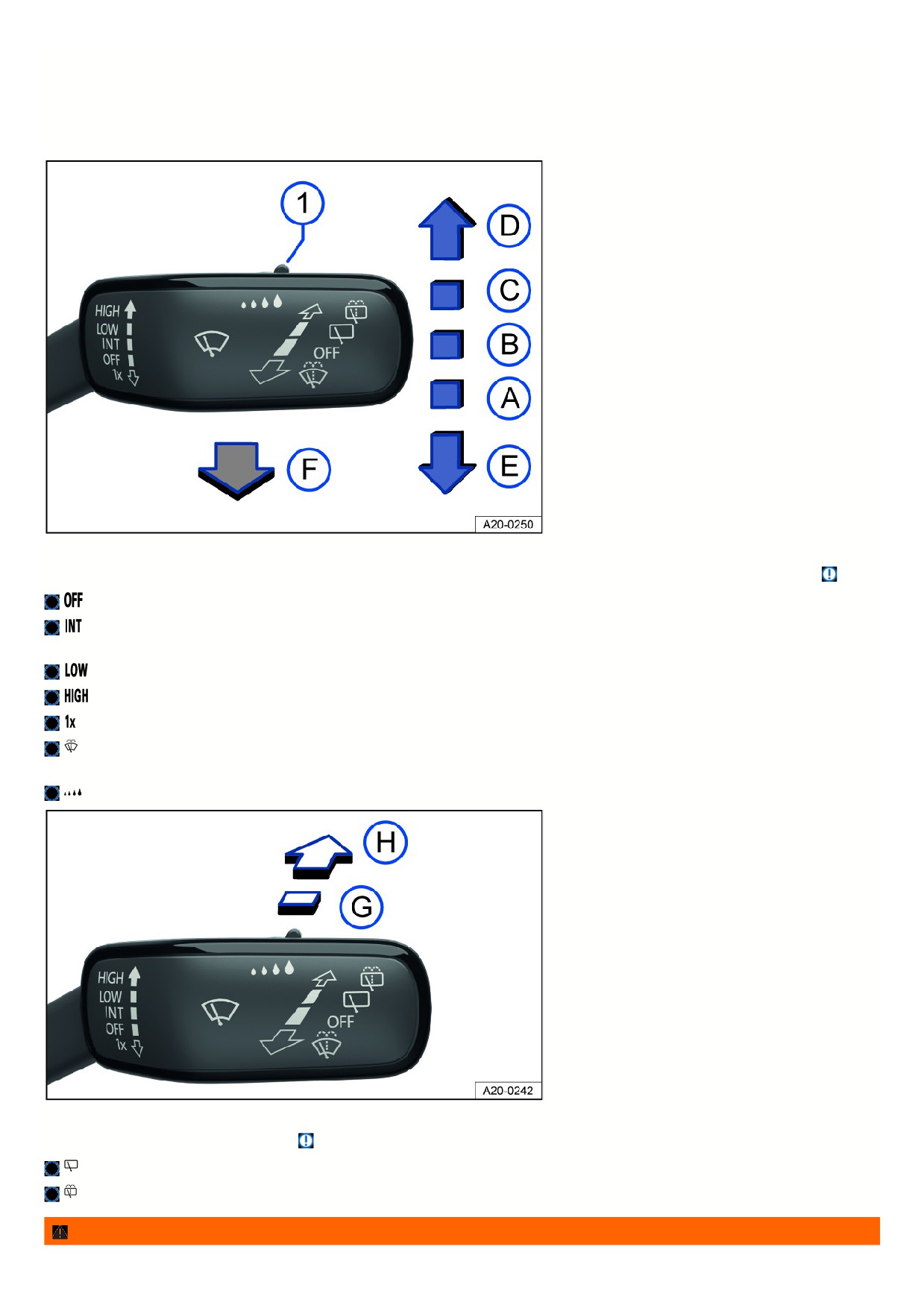
Fig. 103 On the right side of the steering column: operating the windshield wipers.
The windshield wipers only work when the ignition is switched on and the hood or trunk lid is closed. Move the wiper lever into the desired position
⇒
:
Wipers are switched off.
Interval wiping for the windshield or rain sensor mode. Interval wiping for the windshield depends on the driving speed. The higher the speed, the faster
the wipers will move.
Slow wiper speed.
Fast wiping.
One-tap wiping - brief wiping. Press and hold the lever down longer to wipe faster.
Pull the lever to activate the automatic wiper/washer system to clean the windshield. While the wiper/washer system is active, the Climatronic system
switches to recirculation mode for approximately 30 seconds to help prevent the washer fluid odor from entering the vehicle interior.
Switch for interval levels (vehicles without rain/light sensor) or to adjust the sensitivity of the rain/light sensor.
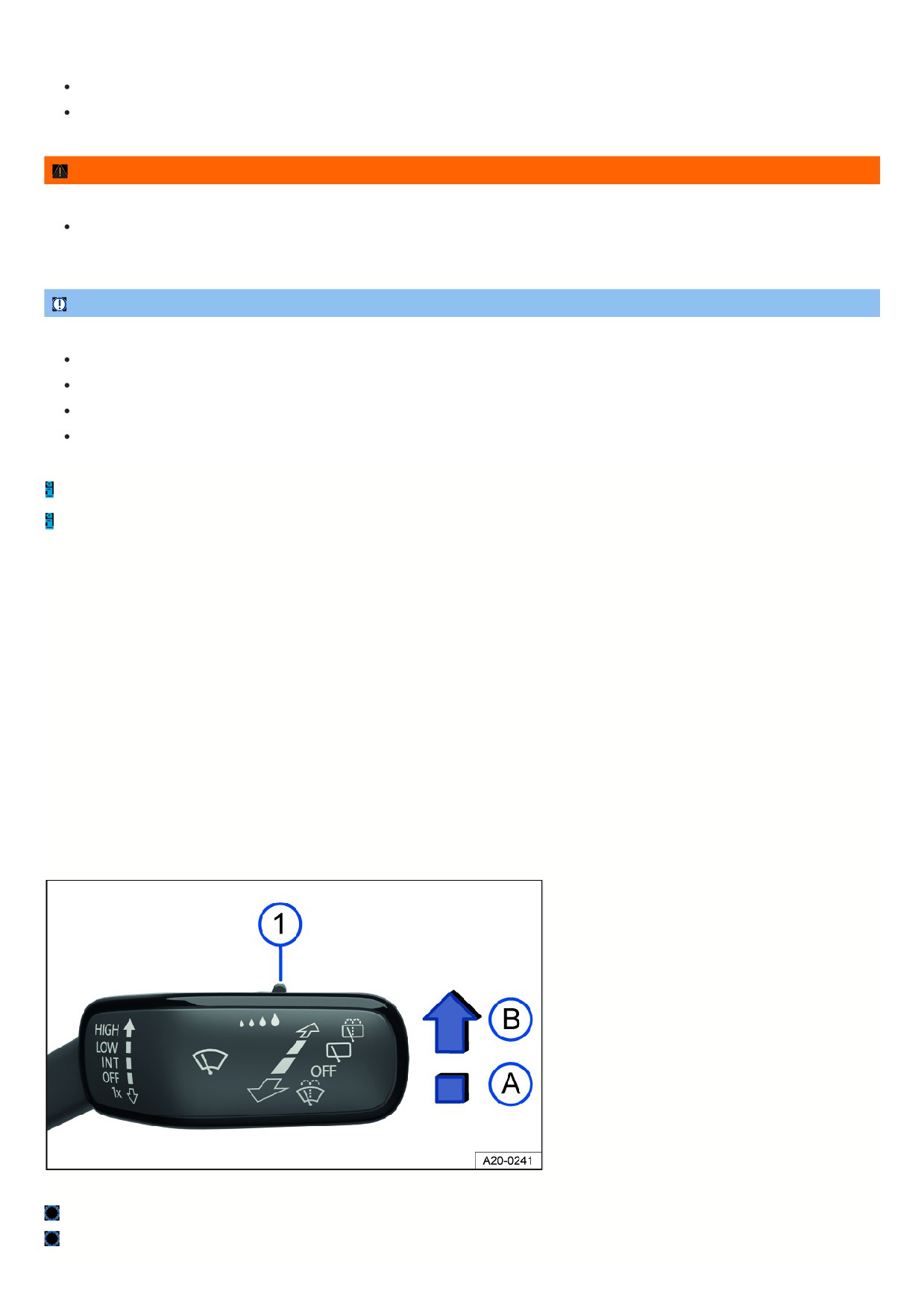
Fig. 104 On the right side of the steering column: operating the rear window wiper.
Move the wiper lever into the desired position ⇒
:
Interval wiping for the rear window. The wiper moves approximately every six seconds.
Press the lever to activate the automatic wiper/washer system to clean the rear window.
WARNING
131
Without the sufficient freeze protection, washer fluid can freeze on the window glass and reduce visibility. This can cause accidents and serious or fatal injuries.
Only use the washer system with sufficient freeze protection in winter temperatures.
Never use the window washer system in winter temperatures if the windshield has not been warmed up with the air conditioning system.
WARNING
Worn or dirty wiper blades reduce visibility and increase the risk of accidents and serious injuries.
Always replace wiper blades if they are damaged or worn and are no longer cleaning the window glass sufficiently
⇒ Cleaning and changing wiper
blades.
NOTICE
Incorrect handling of the windshield wipers can cause damage to the windshield, the wiper blades and the wiper motor.
Before driving and before the ignition is switched on, check that the windshield wiper lever is in the basic position.
Remove any snow and ice from the windshield wipers and the windshield.
Always carefully loosen wiper blades that have frozen onto the windshield from the windshield.
Do not turn on the windshield wipers when the windshield is dry.
The activated wiper speed temporarily changes to the next lower speed when the vehicle is stationary.
When parking the vehicle in cold weather conditions, moving the windshield wipers to the service position may be helpful for loosening the wiper blades more
easily from the windshield ⇒ Putting the windshield wipers in the service position .
Wiper function
Automatic rear window wiping
The rear window wiper switches on automatically when the windshield wipers are switched on and reverse gear is engaged. The automatic activation in reverse
gear function can be activated and deactivated in the vehicle settings in the Infotainment system ⇒ Vehicle settings menu.
Heated washer nozzles
The heat thaws frozen washer fluid nozzles. The heat output is automatically regulated when the ignition is switched on and is dependent on the outside
temperature. Only the window washer nozzles are heated and not the washer fluid hoses.
Heated windshield wiper area
If the windshield wipers are in starting position, they can be heated when the temperature is approx. +4 °C (approx. +39 °F) or lower, depending on the vehicle
equipment. The function is switched on automatically as soon as you switch on the defrost function or the rear window defroster, or you start the vehicle via the
remote start relay function. If the vehicle is moved or the windshield wipers have become heated after a few minutes, then the function switches off automatically.
Rain/light sensor
Fig. 105 On the right side of the steering column: windshield wiper lever.
Switch for adjusting the sensitivity of the rain/light sensor.
Rain/light sensor deactivated.
132

Rain/light sensor activated, automatic wiping as necessary.
When switched on, the rain/light sensor automatically shortens or lengthens the delay between wiping cycles depending on how hard it is raining.
Activating and deactivating the rain/light sensor
1. Press the lever into the desired position fig. 105.
Automatic wiping can be activated and deactivated in the vehicle settings in the Infotainment system
⇒ Vehicle settings menu.
If automatic wiping is deactivated in the Infotainment system, the interval time will be set in fixed stages.
Adjusting the sensitivity of the rain/light sensor
The sensitivity of the rain/light sensor can be manually adjusted with the switch in the windshield wiper lever fig. 105 , ⇒
Move the switch to the right - high sensitivity.
Move the switch to the left - low sensitivity.
WARNING
The rain/light sensor cannot detect all precipitation sufficiently and activate the windshield wipers accordingly. Reduced visibility can cause accidents and
serious or fatal injuries.
If necessary, switch on the windshield wipers manually if water on the windshield is impairing visibility.
Troubleshooting
Washer fluid level too low
The yellow indicator light turns on.
1. Fill the washer fluid reservoir ⇒ Washer fluid.
Windshield wiper malfunction
The yellow indicator light turns on.
The windshield wipers are not working.
1. Switch the ignition off and on.
2. If the malfunction persists, contact a suitably qualified professional. Volkswagen recommends contacting an authorized Volkswagen dealer or authorized
Volkswagen Service Facility.
Rain/light sensor malfunction
The yellow indicator light turns on.
The windshield wipers will not be automatically activated in rain/light sensor mode when it is raining.
1. Switch the ignition off and on.
2. If the malfunction persists, contact a suitably qualified professional. Volkswagen recommends contacting an authorized Volkswagen dealer or authorized
Volkswagen Service Facility.
Changes to rain/light sensor reaction
Some possible reasons for malfunctions and misinterpretations in the sensor area of the rain/light sensor
⇒ View from the front could be:
Damaged wiper blades: damaged wiper blades can leave a film of water or streaks on the window, and this can extend the activation time, greatly shorten the
wiper intervals, or cause fast wiping time.
Insects: insects hitting the windshield may trigger the wipers.
Salt streaks: salt streaks on the windshield from driving in the winter can cause the wipers to wipe more frequently or continuously on a window that is almost
dry.
Dirt: dried dust, wax, any other build-up on the windshield (lotus effect), or washing product residue (car wash) can lower the sensitivity of the rain/light sensor
and cause it to react too slowly or not at all. Clean the sensor area for the rain/light sensor regularly and check the wiper blades for damage ⇒ Exterior care
and cleaning.
Crack in the windshield: if a stone strikes and chips the sensor area while the rain/light sensor is on, this will trigger a wiper cycle. After that, the rain/light
sensor will detect this irregularity on the sensor surface and react to it. Depending on the size of the chip, the reaction behavior of the rain/light sensor may or
may not change.
If there is an obstacle for the wipers on the window glass, the wipers will attempt to remove it. If it continues to block the wipers, the wipers will stop moving.
1. Remove the obstacle and switch the wipers on again.
133

Mirrors
General safety precautions
Using the outside mirrors and the interior rearview mirror, the driver can observe traffic and adjust their driving based on traffic.
For driving safety, it is important that the driver adjusts the outside mirrors and the interior rearview mirror correctly before starting to drive.
It is not possible to oversee the entire side and rear area of the vehicle by looking in the outside and interior rearview mirrors. These areas that are not visible are
called blind spots. Other road users and objects could be in the blind spot.
WARNING
Adjusting the outside mirrors and interior rearview mirror while driving can distract the driver. This can cause accidents and serious or fatal injuries.
Only adjust the outside mirror and interior rearview mirror when the vehicle is stationary.
Always make sure that the mirrors are adjusted correctly and visibility to the rear is not limited by ice, snow, fog, or other objects.
WARNING
The view in the outside mirrors and interior rearview mirror does not cover the entire area around the side and rear of the vehicle. Other road users and objects
could be in these blind spots. This can cause accidents and serious or fatal injuries.
When parking, changing lanes, passing, and turning, always pay attention to your surroundings.
WARNING
Curved mirror surfaces (convex or aspheric) enlarge the field of vision and allow objects in the mirror to appear smaller and farther away. This can make it
difficult to estimate the exact distance from the vehicles behind, e.g. when changing lane. This can cause accidents and serious or fatal injuries.
Use the interior rearview mirror as much as possible to more accurately determine the distance to vehicles or other objects behind you.
Make sure there is sufficient visibility of the area behind the vehicle.
WARNING
An automatic dimming rearview mirror contains an electrolyte fluid that can leak out if the mirror glass breaks. Coming into contact with this liquid can irritate the
skin, eyes, and respiratory organs, especially in individuals with asthma or similar illnesses. This may cause serious injuries.
If electrolyte fluid is swallowed, rinse out the mouth immediately for at least 15 minutes with plenty of water. Do not induce vomiting unless it ordered to
do so by a doctor. Call for medical assistance immediately.
Immediately get plenty of fresh air and exit the vehicle. If this is not possible, open all the windows and doors.
If the electrolyte fluid comes into contact with eyes or skin, wash the affected area immediately for at least 15 minutes with plenty of water and seek
medical assistance.
If the electrolyte fluid comes into contact with your shoes or clothing, wash it for at least 15 minutes with plenty of water. Clean the shoes and clothing
thoroughly before wearing them again.
NOTICE
If the glass on an automatic dimming mirror breaks, electrolyte fluid can leak out. This fluid damages plastic surfaces.
Remove any leaking fluid as soon as possible, for instance using a wet sponge.
Interior rearview mirror
134
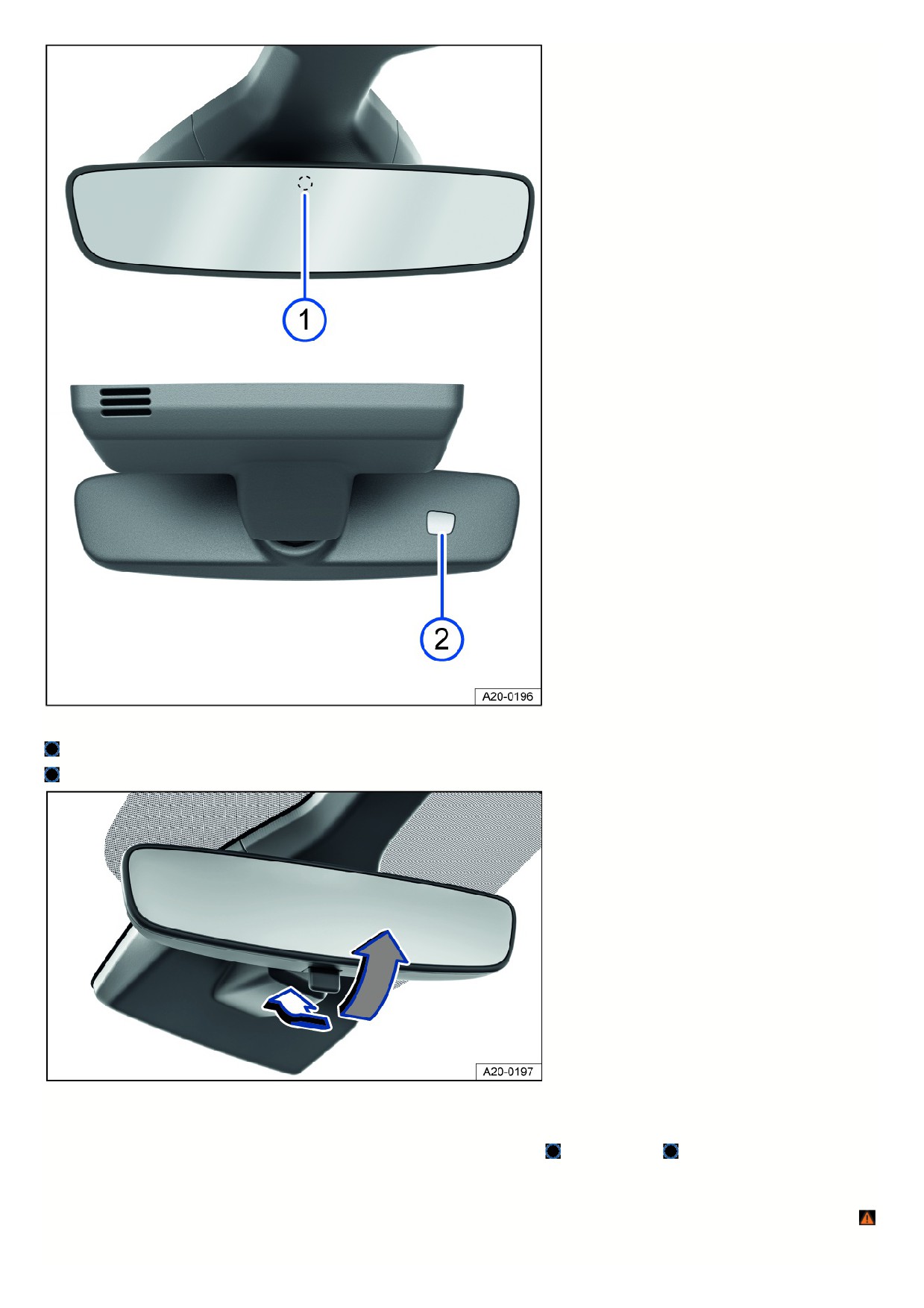
Fig. 106 On the windshield: automatic dimming interior rearview mirror.
Sensor for light entering from the rear.
Sensor for light entering from the front.
Fig. 107 On the windshield: manual dimming interior rearview mirror.
Automatic dimming interior rearview mirror
When the ignition is on, the sensors measure the amount of light entering from the rear fig. 106
and from the front
Depending on the measured values, the interior rearview mirror will dim automatically.
If the amount of light entering the sensors is limited or interrupted, for example by a sunshade or attachment, the automatic dimming interior rearview mirror may no
function or may malfunction. Mobile navigation devices on the windshield or near the automatic dimming interior rearview mirror can also affect the sensors ⇒
Automatic dimming will be deactivated in some situations, for example when reverse gear is engaged.
135
Manual dimming interior rearview mirror
Base position: lever on the lower edge of the mirror points forward toward the windshield.
To dim, pull the lever back fig. 107.
WARNING
The illuminated display of a mobile navigation system may interfere with the automatic dimming interior rearview mirror. This may stop you from using the
interior rearview mirror to accurately determine the distance from vehicles or other objects behind you. Accidents and serious or fatal injuries could result.
Switch the mobile navigation system off in such cases.
Outside mirrors
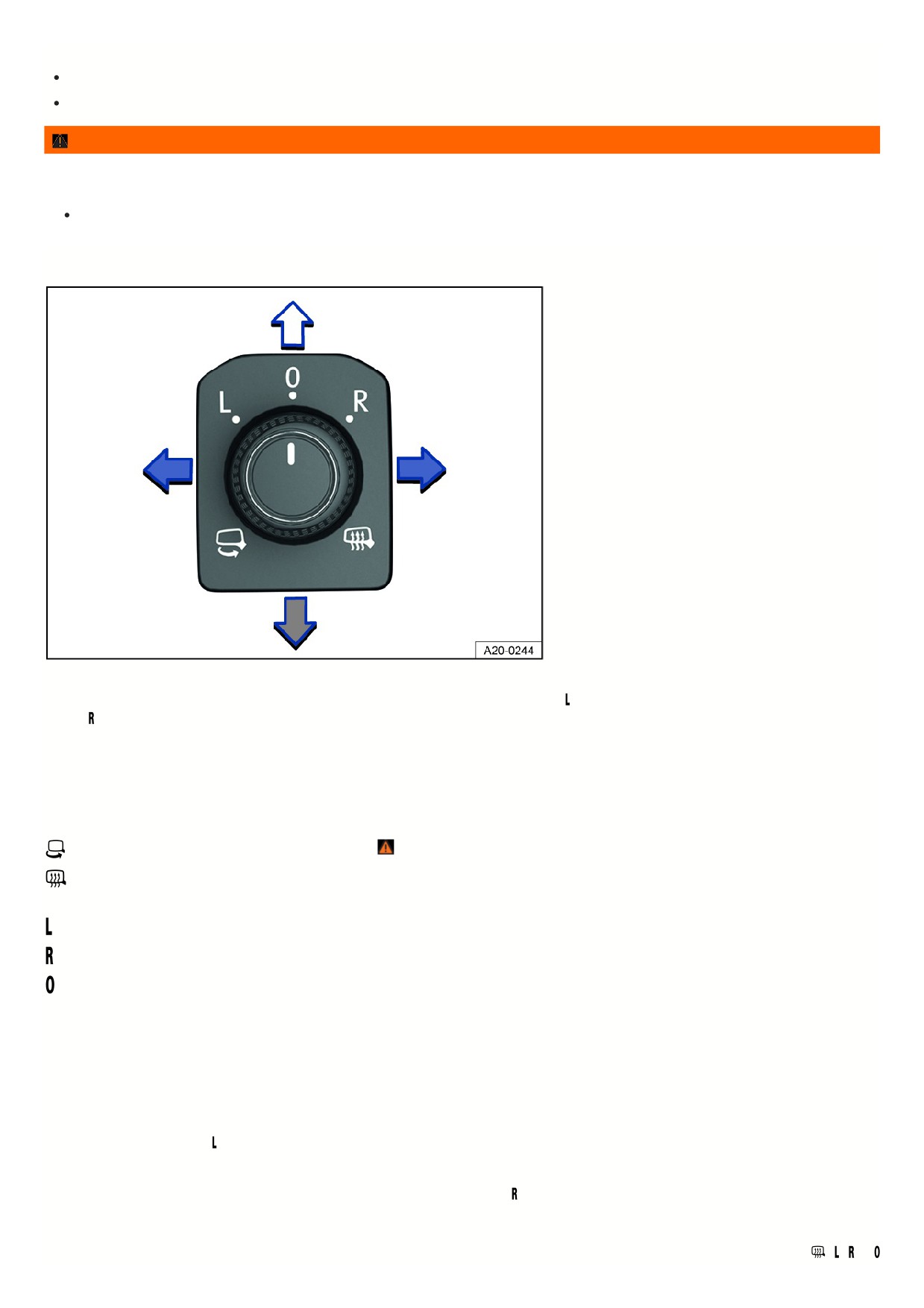
Fig. 108 In the driver door: knob for the outside mirrors.
The following information describes the outside mirror functions for left-hand drive vehicles. Position corresponds to the outside mirror on the driver's side, and
position corresponds to the outside mirror on the passenger's side. For right-hand drive vehicles, proceed in the reverse order.
Adjusting outside mirrors
1. Switch the ignition on.
2. Turn the knob in the driver door to the preferred symbol fig. 108.
3. To adjust the outside mirror, push the knob forward, back, right or left in the direction of the arrow.
Fold the outside mirror in towards the vehicle body ⇒
Switch on the outside mirror heating. The exterior mirror heating only works when the ambient temperature is below approx. 20 °C (around 68 °F) and
provides the most heat when it first turns on. After about two minutes, the mirrors will be heated depending on the ambient temperature.
Adjusts the left outside mirror.
Adjusts the right outside mirror.
Neutral position. The outside mirror cannot be adjusted and all functions are switched off.
Activating outside mirror functions
The following outside mirror functions must be activated in the vehicle settings in the Infotainment system before they are used for the first time
⇒ Vehicle settings
menu.
Synchronized mirror adjustment
The synchronized mirror adjustment feature simultaneously adjusts the right-side outside mirror to match adjustments to the left-side outside mirror.
1. Turn rotary knob to position
2. Adjusts the left outside mirror. The right outside mirror will be adjusted the same way (synchronized).
3. To correct the adjustment of the right outside mirror, if necessary, turn the knob to the
position and adjust the right outside mirror.
Folding the outside mirrors in while parking
If the vehicle is locked or unlocked from the outside, the outside mirrors will automatically fold in or out. For this to happen, the knob must be in the
,
,
or
136
position.
If the knob for power exterior mirrors is in the
position, the outside mirrors will remain folded in.
Save the passenger-side outside mirror settings when reversing
1. Unlock the vehicle using the key, to which the setting is allocated.
2. Set the electronic parking brake.
3. Switch the ignition on.
4. Shift the transmission to neutral.
5. Select the reverse gear.
6. Adjust the front passenger outside mirror so that, for example, the edge of the curb can be seen clearly.
7. Shift the transmission to neutral.
8. Switch the ignition off.
The selected mirror position will be stored and assigned to the vehicle key.
Opening the front passenger outside mirror settings for driving in reverse
1. Turn rotary knob for the outside mirrors to the relevant position for adjusting the front passenger outside mirror.
2. With the ignition switched on, select reverse gear.
The front passenger outside mirror will adjust to the stored position.
The front passenger outside mirror will exit the position stored for driving in reverse when you begin driving forward faster than about 15 km/h (about 9 mph) or whe
the knob is turned to any other position.
WARNING
If you fold the outside mirrors against the vehicle or back without taking care, you could get your fingers jammed between the outside mirror and the mirror
base. This can cause serious injuries.
Do not fold the outside mirrors out or in if there are any obstacles in the path.
NOTICE
If outside mirrors are not folded in when driving through a car wash, they can get damaged.
Always fold in the outside mirrors.
NOTICE
Folding in the power exterior mirror manually can worsen wear and tear or damage the mirror motor.
Do not fold power exterior mirrors in or out by hand.
Leave the outside mirror heating on only as long as it is needed. Otherwise fuel will be used unnecessarily.
If there is a malfunction in the power outside mirror, you can adjust the position of the mirror manually by hand by pushing on the edge of the mirror surface.
Sunshade
Sun visors
137
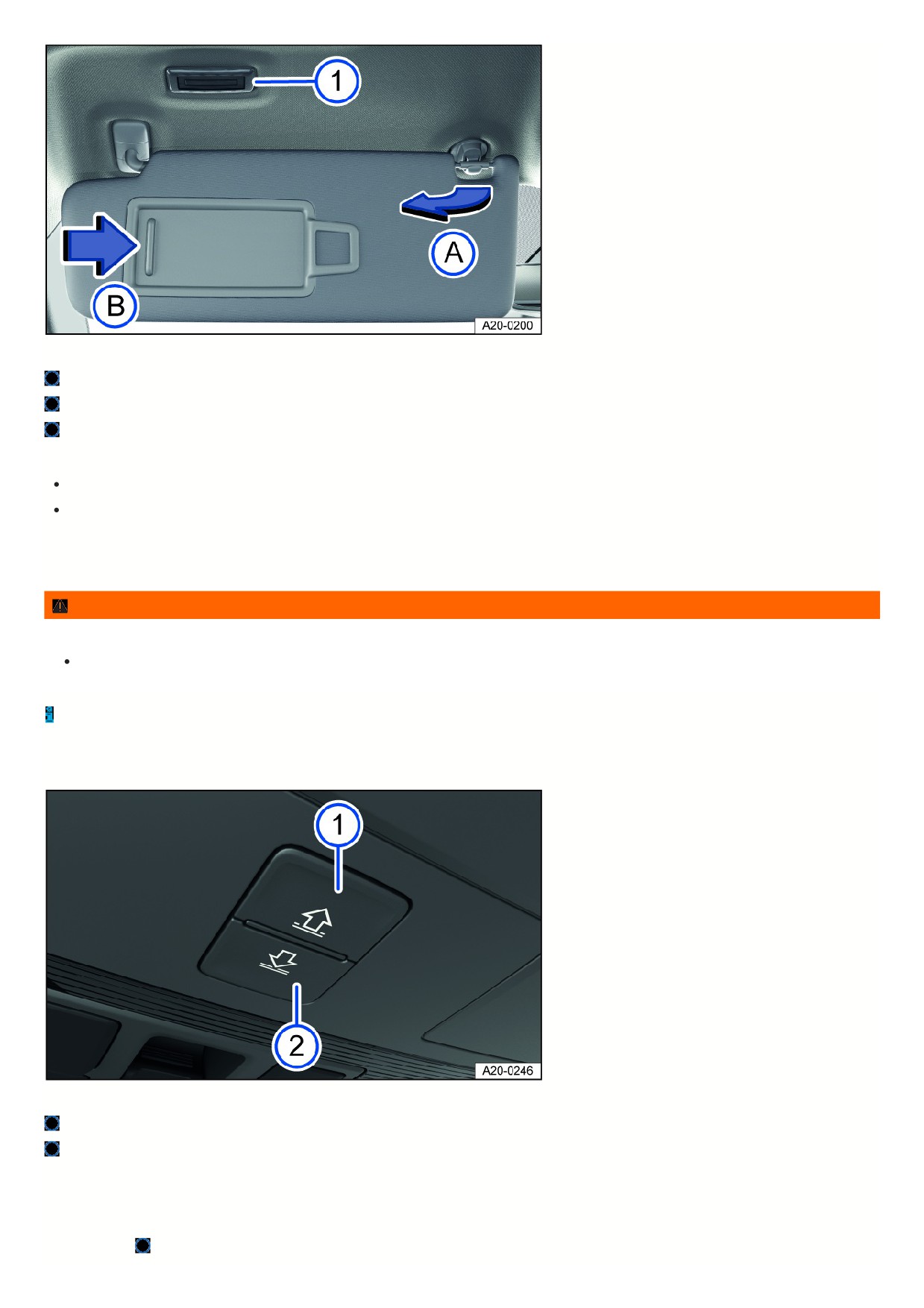
Fig. 109 In the front of the headliner: sun visor.
Light.
Remove from holder.
Slide cover open.
Adjustment options for the driver and front passenger sun visors:
Fold toward the windshield.
Remove from the holder and tilt toward the door fig. 109.
Illuminated vanity mirror
When the sun visor is folded down, there is a vanity mirror located behind a cover. The lights fig. 109 turn on when the cover fig. 109 slides open.
WARNING
Visibility may be reduced when sun visors are folded down and the sunshades are extended. This can cause accidents and serious or fatal injuries.
Always guide sun visors and sunshades back into their holders when they are no longer needed.
Under certain conditions, the light above the sun visor will turn off automatically after several minutes. This reduces the risk of the 12 V vehicle battery being
drained.
Sunshade in the sunroof
Fig. 110 In the headliner: buttons for controlling the sunshade.
Button for opening the sunshade.
Button for closing the sunshade.
The power sunshade only works when the ignition is switched on.
When the sunroof is tilted all the way open, the sunshade automatically moves into a position that provides ventilation. The sunshade will remain in the ventilation
position after the sunroof is closed.
The fig. 110 and
buttons have two detents. In the first detent, the sunshade can be opened or closed either completely or partially.
138
In the second detent, pressing the button briefly opens or closes the sunshade completely. Pressing the button again stops the one-touch feature.
Opening the sunshade
1. Press the
button to the first level.
Automatic process: Press the
button briefly to the second level.
2. To interrupt the automatic opening process, press the button
again briefly.
Closing the sunshade
1. Press the
button to the first level.
Automatic process: Press the
button briefly to the second level.
2. To interrupt the automatic closing process, press the button
again briefly.
The sunshade can still be opened or closed for several minutes after the ignition has been switched off, as long as the driver’s or front passenger door has not been
opened.
Sunshade pinch protection
The pinch protection can reduce the risk of being pinched and injured when the sunshade is closing
⇒ . If the sunshade encounters resistance or an obstacle
when closing, the sunroof or sunshade will open again immediately.
1. Check why the sunroof did not close.
2. Try again to close the sunshade.
If the sunshade still encounters resistance or an obstacle and will not close, open the sunshade again. Within a short time after opening, you can close the
sunshade again without pinch protection.
3. If the sunshade is still not able to close, close the sunshade without pinch protection.
Closing the sunshade without pinch protection
1. Within approximately five seconds after pinch protection is triggered, press and hold the fig. 110 button until the sunshade is completely closed.
This will close the sunshade without pinch protection.
2. If the sunshade still will not close, contact an authorized Volkswagen dealer or authorized Volkswagen Service Facility for assistance. Volkswagen recommends
contacting an authorized Volkswagen dealer or authorized Volkswagen Service Facility.
WARNING
Closing the sunshade without pinch protection may result in serious injuries.
Always be careful when closing the sunshade.
Ensure that nobody is within the range of operation of the sunshade, especially if it is closing without pinch protection.
When the sunroof is open, the power sunshade can only be closed to the front edge of the sunroof.
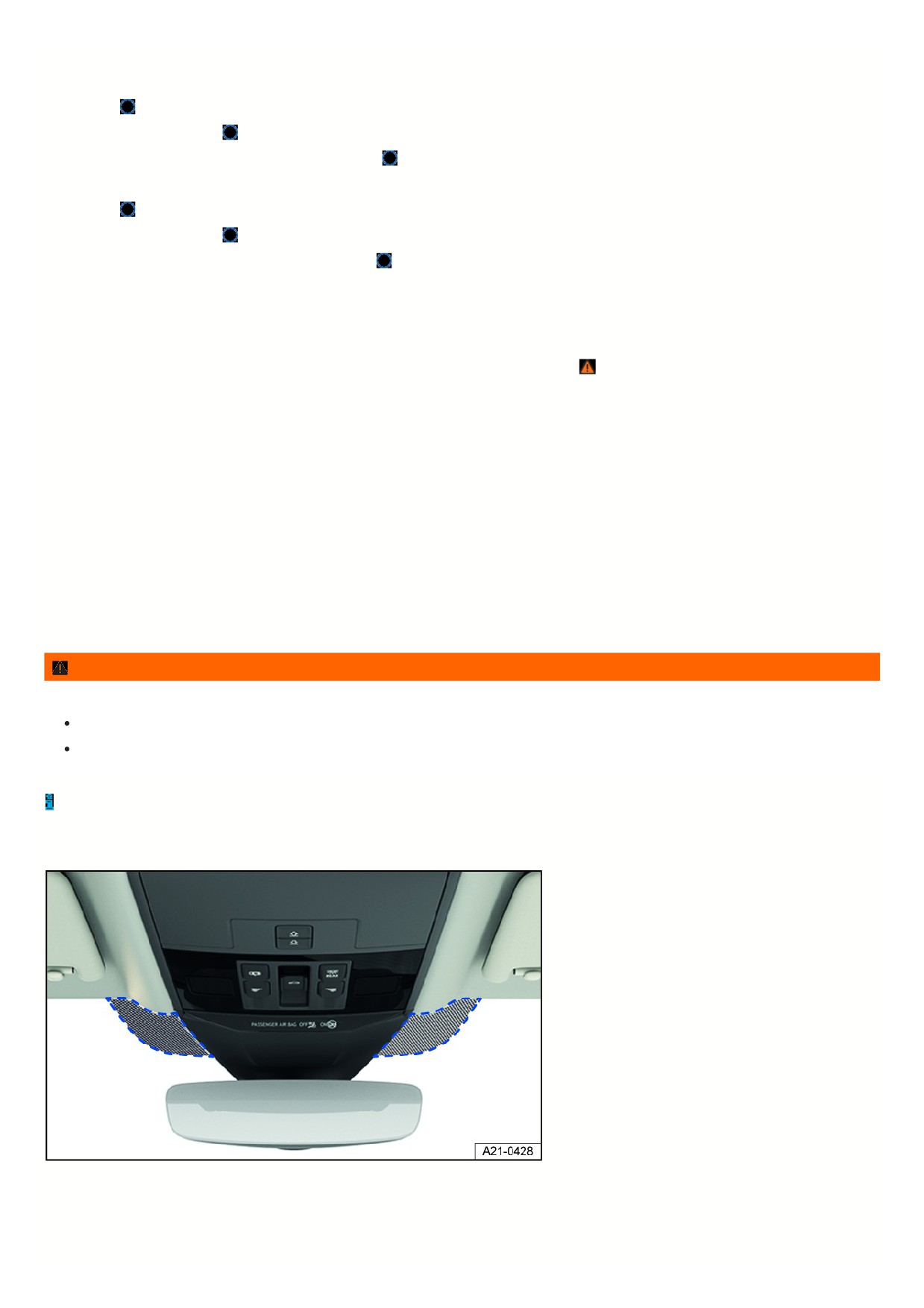
Windshield with communication window
Fig. 111 Next to the mirror base: Communication window (general example).
Windshields made of heat protection glass may have an infrared-reflecting coating and may, depending on the vehicle equipment, be able to be wirelessly heated.
In order to ensure that wireless equipment from the accessories industry, e.g. toll systems, can function correctly, an uncoated area is present on either side of the
interior rearview mirror (communication window) fig. 111.
139

The uncoated areas must not be covered from the inside or outside, or have stickers on them, because this could cause malfunctions.
14
Heating and air conditioning system
Climatronic
Overview of the Climatronic
Climatronic is an automatic air conditioning system which warms, cools and dehumidifies the air. In automatic mode, Climatronic can automatically control the air
temperature, air distribution and the volume of air.
The air conditioner is most effective when the vehicle interior is kept closed. If there is a build-up of heat inside the vehicle, ventilation can help to speed up the
cooling process.
Some functions of the air conditioner, as well as a climate control bar for the rear seats, depend on the vehicle equipment.
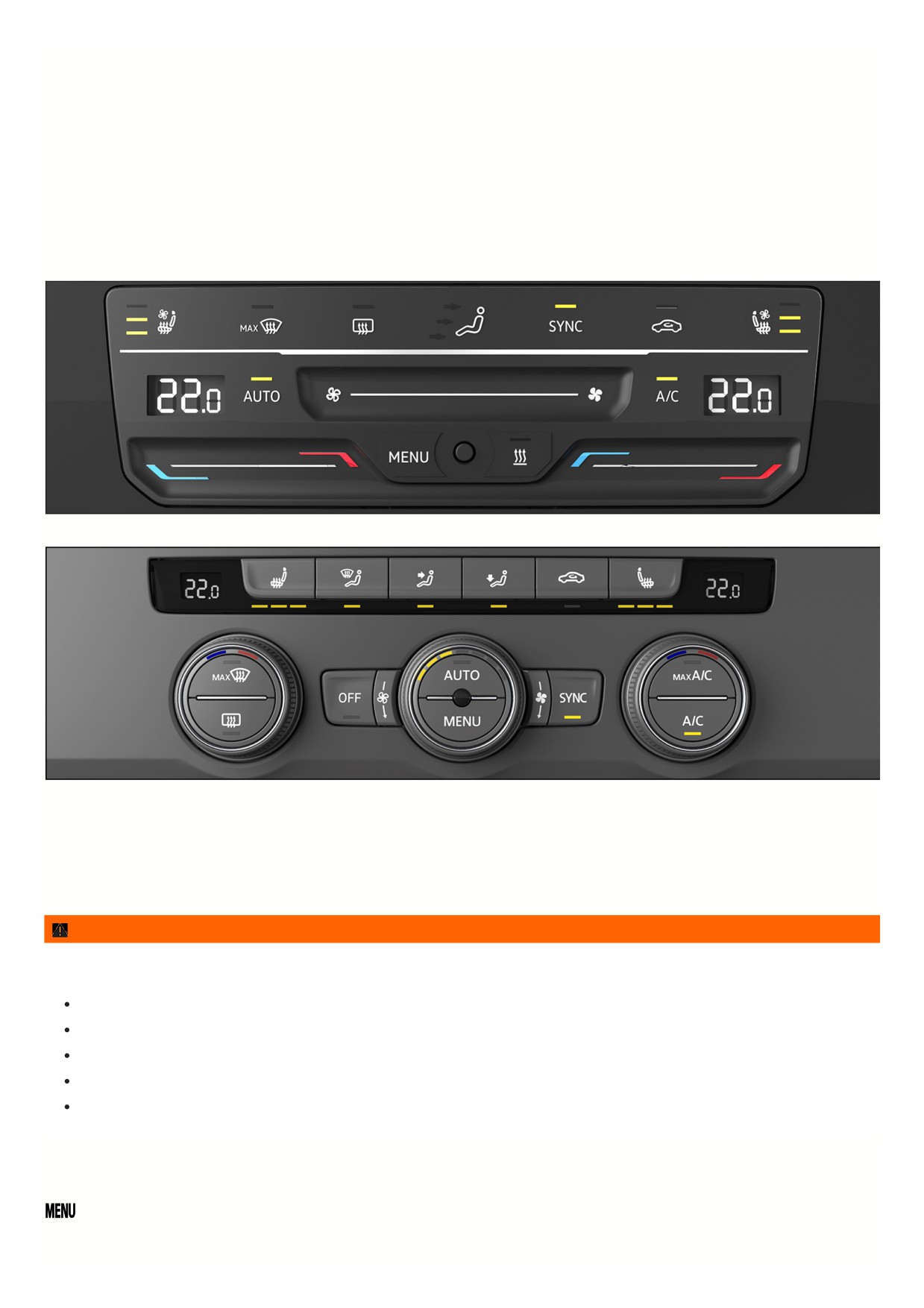
Fig. 112 In the upper section of the center console: air conditioning block for the Climatronic system (version 1).
Fig. 113 In the upper section of the center console: air conditioning block for the Climatronic system (version 2).
Display of activated functions
Illuminated LEDs on the climate control bar indicate that the function is activated.
In the Air conditioner menu in the Infotainment system, function keys highlighted in color indicate that a function is switched on
⇒ Air conditioner menu in the
Infotainment system.
WARNING
Icy, snow-covered or foggy door windows restrict visibility very severely. This increases the risk of collisions and accidents, which may result in serious or fatal
injuries.
Keep all windows free of ice, snow and fog.
Adjust the heating, air conditioner, and rear window defroster to a setting where the windows do not fog up
⇒ Troubleshooting.
Only start driving when all windows are clear.
Only use recirculation mode for a short time. Otherwise, the windows could fog up very quickly and greatly reduce visibility.
Always switch off recirculation mode as soon as it is not necessary.
Air conditioner menu in the Infotainment system
On the climate control bar
Open the Air conditioner menu in the Infotainment system.
The Air conditioner menu in the Infotainment system is only available via the Climatronic. Certain functions depend on the vehicle equipment.
141
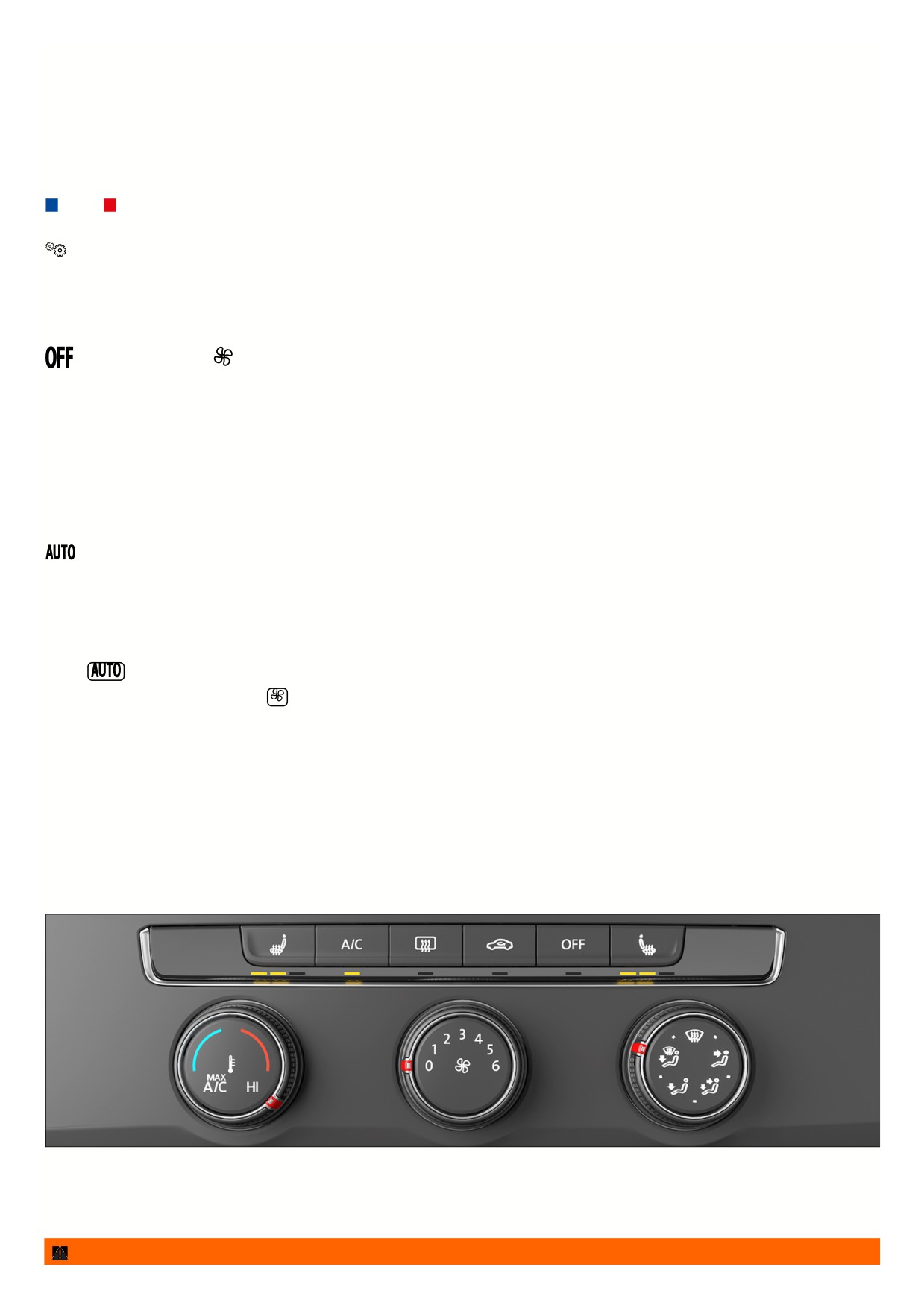
In the Air conditioner menu, you can find, for example, the functions for temperature regulation
⇒ Temperature regulation and air distribution ⇒ Air distribution and
blower speed.
The top of the screen shows the current climate control settings, such as the air conditioner profile for automatic mode.
The lower section of the screen shows function keys for frequently used air conditioning functions.
Operating status of the air conditioner
The operating status of the air conditioning system is represented by colors:
Cooling. Heating.
Climate control settings submenu
Open the Climate control settings submenu.
Depending on the vehicle equipment, you can find additional comfort functions in the Climate control settings submenu:
Switching the Climatronic on and off
In the air conditioner menu or on the climate control bar
Switch off the Climatronic.
Adjust the blower speed.
1. To switch on the Climatronic, swipe towards the right on the touch slider for the blower speed.
Or: Turn the center knob clockwise.
2. To switch off the Climatronic, swipe towards the left on the touch control for the blower speed.
Or: Turn the center knob counterclockwise as far as it will go.
Automatic mode of the Climatronic
In the air conditioner menu or on the climate control bar
The set air temperature is maintained constant. The air volume and air distribution are automatically controlled. Automatic mode switches off when the
blower speed is changed manually.
Selecting the air conditioner profile
The blower power in automatic mode can be controlled via the air conditioning profiles.
1. Open the Air conditioner menu in the Infotainment system.
2. Tap
3. To select an air conditioner profile, tap
at the top of the screen.
4. Select your preferred air conditioner profile in the pop-up window.
Manual air conditioning
Overview of the manual air conditioner
The manual climate control system warms, cools, and removes humidity from the air.
The air conditioner is most effective when the vehicle interior is kept closed. If there is a build-up of heat inside the vehicle, ventilation can help to speed up the
cooling process.
Certain functions of the air conditioner depend on the vehicle equipment.
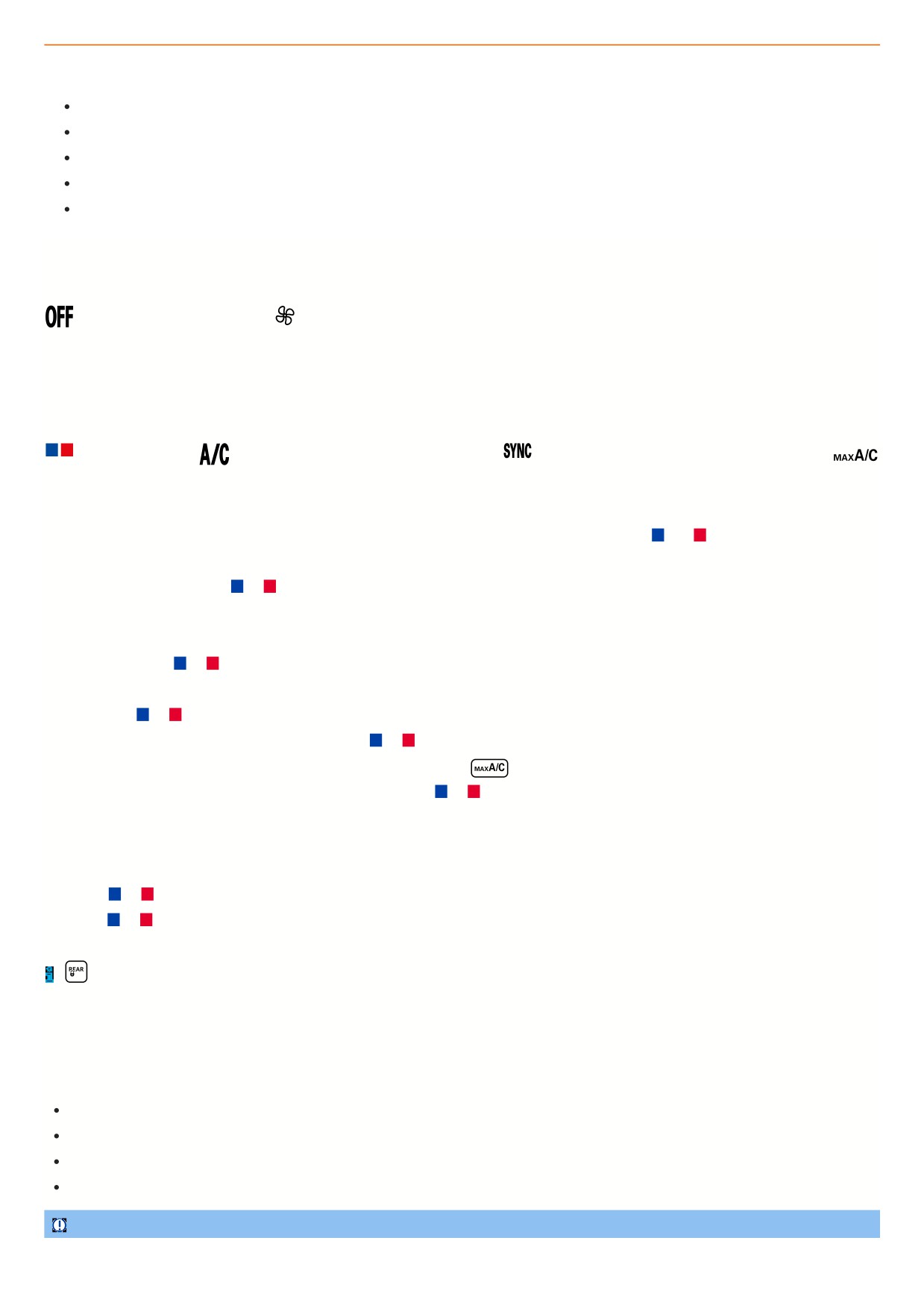
Fig. 114 In the upper section of the center console: Climate control bar for the manual climate control system.
Display of activated functions
Illuminated LEDs on the buttons indicate that the function is activated.
WARNING
142
Icy, snow-covered or foggy door windows restrict visibility very severely. This increases the risk of collisions and accidents, which may result in serious or fatal
injuries.
Keep all windows free of ice, snow and fog.
Adjust the heating, air conditioner, and rear window defroster to a setting where the windows do not fog up
⇒ Troubleshooting.
Only start driving when all windows are clear.
Only use recirculation mode for a short time. Otherwise, the windows could fog up very quickly and greatly reduce visibility.
Always switch off recirculation mode as soon as it is not necessary.
Switching the manual air conditioner on and off
On the climate control bar
Switch off the air conditioning system.
Adjust the blower speed.
1. To switch on the manual air conditioner, turn the center knob clockwise.
2. To switch off the manual air conditioner, turn the center knob all the way counterclockwise.
Temperature regulation
In the air conditioner menu or on the climate control bar
Adjust the temperature.
The air is cooled and dehumidified in cooling mode.
Apply temperature settings for the driver side to all seats.
Switch the maximum cooling output on and off.
Air recirculation is switched on automatically and Climatronic automatically directs air to the upper body.
Setting the temperature on the Climatronic climate control bar
1. To set the temperature of the Climatronic to +22 °C (+72 °F), tap and hold the touch control in the center between
and
Or: to set a different temperature, swipe to the right or left on the touch control.
Or: turn the left or right knob to
or
The Climatronic displays the set temperatures.
Setting the temperature on the manual air conditioning climate control bar
1. Turn the left knob to
or
Maximum cooling output and heating output
1. Tap and hold
or
on the Climatronic touch control.
Or: Turn the left or right knob of the Climatronic system to
or
as far as it will go.
Or: To switch on the maximum cooling output of the Climatronic system, press
on the climate control bar.
Or: turn the left knob on the manual air conditioner as far as it goes to
or
Adjusting the temperature for the rear seats
1. Open the Air conditioner menu in the Infotainment system.
2. Tap the function key for the rear seats.
3. Tap the
or
function key.
Or: tap
or
on the climate control bar for the rear seats.
The set temperatures for the rear seats are shown on the climate control bar displays for the rear seats.
If
is activated in the Infotainment system, the rear climate control bar cannot be used.
Air distribution and blower speed
Vents
Vents are located in the following places in the vehicle:
Driver’s side.
Passenger's side.
Front center console.
Rear center console.
NOTICE
Food, medication, and objects that are sensitive to heat or cold can become damaged or unusable from the air coming out of the vents.
143
Do not place any food, medication, or other objects that are sensitive to temperature in front of the vents.
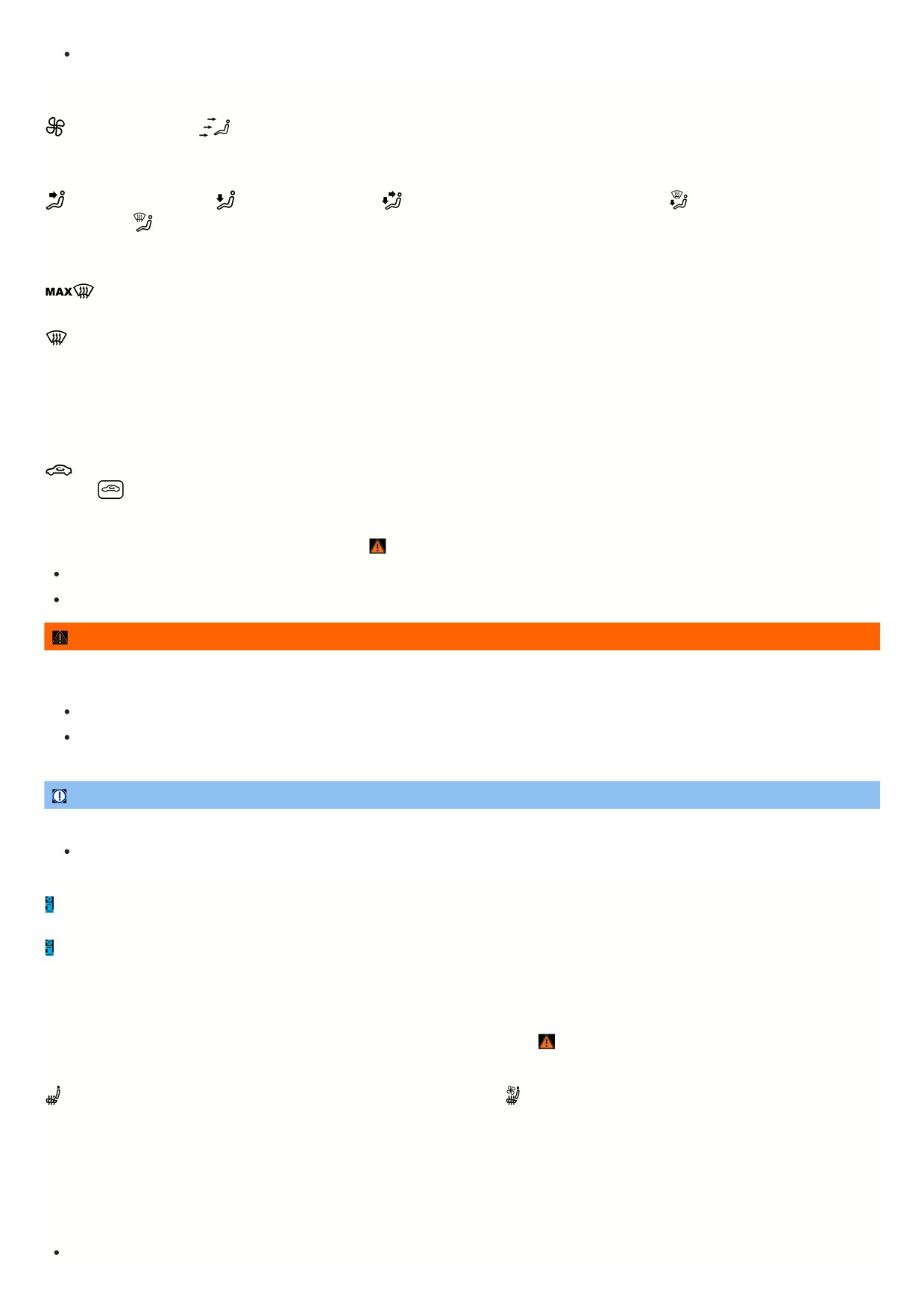
Air distribution functions in the Air conditioner menu on the climate control bar
Adjust the blower speed.
Top arrow: Direct air onto the windshield.
Middle arrow: Direct air to the upper body.
Bottom arrow: Direct air into the footwell.
Direct air to the upper body.
Direct air into the footwell.
Direct air to the upper body and into the footwell.
Direct air onto the windshield and
into the footwell.
Direct air onto the windshield.
Defrost function
The Climatronic defrost function clears fog and ice from the windshield.
The air is dehumidified and the blower is set to a higher speed.
The air conditioning system's defrost function clears the windshield of fog and ice.
The air must be dehumidified when the defrost function is switched on. Therefore when the defrost function is switched on, you cannot switch air recirculation on or
cooling mode off.
Air recirculation
No fresh air will enter the vehicle interior when recirculation mode is switched on.
Switch air recirculation on and off in the Air conditioner menu or climate control bar.
1. Press
on the climate control bar.
When does recirculation mode switch off?
Recirculation mode will switch off in the following situations
⇒
:
If the defrost function is switched on.
If a sensor detects that the windows could fog up.
WARNING
A lack of fresh air supply may result in reduced visibility due to fogged up windows and rapid driver fatigue due to stale air. This can result in collisions,
accidents and serious or fatal injuries.
Only use recirculation mode for a short time.
Always switch off recirculation mode as soon as it is not necessary.
NOTICE
Tobacco smoke can settle on the refrigerant system evaporator and the active combination filter and cause permanent odors.
To prevent permanent odors, do not smoke in the vehicle when air recirculation is switched on.
Climatronic: When reverse gear is engaged or while the automatic wash and wipe system is on, recirculation mode switches on automatically so that no odors
will enter the vehicle interior.
Manual air conditioning system: At very high outside temperatures, air recirculation helps to briefly cool down the vehicle interior faster.
Seat heating and seat ventilation
The seat heating and seat ventilation function when the engine is running. The front seats can be equipped with either a seat heating system or a combined seat
heating and seat ventilation system. There are three levels of heating for the outer rear seats ⇒
The seat ventilation function ventilates the seat using vehicle interior air. This removes moisture from the body. The seat itself is not cooled directly.
Switch the seat heating on and off in the Air conditioner menu or climate control bar.
Switch the seat ventilation on and off in the Air conditioner menu or
climate control bar.
Seat heating levels
The operating status of the seat heating is shown in colors. At the highest heating level, all three LEDs come on.
Heating and ventilation levels for combined seat heating and seat ventilation
The seat heating and seat ventilation are represented by colors:
At the highest heating level, all three red LEDs come on.
144
At the highest ventilation level, all three blue LEDs come on.
If the seat heating and seat ventilation are switched on at the same time, one red LED comes on and one blue LED comes on.
Using the seat heating function
1. In order to switch on the seat heating at the highest heating level, press the
or
button in the climate control bar.
2. To set the heating level, press the
button or the
button repeatedly.
3. To turn off the seat heating, press the
or
button repeatedly until the LED turns off.
Operating seat heating and seat ventilation separately
If operated separately, the last operating mode is always activated.
1. To switch on seat heating or seat ventilation, press the
or
button.
2. Choose between seat heating and seat ventilation in the Air conditioner menu in the Infotainment system.
3. To adjust the heating or ventilation level, press the
or
button.
4. To switch off seat heating or seat ventilation, press the
or
button repeatedly until all LEDs turn off.
Operating seat heating and seat ventilation simultaneously
For simultaneous operation of seat heating and seat ventilation, the systems can be set only via the Infotainment system.
1. To switch on seat heating or seat ventilation, press the
or
button.
2. Set the heating and ventilation levels via the Air conditioner menu in the Infotainment system.
3. To switch off the seat heating and seat ventilation, tap the
function key in the Infotainment system.
The seat heating and seat ventilation switch on and off automatically
If you switch off the ignition, the seat heating and seat ventilation are also switched off. If you switch on the ignition again within ten minutes, the last heating level o
ventilation level selected for the driver seat is also automatically activated.
When should the seat heating and seat ventilation be switched off?
Switch off the seat heating and seat ventilation under any of the following conditions:
The seat is occupied by a person with a limited perception of pain or temperature
⇒
The seat is not occupied
A child restraint is installed on the seat
Objects are covering the seat, e.g. protective covers, jackets, blankets or bags.
The seat is damp or wet.
Seat heating only: The interior or exterior temperature is higher than +25 °C (+77 °F).
WARNING
Magnetic fields are generated when the seat heating is operated. In individual cases, these magnetic fields can affect active medical implants (e.g.
pacemakers).
If you wear an active medical implant, you should consult your doctor or the manufacturer of your implant before operating the seat heating.
Make your vehicle occupants aware of this as well.
WARNING
People who cannot perceive pain or temperature or who have a limited perception of these due to medication, paralysis, or chronic illnesses such as diabetes
could develop burns or undercooling on the back, buttocks, and legs when using seat heating or seat ventilation. Such injuries could take a very long time to heal
or may never heal completely.
If you have a limited perception of pain and/or temperature, never use the seat heating and seat ventilation.
Contact a medical doctor for questions about personal health conditions.
WARNING
If the seat cover is soaked through, this can cause the seat heating to malfunction and increase the risk of burns.
Make sure the seat surface is dry before using the seat heating function.
Never sit on the seat while wearing damp or wet clothing.
Do not place any damp or wet objects and clothing on the seat.
Do not pour any fluids on the seat.
145

NOTICE
The heating elements of the seat heating may be damaged by loads concentrated in a single place and insulating materials.
Do not kneel on the seats and do not exert pressure on the seat cushion and backrest with sharp or pointed objects.
Do not exert pressure on the seat cushion and backrest with pointed objects.
Switch the seat heating off if insulating materials are installed on the seat, e.g. a protective cover or a child restraint.
Only use the seat heating if the seat is equipped with the original seat covers.
If any odor starts to develop, turn off the seat heating immediately and have it checked by suitably qualified professionals. Volkswagen recommends
contacting an authorized Volkswagen dealer or authorized Volkswagen Service Facility.
In order to save fuel, switch off the seat heating and seat ventilation as soon as possible.
Steering wheel heating
The steering wheel heating only works when the engine is running.
Switch steering wheel heating on and off via the multi-function steering wheel.
Heating levels for the steering wheel heating
When you switch on the steering wheel heating, the current heating level is constantly displayed in the instrument cluster as a bar display. At the highest heating
level, all three bars are filled.
Operating steering wheel heating
1. To switch on steering wheel heating at the highest heating level, press the
button.
2. To adjust the heating level, press the
button repeatedly.
3. To switch off steering wheel heating, press the
button repeatedly until the bar display in the instrument cluster display turns off.
Steering wheel heating switches on automatically
If you start the engine again within approximately ten minutes, the last heating level set is automatically switched on.
Saving the heating level
1. Switch on the steering wheel heating and set the desired heating level.
2. To save the current heating level, press and hold the
button for approximately one second.
The heating level is saved and the steering wheel heating is switched off.
3. To switch the steering wheel heating back on at the most recently saved heating level, press and hold the
button for approximately one second.
Steering wheel heating switches off automatically
If one of the following conditions applies, the steering wheel heating switches off automatically:
If the energy use is too high.
If the steering wheel heating system is malfunctioning.
Rear window defroster
The rear window defroster only works when the engine is running.
Switch the rear window defroster on and off in the Air conditioner menu or climate control bar.
The rear window defroster switches off automatically after a maximum of around ten minutes.
NOTICE
Stickers attached to the inside of the rear window above the heating filaments of the rear window defroster could cause damage to the rear window defroster.
Do not attach any stickers above the heating filaments of the rear window defroster.
In order to save fuel, switch off the rear window defroster as soon as possible.
Troubleshooting
146

The cooling mode
or heating cannot be switched on or the function is limited
The
cooling mode only works when the engine is running and at ambient temperatures above +3 °C (+38 °F).
If the engine is very hot or if the outside temperature is extremely high, the function of the cooling mode
, the heating and the defrost may be restricted.
Switch on the fan.
Check the safeguard on the air conditioning system ⇒ Replacing fuses.
Change active combination filters ⇒ Service.
If the malfunction persists, contact a suitably qualified professional. Volkswagen recommends contacting an authorized Volkswagen dealer or authorized
Volkswagen Service Facility.
NOTICE
If the air conditioner is not working and is operated further, that can cause subsequent damage.
If the air conditioner is not cooling or warming the air, switch it off immediately.
Have the air conditioner checked by suitably qualified professionals. Volkswagen recommends contacting an authorized Volkswagen dealer or
authorized Volkswagen Service Facility.
The windows are fogged up
The windows fog up when they are colder than the ambient temperature and the air is very humid. Cold air does not absorb as much moisture as warm air which is
why windows fog up more frequently during cold seasons.
1. To improve the heating and cooling output, keep the air intake in front of the windshield free of ice, snow, and leaves
⇒ Vehicle care.
2. Leave the air duct in the rear section of the luggage compartment uncovered so that air can flow through the vehicle from front to back.
3. Switch on the defrost function ⇒ Defrost function.
The temperature unit has changed
You can change the temperature units for all temperature displays in the vehicle using the Infotainment system.
1. Open the Settings menu.
2. Select the Units menu item.
Water or water vapor under the vehicle
In the case of high outside humidity and temperatures, condensation can drip from the air conditioning system evaporator and pool under the vehicle. This is norma
and does not mean there is a leak in the system.
147

Driving
Steering
Steering information
To make it more difficult to steal the vehicle, the steering must always be locked before leaving the vehicle.
Steering
Power steering on an electromechanical steering system adjusts automatically based on the driving speed, the steering torque, and the steering angle of the
wheels. Electromechanical power steering works only when the engine is running. The steering also works if the start-stop system engages and the engine
switches off.
If the power steering system is impaired or malfunctioning, a significantly greater amount of force than normal must be used to steer.
On vehicles with Driving Mode Selection, power steering handling can be influenced by the selected driving mode.
Mechanical steering lock
On vehicles with an ignition lock, the steering column is locked mechanically:
Locking the steering column:
1. Stop the vehicle.
2. Depending on the vehicle equipment: move the selector lever into the position.
3. Remove the vehicle key.
4. Turn the steering wheel slightly, until you hear the steering lock engage.
Unlocking the steering column:
1. To release the steering lock, turn the steering wheel slightly.
2. Insert the vehicle key in the ignition lock.
3. Hold the steering wheel in position and switch on the ignition.
Countersteering assist
The counter-steering assistance provides the driver with power steering in some critical driving situations. Additional steering power, together with the ESC
,
supports the driver when counter-steering ⇒
Progressive steering
Depending on the vehicle's equipment, the progressive steering can adapt the force of the steering movement to the driving situation. Progressive steering only
works when the engine is running.
In city traffic, less steering movement is needed for parking, maneuvering or for taking sharp bends.
On highways or on expressways, progressive steering gives a sportier, direct steering experience and noticeable dynamics when driving along curved stretches, fo
instance.
WARNING
Depending on the equipment, power steering may only work when the engine is running. If the power steering is not functioning, the steering wheel becomes
stiff, making it much more difficult to steer. This can result in loss of control of the vehicle, accidents, serious injuries or death.
Never let the vehicle roll when the engine is stopped.
WARNING
If the steering lock engages, you can no longer steer the vehicle. This can result in loss of control of the vehicle, accidents, serious injuries or death.
Never remove the remote vehicle key from the ignition switch when the vehicle is in motion.
WARNING
The counter-steering assistance is not a replacement for the driver's attention and works only within the system limitations. In critical driving situations,
uncontrolled vehicle movements can occur despite the counter-steering assistance. If you do not pay attention, there is a risk of accidents, serious injuries and
death.
Always stay attentive and do not rely solely on the system. The driver is always responsible for control of the vehicle.
Ensure that the vehicle is not steered by the counter-steering assistance.
Always adapt your speed and driving style to the visibility, weather, road and traffic conditions.
148
NOTICE
If the ignition is switched off when the vehicle is being towed, some vehicle functions are not available, such as the turn signals, horn, windshield wipers and the
windshield washer system.
Switch on the ignition when towing the vehicle.
Troubleshooting
Steering malfunction
The red warning light turns on or flashes.
There is an electromechanical steering or electronic steering lock malfunction.
Do not continue driving!
1. Contact an authorized Volkswagen dealer or authorized Volkswagen Service Facility for assistance.
If the red warning light turns on, it may be difficult to move the steering wheel because the electromechanical steering system is malfunctioning.
If the red warning light blinks, the steering column cannot unlock.
Steering malfunction
The yellow indicator light turns on or flashes.
The steering is stiffer or more sensitive than usual.
The indicator light comes on permanently:
1. Restart the engine and drive the vehicle slowly for a short distance.
2. If the indicator light stays on, contact a suitably qualified professional and have the system checked. Volkswagen recommends contacting an authorized
Volkswagen dealer or authorized Volkswagen Service Facility.
The indicator light blinks:
1. Turn the steering wheel back and forth slightly.
2. Switch the ignition off and back on.
3. Pay attention to the messages in the instrument cluster display.
4. If the indicator light continues to flash after switching the ignition back on, do not continue driving. Contact an authorized Volkswagen dealer or authorized
Volkswagen Service Facility for assistance.
Pedals
Information on the pedals
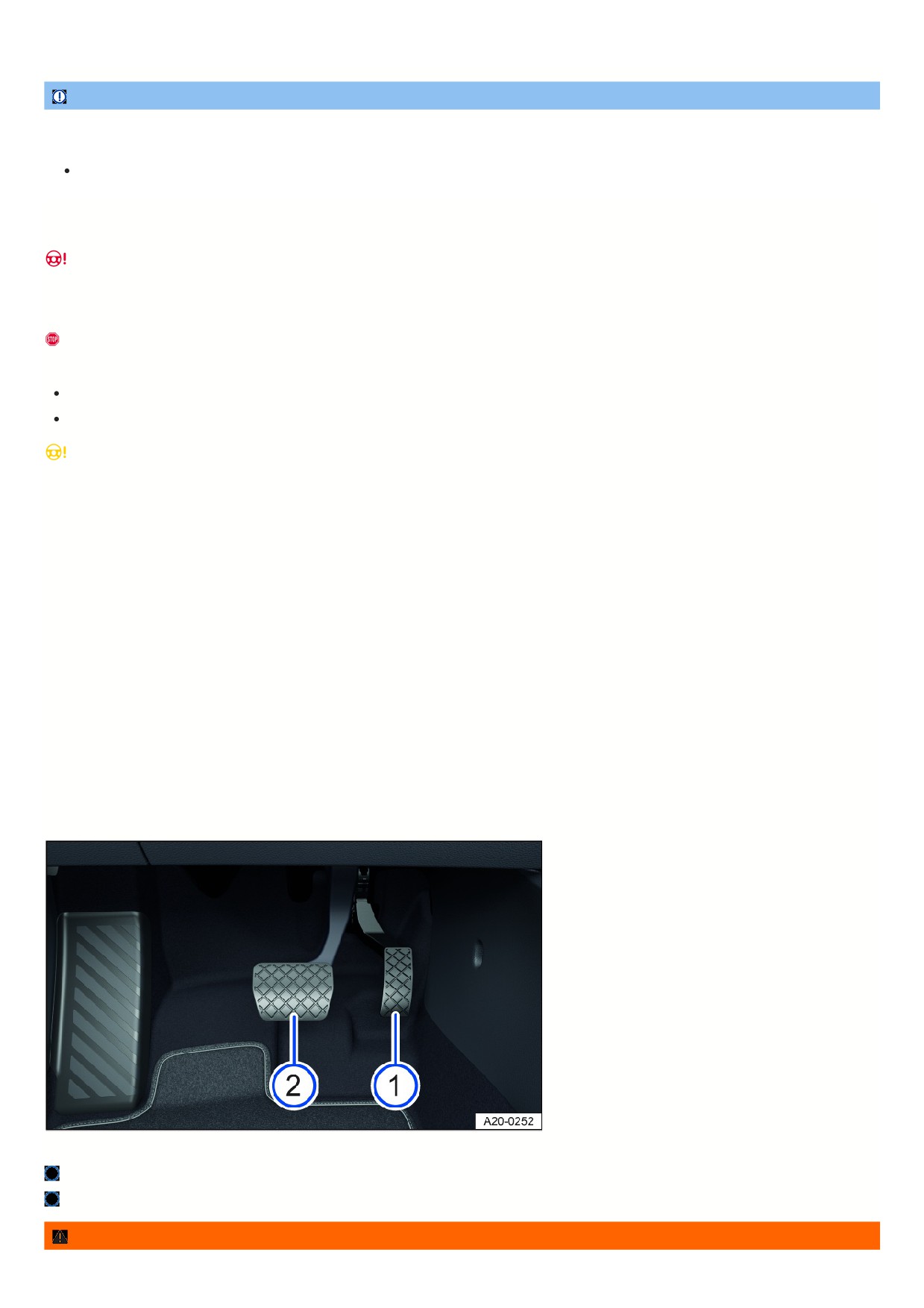
Fig. 115 In the footwell: pedals.
Accelerator pedal.
Brake pedal.
WARNING
149

Objects in the driver footwell can prevent the pedals from moving. This can cause the driver to lose control of the vehicle and increases the risk of serious or
fatal injuries.
Make sure all pedals can always be pressed without obstructions.
Always attach floor mats securely in the footwell.
Never place floor mats or other carpet over the installed floor mat.
Make sure no objects can enter the driver footwell while driving.
Remove any objects from the footwell when the vehicle is parked.
Wear shoes that give your feet good grip for operating the pedals.
WARNING
Not paying attention to road traffic can cause accidents and serious or fatal injuries.
Always comply with the applicable driving regulations and speed limits and think ahead while driving.
Take regular breaks on long drives. You should take a break at least every two hours.
WARNING
Alcohol, drugs, medication, and prescription narcotics can considerably impair perception, reaction times, and driving safety, which can result in loss of vehicle
control. This can cause accidents and serious or fatal injuries.
Do not drive under the influence of alcohol, drugs, medication or prescription narcotics.
NOTICE
If a brake circuit is malfunctioning, the brake pedal may need to travel farther in order to stop the vehicle. A longer braking distance may cause damage to the
vehicle.
Ensure that all the pedals can always be pressed without obstructions.
Press the brake pedal down farther if braking power is reduced.
Brakes
Information on the brakes
Breaking in brake pads
During the first approx. 200 to 300 km (approx. 100 to 200 miles), new brake pads do not yet have their full braking efficiency and first need to be “worn in”
⇒
However, you can compensate for the slightly reduced braking force by pressing firmly on the brake pedal. During the break-in period, the braking distance during
full braking or automatic braking is longer than with brake pads that have been broken in. During the break-in period, avoid full braking and situations that place a
heavy load on the brakes, such as driving too close to the vehicle ahead.
Brake pad wear
Brake pad wear depends on driving conditions and style. When driving frequently in cities and on curves or with a sporty driving style, have your brake pads
checked frequently by suitably qualified professionals. Volkswagen recommends contacting an authorized Volkswagen dealer or authorized Volkswagen Service
Facility.
External influences on the brake
When driving with wet brakes, for example after driving through water, in heavy rain, or after washing your vehicle, the braking efficiency can be reduced by moistur
or ice on the brake discs. You must “dry” the brakes as soon as possible by braking carefully at high speeds. Make sure there is no vehicle behind you and that you
do not endanger anyone else on the road ⇒
A coating of salt on the brake discs and brake pads reduces the braking efficiency and increases the braking distance. If you do not apply the brakes for long period
of time on salt-covered roads, you must brake carefully to clean off the layer of salt ⇒
Leaving the vehicle parked for long periods of time, low mileage, and avoiding heavy braking can contribute to corrosion on the brake rotors and dirty brake pads. If
you usually avoid heavy braking or if there is corrosion present, occasional heavy braking at high speeds is recommended to clean the brake rotors and pads.
Ensure that you do not endanger any other vehicles or anyone else on the road ⇒
WARNING
Driving with worn brake pads or a malfunctioning brake system can lead to a loss of control of the vehicle, accidents and serious or fatal injuries.
15
If you suspect that the brake pads are worn or the brake system is malfunctioning, immediately find a suitably qualified professional and have the brake
pads checked and worn brake pads replaced. Volkswagen recommends contacting an authorized Volkswagen dealer or authorized Volkswagen Service
Facility.
WARNING
Up to the first approx. 300 km (approx. 200 miles), new brake pads do not yet have their full braking efficiency and first need to be "worn in". Insufficient braking
efficiency can increase the risk of accidents. This can cause serious or even fatal injuries.
Increase the pressure on the brake pedal if reduced braking efficiency can be felt.
To reduce the risk of accidents, serious injuries, and loss of vehicle control, drive with extra caution when the brake pads are new.
During the break-in period for new brake pads, do not drive too close to other vehicles and avoid driving situations that place a heavy load on the brakes.
WARNING
Prolonged braking causes the brakes to overheat. This can considerably reduce braking performance, increase braking distance and possibly cause a total
brake system malfunction. This can cause a loss of vehicle control, accidents, and serious or fatal injuries.
Never let the brakes “rub” too often and too long or press the brake pedal too often and too long.
WARNING
When driving downhill, a lot of force is placed on the brakes and they become hot quickly. Overheated brakes reduces the braking efficiency and increase the
braking distance considerably. This can cause a loss of vehicle control, accidents, and serious or fatal injuries.
Before driving on a long stretch of road with a steep gradient, reduce your speed by shifting down to a lower gear with a manual transmission or in
tiptronic mode of the automatic transmission.
Utilize the engine braking effect to reduce the load on the brakes.
Before starting a journey, ensure that the air supply to the brakes is not covered, e.g. by aftermarket or damaged front spoilers.
WARNING
Wet, icy, or salt-covered brakes will take longer to brake and increase the braking distance. This can cause a loss of vehicle control, accidents, and serious or
fatal injuries.
Test the brakes carefully.
Press the brake pedal carefully several times to dry the brakes and clear the ice and salt from them, as long as the visibility, weather, road, and traffic
conditions permit.
If you are having the front brake pads checked, the rear brake pads should be checked at the same time. Regularly check the thickness of the brake pads
visually by inspecting them through the openings in the wheel rims or from underneath the vehicle. If necessary, remove the wheels so that the brake pads can be
inspected. For further information, contact an authorized Volkswagen dealer or authorized Volkswagen Service Facility. Volkswagen recommends contacting an
authorized Volkswagen dealer or authorized Volkswagen Service Facility.
Troubleshooting
/
Brake system malfunctioning
The red warning light turns on. A message may also be displayed.
1.
Do not continue driving! Contact an authorized Volkswagen dealer or authorized Volkswagen Service Facility immediately for assistance.
/
Brake pad wear indicator
The warning light flashes or turns on red or yellow.
The front brake pads are worn.
1. Immediately contact an authorized Volkswagen dealer or authorized Volkswagen Service Facility to have the system checked. Volkswagen recommends
contacting an authorized Volkswagen dealer or authorized Volkswagen Service Facility.
2. Have all brake pads inspected and replaced, if necessary.
Braking Performance Reduced
If the brake pads are worn or if you notice that your vehicle does not brake as usual, e.g. the braking distance suddenly increases:
1. Immediately contact an authorized Volkswagen dealer or authorized Volkswagen Service Facility to have the system checked. Volkswagen recommends
151
contacting an authorized Volkswagen dealer or authorized Volkswagen Service Facility.
2. Have all brake pads inspected and replaced, if necessary.
Start the engine
Remote Start Relay Function
With the remote start relay function, the
engine can be started remotely, in order
to heat or cool the vehicle interior before
the start of a journey.
Remote start relay conditions
The following conditions must be fulfilled simultaneously in order for the vehicle interior to be heated or cooled by the remote start relay function:
The vehicle is fully ready to drive.
The vehicle does not move.
Sufficient fuel is available and the indicator light
did not light up before the vehicle was parked.
The parking lock is engaged.
Vehicles with ignition lock: The vehicle key is not in the ignition switch.
All doors, the hood and the trunk lid are fully closed and locked.
The anti-theft alarm system has not triggered the alarm.
The panic alarm is not activated.
The emergency flashers are switched off.
Two remote starts have not yet been carried out in direct succession.
Starting the Remote Start Relay Function
Fig. 116 Vehicle key with remote start relay function.
Button to lock the vehicle.
Button for remote start relay function.
You must press the following buttons on the vehicle key within five seconds to start the engine using the remote start relay function
⇒
:
1. Press the button
once fig. 116.
All turn signals will flash.
2. Press the
button twice fig. 116.
All turn signals will flash. During remote start, the parking light turns on.
If the remote start relay process is not actively canceled by the driver or automatically canceled, the engine will run for around 10 minutes.
A maximum of two remote starts can be performed in a row, even if one or both remote starts have been interrupted within the 10 minute period.
1. In order to carry out two more remote starts, switch the ignition on and off once.
Ending the remote start relay
1. Press the
button on the remote control vehicle key to switch off the engine fig. 116.
Driving after a remote start relay
To be able to drive the vehicle after you have used the remote start relay function, you have to start the vehicle separately.
1. Vehicles with starter button: Press the brake pedal and the starter button.
Vehicles with ignition lock: Press the brake pedal and turn the vehicle key to the engine start position, then release it.
The engine continues to run during this process.
152
Settings for automatic air conditioning with remote start relay
Climatronic: After the engine is started, the air conditioner automatically regulates the temperature of the vehicle interior to approx. +22 °C (approx. +72 °F) if it is in
automatic mode
Manual air conditioning system: After the engine is started, the air conditioner regulates the temperature of the vehicle interior to the most recently selected level.
If the engine has been started using the remote start relay function, the settings can be changed via the air conditioning system controls and the buttons for the
windshield and rear window defroster, seat heating or ventilation, depending on the vehicle equipment.
Personal settings will be replaced by the automatic air conditioning settings the next time the vehicle is started using remote start relay.
1. To change the automatic air conditioning settings, contact a suitably qualified professional. Volkswagen recommends contacting an authorized Volkswagen
dealer or authorized Volkswagen Service Facility.
Automatic remote start relay functions
Depending on the outside temperature and vehicle equipment, the following heating, ventilation and cooling system settings are automatically activated in the case
of a remote start relay:
Heated spray jets for windscreen washer system.
Heated windshield wiper parks.
Rear window defroster.
Exterior mirror heating.
Front seat heating, level 2.
Front seat ventilation, level 2.
WARNING
Careless or unsupervised use of the remote start relay function may cause poisonous gases to enter the vehicle interior. This can cause serious injuries and
death due to asphyxiation.
Never start the engine in an enclosed space, e.g. in a garage.
Only use the remote start relay function when no-one is in the vehicle and immediately before you intend to drive the vehicle.
WARNING
When the engine is running, the electrical seats are operational. There is a risk of crushing and serious injuries.
Never start the engine if children or animals are in the vehicle unsupervised.
Never start the engine if the vehicle is out of visual range.
WARNING
Hot vehicle parts and exhaust can ignite flammable or explosive materials in the vicinity. This can lead to a fire and cause accidents and serious or fatal injuries.
Never start the engine close to flammable or explosive materials.
Never start the engine if the vehicle is covered with a protective cover.
Never start the engine if the vehicle is out of visual range.
Never start the engine if the warning light
is turned on or blinking.
Using the remote start relay function may increase fuel consumption and discharge the 12 V vehicle battery.
The use of the remote start relay function may be regulated or prohibited regionally in some countries. Always observe legal and local regulations relating to
the use of the remote start relay function!
During an active remote start relay, some vehicle functions are deactivated, e.g. the low beam headlight and the windshield wipers.
Ignition switch
153
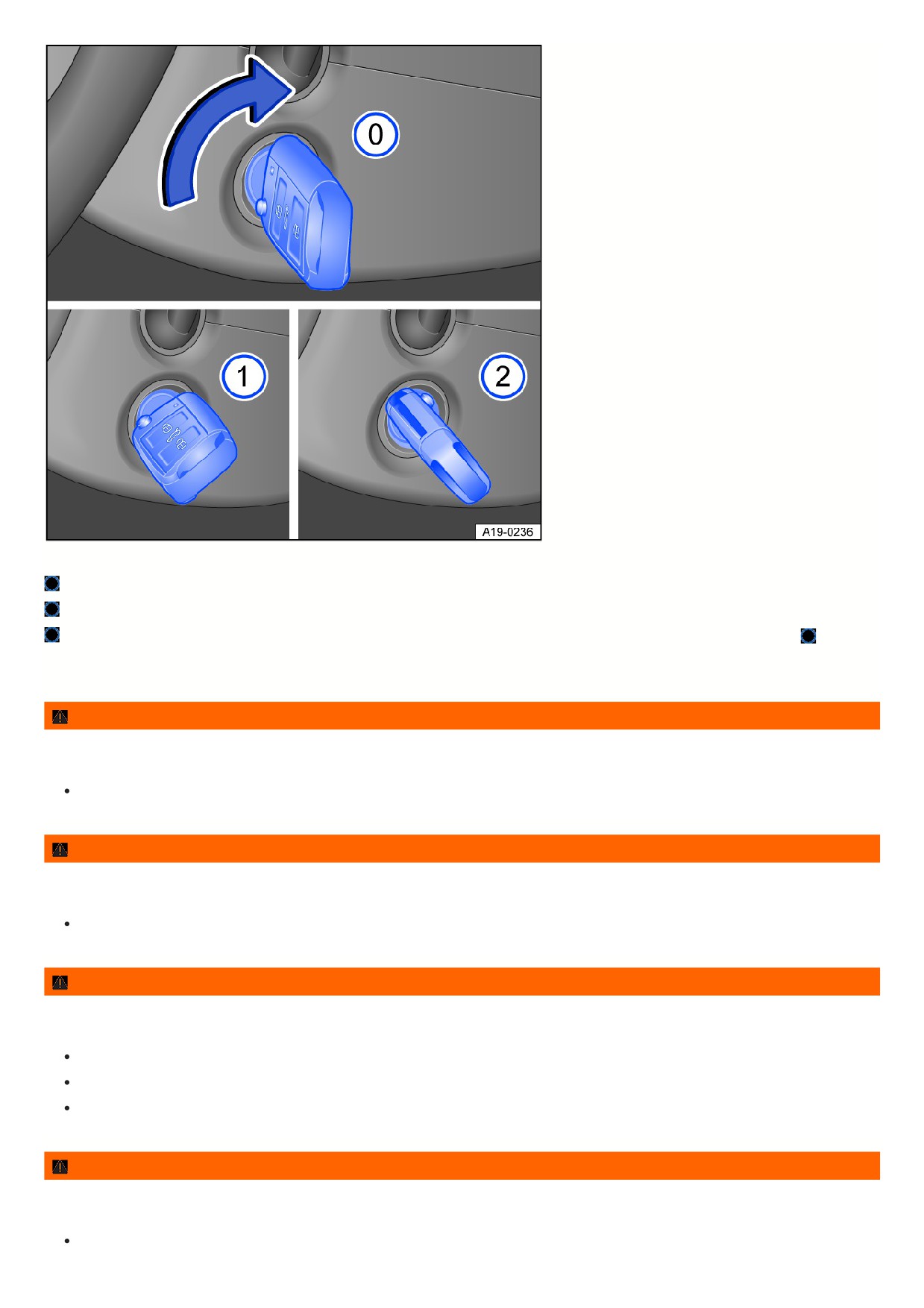
Fig. 117 Next to the steering wheel on the right side: positions of the vehicle key in the ignition lock.
The ignition is switched off. The vehicle key can be removed.
The ignition is switched on.
Vehicles with an automatic transmission: Press the brake pedal. Start the engine. Release the vehicle key. The vehicle key returns to the positio once it is
released.
When a vehicle key is not in the ignition lock, the steering lock can be activated.
WARNING
If you leave vehicle keys unattended in the vehicle, children or unauthorized people could lock the doors and/or the trunk lid, start the engine, or switch on the
ignition and thereby activate electrical equipment, such as the power windows. This can cause accidents and serious or fatal injuries.
Always switch off the engine and take all vehicle keys with you when you leave the vehicle.
WARNING
If you leave children, people requiring assistance or animals unattended in the vehicle, they may accidentally set the vehicle in motion or be subjected to very
high or low temperatures. There is a risk of accidents and serious or fatal injuries.
Never leave children, people requiring assistance or animals unattended in the vehicle.
WARNING
If the vehicle key is removed from the ignition lock while the vehicle is moving, the steering lock may engage and it will not be possible to steer the vehicle. This
can cause accidents and serious or fatal injuries.
Never remove the remote vehicle key from the ignition switch when the vehicle is in motion.
Always fully extend the key bit of the remote control vehicle key and secure it in this position.
Only attach light objects weighing up to approx. 100 g (approx. 3.5 oz) to the vehicle key.
WARNING
Starting the engine in unventilated or enclosed spaces may cause poisonous gases to enter the vehicle interior. This can cause serious injuries and death due to
asphyxiation.
Never start the engine or let it run in unventilated or enclosed spaces, such as in garages.
154
NOTICE
When the ignition is switched on and the engine is switched off, the 12 V vehicle battery could drain and prevent the engine from restarting.
Always switch the ignition off before leaving the vehicle.
If the vehicle key cannot be removed, engage the selector lever position
. Press and release the lock button in the selector lever if necessary.
For vehicles with DSG automated transmission, depending on the market: When the vehicle key is removed when in gear, the engine is switched off and the
parking brake is activated automatically.
Starter button
The starter button replaces the ignition
lock (Press & Drive).
Fig. 118 In the lower area of the center console: starter button for starting the engine.
The engine is started by the starter button (Press & Drive).
The vehicle can only be activated when there is a valid vehicle key inside the vehicle.
Depending on the model, the starter button blinks to indicate readiness for use.
The electronic steering lock is activated when you leave the vehicle by opening the driver door when the ignition is switched off
⇒ Steering information.
Switching the ignition on or off
1. Press the starter button once without pressing the brake pedal
⇒
Automatic ignition shut down for vehicles with start/stop system
If the following conditions are met at the same time, the vehicle ignition is automatically switched off when there is an active engine stop and the vehicle is stationar
The driver releases their safety belt.
No pedals are pushed.
The driver door is opened.
After automatic ignition deactivation, if the low beam headlights are switched on
the parking light remains switched on and goes off automatically after around
30 minutes.
The parking light will also go off if the vehicle is locked or the light is switched off manually.
Engine restart function
If no valid vehicle key is detected in the vehicle interior after stopping the engine, it can be started again within approximately five seconds. A message about this w
be shown in the instrument cluster display.
Once this time has elapsed, the vehicle can no longer be started without a valid vehicle key inside the vehicle.
WARNING
If the brake pedal is pressed when switching on the ignition, the engine will start immediately. This can cause unintentional vehicle movement and serious
injuries.
Avoid pressing the brake pedal when switching on the ignition if the engine is not intended to be started.
155
WARNING
If you leave vehicle keys unattended in the vehicle, children or unauthorized people could lock the doors and/or the trunk lid, start the engine, or switch on the
ignition and thereby activate electrical equipment, such as the power windows. This can cause accidents and serious or fatal injuries.
Always take all vehicle keys with you when leaving the vehicle.
WARNING
If you leave children, people requiring assistance or animals unattended in the vehicle, they may accidentally set the vehicle in motion or be subjected to very
high or low temperatures. There is a risk of accidents and serious or fatal injuries.
Never leave children, people requiring assistance or animals unattended in the vehicle.
WARNING
Starting the engine in unventilated or enclosed spaces may cause poisonous gases to enter the vehicle interior. This can cause serious injuries and death due to
asphyxiation.
Never start the engine or let it run in unventilated or enclosed spaces, such as in garages.
Always switch the ignition off manually before leaving the vehicle and note any messages in the instrument cluster display.
The vehicle being stationary for long periods with the ignition switched on can cause the 12 V vehicle battery to drain and then it will not be possible to start the
engine.
Electronic immobilizer
The immobilizer helps prevent the engine from being started and the vehicle from being moved with an unauthorized vehicle key.
For vehicles with an ignition lock: In the remote control vehicle key, there is a chip which automatically deactivates the immobilizer if a valid vehicle key is inserted
into the ignition lock.
For vehicles with an ignition lock: The electronic immobilizer is activated automatically when the vehicle key is removed from the ignition lock.
For vehicles with a starter button: In the remote control vehicle key, there is a chip used to automatically deactivate the electronic immobilizer when there is a valid
remote control vehicle key in the vehicle interior.
For vehicles with a starter button: The electronic immobilizer is automatically activated as soon as there is no valid vehicle key in the vehicle.
The engine can only be started with a Volkswagen Genuine vehicle key that is coded correctly. You can obtain coded vehicle keys from an authorized Volkswagen
dealer or authorized Volkswagen Service Facility.
Only using Volkswagen Genuine vehicle keys will ensure that your vehicle operates correctly.
Start the engine
Start the engine
1. Switch the ignition on.
2. Press and hold the brake pedal until the electronic parking brake is switched off.
3. Vehicles with an automatic transmission: Move the selector lever to the position or engage the parking lock.
4. Vehicles with ignition lock: Turn the vehicle key in the ignition lock, but do not press the accelerator pedal. Release the vehicle key once the engine starts.
Vehicles with starter button: Press and hold the starter button ⇒ Starter button and do not press the accelerator pedal. For the engine to start, a valid vehicle
key must be inside the vehicle and the brake must be pressed. Release the starter button once the engine starts.
5. If the engine does not start, stop the starting procedure and try again after approximately one minute.
6. Vehicles with starter button: If the vehicle was locked with the vehicle key, the starter button will be deactivated. If you are in the vehicle and you need to start th
engine, first unlock the vehicle or perform an emergency start.
WARNING
Starting the engine in unventilated or enclosed spaces may cause poisonous gases to enter the vehicle interior. This can cause serious injuries and death due to
asphyxiation.
Never start the engine or let it run in unventilated or enclosed spaces, such as in garages.
WARNING
156
Hot vehicle parts and exhaust can ignite flammable or explosive materials in the vicinity. This can lead to fires and cause accidents and serious or fatal injuries.
Never start the engine or leave the engine running if oil, fuel or other flammable operating equipment is in the vicinity of the vehicle or is escaping from the
vehicle.
Do not use any start boosters.
WARNING
An unattended vehicle which is ready to drive may cause accidents and severe injuries.
Never leave the vehicle unattended when the engine is running, especially if a gear is engaged.
NOTICE
Incorrect handling of the vehicle can increase wear to components, such as the starter, or cause damage.
If the engine does not start, e.g. the fuel tank is empty, never use the starter with a gear engaged to drive or to attempt a tow-start.
If necessary, refill with fuel as per or use jump-start.
If the engine does not start, contact an authorized Volkswagen dealer or authorized Volkswagen Service Facility.
NOTICE
Incorrect handling of the vehicle can increase wear to components, such as the engine, or cause damage.
Avoid restarting the engine while driving or directly after turning off the engine.
Avoid high engine speeds, full acceleration and heavy engine loads when the engine is cold.
Be aware that at high altitudes, the air density is lower, which can make it more difficult to start the engine.
NOTICE
Uncombusted fuel can damage the catalytic converter.
Do not tow-start or push-start the vehicle.
Do not let the engine run to warm up while the vehicle is parked. Begin driving as soon as there is enough visibility through the windows. This allows the engine
to reach its operating temperature sooner and reduces the emissions.
Electrical equipment with increased power draw switches off temporarily when the engine is started.
If there is no vehicle key in the vehicle or the key is not detected, a message will appear in the instrument cluster display. This can occur if another signal
interferes with the remote control vehicle key or if the remote control vehicle key is covered by an object, such as a metal case.
For example, if the vehicle key button cell battery is weak or drained, the engine cannot be started with the starter button. Perform an emergency start.
After starting, operating noises may be temporarily higher than usual while the engine is cold. This is normal and not a cause for concern.
Troubleshooting
Engine control malfunction
The yellow indicator light turns on.
Engine control is malfunctioning.
1. Pay attention to any text shown in the Volkswagen Digital Cockpit display.
2. Have the engine checked immediately by a suitably qualified professional. Volkswagen recommends contacting an authorized Volkswagen dealer or authorized
Volkswagen Service Facility.
Engine control malfunction
The indicator light comes on in the Volkswagen Digital Cockpit.
The yellow indicator light turns on.
The driving performance of the vehicle is limited.
The driving performance has been limited to prevent the engine control components from overheating.
157
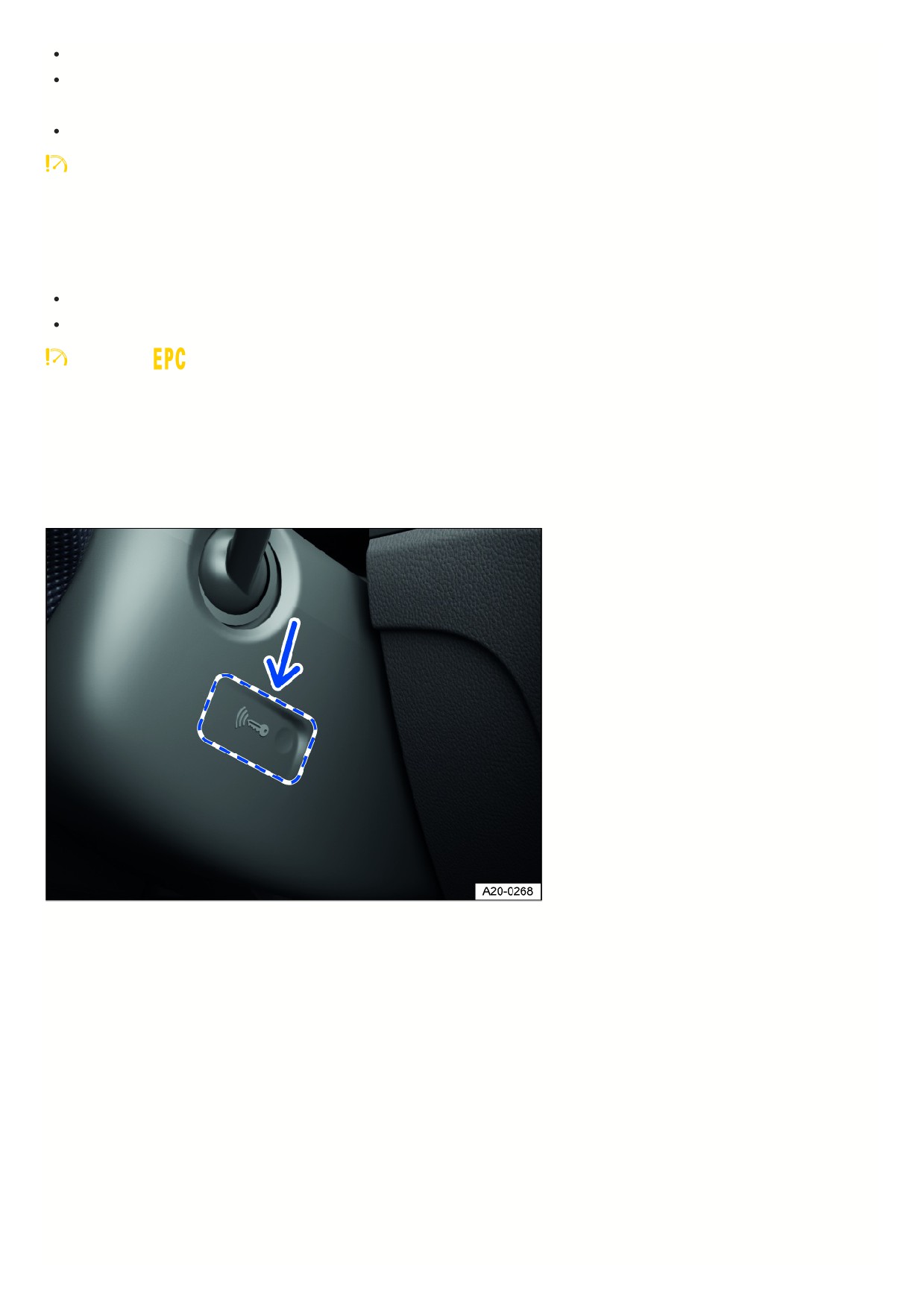
A corresponding indicator may appear in the instrument cluster display.
It is possible to continue driving with reduced driving performance.
The driving performance limitation is removed in the following scenarios:
The engine control components are no longer within a critical temperature range.
Engine speed limited
The yellow indicator light turns on.
The engine speed has been limited to reduce the risk of the engine overheating.
The instrument cluster display shows the engine speed.
The engine speed limitation is removed in the following scenarios:
The engine is no longer within a critical temperature range.
The driver’s foot is removed from the accelerator pedal.
together with
Engine speed limitation due to engine control malfunction
The yellow indicator lights turn on.
The engine speed limitation is triggered by an engine control malfunction.
1. Make sure the displayed RPM is not exceeded.
2. Have the engine checked immediately by a suitably qualified professional. Volkswagen recommends contacting an authorized Volkswagen dealer or authorized
Volkswagen Service Facility.
Valid vehicle key cannot be detected
Fig. 119 On the right side of the steering column: emergency start function on vehicles with Keyless Access with push-button start.
A corresponding indicator appears in the instrument cluster display.
If the vehicle key has a weak or drained button cell battery, the vehicle key may not be able to be detected.
An emergency start must be performed:
1. Press and hold the brake pedal.
2. Hold the vehicle key on the right side of the steering column trim panel immediately after pressing the starter button fig. 119.
The ignition will switch on automatically and the engine may start.
The engine cannot be started
If an unauthorized vehicle key is used or the system is malfunctioning, a corresponding indicator appears in the instrument cluster display.
1. Use an authorized vehicle key.
2. If the malfunction persists, contact an authorized Volkswagen dealer or authorized Volkswagen Service Facility.
Or: the engine cannot be started with the vehicle key or by briefly pressing the starter button while depressing the brake pedal or the clutch pedal.
There is a malfunction in the start system:
158

1. Turn and hold the remote control vehicle key or press the button for as long as needed for the engine to start.
2. Contact an authorized Volkswagen dealer or authorized Volkswagen Service Facility for assistance.
The engine cannot be started remotely
If at least one of the following conditions are met, the engine remote start function does not start:
The vehicle is not fully ready to drive.
Vehicles with ignition lock: There is a vehicle key in the ignition switch.
Sufficient fuel is not available or the indicator light
lit up before the vehicle was parked.
The vehicle is unlocked.
The hood or the trunk lid is opened.
One or several vehicle doors are opened.
The selector lever is not in position
⇒ Automatic transmission: selecting the selector lever position .
If the 12-volt vehicle battery is too weak or discharged.
The emergency flashers are switched on.
The anti-theft alarm system is activated.
The panic alarm is activated.
The vehicle moves.
Two remote starts have already been carried out in direct succession.
There is a system error.
Ensure that the necessary conditions are met and then restart the engine if necessary.
Stopping the engine
Stopping the engine
1. Bringing the vehicle to a stop ⇒
2. Park the vehicle.
3. Vehicles with ignition lock: Switch the ignition off.
4. Vehicles with starter button: Press the starter button briefly. If the engine cannot be turned off, use the emergency stop function.
5. Pay attention to the messages in the instrument cluster.
Exit warning
When the driver door is opened, a warning chime sounds and warning notifications appear in the instrument cluster display to warn you that you are exiting a
vehicle that can roll.
WARNING
When the engine is switched off, certain vehicle systems do not work or only work in a limited way, such as the brake booster or power steering. As a result, you
must use more force for steering and you must apply more pressure on the brake pedal to stop. When the vehicle is moving, this can result in loss of control of
the vehicle, accidents and serious or fatal injuries.
Never switch off the engine while the vehicle is in motion.
WARNING
When the engine is switched off, the airbags and safety belt pretensioners will not function. This can cause serious or fatal injuries in the event of accidents.
Never switch off the engine while the vehicle is in motion.
WARNING
Vehicles with ignition lock: If the vehicle key is removed, the steering lock may engage and it will not be possible to steer the vehicle. That can result in loss of
control of the vehicle, accidents and serious or fatal injuries.
Never remove the remote vehicle key from the ignition switch when the vehicle is in motion.
WARNING
159

Vehicles with starter button: If the ignition is switched off, the steering lock can engage and you would no longer be able to steer the vehicle. When the vehicle is
moving, this can result in loss of control of the vehicle, accidents, and serious or fatal injuries.
Never switch off the ignition when the vehicle is in motion.
WARNING
The parts of the exhaust system become very hot and can ignite flammable materials, for example shrubs, leaves, dry grass or spilled fuel. This can lead to a fire
and cause accidents and serious or fatal injuries.
Never park the vehicle in such a way so that the exhaust system components come into contact with flammable materials under the vehicle.
Never use additional undercoating or corrosion protection for exhaust pipes, catalytic converters, heat shields, or particulate filters.
NOTICE
The engine can overheat after turning it off if the vehicle is driven with a high engine load for a long period of time.
Let the engine run in neutral for approximately two minutes before turning it off.
In vehicles with an automatic transmission, you can only remove the vehicle key from the ignition lock when the selector lever is in the
selector lever position
After the engine has been switched off, the radiator fan in the engine compartment can keep running for a few more minutes. The radiator fan will turn off
automatically.
Troubleshooting
The engine cannot be turned off
The engine cannot be turned off when the starter button is pressed briefly.
An emergency stop must be performed:
1. Press the starter button twice within several seconds or press and hold one time.
The engine will stop automatically ⇒ Starter button.
The vehicle key cannot be removed from the ignition lock
An unauthorized vehicle key was inserted into the ignition lock.
Remove the vehicle key as follows:
Vehicles with an automatic transmission:
1. Press and release the lock button in the selector lever.
2. Remove the vehicle key from the ignition lock.
Start/Stop system
Start-stop system
The start-stop system automatically
switches the engine off when you stop
and when the vehicle is stationary. The
engine starts again automatically when
needed.
16
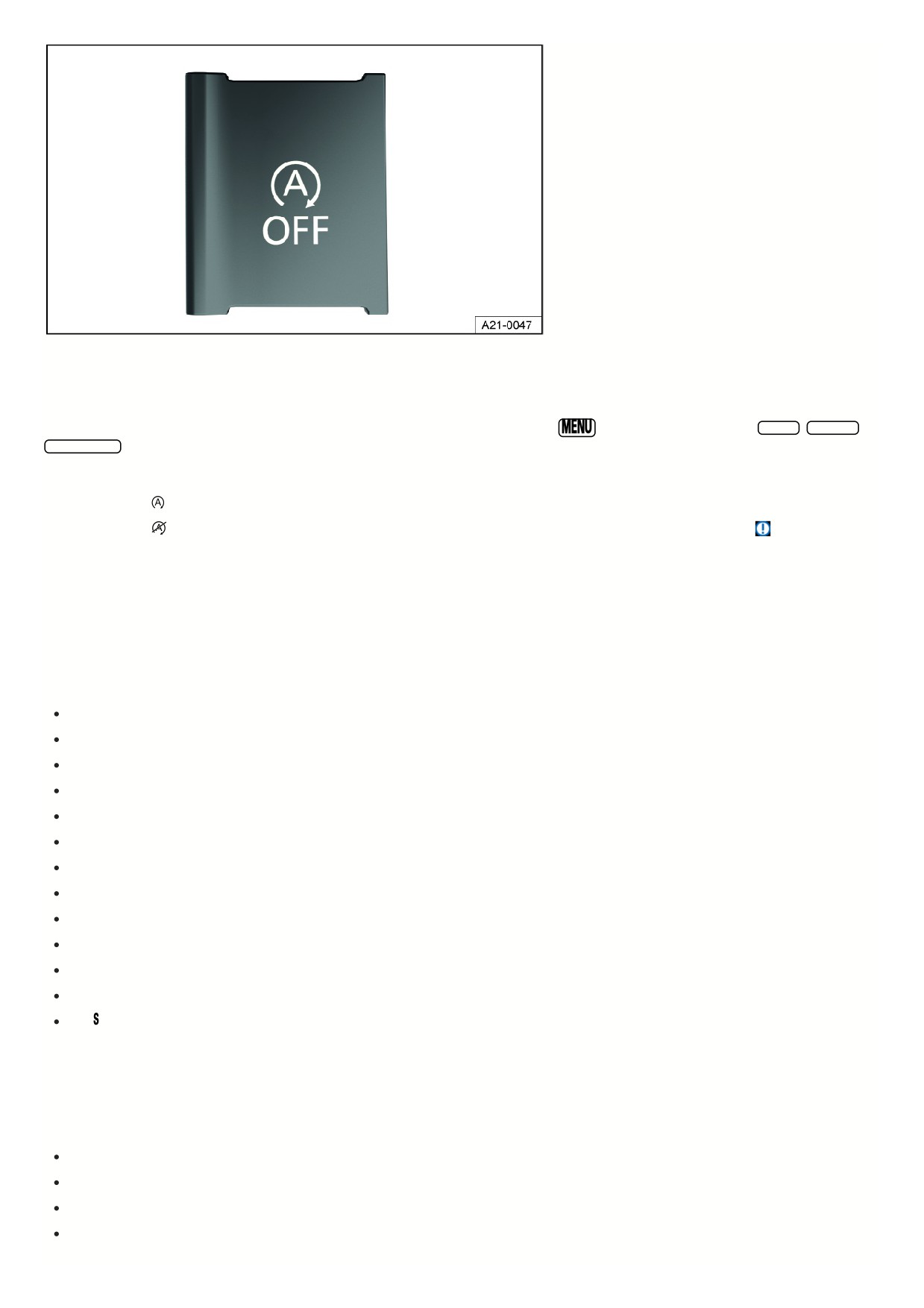
Fig. 120 In the lower section of the center console: Button for the start-stop system.
Switching on the start-stop system
The function is automatically activated every time the ignition is switched on. Information about the current status is shown in the instrument cluster display.
Further information about start/stop mode can be found in the Infotainment system by pressing the
button or function key and the
Vehicle , Selection ,
Vehicle status function keys.
Indicator lights
When indicator light
comes on, the start-stop system is available and the automatic engine stop is active.
When indicator light
comes on, the start-stop system is not available or the start-stop system has automatically started the engine
⇒
The start-stop system status can be displayed in the instrument cluster display.
Automatically deactivating and activating the start-stop system
1. Press and hold the brake pedal to stop the vehicle.
The engine turns off shortly before the vehicle becomes stationary.
2. To restart the engine, take your foot off the brake pedal or press the accelerator pedal.
Important conditions for automatic engine switch off
The driver is wearing their safety belt.
The driver door is closed.
The hood is closed.
A minimum engine temperature has been reached.
The vehicle interior temperature is within the preset temperature value and air humidity is not too high.
The air conditioner's defrost function is not switched on.
The charge level of the 12-volt vehicle battery is sufficient.
The temperature of the 12-volt vehicle battery is neither too low or too high.
The vehicle is not on a large uphill or downhill gradient.
The steering wheel is not significantly turned.
Reverse gear is not engaged.
Park Assist is not activated.
The gear is not engaged.
If the conditions for automatic engine switch-off are only achieved during a stationary phase, then the engine may also switch off at this point, e.g. if the defrost
function is switched off.
Conditions for automatic restart
The engine can start automatically under the following conditions:
If the vehicle interior heats up or cools down significantly.
If the vehicle starts to move.
If the electrical voltage in the 12-volt vehicle battery falls.
If the steering wheel is moved.
In principle the following applies: The engine always restarts automatically when required for the identified situation and vehicle.
161

Conditions that make manual engine start necessary
The engine must be started manually under the following conditions:
The driver’s door is opened.
The hood is opened.
Manually deactivating and activating the start-stop system
Manually deactivating the start-stop system:
1. To manually deactivate the system, press the
button on the center console.
When the start-stop system is deactivated, the indicator light on the button comes on fig. 120.
Manually activating the start-stop system:
1. To activate the system manually, press the
button in the center console again fig. 120.
Each time you press the
button, the instrument cluster display indicates the status of the start-stop system.
If the start-stop system has switched the engine off, it restarts as soon as the system is deactivated by pressing the
button.
WARNING
If the start-stop system is activated during work in the engine compartment, the motor may start suddenly. This can cause accidents and serious injuries.
Always deactivate the start-stop system when working in the engine compartment.
WARNING
When the engine is switched off, certain vehicle systems do not work or only work in a limited way, such as the brake booster or power steering. As a result, you
must use more force for steering and you must apply more pressure on the brake pedal to stop. When the vehicle is moving, this can result in loss of control of
the vehicle, accidents and serious or fatal injuries.
Never switch off the engine while the vehicle is in motion.
WARNING
When the engine is switched off, the airbags and safety belt pretensioners will not function. This can cause serious or fatal injuries in the event of accidents.
Never switch off the engine while the vehicle is in motion.
WARNING
If the ignition is switched off, the steering lock can engage and you would no longer be able to steer the vehicle. When the vehicle is moving, this can result in
loss of control of the vehicle, accidents, and serious or fatal injuries.
Never switch off the ignition when the vehicle is in motion.
NOTICE
If the start-stop system is used for a very long period of time at very high outside temperatures, this can damage the 12-volt vehicle battery.
Avoid using the start-stop system at very high outside temperatures.
If the temperature is above approx. 38 °C (100 °F), the start-stop system may be automatically deactivated.
In some cases you may need to restart the engine manually. Pay attention to the relevant message on the instrument cluster display.
In the case of vehicles with
Driving Mode Selection, if the driving mode is selected, then the start-stop system is automatically activated.
Always manually deactivate the start-stop system when driving through water.
Troubleshooting
The engine does not start automatically
1. Start the engine manually ⇒ Start the engine.
2. Manually deactivate the start-stop system ⇒ Start-stop system.
162