Volkswagen Taos (2023 year). Manual in english - page 1
About this Owner's Manual
This Owner's Manual is valid for all models and versions of your Volkswagen model and model year. The Owner's Manual describes all equipment and models
without indicating special equipment or model versions. This may include descriptions of equipment that your vehicle may not have or that may only be available in
some countries.
You can find details of your actual vehicle equipment in your sales documentation or by contacting an authorized Volkswagen dealer or authorized Volkswagen
Service Facility. Volkswagen recommends contacting an authorized Volkswagen dealer or authorized Volkswagen Service Facility.
This Owner's Manual describes a passenger vehicle.
All information in this Owner's Manual was correct at the time of printing. Due to continuous vehicle development, there may be differences between your vehicle
and the information in this Owner's Manual. No legal commitment can be derived from the information, illustrations, or descriptions in this manual.
Due to legal and technical requirements, the vehicle may be provided with different Owner's Manual variants depending on the country.
Printed Owner's Manual
The printed Owner's Manual describes the range of functions of the vehicle at the time of release. Additions and amendments to the Owner's Manual may also be
added in the form of supplements.
An alphabetically ordered keyword index as well as a list of abbreviations that explains technical abbreviations and designations are included to assist with
orientation and understanding of the printed manual.
Make sure that the printed documents are in the vehicle if you wish to sell or lend the car. Volkswagen also recommends resetting the Infotainment system to its
factory settings in order to delete all personal data.
4
Explanations
Brief definitions are placed in front of some sections in a different color to summarize the topic in question. Detailed information about the systems and equipment
along with their properties, conditions, and system limitations is included in the associated sections.
The following section explains phrasings and terms found in the Owner's Manual to help understanding.
Directions
Directions (left, right, front, back) are in reference to the driving direction unless noted otherwise.
Units and speeds
The display in miles instead of kilometers or mph instead of km/h is determined by the versions of the instrument cluster and Infotainment system that are installed,
which varies depending on the country where the vehicle is sold.
Illustrations
Illustrations are only for orientation and are simply used to provide a visual display of descriptions and instructions. The illustrations may differ from your vehicle.
This Owner's Manual was created for left-hand drive vehicles. For vehicles with right-hand drive steering , controls are sometimes arranged differently from what is
shown in the illustrations or described in the text.
Form of address
To improve readability, plural pronouns are used here to refer to a singular subject of any gender. This applies to all genders equally. The use of abbreviations are
for editorial purposes and do not contain any evaluation.
Terms used and their meanings:
Sunroof
The term "power sunroof" is used as a synonym for all variants of the tilting and sliding panoramic sunroof depending on the vehicle equipment.
Authorized Volkswagen dealer or authorized Volkswagen Service Facility
Authorized Volkswagen dealer or authorized Volkswagen Service Facility refers to
workshops with instructed or trained personnel that specialize in servicing passenger vehicles. A qualified professional can be an authorized
Volkswagen dealer or authorized Volkswagen Service Facility or an independent workshop.
Authorized Volkswagen dealer or authorized Volkswagen Service Facility
Authorized Volkswagen dealer or authorized Volkswagen Service Facility refers to
workshops that have a contractual relationship with Volkswagen. This contractual relationship means that they have access to more information as well
as a direct line of communication to the manufacturer.
Contact an authorized Volkswagen dealer or authorized Volkswagen Service Facility
In some situations, it is necessary for you to drive your vehicle to an
authorized Volkswagen dealer or authorized Volkswagen Service Facility so that it can be checked.
Contact an authorized Volkswagen dealer or authorized Volkswagen Service Facility for assistance If it is no longer possible to continue driving your
vehicle, it is necessary to have it checked directly where it is by a professional. A decision regarding whether the vehicle can continue to be driven
following inspection or whether it needs to be towed must then be made depending on the circumstances.
5
Explanation of symbols
Indicates a reference to a section within a chapter containing important information and safety warnings
that should always be
heeded.
The arrow indicates the end of a section.
This symbol indicates situations where the vehicle must be stopped as quickly as possible.
The symbol means “Trademark” and indicates a recognized but not (yet) officially registered trademark. However, the absence of this
TM
symbol does not constitute a waiver of any rights associated with intellectual property.
This symbol indicates a registered trademark. However, the absence of this symbol does not constitute a waiver of any rights associated
with intellectual property.
⇒
Symbols of this type refer to warnings in the same section or on the specified page, pointing out possible risks that can cause accidents
⇒
and personal injuries and how to help prevent them.
⇒
⇒
Cross-reference to a warning of potential property damage, in the same section or on the specified page.
DANGER
DANGER indicates a hazardous situation which, if not avoided, will result in death or serious injury.
WARNING
WARNING indicates a hazardous situation which, if not avoided, could result in death or serious injury.
CAUTION
CAUTION indicates a hazardous situation which, if not avoided, could result in minor or moderate injury.
NOTICE
NOTICE is used to address practices not related to physical injury, but related to damage to the vehicle.
Texts with this symbol contain information about the environment and how you can help to protect it.
Texts with this symbol contain supplementary information.
6

Vehicle overviews
View from the front
Fig. 2 Overview of vehicle from the front.
Door handles ⇒ Doors and central locking button
Headlights ⇒ Exterior lighting
Behind a cover: mount for towing eye ⇒ Towing
Behind the Volkswagen emblem: radar sensor for assistance systems ⇒ Exterior care and cleaning
Opening lever for the hood ⇒ Opening and closing the hood
Windshield:
With VIN ⇒ Technical data
With windshield wipers ⇒ Operating the windshield wiper lever
With camera for assistance systems in the interior rearview mirror area
⇒ Exterior care and cleaning
With rain/light sensor in the interior rearview mirror area
⇒ Rain/light sensor, ⇒ Exterior care and cleaning
Rear view
7
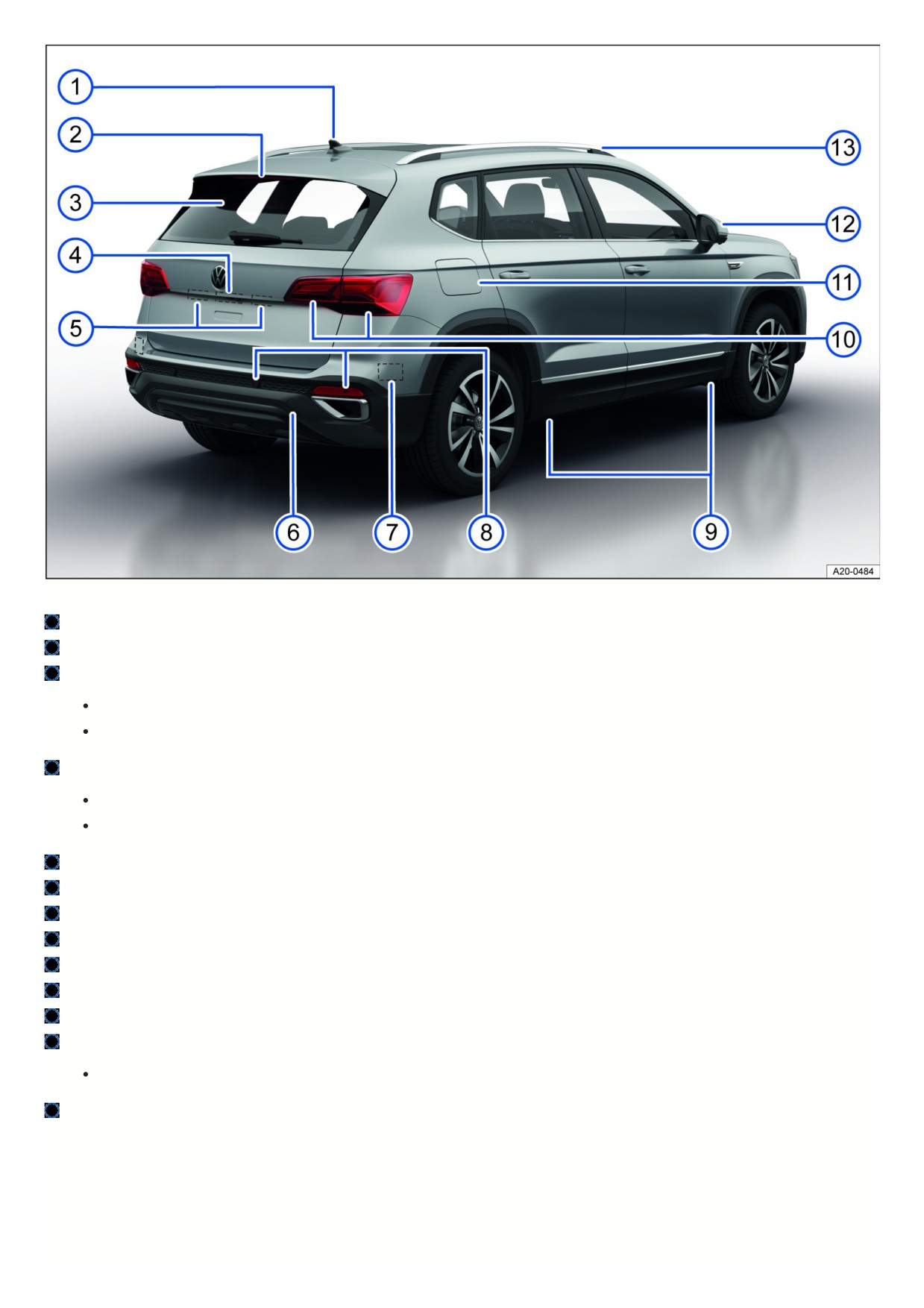
Fig. 3 Rear vehicle overview.
Roof antenna ⇒ Infotainment system and aerials
High-mounted brake light
Rear window:
With rear window defroster ⇒ Rear window defroster
With rear window wiper ⇒ Operating the windshield wiper lever
Area:
Button to open the trunk lid ⇒ Trunk lid
Camera for parking systems ⇒ Rear View Camera, ⇒ Exterior care and cleaning
Number plate light ⇒ Exterior lighting
Behind a cover: mount for towing eye ⇒ Towing
Behind the bumper: radar sensor for assistance systems ⇒ Exterior care and cleaning
Sensors for assistance systems ⇒ Exterior care and cleaning
Mounting points for the vehicle jack ⇒ Wheel change
Taillights ⇒ Exterior lighting
Fuel filler flap ⇒ Fuel types and refueling
Outside mirrors ⇒ Outside mirrors
With “Blind Spot” Monitor display ⇒ “Blind Spot” Monitor
Roof rails ⇒ Roof rack
Driver door
8
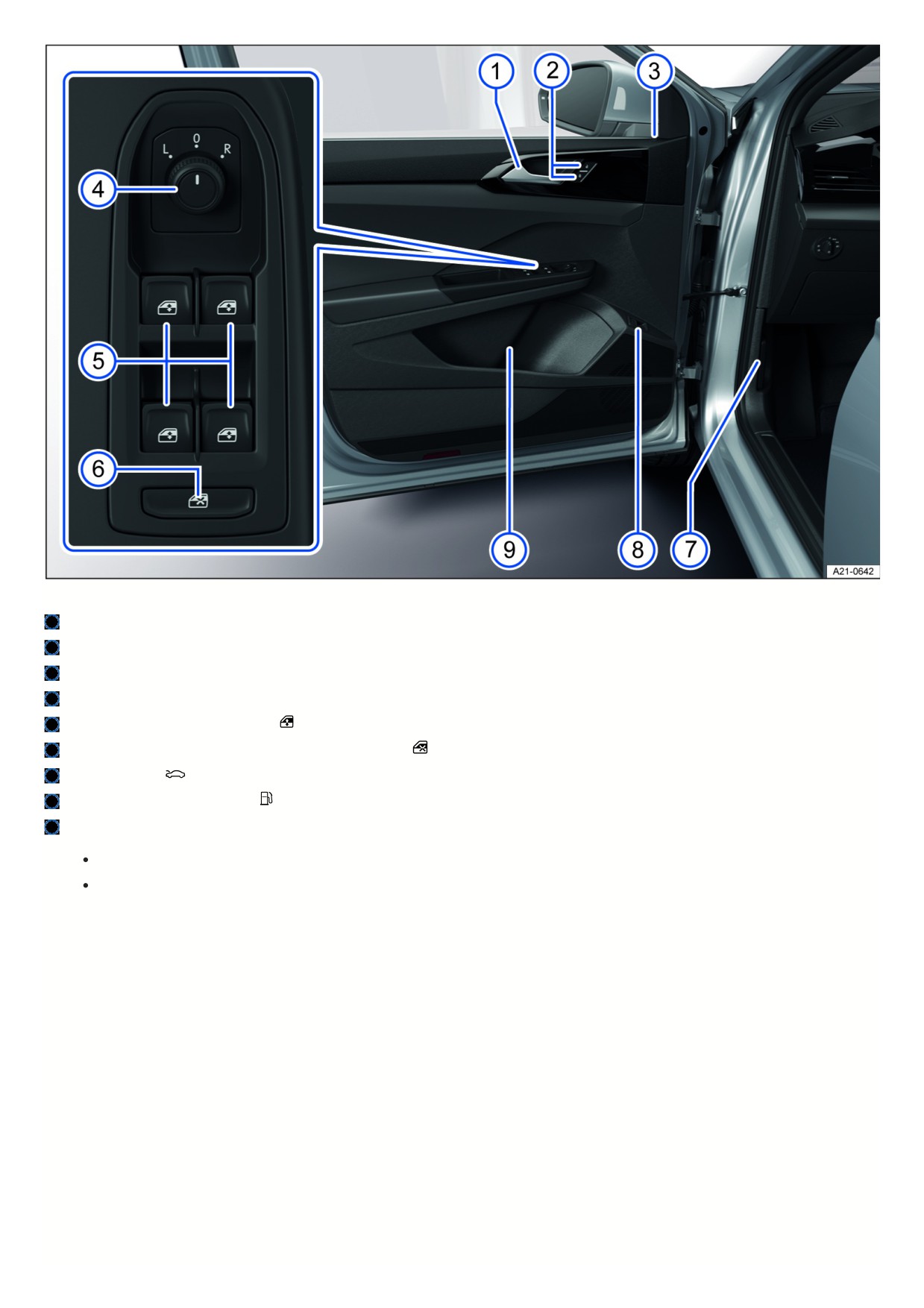
Fig. 4 Driver door: Controls.
Door handle
Central locking button to lock and unlock the vehicle ⇒ Central locking button
Central locking indicator light ⇒ Indicator light in the driver's door
Knob for outside mirror positions and functions ⇒ Outside mirrors
Buttons for operating the power windows
⇒ Opening and closing the windows
Button for deactivating the power window buttons in the rear doors
⇒ Opening and closing the windows
Hood release lever
⇒ Opening and closing the hood
Button for unlocking the fuel filler flap
⇒ Refueling
Storage compartment
With cup holder
With storage option for a reflective vest ⇒ Emergency equipment
Driver side
9
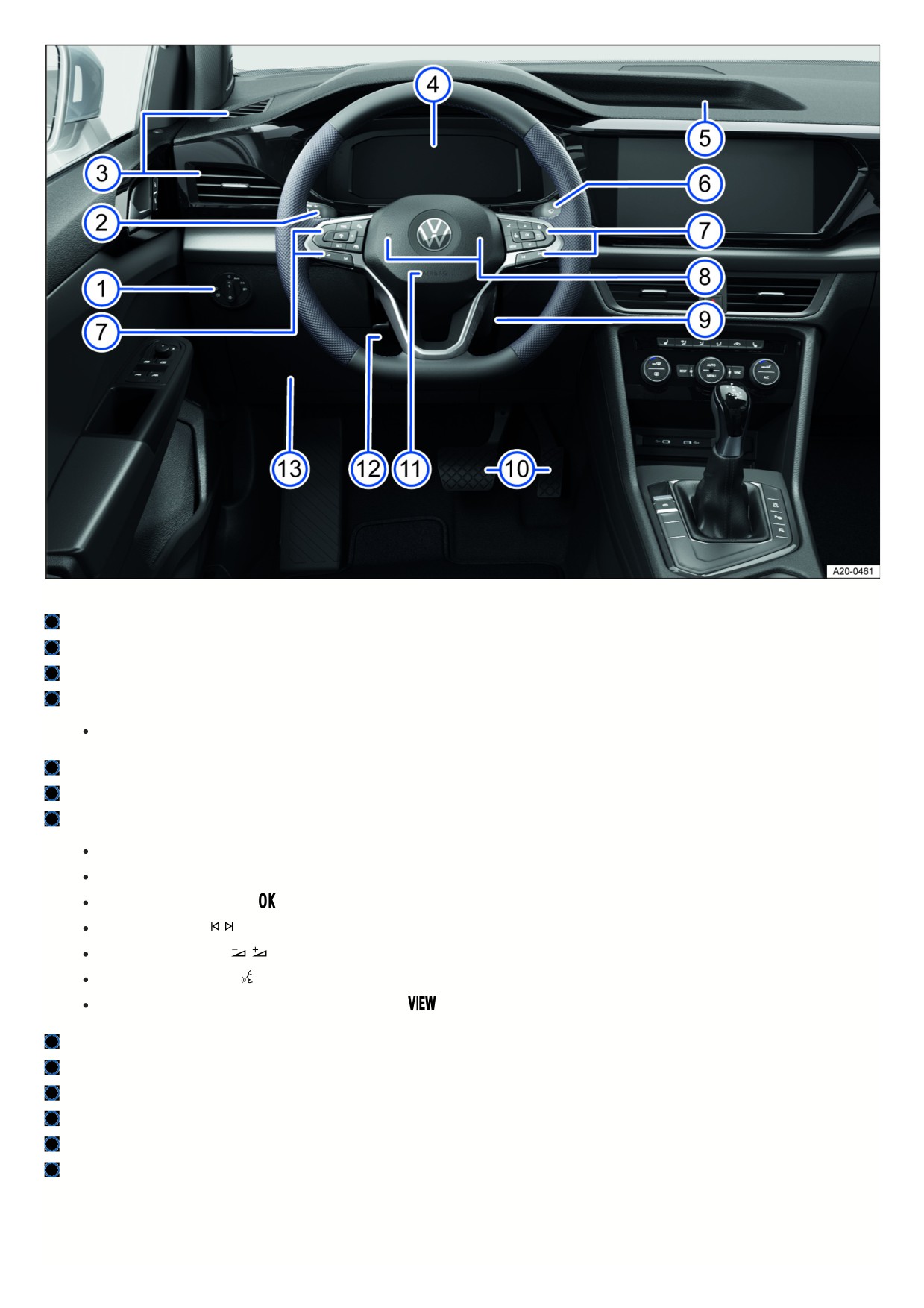
Fig. 5 Driver’s side overview.
Light switch ⇒ Headlights
Turn signal and high beam lever ⇒ Switching the turn signals on and off , ⇒ Switching the high beam headlights on and off
Vents ⇒ Air distribution and blower speed
Instrument cluster ⇒ Overview of the Volkswagen Digital Cockpit Pro
With warning and indicator lights ⇒ Symbols in the instrument cluster
Storage compartment
Windshield wiper/washer lever ⇒ Window wipers
Multi-function steering wheel controls:
For driver assistance systems ⇒ Driver assistance systems
For menu selection ⇒ Operating the Volkswagen Digital Cockpit Pro
For accepting telephone calls
⇒ Mobile phone interface
For audio, navigation
,
⇒ Infotainment system, ⇒ Navigation
For adjusting the volume
⇒ First steps
For activating voice control
⇒ Voice control
In order to switch between the current and previous menus
⇒ Operating the Volkswagen Digital Cockpit Pro
Horn
On the right steering column: Area for the remote control vehicle key for an emergency start
⇒ Troubleshooting
Pedals ⇒ Information on the pedals
Installation location of driver’s front airbag ⇒ Airbag system
Lever for adjusting the steering wheel position ⇒ Steering wheel
Storage compartment
Center console
1
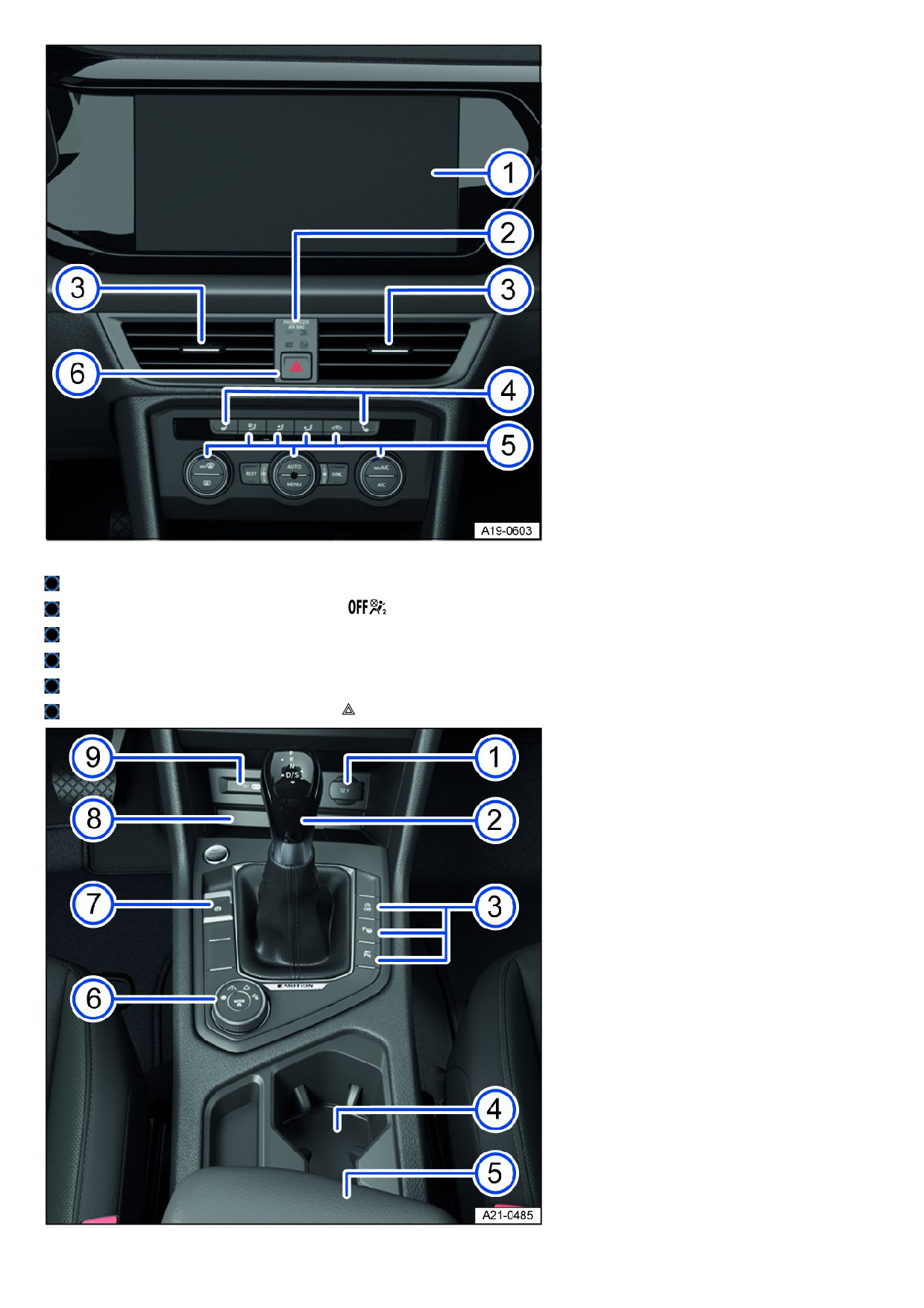
Fig. 6 Overview of the upper section of the center console.
Infotainment system ⇒ Infotainment system
Indicator light for front passenger’s airbag deactivation
⇒ Airbag system
Vents ⇒ Air distribution and blower speed
Buttons for the seat heating ⇒ Seat heating and seat ventilation
Controls for the climate control system ⇒ Heating and air conditioning system
Button for switching the emergency flashers on or off
⇒ In case of an emergency
Fig. 7 Overview of the lower section of the center console.
11
12 V socket ⇒ Sockets
Selector lever for the automatic gearbox ⇒ Automatic transmission
Buttons:
For start/stop system ⇒ Start/Stop system
For parking and maneuvering assist systems ⇒ Parking and maneuvering
Cup holders
Center armrest with storage compartment
Control for Driving Mode Selection ⇒ Driving Mode Selection and 4MOTION Active Control
Electronic parking brake ⇒ Electronic parking brake
Storage compartment
With functionality for wireless charging in accordance with Qi standard ⇒ Charging Options for Mobile Devices
USB sockets with charge function for external device rechargeable batteries (depending on the vehicle equipment)
⇒ Charging Options for Mobile Devices
Passenger’s side
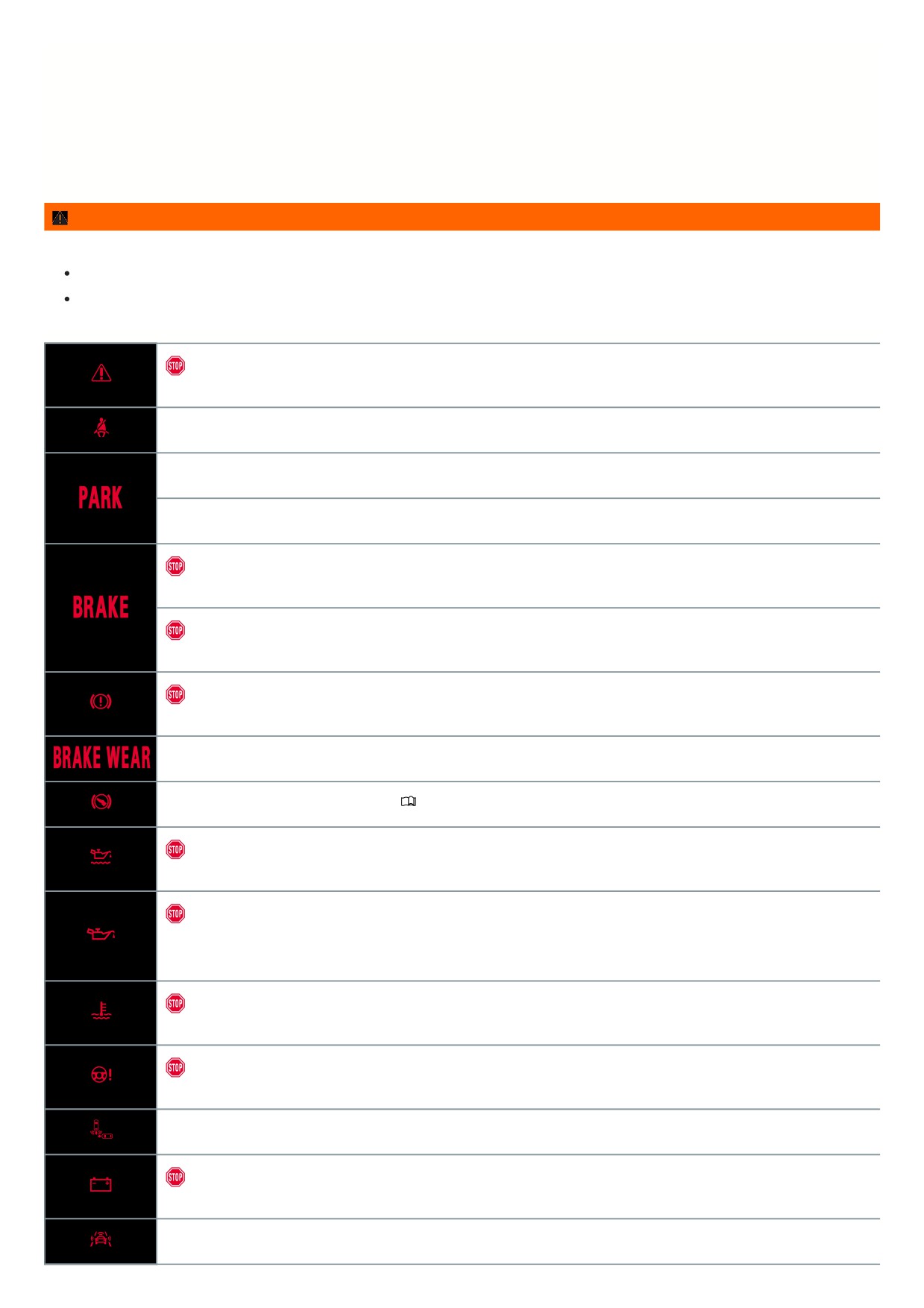
Fig. 8 Passenger's side: instrument panel overview
Installation location of the front passenger’s airbag in the instrument panel
⇒ Advanced Airbag System
Adjustable vent ⇒ Air distribution and blower speed
Glove compartment with handle
Controls in the headliner
Symbol
Meaning
Buttons for interior/reading lights ⇒ Interior/reading lights, ambient lighting.
Sunroof switch ⇒ Sunroof.
Sunshade buttons ⇒ Sunshade in the sunroof.
Buttons for Emergency Call, Information Call and Roadside Assistance Call
⇒ Information Call,
Roadside Assistance Call and Emergency Call Service.
12
Driver information
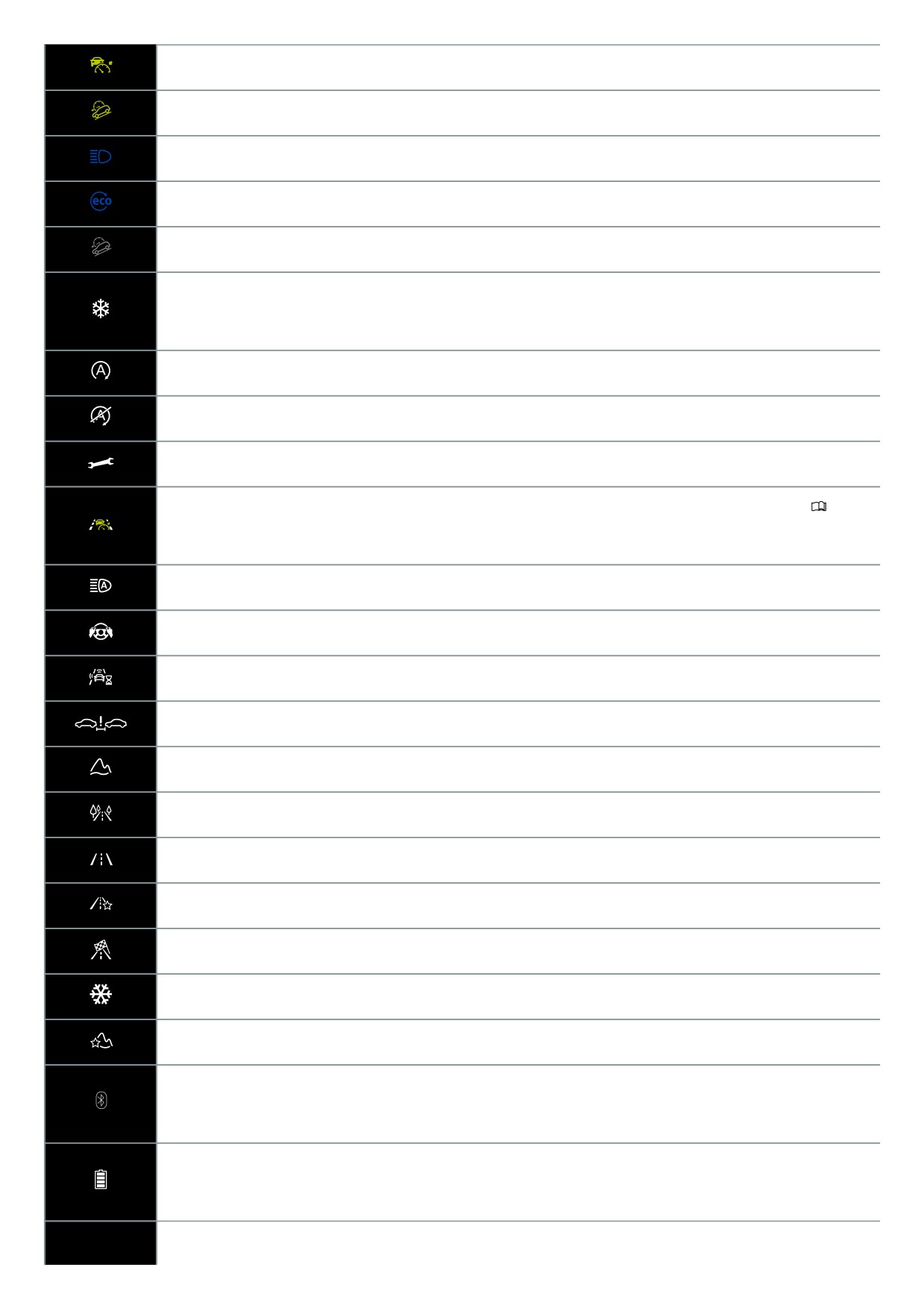
Symbols in the instrument cluster
The warning and indicator lights can turn on individually or in combination with each other and indicate warnings, malfunctions and certain functions. Some warning
and indicator lights come on when you switch the ignition on and must turn off after some time.
Indicator lights that turn on in the light switch are described in the “Lights” chapter ⇒ Switching the lights on and off .
WARNING
Failure to respond to illuminated warning lights and messages may result in a vehicle breakdown, accidents and serious injuries or death.
Never ignore illuminated warning lights and messages.
Stop the vehicle as soon as it is safe to do so.
Do not continue driving!
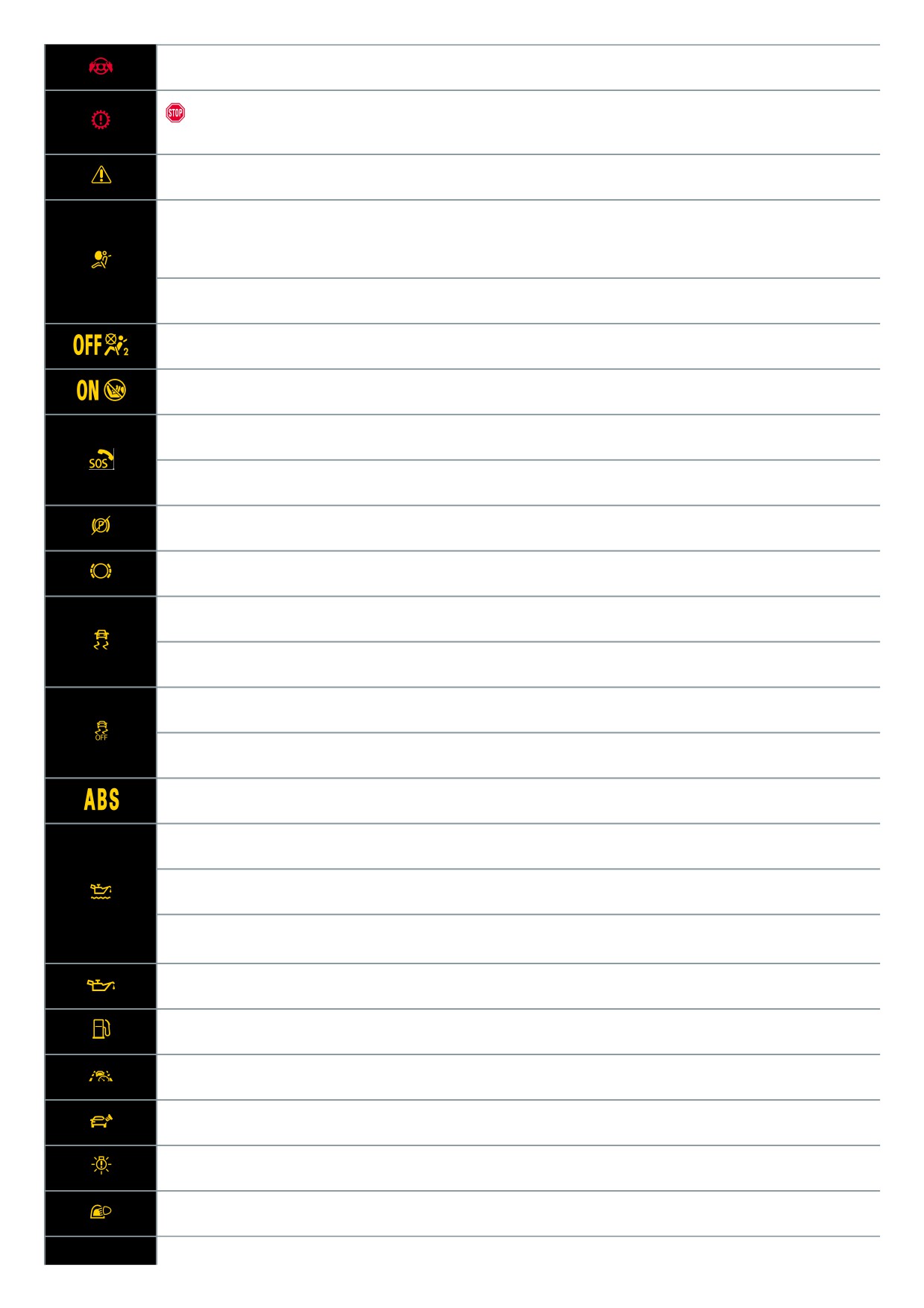
Central warning light ⇒ Priority 1 warning message
Fasten safety belt ⇒ Fasten seat belts reminder and seat belt safety indicator
Electronic parking brake switched on ⇒ Electronic parking brake
Holding force of the electronic parking brake too low ⇒ The holding force is too low for the current situation
Do not continue driving!
Brake system malfunction ⇒ Brake system malfunctioning
Do not continue driving!
Brake fluid level too low ⇒ Brake fluid level
Do not continue driving!
Brake system malfunction ⇒ Brake system malfunctioning
Check brake system ⇒ Brake pad wear indicator
Take over steering and be ready to brake. ⇒
Introduction
Do not continue driving!
Engine oil level too low ⇒ Engine oil level very low
Do not continue to drive!
Engine oil pressure too low ⇒ Engine oil pressure too low
Do not continue to drive!
Engine coolant system malfunction ⇒ Engine coolant
Do not continue driving!
Steering malfunction ⇒ Steering malfunction
Rear Traffic Alert has detected an obstacle to the rear ⇒ Rear Traffic Alert
Do not continue driving!
12 V energy supply malfunction ⇒ 12-volt power supply
Collision warning ⇒ Warning levels and braking support
13
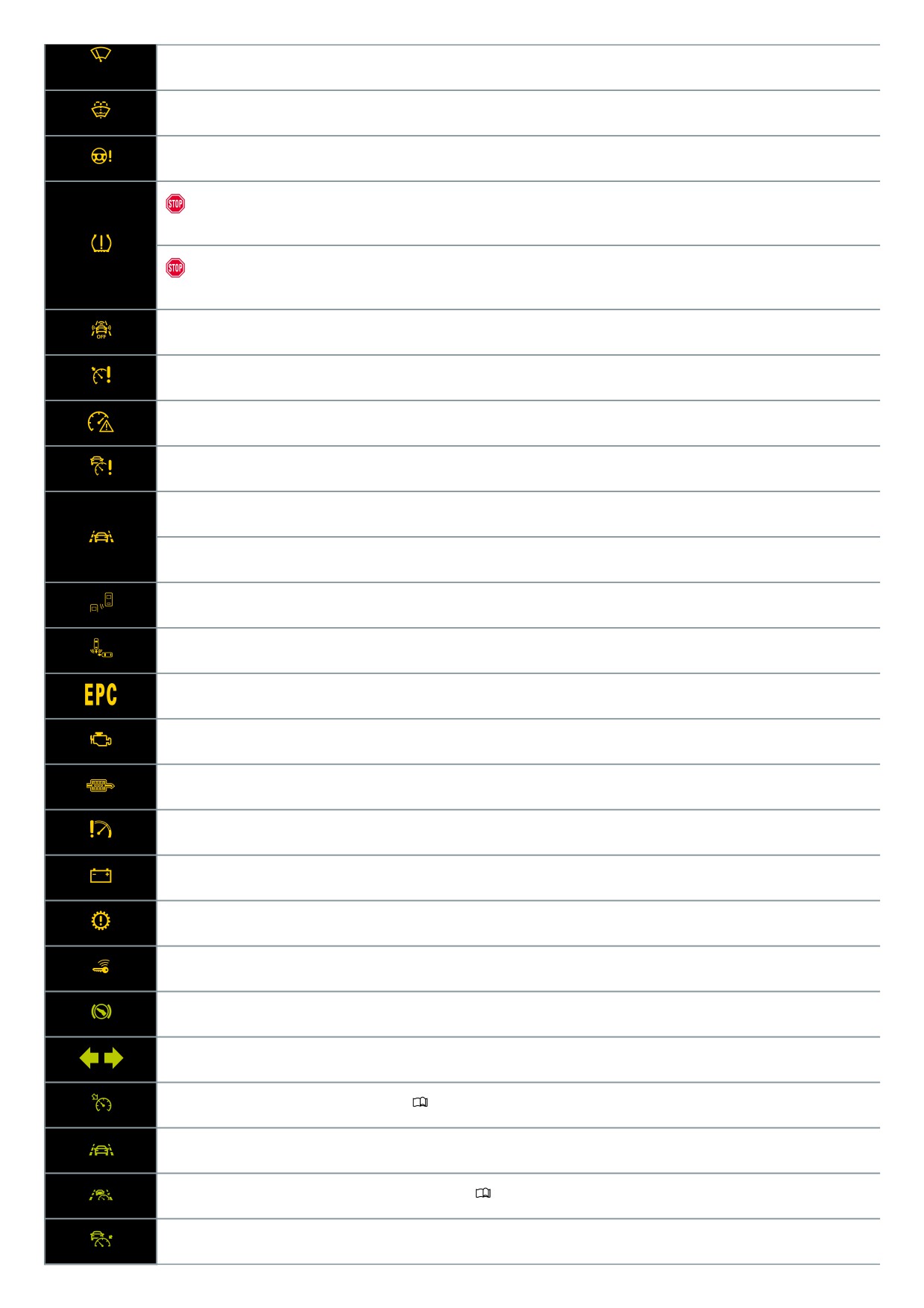
Take over the steering immediately ⇒ Take over the steering immediately
Do not continue to drive!
Transmission overheating ⇒ Transmission overheating
Central warning light ⇒ Priority 2 warning message
Airbag or safety belt pretensioner system deactivated with diagnostic equipment
⇒ Airbag system or safety belt pretensioners
deactivated with diagnostic device
Airbag system or safety belt pretensioner malfunction ⇒ Airbag system or safety belt pretensioners malfunction
Front passenger's front airbag deactivated ⇒ Front passenger's front airbag switched off
Front passenger’s airbag enabled ⇒ Front passenger's front airbag enabled
Emergency Call Service limited ⇒ Emergency Call Service limited
Emergency Call Service malfunctioning ⇒ Emergency Call Service malfunction
Electronic parking brake malfunction ⇒ Electronic parking brake malfunction
Check brake system ⇒ Brake pad wear indicator
Comes on: Electronic Stability Control (ESC) malfunction ⇒ ESC malfunction
Flashes: Electronic Stability Control (ESC) or Anti-slip regulation (ASR) in operation
⇒ Electronic Stability Control (ESC)
Electronic Stabilization Control (ESC) switched off ⇒ ESC Off
Anti-Slip Regulation (ASR) switched off ⇒ ASR
Anti-Lock Braking System (ABS) malfunction ⇒ ABS failure or malfunction
Engine oil system malfunction ⇒ Engine oil system malfunction
Engine oil level too low ⇒ Engine oil level too low
Engine oil level too high ⇒ Engine oil level too high
Engine oil system malfunction ⇒ Engine oil system malfunction
Tank almost empty ⇒ Fuel tank almost empty
Semi-automated driving assistance (Travel Assist) not available ⇒ Travel Assist is not available or is not functioning as expected
Tank cap not closed ⇒ Fuel tank cap open
Driving light failure ⇒ Exterior lighting malfunction
Rain/light sensor malfunction ⇒ Rain/light sensor malfunction, ⇒ Rain/light sensor malfunction
14
Windshield wiper malfunction ⇒ Windshield wiper malfunction
Washer fluid level too low ⇒ Washer fluid level too low
Steering malfunction ⇒ Steering malfunction
Do not continue to drive!
Tire pressure low ⇒ Tire pressure low
Do not continue to drive!
Tire pressure monitoring system malfunction ⇒ Tire Pressure Monitoring System malfunction
Autonomous Emergency Braking (Front Assist) switched off ⇒ Using Front Assist
Cruise control system malfunction ⇒ Cruise control system malfunction
Speed warning ⇒ Driving data menu
Adaptive cruise control (ACC) not available ⇒ ACC is not available
Semi-automatic vehicle control in a medical emergency (Emergency Assist) is functioning ⇒ Driving with Emergency Assist
Lane Assist in control ⇒ Driving with Lane Assist
Blind Spot Monitor active ⇒ “Blind Spot” Monitor malfunction
Rear Traffic Alert brakes ⇒ Rear Traffic Alert
Engine control malfunction ⇒ Engine control malfunction
Exhaust system malfunction ⇒ Exhaust-related malfunction
Particulate filter clogged with soot ⇒ Particulate filter clogged with soot
Engine RPM limited ⇒ Engine speed limited
12-volt power supply malfunction ⇒ 12-volt power supply
Transmission malfunction ⇒ Transmission overheating
Vehicle key not in vehicle ⇒ Valid vehicle key cannot be detected
Press the brake pedal. ⇒ The engine is not starting, ⇒ Driving is restricted by the selector lever lock
Turn signals ⇒ Turn signal indicator light
Cruise control switched on, regulation active ⇒
Introduction
Lane Assist active ⇒ Driving with Lane Assist
Semi-automated driving assistance (Travel Assist) active ⇒
Introduction
Adaptive Cruise Control (ACC) regulates, no vehicle driving ahead is detected ⇒ Switching ACC on and off
15
Adaptive Cruise Control (ACC) regulates, vehicle driving ahead is detected ⇒ Switching ACC on and off
Hill Descent Control is active ⇒ Hill Descent Control
High beams or headlight flasher ⇒ Switching the high beam headlights on and off
Fuel-efficient driving ⇒ Fuel-efficient driving
Hill Descent Control is not active ⇒ Hill Descent Control
Outside temperature is below +39 °F (+4 °C) ⇒ Volkswagen Digital Cockpit Pro Information Displays , ⇒ Volkswagen Digital Cockpit
Basic Information Displays
Start/Stop system active ⇒ Start-stop system
Start/Stop system not available ⇒ Start-stop system
Service due ⇒ Service interval display
Semi-automated driving assistance (Travel Assist) active, Adaptive Cruise Control active, adaptive lane guidance inactive
⇒
Introduction
High beam control active ⇒ Switching on high beam control
Take over the steering ⇒ Take over the steering
Autonomous Emergency Braking (Front Assist) starts ⇒ Front Assist starts
Distance warning ⇒ Warning levels and braking support
Offroad driving profile ⇒ Driving mode properties
Eco driving mode ⇒ Driving mode properties
Normal driving mode ⇒ Driving mode properties
Individual driving mode ⇒ Driving mode properties
Sport driving mode ⇒ Driving mode properties
Snow driving mode ⇒ Driving mode properties
Offroad Custom driving profile ⇒ Driving mode properties
Mobile phone connected via Bluetooth® ⇒ Volkswagen Digital Cockpit Pro Information Displays , ⇒ Volkswagen Digital Cockpit Basic
Information Displays
Mobile phone battery charge level ⇒ Volkswagen Digital Cockpit Pro Information Displays , ⇒ Volkswagen Digital Cockpit Basic
Information Displays
16
Note about information in the Owner's Manual ⇒ Note about information in the Owner's Manual
Warning and information texts
The status of some functions inside the vehicle and vehicle components are checked when the ignition is switched on or while driving. Malfunctions are indicated by
red and yellow warning symbols in the instrument cluster display and may also be signaled audibly in some cases. The appearance of texts and symbols may vary
depending on the instrument cluster version.
Any malfunctions currently occurring can also be manually called up. To do this, open the Vehicle status or Vehicle menu
⇒ Vehicle settings menu.
Priority 1 warning message
The red central warning light flashes or comes on, in some cases together with warning tones or additional symbols.
Do not continue driving! There is a haza
Check the malfunction. Contact an authorized Volkswagen dealer or authorized Volkswagen Service Facility immediately for assistance.
Priority 2 warning message
The yellow central warning light flashes or comes on, in some cases together with warning tones or additional symbols. Malfunctions or insufficient operating fluids
can cause vehicle damage and vehicle malfunctions. Check the malfunction as soon as possible. Immediately contact an authorized Volkswagen dealer or
authorized Volkswagen Service Facility to have the system checked. Volkswagen recommends contacting an authorized Volkswagen dealer or authorized
Volkswagen Service Facility.
Note about information in the Owner's Manual
You can find more information about the existing warning message in the Owner's Manual.
Informational text
Information about various processes in the vehicle.
If there are multiple warning messages, the symbols will appear consecutively for several seconds. The symbols will appear until the malfunction is corrected.
If warning messages about malfunctions appear when the ignition is switched on, settings or information displays may not appear as described. If the
malfunction persists, contact a suitably qualified professional. Volkswagen recommends contacting an authorized Volkswagen dealer or authorized Volkswagen
Service Facility.
Introduction to the instrument cluster
The vehicle is equipped with a Volkswagen Digital Cockpit. The instrument cluster shows essential information, such as speed.
In addition, the following functions, among others, are available depending on the equipment:
Various menus, such as for the driver assistance systems.
Status displays for the driver assistance systems.
Display messages.
Warning and indicator lights.
Information about economy and range.
Content can be individually adapted and settings can be changed in the menus.
WARNING
Operating the Volkswagen Digital Cockpit and Infotainment system can distract you from traffic. If the driver is distracted while driving, accidents and serious or
fatal injuries can occur.
Always drive attentively and responsibly.
Never operate the instrument cluster while driving.
Only adjust any settings in the instrument cluster or Infotainment system when the vehicle is stationary.
WARNING
If there is a serious fault in the instrument cluster, the display may be turned off. The warning light
may also come on here. No further warnings can be
displayed. This may result in vehicle breakdowns while driving, accidents and serious or fatal injuries.
Safely stop the vehicle.
See an authorized Volkswagen dealer or authorized Volkswagen Service Facility for assistance.
After starting the engine when the 12 V vehicle battery is severely drained or when it has been replaced or jump-started, the system settings, e.g. personal
17
convenience settings and programming, and user profiles may be changed or erased. Check and correct the settings after the 12 V vehicle battery is sufficiently
recharged.
Volkswagen Digital Cockpit Pro
Overview of the Volkswagen Digital Cockpit Pro
The Volkswagen Digital Cockpit Pro is a digital instrument cluster with a high-resolution TFT color display. By selecting different information profiles, other displays
can be shown in addition to the standard dials, such as the tachometer. The term Volkswagen Digital Cockpit Pro is used to refer to the “Pro digital instrument
cluster” in the following.
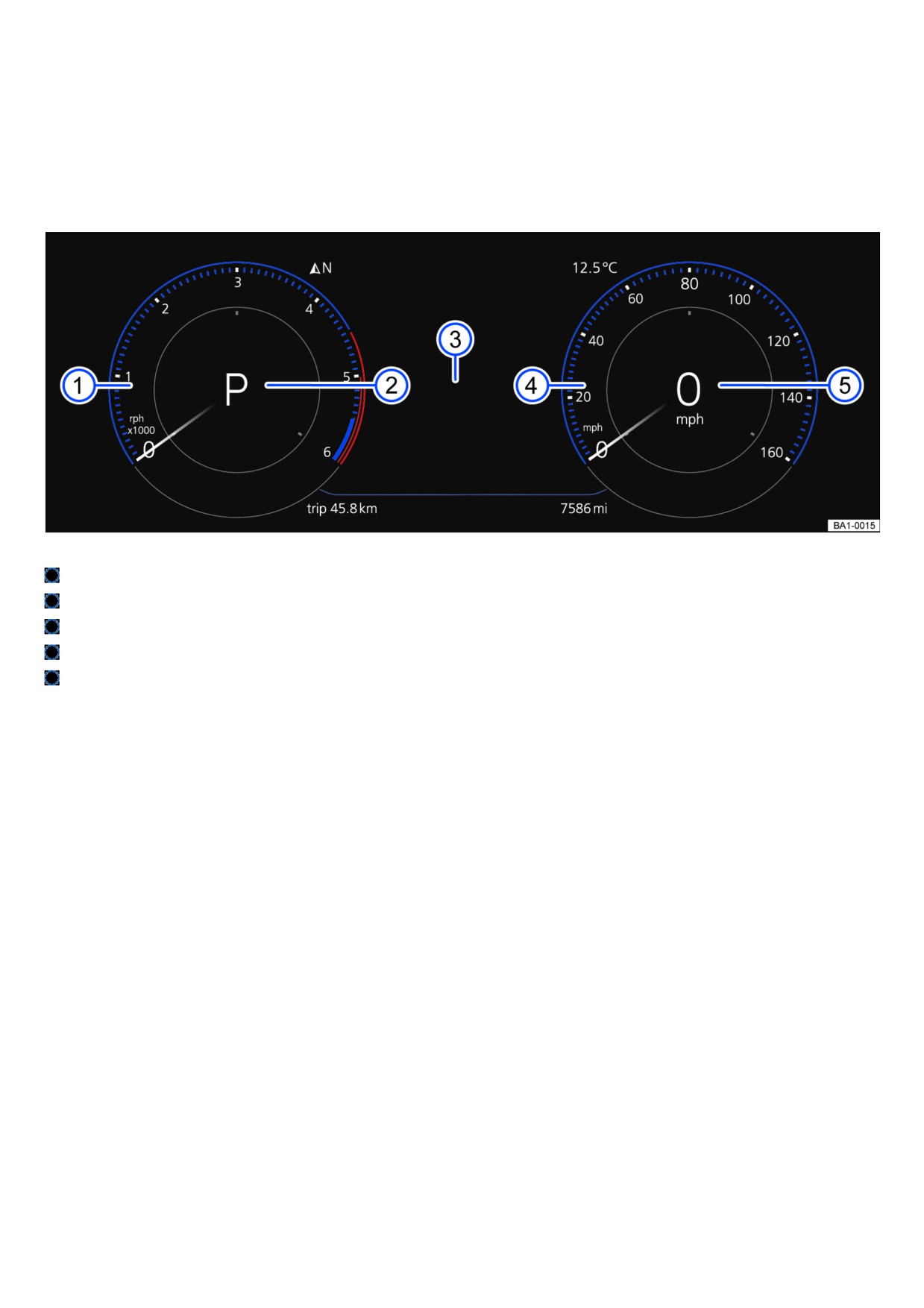
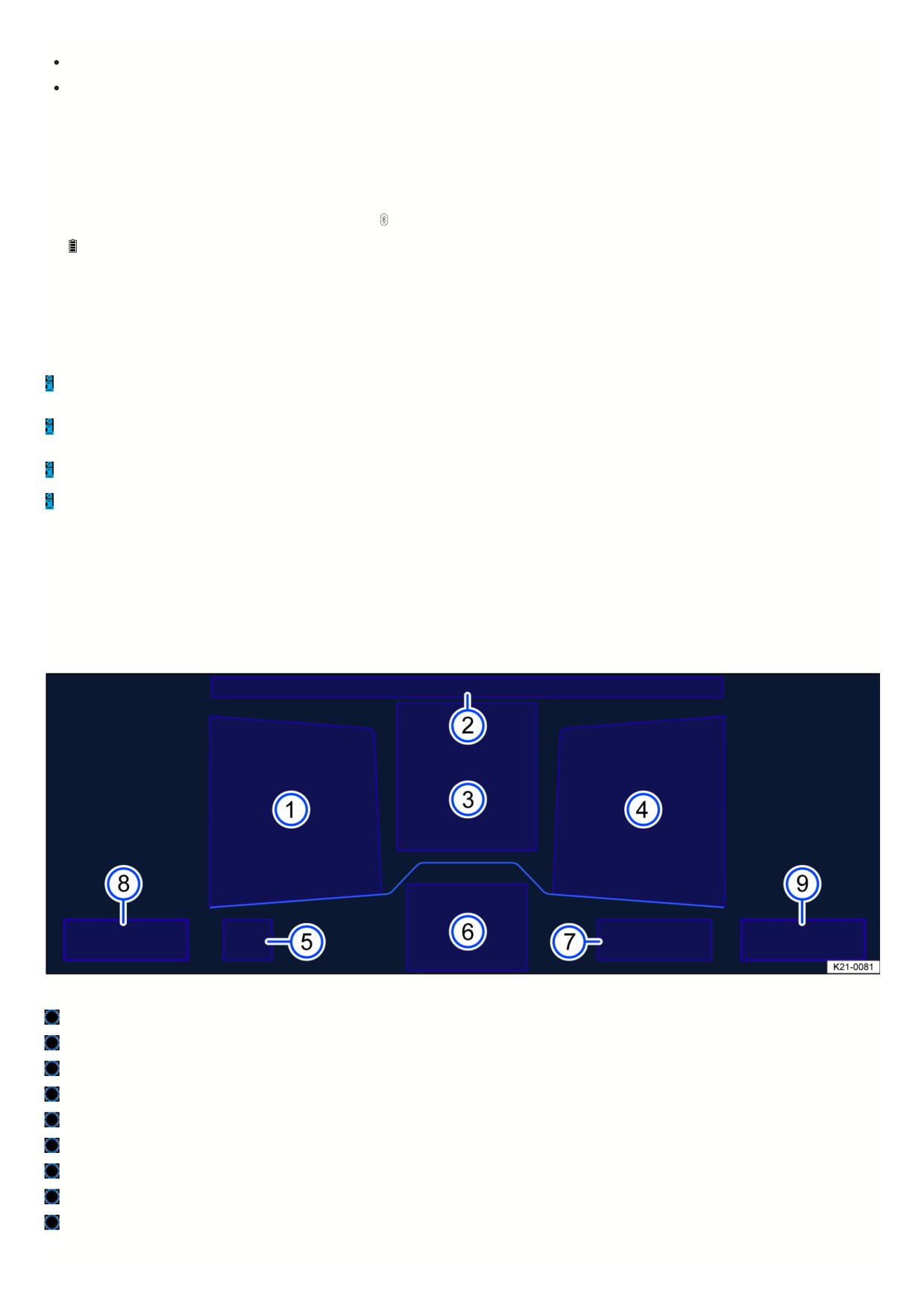
Fig. 9 Volkswagen Digital Cockpit Pro in the instrument panel (general example).
Tachometer (RPM of the running engine).
Currently engaged gear or selector lever level
⇒ Driving.
Displays.
Speedometer.
Digital speed display.
Operating the Volkswagen Digital Cockpit Pro
18
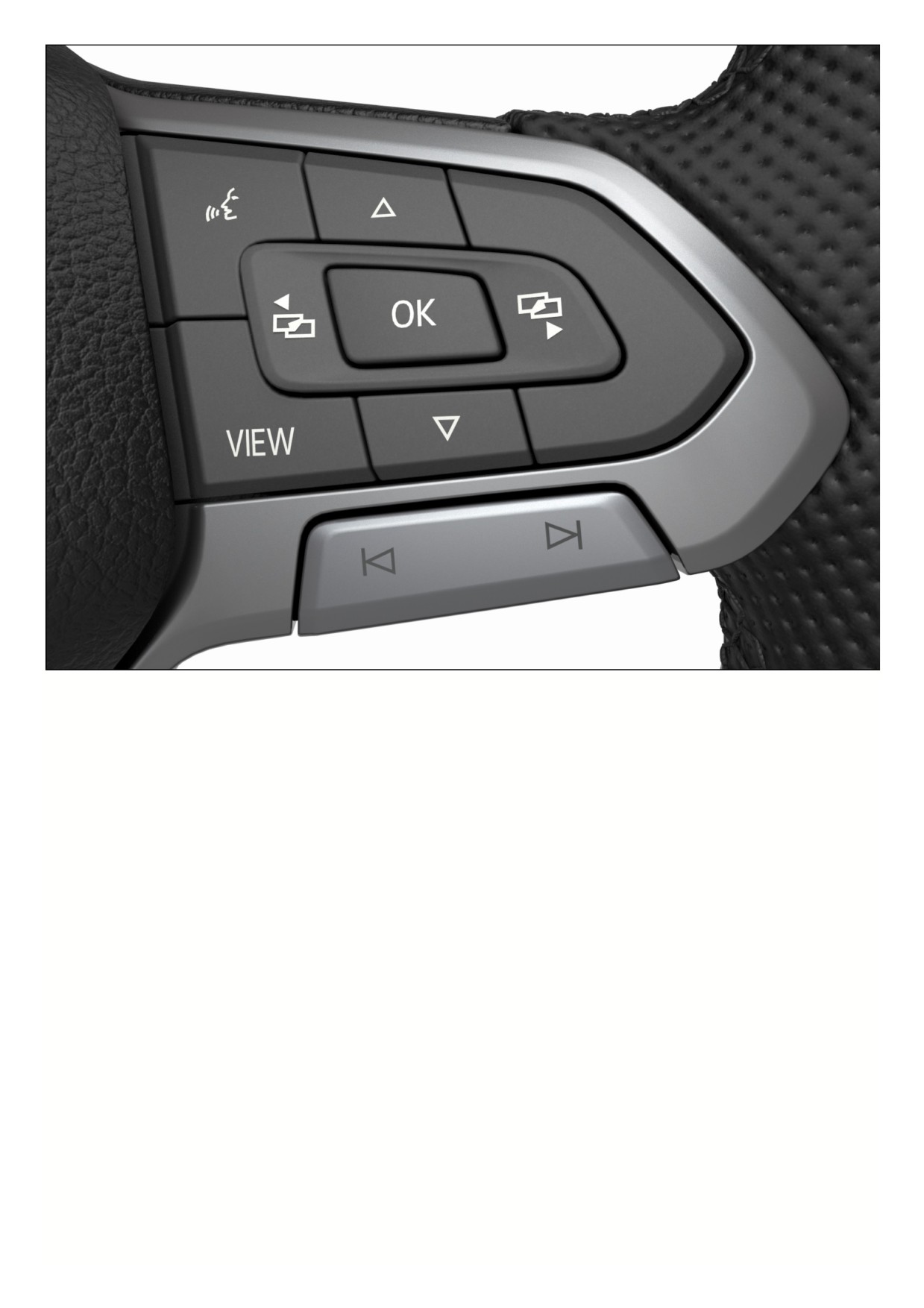
Fig. 10 Right side of the multi-function steering wheel: Operating the Volkswagen Digital Cockpit Pro (variant 1).
19
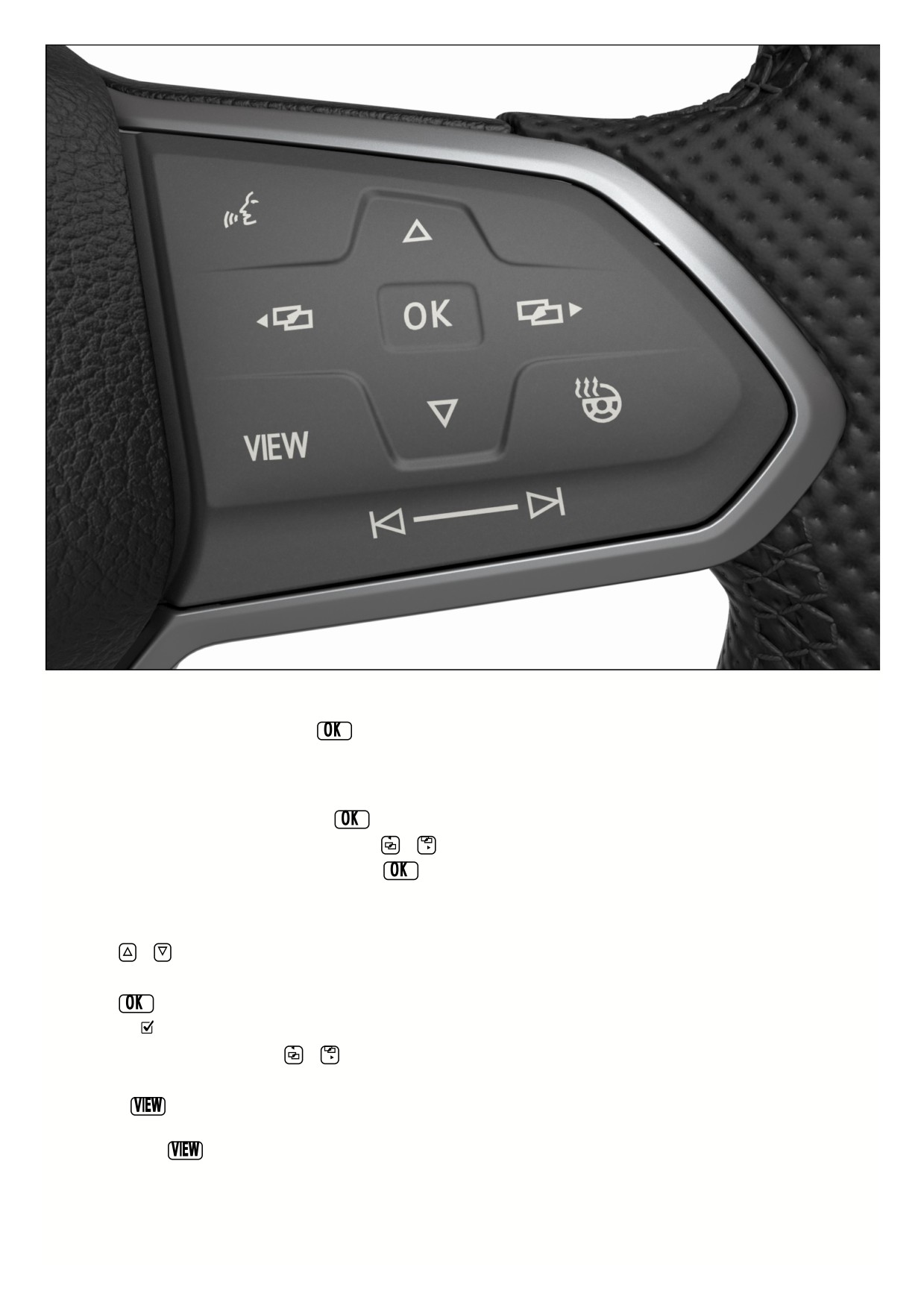
Fig. 11 Right side of the multi-function steering wheel: Operating the Volkswagen Digital Cockpit Pro (variant 2).
Vehicles with multi-function steering wheel: Menus cannot be accessed when a priority 1 warning message is displayed → page , Warning and information texts.
You can confirm and hide some messages using the
button on the multi-function steering wheel fig. 10, fig. 11.
Selecting a menu or information display
Vehicles with multi-function steering wheel:
1. Switch the ignition on.
2. If a message or vehicle icon is displayed, press the
button, repeatedly if necessary.
3. To display a menu and to scroll through the menu, press the
or
button.
4. To open the displayed menu or information display, press the
button or wait until the menu or the information display opens automatically after several
seconds.
Applying settings in the menus
Vehicles with multi-function steering wheel:
1. Press the
or
arrow button in the displayed menu until the preferred menu item is highlighted.
The item is marked with a frame around it.
2. Press the
button to apply the desired changes.
A check mark
indicates that the respective function is switched on.
3. To return to the menu selection, press the
or
button.
VIEW button on multi-function steering wheel
You can use the
button to switch between the classic display of dials, the large platform without information profiles, and the enhanced view with highlighted
information profiles. The classic display shows the large dials on the right and left side, and the selected information profile is displayed in the center.
1. Press and hold the
button to select from the preset information profiles in the list:
Classic
View without information profiles.
Automatic The information profiles adjust to the selected driving mode. Only for vehicles with Driving Mode Selection.
Preset 1 Individual selection of information profiles
2
Preset 2 Individual selection of information profiles
Preset 3 Only on vehicles with standard factory-installed navigation system.
Navigation map in the Volkswagen Digital Cockpit Pro
Depending on the vehicle equipment, the Volkswagen Digital Cockpit Pro may display a detailed navigation map.
The navigation map can be displayed in three sizes. With the larger map view, the navigation map is shown across the entire display. To select the desired map
size, proceed as follows:
1. Select menu item Navigation.
2. Press the
button on the multi-function steering wheel to switch between the map sizes.
3. Press the
or
arrow buttons on the multi-function steering wheel to zoom in or out.
4. When zooming manually, press the
button on the multi-function steering wheel to switch to auto-zoom.
Depending on the equipment, navigation will be shown on two screens or only on one screen. The navigation map may appear in the Volkswagen Digital Cockpit
Pro and in the Infotainment system or just in the Infotainment system. If the navigation map is shown in the Infotainment system, only navigation arrows are shown
the Volkswagen Digital Cockpit.
If warning messages about malfunctions appear when the ignition is switched on, settings or information displays may not appear as described. If the
malfunction persists, contact a suitably qualified professional. Volkswagen recommends contacting an authorized Volkswagen dealer or authorized Volkswagen
Service Facility.
WARNING
Operating the Volkswagen Digital Cockpit and Infotainment system can distract you from traffic. If the driver is distracted while driving, accidents and serious or
fatal injuries can occur.
Always drive attentively and responsibly.
Never operate the instrument cluster while driving.
Only adjust any settings in the instrument cluster or Infotainment system when the vehicle is stationary.
Volkswagen Digital Cockpit Pro Information Displays
Information profiles
Using the Digital Cockpit menu item in the vehicle Infotainment system vehicle settings, you can select different, topic-specific information profiles
⇒ Vehicle
settings menu. Depending on the selected information profile, the Volkswagen Digital Cockpit Pro may show additional information in the center of the dials or the
dials may be hidden and the additional information shown across the entire display. The following information profiles can be selected:
Audio. Digital display of the current audio playback
Acceleration Graphic display of the longitudinal and lateral acceleration
Comfort drive Travel Assist. Visual display of various driver assistance systems
⇒ Driver assistance systems.
Distance Display of the distance driven.
Gear indicator Display of the current gear or the selected gear.
Speed Display of the speed.
Elevation Display of the current elevation above sea level.
Compass Digital compass display
Navigation Graphic display of arrow navigation
Range. Display of the range.
Consumption Graphic display of the current consumption and the digital display of the average consumption
Traffic sign recognition Display of detected traffic signs.
Destination arrival information. Display of remaining driving time, the distance to the destination, and the estimated arrival time.
Depending on the equipment, the number and scope of the information profiles that can be selected may vary.
Possible displays in the Volkswagen Digital Cockpit Pro
Depending on the vehicle equipment, different information may be shown in the Volkswagen Digital Cockpit Pro:
Outside temperature display.
Detected road sign from the traffic sign recognition.
Driver assistance systems.
Driving data menu and menus for various settings.
21

Speed warnings.
Speed warning for winter tires.
Open doors, hood and trunk lid.
Infotainment system and navigation information.
Odometer displays.
Compass display.
Radiator fan run-on.
Engine code ().
Service interval display.
Status display for the start-stop system ⇒ Start/Stop system.
Phone information.
Time.
Selector lever position.
Warning and information texts.
Warning and indicator lights ⇒ Symbols in the instrument cluster .
Outside temperature display
When outside temperatures are colder than approximately +4°C (+39°F), a snowflake symbol also appears on the outside temperature display
. This symbol
remains on until the outside temperature rises above +6 °C (+43 °F).
In the following situations, the temperature displayed may be higher than the actual outside temperature due to heat radiating from the engine:
When the vehicle is stationary
When the driving speed is very low
The measurement range is from -45 °C (-49 °F) to +76 °C (+169 °F)
WARNING
Roads may be icy when outside temperatures are low, even if they are above the freezing point. There is an increased risk of an accident on icy roads. This
could result in serious or fatal injuries.
If the
symbol is displayed in the instrument cluster display, drive with extra caution.
Always adapt your speed and driving style to the visibility, weather, road and traffic conditions.
Never rely solely on the outside temperature display.
Open doors, hood and trunk lid
If, after unlocking the vehicle and while driving, any doors and/or the hood or trunk lid are open, this is displayed in the Volkswagen Digital Cockpit and an audible
signal may also sound.
Speed warning for winter tires
If the set maximum speed is exceeded, this will be shown in the digital instrument cluster.
Settings for the speed warning can be adjusted in the vehicle settings in the Infotainment system
⇒ Winter tires.
Compass display
When the ignition is switched on, the instrument cluster display shows an abbreviation to indicate the direction the vehicle is currently traveling, for example “NW”
for northwest.
If the Infotainment system is switched on and route guidance is not active, the graphic display of a compass is also available.
Odometer displays
The odometer registers the total distance that the vehicle has driven.
The trip trip odometer shows the miles that were driven since the trip odometer was last reset.
1. Reset the odometer via the Infotainment system or the service menu ⇒ Service menu.
Radiator fan run-on
This indicator appears after the ignition has been switched off, if the radiator fan continues to run.
The radiator fan may continue running due to:
Exhaust gas post-treatment, through particulate filter regeneration, for example.
22
Active brake cooling after descent.
Dissipation of engine heat after high load, e.g. trailer mode.
Engine code (EC)
1. Open the service menu ⇒ Service menu.
2. Select the Engine code menu item.
Phone information
If a cell phone is connected via Bluetooth, the Bluetooth symbol
will be displayed in the Volkswagen Digital Cockpit.
The symbol also indicates the charge level of the mobile device.
Selector lever position
The selector lever position that is engaged is shown on the left side of the selector lever and in the Volkswagen Digital Cockpit.
If necessary, the respective gear is displayed in the Volkswagen Digital Cockpit when in the D/S selector lever position and when in tiptronic mode
⇒ Automatic
transmission: selecting the selector lever position.
Suitably qualified professionals can program or modify additional functions depending on the vehicle equipment. Volkswagen recommends contacting an
authorized Volkswagen dealer or authorized Volkswagen Service Facility.
There are different instrument clusters; therefore the versions and appearances of the displays may vary. Malfunctions will only be indicated by indicator lights
if the display does not have warning or information texts.
Some displays in the Volkswagen Digital Cockpit may be hidden due to events that occur suddenly, e.g. incoming phone calls.
Depending on the equipment, some settings and displays may also appear in the Infotainment system.
Volkswagen Digital Cockpit Basic
Overview of the Volkswagen Digital Cockpit Basic
The Digital Cockpit is a digital instrument cluster with a high-resolution TFT color display. By selecting different views, e.g. tachometer, and different displays in the
main display area and in the secondary display areas, further content can be shown. The term “Volkswagen Digital Cockpit” is used to refer to the digital instrument
cluster in the following.
Fig. 12 Volkswagen Digital Cockpit Basic in the instrument panel (general example).
Secondary display area.
Time, compass and temperature.
Main display area.
Secondary display area.
Currently engaged gear or selector lever level.
Active driver assistance.
Range.
Coolant temperature gauge.
Fuel gauge.
23
Operating the Volkswagen Digital Cockpit Basic
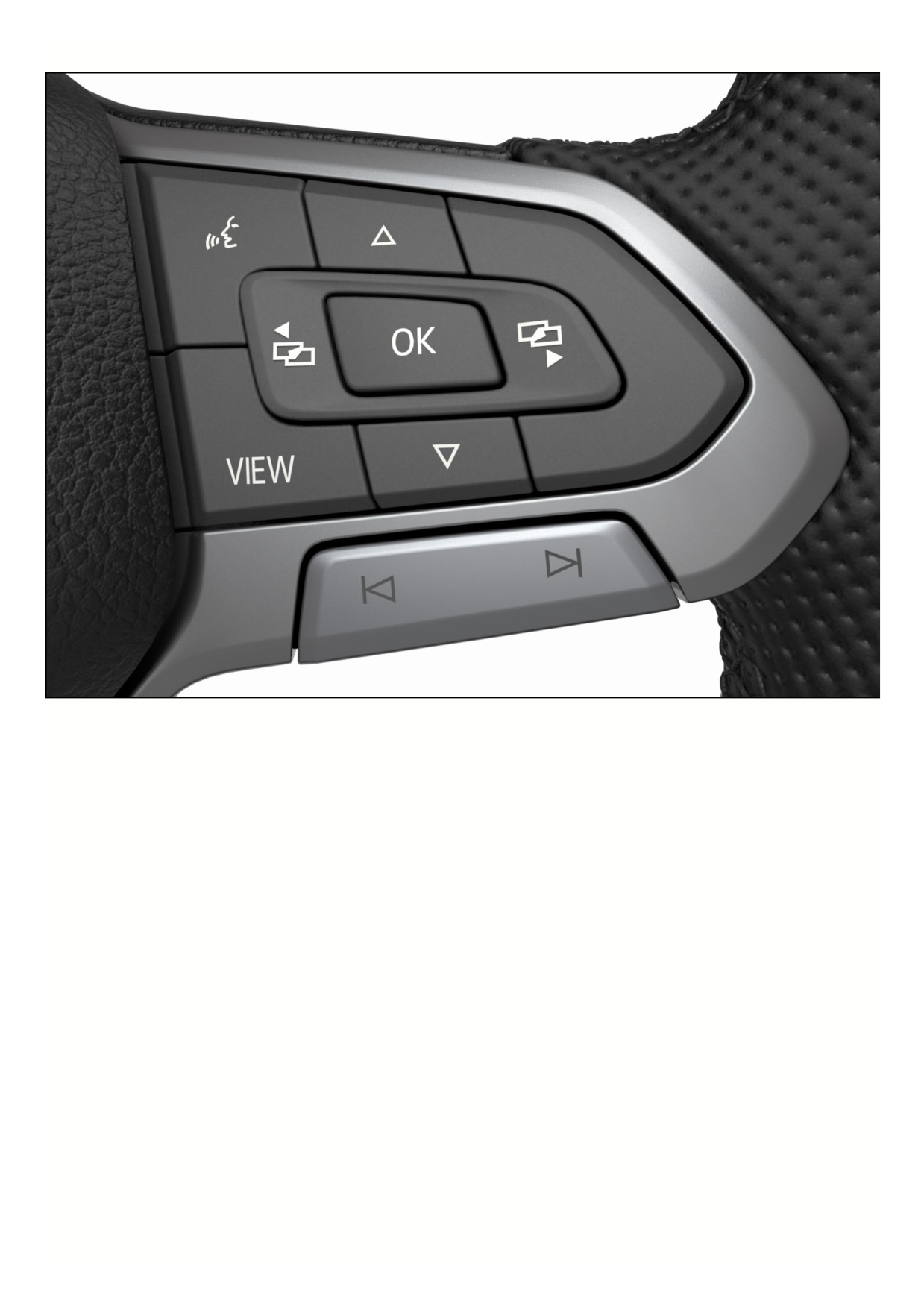
Fig. 13 Right side of the multi-function steering wheel: Operating the Volkswagen Digital Cockpit Basic (variant 1).
24
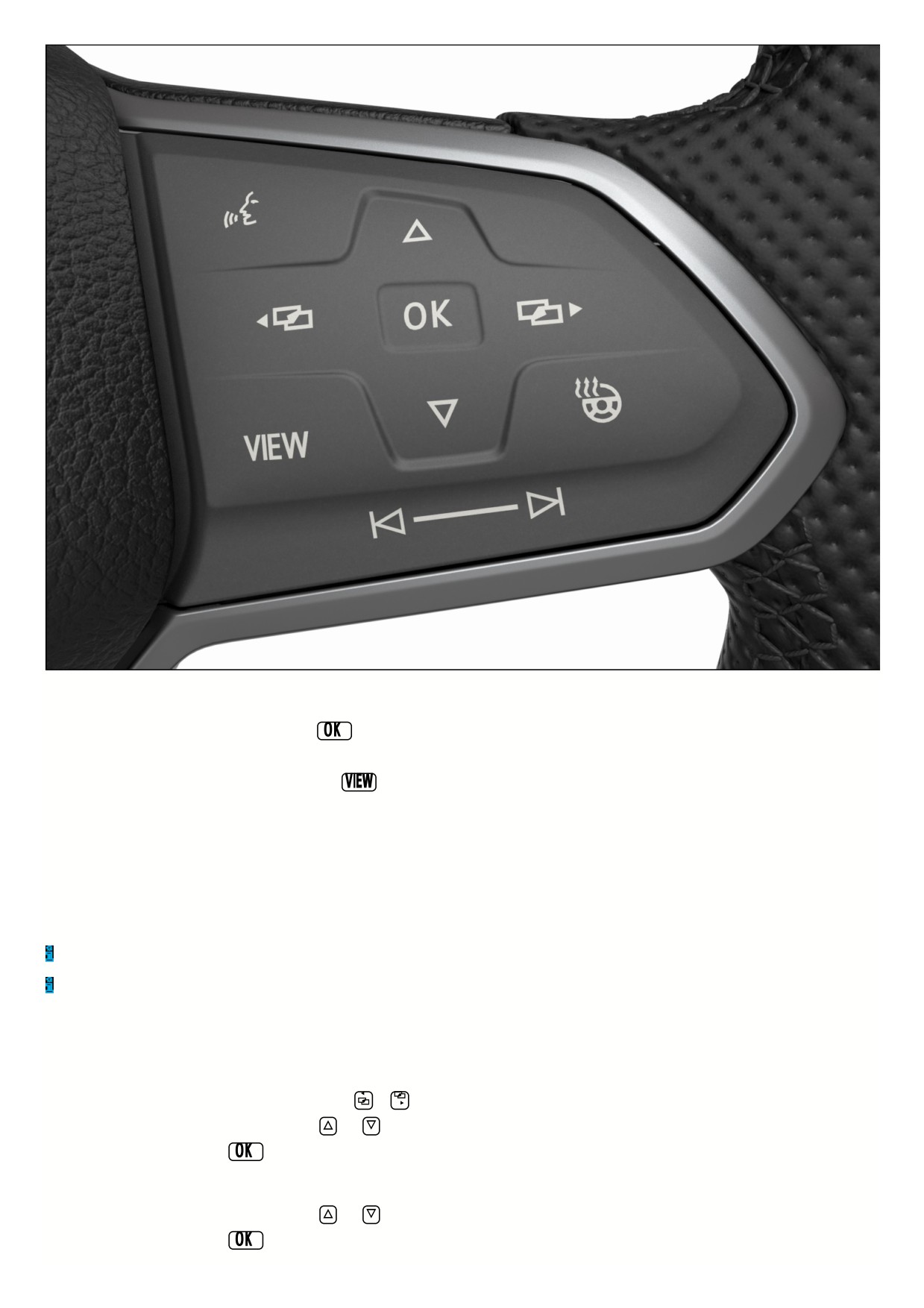
Fig. 14 Right side of the multi-function steering wheel: Operating the Volkswagen Digital Cockpit Basic (variant 2).
Vehicles with multi-function steering wheel: Menus cannot be accessed when a priority 1 warning message is displayed → page , Warning and information texts.
You can confirm and hide some messages using the
button on the multi-function steering wheel fig. 13, fig. 14.
Views in the main display area
1. Vehicles with multi-function steering wheel: Press the
button to switch the main display.
The following views can be shown in the display area:
Digital view
Digital speedometer with secondary displays.
Speed Classic display of the speedometer as a dial.
Tachometer Classic display of the tachometer as a dial.
Depending on the vehicle equipment, the amount of information shown and the scope thereof may vary.
After switching off the ignition, a display is shown with information on the vehicle status, e.g. total mileage.
In the speed and tachometer views, an additional secondary display can be configured in the center of the dial.
Selecting secondary displays
Vehicles with multi-function steering wheel: The secondary displays can be configured or hidden independently of each other. Various driving data, navigation
information or information about audio playback or phone interfaces can be shown on the secondary displays. To select the secondary displays, proceed as follows
1. Select the right or left secondary display area using the
or
buttons.
2. Select the preferred secondary display using the
and
arrow buttons.
3. Confirm your selection with the
button.
Selecting secondary displays in the dial
Vehicles with multi-function steering wheel:
1. Select the preferred secondary display using the
and
arrow buttons.
2. Confirm your selection with the
button.
25
If warning messages about malfunctions appear when the ignition is switched on, settings or information displays may not appear as described. If the
malfunction persists, contact a suitably qualified professional. Volkswagen recommends contacting an authorized Volkswagen dealer or authorized Volkswagen
Service Facility.
WARNING
Operating the Volkswagen Digital Cockpit and Infotainment system can distract you from traffic. If the driver is distracted while driving, accidents and serious or
fatal injuries can occur.
Always drive attentively and responsibly.
Never operate the instrument cluster while driving.
Only adjust any settings in the instrument cluster or Infotainment system when the vehicle is stationary.
Volkswagen Digital Cockpit Basic Information Displays
Possible displays
Depending on the vehicle equipment, different information may be shown in the main display and secondary display areas of the Volkswagen Digital Cockpit Basic:
Outside temperature display.
Time and date.
Digital speed.
Detected road sign from the traffic sign recognition.
Driver assistance systems.
Driving data menu, e.g. Travel time/distance driven.
Speed warning for winter tires.
Open doors, hood and trunk lid.
Odometer displays.
Compass display.
Radiator fan run-on.
Engine code ().
Navigation information.
Engine oil temperature.
Radio information.
Service interval display.
Status display for the start-stop system ⇒ Start/Stop system.
Phone information.
Selector lever position.
Warning and information texts.
Warning and indicator lights.
Depending on the vehicle equipment: Fuel-efficient driving
. Status display for Active Cylinder Management (ACT ) ⇒ Eco tips.
Destination information.
You can adjust further settings in the submenu.
Outside temperature display
When outside temperatures are colder than approximately +4 °C (+39 °F), a snowflake symbol also appears on the outside temperature display
. This symbol
remains on until the outside temperature rises above +6 °C (+43 °F).
In the following situations, the temperature displayed may be higher than the actual outside temperature due to heat radiating from the engine:
When the vehicle is stationary
When the driving speed is very low
The measurement range is from -45 °C (-49 °F) to +76 °C (+169 °F)
WARNING
Roads may be icy when outside temperatures are low, even if they are above the freezing point. There is an increased risk of an accident on icy roads. This
could result in serious or fatal injuries.
26

If the
symbol is displayed in the instrument cluster display, drive with extra caution.
Always adapt your speed and driving style to the visibility, weather, road and traffic conditions.
Never rely solely on the outside temperature display.
Open doors, hood and trunk lid
If, after unlocking the vehicle and while driving, any doors and/or the hood or trunk lid are open, this is displayed in the Volkswagen Digital Cockpit and an audible
signal may also sound.
Speed warning for winter tires
If the set maximum speed is exceeded, this will be shown in the digital instrument cluster.
Settings for the speed warning can be adjusted in the vehicle settings in the Infotainment system
⇒ Winter tires.
Compass display
If the Compass secondary display is activated, the direction in which you are currently driving is shown as a blue arrow with a depiction of the vehicle and a
compass.
Radiator fan run-on
This indicator appears after the ignition has been switched off, if the radiator fan continues to run.
The radiator fan may continue running due to:
Exhaust gas post-treatment, through particulate filter regeneration, for example.
Active brake cooling after descent.
Dissipation of engine heat after high load, e.g. trailer mode.
Engine code
1. Open the service menu ⇒ Service menu.
2. Select the Engine code menu item.
Navigation information
When route guidance is activated, the Navigation instruction auxiliary display shows the direction of travel as an arrow.
An arrow behind the entry in the configuration menu indicates a submenu.
The submenu lists your home address and a list of your most recent destinations. Route guidance can be started with the
button.
Phone information
If the Phone secondary display is activated and a cell phone is connected via Bluetooth, the Bluetooth symbol
will be displayed in the Volkswagen Digital Cockp
The symbol also indicates the charge level of the mobile device.
In the submenu, a list of the most recent phone calls is shown and you have the option to call the displayed contacts back.
Selector lever position for automatic transmission
The selector lever position and, depending on the driving mode, the gear that is engaged, are shown on the selector lever and in the Volkswagen Digital Cockpit.
The gear shift pattern is displayed when the brake or the selector lever in the instrument cluster are actuated.
Fuel-efficient driving
If the vehicle is driving in a fuel-efficient manner, this will be indicated in the Volkswagen Digital Cockpit while driving
Destination information
When route guidance is activated, the Destination information secondary display shows the predicted journey time and distance from the destination.
Some displays in the Volkswagen Digital Cockpit may be hidden due to events that occur suddenly, e.g. incoming phone calls.
Depending on the equipment, some settings and displays may also appear in the Infotainment system.
Tachometer
The start of the red area on the tachometer indicates the maximum permissible engine speed for all gears when the engine is run in and at operating temperature.
Before reaching the red area, shift to the next highest gear, select the selector lever position D/S or take your foot off the accelerator pedal.
NOTICE
27
A heavy engine load, especially when the engine is cold, can lead to engine damage.
Avoid high engine speeds, full acceleration and heavy engine loads when the engine is cold.
To prevent engine damage, the tachometer indicator may only be in the red area of the scale briefly.
Shifting up early helps save fuel and reduce operating noises.
Fuel gauge
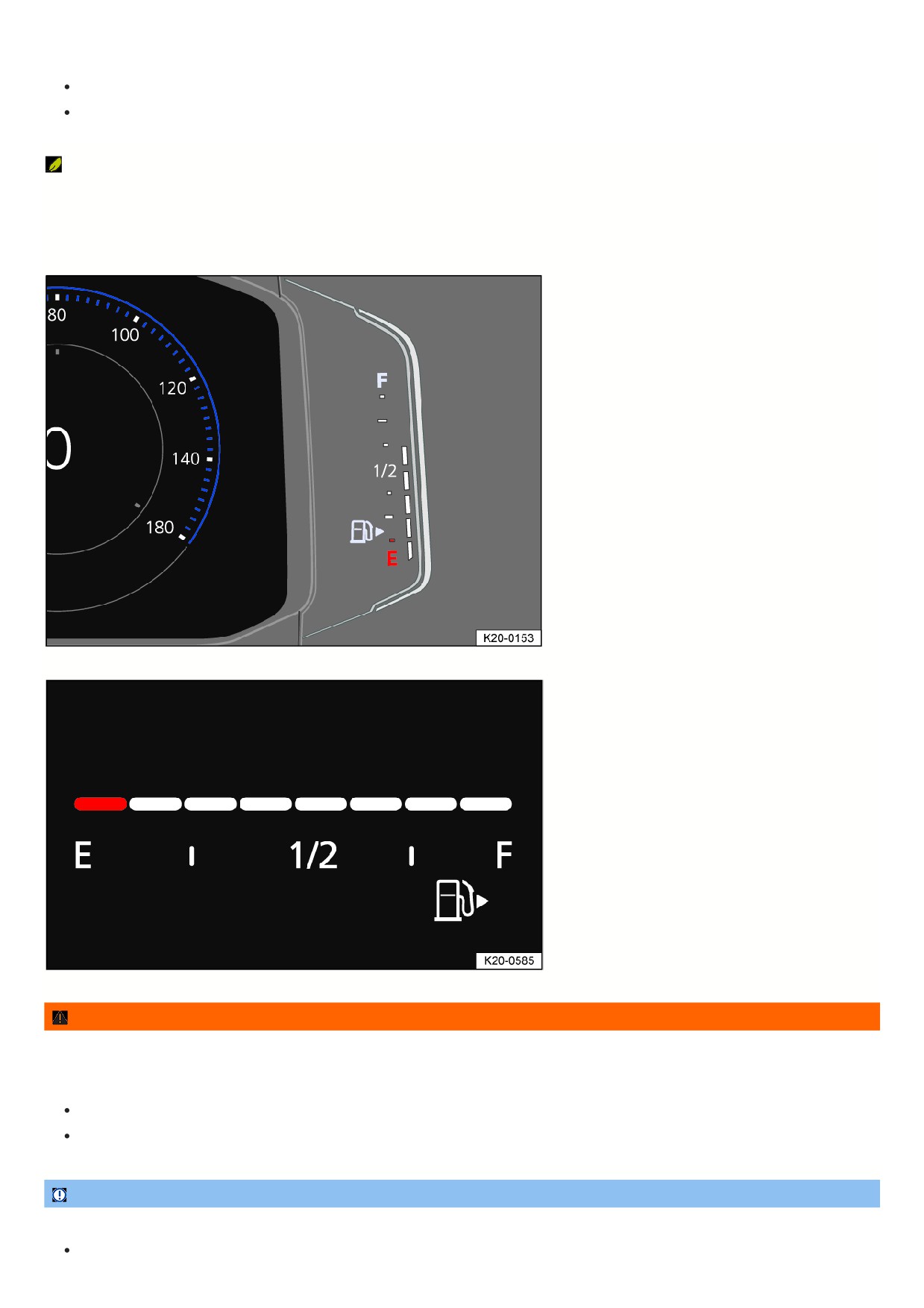
Digital fuel gauge
Fig. 15 Fuel gauge on the Volkswagen Digital Cockpit Pro (general example).
Fig. 16 Fuel gauge on the Volkswagen Digital Cockpit Basic (general example).
WARNING
If the fuel level is too low, this can result in an irregular fuel supply and “sputtering” or stalling of the engine, particularly when going uphill or downhill. This can
cause breakdowns in road traffic, accidents and serious or fatal injuries. The steering, all driver assistance systems and braking assistance systems will not
work if the engine cuts out due to fuel shortage or irregular fuel supply.
Make sure that the fuel tank is always sufficiently filled.
Always refill the fuel tank once it reaches a fill level of 1/4.
NOTICE
Irregular fuel supply can result in misfiring and unburnt fuel entering the exhaust system.
Never drive with a completely empty fuel tank.
28
The small arrow next to the fuel pump symbol on the fuel gauge indicates which side of the vehicle the fuel filler flap is on.
Troubleshooting
Fuel tank almost empty
The yellow indicator light turns on. The reserve supply (red marking ) is being used.
1. Refuel at the next opportunity.
Fuel tank cap open
The yellow indicator light turns on.
1. Close the fuel tank cap.
Engine coolant temperature gauge
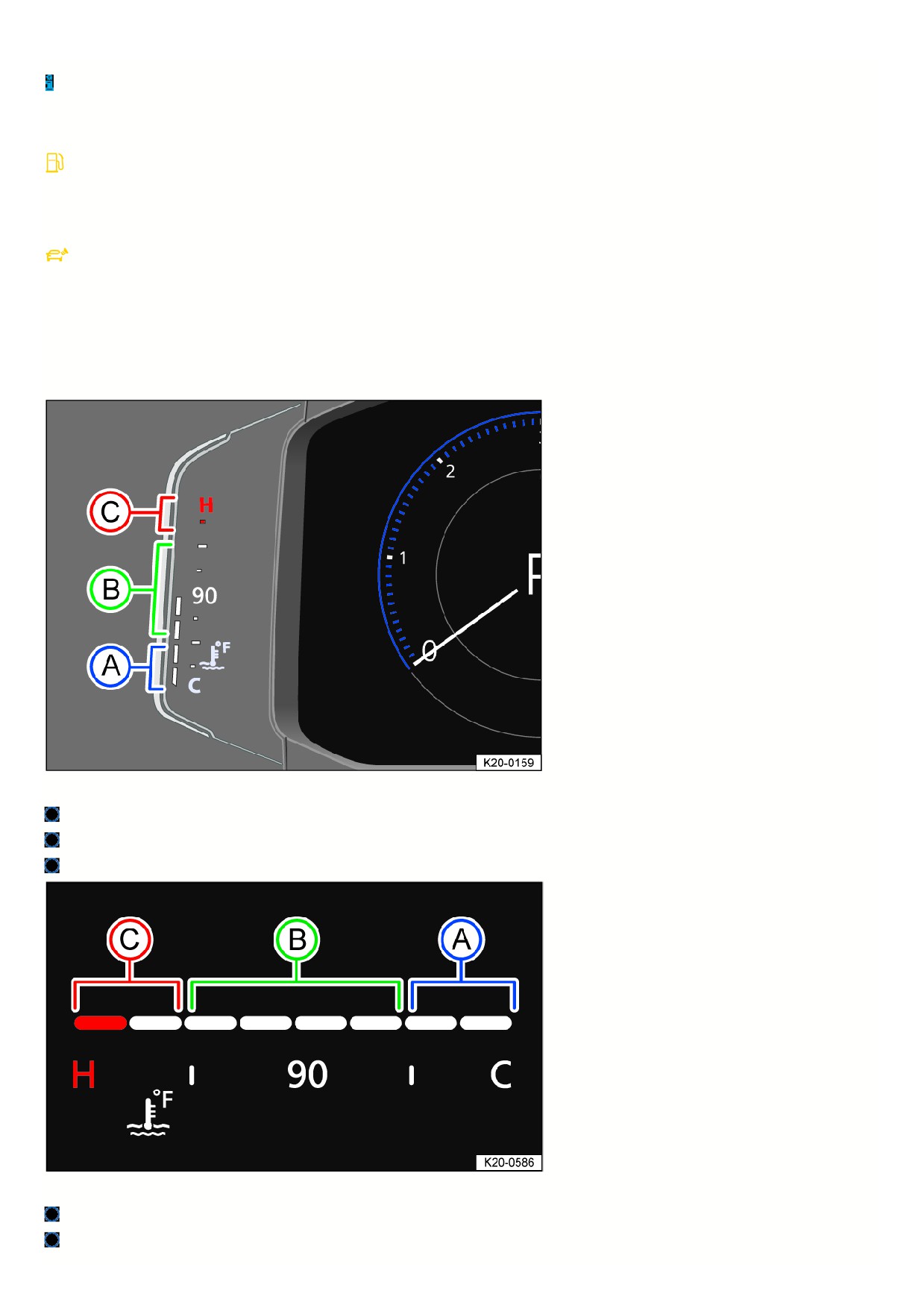
Digital coolant temperature gauge
Fig. 17 Coolant temperature gauge in the Volkswagen Digital Cockpit Pro (general example).
Cold range. The engine is not at operating temperature yet. Avoid high engine RPMs and heavy engine load when the engine is not at operating temperature.
Normal range.
Warning range. The needle may move into the warning range when engine load is heavy, especially when outside temperatures are high.
Fig. 18 Coolant temperature gauge in the Volkswagen Digital Cockpit Basic (general example).
Cold range. The engine is not at operating temperature yet. Avoid high engine RPMs and heavy engine load when the engine is not at operating temperature.
Normal range.
29

Warning range. The needle may move into the warning range when engine load is heavy, especially when outside temperatures are high.
If the
warning light flashes, the coolant temperature is too high or the coolant level is too low
⇒ Troubleshooting.
Driving data menu
The driving data menu shows driving and consumption data. Depending on the vehicle equipment, various driving data can be displayed. The displayed driving
data is dependent on the current driving style, the vehicle status, e.g. particle filter regeneration, and the current driving situation, e.g. city traffic. The driving data is
determined as an average value over sections of different distances and the currently displayed value may therefore differ from the actual average value.
Since start memory
If the trip is interrupted for more than two hours, the memory is erased.
Since refuel memory
Display and memory of the collective driving and consumption data. The memory is erased when the vehicle is refueled.
Extended period memory
The memory collects the driving data up to 19 hours and 59 minutes or 99 hours and 59 minutes driving time or 1999.9 km (miles) or 9999.9 km (miles) distance
driven. If one of these maximum thresholds is met, the memory is erased. The maximum thresholds may vary depending on the version of the instrument cluster.
Volkswagen Digital Cockpit Pro Driving Data Menu
The driving data is available in the context menu of the Volkswagen Digital Cockpit Pro.
Switching Between the Displays in the Volkswagen Digital Cockpit Pro
Vehicles with multi-function steering wheel:
1. Press the
or
button on the multi-function steering wheel.
Switching Memories in the Volkswagen Digital Cockpit Pro
Vehicles with multi-function steering wheel:
1. Press the
button on the multi-function steering wheel.
Deleting Driving Data Memories in the Volkswagen Digital Cockpit Pro
Vehicles with multi-function steering wheel:
1. Select the memory to be erased.
2. Press the
button on the multi-function steering wheel.
Setting the Speed Warning in the Volkswagen Digital Cockpit Pro
Vehicles with multi-function steering wheel:
1. Select the Warning at --- km/h or Warning at --- mph display.
2. Press the
button on the multi-function steering wheel to save the current speed and to activate the warning.
3. Set the speed on the multi-function steering wheel within approximately five seconds by pressing the
and
arrow buttons. Then press the
button
or wait several seconds.
The speed will then be saved and the warning will be activated.
4. Press the
button again to deactivate.
The stored speed is erased.
The warning can be set for speeds between 30 km/h (18 mph) and 250 km/h (155 mph).
Depending on the country, a single warning tone sounds at speeds of over approximately 80 km/h (approximately 50 mph), and from approximately 120 km/h
(approximately 75 mph), a continuous warning tone sounds. The
indicator light will also be displayed in the instrument cluster display. This warning is required
by law and cannot be altered.
Volkswagen Digital Cockpit Basic Driving Data Menu
The driving data is available in the secondary display area of the Volkswagen Digital Cockpit Basic.
Selecting the Driving Data Menu in the Volkswagen Digital Cockpit Basic
Vehicles with multi-function steering wheel:
1. Select the right or left secondary display area using the
or
buttons.
2. Select your preferred driving data menu using the
and
arrow buttons.
3. Confirm your selection with the
button.
Resetting the Driving Data Menu in the Volkswagen Digital Cockpit Basic
Vehicles with multi-function steering wheel:
1. Press the
or
button.
2. Select the corresponding driving data menu in the configuration menu using the
and
arrow buttons.
An arrow behind the entry in the configuration menu indicates a submenu.
3
3. In the submenu, select Reset data and confirm by pressing the
button.
Driving Data in the Infotainment system
Driving Data can be displayed in the Infotainment system, in addition to being displayed in the instrument cluster.
Selecting Displays in the Infotainment System
You can select the driving data you would like to display using the vehicle settings in the Infotainment system
⇒ Vehicle settings menu.
Consumption
The average fuel consumption is displayed after approximately 300 m (approx. 984 ft).
Range
This indicates the approximate distance in km (miles) the vehicle can travel under the same driving conditions.
Speed
The average speed is displayed after approximately 100 m (approximately 328 ft).
WARNING
If the driver is distracted while driving, accidents and serious injuries can occur. Operating the Volkswagen Digital Cockpit and Infotainment system can distract
you from traffic.
Always drive attentively and responsibly.
Never operate the instrument cluster while driving.
Only adjust any settings in the instrument cluster or Infotainment system when the vehicle is stationary.
Service
Service menu
Depending on the equipment, settings can be applied in the service menu.
Opening the Service Menu in the Volkswagen Digital Cockpit Pro
1. Select the Range information profile.
2. Press and hold the
button on the multifunction steering wheel for approximately four seconds.
3. Navigate in the menu using the buttons on the multi-function steering wheel.
Opening the Service Menu in the Volkswagen Digital Cockpit Basic
1. Select the Travel time/distance driven secondary display.
2. Press and hold the
or
button on the multi-function steering wheel in the same direction for approximately six seconds.
3. Use the
and
arrow buttons to navigate the menu.
Resetting the service interval display
1. Select Service menu.
2. Follow the instructions in the instrument cluster display.
Resetting the oil change service
1. Select Reset oil change service menu.
2. Follow the instructions in the instrument cluster display.
Resetting the Trip Odometer on the Volkswagen Digital Cockpit Pro
1. Select Reset trip menu.
2. Follow the instructions in the instrument cluster display.
Displaying the engine code
1. Select Engine code menu.
The engine code is shown on the instrument cluster display.
Setting the time
1. Select Time menu.
2. Set the time with the
and
arrow buttons.
Displaying copyright information
1. Select the Copyright menu to access the copyright information.
31
Service interval display
Displays about service events appear in the instrument cluster display and in the Infotainment system. There are different versions of the instrument cluster and
Infotainment system; therefore, the appearances of the displays may vary.
Service appointments at Volkswagen are divided into oil change services and inspections. The service interval display informs the driver about the next service
appointment which includes an engine oil change and about the next inspection.
The service intervals are specified for vehicles with the fixed oil change service interval.
Intervals are determined individually on vehicles with the flexible oil change service interval. Oil change services only need to be performed if the vehicle requires it
The specific operating conditions and the personal driving style are also taken into consideration. The service early warning message is first displayed 30 days prio
to the calculated oil change service due date. The displayed remaining distance to be traveled is always rounded to 100 km (miles) and the remaining time is
rounded to whole days.
Service notification
If an oil change service or an inspection service is due in the near future, a service notification will be displayed when the ignition is switched on.
The specified mileage or time is the distance or time until the next service can be completed.
Service event
When an oil change service or an inspection service is due, a chime will sound when switching on the ignition and you can then see a wrench symbol
for a fe
seconds in the Volkswagen Digital Cockpit together with one of the following displays:
Inspection now!
Oil change now!
Oil change service and inspection now!
Checking a service due date in the Infotainment system
When the ignition is on, the engine is off, and the vehicle is stationary, the current service due date can be viewed at any time:
1. Depending on the vehicle equipment, press the
button or function key on the Infotainment system and select the Vehicle menu.
Or: depending on the vehicle equipment, press the
button or function key.
2. Depending on how your vehicle is equipped, select the Settings menu.
3. Select the Service menu item to display the service information.
Checking a service due date in the Volkswagen Digital Cockpit
When the ignition is on, the engine is off, and the vehicle is stationary, the current service due date can be viewed at any time:
1. Open the service menu ⇒ Service menu.
Resetting the service interval display
If the service interval display was not reset after the oil change service or inspection service, the display can be reset as follows:
The service interval display can only be reset through the service menu ⇒ Service menu.
Do not reset the service interval display between service intervals or incorrect information will be displayed.
If the oil change service interval was manually reset, the service interval display then also switches to a fixed service interval, even on vehicles with the flexible oil
change service interval.
The service message automatically disappears after a few seconds when the engine is running or by pressing the
button on the windshield wiper
lever or the
button on the multi-function steering wheel.
If the 12 V vehicle battery in a vehicle with the flexible service interval has been disconnected for an extended period, the time for the next oil change service
cannot be calculated. Therefore, the service interval displays may show incorrect calculations. If this is the case, follow the maximum permissible maintenance
intervals.
Time
Setting the time in the Infotainment system
1. Depending on the design, press the
button or function key and open the Vehicle menu.
Or: depending on the vehicle equipment, press the
button or function key.
2. Depending on how your vehicle is equipped, open the Settings menu.
3. Select the Time and date menu item to set the time.
Setting the Time in the Volkswagen Digital Cockpit Pro
1. Select the Range information profile.
2. Press and hold the
button on the multi-function steering wheel until the service menu is available in the instrument cluster display
⇒ Service menu.
32
3. Select Time menu.
4. Set the correct time using the
or
arrow buttons.
Setting the Time in the Volkswagen Digital Cockpit Basic
1. Open the service menu ⇒ Service menu.
2. Select the Time menu.
3. Set the correct time with the
button.
Sport displays
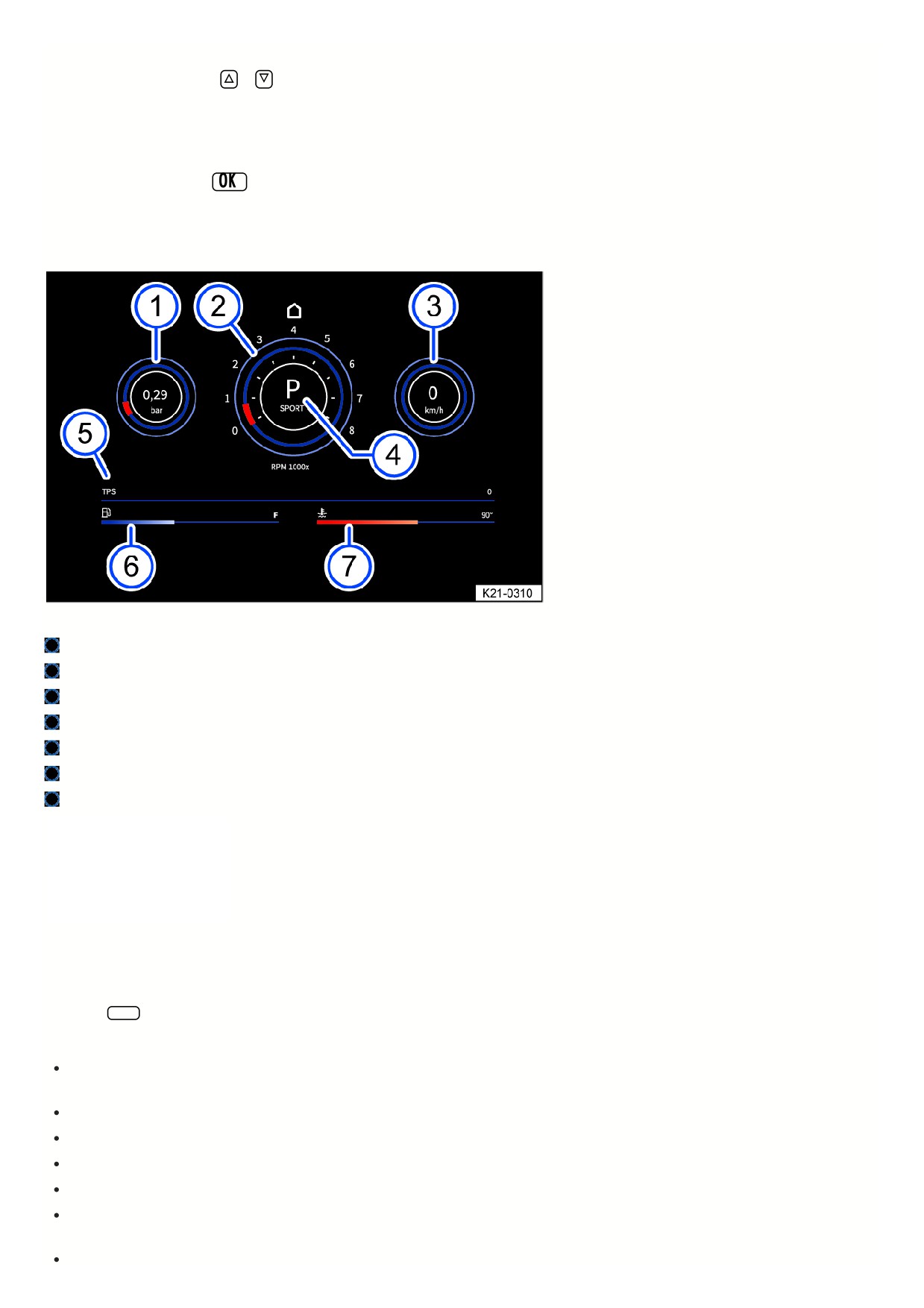
Performance monitor
Fig. 19 On the Infotainment system screen: performance monitor.
Boost pressure indicator.
Tachometer.
Speed display.
Gear indicator
TPS display.
Fuel gauge.
Coolant temperature gauge.
The performance monitor is a display
for sporty driving. The digital
instruments show values in real time for
engine power, temperature, and
acceleration that are determined by
sensors in the vehicle. This gives the
driver an overview of the driving
dynamics.
Depending on the vehicle equipment, the amount of information shown and the scope thereof may vary.
Opening the performance monitor
1. Swipe left on the home screen of the Infotainment system.
2. Tap the Sport function key.
The following instruments can be displayed:
Boost pressure indicator: the boost pressure indicator fig. 19 (left) displays the boost pressure between the turbocharger and the engine in bar. The fuller th
bar on the display, the more engine power is being used.
Tachometer: The tachometer fig. 19 specifies the engine revolutions per minute.
Speed display: The speed display fig. 19 shows the speed currently being driven at in km/h.
Gear indicator: The gear indicator fig. 19 shows the currently engaged gear or selected lever position.
TPS display: The TPS display fig. 19 shows the throttle position. The horizontal bar moves right when the accelerator pedal is pressed.
Fuel gage: This display fig. 19 is synonymous with the fuel display on the Volkswagen Digital Cockpit. If the vehicle is consuming fuel, the horizontal bar
moves left.
Coolant temperature gage: This display fig. 19 is synonymous with the temperature display on the Volkswagen Digital Cockpit. If the engine is exposed to
33
excessive load or high outside temperatures, the horizontal bar moves right. This is not a cause for concern as long as the
indicator light in the instrument
cluster display is off or blinking.
WARNING
If the driver is distracted, accidents and serious injuries can occur. Operating the Infotainment system can distract you from traffic.
Always drive attentively and responsibly.
Adjust settings in the Infotainment system only when the vehicle is stationary.
NOTICE
A heavy engine load, especially when the engine is cold, can lead to engine damage.
Avoid high engine speeds, full acceleration and heavy engine loads when the engine is cold.
To prevent engine damage, the tachometer indicator may only be in the red area of the scale briefly.
Because of the methods that are used to determine power in the vehicle, the displayed values may not be completely precise.
Vehicle settings menu
You can switch individual functions and
systems on and off and adjust settings
in the vehicle settings menu in the
Infotainment system.
Opening the Vehicle settings Menu
1. Switch the ignition on.
2. If necessary, switch on the Infotainment system.
3. Depending on the equipment, press the
button or function key and select the Vehicle menu.
Or: depending on the design, press the
button or function key and select the Settings menu.
Or: Tap the
function key and select the Car menu.
4. To open other menus in the Vehicle settings menu or to adjust settings to the menu items, tap the
function key and select the relevant function keys.
5. Tap the
function key to return to the previous menu.
A check mark
indicates that the respective function is switched on.
System settings and vehicle information display
Vehicle settings (setup)
Depending on vehicle equipment: Performance monitor ⇒ Performance monitor.
Depending on vehicle equipment: Lap timer.
Off-road display ⇒ Offroad display.
Volkswagen Digital Cockpit (Pro) ⇒ Volkswagen Digital Cockpit Pro , ⇒ Volkswagen Digital Cockpit Pro Information Displays .
Volkswagen Digital Cockpit (Basic) ⇒ Volkswagen Digital Cockpit Basic, ⇒ Volkswagen Digital Cockpit Basic Information Displays.
Active media.
Driving Data.
Vehicle status.
Radio station selection.
After starting the engine when the 12 V vehicle battery is severely drained or has been replaced or jump-started, system settings, e.g. personal convenience
settings and programming, may be adjusted or deleted. Check and correct the settings after the 12 V vehicle battery is sufficiently recharged.
WARNING
If the driver is distracted, accidents and serious injuries can occur. Operating the Infotainment system can distract you from traffic.
Always drive attentively and responsibly.
Adjust settings in the Infotainment system only when the vehicle is stationary.
Dynamic Road Sign Display
34
Introduction
The Dynamic Road Sign Display detects
standard road signs using a camera in
the interior rearview mirror base and
informs the driver of detected speed
limits and passing restrictions. Within
the system limits, the system also
displays an additional sign to indicate
special restrictions. The system may
also continue to display the valid speed
limit on roads without signs.
The traffic signs recorded by the Dynamic Road Sign Display are shown in the display of the Volkswagen Digital Cockpit. Depending on the Infotainment system
installed in the vehicle, the road signs may also be displayed there.
Dynamic Road Sign Display is always active when the ignition is started.
Road sign display
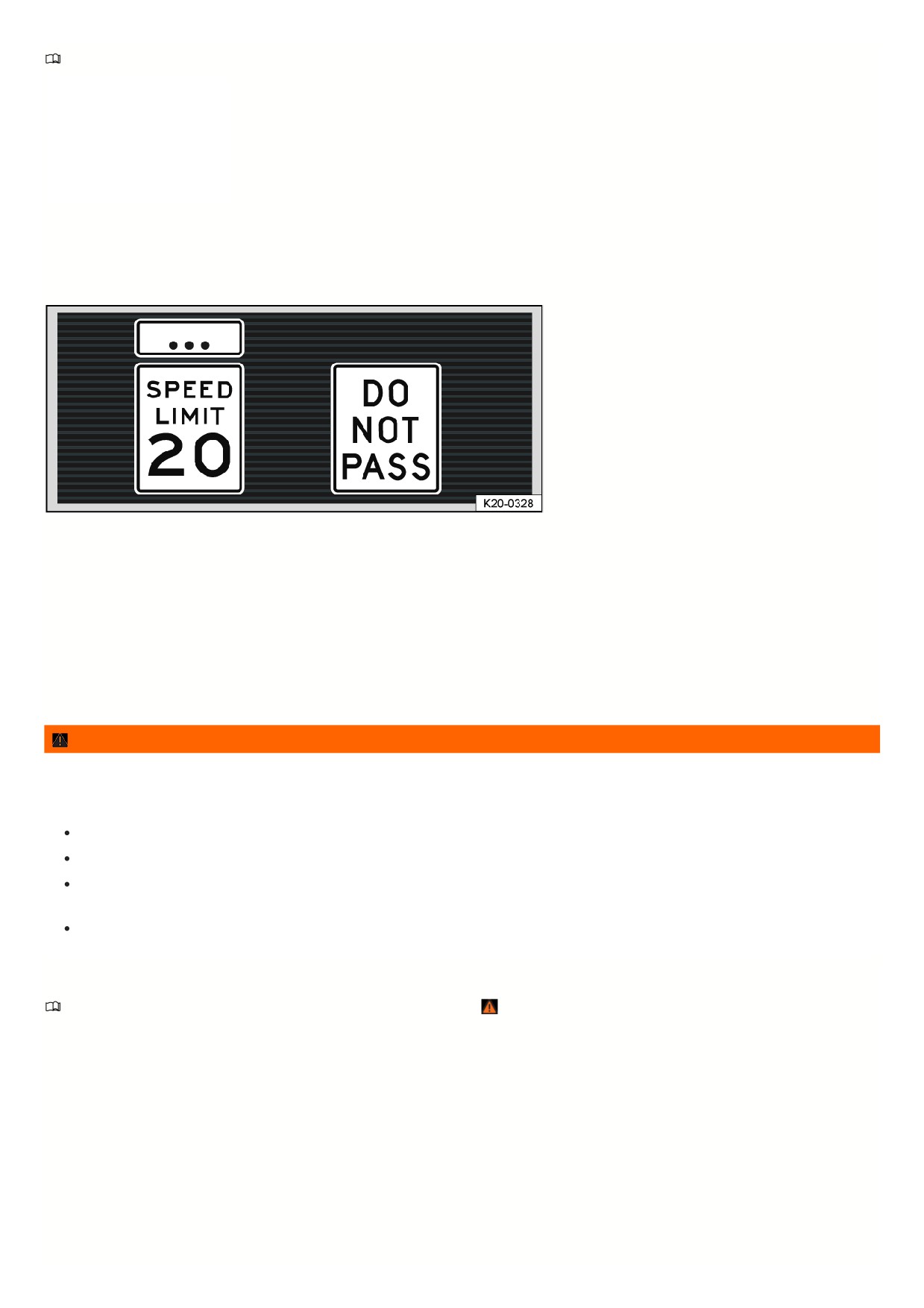
Fig. 20 In the instrument cluster display: Example of detected speed limits.
After checking and evaluating the information from the camera, the Infotainment system, and the current vehicle data, the Dynamic Road Sign Display function
displays up to two valid traffic signs and a generic additional sign fig. 20:
1st position:The traffic sign that currently applies is shown on the left side of the display, for example a speed limit of 20 mph (35 km/h).
2nd position:
Another road sign can be displayed in the second position, such as a passing restriction.
Additional signs:
A recognized additional sign is displayed above the applicable traffic sign. Depending on the system, a generic additional sign is displayed
instead of the actually recognized additional sign. The applicable traffic sign in the display of the instrument cluster is supplemented by the generic
additional sign.
WARNING
The Dynamic Road Sign Display is not a replacement for the driver's attention and works only within the system limitations. This means that the Dynamic Road
Sign Display cannot detect all road signs and may not react, or may react with a delay, or may react in a way that is not desired. Driving recommendations and
road signs displayed in the Dynamic Road Sign Display may differ from the actual traffic situation.
Observe the system limitations ⇒ Limits of the Dynamic Road Sign Display .
Always stay attentive and do not rely solely on the system. The driver is always responsible for control of the vehicle.
Traffic signs on the roads and traffic regulations must always take precedence over driving recommendations and displays from the Dynamic Road Sign
Display function.
Always adapt your speed and driving style to the visibility, weather, road and traffic conditions.
Limits of the Dynamic Road Sign Display
Please read the introductory information and heed the Warnings and Notice ⇒
Introduction.
Error messages
No road signs available.
The system is in the initialization phase.
Or: the vehicle has not detected any road signs.
Error: Dynamic Road Sign Display.
System malfunction. If the malfunction persists, contact a suitably qualified professional. Volkswagen recommends
contacting an authorized Volkswagen dealer or authorized Volkswagen Service Facility.
Speed Alert currently not available.
The speed alert from the Dynamic Road Sign Display is malfunctioning. If the malfunction persists, contact a suitably
qualified professional. Volkswagen recommends contacting an authorized Volkswagen dealer or authorized Volkswagen Service Facility.
Dynamic Road Sign Display: Clean windshield!
The windshield is dirty in the area around the camera or weather conditions are interfering with the camera
view. Clean the windshield.
Dynamic Road Sign Display is currently limited. Data is not being transmitted by the Infotainment system. Check that valid map data is loaded in the
35

Infotainment system.
Or: the vehicle is located in an area that is not detected on the map stored in the Infotainment system.
No data available.
The Dynamic Road Sign Display function is not supported in the country where the vehicle is currently being operated.
Functional limitations
The Dynamic Road Sign Display is subject to system limitations. The following conditions may cause the Dynamic Road Sign Display function to be limited or to no
operate at all:
High ambient temperature or long exposure to direct sunlight.
Poor visibility, such as in snow.
Glare, for example from oncoming traffic or the sun
High speeds
If the camera is obstructed or dirty
If road signs are outside of the camera’s visual field
If road signs are partially or completely covered, for example by trees, snow, dirt, or other vehicles.
If road signs are not in the standard format
If there are damaged or bent road signs
If there are variable traffic signs on overhead signs (variable display of road signs with LED s or other lighting).
If there is outdated map material in the Infotainment system
If there are stickers on vehicles that indicate road signs, such speed limits on commercial vehicles
Operating the Dynamic Road Sign Display
Please read the introductory information and heed the Warnings and Notice ⇒
Introduction.
Speed warning
If the Dynamic Road Sign Display function detects that a valid speed limit is being exceeded, it may warn the driver audibly, or visually and audibly, with a message
in the instrument cluster display.
The speed warning can be set or completely deactivated in the Infotainment system
⇒ Vehicle settings menu. The speed warning can be set to a value of 0 mph
(0 km/h), 3 mph (5 km/h) or 5 mph (10 km/h) over the permitted speed.
36

Safety
General information
Driving preparations and driving safety
Observe the following points before and during every trip, for your own safety and for the safety of your passengers and others on the road
⇒
:
Make sure the vehicle lighting and turn signals are functioning correctly.
Check the tire pressure and fuel level ⇒ Checking the tire pressure, ⇒ Fuel gauge.
Check the washer fluid level ⇒ Washer fluid.
Ensure that the windows are clear and provide good visibility ⇒ Exterior care and cleaning.
The air intake for the engine must not be blocked. The engine must not be covered with covers or insulation
⇒ Safety precautions for working in the engine
compartment.
Secure all objects and luggage in the storage compartments and the luggage compartment
⇒ Transporting.
It must be possible to press the pedals without interference.
Secure children with child restraint systems that are appropriate for their weight and height
⇒ Transporting children safely.
Adjust the front seats, head restraints, and mirrors according to the size of the occupants
⇒ Seating position, ⇒ Mirrors.
Wear shoes that give your feet good grip for operating the pedals.
The floormat in the driver side footwell must be kept clear from the pedal area and be secured.
Assume the correct seating position before driving and remain that way while driving. This also applies to all passengers
⇒ Seating position.
Fasten the safety belt correctly before you begin driving and keep it fastened while driving. This also applies to all passengers
⇒ Safety belts.
The number of passengers must not exceed the number of seats and safety belts.
Never drive when impaired, for example by medication, alcohol, or drugs.
Never allow yourself to be distracted from traffic, such as by adjusting settings, by opening menus, by passengers, or by phone calls.
Always adapt your speed and driving style to the current visual, weather, road, and traffic conditions.
Follow driving rules and posted speed limits.
Take regular breaks on long trips. You should take a break at least every two hours.
Secure animals in the vehicle restraint systems that are appropriate for their weight and size.
Driving in other countries
Some countries have special safety standards and regulations that differ from the vehicle configuration. Volkswagen recommends that you inform yourself about
legal regulations and about the following points from an authorized Volkswagen dealer or authorized Volkswagen Service Facility before driving in other countries.
Volkswagen recommends contacting an authorized Volkswagen dealer or authorized Volkswagen Service Facility.
Do technical modifications need to be made to the vehicle before driving in other countries, such as covering or adjusting the headlights?
Are the tools, diagnostic equipment, and replacement parts that are needed for maintenance and repair work available?
Is there an authorized Volkswagen dealer or authorized Volkswagen Service Facility in the country where you will be driving?
Are fluids that meet Volkswagen specifications available in the country where you will be driving
⇒ Operating fluids and operating equipment ?
Will the navigation function in the factory-installed Infotainment system work with the existing navigation data in the country where you will be driving?
Are special tires needed in the country where you will be driving?
Is a fire extinguisher required in the country where you will be driving?
What are the requirements for a safety vest?
Is fuel with sufficient quality available ⇒ Fuel and emissions control system?
Checks when refueling
Only perform work on the engine and in the engine compartment if you are familiar with the necessary steps and the general safety precautions, and if the correct
operating equipment, fluids, and suitable tools are available ⇒ Safety precautions for working in the engine compartment ! Have all work performed by suitably
qualified professionals. Volkswagen recommends contacting an authorized Volkswagen dealer or authorized Volkswagen Service Facility. Make sure that the
following items are checked regularly:
Washer fluid level ⇒ Washer fluid.
Engine oil level ⇒ Engine oil.
Engine coolant level ⇒ Engine coolant.
Brake fluid level ⇒ Brake fluid specifications.
Tire inflation pressure ⇒ Checking the tire pressure .
37
Vehicle lighting ⇒ Headlights which is necessary for traffic safety:
Information on changing bulbs ⇒ Exterior lighting.
DANGER
Read and heed the important safety instructions for the front passenger's front airbag
⇒ Safety notes on using child restraints .
WARNING
Alcohol, drugs, medication, and prescription narcotics can considerably impair perception, reaction times, and driving safety, which can result in loss of vehicle
control. This can cause accidents and serious or fatal injuries.
Do not drive under the influence of alcohol, drugs, medication or prescription narcotics.
WARNING
Not paying attention to road traffic can cause accidents and serious or fatal injuries.
Always comply with the applicable driving regulations and speed limits and think ahead while driving.
Take regular breaks on long drives. You should take a break at least every two hours.
NOTICE
Volkswagen is not responsible for damage to the vehicle caused by substandard fuel, insufficient maintenance, or unsuitable replacement parts.
Volkswagen recommends the use of Volkswagen original parts or Volkswagen original accessories, which you can acquire from an authorized
Volkswagen dealer or authorized Volkswagen Service Facility.
Having the vehicle serviced regularly not only maintains the value of the vehicle, but also contributes to operational safety and roadworthiness. Therefore, have
maintenance procedures performed according to Volkswagen instructions. Under extreme operating conditions, some work may need to be performed before the
next service is due. Extreme operating conditions can include frequent stop-and-go driving or driving in areas with a lot of dust in the air. For further information,
contact an authorized Volkswagen dealer or authorized Volkswagen Service Facility. Volkswagen recommends contacting an authorized Volkswagen dealer or
authorized Volkswagen Service Facility.
Seating position
Introduction
Number of seats
The vehicle has a total of five seats: two seats in the front and three seats in the back.
Every seat is equipped with a safety belt.
WARNING
Sitting incorrectly in the vehicle can increase the risk of serious or fatal injuries during sudden driving or braking maneuvers, in the event of a collision or
accident, and if the airbags are deployed.
Before the vehicle starts to move, all vehicle occupants must always be in the correct seating position and maintain it while driving. Safety belts must
also be fastened and remain fastened.
The number of persons in the vehicle must not exceed the number of seats with safety belts.
Always secure children in the vehicle with an approved and suitable child restraint system according to the child's body size and weight
⇒ Transporting
children safely and ⇒ Airbag system.
Always keep feet in the footwell while driving. For example, never rest feet on the seat or on the instrument panel and never hold feet out of the window.
Otherwise, if the airbag and the safety belt deploy, they could increase the risk of injury in the event of an accident instead of providing protection.
Risk of injury due to an incorrect seating position
Please read the introductory information and heed the Warnings and Notice ⇒
Introduction.
The risk of serious or fatal injuries will increase if safety belts are not worn or are incorrectly fastened. Safety belts can only achieve the optimum protection if they
are routed correctly. An incorrect seating position significantly impairs the protective function of the safety belt. This could result in serious or fatal injuries. The risk o
serious or fatal injuries increases even more if a deployed airbag strikes a passenger who is sitting in an incorrect seating position. The driver is responsible for all
vehicle occupants and especially for children who are being transported in the vehicle.
The following list includes examples of seating positions that could be dangerous for all vehicle occupants.
38
The following points always apply when the vehicle is in motion:
Never stand inside the vehicle.
Never stand on the seats.
Never kneel on the seats.
Never tilt your seat backrest too far back.
Never lean against the instrument panel.
Never lay down in the seats in the vehicle interior or on the rear bench seat.
Never sit only on the front section of the seat.
Never sit sideways on the seat.
Never lean against the window.
Never place your feet out of the window.
Never place your feet on the instrument panel.
Never place your feet on the seat cushion or on the seat backrest.
Never ride in the footwell.
Never sit on the armrests.
Never drive or ride in a seat without fastening your safety belt.
Never ride in the trunk.
WARNING
Incorrect seating positions in the vehicle increase the risk of serious or fatal injuries in the event of an accident or sudden driving and braking maneuvers,
especially if the airbags are deployed and exert force on a vehicle occupant who is not sitting correctly.
All vehicle occupants must always sit in the correct seating position and have their own safety belts correctly fastened while driving.
Correct seating position
Please read the introductory information and heed the Warnings and Notice ⇒
Introduction.
Fig. 21 General example: correct distance between the driver and the steering wheel, correct safety belt routing and correct head restraint adjustment.
The correct seating positions for the driver and passengers are specified in the information that follows. The safety belt and airbags only provide the optimum
protection when vehicle occupants are seated in a correct seating position.
If you have a physical impairment that prevents you from sitting correctly on the driver seat with a correctly worn safety belt and reaching the pedals, special
modifications to your vehicle may be necessary. For information on possible changes to your vehicle, contact an authorized Volkswagen dealer or authorized
Volkswagen Service Facility qualified for this. Volkswagen recommends contacting an authorized Volkswagen dealer or authorized Volkswagen Service Facility.
Alternatively, contact the Volkswagen Customer CARE Center at +00 (1) 800 822 8987.
For your safety and to reduce the risk of injuries in the event of a sudden braking maneuver or accident, Volkswagen recommends the following seating positions:
The following applies to all vehicle occupants:
Adjust the head restraint so that the upper edge of the head restraint is in line with the upper portion of the head as much as possible, but not lower than eye
level. Position the back of the head as close as possible to the head restraint fig. 21.
For shorter individuals, slide the head restraint all the way downward, even if the head is then below the upper edge of the head restraint.
For taller individuals, move the head restraint upward all the way.
39

Keep both feet in the footwell while driving.
Adjust and fasten the safety belts correctly ⇒ Safety belts.
The following additional points apply to the driver:
Adjust the forward/back position of the driver seat so that you can press the pedals while your legs are slightly bent and there is at least 10 cm (around
4 inches) of space between the instrument panel and your knees fig. 21.
Adjust the driver seat so that the top point of the steering wheel can be reached.
Position the seat backrest in an upright position, so that your back rests completely on the seat backrest.
Adjust the steering wheel so that the distance between the steering wheel and your chest is at least 25 cm (around 10 inches) fig. 21 and you can hold the
steering wheel firmly at the sides with both hands and your elbows slightly bent.
When adjusted, the steering wheel must always face your chest and not be directed toward your face.
In vehicles with head restraints that can be moved forward or back, position the head restraint so that it is as close as possible to the back of the head.
Always keep both feet in the footwell to keep control of the vehicle at all times.
The following additional points apply to the front passenger:
In vehicles with head restraints that can be moved forward or back, position the head restraint so that it is as close as possible to the back of the head.
Position the seat backrest in an upright position, so that your back rests completely on the seat backrest.
Move the front passenger seat back as far as possible so that the airbag can provide optimum protection if it deploys.
Safety belts
Introduction
Check the condition of all of the safety belts regularly. If there is damage to the belt fabric, the belt connections, the automatic safety belt retractor or the buckle,
have the affected safety belt replaced immediately by suitably qualified professionals ⇒
. The authorized Volkswagen dealer or authorized Volkswagen Service
Facility must use the correct parts for the vehicle, equipment and model year. Volkswagen recommends contacting an authorized Volkswagen dealer or authorized
Volkswagen Service Facility.
WARNING
The risk of serious and fatal injuries increases if the safety belts are not worn or are worn incorrectly.
Safety belts are the most effective way to reduce the risk of serious and fatal injuries in a collision. Before every trip, vehicle occupants must therefore
seat themselves correctly, fasten the safety belt that belongs to the seat they are using, and keep it fastened while the vehicle is in motion. This applies to
all passengers and at all times, including during city driving.
Secure only one person with a safety belt.
Secure children in the vehicle with a child restraint that is appropriate for their weight and height and with the safety belt used correctly
⇒ Transporting
children safely.
Never allow children or infants to ride on anyone's lap and never strap children or infants to another person with the same safety belt.
Only ever insert and latch the buckle tongue in the belt buckle for the corresponding seat. Using a buckle from another seat reduces the protection
provided by the safety belt and can cause serious injuries.
Do not wear extremely bulky, loose clothing in the vehicle, such as a coat over a sports jacket, because this could impair the fit and function of the safety
belt.
WARNING
If the belt webbing or other parts of the safety belts are damaged, the safety belts could tear during a collision or sudden braking maneuver and cause serious or
fatal injuries.
Never damage the safety belts by trapping them or chafing them on sharp edges.
Have damaged safety belts replaced immediately with new safety belts that are approved for the vehicle by Volkswagen. Safety belts that are stretched
during a collision must be replaced by an authorized Volkswagen dealer or authorized Volkswagen Service Facility. Volkswagen recommends contacting
an authorized Volkswagen dealer or authorized Volkswagen Service Facility. It may be necessary to replace them even if there is no visible damage.
Check the safety belts' anchorage points as well.
Never try to repair, modify, or remove the safety belts yourself. Have all repairs to safety belts, safety belt retractors, and buckle components performed
only by an authorized Volkswagen dealer or authorized Volkswagen Service Facility. Volkswagen recommends contacting an authorized Volkswagen
dealer or authorized Volkswagen Service Facility.
Fasten seat belts reminder and seat belt safety indicator
Please read the introductory information and heed the Warnings and Notice ⇒
Introduction.
4
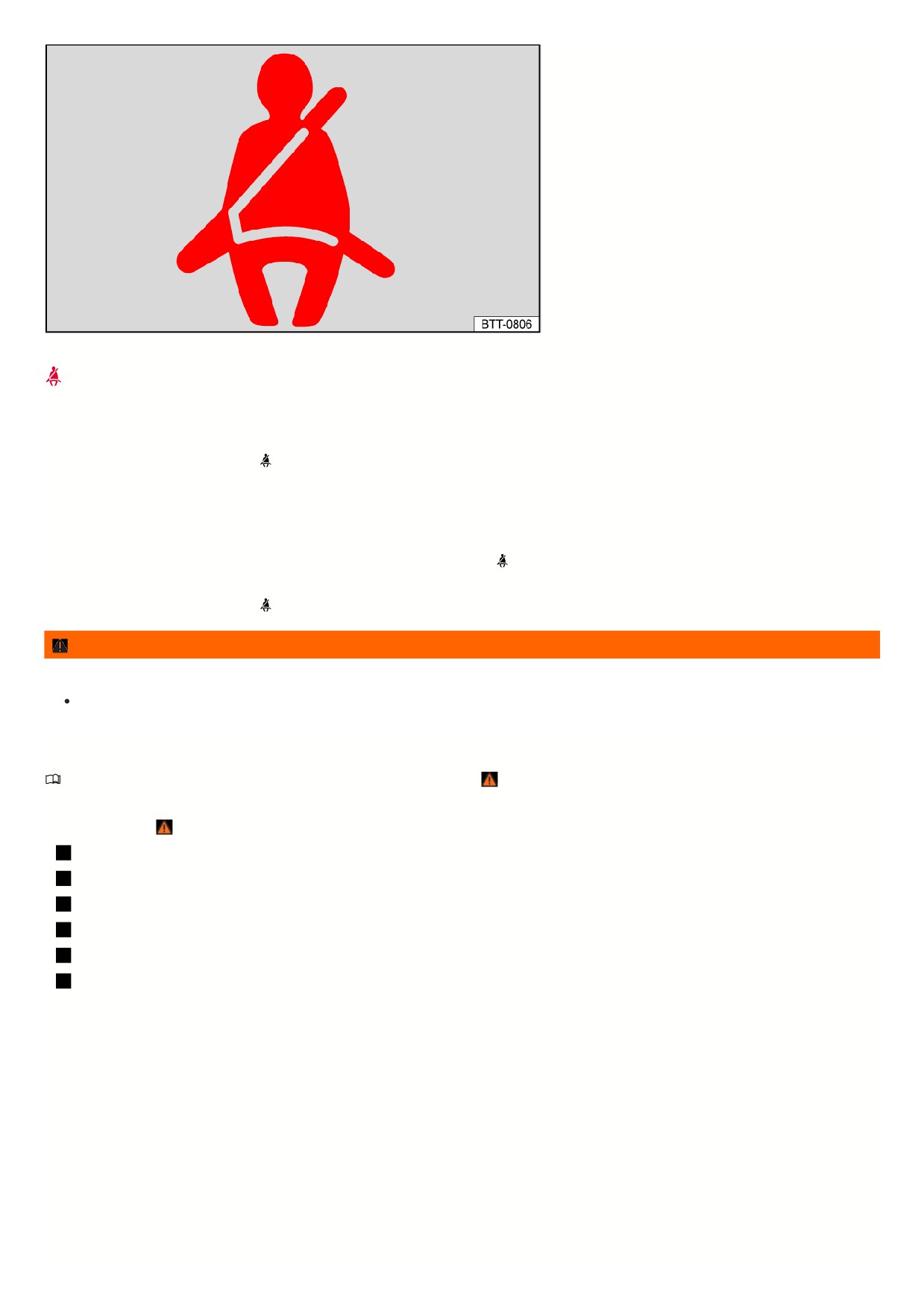
Fig. 22 In the instrument cluster display: warning light.
The driver or front passenger has not fastened their safety belt. Fasten all safety belts.
When the ignition is switched on, several warning and indicator lamps light up temporarily as a function check. They then turn off after a few seconds.
A chime also sounds.
When the ignition is switched on, the red
warning light comes on for six seconds. A chime also sounds for up to six seconds if the driver safety belt is not
fastened. The chime ends when the driver fastens their safety belt. The warning lamps and chime go off when the driver and front passenger have fastened their
safety belts.
If the driver and front passenger do not both fasten their safety belts within 10 seconds after the warning chime has ended and the vehicle is driving at a speed
above approx. 25 km/h (approx. 15 mph), the chime sounds again for approx. 6 seconds, then stops for approx. 24 seconds, and then sounds again for approx. 6
seconds. The same happens if one of the safety belts is released while driving. The red
warning light comes on. A warning chime also sounds for up to two
minutes at 24-second intervals. The chime does not sound at speeds below approx. 8 km/h (approx. 5 mph).
When the ignition is switched on, the red
warning light comes on until the driver and front passenger have both fastened their safety belts.
WARNING
The risk of serious and fatal injuries increases if the safety belts are not worn or are worn incorrectly.
Fasten the safety belts and use them correctly to ensure that they provide optimum protection.
Using safety belts
Please read the introductory information and heed the Warnings and Notice ⇒
Introduction.
Checklist
Using safety belts ⇒
:
Check the condition of all of the safety belts regularly.
Keep safety belts clean.
Always keep foreign objects and fluids far away from the safety belt, the safety belt buckle, and the slot in the safety belt buckle.
Do not pinch or damage the safety belt and/or belt buckle, for example closing it in a door.
Never remove, modify, or repair the safety belt and belt fastening elements.
Always fasten the safety belt correctly before you begin driving and keep it fastened while driving.
Twisted safety belt
If the safety belt is difficult to pull out of the belt guide, the safety belt may have been pulled out too quickly when positioning the belt and may have become twisted
within the side trim panel:
1. Slowly and carefully pull the safety belt out completely by the belt buckle.
2. Untwist any twisted sections of the safety belt and guide the belt back slowly by hand.
If you cannot untwist the safety belt, fasten the safety belt anyway. The twist must not be in a section of the belt that rests directly on the body. Go to an authorized
Volkswagen dealer or authorized Volkswagen Service Facility immediately to have the belt untwisted. Volkswagen recommends contacting an authorized
Volkswagen dealer or authorized Volkswagen Service Facility.
Lockable safety belt
The safety belts on the rear seats and the safety belt on the front passenger seat are lockable and have an emergency locking function. With the locking function,
you can adjust the safety belt so that a child restraint is properly installed ⇒ Securing a child restraint with a safety belt .
41
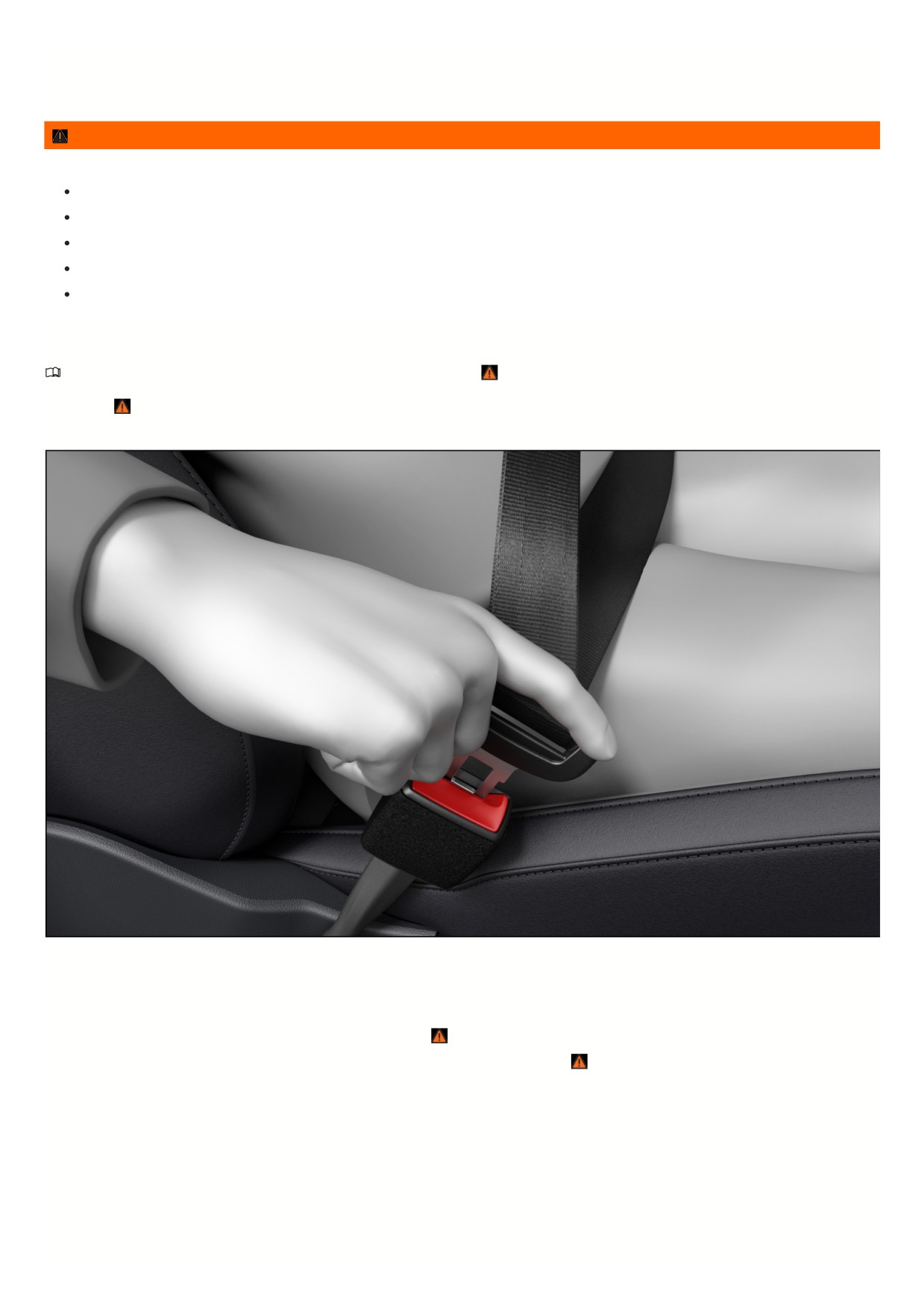
Safety belts may only be locked for certain child restraint systems ⇒ Child restraints - overview.
An activated locking mechanism must be released when a vehicle occupant fastens their safety belt. To release the locking mechanism, push the red button in the
belt buckle and guide the belt back fully by hand.
WARNING
Incorrect handling of the safety belts increases the risk of severe or fatal injuries.
Check the safety belts and associated components regularly to ensure they function correctly.
Never attempt to repair safety belts. Have damaged safety belts replaced.
Always keep the safety belts clean.
Never damage the safety belts by trapping them or chafing them on sharp edges.
Always keep the belt buckle and insertion guide for the belt buckle free of foreign objects and fluids.
Fastening and unfastening the safety belts
Please read the introductory information and heed the Warnings and Notice ⇒
Introduction.
Safety belts that are fastened correctly hold vehicle occupants in the correct position during braking maneuvers or in a collision, in order to provide the maximum
protection ⇒
Fastening the safety belt
Fig. 23 Inserting the buckle tongue into the safety belt buckle.
Always fasten the safety belts before driving.
1. Adjust the front seat and head restraint correctly
⇒ Seating position.
2. Have the rear seat backrest locked into place in an upright position
⇒
3. Grab the belt and pull it evenly over the chest and pelvis. Do not twist the belt while doing this
⇒
4. Insert the buckle tongue securely in the safety belt buckle for that seat fig. 23.
5. Pull on the safety belt to make sure the buckle tongue is latched correctly in the safety belt buckle.
Unfastening the safety belt
42
//////////////////////////////////////////