Volkswagen Atlas Cross Sport (2023 year). Manual in english - page 6

1. Reduce your speed.
2. Push the selector lever to the right out of the
selector lever position and into the tiptronic shift gate.
3. Tap the selector lever back to downshift.
Stopping and starting to drive uphill
The steeper the hill, the lower the gear that you should select.
Hill Start Assist should be used when stopping or starting uphill when the engine is running.
Hill Start Assist is switched off by applying the electronic parking brake.
If you stop on a hill with a gear selected, always press the brake pedal or set the electronic parking brake to prevent the vehicle from rolling away. Only release the
brake pedal or the electronic parking brake once you start driving.
Kick-down
The kick-down function makes maximum acceleration possible in selector lever position or or in the tiptronic position.
When you press the accelerator pedal all the way down, the automatic transmission downshifts into a lower gear, depending on the vehicle speed and engine RPM
This utilizes the full acceleration power of the vehicle ⇒
With kick-down, the automatic upshift to the next gear only occurs if the maximum predefined engine RPM is reached.
WARNING
Fast acceleration can cause traction loss and sliding, especially on slippery roads. This could cause loss in vehicle control, accidents, and serious injuries.
Always adapt your driving style to the flow of traffic.
Only use the kick-down function or accelerate quickly when the visibility, weather, road, and traffic conditions allow it, and when other road users will not
be endangered by the vehicle's acceleration and driving style.
Please note that the drive wheels can continue to spin and the vehicle can slide if the traction control system is switched off, especially if the road is
slippery.
Switch the ASR back on after acceleration.
WARNING
Never let the brakes “rub” too often and too long or press the brake pedal too often and too long. Prolonged braking causes the brakes to overheat. This can
considerably reduce braking performance, considerably increase braking distance and possibly lead to a total brake system malfunction.
NOTICE
If you stop on inclines when a gear is engaged, do not press the accelerator pedal to prevent the vehicle from rolling away. This can cause the automatic
transmission to overheat and can damage it.
Never let the vehicle roll in the selector lever position, especially when the engine is stopped. The automatic transmission is not lubricated and this can
damage it.
NOTICE
Never let the brakes “rub” by pressing the pedal lightly when braking is not really necessary. This increases wear.
Troubleshooting
152
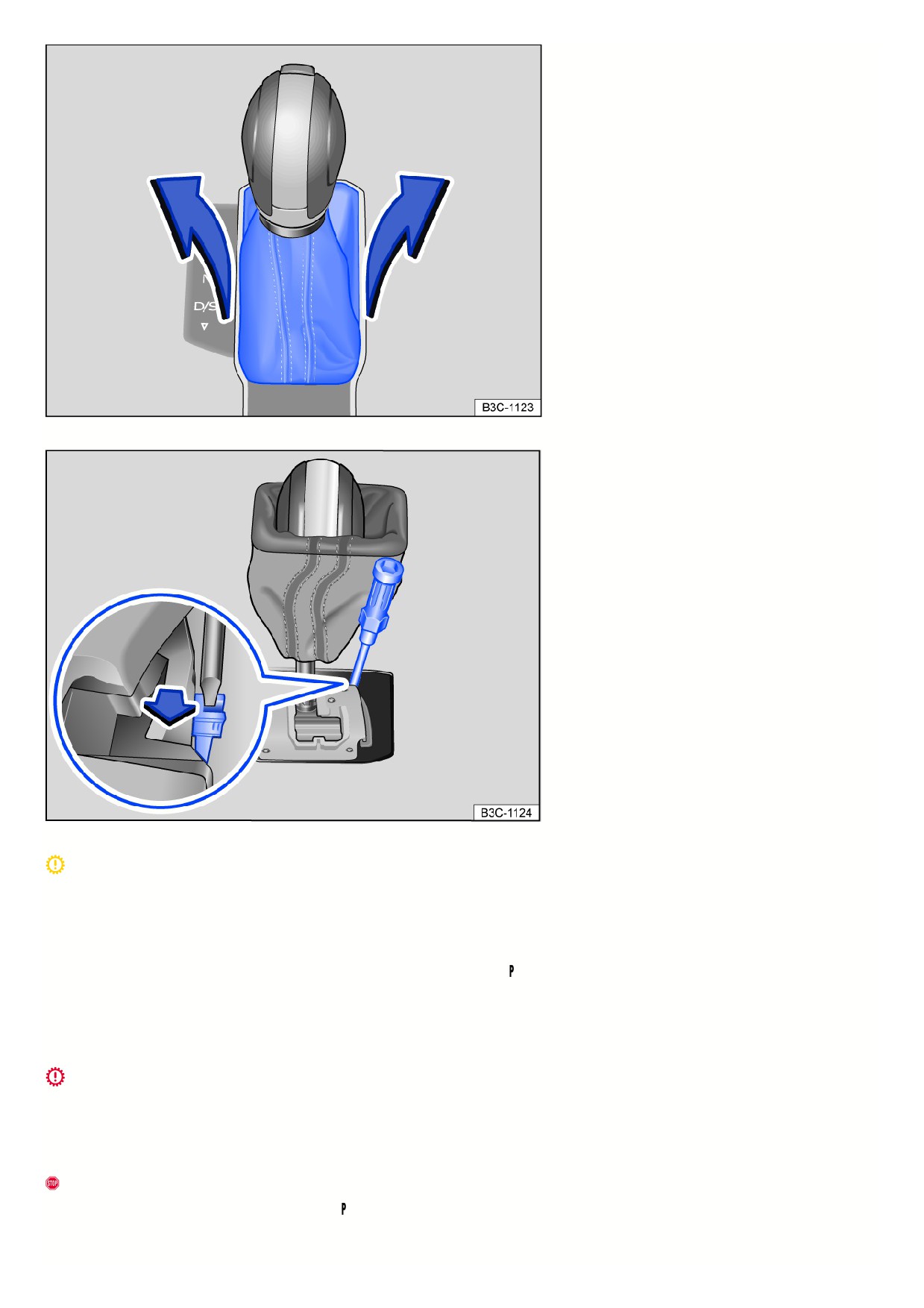
Fig. 105 Remove the cover on the shift gate.
Fig. 106 Manually release the selector lever lock.
Transmission overheating
The yellow indicator light turns on.
An audible warning may also sound. Where applicable, a message will appear in the instrument cluster display.
The DSG® automated transmission can become too hot, for example due to frequently starting up on slopes.
1. At the next opportunity, stop and let the transmission cool down with the parking lock
engaged and the engine running .
2. If the indicator light does not turn off, do not continue driving.
3. Contact an authorized Volkswagen dealer or authorized Volkswagen Service Facility for assistance. Otherwise, the transmission could become severely
damaged.
Transmission overheating
The red warning light turns on.
An audible warning may also sound. Where applicable, a message will appear in the instrument cluster display.
The DSG® automated transmission can become too hot, for example due to frequently starting up on slopes.
Do not continue driving!
1. Let the transmission cool down with the parking lock engaged and the engine running .
2. If the warning light stays on, stop driving.
153

3. Contact an authorized Volkswagen dealer or authorized Volkswagen Service Facility for assistance. Otherwise, the transmission could become severely
damaged.
The engine is not starting
The green indicator light turns on.
The brake pedal was not pressed, for example when trying to shift to another gear using the selector lever.
1. Press the brake pedal to select a gear.
Driving is restricted by the lock button
The green indicator light blinks.
The lock button in the selector lever is not engaged.
1. Check if the lock button is locked.
2. Lock the lock button into place if necessary.
Driving is restricted by the selector lever lock
The green indicator light blinks. A message is also displayed.
In rare cases, the selector lever may not lock in vehicles with an automatic transmission.
The engine will then be disabled to prevent the vehicle from going into motion unintentionally.
1. Press and release the brake pedal again.
Or: move the selector lever to the position and then select a gear.
Selector lever lock emergency release
If there is a loss of power, for example, the 12 V vehicle battery is drained and the vehicle should be towed, then the selector lever lock must be released manually.
Contact an authorized Volkswagen dealer or authorized Volkswagen Service Facility for assistance.
The emergency release is located under the shift gate cover.
Remove the cover on the shift gate:
1. Set the electronic parking brake. If you cannot set the electronic parking brake, the vehicle must be secured another way to prevent it from rolling.
2. Switch the ignition off.
3. Pull the cover near the selector lever boot upward carefully with the wires connected fig. 105.
4. Fold the cover upward over the selector lever.
Manually release the selector lever lock ⇒
:
1. Push the release lever in the direction of the arrow and hold it in this position fig. 106.
2. Press the lock button forward into the selector lever handle and move the selector lever to the
position.
3. After releasing the cover manually, carefully press into the center console while making sure the wires are in the correct position.
Emergency program
If the automatic transmission is in the emergency program, it is indicated with a text message along with the yellow
indicator light in the instrument cluster
display. The selector lever position may continue to be displayed depending on the current system malfunction. The message will be hidden after several seconds.
The yellow indicator light will stay on as long as the system malfunction is present.
Always have the automatic transmission checked immediately by suitably qualified professionals. Volkswagen recommends contacting an authorized Volkswagen
dealer or authorized Volkswagen Service Facility.
Vehicle is not moving even when a drive gear is engaged
If the vehicle does not move in the desired direction, the system may not have engaged the drive position correctly.
1. Press the brake pedal and select the drive position again.
2. If the vehicle still does not move in the desired direction, there is a system malfunction. See an authorized Volkswagen dealer or authorized Volkswagen Servic
Facility for assistance to have the system checked.
WARNING
Never release the parking lock once the electronic parking brake is switched off. Otherwise, the vehicle may start to move unexpectedly on inclines or hills,
which could then lead to accidents and serious injuries.
NOTICE
154

If you allow the vehicle to roll for a long time or at high speed with the engine is stopped and the selector lever is in the
position, for example when towing, the
the automatic transmission will be damaged.
NOTICE
Immediately stop the vehicle safely or drive faster than approx. 20 km/h (approx. 12 mph) the first time the vehicle indicates that the transmission is
overheating.
Stop the vehicle safely and switch off the engine as soon as possible if the message and audible warning are repeating approximately every 10 seconds.
Let the transmission cool down.
Only continue driving when the audible warning stops to reduce the risk of damaging the transmission. As long as the transmission is overheated, avoid
starting the vehicle and driving slowly, like at walking speeds.
Driving on slopes
Hill start assist
Hill start assist helps when starting to
drive uphill by actively holding the
vehicle in place.
Functional requirements
The following requirements must be met at the same time:
The vehicle must be stationary and held with the brake pedal until you start driving.
The engine must be running “evenly”.
A gear or a position is engaged for driving uphill.
To start driving, take your foot off the brake pedal and press the accelerator pedal immediately. The brakes will release gradually as you start driving.
The holding function of the Hill Start Assist remains active only for a short time. Drive off within approx. two seconds.
When is it active?
Hill Start Assist is immediately deactivated if one of the conditions specified below in is no longer met:
The driver’s door is opened.
If the engine is running “unevenly” or in the event of an engine fault.
The engine is switched off or it stalls.
The selector lever is in the neutral position
CAUTION
If you do not pull away immediately after releasing the brake pedal, the vehicle may roll backward under certain circumstances.
If this is the case, press the brake pedal or set the electronic parking brake immediately.
Press the brake pedal for a few seconds before you start to drive if you are driving on an incline in heavy traffic and you would like to prevent the vehicle
from rolling backwards when starting to drive.
Hill Descent Control
Hill Descent Control helps the driver
when traveling on slopes.
System function
Hill descent control maintains the speed on all four wheels when driving forward or in reverse on steep inclines through automatic braking interventions. The wheels
will not lock up because the Anti-Lock Braking System (ABS) remains active.
When starting to drive downhill at speeds less than approx. 30 km/h (approx. 19 mph), the speed is limited to minimum approx. 2 km/h (approx. 1 mph) and
maximum approx. 30 km/h (approx. 19 mph). The driver can increase or decrease the vehicle speed within these speed limits by pressing the accelerator or brake
pedal.
However, there must be enough traction. Hill descent control cannot function as expected, if for example the hill is icy or if the surface is greasy.
Displays
Depending on the driving situation, one of the following indicator lights will light up in the instrument cluster:
155

Hill Descent Control is active.
Hill Descent Control is not active.
If hill descent control is not active, the indicator light turns gray. The system is activated, but it is not regulating.
When is it active?
Hill descent control is automatically activated under the following conditions:
The vehicle engine must be running.
The speed must be less than approx. 30 km/h (approx. 19 mph), the
indicator light appears in the instrument cluster display.
The gradient must be at least 10%.
The brake pedal or accelerator pedal must not be pressed.
Hill Descent Control is deactivated if the speed is higher than approx. 30 km/h (approx. 19 mph), when the brake pedal or accelerator pedal is pressed, or the
gradient is less than 5%.
WARNING
The intelligent technology of hill descent control cannot overcome the natural laws of physics and it can only operate within the limits of the system. Do not allow
the increased convenience of the Hill Descent Control to tempt you into taking risks.
Unintentional vehicle movements can cause serious injuries.
Hill descent control is not a replacement for the driver's attention.
Always adapt your speed and driving style to the visibility, weather, road and traffic conditions.
Hill descent control cannot hold the vehicle on the incline or brake sufficiently going downhill in every situation, for example if the ground is slippery or icy.
WARNING
Always be ready to brake. If this is not the case, accidents and injuries may result.
Hill descent control is merely a tool and cannot sufficiently brake the vehicle going downhill under every circumstance.
The vehicle can go faster despite the hill descent control.
Steering
Steering information
To make it more difficult to steal the vehicle, the steering must always be locked before leaving the vehicle.
Steering
Power steering on an electromechanical steering system adjusts automatically based on the driving speed, the steering torque, and the steering angle of the
wheels. Electromechanical power steering works only when the engine is running. The steering also works if the start-stop system engages and the engine
switches off.
If the power steering system is impaired or malfunctioning, a significantly greater amount of force than normal must be used to steer.
On vehicles with Driving Mode Selection, power steering handling can be influenced by the selected driving mode.
Mechanical steering column lock (steering lock)
On vehicles with an ignition lock, the steering column is locked mechanically:
Locking the steering column:
1. Stop the vehicle.
2. Depending on the vehicle equipment: move the selector lever into the position.
3. Remove the vehicle key.
4. Turn the steering wheel slightly, until you hear the steering lock engage.
Unlocking the steering column:
1. To release the steering lock, turn the steering wheel slightly.
2. Insert the vehicle key in the ignition lock.
3. Hold the steering wheel in position and switch on the ignition.
Countersteering assist
The countersteering assist provides the driver with steering assistance in critical driving situations. Additional steering power supports the driver when
countersteering ⇒
156

WARNING
If the power steering is not functioning, the steering wheel becomes stiff, making it much more difficult to steer. This can result in loss of control of the vehicle,
accidents, serious injuries or death.
Depending on the equipment, power steering may only work when the engine is running.
Never let the vehicle roll when the engine is stopped.
Never remove the remote vehicle key from the ignition switch when the vehicle is in motion. The steering column lock could engage and you would not
be able to steer the vehicle.
WARNING
The counter-steering assistance and the ESC help the driver steer the vehicle in critical driving situations. The driver must always steer the vehicle in every
scenario. The vehicle is not steered by the countersteering assist.
NOTICE
When the vehicle is being towed, switch on the ignition so that the turn signals, horn, windshield wipers, and the windshield washer system can be activated.
Troubleshooting
Steering malfunction
The red warning light turns on or flashes.
There is an electromechanical steering or electronic steering column lock malfunction.
Do not continue driving!
1. Contact an authorized Volkswagen dealer or authorized Volkswagen Service Facility for assistance.
If the red warning light turns on, it may be difficult to move the steering wheel because the electromechanical steering system is malfunctioning.
If the red warning light blinks, the steering column cannot unlock.
Steering malfunction
The yellow indicator light turns on or flashes.
The steering is stiffer or more sensitive than usual.
The indicator light comes on permanently:
1. Restart the engine and drive the vehicle slowly for a short distance.
2. If the indicator light stays on, contact a suitably qualified professional and have the system checked. Volkswagen recommends contacting an authorized
Volkswagen dealer or authorized Volkswagen Service Facility.
The indicator light blinks:
1. Turn the steering wheel back and forth slightly.
2. Switch the ignition off and back on.
3. Pay attention to the messages in the instrument cluster display.
4. If the indicator light continues to flash after switching the ignition back on, do not continue driving. Contact an authorized Volkswagen dealer or authorized
Volkswagen Service Facility for assistance.
4MOTION Active Control
Introduction
Via the driving modes, the driver can
adapt various properties of vehicle
systems to the current driving situation,
the desired driving comfort, and for an
economic driving style. The suspension,
steering, drive, and the air conditioner
are some of the vehicle systems that can
be adjusted.
Different driving modes are available depending on the vehicle equipment. The influence of vehicle systems on the individual driving modes depends on the vehicle
equipment.
Differentiation according to the type of drive
Only vehicles with all-wheel drive (4MOTION) can have the 4MOTION Active Control dial.
157
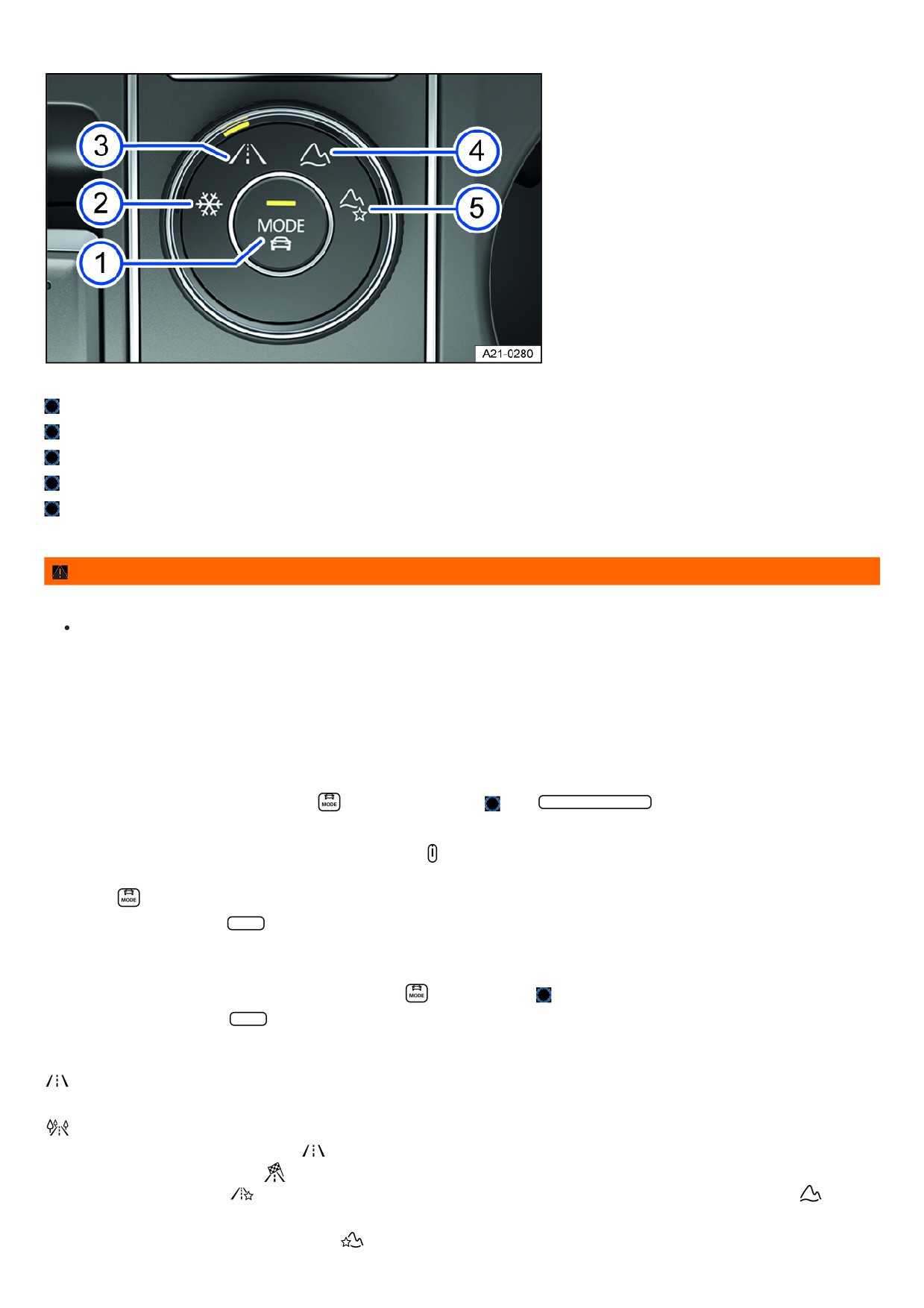
Selecting the driving mode
Fig. 107 In the center armrest: 4MOTION Active Control rotary switch.
MODE button: select onroad driving modes and open the menu in the Infotainment system.
Snow driving mode
Onroad driving mode
Offroad driving mode
Offroad Custom driving mode
The driving mode can be selected when the ignition is switched on and the vehicle is stationary or while driving.
WARNING
Selecting the driving mode while driving can distract you from traffic and increase the risk of accidents.
Always drive attentively and responsibly.
If you select a driving mode while driving, the vehicle systems, except for Drive, will be switched over to the new driving mode immediately.
1. When the traffic situation allows it, briefly take your foot off the accelerator pedal to enable the newly selected driving mode to be applied to the Drive vehicle
system as well.
Selecting the driving mode via the rotary switch
1. Turn the dial until the LEDs next to the preferred driving mode comes on fig. 107.
2. To switch to the onroad driving modes, press the
button on the dial fig. 107
or tap Onroad driving mode in the Infotainment system.
Displaying information about the driving mode
1. To display additional information about the selected driving mode, tap
in the Infotainment system.
Selecting the Custom driving mode
1. Press the
on the dial or turn the dial until the LEDs next to the Onroad driving mode comes on.
2. To open the Custom menu, tap Adjust in the Infotainment system.
Selecting the Offroad Custom driving mode
1. Turn the dial until the LEDs next to the Offroad Individual driving mode lights up.
Or: if the Offroad Custom driving mode is already selected, press
on the dial fig. 107
2. To open the Custom menu, tap Adjust in the Infotainment system.
Driving mode properties
Under Onroad, you can select from the Eco, Comfort, Normal, Sport and Custom driving modes.
The Comfort driving mode is only available in vehicles with DCC .
The Eco driving mode switches the vehicle to fuel-efficient operation and supports the driver with an fuel-saving driving style. The transmission
automatically shifts to E in the Eco driving mode.
The Normal driving mode shows the basic settings of the vehicle systems and offers a balanced
calibration, for example for everyday use.
The Sport driving mode gives the driver a sporty feel. If the Sport driving mode is selected, vehicles with an
automatic transmission switch to S.
With the Custom driving mode, you can adapt individual vehicle systems according to your preferences.
With the
Offroad driving mode, acceleration can be better controlled with the accelerator pedal when driving off-road. The engine's braking efficiency is always available
and shifting can be blocked in critical situations. The hill start assist and hill descent control are active in the Offroad driving mode. The dynamic cornering light is
adjusted to better assist the driver when visibility is poor.
The Offroad Custom driving mode is an off-road driving mode that you can expand and adjust
158
according to your preferences. The instrument cluster display tells you if an Offroad driving mode has been selected.
Using the Snow driving mode can
improve the traction on slippery or snowy ground by having a more precise power transmission.
NOTICE
Using 4MOTION Active Control driving modes while driving normally may lead to tire wear, increased fuel consumption and an increased noise level.
Standard behavior of the driving mode and the vehicle systems
The Normal driving mode represents the basic settings for the vehicle systems when the ignition is switched on.
Behavior of the driving mode when switching the ignition off and on
If you switch the ignition off and then on again, the previously selected driving mode remains selected.
If you have previously selected the Snow, Offroad or Offroad Individual driving mode and then switch the ignition off and on again, the previously selected onroad
driving mode will be set.
Behavior of the Drive vehicle system when the ignition is switched off and on
The settings for the Drive vehicle system are reset to the Normal driving mode settings when you switch the ignition off and on again.
The other vehicle systems will retain their settings.
You can change the Drive vehicle system back to the preferred driving mode.
1. Select your desired driving mode again.
Or: In order to reactivate the settings in the Sport driving mode, move the automatic transmission selector lever backwards into driving mode S.
Troubleshooting
The “S” gear cannot be engaged
The transmission cannot shift into S when the Offroad or Snow driving mode is selected. Information is shown in the instrument cluster display if an Offroad driving
mode has been selected.
1. To be able to shift into S, select another driving mode.
The driving mode or the vehicle systems do not behave as expected
1. Pay attention to the standard behavior of the driving mode and the vehicle systems ⇒ Standard behavior of the driving mode and the vehicle systems.
Offroad display
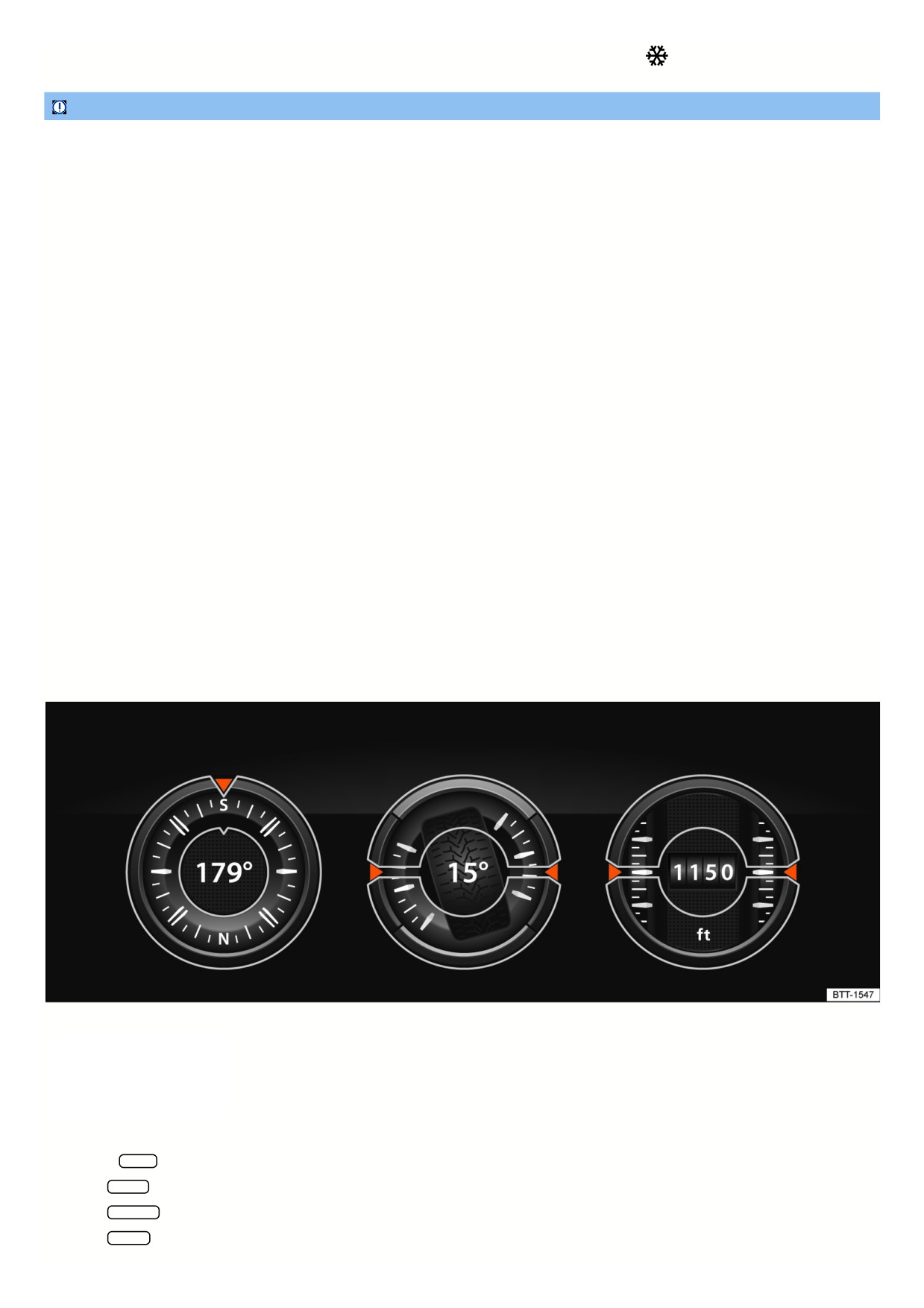
Fig. 108 In the Infotainment system: Offroad display.
The Offroad display provides digital
instruments that display additional
information about the vehicle and its
environment. This enables you to make
a more precise assessment of the current
driving situation.
Open the Offroad display
1. Press the MENU button in the Infotainment system.
2. Tap the Vehicle function key.
3. Tap the Selection function key.
4. Tap the Offroad function key.
159

Selecting instruments and adjusting units
The infotainment system displays various instruments fig. 108.
1. To switch between instruments, swipe up over the display.
The units on some instruments can be adjusted in the Infotainment system
⇒ Vehicle settings menu.
Instruments in the Offroad display
The selection of instruments depends on the vehicle equipment.
Compass: The compass shows your current direction of travel.
Steering angle display: Shows the steering angle of the vehicle. For a left lock, the value is positive. For a right lock, it is negative.
Altimeter: The altimeter shows your current height above sea level.
Coolant temperature display: The display corresponds to the temperature display in the instrument cluster.
Oil temperature display: The display corresponds to the oil temperature display in the instrument cluster.
Adjusting the display areas to the driving situation
The instruments displayed can be selected according to the driving situation and the environmental and terrain conditions:
Sandy terrain: Oil and coolant temperature display, steering angle display.
Inclines: Steering angle display, coolant temperature display, altimeter (depending on country).
Alpine terrain: Steering angle display, altimeter (depending on country), Compass.
Off-road driving situations
Introduction
The examples described in this chapter are to be understood as general guidelines aimed to help the driver in driving safely on off-road terrain. These tips will not
necessarily apply to every possible situation that may occur. Before driving on unknown terrain, it is crucial to find out information about the condition of the terrain
ahead. You can assess potential dangers in advance. The driver is responsible for deciding whether their vehicle is suitable for the terrain ahead and if the terrain
can be driven on.
Driving off-road requires different skills and handling practices compared to driving on developed roads.
This vehicle is not designed for traveling with an “expedition driving style”.
With 4MOTION Active Control in a four-wheel drive vehicle, various vehicle tuning adjustment can be selected to the driver's preference
⇒ Selecting the driving
mode.
Switch off the driver assistance systems and parking systems when off-roading.
Checklist
The following steps should be taken before the first trip to operate and drive the vehicle safely off-road.
Observe the general safety precautions when driving off-road ⇒ Safety precautions for driving off-road.
Adjust the seating position so there is clear visibility in front of the vehicle and fasten safety belts
⇒ Seating position.
Always wear suitable and well-fitted footwear that gives the feet good traction on the pedals.
A responsible driver also treats nature with care when driving off-road. Driving over shrubs and meadows can destroy the habitats of animals and plants.
Leaking operating fluids resulting from vehicle damage can contaminate the environment. Catch any leaking operating fluids and dispose of them correctly
according to environmental regulations.
Take any suitable equipment with you for driving off-road.
Safety precautions for driving off-road
Refer to ⇒
and
WARNING
The intelligent vehicle technology cannot overcome the natural laws of physics and it can only operate within the limits of the system. When the condition of the
ground is poor, the wheels may lock and cause instability, despite the vehicle having ABS. For example, this could occur during hard braking on loose gravel.
Under these conditions, the ESC can only stabilize the vehicle to a limited extent.
WARNING
Driving off-road can be dangerous and can cause accidents, serious injuries, vehicle damage, and vehicle malfunctions far away from any assistance.
16

Never select a dangerous route or undertake a risk that would endanger the vehicle occupants. If you can go no further or you have doubts about the
safety of the route, turn around and choose a different route.
Even if it appears the terrain will be easy to drive on, it may be difficult and dangerous and may create critical driving situations for you and your
passengers. Explore the terrain on foot beforehand.
Drive with extreme caution and anticipation when driving off-road. If you are driving too fast or a driving maneuver fails, this can lead to serious injuries
and vehicle damage.
Never drive faster than is appropriate for the predominant terrain, road conditions, traffic and weather.
Never drive over embankments, ramps, or hillsides at excessively high speeds. This can cause the vehicle to lift in a way that means you can no longer
steer it and lose control of the vehicle.
If the vehicle does lift off the ground, always align the front wheels so they face straight ahead. The vehicle can roll over if the wheels are turned inward
when coming back into contact with the ground.
WARNING
Utility vehicles have a significantly higher rollover rate than other types of vehicles.
In a rollover crash, an unbelted person is significantly more likely to die than a person wearing a seat belt.
The vehicle has a higher center of gravity and has a greater risk of rolling over while driving than a “regular” passenger vehicle that is not suited for
offroad driving.
Never drive too fast, especially around curves, or perform any extreme driving maneuvers.
Always adapt the speed and driving style to the predominant terrain.
Luggage and other objects transported on the roof of the vehicle also increases the center of gravity and thus the risk of a rollover accident.
WARNING
Sections of terrain that seem safe could be very dangerous. Potholes, depressions, ditches, hollows, obstacles, shallow areas, and soft and swampy ground are
often not detected as such and can be completely or partially covered by snow, water, grass, or branches on the ground. Driving over such sections of terrain
can cause accidents, serious injuries, and vehicle malfunctions.
Before driving on unknown terrain, explore the route carefully on foot.
Never choose unsafe routes or undertake a risk that would put you and your passengers in danger. If you have doubts about the safety of the route, turn
around and choose a different route.
Always adapt the speed and driving style to the load, visibility, terrain and weather conditions.
WARNING
Driving at an angle on a hill can be dangerous and cause accidents, serious injuries and damage to the vehicle.
Always avoid driving at an angle on a hill ⇒ Driving at an angle on a hill.
If the vehicle stops at a side angle on a hill, never exit the vehicle through the doors that are facing in the downhill direction. The combined center of
gravity of the vehicle and its load (passengers and cargo) can cause it to shift and cause the vehicle to tip over and roll down the hill. If it is necessary,
always exit the vehicle carefully using the doors on the side of the vehicle that is facing uphill ⇒ Driving at an angle on a hill.
WARNING
The driver assistance systems were developed only for driving on developed roads. The driver assistance systems are not suitable for use off-road and can
thus be dangerous in off-road situations. If you use driver assistance systems off-road, you could lose control of the vehicle and become severely injured.
Never use driver assistance systems off-road.
WARNING
Driving off-road with a low fuel level can lead to a vehicle breakdown, accidents, and serious injuries.
Always refuel your vehicle with enough fuel before driving off-road.
The steering and braking support systems will not work if the engine is “sputtering” or malfunctioning due to fuel shortage or irregular fuel supply.
NOTICE
161
If the windows and sunroof are open, rain could enter the vehicle and soak the interior, causing vehicle damage. Always keep the windows and power sunroof
closed when driving off-road.
Explanations of technical terms
Refer to ⇒
and Safety precautions for driving off-road.
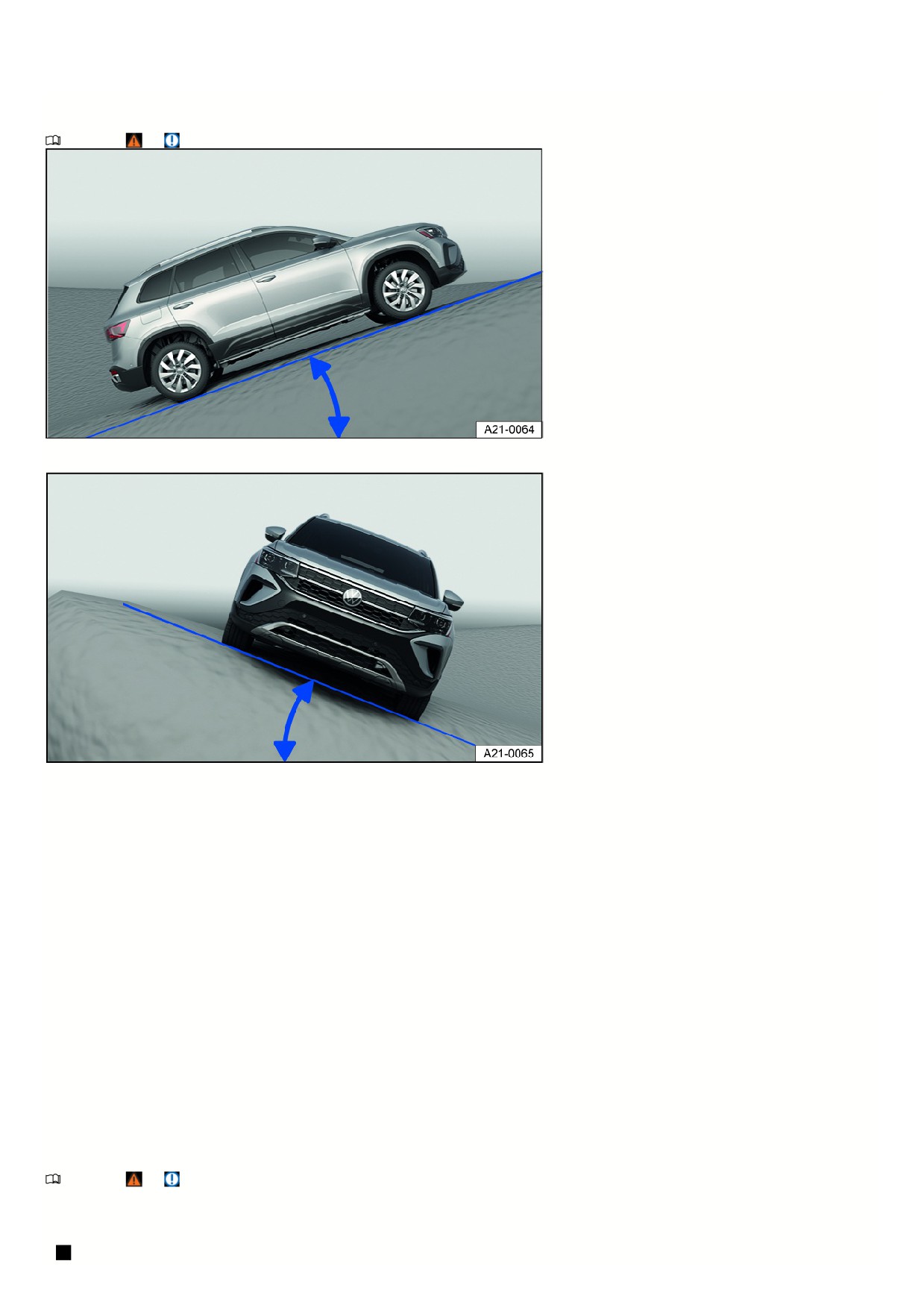
Fig. 109 General example: incline angle
Fig. 110 General example: tilt angle
Center of gravity
The center of gravity of a vehicle influences the risk of rollover accidents. When driving off-road, the vehicle has a larger ground clearance and
thus a higher center of gravity compared to “normal” road vehicles. Due to the higher center of gravity, there is an increased risk that the vehicle could
roll over while driving. Always consider this fact while driving and always observe the safety tips and warnings listed in this Owner's Manual.
Ground clearance
The distance between the road surface and the lowest point of the vehicle underbody.
Incline angle
The maximum angle the vehicle can drive up an incline on its own. A rising difference in altitude (incline) on a 100 m (300 ft) stretch is given in
percentage or degrees fig. 109. The maximum incline angle the vehicle can handle depends on the road surface and the engine power, among other
things.
Tilt angle
The maximum angle that the vehicle can drive diagonally or perpendicularly to the fall line on a hill without tipping over (depends on the center of
gravity) fig. 110.
Ramp angle
Maximum angle that the vehicle can drive over a ramp at slow speeds without the vehicle underbody coming into contact with the edge of the ramp.
Slope angle
The transition from the horizontal plane on an incline or from the slope back to level ground. Maximum angle that the vehicle can handle without the
vehicle underbody coming into contact with the edge of the slope.
Fall line
The line that is the most direct path downhill.
Axle articulation The torsional flexibility of a vehicle when driving over an object on one side.
Checklist “before driving off-road”
Refer to ⇒
and Safety precautions for driving off-road.
Checklist
For your safety and the safety of your passengers, always observe the following points before driving off-road:
Learn about the quality of the upcoming terrain before driving off-road.
162

Fill up the fuel tank. Fuel consumption is significantly higher off-road than it is on developed roads.
Check if the tire profile and the type of all the tires is sufficient for the planned off-road trip.
Check and adjust the tire pressure on all tires.
Check the engine oil level and add engine oil if necessary. When the vehicle is on sloping ground, the engine will only supplied with engine oil if the engine o
level is sufficient.
Fill the windshield washer fluid reservoir completely with water and windshield washer fluid.
Stow any luggage as low as possible in the vehicle and distributed evenly. Secure all loose objects safely.
General rules and driving instructions
Refer to ⇒
and Safety precautions for driving off-road.
Volkswagen recommends to never drive off-road alone. At least two off-roading vehicles should drive together off-road. An unexpected situation could occur at
any time. Therefore, it is especially wise to have equipment that can be used to call for emergency assistance.
Stop and explore the path on foot, especially before critical passages.
Drive over bumps slowly so that the vehicle does not lift up, which could cause damage and prevent you from maneuvering the vehicle.
Drive slowly through difficult sections of the route. Upshift on slippery ground and always keep the vehicle in motion.
There is usually a lot of soft ground on off-road terrain, where the tires could sink into the ground. This reduces the ground clearance and the wading depth.
Whenever possible, drive on level and solid ground.
Even at low speeds, always maintain a safe distance to other vehicles. If the first vehicle suddenly becomes stuck, the vehicle following it would be able to stop
in time without also getting stuck.
NOTICE
Always make sure there is enough ground clearance under the vehicle. Severe damage to the underbody can occur if the vehicle hits the ground. This
damage can cause vehicle breakdowns and make it impossible to continue driving.
Shifting gears correctly
Refer to ⇒
and Safety precautions for driving off-road.
Correct gear selection depends on the terrain.
Before driving on a difficult stretch of the route, it may be helpful to stop and consider which gear to select. After several off-roading trips, you can learn which gear
in conjunction with gear reduction is best suited for certain areas of terrain.
When the correct gear is selected, the vehicle must normally be braked less with the brake pedal because the engine braking effect will be sufficient in the
majority of cases.
Only accelerate as much as is necessary. Too much acceleration can cause the wheels to spin and thus loss of control of the vehicle.
Use the D selector lever position on normal, level stretches of off-road land.
Adjust your speed when driving on soft or slippery ground and drive at the highest possible gear in tiptronic mode.
Drive using tiptronic in gear 1 when on steep hills or on a steep incline.
Drive using tiptronic in gears 3 or 2 when on mud, sand, water, or hilly areas ⇒ Automatic transmission: selecting the selector lever position.
Use the off-road display ⇒ Offroad display.
Driving over brush and rock
Refer to ⇒
and Safety precautions for driving off-road.
1. Select a suitable driving mode ⇒ Selecting the driving mode and drive no faster than walking speeds over rocky ground.
2. If you are unable to drive around a stone, drive carefully onto the stone with one of the front wheels and then drive slowly over it
⇒
Even objects that are lower than the available ground clearance can come into contact with the vehicle underbody and cause vehicle damage and malfunctions.
This is especially true if there is a depression or soft ground in front of or behind the object. This is also true if the vehicle drives too fast over an object and then the
suspension compresses.
NOTICE
Never drive over a very large object such as boulders or tree trunks if it is under the vehicle or on one side. Objects that are higher than the ground clearance
will damage vehicle components when driven over and could cause vehicle malfunctions.
Driving through still or flowing water
Refer to ⇒
and Safety precautions for driving off-road.
Driving through flooded terrain or bodies of water could cause vehicle damage.
163

You can carefully drive through water that comes up to the lower edge of the vehicle body.
1. Note the maximum wading depth of the vehicle.
2. Only drive through water in an area where the ground is solid underneath it remains lower than the maximum permissible wading depth.
3. Note the additional information for driving through water on paved roads ⇒ Driving through water on roads.
Before driving through water
Stop, get out and assess the situation ⇒
:
1. Measure the depth of the water all the way over to the other side. Make sure that the ground is firm enough and identify any dips and obstacles
⇒
2. Make sure that it is possible to safely enter and exit the water.
3. Check the ramp angle and firmness of the banks.
4. Select a suitable driving mode ⇒ Selecting the driving mode.
Driving through still or slow-flowing water
As long as the ground is firm enough, you can drive your vehicle through still or slow-flowing water
⇒
1. Drive into the water slowly and in the direction of the current. Never exceed the ramp or tilt angle.
2. Drive at a constant speed all the way to the opposite bank.
Driving at a constant speed prevents engine damage caused by the ingress of water. It also allows an air pocket to form in front of the engine, which fuels the
engine with the oxygen it requires. If you drive into the water too fast or drive through the water too fast, you will create a bow wave in front of the vehicle. Water fro
this bow wave may find its way into the engine's air intake port and seriously damage the engine.
Driving through fast-flowing water
The strength and speed of the current and the depth of the water can be dangerous and unpredictable
⇒ . Vehicles can be swept away by the current. Even
vehicles with generous ground clearance can get stuck if the ground beneath their tires is swept away. Flowing water backs up against one side of the vehicle,
making the water deeper on that side.
Do not take any risks. Look for a shallower place to cross the water or turn back.
After driving through water
1. Check the vehicle for damage.
2. Gently apply your brakes to dry them off.
WARNING
Flowing water can generate enormous power and can carry a vehicle away. This can lead to extremely dangerous situations, which could cause accidents and
serious or fatal injuries.
Never let the vehicle stop in water.
Soft ground, obstacles under the water, shallows, or water in the engine compartment can cause accidents and vehicle malfunctions in the water. This
can then lead to critical situations.
NOTICE
If you drive through water, vehicle components such as the engine, drivetrain, suspension, or vehicle electrical system could become severely damaged.
Never drive over salt, salt-covered surfaces such as salt flats, or through salty water. Salt can cause corrosion. Using fresh water, immediately rinse any
parts of the vehicle that may have come into contact with salt or salty water.
NOTICE
Objects in the water can enter the openings of the extended spray nozzles of the headlight washer system. The spray nozzles then cannot move back to their
basic position.
Do not use the headlight washer system when you are driving through water.
Driving in sand and mud
Refer to ⇒
and Safety precautions for driving off-road.
The ESC and ASR must be turned on ⇒ Braking assistance systems.
1. Select a suitable driving mode ⇒ Selecting the driving mode.
2. Select a suitable gear and stay in that gear until solid ground is reached
⇒ Shifting gears correctly.
3. Always drive at a consistent speed through sand or mud, do not shift manually, and do not stop.
164

The tires can lose their grip in sand or mud.
Do not change the speed or direction.
If the vehicle slides, steer in the direction in which it is sliding to regain control of the vehicle.
If the tires are no longer gripping the ground, turn the steering wheel back and forth quickly. This can briefly create better tire traction between the ground at the
front wheels.
WARNING
Driving through sand and mud can be dangerous. The vehicle can slide uncontrollably, increasing the risk of injury. Always drive forward carefully when you
have to drive through sand, mud, or slush.
Never choose unsafe routes or undertake a risk that would put you and your passengers in danger. If you have doubts about the safety of the route, turn
around and choose a different route.
WARNING
Incorrect tire pressures can cause a serious or fatal accident.
Incorrect tire pressures cause increased tire wear and impair vehicle handling.
Incorrect tire pressures can cause overheating, sudden tire damage including tire blow-outs, and stripping of the tread, which can then result in loss of
vehicle control.
If you do choose to lower the tire pressure in order to drive through sand, however, you must always reinflate the tires to the correct tire pressure
afterward before you drive anywhere else. Driving with low tire pressures can cause the driver to lose control of the vehicle and increases the risk of
serious and fatal injuries.
Recommendations if the vehicle is stuck
Refer to ⇒
and Safety precautions for driving off-road.
The vehicle becomes stuck when the wheels have sunk so deeply into the ground that the vehicle can no longer move forward or backward under its own power.
To rock the vehicle out of sand or mud, training and a lot of strength are necessary. If one makes a mistake when rocking a vehicle out of place, the vehicle can sink
even farther and additional assistance will be needed to continue.
Never let the wheels spin for a long time, because this will only make the vehicle sink deeper into the ground
⇒
Preparations
1. Carefully dig out all of the wheels and make sure no other vehicle components are stuck in sand or mud.
2. Select the reverse gear.
3. Press the accelerator pedal gently and reverse in the same track.
If this does not help, place brushwood, floor mats, or burlap cloth directly behind the tires to create traction to help the vehicle to move
⇒
Rocking the vehicle out of place
1. Switch off the ASR ⇒ Braking assistance systems.
2. Adjust the steering wheel so that it is straight.
3. Drive in reverse until the wheels begin to spin straight.
4. Engage the first gear immediately and begin to drive forward until the wheels begin to spin again.
5. Drive back and forth in this way until there is enough momentum to release the vehicle.
6. Reactivate ASR after the vehicle is rocked out of place.
WARNING
No one should ever stand in front of or behind the vehicle, especially when attempting to move a stuck vehicle out of place.
Spinning wheels can greatly accelerate stones, brushwood, pieces of wood, or other objects under the wheels, which could cause life-threatening
injuries.
If the stuck vehicle moves suddenly, people standing in front of or behind the vehicle could be run over.
Driving on steep terrain
Refer to ⇒
and Safety precautions for driving off-road.
Driving on inclines or slopes
165
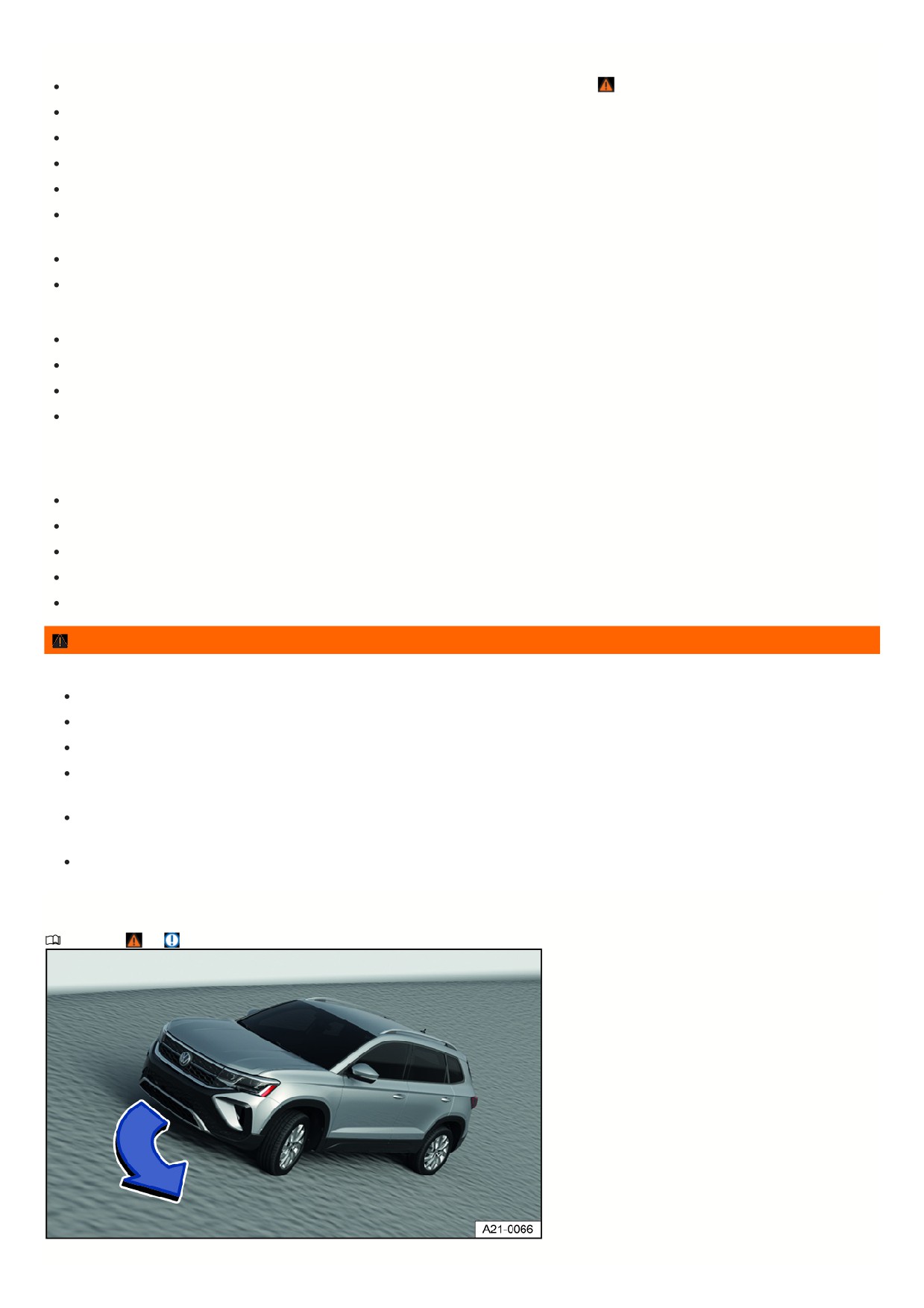
Before driving up an incline or down a hill, stop, exit the vehicle, and assess the situation:
Go along the path and check the ground for sufficient firmness, obstacles, or other hidden hazards
⇒
Look to see how the path continues after the incline.
If the route is too steep, too uneven, or the ground is too loose, then do not drive on this path and choose another route.
Drive uphill or downhill slowly and continuously on a straight path.
Never stop or turn around on a hillside.
Only accelerate enough to overcome the incline. Too much acceleration can cause the wheels to spin and the driver to lose control of the vehicle. Too little
acceleration increases the likelihood of stalling the engine.
Vehicles with an automatic transmission Do not shift gears while driving on an incline.
Use the off-road display ⇒ Offroad display.
If the vehicle can no longer drive up an incline
Never turn around on an incline.
If the engine has stopped, press the brake pedal and restart the engine.
Select reverse gear and drive slowly and carefully along the same path.
Maintain a consistent speed using the brake pedal until you reach safe and level ground.
Driving downhill
There is increased risk of rollover accidents when driving downhill. Concentrate very carefully on steering the vehicle when driving downhill.
Drive in first gear when driving down steep hills.
Use the brakes gently to reduce the risk of losing control of the vehicle.
Never exceed the tilt angle of the vehicle.
If it is possible and not dangerous, drive straight downhill along the fall line (maximum slope).
Use the off-road display and the hill hold assist when driving on steep hills
⇒ Offroad display.
WARNING
Never try to drive on an incline or a hill when it is too steep for the vehicle. The vehicle could slide, tip or flip over.
The incline angle or tilt angle must not be larger than the maximum permissible value for the vehicle.
When driving uphill or downhill, always follow the fall line.
Never change direction or turn round when driving uphill or downhill. The vehicle could tip over or slide.
If the engine stalls or if your vehicle can go no further, stop and press the brake pedal. Restart the engine. Engage the reverse gear, release the brake
pedal and use engine braking to ease the vehicle back in a straight line that follows the fall line. Keep to a steady, low speed.
If the engine will not start, press the brake pedal down, applying constant pressure, and allow the vehicle to roll back the same way you came. Keep to a
steady, low speed.
Never allow the vehicle to coast backward down the incline. You may lose control of the vehicle.
Driving at an angle on a hill
Refer to ⇒
and Safety precautions for driving off-road.
Fig. 111 General example: steering downhill along the fall line.
166
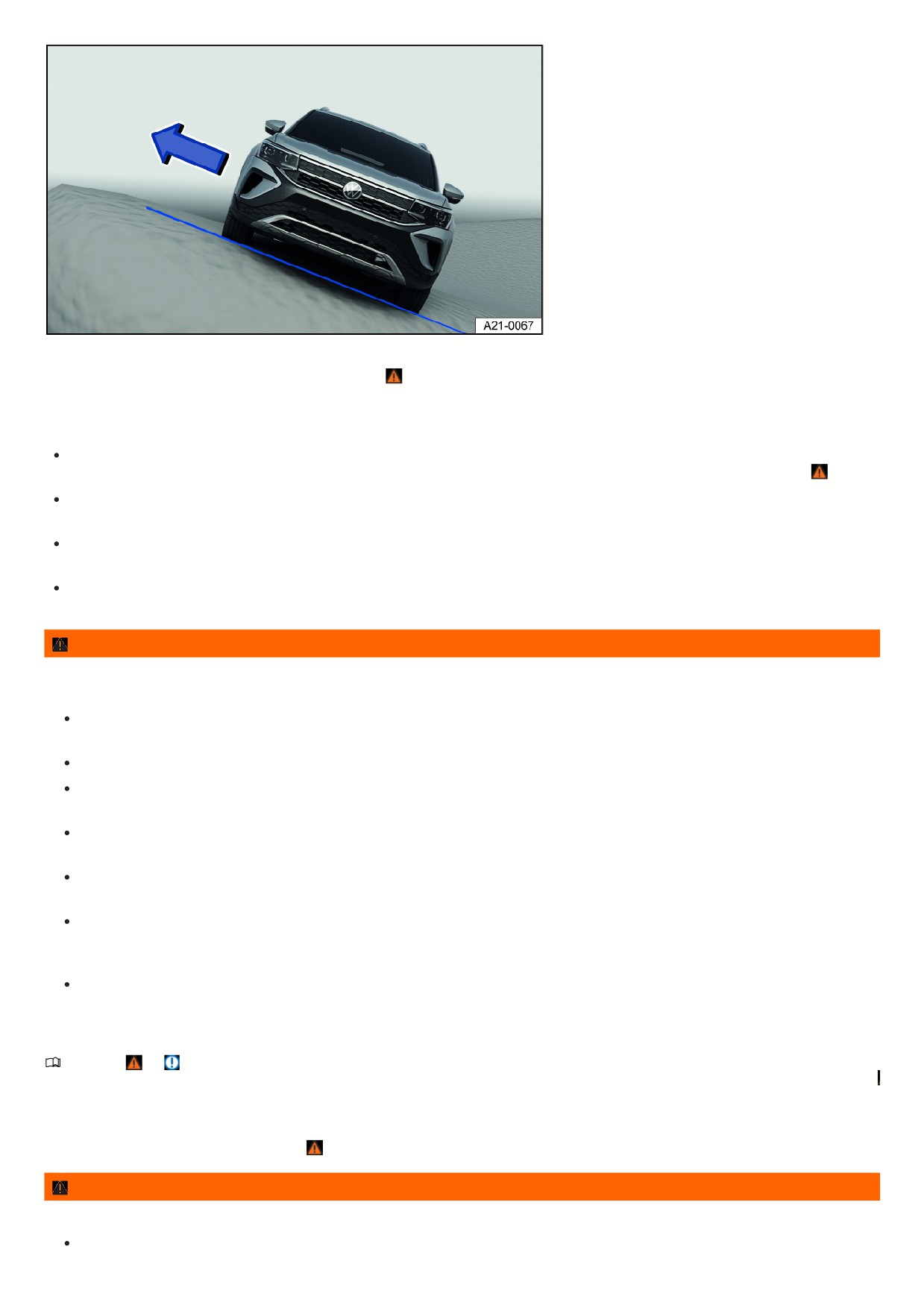
Fig. 112 General example: exit through the side of the vehicle that is facing uphill.
Driving at an angle on a hill is dangerous when driving off-road ⇒
Before driving, always check if there are other safer routes available.
If you must drive at an angled position:
The vehicle’s center of gravity should be as low as possible. Larger or heavier individuals should sit on the more elevated side of the vehicle. Luggage on the
roof should be removed and heavy objects should be secured, because the vehicle could tip over due to objects suddenly sliding out of place ⇒
The ground must be as firm as possible. The vehicle can skid sideways and tip over more easily on slippery or soft ground. Always make sure the angle will no
become too large from bumps in the road. The vehicle can tip and roll over when the tilt angle is too large.
If the vehicle is positioned at a high angle, the wheels on the lower side of the vehicle must never drive over depressions or dips in the ground. The wheels on
the higher side of the vehicle must never drive over elevated objects, such as stones, tree trunks, or other obstacles.
If it seems the vehicle is about to tip, immediately steer toward the downhill direction and accelerate lightly fig. 111. If it is not possible to steer downhill, steer
uphill and accelerate lightly.
WARNING
Never attempt to drive at an angle on a hill, especially if the hill is too steep for the vehicle. A vehicle can skid, tip, or roll over when positioned sideways to a hill.
To reduce the risk of accidents and serious injuries, observe the following:
Never underestimate the risks and dangers of driving at an angle on a hill. Never choose unsafe routes or undertake a risk that would put you and your
passengers in danger. If there are doubts about the safety of the route, turn around and choose a different route.
When driving at an angle on a hill, the vehicle can lose hold, slide to the side, tip, or flip over and roll down the hill.
Never let the wheels on the lower side of the vehicle drive through depressions or dips in the ground. Never let the wheels on the higher side of the
vehicle drive over elevated objects, such as stones, tree trunks, or other obstacles.
Before driving at an angle on a hill, make sure that you can steer toward the fall line. If that is not possible, choose another path. If it seems the vehicle is
about to tip, immediately steer toward the downhill direction and accelerate lightly fig. 111.
If the vehicle is on a hill with a steep sideways tendency, avoid abrupt and dramatic movements in the vehicle. This can cause the vehicle to lose hold,
slide to the side, tip, or flip over and roll down the hill.
If the vehicle is stopped at a side angle on a hill, a person must never exit the vehicle through the doors that are facing downhill. This can cause the total
center of gravity to shift to the side. The vehicle could tip or flip over and roll down the hill. To reduce the risk of this happening, always exit the vehicle
carefully on the side facing uphill fig. 111.
When exiting the vehicle, ensure that the upwards opening door does not shut and cause injury due to its own weight or passenger inattention.
Driving through ditches
Refer to ⇒
and Safety precautions for driving off-road.
1. Check if the slope and tilt angle is small enough to drive over the ditch with the vehicle. The tilt angle must not be too large when driving through the ditch
⇒
2. Find a suitable point to drive through the ditch.
3. If possible, cross the ditch at a sharp angle ⇒
WARNING
If the slope and tilt angle is too steep for the vehicle and the ditch is too deep, the vehicle could tip, slide away and roll over.
Do not attempt to drive across a ditch if the ramp angle or tilt angle is too steep and the ditch is too deep for the vehicle.
167

NOTICE
If driving into the ditch at a right angle, the front wheels will fall in. The vehicle could bottom out, be damaged, and no longer be drivable. If this happens, it will
most likely be impossible to drive out of the ditch, even with all wheel drive.
After off-road driving
Refer to ⇒
and Safety precautions for driving off-road.
Checklist
Clean the vehicle.
Check the vehicle for damage.
Check the tires for damage and remove any thick dirt, stones, and foreign objects from the tread.
Inspect the vehicle underbody and remove any and all objects that are stuck in the brake system, wheels, suspensions, exhaust system and in the engine,
such as twigs, leaves, or pieces of wood ⇒ . If any damage or leaks are discovered, seek assistance from suitably qualified professionals. Volkswagen
recommends contacting an authorized Volkswagen dealer or authorized Volkswagen Service Facility.
Inspect the engine compartment for any contamination that may be impairing engine operation
⇒ Safety precautions for working in the engine compartment
WARNING
Any objects stuck under the vehicle underbody present a hazard. The vehicle underbody must always be inspected for stuck objects after every off-road trip.
Never drive the vehicle if objects are stuck on the underbody, in the brake system, in the wheels, in the suspension, in the exhaust system, or in the
engine.
Flammable materials, such as wet leaves, can ignite near hot vehicle components. A fire can increase the risk of serious injury.
Stuck objects can damage the fuel lines, brake system, seals, and other components on the chassis. This can cause accidents and loss of control of the
vehicle.
168
Driver assistance systems
Cruise control system
Introduction
The cruise control system helps to
maintain a set speed.
Speed range
The cruise control system is available at speeds above approximately 20 km/h (approximately 15 mph) when driving forward.
Driving with the Cruise Control System
You can override the stored speed at any time, for example, to pass another vehicle. The regulation function is paused while the vehicle accelerates and then
resumes the stored speed.
Displays
If the cruise control system is switched on, the instrument cluster display indicates the saved speed and the status of the cruise control system.
The following indicator lights may turn on depending on the driving situation and the instrument cluster version:
Cruise control system is switched on.
Cruise control system is switched on, speed regulation active.
Cruise control system is switched on, speed
regulation active.
If the cruise control system is not regulating the speed, the indicator lights are small or grey.
If no speed is stored, the instrument cluster display shows
instead of the speed.
Driving downhill
The vehicle cannot maintain the saved speed in all driving situations. Always be ready to apply the brakes.
1. Downshift before traveling downhill for extended periods.
This will enable you to utilize the engine braking effect and reduce the load on the brakes.
WARNING
If it is not possible to drive safely with enough distance and a constant speed, using the cruise control system may cause accidents and serious injuries. Using
the cruise control system does not relieve the driver from their responsibility for their vehicle's speed.
Always adapt your speed and remain a safe distance to vehicles driving ahead according to the visual, weather, road, and traffic conditions.
Never use the cruise control system when visibility is poor, when there is not enough distance, or when roads are steep, winding, flooded, or slippery, for
example from snow, ice, moisture, or gravel.
Never use the cruise control system when driving off-road or on unpaved roads.
Operating the cruise control system
Please read the introductory information and heed the Warnings and Notice ⇒
Introduction.
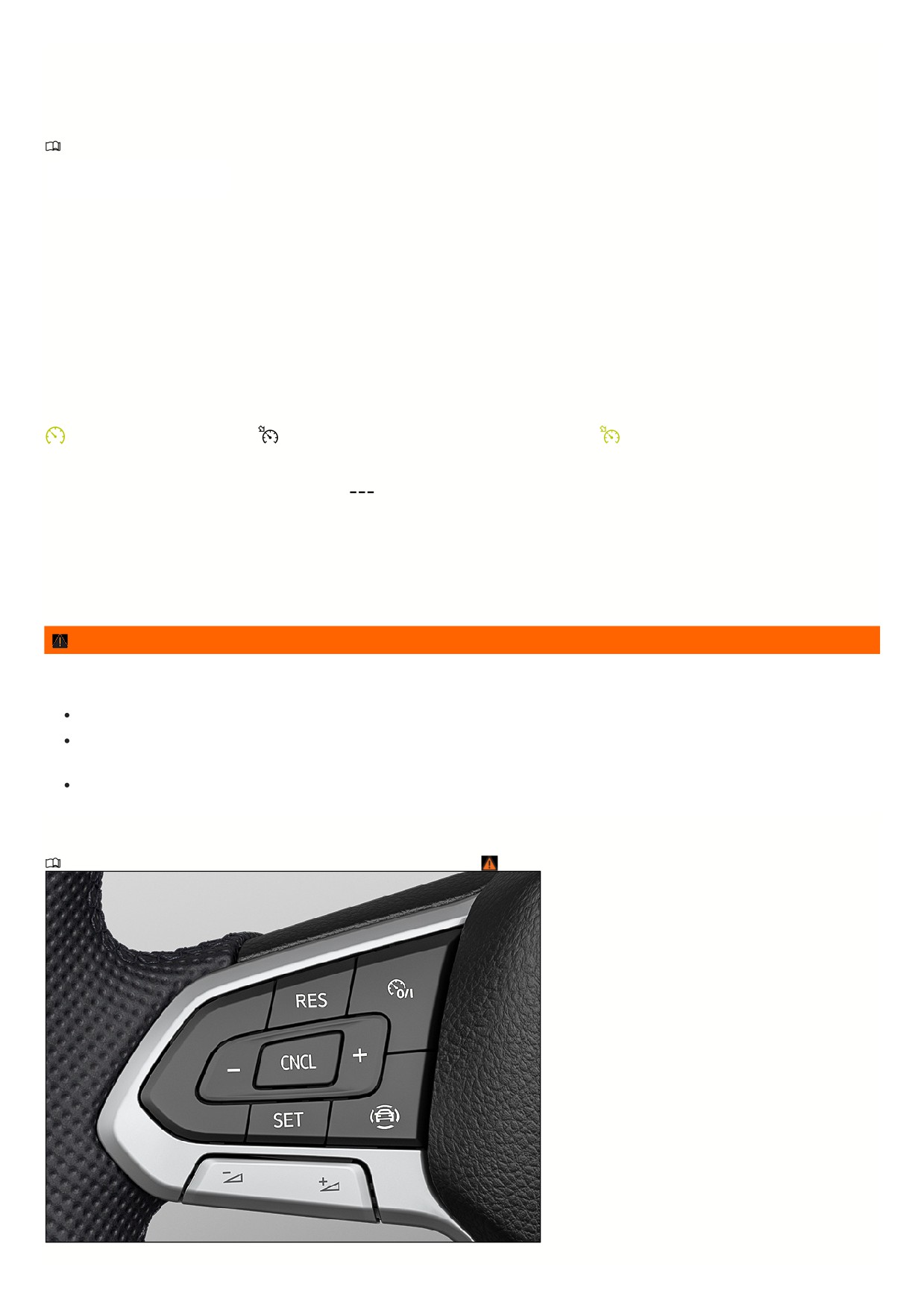
Fig. 113 Left side of the multi-function steering wheel (variant 1).
169
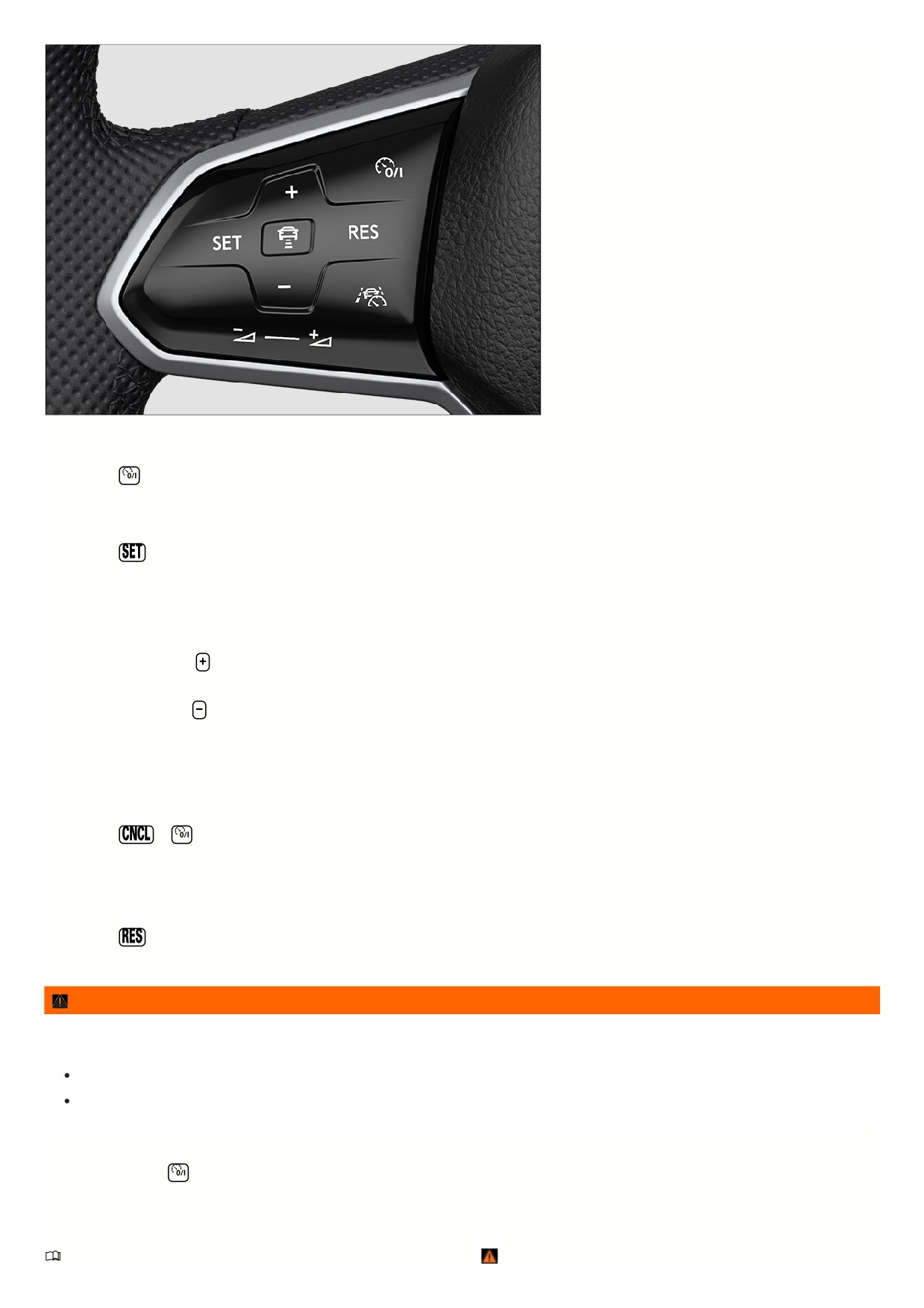
Fig. 114 Left side of the multi-function steering wheel (variant 2).
Switching on
1. Press the
button.
No speed is saved. At this stage, the limiter will not yet start regulating your speed.
Starting the regulation function
1. Press the
button while driving.
The cruise control system saves and controls the current speed.
Setting the speed
You can adjust the saved speed as follows:
+ 1 mph (1 km/h):
Press the
button.
Steering wheel version 2: Alternatively, swipe the button from the bottom to the top.
- 1 mph (1 km/h): Press the
button.
Steering wheel version 2: Alternatively, swipe the button from the top to the bottom.
To change the stored speed continuously, press and hold the respective button.
The vehicle adjusts to the current speed by accelerating or decelerating. The vehicle does not brake actively.
Canceling the regulation function
1. Press the
or
button briefly.
Or: Press the brake pedal.
The vehicle speed remains stored in the system.
Resuming the regulation function
1. Press the
button.
The cruise control system resumes and maintains the saved speed.
WARNING
There is the risk of an accident if you inadvertently resume at the saved speed or if the saved speed is too fast for the current road, traffic, or weather
conditions. This may result in serious injury or even death.
Check whether the saved speed is suitable for the current road, traffic, or weather conditions before you resume the cruise control system.
Switch off the cruise control system if you do not require it.
Switching off
1. Press and hold the
button.
The cruise control system is switched off and the saved speed is deleted.
Troubleshooting
Please read the introductory information and heed the Warnings and Notice ⇒
Introduction.
17

Cruise control system malfunction
Malfunction. The yellow indicator light turns on.
1. Switch off the cruise control system and seek assistance from an authorized Volkswagen dealer or authorized Volkswagen Service Facility. Volkswagen
recommends contacting an authorized Volkswagen dealer or authorized Volkswagen Service Facility.
Cruise control system malfunction
Malfunction. The white indicator light comes on. In addition, the yellow central warning light
lights up.
1. Switch off the cruise control system and seek assistance from an authorized Volkswagen dealer or authorized Volkswagen Service Facility. Volkswagen
recommends contacting an authorized Volkswagen dealer or authorized Volkswagen Service Facility.
The regulation function is canceled automatically
The vehicle has exceeded the stored speed for an extended period.
No gear is engaged for driving forward.
Brake assistance systems, for example ASR or ESC, are active.
The vehicle has been braked by Front Assist.
If the problem persists, switch off the cruise control system and seek assistance from an authorized Volkswagen dealer or authorized Volkswagen Service
Facility. Volkswagen recommends contacting an authorized Volkswagen dealer or authorized Volkswagen Service Facility.
Adaptive Cruise Control (ACC)
Introduction
Adaptive Cruise Control (ACC)
maintains your selected speed. When
the vehicle approaches a vehicle driving
ahead, the ACC adjusts the speed
automatically and maintains your set
distance to the vehicle driving ahead.
Does this vehicle have ACC?
The vehicle has ACC if you can adjust ACC settings in the Assistance systems menu in the Infotainment system.
Speed range
You can set a speed between approx. 20 mph (approx. 30 km/h) and approx. 130 mph (approx. 210 km/h). The maximum speed that you can set may be lower,
depending on the vehicle equipment and country.
Driving with ACC
You can override the ACC system at any time. The regulation function is canceled when you apply the brakes. When you accelerate, the regulation function is
paused while accelerating and then resumed.
If a trailer is hitched, ACC is less dynamic.
Driver intervention request
If automatic deceleration by the ACC is not sufficient or the system limits are reached, the ACC will prompt you - with a message in the instrument cluster -
to also apply the brakes. The red warning light will also turn on and a warning tone will sound. Take over steering and be ready to brake.
Radar sensor
ACC detects driving situations using a radar sensor in the front of the vehicle. The radar sensor has a range of up to approx. 120 m (approx. 400 ft).
WARNING
The intelligent technology of the ACC cannot overcome the natural laws of physics and can operate only within the limits of the system. Never allow the
increased convenience to tempt you into taking risks. Careless or unintended use of the ACC system can cause accidents and serious injuries. The system
cannot replace the driver's attention.
Always adapt your speed and distance to vehicles driving ahead based on the visual, weather, road, and traffic conditions.
Never use ACC when visibility is poor or when roads are steep, winding, flooded, or slippery, like from snow, ice, moisture, or gravel.
Never use ACC when driving off-road or on unpaved roads. ACC is only designed for use on paved roads.
Take over steering immediately if a driver intervention prompt appears in the instrument cluster display or the deceleration by ACC is not sufficient.
Apply the brakes if the vehicle continues to roll unintentionally, e.g. after a driver intervention prompt.
Always be ready to resume control of the vehicle speed.
Special driving situations
171

Please read the introductory information and heed the Warnings and Notice ⇒
Introduction.
The functions described below depend on the vehicle equipment and are not available in all countries.
Stop-and-go traffic
ACC can brake vehicles with automatic transmissions to a stop and hold them stationary. ACC remains active, and the instrument cluster display shows ACC is
ready for a few seconds. In this time, the vehicle will automatically move again once the vehicle driving ahead starts.
Extend drive-readiness or reactivate:
1. Press the
button.
Driving off when drive-readiness has ended and the vehicle driving ahead has already started moving:
1. Press the
button.
Or: Briefly press the accelerator pedal.
The ACC does not stay active in the following scenarios:
The stationary phase lasts several minutes.
A vehicle door is opened.
The ignition is switched off.
WARNING
If ACC is ready appears in the instrument cluster display and the vehicle driving ahead starts to move, your vehicle will start driving automatically. The vehicle
may not be able to detect obstacles in the vehicle's path when this happens. This may cause accidents and serious injuries.
Check the vehicle's path every time before you start driving and brake the vehicle if necessary.
ACC limitations
Please read the introductory information and heed the Warnings and Notice ⇒
Introduction.
When should I not use ACC?
The ACC system is not suitable in the following situations. Canceling the regulation function
⇒
:
When driving in heavy rain, snow, or spray
When driving through construction zones, tunnels or toll stations.
When driving on winding roads, for example, mountain roads
When driving off-road
When driving in parking ramps
When driving on roads with embedded metal objects, such as railroad tracks
When driving on gravel roads
Following a violent impact affecting components within the range of the radar sensor, e.g. following a rear-end collision.
WARNING
If you use the ACC in the situations mentioned, accidents and serious injuries may result and legal regulations may be violated.
Delayed reaction
If the radar sensor is exposed to environmental conditions that limit its function, the system may have a delayed response to this. Therefore, the display that
indicates that functions are restricted may be delayed when you first start driving or while driving ⇒
Introduction.
Unrecognizable objects
ACC only detects vehicles that are moving in the same direction. The following will not be detected:
Pedestrians
Animals
Stationary vehicles
Vehicles crossing the street or oncoming vehicles
Other stationary obstacles
172
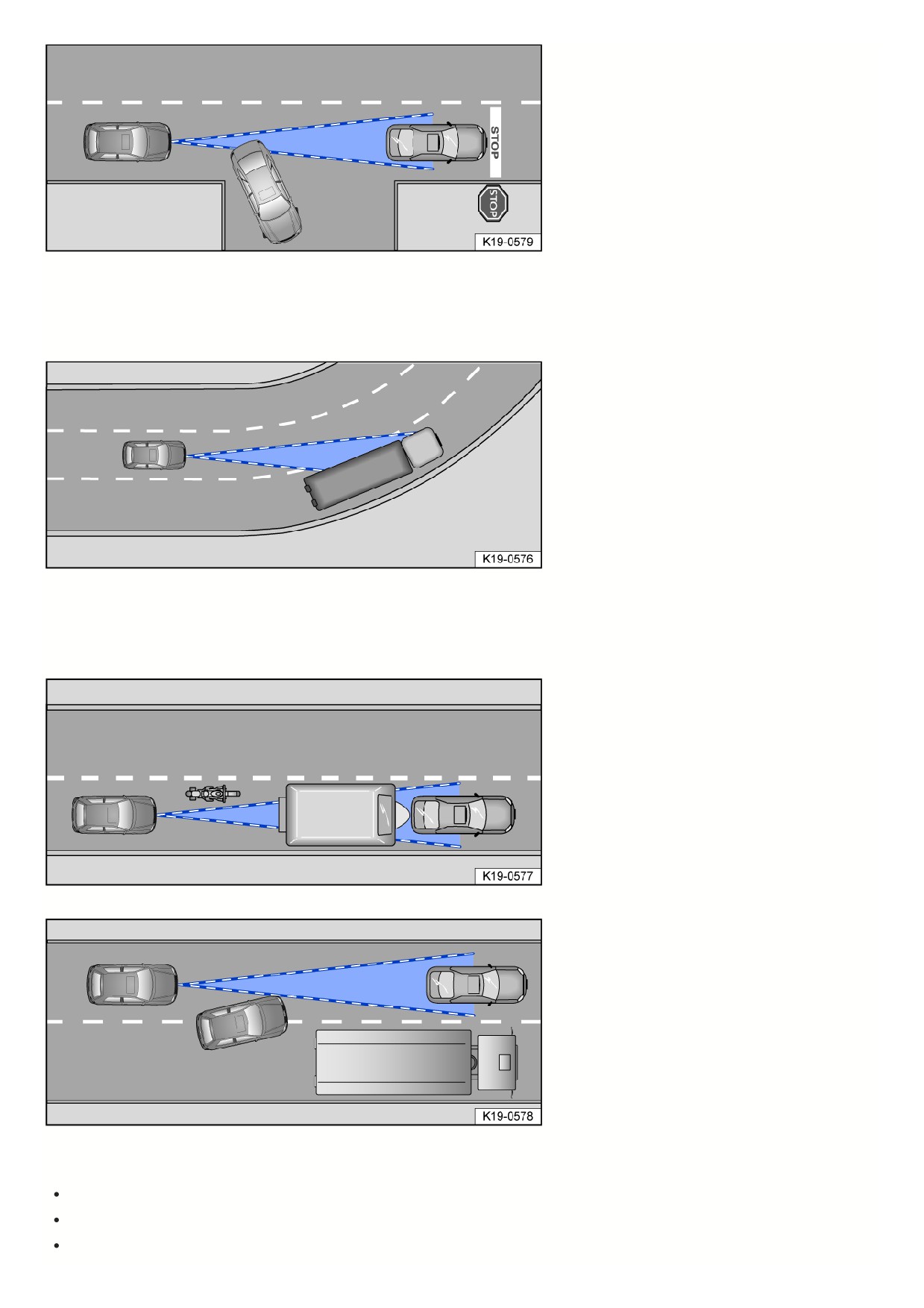
Fig. 115 Turning and stationary vehicles.
If, for example, a vehicle detected by the ACC turns or changes lanes and there is a stationary vehicle in front of this vehicle, the ACC will not react to the stationary
vehicle fig. 115.
Curves
Fig. 116 Driving around curves.
The radar sensor only measures straight ahead. Therefore, on tight curves, vehicles may be detected by mistake or vehicles driving ahead may not be detected
fig. 116.
Vehicles outside the sensor range
Fig. 117 Narrow vehicle.
Fig. 118 Changing lanes.
The ACC may not react, may react with a delay, or may react in a way that is not desired in the following situations:
If there are vehicles that are driving close to your vehicle but outside the sensor range, such as motorcycles fig. 117.
If vehicles change to your lane close in front of your vehicle fig. 118.
Vehicles with attachments exceeding the vehicle dimensions.
173
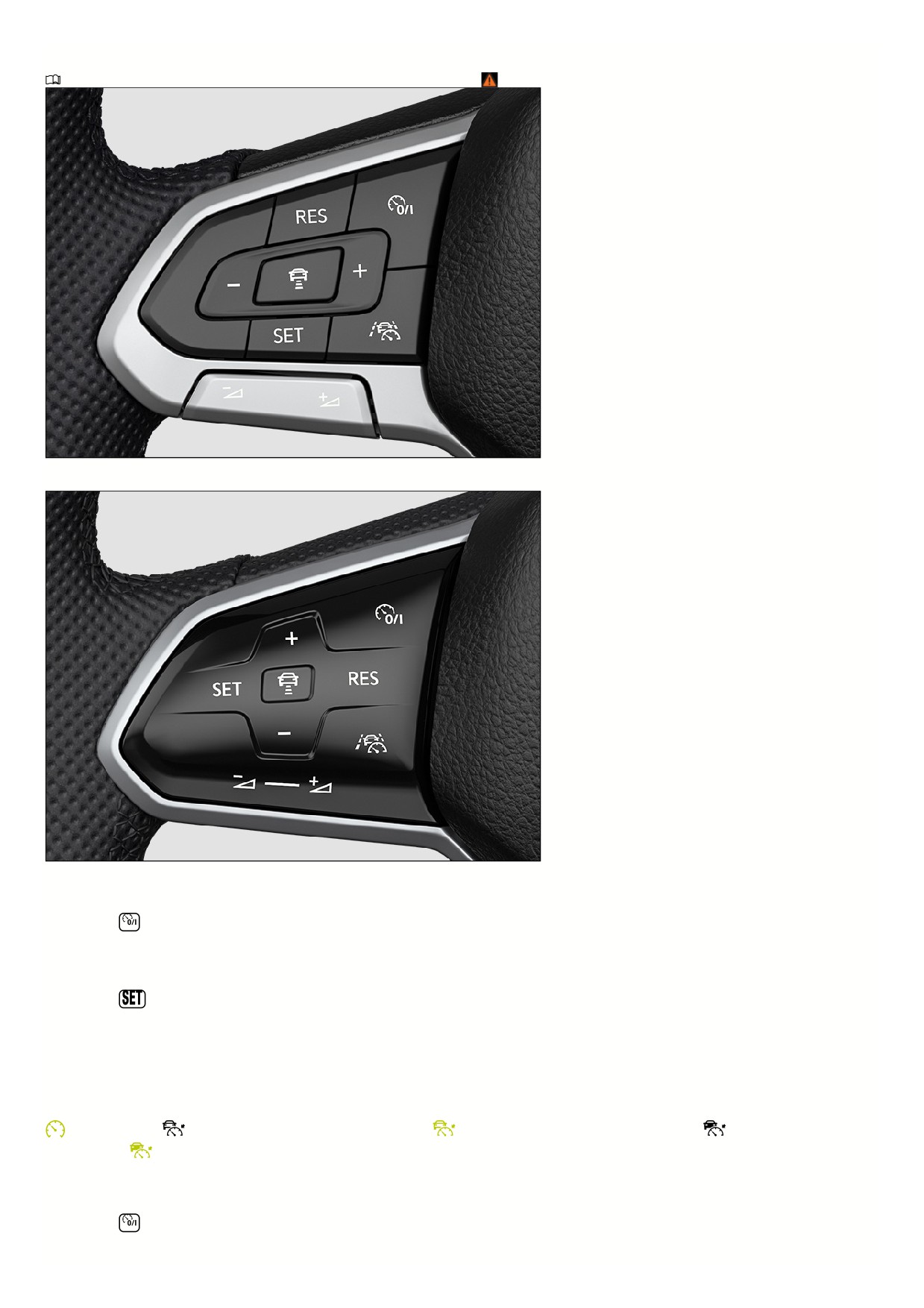
Switching ACC on and off
Please read the introductory information and heed the Warnings and Notice ⇒
Introduction.
Fig. 119 Left side of the multi-function steering wheel (variant 1).
Fig. 120 Left side of the multi-function steering wheel (variant 2).
Switching on
1. Press the
button.
ACC is not yet functioning.
Starting the regulation function
1. Press the
button while driving forward.
ACC saves the current speed and maintains the set distance. If the current speed is outside the specified speed range, the ACC adjusts the minimum speed
when driving too slowly or the maximum speed when driving too quickly.
In addition, the anti-slip regulation (ASR) is activated and ESC Sport is deactivated.
The following indicator lights may turn on depending on the driving situation and the instrument cluster version:
ACC is regulating.
ACC is regulating - no vehicle ahead detected.
ACC is regulating - no vehicle ahead detected.
ACC is regulating - vehicle
ahead detected.
ACC is regulating - vehicle ahead detected.
If the ACC is not functioning, the gray indicator lights will light up or no indicator lights will light up at all.
Canceling the regulation function
1. Press the
button briefly.
Or: Press the brake pedal.
174
The relevant indicator light for the driving situation comes on and the speed and distance are saved.
If the anti-slip regulation (ASR) is deactivated, then the Adaptive Cruise Control is automatically stopped.
Resuming the regulation function
1. Press the
button.
ACC assumes the last set speed and the last set distance. The instrument cluster display shows the set speed, and indicator lights turn on corresponding to the
driving situation.
Switching off
1. Press and hold the
button.
The set speed is deleted.
Adjusting the ACC settings
Please read the introductory information and heed the Warnings and Notice ⇒
Introduction.
Setting the distance
Fig. 121 In the instrument cluster display: set distance
(general example, ACC is regulating).
You can set the distance at five levels from very short to very long:
1. Press the
button.
2. Press the
or
button.
Steering wheel version 2: Alternatively, swipe vertically over the button area from
to
or
Or: Press the
button repeatedly until the preferred distance is set.
The instrument cluster display shows the selected level fig. 121
. Heed the country-specific regulations for minimum distance.
In the Assistance systems menu of the Infotainment system, you can choose whether you want the regulation to start at the distance that was set at the end of the
journey or start at a preselected distance.
If ACC is not regulating, the set distance and the vehicle will not be highlighted on the instrument cluster display.
Setting the speed
You can adjust the stored speed within the specified speed range using the buttons on the multi-function steering wheel as follows:
+ 1 mph (1 km/h):
Press the
button.
Steering wheel version 2: Alternatively, swipe the button from the bottom to the top.
- 1 mph (1 km/h):
Press the
button.
Steering wheel version 2: Alternatively, swipe the button from the top to the bottom.
+ 5 mph (10 km/h):
Press and hold the
button. Pressing for the first time changes to the next-largest tens digit (km/h) or fives digit (mph).
- 5 mph (10 km/h):Press and hold the
button. Pressing for the first time changes to the next-smallest tens digit (km/h) or fives digit (mph).
WARNING
If the vehicle is less than the minimum distance from the vehicle ahead and the difference in speed between the vehicle ahead and your own vehicle is so great
175

that the speed deceleration from the ACC is not sufficient, there is a risk of a rear end collision. The braking distance also increases during rainfall and winter
road conditions.
ACC may not be able to detect all driving situations correctly.
Always be ready to apply the brakes yourself.
If you press the accelerator pedal, you will override the speed and distance control. In this case, ACC will not brake automatically.
Heed the country-specific regulations regarding minimum distance.
Always set a longer distance when there is rain, snow, or poor visibility.
Adjusting the regulation function system settings
You can influence how the ACC reacts in a sporty driving style:
Vehicles with Driving Mode Selection:
Select the desired driving mode.
Vehicles without Driving Mode Selection:
Select the desired driving mode in the Assistance systems menu in the Infotainment system.
Deactivating distance control
1. Press the
button.
2. Select Control system in the instrument cluster display.
Distance control is deactivated. The vehicle only maintains the set speed.
Troubleshooting
Please read the introductory information and heed the Warnings and Notice ⇒
Introduction.
ACC is not available
The yellow indicator light turns on.
The radar sensor is dirty. Clean the radar sensor ⇒ Vehicle care.
The visibility of the radar sensor is limited due to weather conditions, such as snow, or from soap residue or coatings. Clean the radar sensor
⇒ Vehicle care
Radar sensor visibility is limited by attachments, decorative frames on license plate holders, or stickers. Clear the area around the radar sensor.
The radar sensor is misaligned or damaged, for example as a result of damage to the front of the vehicle. Check if there is noticeable damage
⇒ Repairs and
technical modifications.
Malfunction or fault. Stop the engine and restart.
Painting work was carried out on or structural modifications were made to the front of the vehicle.
The original Volkswagen emblem is not used. Volkswagen recommends the use of Volkswagen original parts or Volkswagen original accessories, which you
can acquire from an authorized Volkswagen dealer or authorized Volkswagen Service Facility.
If the problem persists, contact an authorized Volkswagen dealer or authorized Volkswagen Service Facility. Volkswagen recommends contacting an
authorized Volkswagen dealer or authorized Volkswagen Service Facility.
ACC is not functioning as expected
The radar sensor is dirty. Clean the radar sensor ⇒ Vehicle care.
The system limitations are not adhered to ⇒ ACC limitations.
The brakes are overheating, and the regulation function has been automatically canceled. Let the brakes cool down and check the function again.
If the problem persists, contact an authorized Volkswagen dealer or authorized Volkswagen Service Facility. Volkswagen recommends contacting an
authorized Volkswagen dealer or authorized Volkswagen Service Facility.
The Adaptive Cruise Control cannot start
Make sure the following requirements are met:
Vehicles with an automatic transmission: A gear is engaged for driving forward.
The brake lights on the vehicle are functioning.
The brake lights on the electronically connected trailer are functioning.
ESC is not regulating.
The brake pedal is not being pressed.
Unusual noises during automatic braking
This is normal and not a cause for concern.
176

Front Assist
Introduction
Front Assist can recognize impending
forward collisions and warn the driver.
In addition, the system can provide
support when braking and initiate an
automatic braking maneuver.
The Front Assist system can help to avoid accidents but cannot replace the driver's attention.
Front Assist works solely within the system limitations. Warning times vary depending on the Traffic Situation and the driving behavior.
Range of functions
Autonomous Emergency Braking (Front Assist) includes the following extended functions, depending on the vehicle equipment and the country:
Pedestrian Monitoring.
The functions named are (if available) automatically active if Front Assist is switched on.
Recognizable objects
Autonomous Emergency Braking (Front Assist) can recognize the following objects, depending on the vehicle equipment and the country:
Vehicles.
Bikes.
Pedestrians.
Driving with Front Assist
You can cancel automatic braking interventions by moving the steering wheel or pressing the accelerator pedal.
Automatic braking
Front Assist can brake the vehicle to a stop. The vehicle will not be held at a stop after that. Press the brake pedal.
The brake pedal feels more firm during an automatic braking maneuver.
Detecting the Driving Situation
Front Assist detects driving situations using a radar sensor in the front of the vehicle. The range of the radar sensor is up to approximately 400 ft (120 m).
WARNING
The intelligent technology of Front Assist cannot overcome the natural laws of physics and it can only operate within the limits of the system. Do not allow the
increased convenience provided by the Front Assist system to tempt you into taking risks. The Front Assist system cannot prevent accidents and severe
injuries automatically. The driver is always responsible for control of the vehicle.
Always adapt your speed and remain a safe distance to vehicles driving ahead according to the visual, weather, road, and traffic conditions.
Please be aware that Autonomous Emergency Braking (Front Assist) cannot detect all objects in the speed range
⇒ Front Assist limitations.
When Front Assist warns you, brake the vehicle immediately or maneuver around the obstacle, depending on the driving situation.
Autonomous Emergency Braking (Front Assist) may intervene when not desired, e.g. when the function is limited. Therefore, consider interrupting
automatic Autonomous Emergency Braking (Front Assist) interventions if necessary.
If you are unsure which functions the vehicle has included, consult suitably qualified professionals before starting your journey. Volkswagen recommends
contacting an authorized Volkswagen dealer or authorized Volkswagen Service Facility.
Warning levels and braking support
Please read the introductory information and heed the Warnings and Notice ⇒
Introduction.
Speed ranges
Autonomous Emergency Braking (Front Assist) provides maximum support within these speed ranges:
Response to vehicles: Approx. 3 mph (approx. 5 km/h) to approx. 155 mph (approx. 250 km/h).
Response to bikes: Approx. 3 mph (approx. 5 km/h) to approx. 155 mph (approx. 250 km/h).
Response to pedestrians: Approx. 3 mph (approx. 5 km/h) to approx. 40 mph (approx. 65 km/h).
The support system can involve an advance warning, an immediate warning, automatic braking or braking support. A distance warning may also be displayed.
Influencing factors
Whether and in which speed range Autonomous Emergency Braking (Front Assist) reacts to the named objects is dependent on the following factors:
Type of object.
177

Movement direction of the object.
Speed of the object.
Speed of the vehicle.
The work area can therefore be limited if the vehicle approaches an object very quickly and thus has little time to react.
Furthermore, not all warning levels are passed through in all situations. Depending on the speed, there may not be, for example, an advance warning or immediate
warning, but rather an automatic braking maneuver that occurs straight away, so as to best protect the detected object.
Distance warning
Front Assist detects if there is a safety hazard from following the vehicle ahead too closely.
The indicator light turns on. Increase the distance.
Advance warning
Front Assist detects a possible collision and prepares the vehicle for possible emergency braking.
A warning tone sounds and the warning light turns on. Apply the brakes or maneuver to avoid the collision.
Immediate warning
If you do not respond to the advance warning, the brakes may be applied briefly to indicate the increasing risk of a collision. Apply the brakes or maneuver to avoid
the collision.
Automatic braking
Autonomous Emergency Braking (Front Assist) can brake the vehicle automatically in several stages of increasing braking force. Reducing the vehicle speed may
help to reduce the damage resulting from a collision.
Braking support
If the system detects that you are not braking enough before an impending collision, Front Assist can increase the braking force and thus help to reduce the risk of
collision. The braking support is only active as long as you are firmly pressing the brake pedal.
Front Assist limitations
Please read the introductory information and heed the Warnings and Notice ⇒
Introduction.
or
Autonomous Emergency Braking is not available or availability is limited directly after starting the vehicle or after restarting the system. During this
time, the indicator light in the instrument cluster display comes on.
Front Assist has physical and system limitations. Therefore, always pay attention and be ready to intervene as necessary.
Delayed reaction
If the radar sensor is exposed to environmental conditions that limit its function, the system may have a delayed response to this. Therefore, the display that
indicates that functions are restricted may be delayed when you first start driving or while driving ⇒
Introduction.
Unrecognizable objects
Autonomous Emergency Braking (Front Assist) may not react or may react with a delay to the following objects:
If vehicles are driving close to your vehicle but outside of the sensor range, for example vehicles that are staggered around your vehicle or motorcycles
If vehicles change to your lane close in front of your vehicle
If vehicles have objects or accessories projecting out of the vehicle.
If there are oncoming vehicles or vehicles crossing the street
Stationary or oncoming pedestrians; generally no reaction to people without Pedestrian Monitoring.
Stationary cyclists, oncoming cyclists or cyclists crossing the street.
Pedestrians and cyclists who are not detected as such, for example because they are fully or partially hidden.
Functional limitations
Front Assist may not react, may react with a delay, or may react in a way that is not desired in the following situations:
When driving around tight curves
When driving in heavy rain, snow, or spray
When driving in parking garages or tunnels.
When driving on roads with embedded metal objects, such as railroad tracks
When driving in reverse
If ESC is regulating.
If the Offroad driving mode is switched on (depending on the vehicle equipment).
When ESC Sport (depending on the vehicle equipment) is switched on ⇒ Switching the braking support system on and off .
If the radar sensor is dirty or obstructed
178
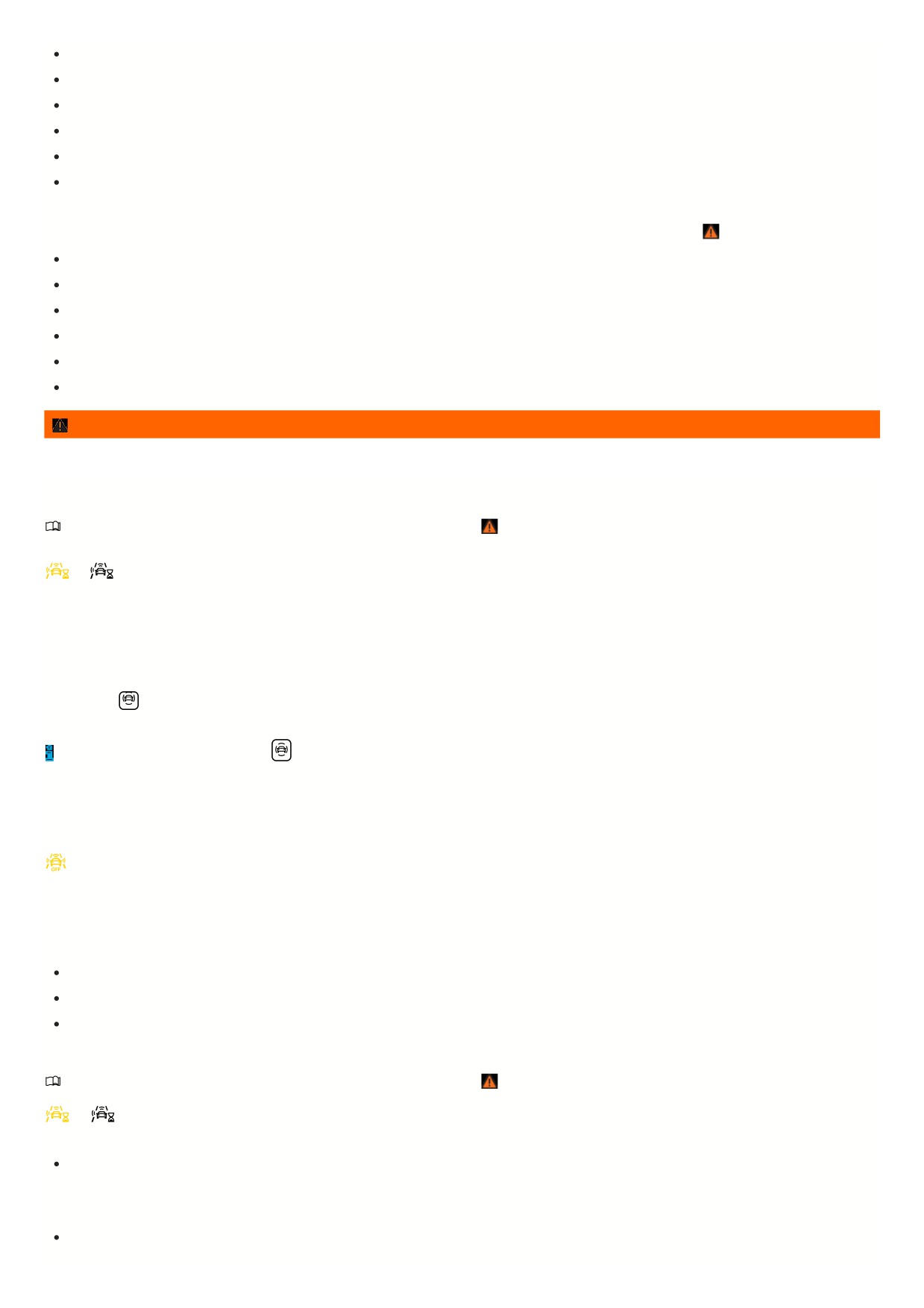
If multiple brake lights on the vehicle are malfunctioning.
If multiple brake lights are malfunctioning on a trailer that is connected to the vehicle electrical system
If the vehicle is accelerating very quickly or the accelerator pedal is pressed all the way down
In complex driving situations, such as around traffic islands
In unclear traffic situations, for example if vehicles driving ahead are braking quickly or are turning
If Front Assist is malfunctioning
Switching off Front Assist
Depending on the system, Front Assist may not be suitable in the following situations and must be switched off if they occur
⇒
:
If the vehicle is not being driven on public roads, for example during off-road driving or on a racetrack.
If the vehicle is being towed or transported
If add-ons such as auxiliary headlights cover the radar sensor.
If the radar sensor is malfunctioning
Following a violent impact affecting components within the range of the radar sensor, e.g. following a rear-end collision.
If there are multiple unwanted activations
WARNING
If you do not switch off Front Assist in the these situations, accidents and serious injuries could occur.
Using Front Assist
Please read the introductory information and heed the Warnings and Notice ⇒
Introduction.
When you switch on the ignition, Front Assist and the advance warning (depending on the country) are automatically switched on.
or
However, Front Assist is not available or its availability is restricted while the indicator light is turned on.
Volkswagen recommends always leaving Front Assist, distance warning, and advance warning switched on. For exceptions to this, see
⇒ Front Assist limitations.
Switching on and off
You can switch Autonomous Emergency Braking on and off manually and view the switched on condition.
In the instrument cluster display:
1. Press the
button.
2. Switch Autonomous Emergency Braking on or off.
Depending on the vehicle equipment, the
button is located either on the multi-function steering wheel or the turn signal and high beam lever.
In the Infotainment system:
1. Open the Assistance systems menu.
2. Switch Autonomous Emergency Braking on or off in the corresponding submenu.
If you switch off Front Assist, the advance warning and distance warning will also be switched off. The yellow indicator light turns on in the instrument
cluster display.
Adjusting the distance and advance warning setting
If Front Assist is switched on, you can set the following settings in the assistance systems menu of the Infotainment system depending on the equipment and
country:
Switch on and off distance warning.
Switch on and off advance warning.
Set the warning period for the advance warning.
Troubleshooting
Please read the introductory information and heed the Warnings and Notice ⇒
Introduction.
or
Front Assist Starts
The indicator light lights up white or yellow depending on the country.
Autonomous Emergency Braking (Front Assist) is temporarily not available or has limited availability. After driving straight for a short distance, Autonomous
Emergency Braking is available again and the indicator light goes out. If the vehicle does not drive, the indicator light stays on.
Front Assist is not available, and the radar sensor does not have sufficient visibility
The radar sensor is dirty. Clean the radar sensor ⇒ Vehicle care.
179

The visibility of the radar sensor is limited due to weather conditions, such as snow, or from soap residue or coatings. Clean the radar sensor
⇒ Vehicle care
Radar sensor visibility is limited by attachments, decorative frames on license plate holders, or stickers. Clear the area around the radar sensor.
The radar sensor is misaligned or damaged, for example as a result of damage to the front of the vehicle. Check if there is noticeable damage
⇒ Repairs and
technical modifications.
Painting work was carried out on or structural modifications were made to the front of the vehicle.
The original Volkswagen emblem is not used. Volkswagen recommends the use of Volkswagen original parts or Volkswagen original accessories, which you
can acquire from an authorized Volkswagen dealer or authorized Volkswagen Service Facility.
If the problem persists, turn off Autonomous Emergency Braking and contact suitably qualified professionals. Volkswagen recommends contacting an
authorized Volkswagen dealer or authorized Volkswagen Service Facility.
Front Assist is not functioning as expected or has been triggered multiple times unnecessarily
The radar sensor is dirty. Clean the radar sensor ⇒ Vehicle care.
The system limitations are not adhered to ⇒ Front Assist limitations.
If the problem persists, turn off Autonomous Emergency Braking and contact suitably qualified professionals. Volkswagen recommends contacting an
authorized Volkswagen dealer or authorized Volkswagen Service Facility.
Lane Keeping System (Lane Assist)
Introduction
Lane Assist helps the driver to stay in a
lane, within the system limitations. This
function is not suitable for, and not
designed for, autonomously keeping
your vehicle in a lane.
Lane Assist detects the lane markers using a camera behind the windshield. If the system detects that the vehicle is coming too close to a lane marker, the system
warns the driver with corrective steering. The driver can override the corrective steering at any time.
Speed range
Lane Assist is ready to take control (active system status) when a lane marking is detected within the system limits above approximately 35 mph (60 km/h).
WARNING
The intelligent technology of Lane Assist cannot overcome the natural laws of physics and it can only operate within the limits of the system. Careless or
unintended use of Lane Assist can cause accidents and serious injuries. The system cannot replace the driver’s attention and steering.
Always adapt your speed and remain a safe distance to vehicles driving ahead according to the visual, weather, road, and traffic conditions.
Always keep your hands on the steering wheel so that you are prepared to steer at any time. The driver is always responsible for keeping the vehicle
within the lane.
Override immediately by steering if the system intervenes when it should not.
Pay attention to indicators in the instrument cluster display and respond to the prompts accordingly when the traffic situation allows.
Always pay attention to the area around your vehicle and drive with anticipation.
If the camera lens is dirty, covered, or damaged, Lane Assist may be limited.
Lane Assist limitations
Please read the introductory information and heed the Warnings and Notice ⇒
Introduction.
Lane markings not detected or not correctly recognized
Lane Assist does not correctly detect all lane markings. If lane markings are not recognized, Lane Assist may fail to intervene. Be prepared to steer at all times.
Under certain circumstances, Lane Assist may incorrectly detect poor road surfaces, road structures or objects, reflections and glare as lane markings. Override
immediately if the system intervenes when it should not.
Switching off Lane Assist temporarily
In the following situations, Lane Assist may intervene when not desired or may fail to intervene when it should. Therefore, the driver's attention is especially
important in these scenarios. Switch off Lane Assist temporarily:
When the driving style is very dynamic.
When weather or road conditions are poor
In construction zones
In front of bumps or dips in the road
When not on highways or well-developed roads.
18
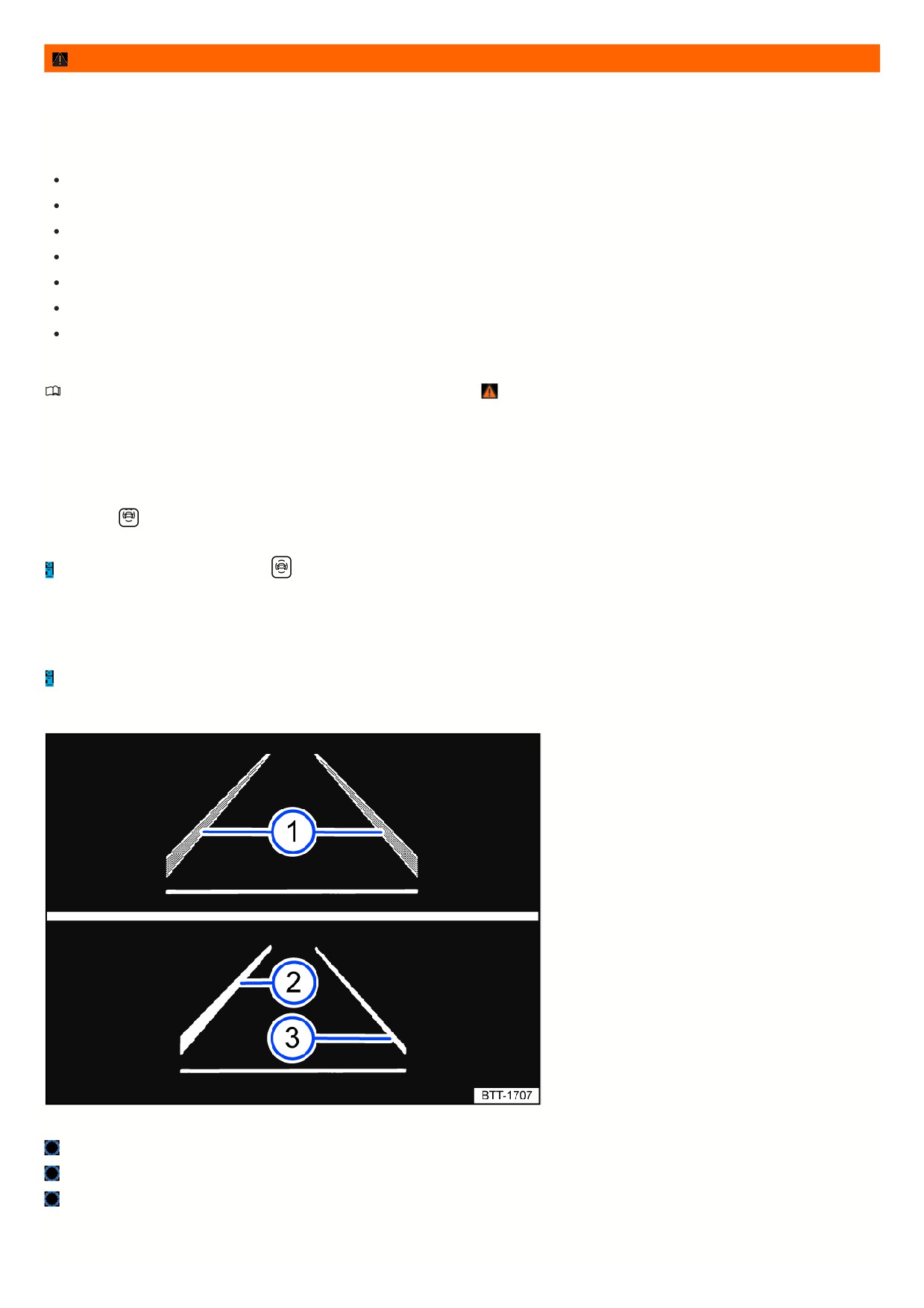
WARNING
If you do not switch off Lane Assist in the these situations, accidents and serious injuries could occur.
Lane Assist is not available
The system is not available under the following conditions (inactive system status):
The vehicle speed is less than around 55 km/h (around 30 mph).
Lane Assist has not detected a road lane marking.
If lanes and curves are too narrow.
Temporarily, when the driving style is very dynamic.
When the turn signals are switched on before a manual lane change.
When the driver oversteers during a system intervention.
When there is no reaction from the driver to a driver intervention prompt.
Driving with Lane Assist
Please read the introductory information and heed the Warnings and Notice ⇒
Introduction.
Switching on and off
You can view the switched on condition of the Lane Assist in the instrument cluster display and in the Infotainment system. You can also switch Lane Assist on and
off there.
In the instrument cluster display:
1. Press the
button.
2. Switch Lane Assist on or off.
Depending on the vehicle equipment, the
button is located either on the multi-function steering wheel or the turn signal and high beam lever.
In the Infotainment system:
1. Open the Assistance systems menu.
2. Switch Lane Assist on or off in the corresponding submenu.
If there is a system malfunction, Lane Assist can turn off automatically.
Displays
Fig. 122 In the instrument cluster display: Lane Assist indicators.
Lane marking detected. The system is ready to monitor on the indicated side.
Lane marking detected. The system is monitoring on the indicated side.
The system is not ready to monitor on the indicated side.
One of the following indicator lights may come on, depending on the driving situation and the instrument cluster version:
181