Volkswagen Golf Variant / Jetta. Manual - part 732
 

  Index      Volkswagen     Volkswagen Golf Variant (2007), Jetta (2005) - service repair manual


Search            


Content   ..  730  731  732  733   ..


Volkswagen Golf Variant / Jetta. Manual - part 732


Caution

♦ Switch off ignition and all electrical consumers.
♦ Remove the ignition key.
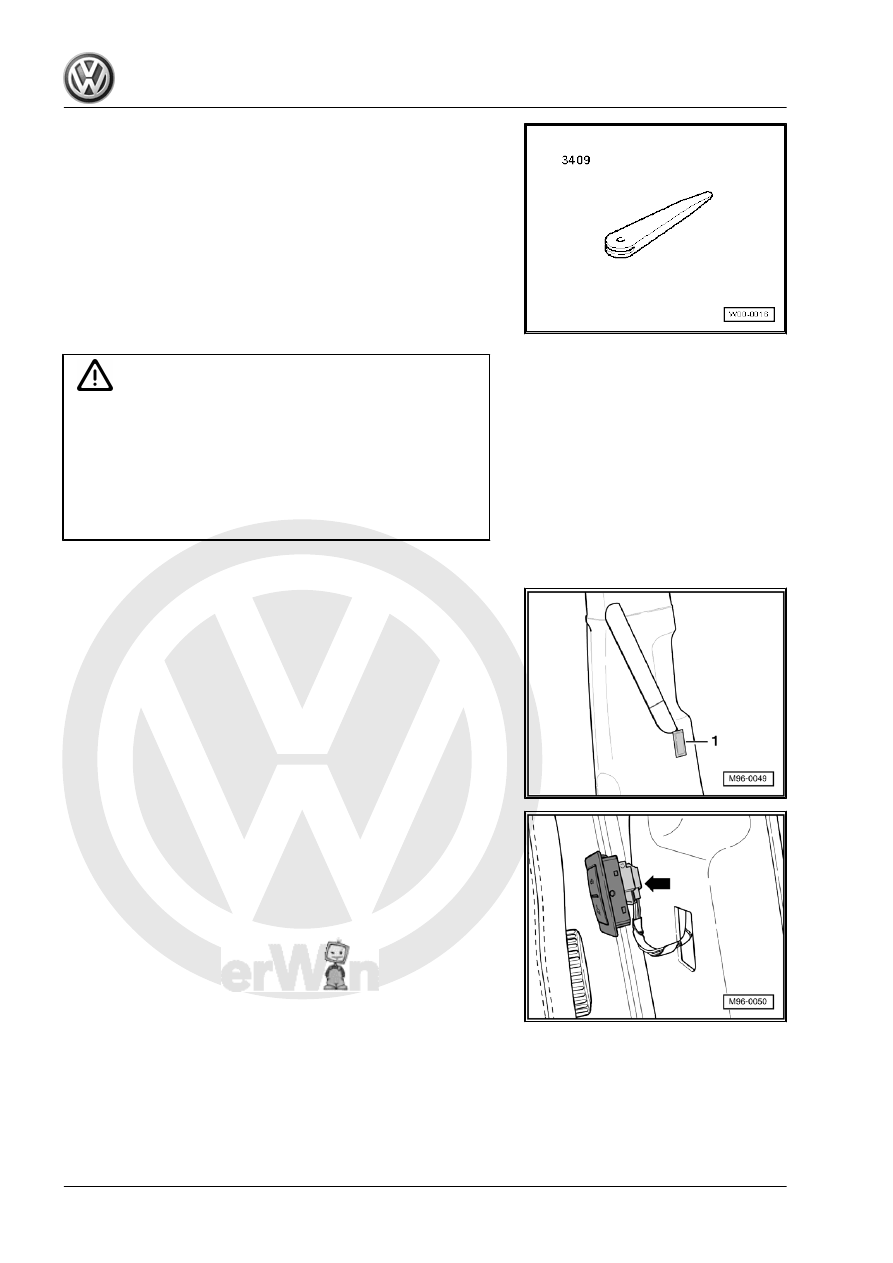
♦ When removing and installing components that are in view

(switches, covers, trim), mask off areas where tools ( re‐

moval wedge -VAS 3409- , screwdriver) are used to lever

out those components using commercially available

masking tape.

Removing
– Use removal wedge -VAS 3409- to unclip switch -1- from trim.

– Disconnect connector -arrow-.
Installing
Installation is carried out in reverse order of removal.

3.8

Removing and installing central locking

deadlock function warning lamp -SAFE-

-K133-

The central locking deadlock function warning lamp -SAFE- -

K133- is located near to the exterior mirror in the driver's door trim.

398

Removing and installing central locking

deadlock function warning lamp -SAFE-

-K133-

Caution

♦ Switch off ignition and all electrical consumers.
♦ Remove the ignition key.
♦ When removing and installing components that are in view

(switches, covers, trim), mask off areas where tools ( re‐

moval wedge -VAS 3409- , screwdriver) are used to lever

out those components using commercially available

masking tape.

Removing
– Remove driver side front door trim ⇒  General body repairs,

interior; Rep. gr.  70 .

– Unclip central locking deadlock function warning lamp -SAFE-

-K133- -1- by pressing locking lugs together -arrows- and

remove from door trim panel.

– Pull connector -1- off central locking deadlock function warn‐

ing lamp -SAFE- -K133- -2-.

Installing
Install in the reverse order of removal. When doing this, note the

following:
Ensure that the central locking deadlock function warning lamp -

SAFE- -K133- engages properly into door trim.

3. Lights and switches in front doors and B-pillar    

399

Lights and switches in rear doors

4.1

Components - rear door locks

Rear left door lock (depending on equipment)
♦ Rear left door contact switch -F10-
♦ Rear left central locking lock unit -F222-
♦ Rear left door central locking motor, lock -V214-
♦ Rear left door central locking deadlock function motor -V163-
Rear right door lock (depending on equipment)
♦ Rear right door contact switch -F11-
♦ Rear right central locking lock unit -F223-
♦ Rear right door central locking motor, lock -V215-
♦ Rear right door central deadlock function locking motor -V164-
The above mentioned components cannot be renewed individu‐

ally.
– Renew corresponding door lock ⇒  General body repairs, ex‐

terior; Rep. gr.  58 .

4.2

Removing and installing rear window

regulator switch in door

The procedure for removal and installation of rear left window

regulator switch, in door -E52- / rear right window regulator switch,

in door -E54- is the same and is therefore described for one only.

Caution

♦ Switch off ignition and all electrical consumers.
♦ Remove the ignition key.
♦ When removing and installing components that are in view

(switches, covers, trim), mask off areas where tools ( re‐

moval wedge -VAS 3409- , screwdriver) are used to lever

out those components using commercially available

masking tape.

Removing
– Remove upper part of handle recess from door handle ⇒ 

General body repairs, interior; Rep. gr.  70 .

– Disconnect connector -arrow-.

400

window regulator switch, in door -E52- from installation frame.

Installing
Installation is carried out in reverse order of removal.
– When installing, make sure you hear the four locking lugs click

into place.

4. Lights and switches in rear doors    

401


Content   ..  730  731  732  733   ..