Volkswagen Golf Variant / Jetta. Manual - part 616
For additional information, refer to the ⇒ operating manual of the
Midtronics -INC 940- tester.
Ending battery -A- charging process
– Remove charger unit terminals from battery terminals.
– Disconnect Midtronics -INC 940- battery charger from mains.
3.5.3
Dealing with problems
Under certain circumstances, the display may show errors or
messages depending on the status of the tester.
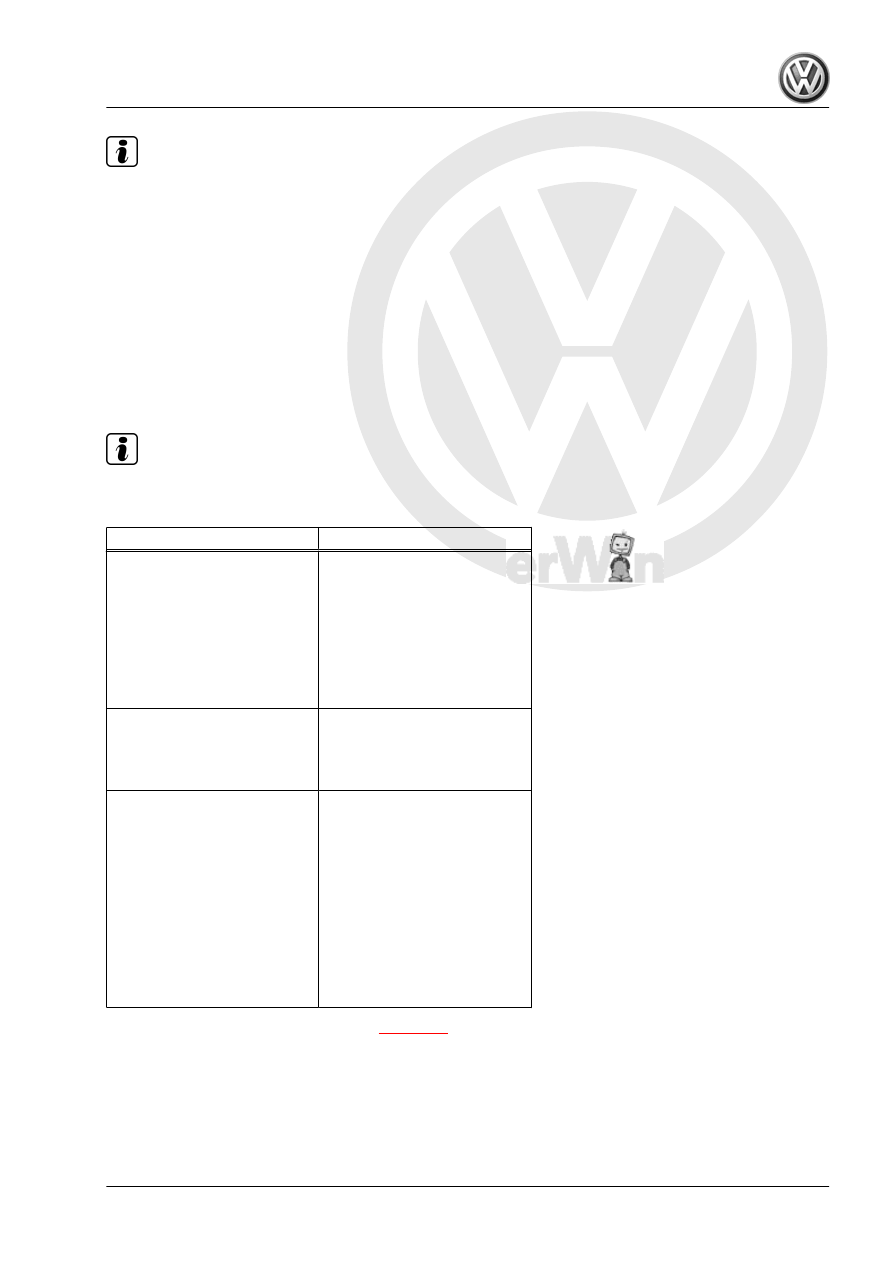
The most frequent display messages are listed below, together
with suggested solutions.
Note
For messages not listed here, please refer to ⇒ Operating manual
Midtronics -INC 940- .
Display message
Measures
Check connection.
– Check whether terminal
clamps of Midtronics -INC
940- battery tester are firmly
connected to battery termi‐
nals.
– Check whether battery ter‐
minals are tightened ac‐
cording to regulations and
do not have corrosion.
Terminals connected?
Safety function of Midtronics -
INC 940- charger.
– Connect terminal clamps to
battery -A- before starting
charging procedure.
System noise
– Switch off all electrical
loads.
– Wait until all electrical loads
monitored by onboard sup‐
ply control unit -J519- have
switched off.
– Remove the ignition key.
– Disconnect any suspicious,
non-standard electrical
equipment from onboard
supply.
– Wait a few minutes and charge again
3. Charging battery A
61