Volkswagen Golf Variant / Jetta. Manual - part 612
 

  Index      Volkswagen     Volkswagen Golf Variant (2007), Jetta (2005) - service repair manual


Search            


Content   ..  610  611  612  613   ..


Volkswagen Golf Variant / Jetta. Manual - part 612


Note

The temperature of the battery -A- must be at least 10 °C.

Carry out following procedures:
– Switch off ignition and all electrical loads.
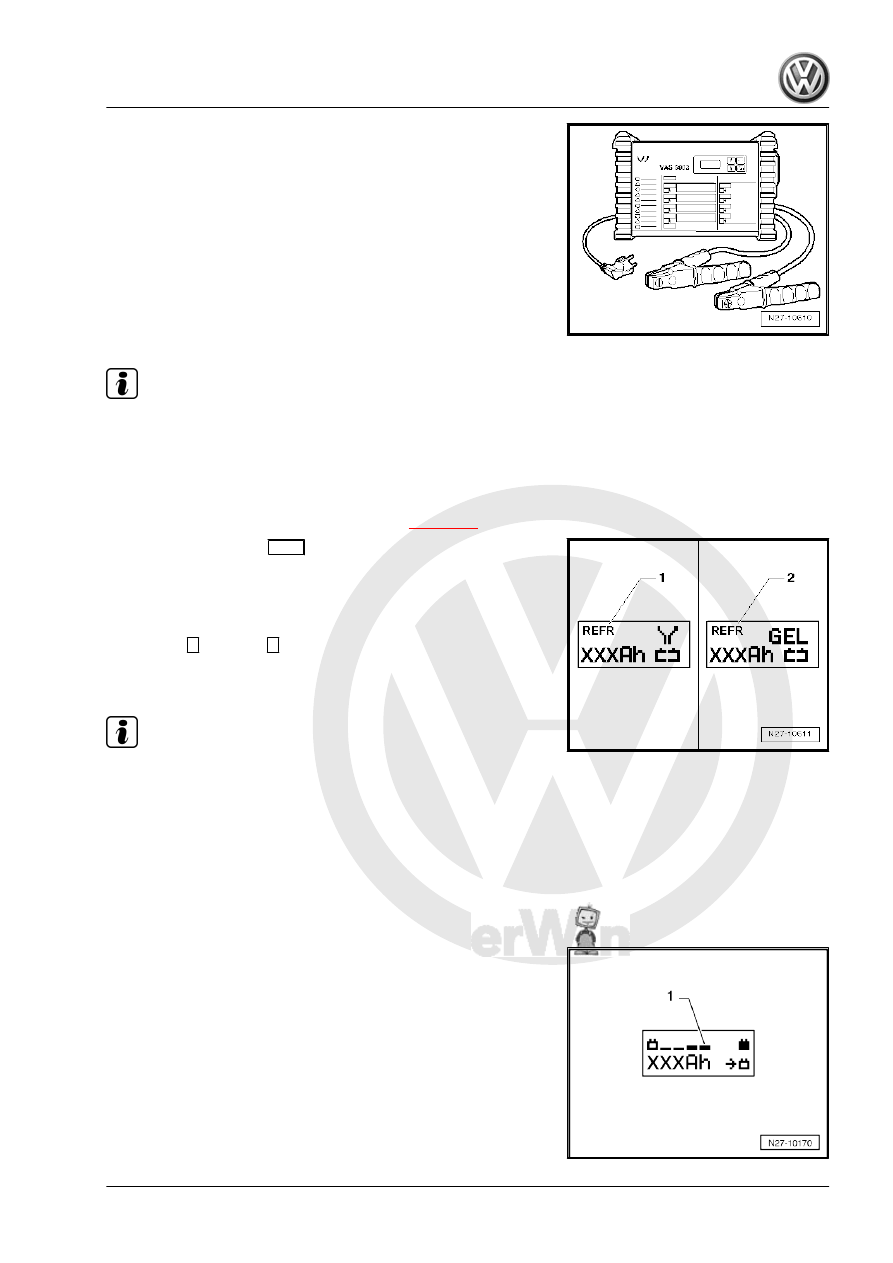
– Connect battery charger -VAS 5903- to mains. The last selec‐

ted operating mode will appear on display 

⇒ page 44

 .

– Set battery type with 

INFO

 button.

In the display, the symbol -1- for “standard charge for wet batter‐

ies” or symbol -2- for “standard charge for gel/absorbent glass

mat batteries” will appear.
– Set battery capacity (Ah) of battery -A- for charging using re‐

spective 

 button or 

 button.

– Connect red terminal clamp (+) to positive terminal of battery

-A- .

Note

In vehicles with start/stop function and battery monitor control unit

-J367- fitted, black terminal clamp (-) must be connected to body

earth. Connecting it to negative terminal of battery -A- will cause

start/stop system to malfunction.

– Connect black terminal clamp (-) to negative terminal of bat‐

tery -A- /negative connection point.

The battery charger -VAS 5903- recognises the voltage required

for the connected battery -A- (6 V/12 V/24 V) and initiates the

charging sequence automatically.

When the charge reaches about 80 - 85% the battery charger -

VAS 5903- starts the “final charging”. The fourth bar appears in

display -1-. The battery -A- is now ready for operation.

3. Charging battery A     

45

Note

In the battery type “standard charge” the parallel use of con‐

sumers while charging is possible. The charging period will be

longer.

Depending on battery type, battery charger -VAS 5903-

switches over to trickle charging mode after approx. 1 to 7

hours. To fully charge battery, battery -A- should be connected

to battery charger -VAS 5903- for this length of time.

Possible faults and fault rectification
1 - Displayed battery voltage is not as per nominal voltage:
– Press respective 

 button or 

 button until charging sequence

starts.

2 - Displayed battery voltage is not as per nominal voltage –

charging sequence already started:

– Press 

START / STOP

 button twice.

– Press respective 

 button or 

 button until charging sequence

starts again.

3 - Battery charger does not detect a battery -A- if battery volt‐

age is less than 2 V:

Display remains unchanged.
The battery type and ampere hours (Ah) as set is displayed.
Ending battery -A- charging process
– Press 

START / STOP

 button.

– Remove charger unit terminals from battery terminals.
– Disconnect battery charger -VAS 5903- from mains.

3.3.3

Refresh charging

WARNING

Danger of injury! Observe warning notices and safety regula‐

tions 

⇒ page 2

 !

WARNING

Do not test or charge batteries -A- whose magic eye is “col‐

ourless/light yellow”. Do not slave/jump start the vehicle!
Danger  of  explosion  when  checking  and  charging  or  slave/

jump starting
These batteries -A- must be replaced.

46

The “refresh charging” operating mode is not permitted for VW

vehicles as the voltage peaks will damage the onboard elec‐

tronics.
If you nevertheless use “refresh charging”, the battery -A- must

be disconnected from the onboard supply.

Caution

When charging, always set battery charger to the correct type

of battery -A- ⇒  Operating instructions for battery charger -VAS

5903- !
“Refresh charge” is suitable for wet batteries which can be top‐

ped up with distilled water.
Do not use “refresh charge” operating mode with maintenance-

free wet batteries.

The “refresh charging (Refr)” mode is only used for batteries -A-

that are suspected of being defective (e.g. sulphation). The bat‐

tery -A- is charged up to maximum electrolyte density and the

plates are reactivated (reduction of sulphate layer).
Special tools and workshop equipment required
♦ Battery charger -VAS 5900-

Note

The temperature of the battery -A- must be at least 10 °C.

Carry out following procedures:
– Switch off ignition and all electrical loads.
– Connect battery charger -VAS 5903- to mains. The last selec‐

ted operating mode will appear on display 

⇒ page 44

 .

3. Charging battery A     

47

INFO

 button.

In the display the symbol -1- for “refresh charge for wet batteries”

or symbol -2- for “refresh charge for gel/absorbent glass mat bat‐

teries” will appear.
– Set battery capacity (Ah) of battery -A- for charging using re‐

spective 

 button or 

 button.

– Connect red terminal clamp (+) to positive terminal of battery

-A- .

Note

In vehicles with start/stop function and battery monitor control unit

-J367- fitted, black terminal clamp (-) must be connected to body

earth. Connecting it to negative terminal of battery -A- will cause

start/stop system to malfunction.

– Connect black terminal clamp (-) to negative terminal of bat‐

tery -A- /negative connection point.

The battery charger -VAS 5900- recognises the voltage required

for the connected battery -A- (6 V/12 V/24 V) and initiates the

charging sequence automatically.

When the charge reaches about 80 to 85% of the battery voltage,

the battery charger -VAS 5900- starts the “final charging”. The

fourth bar appears in display -1-. The battery -A- is now ready for

operation.

Note

The success of “refresh charging” depends on the severity of bat‐

tery -A- sulphation.

Possible faults and fault rectification
1 - Displayed battery voltage is not as per nominal voltage:
– Press respective 

 button or 

 button until charging sequence

starts.

2 - Displayed battery voltage is not as per nominal voltage –

charging sequence already started:

– Press 

START / STOP

 button twice.

– Press respective 

 button or 

 button until charging sequence

starts.

3 - Battery charger does not detect a battery -A- if battery volt‐

age is less than 2 V:

Display remains unchanged.
The operating mode and ampere hours (Ah) as set are displayed.
Ending battery -A- charging process
– Press 

START / STOP

 button.

– Remove charger unit terminals from battery terminals.
– Disconnect battery charger -VAS 5903- from mains.

48


Content   ..  610  611  612  613   ..