Volkswagen Golf Variant / Jetta. Manual - part 468
 

  Index      Volkswagen     Volkswagen Golf Variant (2007), Jetta (2005) - service repair manual


Search            


Content   ..  466  467  468  469   ..


Volkswagen Golf Variant / Jetta. Manual - part 468


⇒ “3.1.3 Battery, Charging with Battery Charger VAS5059A ”,

page 32

 .

♦ Severely discharged Battery - A- , charging. Refer to

⇒ “3.1.4 Severely Discharged Battery, Charging with Battery

Charger VAS5059A ”, page 34

 .

♦ Support mode. Refer to

⇒ “3.1.5  Battery Charger VAS5059A Support Mode”,

page 34

 .

♦ Buffer mode/maintenance charging. Refer to

⇒ “3.1.6  Battery Charger VAS5059A Maintenance Charging”,

page 36

 .

3.1.2

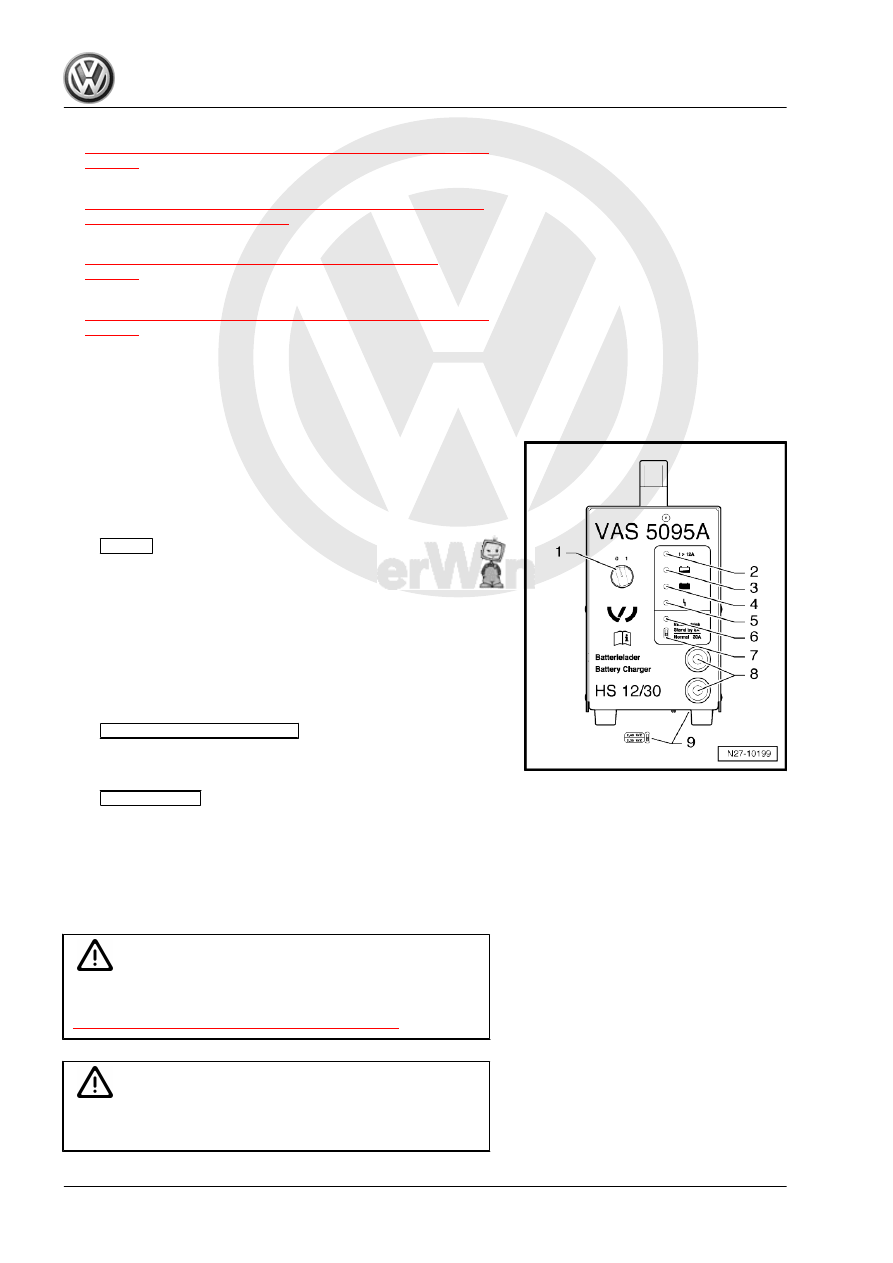
Battery Charger - VAS5059A- Device

Description

The Battery Charger - VAS5095A- is designed to charge all 12 V

Batteries - A- in the VW group.
The battery is charged without amperage or voltage surges.

Thereby the on-board electronics will not be affected. It is not

necessary to remove the Battery - A- from the vehicle or be dis‐

connected from the electrical system during charging.
Battery Charger - VAS5095A-
1 -

ON/OFF

-Switch (0 = OFF)

2 - Charge current display (I greater than 12 A)
3 - Battery - A- charge current display, partially charged (great‐

er than 90 %)

4 - Maintenance charging, lights up green when the Battery -

A- is charged

5 - Interference indicator
6 - Support mode indicator
7 -

Support Mode/Normal Mode

 selector switch

8 - Charge cable: red charging clamp (+), black charging clamp

(-)

9 -

Battery Type

 change switch (on the bottom of the unit)

3.1.3

Battery, Charging with Battery Charger

- VAS5059A-

Special tools and workshop equipment required
♦ Battery Charger - VAS5095A-

WARNING

Risk of injury. Follow all warning messages and safety pre‐

cautions. 

Refer 

to

⇒ “1.3 Warnings and Safety Precautions”, page 3

 .

Caution

While charging, always set the battery type to 2.4 V/C (Volts/

Battery Cell). This applies to all Batteries - A- .

Beetle 2012 ➤ , Golf 2015 ➤ , Golf Variant 2007 ➤ , Golf Variant 2010 ➤ ...

32

The Battery - A- temperature must be at least 10 °C.

WARNING

Do not check or charge a Battery - A- when the visual indicator

has »no color or is bright yellow«. Jump starting must not be

used!
There is a risk of explosion during testing, charging or jump

starting.
These Batteries - A- must be replaced.

Procedure
– Turn off the ignition and all electrical consumers and remove

the ignition key.

– Check the battery type setting on the 

battery type

 switch.

Refer to

⇒ “3.1.2  Battery Charger VAS5059A Device Description”,

page 32

 . The 

battery type

 switch must be set to 2.4V/C

(Volts/Battery Cell).

– Connect the red charge terminal (+) to the positive terminal of

the Battery - A- .

Note

On vehicles with a Start/Stop function and an installed Battery

Monitoring Control Module - J367- , the black charge terminal (-)

must be connected to the body ground. The Start/Stop system

will malfunction when it is connected to the Battery - A- negative

terminal.

– Connect the black charge terminal (-) to the negative terminal

of the Battery - A- /negative connector.

– Switch on the Battery Charger - VAS5095A- . Refer to

⇒ “3.1.2  Battery Charger VAS5059A Device Description”,

page 32

 .

Charge current displays. Refer to

⇒ Fig. ““ Battery Charger -VAS5095A- ”“ , page 32

 -2- and -3- light

up yellow. The Battery - A- is partially charged (approximately

90 %) when only the yellow LED -3- is on.
If the green LED. Refer to

⇒ Fig. ““ Battery Charger -VAS5095A- ”“ , page 32

 -4- is also on,

then the Battery Charger - VAS5095A- has switched to mainte‐

nance charging. The Battery - A- is charged.
– Switch off the Battery Charger - VAS5095A- . Refer to

⇒ “3.1.2  Battery Charger VAS5059A Device Description”,

page 32

 .

– Remove the charging clamps from the battery terminals.

Beetle 2012 ➤ , Golf 2015 ➤ , Golf Variant 2007 ➤ , Golf Variant 2010 ➤ ...

3. Battery, Charging    

33

Severely Discharged Battery, Charging

with Battery Charger - VAS5059A-

WARNING

Risk of injury. Follow all warning messages and safety pre‐

cautions. 

Refer 

to

⇒ “1.3 Warnings and Safety Precautions”, page 3

 .

The Battery Charger - VAS5095A- automatically detects severely

discharged Batteries - A- and starts the charging process con‐

servatively with a low charge current. The charge current is

automatically adjusted to the battery charge state.
♦ For information in the chapter. Refer to

⇒ “3.7 Severely Discharged Batteries”, page 68

 .

♦ The battery voltage must be at least 0.6 V!
♦ Severely discharged Batteries - A- in vehicles must be re‐

placed prior to delivery. Pre-existing damage cannot be ruled

out.

WARNING

Do not check or charge a Battery - A- when the visual indicator

has »no color or is bright yellow«. Jump starting must not be

used!
There is a risk of explosion during testing, charging or jump

starting.
These Batteries - A- must be replaced.

Procedure
– Charge the Battery - A- . Refer to

⇒ “3.1.3 Battery, Charging with Battery Charger VAS5059A ”,

page 32

 .

3.1.5

Battery Charger - VAS5059A- Support

Mode

Special tools and workshop equipment required
♦ Battery Charger - VAS5095A-
General Information
The support mode provides the vehicle electrical system with

voltage when the Battery - A- is removed or disconnected.
For more information. Refer to the Battery Charger - VAS5095A-

Operating Instructions.
The support mode is used for the following situations:
♦ Vehicle electrical system support mode with the Battery - A-

not installed

♦ Maintaining the voltage when the battery is being replaced
♦ Systems test without the Battery - A-

Beetle 2012 ➤ , Golf 2015 ➤ , Golf Variant 2007 ➤ , Golf Variant 2010 ➤ ...

34

Risk of injury. Follow all warning messages and safety pre‐

cautions. 

Refer 

to

⇒ “1.3 Warnings and Safety Precautions”, page 3

 .

WARNING

Do not check or charge a Battery - A- when the visual indicator

has »no color or is bright yellow«. Jump starting must not be

used!
There is a risk of explosion during testing, charging or jump

starting.
These Batteries - A- must be replaced.

Procedure

Caution

♦ The polarity protection of the charger clamps is not active

in the operation mode “charging severely discharged bat‐

teries/Support mode”. Connect the charger clamps to the

battery terminals correctly according to polarity!

♦ It can result in sparks due to short circuit.
♦ This constitutes an explosion risk.
♦ Make sure the charging clamp connections are secure.

– Remove the Battery - A- . Refer to ⇒  Electrical Equipment;

Rep. Gr.  27 ; Battery; Battery, Removing and Installing .

Caution

Whenever the Battery - A- is removed, be careful to prevent

contact between the connected charge clamp on the positive

terminal and the body ground. Likewise prevent contact be‐

tween the battery terminals.

– Clamp the red charging clamp (+) to the vehicle positive bat‐

tery terminal.

Note

On vehicles with a Start/Stop function and an installed Battery

Monitoring Control Module - J367- , the black charge terminal (-)

must be connected to the body ground. The Start/Stop system

will malfunction when it is connected to the Battery - A- negative

terminal.

– Attach the black charging clamp (-) to the vehicle battery neg‐

ative terminal.

– Check the setting for the 

support mode/standard opera-

tion

 switch. Refer to

⇒ “3.1.2  Battery Charger VAS5059A Device Description”,

page 32

 . “Support mode” must be on.

Beetle 2012 ➤ , Golf 2015 ➤ , Golf Variant 2007 ➤ , Golf Variant 2010 ➤ ...

3. Battery, Charging    

35


Content   ..  466  467  468  469   ..