Infiniti Q50 (2018 year). Instruction - part 24
 

  Index      Infiniti     Infiniti Q50 (2018 year) - instruction in english


Search            copyright infringement  


Content      ..     22      23      24      25     ..


Infiniti Q50 (2018 year). Instruction - part 24


8-22

Do-it-yourself

SDI2048

REPLACING

Replace the wiper blades if they are worn.
Before replacing the wiper blades, the wiper
should be in the fully up position to avoid
scratching the engine hood or damaging the
wiper arm. To pull up the wiper arm, see
“Wiper and washer switch” (P.2-33).
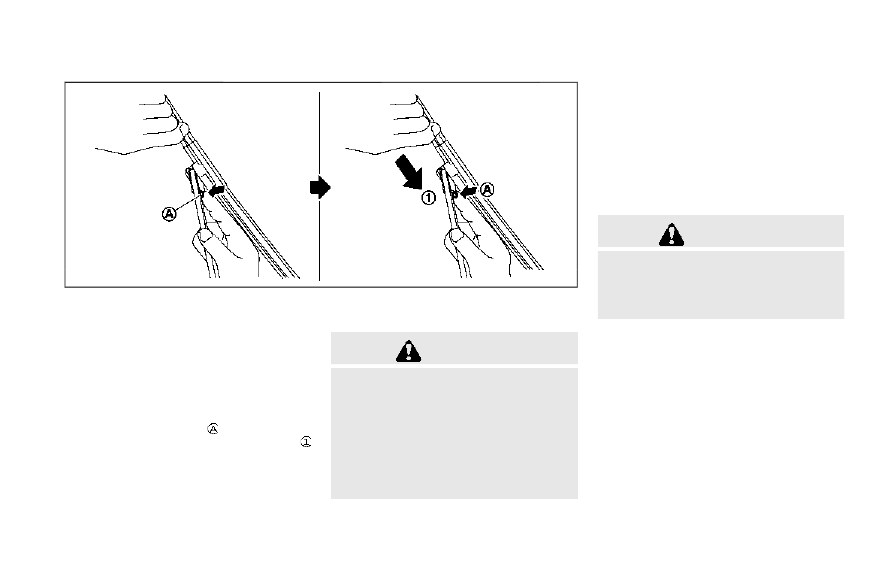
1. Pull the wiper arm.
2. Push the release tab

, and then move

the wiper blade down the wiper arm
while pushing the release tab to remove.

3. Insert the new wiper blade onto the

wiper arm until a click sounds.

4. Rotate the wiper blade so the dimple is in

the groove.

CAUTION

After wiper blade replacement, re-

turn the wiper arm to its original
position;

otherwise it may be damaged when
the hood is opened.

Make sure the wiper blades contact

the glass; otherwise the arm may be
damaged from wind pressure.

If the brakes do not operate properly, have
the brakes checked. It is recommended you
visit an INFINITI retailer for this service.

SELF-ADJUSTING BRAKES

Your vehicle is equipped with self-adjusting
brakes.
The disc-type brakes self-adjust every time
the brake pedal is applied.

WARNING

Have your brake system checked if the
brake pedal height does not return to
normal. It is recommended you visit an
INFINITI retailer for this service.

BRAKE PAD WEAR WARNING

The disc brake pads have audible wear
warnings. When a brake pad requires repla-
cement, it will make a high pitched scraping
sound when the vehicle is in motion. This
scraping sound will first occur only when the
brake pedal is depressed. After more wear of
the brake pad, the sound will always be
heard even if the brake pedal is not
depressed. Have the brakes checked as soon
as possible if the wear warning sound is
heard.

BRAKES

-------------------------------------------------------------------------------------------------------------------------------------------------------------

Under some driving or climate conditions,
occasional brake squeak, squeal or other
noise may be heard. Occasional brake noise
during light to moderate stops is normal and
does not affect the function or performance
of the brake system.
Proper brake inspection intervals should be
followed. 
For additional information, see the
maintenance schedule shown in the “9.
Maintenance and schedules” section.

JVM0255X

VR30DDTT engine model

JVM0734X

VR30DDTT engine model

JVM0305X

2.0L turbo gasoline engine model

JVM0331X

2.0L turbo gasoline engine model

Do-it-yourself

8-23

FUSES

-------------------------------------------------------------------------------------------------------------------------------------------------------------

8-24

Do-it-yourself

JVM0306X

2.0L turbo gasoline engine model (trunk)

ENGINE COMPARTMENT

WARNING

Never use a fuse of a higher or lower
amperage rating than that specified on
the fuse box cover. This could damage
the electrical system or electronic con-
trol units or cause a fire.

If any electrical equipment does not operate,
check for an open fuse.
1. Be sure the ignition switch is placed in

the OFF or LOCK position and the

headlight switch is turned to OFF.

2. Open the engine hood.
3. Remove the fuse/fusible link holder

cover.

4. Remove the fuse with the fuse puller.

SDI1754

5. If the fuse is open

, replace it with a

new fuse

. Spare fuses are stored in the

passenger compartment fuse box.

6. If a new fuse also opens, have the

electrical system checked and repaired.
It is recommended you visit an INFINITI
retailer for this service.

Fusible links

If any electrical equipment does not operate
and fuses are in good condition, check the
fusible links. If any of these fusible links are
melted, replace only with genuine INFINITI
parts.

-------------------------------------------------------------------------------------------------------------------------------------------------------------

JVM0256X

PASSENGER COMPARTMENT

WARNING

Never use a fuse of a higher or lower
amperage rating than that specified on
the fuse box cover. This could damage
the electrical system or electronic con-
trol units or cause a fire.

If any electrical equipment does not operate,
check for an open fuse.
1. Be sure the ignition switch is placed in

the OFF or LOCK position and the
headlight switch is turned to OFF.

2. Open the fuse box lid.
3. Remove the fuse with the fuse puller

.

4. If the fuse is open, replace it with a new

fuse.

5. If a new fuse also opens, have the

electrical system checked and repaired.
It is recommended you visit an INFINITI
retailer for this service. Spare fuses are
stored in the fuse box.

JVM0257X

Extended storage fuse switch (if so
equipped)

To reduce battery drain, the extended
storage fuse switch comes from the factory
switched off. Prior to delivery of your
vehicle, the switch is pushed in (switched
on) and should always remain on.
If the extended storage fuse switch is not
pushed in (switched on), the “Shipping Mode
On, Push Storage Fuse” warning may appear
in the vehicle information display. See “20.
Extended storage fuse warning” (P.2-23).
If any electrical equipment does not operate,
remove the extended storage fuse switch
and check for an open fuse.

Do-it-yourself

8-25

-------------------------------------------------------------------------------------------------------------------------------------------------------------

8-26

Do-it-yourself

NOTE:
If the extended storage fuse switch mal-
functions or if the fuse is open, it is not
necessary to replace the switch. In this case,
remove the extended storage fuse switch
and replace it with a new fuse of the same
rating.
How to remove the extended storage fuse
switch:
1. To remove the extended storage fuse

switch, be sure the ignition switch is in
the OFF or LOCK position.

2. Be sure the headlight switch is in the

OFF position.

3. Remove the fuse box cover.
4. Pinch the locking tabs

found on each

side of the storage fuse switch.

5. Pull the storage fuse switch straight out

from the fuse box

.

CAUTION

Be careful not to allow children to
swallow the battery and removed parts.

JVM0317X

To replace the battery:
1. Release the lock knob at the back of the

Intelligent Key and remove the mechan-
ical key.

2. Insert a flat-blade screwdriver wrapped

with a cloth into the slit of the corner and
twist it to separate the upper part from

INTELLIGENT KEY BATTERY
REPLACEMENT

-------------------------------------------------------------------------------------------------------------------------------------------------------------

the lower part.

3. Replace the battery with a new one.

Recommended battery:
CR2032 or equivalent

.

Do not touch the internal circuit and

electric terminals as it could cause a
malfunction.

.

Hold the battery by the edges. Hold-

ing the battery across the contact
points will seriously deplete the sto-
rage capacity.

.

Make sure that the + side faces the

bottom of the case.

SDI2452

4. Align the tips of the upper and lower

parts

, and then push them together

until it is securely closed.

5. Operate the buttons to check its opera-

tion.

If you need any assistance for replacement,
it is recommended you visit an INFINITI
retailer for this service.
FCC Notice:
For USA:
This device complies with Part 15 of the
FCC Rules. Operation is subject to the
following two conditions: (1) This device
may not cause harmful interference, and (2)
this device must accept any interference

received, including interference that may
cause undesired operation.

NOTE:
Changes or modifications not expressly
approved by the party responsible for
compliance could void the user’s authority
to operate the equipment.
For Canada:
This device complies with Industry Canada
licence-exempt RSS standard(s). Operation
is subject to the following two conditions:
(1) this device may not cause interference,
and (2) this device must accept any inter-
ference, including interference that may
cause undesired operation of the device.

Do-it-yourself

8-27

-------------------------------------------------------------------------------------------------------------------------------------------------------------

8-28

Do-it-yourself

JVM0828X

1.

Headlight (high-beam)

2.

Headlight (low-beam)

3.

Parking light, daytime running light

4.

Map light

5.

Rear personal light

6.

Side turn signal light

7.

Front turn signal light

8.

Fog light

9.

Front side marker light

10. Step light
11. Courtesy light
12. High-mounted stop light
13. Back-up light
14. Tail light
15. Rear turn signal light
16. Tail/stop light
17. Rear side marker light
18. License plate light
19. Trunk light

LIGHTS

-------------------------------------------------------------------------------------------------------------------------------------------------------------

HEADLIGHTS

If replacement is required, it is recommended
you visit an INFINITI retailer for this service.
Fog may temporarily form inside the lens of
the exterior lights in the rain or in a car wash.
A temperature difference between the inside
and the outside of the lens causes the fog.
This is not a malfunction. If large drops of
water collect inside the lens, it is recom-
mended you visit an INFINITI retailer for this
service.

EXTERIOR AND INTERIOR LIGHTS

Item

Wattage (W)

Bulb No.

Headlight*

High/Low beams

LED

Front turn signal light*

LED

Front fog light*

LED

Parking light*/Daytime running light*

LED

Front side marker light*

LED

Side turn signal light*

LED

Rear combination light*

back-up

LED

turn signal

LED

tail

LED

tail/stop

LED

side marker

LED

License plate light*

LED

Map light*

LED

Rear personal light

8

Vanity mirror light*

1.8

Step light

5

Console box light*

2

Inside door handle light* (if so equipped)

LED

Door trim light* (if so equipped)

LED

Front cup holder light*

LED

Footwell light*

LED

Trunk light

3.4

Do-it-yourself

8-29

-------------------------------------------------------------------------------------------------------------------------------------------------------------

8-30

Do-it-yourself

Item

Wattage (W)

Bulb No.

Courtesy light*

LED

High-mounted stop light*

LED

*: It is recommended you visit an INFINITI retailer for replacement.
NOTE: It is recommended that you check with the Parts Department at an INFINITI retailer
for the latest information about parts.

Replacement procedures

All other lights are either type A, B, C, D, E or
F. When replacing a bulb, first remove the
lens and/or cover.

-------------------------------------------------------------------------------------------------------------------------------------------------------------

SDI1679

SDI2031

Rear personal light

SDI2330

Step light

SDI1258A

Trunk light

Do-it-yourself

8-31

-------------------------------------------------------------------------------------------------------------------------------------------------------------

8-32

Do-it-yourself

If you have a flat tire, see “Flat tire” (P.6-3).

TIRE PRESSURE

Tire Pressure Monitoring System
(TPMS)

This vehicle is equipped with the Tire
Pressure Monitoring System (TPMS). It
monitors tire pressure of all tires except the
spare. When the low tire pressure warning
light is lit and the “Tire Pressure Low - Add
Air” warning appears in the vehicle informa-
tion display, one or more of your tires is
significantly under-inflated.
The TPMS will activate only when the
vehicle is driven at speeds above 16 MPH
(25 km/h). Also, this system may not detect
a sudden drop in tire pressure (for example a
flat tire while driving).
For more details, see “Low tire pressure
warning light” (P.2-12),“Tire Pressure Mon-
itoring System (TPMS)” (P.5-5) and “Tire
Pressure Monitoring System (TPMS)” (P.6-
3).

Tire inflation pressure
Check the pressure of the tires (in-
cluding the spare) often and always
prior to long distance trips. The
recommended tire pressure specifica-
tions are shown on the Tire and

Loading Information label under the
“Cold Tire Pressure” heading. The Tire
and Loading Information label is
affixed to the driver side center pillar.
Tire pressures should be checked
regularly because:
. Most tires naturally lose air over

time.

. Tires can lose air suddenly when

driven over potholes or other ob-
jects or if the vehicle strikes a curb
while parking.

The tire pressures should be checked
when the tires are cold. The tires are
considered COLD after the vehicle
has been parked for 3 or more hours,
or driven less than 1 mile (1.6 km) at
moderate speeds.
TPMS with Tire Inflation Indicator
provides visual and audible signals
outside the vehicle for inflating the
tires to the recommended COLD tire
pressure. (See “TPMS with Tire Infla-
tion Indicator” (P.5-8) about the
TPMS with Tire Inflation Indicator.)
Incorrect tire pressure, including un-
der inflation, may adversely affect

tire life and vehicle handling.

WARNING

Improperly inflated tires can fail

suddenly and cause an accident.

The Gross Vehicle Weight rat-

ing (GVWR) is located on the F.
M.V.S.S./C.M.V.S.S. label. The
vehicle weight capacity is indi-
cated on the Tire and Loading
Information label. Do not load
your vehicle beyond this capa-
city. Overloading your vehicle
may result in reduced tire life,
unsafe operating conditions
due to premature tire failure,
or unfavorable handling char-
acteristics and could also lead
to a serious accident. Loading
beyond the specified capacity
may also result in failure of
other vehicle components.

Before taking a long trip, or

whenever you heavily load your
vehicle, use a tire pressure
gauge to ensure that the tire

WHEELS AND TIRES

-------------------------------------------------------------------------------------------------------------------------------------------------------------

pressures are at the specified
level.

For additional information re-

garding tires, refer to “Impor-
tant Tire Safety Information”
(US) or “Tire Safety Informa-
tion” (Canada) in the Warranty
Information Booklet.

Do-it-yourself

8-33

-------------------------------------------------------------------------------------------------------------------------------------------------------------

8-34

Do-it-yourself

SDI2567

Tire and Loading Information label

Seating capacity: The maximum
number of occupants that can be
seated in the vehicle.
Vehicle load limit: See “Vehicle
loading information” (P.10-19).

Original size: The size of the tires
originally installed on the vehicle
at the factory.
Cold tire pressure: Inflate the
tires to this pressure when the
tires are cold. Tires are consid-

ered COLD after the vehicle has
been parked for 3 or more hours,
or driven less than 1 mile (1.6 km)
at moderate speeds. The recom-
mended cold tire inflation is set
by the manufacturer to provide
the best balance of tire wear,
vehicle handling, driveability, tire
noise, etc., up to the vehicle’s
GVWR.
Tire size — see “Tire labeling”
(P.8-36).
Spare tire size or compact spare
tire size (if so equipped)

-------------------------------------------------------------------------------------------------------------------------------------------------------------

SDI1949

Checking the tire pressure
1. Remove the valve stem cap from

the tire.

2. Press the pressure gauge squarely

onto the valve stem. Do not press
too hard or force the valve stem
sideways, or air will escape. If the
hissing sound of air escaping from
the tire is heard while checking the
pressure, reposition the gauge to
eliminate this leakage.

3. Remove the gauge.

4. Read the tire pressure on the

gauge stem and compare it to the
specification shown on the Tire
and Loading Information label.

5. Add air to the tire as needed. If too

much air is added, press the core of
the valve stem briefly with the tip
of the gauge stem to release
pressure. Recheck the pressure
and add or release air as needed.

6. Install the valve stem cap.
7. Check the pressure of all other

tires, including the spare.

SIZE

COLD

TIRE IN-

FLA-

TION

PRES-

SURE

FRONT

ORIGI-

NAL

TIRE

P225/55R-
F17 95V

240 kPa,
35 PSI

P225/50R-
F18 94V

240 kPa,
35 PSI

P245/40R-
F19 94V

240 kPa,
35 PSI

245/40RF19
94W

240 kPa,
35 PSI

245/40R19
94Y

240 kPa,
35 PSI

Do-it-yourself

8-35

-------------------------------------------------------------------------------------------------------------------------------------------------------------

8-36

Do-it-yourself

REAR

ORIGI-

NAL

TIRE

P225/55R-
F17 95V

240 kPa,
35 PSI

P225/50R-
F18 94V

240 kPa,
35 PSI

P245/40R-
F19 94V

240 kPa,
35 PSI

245/40RF19
94W

240 kPa,
35 PSI

265/35R19
94W

240 kPa,
35 PSI

265/35RF19
94W

240 kPa,
35 PSI

SPARE

TIRE (if

so

equip-

ped)

T145/70R18
107M

420 kPa,
60 PSI

SDI1575

Example

TIRE LABELING
Federal law requires tire manufac-
turers to place standardized informa-
tion on the sidewall of all tires. This
information identifies and describes
the fundamental characteristics of
the tire and also provides the tire
identification number (TIN) for safety
standard certification. The TIN can be
used to identify the tire in case of a
recall.

SDI1606

Example

Tire size (example: P215/60R16

94H)
1. P: The “P” indicates the tire is

designed for passenger vehicles.
(Not all tires have this informa-
tion.)

2. Three-digit number (215): This

number gives the width in milli-
meters of the tire from sidewall
edge to sidewall edge.

3. Two-digit number (60): This num-

ber, known as the aspect ratio,
gives the tire’s ratio of height to

-------------------------------------------------------------------------------------------------------------------------------------------------------------

width.

4. R: The “R” stands for radial.

F: The “F” after “R” indicates Self-
Supporting type run-flat tire.

5. Two-digit number (16): This num-

ber is the wheel or rim diameter in
inches.

6. Two- or three-digit number (94):

This number is the tire’s load index.
It is a measurement of how much
weight each tire can support. You
may not find this information on all
tires because it is not required by
law.

7. H: Tire speed rating. You should

not drive the vehicle faster than
the tire speed rating.

JVM0694X

Example

TIN (Tire Identification Number) for

a new tire (example: DOT XX XX XXX
XXXX)
1. DOT: Abbreviation for the “De-

partment of Transportation”. The
symbol can be placed above, be-
low or to the left or right of the
Tire Identification Number.

2. Two-digit code: Manufacturer’s

identification mark

3. Two-digit code: Tire size
4. Three-digit code: Tire type code

(Optional)

5. Four numbers represent the week

and year the tire was built. For
example, the numbers 3103
means the 31st week of 2003. If
these numbers are missing, then
look on the other sidewall of the
tire.

Tire ply composition and material

The number of layers or plies of
rubber-coated fabric in the tire.
Tire manufacturers also must indicate
the materials in the tire, which include
steel, nylon, polyester, and others.

Maximum permissible inflation

pressure
This number is the greatest amount of
air pressure that should be put in the
tire. Do not exceed the maximum
permissible inflation pressure.

Maximum load rating

This number indicates the maximum
load in kilograms and pounds that can
be carried by the tire. When replacing
the tires on the vehicle, always use a
tire that has the same load rating as
the factory installed tire.

Do-it-yourself

8-37

-------------------------------------------------------------------------------------------------------------------------------------------------------------


Content      ..     22      23      24      25     ..