2017 Infiniti QX70/FX (2017 year). Instruction - part 17
(267,1)
Model: 2017MY INFINITI QX70(S51) OM17E00S51U0 ]
SAA2497
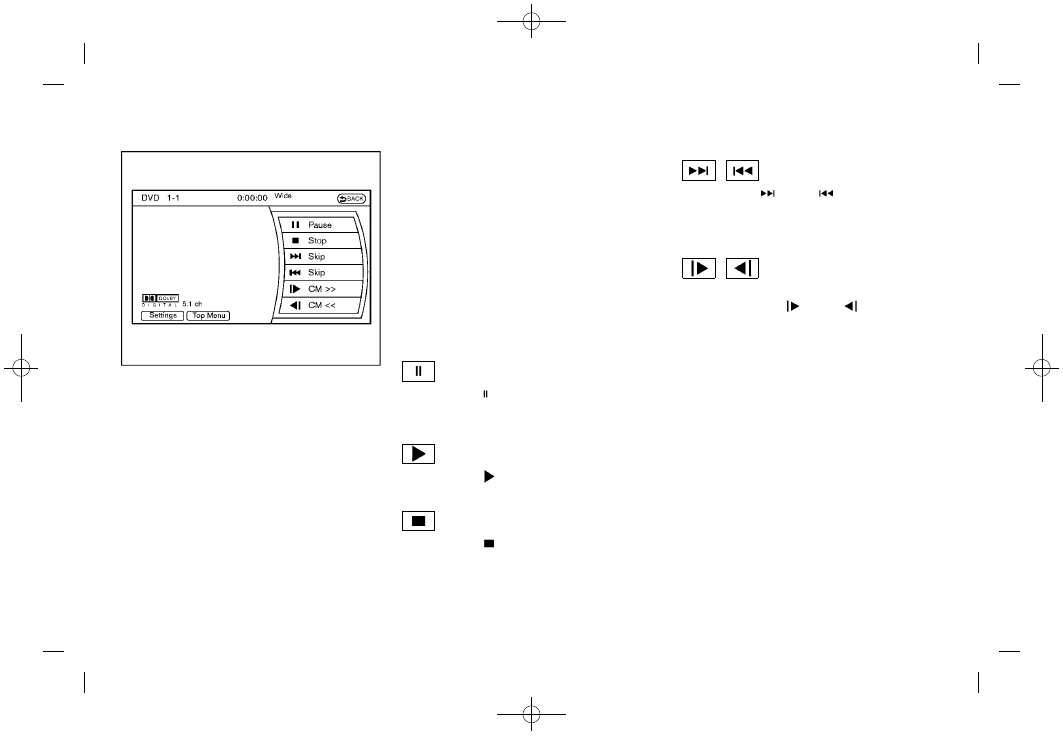
Playing a DVD
DISC·AUX button:
Park the vehicle in a safe location for the
front seat occupants to operate the DVD
drive while watching the images.
Push the DISC·AUX button on the instru-
ment panel and turn the display to the DVD
mode.
When a DVD is loaded, it will be replayed
automatically.
The operation screen will be turned on
when the DISC·AUX button located on the
instrument panel is pushed while a DVD is
being played, and it will turn off auto-
matically after a period of time. To turn it on
again, push the DISC·AUX button again.
DVD operation keys:
When the DVD is playing without the
operation screen being shown, you may
use the touch screen to select items from
the displayed video. You may also use the
INFINITI controller to select an item from
the displayed video. When the operation
screen is being shown, use the INFINITI
controller or touch screen to select an item
from the displayed menus.
PAUSE:
Select the “
” key to pause the DVD. To
resume playing the DVD, use the “PLAY”
key.
PLAY:
Select the “
” key to start playing the
DVD, for example, after pausing the DVD.
STOP:
Select the “
” key to stop playing the
DVD.
/
Next/Previous Chapter:
Select the “
” or “
” key to skip the
chapter(s) of the disc forward/backward.
The chapters will advance/go back the
number of times this key is selected.
/
Commercial Skip:
This function is only for DVD-VIDEO, DVD-
VR. Select the “
” or “
” key to skip
forward or backwards by the set amount as
defined in the DVD Settings menu.
Top Menu:
When the “Top Menu” key is selected in the
screen while a DVD is being played, the top
menu specific to each disc will be dis-
played. For details, see the instructions on
the disc.
Monitor, heater, air conditioner, audio, phone and voice recognition systems
4-77
Condition: