Infiniti Jx35 (2013 year). Instruction - part 11
 

  Index      Infiniti     Infiniti Jx35 (2013 year) - instruction in english


Search            copyright infringement  


Content      ..     9      10      11      12     ..


Infiniti Jx35 (2013 year). Instruction - part 11


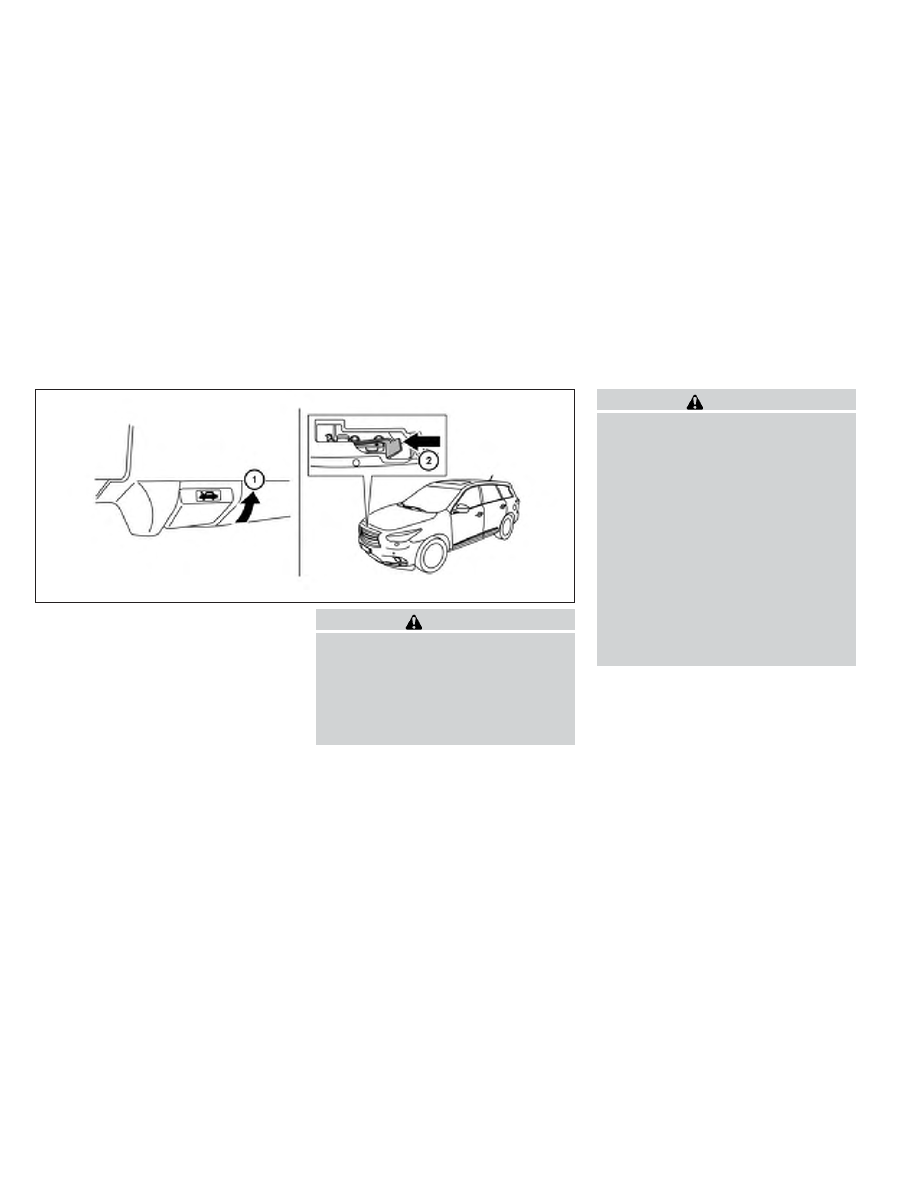
1

Pull the hood lock release handle located
below the driver side instrument panel. The
hood will spring up slightly.

2

Push the lever at the front of the hood to the
side as illustrated with your fingertips and
raise the hood.

When closing the hood, lower it slowly and make
sure it locks into place.

WARNING

● Make sure the hood is completely

closed and latched before driving. Fail-
ure to do so could cause the hood to fly
open and result in an accident.

● If you see steam or smoke coming from

the engine compartment, to avoid injury
do not open the hood.

WARNING

● Always be sure the liftgate has been

closed securely to prevent it from open-
ing while driving.

● Do not drive with the liftgate open. This

could allow dangerous exhaust gases
to be drawn into the vehicle. See “Ex-
haust gas” in the “Starting and driving”
section of this instruction.

● Do not leave children unattended inside

the vehicle. They could unknowingly ac-
tivate switches or controls. Unattended
children could become involved in seri-
ous accidents.

● Always be sure that hands and feet are

clear of the door frame to avoid injury
while closing the liftgate.

LPD2061

HOOD

LIFTGATE

3-20

Pre-driving checks and adjustments

-------------------------------------------------------------------------------------------------------------------------------------------------------------

OPERATING THE POWER LIFTGATE

WARNING

● Make sure that all passengers have

their hands, etc., inside the vehicle be-
fore closing the liftgate.

● Do not leave children unattended inside

the vehicle. They could unknowingly ac-
tivate switches or controls. Unattended
children could become involved in seri-
ous accidents.

Liftgate switch

LPD2063

Instrument panel switch

LPD0249

Liftgate opener switch

LPD2069

Pre-driving checks and adjustments

3-21

-------------------------------------------------------------------------------------------------------------------------------------------------------------

NOTE:

To open, close or reverse the power lift-
gate, the shift selector must be in P (Park).
Also, the power liftgate will not operate if
battery voltage is low.

Power Open:
The power liftgate automatically moves from the
fully closed position to the fully open position in
approximately 5 – 8 seconds. The power open
feature can be activated by the switch on the
keyfob, the instrument panel switch and the lift-
gate request switch. The hazard lights flash and a
chime sounds to indicate the power open se-
quence has been started.

● The liftgate can be opened by the instrument

panel switch, liftgate request switch and the
keyfob even if the vehicle is locked. The
liftgate will individually unlock and open.
Once the liftgate is closed, its lock will align
to the vehicle’s lock or unlock status.

● The keyfob button must be held for 0.5 sec-

ond before the liftgate opens.

● The liftgate must be unlocked to open it with

the liftgate opener switch

A

.

A warning chime will sound if the shift selector is
moved out of P (Park) during a power open
operation.

Power Close:
The power liftgate automatically moves from the
fully open position to the secondary position.
When the liftgate reaches the secondary posi-
tion, the cinching motor engages and pulls the
liftgate to its primary latch position. Power close
takes approximately 7 – 10 seconds. The power
close feature can be activated by the switch on
the keyfob, the instrument panel and the liftgate
opener switch

A

. The hazard lights flash and a

chime sounds to indicate the power close se-
quence has been started.

● If the liftgate opener switch

A

is activated

while the cinching motor is engaged, the
cinching motor will disengage and release
the latch.

● The keyfob button must be held for 0.5 sec-

ond before the liftgate closes.

● The switch on the liftgate can only be used

to close the liftgate if the power liftgate main
switch is in the ON position.

Reverse:
The power liftgate will reverse direction immedi-
ately during power open or power close if the
keyfob, instrument panel or liftgate switch is
pushed or if the liftgate opener switch

A

is

pushed. A chime will sound to announce the
reversal.

Auto Reverse:
If an obstacle is detected during power open or
power close, a warning chime will sound and the
liftgate will reverse direction and return to the full
open or full close position. If a second obstacle is
detected, the liftgate motion will stop and the
liftgate will enter instruction mode.

A pinch strip is mounted on each side of the
liftgate. If an obstacle is detected by a pinch strip
during power close, the liftgate will reverse direc-
tion and return to the full open position.

NOTE:

If the pinch strip is damaged or removed,
the power close function will not operate.

WARNING

There are some small distances immedi-
ately before the closed position which
cannot be detected. Make sure that all
passengers have their hands, etc., inside
the vehicle before closing the liftgate.

3-22

Pre-driving checks and adjustments

-------------------------------------------------------------------------------------------------------------------------------------------------------------

Instruction Mode:
If power operation is not available, the liftgate
may be operated instructionly. Power operation may
not be available if the power liftgate main switch
is in the ON position, if multiple obstacles have
been detected in a single power cycle, or if
battery voltage is low.

If the power liftgate opener switch

A

is pushed

during power open or close, the power operation
will be canceled and the liftgate can be operated
instructionly.

To open the liftgate instructionly, press the liftgate
opener switch

A

and lift the liftgate.

To close, lower and push the liftgate down securely.

POWER LIFTGATE MAIN SWITCH

The power liftgate operation can be turned on or
off by the power liftgate main switch on the
instrument panel.

When the power liftgate main switch is pushed to
the OFF position, the power operation is not
available by the power liftgate switch on the
liftgate and liftgate opener switch.

LIFTGATE RELEASE LEVER

WARNING

● Always be sure the liftgate has been

closed securely to prevent it from open-
ing while driving.

● Do not drive with the liftgate open. This

could allow dangerous exhaust gases
to be drawn into the vehicle. See “Ex-
haust gas” in the “Starting and driving”
section of this instruction.

LPD2062

SPA2547

Pre-driving checks and adjustments

3-23

-------------------------------------------------------------------------------------------------------------------------------------------------------------

Power liftgate release

If the liftgate cannot be opened with the instru-
ment panel switch, liftgate opener switch or key-
fob due to a discharged battery, follow these
steps:

1. Remove the cover

A

on the inside of the

liftgate.

2. Move the lever

B

as illustrated to open the

liftgate.

Contact an INFINITI retailer as soon as possible
for repair.

LIFTGATE POSITION SETTING

The liftgate can be set to open to a specific height
by performing the following:

1. Open the liftgate using the request switch or

the Intelligent Key.

2. Pull the liftgate down to the desired position

and hold the liftgate (the liftgate will have
some resistance when being instructionly ad-
justed).

3. While holding the liftgate in position, press

and hold the liftgate switch

located

on the liftgate for approximately 5 seconds
or until 3 beeps are heard.

The liftgate will open to the selected position
setting. To change the position of the liftgate,
repeat steps 1-3 for setting the position of the
liftgate.

OPENING THE FUEL-FILLER DOOR

The fuel-filler door automatically unlocks when
the driver’s door is unlocked.

1. Unlock the fuel-filler door using one of the

following operations:

● Unlock the driver’s door with the keyfob.
● Unlock the driver’s door with the key.
● Push the power door lock switch to the

unlock position.

● Push the door handle request switch.

2. To open the fuel filler door, push the right

side of the fuel filler door to release.

SPA2778

WPD0454

FUEL-FILLER DOOR

3-24

Pre-driving checks and adjustments

-------------------------------------------------------------------------------------------------------------------------------------------------------------

To lock, close the fuel-filler door securely and
lock the doors.

FUEL-FILLER CAP

WARNING

● Gasoline is extremely flammable and

highly explosive under certain condi-
tions. You could be burned or seriously
injured if it is misused or mishandled.
Always stop the engine and do not
smoke or allow open flames or sparks
near the vehicle when refueling.

● Do not attempt to top off the fuel tank

after the fuel pump nozzle shuts off
automatically. Continued refueling may
cause fuel overflow, resulting in fuel
spray and possibly a fire.

● Use only an original equipment type

fuel-filler cap as a replacement. It has a
built-in safety valve needed for proper
operation of the fuel system and emis-
sion control system. An incorrect cap
can result in a serious malfunction and
possible injury. It could also cause
the

Malfunction Indicator Light

(MIL) to come on.

● Never pour fuel into the throttle body to

attempt to start your vehicle.

● Do not fill a portable fuel container in

the vehicle or trailer. Static electricity
can cause an explosion of flammable
liquid, vapor or gas in any vehicle or
trailer. To reduce the risk of serious
injury or death when filling portable fuel
containers:

– Always place the container on the

ground when filling.

– Do not use electronic devices when

filling.

– Keep the pump nozzle in contact

with the container while you are fill-
ing it.

– Use only approved portable fuel con-

tainers for flammable liquid.

CAUTION

● Do not use E-15 or E-85 fuel in your

vehicle. For further information see the
“Fuel Recommendation” in the “Techni-
cal and consumer information” section
of this instruction.

● The LOOSE FUEL CAP warning will ap-

pear if the fuel-filler cap is not properly
tightened. It may take a few driving trips
for the message to be displayed. Failure
to tighten the fuel-filler cap properly
after the LOOSE FUEL CAP warning ap-
pears may cause the

Malfunction

Indicator Light (MIL) to illuminate.

● Failure to tighten the fuel-filler cap

properly may cause the

Malfunc-

tion Indicator Light (MIL) to illuminate.
If the

light illuminates because

the fuel-filler cap is loose or missing,
tighten or install the cap and continue
to drive the vehicle. The

light

should turn off after a few driving trips.
If the

light does not turn off after a

few driving trips, have the vehicle in-
spected by an INFINITI retailer.

● For additional information, see the

“Malfunction Indicator Light (MIL)” in
the “Instruments and Controls” section
in this instruction.

● If fuel is spilled on the vehicle body,

flush it away with water to avoid paint
damage.

Pre-driving checks and adjustments

3-25

-------------------------------------------------------------------------------------------------------------------------------------------------------------

To remove the fuel-filler cap:

1. Turn the fuel-filler cap counterclockwise to

remove.

2. Put the fuel-filler cap on the cap holder

1

while refueling.

To install the fuel-filler cap:

1. Insert the fuel-filler cap straight into the fuel-

filler tube.

2. Turn the fuel-filler cap clockwise until a

single click is heard.

Loose Fuel Cap warning

The LOOSE FUEL CAP warning appears in the
vehicle information display when the fuel-filler
cap is not tightened correctly after the vehicle has
been refueled. It may take a few driving trips for
the message to be displayed. To turn off the
warning, perform the following:

1. Remove and install the fuel-filler cap as soon

as possible. See “Fuel-filler cap”.

2. Tighten the fuel-filler cap until it clicks.

3. Press the

next button

A

on the steer-

ing wheel for about 1 second to turn off the
LOOSE FUEL CAP warning

B

after tight-

ening the fuel-filler cap.

WARNING

● Do not adjust the steering wheel while

driving. You could lose control of your
vehicle and cause an accident.

● Do not adjust the steering wheel any

closer to you than is necessary for
proper steering operation and comfort.
The driver’s air bag inflates with great
force. If you are unrestrained, leaning
forward, sitting sideways or out of posi-
tion in any way, you are at greater risk of
injury or death in a crash. You may also
receive serious or fatal injuries from the
air bag if you are up against it when it
inflates. Always sit back against the
seatback and as far away as practical
from the steering wheel. Always use the
seat belts.

LPD2065

LPD2066

TILT/TELESCOPIC STEERING

3-26

Pre-driving checks and adjustments

-------------------------------------------------------------------------------------------------------------------------------------------------------------

TILT AND TELESCOPIC OPERATION

To adjust the steering wheel move the switch

1

in the following directions:

● Adjust the steering wheel forward or back-

ward in direction

3

to the desired tele-

scopic position.

● Adjust the steering wheel up or down in

direction

2

to the desired tilt position.

CAUTION

For vehicles with automatic drive posi-
tioner: Failure to reset the tilt and tele-
scoping functions of the steering wheel,
after the vehicle’s battery has been dis-
charged, may prevent the steering wheel
position from being adjusted.

For vehicles with automatic drive positioner: Both
the tilt and telescopic steering operation must be
reset after the vehicle’s battery has been dis-
charged in order to prevent the tilt and telescopic
operation from locking in one position. When the
battery has been recharged or replaced, perform
the following:

● For telescopic operation: Adjust the switch

1

so the steering wheel moves to the most

forward and backward position

3

that can

be reached.

● For tilt operation: Adjust the switch

1

so

the steering wheel moves to the highest
position

2

that can be reached.

Performing these operations resets the range of
the steering wheel’s tilt and telescopic function.

Entry/Exit function

The automatic drive positioner system will make
the steering wheel move up automatically when
the driver’s door is opened and the ignition
switch is in the LOCK position. This lets the driver
get into and out of the seat more easily. The
steering wheel moves back into position when
the driver’s door is closed and the ignition switch
is pushed.

For more information, see “Automatic drive posi-
tioner” in this section.

WPD0366

Pre-driving checks and adjustments

3-27

-------------------------------------------------------------------------------------------------------------------------------------------------------------

1

To block glare from the front, swing down the
sun visor.

2

To block glare from the side, remove the sun
visor from the center mount and swing the
visor to the side.

3

Slide the extension sun visor in or out as
needed.

CAUTION

● Do not store the sun visor before return-

ing

the

extension

to

its

original

position.

● Do not pull the extension sun visor

forcedly downward.

VANITY MIRRORS

To access the vanity mirror, pull the sun visor
down and flip open the mirror cover. The vanity
mirror will illuminate when the mirror cover is
open.

WPD0315

LPD2067

SUN VISORS

3-28

Pre-driving checks and adjustments

-------------------------------------------------------------------------------------------------------------------------------------------------------------

REARVIEW MIRROR (if so equipped)

The night position

1

reduces glare from the

headlights of vehicles behind you at night.

Use the day position

2

when driving in daylight

hours.

WARNING

Use the night position only when neces-
sary, because it reduces rear view clarity.

AUTOMATIC ANTI-GLARE
REARVIEW MIRROR (if so equipped)

The inside mirror is designed so that it automati-
cally dims according to the intensity of the head-
lights of the vehicle following you. The automatic
anti-glare feature operates only when the ignition
switch is in the ON position.

The indicator light

2

will illuminate when the

automatic anti-glare feature is operating.

To turn off the automatic anti-glare feature, press
the

O

button. The indicator light will turn off.

To turn on the automatic anti-glare feature, press
the

|

button again. The indicator light will turn

on.

For information on the automatic anti-glare out-
side mirrors, see “Automatic anti-glare outside
mirrors” later in this section.

For information on HomeLink® Universal Trans-
ceiver operation, see “HomeLink® Universal
Transceiver” in the “Instruments and controls”
section of this instruction.

NOTE:

Do not hang any objects over the sensors

1

or apply glass cleaner to the sensors.

Doing so will reduce the sensitivity of the
sensors, resulting in improper operation.

WPD0126

LPD0469

MIRRORS

Pre-driving checks and adjustments

3-29

-------------------------------------------------------------------------------------------------------------------------------------------------------------

OUTSIDE MIRRORS

The outside mirror remote control will operate
only when the ignition switch is in the ACC or ON
position.

Move the small switch

1

to select the right or left

mirror. Adjust each mirror to the desired position
using the large switch

2

.

WARNING

● Objects viewed in the outside mirror on

the passenger side are closer than they
appear. Be careful when moving to the
right. Using only this mirror could cause
an accident. Use the inside mirror or
glance over your shoulder to properly
judge distances to other objects.

● Do not adjust the mirrors while driving.

You could lose control of your vehicle
and cause an accident.

Power folding outside mirrors

CAUTION

● Do not touch the mirrors while they are

moving. Your hand may be pinched, and
the mirror may malfunction.

● Do not drive with the mirrors stored.

You will be unable to see behind the
vehicle.

Push the

2

switch to open or the

1

switch to

close the mirrors.

SPA2739

SPA2738

3-30

Pre-driving checks and adjustments

-------------------------------------------------------------------------------------------------------------------------------------------------------------

If one of the mirrors are instructionly operated or
bumped, the mirror body can become loose at
the pivot point. To correct electronic mirror op-
eration, cycle the mirrors by pushing the
“CLOSE” switch until completely closed, then
push the “OPEN” switch until the mirrors are in
the open position.

Reverse tilt-down feature (if so
equipped)

The reverse tilt-down feature will turn the se-
lected outside mirror surface downward to pro-
vide better rear visibility close to the vehicle.

When the ignition switch is in the ON position,
turn the outside mirror control switch to the left or
right position. Only one mirror can be selected at
a time.

Move the shift selector to R (Reverse). The se-
lected mirror will turn downward.

The selected mirror surface will return to its original
position when any of the following have occurred:

● The shift selector is moved to any position

other than R (Reverse).

● The outside mirror control switch is set to the

neutral or center position.

● The ignition switch is placed in the OFF

position.

NOTE:

If the outside mirror control switch is in the
neutral position, neither mirror will turn
downward when the shift selector is moved
to R (Reverse).

For more information regarding this feature, refer
to “Automatic drive positioner” in this section.

Heated mirrors

The outside mirrors can be heated to defrost,
defog, or de-ice for improved visibility. For addi-
tional information, see “Rear window and outside
mirror defroster switch” in the “Instruments and
controls” section of this instruction.

The automatic drive positioner system has three
features:

● Memory storage function
● Entry/exit function
● Seat synchronization function

AUTOMATIC DRIVE POSITIONER (if
so equipped)

Pre-driving checks and adjustments

3-31

-------------------------------------------------------------------------------------------------------------------------------------------------------------

MEMORY STORAGE FUNCTION

Two positions for the driver’s seat, steering col-
umn, and outside mirrors can be stored in the
automatic drive positioner memory. Follow these
procedures to use the memory system.

1. Set the Continuously Variable Transmission

(CVT) shift selector to the P (Park) position.

2. Place the ignition in the ON position.

3. Adjust the driver’s seat, steering column,

and outside mirrors to the desired positions
by

instructionly

operating

each

adjusting

switch. For additional information, see
“Seats” in the “Safety—Seats, seat belts and

supplemental restraint system” section, and
“Tilt/Telescopic Steering” and “Outside mir-
rors” in this section.

During this step, do not place the ignition
switch in any position other than ON.

4. Push the SET switch and, within 5 seconds,

push the memory switch (1 or 2).

The indicator light for the pushed memory
switch will come on and stay on for approxi-
mately 5 seconds after pushing the switch.
After the indicator light goes off, the se-
lected positions are stored in the selected
memory (1 or 2).

If a new memory is stored in the same memory
switch, the previous memory will be deleted.

Linking a keyfob to a stored memory
position

Each keyfob can be linked to a stored memory
position (memory switch 1 or 2) with the follow-
ing procedure.

1. Follow the steps for storing a memory posi-

tion.

2. While the indicator light for the memory

switch being set is illuminated for 5 sec-
onds, press the

button on the keyfob.

The indicator light will blink. After the indica-
tor light goes off, the keyfob is linked to that
memory setting.

With the ignition switch placed in the OFF posi-
tion, press the

button on the keyfob. The

driver’s seat, steering wheel and outside mirrors
will move to the memorized position.

NOTE:

If a new memory position is saved to the
memory switch, the keyfob automatically
re-links.

Reverse tilt-down feature (if so
equipped)

The reverse tilt-down feature will turn the se-
lected outside mirror surface downward to pro-
vide better rear visibility close to the vehicle.

When the ignition switch is in the ON position,
turn the outside mirror control switch to the left or
right position. Only one mirror can be selected at
a time.

Move the shift selector to R (Reverse). The se-
lected mirror will turn downward.

LPD2068

3-32

Pre-driving checks and adjustments

-------------------------------------------------------------------------------------------------------------------------------------------------------------

The selected mirror surface will return to its origi-
nal position when any of the following have oc-
curred:

● The shift selector is moved to any position

other than R (Reverse).

● The outside mirror control switch is set to the

neutral or center position.

● The ignition switch is placed in the OFF

position.

NOTE:

If the outside mirror control switch is in the
neutral position, neither mirror will turn
downward when the shift selector is moved
to R (Reverse).

Seat synchronization function

The seat synchronization function automatically
adjusts the positions of the steering wheel and
outside mirrors when the seat is adjusted using
the power seat switches.

However, the steering wheel and outside mirrors
will not move if the seat is adjusted over the
maximum thresholds. The system considers that
the steering wheel and outside mirror adjust-
ments are not necessary because the seat may

not be adjusted for the driving position. Note that
the function is set to disabled as the factory
default setting.

The seat synchronization function operates under
the following conditions:

● The ignition switch is in the ON position.
● The shift selector is in the P (Park) position.

If the outside mirrors or the steering wheel
reaches its maximum adjustment, the function is
automatically disabled. Restart the function by
selecting a previously stored seat memory posi-
tion using the memory switches (1 or 2). An
Intelligent Key that was previously linked to the
stored seat memory can also be used to restart
the function.

If a seat position was not previously stored in the
seat memory, restart the function by adjusting the
steering wheel and outside mirrors instructionly for
your best driving position and then drive the
vehicle above 4 MPH (7 km/h).

Cancel or activate seat synchronization
function

The shift selector must be in the P (Park) position
with the ignition switch placed in the ACC posi-
tion.

Confirming memory storage

● Place the ignition switch in the ON position

and push the SET switch. If the main memory
has not been stored, the indicator light will
come on for approximately 0.5 seconds.
When the memory has stored the position,
the indicator light will stay on for approxi-
mately 5 seconds.

● If the battery cable is disconnected, or if the

fuse opens, the memory storage function will
be canceled and must be restarted before a
stored memory position can be set again.
Drive the vehicle over 25 MPH (40 km/h) to
restart the memory storage function. You
can also restart the memory storage function
using the following procedure.

1. Connect the battery cable or replace the

fuse.

2. Open and close the driver’s door more than

2 times with the ignition switch in the LOCK
position.

Once the memory storage function has been
restarted, you can store a memory position.
See “Memory storage function” in this sec-
tion.

Pre-driving checks and adjustments

3-33

-------------------------------------------------------------------------------------------------------------------------------------------------------------

Selecting the memorized position

Set the shift selector to the P (Park) position,
then:

● Within 45 seconds of opening the driver’s

door, push the memory switch (1 or 2) or

● Place the ignition switch in the ON position

and push the memory switch (1 or 2).

The driver’s seat, steering column, and outside
mirrors will move to the memorized position with
the indicator light blinking, and then the light will
stay on for approximately 5 seconds.

ENTRY/EXIT FUNCTION

This system is designed so that the driver’s seat
and automatic operation steering column will au-
tomatically move when the shift selector is in the
P (Park) position. This allows the driver to get into
and out of the driver’s seat more easily.

The driver’s seat will slide backward and the
steering column will move up:

● When the driver’s door is opened with the

ignition switch placed in the LOCK position.

● When the ignition switch is turned from

ACC to LOCK with the driver’s door open.

The driver’s seat and steering wheel will return to
the previous position:

● When the driver’s door is closed with the

ignition switch placed in the LOCK position.

● When the ignition switch is turned from

ACC to ON while the shift selector is in the P
(Park) position.

The entry/exit function can be adjusted or can-
celed through the Vehicle Settings in the vehicle
information display by performing the following:

● Switch the Exit Seat Slide from ON to OFF.
● Switch the Exit Steering UP from ON to

OFF.

Restarting the entry/exit function

If the battery cable is disconnected or if the fuse
opens, the entry/exit function will be disabled.
Drive the vehicle over 25 MPH (40 km/h) to
restart the entry/exit function. You can also restart
the entry/exit function using the following proce-
dure.

1. Connect the battery cable or replace the

fuse.

2. Open and close the driver’s door more than

2 times with the ignition switch in the LOCK
position.

The entry/exit function should now work properly.

SETTING MEMORY FUNCTION

The position of the following settings can be
linked to the Intelligent Key and the memorized
settings can be available for each Intelligent Key.

● Climate control system
● Navigation system (if so equipped)
● Audio system

To use the memory function, set the climate,
navigation and audio systems to the driver’s pre-
ferred settings. Lock the doors with the Intelligent
Key. Each Intelligent Key may be set with the
driver’s individual preferences. When a new In-
telligent Key is used, “Connection with the key
has been done” will be displayed on the screen
and the memorized settings are available.

To engage the memorized settings, perform the
following:

1. Carry the Intelligent Key that is linked to the

memorized settings.

2. Unlock the doors by pushing the driver’s

door

handle

request

switch

or

the

UNLOCK

button on the Intelligent

Key.

3. Place the ignition switch in the “ON” posi-

tion. The settings linked to the Intelligent Key
will start.

3-34

Pre-driving checks and adjustments

-------------------------------------------------------------------------------------------------------------------------------------------------------------

For further instructions on using the Climate con-
trol system see “Heater and air conditioner (au-
tomatic)” in “Monitor, climate, audio, phone and
voice recognition systems”.

For further instructions on using the Navigation
System see the separate Navigation System
Owner’s Manual.

For further instructions on using the Audio sys-
tem see “Audio system” in “Monitor, climate, au-
dio, phone and voice recognition systems”.

SYSTEM OPERATION

The automatic drive positioner system will not
work or will stop operating under the following
conditions:

● When the vehicle speed is above 4 MPH

(7 km/h).

● When any of the memory switches are

pushed while the automatic drive positioner
is operating.

● When the adjusting switch for the driver’s

seat and steering column is turned on while
the automatic drive positioner is operating.

● When the seat has already been moved to

the memorized position.

● When no seat position is stored in the

memory switch.

● When the shift selector is moved from P

(Park) to any other position.

● When the driver’s door remains open more

than 45 seconds and the ignition switch is
not in the ON position.

● The seat synchronization function is auto-

matically disabled if the outside mirrors or
steering wheel reaches its maximum adjust-
ment.

● The seat synchronization function will not

operate if the seat is adjusted over one of the
following maximum thresholds:

– Seat sliding: 3.0 in (76 mm)

– Seatback reclining: 9.1 degrees

– Seat lifter (rear side): 0.8 in (20 mm)

The entry/exit function can be adjusted or can-
celed through the Vehicle Settings in the vehicle
information display by performing the following:

● Switch the Exit Seat Slide from ON to OFF.
● Switch the Exit Steering UP from ON to

OFF.

Pre-driving checks and adjustments

3-35

-------------------------------------------------------------------------------------------------------------------------------------------------------------


Content      ..     9      10      11      12     ..