Infiniti QX56 (2012 year). Instruction - part 19
4-102
Monitor, climate, audio, phone and voice recognition systems
JVH0136M
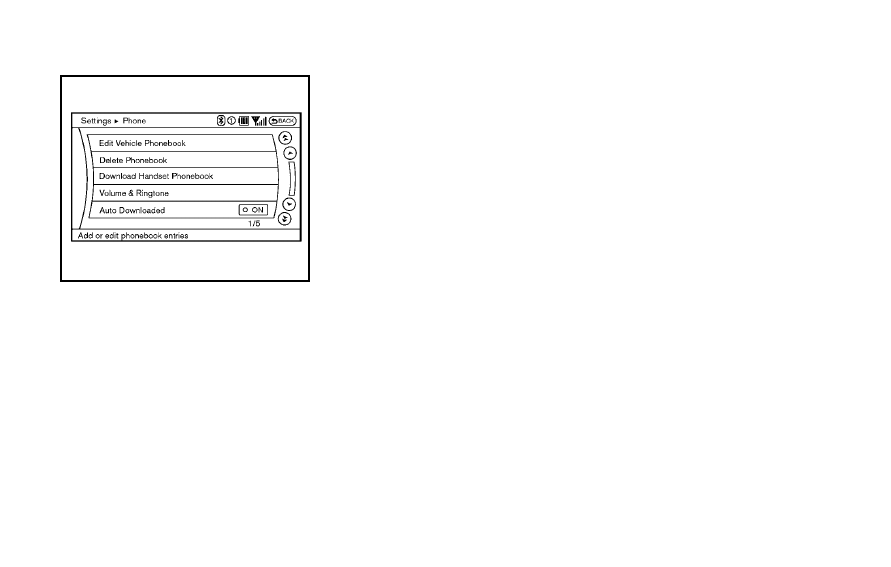
PHONE SETTING
To set up the Bluetooth
®
Hands-Free
Phone System to your preferred settings,
push the SETTING button on the instrument
panel and select the
“PHONE” key.
Edit Vehicle Phonebook
To edit the vehicle phonebook, use the
same procedure as described in
“Vehicle
phonebook
” earlier in this section.
Delete Phonebook
The vehicle phonebook entries can be
deleted all at the same time or one by one.
Download Handset Phonebook
Download the contacts registered in a
Bluetooth
®
cellular phone. Availability of
this function depends on each cellular
phone. The memory downloading proce-
dure from the cellular phone also varies
according to each cellular phone. See
cellular phone Owner
’s Instruction for details.
When
“Auto Download” is active, the
system will automatically re-download the
entries registered in the phone every time
it is paired with the vehicle, even after you
delete the entries from your vehicle
’s
Handset Memory.
Volume & Ringtone
The following kinds of phone volume can
be set. Pushing the PHONE button and
selecting the
“Volume & Ringtone” key can
also operate the same settings.
. Ringtone/Incoming Call/Outgoing Call
To increase or decrease the volume,
select the
“Ringtone”, “Incoming Call”
or
“Outgoing Call” key and adjust it
with the INFINITI controller.
. Automatic Hold
When this function is activated, an
incoming phone call is automatically
held.
. Vehicle Ringtone
When this function is activated, a
specific ringtone that is different from
the cellular phone will sound when
receiving a call.
Auto Download
When this item is activated and supported
by a compatible phone, the phonebook of
the hands-free phone is automatically
downloaded at the same time that the
hands-free phone is connected.
When this item is active, the system will
automatically re-download the entries re-
gistered in the connected phone even after
you delete the entries from your vehicle
’s
Handset Memory.