Infiniti G37 Coupe (2012 year). Instruction - part 12
4-6
Monitor, climate, audio, phone and voice recognition systems
SAA2473
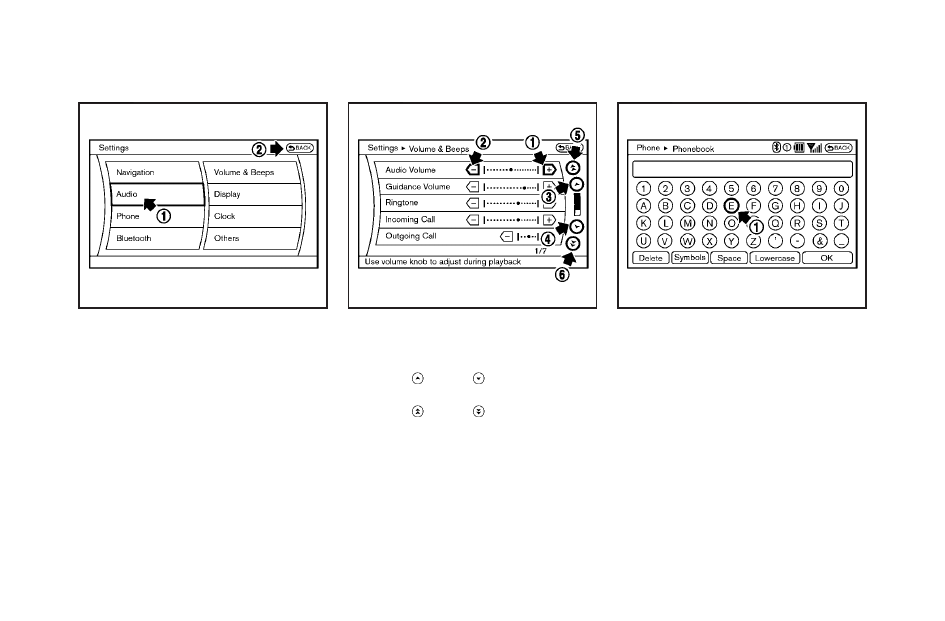
Selecting the item:
Touch an item to select it. To select the
“Audio” settings, touch the “Audio” area
*
1
on the screen.
Touch the
“BACK”
*
2
key to return to the
previous screen.
SAA2474
Adjusting an item:
Touch the
+
*
1
or
−
*
2
key to adjust the
settings.
Touch the
*
3
or
*
4
key to move to
the previous or next item.
Touch the
*
5
or
*
6
key to move to
the previous or next page.
SAA2475
Inputting characters:
Touch the letter or number
*
1
.
There are some options available when
inputting characters.
. Uppercase:
Shows uppercase characters.
. Lowercase:
Shows lowercase characters.
. Symbols:
Shows symbols such as the question
mark (?).
. Space:
Inserts a space.