Infiniti EX35 (2012 year). Instruction - part 16
When the REW button is pushed for less
than 1.5 seconds after 3 seconds from
when the current track started playing, the
beginning of the current track will be
played.
The INFINITI controller can also be used to
select tracks when the Bluetooth
®
audio
play mode screen is shown on the display.
(“Bluetooth audio” will be indicated on the
header of the screen.)
REPEAT (RPT), RANDOM (RDM):
To change the play mode, push the
button repeatedly and the mode changes
as follows.
Normal ? Shuffle All Tracks ? Shuffle
Group ? Repeat 1 Track ? Repeat All
Tracks ? Repeat Group ? Normal
Operation keys:
To operate a Bluetooth
®
audio device,
select a key displayed on the operation
screen using the INFINITI controller.
Play
Select the “
” key to start playing when
pausing. Select this key again to pause the
audio play.
Pause
Select the “
” key to pause the Blue-
tooth
®
audio device. Select this key again
to resume playing.
Play Mode:
The play mode setting display will appear
when the “Menu” key is selected.
Choose the preferred play mode from the
following items.
. Shuffle
Choose “Shuffle OFF”, “Shuffle All
Tracks” and “Shuffle Group”.
. Repeat
Choose from “Repeat OFF”, “Repeat 1
Track”, “Repeat All Tracks” and “Repeat
Group”.
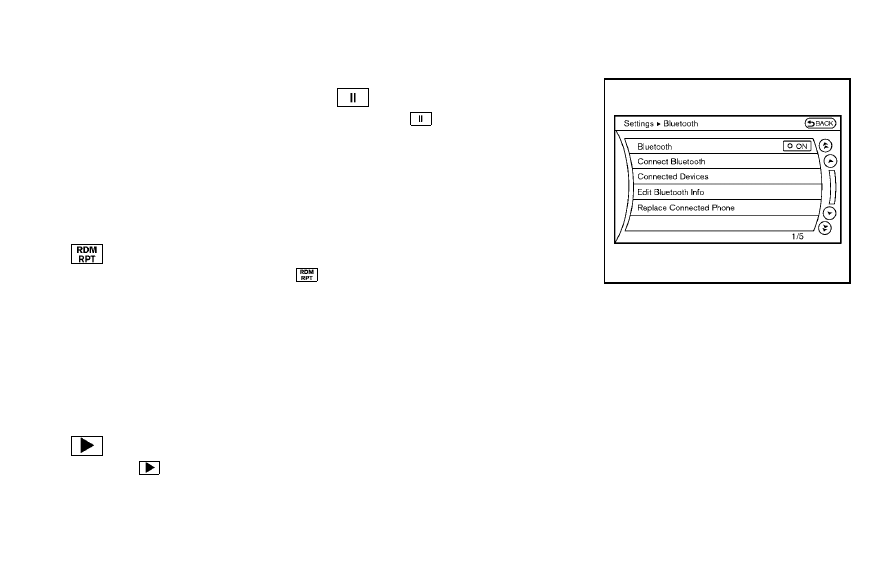
SAA2511
Bluetooth
®
settings
To set up the Bluetooth
®
device system to
the preferred settings, push the SETTING
button and select the “Bluetooth” key.
Bluetooth
®
:
If this setting is turned off, the connection
between the Bluetooth
®
devices and the
in-vehicle Bluetooth
®
module will be can-
celed.
Connect Bluetooth:
Connects to the Bluetooth
®
device. See
“Connecting procedure” earlier in this
section. Up to 5 devices can be registered.
Monitor, climate, audio, phone and voice recognition systems
4-83