Infiniti EX35 (2012 year). Instruction - part 12
To turn on the screen, set this item to the
“ON” position or push the “
OFF”
button.
Brightness/Contrast/Background Color:
To adjust the brightness, contrast and
background color of the screen, select the
appropriate “Brightness”, “Contrast” or
“Background Color” key and push the
ENTER button.
Then, you can adjust the brightness to
“Darker” or “Brighter”, and the contrast to
“Lower” or “Higher” using the INFINITI
controller. Switch the background color to
the daytime mode or the nighttime mode
by pushing the ENTER button.
SAA2487
Clock settings (models with navi-
gation system)
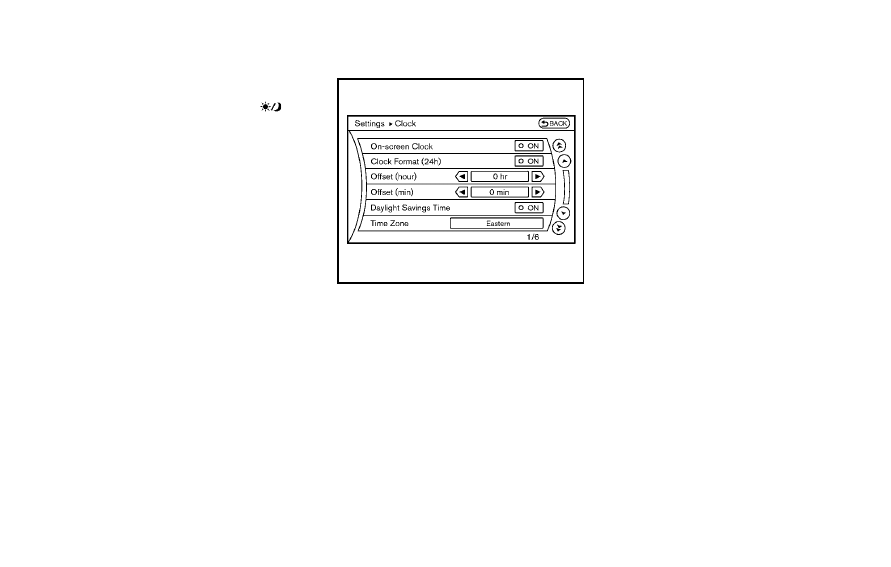
The display as illustrated will appear when
pushing the SETTING button and selecting
the “Clock” key.
The clock settings display cannot be
operated while driving. Stop the vehicle
in a safe place and apply the parking brake
before setting the clock.
On-screen Clock:
When this item is turned to ON, a clock is
always displayed in the upper right corner
of the screen.
This clock will indicate the time almost
exactly because it is always adjusted by
the GPS system.
Clock Format (24h):
When this item is turned to ON, the 24-
hour clock is displayed. When this item is
not turned to ON, the 12-hour clock is
displayed.
Offset (hour)/(min):
Adjust the time by increasing or decreasing
per hour or per minute.
Daylight Saving Time:
Turn this item to ON for daylight saving
time application.
Time Zone:
Choose the time zone from the following
. Pacific
. Mountain
. Central
. Eastern
. Atlantic
. Newfoundland
. Hawaii
. Alaska
Monitor, climate, audio, phone and voice recognition systems
4-19