Honda Clarity Plug-in Hybrid (2018 year). Manual - part 7
 

  Index      Honda     Honda Clarity Plug-in Hybrid - service manual 2018 year in english


Search            copyright infringement  


Content   ..  5  6  7  8   ..


Honda Clarity Plug-in Hybrid (2018 year). Manual - part 7


96

uu

Indicators

u

In

strum

e

nt Pa

nel

Indicator

Name

On/Blinking

Explanation

Message

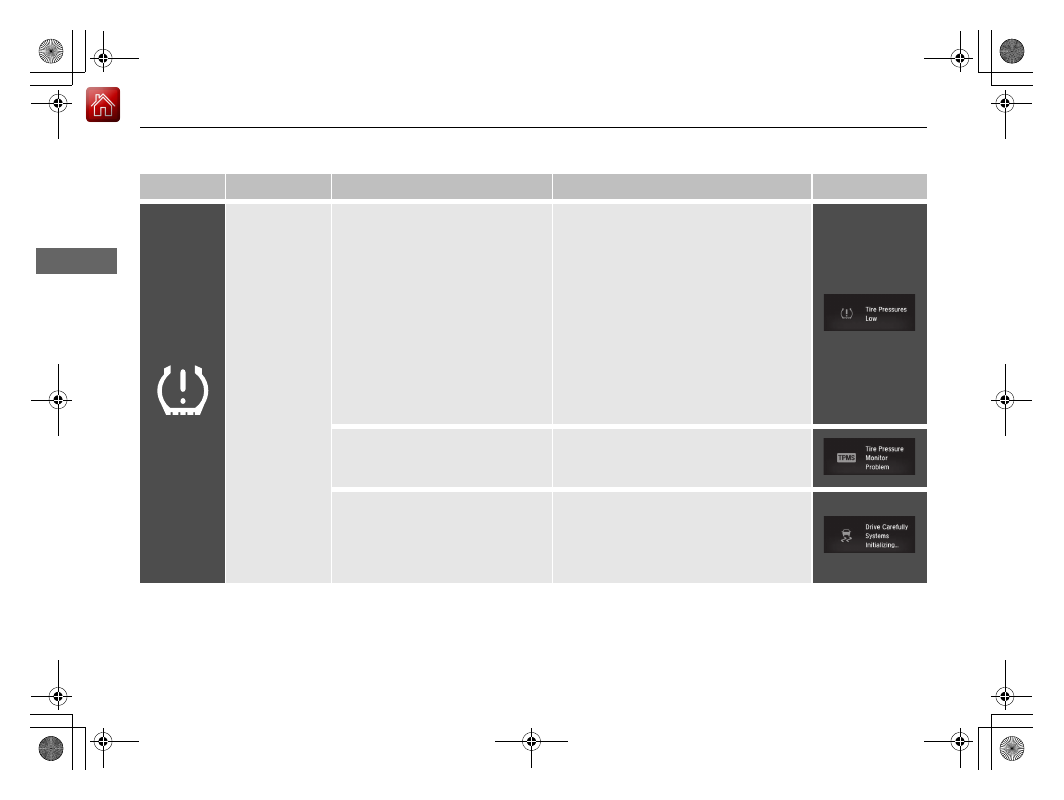
Low Tire 
Pressure/TPMS 
Indicator

●

Comes on for a few seconds when 
you set the power mode to ON.

●

May come on briefly if the power 
mode is set to ON and the vehicle 
is not moved within 45 seconds, to 
indicate the calibration process is 
not yet complete.

●

Comes on and stays on when:
- One or more tires’ pressures are 

determined to be significantly 
low.

- The system has not been 

calibrated.

●

Comes on while driving - Stop in a safe 
place, check tire pressures, and inflate the 
tire(s) if necessary.

●

Stays on after the tires are inflated to 
the recommended pressures
 - The 
system needs to be calibrated.

2 TPMS Calibration P. 425

●

Blinks for about one minute, and 
then stays on if there is a problem 
with the TPMS.

●

Blinks and remains on - Have your 
vehicle checked by an authorized Honda 
Clarity Plug-In Hybrid dealer.

●

Comes on if the TPMS is 
deactivated temporarily after the 
battery has been disconnected, 
then re-connected.

●

Drive a short distance at more than 12 
mph (20 km/h). The indicator should go 
off. If it does not, have your vehicle 
checked by an authorized Honda Clarity 
Plug-In Hybrid dealer.

97

uu

Indicators

u

Continued

In

strum

e

nt Pa

nel

*1:Canadian models only: Apply and hold the brake pedal before selecting the ON mode.

Indicator

Name

On/Blinking

Explanation

Message

Turn Signal and 
Hazard Warning 
Indicators

●

Blinks when you operate the turn 
signal lever.

●

Blinks along with all turn signals 
when you press the hazard 
warning button.

●

Does not blink or blinks rapidly - 
Have your vehicle checked by an 
authorized Honda Clarity Plug-In Hybrid 
dealer immediately.

—

High Beam 
Indicator

●

Comes on when the high beam 
headlights are on.

—

—

Lights On 
Indicator

●

Comes on when the light switch in 
a position other than OFF or when 
the switch is set to AUTO and the 
exterior lights come on.

●

If you set the power mode to 
ACCESSORY or VEHICLE OFF while the 
exterior lights are on, a chime sounds 
when the driver’s door is opened.

—

Immobilizer 
System Indicator

●

Blinks if the immobilizer system 
cannot recognize the key 
information.

●

Blinks - You cannot start the power 
system. Set the power mode to VEHICLE 
OFF

*1

, then select the ON mode again.

●

Repeatedly blinks - The system may be 
malfunctioning. Have your vehicle 
checked by an authorized Honda Clarity 
Plug-In Hybrid dealer.

●

Do not attempt to alter this system or add 
other devices to it. Electrical problems can 
occur.

Indicator

Canadian models

98

uu

Indicators

u

In

strum

e

nt Pa

nel

Indicator

Name

On/Blinking

Explanation

Message

System Message 
Indicator

●

Comes on along with a beep when 
a problem is detected. A system 
message on the driver information 
interface appears at the same time.

●

While the indicator is on, press the 


(display/information) button to see the 
message again.

●

Refer to the Indicators information in this 
chapter when a system message appears 
on the driver information interface. Take 
the appropriate action for the message.

●

The driver information interface does not 
return to the normal screen unless the 
warning is canceled, or the 

 button is 

pressed.

—

Security System 
Alarm Indicator

●

Blinks when the security system 
alarm has been set.

2 Security System Alarm P. 153

—

SPORT Mode 
Indicator

●

Comes on when you press the 
SPORT button.

●

The ambient meter remains lit up 
in red as long as sport mode is on.

2 SPORT Mode P. 389

ECON Mode 
Indicator

●

Comes on when ECON mode is on.

2 ECON Mode P. 388

Indicator

99

uu

Indicators

u

Continued

In

strum

e

nt Pa

nel

Indicator

Name

On/Blinking

Explanation

Message

Road Departure 
Mitigation 
(RDM) Indicator

●

Comes on for a few seconds when 
you set the power mode to ON, 
then goes off.

●

Comes on if there is a problem 
with the RDM system.

●

Stays on constantly - Have your vehicle 
checked by an authorized Honda Clarity 
Plug-In Hybrid dealer.

●

Comes on when the RDM system 
shuts itself off.

●

Stays on - The temperature inside the 
camera is too high.
Use the climate control system to cool 
down the camera.
The system activates when the 
temperature inside the camera cools 
down sufficiently.

2 Front Sensor Camera P. 394

●

Stays on - The area around the camera is 
blocked by dirt, mud, etc. Stop your 
vehicle in a safe place, and wipe it off 
with a soft cloth.

●

Have your vehicle checked by an 
authorized Honda Clarity Plug-In Hybrid 
dealer if the indicator and message come 
back on after you cleaned the area 
around the camera.

2 Front Sensor Camera P. 394

100

uu

Indicators

u

In

strum

e

nt Pa

nel

Indicator

Name

On/Blinking

Explanation

Message

Adaptive Cruise 
Control (ACC) 
with Low Speed 
Follow (LSF) 
Indicator 
(Amber)

●

Comes on for a few seconds when 
you set the power mode to ON, 
then goes off.

●

Comes on if there is a problem 
with ACC with LSF.

●

Comes on while driving - Have your 
vehicle checked by an authorized Honda 
Clarity Plug-In Hybrid dealer.

●

Comes on if anything covers the 
radar sensor cover and prevents 
the sensor from detecting a vehicle 
in front.

●

May come on when driving in bad 
weather (rain, snow, fog, etc.)

●

ACC with LSF has been 
automatically canceled.

●

When the radar sensor gets dirty, stop 
your vehicle in a safe place, and then 
clean the sensor using a soft cloth.

●

Have your vehicle checked by an 
authorized Honda Clarity Plug-In Hybrid 
dealer if the indicator does not disappear, 
even after you clean the sensor cover.

Adaptive Cruise 
Control (ACC) 
with Low Speed 
Follow (LSF) 
Indicator (Green)

●

Comes on when you press the 
MAIN button.

2 Adaptive Cruise Control (ACC) with 

Low Speed Follow (LSF) P. 400

—

101

uu

Indicators

u

Continued

In

strum

e

nt Pa

nel

Indicator

Name

On/Blinking

Explanation

Message

Lane Keeping 
Assist System 
(LKAS) Indicator 
(Amber)

●

Comes on for a few seconds when 
you set the power mode to ON, 
then goes off.

●

Comes on if there is a problem 
with the LKAS.

●

Stays on constantly - Have your vehicle 
checked by an authorized Honda Clarity 
Plug-In Hybrid dealer.

Lane Keeping 
Assist System 
(LKAS) Indicator 
(Green)

●

Comes on when you press the 
MAIN button.

2 Lane Keeping Assist System (LKAS) 

P. 415

—

Collision 
Mitigation 
Braking 
System

TM


(CMBS

TM

) 

Indicator

●

Comes on for a few seconds when 
you set the power mode to ON, 
then goes off.

●

Comes on when you deactivate 
the CMBS

TM

.

●

Comes on if there is a problem 
with the CMBS

TM

.

●

Stays on constantly without the 
CMBS

TM

 off - Have your vehicle checked 

by an authorized Honda Clarity Plug-In 
Hybrid dealer.

2 Collision Mitigation Braking 

System

TM

 (CMBS

TM

) P. 439

●

Comes on if the CMBS is 
deactivated temporarily after the 
battery has been disconnected, 
then re-connected.

●

Drive a short distance at more than 12 
mph (20 km/h). The indicator should go 
off. If it does not, have your vehicle 
checked by an authorized Honda Clarity 
Plug-In Hybrid dealer.

102

uu

Indicators

u

In

strum

e

nt Pa

nel

Indicator

Name

On/Blinking

Explanation

Message

Collision 
Mitigation 
Braking 
System

TM


(CMBS

TM

) 

Indicator

●

Comes on when the CMBS

TM


system shuts itself off.

●

Stays on - The area around the camera is 
blocked by dirt, mud, etc. Stop your 
vehicle in a safe place, and wipe it off 
with a soft cloth.

2 Front Sensor Camera P. 394

●

When the radar sensor gets dirty, stop 
your vehicle in a safe place, and then 
clean the sensor using a soft cloth.

●

Have your vehicle checked by an 
authorized Honda Clarity Plug-In Hybrid 
dealer if the message does not disappear 
even after you clean the sensor cover.

2 Collision Mitigation Braking 

System

TM

 (CMBS

TM

) P. 439

●

Stays on - The temperature inside the 
camera is too high. Use the climate 
control system to cool down the camera. 
The system activates when the 
temperature inside the camera cools 
down sufficiently.

2 Front Sensor Camera P. 394

103

uu

Indicators

u

Driver Information Interface Warning and Information Messages

Continued

In

strum

e

nt Pa

nel

Driver Information Interface Warning and Information Messages

The following messages appear only on the driver information interface. Press the 

 (display/information) button to see the message 

again with the system message indicator on.

Message

Condition

Explanation

●

Appears when the vehicle cannot be driven.

●

Immediately stop in a safe place.

●

Appears when the washer fluid gets low.

●

Refill the washer fluid.

2 Refilling Window Washer Fluid P. 493

●

Appears when the scheduled maintenance is due 
soon.

●

Consequently, Service Due Now and Service Past 
Due
 follow.

2 Warning Message and Maintenance Minder 

Information on the Driver Information Interface 
P. 476

●

Appears as soon as a problem is detected in the 
smart entry system or push button starting system.

●

Appears constantly - Have your vehicle checked by an 
authorized Honda Clarity Plug-In Hybrid dealer.

Canadian models

104

uu

Indicators

u

Driver Information Interface Warning and Information Messages

In

strum

e

nt Pa

nel

Message

Condition

Explanation

●

Appears when there is a problem with the sensor on 
the 12-volt battery.

●

Have your vehicle checked by an authorized Honda 
Clarity Plug-In Hybrid dealer.

2 Checking the 12-Volt Battery P. 508

●

Appears along with the battery charging system 
indicator when the battery is not charging.

●

Turn off the climate control system and rear defogger to 
reduce electricity consumption.

2 If the 12-Volt Battery Charging System Indicator 

Comes On P. 546

●

Appears when the engine oil pressure is low.

●

Appears while driving - Immediately stop in a safe 
place.

2 If the Low Oil Pressure Warning Appears P. 545

●

Appears when the engine coolant temperature gets 
abnormally high.

2 Overheating P. 542

●

Appears when the engine coolant temperature is 
near its upper limit.

●

Drive slowly to prevent overheating.

●

Appears if there is a problem with the cooling 
system.

●

Drive slowly to prevent overheating and have your 
vehicle checked by an authorized Honda Clarity Plug-In 
Hybrid dealer as soon as possible.

●

Appears when the fuel fill cap is loose or is not 
installed.

2 Tighten Fuel Cap Message P. 547

105

uu

Indicators

u

Driver Information Interface Warning and Information Messages

Continued

In

strum

e

nt Pa

nel

Message

Condition

Explanation

●

Appears if the vehicle’s speed reaches about 10 mph 
(15 km/h) with the fuel fill door opened.

●

Stop the vehicle and close the fuel fill door.

●

Appears when the fuel fill door has been open for 30 
minutes.

●

Turn off the power system, reinstall the fuel cap, and 
close the fuel fill door.
- If you still want to refuel, press the fuel fill door release 

button to reopen the door.

106

uu

Indicators

u

Driver Information Interface Warning and Information Messages

In

strum

e

nt Pa

nel

Message

Condition

Explanation

●

Appears after the driver’s door is opened when the 
power mode is in ACCESSORY.

●

Press the POWER button twice with your foot off the 
brake pedal to change the power mode to VEHICLE 
OFF.

●

Appears when the power mode is in ACCESSORY.

—

●

Appears when you close the door with the power 
mode in ON without the smart entry remote inside 
the vehicle.

●

Disappears when you bring the smart entry remote back 
inside the vehicle and close the door.

2 Smart Entry Remote Reminder P. 160

●

Appears when the smart entry remote battery 
becomes weak.

●

Replace the battery as soon as possible.

2 Replacing the Button Battery P. 510

●

Appears if the smart entry remote’s battery is too 
weak to turn on the power system or the key is not 
within operating range to turn on the power system.
A beeper sounds six times.

●

Bring the back of the smart entry remote into contact 
with the POWER button.

2 If the Smart Entry Remote Battery is Weak P. 537

●

Appears when you set the power mode to 
ACCESSORY or ON.

●

Appears after you unlock and open the driver’s door.

2 Turning on the Power P. 376

●

Appears when the POWER button is pressed while 
driving.

2 Emergency Power System Off P. 538

Canadian models

107

uu

Indicators

u

Driver Information Interface Warning and Information Messages

Continued

In

strum

e

nt Pa

nel

Message

Condition

Explanation

●

Appears when the high voltage battery charge level 
is extremely low.

●

Caused by the low battery charge level - 
Immediately charge the high voltage battery.

●

Appears when the power system temperature is low.

●

Your vehicle has less ability to accelerate and may be 
harder to start on an incline.

●

In extremely cold climates, keep the vehicle stored in a 
garage.

●

In extremely cold climates, keep the vehicle stored in a 
garage and connect the charging connector.

●

Appears when the power system temperature is 
high.

●

Your vehicle has less ability to accelerate and may be 
harder to start on an incline.

●

Park in a safe place, and cool the system down.

2 Overheating P. 542

●

Appears if the power system is in diagnostic mode.

●

You may notice a decrease in available power. Have 
your vehicle checked by an authorized Honda Clarity 
Plug-In Hybrid dealer immediately.

●

As a result of diagnostics, the POWER SYSTEM 
indicator may come on.

2 POWER SYSTEM Indicator P. 88

U.S. models

Canadian models

108

uu

Indicators

u

Driver Information Interface Warning and Information Messages

In

strum

e

nt Pa

nel

Message

Condition

Explanation

●

Appears when the charging connector is connected 
to the inlet.

●

The vehicle does not move while the charging 
connector is plugged into the inlet.

●

Appears when there is a problem with the standard 
plug-in charging system or the charging station 
outlet.

●

This message only - There may be a problem with the 
charging station outlet. Refer to the instructions 
provided at the station or consult a qualified technician.
If the outlet works properly, have the vehicle checked by 
an authorized Honda Clarity Plug-In Hybrid dealer.

●

Comes on with the POWER SYSTEM indicator - 
Have your vehicle checked by an authorized Honda 
Clarity Plug-In Hybrid dealer.

●

Appears if there is a problem with the acoustic 
vehicle alerting system.

●

Have your vehicle checked by an authorized Honda 
Clarity Plug-In Hybrid dealer immediately.

●

Appears when the charge lid is open.

●

Close the charge lid.

2 Charging P. 454

109

uu

Indicators

u

Driver Information Interface Warning and Information Messages

Continued

In

strum

e

nt Pa

nel

Message

Condition

Explanation

●

Appears when you press the fuel fill door release 
button.

●

The display changes to Ready when the fuel vapor 
pressure inside the fuel tank is released. You can start 
refueling once Ready appears.

2 Refueling P. 451

●

Appears when the vehicle is ready to be refueled.

●

Appears when the high voltage battery and other 
system control temperatures are too low to operate 
(approx. –22°F [–30°C] or below).

●

You must wait for an increase in the ambient 
temperature or move the vehicle to a warmer location.

●

Consult an authorized Honda Clarity Plug-In Hybrid 
dealer.

●

In extremely cold climates, keep the vehicle stored in a 
garage.

●

In extremely cold climates, keep the vehicle stored in a 
garage and connect the charging connector.

●

Appears when the charging connector is 
disconnected while the power mode is in ON with 
the charging connector connected.

●

Set the power mode to OFF, then set it back to ON if 
you drive again.

2 Turning on the Power P. 376

●

Appears when the high voltage battery temperature 
is too low to operate (approx. −22°F [−30°C]).

●

You can start the engine and use the climate control 
system to warm up the interior.

●

You must wait for an increase in the high voltage 
battery temperature to drive.

U.S. models

Canadian models

Canadian models

110

uu

Indicators

u

Driver Information Interface Warning and Information Messages

In

strum

e

nt Pa

nel

Message

Condition

Explanation

●

Appears when the outside temperature is low.

●

In extremely cold climates, keep the vehicle stored in a 
garage or connect the charging connector.

2 Charging P. 454

●

Appears when the engine starts automatically when 
the engine has not started for a long time.

—

●

Appears when the vehicle can run only in EV because 
the failure that cannot generate power by the engine 
failure or generator failure etc occurs.

●

The estimated distance you can travel on the 
remaining power is displayed.

●

Have your vehicle checked by an authorized Honda 
Clarity Plug-In Hybrid dealer.

●

Appears when you are unable to select the HV 
Charge because the High Voltage battery charge 
level is at maximum limit (12 segments) of the HV 
Charge.

2 SPORT HYBRID i-MMD Plug-in (Intelligent Multi-

mode Drive Plug-in) P. 11

●

Appears if the drive mode cannot be changed due to 
certain situations, such as a system error or adverse 
driving conditions.

—

Canadian models

111

uu

Indicators

u

Driver Information Interface Warning and Information Messages

Continued

In

strum

e

nt Pa

nel

Message

Condition

Explanation

●

Appears when you set the power mode to ON 
without fastening the driver’s seat belt.

●

Appears if the gear position has been automatically 
changed to 

(

P and the driver attempts to take the 

vehicle out of 

(

P but does not have his or her 

seatbelt fastened.

●

Fasten the seat belt properly before you start to drive.

2 Shift Operation P. 384

●

Appears when you try to change the gear position 
without depressing the brake pedal while the 
transmission is in 

(

P or 

(

N.

●

Depress the brake pedal, then select a shift button.

●

Appears when you try to change the gear position 
without releasing your foot off the accelerator pedal 
while the transmission is in 

(

P or 

(

N.

●

Release your foot off the accelerator pedal, then select 
a shift button.

●

Appears when the transmission system temperature 
is too high.

●

Park in a safe place, and allow the system to cool down 
sufficiently.

●

Appears when you depress the accelerator pedal 
while the transmission is in 

(

N.

●

Release the accelerator pedal.

●

Depress the brake pedal, then select a shift button to 
start driving.


Content   ..  5  6  7  8   ..