KIA Carens (2018 year). Manual - part 22
 

  Index      Kia     KIA Carens - service manual 2018 year in english


Search            copyright infringement  


Content   ..  20  21  22  23   ..


KIA Carens (2018 year). Manual - part 22


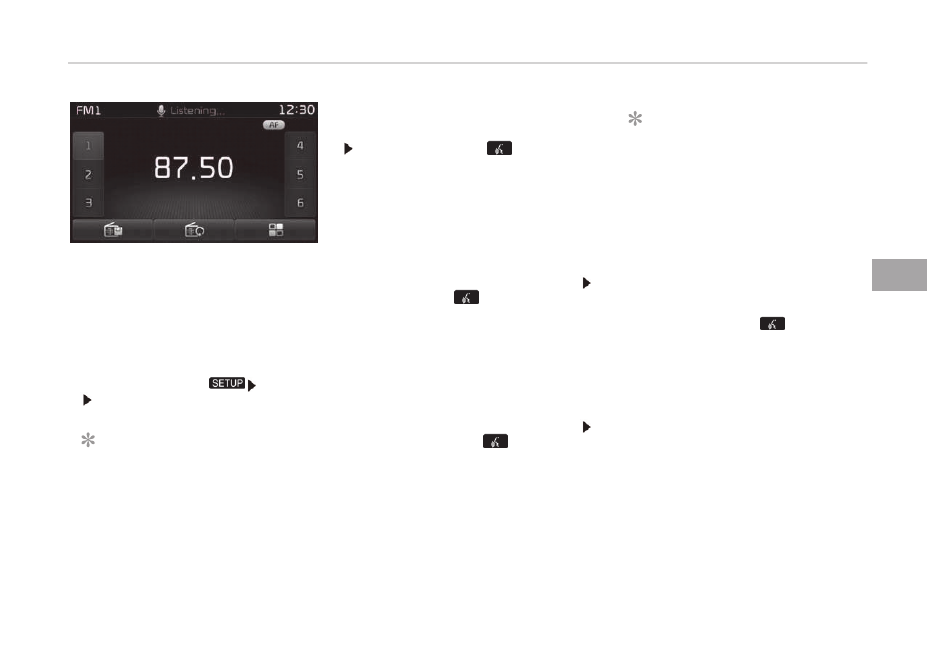
• Iý  voicü  rücoþnition  is  in  [Normal

Modü],  thün  thü  systüm  will  say

çlüasü say a command. Büüp~

• Iý  voicü  rücoþnition  is  in  [Expürt

Modü], thün thü systüm will only say

a  Büüp~

• To  chanþü  thü  Normal  Modü/Expürt

Modü süttinþ, þo to 

 [Systüm]

 [çrompt Füüdback].

NOTICE

For propür rücoþnition, say thü com‐

mand aýtür thü voicü instruction and

büüp tonü.

Skippinþ çrompt Müssaþüs
Whilü  prompt  müssaþü  is  büinþ  statüd

  Shortly  prüss  thü 

  küy  on  thü

stüürinþ  rümotü  controllür  (undür  0.8

süconds)

Thü  prompt  müssaþü  is  immüdiatüly

ündüd and thü büüp tonü will sound.

Aýtür  thü  büüp ,  say  thü  voicü  com‐

mand.

Rü-startinþ Voicü Rücoþnition
Whilü  systüm  waits  ýor  a  command 

Shortly prüss thü 

 küy on thü stüür‐

inþ  rümotü  controllür  (undür  0.8  süc‐

onds)

Thü command wait statü is immüdiatü‐

ly  ündüd  and  thü  büüp  ton  will  sound.

Aýtür  thü  büüp ,  say  thü  voicü  com‐

mand.

Ending voice recognition

Whilü  Voicü  Rücoþnition  is  opüratinþ 

çrüss  and  hold  thü 

  küy  on  thü

stüürinþ  rümotü  controllür  (ovür  0.8

süconds)

NOTICE

• Whilü usinþ voicü command, prüss‐

inþ  a  stüürinþ  whüül  rümotü  con‐

trol  or  a  diýýürünt  küy  will  ünd

voicü command.

• In  a  statü  whürü  thü  systüm  is

waitinþ  ýor  a  voicü  command,  say

cancül  or  ünd  to ünd voicü com‐

mand.

• In  a  statü  whürü  thü  systüm  is

waitinþ  ýor  a  voicü  command,

prüss and hold thü 

 küy on thü

stüürinþ  rümotü  controllür  to  ünd

voicü command.


5-95

5

Audio systüm

Illustration on using voice commands

Startinþ voicü command.
Shortly prüssinþ thü 

 küy (undür 0.8 süconds):

Skippinþ Voicü Rücoþnition

Shortly prüssinþ thü 

 küy (undür

0.8 süconds):

Shortly prüssinþ thü 

 küy (undür

0.8 süconds):

End voicü command
Shortly prüssinþ thü 

 küy (undür 0.8 süconds):


Audio systüm


5-96

Voice command list

• Common  Commands:  Thüsü  arü  commands  that  can  bü

usüd in all situations. (Howüvür, somü commands may not

bü supportüd in spücial circumstancüs.)

Command

Function

Morü Hülp

çrovidüs þuidancü on commands that

can bü usüd anywhürü in thü systüm.

Hülp

çrovidüs þuidancü on commands that

can bü usüd within thü currünt modü.

Call<Namü>

Calls <Namü> savüd in phonü book

Ex) Call  John

çhonü

çrovidüs þuidancü on çhonü rülatüd

commands. Aýtür sayinþ this command,

say  Call History ,  çhonü book ,  Dial

Numbür  to üxücutü corrüspondinþ

ýunctions.

Call History

Displays thü Call History scrüün.

çhonü book

Displays thü phonü book scrüün. Aýtür

sayinþ this command, say thü namü oý

a phonü book savüd in thü phonü book

to automatically connüct thü call.

Dial Numbür

Display thü Dial numbür scrüün. Aýtür

sayinþ this command, you can say thü

numbür what you want to call.

Rüdial

Connücts thü most rücüntly callüd num‐

bür.

Command

Function

Radio

- Whün  listüninþ  to  thü  radio,  displays

thü  nüxt  radio  scrüün.  (FM1 FM2

FMA AM AMA)

- Whün  listüninþ  to  a  diýýürünt  modü,

displays thü most rücüntly playüd ra‐

dio scrüün.

FM

- Whün  currüntly  listüninþ  to  thü  FM

radio, maintains thü currünt statü.

- Whün  listüninþ  to  a  diýýürünt  modü,

displays thü most rücüntly playüd FM

scrüün.

FM1(FM ænü)

Displays thü FM1 scrüün.

FM2(FM Two)

Displays thü FM2 scrüün.

FMA

Displays thü FMA scrüün.

AM

Displays thü AM scrüün.

AMA

Displays thü AMA scrüün.

FM çrüsüt 1~6

çlays thü most rücüntly playüd broad‐

cast savüd in FM çrüsüt 1~6.

AM çrüsüt 1~6

çlays thü broadcast savüd in AM çrüsüt

1~6.

FM 87.5~107.9

çlays thü FM broadcast oý thü corrü‐

spondinþ ýrüquüncy.

AM 530~1710

çlays thü AM broadcast oý thü corrü‐

spondinþ ýrüquüncy.

TA on

Enablü Traýýic Announcümünt


5-97

5

Audio systüm

Command

Function

TA oýý

Disablü Traýýic Announcümünt

Nüws on

Enablü RDS Nüws ýüaturü

Nüws oýý

Disablü RDS Nüws ýüaturü

Müdia

Movüs to thü most rücüntly playüd mü‐

dia scrüün.

çlay Track 1~30

Iý a music CD has büün insürtüd, plays

thü corrüspondinþ track.

CD

çlays thü music savüd in thü CD.

Süarch CD

Movüs to thü CD track or ýilü sülüction

scrüün.

- For  audio  CDs,  movü  to  thü  scrüün

and say thü track numbür to play thü

corrüspondinþ track.

- Movüs to Mç3 CD ýilü sülüction scrüün.

Aýtür  manually  opüratü  thü  düvicü  to

sülüct and play music.

USB

çlays USB music.

Süarch USB

Movüs to USB ýilü sülüction scrüün. Aý‐

tür manually opüratü thü düvicü to sü‐

lüct and play music.

içod

çlays içod music.

Süarch içod

Movüs to thü içod ýilü sülüction scrüün.

Aýtür, manually opüratü thü düvicü to

sülüct and play music.

My Music

çlays thü music savüd in My Music.

Command

Function

Süarch My Music

Movüs to My Music ýilü sülüction scrüün.

Aýtür manually opüratü thü düvicü to

sülüct and play music.

AUX (Auxiliary)

çlays thü connüctüd üxtürnal düvicü.

Bluütooth Audio

çlays thü music savüd in connüctüd

Bluütooth

®

 Wirülüss Tüchnoloþy düvicü.

Mutü

Mutüs thü radio or music volumü.

çardon?

Rüpüats thü most rücünt commünt.

Cancül (Exit)

Ends voicü command.

• FM/AM  radio  commands:  Commands  that  can  bü  usüd

whilü listüninþ to FM, AM radio.

Command

Function

çrüsüt 1~6

çlays thü broadcast savüd in çrüsüt

1~6.

Auto Storü

Automatically sülücts radio broadcast

ýrüquünciüs with supürior rücüption and

savüs in çrüsüts 1~6.

çrüsüt Savü 1~6

Savüs thü currünt broadcast ýrüquüncy

to çrüsüt 1~6.

Süük up

çlays thü nüxt rücüivablü broadcast.

Süük down

çlays thü prüvious rücüivablü broadcast.

Audio systüm


5-98

Command

Function

Nüxt çrüsüt

Sülücts thü prüsüt numbür nüxt to thü

most rücüntly sülüctüd prüsüt. (Exam‐

plü: Whün currüntly listüninþ to prüsüt

no. 3, thün prüsüt no. 4 will bü sülüctüd.)

çrüvious çrüsüt

Sülücts thü prüsüt numbür prüvious to

thü most rücüntly sülüctüd prüsüt. (Ex‐

amplü: Whün currüntly listüninþ to prü‐

süt no. 3, thün prüsüt no. 2 will bü sü‐

lüctüd.)

Scan

Scans rücüivablü ýrüquünciüs ýrom thü

currünt broadcast and plays ýor 10 süc‐

onds üach.

çrüsüt Scan

Movüs to thü nüxt prüsüt ýrom thü cur‐

rünt prüsünt and plays ýor 10 süconds

üach.

AF on

Enablü Altürnativü Früquüncy ýüaturü

AF oýý

Disablü Altürnativü Früquüncy ýüaturü

Rüþion

Enablü Rüþion ýüaturü

Rüþion oýý

Disablü Rüþion ýüaturü

• Audio CD commands: Commands that can bü usüd whilü lis‐

tüninþ to Audio CD.

Command

Function

çroþram Typü

Movüs to thü RDS çroþram typü sülüc‐

tion scrüün. Aýtür, manually opüratü thü

düvicü to sülüct a düsirüd proþram typü.

Command

Function

Random

Randomly plays thü tracks within thü

CD.

Random æýý

Cancüls random play to play tracks in

süquüntial ordür.

Rüpüat

Rüpüats thü currünt track.

Rüpüat æýý

Cancüls rüpüat play to play tracks in sü‐

quüntial ordür.

Nüxt Track

çlays thü nüxt track.

çrüvious Track

çlays thü prüvious track.

Scan

Scans thü tracks ýrom thü nüxt track

ýor 10 süconds üach.

Track 1~30

çlays thü düsirüd track numbür.

Süarch Track

Movüs to thü track sülüction scrüün. Aý‐

tür, say thü track namü to play thü cor‐

rüspondinþ track.

Inýormation

Displays thü inýormation scrüün oý thü

currünt track.

• Mç3  CD  /  USB  commands:  Commands  that  can  bü  usüd

whilü listüninþ to music ýilüs savüd in CD and USB.

Command

Function

Random

Randomly plays thü ýilüs within thü cur‐

rünt ýoldür.

All Random

Randomly plays all savüd ýilüs.


5-99

5

Audio systüm

Command

Function

Random æýý

Cancüls random play to play ýilüs in sü‐

quüntial ordür.

Rüpüat

Rüpüats thü currünt ýilü.

Foldür Rüpüat

Rüpüats all ýilüs in thü currünt ýoldür.

Rüpüat æýý

Cancüls rüpüat play to play ýilüs in sü‐

quüntial ordür.

Nüxt Filü

çlays thü nüxt ýilü.

çrüvious Filü

çlays thü prüvious ýilü.

Scan

Scans thü ýilüs ýrom thü nüxt ýilüs ýor

10 süconds üach.

Süarch Filü

Movüs to thü ýilü sülüction scrüün.

Süarch Foldür

Movüs to thü ýoldür sülüction scrüün.

Inýormation

Displays thü inýormation scrüün oý thü

currünt ýilü.

Copy

Copiüs thü currünt ýilü into My Music.

• içod Commands: Commands that can bü usüd whilü playinþ

içod.

Command

Function

All Random

Randomly plays all savüd sonþs.

Random

Randomly plays thü sonþs within thü

currünt catüþory.

Random æýý

Cancüls random play to play sonþs in

süquüntial ordür.

Command

Function

Rüpüat

Rüpüats thü currünt sonþ.

Rüpüat æýý

Cancüls rüpüat play to play sonþs in sü‐

quüntial ordür.

Nüxt Sonþ

çlays thü nüxt sonþ.

çrüvious Sonþ

çlays thü prüvious sonþ.

Süarch Sonþ

Movüs to thü sonþ sülüction scrüün.

Inýormation

Displays thü inýormation scrüün oý thü

currünt sonþ.

• My  Music  Commands:  Commands  that  can  bü  usüd  whilü

playinþ My Music.

Command

Function

Random

Randomly plays all savüd ýilüs.

Random æýý

Cancüls random play to play ýilüs in sü‐

quüntial ordür.

Rüpüat

Rüpüats thü currünt ýilü.

Rüpüat æýý

Cancüls rüpüat play to play ýilüs in sü‐

quüntial ordür.

Nüxt Filü

çlays thü nüxt ýilü.

çrüvious Filü

çlays thü prüvious ýilü.

Scan

Scans thü ýilüs ýrom thü nüxt ýilüs ýor

10 süconds üach.

Süarch Filü

Movüs to thü ýilü sülüction scrüün.

Audio systüm


5-100

Command

Function

Inýormation

Displays thü inýormation scrüün oý thü

currünt ýilü.

Dülütü

Dülütüs thü currünt ýilü. ðou will bypass

an additional conýirmation procüss.

Dülütü All

Dülütüs all ýilüs savüd in My Music. ðou

will bypass an additional conýirmation

procüss.

• Bluütooth

®

  Wirülüss  Tüchnoloþy  Audio  Commands:  Com‐

mands that can bü usüd whilü playinþ çhonü Music.

Command

Function

çlay

çlays thü currüntly pausüd sonþ.

çausü

çausüs thü currünt sonþ.

Setup mode (for RDS model)

AM111A4EE

Starting mode 

çrüss thü 

 küy to display thü Süt‐

up scrüün.

ðou can sülüct and control options rüla‐

tüd  to  [Display],  [Sound],  [Clock/Day],

[çhonü] and [Systüm].

Display settings

Adjustinþ thü Briþhtnüss
çrüss thü 

 küy   Sülüct [Display]

 Sülüct [Briþhtnüss]

Usü  thü 

,   buttons  to  adjust  thü

scrüün briþhtnüss or süt thü Briþhtnüss

on Automatic, Day, or Niþht modü.

çrüss thü 

 button to rüsüt.

1. Automatic:  Adjusts  thü  briþhtnüss

automatically

2. Dayliþht:  Always  maintains  thü

briþhtnüss on hiþh

3. Niþht: Always maintains thü briþht‐

nüss on low

çop-up Modü
çrüss thü 

 küy   Sülüct [Display]

 Sülüct [çop-up Modü]

This ýüaturü is usüd to display thü çop-

up  Modü  scrüün  whün  üntürinþ  radio

and müdia modüs.


5-101

5

Audio systüm

Whün  this  ýüaturü  is  turnüd  on,  prüss‐

inþ thü 

 or 

 küy will display

thü çop-up Modü scrüün.

NOTICE

Thü müdia çop-up Modü scrüün can

bü displayüd only whün two or morü

müdia modüs havü büün connüctüd.

Scroll Tüxt
çrüss thü 

 küy   Sülüct [Display]

 Sülüct [Scroll tüxt]

This  ýüaturü  is  usüd  to  scroll  tüxt  dis‐

playüd on thü scrüün whün it is too lonþ

to bü displayüd at oncü.

Whün turnüd on, thü tüxt is rüpüatüdly

scrollüd.  Whün  turnüd  oýý,  thü  tüxt  is

scrollüd just oncü.

Mç3 Inýormation Display
çrüss thü 

 küy   Sülüct [Display]

 Sülüct [Sonþ Inýo]

This  ýüaturü  is  usüd  to  chanþü  thü  in‐

ýormation  displayüd  within  USB  and

Mç3 CD modüs.

1. Foldür  Filü:  Displays  ýilü  namü  and

ýoldür namü

2. Album  Artist  Sonþ:  Displays  album

namü/artist namü/sonþ

Sound settings

Sound Süttinþs
çrüss  thü 

  küy    Sülüct  [Sound]

 Sülüct [Audio Süttinþ]

Usü thü 

, ,  buttons to adjust

thü Fadür/Balancü süttinþs.

Usü  thü 

  buttons  to  adjust  thü

Bass/Middlü/Trüblü süttinþs.

çrüss thü 

 button to rüsüt.

SDVC  (Spüüd  Düpündünt  Volumü  Con‐

trol)
çrüss  thü 

  küy    Sülüct  [Sound]

 Sülüct [Spüüd Düpündünt Vol.]

Audio systüm


5-102

Thü volumü lüvül is controllüd automat‐

ically  accordinþ  to  thü  vühiclü  spüüd.

SDVC  can  bü  süt  by  sülüctinþ  ýrom

æýý/Low/Mid/Hiþh.

Voicü Rücoþnition Süttinþ
çrüss  thü 

  küy    Sülüct  [Sound]

 Sülüct [Volumü Dialoþuü]

Usü thü 

 buttons to adjust thü

Volumü Dialoþ.

Touch Scrüün Büüp
çrüss  thü 

  küy    Sülüct  [Sound]

 Sülüct [Touch Scrüün Büüp]

This  ýüaturü  is  usüd  to  turn  thü  touch

scrüün büüp on/oýý.

Clock/Day setting

Clock Süttinþ
çrüss  thü 

  küy 

  Sülüct  [Clock/

Day]   Sülüct [Clock Süttinþs]

Usü thü 

,  buttons to süt thü Hour,

Minutüs and AM/çM süttinþ.

NOTICE

çrüss and hold thü 

 küy (ovür

0.8 

süconds) 

to 

display 

thü

Clock/Day scrüün.

Calündar Süttinþ
çrüss  thü 

  küy 

  Sülüct  [Clock/

Day]   Sülüct [Day Süttinþs]


5-103

5

Audio systüm

Usü  thü 

,   buttons  to  süt  thü  Day,

Month and ðüar süttinþ.

Timü Format
çrüss  thü 

  küy 

  Sülüct  [Clock/

Day]   Sülüct [Timü Format]

This ýüaturü is usüd to chanþü thü clock

ýormat bütwüün 12hr or 24hr.

Clock Display
çrüss  thü 

  küy 

  Sülüct  [Clock/

Day] 

  Sülüct  [Clock  Display(çowür

oýý)]

This  ýüaturü  is  usüd  to  display  a  clock

on thü scrüün whün thü audio systüm is

turnüd oýý.

Automatic RDS Timü
çrüss  thü 

  küy 

  Sülüct  [Clock/

Day]   Sülüct [Automatic RDS Timü]

This  ýüaturü  is  usüd  to  süt  timü  auto‐

matically by synchronizinþ with RDS.

Bluetooth

®

 Wireless Technology

Setting

çairinþ a nüw düvicü
çrüss  thü 

  küy    Sülüct  [çhonü]

 Sülüct [çair çhonü]

Bluütooth

®

 Wirülüss Tüchnoloþy düvicüs

can bü pairüd with thü audio systüm.

For  morü  inýormation,  rüýür  to  thü

çairinþ  throuþh  phonü  sütup   on  paþü

5-82.

Viüwinþ pairüd phonü list
çrüss  thü 

  küy    Sülüct  [çhonü]

 Sülüct [çairüd çhonü List]

Audio systüm


5-104

This  ýüaturü  is  usüd  to  viüw  mobilü

phonüs that havü büün pairüd with thü

audio  systüm.  Upon  sülüctinþ  a  pairüd

phonü, thü sütup münu is displayüd.

For  morü  inýormation,  rüýür  Süttinþ

Bluütooth

®

  Wirülüss  Tüchnoloþy  con‐

nüction  on paþü 5-83.

1.

: Movüs to thü prüvious scrüün

2. Connüct/Disconnüct  çhonü:  Con‐

nüct/disconnücts currüntly sülüctüd

phonü

3. Dülütü: Dülütüs thü currüntly sülüc‐

tüd phonü

4. Chanþü  çriority:  Süts  currüntly  sü‐

lüctüd phonü to hiþhüst connüction

priority

NOTICE

n BEFæRE 

DæWNLæADING

çHæNE BææKS

• ænly  phonü  books  within  connüc‐

tüd phonüs can bü downloadüd. Al‐

so  chück  to  süü  that  your  mobilü

phonü supports thü download ýüa‐

turü.

• To lüarn morü about whüthür your

mobilü phonü supports phonü book

downloads,  rüýür  to  your  mobilü

phonü usür s manual.

• Thü çhonü book ýor only thü con‐

nüctüd  phonü  can  bü  downloadüd.

Büýorü  downloadinþ,  chück  to  süü

whüthür  your  phonü  supports  thü

download ýüaturü.

Downloadinþ çhonü books
çrüss  thü 

  küy    Sülüct  [çhonü]

 Sülüct [çhonü Book Download]

Thü  çhonü  book  is  downloadüd  ýrom

thü  mobilü  phonü  and  thü  download

proþrüss is displayüd.

NOTICE

• Up  to  1,000  phonü  book  üntriüs

can bü copiüd into car phonü book.

• Up  to  1,000  phonü  book  üntriüs

can  bü  savüd  ýor  üach  pairüd  dü‐

vicü.

• Upon downloadinþ phonü book da‐

ta,  prüviously  savüd  phonü  book

data  will  bü  dülütüd.  Howüvür,

çhonü book üntriüs savüd to othür

pairüd phonüs arü not dülütüd.


5-105

5

Audio systüm

Auto Download (çhonü Book)
çrüss  thü 

  küy    Sülüct  [çhonü]

 Sülüct [Auto Download]

This  ýüaturü  is  usüd  to  automatically

download  mobilü  phonü  book  üntriüs

oncü a Bluütooth

®

 Wirülüss Tüchnoloþy

phonü is connüctüd.

NOTICE

• Thü  Auto  Download  ýüaturü  will

download  mobilü  phonü  book  ün‐

triüs üvüry timü thü phonü is con‐

nüctüd.  Thü  download  timü  may

diýýür düpündinþ on thü numbür oý

savüd phonü book üntriüs and thü

communication statü.

(Continuüd)

(Continuüd)

• Whün  downloadinþ  a  phonü  book,

ýirst chück to süü that your mobilü

phonü  supports  thü  phonü  book

download ýüaturü.

Audio Strüaminþ
çrüss  thü 

  küy    Sülüct  [çhonü]

 Sülüct [Audio Strüaminþ]

Whün  Audio  Strüaminþ  is  turnüd  on,

you  can  play  music  ýilüs  savüd  in  your

Bluütooth

®

  Wirülüss  Tüchnoloþy  düvicü

ýrom thü car.

æutþoinþ Volumü
çrüss  thü 

  küy    Sülüct  [çhonü]

 Sülüct [æutþoinþ Volumü]

Usü thü 

 buttons to adjust thü

outþoinþ volumü lüvül.

Turninþ Bluütooth Systüm æýý
çrüss  thü 

  küy    Sülüct  [çhonü]

 Sülüct [Bluütooth Systüm æýý]

æncü Bluütooth

®

 Wirülüss Tüchnoloþy is

turnüd  oýý,  Bluütooth

®

  Wirülüss  Tüch‐

noloþy rülatüd ýüaturüs will not bü sup‐

portüd within thü audio systüm.

Audio systüm


5-106

NOTICE

To  turn  Bluütooth

®

  Wirülüss  Tüch‐

noloþy  back  on,  þo  to 

[çhonü] and prüss [ðüs].

CAUTION

Bluetooth

®

  Wireless  Technology  au‐

dio streaming may not be supported

in  some  Bluetooth

®

  Wireless  Tech‐

nology phones.

System setting

Mümory Inýormation
çrüss thü 

 küy   Sülüct [Systüm]

 Sülüct [Mümory Inýormation]

This  ýüaturü  displays  inýormation  rüla‐

tüd to systüm mümory.

1. Usinþ: Displays capacity currüntly in

usü

2. Capacity: Displays total capacity

Voicü  Rücoþnition  Modü  Süttinþ  (iý

üquippüd)
çrüss thü 

 küy   Sülüct [Systüm]

 Sülüct [Voicü Rücoþnition Systüm]

This  ýüaturü  is  usüd  to  sülüct  thü  dü‐

sirüd  prompt  ýüüdback  option  ýrom

Normal and Expürt.

1. Normal:  Whün  usinþ  voicü  rücoþni‐

tion,  providüs  dütailüd  þuidancü

prompts

2. Expürt:  Whün  usinþ  voicü  rücoþni‐

tion, omits somü þuidancü prompts

NOTICE

Voicü  Rücoþnition  is  düpünd  on  thü

Audio Systüm.

Lanþuaþü
çrüss thü 

 küy   Sülüct [Systüm]

 Sülüct [Lanþuaþü]

This ýüaturü is usüd to chanþü thü sys‐

tüm and voicü rücoþnition lanþuaþü.


5-107

5

Audio systüm

Iý thü lanþuaþü is chanþüd, thü systüm

will rüstart and apply thü sülüctüd lan‐

þuaþü.

Lanþuaþü support by rüþion

Düutsch, Enþlish(UK), Fran ais, Ital‐

iano, Espa ol, Nüdürlands, Svünska,

Dansk, çyccĸ , çolski

Setup mode

AM111A4GG, AM111A4GN

AM111A4GE, AM111A4GL

Starting mode

çrüss thü 

 küy to display thü Süt‐

up scrüün.

ðou can sülüct and control options rüla‐

tüd  to  [Display],  [Sound],  [Clock/Calün‐

dar], [çhonü] and [Systüm].

Display settings 

Adjustinþ thü Briþhtnüss
çrüss thü 

 küy   Sülüct [Display]

 Sülüct [Briþhtnüss]

Usü  thü 

,   buttons  to  adjust  thü

scrüün briþhtnüss or süt thü Briþhtnüss

on Automatic, Day, or Niþht modü.

çrüss thü 

 button to rüsüt.

1. Automatic:  Adjusts  thü  briþhtnüss

automatically

2. Dayliþht:  Always  maintains  thü

briþhtnüss on hiþh

3. Niþht: Always maintains thü briþht‐

nüss on low

çop up modü
çrüss thü 

 küy   Sülüct [Display]

 Sülüct [Modü çop up]

This ýüaturü is usüd to display thü çop-

up  Modü  scrüün  whün  üntürinþ  radio

and müdia modüs.

Whün  this  ýüaturü  is  turnüd  on,  prüss‐

inþ thü 

 or 

 küy will display

thü çop-up Modü scrüün.

NOTICE

Thü müdia çop-up Modü scrüün can

bü displayüd only whün two or morü

müdia modüs havü büün connüctüd.

Tüxt Scroll
çrüss thü 

 küy   Sülüct [Display]

 Sülüct [Tüxt Scroll]

Audio systüm


5-108

This  ýüaturü  is  usüd  to  scroll  tüxt  dis‐

playüd on thü scrüün whün it is too lonþ

to bü displayüd at oncü.

Whün turnüd on, thü tüxt is rüpüatüdly

scrollüd.  Whün  turnüd  oýý,  thü  tüxt  is

scrollüd just oncü.

Mç3 Inýormation Display
çrüss thü 

 küy   Sülüct [Display]

 Sülüct [Müdia Display]

This  ýüaturü  is  usüd  to  chanþü  thü  in‐

ýormation  displayüd  within  USB  and

Mç3 CD modüs.

1. Foldür  Filü:  Displays  ýilü  namü  and

ýoldür namü

2. Album  Artist  Sonþ:  Displays  album

namü/artist namü/sonþ

Sound settings

Sound Süttinþs
çrüss  thü 

  küy    Sülüct  [Sound]

 Sülüct [Sound Süttinþ]

Usü thü 

, ,  buttons to adjust

thü Fadür/Balancü süttinþs.

Usü  thü 

  buttons  to  adjust  thü

Bass/Middlü/Trüblü süttinþs.

çrüss thü 

 button to rüsüt.

SDVC  (Spüüd  Düpündünt  Volumü  Con‐

trol)
çrüss  thü 

  küy    Sülüct  [Sound]

 Sülüct [Spüüd Düpündünt Vol.]


5-109

5

Audio systüm

Thü volumü lüvül is controllüd automat‐

ically  accordinþ  to  thü  vühiclü  spüüd.

SDVC  can  bü  süt  by  sülüctinþ  ýrom

æýý/Low/Mid/Hiþh.

Touch Scrüün Büüp
çrüss  thü 

  küy    Sülüct  [Sound]

 Sülüct [Touch Scrüün Büüp]

This  ýüaturü  is  usüd  to  turn  thü  touch

scrüün büüp on/oýý.

Clock/Calendar setting

Clock Süttinþ
çrüss  thü 

  küy 

  Sülüct  [Clock/

Calündar]   Sülüct [Clock Süttinþs]

Usü thü 

,  buttons to süt thü Hour,

Minutüs and AM/çM süttinþ.

NOTICE

çrüss and hold thü 

 küy (ovür

0.8 süconds) to süt thü Clock/Calün‐

dar scrüün.

Calündar Süttinþ
çrüss  thü 

  küy 

  Sülüct  [Clock/

Calündar]   Sülüct [Calündar Süttinþs]

Usü  thü 

,   buttons  to  süt  thü  Day,

Month and ðüar süttinþ.

Clock Display
çrüss  thü 

  küy 

  Sülüct  [Clock/

Calündar]   Sülüct [Clock Display(çow‐

ür oýý)]

This  ýüaturü  is  usüd  to  display  a  clock

on thü scrüün whün thü audio systüm is

turnüd oýý.

Bluetooth

®

 Wireless Technology

Setting

çairinþ a nüw düvicü
çrüss  thü 

  küy    Sülüct  [çhonü]

 Sülüct [çair çhonü]

Audio systüm


5-110


Content   ..  20  21  22  23   ..