Snowmobile Polaris Matryx Platform (Indy VR1 129 / 137). Owner’s Manual (2024) - page 2
 

  Index      Manuals     Snowmobile Polaris Matryx Platform (Indy VR1 129 / 137). Owner’s Manual (2024)


Search            copyright infringement  


Content      ..      1      2      3      ..


Snowmobile Polaris Matryx Platform (Indy VR1 129 / 137). Owner’s Manual (2024) - page 2


FEATURES

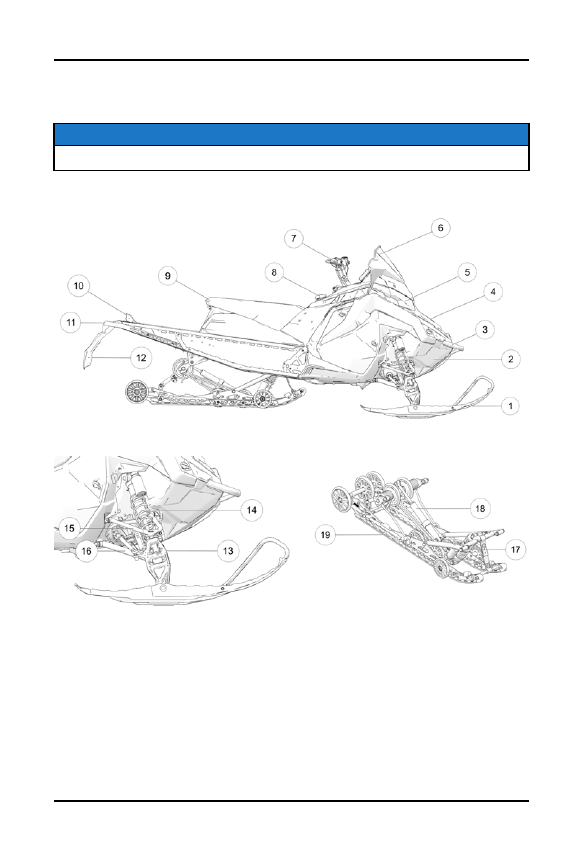
COMPONENT LOCATIONS

NOTICE

The figures below are for reference only. Your model may differ slightly.

q

Skis

w

Nosepan

e

Front Bumper

r

Hood

t

Headlight

y

Windshield

u

Handlebar

i

Fuel Cap

o

Operator Seat

a

Taillight

s

Rear Bumper

d

Snow Flap

f

Spindle

g

Front Suspension

h

Upper Control Arm

j

Lower Control Arm

k

Front Track Shock

l

Rear Track Shock

1(

Rail

33
FEATURES

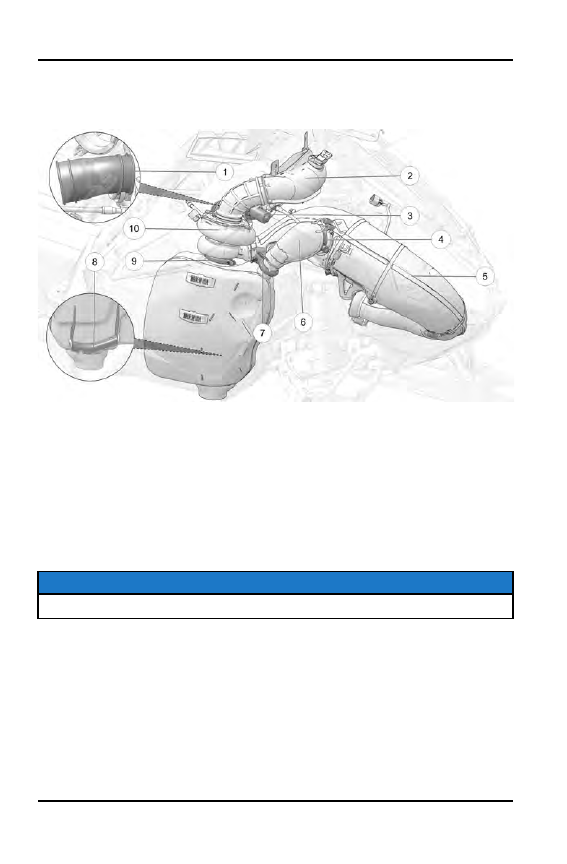
PATRIOT BOOST SYSTEM COMPONENTS
(IF EQUIPPED)

q

Intake Boost Tube

w

Turbo Intake Tube

e

Smart Boost Wastegate Actuator

r

Upper Bypass V-Band Clamp

t

Exhaust Tune Pipe/Heat Shields

y

Exhaust Bypass Tube

u

Lower Bypass V-Band Clamp

i

Exhaust Silencer

o

Turbo V-Band Clamp

a

Turbocharger

CONTROLS

NOTICE

The figures below are for reference only. Your model may differ slightly.

34

FEATURES

q

Brake Lever

w

Parking Brake Lock

e

7S Display (if equipped)

r

Engine Stop Switch

t

Throttle Control

y

Ignition Switch

u

Recoil Starter Handle

i

Hand Controls

o

Heated Grips Button

a

Polaris Electronic Reverse

Control (PERC)

s

Headlight Dimmer Button

NOTICE

For information about the Ride Command hand controls, see page 70.

IGNITION SWITCH

The ignition switch has three positions: OFF, RUN, and START.

35

FEATURES

q

OFF

Vehicle / Display power

off

w

RUN

Vehicle / Display power

on

e

START

Activates starter

motor (if equipped)

If equipped with electric start,
turn the key to START to crank
the engine. When released, the
key automatically returns to the
RUN position.

NOTICE

If the key remains in the RUN position after using the engine stop switch to

stop the engine, the 7S Display will remain active. The screen will turn off after

several minutes of inactivity, but if a battery is installed, the display will

continue to draw a small amount of current from the battery until the key is

turned off. This feature is useful for accessing Ride Command without starting

the engine, but turn the key off when the display is not in use.

The 7S Display is not dependent on a battery while the engine is running. This
allows the 7S to remain fully powered and retain GPS lock during a successful

PERC event (forward/reverse transition). When the engine is shut off, the

display will immediately power down.

For vehicles equipped with a battery, the 7S Display will remain fully powered

(battery installed) for 60 seconds when the key remains in the RUN position

after Engine Stop Switch is depressed. The display will power off automatically

after 10 minutes of inactivity.

36

FEATURES

12-VOLT DC POWER RECEPTACLE

NOTICE

The 12-volt DC power receptacle and the jumper harness required to connect

the receptacle to the hood wiring harness can be purchased from your

POLARIS dealer.

If equipped, the 12-volt DC power receptacle is
located on the hood next to the instrument cluster.
The 12-volt power receptacle is protected by a 2
amp mini blade fuse located the fuse block, or in a
protective bag above the clutch cover. Use of the
12-volt DC power receptacle is recommended for
connecting power-sensitive devices such as GPS
units and cell phones.

12-VOLT RCA POWER SOURCES

Some rider accessories require the use of an RCA power adapter. If your model
is not equipped with an RCA power plug, an accessory 12-volt RCA adapter or
RCA power plug can be purchased from your POLARIS dealer.

12-VOLT RCA ADAPTER

The RCA adapter can be used if
your model is equipped with the
12-volt DC power receptacle.
Plug the adapter into the
receptacle to convert it to a
12-volt RCA power outlet.

37

FEATURES

12-VOLT RCA POWER PLUG

The RCA power plug (with
cover) mounts next to the key
switch and is plugged into the
main vehicle wire harness.
Installation instructions are
provided with the accessory.
This power point is powered by
the load shed relay and is not
fuse protected. POLARIS
recommends using this power
point for electric helmet shields.

ADJUSTABLE HEADLIGHT

NOTICE

The image below is for reference only. Your model may differ slightly.

HEADLIGHT INSPECTION

It is very crucial to correctly complete the steps below in order to achieve optimal
headlight performance. The headlight can be inspected for vertical aim using the
following procedure.

1. In a well-ventilated area, position the snowmobile on a level surface with the

headlight approximately 25 feet (7.6 m) from a wall

q

.

2. Place the rider or the approximate weight of the rider on the seat or tunnel

floorboards.

38

FEATURES

3. Measure the distance from the floor to the center of the headlight and make a

mark on the wall at the same height

w

.

4. Start the engine. Move the headlight switch to low beam.

5. Observe the headlight aim on the wall. There should be a distinct horizontal

line on the wall from the low beam. That line should align with the mark on
the wall

w

.

HEADLIGHT ADJUSTMENT

1. Shut off engine.

WARNING

To prevent serious injury, NEVER attempt to adjust the headlight while the

engine is running.

2. If adjustment is necessary,

an adjuster knob is located
on the back of the headlight,
which can be accessed by
removing the vehicle’s left
side panel.

NOTICE

Depending on the model, the

headlight adjuster knob

e

will

be located on the bottom of the

headlight assembly or at the

rear of the light above the plug.

• To LOWER the beam, turn

the adjuster knob
CLOCKWISE.

• To RAISE the beam, turn

the adjuster knob
COUNTERCLOCKWISE.

39

FEATURES

TOOLS

The belt removal L-wrench tool, spare belt, spark plug, and spark plug tool
container are located behind the left engine compartment panel.

NOTICE

Spare belt and spark plugs are not provided with the snowmobile.

L-WRENCH

When properly engaged in the bracket,
the L-wrench

q

secures the fender to

the console. To retrieve the L-wrench,
rotate it counter-clockwise and slide it
upward from the bracket. Return the
L-wrench to the bracket and rotate it
clockwise when it’s not in use.

SPARK PLUG WRENCH

The spark plug wrench secures the spare belt/spark plug tool container to the
front bumper. Remove the container to add or access a spare spark plug or belt.

REPLACEMENT DRIVE BELT

To insert a replacement drive belt into the spare drive belt container, do the
following:

1. Rotate the spark plug wrench counter-clockwise to release it from the

bracket.

2. Pull the wrench upward to remove it.

3. Tilt the container until the bracket detaches from the bumper tube.

4. Pull the container out of the compartment.

5. When placing a drive belt into the container, fold the belt as shown. Verify

that the belt loop at the rear of the container is positioned slightly higher than
the front loop.

6. Slide the container into the engine compartment at an angle.

7. Position the container bracket onto the bumper tube and rotate it downward.

8. Reinstall the spark plug wrench into the bracket and through the hole in the

bumper tube.

9. Rotate the spark plug wrench clockwise until it locks into place.

40

FEATURES

CARGO STORAGE

Never hang heavy items or fuel
containers from the rear of the tunnel.
Cargo may be stowed only in the tunnel
storage bag (if equipped) or under the
seat.

The maximum weight capacity for the
tunnel is 15 lbs. (7 kg). Include the
weight of the cargo bag when
determining cargo weight.

NOTICE

Exceeding the tunnel cargo weight capacity could result in tunnel and or

suspension pad damage. Do not exceed the weight limit.

RAIL SCRATCHERS

Some models are equipped with rail scratchers to help prevent overheating
when riding on ice or hard-packed snow.

NOTICE

Do not install accessory bogie wheels on the inside of the rail beams if your

model is equipped with a remote reservoir rear track shock or damage will

occur. The rail scratchers must be removed as they interfere with the

accessory bogie wheels.

ACCESSORIES

POLARIS offers a wide range of accessories for your snowmobile to help make
each ride more enjoyable.

Use only POLARIS parts and accessories on your POLARIS snowmobile. Use
of unapproved parts and accessories may result in:

• Non-compliance with government/industry requirements
• Voiding of warranty
• Injury to self or others

This applies to, but is not limited to the following areas: brakes, clutches, fuel
systems, and exhaust systems. Exhaust systems are critical safety areas that

must

use approved POLARIS parts. Please see your authorized POLARIS

dealer for service.

41

FEATURES

DETONATION ELIMINATION TECHNOLOGY
(DET)

When DET senses and takes action to reduce detonation, the driver may notice
a drop in engine RPM and/or reduced performance.

The ECU will illuminate the check engine LED and display “DETONATION” on
the LCD screen whenever the DET system is active.

If the ECU determines the detonation cannot be controlled by normal means,
and further operation may cause engine damage, the check engine LED will
flash, the instrument clusters will display “DETONATION” and the ECU will
either limit the maximum engine speed or turn off the engine.

If the ECU limits RPM, the limit will remain active until the driver stops and
restarts the engine.

NOTICE

The most likely causes of severe detonation are outlined in the troubleshooting

table on page 240.

DETONATION PROTECTION MODES

Check Engine LED/Gauge Display

Protection Mode

650 Models

LED illuminated / “DETONATION”
displayed

Slight drop in engine RPM/power

LED flashing / “DETONATION” displayed

Engine shut-off

850 Models

LED illuminated / “DETONATION”
displayed

Slight drop in engine RPM/power

LED flashing / “DETONATION” displayed

Exhaust valves close to reduce engine
RPM/power. Restart engine to reset.

Indy VR1 Boost / Switchback Assault Boost

LED illuminated / “DETONATION”
displayed

Slight drop in engine RPM / power

LED flashing / “DETONATION” displayed

Engine shut-off

42

FEATURES

NOTICE

The instrument cluster alert indicates which cylinder is experiencing

detonation.

43

FEATURES

OIL PUMP FAILURE PROTECTION

If the ECU determines there is a problem with the electronic oil pump control
circuit, the engine management system will limit engine speed to approximately
4000 RPM and illuminate the check engine indicator light on the instrument
cluster or 7S Display.

EXTENDED IDLE ENGINE SHUTOFF

The Extended Idle Engine Shutoff feature causes the ECU to shut down the
engine when engine temperature reaches a specific temperature (see table
below) and there is no throttle lever input for 11 minutes.

MODEL

ENGINE TEMP.

650 / 850 Models

86° F (30° C)

NOTICE

If your vehicle is equipped with electric start, the 7S display (if equipped) will

remain on when the key is in the ON position. After 60 seconds, the display

backlight will dim and then fully shut down after 10 minutes of inactivity.

SECURITY SYSTEM (IGNITION LOCK SYSTEM)

Your snowmobile has an optional security function that can be activated by an
authorized Polaris dealer. If you have this feature activated, you can lock the
ignition to prevent unauthorized use when leaving the snowmobile unattended.
A locked system will limit engine speed to 3000 RPM, which prevents clutch
engagement, and the snowmobile will not move when throttle is applied.

44

FEATURES

GAUGE

STANDARD INSTRUMENT CLUSTER

q

Check Engine

w

Engine Hot

e

Low Oil

r

Low Battery Voltage

t

Playback

y

Low Fuel

u

High Beam

i

Parking Brake

o

Reverse

a

Security

NOTICE

Certain products will damage the lens and other plastic surfaces. Do not use

alcohol to clean the instrument cluster. Immediately clean off any gasoline that

splashes on the instrument cluster.

45

FEATURES

The instrument cluster and
gauge (if equipped) contains
indicator lights and the rider
information center. The
information center can be
controlled by the SELECT button

s

and ARROW buttons

d

on

the hand controls.

INDICATOR LAMPS

INDICATOR

CONDITION

This indicator appears if an EFI-related fault occurs. Do not operate
the snowmobile if this warning appears. Serious engine damage
could result. Your authorized POLARIS dealer can assist.

The over-temperature indicator will

illuminate

when the engine is

overheating. Take action to cool the engine. The indicator will

flash

when engine temperature reaches critical levels.

Stop the engine

immediately.

The low oil indicator light may flicker at times due to oil movement in
the bottle, but when the light comes on and remains on, add the
recommended oil before further operation.

The low battery voltage indicator illuminates when the battery voltage
is low.

The playback indicator illuminates when the gauge is in playback
mode.

The low fuel indicator illuminates when there is 2 gal (7.5 L) of fuel
remaining in the tank.

The high beam indicator illuminates when the lights are set to high
beam.

46

FEATURES

INDICATOR

CONDITION

The parking brake Indicator illuminates when the parking brake is
engaged. It will also illuminate when the service brake is in use.

The reverse indicator flashes when the transmission is in reverse.

The security indicator illuminates when the security system is
activated.

RIDER INFORMATION CENTER

The rider information center is located in the instrument cluster. The center
displays vehicle speed, engine speed, odometer, resettable trip meters (2), total
engine hours of operation, fuel level, engine temperature, and a diagnostic
display mode.

Setting changes must be made with the engine running or with the vehicle
powered by an external DC power supply connector. The information center is
set to display standard units of measurement for distance and temperature.

q

Information Display Area

- This area displays either engine speed or vehicle

speed (whichever is not displayed in the speed display), engine temperature and
maximum vehicle speed.

47

FEATURES

w

Speed Display

- The speed display area displays either vehicle speed or

engine speed.

e

Fuel Gauge

- Not available on all models. The segments of the fuel gauge

show the level of fuel in the fuel tank. When the last segment clears, a low fuel
warning is activated. All segments including the fuel icon will flash. Refuel
immediately.

NOTICE

The low fuel indicator and fuel level gauge on the Standard Instrument Cluster

are not supported on models with a fuel level gauge on the fuel cap.

TIP

If the fuel icon fails to display, an open or short circuit has occurred in the fuel

sensor circuit. See your dealer.

r

Odometer/Engine Hour Display

- This area displays the odometer, Trip A,

Trip B and engine hours.

INFORMATION DISPLAY AREA

This area displays either engine speed or vehicle speed (whichever is not
displayed in the speed display), engine temperature, maximum vehicle speed,
and speed or RPM. To change the display,

press and release

the MODE button

or the MODE switch until the desired item is displayed.

SPEED DISPLAY AREA

The speed display area displays either vehicle speed or engine speed. Vehicle
speed is displayed in either miles per hour (MPH) or kilometers per hour (km/h).
Engine speed is displayed in revolutions per minute (RPM).

1. To change which item displays, first make sure the information display area

is set to display either engine speed or vehicle speed.

2.

Press and release

the center button.

FUEL GAUGE (IF EQUIPPED)

The segments of the fuel gauge show the level of fuel in the fuel tank. When the
last segment clears, a low fuel warning is activated. All segments including the
fuel icon will flash. Refuel immediately.

NOTICE

The low fuel indicator and fuel level gauge on the Standard Instrument Cluster

are not supported on models with a fuel level gauge on the fuel cap.

48

FEATURES

TIP

If the fuel icon fails to display, an open or short circuit has occurred in the fuel

sensor circuit. See your dealer.

ODOMETER/ENGINE HOUR DISPLAY AREA

This area displays the odometer, Trip 1 meter, Trip 2 meter, CLOCK, and Engine
Hours meter.

The odometer displays the total distance traveled by the vehicle since
manufacture. Each trip meter records the distance traveled by the vehicle on a
trip if the meter is reset before each trip. The CLOCK displays the time, and the
engine hour meter displays the total hours the engine has been in operation
since manufacture.

To change the display,

press and release

the SET button or SET switch until the

desired item is displayed.

To reset a trip meter,

press and hold

the SET button or SET switch until the

meter resets to zero.

PLAYBACK FUNCTION

The playback function allows the rider to record and play back engine speed,
vehicle speed and throttle position sensor information for up to three minutes.

TO RECORD

1.

Press and hold

the center

button on the instrument cluster to enter the

Options Menu.

2.

Press and release

the MODE button until PLAYBACK appears in the

information display area.

49

FEATURES

3.

Press and release

the SET button.

RECORD will appear in the information display area.

4. To begin recording,

Press and release

the SET button.

The playback indicator will flash while recording is in progress. Recording is
complete when the light stops flashing.

NOTICE

To stop recording at any time during the recording process,

press and release

the SET button.

TO PLAYBACK

1. To play back the recorded data, stop the vehicle and wait for engine speed to

drop below clutch engagement.

2.

Press and hold

the center

button on the instrument cluster to enter the

Options Menu.

3.

Press and release

the MODE button until PLAYBACK appears in the

information display area.

50

FEATURES

4.

Press and release

the SET button twice.

PLAY will appear in the information display area.

5.

Press and release

the SET button to play the recorded data.

Once playback has concluded, REPLAY will appear in the information
display area.

6.

Press and release

the SET button to REPLAY recorded data.

7.

Press and release

the MODE button to end playback and return to the

Options Menu.

STANDARD/METRIC DISPLAY

The odometer and temperature displays can be viewed in either standard or
metric units of measurement. Both displays change if units are changed. The
new settings will remain until changed by the operator.

Change Method 1

1.

Press and hold

the center

button on the instrument cluster to enter the

Options Menu.

2.

Press and release

the MODE button until engine temperature appears in the

information display area.

3.

Press and release

the SET button or SET switch to change units.

51

FEATURES

Change Method 2

1.

Press and release

the SET button or SET switch until the odometer appears

in the information display area.

2.

Press and hold

the SET button or SET switch until the units change.

SECURITY SYSTEM (IGNITION LOCK SYSTEM)

This system is an optional feature and will not function until it has been activated
by your authorized POLARIS dealer. If you have this feature activated, you can
lock the ignition to prevent unauthorized use when leaving the snowmobile
unattended. A locked system will limit engine speed to 3000 RPM, which
prevents clutch engagement, and the snowmobile will not move when throttle is
applied.

If you wish to use this feature, you must complete all four tasks on the following
pages to have your system activated and to change the security code to one of
your own choosing.

FIRST TIME USE OF YOUR SECURITY SYSTEM

Perform all tasks in the order shown if you wish to activate and use the optional
security system.

TASK 1: Activate the security system

See your authorized POLARIS dealer to have the optional security system
feature activated in the electronic control unit (ECU).

TASK 2: Lock the System the First Time

NOTICE

To lock the system for the first time, use code 000.

52

FEATURES

1.

Press and hold

the center

button on the instrument cluster to enter the

Options Menu.

2.

Press and release

the MODE button until SECURITY OFF appears in the

information display area.

3.

Press and release

the SET button.

ENTER CODE will appear in the information display area.

4.

Press and release

the SET button to increase the 1st digit.

5.

Press and hold

the SET button to accept the 1st digit and advance to the 2nd

digit.

6.

Press and release

the SET button to increase the 2nd digit.

53

FEATURES

7.

Press and hold

the SET button to accept the 2nd digit and advance to the 3rd

digit.

8.

Press and hold

the SET button to accept the 3rd digit and submit code.

If code is correct, SECURITY ON will appear in the information display area.
The system is now locked. Proceed immediately to Task 3.

If code is incorrect, BAD CODE will appear in the information display area.
Return to step 3 to re-enter code.

54

FEATURES

TASK 3: Unlock the System

NOTICE

To unlock the system for the first time, use code 000.

1. While the engine is running,

Press and release

the SET button.

ENTER CO will appear in the information display area.

2.

Press and release

the SET button to increase the 1st digit.

3.

Press and hold

the SET button to accept the 1st digit and advance to the 2nd

digit.

4.

Press and release

the SET button to increase the 2nd digit.

55

FEATURES

5.

Press and hold

the SET button to accept the 2nd digit and advance to the 3rd

digit.

6.

Press and release

the SET button to increase the 3rd digit.

7.

Press and hold

the SET button to accept the 3rd digit and submit code.

If code is correct, SECURITY OFF will appear in the information display area

NOTICE

The system is now

unlocked

.

If code is incorrect, BAD CODE will appear in the information display area.
Return to step 1 to re-enter code.

8. You must now enter a new security code. Proceed immediately to TASK 4.

56

FEATURES

TASK 4: Enter Your New Security Code

1. Immediately after locking and unlocking the system, and while SECURE

OFF is displayed, simultaneously

press and hold

the MODE and SET

buttons.

SET NEW CODE will appear on the information display area.

2.

Press and release

the SET button to increase the 1st digit.

3.

Press and hold

the SET button to accept the 1st digit and advance to the 2nd

digit.

4.

Press and release

the SET button to increase the 2nd digit.

5.

Press and hold

the SET button to accept the 2nd digit and advance to the 3rd

digit.

57

FEATURES

6.

Press and release

the SET button to increase the 3rd digit.

7.

Press and hold

the SET button to accept the 3rd digit.

CODE SET will appear in the information display area, and then the new
code will blink three times in the information display area

NOTICE

Your new code is now set. The system is NOT locked.

8. Record your new security code in a safe place for future reference.

Record your new personal security code here: __________________

TIP

If you lose your personal security code, see your authorized POLARIS dealer

to have the code reset to “000”. Then perform TASK 2 through TASK 4 to

change the code to one of your own choosing.

58

FEATURES

LOCKING SYSTEM WITH PERSONAL SECURITY CODE

1. Start the engine.

2.

Press and hold

the center

button on the instrument cluster to enter the

Options Menu.

3.

Press and release

the MODE button until SECURITY OFF appears in the

information display area.

4.

Press and release

the SET button.

ENTER CODE will appear in the information display area.

5.

Press and release

the SET button to increase the 1st digit.

6.

Press and hold

the SET button to accept the 1st digit and advance to the 2nd

digit.

59

FEATURES

7.

Press and release

the SET button to increase the 2nd digit.

8.

Press and hold

the SET button to accept the 2nd digit and advance to the 3rd

digit.

9.

Press and hold

the SET button to accept the 3rd digit and submit code.

If code is correct, SECURITY ON will appear in the information display area.
The system is now locked. Proceed immediately to Task 3.

If code is incorrect, BAD CODE will appear in the information display area.
Return to step 3 to re-enter code.

60

FEATURES

UNLOCKING SYSTEM WITH PERSONAL SECURITY
CODE

1. While the engine is running,

Press and release

the SET button.

ENTER CODE will appear in the information display area.

2.

Press and release

the SET button to increase the 1st digit.

3.

Press and hold

the SET button to accept the 1st digit and advance to the 2nd

digit.

4.

Press and release

the SET button to increase the 2nd digit.

5.

Press and hold

the SET button to accept the 2nd digit and advance to the 3rd

digit.

61

FEATURES

6.

Press and release

the SET button to increase the 3rd digit.

7.

Press and hold

the SET button to accept the 3rd digit and submit code.

If code is correct, SECURITY OFF will appear in the information display area

NOTICE

The system is now

unlocked

.

If code is incorrect, BAD CODE will appear in the information display area.
Return to step 1 to re-enter code.

CHANGING TO A NEW SECURITY CODE

Any time you wish to change your current security code to a new code, perform
TASK 2 through TASK 4 of the First Time Use of Your Security System
procedure. Instead of using the factory default code “000” in TASK 2 and TASK
3, use your current security code.

62

FEATURES

SECURITY SYSTEM ACCESS QUICK REFERENCE

Now that you have become familiar with the procedure for locking and unlocking
the system, use the chart below as a quick reference.

SECURITY SYSTEM ACCESS QUICK REFERENCE CHART

ACTION

RESULT

1. Start engine

2.

Press and hold

the center

button

3.

Press and release

the SET button

until SECURITY appears in
information display area.

4.

Press and release

SET button.

Displays ENTER CODE (to lock
the system)

Press and release

the SET button

Advances a digit on the ENTER
CODE screen

Press and hold

the SET button

Accepts a digit and displays the
next digit position (if any remain)
on the ENTER CODE screen

While SECURITY OFF is shown on the
information display area, simultaneously

Press and hold

the MODE and SET

button.

Allows user to change security
code.

DIAGNOSTIC DISPLAY MODE

The diagnostic display mode is for
informational purposes only. Your
authorized POLARIS dealer can
perform all major repairs.

The diagnostic mode is accessible only
when the check engine warning
indicator is illuminated

and

a diagnostic

code is active.

Do not stop the engine if you want to view the active code (failure code). Active
codes cannot be retrieved if power is interrupted to the instrument cluster. The
codes will become inactive codes if power is interrupted. Inactive codes are
stored in the history of the unit. Please see your authorized POLARIS dealer can
help retrieve inactive codes.

Use the following procedure to view active codes.

63

FEATURES

1. Do not stop the engine.

2.

Press and hold

the center

button on the instrument cluster to enter the

Options Menu.

3.

Press and release

the MODE button until DIAGCODE appears in the

information display area. The Diagnostic display mode will appear in the
Options Menu if there is an active trouble code.

TIP

When the diagnostic mode is displayed, the check engine warning indicator will

begin to flash.

4. A set of two numbers will appear in the display.

• The 2-6 digit suspect parameter number (SPN) in the information display

area indicates which component is generating the fault code.

• The 1-2 digit failure mode indicator (FMI) number in the odometer area

indicates the fault mode, such as open or short circuit.

5. More than one fault may be active. Press and hold the SET button or SET

switch for two seconds to toggle to the next active code. Repeat until all
codes are retrieved.

6. See Diagnostic Trouble Codes for code definitions and failure descriptions.

FUEL TYPE SELECTION

When using the recommended 91
non-ethanol gasoline, always select the
91 NON-ETHANOL setting. When using
ethanol, MTBE, or other forms of
oxygenated gasoline, the fuel type must
be changed to
NON-PREMIUM/ETHANOL in the
gauge.

IMPORTANT

Whenever in doubt of your fuel purchase, use the NON-PREMIUM / ETHANOL

mode.

Use the following procedure to change the fuel type designation in the gauge.
Refer to the fuel type selection label located inside the left side panel.

64

FEATURES


Content      ..      1      2      3      ..