Polaris TRACTOR Sportsman 570 6X6 (2018 year). Instruction - part 8
 

  Index      Snowmobiles / ATV     Polaris TRACTOR Sportsman 570 6X6 - instruction 2018 year


Search            


Content   ..  6  7  8  9   ..


Polaris TRACTOR Sportsman 570 6X6 (2018 year). Instruction - part 8


35

FEATURES AND CONTROLS

Instrument Cluster

Digital/Analog Gauge

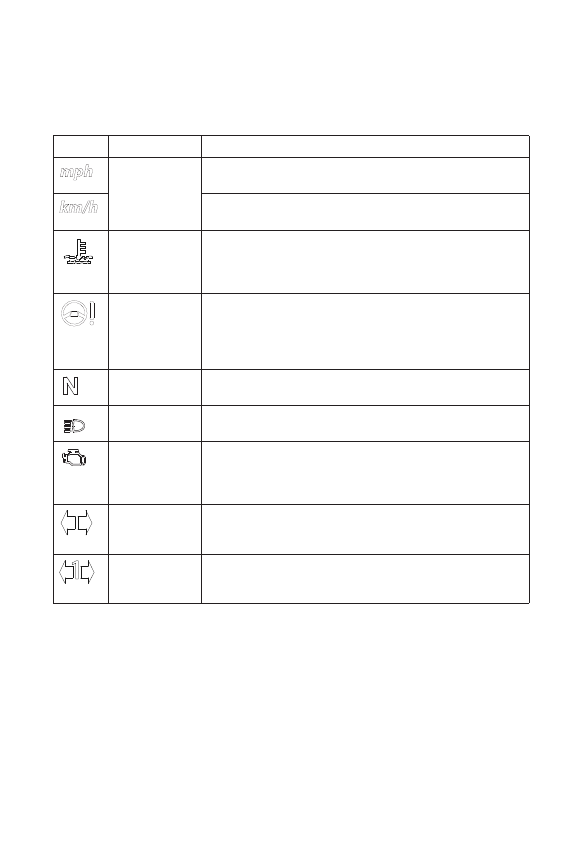
Indicator Lamps

Lamp

Indicates

Condition

Vehicle

Speed

When standard mode is selected, speed displays in 

miles per hour.
When metric mode is selected, speed displays in 

kilometers per hour.

Over 

Temperature

This lamp flashes to indicate an overheated engine. If 

the indicator stops flashing but remains illuminated, 

the overheating condition remains, and the system 

will automatically reduce engine power.

EPS Warning

(if equipped)

This indicator illuminates when the key is turned to 

the ON position and goes off when the engine is 

started. If the light remains on after starting the 

engine, the EPS system is inoperative. Your 

POLARIS dealer can assist.

Neutral

This lamp illuminates when the transmission is in 

neutral and the ignition key is in the ON position.

High Beam

This lamp illuminates when the headlamp switch is 

set to high beam.

Check Engine This indicator appears if an EFI-related fault occurs. 

Do not operate the ATV if this warning appears. 

Serious engine damage could result. Your POLARIS 

dealer can assist.

Turn Signal

The corresponding turn signal indicator flashes when 

the left, right or both turn signals (hazard warning) are 

active.

Trailer Turn 

Signal

The corresponding turn signal indicator flashes when 

the trailer light harness is properly connected to the 

vehicle and a left or right turn signal is active.

36

FEATURES AND CONTROLS

Instrument Cluster

Digital/Analog Gauge

Rider Information Center
The rider information center is located in the instrument cluster. All 

segments will light up for one second at start-up. If the instrument 

cluster fails to illuminate, a battery over-voltage may have occurred and 

the instrument cluster may have shut off to protect the electronic 

speedometer. If this occurs, your POLARIS dealer can provide proper 

diagnosis.
The information center is set to display standard units of measurement 

and a 12-hour clock at the factory. To change to metric and/or a 24-hour 

clock, see page 39.

Trip 1

km

mi

RPM

E

F

88

:

88

1

2

3

5

6

7

4

37

FEATURES AND CONTROLS

Instrument Cluster

Digital/Analog Gauge

Rider Information Center
1. Gear Display - This area displays gear shifter position:

H = High Gear

L = Low Gear

N = Neutral

R = Reverse Gear

P = Park

-- = Gear Signal Error (or shifter between gears)

2. Fuel Gauge Display - The segments of the fuel gauge show the 

level of fuel in the fuel tank. When the last segment clears, a low 

fuel warning is activated. All segments including the fuel icon will 

flash. Refuel immediately.

Tip: If the fuel icon fails to display, an open or short circuit has occurred in the 

fuel sensor circuit. Your POLARIS dealer can assist.

3. Information Display - This area displays odometer, trip meter, 

engine hour meter, engine speed and programmable service hour 

interval.

4. Active Descent Control Display - This icon displays when ADC is 

active. See page 33.

5. Clock Display - The clock displays time in a 12-hour or 24-hour 

format. Turn the key to the ON position to view the clock. See page 

39 for resetting instructions.

6. Service Reminder Display - A flashing wrench symbol alerts the 

operator that the preset service interval has been reached. Your 

POLARIS dealer can provide scheduled maintenance. See page 39 

for resetting instructions.

7. AWD Display - This icon displays when the AWD system is 

engaged (switch is on either ADC AWD or AWD).

38

FEATURES AND CONTROLS

Instrument Cluster

Digital/Analog Gauge

Rider Information Center
The reverse override button acts as the MODE button when pressed and 

released quickly. The transmission cannot be in reverse when using the 

override button as a MODE button. This feature does not contain a 

vehicle speed lockout function and can be used at any operating speed.

Display Units (Standard/Metric)
The display can be changed to display either standard or metric units of 

measurement.

Tip: To exit the set-up mode at any time, wait 10 seconds. The display 

automatically exits and returns to the odometer display.

1. Turn the key to the OFF position.
2. Place the transmission in neutral.
3. Press and hold the MODE button while turning the key to the ON 

position.

4. When the display flashes the distance setting, tap the MODE button 

to advance to the desired setting.

5. Press and hold the MODE button to save the setting and advance to 

the next display option.

6. Repeat the procedure to change remaining display settings.

Standard Display

Metric Display

Distance

Miles

Kilometers

Time

12-Hour Clock

24-Hour Clock


Content   ..  6  7  8  9   ..