Polaris ACE 570 (2018 year). Instruction - part 8
 

  Index      Snowmobiles / ATV     Polaris ACE 570 - instruction 2018 year


Search            copyright infringement  


Content   ..  6  7  8  9   ..


Polaris ACE 570 (2018 year). Instruction - part 8


36

FEATURES AND CONTROLS

Park Brake Lever

Always apply the service brakes before engaging or releasing the park 

brake. To help prevent the vehicle from rolling, set the park brake when 

parking the vehicle. When the park brake is set and the park brake 

indicator is illuminated, engine speed is limited. If the accelerator is 

applied, this limiting feature prevents operation, which protects the park 

brake pads from excessive wear.

Tip: This feature will not operate properly if the park brake connector or switch 

(under the hood) malfunctions or becomes disconnected, or if the switch 

has moved. Check for disconnection, then see your dealer promptly if this 

feature fails to operate properly.

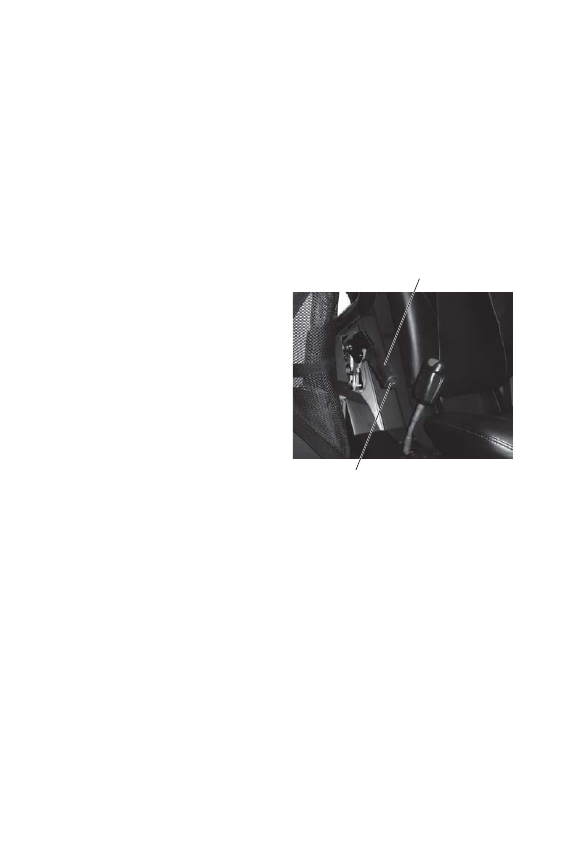
1. To set the park brake, apply the 

brakes.

2. Pull the park brake lever 

upward as far as possible.

3. To release the park brake, apply 

the brakes. Press the park brake 

release inward and move the 

lever downward as far as 

possible.

Park Brake Lever

Park Brake Release

37

FEATURES AND CONTROLS

Rollover Protective Structure (ROPS)

The Rollover Protective Structure 

(ROPS) on this vehicle meets 

OSHA 1928.53 rollover 

performance requirements. 

Always have your authorized 

POLARIS dealer thoroughly 

inspect the ROPS if it ever 

becomes damaged in any way.
No device can assure occupant 

protection in the event of a 

rollover. When used with seat 

belts and cab nets, the ROPS 

helps prevent occupants from 

being ejected from the vehicle. 

Always follow all safe operating 

practices outlined in this manual 

to avoid vehicle rollover.

WARNING! Vehicle rollover could cause severe injury or death. Always avoid 

operating in a manner that could result in vehicle rollover.

ROPS Label

(on ROPS behind rear cab)

38

FEATURES AND CONTROLS

Instrument Cluster

High water pressure may damage 

components. Wash the vehicle by 

hand or with a garden hose using 

mild soap. Do not use alcohol to 

clean the instrument cluster. Do 

not allow insect sprays to contact 

the lens.

Speedometer

The speedometer displays vehicle 

speed in either miles per hour 

(MPH) or kilometers per hour 

(km/h). See page 42.

Mode Button

Use the MODE button to toggle 

through mode options. See page 42 

for operation of the modes.

Rider Information 

Center

Speedometer

Indicator 

Lamps

MODE 

Button

39

FEATURES AND CONTROLS

Instrument Cluster
Indicator Lamps

Lamp

Indicates

Condition

Vehicle

Speed

When standard mode is selected, speed displays in 

miles per hour.
When metric mode is selected, speed displays in 

kilometers per hour.

Over 

Temperature

This lamp illuminates to indicate an overheated 

engine. If the indicator flashes, the overheating 

condition remains, and the system will automatically 

reduce engine power.

Neutral

This lamp illuminates when the transmission is in 

neutral and the ignition key is in the ON position.

High Beam (if 

equipped)

This lamp illuminates when the headlamp switch is 

set to high beam.

Helmet/Seat 

Belt

This lamp flashes for several seconds when the key is 

turned to the ON position. The lamp is a reminder to 

wear helmet and seat belt before operating.

Check Engine This indicator appears if an EFI-related fault occurs. 

Do not operate the vehicle if this warning appears. 

Serious engine damage could result. See your dealer.

Direction 

Indicators

A direction indicator flashes when a turn signal is 

active. Both indicators flash when the hazard signal is 

active.


Content   ..  6  7  8  9   ..