Snowmobile Polaris 700 Classic / 700 touring (2006 year). Instruction - part 8
 

  Index      Snowmobiles / ATV     Snowmobile Polaris 700 Classic / 700 touring - instruction 2006 year


Search            copyright infringement  


Content   ..  6  7  8  9   ..


Snowmobile Polaris 700 Classic / 700 touring (2006 year). Instruction - part 8


32

FEATURES

Instrumentation

MFD Digital Display Programs

Press the MODE button to cycle through the three MFD programs:

Performance, Engine and History. Each program will remain in the

display until another is selected.

NOTE: The analog will always display either MPH or engine RPM

(whichever setting is selected) regardless of the display

program being viewed.

Performance Program
The Performance Program automatically displays either speed or

tachometer, whichever is opposite the analog display. See page 31. It

also displays electrical system voltage and fuel levels.
While in the Performance mode, press the SET button to cycle through

the odometer, Trip 1, Trip 2, Trip F and Clock settings.
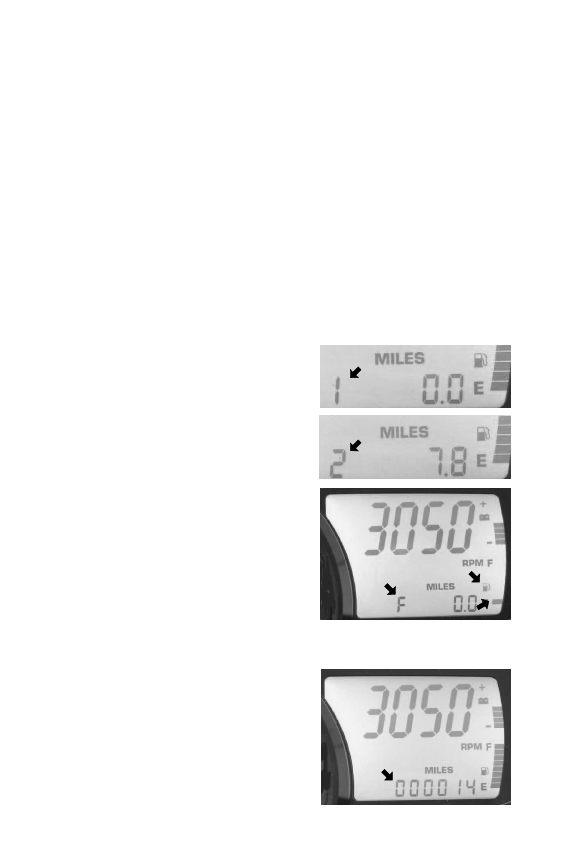
Trip Settings
Trip 1 and Trip 2 are odometers used to

check fuel mileage or to keep track of

distance traveled.
1. To reset a trip odometer to zero,

enter the Trip 1 or Trip 2 display.

2. Press and hold the SET button for

two seconds.

Trip F automatically displays if the fuel

level is low. The fuel symbol and the

last fuel bar on the MFD gauge will

blink when the fuel level reaches 1/8th

tank. The Trip F odometer records

distance traveled until enough fuel is

added to raise the level above 1/4 tank.

The fuel symbol and the fuel bar will

continue to blink until the fuel level is

above 1/4 tank. The Trip F odometer

will automatically reset to zero after

refueling.

Odometer Setting
The odometer records the vehicle’s

total distance traveled since

manufacture. The odometer cannot be

reset.

33

FEATURES

Instrumentation

MFD Digital Display Programs

Performance Program
Clock Setting
1. While in the CLOCK display, press

and hold the SET button for five

seconds.

2. When the hour starts flashing press

the SET switch once to advance one

hour, or press and hold the SET

button to advance the hour once

every 0.2 seconds.

3. Press the MODE button to save the hour and flash the minutes.
4. Set the minutes in the same manner.
5. When finished, press the MODE button to save the new setting.

NOTE: If the MODE button is not pressed within ten seconds, the

clock will automatically save the new entry.

Engine Program
The Engine Program automatically displays the engine coolant

temperature, engine hours, electrical system voltage level and fuel

level. On machines equipped with altimeter sensor and ambient air

temperature sensors, altitude and ambient air temperature will display

as additional screens in the engine program. Press the SET button to

display the ambient air temperature and altitude screens (if equipped).
Air Temperature (if equipped)
The MFD displays actual air temperature.

Press and hold the MODE switch for ten

seconds to switch between standard and

metric units of measurement.

34

FEATURES

Instrumentation

MFD Digital Display Programs

Altitude (if equipped)
The rider can calibrate the altimeter for

current atmospheric conditions. Altimeter

accuracy will be +/--300 ft. (91 m) after

adjustment.

NOTE: Press and hold the MODE switch

for ten seconds to switch

between standard and metric units of measurement. When

“ALt” displays, the program is in the metric mode.

1. Enter the Engine Program and select the altimeter display.
2. Press and hold the SET button for five seconds.
3. When the digits begin to flash, press the SET button once to

advance 50 feet (15 m), or press and hold the button to advance

100 ft. (30 m) every 0.1 seconds. Adjust the altitude display to

within 50 ft. (15 m) of current altitude.

NOTE: The gauge reads barometric pressure and allows the rider to

compensate for daily fluctuations in air pressure. The gauge

can adjust the displayed altitude to +/-- 1300 ft. (396 m) from

the preset value. It will adjust up to +1300 ft. (396 m) above

the calibrated altitude. Once the +1300 ft. (396 m) offset has

been reached, the next adjustment is --1300 ft. (396 m) from

the calibrated altitude, and 50 ft. (15 m) will be added to the

altitude each time the SET button is pressed.

4. Press the MODE button to hold the reading at the adjusted value. If

the it’s not pressed within five seconds, the gauge will

automatically save the new setting.

Hour Meter
The hour meter records the total hours of

engine operation since manufacture. This

meter cannot be reset.

Engine Temperature
A thermometer measures water temperature,

giving an indication of engine temperature.

35

FEATURES

Instrumentation

MFD Digital Display Programs

History Program
The History Program automatically displays electrical system voltage

level and fuel level.
While in the History mode, press the SET button to view maximum

vehicle speed, maximum engine rpm or the current service interval

setting. The gauge automatically logs the maximum speed and engine

rpm even if the History Program is not currently displayed.
The History Program will display the history of the Maximum Speed,

Maximum RPM and Service Interval settings.
Maximum Speed/RPM Reset
While in either the MAX MPH or the

MAX RPM mode, press and hold the

SET button for three seconds to reset

the recorded maximum values for both

MPH and RPM. Both of these values

are reset at the same time. Reset the

MAX MPH/RPM values before each

run to obtain accurate readings.

NOTE: Due to electrical noise, the

MFD may occasionally

display MAX MPH/RPM

values that are not

representative of actual

values.


Content   ..  6  7  8  9   ..