DB2 Server for VSE System Administration (Version 7 Release 5) - page 3
Chapter 5. Operating the Online Support
This chapter explains how to enable VSE guests to access an application server on
a VM operating system, and how to operate the VSE online support.
Operating VSE Guest Sharing
Your VSE online users can access an application server on a VM host operating
system when the VSE operating system is running as a guest in a virtual machine.
(DRDA support is not provided with the VSE guest sharing function.) Database
switching is supported for CICS online applications, which means that one
resource adapter in one CICS region can connect to multiple application servers.
Any CICS transaction in the CICS region can connect to any of the DB2 Server for
VM application servers to which the online resource adapter has established
connections. This means that:
1. Different transactions in a CICS region will be able to connect to different DB2
Server for VM application servers
2. Single transactions will be able to connect to different DB2 Server for VM
application servers in different units of work.
The DB2 Server for VM application server can be accessed by specifying the
server_name parameter on the CIRB transaction or on the CIRA transaction. The
DB2 Server for VM application server must be defined in the DBNAME Directory.
The DBNAME Directory provides the mapping of mapped DBNAME to resid. See
“Choosing an Application Server Name” on page 23 DB2 Server for VSE System
Administration for more DBNAME Directory information. The resid is the basic
DBNAME, and must be the same as the one specified in the SET APPCVM
command during the VSE initial program load. If there are multiple DB2 Server for
VM servers on the VM host, there can be more than one SET APPCVM command.
The VM application server being accessed can be either on the same processor or
on another processor in the network. For batch applications and for online users
who want to access an application server on another processor in a SNA network,
you must issue the SET APPCVM command when you start VSE. The command
provides routing information for both batch and online users. Note that SET
APPCVM is required only if VTAM is to be used in the connection. If the server
and requester are in a TSAF collection on the same node, it is not necessary to
issue the SET APPCVM command.
Figure 26 on page 82 shows the syntax of the SET APPCVM command.
81

►► SET APPCVM TARGET
resid
►◄
avs_parameter_block
avs_parameter_block:
( resid,gateway_name,target_LU_name,mode_name
)
Figure 26. SET APPCVM Command
The variables have the following meanings:
resid
The resource identifier of the DB2 Server for VM application server which is
the same as the resid parameter on the IUCV *IDENT entry in the database
machine directory for VM operating systems.
avs_parameter_block
Only specify these parameters if the application server you want to access is in
an SNA network. The names are defined by VTAM* statements when the
network is built, and have these meanings:
resid
The resource identifier of the DB2 Server for VM application server. This is
the same as the resid parameter on the IUCV *IDENT entry in the database
machine directory on VM.
gateway_name
This corresponds to an APPL statement at the local system. To the SNA
network, gateway_name is an LU with the same name.
target_LU_name
This corresponds to an APPL statement at the remote system.
mode_name
This corresponds to a mode table entry at the local and remote systems.
The parameters must be specified in the order shown above.
For more information about the AVS parameters, see the VM/ESA: Connectivity
Planning, Administration, and Operation manual. For more information on the IPL
SET APPCVM command in VSE, see VSE/ESA System Control Statements.
Note: The VSE Guest sharing facility requires 40KB of real storage for each
database communication link. For more information on providing real
storage, see VSE/ESA System Control Statements
Operator Responsibilities
VSE guest sharing is monitored from the VM console. All DB2 Server for VM
operator commands can be used. In addition, in-doubt LUWs can be forced from
the VM console.
Online support is required for ISQL and CICS transaction programs that access the
application server. The DB2 Server for VSE online resource adapter must be started
so that the application server can be accessed from the CICS online environment. If
82
System Administration
this is not done, and a CICS transaction attempts to access the application server,
CICS will end the transaction with CICS/VSE abend code AEY9.
Operation of the online support involves the following:
1.
Starting the application server in multiple user mode, either before or after
CICS is started. (The online environment is not supported in single user mode.)
|
2.
Starting the DB2 Server for VSE online support by running the CIRB
|
transaction under CICS. The CIRB transaction accepts a list of server names.
|
This allows online access to multiple application servers to be established from
|
one command. CIRB enables the online resource adapter and also loads the
|
online resource adapter above the 16MB line thus allows the memory space
|
below 16MB to be used for other purposes. After CIRB has successfully
|
completed its processing, the online resource adapter is ready to handle SQL
|
requests from CICS transaction programs (such as ISQL).
3.
After the online resource adapter is started, the CICS transaction CIRA can be
used to add connections or enable online access to other application servers.
CIRA can be entered multiple times with different server_names. This establishes
the connections or enables online access to the specified application server.
CIRA also accepts a list of server_names so that online access to multiple servers
can be established with one command.
4.
The transaction CIRR can be used to remove connections or disable online
access to a particular application server or list of application servers. The online
resource adapter is terminated if the CIRR transaction removes the connection
or disables online access to the last application server.
5.
Displaying information about active CICS transactions (including ISQL) that
access an application server by using the CIRD transaction. The CIRD
transaction accepts a server_name parameter to display the transactions
accessing a particular application server. The * keyword can be specified to
display all transactions on all of the application servers (for example, CIRD *).
6.
Changing the default application server using the CICS transaction CIRC.
7.
Stopping the online support without stopping either CICS or the application
server by issuing the CIRT transaction. The CIRT transaction terminates all
connections or access to all application servers and then terminates the online
resource adapter.
If a local application server becomes unavailable for some reason, only the
connections to that application server are lost. The online resource adapter remains
active and connections or online access to other application servers can still be
used. When the local application server becomes available again, the CIRA
transaction can be used to re-establish connections to it. If there are any in-doubt
LUWs associated with this application server, they will be resolved at this time.
If the default application server becomes unavailable, a new default server is not
established automatically. Users attempting to connect to the default server will
receive a message indicating that the server is not available.
These steps are described in detail below. For more information on starting and
stopping online support for VSE guest sharing, see the DB2 Server for VSE & VM
Operation manual.
Starting the Online Resource Adapter -- The CIRB Transaction
To activate the online support, run the CIRB transaction. When it completes, the
resource adapter is enabled. Only when this happens can user transactions be
executed.
Chapter 5. Operating the Online Support
83
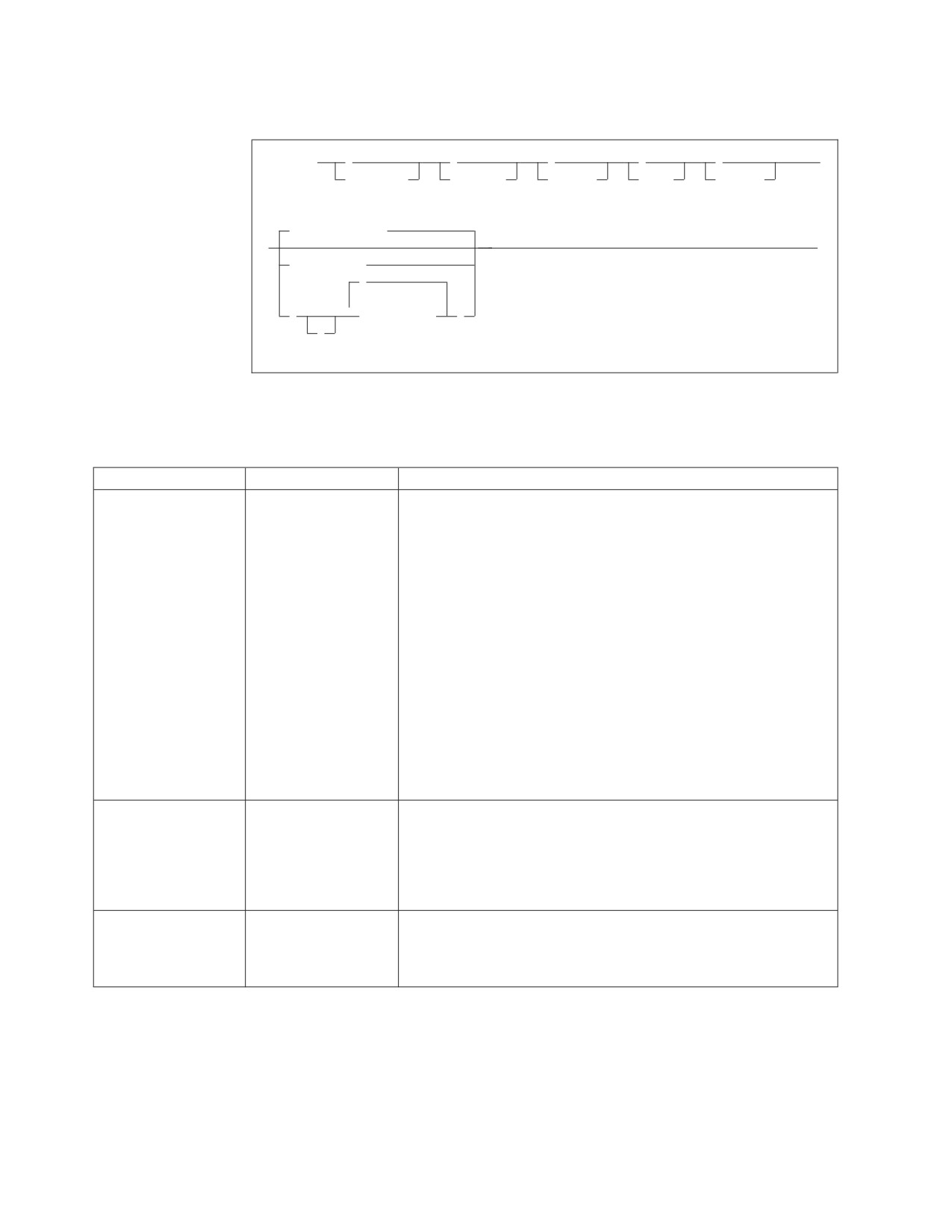
CIRB has six parameters:
►► CIRB
,
,
,
,
,
►
password,
nolinks,
defuid,
rmid,
langid,
Default_server
►
►◄
server_name
,
(
▼
server_name
)
,
Figure 27. CIRB Transaction Syntax
The parameters are described in the following table:
Table 8. CIRB Transaction Parameters
Parameter
Default
Description
PASSWORD
SQLDBAPW
This parameter establishes the operator’s authority to activate
(positional parameter
online access to a local application server. The password identifies
1)
the CICS subsystem. The user ID of the subsystem is the CICS
APPLID, which defaults to DBDCCICS. The procedure ARIS080D
uses the following job control to give the password and user ID to
the local application server:
// EXEC ARISQLDS,SIZE=AUTO,PARM=’SYSMODE=S,
LOGMODE=N,PROGNAME=ARIDBS’
CONNECT SQLDBA IDENTIFIED BY SQLDBAPW;
GRANT SCHEDULE TO DBDCCICS IDENTIFIED BY CICSPSWD;
COMMIT WORK;
The password chosen (CICSPSWD above) must satisfy DB2 Server
for VSE & VM specifications for a password. This password
establishes which password to use when dropping connections
through the CIRR or CIRT commands. See “Password Implications
on Online Resource Adapter Termination” on page 116 for more
details.
NOLINKS (positional
3
This parameter establishes the number of links (paths) that should
parameter 2)
be initialized to a local application server. Specify this parameter as
a decimal value between 1 and 64. The number must be less than
or equal to the value assigned to the NCUSERS initialization
parameter of the DB2 Server for VSE & VM system. (The NCUSERS
default is 5.)
DEFUID (positional
CICSUSER
This parameter identifies the default user ID used by the online
parameter 3)
support when it makes an implicit CONNECT to a local application
server. This parameter must satisfy DB2 Server for VSE & VM
specifications for a user ID.
84
System Administration
Table 8. CIRB Transaction Parameters
(continued)
Parameter
Default
Description
RMID (positional
0
This parameter identifies a unique resource adapter. You must
parameter 4)
specify it only if your installation has multiple CICS partitions
active in the same VSE/ESA system, and if each CICS partition
allows online access to a server. For the case of a local application
server, recovery requires that the local server know the resource
adapter it is servicing. You must specify this parameter as a decimal
value between 0 and 63.
If the DB2 Server for VSE online support detects that this ID is not
unique in the system, it issues a message. The CIRB transaction
then ends without enabling the resource adapter.
There can be only one DB2 Server for VSE resource adapter enabled
in a single CICS partition. An attempt to enable a second DB2
Server for VSE resource adapter causes the DB2 Server for VSE
online support to issue a message, and the CIRB transaction ends
without enabling the second resource adapter. The first one,
however, remains in effect.
LANGID (positional
specified at
This parameter defines the language the DB2 Server for VSE online
parameter 5)
installation
support uses to display error and information messages. The
language you specify on this transaction becomes the default
language for ISQL, CBND, C2BD, DSQG, DSQU, DSQD, and
DSQQ. The ISQL welcome logo always appears in the language
specified on this transaction.
This parameter must take the form of a minimum 1-character,
maximum 5-character language ID. You must use one of the
language IDs in the LANGID column of the
SQLDBA.SYSLANGUAGE table. The language ID must identify a
language you have installed on the DB2 Server for VSE server. To
choose another language, use the SET LANGUAGE command in
ISQL. The following IDs can be specified on the CIRB transaction:
AMENG
American English
UCENG
Uppercase English
FRANC
French
GER
German
KANJI
Kanji (Japanese)
HANZI
Simplified Chinese
If this parameter is omitted, the language defaults to the language
chosen as the default at installation.
SERVER-NAME
Determined from
This parameter enables you to specify the application servers that
(positional parameter
DBNAME directory or
you want to access. If the list format specifies multiple servers, the
6)
“SQLDS”.
first one in the list becomes the default server. Only the first
server_name in the list may be omitted.
If this parameter (or the first one in the list) is omitted, the default
server is determined from the DBNAME directory. If the DBNAME
directory does not specify a default server, then SQLDS becomes
the default server name.
The CIRB transaction establishes the default application server. If the server_name
parameter is not specified on the CIRB transaction, then the default server is
Chapter 5. Operating the Online Support
85
determined from the DBNAME directory. If a single server_name is specified on
the CIRB transaction then it becomes the default server. If a server_name list is
specified on the CIRB transaction, the first server_name in the list becomes the
default server. If the first server_name in the server_name list is blank then the
default server is determined in the same way as when the server_name is omitted
from the CIRB transaction. For example:
CIRB ,,,,,(,SQLMACH2)
This starts connections to two servers. The first one is the default server and its
name is determined from the DBNAME directory or if it is not specified in the
DBNAME directory it defaults to SQLDS. The second server is SQLMACH2.
Note that the following examples are not allowed. Only the first server_name in
the list can be blank.
CIRB ,,,,,(SQLMACH2,)
CIRB ,,,,,(SQLMACH2,,SQLVM)
The number of server_names that can be specified on the CIRB command is
limited by the size of the input line on the VSE console or a CICS terminal. The
VSE console only allows one line of input. A CICS terminal allows much more
input. If short server_names are used more can fit on the command. Server-names
can be up to 18 characters long. If all of the required server_names cannot fit on
the command, the CIRA transaction must be used to establish connections for the
remaining server_names.
|
Figure 28 shows an example of using the server_name list on the CIRB transaction
|
and from the message
|
"ARI0450I DB2 Server for VSE online support has an entry point of 02C02000"
|
we can find that the online resource adapter is loaded above the 16MB memory
|
line.
|
msg f2
|
AR 015 1I40I READY
|
2 cirb ,,,,,(sqlmach1,sqlmach1)
|
F2-002 ARI0410I Resource Adapter ARI0OLRM is enabled.
|
F2-002 ARI0450I DB2 Server for VSE online support has an
|
entry point of 02C02000 RMGL at 00541200.
|
F2-002 ARI0454I Connections to SQLMACH1 established.
|
RMCV at 0055B2E0.
|
F2-002 ARI0458I The default server is SQLMACH1.
|
F2-002 ARI0457W Connections to SQLMACH1 already exist.
|
F2-002 ARI0402E Connections to SQLMACH1 could not be established.
|
|
|
Figure 28. Example of CIRB with Duplicate Server Names
|
The maximum number of application servers to which an online resource adapter
can establish connections or enable online access to is only limited by the amount
of storage available in the partition where the online resource adapter is running.
If you try to establish connections to an application server to which connections
already exist, or to which online access is already enabled, the message “ARI0457W
Connections to <server_name> already exist.” is displayed. No action is taken against
that server. If the connections to a local server need to be changed they must first
be removed using CIRR or CIRT and then re-established using CIRA or CIRB. An
example is shown in Figure 29 on page 87.
86
System Administration
|
msg f2
|
AR 015 1I40I READY
|
2 cirb ,,,,,(sqlmach1,sqlmach2)
|
F2-002 ARI0410I Resource Adapter ARI0OLRM is enabled.
|
F2-002 ARI0450I DB2 Server for VSE online support has an
|
entry point of 02C02000 RMGL at 00541200.
|
F2-002 ARI0454I Connections to SQLMACH1 established.
|
RMCV at 0055B2E0.
|
F2-002 ARI0458I The default server is SQLMACH1.
|
F2-002 ARI0454I Connections to SQLMACH2 established.
|
RMCV at 0055C2E0.
|
2 cirr ,,,sqlmach2
|
F2-002 ARI0455I Connections to SQLMACH2 are disabled.
|
2 cira ,5,,sqlmach2
|
F2-002 ARI0454I Connections to SQLMACH2 established.
|
RMCV at 0055A2E0.
|
|
|
Figure 29. Example of Changing Connection Settings
|
Note that each local server in the list has its connections established with the same
values for password, number of links, RMID, default user ID and language ID that
were specified.
If the CIRB parameters for each server are identical, all of the connections or online
access can be established with one CIRB transaction, as illustrated in Figure 30.
|
msg f2
|
AR 015 1I40I READY
|
2 cirb ,,,,,(sqlmach1,sqlmach2,sqlvm)
|
F2-002 ARI0410I Resource Adapter ARI0OLRM is enabled.
|
F2-002 ARI0450I DB2 Server for VSE online support has an
|
entry point of 02C02000 RMGL at 00541200.
|
F2-002 ARI0454I Connections to SQLMACH1 established.
|
RMCV at 0055A2E0.
|
F2-002 ARI0458I The default server is SQLMACH1.
|
F2-002 ARI0454I Connections to SQLMACH2 established.
|
RMCV at 0055C2E0.
|
F2-002 ARI0454I Connections to SQLVM established.
|
RMCV at 0055D2E0.
|
|
|
Figure 30. Example of CIRB with Server-Name List
|
All three local application servers have the same number of connections, the same
default user ID, the same password, the same RMID and the same language ID.
If one or more of the parameters must be different, then all of the connections
cannot be established with one CIRB transaction. You will need the CIRA
transaction to add additional servers.
|
If you enter a remote server name, which has been coded with CONNPOOL=N in
|
the DBNAME directory, in the server_name parameter of the CIRB or CIRA
|
transaction, CIRB or CIRA will not establish any links or sessions to the remote
|
system where the remote server runs. The following message will not be displayed
|
by CIRB or CIRA when it is processing such a remote server. The message will
|
display for local servers and for remote servers with CONNPOOL=Y.
|
ARI0454I Connections to server_name established.
|
RMCV at XXXXXXXX.
Chapter 5. Operating the Online Support
87
CIRB or CIRA will display the following message instead for every remote server
processed at initialization time:
ARI0467I RMCV for remote server_name established.
RMCV at XXXXXXXX.
Starting the CIRB Transaction
The CICS sequential device support can be used to automatically start the CIRB
transaction when CICS is started. Either a CRLP (a card reader or line printer)
device, or a sequential DASD device must be defined in the CICS DFHTCT, to
allow them to simulate terminals.
If a CRLP device is defined, the CIRB transaction can be run automatically by
including it in the CICS startup jobstream. The CIRB statement should be coded
just as it would if it were entered from a terminal. Include a slash (\) at the end of
the statement to indicate the end of data. Figure 31 shows an example:
// EXEC DFHSIP,SIZE=NNNNK
CIRB PASSWORD,3,PRODCICS,0\
/*
Figure 31. Automatically Starting CIRB
If a sequential DASD device has been defined in the CICS DFHTCT, you must
define two sequential DASD data sets: one input and one output. These can be
either sequential access method (SAM) data sets or SAM-managed VSAM data
sets. The input data set must contain the CIRB statement. (A utility such as DITTO
or VSAM IDCAMS can be used to load the CIRB statement to the data set.) The
output data set will contain the messages from the CIRB startup process.
Whichever type of device is used -- CRLP or DASD -- do not include a CSSF
GOODNIGHT statement following the CIRB statement, as this would allow the
statement to be processed in all CICS startup modes (cold, auto, and emer).
The application server must be started before CICS for automatic startup to work.
When the CIRB transaction successfully ends, the following message is displayed
at the VSE console:
ARI0410I Resource Adapter ARI0OLRM is enabled
For more information about CICS sequential device support, see the CICS
Transaction Server for VSE/ESA V1R1.0 Resource Definition Guide manual. For
information about the DFHTCT entries required to define a sequential CRLP or
DASD device, see the DB2 Server for VM Program Directory.
If a failure occurs, you can issue the CIRT transaction with the QUICK mode. This
mode disconnects links to the application server. For more information, see
“Stopping the Online Support -- The CIRT Transaction” on page 112. If the above
action does not solve the problem, CICS must be recycled.
SCHEDULE Authority for VSE Guest Sharing
The VM database must grant SCHEDULE authority to the CICS/VSE application
identifier.
Implicit CONNECT Support
This support allows development of online applications that do not issue an SQL
CONNECT statement. With this support, operators need not enter a user ID and
password as input to the online application, which is useful if your installation
requires terminal users to sign on using the CSSN transaction. For some
88
System Administration
transactions accessing the database, the CICS sign-on verification may be sufficient.
It can also be useful if you have just installed the database manager and find it
convenient to have all users identified by one name (for example, CICSUSER).
If a CICS transaction has not yet established a user ID for the current or prior unit
of work, and the user has signed on to CICS using the CESN (or CSSN)
transaction, online support will attempt to use the eight-character sign on user ID.
The user ID used will be the value returned by the CICS command
EXEC CICS ASSIGN USERID(data-area)
If you start the online support with CIRB, then before the online resource adapter
is able to run the implicit connect support to a local application server, it verifies
that the CICS subsystem has SCHEDULE authority on the local application server.
Refer to procedure ARIS080D in the DB2 Server for VSE Program Directory manual,
which shows how the CICS subsystem is identified to the application server and
granted the necessary SCHEDULE authority. Modify the example procedure
ARIS080D if any of the following are true:
v Your CICS subsystem does not use the default APPLID (DBDCCICS). It specifies,
for example, APPLID=CICSTEST for the CICS DFHSIT.
v You want to change the password. For example, you want to identify the name
by a more secure password than SQLDBAPW.
Given the above two conditions, you would change the GRANT statement to read:
Grant the necessary SCHEDULE authority as follows:
GRANT SCHEDULE TO CICSTEST IDENTIFIED BY cicspw
where cicspw is the new password. The required password input parameter for
CIRB (and CIRT) is now cicspw.
If the online support can verify that the CICS subsystem has SCHEDULE authority,
it sets the DEFUID into each of the agents allocated for online use. The DEFUID
you specify as an input parameter for CIRB is the user ID used for all online
applications connecting to a local application server that do not issue an SQL
CONNECT statement and do not have a valid CICS sign on user ID.
Supporting Multiple User Online Access
The NOLINKS input parameter to CIRB causes the allocation of a fixed number of
links to the local application server. The online support suballocates the links to
CICS transactions when they issue their first SQL request. When a transaction has
a link, it keeps it until the end of the logical unit of work. When the number of
such transactions exceeds NOLINKS, some transactions have to wait for links, and
link contention occurs. Some planning is required to optimize the NOLINKS
parameter. NOLINKS varies as your application mix varies.
Consider these things about the NOLINKS input parameter:
v Initially, allow one link for each one to two ISQL users, and one link for each
four to ten users of preplanned transactions.
v The NOLINKS value must not exceed that of the NCUSERS initialization
parameter, which defines the total number of links to the application server.
v The online support uses the CICS monitoring facility to collect performance
data. For a given NOLINKS and a given period of the day, you can gather
information on the number of link waits, total link wait time, and total time
holding the link. For more information, see the DB2 Server for VSE & VM
Performance Tuning Handbook.
Chapter 5. Operating the Online Support
89
v When a logical unit of work ends, the online support makes the freed link
available to all waiting transactions. The first waiting database transaction that
CICS dispatches gets the link. To define allocation priority for the online links,
consider using the operator, transaction, and terminal priority mechanisms of
CICS. (These are specified with the OPPRTY keyword of DFHSNT, and the
TRMPRTY keyword of DFHTCT respectively.)
v Consider defining one or more transaction classes for the transactions that access
the database manager, and limit access by using the CICS CMXT keyword of
DFHSIT. By correlating CMXT with NOLINKS, you can ensure that storage
resources in the CICS partition are not used until links are available.
v Consider a similar technique to control the number of active ISQL users. Rather
than limit the total number of active ISQL users, you can control the number of
active users from a given department or user group. See “Controlling Access by
ISQL Users” on page 119.
CIRB Impact to System Resources
If the NOLINKS input parameter is n, system resources are used as follows:
v You have n links allocated to the application server, and n application server
agents are used. The agents remain allocated for online applications until CIRT
is entered.
v Additional virtual storage is required in the CICS partition for the online
support. See Appendix A, “Processor Storage Requirements,” on page 339.
v For each concurrent transaction that is attempting to access the application
server, additional virtual storage is required in the CICS partition. See
Appendix A, “Processor Storage Requirements,” on page 339.
Supporting Multiple CICS Partitions
Your installation can have multiple CICS partitions, each with access to the
application server. For recovery purposes, each instance of an active online
resource adapter must have a unique identifier. You can do this with the CIRB
RMID input parameter. You should keep the RMID for a CICS partition consistent,
by relating the RMID to the priority of each CICS, specifying a 0 for the
production CICS, 1 for the test-level CICS, and so on. If your installation has only
one CICS system, the RMID input parameter need not be specified.
Adding Connections -- The CIRA Transaction
The CIRA transaction has four parameters:
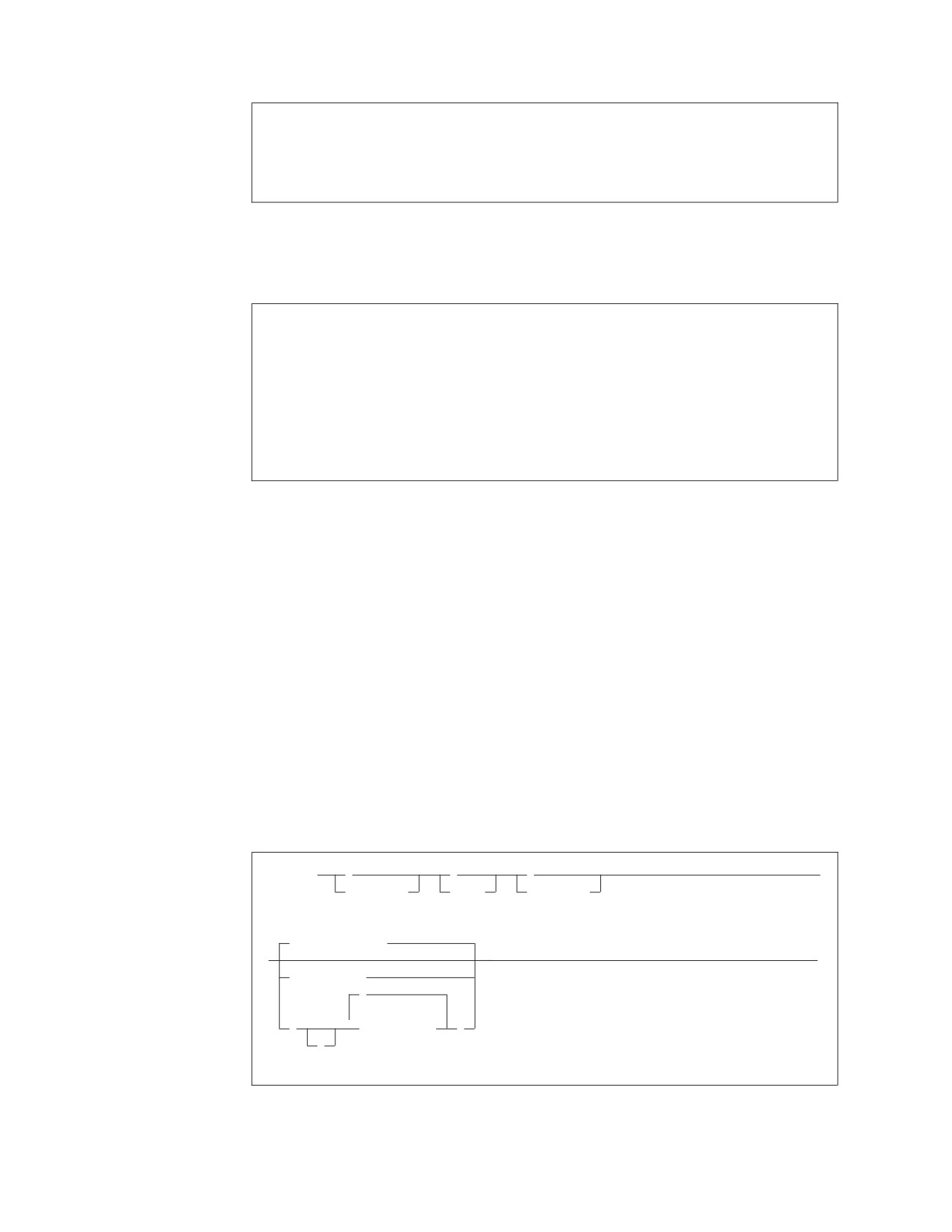
►► CIRA
,
,
,
server_name
►◄
password,
nolinks,
defuid,
,
(
▼
server_name
)
Figure 32. CIRA Transaction Syntax
The parameters are described in the following table:
90
System Administration

Table 9. CIRA Transaction Parameters
Parameter
Default
Description
PASSWORD
SQLDBAPW
This parameter establishes the operator’s authority to activate
(positional parameter
online access to a local application server. The password identifies
1)
the CICS subsystem. The user ID of the subsystem is the CICS
APPLID, which defaults to DBDCCICS. The procedure ARIS080D
uses the following job control to give the password and user ID to
the DB2 Server for VSE server:
// EXEC ARISQLDS,SIZE=AUTO,PARM=’SYSMODE=S,
LOGMODE=N,PROGNAME=ARIDBS’
CONNECT SQLDBA IDENTIFIED BY SQLDBAPW;
GRANT SCHEDULE TO DBDCCICS IDENTIFIED BY CICSPSWD;
COMMIT WORK;
The password chosen (CICSPSWD above) must satisfy DB2 Server
for VSE & VM specifications for a password. This password
establishes which password to use when dropping connections
through the CIRR or CIRT commands. See “Password Implications
on Online Resource Adapter Termination” on page 116 for more
details.
NOLINKS (positional
3
This parameter establishes the number of links (paths) that should
parameter 2)
be initialized to a local application server. Specify this parameter as
a decimal value between 1 and 64. The number must be less than
or equal to the value assigned to the NCUSERS initialization
parameter of the DB2 Server for VSE & VM system. (The NCUSERS
default is 5).
DEFUID (positional
CICSUSER
This parameter identifies the default user ID used by the online
parameter 3)
support when it makes an implicit CONNECT to a local application
server. This parameter must satisfy DB2 Server for VSE & VM
specifications for a user ID.
SERVER-NAME
none
This parameter is required and it specifies the additional
(positional parameter
application servers (local or remote), that you want to access.
4)
If this parameter is omitted, the message ARI0400E is issued
indicating that an invalid input parameter was entered.
The password, nolinks, defuid and server_name parameters have exactly the same
meanings as on the CIRB command. One exception is that the server_name
parameter is required on CIRA but is optional on CIRB.
The number of server_names that can be specified on the CIRA command is
limited by the size of the input line. As with CIRB, CIRA can be entered on the
VSE console or on a CICS terminal. On the VSE console the input is limited to one
line. On the CICS terminal it can use the full screen. If short server_names are used
more can fit on the command. Server_names can be up to 18 characters long. If all
of the required server_names cannot fit on the command, the CIRA transaction
must be repeated for the remaining server_names. Figure 33 on page 92 shows an
example using the CIRA transaction with a server_name list.
Chapter 5. Operating the Online Support
91
msg f2
AR 015 1I40I READY
2 cirb ,,,,,sqlmach1
F2-002 ARI0410I Resource Adapter ARI0OLRM is enabled.
F2-002 ARI0450I DB2 Server for VSE online support has an
entry point of 003AA808 RMGL at 00541200.
F2-002 ARI0454I Connections to SQLMACH1 established.
RMCV at 0055A2E0.
F2-002 ARI0458I The default server is SQLMACH1.
2 cira ,,,(sqlmach2,sqlvm)
F2-002 ARI0454I Connections to SQLMACH2 established.
RMCV at 0055C2E0.
F2-002 ARI0454I Connections to SQLVM established.
RMCV at 0055D2E0.
Figure 33. Example of CIRA with Server_Name List
The maximum number of application servers to which an online resource adapter
can establish connections or enable online access to is only limited by the amount
of storage available in the partition where the online resource adapter is running.
The CIRA transaction establishes connections or enables online access to the
specified application servers based on the parameters given on the CIRA
transaction. If a server_name list is used then connections or online access will be
established to each application server in the list using the same set of parameters.
For example:
CIRA thispw,4,thisid,(sqlmach2,sqlvm)
The above command will establish four links to the local application server
SQLMACH2 with password “thispw” and default user ID “thisid.” The RMID and
the language ID are inherited from the CIRB transaction. If the online resource
adapter was started with RMID = 0 and language ID = ameng then any
connections started to that same online resource adapter will also have RMID = 0
and language id = ameng. Then CIRA will establish four links to SQLVM with
password “thispw” and default user ID “thisid.” Again the RMID is 0 and the
language ID is ameng. If CIRA is entered before CIRB was run, the message
“ARI0411I Resource Adapter is not enabled.” is displayed.
If one or more of the parameters must be different, then the server_name list
format of the CIRA transaction cannot be used. The CIRA transaction would have
to be executed separately for each application server that required different
parameters. For example, if three links are required to SQLMACH2 and four links
are required to SQLVM but the other parameters are the same for both servers, the
CIRA transaction must be run for each of them.
CIRA thispw,3,thisid,sqlmach2
CIRA thispw,4,thisid,sqlvm
If you try to establish connections or enable online access to an application server
that is already connected a warning message will be displayed. No action is taken
against that server. If the connections to a local application server need to be
changed they must first be removed using CIRR or CIRT and then re-established
using CIRA or CIRB.
Consider the following scenario. An online transaction program needs to access
three different application servers, SQLMACH2, SQLMACH1 and SQLVM.
SQLMACH2 and SQLMACH1 are running in two VSE partitions and SQLVM is
92
System Administration
running under VM and is accessed via guest sharing. We want SQLMACH1 to be
the default server, and we want the default settings for all three servers.
To achieve this we could enter the following sequence of commands. Assume that
our CICS region is running in partition 2, SQLMACH2 is running in partition 4
and SQLMACH1 is running in partition 5.
1. Use the CIRB transaction to start the online resource adapter and establish the
default application server, SQLMACH1.
2. Use the CIRA transaction to establish connections to SQLMACH2.
3. Use the CIRA transaction again to establish connections to SQLVM.
This is illustrated in Figure 34.
F2-002 DFH1500 - DBDCCICS : CONTROL IS BEING GIVEN TO CICS
msg f2
AR 015 1I40I READY
2 cirb ,,,,,sqlmach1
F2-002 ARI0410I Resource Adapter ARI0OLRM is enabled.
F2-002 ARI0450I DB2 Server for VSE online support has an
entry point of 003AA808 RMGL at 00541200.
F2-002 ARI0454I Connections to SQLMACH1 established.
RMCV at 0055D2E0.
F2-002 ARI0458I The default server is SQLMACH1.
2 cira ,,,sqlmach2
F2-002 ARI0454I Connections to SQLMACH2 established.
RMCV at 0055C2E0.
2 cira ,,,sqlvm
F2-002 ARI0454I Connections to SQLVM established.
RMCV at 0055A2E0.
Figure 34. Example of CIRB and CIRA
Since the settings for the connections to SQLMACH2 and SQLVM are identical,
both connections could be established on the same CIRA command, as illustrated
in Figure 33 on page 92.
Automatic Restart Resynchronization
If a system or subsystem failure occurs while an online application is trying to
commit work and two-phase commit is being used, the unit being committed is
called an in-doubt logical unit of work, because the database manager has
prepared it for commit or rollback but the system or subsystem failure occurred
before the commit completed. In-doubt units of work must be resolved the next
time the application server is started.
Note: CICS/VSE and the local application server will use a one-phase commit if at
most one external resource has been updated. In this case it is not possible
to create an in-doubt unit of work. This means that any CICS transaction
that updates only the local application server resources will not generate
in-doubt units of work.
The CICS/VSE restart resynchronization facility, which is started implicitly when
you issue CIRB or CIRA, resolves the in-doubt units of work created by any CICS
transaction that updated a local application server. To enable it, you must update
the CICS/VSE tables to include the resynchronization transaction.
CIRB and CIRA assume that restart resynchronization is enabled when they are
executed. If, for some reason it has been disabled when CIRB or CIRA is issued, it
Chapter 5. Operating the Online Support
93
will display the message ″ARI0466E CICS restart re-synchronization is not available.
The <tran> transaction is ended.″ and exit. At this point the system programmer
should ensure that it has been properly enabled and retry CIRB or CIRA.
For information about the updates, see the DB2 Server for VSE Program Directory
manual.
The current implementation of the CICS/VSE restart resynchronization facility
allows it to re-synchronize itself with DB2 Server for VSE online resource adapter
only once. After it has been invoked, CICS discards any information about
in-doubt units of work that it did not resolve. This means that there can be
scenarios where it is not possible to automatically resolve in-doubt units of work.
When the CIRB or CIRA transaction is started, a connection is made to the
READY/RECOVERY agent of the local server to get a ’recovery list’. This recovery
list provides information on any in-doubt agents that need to be resolved for this
server. After this has been done for every local server specified in the CIRB or
CIRA command, the CICS/VSE restart resynchronization facility is invoked, which
will resolve the in-doubt units of work for all of those local servers. A subsequent
CIRA to connect to another local server that also has in-doubt units of work will
fail because CICS has discarded the log information. The in-doubt units of work on
that server must be resolved manually using the FORCE n COMMIT or FORCE n
ROLLBACK commands on the server before the CIRA command will work.
For example, suppose that SQLMACH1 and SQLMACH2 are DB2 Server for VSE
application servers that run on the same VM system and are accessed via guest
sharing. The password used to access SQLMACH1 is ABC and the password used
to access SQLMACH2 is DEF. All the other parameters needed by the two
databases are the defaults. The connections to SQLMACH1 and SQLMACH2 are
established using the following sequence of commands:
CIRB abc,,,,,sqlmach1
CIRA def,,,sqlmach2
Suppose that CICS transactions accessing these application servers also make
updates to the DB2 Server for VSE database as well as some other external
non-CICS resource, so that CICS will use the two-phase commit process. If a
system failure occurs on the VM system while CICS is performing a two-phase
commit to both these databases, then both SQLMACH1 and SQLMACH2 will go
down. When the system is brought back up and SQLMACH1 and SQLMACH2 are
restarted, they will both have in-doubt units of work. If the connections to
SQLMACH1 and SQLMACH2 are restarted the same way as before, only the
in-doubt units of work on SQLMACH1 will be resolved automatically. The
in-doubt units of work on SQLMACH2 will need to be resolved explicitly before
the CIRA command for SQLMACH2 will work.
See Figure 35 on page 95 for an example of this.
94
System Administration
2 cirb abc,,,,,sqlmach1
F2 002 ARI0410I Resource Adapter ARI0OLRM is enabled.
F2 002 ARI0450I DB2 Server for VSE online support has an
entry point of 0039F008 RMGL at 001DF5B4.
F2 002 ARI0454I Connections to SQLMACH1 established.
RMCV at 0053BF00.
F2-002 ARI0458I The default server is SQLMACH1.
2 cira def,,,sqlmach2
F2-002 ARI0454I Connections to SQLMACH2 established.
RMCV at 0055A080.
<System Failure occurs>
F2
002
ARI2908I XPCCB, IJBXRUSR = 0483061009000000
F2
002
ARI0406E Error in using system communications facility.
Request = 15
Return Code = 4 Reason Code = 7
F2
002
The default server is SQLMACH1.
F2
002
----------------------------------------------
F2
002
DBDCCICS connected to server SQLMACH1.
F2
002
Status of DB2 Server for VSE online applications:
F2
002
F2
002
Transactions holding a link to the application server but not using are:
F2
002
F2
002
TASKNO TRANID TERMID USER ID USERDATA TIME SINCE TOTAL LUW
F2
002
LAST ACCESS TIME
F2
002
______
______ ______ ________
________ ___________ _________
F2
002
0000041
CISQ
SQLDBA
L080
00:00:06
00:01:34
F2
002
F2
002
TIME= 15:26:15 DATE= 08/14/95
F2
002
ARI0465I Transactions are still active
for server SQLMACH1.
F2
002
ARI0463I The DISABLE transaction CIRR must delay for a
30-second interval before attempting the disable.
F2
002
ARI0455I Connections to SQLMACH1 are disabled.
F2
002
ARI0460W Connections to the default server SQLMACH1
have been disabled.
F2
002
ARI2908I XPCCB, IJBXRUSR = 0483061009000000
F2
002
ARI0406E Error in using system communications facility.
Request = 15
Return Code = 4 Reason Code = 7
F2
002
The default server is SQLMACH1.
F2
002
----------------------------------------------
F2
002
DBDCCICS connected to server SQLMACH2.
F2
002
Status of DB2 Server for VSE online applications:
F2
002
F2
002
Transactions holding a link to the application server but not using are:
F2
002
F2
002
TASKNO TRANID TERMID USER ID USERDATA TIME SINCE TOTAL LUW
F2
002
LAST ACCESS TIME
F2
002
______
______ ______ ________
________ ___________ _________
F2
002
0000141
CISQ
SQLDBA
L083
00:00:06
00:01:34
F2
002
Figure 35. Automatic Restart Resynchronization Failure (Part 1 of 2)
Chapter 5. Operating the Online Support
95
F2 002
TIME= 15:26:45 DATE= 08/14/95
F2 002 ARI0465I Transactions are still active
for server SQLMACH2.
F2 002 ARI0463I The DISABLE transaction CIRR must delay for a
30-second interval before attempting the disable.
F2 002 ARI0455I Connections to SQLMACH2 are disabled.
F2-002 ARI0413I Resource Adapter ARI0OLRM is disabled.
<SQLMACH1 and SQLMACH2 are restarted>
2 cirb abc,,,,,sqlmach1
F2 002 ARI0410I Resource Adapter ARI0OLRM is enabled.
F2 002 ARI0450I DB2 Server for VSE online support has an
entry point of 0039F008 RMGL at 001DF5B4.
F2 002 ARI0454I Connections to SQLMACH1 established.
RMCV at 0053BF00.
F2-002 ARI0458I The default server is SQLMACH1.
2 cira def,,,sqlmach2
F2 002 ARI0454I Connections to SQLMACH2 established.
RMCV at 0055A080.
F2-002
F2 002 ARI0438E Automatic restart resynchronization failed.
A logical unit of work that DB2 for VSE indicated
needed to be resolved was not identified by
the CICS/VSE log as needing resolution.
F2 002 ARI0423A Use the SHOW and FORCE commands to
COMMIT or ROLLBACK the following units of work:
F2 002 ARI0424I User ID = SQLDBA Agent Identifier = 1
Server = SQLMACH2
F2 002 The default server is SQLMACH1.
F2 002 ----------------------------------------------
F2 002 DBDCCICS connected to server SQLMACH2.
F2 002 There are no active DB2 Server for VSE transactions.
F2 002
F2 002
TIME= 15:33:22 DATE= 08/14/95
F2 002 ARI0455I Connections to SQLMACH2 are disabled.
<From the SQLMACH2 console enter:>
<SHOW ACTIVE>
<FORCE 1 ROLLBACK>
<Now CIRA will work>
2 cira def,,,sqlmach2
F2 002 ARI0454I Connections to SQLMACH2 established.
RMCV at 0055A080.
Figure 35. Automatic Restart Resynchronization Failure (Part 2 of 2)
However if the connections to SQLMACH1 and SQLMACH2 are established with
a single CIRB or CIRA command, the in-doubt units of work on both servers will
be resolved automatically.
See Figure 36 on page 97 for a detailed example of this.
96
System Administration
2 cirb abc,,,,,(sqlmach1,sqlmach2)
F2 002 ARI0410I Resource Adapter ARI0OLRM is enabled.
F2 002 ARI0450I DB2 Server for VSE online support has an
entry point of 0039F008 RMGL at 001DF5B4.
F2 002 ARI0454I Connections to SQLMACH1 established.
RMCV at 0053BF00.
F2-002 ARI0458I The default server is SQLMACH1.
F2-002 ARI0454I Connections to SQLMACH2 established.
RMCV at 0055A080.
<System Failure occurs>
F2
002
ARI2908I XPCCB, IJBXRUSR = 0483061009000000
F2
002
ARI0406E Error in using system communications facility.
Request = 15
Return Code = 4 Reason Code = 7
F2
002
The default server is SQLMACH1.
F2
002
----------------------------------------------
F2
002
DBDCCICS connected to server SQLMACH1.
F2
002
Status of online DB2 Server for VSE applications:
F2
002
F2
002
Transactions holding a link to the application server but not using are:
F2
002
F2
002
TASKNO TRANID TERMID USER ID USERDATA TIME SINCE TOTAL LUW
F2
002
LAST ACCESS TIME
F2
002
______
______ ______ ________
________ ___________ _________
F2
002
0000041
CISQ
SQLDBA
L080
00:00:06
00:01:34
F2
002
F2
002
TIME= 15:26:15 DATE= 08/14/95
F2
002
ARI0465I Transactions are still active
for server SQLMACH1.
F2
002
ARI0463I The DISABLE transaction CIRR must delay for a
30-second interval before attempting the disable.
F2
002
ARI0455I Connections to SQLMACH1 are disabled.
F2
002
ARI0460W Connections to the default server SQLMACH1
have been disabled.
F2
002
ARI2908I XPCCB, IJBXRUSR = 0483061009000000
F2
002
ARI0406E Error in using system communications facility.
Request = 15
Return Code = 4 Reason Code = 7
F2
002
The default server is SQLMACH1.
F2
002
----------------------------------------------
F2
002
DBDCCICS connected to server SQLMACH2.
F2
002
Status of online DB2 Server for VSE applications:
F2
002
Figure 36. Successful Automatic Restart Resynchronization (Part 1 of 2)
Chapter 5. Operating the Online Support
97
F2 002 Transactions holding a link to the application server but not using are:
F2 002
F2 002
TASKNO TRANID TERMID USER ID USERDATA TIME SINCE TOTAL LUW
F2 002
LAST ACCESS TIME
F2 002
______
______ ______ ________
________ ___________ _________
F2 002
0000141
CISQ
SQLDBA
L083
00:00:06
00:01:34
F2 002
F2 002
TIME= 15:26:45 DATE= 08/14/95
F2 002 ARI0465I Transactions are still active
for server SQLMACH2.
F2 002 ARI0463I The DISABLE transaction CIRR must delay for a
30-second interval before attempting the disable.
F2 002 ARI0455I Connections to SQLMACH2 are disabled.
F2-002 ARI0413I Resource Adapter ARI0OLRM is disabled.
<SQLMACH1 and SQLMACH2 are restarted>
2 cirb abc,,,,,(sqlmach1,sqlmach2)
F2 002 ARI0410I Resource Adapter ARI0OLRM is enabled.
F2 002 ARI0450I DB2 Server for VSE online support has an
entry point of 0039F008 RMGL at 001DF5B4.
F2 002 ARI0454I Connections to SQLMACH1 established.
RMCV at 0053BF00.
F2-002 ARI0458I The default server is SQLMACH1.
F2 002 ARI0454I Connections to SQLMACH2 established.
RMCV at 0055A080.
Figure 36. Successful Automatic Restart Resynchronization (Part 2 of 2)
Assuming CICS restart resynchronization has been properly enabled as described
in the DB2 Server for VSE Program Directory manual, the conditions where in-doubt
units of work must be resolved explicitly are:
1. CICS log missing. This can be from a CICS log media failure, CICS COLD start
which destroys the log contents, or CICS journal is not active so no log data is
created.
2. CICS RESYNCH has already been issued. The log data is discarded by CICS
after the RESYNCH command has been issued even if it was not used. See
Figure 35 on page 95 for an example of this.
To take full advantage of the automatic restart resynchronization the following
should be true:
1. All local application servers with in-doubt units of work must be started on the
same CIRB or CIRA transaction. This means they must have the same
password, default user ID, language, RMID, and number of links to be started.
2. CICS startup should be START=AUTO which lets CICS determine if the startup
will be START=WARM or START=EMER. Any COLD start will erase the log
data and automatic restart resynchronization will not be possible.
Resolving In-Doubt Transactions
Only under exceptional conditions (such as a CICS log media failure) do you have
to resolve in-doubt LUWs explicitly. To do so, issue the SHOW ACTIVE command to
determine those agents that are in-doubt; then issue the FORCE command to commit
or rollback each one:
FORCE n COMMIT
or
FORCE n ROLLBACK
98
System Administration

where n is the agent identifier of the in-doubt LUW.
The discussion in the DB2 Server for VSE & VM Operation manual states that, in
general, FORCE n COMMIT should be entered. The exception is for applications
that access multiple resources (for example, an application that updates a database
and a VSAM file.) For such applications, the operator requires direction from the
developer or user of the application.
You could plan for this situation by keeping a list of all transactions that update
multiple resources. The list should contain the CICS transaction identifier for the
application, and the recommended direction (COMMIT or ROLLBACK) from the
developer. (For more information, see the discussion on online application recovery
in the DB2 Server for VSE & VM Database Administration manual.) Because ISQL
does not update multiple resources, the direction for the ISQL transaction should
always be to commit work.
Changing the Default Server -- The CIRC Transaction
The transaction CIRC can be used to dynamically change the default server. The
CIRC transaction has one parameter:
►► CIRC server_name
►◄
Figure 37. CIRC Transaction Syntax
The parameter is described in the following table.
Table 10. CIRC Transaction Parameter
Parameter
Default
Description
SERVER-NAME
none
This parameter is required and it specifies the
(positional
application server that you want to become the
parameter 1)
default.
If this parameter is omitted, the message ARI0400E
is issued indicating that an invalid input parameter
was entered.
The server-name specified must already have connections or online access
established to it, either from the CIRB or CIRA transactions. If connections to the
specified server do not exist or online access to the specified server was not
enabled from the CIRB or CIRA transactions, the message “ARI0456I Connections to
<server-name> do not exist.” is displayed. In this case the CIRA transaction must
first be run to establish the connections, then the CIRC transaction is run to make
it the default server.
For the following example assume that connections exist to SQLMACH1 and
SQLMACH2 and that SQLMACH2 is the current default server.
Chapter 5. Operating the Online Support
99
msg f2
AR 015 1I40I READY
2 circ sqlmach1
F2-002 ARI0459I The new default server is SQLMACH1.
The previous default server was SQLMACH2.
Figure 38. Example of CIRC
For this next example assume that connections exist to SQLMACH1 but not to
SQLMACH2.
msg f2
AR 015 1I40I READY
2 circ sqlmach2
F2-002 ARI0456I Connections to SQLMACH2 do not exist.
2 cira ,,,sqlmach2
F2-002 ARI0454I Connections to SQLMACH2 established.
RMCV at 0055D2E0.
2 circ sqlmach2
F2-002 ARI0459I The new default server is SQLMACH2. The previous
default server was SQLMACH1.
Figure 39. Example of CIRC
It is important to note that if the connections to the default server are lost, or
online access to the default application server is disabled, that server is still
identified as the default server. The connections can be lost because the server
went down or because the CIRR transaction was used to terminate the online
access or connection. Users that are trying to connect to the default server in these
cases will receive SQLCODE = -940. If the CIRB or CIRA transaction is used to
establish connections to a local server that is not ready, the message “ARI0418A
Application server <server-name> is not ready. Retry the enable transaction after the
application server starts.” is displayed. If the CIRB or CIRA transaction is used to
establish online access to a remote server that is not ready, an error message will
not be displayed. This is because CIRB or CIRA can not check whether a remote
server is ready or not.
Removing Connections -- The CIRR Transaction
To remove connections or to disable online access to a local or remote application
server, issue the CICS CIRR transaction. The CIRR transaction has four parameters:
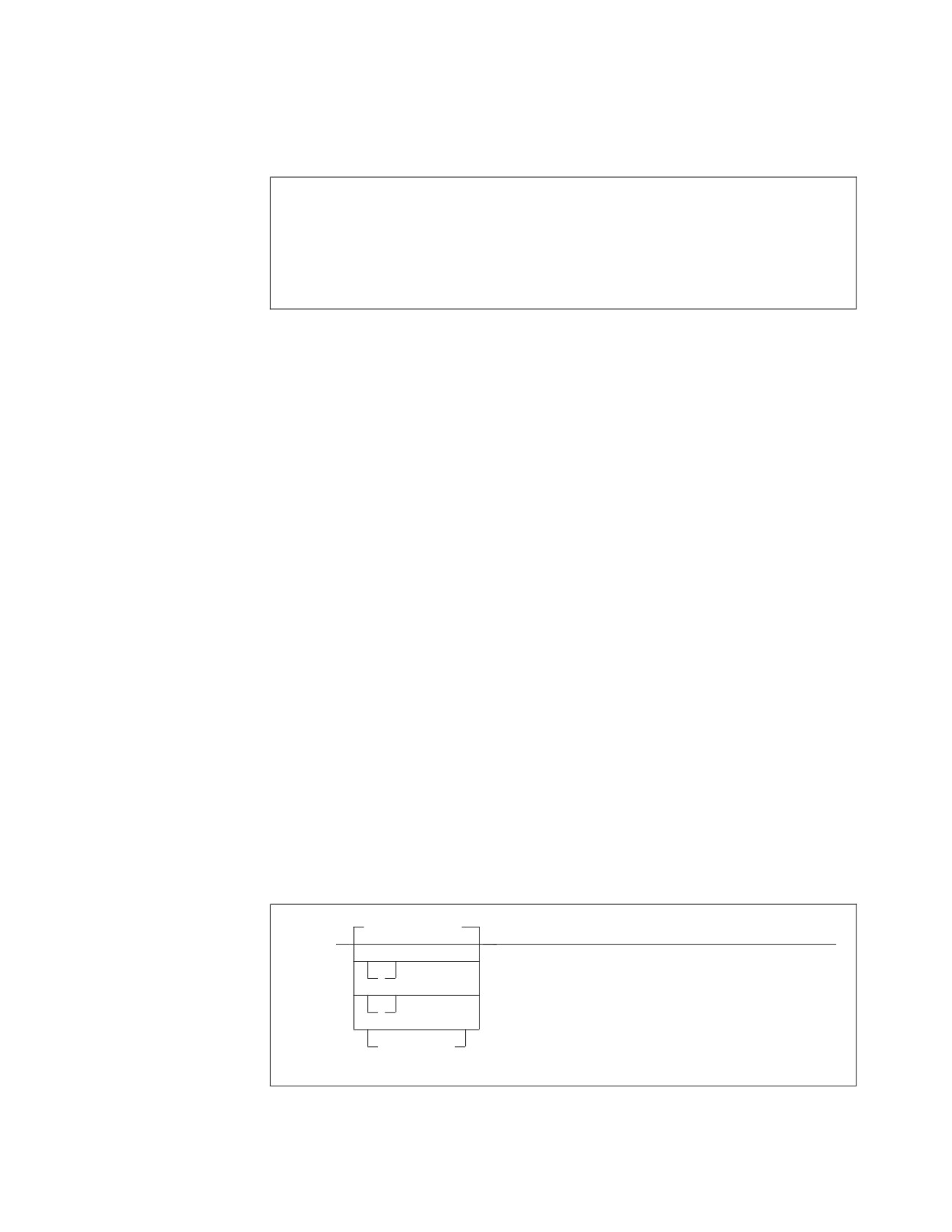
►► CIRR
,
,
,
►
password,
mode,
interval,
Default_server
►
►◄
server_name
,
▼
(
server_name
)
,
Figure 40. CIRR Transaction Syntax
100
System Administration

The password, mode and interval parameters are the same as on the CIRT
transaction and are described in the following table:
Table 11. CIRR Transaction Parameters
Parameter
Default
Description
PASSWORD
SQLDBAPW
This password establishes the operator’s authority to
(positional
terminate the online access to the application server.
parameter 1)
It must be the same password that was supplied for
the server by the CIRB or CIRA transaction. Refer to
“Password Implications on Online Resource Adapter
Termination” on page 116 for more details.
MODE
NORMAL
This parameter establishes the shutdown mode:
(positional
NORMAL or QUICK. When you specify NORMAL,
parameter 2)
the CIRR transaction prevents new online users from
accessing the specified application server. Users who
are already doing work, however, can finish. When
all users complete their work, no online users can
use the specified application server. When you
specify NORMAL for a remote application server,
the shutdown of the access to the remote application
server will complete only when all conversations to
the remote application server have been deallocated.
When you specify QUICK for a local application
server, online access is ended immediately. Online
users cannot finish their work. Their current logical
units of work are rolled back (unless they are
already processing a COMMIT WORK). You can
change from NORMAL to QUICK. However, once
the MODE is QUICK, you cannot change it back to
NORMAL. When you specify QUICK for a remote
server, the QUICK mode is changed to NORMAL.
QUICK mode is not supported for a remote
application server.
Chapter 5. Operating the Online Support
101

Table 11. CIRR Transaction Parameters (continued)
Parameter
Default
Description
INTERVAL
30
(seconds)
The number of seconds that the CIRR transaction
(positional
should delay before freeing the terminal. The value
parameter 3)
must be an integer value between 0 and 3600. This
parameter controls the availability of the CICS
terminal (or operator console) once you issue the
CIRR transaction.
The CICS terminal (or VSE operator console) used to
activate the CIRR transaction is unavailable until the
transaction ends. This could be a long time if the
online application is long-running or if a user left
without correctly ending the terminal session. If you
issue CIRR PASSWORD,NORMAL,, server_name the
terminal is not available until all online DB2 Server
for VSE users complete their work.
The value you specify for interval represents an
interval of time measured in seconds. If the CIRR
transaction does not finish immediately, it waits the
amount of time you specify. When this time ends,
the CIRR transaction tries once again to finish
processing. If the CIRR transaction does not finish
successfully, you receive a message telling you to
retry the CIRR transaction later. After issuing the
message, the CIRR transaction ends. The shutdown
mode is still in effect (the specified server is in the
process of shutting down), and the terminal is
available for your use.
SERVER-NAME
Determined by
This parameter enables you to specify the
(positional
CIRB or CIRC
application servers from which you want to remove
parameter 4)
transaction.
access. The default server is removed if this
parameter is omitted, or if the first parameter in the
server_name list is blank. The default server is the
one that was established by the CIRB transaction or
by the CIRC transaction.
If no server_name is specified the default server_name is used. The default
server_name was established by the CIRB or CIRC transaction. The CIRD
transaction may be used to display the default server_name in case the user does
not know what the default server_name is.
msg f2
AR 015 1I40I READY
2 cirr
F2-002 ARI0455I Connections to SQLMACH1 are disabled.
F2-002 ARI0460W Connections to the default server SQLMACH1 have
been disabled.
Figure 41. Example of CIRR with Defaults
The above example assumes that there are connections to more than one server
when the CIRR transaction is entered.
If the password, mode and interval are the same then the server_name list can be
used to remove connections or disable online access from multiple application
102
System Administration
servers. Since SQLVM was the last active connection, the online resource adapter
was terminated. SQLMACH2 and SQLVM are local application servers, while
SQLMACH8 is a remote server.
msg f2
AR 015 1I40I READY
2 cirr ,,,(sqlmach2,sqlmach8,sqlvm)
F2-002 ARI0455I Connections to SQLMACH2 are disabled.
F2-002 ARI0455I Online access to SQLMACH8 is disabled.
F2-002 ARI0455I Connections to SQLVM are disabled.
F2-002 ARI0413I Resource Adapter ARI0OLRM is disabled.
Figure 42. Example of CIRR with Server-Name List
The CIRR transaction can be used to remove the connections or disable online
access to the application server that were established by the CIRB and CIRA
transactions. If CIRR removes the last active connections to the online resource
adapter and all active APPC conversations known to the online resource adapter
are deallocated, then the online resource adapter is terminated. The CIRB
transaction would have to be used to restart it.
The CIRA and CIRR transactions can be entered repeatedly and in any order to
add and remove links to application servers or to enable and disable online access
to application servers as required.
If CIRR is entered to remove connections or disable online access to a server to
which no connections or online access have been established, the message
“ARI0456I Connections to <server_name> do not exist.” is displayed.
If the password given on the CIRR transaction does not match the password that
was used to start the connections or online access to the named server, then the
connections or online access to that server are not shut down and processing
continues with the next server in the list.
Displaying Information -- The CIRD Transaction
To display status information about active CICS transactions that access a local or a
remote application server, issue the CICS CIRD transaction.
The CIRD transaction does not require a password, and can be issued from any
CICS terminal or the operator console. To use it, you must enable it as well as the
CICS restart resynchronization facility. See the DB2 Server for VSE Program Directory
for more information.
Default-server
►► CIRD
►◄
?
server_name
Figure 43. CIRD Transaction Syntax
Chapter 5. Operating the Online Support
103
The parameter is described in the following table:
Table 12. CIRD Transaction Parameters
Parameter
Default
Description
SERVER-NAME
Determined by
This parameter enables you to specify the
(positional
CIRB or CIRC
application server whose status is to be displayed, or
parameter 1)
transaction.
* to display the status of all servers and the details
of transactions accessing the servers, or ? to display
a list of the connected servers without the
transaction details.
If this parameter is omitted, the default server_name
is the one that was determined by the CIRB or the
CIRC transaction.
Four categories of CICS transactions access the local application server. The
information that CIRD displays for transactions connected to a local server varies
depending on these four categories:
v
Transactions waiting to access the local application server
These transactions have issued an SQL request and are waiting because all links
to the application server are busy. For these transactions, CIRD displays the
elapsed time of the wait.
In general, links to the local application server are busy because other users are
accessing it. The only exception occurs when the DB2 Server for VSE online
support is being started; at that time, all links to the application server could be
busy during the synchronization of the database log and the CICS log. Usually
this requires little time, but a long delay can occur if a very large LUW is being
rolled back.
v
Transactions currently accessing the local application server
These transactions have established a link to the local application server and an
LUW. The application server is currently doing processing for that LUW. For
these transactions, CIRD displays the elapsed time of the current SQL statement,
and the elapsed time the link is held. The latter effectively indicates the elapsed
time of the current LUW.
v
Transactions holding a link to the local application server but not using it
These transactions have established a link to the local application server and an
LUW, but the application server is not currently processing for that LUW.
Instead, these transactions are doing other work or are waiting for terminal
communications. For these transactions, CIRD displays the elapsed time since
the last application server access ended, and the elapsed time the link is held.
Again, the latter effectively indicates the elapsed time of the current LUW.
v
Transactions that previously held a link to the local application server, but no
longer do.
These transactions have previously ended one or more LUWs, but have not yet
started another. For these transactions, CIRD displays the elapsed time since the
last LUW completed.
If you enter CIRD when the DB2 Server for VSE online support is not enabled or
when the CIRD is not operational, an error message is displayed and CIRD ends.
Note that for CIRD to display information about a transaction, the transaction
must have issued an SQL request. CIRD displays the following information (where
applicable) for each of the four categories of local database transactions:
v The CICS task number (TASKNO)
104
System Administration
v
The CICS transaction identifier (TRANID)
v
The CICS terminal identifier (TERMID)
Not all transactions have a terminal identifier. For example, ISQL has a
two-transaction structure: ISQL and CISQ. The former controls the terminal and
the latter is for access to the application server. Because a CISQ transaction has
no terminal associated with it, instead of displaying TERMID for it, CIRD
displays the terminal identifier in another field called USERDATA (described
below).
If a transaction accesses the application server, but does not have a terminal
associated with it, CIRD does not display TERMID.
v
The user identifier (USERID) that the application server establishes for the
transaction
CIRD does not display this identifier unless a user ID has been established,
which is done when an application issues an SQL statement that starts an initial
LUW. The user ID may not be established immediately. (For example, a
transaction can be waiting for a link to the application server.) It remains
established after a transaction ends an LUW, unless the RELEASE option of
COMMIT WORK or ROLLBACK WORK was used.
v
User data (USERDATA) for ISQL transactions
The USERDATA field contains the terminal identifier (TERMID) of the terminal
that was used to call ISQL. For most other transactions, USERDATA is blank. It
is possible, however, to code an online application to initialize the USERDATA
field. Such an application would use the DB2 Server for VSE online cancel
support. For more information, see “Coding Your Own Cancel Exit” on page
287.
Note: If you are controlling ISQL access with the DFHSIT CMXT parameter, you
have renamed the ISQL transaction. For these renamed ISQL transactions,
CIRD still displays the terminal identifier of the terminal that was used to
run the transaction. For more information on this parameter, see
“Controlling Access by ISQL Users” on page 119.
v
The elapsed time intervals (as described above)
CIRD uses the following format to display the time:
hh:mm:ss
CIRD then displays the time of day and the date, as follows:
TIME=hh:mm:ss DATE=mm/dd/yy
(or dd/mm/yy)
and then ends its processing. (The format of the date depends on how you
specified it on the DATE parameter of the VSE STDOPT JCC/JCS.)
If CIRD determines that no CICS transactions apply to the application server, it
displays only the time and the date, and then ends.
Note: If the DB2 Server for VSE online support ends abnormally (for example, if
the application server partition ends unexpectedly), the CIRD transaction is
called implicitly to display information about transactions that were
accessing the application server at the time of the failure. This information is
displayed on the VSE system console.
For the following examples, assume that SQLMACH1 is the default local server
and that connections have been established for the local application servers
SQLMACH1, SQLMACH2 and SQLVM.
Chapter 5. Operating the Online Support
105
Figure 44 shows an example of the information displayed by the CIRD transaction
with no parameters.
2 cird
F2
002
The default server is SQLMACH1.
F2
002
---------------------------------------------------
F2
002
DBDCCICS connected to server SQLMACH1.
F2
002
Status of online DB2 Server for VSE applications:
F2
002
F2
002
Transactions waiting to establish a link to the application server are:
F2
002
F2
002
TASKNO TRANID TERMID USER ID USERDATA WAIT TIME
F2
002
------ ------ ------ -------- -------- ---------
F2
002
000033 MKE2
L222
00:01:32
F2
002
000025 INV
L224
JIM
00:08:32
F2
002
F2
002
Transactions holding a link and now accessing the application server are:
F2
002
F2
002
TASKNO TRANID TERMID USER ID USERDATA TIME USED
TOTAL LUW
F2
002
FOR CURRENT TIME
F2
002
ACCESS
F2
002
------ ------ ------ -------- -------- ------------ ---------
F2
002
000019 CISQ
DEPT222
L199
00:01:32
00:03:48
F2
002
000037 INV
L209
TERRY
00:00:01
00:00:03
F2
002
F2
002
Transactions holding a link to the application server but not using are:
F2
002
F2
002
TASKNO TRANID TERMID USER ID USERDATA TIME SINCE TOTAL LUW
F2
002
LAST ACCESS TIME
F2
002
------ ------ ------ -------- -------- ------------ ---------
F2
002
000003 CISQ
WILLIAM L210
00:07:01
00:10:56
F2
002
F2
002
Transactions which previously accessed the application server (not holding link):
F2
002
F2
002
TASKNO TRANID TERMID USER ID USERDATA TIME SINCE
F2
002
LAST ACCESS
F2
002
------ ------ ------ -------- -------- ------------
F2
002
000003 MKE2
ROBERT L210
00:20:04
F2
002
F2
002
TIME=14:28:23 DATE=09/01/95
Figure 44. Example of CIRD with Defaults
Figure 45 on page 107 shows an example of the information displayed by the CIRD
transaction with a server_name specified.
106
System Administration
2 cird
sqlmach2
F2
002
The default server is SQLMACH1.
F2
002
---------------------------------------------------
F2
002
DBDCCICS connected to server SQLMACH2.
F2
002
Status of online DB2 Server for VSE applications:
F2
002
F2
002
Transactions waiting to establish a link to the application server are:
F2
002
F2
002
TASKNO TRANID TERMID USER ID USERDATA WAIT TIME
F2
002
------ ------ ------ -------- -------- ---------
F2
002
000033 MKE2
L222
00:01:32
F2
002
000025 INV
L224
JIM
00:08:32
F2
002
F2
002
Transactions holding a link and now accessing the application server are:
F2
002
F2
002
TASKNO TRANID TERMID USER ID USERDATA TIME USED
TOTAL LUW
F2
002
FOR CURRENT TIME
F2
002
ACCESS
F2
002
------ ------ ------ -------- -------- ------------ ---------
F2
002
000019 CISQ
DEPT222
L199
00:01:32
00:03:48
F2
002
000037 INV
L209
TERRY
00:00:01
00:00:03
F2
002
F2
002
Transactions holding a link to the application server but not using are:
F2
002
F2
002
TASKNO TRANID TERMID USER ID USERDATA TIME SINCE TOTAL LUW
F2
002
LAST ACCESS TIME
F2
002
------ ------ ------ -------- -------- ------------ ---------
F2
002
000003 CISQ
WILLIAM L210
00:07:01
00:10:56
F2
002
F2
002
Transactions which previously accessed the application server (not holding
link):
F2
002
F2
002
TASKNO TRANID TERMID USER ID USERDATA TIME SINCE
F2
002
LAST ACCESS
F2
002
------ ------ ------ -------- -------- ------------
F2
002
000003 MKE2
ROBERT L210
00:20:04
F2
002
F2
002
TIME=14:28:23 DATE=09/03/95
Figure 45. Example of CIRD with Server-Name
Figure 46 on page 108 shows an example of the information displayed by the CIRD
transaction with the * specified.
Chapter 5. Operating the Online Support
107
2 cird
F2
002
The default server is SQLMACH1.
F2
002
There are connections to server SQLMACH1.
F2
002
There are connections to server SQLMACH2.
F2
002
There are connections to server SQLVM.
F2
002
---------------------------------------------------
F2
002
DBDCCICS connected to server SQLMACH1.
F2
002
Status of online DB2 Server for VSE applications:
F2
002
F2
002
Transactions waiting to establish a link to the application server are:
F2
002
F2
002
TASKNO TRANID TERMID USER ID USERDATA WAIT TIME
F2
002
------ ------ ------ -------- -------- ---------
F2
002
000033 MKE2
L222
00:01:32
F2
002
000025 INV
L224
JIM
00:08:32
F2
002
F2
002
Transactions holding a link and now accessing the application server are:
F2
002
F2
002
TASKNO TRANID TERMID USER ID USERDATA TIME USED
TOTAL LUW
F2
002
FOR CURRENT TIME
F2
002
ACCESS
F2
002
------ ------ ------ -------- -------- ------------ ---------
F2
002
000019 CISQ
DEPT222
L199
00:01:32
00:03:48
F2
002
000137 INV
L209
BOB
00:17:34
01:24:03
F2
002
F2
002
Transactions holding a link to the application server but not using are:
F2
002
F2
002
TASKNO TRANID TERMID USER ID USERDATA TIME SINCE TOTAL LUW
F2
002
LAST ACCESS TIME
F2
002
------ ------ ------ -------- -------- ------------ ---------
F2
002
000013 CISQ
LARRY
L210
00:03:01
00:11:36
F2
002
F2
002
Transactions which previously accessed the application server (not holding link):
F2
002
F2
002
TASKNO TRANID TERMID USER ID USERDATA TIME SINCE
F2
002
LAST ACCESS
F2
002
------ ------ ------ -------- -------- ------------
F2
002
000003 MKE2
LOUISA L210
01:57:04
F2
002
F2
002
TIME=14:28:23 DATE=09/03/95
F2
002
---------------------------------------------------
F2
002
DBDCCICS connected to server SQLMACH2.
F2
002
There are no active DB2 Server for VSE transactions.
F2
002
F2-002
TIME= 14:29:47 DATE= 09/03/95
F2 002
---------------------------------------------------
F2 002
DBDCCICS connected to server SQLVM.
F2 002
There are no active DB2 Server for VSE transactions.
F2 002
F2 002
TIME=14:30:23 DATE=09/03/95
Figure 46. Example of CIRD with *
Figure 47 on page 109 shows an example of the information displayed by the CIRD
transaction with the ? specified.
108
System Administration
2 cird ?
F2 002 The default server is SQLMACH1.
F2 002 There are connections to server SQLMACH1.
F2 002 There are connections to server SQLMACH2.
F2 002 There are connections to server SQLVM.
F2 002 ---------------------------------------------------
Figure 47. Example of CIRD with ?
Some extra information can be derived from the displays. In Figure 50 on page 112
notice that SQLMACH1 is mentioned as the default server and on the next
message that there are connections to SQLMACH1 also. It is possible, with the
CIRR transaction, to remove the connections to SQLMACH1. The CIRD command
would still show that the default server is SQLMACH1 but the message indicating
there are connections to SQLMACH1 would not be displayed. In this scenario,
users connecting to the default server would receive SQLCODE = -940 on the
CONNECT statement. The CIRA transaction could be used to establish connections
to SQLMACH1 again or the CIRC transaction could be used to change the default
server to one of the other active servers. Either method allows CONNECT
statements to access the default server.
If CIRR or CIRT has been issued to disconnect a server or to shut down the online
resource adapter but cannot complete because there are still active transactions
against the server, the CIRD transaction will show which transactions and which
servers are affected.
Figure 48 on page 110 shows an example of the information displayed by the CIRD
transaction with the ? parameter specified. The attempt to remove the connections
to SQLMACH2 fails because there are still active transactions. Then the CIRD
transaction is used to determine which transactions are still active. The user is
found and asked to complete his work. When the CIRR command is retried it
completes successfully and the connections to SQLMACH2 are shut down.
Chapter 5. Operating the Online Support
109
2 cird ?
F2 002
The default server is SQLMACH1.
F2 002
There are connections to server SQLMACH1.
F2 002
There are connections to server SQLMACH2.
F2 002
There are connections to server SQLVM.
F2 002
---------------------------------------------------
2 cirr ,,1,sqlmach2
F2 002
ARI0463I The DISABLE transaction CIRR must delay for a
1-second interval before attempting the disable.
F2-002
2 cird ?
F2 002
The default server is SQLMACH1.
F2 002
There are connections to server SQLMACH1.
F2 002
Connections to SQLMACH2 are being disabled.
F2 002
There are connections to server SQLVM.
F2 002
----------------------------------------------
F2-002
2 cird *
F2 002
The default server is SQLMACH1.
F2 002
There are connections to server SQLMACH1.
F2 002
Connections to SQLMACH2 are being disabled.
F2 002
There are connections to server SQLVM.
F2 002
----------------------------------------------
F2 002
DBDCCICS connected to server SQLMACH1.
F2 002
There are no active DB2 Server for VSE transactions.
F2 002
F2 002
TIME= 19:07:43 DATE= 09/20/95
F2-002
F2 002
----------------------------------------------
F2 002
DBDCCICS connected to server SQLMACH2.
F2 002
Status of online DB2 Server for VSE applications:
F2 002
F2 002
Transactions holding a link to the application server but not using
are:
F2 002
F2 002
TASKNO TRANID TERMID USER ID USERDATA TIME SINCE TOTAL LUW
F2 002
LAST ACCESS TIME
F2 002
______
______ ______ ________ ________ ___________ _________
F2 002
0000129 CISQ
CICSUSER L77D
00:00:31
00:00:31
F2 002
F2 002
TIME= 19:07:44 DATE= 09/20/95
F2 002
----------------------------------------------
F2 002
DBDCCICS connected to server SQLVM.
F2 002
There are no active DB2 Server for VSE transactions.
F2 002
F2 002
TIME= 19:07:45 DATE= 09/20/95
F2-002
2 cirr ,,2,sqlmach2
F2-002
ARI0455I Connections to SQLMACH2 are disabled.
Figure 48. Example of CIRD in a Disable Scenario
The CIRD transaction displays the following information (where applicable) for
transactions that relate to a remote application server:
RDBMS
displays the name, class, and release level (version, release, and modification
level) of the application server being accessed.
LU
displays the logical unit name.
TPN
displays the transaction program name. Its character and hexadecimal versions
are both displayed.
110
System Administration
TASKNO
displays the number of the task.
TRANID
displays the transaction id.
TERMID
displays the name of the terminal where the transaction was initiated.
USER ID
displays the connected user id.
STATUS
displays the communication state. COMM indicates that the transaction sent an
SQL statement to the database machine and has been waiting for a reply since
the time shown. APPL indicates that the transaction returned control to the
application at the time shown. VRA indicates that the Online Resource Adapter
is processing your request. WAIT indicates that the transaction is waiting for a
session.
TIME
displays the time when the STATUS displayed had begun. For example, task
number 891 has already returned control to the application at 09:12:42, as
indicated by TIME.
LUWID
displays the logical unit of work identifier, which uniquely identifies an LU6.2
conversation. Its value is netid.luname.instance_number.sequence_number where
netid and luname are up to 8 characters long, instance_number is 12 characters
long, and sequence_number is 4 characters long.
Figure 49 shows an example of the information displayed by the CIRD transaction
with a remote server-name specified.
User:
2
cird
sqlmach8
System: F2 0002 The default server is SQLMACH8.
F2 0002 ----------------------------------------------
F2 0002 Status of online DB2 Server for VSE applications for
F2 0002 RDBMS = SQLMACH8 SQLDS/VM V6.1.0
F2 0002 LU = VMC3
F2 0002 TPN = SQLMACH8
F2 0002
(X’E2D8D3D4C1C3C8F8’)
F2 0002
F2 0002
TASKNO TRANID TERMID USER ID STATUS TIME
F2 0002
______
______ ______ ________
______
___________________
F2 0002
LUWID
F2 0002
______
F2 0002
0000891
DRT1
D080
SYSA
APPL
1998-08-11.09:12:42
F2 0002
CAIBMOML.D08001.E31FE596ADDE.0001
F2 0002
F2 0002
TIME= 09:18:11 DATE= 08/11/98
F2-0002
Figure 49. Example of CIRD with remote server name
Figure 50 on page 112 shows an example of the information displayed by the CIRD
transaction with a ? specified, where online access to the remote server RMTSERV1
is allowed. Assume that SQLMACH1 is the default local application server and
RMTSERV1 is a remote application server. Connections have been established for
SQLMACH1 and online access to RMTSERV1 through the online support is
allowed.
Chapter 5. Operating the Online Support
111
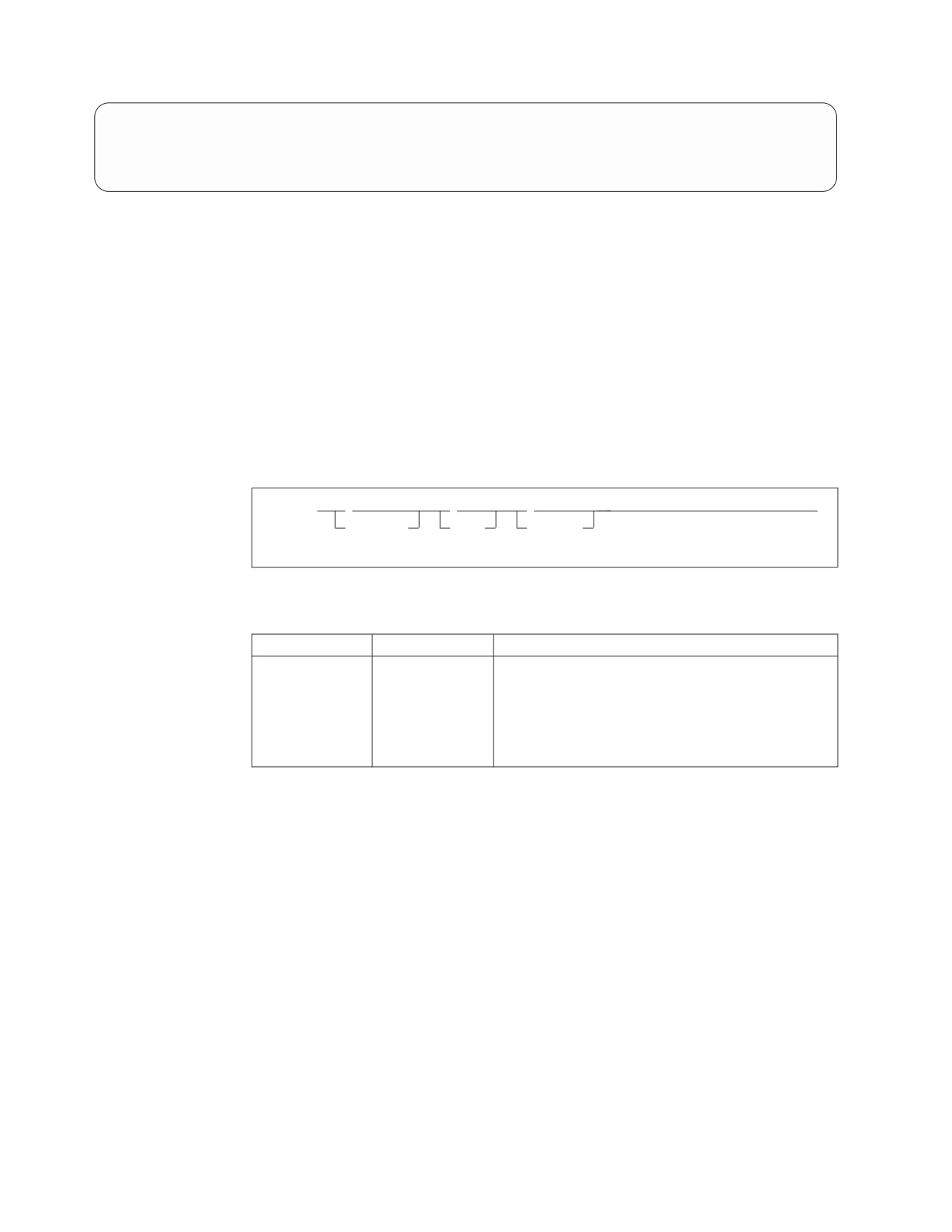
User:
2 cird ?
System: F2 002 The default server is SQLMACH1.
F2 002 There are connections to server SQLMACH1.
F2 002 Online access to remote RMTSERV1 is allowed.
F2 002 ---------------------------------------------------
Figure 50. Example of CIRD with ?
Stopping the Online Support -- The CIRT Transaction
While the online support is enabled, it uses CICS resources (storage) and
application server resources (agents). At certain periods of the day, you may want
to free these resources and prevent online access to the application server. You
may, for example, want to allow only batch access to the application server for
purposes of loading a large amount of data. For either of these situations, the
operator can disable the online support by entering the CIRT transaction.
To end DB2 Server for VSE online support, issue the CICS CIRT transaction. The
syntax of the CIRT transaction is as follows:
►► CIRT
,
,
,
►◄
password,
mode,
interval
Figure 51. CIRT Transaction Syntax
Table 13. CIRT Transaction Parameters
Parameter
Default
Description
PASSWORD
SQLDBAPW
This password establishes the operator’s authority to
(positional
terminate the online access to the application server.
parameter 1)
It must be the same password that was supplied for
the CIRA or CIRB transaction. Refer to “Password
Implications on Online Resource Adapter
Termination” on page 116 for more details.
112
System Administration
Table 13. CIRT Transaction Parameters (continued)
Parameter
Default
Description
MODE
NORMAL
This parameter establishes the shutdown mode:
(positional
NORMAL or QUICK. When remote application
parameter 2)
servers are accessed by the online support, CIRT
NORMAL will complete only when all conversations
to the remote application servers are deallocated.
When you specify NORMAL, the CIRT transaction
prevents new online users from accessing the
application server. Users who are already doing
work, however, can finish. When all users complete
their work, no online users can use the application
server. When you specify QUICK, online access to
local application servers is ended immediately.
Online users accessing a local application server
cannot finish their work. Their current logical units
of work are rolled back (unless they are already
processing a COMMIT WORK). You can change
from NORMAL to QUICK. However, once the
MODE is QUICK, you cannot change it back to
NORMAL. When remote application servers are
accessed by the online support and you specify
QUICK, online access to the remote application
server is not ended immediately. Online users
accessing a remote server can finish their unit of
work, but cannot start a new logical unit of work.
QUICK mode is not supported for a remote
application server.
INTERVAL
30
(seconds)
The number of seconds that the CIRT transaction
(positional
should delay before freeing the terminal. The value
parameter
3)
must be an integer value between 0 and 3600. This
parameter controls the availability of the CICS
terminal (or operator console) once you issue the
CIRT transaction.
The CICS terminal (or VSE operator console) used to
activate the CIRT transaction is unavailable until the
transaction ends. This could be a long time if the
online application is long-running or if a user left
without correctly ending the terminal session. If you
issue CIRT PASSWORD,NORMAL the terminal is
not available until all online DB2 Server for VSE
users complete their work. Even with CIRT
PASSWORD, QUICK there may be some delay
before the CICS terminal allows the CIRT terminal to
complete its cleanup process.
The value you specify here represents an interval of
time measured in seconds. If the CIRT transaction
does not finish immediately, it waits the amount of
time you specify. When this time ends, the CIRT
transaction tries once again to finish processing. If
the CIRT transaction does not finish successfully,
you receive a message telling you to retry the CIRT
transaction later. After issuing the message, the CIRT
transaction ends. The shutdown mode is still in
effect (the specified DB2 Server for VSE system is in
the process of shutting down), and the terminal is
available for your use.
Chapter 5. Operating the Online Support
113

If links or online access to multiple application servers exist, they will all be
removed. Once all of the links and/or online access have been removed, the online
resource adapter is terminated.
The following examples assume that SQLVM, SQLMACH1 and SQLMACH2 are
local application servers, and SQLMACH8 is a remote application server.
msg f2
AR 015 1I40I READY
2 cirt
F2-002 ARI0455I Connections to SQLVM are disabled.
F2-002 ARI0455I Connections to SQLMACH2 are disabled.
F2-002 ARI0455I Connections to SQLMACH1 are disabled.
F2-002 ARI0455I Online access to SQLMACH8 is disabled.
F2-002 ARI0413I Resource Adapter ARI0OLRM is disabled.
Figure 52. Example of CIRT with Connections to Four Applications Servers
Note that the message ARI0413I Resource Adapter ARI0OLRM is disabled is not
displayed until the last application server connections and APPC conversations
have been severed.
When the online resource adapter is not active, the CIRA and CIRR transactions
are invalid. The online resource adapter needs to be enabled with the CIRB
transaction before the CIRA and CIRR transactions can be used.
F2-002 ARI0413I Resource Adapter ARI0OLRM is disabled.
2 cira ,,,sqlmach1
F2-002 ARI0411I Resource Adapter is not enabled.
2 cirr ,,,sqlmach1
F2-002 ARI0411I Resource Adapter is not enabled.
Figure 53. Example of CIRA and CIRR after CIRT
Effect of a Shutdown on Online Applications
In the NORMAL mode, CIRT prevents new LUWs from being started. As LUWs
end, the links to the local application server are disconnected and APPC
conversations to the remote application server are deallocated. (The NORMAL
process allows for the normal end of all online LUWs.) After all links are
disconnected and all APPC conversations are deallocated, the CICS storage
resources are freed, and application access to the DB2 Server for VSE online
support is no longer allowed.
In the QUICK mode, links to the local application server are immediately
disconnected. Some online LUWs may be interrupted. The CICS storage resources
are freed, and application access to online support is no longer allowed.
With QUICK, when the links are disconnected, the application server partition is
posted by the operating system. The post causes the database manager to do an
internal ROLLBACK WORK for all LUWs that were not committed or at a
synchronization point (that is, those LUWs that were prepared for COMMIT or
ROLLBACK).
While the CIRT transaction is ending access in QUICK mode, the CICS transactions
that access the application server can be ended by CICS with an abend code of
AEY9, ASP7, or ASRA. To allow for normal transaction shutdown, then, you
should either use the CIRD transaction to determine which transactions accessing
114
System Administration
the application server are still active and wait until they are complete, or use the
CIRT transaction with the NORMAL option which allows all active users to finish
their work.
The QUICK mode is not supported when you are ending online access to a remote
server. In this case, the QUICK mode is changed to NORMAL mode.
Terminal Availability During Online Shutdown
The terminal used to activate the CIRT transaction for NORMAL or QUICK is
unavailable until the transaction ends. This could be a long time for a large online
application or for an online application controlled by a CICS terminal operator
who is not at the console. There are two conditions when CIRT may need to wait
(in CICS terms, delay for an interval of time):
v In the NORMAL mode, the process must wait until all LUWs complete
normally.
v In both NORMAL and QUICK modes, after all connections and APPC
conversations to the application server are severed, the process attempts to
disable itself. The attempt can fail if CICS finds some online transaction that is
still active and had access to the application server before CIRT was issued. In
this situation, the CIRT transaction cannot complete its clean-up process until
that transaction ends.
In the situations described above, CIRT will wait for an interval of time before
attempting to complete the cleanup process again. (The default interval of time is
30 seconds. The interval can be specified as an input parameter to CIRT.)
After the delay, the CIRT transaction determines if the condition that caused the
wait has passed. If it has, the process completes, and the online support is
disabled. If not, CIRT exits by returning to CICS (the shutdown mode is still active
and the terminal is free), and message ARI0414I is displayed, prompting the
operator to retry the CIRT transaction later.
The operator can proceed in a number of ways to disable the online support:
v The installation may have a policy that work can continue until 5:30 PM. The
operator routinely issues CIRT SQLDBAPW,NORMAL at 5 PM. Doing this prevents
new work from starting. The operator then waits until 5:30 PM and reissue the
CIRT transaction to proceed with normal transaction shutdown.
v The operator can use the CICS message transaction CMSG to route messages to
selected terminals or users, and CICS CEMT, CIRD or CSMT commands to
determine who or what applications are active, or to end the application. After
such operator intervention is completed, the CIRT transaction is re-entered and
the online support becomes disabled.
This intervention presupposes that the operator has information about those
CICS transactions that access the application server. You may find it useful to
keep a list or use a naming convention for all such transactions.
v If the NORMAL process was attempted and could not finish, the operator can
escalate the shutdown mode (escalate in the sense that the database manager
goes from NORMAL mode, which allows all LUWs to end, to QUICK mode,
which immediately stops all access to the application server). To escalate, the
operator enters CIRT SQLDBAPW,QUICK.
Shutdown Impact to Online Applications
After the online support has been disabled, or before it has been enabled, CICS
abnormally ends any transaction that attempts online access to the application
server by abending the transaction with abend code AEY9. If an attempt is made
Chapter 5. Operating the Online Support
115
to execute a transaction while the online support has not been enabled, the
transaction also abends with an abend code AEY9. If an application attempts to
use CICS HLPI to access either a CICS/VSE subsystem or non-CICS/VSE
subsystem that has not been enabled, the CICS terminal operator receives the
CICS/VSE abend code AEY9.
When the shutdown process is active, the following occurs:
v For NORMAL mode, the result depends on the state of the application program.
If it is in work, the process has no effect. If the application program is not in
work, the online support returns an SQLCODE of -937. A later request by such a
program will cause CICS to abnormally end the transaction with the AEY9
abend code.
v For QUICK mode, all initial requests result in the -937 SQLCODE, and a later
request will result in the AEY9 abend code.
Also, for the QUICK mode, the online support cannot participate in the CICS
two-phase syncpoint protocol. (For information on this protocol, review the
discussion on online application recovery in the DB2 Server for VSE & VM
Database Administration manual.) When the online support reports to CICS that it
is disabling, the result is an ASP7 abend. This is the general abend code that the
CICS syncpoint manager uses when a CICS or non-CICS/VSE subsystem cannot
participate in the two-phase syncpoint protocol. Online application programs do
not regain control for clean-up routines when an ASP7 abend occurs. The ISQL
transaction must be ended by the operator with the CICS CSMT or CEMT
command.
Password Implications on Online Resource Adapter
Termination
The password used on the CIRR and CIRT transactions must be the same one that
was used on the CIRA and/or the CIRB transactions. CIRR and CIRT will only
shut down the connections to servers where the password matches. If the
passwords do not match, that server is not shut down.
Consider the following example:
1. The online resource adapter is started with the command:
CIRB pw1,5,,,,(SQLMACH1,SQLMACH2)
2. Connections to two new servers are added with the command:
CIRA ,,,(SQLMACH3,SQLMACH4)
3. Another connection is added to a fifth server with the command:
CIRA pw2,1,,SQLMACH5
It is not possible to end the online resource adapter with one command in this
scenario. The CIRT or CIRR transactions must be run at least three times before the
online resource adapter is completely shutdown because three different passwords
were used to start it up.
The CIRT transaction issued with no parameters would only shut down the
connections to SQLMACH3 and SQLMACH4 because they were the only servers
that were started with the default password.
To shut down SQLMACH5, you would have to enter the following command:
CIRT pw2
116
System Administration
To bring down the remaining servers and stop the online resource adapter you
need to enter:
CIRT pw1 followed by CIRT
The CIRR transaction can also be used, but the server names must be specified.
The following shows the CIRR commands that would be equivalent to the CIRT
commands in this scenario.
CIRT pw1 is equivalent to CIRR pw1,,,(SQLMACH1,SQLMACH2)
CIRT is equivalent to CIRR ,,,(SQLMACH3,SQLMACH4)
CIRT pw2 is equivalent to CIRR pw2,,,SQLMACH5
If the command:
CIRR ,,,(SQLMACH1,SQLMACH2,SQLMACH3,SQLMACH4,SQLMACH5)
were entered only SQLMACH3 and SQLMACH4 would be disconnected.
Message ARI0464E will be issued for servers SQLMACH1, SQLMACH2 and
SQLMACH5 because the passwords do not match.
Similarly, if the command:
CIRR pw1,,,(SQLMACH1,SQLMACH2,SQLMACH3,SQLMACH4,SQLMACH5)
were entered only SQLMACH1 and SQLMACH2 would be disconnected.
Message ARI0464E will be issued for servers SQLMACH3, SQLMACH4 and
SQLMACH5 because the passwords don’t match.
Chapter 5. Operating the Online Support
117
118
System Administration

Chapter 6. Maintaining Database Security
Database security is maintained through the use of authorities and privileges. Only
users granted the CONNECT authority for an application server can access it.
For information about DB2 Server for VSE authorities and privileges, refer to the
DB2 Server for VSE & VM Database Administration manual. This chapter discusses
the following topics:
v Protecting VSAM data sets from unauthorized access
v VSAM commands that must not be used against any database
v Controlling access to ISQL
v Access Control to Remote Users
Protecting VSAM Data Sets
You can optionally assign a VSAM MASTERPW- or CONTROLPW-level password
to protect all the VSAM data sets that make up the database. If you do, you must
use it:
v In every DEFINE statement for the VSAM data sets that make up the database
v When you install the database manager
v When you add new data sets.
Table 15 on page 134 shows how a CONTROLPW is to be coded. Coding for a
MASTERPW is identical, except for the keyword.
Each time the application server is started, the DBPSWD=password initialization
parameter must be supplied. The database manager uses the password when it
opens the VSAM data sets. If the password supplied does not match the one
defined for the data sets, the operator is prompted to supply the correct one. (See
“DBPSWD” on page 50)
VSAM Restrictions
Storage for the database manager is defined by VSAM. However, VSAM does not
manage this storage. The VSAM commands such as EXPORT, IMPORT, REPRO,
and VERIFY should never be used against the database. If an error message is
received indicating an OPEN error (RC=74), ignore it and do not run VERIFY.
Controlling Access by ISQL Users
In VSE, ISQL is made up of two transactions: ISQL and CISQ. The former controls
the CICS terminal, and the latter controls access to the application server. By
creating the second transaction dynamically (instead of hard-coding it as CISQ)
you can put different departments or different groups of users into different CICS
classes. Each group would have different transaction identifiers for both
transactions of ISQL. Because the different groups have different CICS classes, you
can limit the number of active ISQL users in each group.
To implement this, create any transaction ID for the first transaction. Then, instead
of making CISQ the second transaction ID, make it identical to the first one except
119
for the last character, which should be a 2. For example, if there are five
departments, you could have chosen these transaction IDs:
First
Second
Transaction ID
Transaction ID
Department
--------------
---------------------
----------
ISQL
ISQ2
202
ACCT
ACC2
ACCOUNTING
SAL
SA2
SALES
IN
I2
INVENTORY
P
P2
PLANNING
These examples show how the format works for different identifier lengths. Note
that when the first transaction ID is one character (P), the 2 is added (P2). Also
note that the first transaction ID cannot end with a 2.
Next, decide what the maximum number of ISQL users for each department
should be:
First
Second
Maximum
Transaction ID
Transaction ID
Department ISQL Users
--------------
--------------
----------
----------
ISQL
ISQ2
202
2
ACCT
ACC2
ACCOUNTING
3
SAL
SA2
SALES
4
IN
I2
INVENTORY
3
P
P2
PLANNING
2
Next, specify the CICS parameters TRANSID, TCLASS, and CMXT as follows:
v
TRANSACTION parameter in the CICS System Definition File
You must code an entry for each transaction ID defined. In the above example
these are: ISQL, ISQ2, ACCT, ACC2, SAL, SA2, IN, I2, P, and P2. The
TRANSACTION must specify the particular transaction ID (for example,
TRANSID=ISQ2 for the ISQ2 transaction), and the program name parameter
should reference the same program as CISQ or ISQL.
v
TCLASS parameter and CMXT parameter in the DFHSIT
To fully understand these two parameters, it is best to consider them together.
To implement the above example, you would code them as follows:
DEFINE TRANSACTION(ISQL) GROUP(DB2710) PROGRAM(ARIITRM)
TWASIZE(300) INDOUBT(BACKOUT) SPURGE(NO) TPURGE(YES)
DEFINE TRANSACTION(ISQ2) GROUP(DB2710) PROGRAM(ARIISQL)
TWASIZE(0) INDOUBT(BACKOUT) SPURGE(NO) TPURGE(YES) TCLASS(1)
DEFINE TRANSACTION(ACCT) GROUP(DB2710) PROGRAM(ARIITRM)
TWASIZE(300) INDOUBT(BACKOUT) SPURGE(NO) TPURGE(YES)
DEFINE TRANSACTION(ACC2) GROUP(DB2710) PROGRAM(ARIISQL)
TWASIZE(0) INDOUBT(BACKOUT) SPURGE(NO) TPURGE(YES) TCLASSS(2)
DEFINE TRANSACTION(SAL) GROUP(DB2710) PROGRAM(ARIITRM)
TWASIZE(300) INDOUBT(BACKOUT) SPURGE(NO) TPURGE(YES)
DEFINE TRANSACTION(SA2) GROUP(DB2710) PROGRAM(ARIISQL)
TWASIZE(0) INDOUBT(BACKOUT) SPURGE(NO) TPURGE(YES) TCLASS(3)
DEFINE TRANSACTION(IN) GROUP(DB2710) PROGRAM(ARIITRM)
TWASIZE(300) INDOUBT(BACKOUT) SPURGE(NO) TPURGE(YES)
DEFINE TRANSACTION(I2) GROUP(DB2710) PROGRAM(ARIISQL)
TWASIZE(0) INDOUBT(BACKOUT) SPURGE(NO) TPURGE(YES) TCLASS(4)
DEFINE TRANSACTION(P) GROUP(DB2710) PROGRAM(ARIITRM)
*
120
System Administration
TWASIZE(300) INDOUBT(BACKOUT) SPURGE(NO) TPURGE(YES)
DEFINE TRANSACTION(P2) GROUP(DB2710) PROGRAM(ARIISQL)
TWASIZE(0) INDOUBT(BACKOUT) SPURGE(NO) TPURGE(YES) TCLASS(5)
These TCLASS values correspond to the positional values in the CMXT
parameter. These values are arbitrary, but you should set them up so that a
transaction’s TCLASS value corresponds to its CMXT positional parameter. In
the above example, ISQ2 has a TCLASS value of 1. This means that it is in class
1, which corresponds to the first positional value on the CMXT parameter. The
first positional parameter value for CMXT is 2. This means that the maximum
number of transactions that can be active in class 1 (TCLASS=1) is 2. Therefore,
the number of active Department 202 users of the ISQL-ISQ2 transactions is
limited to 2. The same is true for the other TCLASS and CMXT positional
values. (For unspecified CMXT values, the default is 1.)
Controlling Access by Remote Users
The AXE transactions must be installed in one or more groups with appropriate
security mechanism provided by CICS or by an external security manager. Local
CICS users should not be able to start any of these transactions.
The security levels are:
v Bind-time Security
This is the session level security that can be used if the partner LU supports
LU-to-LU verification.
v Transaction Security
This controls the link authorization to attach the AXE transaction.
For more information on CICS security, see the VTAM Resource Definition Reference
and the CICS/VSE Intercommunication Guide manuals.
After deciding on the security level, specify the TCLASS parameter in the CICS
System Definition for the AXE transaction. An example is shown below.
DFHSIT
...,CMXT=(5,6,2,1,,),...
DEFINE TRANSACTION(AXE1) GROUP(DB2710) PROGRAM(ARICAXED)
TWASIZE(0) INDOUBT(BACKOUT) SPURGE(YES) TPURGE(YES) TCLASS(1)
DEFINE TRANSACTION(AXE2) GROUP(DB2710) PROGRAM(ARICAXED)
TWASIZE(0) INDOUBT(BACKOUT) SPURGE(YES) TPURGE(YES) TCLASS(2)
DEFINE TRANSACTION(AXE3) GROUP(DB2710) PROGRAM(ARICAXED)
TWASIZE(0) INDOUBT(BACKOUT) SPURGE(YES) TPURGE(YES) TCLASS(3)
DEFINE TRANSACTION(AXE4) GROUP(DB2710) PROGRAM(ARICAXED)
TWASIZE(0) INDOUBT(BACKOUT) SPURGE(YES) TPURGE(YES) TCLASS(4)
DEFINE TRANSACTION(AXE5) GROUP(DB2710) PROGRAM(ARICAXED)
TWASIZE(0) INDOUBT(BACKOUT) SPURGE(YES) TPURGE(YES) TCLASS(5)
Note: There are a maximum of ten classes which can be defined to CICS. Ensure
that when you design your security methodology, you do not commit a class
for more than one purpose. That is, if you use TCLASS 1 for limiting ISQL
users, then that is the same limit if you assign TCLASS 1 for limiting remote
users.
In the example, 5 remote users can access the application server with TPN AXE1, 6
remote users can access the application server with TPN AXE2 and so on. If AXE4
is a privileged TPN for a critical application, only that application is given access
to TPN AXE4. This way, the application has exclusive use of a real agent on the
application server.
Chapter 6. Maintaining Database Security
121
DRDA Security
If any packages need to be secure (not viewed by unauthorized persons), the
application can be preprocessed into a private bind file that is only accessible to
the authorized person(s). VSAM security control mechanism could then be used to
protect this private VSAM file so that unauthorized access is denied. You can
change the JCL of the preprocessor to specify the file_id of the private VSAM Bind
file on the SQLBIND DLBL statement and use this file_id with the CBND
transaction.
With CICS/VSE, you can only establish SECURITY=SAME conversions with
remote partners. Therefore, DRDA security checking is performed during
handshaking.
Enabling Password Encryption and Decryption for DRDA
The DB2 Server and requester for VSE can decrypt and encrypt a password,
respectively. To enable this service execute job control member ARIS73XD. This job
can be executed any time. It will generate two phases, ARICSEC and ARICSCC.
ARICSCC is used by the Online Resource Adapter to provide the same support.
The server support is activated the next time the DB2 Server for VSE database
manager is started. Requester support is activated the next time the resource
adapter is recycled.
122
System Administration
Chapter 7. Managing Database Storage
This chapter discusses:
v Database storage concepts
v Adding dbspaces to a database
v Expanding the page tables in the directory
v Acquiring dbspaces for packages
v Managing storage pools.
Storage Concepts
A database contains user data objects (tables and indexes), and supporting
information maintained by the database manager. Specifically, it contains:
v A directory which is a data set containing database control information, including
mappings of the dbspaces to their addresses on DASD. The directory relates the
logical database image to the physical storage used.
v Either one, two, or four log data sets which hold records that describe each
change made to the database. If any changes made to the data must be undone
or redone, logs can be used to restore the data to a consistent state.
v One or more storage pools, which are collections of data sets called database
extents (dbextents). This is where the actual data is stored.
Directory
Log
Log
Log
Log
Storage pool 1
Storage pool 2
Figure 54. The DB2 Server for VSE Database
A dbextent is an allocation of actual DASD space. Storage pools are composed of one
or more dbextents. The size of a storage pool can be increased by adding more
dbextents, or reduced by deleting existing ones. Each dbextent is the primary
allocation of a VSAM data set. When dbspaces are assigned to a storage pool and
their pages are filled, physical DASD pages are taken from the dbextents of the
storage pool.
Storage pools can be defined so that they are either recoverable or nonrecoverable.
By default, storage pools are recoverable, that is, the database manager does full
recovery for them. For nonrecoverable storage pools, only limited recovery is done.
For more information on nonrecoverable storage pools, refer to “Nonrecoverable
Storage Pools” on page 177.
A dbspace is a logical allocation of space in the database, divided into 4096-byte
blocks called pages. A dbspace is not a real allocation of DASD space, but only an
allocation of page tables in the directory. These page tables map logical dbspace
123
pages to DASD locations. The database manager dynamically allocates real DASD
storage space to support dbspace pages on a demand basis so unused pages do not
occupy DASD space.
I1
I4
I7
Tab 1
I2
Tab 4
I5
I8
Tab 2
I3
Tab 5
I6
Tab 6
I9
Tables (Tab)
and indexes
(I) are stored
in dbspaces
Dbspace A
Dbspace B
Dbspace C
Each dbspace is
assigned to a
storage pool.
Storage pool 5
Storage pool 7
Storage pools
consist of
one or more
dbextents
Dbextent 5
Dbextent 9
Dbextent 7
Figure 55. Physical Database Concepts
How Information is Stored in Dbspaces
Tables and their indexes are stored in dbspaces. At the beginning of every dbspace
are one to eight header pages, which contain control information on the tables and
indexes that follow. Next come data pages, which hold the rows of the tables. At
the end are index pages, which hold the index entries. A page in a dbspace is
defined as a header page, a data page, or a index page, when the dbspace is
acquired. Figure 56 on page 125 shows how information is stored in a dbspace.
124
System Administration
Header
Data
Index
Pages
Pages (tables)
Pages
Figure 56. Table and Index Storage in a Dbspace
When a table is created, its creator can either assign it to a dbspace explicitly by
specifying a dbspace in the CREATE TABLE statement, or can let the database
manager assign it to a default dbspace. Any indexes created on the table obtain
their storage from the same dbspace as that table.
Figure 55 shows two tables and their indexes in dbspace A, two tables and their
indexes in dbspace B, and one table with three indexes in dbspace C.
The potential capacity of a dbspace is fixed when it is defined with the ADD
DBSPACE command. A dbspace can hold up to 255 tables along with their indexes.
More than one table can be stored in the same dbspace, but a table cannot reside in
multiple dbspaces. If you store multiple tables in a dbspace, be aware that the
database manager may store rows from different tables on the same data pages.
For performance reasons, it is frequently desirable to have only one table per
dbspace. (Index entries from different indexes are never stored on the same page.)
There are three types of dbspaces: private, public, and internal. For private data,
there should be one private dbspace reserved for each user. These are locked at the
dbspace level, so the database manager does not incur unnecessary overhead while
users are accessing their own private data. Any tables that are to be accessed by
multiple users who will be doing UPDATE, INSERT, or DELETE operations should
be placed in public dbspaces, which have page- or row-level locking to support
concurrent access. Internal dbspaces are temporary spaces used only by the
database manager to perform tasks such as sorting.
Adding Dbspaces to the Database
Before tables and indexes can be stored in a dbspace, the dbspace must be added,
and then acquired. Adding a dbspace to a database consists of reserving page tables
in the directory, assigning the dbspace to a storage pool, and specifying it as public
or private.
The ADD DBSPACE Operation
To create new dbspaces, use the ADD DBSPACE operation. The application server
must be running in single user mode (SYSMODE=S), with STARTUP=S.
Specify each dbspace to be added on a SYSIPT input record that contains the type
(public or private), the size (number of pages), and, optionally, the storage pool
assignment. (The default storage pool number is 1.) The number you specify for
the size should be a multiple of 128, since directory page tables are allocated in
multiples of 128-page table entries. If it is not, the database manager rounds it up
to the next higher multiple of 128. Separate all parameter values by at least one
blank. Figure 57 on page 126 shows an example.
Chapter 7. Managing Database Storage
125
// JOB ADD DBSPACES
// EXEC PROC=ARIS75SL
// EXEC PROC=ARIS75DB
// EXEC PGM=ARISQLDS,SIZE=AUTO,PARM=’DBNAME=SQL_DB1,SYSMODE=S,STARTUP=S’
PUBLIC 1024 7
PUBLIC 1024 8
PRIVATE 256 5
PRIVATE 256 5
PRIVATE 256 5
PRIVATE 256 5
INTERNAL 50 1024 9
/*
/&
Figure 57. Sample ADD DBSPACE Control Statements
On the last dbspace specification record you must specify the internal dbspaces to
be defined. This record contains the keyword INTERNAL, the number of internal
dbspaces to be supported, the size of each (in number of pages), and, optionally,
the storage pool assignments. Internal dbspaces can be assigned to either
recoverable or nonrecoverable storage pools. However, for performance reasons,
the internal dbspaces should not be assigned to storage pool 1 and preferably
should be stored in their own storage pool. Internal dbspaces can also be stored in
a virtual disk. For more information on the performance benefits of virtual disk
support, see the DB2 Server for VSE & VM Performance Tuning Handbook.
It is necessary that you respecify the internal dbspace values each time you add a
new public or private dbspace, even if you are not changing these values from
what they were before. The internal dbspace specification overrides the previous
one, including changing the storage pool assignment.
Note: You may sometimes want to change the internal dbspace specifications for
reasons other than adding new user dbspaces. To do this, simply run the
ADD DBSPACE operation omitting the control statements for public or
private dbspaces, and enter the number of internal dbspaces you want.
Considerations for Adding Dbspaces
The ADD DBSPACE operation updates the directory and the catalog tables in the
database. Only the updates to the catalog tables are recorded in the log; updates to
the directory are not. Because of this, you can have a problem if you normally
archive the database, and then try to restore it. Suppose the following events occur:
1. You do a database archive.
2. Later, you add dbspaces.
3. Later, users acquire and use those dbspaces.
4. You do an archive restore using the archive file that you created in step 1 and,
if you use LOGMODE=L, the subsequent log archives.
The directory and the database are not synchronized. The directory has been
restored from a database archive file that does not reflect the ADD DBSPACE
operation. The database is also restored from that file; but its restore includes the
updates recorded in the log or log archives, which do reflect the ADD DBSPACE
operation. Thus, the directory does not include the new dbspaces but the database
does.
To prevent this problem, archive the database immediately after the ADD
DBSPACE operation, as follows:
126
System Administration
1. After you add the dbspaces, warm-start the application server in multiple user
mode (SYSMODE=M) with LOGMODE set to L or A.
2. Immediately take a new database archive, with either the ARCHIVE, SQLEND
ARCHIVE, or SQLEND UARCHIVE command. (If you use SQLEND
UARCHIVE, remember to take the user archive after the application server
ends.)
Following this procedure will ensure that your current database archive reflects the
added dbspaces. (See “Archiving Procedures” on page 152 and “Restoring the
Database” on page 158 for more information on archiving and restoring
procedures.)
If you do log archiving and restore the database using a database archive taken
before the ADD DBSPACE operation, the same problem that was described above
occurs. If you use a back-level database archive and subsequent log archives to
restore the database, the database archive that records the addition of the dbspaces
is skipped: the directory is restored from the back-level database archive and does
not show the addition of the dbspaces, but the subsequent log archives do.
If you used the ADD DBSPACE operation only to reconfigure your internal
dbspaces, restoring a back-level database does not unsynchronize the directory and
database, since information about internal dbspaces is stored in the directory but
their use is not recorded in the database. Thus, if you restore a back-level database,
the number and size of the internal dbspaces return to the back-level values.
The ADD DBSPACE operation is a two-phase process. The first phase updates the
database directory with the information about the new dbspace. The second
updates the SYSTEM.SYSDBSPACES catalog table.
Completion of the first phase is indicated by the message:
ARI0915I DBSPACE ADDED TO DATABASE
If an abnormal end occurs before message ARI0915I is issued, restart the ADD
DBSPACE operation from the beginning. If an abnormal end occurs after message
ARI0915I is issued, restart the ADD DBSPACE operation by doing a start up of the
application server as follows:
// EXEC ARISQLDS,SIZE=AUTO,PARM=’SYSMODE=S,STARTUP=W,PROGNAME=ARISEGB’
Initialization Parameters for ADD DBSPACE
Table 14 on page 128 shows the initialization parameters that you can specify for
the ADD DBSPACE operation.
Chapter 7. Managing Database Storage
127

Table 14. Initialization Parameters for the ADD DBSPACE Operation
Parameter
Default
Minimum
Maximum
DBNAME=name
SQLDS
---
---
SYSMODE=S
---
---
---
PARMID=name
None
---
---
STARTUP=S
---
---
---
DBPSWD=password
None
---
---
LOGMODE=Y|A|L|N
Y
---
---
DSPLYDEV=L|C|B
L
---
---
DUMPTYPE=P|F|N
P
---
---
TRACDBSS=nnn...
Zeros
Zeros
Twos
TRACRDS=nnnnnn
Zeros
Zeros
Twos
TRACDSC=nnnnnn
Zeros
Zeros
Twos
TRACCONV=n
Zero
Zero
Twos
TRACSTG=n
Zero
Zero
Ones
TRACEBUF=n
Zero
Zero
99999
The DBNAME, SYSMODE and STARTUP parameters are required as shown to
define the run of the database manager as an ADD DBSPACE operation. In
addition, DBPSWD is required if the database VSAM data sets are password
protected.
If you have been accessing the database with LOGMODE=A or L, you must
continue to do so for the ADD DBSPACE operation.
You can use PARMID to specify a source member that contains parameter
specifications for the ADD DBSPACE operation.
You can also specify the DSPLYDEV, DUMPTYPE, TRACDBSS, TRACDSC,
TRACRDS, TRACCONV, TRACSTG and TRACEBUF parameters. For more
information, see “Multiple User Mode Initialization Parameters” on page 47.
Because the ADD DBSPACE operation requires that the database manager be run
in single user mode, the TRACDBSS and TRACRDS initialization parameters are
the only means of doing a trace of the ADD DBSPACE operation. (Operator
TRACE commands are only valid when the database manager runs in multiple
user mode).
Expanding the Database Directory
When a database is initially generated, a calculation is made to determine which
portion of the directory will be set aside for the page map table, and which portion
will be used for the allocation bitmaps. The size of the page map table determines
the maximum number of DBSPACE pages, that is, the maximum logical size of the
database. The size of the allocation bitmap determines the maximum number of
dbextent pages, that is, the maximum physical size of the database. As the
database grows in size with use, it may run short on either logical or physical
space. If it is short on logical space, the ADD DBSPACE operation may fail. If it is
short on physical space, the ADD DBEXTENT operation may fail. You can expand
the directory to correct these situations.
You can use ARIMEXBD to increase:
128
System Administration
v The maximum number of dbspace pages, by expanding the page map table
using EXPAND=DBSPACE. See Figure 58.
v The maximum number of dbspace pages and dbextent pages, by expanding the
page map table and allocation bitmaps concurrently using EXPAND=ALL. See
Figure 58.
Expand the directory as follows:
1. Use the VSAM IDCAMS DEFINE commands to define the VSAM data set for
the new directory.
For information about these commands, see the Using VSE/VSAM Commands
and Macros manual.
2. Run the utility program ARIMEXBD. An example is shown in Figure 58.
3. Update the DLBL statement for the BDISK to reflect the change.
// JOB EXPAND BDISK
// LIBDEF PROC,SEARCH=(PRD2.DB2730)
// EXEC PROC=ARIS75PL
*-- PRODUCTION LIBRARY ID PROC
// EXEC PROC=ARIS75DB
*-- DATABASE ID PROC
// DLBL BDSKNEW,’SQL.BDSKNEW.STARTER.DB’,,VSAM
▌1▐
// EXEC ARIMEXBD,SIZE=AUTO,PARM=’DBPSWD=password,EXPAND=DBSPACE|ALL’▌2▐
/*
/&
Figure 58. Sample ARIMEXBD Job
Notes for Figure 58:
▌1▐
In the DLBL statements, the file name for the new directory data set must
be BDSKNEW.
▌2▐
If the VSAM data sets are password-protected, enter the correct password
on the DBPSWD parameter.
Acquiring Dbspaces for Packages
The process of adding a dbspace merely reserves pages for it in the directory.
Before it can actually be used, it must be acquired. For details of how to acquire
dbspaces, see the DB2 Server for VSE & VM Database Administration manual.
Packages and view definitions are stored in system dbspaces named SYS0002,
SYS0003,
SYSnnnn. Allocation of the initial system dbspace (SYS0002) is
performed during database generation. You should probably acquire an additional
package dbspace after installation, and then more as needs arise. Because unused
dbspaces only require minimal directory space and no data pages, acquiring them
is not costly. Thus, if your installation has many packages and views, it is a good
idea to acquire several dbspaces for packages in advance for later use.
The database manager stores packages and view definitions as tables. A dbspace
can contain up to 255 tables, and can therefore have up to 255 packages and view
definitions.
Although packages and view definitions are stored as tables, information about
them is found not in the SYSTEM.SYSCATALOG catalog table, but in the
SYSTEM.SYSACCESS catalog table. When a dbspace is acquired for packages, 255
Chapter 7. Managing Database Storage
129
empty tables are preallocated in it. For each table that is created, a row is added to
the SYSTEM.SYSACCESS catalog table that identifies the package table as unused.
Unused package tables can be either available or unavailable. The TNAME value
in SYSACCESS for unused package tables is represented either as
!0x AVAILABLE or ¢0x UNAVAILABLE. (The x is a number from 1 to 5, which
is used internally.) Initially, all package tables in a newly acquired dbspace are
unused and available. As packages are created and views are defined, the TNAME
value is changed to indicate the package or view name.
As mentioned above, you can usually fit 255 packages in a dbspace. However, if
large packages are created, the dbspace pages may fill before all 255 package tables
are used. In this situation, all remaining package tables are unused and unavailable
and their TNAME value is marked in the dbspace as ¢0x UNAVAILABLE. When
the dbspace is full, the FREEPCT column of the SYSTEM.SYSDBSPACES catalog
table is updated. A FREEPCT of 1 means that space is still available, while a
FREEPCT of 0 means that this dbspace is full.
If a package or view is dropped from a dbspace that is not full, the database
manager does not drop the package table from the dbspace. Instead, it deletes all
the rows from the table, and marks the table as available in the
SYSTEM.SYSACCESS catalog table. The table can then be reused.
If a package or view is dropped from a dbspace that has been marked as full
(FREEPCT = 0), FREEPCT is reset to 1. Before these package tables can be reused,
however, their TNAMEs in the SYSTEM.SYSACCESS catalog table must be
changed to indicate that they are available. This is not done immediately, because
if it were, the next time someone tried to create a package, the database manager
would reuse the table from the package or view that was just dropped. It would
try to place the newly created package in a dbspace that is almost full, and it
probably would not fit. Thus, if you have used all the space in your package
dbspaces, you should acquire another dbspace rather than try to free space by
dropping one or two unused packages. The package tables will be marked
available the next time the database manager does preallocation.
Preallocation is done when you acquire a new package dbspace. It is also done
when you try to create a view or a new package, and there are no available
packages. If the database manager cannot find an available package, it looks in all
dbspaces that are not full (FREEPCT=1) for package tables that are marked
unavailable, and marks them as available.
A user with DBA authority can acquire a package dbspace by issuing the following
SQL statement when the database is running in multiple user mode:
ACQUIRE PUBLIC DBSPACE NAMED SYSnnnn (PAGES=xxxx)
where
nnnn is the number of the package dbspace. (SYS0002 is the initial dbspace,
so the next one will be called SYS0003, the next one, SYS0004, and so on.)
xxxx is the number of pages of address space for the dbspace. The usual
value is 2048, but you can set it larger or smaller if your programs have a
large or small number of SQL statements in them, or if you are adding many
views to the database.
You should specify the PAGES parameter because the default value of 128 is
usually too small. You can specify NHEADER or allow it to default to 8. The
130
System Administration